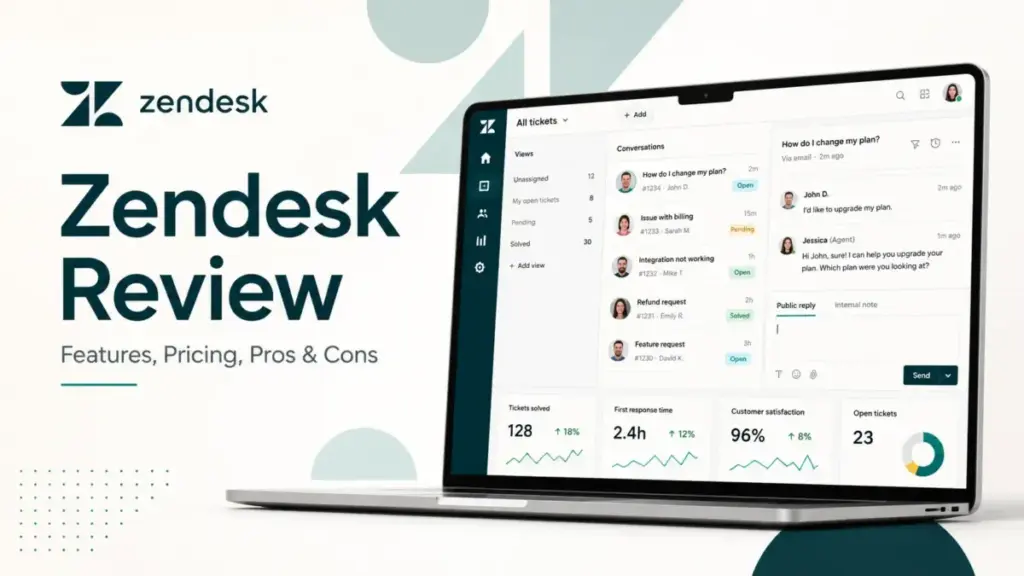
Zendesk looks affordable at $19 per agent per month until your team adds AI, quality assurance, workforce management, and advanced privacy controls. This Zendesk review breaks down what the platform actually costs, what it does well, and where it falls short for support teams in 2026. If you are comparing help desk platforms for a growing operation, the real question is not whether Zendesk can handle the job.
It is whether your team has the admin maturity and budget tolerance to run it without overspending on features you may never fully configure. I evaluated Zendesk’s current product, pricing, AI stack, and competitor positioning based on official data, verified review patterns, and editorial analysis following the SaaSZap review methodology.
TL;DR / Quick Verdict
Score: 8.7/10
Best for: 25+ agent support teams with multichannel complexity, SLA requirements, and dedicated admin resources.
Not for: 1 to 10 person teams that only need a shared inbox, email ticketing, or a basic knowledge base.
Starting price: $19/agent/month (Support only, billed annually). Suite starts at $55/agent/month.
Key limitation: Add-on costs for Copilot ($50), QA ($35), WFM ($25), and ADPP ($50) can double or triple the base price per agent.
Best alternative by use case:
- Lower cost: Freshdesk ($15/agent/month)
- Chat-first AI: Intercom
- Simple shared inbox: Help Scout
- Budget Zoho ecosystem: Zoho Desk
Zendesk Final Verdict
Zendesk earns an 8.7 out of 10 for support teams that need a full-stack customer service platform, but it loses points on pricing transparency, admin overhead, and add-on complexity. The platform excels at ticket management, omnichannel routing, marketplace depth, and compliance coverage. It struggles when small teams adopt it without a dedicated support operations owner.
Here is how the score breaks down, weighted by what matters most to support buyers:
| Category | Weight | Score | Weighted |
|---|---|---|---|
| Ticketing and omnichannel support | 20% | 18/20 | 18 |
| AI and automation | 15% | 13/15 | 13 |
| Reporting and operations | 15% | 13/15 | 13 |
| Integrations and ecosystem | 15% | 14/15 | 14 |
| Pricing transparency and value | 15% | 10/15 | 10 |
| Ease of setup and admin burden | 10% | 7/10 | 7 |
| Security and compliance | 10% | 9/10 | 9 |
| Total | 100% | 84/100 → 8.7/10 |
Zendesk loses the most points on pricing transparency because the base plan price tells only part of the story. Once a team adds Copilot, QA, WFM, or ADPP, the per-agent cost can reach $225 or more per month. The setup and admin burden score reflects the reality that Zendesk rewards teams with a support ops owner and punishes teams that lack one.
Maya Patel’s Quick Take
Zendesk is still one of the strongest customer support software platforms for complex support operations in 2026. But it is overkill for small teams that only need shared inbox, email ticketing, and a lightweight knowledge base. If your team handles fewer than 300 tickets per month and operates on two channels or fewer, you will pay enterprise prices for capabilities you will not fully use. If your team handles 1,000+ tickets across email, chat, voice, and social, with SLA commitments and compliance requirements, Zendesk is hard to beat.
What Is Zendesk?
Zendesk is a customer service and employee service platform built around ticketing, messaging, live chat, help center, voice, analytics, AI agents, automations, integrations, and enterprise governance. The company claims over 200,000 companies use the platform, with 20,000+ AI customers as of 2026.
Zendesk operates as two core product lines for customer service buyers:
- Zendesk Support: The narrower ticketing product, starting at $19/agent/month. Best for teams that only need email-based ticket management.
- Zendesk Suite: The all-in-one customer service bundle that adds messaging, live chat, voice, help center, AI agents, and reporting on top of ticketing. Suite plans start at $55/agent/month. Understanding the core components of what defines modern help desk software helps clarify why Zendesk’s modular approach can quickly become complex and costly for smaller teams.
The distinction matters because many buyers start by searching for “Zendesk pricing” and see $19, but the features most teams actually need, like messaging, knowledge base, and reporting, live inside Suite plans that start three times higher. Understanding this split is the first step to evaluating whether Zendesk fits your budget.
Zendesk Features That Matter
Zendesk’s feature set is broad, but not every feature ships with every plan. The gap between what Zendesk can do and what your plan includes is where most buyer frustration starts. Here is what each major feature area delivers and where the limits sit.
Zendesk Ticketing and Omnichannel Inbox
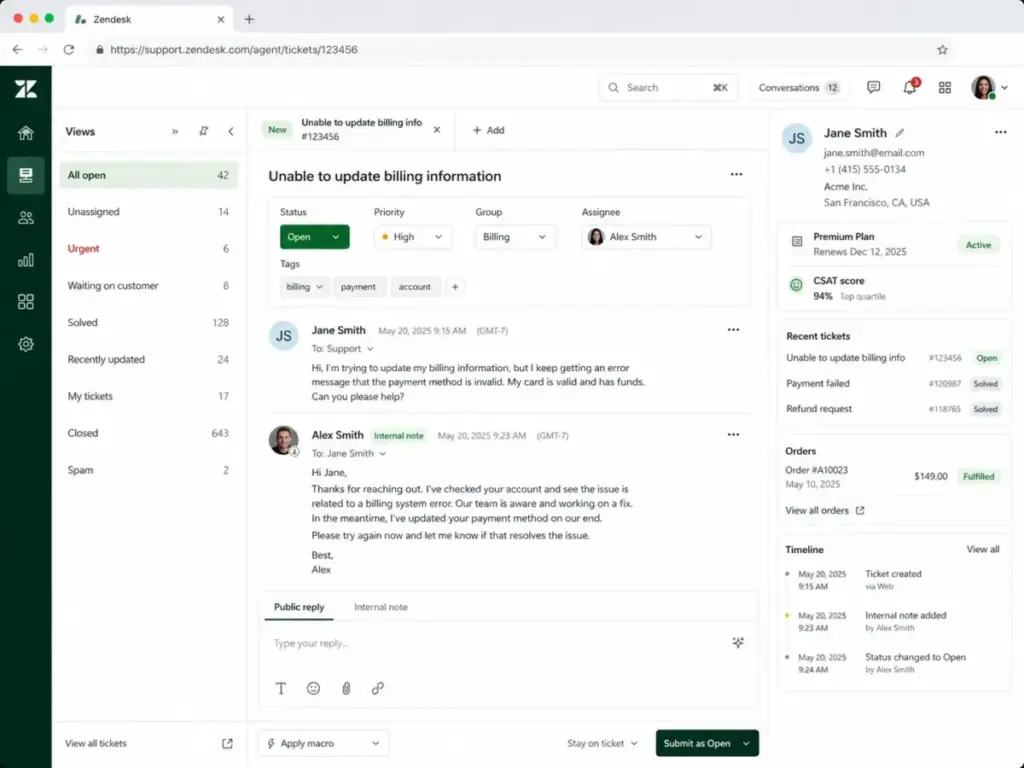
Zendesk’s ticketing system remains the backbone of the platform. Tickets can arrive from email, chat, messaging, voice, social, web forms, and API. Agents work from a unified inbox with customer context, conversation history, and internal notes visible in a single view.
The omnichannel routing engine assigns tickets based on agent availability, capacity, skills, and priority. Teams can define views, macros, triggers, and automations to reduce manual handling. For a 25-agent team handling SLA-driven B2B support, this is where Zendesk’s operational depth shows. For a 5-person team handling 200 emails a month, it is more infrastructure than necessary.
Zendesk Help Center and Knowledge Base
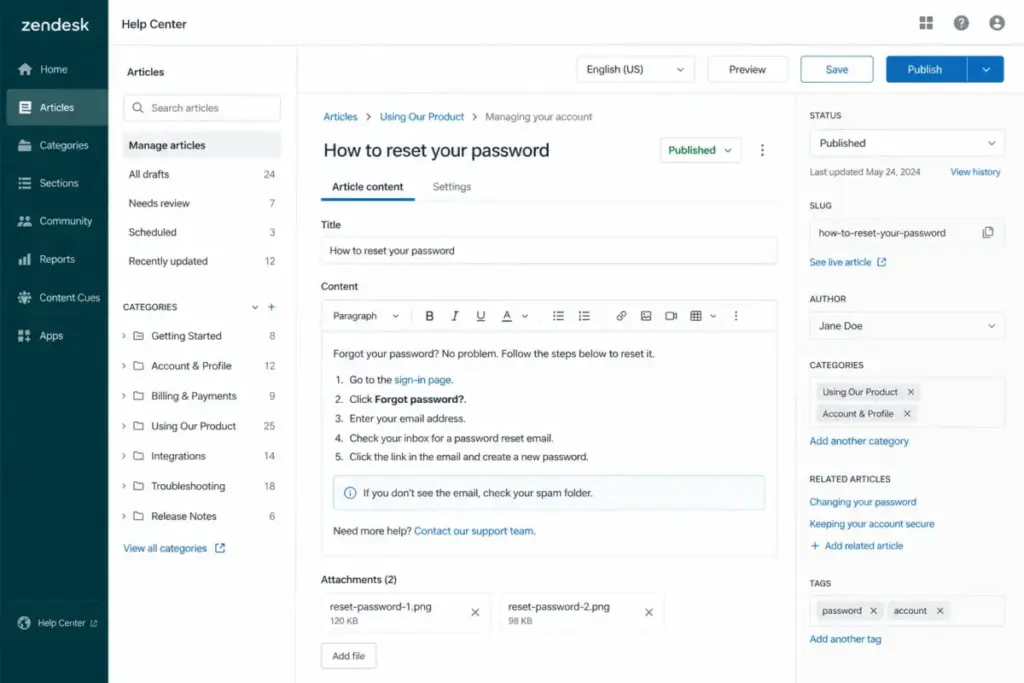
Zendesk Guide powers the help center and knowledge base software functionality. Teams can create articles, organize them into categories and sections, and surface them to customers through a branded self-service portal.
The editor supports rich text, images, and embedded content. Agents can suggest articles within tickets. AI-powered article recommendations can deflect tickets before they reach a human. Multi-brand and multilingual help centers are available on higher plans, which matters for teams supporting multiple products or regions.
Zendesk AI Agents and Copilot
Zendesk’s AI stack in 2026 splits into distinct products, and this is where pricing gets complicated:
- AI Agents (included): Basic bot and automation capabilities included in Suite plans.
- AI Agents Advanced: Extended bot capabilities with custom workflows. Contact sales for pricing.
- Zendesk Copilot: Agent-assist AI that suggests replies, summarizes tickets, and recommends macros. Costs $50/agent/month as a standalone add-on, or $155/agent/month bundled with Suite Professional.
- Zendesk QA: AI-powered quality assurance that scores conversations automatically. Costs $35/agent/month.
- Zendesk WFM: Workforce management for forecasting, scheduling, and agent activity tracking. Costs $25/agent/month.
The key distinction: basic AI agents are included in Suite plans. Copilot, QA, and WFM are paid add-ons. A team that expects “AI-powered support” from their base subscription will find that the most useful AI features sit behind additional per-agent fees.
Zendesk Reporting and Analytics
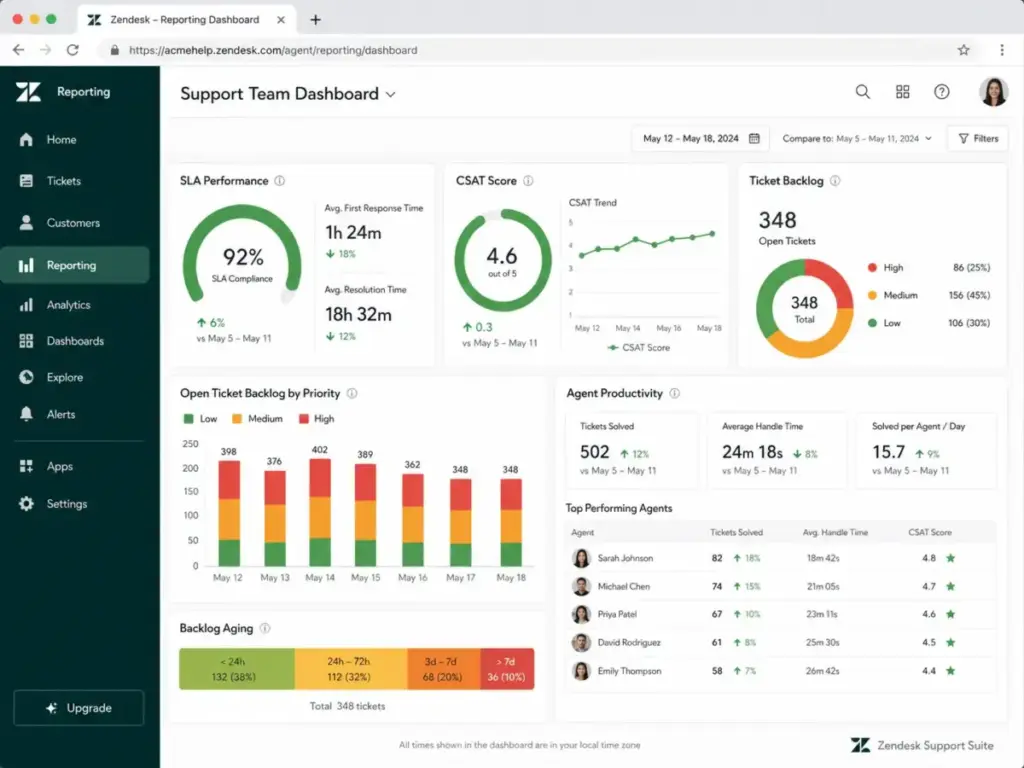
Zendesk Explore provides reporting dashboards for ticket volume, SLA performance, CSAT, agent productivity, backlog trends, and channel distribution. Pre-built dashboards cover common metrics, and custom reports allow deeper analysis.
The limitation: advanced reporting features, custom dashboards, and enterprise analytics are gated behind Suite Professional and Enterprise plans. Teams on Suite Team or Growth may find their reporting options too narrow for operational decision-making.
Zendesk Marketplace and Integrations
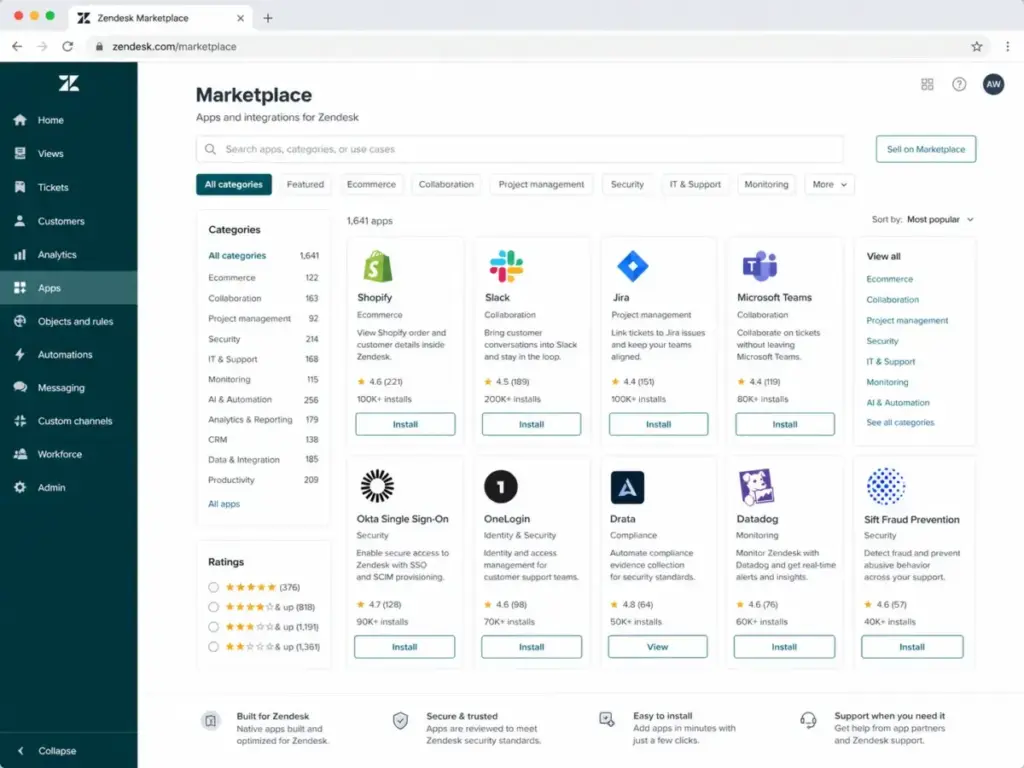
The Zendesk Marketplace lists 1,800+ apps, partners, and integrations. Shopify, Slack, Microsoft Teams, Jira, and dozens of CRM, marketing, security, and workflow tools connect directly.
This is both an advantage and a cost risk. Each marketplace app may carry its own subscription fee. A team that installs five paid marketplace apps at $10 to $50 per month each adds $600 to $3,000 per year in cost that does not appear on the Zendesk invoice.
Zendesk Security and Compliance
Zendesk’s compliance coverage is among the broadest in the help desk category. The Zendesk Trust Center lists SOC 2 Type II, ISO 27001:2022, ISO 27018:2019, ISO 27701:2019, ISO 27017:2015, ISO 42001, FedRAMP LI-SaaS, Cyber Essentials Plus, CSA STAR AI, PCI-DSS, and HIPAA-related scope.
The compliance scope covers ticketing, help center, community forums, messaging, reporting, voice, AI agents, Copilot, QA, WFM, ADPP, and more. For regulated industries like fintech, healthcare, and government-adjacent services, this breadth matters. The Advanced Data Privacy and Protection (ADPP) add-on, at $50/agent/month, adds data masking, advanced encryption, and access logging for teams with stricter privacy requirements.
Zendesk User Experience
The Zendesk experience depends heavily on who is setting it up and how much time they invest in configuration. A team with a dedicated admin can reach operational maturity in 30 to 60 days. A team without one may struggle for months.
Zendesk Signup and Trial
Zendesk offers a 14-day free trial with no credit card required. The trial typically starts with Suite Professional capabilities, giving teams access to ticketing, messaging, help center, reporting, and automations during the evaluation period. A work email is required to sign up.
Zendesk First 30 Days
The first 30 days determine whether Zendesk becomes a productivity engine or an expensive inbox. Here is the realistic setup sequence:
Week 1: Connect email channels, set up agent accounts, create basic views and groups. Most teams can start handling tickets within hours.
Week 2: Configure macros, triggers, and SLA policies. Build the initial help center structure with 10 to 20 articles covering top ticket topics.
Week 3: Set up routing rules, automations, and CSAT surveys. Define reporting views for managers.
Week 4: Review first-month data. Adjust views, macros, and triggers based on actual ticket patterns. Begin training agents on shortcuts and workflows.
The catch: this timeline assumes someone owns the setup process. Teams that skip configuration and use Zendesk as a basic inbox miss the automation, deflection, and reporting capabilities that justify the price.
Zendesk Daily Agent Workflow
Agents work from ticket views filtered by priority, status, group, or assignee. Each ticket shows customer context, conversation history, linked tickets, and suggested macros. Chat and messaging conversations appear in the same workspace, reducing context switching.
As one TrustRadius reviewer noted, Zendesk provides a “single place” for consolidating support channels (Adam Vorisek, Technical Support Manager). Another reviewer described it as “Very customisable by a non technical user” (Verified User, Manager in Information Technology, TrustRadius).
Zendesk Admin Workflow
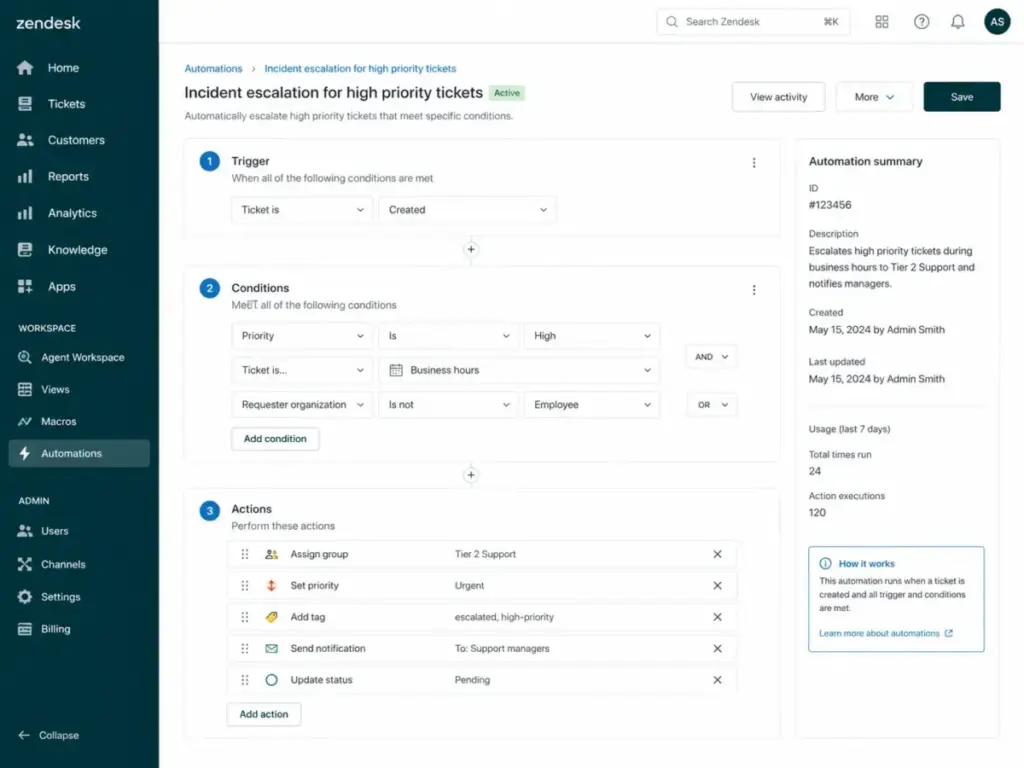
Admins manage routing rules, automation logic, reporting dashboards, help center content, user roles, and integration settings. The admin interface is functional but dense. Teams with 50+ agents and multiple brands will find the admin panel busy, with triggers, automations, and macros accumulating over time.
Zendesk Pricing and Plans
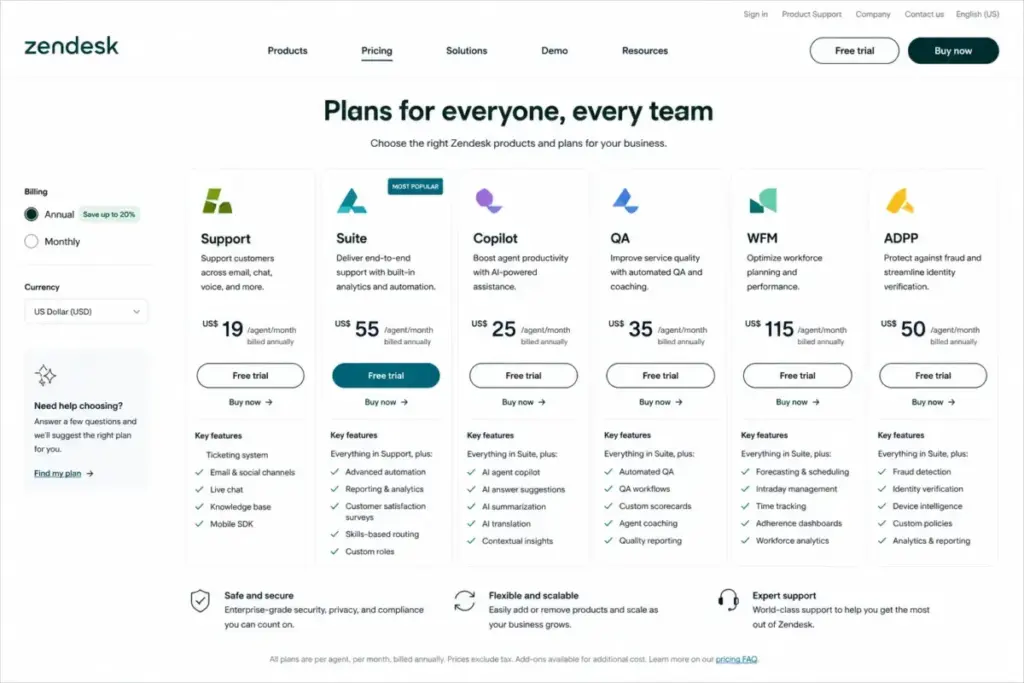
Zendesk pricing starts at $19/agent/month for Support only and $55/agent/month for Suite Team, but the real cost depends on which add-ons your team needs. Here is the current pricing structure as verified from the official pricing page in May 2026.
Base Plans
| Plan | Price (Annual) | Best For | Key Limits |
|---|---|---|---|
| Support Team | $19/agent/mo | Email-only ticketing | No messaging, no help center, no voice |
| Suite Team | $55/agent/mo | Small teams starting omnichannel | Limited reporting, basic automations |
| Suite Growth | $89/agent/mo | Growing teams with self-service | Limited custom roles, fewer integrations |
| Suite Professional | $115/agent/mo | Mid-size teams with SLAs | Full reporting, routing, CSAT surveys |
| Suite Enterprise | $169/agent/mo | Large teams with governance needs | Custom roles, sandbox, advanced security |
Prices verified May 2026. Monthly billing available at higher rates. Source: Zendesk Pricing.
Add-On Pricing
| Add-On | Price (Annual) | What It Adds |
|---|---|---|
| Copilot | $50/agent/mo | AI reply suggestions, ticket summaries, macro recommendations |
| Suite + Copilot Professional | $155/agent/mo | Suite Pro bundled with Copilot |
| Suite + Copilot Enterprise | $209/agent/mo | Suite Enterprise bundled with Copilot |
| Quality Assurance (QA) | $35/agent/mo | Automated conversation scoring |
| Workforce Management (WFM) | $25/agent/mo | Forecasting, scheduling, activity tracking |
| ADPP | $50/agent/mo | Data masking, advanced encryption, access logging |
| Workforce Engagement Bundle | $50/agent/mo | QA + WFM bundle |
| AI Agents Advanced | Contact sales | Extended bot and workflow capabilities |
| Contact Center | Contact sales | Full voice and contact center functionality |
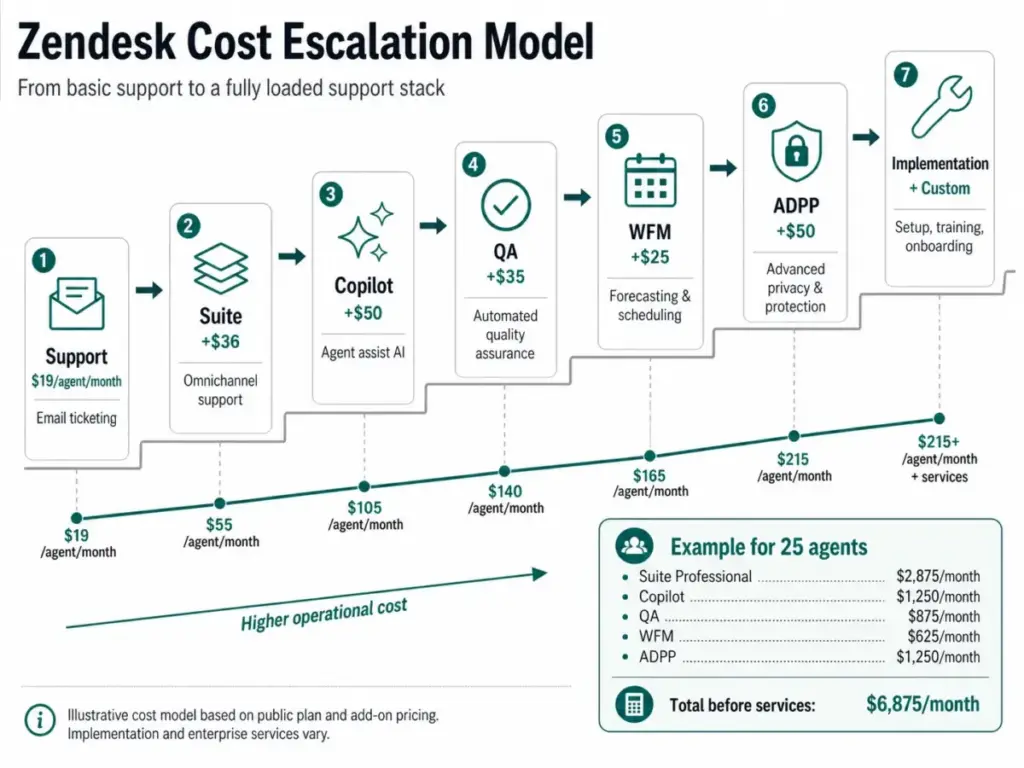
What Zendesk Pricing Really Looks Like
The base plan price is not the number that appears on your invoice. Here is what two common team sizes actually pay:
10-Agent Team on Suite Professional + Copilot + QA:
- Suite Professional: $115 × 10 = $1,150/month
- Copilot: $50 × 10 = $500/month
- QA: $35 × 10 = $350/month
- Monthly total: $2,000/month ($24,000/year)
25-Agent Team on Suite Professional + Copilot + QA + WFM + ADPP:
- Suite Professional: $115 × 25 = $2,875/month
- Copilot: $50 × 25 = $1,250/month
- QA: $35 × 25 = $875/month
- WFM: $25 × 25 = $625/month
- ADPP: $50 × 25 = $1,250/month
- Monthly total: $6,875/month ($82,500/year)
Before marketplace apps, voice usage, implementation services, or premium support.
This is not a criticism of Zendesk specifically. Enterprise support platforms cost enterprise money. But buyers should model the full cost before committing, not just the base plan price. For a deeper breakdown, see our Zendesk pricing analysis.
What Zendesk Does Not Tell You
Every platform has gaps between the marketing page and daily reality. These are the areas where Zendesk’s pitch does not match the operational experience for many teams.
Zendesk Add-On Creep
The most common frustration in community discussions is add-on creep. A team signs up for Suite Professional at $115/agent/month. Then they add Copilot because AI-assisted replies improve resolution time. Then QA because managers want conversation scoring. Then WFM because the operations lead needs scheduling. Then ADPP because the compliance team requires data masking.
Each add-on solves a real problem. But the cumulative effect turns a $115 per-agent cost into $275 per-agent cost without changing plans. As one Reddit user in r/Zendesk noted: “Zendesk’s Advanced Data Privacy and Protection feature costs $50 per agent per month.”
Zendesk Admin Burden
Zendesk rewards configuration. Triggers, automations, macros, routing rules, SLA policies, views, and help center structure all require someone to build and maintain them. Teams without a dedicated support operations owner often end up with default settings, unused features, and agents who treat Zendesk as a glorified email client.
The admin burden is not a bug. It is the trade-off for a platform that can handle 80-agent multilingual operations. But teams with 5 to 10 agents rarely need that depth, and they pay for it anyway.
Zendesk Support Desk Security Risk
Support desks are high-value targets for phishing, spam abuse, and social engineering. In 2026, TechRadar reported on Zendesk support ticket abuse used to trigger spam emails from legitimate systems. Separately, ITPro covered typosquatted Zendesk-related domains and fake SSO pages targeting Zendesk customers.
These are not Zendesk vulnerabilities per se, but they highlight that any support platform handling customer data needs SSO enforcement, domain verification, rate limiting, IP restrictions, and admin access controls. Zendesk provides these tools, but they require deliberate configuration, especially for teams in regulated industries. The Zendesk Trust Center documents available security controls.
Zendesk Reporting Gates
Reporting depth depends on your plan. Suite Team provides basic dashboards. Suite Professional unlocks custom reporting, SLA tracking, and deeper analytics. Enterprise adds advanced customization.
Teams that need operational reporting, such as SLA breach analysis, agent handle time trends, or channel-level resolution rates, will find Suite Team and Growth insufficient. This is a common upgrade trigger that pushes teams from $55 or $89 per agent to $115 per agent.
Zendesk Pros and Cons
- Ticketing depth: Zendesk’s ticket management, routing, macros, and automation logic remain among the best in the category.
- Omnichannel coverage: Email, chat, messaging, voice, social, and API channels in a single workspace.
- Marketplace breadth: 1,800+ apps and integrations covering CRM, ecommerce, security, and productivity tools.
- Compliance coverage: SOC 2, ISO 27001, HIPAA scope, FedRAMP LI-SaaS, ISO 42001, and more.
- AI stack maturity: Copilot, QA, WFM, and AI Agents provide a full support operations layer when budget allows.
- Help center and self-service: Multi-brand, multilingual knowledge base with agent-suggested articles.
- Scalability: Proven at enterprise scale with hundreds of agents across multiple brands and regions.
- Add-on pricing escalation: Copilot, QA, WFM, and ADPP add $50 to $160 per agent per month on top of base plans.
- Admin overhead: Triggers, automations, views, macros, and help center structure require ongoing maintenance.
- Reporting gated by plan: Operational reporting requires Suite Professional ($115/agent/month) or higher.
- Overkill for small teams: Teams under 10 agents with 1 to 2 channels rarely use enough of Zendesk to justify the cost.
- Monthly billing premium: Monthly pricing runs 20 to 30 percent higher than annual billing, with no refunds on cancellation.
- Voice and contact center priced separately: Full voice capabilities require additional Contact Center add-on at undisclosed pricing.
Zendesk Alternatives Compared
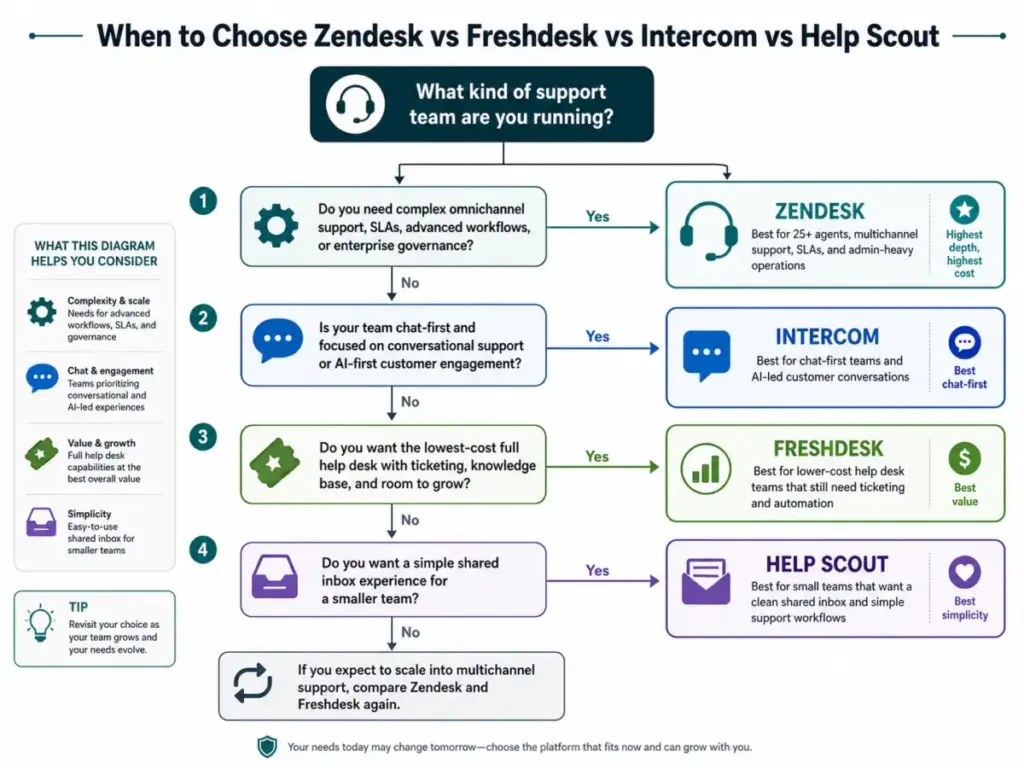
Zendesk is not the only option, and for some teams, it is not the best one. Here is how the top Zendesk alternatives compare on the dimensions that matter most.
Zendesk vs Freshdesk
Freshdesk starts at $15/agent/month and offers a free program for 1 to 2 agents for six months. It covers ticketing, knowledge base, and basic reporting at a lower entry price.
Choose Freshdesk when: Your team wants help desk functionality without enterprise pricing. As one Reddit user put it: “Freshdesk feels a bit easier and cheaper, Zendesk has more of everything but it can be a lot.”
Choose Zendesk when: You need deeper enterprise workflows, marketplace depth, and compliance governance.
Zendesk vs Intercom
Intercom positions itself as an AI-first customer service platform with the Fin AI Agent. Pricing starts around $29/seat/month for Essential, with usage-based Fin AI Agent costs on top.
Choose Intercom when: Your support model is chat-first and product-led, and you want AI to handle a large share of conversations before they reach a human.
Choose Zendesk when: Your team relies on structured ticketing, SLA management, and traditional support operations with email, voice, and help center.
Zendesk vs Help Scout
Help Scout is built for teams that want a clean shared inbox experience without the weight of enterprise ticketing.
Choose Help Scout when: Your team has 5 to 20 agents, handles mostly email-based support, and values simplicity over configurability.
Choose Zendesk when: You need omnichannel routing, voice, advanced automations, or compliance certifications that Help Scout does not cover.
Zendesk vs Zoho Desk
Zoho Desk offers a free plan for 3 user licenses and paid plans at lower per-agent costs than Zendesk. It fits well inside the broader Zoho ecosystem.
Choose Zoho Desk when: Your company already uses Zoho apps and needs a help desk that connects natively to Zoho CRM, Zoho Analytics, and Zoho Projects.
Choose Zendesk when: You need broader marketplace integrations, deeper automation logic, or enterprise compliance coverage beyond what Zoho provides.
Zendesk vs Salesforce Service Cloud
Salesforce Service Cloud is the enterprise CRM-native customer service platform. It is the right choice when service data needs to live inside Salesforce’s account and opportunity model.
Choose Salesforce when: Your company runs Salesforce CRM and needs sales and service data unified in one platform.
Choose Zendesk when: You want a faster, support-focused implementation without the complexity of the Salesforce data model.
| Platform | Starting Price | Best For | Biggest Advantage | Biggest Limitation |
|---|---|---|---|---|
| Zendesk | $19/agent/mo | Complex omnichannel support ops | Depth and scale | Add-on cost escalation |
| Freshdesk | $15/agent/mo | Cost-conscious help desk teams | Lower entry price | Less enterprise depth |
| Intercom | ~$29/seat/mo | Chat-first AI support | AI-first workflows | Usage-based AI costs |
| Help Scout | Free to paid | Small teams, shared inbox | Simplicity | Limited at scale |
| Zoho Desk | Free to paid | Zoho ecosystem teams | Price-to-feature value | Smaller marketplace |
| Salesforce Service Cloud | Contact sales | Salesforce CRM users | CRM-native data model | Implementation complexity |
Who Should Use Zendesk?
Zendesk fits teams where ticket volume, channel complexity, and compliance requirements justify the investment. Here is how it maps to specific buyer profiles:
25-agent B2B SaaS support org with SLAs, a knowledge base, escalation workflows, and a dedicated support ops lead. Suite Professional at $115/agent/month gives this team ticketing, reporting, automations, and help center capabilities that match their operational maturity. This is Zendesk’s sweet spot.
80-agent multilingual telecom support team with voice, messaging, QA, and workforce management needs. Suite Enterprise with Copilot, QA, and WFM provides a unified platform for agent-assist AI, conversation scoring, scheduling, and multilingual help center content. The cost is high, but the alternative is stitching together five or six separate tools.
7-agent Shopify support team with email, chat, and order-status tickets. Suite Growth at $89/agent/month connects to Shopify through the marketplace, handles chat and email in one workspace, and provides basic reporting. This team is borderline; Freshdesk at $15/agent/month could handle the same workload at a fraction of the cost, but if the team plans to grow past 15 agents, starting on Zendesk avoids a future migration.
Who Should Not Use Zendesk?
Zendesk is not the right first help desk for every team. These profiles are better served by alternatives:
5-person founder-led SaaS tools team handling fewer than 300 tickets per month. This team does not need omnichannel routing, SLA engines, or enterprise compliance. Help Scout or Freshdesk provides what they need at a lower cost and with less setup burden.
Budget-constrained teams where per-seat cost is the primary decision factor. Zendesk Suite Professional at $115/agent/month is 7.6 times the cost of Freshdesk at $15/agent/month. If the budget cannot absorb that gap, Zendesk’s additional capabilities are irrelevant.
Teams without a support ops owner. Zendesk’s value scales with configuration depth. If nobody owns triggers, automations, macros, routing rules, and help center structure, the team is paying enterprise prices for a basic inbox experience.
Buyers expecting AI to be included. Copilot at $50/agent/month, QA at $35/agent/month, and WFM at $25/agent/month are separate costs. Teams that choose Zendesk because of AI marketing and then discover the add-on fees often feel misled.
FAQ
Is Zendesk worth it in 2026?
Yes, for support teams with 25+ agents, multichannel complexity, and a dedicated admin. No, for small teams under 10 agents that only need email ticketing and a basic knowledge base. The platform’s value scales with how much of its feature set you actually configure and use.
How much does Zendesk cost?
Zendesk Support starts at $19/agent/month billed annually. Suite plans range from $55 to $169/agent/month. Add-ons like Copilot ($50), QA ($35), WFM ($25), and ADPP ($50) can push per-agent costs past $275/month. A 25-agent team on Suite Professional with Copilot, QA, WFM, and ADPP pays approximately $6,875/month.
What is Zendesk best used for?
Multichannel customer service operations that require ticketing, messaging, live chat, voice, help center, automations, SLA management, reporting, and compliance governance in a single platform.
Is Zendesk good for small businesses?
It depends on the business. A 10-person support team with multiple channels, SLA requirements, and growth plans can benefit from Zendesk Suite. A 3-person team handling email-only support will find Zendesk overbuilt and overpriced. Freshdesk and Zoho Desk offer free or lower-cost entry points.
What are Zendesk's biggest disadvantages?
Add-on cost escalation, admin configuration overhead, reporting gated behind higher plans, and a pricing structure that becomes expensive as teams adopt AI, QA, WFM, and privacy features. The gap between the starting price and the actual operating cost is the most common source of buyer frustration.
Does Zendesk include AI?
Basic AI agents are included in Suite plans. Copilot (agent-assist AI), QA (automated conversation scoring), and WFM (workforce management) are paid add-ons at $50, $35, and $25 per agent per month respectively. AI Agents Advanced requires contacting sales.
What is the difference between Zendesk Support and Zendesk Suite?
Zendesk Support is the standalone ticketing product starting at $19/agent/month. Zendesk Suite bundles ticketing with messaging, live chat, help center, voice, AI agents, and reporting. Most teams evaluating Zendesk for modern customer service need Suite, not Support alone.
Is Zendesk better than Freshdesk?
Zendesk offers deeper enterprise workflows, a larger marketplace, broader compliance coverage, and a more mature AI stack. Freshdesk offers lower starting prices ($15/agent/month), simpler setup, and a free program for small teams. For teams under 15 agents with straightforward support needs, Freshdesk is often the better value. For details, read our Freshdesk review.
Is Zendesk better than Intercom?
For structured ticketing, SLA management, and traditional support operations, yes. For chat-first, AI-first customer engagement, Intercom’s approach with Fin AI Agent is stronger. The choice depends on whether your support model centers on tickets or conversations. Read our Intercom review for a full comparison.
What is the best Zendesk alternative?
It depends on your priority. Freshdesk for lower cost. Intercom for chat-first AI. Help Scout for shared inbox simplicity. Zoho Desk for Zoho ecosystem value. Salesforce Service Cloud for CRM-native enterprise service.