
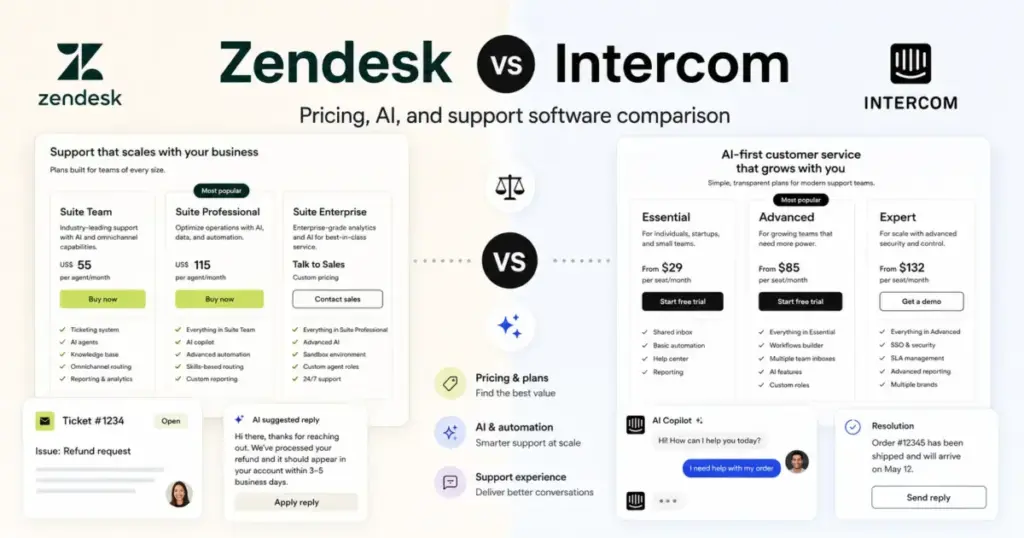
Zendesk Suite Team costs $55/agent/month billed annually. Intercom Essential costs $29/seat/month on the same annual billing. At 10 agents, the base price gap is $260/month before either platform charges for AI outcomes, add-ons, or usage-based features.
That gap is why most help desk solutions comparisons stop at starting price and declare Intercom the cheaper option. But the real cost picture changes when you add Zendesk’s $50/agent Copilot add-on or Intercom’s $0.99-per-outcome Fin charges on a team resolving 3,000 tickets a month with AI.
Choose Zendesk if your support operation has mature queues, SLAs, routing rules, reporting needs, and admin capacity to configure a structured ticketing stack. Choose Intercom if your support motion is conversational, chat-first, product-led, and your team wants Fin AI close to the core workflow from day one.
This comparison breaks the decision into the workflows that actually differ: ticketing and operations governance, AI-first customer experience, pricing at scale, data portability and migration, and enterprise controls. Each section declares a winner, shows the plan gate, and tells you when neither platform is the right fit. I analyzed pricing for 45+ business software tools with full add-on breakdowns, and the Zendesk vs Intercom decision is one of the more nuanced ones because the cost variables on both sides are real.
Quick Verdict: Zendesk vs Intercom
| Category | Winner | Why | Watch-out |
|---|---|---|---|
| Base seat price (annual) | Intercom | Essential at$29/seat/mo vs Suite Team at $55/agent/mo | Fin outcomes add variable cost on top |
| Ticketing depth and governance | Zendesk | Structured ticketing, routing, sandbox, approval workflows, custom roles | Strongest controls require Suite Enterprise plus Copilot (sales-led) |
| AI-first customer experience | Intercom | Fin AI Agent on every plan, outcome pricing, native Messenger integration | $0.99/outcome adds up fast at high resolution volume |
| Total cost predictability | Zendesk | Fixed seat-based billing, no per-outcome charges on core plans | Add-on stacking (Copilot, WFM, Contact Center at $50/agent each) |
| Ease of launch for small teams | Intercom | Messenger, shared inbox, public help center, fast onboarding | Advanced workflows, SSO, SLAs gated behind Advanced or Expert |
| Integrations and API | Zendesk | Larger marketplace, broader APIs and SDKs, High Volume API add-on | API depth requires Suite Growth or higher |
| Security and compliance | Zendesk | Data hosting choices, sandbox, custom roles, approval workflows | Enterprise controls require sales-led pricing |
| Migration and data portability | Tie | Both require careful planning and API-level extraction | Zendesk excludes AI agent tickets from standard exports; Intercom transcripts omit internal notes and attachments |
| Reporting and analytics | Zendesk | Prebuilt and custom dashboards, Explore analytics, Quick Reports on Professional | Real-time dashboard is Expert-only on Intercom |
| Omnichannel support | Zendesk | Native voice, messaging, email, chat, social from Suite Team | Intercom adds Phone, SMS, WhatsApp as usage-based channels |
What this means: Zendesk wins more categories overall, but the categories Intercom wins (base price, AI, ease of launch) are the ones that matter most to smaller, product-led teams. The winner depends on your team size, ticketing system maturity, and how much AI resolution volume you expect.
Zendesk vs Intercom at a Glance
| Zendesk | Intercom | |
|---|---|---|
| Best for | Support ops teams with 10+ agents, formal queues, SLAs, multichannel routing, and regulated workflows | Product-led SaaS, ecommerce, and growth teams that want chat-first support with native AI |
| Not best for | Small product-led teams wanting lightweight chat with minimal config | Teams needing advanced SLAs, SSO, and HIPAA at lower tiers |
| Starting price | $19/agent/mo (Support Team, annual) | $29/seat/mo (Essential, annual) |
| Practical plan | Suite Team at $55/agent/mo (annual) | Advanced at $85/seat/mo (annual) |
| Free plan | No | No |
| Free trial | Yes | Yes |
| Setup difficulty | Medium to High | Low to Medium |
| AI agent | Zendesk AI Agents (included from Suite Team) | Fin AI Agent (included on all plans, outcomes billed separately) |
| Main strength | Structured ticketing, routing, reporting, and governance at scale | Conversational support, Messenger UX, and Fin AI adoption speed |
| Main limitation | Cost stacks through add-ons; admin time required for mature setup | Fin outcome costs are variable; enterprise controls gated to Expert |
How We Compared Zendesk and Intercom
This comparison is based on official documentation, pricing pages, help center content, security trust center pages, developer docs, and published user sentiment from both vendors. Pricing was verified on May 27, 2026 from official Zendesk and Intercom pricing pages. Testing level for both products is third-party validated: I did not conduct hands-on product testing for this comparison. Claims about features, plan gates, and pricing are sourced from official vendor pages and documented in the evidence ledger.
I built cost-at-scale models for 5, 10, 25, and 50 agents using official annual rates. Zendesk monthly self-serve rates were not visible in the accessible official pricing HTML, so I used verified annual paid-yearly prices only. Intercom’s total cost depends on seats, Fin outcomes, messaging channels, Copilot usage, and Pro add-on volume, so base seat prices represent the floor, not the ceiling.
Limitation: This comparison does not include hands-on workflow testing. Feature gate information reflects official documentation at the time of verification. Enterprise pricing for both platforms requires sales engagement and could differ from published rates.
Workflow 1: Ticketing and Support Operations — Zendesk vs Intercom
Winner: Zendesk
The core architecture difference starts here. Zendesk is built around the ticket as the atomic unit. Every customer interaction creates a ticket that flows through routing, assignment, SLAs, triggers, automations, and reporting. Intercom is built around the conversation. Customer messages arrive in a shared inbox, and the system routes them based on team rules, workflows, and Fin AI behavior.
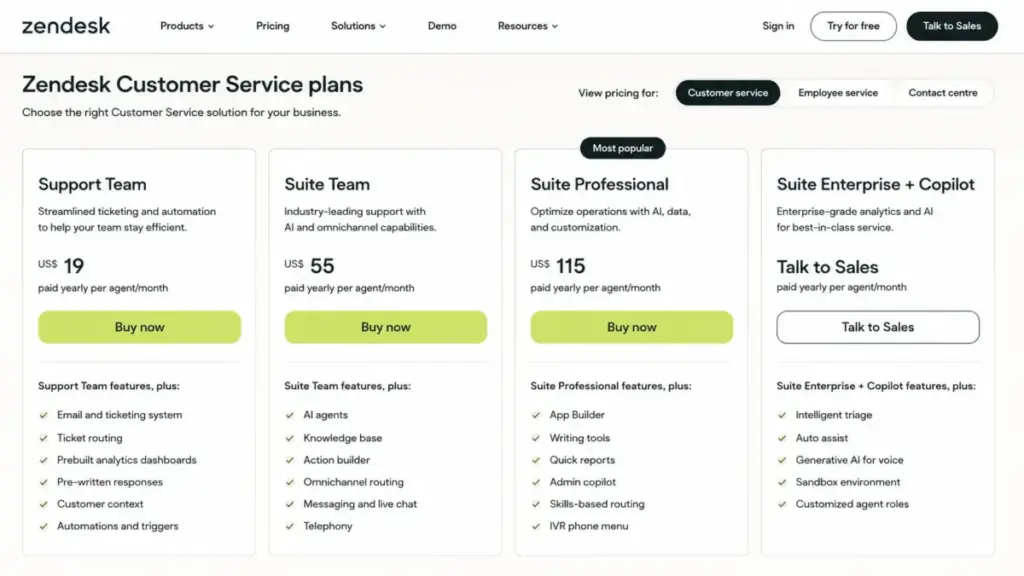
For a 30-agent B2B support team with formal SLAs, multiple queues, and escalation rules, Zendesk is the clearer fit. Ticket routing, skills-based assignment (available on Suite Professional at $115/agent/month), automations, triggers, and prebuilt analytics dashboards give operations managers the controls they need.
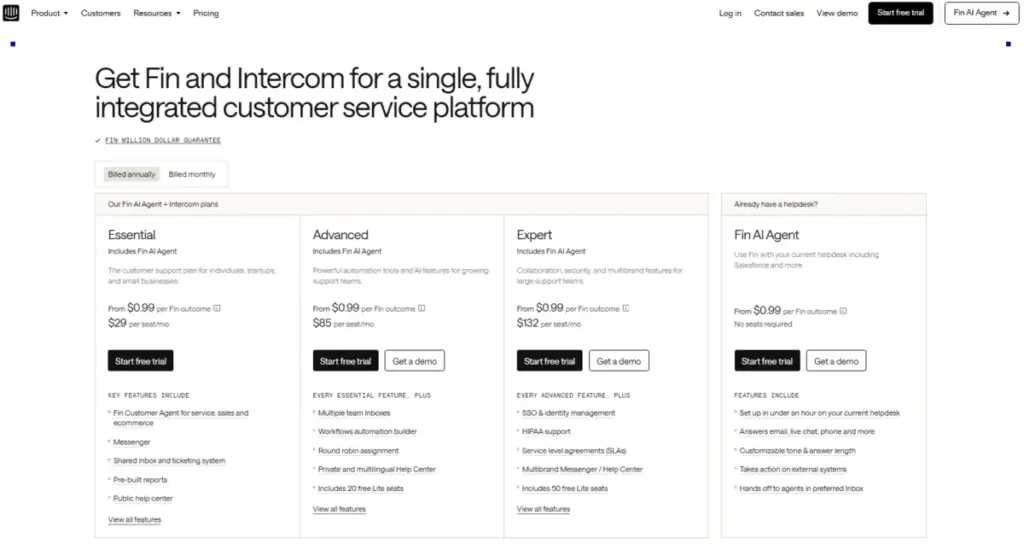
Intercom has a ticketing system, but several governance features sit behind the Expert plan at $132/seat/month billed annually. SLAs, SSO, workload management, multibrand Messenger, multibrand Help Center, team office hours, and real-time dashboards all require Expert.
Feature-to-Plan Gate: Ticketing and Operations
| Feature | Zendesk plan gate | Intercom plan gate | Buyer implication |
|---|---|---|---|
| Basic ticketing | Support Team ($19/agent/mo) | Essential ($29/seat/mo) | Intercom costs more for basic ticket creation |
| Omnichannel routing | Suite Team ($55) | Essential (basic), Advanced ($85) for workflows | Zendesk includes omnichannel earlier |
| SLA rules | Suite Team | Expert ($132) | Intercom SLAs cost 2.4x the base seat price |
| Skills-based routing | Suite Professional ($115) | Not documented as equivalent feature | Zendesk advantage for specialized agent teams |
| Custom agent roles | Suite Enterprise (custom) | Expert ($132) | Both gate enterprise controls to top tier |
| Sandbox environment | Suite Enterprise (custom) | Not available | Zendesk-only for testing before production |
| Approval workflows | Suite Enterprise (custom) | Not available | Zendesk-only for regulated workflows |
| Workload management | Suite Professional | Expert ($132) | Intercom gates agent capacity controls higher |
| Real-time dashboard | Available across tiers | Expert ($132) | Intercom real-time monitoring is top-tier only |
What this means: If your team requires SLAs and you choose Intercom, you are paying $132/seat/month on Expert to get what Zendesk includes on Suite Team at $55/agent/month. For a 10-agent team, that is the difference between $550/month and $1,320/month just to access SLA functionality.
Workflow 2: AI-First Customer Support — Intercom vs Zendesk
Winner: Intercom
Intercom designed Fin as the centerpiece of every plan. The AI agent is available on Essential, Advanced, and Expert. Fin handles resolutions, procedure handoffs, and disqualifications at $0.99 per outcome. Qualification outcomes cost $9.99. Fin Voice, high-volume pricing, and specialized needs require sales contact.
Zendesk also includes AI Agents starting from Suite Team. Action Builder and Knowledge Base power the AI workflow. But advanced AI features are distributed across tiers and add-ons: Intelligent Triage, Auto Assist, and Generative AI for Voice sit behind Suite Enterprise plus Copilot (custom/sales-led). The standalone Copilot add-on costs $50/agent/month billed annually.
The difference is not whether each platform has AI. Both do. The difference is how close AI sits to the core workflow. Intercom treats Fin as the front door. Zendesk treats AI as a layer that enhances the existing ticketing system.
AI Cost Sensitivity: What 5,000 Monthly AI Resolutions Actually Cost
| Cost component | Zendesk | Intercom |
|---|---|---|
| Base seats (10 agents, annual) | $550/mo (Suite Team) | $290/mo (Essential) |
| AI resolution cost (5,000/mo) | Included in plan or usage-based (exact billing requires account modeling) | $4,950/mo at $0.99/outcome |
| AI add-on (Copilot) | $500/mo ($50/agent x 10) | $290/mo ($29/teammate x 10) or included limited at 10 conversations/teammate/month |
| Estimated total | $1,050/mo (Suite Team + Copilot, AI resolution billing TBD) | $5,530/mo (Essential + Fin outcomes + Copilot unlimited) |
What this means: At high AI resolution volume, Intercom’s usage-based Fin pricing can exceed Zendesk’s total cost by a wide margin. A team resolving 5,000 tickets through AI per month faces $4,950/month in Fin outcome charges alone on Intercom. Zendesk’s AI automated resolution billing also needs account-specific modeling, but the per-agent add-on structure is more predictable for budgeting.
There is a caveat, though. Most teams do not start at 5,000 AI resolutions. A 10-person team handling 1,000 monthly conversations with 300 Fin resolutions pays $297/month in Fin charges. At that volume, Intercom’s total cost (seats + Fin) stays below Zendesk’s Suite Team base.
Workflow 3: Pricing and Total Cost at Scale — Zendesk vs Intercom
Winner: Depends on team size and AI usage
Base Seat Cost Comparison
| Team size | Zendesk Suite Team (annual) | Intercom Essential (annual) | Winner (base only) | Usage caveat |
|---|---|---|---|---|
| 5 agents | $275/mo | $145/mo | Intercom | Excludes Fin outcomes, SMS, WhatsApp, phone |
| 10 agents | $550/mo | $290/mo | Intercom | Excludes Fin outcomes and channel usage |
| 25 agents | $1,375/mo | $725/mo | Intercom | Excludes Fin outcomes and channel usage |
| 50 agents | $2,750/mo | $1,450/mo | Intercom | Excludes Fin outcomes and channel usage |
What this means: Intercom wins every base seat comparison at every team size. The annual Essential seat is roughly half the cost of Zendesk Suite Team. But base seat price is not total cost. Intercom’s pricing page is the floor. The ceiling depends on Fin outcomes, SMS and WhatsApp messaging, Phone usage, outbound email campaigns, Pro add-on conversation volume, and Copilot unlimited usage.
Zendesk’s cost stacking works differently. The base seat is higher, but add-ons are priced per agent: Copilot at $50/agent/month, Workforce Engagement Bundle at $50/agent/month, and Contact Center at $50/agent/month. A 10-agent team on Suite Team with all three add-ons pays $2,050/month. That is 3.7x the base seat cost.
Hidden Costs: The Add-On Tax
| Hidden cost | Zendesk | Intercom |
|---|---|---|
| AI add-on | Copilot: $50/agent/mo | Fin: $0.99/outcome; Copilot unlimited: $29-35/teammate/mo |
| Workforce management | WFM Bundle: $50/agent/mo | Not available as comparable add-on |
| Contact center | Contact Center: $50/agent/mo | Phone, SMS, WhatsApp billed by usage |
| Advanced analytics | Included from Support Team (prebuilt); Quick Reports on Professional | Pro add-on: $99/mo for 1,000 conversations, tiered pricing above |
| Enterprise controls | Suite Enterprise (custom pricing) | Expert plan required ($132/seat/mo) |
| API limits | High Volume API add-on (eligible Suite Growth+, 10+ seats) | Extended API limit on Expert only |
| Implementation | Professional services or admin time | Admin time; complex Fin/workflow configuration |
I have tracked hidden costs across 25+ vendors. Both Zendesk and Intercom follow the same pattern: the pricing page shows the entry point, not the operating cost. The difference is that Zendesk’s add-ons are predictable per-agent charges. Intercom’s add-ons mix per-seat, per-outcome, and per-volume pricing. For a finance team building a budget, Zendesk’s model is easier to forecast. For a small team watching monthly spend, Intercom’s lower base is easier to start with.
Workflow 4: Data Portability and Migration Risk — Zendesk vs Intercom
Winner: Tie
Both platforms create migration risk. The question is which risks your team can absorb.
Migration and Data Portability Checklist
| Migration item | Zendesk caveat | Intercom caveat | Action before contract |
|---|---|---|---|
| Ticket/conversation export | JSON, CSV, or XML after export is enabled by Zendesk support | Browser exports limited to 10,000 rows | Request export enablement; test row limits |
| AI agent data | AI agent tickets cannot be exported in standard ticket/user/org flow | Fin conversation data available but export format may vary | Confirm AI data portability in writing |
| Transcript completeness | Standard export includes ticket content | Downloaded transcripts omit internal notes, attachments, images, GIFs, articles, apps, assignment history, CC/BCC | Test a transcript download before committing |
| Bulk transcript export | Available through standard export after enablement | Requires Conversations API; browser UI does not support bulk | Budget API development time for extraction |
| API rate limits | Default limits; High Volume API add-on: 2,500 req/min (Suite Growth+, 10+ seats) | Private apps: 10,000 calls/min per app, 25,000/min per workspace, distributed into 10-second windows | Model extraction time for large data sets |
| Help center migration | Guide articles exportable; API available | Help Center articles exportable; multilingual content requires Advanced+ | Map article structure and language variants |
| Workflow rebuild | Triggers, automations, macros, SLAs, views need recreation | Workflows, Fin behavior, team rules, routing need recreation | Document current automation rules before switch |
What this means: Migration from Zendesk to Intercom requires translating structured tickets, fields, groups, macros, triggers, SLAs, help center content, and attachments into Intercom’s conversation and inbox model. Migration from Intercom to Zendesk requires mapping conversations, users, teams, tags, help articles, workflows, Fin behavior, and product-led context into tickets, views, triggers, and Zendesk reporting.
Both directions are Medium to High difficulty. Neither platform makes leaving easy. If migration risk is a primary concern, audit export limits, transcript needs, API rate windows, attachment portability, AI data, and help center migration before signing a contract.
Workflow 5: Enterprise Controls and Compliance — Zendesk vs Intercom
Winner: Zendesk
Zendesk’s Trust Center states Service Data is hosted primarily in AWS data centers certified for ISO 27001, PCI DSS Service Provider Level 1, and SOC 2 compliance. Data encryption at rest uses AES-256, and data hosting choices include US, AU, JP, and EEA.
Intercom lists SOC 2, ISO 27001:2022, ISO 27018, ISO 27701, ISO/IEC 42001:2023, GDPR, HIPAA, CCPA, and HDS through its Trust Center.
Both platforms publish strong compliance documentation. The difference is access. Zendesk distributes enterprise controls more broadly across plan tiers: custom agent roles and approval workflows sit behind Suite Enterprise, but sandbox, admin tools, and robust reporting are accessible earlier. Intercom gates SSO, HIPAA support, SLAs, multibrand Messenger, multibrand Help Center, workload management, and extended API limits to Expert at $132/seat/month.
For a regulated or enterprise support organization that needs audit trails, role controls, sandbox testing, and data locality, Zendesk’s governance architecture is deeper.
Where Zendesk Wins
- Structured ticketing at scale. If your operation runs on formal queues, ticket routing, automations, triggers, and SLA tracking, Zendesk is built for that workflow. Intercom has ticketing, but Zendesk’s ticket-centric architecture is more mature.
- Predictable AI budgeting. Zendesk’s AI add-ons are per-agent charges. You can forecast the monthly AI bill before the month starts. Intercom’s Fin outcome pricing is variable, and a spike in AI resolutions can spike the bill.
- Enterprise governance. Sandbox environments, approval workflows, custom agent roles, data hosting choices, and deeper admin controls give Zendesk the edge for regulated industries and large support organizations.
- Omnichannel breadth from Suite Team. Voice, messaging, live chat, email, and social channels are included from Suite Team at $55/agent/month. Intercom adds Phone, SMS, and WhatsApp as usage-based channels on top of seat pricing.
- Marketplace and integration ecosystem. Zendesk Marketplace has a broader library of pre-built integrations. Salesforce, Jira, Shopify, Slack, and Microsoft Teams connectors are well-documented. The High Volume API add-on supports 2,500 requests per minute for eligible accounts.
Where Intercom Wins
- Lower base seat cost. Intercom Essential at $29/seat/month is roughly half the cost of Zendesk Suite Team at $55/agent/month. For a budget-constrained team that does not need enterprise controls, the annual savings at 10 seats is $3,120.
- AI-first adoption speed. Fin is available on every plan. Teams can deploy conversational AI from day one without upgrading or purchasing add-ons. The per-outcome pricing means you pay only when Fin resolves, hands off, or disqualifies a conversation.
- Messenger and in-app support. Intercom’s Messenger, mobile SDKs (iOS, Android, React Native, Cordova), and in-app support workflows are purpose-built for product-led teams. Push messages, outbound workflows, and mobile carousels work inside the app without forcing customers into email or a separate portal.
- Faster launch for small teams. A 5-person team can set up Intercom’s shared inbox, public help center, and Messenger in hours. Zendesk can launch quickly for basic ticketing, but mature routing, reporting, and governance require more admin time.
- Fin on external help desks. Intercom’s Fin can run on top of Salesforce and Zendesk without requiring a full migration. Teams that want Fin’s AI capabilities without leaving their current platform have this option.
Who Should Choose Zendesk
- Support operations teams with 10+ agents that run formal queues, SLAs, routing rules, and structured ticket workflows.
- Regulated organizations that need sandbox environments, approval workflows, custom roles, data hosting options, and documented compliance across ISO 27001, PCI DSS, and SOC 2.
- Teams that need predictable monthly costs and cannot absorb variable AI outcome charges or usage-based channel fees.
- Organizations with existing Zendesk Marketplace integrations (Salesforce, Jira, Shopify) that would require rebuild on a new platform.
- Enterprise support teams that need skills-based routing, IVR phone trees, and workforce engagement management.
For a deeper evaluation of Zendesk’s plan gates and total cost, see the Zendesk review.
Who Should Choose Intercom
- Product-led SaaS and ecommerce teams that want chat-first, in-app support with Messenger and mobile SDKs.
- Small teams (5-15 agents) that need a lower entry price and can manage Fin outcome costs at moderate AI resolution volume.
- Teams adopting AI-first support that want Fin integrated into every plan without purchasing separate add-ons.
- Mobile app support teams that need in-app help center, push messages, and conversational workflows without leaving the app.
- Teams migrating from email-only support that want a modern shared inbox and public help center with minimal configuration.
For Intercom’s full feature gate breakdown, see the Intercom review.
Who Should Avoid Both
Not every support team fits into the Zendesk or Intercom model. Consider alternatives if:
- You need lower-cost SMB ticketing without enterprise complexity. Freshdesk offers omnichannel help desk software features at a lower entry price than either Zendesk Suite or Intercom Advanced.
- You want a proven SMB help desk alternative. Freshdesk Growth starts at $15/agent/month with omnichannel support, SLA management, and automation at a fraction of the cost. See the Freshdesk review for the full cost breakdown.
- You want a lighter shared inbox with simpler automation. Help Scout is built for support teams that need email-based support with a clean inbox, knowledge base, and Beacon widget, not a full ticketing or conversational platform. See the Help Scout review.
- You need customer timeline and CRM-style context as the core object. Kustomer (now part of Meta’s ecosystem) provides unified customer history for ecommerce and customer operations teams. Neither Zendesk nor Intercom centers the customer record the same way.
- Your budget is under $500/month for a 10-agent team and you cannot justify either Zendesk’s add-on stacking or Intercom’s Fin outcome exposure. Freshdesk, Zoho Desk, or Help Scout may be better starting points.
Alternatives to Zendesk and Intercom
| Alternative | Best for | Starting price | Why consider |
|---|---|---|---|
| Freshdesk | SMB omnichannel help desk | Free plan available; paid from $15/agent/mo | Lower cost than both; simpler ticketing than Zendesk |
| Help Scout | Lighter shared inbox and KB | From $22/user/mo | Simpler than both; good for email-first support |
| Kustomer | Customer timeline and CRM-style context | Custom pricing | Unified customer history for ecommerce ops |
What this means: The Zendesk vs Intercom decision assumes you need either a structured ticketing platform or a conversational AI-first inbox. If you need neither at full depth, these alternatives cover customer service software needs at lower cost and complexity.
Final Verdict: Zendesk vs Intercom in 2026
There is no universal winner. The answer depends on three variables: team size, support workflow maturity, and AI budget exposure.
For teams with 10+ agents, formal SLAs, and structured ticket operations: Zendesk is the stronger fit. The ticketing depth, routing controls, reporting, and governance architecture are built for operational complexity. Budget for Suite Team at $55/agent/month minimum, and model add-on costs (Copilot, WFM, Contact Center) before committing.
For product-led SaaS teams under 30 agents that want conversational, chat-first support: Intercom is the better starting point. Lower base seat cost, Fin AI from day one, Messenger, and faster onboarding outweigh Zendesk’s operational depth for teams that do not yet need it. Budget for Fin outcome charges and model the cost at your expected AI resolution volume.
For teams expecting 3,000+ monthly AI resolutions: Model both platforms carefully. Intercom’s Fin at $0.99/outcome makes AI cost variable. Zendesk’s AI billing requires account-specific modeling. Do not sign an annual contract without a cost sensitivity table for your expected resolution volume.
If neither fits: Freshdesk for SMB ticketing, Help Scout for a simpler shared inbox, or consider running Fin on your existing Zendesk pricing stack without migrating to Intercom at all.
The real decision is not chat versus tickets. It is structured support governance and predictable operations versus AI-first conversational speed with more variable usage-based cost. Pick the model that matches your team’s current maturity, not the one you hope to grow into.
FAQ
Is Zendesk better than Intercom?
Zendesk is better for teams with 10+ agents that need structured ticketing, SLAs, routing, sandbox, and enterprise governance. Intercom is better for product-led teams under 30 agents that want conversational support with Fin AI from day one. The winner depends on your support workflow maturity and team size.
Is Intercom cheaper than Zendesk?
Yes, on base seat price. Intercom Essential costs $29/seat/month annually versus Zendesk Suite Team at $55/agent/month. But Intercom’s total cost includes Fin outcomes ($0.99 each), messaging channel usage, and optional add-ons. At high AI resolution volume, Intercom can cost more than Zendesk.
What is the main difference between Zendesk and Intercom?
Zendesk is ticket-first: every interaction becomes a structured ticket flowing through routing, automations, and SLAs. Intercom is conversation-first: interactions arrive in a shared inbox with Fin AI handling resolutions before human agents. The architecture difference shapes everything about how each platform handles workflows, reporting, and cost.
Does Intercom have SLAs?
Yes, but SLA rules are gated behind the Expert plan at $132/seat/month billed annually. Zendesk includes SLA tracking from Suite Team at $55/agent/month. If SLAs are a requirement, this plan gate significantly impacts the cost comparison.
How much does Zendesk cost for 10 agents in 2026?
Zendesk Suite Team costs $550/month for 10 agents on annual billing. Suite Professional costs $1,150/month. Adding Copilot ($50/agent) brings Suite Team to $1,050/month. Suite Enterprise plus Copilot requires sales engagement for custom pricing.
How much does Intercom cost for 10 agents in 2026?
Intercom Essential costs $290/month for 10 seats on annual billing. Advanced costs $850/month. Expert costs $1,320/month. Add Fin outcomes at $0.99 each and Copilot unlimited at $29/seat/month to estimate total cost. A team resolving 1,000 conversations with 300 Fin resolutions adds approximately $297/month in outcome charges.
Can Fin work with Zendesk?
Yes. Intercom offers Fin for external help desks including Salesforce and Zendesk. Teams can deploy Fin’s AI capabilities on their existing Zendesk instance without a full platform migration.
Which is better for SaaS support, Zendesk or Intercom?
For product-led SaaS with in-app chat, mobile SDKs, and proactive messaging, Intercom is the better fit. For B2B SaaS with formal support queues, ticket escalation, and compliance requirements, Zendesk is the stronger platform. The answer depends on whether your support motion is conversational or ticket-driven.
How hard is it to migrate from Zendesk to Intercom?
Medium to High. Migration requires translating structured tickets, fields, groups, macros, triggers, SLAs, help center content, and attachments into Intercom’s conversation and inbox model. Zendesk data export must be enabled by support, and AI agent tickets cannot be exported through the standard flow. Budget for test migrations and stakeholder sign-off.
What are the hidden costs of Zendesk and Intercom?
Zendesk: Copilot ($50/agent/mo), Workforce Engagement ($50/agent/mo), Contact Center ($50/agent/mo), High Volume API add-on, enterprise sales-led pricing. Intercom: Fin outcomes ($0.99-$9.99 per outcome), SMS and WhatsApp usage, Phone charges, Pro add-on ($99/mo for 1,000 conversations), Copilot unlimited ($29-35/teammate/mo), Expert-only enterprise controls.
