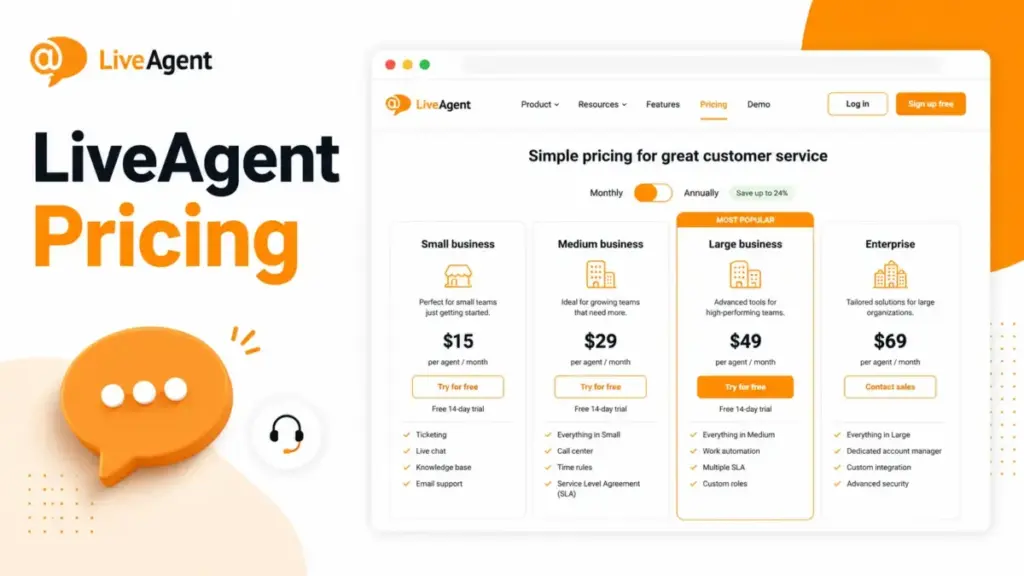
The advertised number for LiveAgent is $15 per agent per month. That is the annual Small business rate, and it is not the number most support teams end up paying once social channels, a second knowledge base, or branding removal enter the picture.
I write about help desk software pricing from the money first, not the feature list. So this guide separates LiveAgent’s sticker price from its real cost, using the official pricing page, official terms, and official documentation checked on July 3, 2026.
LiveAgent (built by Quality Unit) sells four paid plans: Small business, Medium business, Large business, and Enterprise. On July 3, 2026, the pricing page also showed a July 1 to 31, 2026 promotion offering roughly 33 percent off plus a free AI Agent for eligible new users, with promotional prices listed separately from standard rates.
The practical plan for teams that need call center, SLAs, and reporting is Medium, not Small. The plan that quietly costs the most is any lower tier that gets loaded with social add-ons at $39 per channel per month.
Quick Pricing Verdict
| Question | Answer (as of July 3, 2026) |
|---|---|
| Starting price | $15/agent/month (Small, annual); $19/agent/month monthly, before any promo |
| Free plan | No confirmed public free plan; official page highlights a 30-day free trial. Review platforms conflict on free-version status |
| Free trial | 30-day free trial, no credit card required, per the official pricing page |
| Best plan for most teams | Medium business ($29/agent/month annual) for teams needing call center, IVR, and SLAs |
| Plan to avoid | Small, if you support even two or three social channels or run more than one brand |
| Biggest hidden cost | Social channel add-ons at $39/month each in lower-tier context, plus WhatsApp provider fees |
| Best alternative if too expensive | Freshdesk Growth at $19/agent/month, or Zendesk Support Team at $19/agent/month |
| Pricing verified | July 3, 2026, from the official LiveAgent pricing page |
Prices, promotions, and taxes can change after the July 2026 promotion ends. Verify checkout before you buy.
The Advertised Price vs the Real Price
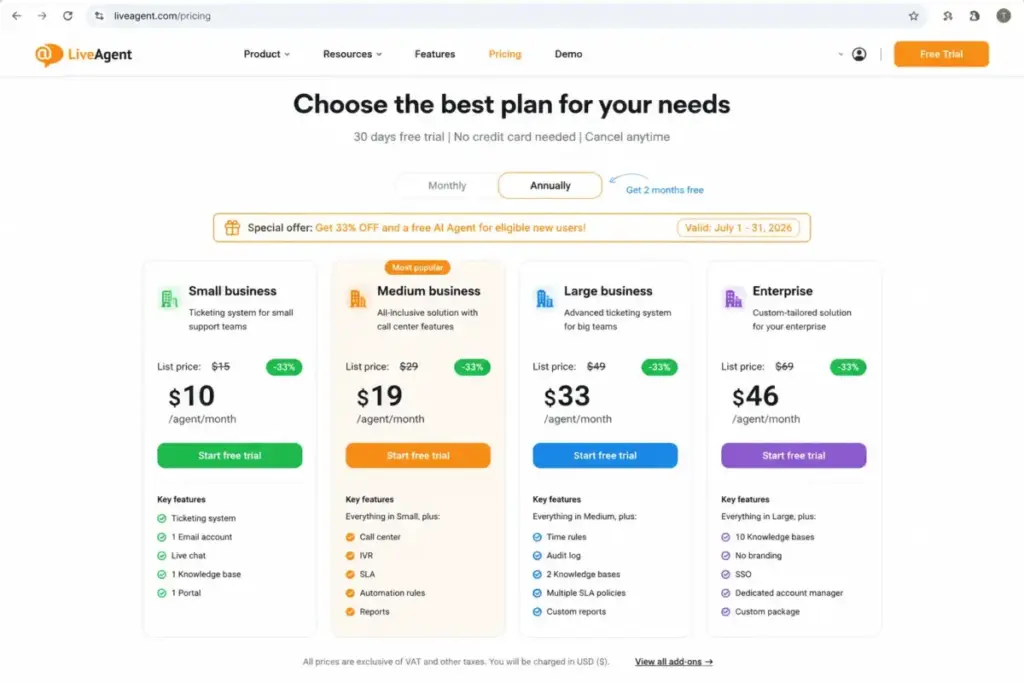
The gap between LiveAgent’s advertised price and its real price comes from two places: the temporary July 2026 promotion, and the add-ons that sit outside the per-agent rate.
Start with the promotion. On July 3, 2026, the pricing page showed standard prices and a separate set of promotional prices for eligible new users, valid July 1 to 31, 2026.
Budgeting from the promo price is the most common 2026 mistake I expect to see. The promo may not apply for the full renewal cycle once the campaign ends, so the standard rate is the safer planning baseline.
| Plan | Annual standard | Annual July 2026 promo | Monthly standard | Monthly July 2026 promo |
|---|---|---|---|---|
| Small business | $15/agent/mo | $10/agent/mo | $19/agent/mo | $13/agent/mo |
| Medium business | $29/agent/mo | $19/agent/mo | $35/agent/mo | $23/agent/mo |
| Large business | $49/agent/mo | $33/agent/mo | $59/agent/mo | $40/agent/mo |
| Enterprise | $69/agent/mo | $46/agent/mo | $85/agent/mo | $57/agent/mo |
All figures are from the official pricing page, per agent per month, checked July 3, 2026. The promo prices are time-limited and shown for eligible new users only.
The second gap is add-ons. The per-agent line is the first line item, not the last one, and the sections below show where the rest comes from.
The Five Hidden Costs Nobody Puts in the Sticker Price
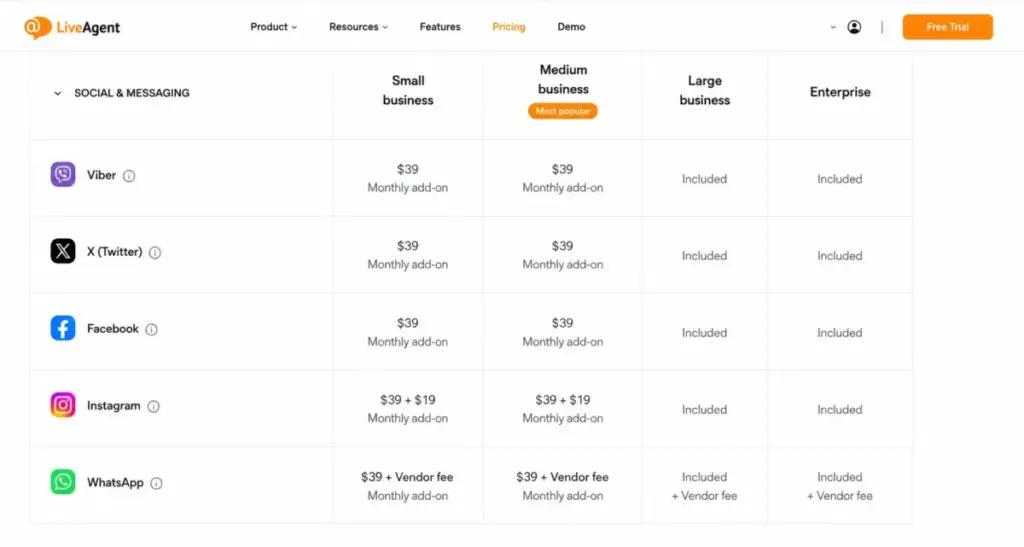
Every price on the plan cards is per agent per month. Several real costs are not, and the official pricing table lists them as separate monthly charges.
1. Social channels can cost more than an agent seat
On lower tiers, the official pricing table lists social and messaging channels as monthly add-ons at $39 per channel per month for Viber, X (Twitter), and Facebook. That is more than one Small-plan agent seat.
Add three channels and you have added $117 per month before you have added a single new agent. This is why a “cheap” plan stops being cheap for social-heavy teams.
The official table lists these as monthly add-ons. Verify checkout for the exact billing basis, since account-level versus per-number behavior can differ.
2. Instagram is not a standalone decision
Competitor articles often list Instagram as its own low-cost channel. The official pricing table presents Instagram together with Facebook, shown as $39 plus $19 per month in lower-tier context.
Read that as a dependency, not a discount. If you already run Facebook at $39, Instagram adds $19 on top; if you do not, you are effectively buying Facebook to get Instagram.
3. WhatsApp brings a second bill you do not pay to LiveAgent
The official pricing table states WhatsApp works only with Twilio and 360dialog. The LiveAgent add-on (listed at $39 per month in lower-tier context) is not the same as your total WhatsApp cost.
Twilio and 360dialog charge their own provider and messaging fees, and LiveAgent’s pricing page does not disclose them. Treat WhatsApp as help desk cost plus external provider cost, and price the provider separately before committing.
4. A second knowledge base and branding removal are line items
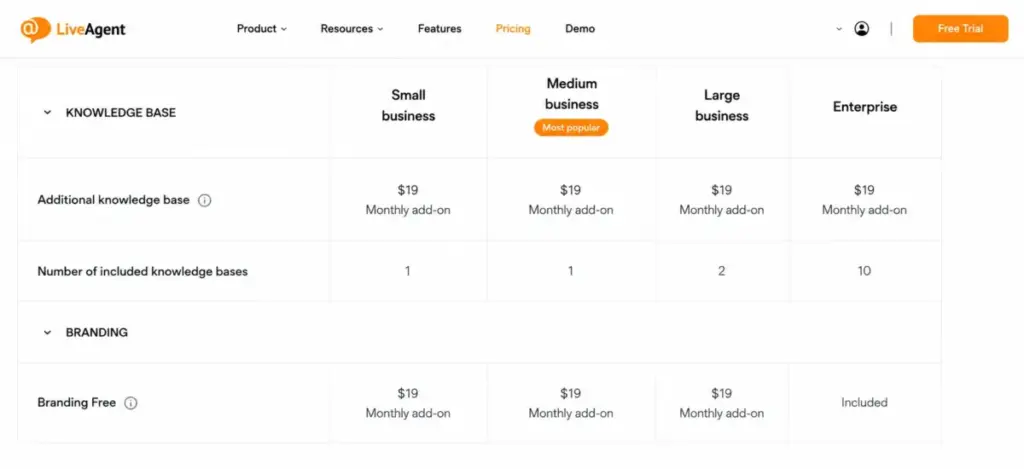
Small and Medium include one knowledge base; Large includes two; Enterprise includes ten. An additional knowledge base is listed at $19 per month, which matters for agencies and multi-brand teams that hit knowledge base limits before agent limits.
Branding removal is the trap wording here. The Enterprise plan card includes Branding Free, while lower-tier context on the pricing table shows Branding Free as a $19 per month per account add-on.
Do not assume Large removes LiveAgent branding for free. Confirm it at checkout if a white-label widget or portal is a requirement.
5. AI is promoted as included, but provider setup may not be
The pricing page lists AI features and a July 2026 free AI Agent promotion for new users. That framing is easy to read as “AI is fully covered.”
Official AI provider setup documentation shows that connecting a provider can require creating and supplying your own OpenAI API key. Usage-based provider costs then sit outside your LiveAgent subscription, and LiveAgent does not publish an all-in AI figure.
LiveAgent Plans Compared
Here is the full plan table with billing basis, fit, and the limits that actually change a buying decision. All data is from the official pricing page, checked July 3, 2026.
| Plan | Monthly (standard) | Annual (standard) | Billing basis | Best for | Key limits |
|---|---|---|---|---|---|
| Small business | $19/agent/mo | $15/agent/mo | Per agent, per month | 1 to 5 agent email + chat teams, one brand | 3 incoming + 3 outgoing email accounts, 2 chat buttons, 10 departments, 1 API key, 1 knowledge base, 50 event rules |
| Medium business | $35/agent/mo | $29/agent/mo | Per agent, per month | Teams needing call center, IVR, SLAs, and reports | 10 incoming + 10 outgoing email accounts, 5 chat buttons, 20 departments, 5 API keys, 1 knowledge base, 150 event rules, SLAs |
| Large business | $59/agent/mo | $49/agent/mo | Per agent, per month | Multi-channel teams needing social + admin controls | 150 email accounts each way, 50 chat buttons, 150 departments, 10 API keys, 2 knowledge bases, SSO, audit log, social channels |
| Enterprise | $85/agent/mo | $69/agent/mo | Per agent, per month | High-limit teams needing a dedicated manager | 500 email accounts each way, 100 chat buttons, 300 departments, 100 API keys, 10 knowledge bases, Branding Free, priority support |
No public seat minimum appears on the official pricing page for any tier. Enterprise-level terms can still apply at very high ticket volume, which the next sections cover.
What Each LiveAgent Plan Includes
The plan cards read as a feature ladder. The money question is which rung actually holds your workflow, so each plan below gets a mini verdict and an avoid-if.
Small business ($15/agent/month annual)
Includes ticketing, live chat, knowledge base, customer portal, contact forms, automation rules, integrations, multilingual support, AI Answer Assistant, and AI Chatbot.
Missing: call center, IVR, reports, SLAs, SSO, audit log, and included social channels.
Verdict: a real starter plan for a single-brand email and chat team under five agents. Avoid if you support Facebook, Instagram, or WhatsApp, run more than one brand, or need SLAs, because the add-ons and gates push you up a tier fast.
Medium business ($29/agent/month annual)
Adds call center and IVR, time rules, reports, proactive chat invitations, agent ratings, sound configuration, and SLAs on top of everything in Small.
Missing: SSO, custom roles, time tracking, audit log, and included social channels.
Verdict: the practical plan for most teams that treat phone and SLAs as core, not optional. Avoid if you need three or more social channels, because at that point Large becomes cheaper per outcome (the crossover math is below).
Large business ($49/agent/month annual)
Adds SSO, custom roles, time tracking, audit log, and social channel availability (Facebook, Instagram, X, Viber, Telegram, and WhatsApp) per the official pricing rows.
Missing: dedicated account manager, priority support, Branding Free inclusion, and Enterprise-level limits.
Verdict: the tier for multi-channel teams that also need admin and security controls for procurement. Avoid if you only need one or two channels and no SSO, since Medium plus a single add-on is cheaper.
Enterprise ($69/agent/month annual)
Adds a dedicated account manager, priority support, assisted channels integration, Branding Free, custom billing setup, service review calls and reports, and scheduled release management.
Missing: little in feature terms; the question is whether the service layer justifies the jump.
Verdict: worth it when included Branding Free, custom billing, release scheduling, and a named manager solve real procurement or scale problems. Avoid if you are buying Enterprise only for higher numeric limits your team will not reach.
Feature Gates: What You Actually Get by Plan
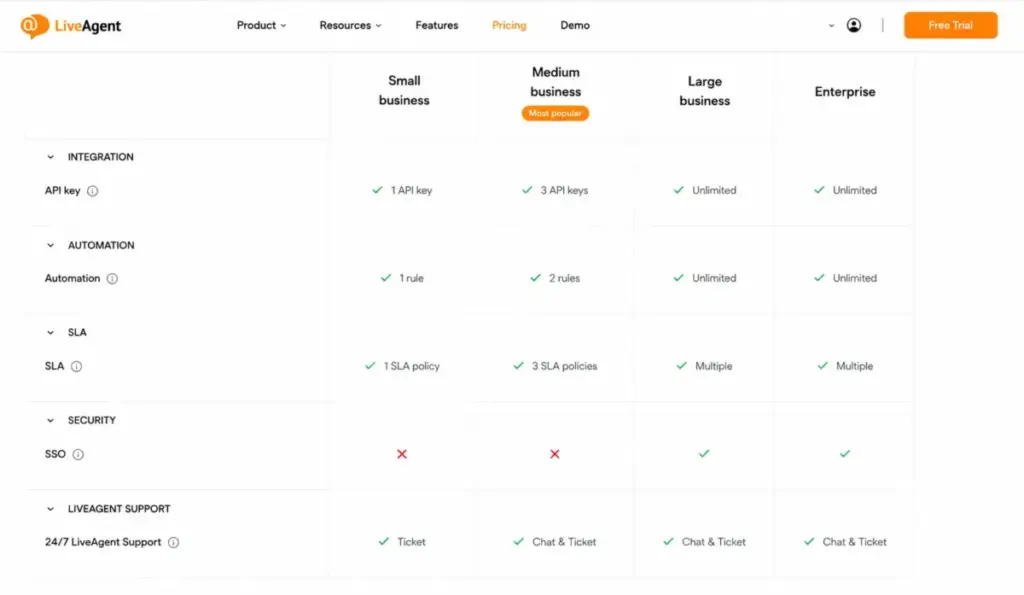
The gates below decide most upgrades. This is where “does it have automation?” becomes “which plan turns it on, and at what limit?”
| Capability | Small | Medium | Large | Enterprise |
|---|---|---|---|---|
| Ticketing, live chat, knowledge base | Yes | Yes | Yes | Yes |
| AI Answer Assistant + AI Chatbot | Yes | Yes | Yes | Yes |
| Call center + IVR | No | Yes | Yes | Yes |
| Reports + SLAs | No | Yes | Yes | Yes |
| Event rules (automation) | 50 | 150 | 500 | 1,000 |
| SSO, custom roles, audit log | No | No | Yes | Yes |
| Included social channels | No | No | Yes | Yes |
| API keys | 1 | 5 | 10 | 100 |
| Knowledge bases included | 1 | 1 | 2 | 10 |
| Dedicated manager + priority support | No | No | No | Yes |
Two gates trip teams up most. Call center, reports, and SLAs sit behind Medium, and SSO plus audit log sit behind Large, so compliance-driven buyers rarely stay on the entry tier.
On the API side, “included” is not “unlimited.” Official documentation states cloud accounts are limited to 180 requests per minute per API key, so high-throughput sync or reporting jobs need to plan around that ceiling and the per-tier key counts (1, 5, 10, 100).
Monthly vs Annual Billing
Every tier costs more on monthly billing than on annual. The official matrix lists the two rates side by side, so this is a confirmed difference, not an invented discount.
| Plan | Annual (per agent/mo) | Monthly (per agent/mo) | Monthly premium |
|---|---|---|---|
| Small business | $15 | $19 | +$4/agent/mo |
| Medium business | $29 | $35 | +$6/agent/mo |
| Large business | $49 | $59 | +$10/agent/mo |
| Enterprise | $69 | $85 | +$16/agent/mo |
At 10 agents on Large, monthly billing costs $100 more per month, or $1,200 a year, than the annual rate. That is the price of flexibility.
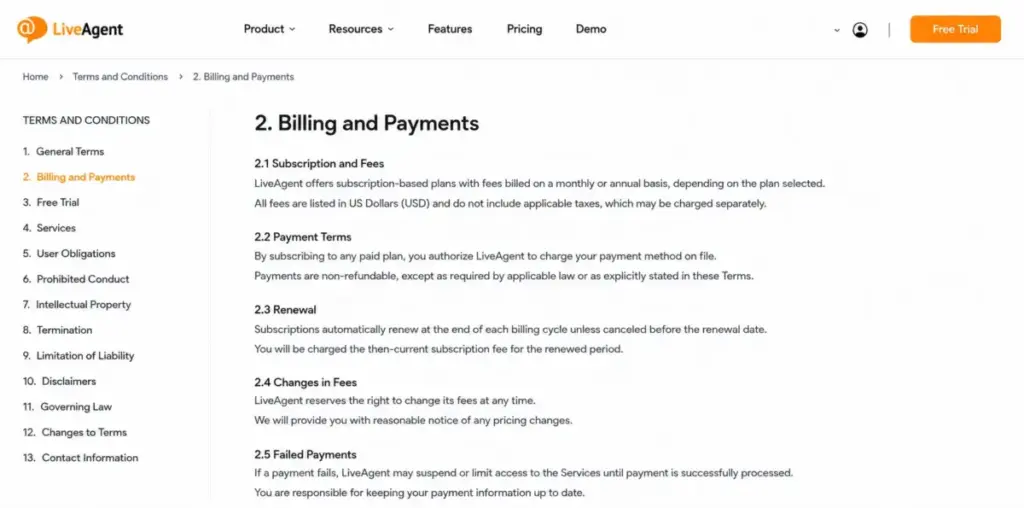
Annual is the cheaper rate, but it carries a commitment cost. LiveAgent’s terms state there are no refunds or credits for partial months, plan downgrades, or unused months, and downgrading can drop content, features, or capacity.
The terms also describe annual pre-paid credit and a cancellation fee that may equal 50 percent of unused value if you discontinue before the credit is used or the period ends. Choose annual for the lower rate only if you are confident in the seat count and the tier.
The Free Trial and the Free-Plan Question
LiveAgent’s official pricing page highlights a 30-day free trial with no credit card required. It does not present a public free plan as the headline path.
Here is where sources disagree. G2, GetApp, and TrustRadius list free or freemium metadata, while Capterra states there is no free version, and the official page leads with the trial.
I would not plan around a free plan. Based on the official page, treat LiveAgent as a paid product with a 30-day trial, and confirm any free-tier claim at checkout before you rely on it.
One more caveat on the trial. A third-party editorial review reported observed trial-account limits that differed from the public plan limits, so treat the official public plan limits as authoritative and the trial as a preview to verify, not a guarantee.
Real Cost Scenarios: 3, 5, 10, and 25 Agents
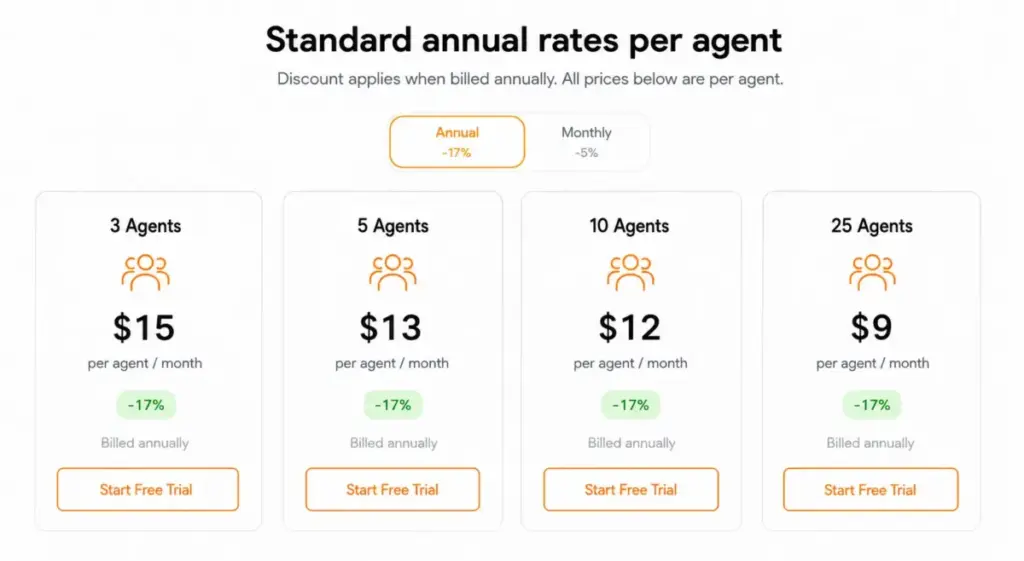
Sticker price hides at team scale, so here is the real monthly cost by size, on the recommended plan, before taxes and add-ons. Standard annual rates are the planning baseline; the July 2026 promo figure is shown for reference only.
| Team size | Recommended plan | Standard cost (annual rate) | July 2026 promo (reference) | Notes |
|---|---|---|---|---|
| 3 agents | Small business | $45/mo ($540/yr) | $30/mo | Email + chat, one brand, no social add-ons |
| 5 agents | Medium business | $145/mo ($1,740/yr) | $95/mo | Adds call center, IVR, SLAs, reports |
| 10 agents | Large business | $490/mo ($5,880/yr) | $330/mo | Social channels, SSO, audit log, 2 knowledge bases |
| 25 agents | Enterprise | $1,725/mo ($20,700/yr) | $1,150/mo | Dedicated manager, Branding Free, high limits |
These are subscription-only figures. Add social channels, extra knowledge bases, branding removal, or WhatsApp provider fees on top, and the real number rises.
The crossover: when Large beats Medium plus add-ons
This is the calculation the SERP skips. A 5-agent Medium team that needs Facebook, Instagram, and WhatsApp does not stay cheap.
Medium at 5 agents is $145 per month. Using the official lower-tier add-on rows, Facebook adds $39, Instagram adds $19 on top of Facebook, and WhatsApp adds $39, for $97 in add-ons and about $242 per month total, before any Twilio or 360dialog provider fees.
Large at 5 agents is $245 per month standard, and it includes those social channels plus SSO and audit log. For roughly $3 more per month, Large is the better buy the moment a team needs three social channels, so the “cheaper” Medium plan is a false economy there.
Which LiveAgent Plan Should You Choose?
Match the plan to a measurable threshold, not a vague team label.
Solo or 1 to 3 agents, single brand, email and chat only: Small at $15 per agent per month annual. Use this if you will not add social channels or a second knowledge base within the year.
Small to mid team, 4 to 10 agents, phone and SLAs matter: Medium at $29 per agent per month annual. This is the practical plan for support operations that run a call center and enforce SLAs.
Multi-channel team, 8 to 20 agents, social plus SSO: Large at $49 per agent per month annual. Choose Large once you need three or more social channels or SSO and audit log for compliance.
High-limit or procurement-heavy team, 20-plus agents: Enterprise at $69 per agent per month annual. Choose Enterprise when Branding Free, custom billing, release scheduling, and a named account manager solve concrete problems, not just for larger numbers.
Which LiveAgent Plan Should You Avoid?
Avoid Small if you support social channels or run more than one brand. The plan’s single knowledge base and $39-per-channel social add-ons erase its price advantage quickly, and you will likely migrate to Medium or Large within a quarter.
Small still fits a genuine single-channel, single-brand email team that will stay that way. The avoid-if is about growth trajectory, not the plan itself.
The second thing to avoid is buying Medium and bolting on three social channels. As the crossover math showed, Large is within a few dollars and includes more, so that specific configuration overpays for less.
LiveAgent Pricing vs Zendesk, Freshdesk, Help Scout, and LiveChat
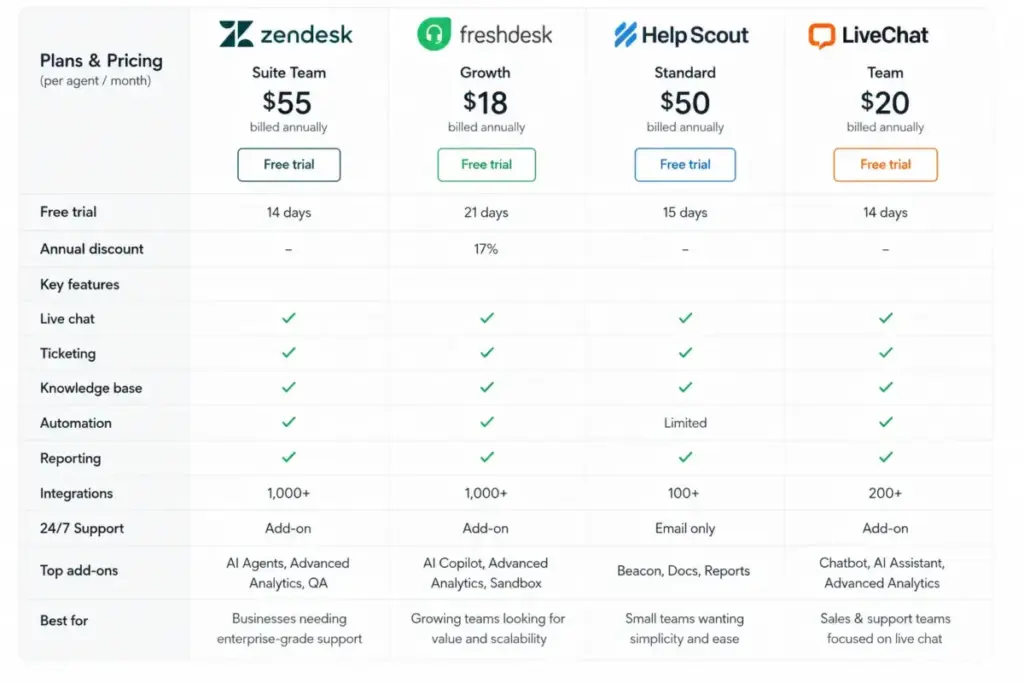
Price anchors help you read LiveAgent’s value without leaving the page. All competitor figures are from official competitor pricing pages, checked July 3, 2026.
| Product | Entry paid (annual) | Practical tier (annual) | Notable caveat |
|---|---|---|---|
| LiveAgent | $15/agent/mo (Small) | $29/agent/mo (Medium) | Social channels are paid add-ons on lower tiers |
| Zendesk | $19/agent/mo (Support Team) | $55/agent/mo (Suite Team) | Copilot AI add-on listed at $50/agent/mo annual |
| Freshdesk | $19/agent/mo (Growth) | $55/agent/mo (Pro) | Extra Freddy AI sessions at $49 per 100 sessions |
| Help Scout | $25/user/mo (Standard) | $45/user/mo (Plus) | Pro at $75 has a 10-user minimum; free plan up to 5 users |
| LiveChat | $19/person/mo (Starter) | $49/person/mo (Team) | Live chat focus, not a full ticketing suite; ChatBot from $52/mo annual |
LiveAgent’s Small tier is the cheapest entry point in this group at $15 per agent per month. Its all-in-one channel spread (ticketing, chat, call center, and social) is broader than a chat-only tool like LiveChat, which is the value case.
Where it loses ground is the paid social add-ons that competitors sometimes fold into the base tier, and the WhatsApp provider dependency. If your channel mix is heavy on paid social add-ons, compare the loaded LiveAgent bill against Zendesk alternatives and Freshdesk before deciding.
Security, Compliance, and the SOC 2 Wording That Trips Up Procurement
This is the detail most pricing guides get wrong, and it can stall a procurement review. LiveAgent’s own security support article states that LiveAgent itself is not SOC 2 or ISO certified.
The nuance is that AWS, the data center provider hosting LiveAgent data, is SOC 2 and ISO compliant. Infrastructure compliance is not the same as vendor certification.
Do not tell your security team that LiveAgent is SOC 2 certified. The accurate statement is that LiveAgent runs on SOC 2 and ISO compliant AWS infrastructure while the application itself is not certified, per LiveAgent’s support documentation.
On the admin side, the controls procurement usually asks about (SSO, custom roles, and audit log) sit behind the Large plan. Budget for at least Large if certification-adjacent admin features are a requirement.
Is LiveAgent Worth the Price?
Worth it if you are a 3 to 20 agent ecommerce, SaaS, or services team that wants email ticketing, live chat, a customer portal, and a call center in one dashboard, and you can stay on Medium or move cleanly to Large. At that shape, the all-in-one bundle is priced below assembling separate tools.
Worth it if you need the Large-tier admin stack (SSO, audit log, roles) and can absorb the social add-on model. The per-agent rate is competitive against Zendesk Suite and Freshdesk Pro at the same tier.
Not worth it if you are an SMS-first team, a WhatsApp team that wants all provider costs bundled into one subscription, a very high API-throughput operation, or a buyer who needs LiveAgent itself to hold SOC 2 certification. Those requirements collide with documented limits.
If Medium-plus-social pushes you toward Large-level spend and you would rather not manage add-ons, Freshdesk or Help Scout are the anchors to price against next.
How to Avoid Overpaying for LiveAgent
- Price the loaded plan, not the sticker. Add every social channel at $39 per month before you commit, because the per-agent rate hides the real bill.
- Run the Medium-versus-Large crossover at your channel count. If you need three or more social channels, Large usually wins on cost and includes more.
- Budget WhatsApp separately. The LiveAgent add-on is not the Twilio or 360dialog provider fee, so get a provider quote first.
- Count your knowledge bases and brands. If you run multiple brands, the $19-per-month extra knowledge base and Branding Free wording can change which tier makes sense.
- Use the standard rate for planning, not the July 2026 promo. The promotion is time-limited, and renewals may revert to standard pricing.
- Confirm annual commitment risk. The no-refund terms and the possible 50 percent unused-value cancellation fee mean annual only pays off if the seat count is stable.
- Verify AI provider costs. If you plan to use AI features that require your own OpenAI key, price that usage before you treat AI as free.
LiveAgent Pricing FAQ
How much does LiveAgent cost?
As of July 3, 2026, LiveAgent’s paid plans start at $15 per agent per month billed annually (Small), or $19 per agent per month billed monthly, before any promotion. Medium is $29 annual, Large is $49, and Enterprise is $69, per the official pricing page.
Does LiveAgent have a free plan?
The official pricing page highlights a 30-day free trial with no credit card, not a headline free plan. Review platforms conflict: some list a free or freemium version, while Capterra says there is no free version, so confirm at checkout before relying on a free tier.
Is LiveAgent billed per agent?
Yes. All four plans are priced per agent, per month, on the official pricing page, with monthly rates higher than annual rates.
Which LiveAgent plan includes WhatsApp?
Social and messaging channel availability, including WhatsApp, appears on the Large plan per the official rows, and lower tiers show WhatsApp as a paid add-on. WhatsApp also requires Twilio or 360dialog, whose provider fees are separate from your LiveAgent subscription.
Does LiveAgent charge extra for social media channels?
On lower tiers, yes. The official pricing table lists Facebook, X, and Viber at $39 per month each in lower-tier context, and Instagram is shown with a Facebook dependency at $39 plus $19 per month.
Which LiveAgent plan has SSO?
SSO, custom roles, time tracking, and audit log are included starting with the Large plan, per the official plan card. Small and Medium do not include SSO.
How much is LiveAgent Enterprise?
Enterprise is $69 per agent per month billed annually, or $85 billed monthly, as of July 3, 2026. It adds a dedicated account manager, priority support, Branding Free, and custom billing setup.
Is LiveAgent SOC 2 certified?
LiveAgent’s own security support article states that LiveAgent itself is not SOC 2 or ISO certified, while the AWS data centers hosting its data are SOC 2 and ISO compliant. Do not tell procurement the application is certified.
Is LiveAgent cheaper than Zendesk?
At entry, LiveAgent Small ($15/agent/month annual) is cheaper than Zendesk Support Team ($19/agent/month annual). Once you add paid social channels on lower LiveAgent tiers, compare the loaded totals rather than the starting prices.
What are the best LiveAgent alternatives if it is too expensive?
Freshdesk Growth ($19/agent/month annual) and Zendesk Support Team ($19/agent/month annual) are the closest anchors, and Help Scout ($25/user/month annual) suits email-first teams. LiveChat fits chat-only teams that do not need full ticketing.