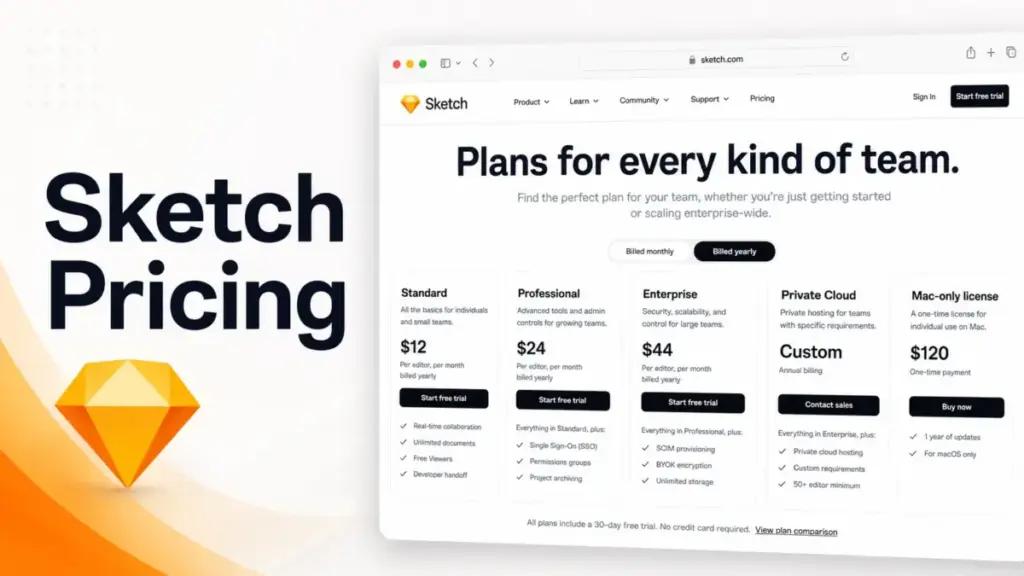
Sketch pricing starts at $12 per editor per month billed yearly, and on the surface that makes it one of the cheaper design tools you can put in front of a Mac-first team. The trouble is that the $12 number answers almost none of the questions a buyer actually has.
It does not tell you what changes when you need single sign-on, what an enterprise rollout costs, or why the $120 “license” you keep seeing is not the same product as the subscription.
If your team is weighing Sketch against the best UI/UX design tools, the plan you pick matters more than the headline price.
This guide breaks down every Sketch plan, the costs nobody puts on the pricing page, real spend at 5 to 100 users, and when Figma, Penpot, Axure, or UXPin make more sense. Pricing verified against Sketch’s official pricing page on June 29, 2026.
Quick Pricing Verdict
| Question | Answer |
|---|---|
| Starting price | $12 / editor / month, billed yearly ($144 / editor / year) |
| Free plan | No general free editor plan. Free Viewers and a free Education plan only |
| Free trial | 30 days, no credit card to start |
| Best plan for most teams | Standard ($12 / editor / month) |
| Plan to avoid | Mac-only license for any team that needs collaboration |
| Biggest hidden cost | Private Cloud one-time setup fee plus a 50-editor minimum |
| Best alternative if too expensive | Penpot (free up to 8) or Figma’s free Starter |
| Platform requirement | Native Mac app, macOS Sonoma 14.0 or newer |
| Pricing verified | June 29, 2026, against the official Sketch pricing page |
Key Takeaways
- Sketch’s real entry point is $12 per editor per month on Standard, billed yearly. That plan already includes real-time collaboration, unlimited documents, free Viewers, and developer handoff, so most teams never need to upgrade for the basics.
- The jump to Professional ($24) buys admin controls like SSO and permissions groups, not creative features. Enterprise ($44) buys security controls like SCIM and BYOK.
- The $120 Mac-only license is a different product, not a cheaper subscription. It strips out the collaboration features that make Sketch worth using on a team.
- Private Cloud is custom-priced, needs at least 50 paid editors, and carries a one-time setup fee. It is a procurement project, not an upgrade button.
- Several directory pages still quote stale $9 or $10 pricing or claim a free version exists. The official pricing page is the source of truth.
The Advertised Price vs The Real Price
The advertised price is honest. The problem is that $12 only describes one of five ways to buy Sketch, and the gap between what you read and what you sign for grows the moment your team needs anything beyond shared editing.
Here is the difference between the number you see and the number you commit to.
| What you see advertised | What you actually pay for |
|---|---|
| “From $12 / editor / month” | $144 per editor per year on Standard, billed up front for the full year |
| “$120 Sketch license” | A one-time Mac-only license with no Workspace collaboration, no online sharing, no handoff |
| “Enterprise plan” | $44 / editor / year-billed, but priority support and a dedicated CSM need 15+ paid editors |
| “Private Cloud available” | Custom quote, a 50-editor minimum, plus a one-time setup fee that is not published |
| “$14 / month on the App Store” | An App Store variant that supports only one editor per Workspace |
What this means: the $12 plan is genuinely the right answer for most small and mid-size design teams. But three of the five purchase paths carry conditions that the headline pricing never surfaces, and two of them (Mac-only and Private Cloud) are not really “plans” at all. Read the conditions before you read the price.
Sketch Hidden Costs and Plan Caveats
Sketch does not bury surprise charges the way usage-based tools do. The hidden costs here are structural: minimums, thresholds, and feature exclusions that change the real bill. Based on Sketch’s official pricing page, terms of service, and help documentation, these are the five that catch buyers out.
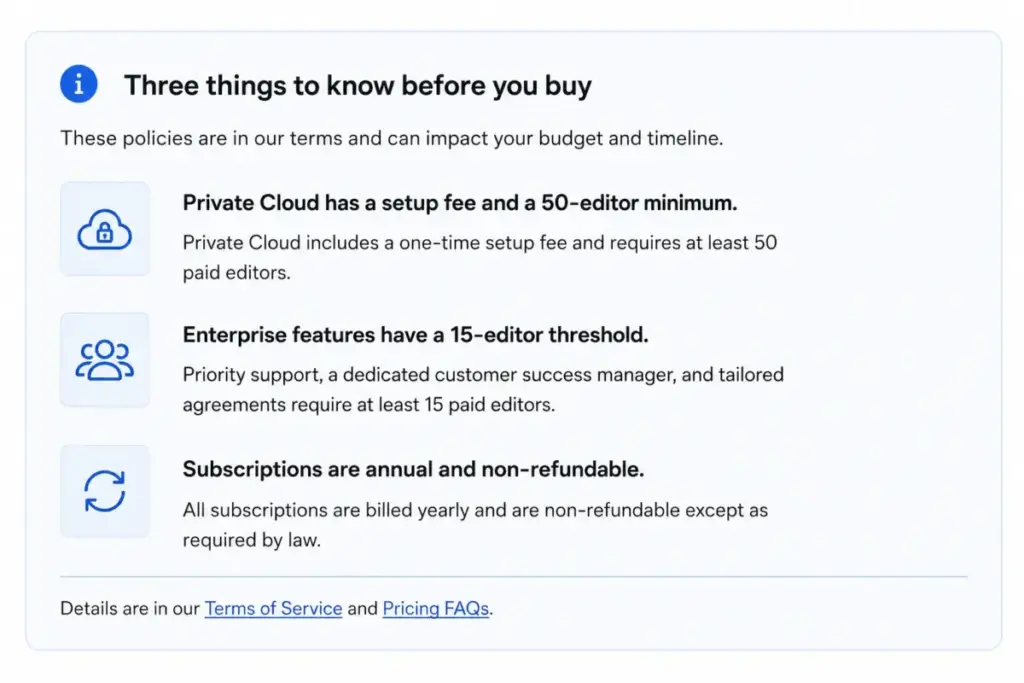
The Private Cloud 50-editor floor
Private Cloud sounds like the next step up from Enterprise. It is not a step you take lightly. Sketch’s terms set a minimum of 50 paid editors for Private Cloud, and the pricing page notes a one-time setup fee plus additional charges for custom requirements. Neither the setup fee nor the per-editor rate is published, so treat Private Cloud as a custom procurement project. If you have 20 editors and want a private environment, you do not qualify yet.
The Enterprise 15-editor services threshold
Enterprise is $44 per editor per month billed yearly, and you can technically buy it for a single seat. But the things people buy Enterprise for, priority support, a dedicated customer success manager, tailored agreements, and custom security reviews, require at least 15 paid editors per Sketch’s terms. A five-person team paying Enterprise prices for SSO and SCIM will not get the white-glove service the tier implies.
The Mac-only license is missing the team features
The $120 Mac-only license is the one that trips up the most buyers. It is a native Mac app with one year of updates and local documents, and that is the whole story. Sketch’s license page confirms it has no real-time collaboration, no shared online Workspace, no online comments, no sharing permissions, no online viewing, no free Guest Editors, no developer handoff, and no iOS preview. For a solo designer who never shares files, fine. For a team, it removes the reasons to use Sketch in the first place.
The App Store one-editor limit
If you buy Sketch through the Apple App Store, expect $14 monthly or $139 yearly per the App Store listing. The catch, documented in Sketch’s help center, is that the App Store subscription variant supports only one editor per Workspace, and any Guest Editors need their own active Sketch subscription. It is fine for an individual. It is the wrong purchase channel for a team.
The refund and renewal limits
Monthly billing is non-refundable. Annual billing has a 30-day refund window on the initial purchase, but per Sketch’s terms, subsequent purchases, additional seats, and renewals are not refundable. So if you add ten seats mid-year and your headcount drops, that money is committed.
There is also a non-monetary cost worth flagging. If you run the 30-day trial and do not convert, Sketch’s help center states that Workspace documents become read-only for 90 days and may be permanently deleted after that. Export your work before the trial lapses.
Plan-by-Plan Breakdown
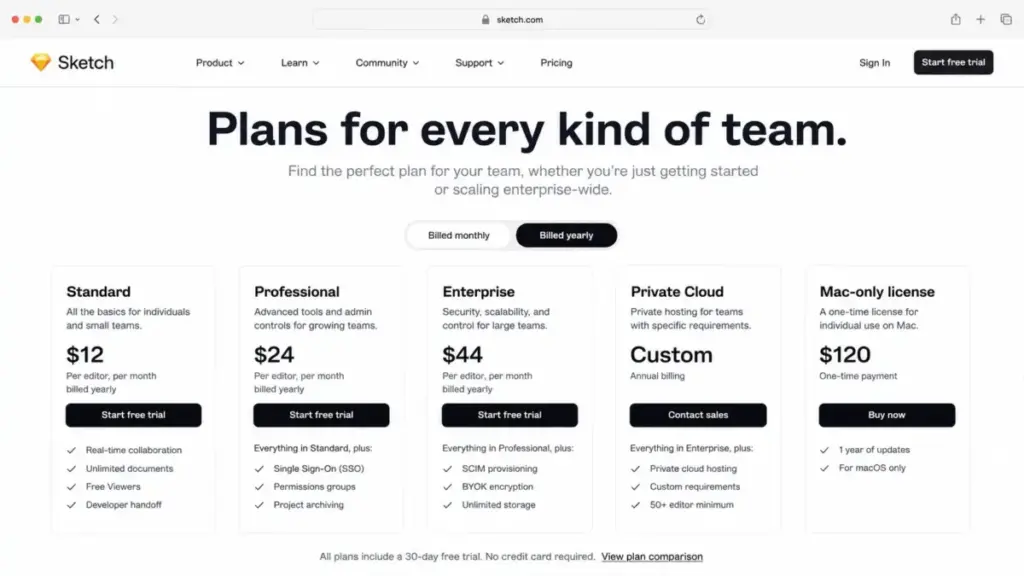
Here is every Sketch plan with the annual-billed pricing that Sketch publishes. Direct month-to-month web prices for Professional and Enterprise are not clearly surfaced on the accessible pricing page, so the figures below are the confirmed annual-equivalent rates.
| Plan | Price (billed yearly) | Storage | Best for | Key limits |
|---|---|---|---|---|
| Standard | $12 / editor / mo ($144 / yr) | 50GB per editor | Small to mid Mac-first teams | No SSO, SCIM, BYOK, or Private Cloud |
| Professional | $24 / editor / mo ($288 / yr) | 50GB per editor | Teams needing SSO and permissions | No SCIM or BYOK |
| Enterprise | $44 / editor / mo ($528 / yr) | Unlimited | Security-conscious orgs | Some services need 15+ editors |
| Private Cloud | Custom quote | Unlimited | Regulated or 50+ editor orgs | 50-editor minimum, setup fee |
| Mac-only license | $120 one-time (1 yr updates) | Local only | Solo offline Mac work | No collaboration or handoff |
What this means: the only plan most teams should think hard about is Standard. Professional and Enterprise are admin and security purchases, and the two outliers solve narrow problems.
What each plan actually includes
Standard is the real product. Per Sketch’s pricing page, it includes real-time collaboration, unlimited documents, unlimited free Viewers, document version history, and free developer handoff. What it lacks is administration: no SSO, no permissions groups, no project archiving. For a team of designers who trust each other, that absence costs nothing.
Professional adds the admin layer: SSO, project archiving, a permissions directory, and permissions groups. You buy this when IT or security asks you to, not when designers ask for it.
Enterprise adds the security layer: SCIM provisioning, bring-your-own-key encryption, dedicated support, custom security reviews, and custom terms. Storage also goes from 50GB per editor to unlimited. This is a compliance tier.
Private Cloud takes Professional’s feature set and puts it in a private cloud environment with a choice of hosting location, unlimited Workspaces, SCIM, and BYOK. It is the answer to “our data cannot live in a shared multi-tenant cloud,” and it is priced accordingly.
The Mac-only license is the offline native app. Useful, but covered above for what it leaves out.
Feature gates: what unlocks where
| Feature | Standard | Professional | Enterprise | Private Cloud |
|---|---|---|---|---|
| Real-time collaboration | Yes | Yes | Yes | Yes |
| Unlimited cloud documents | Yes | Yes | Yes | Yes |
| Unlimited free Viewers | Yes | Yes | Yes | Yes |
| Developer handoff | Yes | Yes | Yes | Yes |
| Storage | 50GB / editor | 50GB / editor | Unlimited | Unlimited |
| Project archiving | No | Yes | Yes | Yes |
| Permissions groups | No | Yes | Yes | Yes |
| SSO | No | Yes | Yes | Yes |
| SCIM | No | No | Yes | Yes |
| BYOK | No | No | Yes | Yes |
| Private cloud environment | No | No | No | Yes |
What this means: every creative feature you would use day to day lives on Standard. Each higher tier adds governance, not design power. If nobody on your team can name a reason you need SSO, you do not need to leave Standard.
Does Sketch Have a Free Plan?
People search for a free Sketch plan and get confused, because three different “free” things exist and none of them is a free editor plan.
First, the 30-day trial. Per Sketch’s help center, it runs 30 consecutive days, starts without a credit card, and you get one per customer. Adding payment details during the trial raises your invitation limits, which matters if you want to test with a larger group.
Second, free Viewers. Every paid subscription includes unlimited free Viewers. So a developer who only needs to inspect a file and grab specs does not cost you a seat. That is a real cost saver, but a Viewer cannot edit.
Third, the Education plan. Sketch’s education page offers free access for verified students and educators for one year, with a Workspace and 50GB storage. Outside school, it does not apply.
What there is no version of: a permanent free plan for working designers. Sketch’s own help center explains there is no general free plan. If a directory tells you Sketch has a free version, it is conflating the Viewer role or the trial with a free editor tier. One genuine discount does exist beyond the above: per the pricing page, eligible nonprofits get 50% off yearly Standard subscriptions or Mac-only licenses.
Monthly vs annual billing, and the App Store wrinkle
Sketch’s confirmed public pricing is annual-billed at the $12, $24, and $44 monthly-equivalent rates. The App Store listing shows $14 monthly and $139 yearly for its own variant. So the cheapest way to run Standard is the annual subscription bought directly. The App Store route costs more per month and, as noted, caps you at one editor per Workspace. If you are a team, buy annual and buy direct.
Real Cost Scenarios: 5, 10, 25, 50, and 100 Users
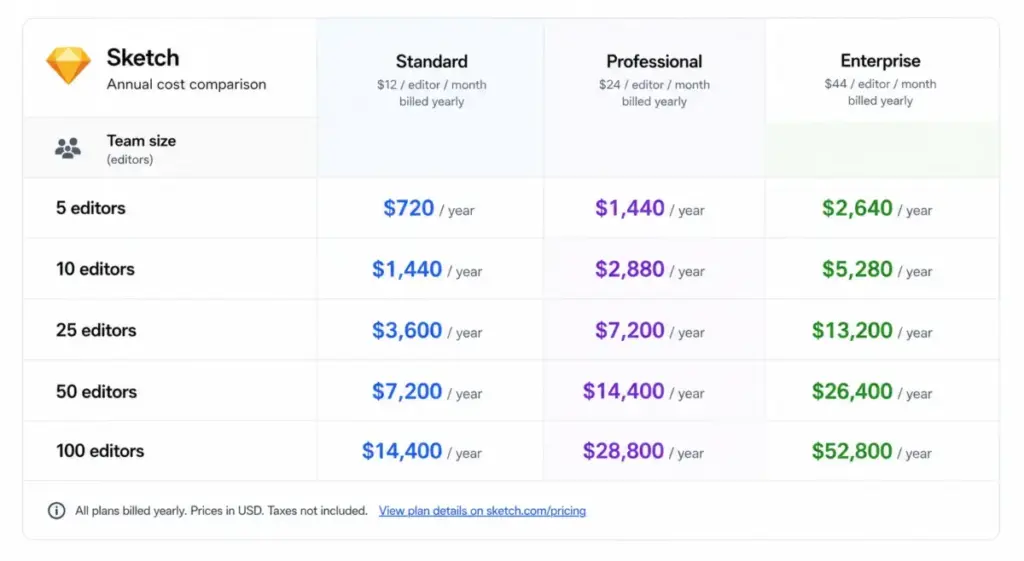
Pricing pages give you a per-seat number and let you do the math. Here is the math, at the team sizes that actually change the decision.
| Team size | Recommended plan | Annual cost | Why |
|---|---|---|---|
| 5 editors | Standard | $720 / yr | Collaboration without admin overhead |
| 10 editors | Standard | $1,440 / yr | Still the lowest-cost team option |
| 25 editors | Professional | $7,200 / yr | Only if you need SSO and permissions groups |
| 50 editors | Enterprise | $26,400 / yr | When SCIM, BYOK, and unlimited storage matter |
| 100 editors | Enterprise | $52,800 / yr | Admin and security controls at scale |
What this means: at 25 editors, the plan choice is the whole budget conversation. Twenty-five seats on Standard would run $3,600 per year. The same 25 on Professional is $7,200. You are paying roughly double for SSO and permissions, so make sure someone actually requires those controls before you commit. At 50 editors and up, Private Cloud becomes an option, but it is a custom quote, not a line you can budget from this table.
The Plan to Choose, and the One to Avoid
I will be direct about this, because the data points one way for most readers.
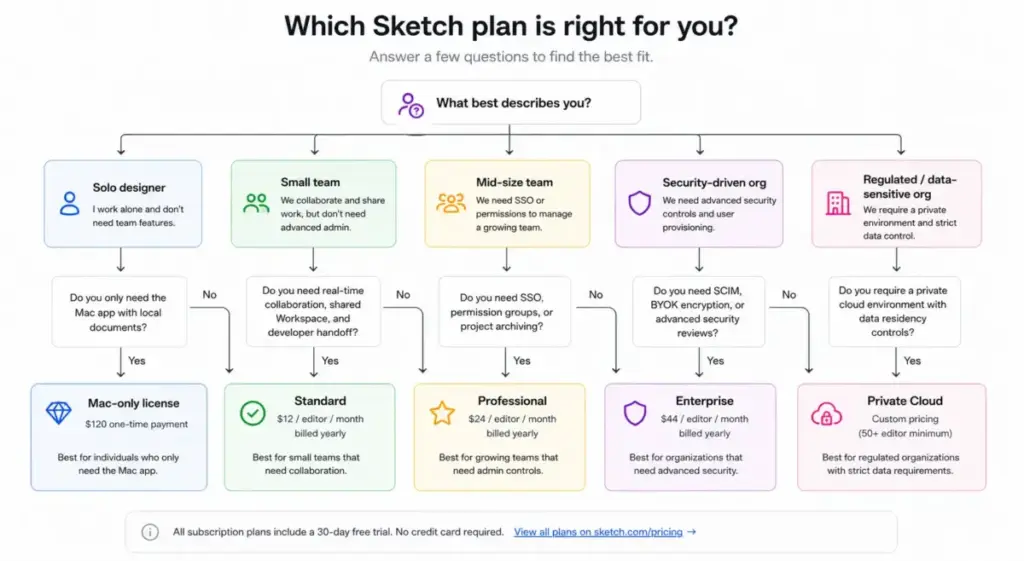
Choose Standard if you run a Mac-first design team that needs shared editing, free Viewers, version history, and developer handoff. That is the majority of teams. It is the best value Sketch offers and it does not make you pay for governance you will not use.
Move to Professional only when IT requires SSO or you genuinely need permissions groups and project archiving to keep a larger team organized. Around 20 to 30 editors, that case starts to hold up.
Move to Enterprise when a security or compliance team asks for SCIM provisioning, BYOK encryption, or formal security reviews. If that conversation has not happened, you do not need this tier.
Consider Private Cloud only if you are a regulated or data-sensitive organization with 50+ editors that cannot use a shared cloud. Everyone else should stop at Enterprise.
The plan to avoid is the Mac-only license for any collaborative team. The $120 one-time price is tempting next to a recurring subscription, but it removes Workspace collaboration, online sharing, free developer handoff, online comments, and iOS preview. A freelancer who works alone and offline can justify it. A team that buys it will rebuy the subscription within a month once they hit the first handoff. One detail worth knowing if you do go this route: additional Mac-only seats are prorated until the license expires, so mid-term additions do not reset your clock.
Sketch Pricing vs Figma, Penpot, Axure, UXPin, and Adobe
Sketch’s per-editor pricing reads cheap until you compare it to tools that hand you a free tier. Here is the current pricing context for the products Sketch competes with, verified June 29, 2026.
| Tool | Starting price | Free plan | 10-user cost |
|---|---|---|---|
| Sketch | $12 / editor / mo (yearly) | No (Viewers + Education only) | $1,440 / yr |
| Figma | $0 Starter; $16 / mo Pro Full seat | Yes | $160 / mo for 10 Pro Full seats |
| Penpot | $0 Professional; $7 / user / mo Unlimited | Yes | $70 / mo on Unlimited (bill capped at $175 / mo) |
| Axure RP | $29 / user / mo Pro | No | $290 / mo on Pro |
| UXPin | $29 / mo Core (yearly); $49 / mo monthly | Limited after trial | From $29 / mo Core if seat limits fit |
| Adobe Creative Cloud | $54.99 / mo Standard (annual contract, billed monthly) | No | $549.90 / mo for 10 Standard subscriptions |
What this means: Sketch is cheaper than Axure and far cheaper than Adobe Creative Cloud at ten users. It is more expensive than Penpot’s capped Unlimited plan and it has no free tier to match Figma’s Starter or Penpot’s free Professional. So the price comparison is not “Sketch is cheap.” It is “Sketch is reasonable for a Mac team that wants a native app, and beatable on raw cost by open-source-friendly or browser-first tools.” If you want to see how the other side of that decision shakes out, the Figma review covers the browser-first tradeoffs, and Miro pricing is worth a look if whiteboarding is part of your workflow.
Is Sketch worth the price?
Worth it if: you are a Mac-first product or UX team that wants a native design tool, shared Workspace, free Viewers, and developer handoff at a predictable per-editor rate. At $12 a seat, Standard is fair for what it delivers.
Not worth it if: your team is on mixed operating systems, you want browser-based access, you need editors on a free tier, or you are an open-source-first shop. In those cases Figma or Penpot will fit better, and you should compare before buying. Sketch’s Mac-only foundation is a feature for some teams and a dealbreaker for others, and no amount of pricing analysis changes which camp you are in.
How to Avoid Overpaying for Sketch
- Start on Standard and stay there until someone names a specific governance need. Most teams never need to leave.
- Do not buy Professional for “future SSO.” Buy it the month IT actually requires SSO, not before.
- Use free Viewer seats for developers, stakeholders, and reviewers. They cost nothing and cover most non-editing roles.
- Buy annual and buy direct rather than through the App Store. The App Store costs more and caps you at one editor per Workspace.
- Skip the Mac-only license unless you are a solo, offline designer. For a team it is a false economy.
- Do not add seats mid-year on a guess. Renewals and additional seats are non-refundable, so add seats as people actually join.
- If you are a student, educator, or nonprofit, claim the Education plan or the 50% nonprofit discount before paying full price.
One thing worth doing every renewal: recount your active editors against your paid seats. Teams drift, people leave, and you keep paying for seats nobody uses because the renewal is non-refundable once it processes.
How We Verified This Pricing
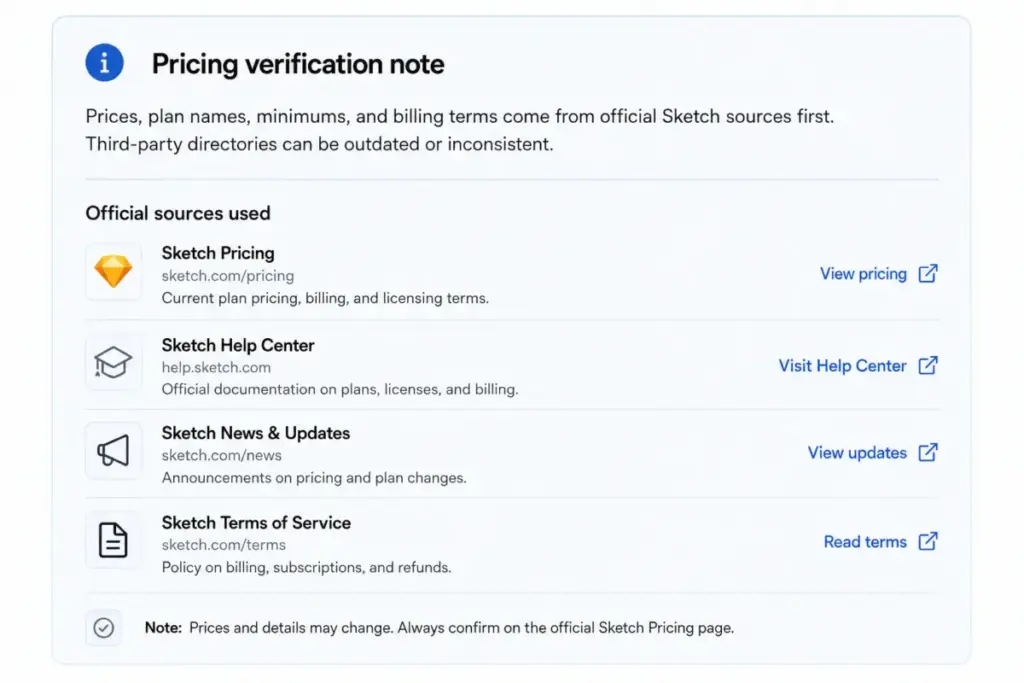
Every price here comes from Sketch’s own pricing page, terms of service, help center, education page, and App Store listing, checked on June 29, 2026, with competitor prices pulled from each vendor’s official pricing page. We did not run a hands-on deployment for this guide, so the analysis is research-based rather than a usage review.
We are flagging this because several pages ranking for Sketch pricing still show stale numbers. Some directories quote older $9 or $10 starting prices, some treat free Viewers as a free plan, and at least one formats the one-time Mac-only license as if it were a monthly subscription. When a third-party directory disagrees with Sketch’s official pricing page, the official page wins. Procurement-focused pages may also show negotiated ranges below list price, which can be real for large deals but should not be treated as published pricing. For more product cost breakdowns built the same way, see our pricing guides.
FAQ
How much does Sketch cost in 2026?
Sketch Standard costs $12 per editor per month billed yearly, which is $144 per editor per year. Professional is $24 and Enterprise is $44 per editor per month on the same annual billing, per Sketch’s pricing page on June 29, 2026.
Is Sketch free to use?
No, there is no general free editor plan. Sketch confirms this in its help center. You get unlimited free Viewers on any paid subscription, a free Education plan for verified students and educators, and a 30-day trial, but working designers need a paid seat.
Does Sketch have a free trial?
Yes. It runs 30 consecutive days, starts with no credit card, and you get one per customer. Adding payment details during the trial raises your invitation limits.
Is Sketch cheaper than Figma?
Yes, if you ignore free tiers. At ten paid editors, Sketch Standard is $1,440 per year while ten Figma Professional Full seats run $160 per month. But Figma has a free Starter plan and runs in the browser, so Figma is cheaper to start and works on any OS. Compare Figma’s pricing before deciding.
What is the Sketch Mac-only license?
It is a one-time $120 native Mac app license with one year of updates and local documents. It is not a cheaper subscription. It excludes real-time collaboration, online sharing, developer handoff, online comments, and iOS preview, so it only suits solo offline work.
How much is Sketch Enterprise, and is it worth it just for SSO?
Enterprise is $44 per editor per month billed yearly. No, it is not worth it just for SSO. SSO is available on Professional at $24. Enterprise is the tier for SCIM, BYOK, and security reviews, and several Enterprise services require at least 15 paid editors.
What is Sketch Private Cloud and what does it cost?
It is a private cloud deployment with a hosting-location choice, custom-priced with a 50-editor minimum and a one-time setup fee that Sketch does not publish. It is for regulated organizations, not a routine upgrade from Enterprise.
Does Sketch run on Windows?
No. Sketch is a native Mac app and requires macOS Sonoma 14.0 or newer. Mixed-OS teams should look at browser-based tools instead.
What happens to my files when the Sketch trial ends?
If you do not convert, your Workspace documents become read-only for 90 days and may be permanently deleted after that, per Sketch’s help center. Export anything you want to keep before the trial lapses.
Do viewers cost extra in Sketch?
No. Every paid subscription includes unlimited free Viewers, so people who only need to inspect files or read specs do not consume a paid editor seat.
The Bottom Line on Sketch Pricing
Sketch is straightforward to price once you ignore the noise. Standard at $12 per editor per month is the plan most teams should buy, and it already includes the collaboration and handoff features that make the tool useful. Professional and Enterprise are governance and security upgrades, not creative ones, so only climb the ladder when someone names a real requirement. Avoid the Mac-only license unless you work alone and offline, and treat Private Cloud as a custom procurement project with a 50-editor floor.
The honest summary: Sketch is fairly priced for a Mac-first design team and unremarkable on cost against free-tier rivals like Figma and Penpot. If your team lives on Macs and wants a native tool, buy Standard and move on. If you are weighing it against your broader stack, our roundup of the best team collaboration tools and the guide to project management software put the design decision in context with the rest of your toolset.