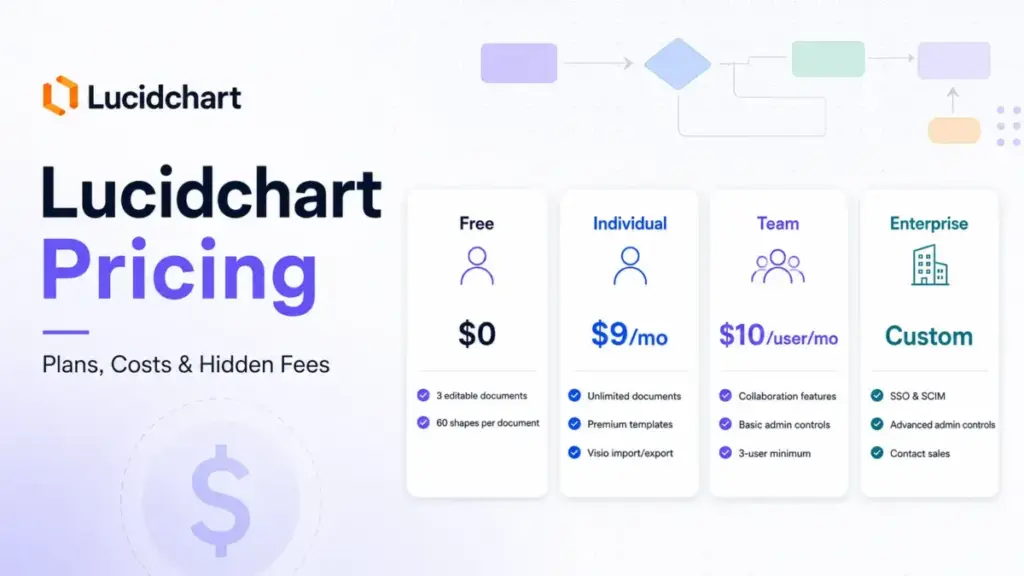
Lucidchart looks cheap. Individual is $9 a month, Team is $10 per user, and the free plan costs nothing. That sticker price is the trap.
The number most teams should care about is not $9 or $10. It is the three-seat Team minimum, the per-user math at 25 and 50 people, and the moment your IT team asks for SSO and the price changes from a published rate to a custom quote.
I have deployed diagramming and workflow tools across distributed teams for years, and Lucidchart follows a familiar pattern: easy to start, fine on Team, then a hard wall when security and identity requirements show up.
Teams shopping it usually evaluate it alongside the broader best project management software stack, since diagramming rarely stands alone. This guide breaks down every plan, the seat math at five team sizes, the gates that force an Enterprise call, and the cheaper options worth checking first.
One thing up front, and I will come back to it: Lucid does not expose every billing detail in plain text on its own pricing page, so a few numbers here carry a verify-before-you-buy flag.
Quick Pricing Verdict
| Question | Answer |
|---|---|
| Starting price | $9/month plus tax for Individual (as of June 2026) |
| Free plan | Yes, capped at 3 editable documents and 60 shapes per document |
| Free trial | 7-day trial of the Individual plan |
| Best plan for most teams | Team at $10/user/month, with a 3-user minimum |
| Plan to avoid | Free plan for ongoing business work; it fills up fast |
| Biggest hidden cost | Enterprise upgrade for SSO and SCIM, priced by custom quote |
| Best alternative if too expensive | draw.io (free core app) or Visio Plan 1 inside Microsoft 365 |
| Pricing verified | June 26, 2026 |
What this means: For a solo user, $9/month is a fair price for unlimited diagrams. For a team, the real decision is whether basic admin controls on Team are enough, or whether identity management pushes you into a quote-based Enterprise contract. Pricing verified June 2026. Check the official Lucidchart pricing page for current rates.
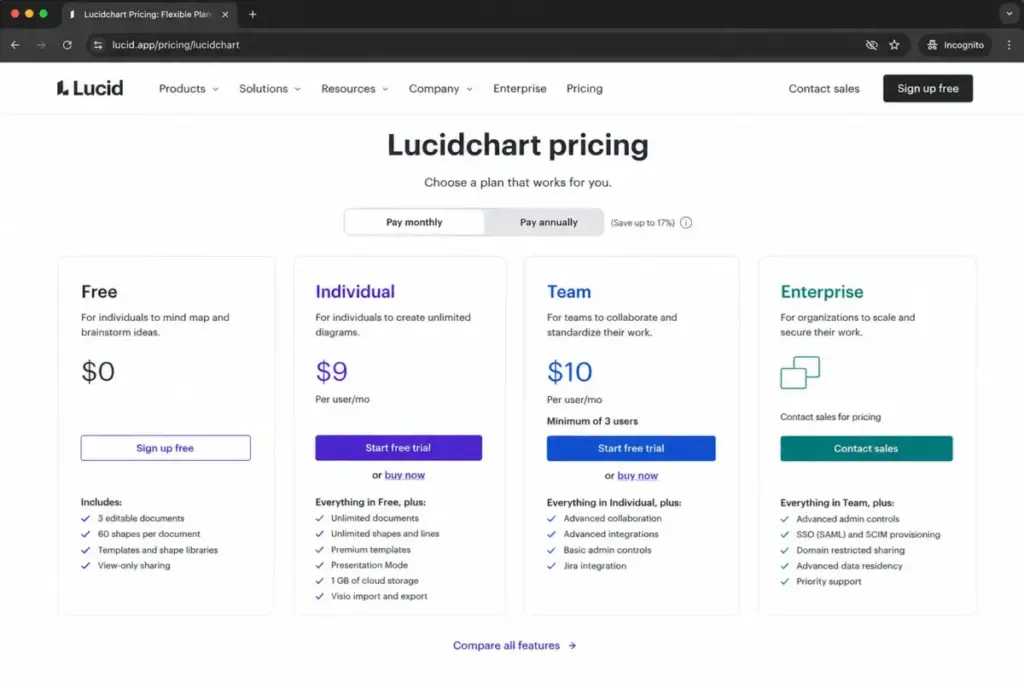
A note on price confidence: Lucid’s own pricing page renders much of its plan detail dynamically, so the full table is hard to read in plain text. The $9 Individual figure comes straight from Lucid’s official trial page. The $10/user Team figure and the 3-seat minimum come from reputable third-party pricing pages such as Capterra and Software Advice. Treat Team math as accurate but verify in your own Lucid account before you commit.
If You Are a Solo User
A solo user pays $9/month plus tax for Lucidchart Individual (as of June 2026), and for most independent work that is the right plan. The free plan exists, but it stops being useful the moment your work gets real.
Here is the practical split. The free plan gives you 3 editable documents and 60 shapes per document, according to Lucid’s official trial page. Some third-party sources list 75 shapes instead, so confirm the live cap in your own account before planning around it. Either way, that is enough to sketch a single flowchart or try the editor. It is not enough to maintain a library of process maps, UML diagrams, or architecture drawings.
Individual removes those caps. You get unlimited documents, unlimited shapes and lines, premium templates, Presentation Mode, 1 GB of cloud storage, premium shape libraries, and Visio import and export.
The Visio import and export point matters more than people expect. If you receive .vsdx files from clients or coworkers, that capability alone justifies the $9 over the free plan. The free tier cannot open them.
Solo verdict: Pay for Individual at $9/month if you build diagrams weekly. Stay on free only if you make one diagram a quarter and never touch Visio files. Solo users who want diagrams-as-code or occasional sketches should look at draw.io first, since its core app is free.
If You Have a 5-Person Team
A 5-person team on Lucidchart Team pays $50/month, or $600/year, at the published $10/user/month rate (as of June 2026). That assumes five paid seats and no Enterprise security requirements.
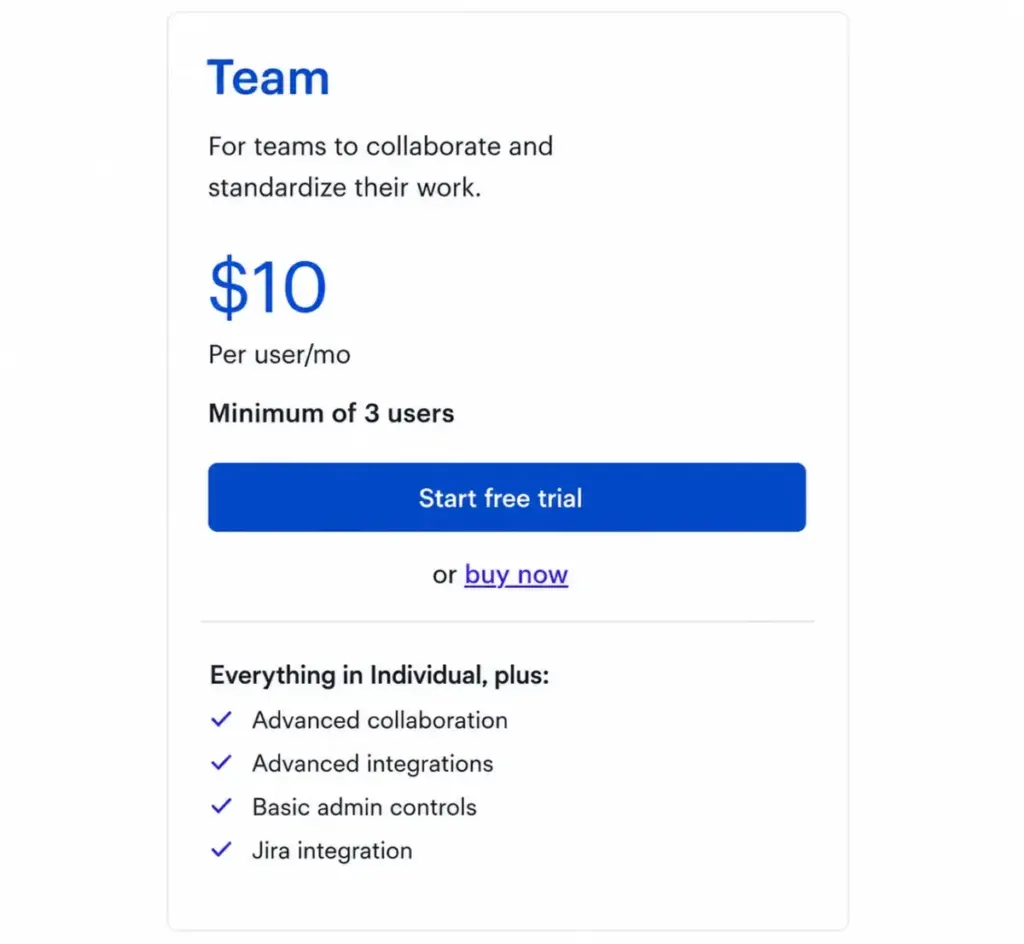
Team is where Lucidchart earns its keep for groups. The plan adds advanced collaboration, advanced integrations, basic admin controls, and the Jira integration, according to third-party pricing pages. For a marketing, ops, or product pod that needs shared folders and co-editing, that is the correct tier.
But watch the floor. Team carries a 3-user minimum. A real two-person team that wants Team features still pays for three seats, which puts the practical entry point at $30/month even if one license sits unused.
The 5-seat math is clean: five people, five seats, $50/month. No surprises at this size unless someone in IT asks for single sign-on, which Team does not include.
If You Have 10 to 20 Users
A 10-user team pays $100/month ($1,200/year) and a 20-user team pays $200/month ($2,400/year) on Lucidchart Team at the published rate (as of June 2026). This is the best public-price scenario for a mid-size group that only needs Team features.
The cost scales linearly, which makes budgeting simple. What does not scale simply is the admin story. At 10 to 20 people you start caring about who can edit what, domain restrictions, and provisioning new hires without manual invites. Team gives you basic admin controls. It does not give you SCIM provisioning or SAML SSO.
There is a second hidden cost at this size that almost no pricing page mentions. The Lucidchart iOS app, per its App Store listing, requires a Team or Enterprise subscription, and Free or Individual users are told to use the desktop or mobile web browser instead. If field staff or tablet users need the native app, that gate effectively pushes them onto a paid Team seat.
10-to-20 verdict: Team at $100 to $200/month works well if your identity and provisioning needs are light. The moment HR or IT wants automated onboarding and SSO, you are pricing Enterprise, not Team.
If You Have 25 or More Users
At 25 users, Lucidchart Team costs $250/month ($3,000/year); at 50 users, $500/month ($6,000/year); at 100 users, $1,000/month ($12,000/year) at the published Team rate (as of June 2026). Those are the public-price baselines. Whether you pay them depends on security, not headcount.
This is the scale question I ask of every tool: does it work the same way at 100 users as it does at 5? For Lucidchart, the answer is no, because the gates change. Microsoft’s Entra documentation states that automatic user provisioning for Lucidchart assumes a tenant on the Enterprise plan or better. A Lucid community support response says the same about configuring SAML and SCIM for an organization account: that is Enterprise territory.
So at 25-plus users, the published Team math is real, but most organizations of that size need identity management, which is quote-only.
A negotiation tip from procurement reality: Enterprise pricing is custom and not publicly disclosed, so your only bargaining chips are volume and contract term. One public example shows how this cuts both ways. UC Santa Cruz announced it would discontinue centralized Lucidchart licensing in 2026 because costs rose while usage stayed low and the vendor required a minimum purchase that exceeded real demand. Do not over-buy seats you cannot fill.
Full Plan Breakdown
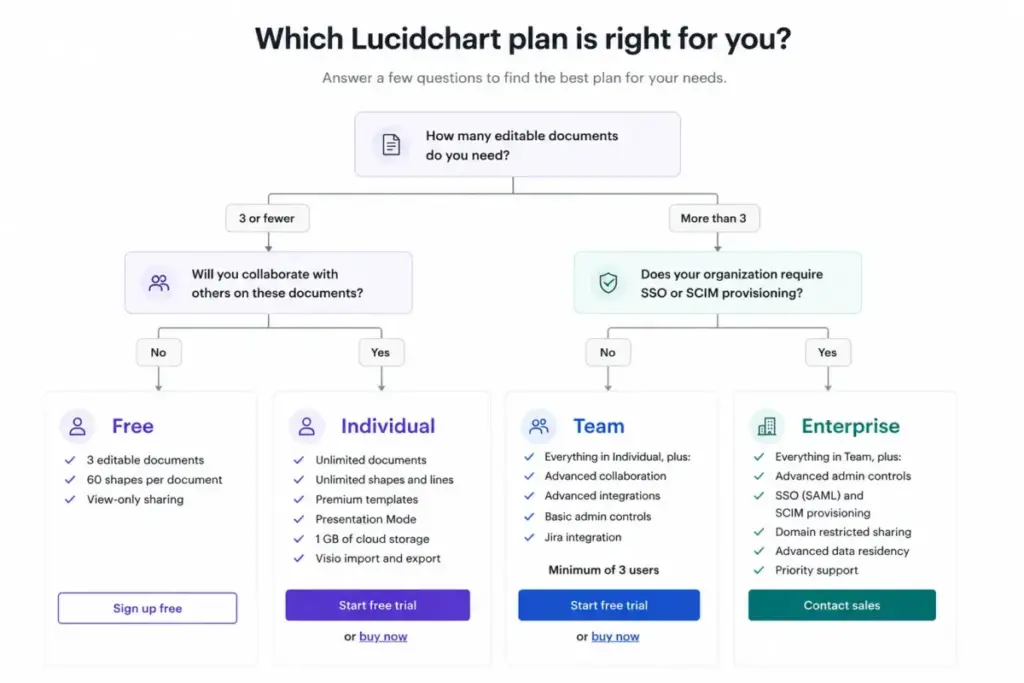
Lucidchart sells four plans: Free, Individual, Team, and Enterprise. Here is the full comparison at verified June 2026 pricing.
| Plan | Monthly | Annual | Billing basis | Best for |
|---|---|---|---|---|
| Free | $0 | $0 | No charge | Single diagrams, evaluation |
| Individual | $9/month plus tax | ~$108/year if annualized at the published rate | Flat, one user | Solo diagramming with Visio support |
| Team | $10/user/month | ~$120/user/year if annualized; 3-user minimum | Per user | Small to mid teams needing collaboration |
| Enterprise | Custom quote | Custom quote | Per organization | SSO, SCIM, governance at scale |
What this means: The published Individual and Team prices are real entry points. The annual figures are straight annualizations of the monthly rate, not a confirmed discount, because Lucid does not expose an annual-versus-monthly delta in accessible text. Capterra states Team is billed annually starting at $30/month for three licenses, which matches the 3-seat minimum. Enterprise has no public per-seat price, so anyone quoting you a fixed Enterprise number is guessing.
What Each Plan Includes
Free includes 3 editable documents, 60 shapes per document, and 100 basic templates. Missing: unlimited documents, premium shape libraries, Visio import and export, and any team admin. Avoid if you maintain more than three diagrams at once.
Individual ($9/month plus tax) includes unlimited documents, unlimited shapes and lines, premium templates, Presentation Mode, 1 GB storage, premium shape libraries, and Visio import and export. Missing: team admin controls, advanced collaboration, SSO, and SCIM. Avoid if more than one person needs to manage shared content.
Team ($10/user/month, 3-seat minimum) adds advanced collaboration, advanced integrations, basic admin controls, and Jira integration per third-party pricing pages. Missing: SAML SSO, SCIM provisioning, domain control, and advanced governance. Avoid if your IT team mandates single sign-on.
Enterprise (custom quote) unlocks SAML SSO, SCIM provisioning, advanced admin controls, domain control, and advanced data and automation. Lucid does not disclose the price or seat minimum in accessible text. Avoid assuming a price; you must contact sales.
Feature Gates: What You Actually Get by Plan
The gates, not the prices, decide which plan you land on. This table maps the features that trigger upgrades.
| Feature | Free | Individual | Team | Enterprise |
|---|---|---|---|---|
| Editable documents | 3 | Unlimited | Unlimited | Unlimited |
| Shapes per document | 60 | Unlimited | Unlimited | Unlimited |
| Basic templates (100) | Yes | Yes | Yes | Yes |
| Premium templates | No | Yes | Yes | Yes |
| Premium shape libraries | No | Yes | Yes | Yes |
| Visio import and export | No | Yes | Yes | Yes |
| Advanced collaboration | No | No | Yes | Yes |
| Basic admin controls | No | No | Yes | Yes |
| SAML SSO | No | No | No | Yes |
| SCIM provisioning | No | No | No | Yes |
| Enterprise Shield add-on | No | No | No | Optional |
| Cloud Accelerator / Lucidscale | No | No | No | Optional |
What this means: The big jumps happen twice. First, from Free to Individual, where unlimited shapes and Visio support arrive. Second, from Team to Enterprise, where SSO and SCIM live. There is no middle option that adds enterprise identity to the Team price. If you need SSO, you pay for a custom quote, full stop.
Hidden Costs and Add-Ons
Lucidchart’s published prices leave out several cost centers that procurement teams should map before signing. None of these carry public Lucidchart prices in accessible official sources, so treat them as quote-based.
| Add-on | What it unlocks | Public price |
|---|---|---|
| Enterprise Shield | Enhanced security visibility and admin control at scale | Custom, not disclosed |
| Cloud Accelerator | Cloud documentation and automated cloud architecture diagrams | Custom, not disclosed |
| Lucidscale | Cloud infrastructure visualization for AWS, Azure, and GCP | Custom, not disclosed |
| Lucid Visual Collaboration Suite | Lucidchart plus Lucidspark in one bundle | Custom for Enterprise |
| Professional services | Onboarding, technical configuration, training, assessments | Custom, not disclosed |
What this means: Lucid describes each of these capabilities on its official product and help pages, but it does not list standard public prices. If a sales rep bundles Enterprise Shield or Cloud Accelerator into your quote, ask for line-item pricing so you can compare year over year.
Beyond add-ons, three smaller costs deserve a flag:
- Tax. Lucid’s trial page lists Individual as $9/month plus tax, so your invoice runs higher than the sticker depending on jurisdiction.
- The Team seat minimum. A team of one or two that needs Team features still pays for three seats, a practical floor of $30/month at the published rate.
- Mobile app access. The iOS app requires Team or Enterprise per its App Store listing, so Free and Individual users are limited to browser access.
Insider tip: Before you start the 7-day Individual trial, decide whether you need Team at all. Upgrading later is easy. What is harder is unwinding a charge. Lucid’s cancellation help page says cancellation takes effect at the end of the current billing cycle, not immediately, and some Trustpilot and Reddit users report confusion over annual charges. Lucid’s own help center notes charges occur because a monthly or annual subscription was purchased. None of that is unusual, but read your billing interval before you click upgrade.
Monthly vs Annual Billing
Lucidchart does not disclose its annual discount percentage in accessible official text, so I will not invent one. The honest position: the published rates are $9/month for Individual and $10/user/month for Team, and Capterra reports Team is billed annually.
Here is what I can say without guessing. If you annualize the published monthly rates, Individual lands near $108/year and Team near $120/user/year. Whether Lucid offers a real saving for paying yearly versus monthly is not exposed in plain text on its pricing page, and third-party pages do not consistently separate the two.
Recommendation: If you are confident you will use Lucidchart for 12 months, annual billing is the norm for Team and likely your default. If you are testing the tool or your headcount is volatile, ask sales or check in-account for a true monthly option before locking in a year. Do not assume a discount that the official page does not state.
Which Lucidchart Plan Should You Choose?
Plan choice comes down to three questions: how many diagrams, how many editors, and whether IT requires identity management. Here is the breakdown by buyer type.
Solo founders and independent consultants should choose Individual at $9/month. You get unlimited diagrams and Visio support, which covers client work. Skip Team; you do not need seat management.
5-to-15 person product, ops, or process teams should choose Team at $10/user/month. Advanced collaboration and basic admin controls fit groups that co-edit workflows daily, and the per-user math stays predictable up to about 20 seats.
25-plus user organizations with IT governance should plan for Enterprise. Once SAML SSO, SCIM provisioning, or domain control enters the requirements, Team cannot serve you, and the price becomes a custom quote driven by security needs more than headcount.
Students and educators should skip paid plans entirely. Lucid’s education page says students and educators are eligible for a free Education account, which is a better deal than any paid tier for academic use.
Which Lucidchart Plan Should You Avoid?
Avoid the Free plan for any ongoing business use. The 3-document and 60-shape-per-document caps surface within the first real project. The free tier is an evaluation tool, not a work tool, and treating it as a permanent solution wastes the time you spend hitting walls.
The exception: if you make one simple diagram a quarter and never touch Visio files, Free is fine.
Also be careful with Individual for team scenarios. At $9/month it looks like a bargain for a small group, but it has no admin controls, no advanced collaboration, and no governance. Buying multiple Individual seats to dodge the Team minimum creates a management mess. If you have a real team, pay for Team.
Lucidchart Pricing vs Competitors
Lucidchart is not the cheapest diagramming option, and at scale it is not close. Cost depends on whether you need cloud collaboration, Microsoft-stack integration, or free offline diagramming.
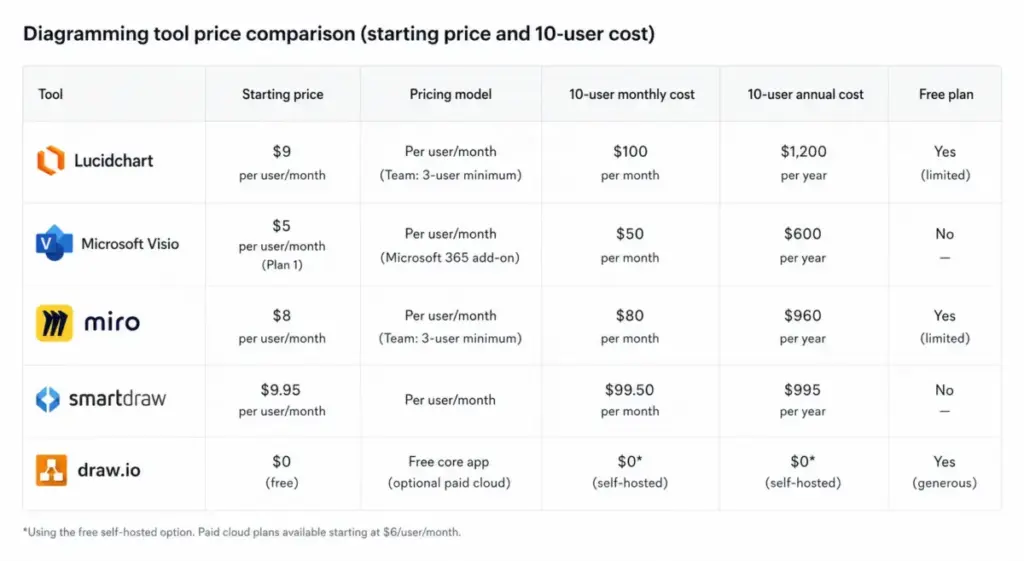
| Tool | Starting price | 10-user cost | Best for |
|---|---|---|---|
| Lucidchart | $10/user/month (Team) | $100/month | Polished diagramming with admin controls |
| Microsoft Visio | $5/user/month (Plan 1, annual) | $50/month | Microsoft 365 teams |
| Miro | $8/member/month (annual) | $80/month | Visual collaboration and whiteboarding |
| SmartDraw | $6.95/user/month (Team, annual) | $69.50/month | Budget team diagramming |
| draw.io | $0 (core app) | $0 | Free offline and online diagramming |
What this means: At 10 users, Lucidchart Team ($100/month) costs more than every alternative in this table. Visio Plan 1 runs $5/user/month paid yearly per Microsoft’s official pricing, and Visio web features are included only inside qualifying Microsoft 365 commercial plans, not every M365 license, which makes it close to free for teams that already hold the right plan. draw.io’s core editor is free forever and open source, with paid pricing only for the separate Atlassian apps. Miro starts at $8/member/month billed annually (about $100/month month-to-month for 10 members) per its official pricing, and SmartDraw Team runs $6.95/user/month billed annually with a 3-user minimum. Lucidchart’s premium is its polish, template depth, and collaboration, not its price. For Miro specifically, the gap narrows because both target visual collaboration; see the Miro pricing breakdown and the Miro review and analysis if whiteboarding matters more than structured diagrams. Lucidchart and most of these tools fit naturally into a wider team collaboration software stack.
Is Lucidchart Worth the Price?
Lucidchart is worth $9/month for solo users and $10/user/month for teams that need polished, collaborative diagramming and can live within basic admin controls. It is not worth it for budget-driven buyers who only need occasional diagrams or for teams forced into a custom Enterprise quote purely to get SSO.
Worth it if: you build reusable workflows, system diagrams, org charts, UML, ERDs, or client-facing process maps, and your team co-edits regularly. The template depth and Visio compatibility pay for themselves in saved formatting time. If diagramming is one piece of a wider tooling decision, weigh it against the best team collaboration tools before committing budget.
Not worth it if: you only need occasional diagrams, you prefer diagrams-as-code, or you are already on Microsoft 365 and can use Visio Plan 1 or included Visio web features. In those cases, draw.io or Visio delivers most of the value for less.
The honest summary from my evaluation: Lucidchart prices its entry tiers to look like an easy yes, and for individuals they are. The decision gets harder at the Team minimum and harder still at the Enterprise gate, which is where your real cost lives.
How to Avoid Overpaying for Lucidchart
A few moves keep your Lucidchart bill honest:
- Right-size seats before you buy. Team has a 3-user minimum; do not buy 10 seats for a team of 6. Provision only the editors who need access.
- Separate viewers from editors. Not everyone who looks at a diagram needs a paid editing seat. Map who edits before counting seats.
- Check whether Visio covers you. If your organization runs Microsoft 365, price Visio Plan 1 at $5/user/month first; it may meet your needs at half the Team rate.
- Ask for Enterprise line items. If sales bundles Enterprise Shield, Cloud Accelerator, or professional services, request itemized pricing so you can drop what you will not use.
- Confirm your billing interval. Cancellation takes effect at the end of the billing cycle, so know whether you signed up monthly or annual before you commit.
- Use the Education account if eligible. Students and educators qualify for a free Education account; never pay for academic use.
- Reconsider scale annually. Review seat usage every year. The UC Santa Cruz case shows what happens when minimum purchases outrun real demand.
FAQ
How much does Lucidchart cost in 2026?
Lucidchart Individual costs $9/month plus tax, and Team costs $10/user/month with a 3-user minimum, as verified in June 2026. The free plan costs nothing but caps you at 3 documents and 60 shapes each. Enterprise pricing is a custom quote that Lucid does not publish, since it depends on seat count, security needs, and contract terms.
Is Lucidchart actually free or just a trial?
Both exist. Lucidchart has a permanent free plan limited to 3 editable documents, 60 shapes per document, and 100 basic templates. Separately, there is a 7-day free trial of the paid Individual plan. The free plan never expires but stops being useful once you exceed those caps, which happens quickly on real projects.
What happens when I exceed the Lucidchart free shape limit?
Once a document passes the free plan’s 60-shape cap, you cannot add more shapes until you upgrade or reduce the count. Lucid’s official trial page lists 60 shapes per document, though some third-party sources report 75, so confirm the live limit in your own account before relying on it for planning.
Can I use Lucidchart with only two team members?
Yes, but you will pay for three. Lucidchart Team carries a 3-user minimum according to Capterra and Software Advice, so a two-person team that wants Team features still pays for three seats. That puts the practical floor at $30/month at the published $10/user rate, even with one seat unused.
Does Lucidchart support SSO without Enterprise?
No. SAML SSO and SCIM provisioning require the Enterprise plan. Microsoft’s Entra provisioning documentation states automatic provisioning assumes an Enterprise tenant, and a Lucid community support response confirms SAML and SCIM setup needs an Enterprise organization account. If single sign-on is mandatory, budget for a custom Enterprise quote.
Is Lucidchart cheaper than Visio?
No. Microsoft Visio Plan 1 costs $5/user/month paid yearly, versus Lucidchart Team at $10/user/month. Visio web features are also included inside qualifying Microsoft 365 commercial plans (not every M365 license), which makes it close to free for teams on the right Microsoft plan. Lucidchart costs more, and you pay for its collaboration depth and template library, not for a lower price.
Can I cancel Lucidchart after one month?
You can cancel at any time, but the change takes effect at the end of your current billing cycle, per Lucid’s cancellation help page. If you are on an annual plan, that means access continues until the year ends rather than stopping mid-term. Check whether you signed up monthly or annually before assuming a one-month commitment.
Can students get Lucidchart for free?
Yes. Lucid’s education page states that students and educators are eligible for a free Education account. That is a better deal than any paid plan for academic use, so students should never pay the Individual or Team rate. Verify current eligibility on Lucid’s education page, since program terms can change.
The Bottom Line
Lucidchart’s pricing rewards solo users and small teams and punishes anyone who assumes the $9 to $10 sticker is the whole story. Individual at $9/month is a clean yes for one person. Team at $10/user/month is the right call for collaborative groups up to about 20 seats. Past that, or the moment IT requires SSO and SCIM, you are negotiating a custom Enterprise quote where the price reflects security and governance, not headcount.
If budget is the deciding factor, draw.io is free and Visio Plan 1 undercuts Team by half for Microsoft teams. If polish and collaboration matter more, Lucidchart earns its premium. My advice, after mapping this out as a project and collaboration tooling decision, is to size your seats and identity requirements first, then price the plan, not the other way around. Verify the Team rate and your billing interval in-account before you commit, since Lucid’s public pricing text leaves a few details unconfirmed.