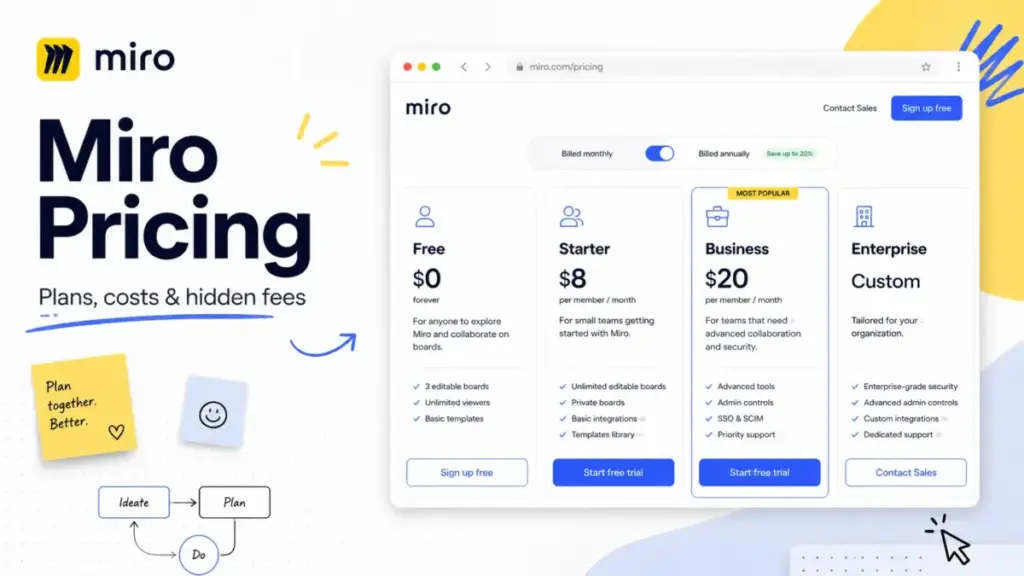
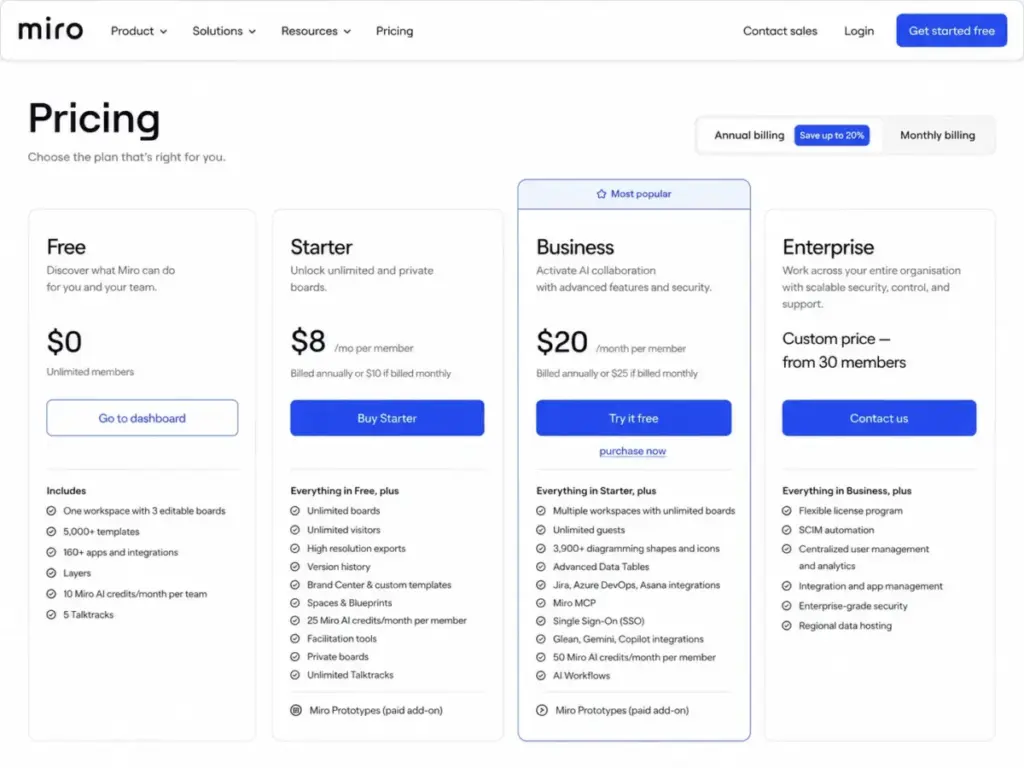
Miro charges $8 per member per month on its cheapest paid plan. That number is on the pricing page, and it is accurate.
But it leaves out the part that shapes your actual bill: who counts as a member, what happens when you invite a client, whether your team needs SSO, and how fast you burn through AI credits.
I went through every plan, every add-on, and every billing rule Miro publishes (as of May 2026) to build the pricing breakdown that the official page does not give you. Below, you will find the real cost at 5, 10, 25, 50, and 100 users, the hidden costs most pricing guides skip, and the plan decision that fits your team.
If your team runs workshops, roadmapping sessions, or client collaboration on shared boards, this guide tells you exactly what you will pay and where the upgrade pressure starts. For broader context on how Miro fits the market, see our best team collaboration tools ranking.
| Quick Pricing Verdict | |
|---|---|
| Starting price | $0 (Free plan, 3 editable boards) |
| Lowest paid plan | $8/member/month (Starter, billed annually) |
| Free plan | Yes, unlimited members, 3 editable boards |
| Free trial | 14-day Business trial (credit card required) |
| Best plan for most teams | Business at $20/member/month (annual) for teams needing SSO, guest editing, or AI Workflows |
| Plan to avoid | Free for any recurring team workflow (3-board cap creates constant friction) |
| Biggest hidden cost | Permanent team member seats on paid plans, plus invoice payment minimums |
| Best alternative if too expensive | FigJam at $3/month Collab seat (if whiteboarding is the only need) |
| Pricing verified | May 25, 2026, viamiro.com/pricing |
The Advertised Price vs. the Real Price
Here is the gap that shapes the Miro pricing conversation in 2026.
| What Miro advertises | What the bill looks like |
|---|---|
| Free: $0, unlimited members | 3 editable boards. Board 4 makes board 1 view-only. No private boards. |
| Starter: $8/member/month | Every permanent team member needs a paid seat. Guests can view and comment only, not edit. |
| Business: $20/member/month | Includes SSO, guest editing, AI Workflows. But invoice payment requires a 5-license annual minimum. |
| Enterprise: Custom | Starts from 30 members. Price depends on sales negotiation, contract terms, and add-on selection. |
What this means: The starting price is real, but the billing model adds cost in ways the pricing page does not explain upfront. Every person who joins your team as a permanent member requires a paid license. Adding users mid-cycle triggers prorated charges. And if you want guests who can edit boards (not just view them), you need Business or higher.
That gap between the number on the pricing page and the number on the invoice is where most teams get surprised.
The 6 Hidden Costs Nobody Mentions
Most pricing comparisons list Miro’s starting price and move on. These are the costs that show up after you commit.
1. Every team member is a paid seat
On paid plans, every permanent team member needs a license. There is no “free seat for viewers who are part of the team.” If someone is in your workspace and needs full member rights, they get a paid seat (verified May 2026).
This catches teams that start small and grow. Add three people to your Starter plan mid-quarter, and Miro charges a prorated fee immediately. You can schedule license removals for the renewal date, but you cannot get a refund for the current billing period.
2. Invoice payment minimums
Credit card payment has no seat minimum. But if your finance team requires invoice billing (common at companies with 10+ people), Miro imposes minimums:
| Payment method | Starter minimum | Business minimum |
|---|---|---|
| Credit card (automated) | 1 license | 1 license |
| Invoice (annual) | 10 licenses | 5 licenses |
What this means: A 4-person team that needs invoice billing on Starter has to buy 10 licenses. That is $80/month equivalent on annual billing for 4 people, not the $32/month you would expect. Quarterly true-up invoices apply if you add licenses under annual invoicing.
3. Guests vs. visitors vs. members
This is the billing confusion that creates real buyer anxiety. Miro uses three different collaboration roles, and each behaves differently depending on your plan.
| Role | Who they are | Cost | Starter | Business | Enterprise |
|---|---|---|---|---|---|
| Member | Permanent team member | Paid seat | Yes | Yes | Yes |
| Guest | External collaborator invited to specific boards | No seat cost | View/comment only | Can edit | Can edit |
| Visitor | Anyone with a public board link | No seat cost | Can view | Can view | Can view |
On Starter, guests cannot edit your boards. They can only view and comment. If a consulting team or agency needs clients to edit boards directly, Starter does not support that workflow. You need Business at $20/member/month.
4. AI credit overuse
Miro includes AI credits by plan, but the allocation is not generous for heavy users.
| Plan | AI credits per month |
|---|---|
| Free | 10 per team (total) |
| Starter | 25 per member |
| Business | 50 per member |
| Enterprise | Custom |
A 10-person Business team gets 500 AI credits per month. Each AI action (text generation, image search, template creation, Sidekick interaction) consumes credits. If your team uses AI features heavily across workshops and brainstorming sessions, you will hit the cap. An AI credits add-on exists, but Miro does not publish the exact price in a static table. You will see it inside the product billing flow.
5. Miro Prototypes add-on
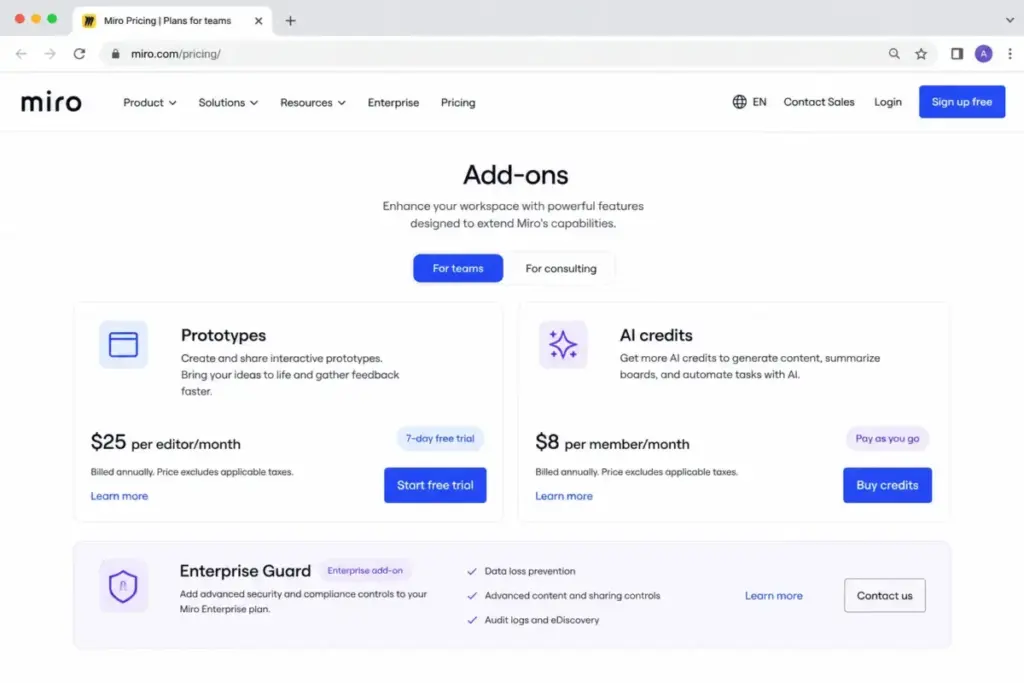
Miro Prototypes is a separate paid add-on at $20/month base price (shown on the pricing page, verified May 2026). It unlocks AI-powered prototype generation, preview mode, connector lines, focus edit mode, and screenshot-to-editable mockup conversion.
A 7-day trial is available for Starter and Business users with no credit card required. After the trial, advanced prototyping features stop unless you purchase the add-on.
6. Enterprise security gate
SCIM provisioning, Enterprise APIs, regional data hosting, Flexible Licensing Program, and Enterprise Guard are all locked behind Enterprise. If your security or compliance team requires any of these, there is no way around the custom Enterprise pricing conversation. Teams evaluating visual collaboration software options should factor these security gates into the total cost comparison.
Enterprise Guard itself is an additional paid add-on on top of Enterprise pricing.
Miro Plans: What Each One Actually Includes
Free: The sandbox with a short runway
Best for: Individuals or very small teams trying Miro before committing.
Miro Free allows unlimited team members in one workspace. You get 3 editable boards, 5,000+ templates, 160+ integrations, layers, 10 AI credits per team per month, and 5 Talktracks.
The catch: only 3 boards can be active at a time. Create board number 4, and your earliest board becomes view-only. There are no private boards, so every board is visible to every team member.
Upgrade when: You need more than 3 active boards, private sharing, custom templates, high-resolution exports, voting, timer, or version history.
Avoid if: Your team runs recurring workshops or has more than one active project at a time. The 3-board rotating limit creates constant friction.
Starter ($8/member/month annual, $10 monthly): The first real plan
Best for: Small internal teams (3–10 people) who need unlimited boards and private collaboration without enterprise overhead.
Starter removes the board cap. You get unlimited editable boards, private boards, custom templates, Spaces, Blueprints, high-resolution exports, password-protected public boards, and 25 AI credits per member per month.
Missing: SSO, SCIM, editable guest access, multiple workspaces, full AI Workflows, Enterprise APIs.
Avoid if: You need clients or external collaborators to edit boards. Guests on Starter can view and comment only.
Business ($20/member/month annual, $25 monthly): The collaboration plan
Best for: Teams of 10–50 that need SSO, editable guest access, AI Workflows, or advanced diagramming.
Business unlocks the features that matter for cross-team and external collaboration: SSO (SAML), editable guests, multiple workspaces, 50 AI credits per member per month, AI Workflows (Sidekicks and Flows), knowledge integrations, Miro MCP, and advanced diagramming.
Missing: SCIM, Flexible Licensing Program, Enterprise APIs, regional data hosting, Enterprise Guard.
Avoid if: You do not need SSO or editable guest access. Starter covers unlimited boards and private sharing at less than half the cost.
A note on Business pricing: several third-party pricing guides still show Miro Business at $16/member/month (annual). That is outdated. The current official price is $20/member/month billed annually or $25 billed monthly (verified May 2026 on miro.com/pricing).
Enterprise (custom pricing): The governance tier
Best for: Organizations with 30+ members needing company-wide rollout, central admin controls, SCIM, regional data hosting, or Flexible Licensing Program.
Enterprise starts from 30 members with custom pricing. You get everything in Business plus SCIM provisioning, Enterprise APIs, Flexible Licensing Program, regional data hosting, customer success support, and the option to add Enterprise Guard, Miro Insights, and Miro Portfolios.
Missing: A public price. Exact cost, discount terms, AI credit allocation, and add-on pricing depend on your sales quote and contract.
Avoid if: Your team is under 30 people and does not need SCIM or regional data hosting. Business covers SSO and guest editing at a known price.
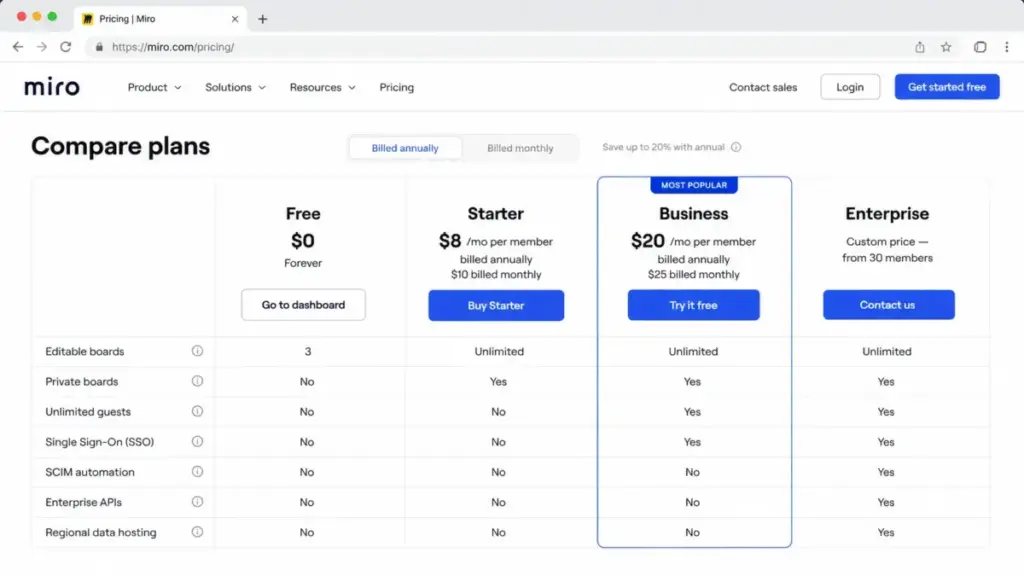
Feature Gates: What You Actually Get by Plan
This is the table that determines which plan your team needs. Features are not distributed evenly across tiers, and the gates are not always where you would expect them.
| Feature | Free | Starter | Business | Enterprise |
|---|---|---|---|---|
| Editable boards | 3 | Unlimited | Unlimited | Unlimited |
| Private boards | No | Yes | Yes | Yes |
| Custom templates | No | Yes | Yes | Yes |
| Spaces and Blueprints | No | Yes | Yes | Yes |
| AI credits/month | 10/team | 25/member | 50/member | Custom |
| AI Workflows (Sidekicks, Flows) | Limited | Limited | Included | Paid add-on |
| Visitors (public link) | No | Yes | Yes | Yes |
| Guests with edit access | No | No | Yes | Yes |
| SSO (SAML) | No | No | Yes | Yes |
| SCIM provisioning | No | No | No | Yes |
| Flexible Licensing Program | No | No | No | Yes |
| Enterprise APIs | No | No | No | Yes |
| Regional data hosting | No | No | No | Yes |
| Miro Prototypes (advanced) | No | Paid add-on | Paid add-on | Paid add-on |
| Enterprise Guard | No | No | No | Paid add-on |
What this means: The two gates that force most upgrades are guest editing (requires Business) and SCIM (requires Enterprise). If your workflow involves external collaborators who need to move sticky notes, draw on boards, or edit content directly, Starter will not work. That single requirement pushes you from $8 to $20 per member per month.
When the Free Plan Stops Working
The Free plan fails the moment any of these happen:
- Your team has more than 3 active projects or boards
- Anyone needs a private board that not everyone on the team should see
- You want high-resolution exports without a watermark
- You need version history to track changes across sessions
- Your workshop needs voting or timer features
- You run out of 10 AI credits for the entire team in a month
I have seen teams try to make Free work by archiving and rotating boards. It is technically possible, but it creates workflow friction that defeats the purpose of a visual collaboration tool. If your team uses Miro more than once a month, the Free plan will slow you down.
Real Cost Scenarios: 5, 10, 25, 50, and 100 Users
These calculations use the annual billing price, which saves 20% over monthly billing (verified May 2026). All prices exclude applicable taxes and add-ons.
| Team size | Starter (annual) | Business (annual) | Notes |
|---|---|---|---|
| 5 users | $480/year ($40/mo equivalent) | $1,200/year ($100/mo) | Starter works unless you need SSO or editable guests. |
| 10 users | $960/year ($80/mo equivalent) | $2,400/year ($200/mo) | Starter remains the lowest-cost paid plan. Business adds SSO, AI Workflows, and guest editing. |
| 25 users | $2,400/year ($200/mo) | $6,000/year ($500/mo) | Business is the practical choice once external guest editing, SSO, or advanced diagramming matter. |
| 50 users | $4,800/year ($400/mo) | $12,000/year ($1,000/mo) | Business has a published price, but Enterprise should be evaluated for SCIM, Flexible Licensing, and regional hosting. |
| 100 users | $9,600/year ($800/mo) | $24,000/year ($2,000/mo) | Most 100-seat organizations should compare Enterprise custom terms. Enterprise begins at 30 members and unlocks central governance. |
What this means: The Starter-to-Business jump is significant at scale. For a 25-person team, the annual difference is $3,600/year. That gap buys you SSO, editable guest access, AI Workflows, 50 AI credits per member (vs. 25), and multiple workspaces. Whether that is worth it depends on whether your team collaborates with external clients or requires SSO for security compliance.
One thing I have noticed: teams that start on Starter and grow past 15 people tend to hit the guest-editing wall within the first quarter. A consulting firm or product team running client workshops will need Business almost immediately.
Monthly vs. Annual Billing: The Savings Math
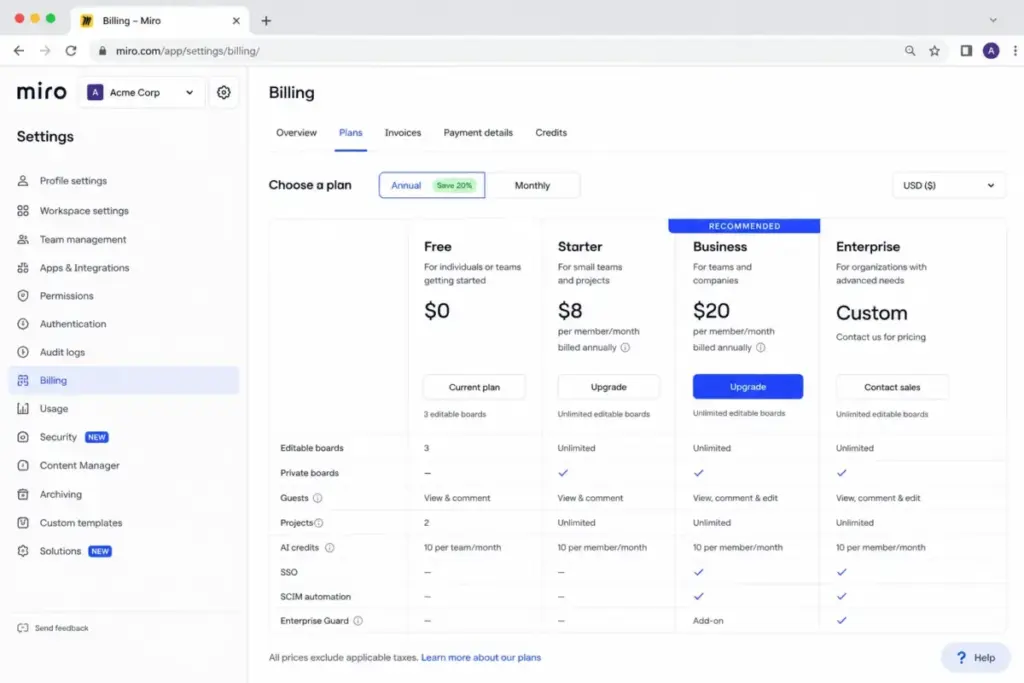
Miro offers a flat 20% discount for annual billing versus monthly billing (verified May 2026).
| Plan | Monthly | Annual (per month equivalent) | You save per user/year |
|---|---|---|---|
| Starter | $10/member/month | $8/member/month | $24/user/year |
| Business | $25/member/month | $20/member/month | $60/user/year |
At 10 users:
- Starter annual saves $240/year vs. monthly billing
- Business annual saves $600/year vs. monthly billing
The tradeoff is commitment. Annual billing locks you in for 12 months. If team size shrinks, you can schedule license removals for the renewal date, but you are paying for those seats until then.
My take: if you are confident about team size for the next 6 months, annual billing is the obvious call. The 20% savings is real and predictable. If your team is growing fast and you are not sure whether you will need 10 or 25 seats by Q3, start monthly and switch to annual once headcount stabilizes.
Which Miro Plan Should You Choose?
| If you are… | Choose this plan | Why |
|---|---|---|
| A solo user or freelancer exploring Miro | Free | 3 boards, unlimited members, no cost. Good enough for occasional use. |
| A 3–10 person internal team | Starter ($8/member/month) | Unlimited boards, private sharing, custom templates. No SSO or guest editing needed. |
| A team with external clients or consultants who edit boards | Business ($20/member/month) | Guest editing is locked behind Business. If clients need to move sticky notes, you need this. |
| A team that requires SSO for security compliance | Business ($20/member/month) | SSO (SAML) is a Business feature. Not available on Starter. |
| A product team using AI Workflows (Sidekicks, Flows) heavily | Business ($20/member/month) | Full AI Workflows included. Starter only gets limited access. |
| An organization with 30+ members needing SCIM or regional hosting | Enterprise (custom) | SCIM, Enterprise APIs, Flexible Licensing, and regional data hosting are Enterprise-only. |
Which Miro Plan Should You Avoid?
Avoid the Free plan for any recurring team workflow.
The 3-editable-board limit and the lack of private boards create constant friction for teams that use Miro regularly. If your team runs more than one project at a time, Free will slow you down within the first week.
The exception: if you are a solo user who needs Miro for occasional brainstorming or a one-off workshop, Free covers that use case without issue.
Avoid Starter if your workflow requires external editing.
If clients, contractors, or cross-company collaborators need to edit your boards (not just view and comment), Starter will not work. You will discover this limitation during your first client workshop and end up upgrading to Business mid-session. Save the disruption and start on Business if external collaboration is part of your workflow.
For teams that also need structured project tracking alongside whiteboarding, the best project management software roundup covers tools that pair well with Miro.
Miro Pricing vs. Competitors
How does Miro stack up against other visual collaboration tools on price? Here is the side-by-side using starting paid prices and 10-user costs (all verified May 2026).
| Tool | Starting paid price | Free plan | 10-user cost (annual equivalent) | Best for |
|---|---|---|---|---|
| Miro | $8/member/month | Yes (3 boards) | $80/month (Starter) | Visual collaboration, workshops, product discovery |
| Mural | $9.99/member/month | Yes | $99.90/month | Workshop facilitation, structured collaboration |
| FigJam / Figma | $3/month (Collab seat) | Yes | $30/month (Collab seats) | Teams already in Figma for design |
| Lucidspark | $9/user/month (Individual) | Yes | ~$100/month (Team) | Diagramming-heavy visual collaboration |
| Whimsical | $10/editor/month (Pro) | Yes | $100/month (Pro editors) | Lightweight wireframing and flowcharts |
| Creately | $5/user/month | Yes | $50/month (Team) | Budget-friendly diagramming and collaboration |
What this means: Miro is not the cheapest whiteboard tool, but it is not the most expensive either. FigJam is the clear budget winner if your team already uses Figma and only needs basic whiteboarding. Creately offers the lowest per-user cost for teams that prioritize diagramming.
Miro’s price premium over FigJam and Creately becomes justified when your team needs advanced workshop features, AI Workflows, guest editing on Business, or the depth of Miro’s template and integration ecosystem. For teams that run client-facing workshops regularly, Miro’s collaboration model is harder to replicate in cheaper tools.
If price is the primary concern and your team does not need SSO, guest editing, or AI features, Figma’s pricing structure offers a lower entry point. Teams evaluating Slack pricing alongside Miro should consider whether their collaboration budget covers both communication and whiteboarding.
Is Miro Worth the Price?
Worth it if:
- Your team runs recurring workshops, retrospectives, roadmapping, or product discovery sessions
- You need external guest editing for client or cross-company collaboration (Business plan)
- Your organization requires SSO, and you want it bundled with the collaboration tool
- You use AI Workflows for brainstorming, summarization, or prototyping regularly
- You need a visual workspace that integrates with Jira, Azure DevOps, Slack, or Google Drive
Not worth it if:
- You only need occasional diagrams or flowcharts (Creately or Whimsical cost less)
- Your team already has whiteboarding covered inside Figma or Canva
- You need SCIM or advanced governance but are unwilling to negotiate Enterprise pricing
- You are a solo user who would use Miro fewer than twice a month (Free covers that, and you do not need a paid plan)
The Miro platform review covers features, ease of use, and limitations in more detail if you want the full picture beyond pricing. If you are comparing Miro to project-oriented tools, our Asana pricing breakdown and Notion pricing guide show how task management platforms compare on cost.
How to Avoid Overpaying for Miro
- Start with annual billing if headcount is stable. The 20% savings is real. At 10 users on Business, that is $600/year back in your budget.
- Audit team members quarterly. Miro charges for every permanent member. Remove inactive users and schedule license removals before renewal. Prorated charges apply when you add seats, but reductions only take effect at renewal.
- Use guests and visitors instead of paid seats for externals. On Business, guests can edit boards without needing a paid license. On Starter, guests can view and comment. Structure your collaboration model around these roles to avoid paying for seats your external collaborators do not need.
- Do not buy Starter with invoice billing unless you have 10+ users. The 10-license minimum for Starter invoicing means a 4-person team would pay for 6 unused licenses. Use credit card payment instead.
- Monitor AI credit usage before buying the add-on. Check your team’s actual AI credit consumption in the billing dashboard before purchasing additional credits. Many teams do not exhaust their included allocation.
- Trial Business before committing. Miro offers a 14-day Business trial (credit card required for Free users). Use it to confirm whether SSO, guest editing, and AI Workflows are features your team will use weekly.
- Evaluate Enterprise only if you need SCIM or regional hosting. Do not upgrade to Enterprise just for “more features.” Business covers SSO, guest editing, AI Workflows, and advanced diagramming. Enterprise is worth the conversation when SCIM, Flexible Licensing Program, Enterprise APIs, or regional data hosting are requirements.
FAQ
How much does Miro cost per month?
Miro’s cheapest paid plan is Starter at $8 per member per month billed annually, or $10 billed monthly. Business costs $20 per member per month billed annually, or $25 monthly. Enterprise pricing is custom and starts from 30 members. A free plan exists with 3 editable boards (verified May 2026).
Is Miro free to use?
Yes. Miro has a free plan with unlimited team members, one workspace, and 3 editable boards. Creating a fourth board makes the earliest board view-only. The free plan does not include private boards, custom templates, or high-resolution exports.
What is the difference between Miro Starter and Business?
Starter costs $8/member/month (annual) and gives you unlimited boards, private boards, and 25 AI credits per member. Business costs $20/member/month (annual) and adds SSO (SAML), editable guest access, multiple workspaces, AI Workflows, 50 AI credits per member, Miro MCP, and advanced diagramming. The two biggest reasons to upgrade from Starter to Business are editable guest access and SSO.
Does Miro charge for guests?
Guests do not require a paid seat. On Starter, guests can view and comment but cannot edit boards. On Business and Enterprise, guests can edit boards. Permanent team members always require a paid license on paid plans.
How much does Miro cost for 10 users?
On Starter (annual billing): $960/year or $80/month equivalent. On Business (annual billing): $2,400/year or $200/month equivalent. Monthly billing is 20% higher. These prices do not include taxes or add-ons.
Does Miro have a free trial?
Yes. Miro offers a 14-day free trial of the Business plan with AI Workflows (credit card required for Free users). The Miro Prototypes add-on has a separate 7-day trial for Starter and Business users with no credit card required.
What Miro plan includes SSO?
SSO (SAML) is included on Business ($20/member/month annual) and Enterprise (custom). It is not available on Free or Starter.
What Miro plan includes SCIM?
SCIM provisioning is an Enterprise-only feature. It is not available on Free, Starter, or Business plans.
Is Miro cheaper than Mural?
At 10 users on the lowest paid plan: Miro Starter costs $80/month (annual equivalent) vs. Mural Team+ at $99.90/month. Miro is cheaper at the entry paid tier. The comparison shifts at higher tiers depending on specific feature needs. FigJam is cheaper than both at $30/month for 10 Collab seats.
Are Miro AI credits included or extra?
AI credits are included with every plan: 10 per team on Free, 25 per member on Starter, 50 per member on Business, and custom allocation on Enterprise. An AI credits add-on exists for organizations that exhaust their monthly allocation, but the exact add-on price is not published in a static pricing table (verified May 2026).
Pricing data in this article was verified on May 25, 2026, using Miro’s official pricing page and Miro help center. Prices may change. Enterprise pricing requires contacting Miro sales. All prices are in USD and exclude applicable taxes.