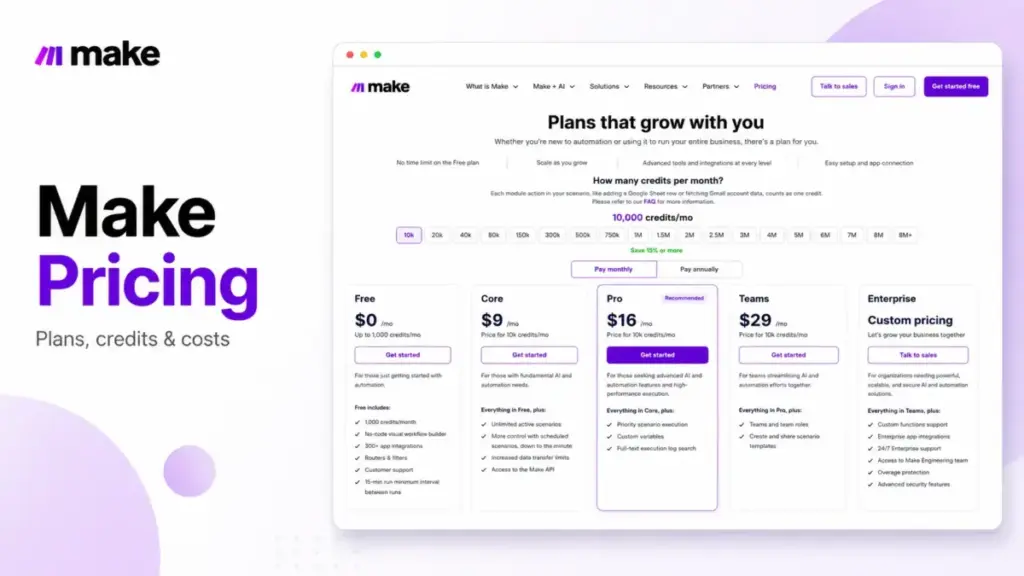
Make.com advertises a starting price of $9 a month, and that number is technically true. The important detail is that the $9 price is tied to the credit selector, not to a simple flat team plan.
The real cost of Make is set by credits, not seats. Every action your scenarios run burns credits, and your monthly bill is a bet on how much automation your team will push through the platform.
That is the gap this guide closes. I will show you Make’s current official plans as of July 1, 2026, how credits get consumed, the hidden costs that turn a cheap plan into something bigger, and which plan I would choose or skip based on team size and workflow volume.
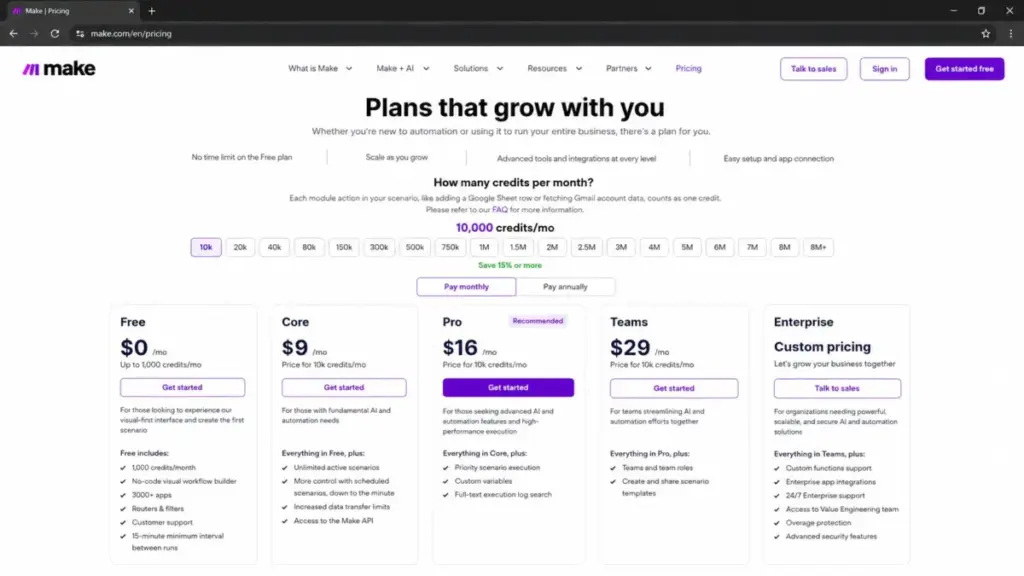
One warning before the tables. Make’s live pricing page currently shows Free, Core, Pro, Teams, and Enterprise. If you see a guide that says Make Plan or Company instead, treat that as stale unless the official pricing page has changed again.
If you are new to workflow automation, that naming mismatch alone can cost you an hour of confusion, so I lead with the official page and flag the stale labels as I go.
For broader context on where Make sits against rivals, see our roundup of the best workflow automation tools.
Quick Pricing Verdict
Here is the short version before the deep dive.
| Question | Answer |
|---|---|
| Starting price | Free plan at $0/mo with up to 1,000 credits/month |
| Cheapest paid plan | Core from $9/mo at the 10,000 credits/month selector level |
| Best plan for most teams | Core for basic paid automation, Pro for priority execution and advanced logs, Teams for team roles and shared templates |
| Plan to avoid for live work | Free, once you need more than 2 active scenarios |
| Biggest hidden cost | Credit burn from high-volume workflows, AI actions, code execution, and extra credits |
| Enterprise option | Enterprise plan, custom pricing, contact sales |
| Best alternative if credits get pricey | n8n for high-step workflows; Zapier for simple app-to-app tasks |
| Pricing checked | July 1, 2026, against Make’s official pricing page |
Read that starting price line carefully. Free is real and has no time limit, but it caps you at 2 active scenarios and a 15-minute minimum run interval, which is fine for learning and weak for anything a team relies on.
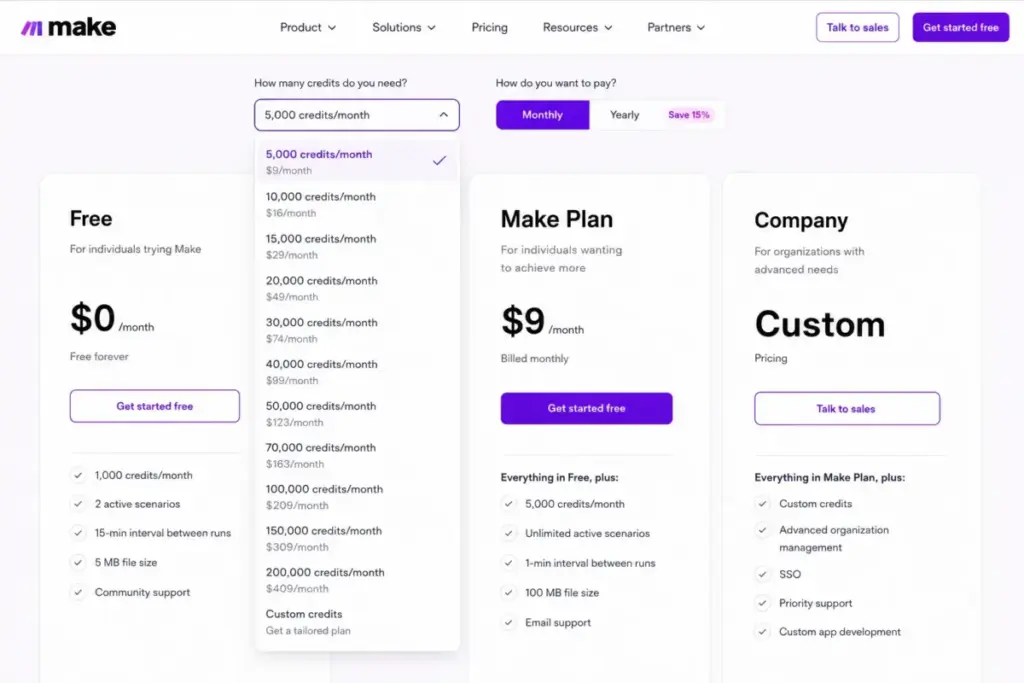
Core is the cheapest public paid plan. The $9 figure is shown at the 10,000 credits/month selector level, and the price changes as you drag the credit slider up.
The Advertised Price vs The Real Price
The pricing page sells you a plan. Your scenarios spend the money. Those are two different things, and the whole cost trap lives in the gap between them.
| What the page advertises | What you actually pay for |
|---|---|
| “From $9/mo” | $9 is the Core price at the 10,000 credits/month selector level; heavier automation needs a higher credit tier |
| “Unlimited active scenarios” on paid plans | Scenarios still stop when your monthly credits run out |
| “AI apps and agents included” | Advanced features using Make’s AI Provider can consume more credits |
| “No-code visual builder” | The Make Code App bills 2 credits per 1 second of code execution time |
| One flat monthly number | Your real bill depends on the selected credit tier, extra credits, AI usage, and code execution |
| “Save 15% or more” annually | Annual locks you in for a year against usage you have to estimate up front |
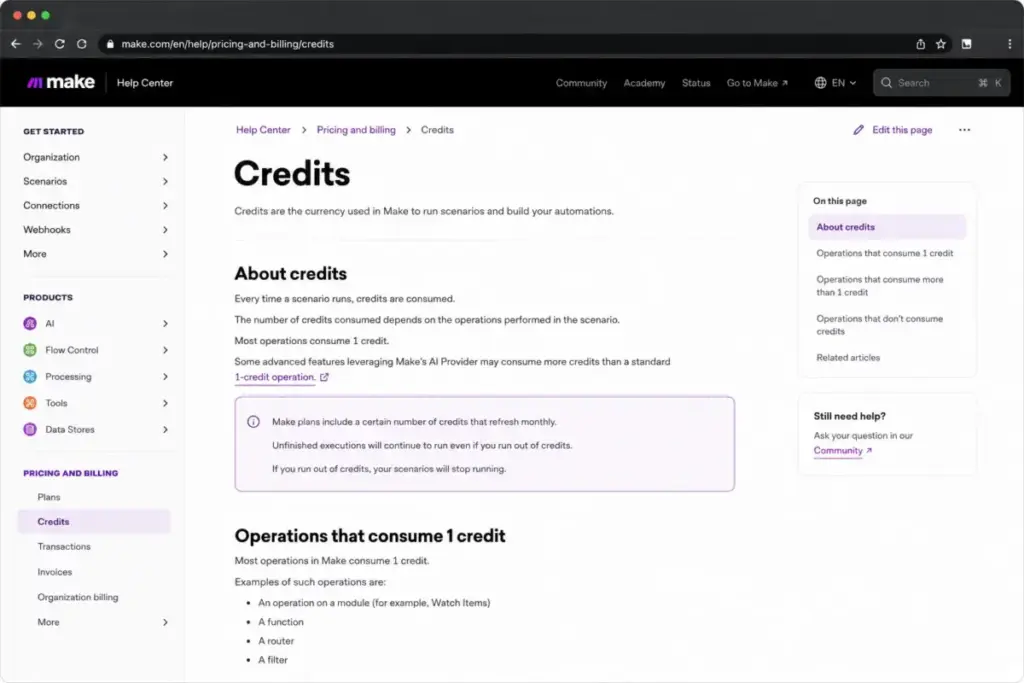
Make’s billing unit is the credit, and that switch became the official model as of August 27 based on the pricing FAQ. Most single actions a scenario performs cost one credit.
So the honest way to read Make pricing is not “how many users do I have.” It is “how many module actions will my scenarios run each month, and what happens when I guess wrong.”
That reframing is the difference between budgeting Make correctly and getting surprised on the invoice.
The 5 Hidden Costs Nobody Mentions
Sticker price is the easy part. These five line items are where Make quietly gets more expensive, and every one of them is documented on Make’s own pages.
1. Extra Credits Can Turn a Cheap Plan Into a Bigger Bill
When your scenarios burn through the monthly credits included in your plan, you have to add credits, upgrade the subscription, or use extra-credit purchasing where available. The practical problem is simple: under-buying your plan and repeatedly topping up is a risky way to run Make.
Make’s pricing FAQ says extra credits can be purchased in bundles and that auto-purchasing is available on Core, Pro, and Teams. That is useful, but it also means a workflow that outgrows its plan can keep adding cost unless someone watches usage.
I would size the plan slightly above your expected monthly burn rather than run lean and rely on extra credits every month.
2. AI Features Are Listed as Included, But They Meter Differently
Make’s pricing grid lists AI applications, an MCP server, an AI Content Extractor, an AI Web Search beta, Make AI Agents, and the Make AI Toolkit. On paper that reads as “AI is included.”
The pricing FAQ tells a more careful story. It says advanced features leveraging Make’s AI Provider can consume more credits than a standard one-credit action.
Bringing your own LLM key can shift the token billing to your AI provider, but the Make tool and scenario actions around that call still spend Make credits. So an AI-heavy workflow can cost more credits per run than a simple data-move scenario, even on the same plan.
3. The Make Code App Bills by the Second
Custom logic is where technical teams save time and, sometimes, spend credits fast. The Make Code App is priced at 2 credits per 1 second of code execution time, per the official pricing page.
A long-running transformation or a heavy data loop is not a one-credit action. It is a metered process, and a slow script quietly multiplies its credit cost every time it runs.
If you plan to lean on custom JavaScript or Python inside scenarios, model the execution time before you assume it is cheap.
4. Running Out of Credits Stops Your Scenarios
This is the one that hurts operations teams. Make’s FAQ is direct that when you run out of credits, your scenarios will not continue until credits are added again.
Make sends usage notifications near 75% and 90% of your allowance, which is your early-warning system. If nobody owns those alerts, a business-critical automation can simply stop mid-month.
For any workflow you depend on, I treat credit monitoring as a real operational task, not a nice-to-have.
5. Unused Credits Expire, So Rollover Savings Are a Myth
Some personal reviews online imply you bank unused capacity month to month. Make’s official FAQ says the opposite: credits expire at the end of the term.
Extra credits are treated like pre-purchased credits and expire on the subscription term, so monthly buyers lose them at month-end and annual buyers lose them at year-end. That matters most for seasonal or uneven usage, where you might pay for a big tier you only need part of the year.
Do not budget Make assuming last month’s leftovers carry forward. They do not.
| Hidden cost | What Make’s pages say | When it bites |
|---|---|---|
| Extra credits | Extra credits can be purchased when your included credits run out | Every month you exceed your plan |
| AI Provider usage | Advanced AI features can consume more credits | AI Agents, Toolkit, extraction, long prompts |
| Make Code App | 2 credits per 1 second of code execution time | Long or frequent custom scripts |
| Credit depletion | Scenarios stop until credits are added | Unmonitored, high-volume workflows |
| Credit expiry | Credits expire at end of term, no rollover | Seasonal or spiky usage patterns |
Plan-by-Plan Breakdown
Now the plans themselves, with the feature gates that change what you can do. Everything here reflects Make’s official pricing page checked July 1, 2026.
| Plan | Monthly price | Billing basis | Best for | Key limits |
|---|---|---|---|---|
| Free | $0/mo | Credits, up to 1,000/mo | Learning Make and testing the builder | 2 active scenarios, 15-min interval, 5-min max run, 5MB files |
| Core | $9/mo at 10,000 credits/mo | Credits, selectable monthly tier | Basic paid automation and individual workflows | Cost scales with credit tier; Pro/Teams features are gated above Core |
| Pro | $16/mo at 10,000 credits/mo | Credits, selectable monthly tier | Advanced automation, priority execution, custom variables, and log search | Costs more than Core; team-role features require Teams |
| Teams | $29/mo at 10,000 credits/mo | Credits, selectable monthly tier | Teams collaborating on automation workflows | Governance, SSO, overage protection, and 24/7 enterprise support require Enterprise |
| Enterprise | Custom pricing | Credits, custom allocation | Organizations running critical business processes | Price, seat minimums, and credit allocation are not public |
Free: The Learning Sandbox
Free gives you the real no-code visual builder, access to Make’s 3,000+ app library, routers, and filters. It is a genuine product, not a crippled demo.
The limits are what make it a sandbox. Two active scenarios, a 15-minute minimum run interval, a 5-minute maximum execution time, and a 5MB file cap add up to “fine for testing, risky for operations.”
Avoid Free if you need more than two live automations or faster-than-15-minute triggers.
Core: The Cheapest Paid Plan
Core is the cheapest paid plan on Make’s public pricing page. At the 10,000 credits/month selector level, it starts at $9 per month.
Core removes the active-scenario cap and gives you more control with scheduled scenarios down to the minute, increased data transfer limits, and access to the Make API.
It is the first plan I would consider for solo operators, freelancers, and small teams that need live automations but do not yet need Pro’s priority execution, custom variables, or full-text execution log search.
Pro: The Advanced Automation Tier
Pro starts at $16 per month at the 10,000 credits/month selector level. It is the better fit when your automations are important enough that priority execution, custom variables, and better log search matter.
This is where Make begins to feel less like a personal automation tool and more like a workflow operations layer. If debugging time matters, full-text execution log search alone can justify looking above Core.
For the full feature story beyond price, see our Make review.
Teams: The Collaboration Tier
Teams starts at $29 per month at the 10,000 credits/month selector level. It is built for groups managing automation together rather than one person building scenarios alone.
The key additions are teams and team roles, plus the ability to create and share scenario templates. If several people will build, maintain, or hand off automations, this is the plan that maps better to real team workflows.
Enterprise: The Governance Tier
Enterprise is Make’s custom-priced plan for organizations running automation they cannot afford to have break. It adds custom functions support, 24/7 Enterprise support, access to a Value Engineering team, overage protection, and advanced security features.
The governance features are the real trigger. Enterprise adds company SSO, domain claim, advanced security features, and information security compliance support, which is what regulated and larger teams need.
Make’s security page states GDPR adherence plus completed SOC 2 Type II and SOC 3 audits, which supports the compliance posture Enterprise buyers are paying for. Make does not publish Enterprise pricing, seat minimums, or credit allocation, so treat this as contact-sales territory.
Feature Gates: What You Actually Get by Plan
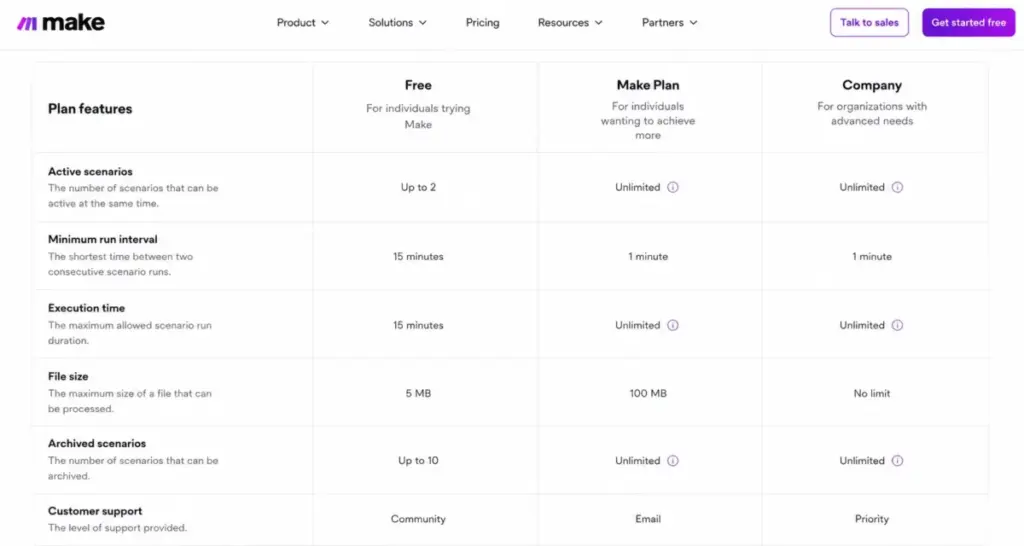
| Feature or gate | Free | Core | Pro | Teams | Enterprise |
|---|---|---|---|---|---|
| Credits per month | 1,000 | Selectable, $9 at 10k | Selectable, $16 at 10k | Selectable, $29 at 10k | Custom |
| Active scenarios | 2 | Unlimited | Unlimited | Unlimited | Unlimited |
| Minimum run interval | 15 minutes | 1 minute | 1 minute | 1 minute | 1 minute |
| Max execution time | 5 minutes | 40 minutes | 40 minutes | 40 minutes | 40 minutes |
| Max file size | 5MB | 100MB | 250MB | 500MB | 1,000MB |
| Make API rate call limit/minute | Not included | 60 | 120 | 240 | 1,000 |
| Custom variables | No | No | Yes | Yes | Yes |
| Full-text log search | No | No | Yes | Yes | Yes |
| Teams and team roles | No | No | No | Yes | Yes |
| Scenario templates | No | No | No | Yes | Yes |
| SSO and domain claim | No | No | No | No | Yes |
| Overage protection | No | No | No | No | Yes |
| 24/7 Enterprise support | No | No | No | No | Yes |
How Make Credits Actually Work
Credits are the whole ballgame, so this section is worth slowing down for. Each action a scenario performs consumes credits, and most standard actions cost one credit each.
Actions that count as credits include reading data from an app or webhook, searching for data, creating, updating, deleting, transforming, aggregating, and iterating data. String enough of those together in a scenario and you can estimate its per-run credit cost.
Two exceptions matter for cost control. Make’s FAQ says the router module and the error handler modules, which include Rollback, Break, Resume, Commit, and Ignore, do not count credits.
That is a real optimization lever. You can add branching logic and error handling without inflating your credit burn, which rewards clean scenario design over brute-force polling.
A Worked Credit Example
Numbers make this concrete. Picture a lead-capture scenario that watches a webhook, searches a CRM for a duplicate, creates or updates a contact, then posts a Slack message.
That is roughly four credit-counting actions per run, so about 4 credits each time the scenario fires. Any routers you add for branching and any error handlers you wrap around it do not add to that count.
Run that scenario 1,000 times a month and you are near 4,000 credits. That fits inside the 10,000-credit selector example, but it also shows how quickly multiple busy scenarios can force you into a higher credit tier.
Now swap the Slack step for an AI summarization step. That single change can push the per-run cost above 4 credits, because advanced AI Provider actions can consume more, which is exactly why AI-heavy automations deserve their own line in your estimate.
The lesson is not “Make is expensive.” It is that credit burn is predictable if you count actions per run and multiply by runs per month before you buy.
Usage Allowance Scales With Your Credits
Credits do not just buy actions. They also set your data allowances, and file-heavy or webhook-heavy teams can hit these limits well before they hit a price wall.
| Per 10,000 credits | Allowance |
|---|---|
| Data transfer | 5GB |
| Data storage | 10MB |
| Incomplete execution storage | 10MB, 2GB maximum |
| Webhook queue size | 667, 10,000 maximum |
Make’s FAQ gives a worked example at scale. At 150,000 credits per month, you get 75GB data transfer, 150MB incomplete execution storage, 150MB data storage, and up to 10,000 webhooks in the queue.
The takeaway for buyers is that your credit tier quietly governs how much data and how many queued webhooks you can handle. A scenario moving large files can strain the transfer allowance even if it is not action-heavy.
Why Make Pricing Guides Disagree in 2026
If you have read three Make pricing articles and seen three different plan tables, you are not confused, they are stale. This is worth a callout because it changes which numbers you should trust.
Make’s live pricing page checked on July 1, 2026 shows Free, Core, Pro, Teams, and Enterprise. Some guides may still reference Make Plan and Company, or may quote older operation-based pricing. Do not use those labels for budgeting unless the official pricing page shows them again.
There are two moving parts behind the disagreement. Make has changed pricing language over time, and the public page uses a credit selector that changes the prices shown for paid plans.
Here is how I would treat it. Trust Make’s official pricing page for current plan names, current prices, and the selected credit tier shown on the page. Read any guide that disagrees with the official page as an older snapshot.
The practical risk is budgeting off a number that no longer maps to what you will see at checkout. When a guide and the official page disagree, the official page wins.
When the Free Plan Stops Working
Free is genuinely useful, so let me be specific about the moment it breaks for a real team.
The wall is usually the 2 active scenario cap. The second you need a third live automation running on its own schedule, Free is done.
The second wall is the 15-minute interval. If your team needs a workflow that reacts within a minute of a trigger, Free cannot do it, and no amount of scenario cleverness gets around the schedule floor.
The third wall is quieter: 1,000 credits a month plus a 5-minute execution cap and a 5MB file limit. A handful of moderately busy scenarios or one file-heavy job will burn that allowance fast.
Here is my blunt verdict. Free is for learning Make and testing whether it fits your workflow, and I would not run anything a colleague depends on inside those limits.
Real Cost Scenarios: 5, 10, and 20 Users
Now the question everyone asks, phrased the wrong way. “How much is Make for 10 people” has no clean answer, because Make’s public pricing is credit-based, not per-seat.
Paid plans include collaboration features at higher tiers, and the credit slider drives the price. Your user count only affects cost indirectly, through how much automation those users create and whether you need team governance.
| Team size | Likely plan | Cost logic | Notes |
|---|---|---|---|
| 5 users, light usage | Core | From $9/mo at the 10,000 credits/month selector level if that credit tier covers your runs | Watch who owns which active scenario and total credit burn |
| 10 users, moderate usage | Core or Pro | Start from the public 10k-credit prices, then move up the credit slider as runs grow | Pro makes more sense if priority execution, custom variables, or full-text log search matter |
| 20 users, heavier usage | Teams or Enterprise | Teams if collaboration features are enough; Enterprise if governance matters | SSO, domain claim, overage protection, and 24/7 support push toward Enterprise |
| 25+ users, critical workflows | Enterprise | Custom pricing, contact sales | Price by credit volume, security, support, and governance needs |
I have deliberately not printed a fake “$X for 20 users” number, because Make’s official price changes by selected monthly credits and I will not guess the tier your workflows need. The honest budgeting move is to estimate your monthly credit burn first, then read the price off Make’s live selector.
The team-size questions that change your plan are governance questions. Once you need SSO, domain claim, overage protection, or 24/7 enterprise support, you are shopping Enterprise regardless of headcount.
Monthly vs Annual Billing
Make’s pricing page states annual payment is cheaper, with a “Save 15% or more” label, and the FAQ confirms paying annually in advance costs less than monthly. That is the extent of what the official page exposes, so I will not compute a bigger discount than Make claims.
The tradeoff with annual is commitment. You are locking in a credit tier for a year against usage you have to forecast now, and Make credits do not roll over if you overestimate.
My rule of thumb: pay annually once your monthly credit burn is stable and predictable. If your automation volume is still swinging month to month, monthly billing keeps you flexible while you learn your real burn rate.
Two admin details round this out. Make’s FAQ notes that Core, Pro, and Teams accept major credit cards, ACH direct debit, and Google Pay, with wire transfer available for enterprise customers after invoicing. Make also supports NGOs and non-profits through a contact request rather than a public discount code.
The one to plan around is downgrading. Make’s FAQ indicates that active scenarios relying on higher-plan features can stop after you move to a lower plan, so audit which scenarios use plan-gated capabilities before you drop a tier to save money.
Which Make Pricing Plan Should You Choose?
Match the plan to how the work runs, not to a marketing label.
Solo builders and freelancers: start Free to learn, then move to Core the moment you need a third live scenario or faster triggers. The $9 public entry point is enough while your automation is light and the selected credit tier covers your runs.
Small teams automating several workflows: Core is the first plan to test, but Pro is the better fit once debugging, execution priority, custom variables, or full-text log search become important.
Teams sharing automation work: Teams is the right home once roles, shared scenario templates, and collaborative workflow ownership matter. This is less about raw credits and more about operational control.
Organizations with critical or regulated workflows: go Enterprise. If a stopped scenario would cause a real business problem, or if security and compliance sign-off is required, the overage protection and governance features are the reason to pay.
Which Make Pricing Plan Should You Avoid?
Avoid running live operations on Free. It is not a value judgment on the plan, it is the 2 active scenario cap, the 15-minute interval, the 5-minute execution ceiling, and the 1,000-credit allowance colliding with real work.
The specific failure mode is a team that builds three or four dependable automations on Free, hits the scenario cap, and then discovers the 15-minute interval cannot support a time-sensitive workflow. That is a predictable dead end.
The exception is real: Free is the correct choice for learning, prototyping, and one-off personal automations that nobody else relies on. Use it for exactly that, then upgrade before you depend on it.
There is a second avoid pattern worth naming. Do not run chronically under-sized on Core, Pro, or Teams and cover the gap with extra credits every month. That is how a cheap public entry price becomes a messy operational bill.
Make Pricing vs Competitors
The most useful comparison is not sticker price. It is the billing metric, because the cheapest platform depends entirely on the shape of your workflows.
| Platform | Entry price | Billing metric | Best fit |
|---|---|---|---|
| Make | Free; Core from $9/mo at the 10,000 credits/month selector level | Credits per action | Multi-step visual workflows at controlled credit burn |
| Zapier | Free, 100 tasks/mo; Professional from $19.99/mo | Tasks per completed action | Simple app-to-app automations |
| n8n | Starter EUR 20/mo billed annually, 2,500 executions | Workflow executions, regardless of steps | Long, multi-step workflows |
| Pipedream | Free plan plus paid tiers | Compute credits, 1 per 30 sec at 256MB | Developer-built, compute-heavy workflows |
| Workato | Custom, sales-led | Enterprise custom pricing | Governance-heavy enterprise iPaaS |
Read that table by workflow shape. Make charges per module action, so a scenario with many steps costs more credits per run than the same logic on n8n, where you pay per workflow execution regardless of how many steps it contains.
Zapier bills by task, which suits short automations but can climb with action volume. Zapier’s own AI steps now carry model-based multipliers as of June 15, 2026, with standard, advanced, and premium tiers billed at higher task rates, so AI on Zapier is not flat either.
Pipedream’s compute-credit model rewards fast, efficient code and free development, which fits engineering teams. Workato does not publish public prices at all and is built for enterprise governance, not SMB cost-cutting.
For a fuller side-by-side, our Zapier review goes deeper on the daily experience behind its task model.
Our n8n review does the same for the per-execution approach that suits step-heavy workflows.
Is Make Worth the Price?
Make is worth it if your automations are multi-step, visual, and repeatable, and if you are willing to treat credit burn as a number you actively manage. At the $9 public Core entry point, it is one of the cheaper serious automation platforms to start with.
Make is not worth it if your automations are one-step app-to-app triggers, where Zapier’s task model is simpler to reason about. It is also a poor fit if you want a flat, predictable bill and refuse to monitor usage, because credits punish inattention.
The honest worth-it test is behavioral, not financial. If someone on your team will own the credit dashboard and the 75%/90% alerts, Make pays off. If nobody will, the hidden costs will find you.
If Make’s credit math feels like too much overhead, the closest escape hatches are n8n for high-step workflows and Zapier for simplicity. Our list of Zapier alternatives covers more options if you are still narrowing the field.
How to Avoid Overpaying for Make
Seven practical moves, all tied to how Make bills.
- Size your plan one credit tier above your expected monthly burn, so routine spikes do not push you into constant extra-credit purchases.
- Use routers and error-handler modules freely, since Make’s FAQ confirms they do not consume credits, and let them replace credit-hungry polling patterns.
- Model your Make Code App usage before committing, because 2 credits per second of execution adds up on long scripts.
- Assign an owner to the 75% and 90% credit notifications, so a critical scenario never stops from a missed alert.
- Separate AI-heavy scenarios in your planning, since advanced AI Provider features can consume more credits than standard actions.
- Only commit to annual billing once your monthly burn is stable, because credits expire and do not roll over.
- Audit active scenarios before any downgrade, since scenarios using higher-plan features can stop after you drop down.
A quick note on where these facts come from: this guide is built from Make’s official pricing page, pricing FAQ, help center, and security page, all checked on July 1, 2026, plus the official pricing pages of the competitors named above. You can read how we handle sourcing in our review methodology.
Frequently Asked Questions
How much does Make cost?
Make has a Free plan at $0 a month with up to 1,000 credits. On the official pricing page checked July 1, 2026, the public paid plans are Core from $9/mo, Pro from $16/mo, and Teams from $29/mo at the 10,000 credits/month selector level. Enterprise uses custom pricing.
Is Make free?
Yes, Make has a Free plan with no time limit at $0 a month. It caps you at 2 active scenarios, a 15-minute minimum run interval, and about 1,000 credits a month, so it suits learning more than live operations.
What are Make credits?
Credits are Make’s billing unit as of the August 27 change. Most single actions a scenario performs cost one credit, while advanced features using Make’s AI Provider can consume more.
Does Make charge per user?
No. Make’s public pricing is credit-based, and paid plans include collaboration features at higher tiers, so your cost tracks automation volume and governance needs more than raw seat count.
Is Make cheaper than Zapier?
It depends on workflow shape. Make bills per module action while Zapier bills per task, so long multi-step workflows behave differently on each, and n8n’s per-execution model can beat both for very step-heavy automations.
What happens if I run out of Make credits?
Your scenarios stop and will not continue until credits are added, according to Make’s FAQ. Make sends notifications near 75% and 90% usage, so assign someone to watch them if the workflows are critical.
Do unused Make credits roll over?
No. Make’s FAQ states credits expire at the end of the term, and extra credits are treated like pre-purchased credits that expire on the subscription term, so there is no rollover.
Does Make charge extra for AI?
The pricing grid lists AI apps and agents as included, but the FAQ notes advanced AI Provider features can consume more credits. AI-heavy scenarios can cost more credits per run than simple data moves.
What is Make Enterprise pricing?
Enterprise is custom, sales-led pricing. Make does not publish the price, seat minimums, or credit allocation, and it adds SSO, domain claim, overage protection, 24/7 Enterprise support, advanced security features, and access to a Value Engineering team.
Can I downgrade or cancel safely?
You can, but audit first. Make’s FAQ indicates scenarios using higher-plan features can stop after a downgrade, and cancellation moves your organization to Free at the end of the term.