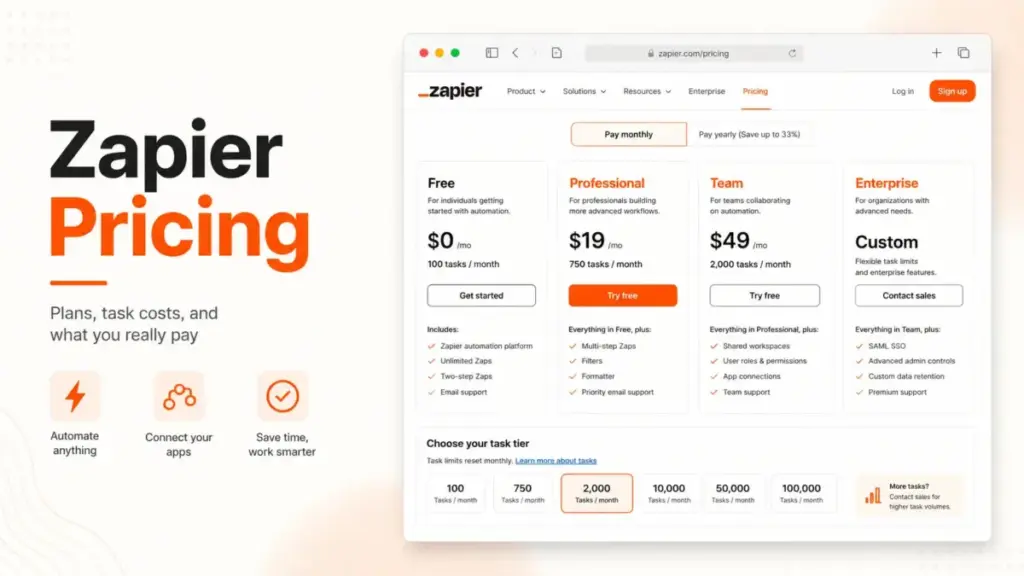
Zapier pricing starts at $0/month on the Free plan, and paid plans start at $19.99/month billed annually for Professional. That number is not what most teams end up paying.
The real Zapier bill is driven by tasks, not seats. Every action your automations complete pulls from a monthly task pool shared across Zaps, AI steps, code, and MCP calls, and that pool is what pushes a $19.99 plan into a higher tier.
For most solo builders the practical plan is Professional. For teams that need shared workflows and single sign-on, it jumps to Team at $69/month billed annually.
The biggest pricing surprise is AI and pay-per-task billing, which can multiply usage faster than adding people ever would.
This guide breaks down every Zapier plan, what a task actually costs, the hidden AI and MCP charges, real cost scenarios by team size, and when a cheaper alternative among workflow automation tools makes more sense. All prices were verified against Zapier’s official pricing pages on July 1, 2026.
Quick Zapier Pricing Verdict
Here is the short version before the detail.
| Pricing question | Answer (verified July 1, 2026) |
|---|---|
| Starting price | $0/month Free, then $19.99/month billed annually (Professional) |
| Free plan | Yes, 100 tasks/month, 1 user, two-step Zaps, free forever |
| Free trial | 14-day Pro trial, no card required, capped at 1,000 tasks |
| Best plan for most solo builders | Professional, for multi-step Zaps and premium apps |
| Best plan for teams | Team ($69/month billed annually) for shared workflows and SAML SSO |
| Plan to avoid | Free, for any production workflow needing premium apps or more than 100 tasks |
| Biggest hidden cost | AI by Zapier task multipliers and pay-per-task overages |
| Best alternative if too expensive | Make for credit-based volume, n8n for self-hosted execution pricing |
What this means: Zapier is cheap to start and gets expensive through usage, not headcount. Read the task section next, because it decides your actual monthly cost more than the plan name does.
The Real Cost Driver: Tasks, Not Seats
Most software bills you per user. Zapier mostly bills you per task, and that single difference is why bills rise without anyone joining the account.
A task is one action your automation completes successfully. Zapier’s pricing FAQ confirms that unsuccessful actions do not count against your limit, so a failed step does not burn a task.
Here is the part competitors skip. Zaps, AI by Zapier steps, Code by Zapier, MCP tool calls, and the SDK all draw from the same monthly task pool, per Zapier’s official pricing and task-rate pages.
That shared pool is the friction point. You can blow through a task tier by adding one AI-heavy workflow, even if your team size never changes.
If you are new to this model, it helps to understand how workflow automation works before you pick a tier, because the cost follows the volume of actions, not the number of people.
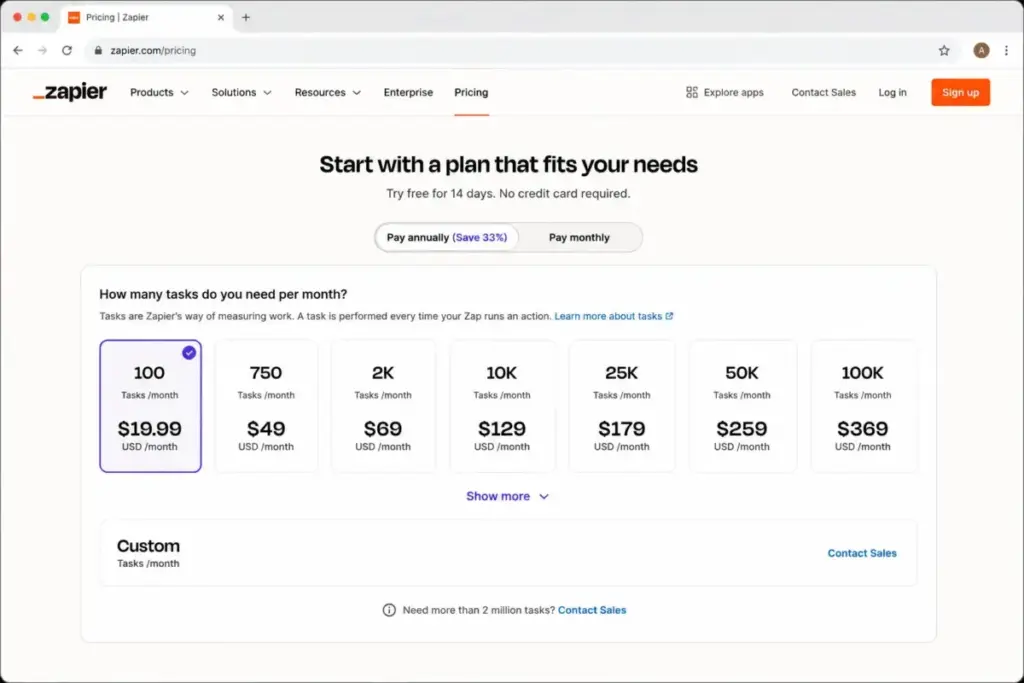
Real cost driver box: Your Zapier plan name sets the features. Your task tier sets the price. Pick the plan for the features you need, then size the task tier to the actions your workflows will actually complete each month.
What Actually Counts as a Zapier Task
Not every step in a Zap costs a task. This is the lever most buyers miss, and it can cut your usage without downgrading a single workflow.
A standard app action, like creating a row or sending a message, uses 1 task when it completes. That is the baseline.
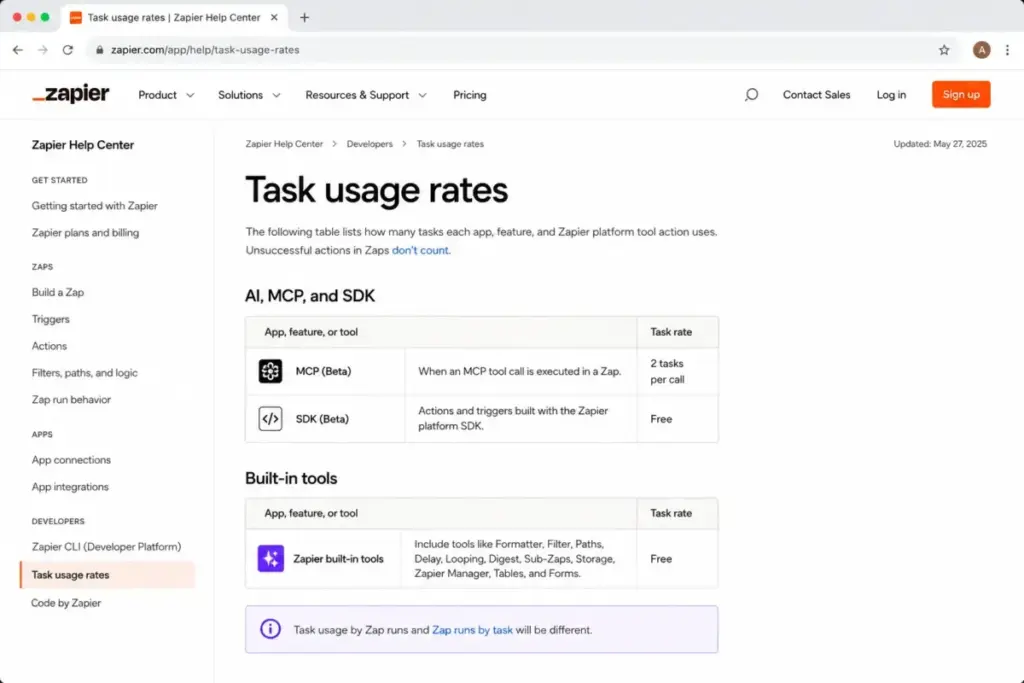
Zapier’s built-in tools use 0 tasks. Based on the official task-rate page, that list includes Filters, Formatter, Paths, Delay, Looping, Sub-Zaps, Digests, Zapier Manager, Storage, Tables, and Forms.
| Step type | Task cost |
|---|---|
| Standard app action (create, send, update) | 1 task |
| Filter, Formatter, Paths, Delay | 0 tasks |
| Looping, Sub-Zaps, Digests, Storage | 0 tasks |
| Tables and Forms actions | 0 tasks |
| MCP tool call | 2 tasks per call |
| AI by Zapier step | 1x to 5x by model tier (see hidden costs) |
What this means: A five-step Zap does not always cost five tasks. If two of those steps are a Filter and a Formatter, the run costs three tasks, not five, so building filtering logic early is a direct way to lower your bill.
A worked example of task math
Say you run one Zap that triggers on a new form entry, filters out incomplete entries, formats a date, then creates a CRM contact and sends a Slack message. That is five steps.
Two of those steps are a Filter and a Formatter, which cost 0 tasks. The trigger does not count, so each completed run costs 2 tasks, not 5.
Now run that Zap 350 times in a month. At 2 tasks per run, that is 700 tasks, which fits inside Professional’s 750-task starting tier with almost no room to spare.
Add one Advanced AI step to the same Zap and the math changes fast. An Advanced AI step at 3x adds roughly 3 tasks per run, so 350 runs jump to about 1,750 tasks and push you well past the 750 tier into a paid higher tier.
Buyer impact: The same workflow can sit inside a cheap tier or force an upgrade, depending on whether you add AI and how you build the non-AI steps. Model your busiest Zap at real run counts before you pick a tier, and put filters ahead of billable actions so failed-condition runs never complete a paid step.
If You Are a Solo User or Freelancer
For one person running simple automations, start Free and upgrade only when a real limit blocks you. The Free plan gives you 100 tasks/month, two-step Zaps, and 15-minute polling on a single user seat.
Free stops working fast for production use. You lose premium apps and multi-step Zaps once the trial period ends, and 100 tasks disappear quickly if any Zap runs daily.
Here is when a solo user should upgrade to Professional:
- You need premium apps like webhooks or paid connectors.
- You need multi-step Zaps beyond two actions.
- You run more than 100 successful actions per month.
- You want faster 2-minute polling instead of 15-minute checks.
- You want AI Fields, conditional Form logic, or larger Tables limits.
Professional costs $19.99/month billed annually and includes 750 tasks/month at the starting tier, per Zapier’s official pricing blog. That is the practical plan for most solo builders.
Solo verdict: Free is a learning tier, not a production tier. If your automations matter to your income, budget for Professional and size the task tier to your real monthly volume. For a deeper look at the day-to-day experience behind these plans, our full Zapier review walks through the workflow builder itself.
If You Have a 5-Person Team
At five users, the question is not tasks first. It is whether you need people sharing and editing the same automations.
Professional includes 1 user. Five people cannot collaborate inside one Professional account with shared ownership, which is the friction point most small teams hit early.
Team costs $69/month billed annually and adds shared Zaps, shared folders, shared app connections, and SAML SSO. That is the jump you pay for collaboration, not for raw task volume.
A 5-person team on Team pays the same base as a 10-person team on Team, because Zapier prices the plan and task tier, not each seat. Your cost driver is still the shared task pool.
5-person verdict: If your five people only need one owner building Zaps and everyone else consuming the output, Professional can still work. If two or more people build and edit automations, Team is the honest choice, and I would not try to stretch Professional to avoid it.
If You Have 10 to 25 Users
At this size, Team is usually the fit, and the visible pricing table lists 25 seats on the plan. This is where a documented contradiction matters.
Zapier’s visible pricing table shows Team at 25 users. A separate line in Zapier’s pricing FAQ says unlimited users are available on Team and Enterprise, which creates real ambiguity for budgeting.
I would not assume unlimited Team seats from that FAQ line. Confirm additional seat handling in checkout or with Zapier sales before you plan a 25-plus-user rollout on Team.
At 10 to 25 users, your hidden costs also grow. More builders means more AI steps, more premium app actions, and a higher chance of hitting your task tier and triggering pay-per-task charges.
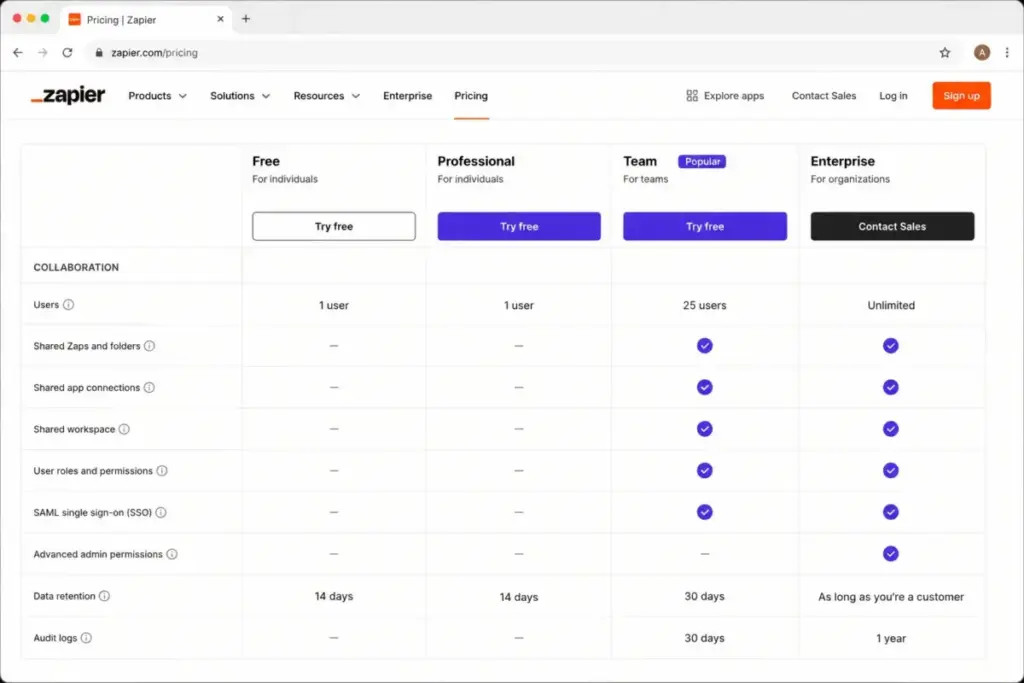
10-to-25 verdict: Budget for Team plus a task tier that fits combined usage, not just the base price. The seat count on the visible table is 25, so treat any “unlimited Team users” claim as unconfirmed until sales verifies it.
If You Have 25+ Users or Need Governance
Past the visible 25-seat Team table, or when IT governance drives the decision, Enterprise is the path. Zapier does not publish Enterprise pricing, so it is contact-sales only.
Enterprise is custom, but it is not vague. The official pricing page lists concrete triggers that justify contacting sales rather than a mystery quote.
Contact Zapier sales for Enterprise when you need:
- Unlimited users per the visible table, beyond Team’s 25 seats.
- Advanced admin permissions and app controls.
- Advanced deployment options and annual task limits.
- Observability and log streaming for compliance.
- A Technical Account Manager and priority support with screen sharing.
Negotiation tip based on how Zapier structures Enterprise: pricing tracks task volume, governance depth, and support tier, so come with a real monthly task estimate. A vague “we might scale” invites a padded quote, while a documented task forecast supports a tighter one.
25-plus verdict: Do not guess an Enterprise price, and avoid any third-party page that quotes one. Budget by task volume, seat count, governance requirements, and support needs, then use those numbers as your strongest bargaining point in the sales conversation.
Zapier Plans Compared
Here is the full plan table with confirmed annual starting prices. Monthly checkout prices are caveated because they were not fully exposed on Zapier’s public static pricing page.
| Plan | Annual starting price | Monthly (caveated) | Billing basis | Best for | Key limits |
|---|---|---|---|---|---|
| Free | $0/month | $0 | Task pool, 1 user | Learning and light personal use | 100 tasks/month, two-step Zaps, 15-min polling |
| Professional | $19.99/month billed annually | Commonly reported ~$29.99, verify in checkout | Task pool, 1 user | Solo builders needing multi-step Zaps | 750 tasks/month starting tier, premium apps, 2-min polling |
| Team | $69/month billed annually | Commonly reported ~$103.50, verify in checkout | Task pool, 25 seats (visible table) | Teams sharing workflows | Shared Zaps, SAML SSO, 1-min polling, task tier selectable |
| Enterprise | Custom, contact sales | Custom | Task pool, unlimited users (visible table) | Governance and large-scale automation | Annual task limits, admin controls, observability, TAM |
What this means: The confirmed numbers are the annual-billed starting prices. Third-party sites report monthly figures of roughly $29.99 for Professional and $103.50 for Team, but I treat those as corroborated, not official, until you see them in Zapier’s checkout. Do not publish those monthly numbers as verified fact.
Feature Gates by Plan
Price is only half the decision. What each plan unlocks is the other half, and Zapier gates several features by tier.
The table below maps the gates that most often force an upgrade. Availability reflects Zapier’s visible pricing table and plan cards verified July 1, 2026.
| Feature | Free | Professional | Team | Enterprise |
|---|---|---|---|---|
| Tasks at starting price | 100/month | 750/month | Task tier selectable | Custom or annual limit |
| Seats | 1 | 1 | 25 (visible table) | Unlimited (visible table) |
| Zap steps | Two-step | Multi-step | Multi-step | Multi-step |
| Polling speed | 15 min | 2 min | 1 min | 1 min |
| Premium apps and webhooks | No after trial | Yes | Yes | Yes |
| Shared connections and workspace | No | No | Yes | Yes |
| SAML SSO | No | No | Yes | Yes |
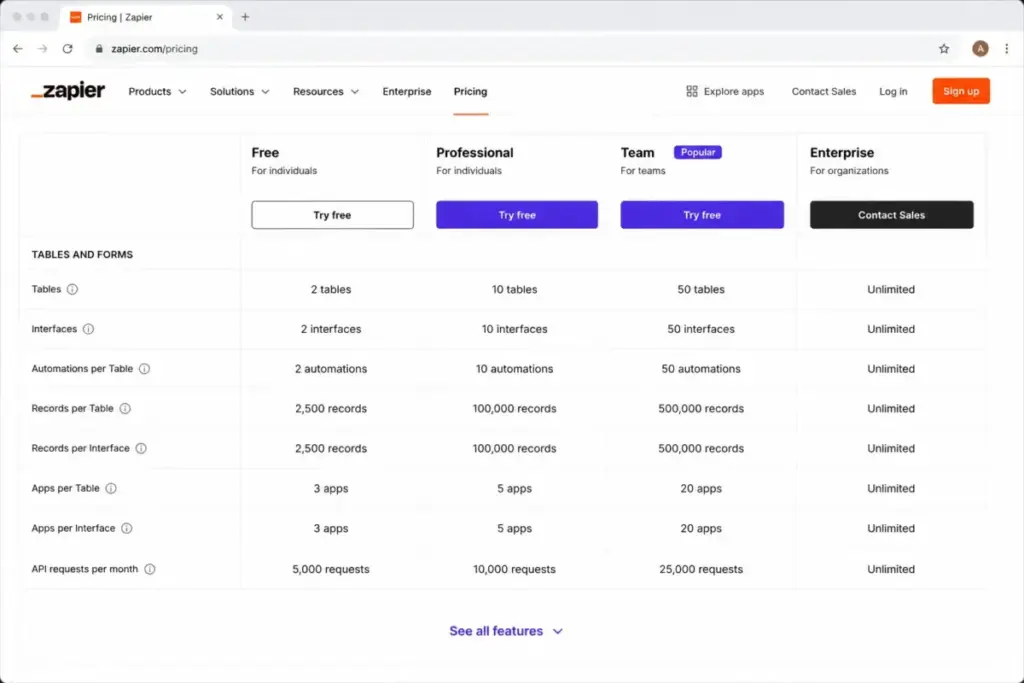
| Tables records | 2,500 | 100,000 | 500,000 | Contact sales |
| Forms pages | 10 | 50 | 150 | Contact sales |
| Code by Zapier runtime per step | 1 second | 30 seconds | 30 seconds | 2 minutes |
| Live chat support | No | From the 2,000-task tier and up | Priority support | Priority with screen sharing |
What this means: Two gates surprise buyers most. Live chat does not come with the base Professional plan, it starts at the Professional 2,000-task tier and up, and shared app connections plus SAML SSO are Team-only. If either of those matters, the upgrade is about the gate, not the task count.
Hidden Costs That Change Your Zapier Bill
The sticker price is the floor. These are the charges that lift your real Zapier cost above it, and most are tied to usage you control.
| Hidden cost | What it does | When it hits |
|---|---|---|
| AI by Zapier multipliers | Standard 1x, Advanced 3x, Premium 5x, BYO 1x | Any AI by Zapier step on a paid plan |
| Pay-per-task overage | Continues runs past your tier at an account-specific rate | Paid account hits its task limit with pay-per-task on |
| MCP tool calls | 2 tasks per call from the shared pool | An AI client uses a Zapier MCP tool call |
| Code runtime | Extended runtime consumes more usage per step | Code by Zapier exceeds the included runtime |
| Higher task tiers | Price rises as you move up the tier selector | Monthly volume exceeds your plan’s starting tasks |
AI by Zapier can multiply your usage
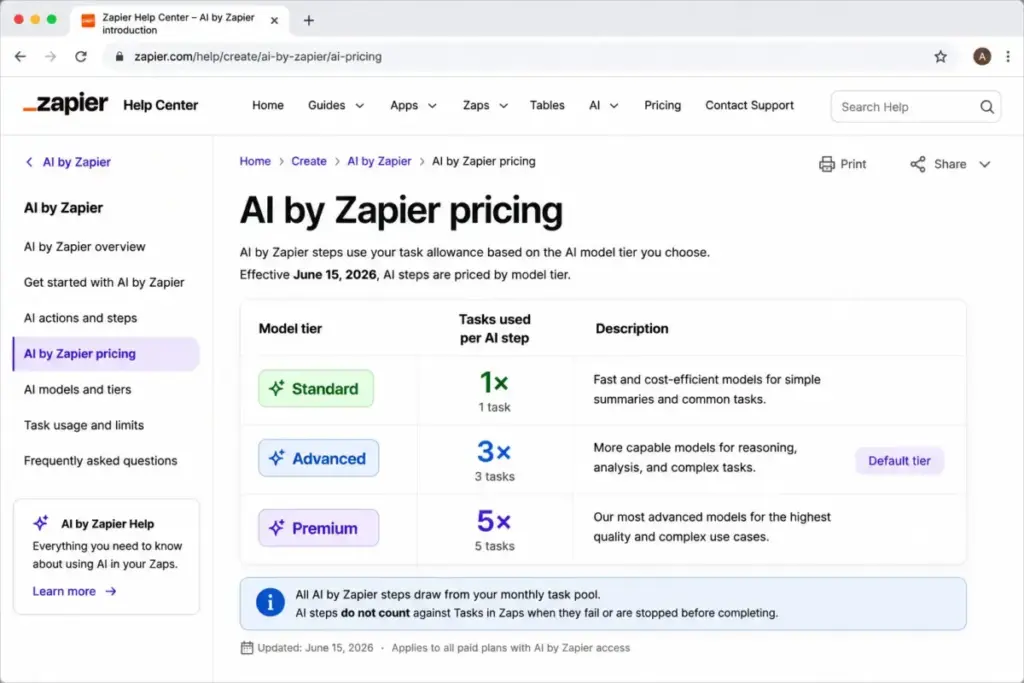
Starting June 15, 2026, AI by Zapier steps are priced by model tier, per Zapier’s official help doc. Standard runs at 1x, Advanced at 3x, Premium at 5x, and bring-your-own-key at 1x.
The default tier is Advanced, which means AI steps cost 3x by default. Tool calls add at the same rate, and a single AI step run is capped at 75 tasks.
Buyer impact: An AI-heavy workflow on the Advanced default burns tasks three times faster than a standard action. If you run AI steps at volume, size your task tier for the multiplier or switch selected steps to Standard.
Pay-per-task billing needs a guardrail
Pay-per-task is available only on paid plans, and Zapier’s billing help says it is enabled by default for accounts joined after January 2024. It can be disabled in Billing settings.
There is a ceiling. Your account has a maximum total task limit set at 3x your plan allocation, so runs stop once you reach it even with pay-per-task on.
One freshness warning matters here. Zapier’s help doc states that monthly-plan pay-per-task rates change for the first billing cycle on or after July 15, 2026, so check Billing settings for your current rate rather than trusting any fixed number online.
Warning callout: Do not budget from a fixed overage rate you found on an older page. Zapier’s official help directs you to your account Billing settings for the current per-task rate, and that rate is changing after July 15, 2026.
MCP and SDK costs for AI builders
Zapier MCP is available to all accounts, and one MCP tool call uses 2 tasks, per the pricing FAQ and task-rate page. That is double a standard action, so AI agents that call tools frequently consume the pool quickly.
The Zapier SDK is free while in beta. That is a caveat, not a promise, so plan for the price to change when the SDK leaves beta.
Buyer impact: If you build AI agents that lean on MCP, model the cost at 2 tasks per call, not 1. A busy agent can outspend your Zaps on tasks alone.
Free Trial Limits Before You Test
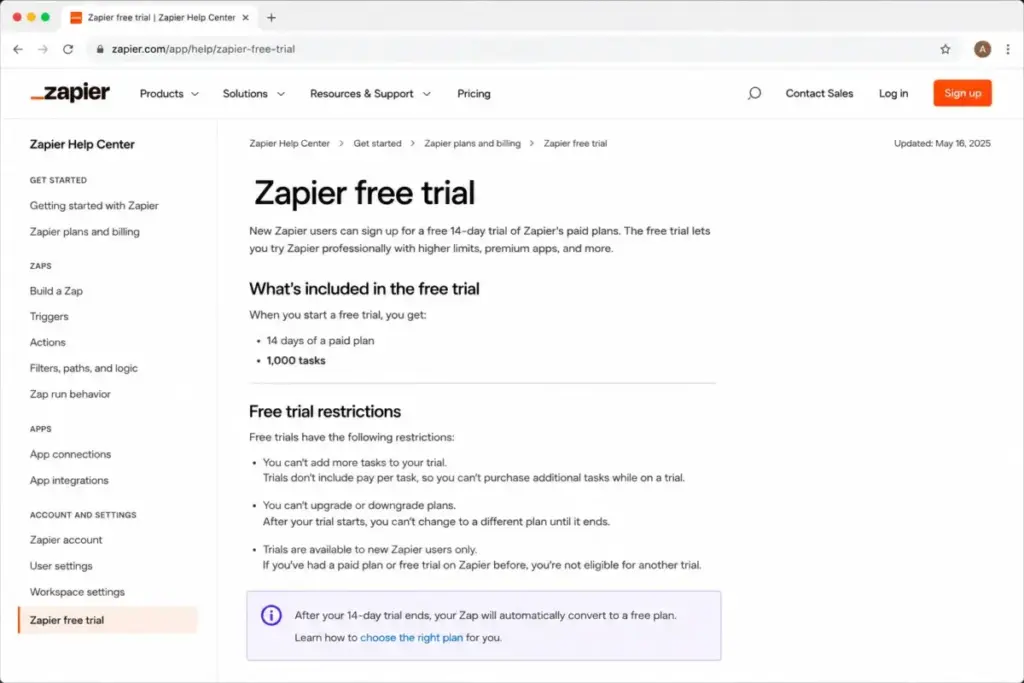
Zapier auto-enrolls new accounts in a 14-day Pro trial with no payment method required and no auto-upgrade. That sounds like a full test drive, but it is capped in ways that hide real paid behavior.
The Pro trial limits, per Zapier’s trial help doc, include a 1,000-task cap, a 30-running-step limit, no autoreplay, no pay-per-task billing, and no paid Zapier Forms features.
Trial caveat box: The trial will not show you how pay-per-task behaves at your real volume, because pay-per-task is off during the Pro trial. If your production concern is overage cost, you cannot fully test it in the trial, so model it from the pricing rules instead.
Real Cost Scenarios: Task Volume Meets Team Size
Zapier is not simple per-user software, so a headcount table alone misleads. These scenarios pair team size with the plan the collaboration needs, then flag the task-driven cost you must add on top.
| Team size | Likely plan | Starting annual base | Real cost note |
|---|---|---|---|
| 1 solo builder | Professional | $19.99/month billed annually | Add higher task tier if monthly actions exceed 750 |
| 5 users | Team | $69/month billed annually | Same base as 25 users, task tier drives the real number |
| 10 users | Team | $69/month billed annually | Watch AI and MCP usage across more builders |
| 25 users | Team | $69/month billed annually | Confirm 25-seat handling in checkout before rollout |
| 50 users | Enterprise | Custom, contact sales | Visible Team table caps at 25 seats, so budget Enterprise |
| 100 users | Enterprise | Custom, contact sales | Price by task volume, governance, and support, not headcount |
What this means: The base price barely moves between 5 and 25 users, because Team is plan-and-tier priced. Your variable cost is the task tier plus any pay-per-task or AI multiplier usage, so forecast tasks before you forecast seats. I did not invent an Enterprise number, and neither should any budget you build from this table.
Monthly vs Annual Billing
Zapier’s pricing page shows a “Pay yearly, Save 33%” option with a USD selector. Annual billing is the cheaper route on paid plans.
The confirmed annual-billed starting prices are $19.99/month for Professional and $69/month for Team. Those are the numbers I trust, because Zapier’s official page and blog both support them.
Monthly checkout is where precision drops. Third-party pages commonly report roughly $29.99/month for Professional and $103.50/month for Team, but I could not confirm those monthly figures from Zapier’s public static page.
Billing recommendation: If your workflows are stable, annual billing at the 33% saving is the clear pick. If you are still validating whether Zapier fits, pay monthly for the first cycle and confirm the exact monthly rate in checkout before you commit for a year.
Which Zapier Plan Should You Choose?
Match the plan to your situation, not to the biggest feature list.
Solo learners and hobby projects: Free. It is enough to build simple two-step Zaps and learn the model within 100 tasks a month.
Solo builders running real automations: Professional. Multi-step Zaps, premium apps, and 750 starting tasks cover most one-person operations for $19.99/month billed annually.
Teams that share and edit workflows: Team. Shared connections, shared folders, and SAML SSO are the reason to pay $69/month billed annually, and the seat table lists 25 users.
Large or regulated organizations: Enterprise. Governance, unlimited users on the visible table, annual task limits, and a Technical Account Manager justify the sales call.
Choice verdict: Pick the plan for the collaboration and governance you need, then size the task tier for your monthly action volume. The features set the plan, and the tasks set the price.
Which Zapier Plan Should You Avoid?
Free is the plan most teams should avoid for production work. It caps at 100 tasks a month, drops premium apps and multi-step Zaps after the trial period, and limits you to a single user.
That does not make Free useless. It is a genuinely good learning and prototyping tier, so keep it for testing ideas, not for running the automations your business depends on.
The second trap is treating Team as automatically best for scale. If your real problem is task volume rather than collaboration, jumping to Team does not fix cost, because Team and Professional share the same task-tier pricing model.
Avoid verdict: Avoid Free for anything that must run reliably, and avoid over-buying Team when your constraint is tasks, not people. If tasks are your problem, size the tier or compare a cheaper billing model before you upgrade the plan.
Zapier Pricing vs Alternatives
Comparing Zapier to alternatives by sticker price alone is misleading, because each tool bills by a different unit. The unit is the real story.
| Tool | Billing unit | Entry point | Best fit |
|---|---|---|---|
| Zapier | Tasks (shared pool) | $0 Free, $19.99/month annually | Broad 9,000-plus app coverage, fast setup |
| Make | Credits per month | $0 Free, from $9/month for 5,000 credits | High-volume workflows where most actions use 1 credit |
| n8n | Workflow executions | Priced in euros, unlimited users on all plans | Self-hosting and execution-based cost control |
| Relay.app | Steps plus AI credits | $0 Free, $19/month annually | Step-based pricing with built-in AI credits |
| Power Automate | Per user or per bot | $15/user/month paid yearly (Premium) | Microsoft-native RPA and governance |
| Activepieces | Active flows | Free for 10 active flows, then $5 per active flow | Simple per-flow pricing and open-source core |
What this means: Zapier bills per task, so it rewards lean workflows and punishes AI-heavy ones. Make’s credit model can be cheaper at high volume because most actions cost one credit, while n8n prices by workflow execution regardless of how many steps run inside it, which suits self-hosted teams. I have left n8n’s euro figures off this US table on purpose, and you can confirm them on n8n’s own pricing page.
If Zapier’s task math does not fit your workflow shape, our Make review covers the credit model in practice, and our n8n review walks through execution-based pricing for self-hosted teams.
Is Zapier Worth the Price?
Zapier is worth it when speed of setup and app coverage matter more than optimizing every task. With 9,000-plus app integrations, it gets a working automation live faster than almost anything else.
It stops being worth it when task volume, AI tool calls, or code runtime dominate your usage. At that point you are paying a premium for convenience that a credit-based or execution-based tool can beat.
Worth it if: You value fast setup, broad app coverage, premium connectors, and low-maintenance automation, and your monthly task volume is predictable enough to size a tier.
Not worth it if: You run very high-volume predictable automation, need self-hosting control, or want simple flat per-flow pricing. In those cases, compare the field first, and our roundup of Zapier alternatives lines up the tools by billing model so you can match one to your workflow shape.
Worth-it verdict: For most small teams that want automation working this week, Zapier earns its price. For cost-sensitive high-volume teams, the task model is the reason to look elsewhere.
How to Avoid Overpaying for Zapier
You control most of your Zapier cost. These moves keep the bill honest.
- Build with zero-task tools first. Filters, Formatter, Paths, and Delay cost 0 tasks, so filter early to stop Zaps from completing actions you did not need.
- Right-size the task tier. Estimate your real monthly successful actions and buy the tier that fits, rather than defaulting to a high tier “just in case.”
- Watch the AI default. AI by Zapier defaults to the Advanced tier at 3x, so switch steps to Standard 1x or bring-your-own-key when the Advanced model is not needed.
- Model MCP at 2 tasks per call. If you run AI agents, budget MCP usage at double a standard action so agent traffic does not blow the pool.
- Decide on pay-per-task deliberately. It is on by default for newer paid accounts, so review Billing settings and turn it off if you would rather cap usage than pay overages.
- Pay annually when stable. The 33% annual saving is real, so commit yearly once you know Zapier fits.
- Recheck rates after July 15, 2026. Monthly-plan pay-per-task rates change then, so re-verify your rate in Billing settings rather than trusting an old figure.
Zapier Pricing FAQ
How much does Zapier cost?
Zapier costs $0 on Free, then $19.99/month billed annually for Professional and $69/month billed annually for Team, verified July 1, 2026. Your real cost depends on your monthly task volume and any AI or pay-per-task usage on top of the base plan.
Is Zapier free?
Yes, Zapier has a free-forever plan with 100 tasks per month, one user, two-step Zaps, and 15-minute polling. Premium apps and multi-step Zaps drop off once the initial trial period ends if you do not upgrade.
What counts as a Zapier task?
A task is one action your Zap completes successfully, and unsuccessful actions do not count. Built-in tools like Filters, Formatter, Paths, and Delay use 0 tasks, while a standard app action uses 1 task.
Do Zapier's AI steps cost extra tasks?
Yes. Since June 15, 2026, AI by Zapier steps are priced by model tier at Standard 1x, Advanced 3x, and Premium 5x, and the default tier is Advanced.
What happens when I hit my Zapier task limit?
On paid plans with pay-per-task enabled, runs continue at an account-specific rate until you reach your maximum task limit, which is 3x your plan allocation. Check Billing settings for your current rate, because monthly-plan rates change after July 15, 2026.
How many users does Zapier Team include?
The visible pricing table lists 25 users on Team, but a pricing FAQ line mentions unlimited users on Team and Enterprise. Confirm additional seat handling in checkout or with Zapier sales before planning a large rollout.
Is Zapier cheaper than Make?
It depends on your workflow shape. Make bills by credits and starts at $9/month for 5,000 credits, which can be cheaper for high-volume automations, while Zapier’s task model can cost more when AI steps or MCP calls run often.
How much does Zapier Enterprise cost?
Zapier does not publish Enterprise pricing, so it is custom and contact-sales only. Budget by task volume, seat count, governance needs, and support tier rather than any third-party quote.
Does the free trial show my real cost?
No, not fully. The 14-day Pro trial caps at 1,000 tasks and turns pay-per-task off, so it cannot show overage behavior at production volume, and you should model that cost from the pricing rules instead.
Zapier pricing in this guide was verified against Zapier’s official pricing, task-rate, trial, pay-per-task, and AI pricing pages on July 1, 2026. Prices and plan limits can change, so confirm current figures in Zapier’s checkout and Billing settings before you buy.