Zapier Alternatives become a real search the moment a two-step Zap turns into a monthly invoice that needs explaining. Zapier still leads in app coverage, template depth, and fast onboarding for non-technical teams. But task-based pricing changes the math when every lead, invoice, or support ticket triggers five actions. Each successful step counts as a task, and multi-step workflows multiply cost in ways that flat-rate or execution-based tools do not.
I compared the 10 strongest replacements by billing model, migration difficulty, and real workflow fit. Not by feature lists alone. If you run a SaaS stack with CRM, email, billing, and support tools connected, the billing unit your automation platform uses matters more than the number of app logos on its homepage. This guide maps each alternative to a specific exit reason so you can decide whether switching saves money, adds control, or both.
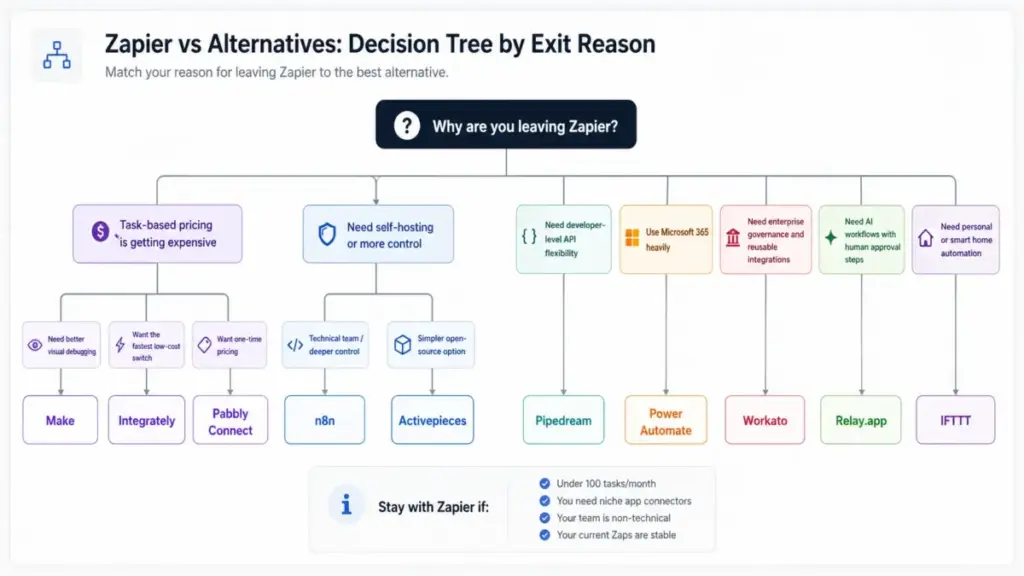
Quick Verdict: Best Zapier Alternatives
The right Zapier replacement depends on why you are leaving. The table below maps each alternative to one primary exit reason, a starting price, and migration difficulty. Scan the “Why Switch” column first.
| Rank | Alternative | Best For | Starting Price | Migration Difficulty | Why Switch |
|---|---|---|---|---|---|
| 1 | Make | Visual workflow control | $9/mo (5K credits) | Medium | Better debugging and lower cost for multi-step flows |
| 2 | n8n | Self-hosting and code control | €20/mo (2.5K executions) | Medium to Hard | Execution-based billing, Git version control, self-host option |
| 3 | Pabbly Connect | Lifetime pricing | $799 one-time (10K tasks/mo) | Medium | Eliminate recurring automation bills |
| 4 | Power Automate | Microsoft 365 shops | $15/user/mo | Medium to Hard | Native M365 governance and RPA |
| 5 | Activepieces | Open-source starter | Free (10 active flows) | Medium | Unlimited runs, active-flow pricing |
| 6 | Pipedream | Developer API workflows | Credit-based (verify live) | Medium to Hard | Code steps, Node.js, Python, serverless |
| 7 | Integrately | Budget quick switch | $19.99/mo (2K tasks) | Easy to Medium | Lower cost for simple automations |
| 8 | Workato | Enterprise iPaaS | Custom pricing | Hard | Governance, orchestration, reusable architecture |
| 9 | Relay.app | Human-in-the-loop AI | $19/mo (750 steps) | Easy to Medium | Built-in approval checkpoints for AI workflows |
| 10 | IFTTT | Personal automation | $2.99/mo (20 applets) | Easy | Cheap consumer and smart home applets |
Pricing verified April 28, 2026. Workato and Pipedream require live verification for exact tier pricing.
Why Are Users Leaving Zapier?
Zapier is not a bad product. It is one of the most mature automation platforms available. But specific pain points push teams toward alternatives once workflows scale beyond simple trigger-action pairs.
The most common exit reasons fall into three categories: cost, control, and fit.
Cost pressure is the top driver. Zapier counts every successful action step as a task. A five-step Zap that runs 1,000 times per month consumes 5,000 tasks, not 1,000. On the Professional plan, that volume starts at $19.99/month for 750 tasks and scales quickly. One Reddit user in r/automation wrote:
“What started as $10 per month has now jumped to over $750 for basic automations.”
AI steps add further cost uncertainty. When Zapier introduced AI-powered actions, teams that added them to existing Zaps saw task counts rise without changing workflow logic. There is no separate AI billing cap on most plans.
Control gaps frustrate technical teams. Zapier’s visual builder is simple, but debugging a failed Zap across 20 steps is harder than it should be. There is no Git-based version control. No self-hosting option. No way to run Zapier on your own infrastructure for compliance or data residency. Developer teams that need code steps, API access, or CI/CD-style workflow management often hit Zapier’s ceiling before they hit its task limit.
Stack fit becomes a problem for Microsoft-heavy and enterprise teams. Organizations running Outlook, Teams, SharePoint, and Dynamics often find that Zapier connects to Microsoft apps but does not govern them natively. Enterprise IT teams need audit trails, reusable integration patterns, and role-based access that Zapier’s Team and Enterprise plans only partially address.
Another Reddit user summarized reliability concerns bluntly:
“My Zaps ALWAYS BREAK”
That quote reflects a real frustration: as Zap count and complexity grow, maintenance burden grows with it. And Zapier’s support tiers gate faster response times behind higher-priced plans.
Zapier Alternatives Pricing Models
The single biggest mistake when comparing Zapier competitors is treating all billing units as equal. A Zapier “task” is not the same as a Make “credit,” an n8n “execution,” or an Activepieces “active flow.” Understanding billing units is the first step toward accurate cost comparison. Before comparing pricing models, it helps to understand what workflow automation actually is and how different automation approaches — from simple triggers to full orchestration — affect which billing model fits your team.
Each platform charges differently based on what it counts as a billable event. The table below decodes the billing model for every alternative in this guide.
| Platform | Billing Unit | What Counts | Free Tier | Paid Starting Price |
|---|---|---|---|---|
| Zapier | Task | Each successful action step in a Zap | 100 tasks/mo | $19.99/mo (750 tasks) |
| Make | Credit (operation) | Each module execution in a scenario | 1,000 credits/mo | $9/mo (5K credits) |
| n8n | Workflow execution | One full workflow run, regardless of step count | Community (self-host) | €20/mo (2.5K executions) |
| Pabbly Connect | Task | Each action step, similar to Zapier | None on lifetime | $799 one-time (10K tasks/mo) |
| Power Automate | Per user or per bot | User license or unattended bot license | None standalone | $15/user/mo |
| Activepieces | Active flow | Each active automation, unlimited runs per flow | 10 active flows | $5/flow/mo beyond free tier |
| Pipedream | Compute credit | Compute time per step execution | Yes (verify limits) | Credit-based (verify live) |
| Integrately | Task | Each action step | None listed | $19.99/mo (2K tasks) |
| Workato | Custom/usage-based | Recipes, connections, transaction volume | None | Custom (contact sales) |
| Relay.app | Step | Each step execution in a workflow | 200 steps/mo | $19/mo (750 steps) |
| IFTTT | Applet | Number of active applets, not runs | 2 applets | $2.99/mo (20 applets) |
Pricing verified April 28, 2026.
Why this matters for switching decisions: A five-step lead routing workflow that runs 1,000 times monthly costs 5,000 tasks on Zapier but only 1,000 executions on n8n. On Make, the credit cost depends on module complexity, but it is often lower than Zapier’s equivalent task count. On Activepieces, it costs one active flow regardless of how many times it runs. The billing unit alone can change annual cost by 40% to 80% for the same workflow.
Best Zapier Alternatives Ranked
I ranked these 10 alternatives based on how well each one solves a specific Zapier exit reason, not on general feature count. Each review includes billing model, migration difficulty, a critical weakness, and a clear recommendation for who should and should not switch. Our review methodology weights pricing transparency, workflow builder depth, integration coverage, and real switching cost.
Make – Best Visual Workflow Builder

Score: 9.2/10 – Excellent
Make is the strongest alternative for teams that need visual control over complex, multi-step workflows. Its canvas-based scenario builder shows every branch, filter, router, and error path in a single view. For RevOps teams routing leads through CRM, enrichment, and notification steps, Make’s visual debugging alone justifies switching from Zapier.
Best for: 3 to 8 person RevOps teams routing inbound leads through HubSpot, enrichment APIs, and Slack notifications. Not for: Teams that depend on niche Zapier-only connectors not available in Make’s 3,000+ app library. Pricing verified: April 28, 2026 Migration difficulty: Medium
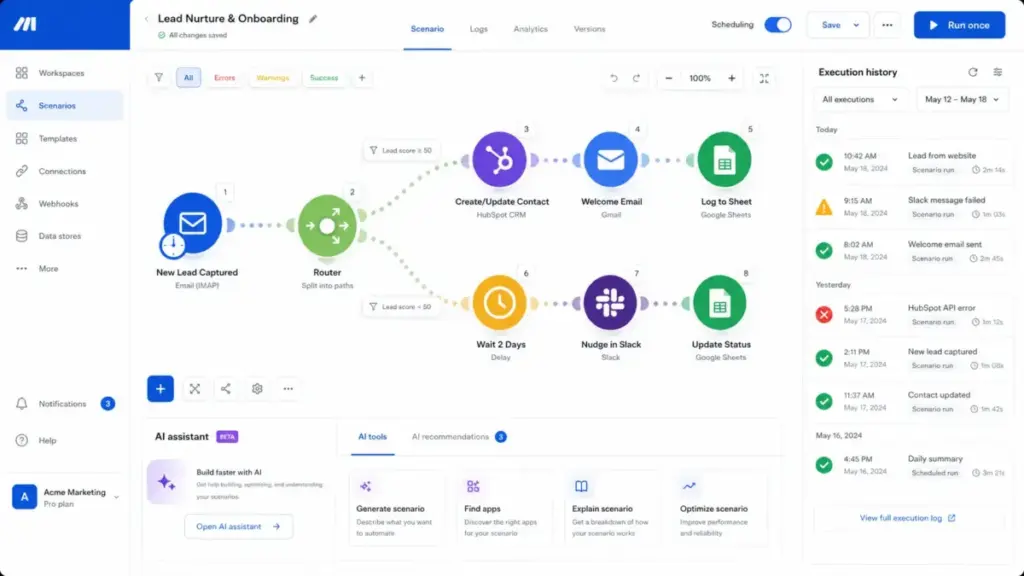
Why switch from Zapier: Zapier’s linear Zap view becomes hard to manage once workflows include paths, filters, and error handling. Make shows every execution path visually. Full-text execution log search lets you find failed runs without scrolling through individual step histories. Make’s credit-based pricing also tends to cost less than Zapier’s task-based billing for workflows with five or more steps.
Key features:
- Visual scenario builder with drag-and-drop routers, iterators, and filters
- 3,000+ app connections with Make API access
- Full-text execution log search across all scenarios
- Make AI Agents (beta) and AI app modules
- Make MCP Server for agent-to-scenario orchestration
- Data store and data structure modules for persistent state
Pricing comparison: Make’s Free plan includes 1,000 credits per month. The Make Plan starts at $9/month for 5,000 credits. Credits map to module executions, not step-level tasks. A five-module scenario that runs once uses roughly five credits, similar to Zapier’s five tasks. But Make’s paid tiers include more credits per dollar than Zapier’s equivalent task tiers at moderate volume.
Critical weakness: Make’s app library has 3,000+ connections versus Zapier’s 8,000+. If a critical integration exists only on Zapier, Make cannot replace it without a custom HTTP module or webhook workaround. Credit overages also need monitoring; high-frequency scenarios can burn through credits faster than expected.
Migration notes: Rebuilding Zaps as Make scenarios requires reconnecting every app credential. Zapier paths translate to Make routers. Zapier filters translate to Make filters, but the syntax differs. Expect one to two days per complex workflow. Simple two-step Zaps migrate in under an hour.
Daniel Rivera’s take: Make is the tool I recommend first to teams leaving Zapier for cost or debugging reasons. It is not cheaper in every scenario, but the visual builder makes complex workflows easier to maintain. Read our full Make review for a deeper breakdown.
n8n – Best Self-Hosted Alternative

Score: 9.0/10 – Excellent
n8n changes who owns the automation stack. It is the strongest option for technical teams that want self-hosting, Git-based version control, and execution-based billing where a 20-step workflow costs the same as a 2-step workflow per run.
Best for: Technical teams with 1 to 3 automation engineers who want infrastructure-level control. Not for: Non-technical teams who need the fastest possible setup without DevOps involvement. Pricing verified: April 28, 2026 Migration difficulty: Hard for non-technical teams, Medium for technical teams
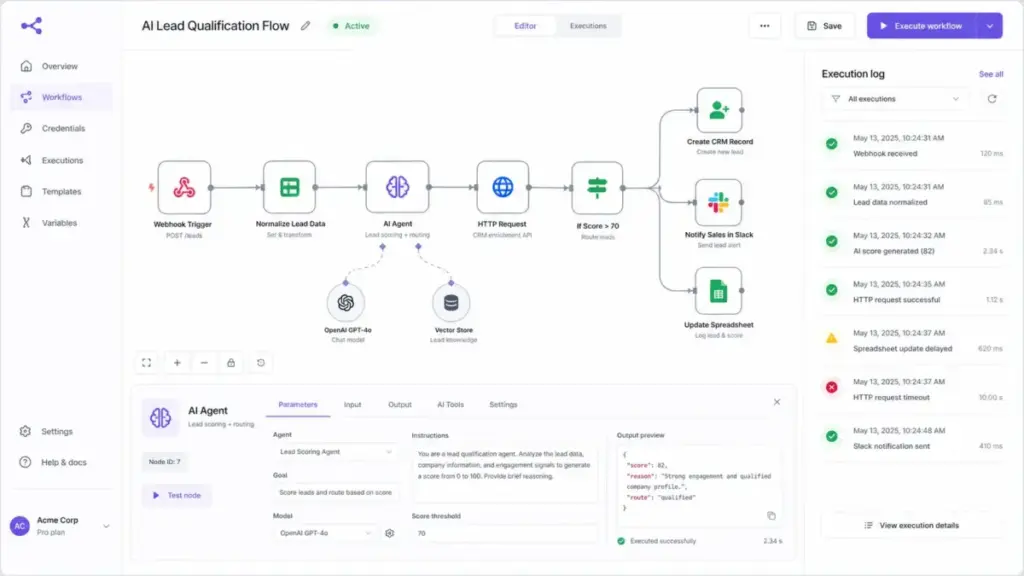
Why switch from Zapier: n8n charges by workflow execution, not by step. A 20-node workflow that runs 1,000 times costs 1,000 executions. On Zapier, the same workflow would consume 20,000 tasks. That billing difference alone can reduce monthly cost by 60% to 80% for complex workflows. Self-hosting adds data residency, compliance control, and zero per-execution cost beyond server infrastructure.
Key features:
- Self-hosting via Docker, Kubernetes, or n8n’s own cloud
- Unlimited steps per execution on all paid plans
- AI Workflow Builder with credits for generative AI-assisted node configuration
- Git version control on Business plan (workflow history on all plans)
- Global variables, admin roles, and credential sharing
- 400+ built-in integrations plus custom HTTP and code nodes
Pricing comparison: n8n Starter is €20/month billed annually for 2,500 workflow executions. Pro is €50/month. Business is €667/month for 40,000 executions. Self-hosted Community edition is free with no execution limits, but requires server management. Compared to Zapier Professional at $19.99/month for 750 tasks, n8n’s 2,500 executions can cover far more actual work if workflows have multiple steps.
Critical weakness: n8n’s native integration library is smaller than Zapier’s and Make’s. Teams relying on pre-built app connections may need to build custom nodes or use HTTP request nodes. The self-hosted option requires Docker or Kubernetes knowledge, ongoing maintenance, and monitoring. That operational cost is real and often underestimated.
Migration notes: Zapier Zaps do not export in a format n8n can import directly. Each workflow must be rebuilt node by node. Triggers, filters, and formatters need manual recreation. App credentials require fresh OAuth connections. For a team with 20+ active Zaps, plan two to three weeks for full migration with testing.
Daniel Rivera’s take: n8n is not a cheaper Zapier. It is a different category of tool. If your team has someone comfortable with Docker and JSON, n8n gives you control that no hosted platform can match. If your team does not, the learning curve will offset the cost savings. Our n8n review covers the self-hosting math in detail.
Pabbly Connect – Best Lifetime Pricing Option

Score: 8.4/10 – Good
Pabbly Connect exists primarily to solve one problem: recurring monthly automation bills. Its one-time lifetime pricing model appeals to bootstrapped teams, affiliates, and small agencies that want to stop paying Zapier every month for the same workflows.
Best for: 1 to 3 person founder teams and small agencies managing simple, high-volume workflows. Not for: Enterprise governance, complex branching logic, or niche integrations unavailable in Pabbly’s library. Pricing verified: April 28, 2026 Migration difficulty: Medium
Why switch from Zapier: The exit reason is purely economic. Pabbly’s lifetime plan page showed $799 for 10,000 tasks per month at the time of verification. Pricing changes frequently, so confirm before purchasing. For teams spending $50 to $150 per month on Zapier, the lifetime plan pays for itself within 6 to 16 months.
Key features:
- One-time lifetime pricing option (verify current availability)
- Multi-step workflow builder with webhooks
- Unlimited workflows on some plans
- Task-based billing similar to Zapier’s logic
- Built-in apps for forms, email marketing, and billing
Pricing comparison: Pabbly uses task-based billing like Zapier, so a five-step workflow still consumes five tasks per run. The savings come from the one-time payment model, not from a different billing unit. Monthly subscription plans also exist but are less distinctive compared to alternatives like Make or n8n.
Critical weakness: Pabbly’s interface and integration depth lag behind Zapier, Make, and n8n. The builder works for straightforward automations but becomes harder to manage with complex branching. Integration coverage is narrower. Error handling and logging are less detailed than Make’s execution history.
One Pabbly user, Thomas Weaver, noted on the pricing page:
“6 months with Pabbly Connect now. I’m so glad that I went for the 10k tasks plan.”
Migration notes: Simple Zaps with common apps (Gmail, Google Sheets, Slack) migrate easily. Complex Zaps with custom webhooks, formatters, or paths require more testing. App credentials need fresh connections. Expect one to two days for a typical migration of 10 simple workflows.
Daniel Rivera’s take: Pabbly’s appeal is economic first, product depth second. If you are running straightforward automations and your main complaint about Zapier is the monthly bill, Pabbly is worth evaluating. If you need advanced debugging, branching, or enterprise features, look at Make or n8n instead.
Microsoft Power Automate – Best for Microsoft Shops

Score: 8.7/10 – Very Good
Microsoft Power Automate is the right Zapier replacement only if your workflows start and end inside the Microsoft ecosystem. For organizations running Microsoft Teams, Outlook, SharePoint, Excel, Dynamics 365, and Azure, Power Automate provides native governance, desktop RPA, and Dataverse integration that Zapier cannot match.
Best for: 10 to 50 person Microsoft 365 organizations with IT-managed compliance requirements. Not for: Teams running mixed SaaS stacks with heavy reliance on non-Microsoft apps like Slack, HubSpot, or Stripe. Pricing verified: April 28, 2026 Migration difficulty: Medium to Hard
Why switch from Zapier: Zapier connects to Microsoft apps through third-party connectors, but it does not inherit Microsoft’s admin center governance, conditional access policies, or Dataverse data layer. Power Automate does. For compliance-sensitive industries (healthcare, finance, government), native Microsoft governance removes an integration layer and the risk that comes with it.
Key features:
- Cloud flows (trigger-action) and desktop flows (RPA)
- Attended and unattended robotic process automation
- Native integration with all Microsoft 365 services
- Dataverse as a data platform for flow state and business logic
- Premium connectors for SAP, Oracle, Salesforce, and custom APIs
- Process mining add-on for workflow discovery
- Per-user and per-bot licensing
Pricing comparison: Power Automate Premium costs $15/user/month paid yearly. Power Automate Process (unattended RPA bot) costs $150/bot/month. Hosted Process is $215/bot/month. This is per-user, not per-task, which makes cost predictable but expensive for large teams. Some Microsoft 365 E3 and E5 licenses include limited Power Automate access, reducing incremental cost for existing Microsoft customers.
Critical weakness: Power Automate’s strength with Microsoft apps becomes a weakness with non-Microsoft SaaS. Third-party connectors exist, but they are less polished than Zapier’s equivalents. The flow builder is functional but not as visually clear as Make’s scenario canvas. Desktop flows (RPA) add complexity that cloud-only teams may not need.
Migration notes: Migrating from Zapier to Power Automate is not a one-to-one rebuild. Zapier’s app connector model differs from Power Automate’s connector and action framework. Triggers may behave differently. Teams need to map each Zap to a Power Automate flow template, reconnect credentials through Azure AD, and test thoroughly. Microsoft’s own migration documentation is sparse for Zapier-specific transitions.
Daniel Rivera’s take: Power Automate is strongest when the workflow lives inside Microsoft. If you are a Salesforce shop using Slack and Stripe, Power Automate adds friction instead of removing it. But for a SharePoint-to-Teams-to-Outlook approval chain, nothing else comes close.
Activepieces – Best Open-Source Starter

Score: 8.3/10 – Good
Activepieces offers a simpler entry point to open-source automation than n8n. Its pricing model charges per active flow rather than per task or execution, which means unlimited runs on every active workflow. For teams with high run volume but a controlled number of workflows, this billing model changes the cost equation.
Best for: Semi-technical teams wanting open-source automation without n8n’s heavier learning curve. Not for: Teams needing broad connector coverage or mature enterprise support contracts. Pricing verified: April 28, 2026 Migration difficulty: Medium
Why switch from Zapier: Zapier’s task limits punish high-frequency workflows. A workflow that runs 50 times per day with five steps consumes 7,500 tasks per month on Zapier. On Activepieces, that same workflow costs one active flow with unlimited runs. The Standard plan includes 10 free active flows. Additional flows cost $5 per active flow per month.
Key features:
- Open-source codebase with self-hosting options (deployment docs)
- Unlimited runs per active flow
- AI agents and MCP server support
- Tables for structured data within flows
- Piece access controls and RBAC on higher plans
- SSO available on custom/enterprise plans
Pricing comparison: Activepieces Standard is free with 10 active flows and unlimited runs. Beyond 10 flows, each additional active flow costs $5/month. The Unlimited plan is a custom annual contract. Compared to Zapier, Activepieces is dramatically cheaper for teams running a small number of workflows at high frequency. It is less advantageous for teams running hundreds of low-frequency workflows.
Critical weakness: Activepieces is younger than Zapier, Make, and n8n. Its connector library is smaller. Enterprise support, SLA guarantees, and advanced governance features are less mature. Teams evaluating Activepieces should verify that critical app connectors exist before committing to migration.
Migration notes: Rebuilding Zaps in Activepieces requires creating new flows from scratch. The builder is intuitive for simple workflows but less documented than Make or n8n for edge cases. App credentials need fresh connections. Plan one to two days for a migration of 10 to 15 workflows.
Daniel Rivera’s take: Activepieces sits between n8n’s technical depth and Zapier’s simplicity. Its active-flow pricing model is its strongest differentiator. If your automation cost is driven by run volume, not workflow count, Activepieces deserves a trial.
Pipedream – Best for Developers

Score: 8.6/10 – Very Good
Pipedream is the alternative you choose when “no-code” becomes the constraint. It gives developers full code steps in Node.js, Python, Go, and Bash alongside a visual builder. For teams building API-heavy automations, AI agent toolchains, or custom data pipelines, Pipedream offers flexibility that Zapier’s code steps cannot match.
Best for: Developer teams and platform engineers building API-first workflows and AI agent toolchains. Not for: Marketing teams or non-technical operators who need drag-and-drop templates only. Pricing verified: April 28, 2026 Migration difficulty: Hard for non-technical teams, Medium for developers
Why switch from Zapier: Zapier’s code steps are limited to JavaScript and Python with restricted libraries and execution time. Pipedream runs full serverless functions with access to npm packages, pip libraries, and system-level tools. For teams that outgrow Zapier’s no-code constraints, Pipedream removes the ceiling without forcing a move to raw AWS Lambda or Cloud Functions.
Key features:
- Full code steps: Node.js, Python, Go, Bash
- 3,000+ API integrations and 10,000+ tools for agents
- MCP support for AI agent orchestration
- Serverless execution with managed infrastructure
- SOC 2 Type II, HIPAA, and GDPR compliance (security page)
- Pipedream Connect for embedding workflows into products
Pricing comparison: Pipedream uses a credit-based model tied to compute time, not tasks or executions. The pricing docs describe the credit structure. The pricing page requires client-side rendering for exact tier prices. I cannot state exact paid tier prices without live verification. The free tier includes limited credits per month; verify current limits on the official page.
Critical weakness: Pipedream is not friendly to non-technical users. There are no 1-click templates in the Zapier or Integrately sense. Teams without developers will struggle. The billing model based on compute credits can be hard to predict without benchmarking actual workflows first.
Migration notes: Developers can migrate Zapier Zaps to Pipedream relatively quickly by rebuilding trigger logic and writing code steps. Non-technical teams face a steep curve. Zapier’s visual filter and formatter steps must be rewritten as code or configured through Pipedream’s action steps. OAuth credentials require fresh setup.
Daniel Rivera’s take: Pipedream is the tool for teams where a developer said, “I could build this better in code, but I don’t want to manage the infrastructure.” If that sentence resonates, Pipedream fits. If your team measures tools by how few clicks they require, Pipedream is not the answer.
Integrately – Easiest Budget Switch

Score: 8.0/10 – Good
Integrately is not the deepest automation tool on this list, but it is one of the fastest ways to leave Zapier when cost and simplicity are the main concerns. Its 1-click automation library lets teams activate prebuilt recipes without configuring every step from scratch.
Best for: Small teams moving simple two-to-three step Zaps off Zapier to save money. Not for: Complex branching workflows, enterprise governance, or developer-first automation. Pricing verified: April 28, 2026 Migration difficulty: Easy to Medium
Why switch from Zapier: Integrately’s Starter plan is $19.99/month for 2,000 tasks, billed annually. That matches Zapier Professional’s starting price but includes more than double the task count (2,000 vs 750). For teams running simple workflows under 2,000 tasks per month, Integrately provides immediate savings with minimal migration effort.
Key features:
- 1-click prebuilt automation recipes
- Multi-step workflow support
- Webhooks for custom triggers
- Live chat support on all plans
- Task tiers: Starter (2K), Professional (10K), Growth, Business
Pricing comparison: Integrately Starter is $19.99/month for 2,000 tasks. Professional is $39/month for 10,000 tasks. Growth is $99/month. Business is $239/month. Compared to Zapier, Integrately provides more tasks per dollar at every tier, but with fewer app connections and less advanced workflow logic.
Critical weakness: Integrately lacks the depth of Make, n8n, and Pipedream. Error handling is basic. The visual builder does not support the branching, routing, and iteration that complex workflows require. For teams with more than 20 active workflows or workflows with conditional logic, Integrately’s limits will surface quickly.
Migration notes: Simple Zaps migrate easily. Integrately’s prebuilt recipe library covers common app pairs. Credentials require fresh OAuth connections. Complex Zaps with formatters, paths, or custom webhooks may not translate cleanly. Plan a half-day for 10 simple workflows.
Daniel Rivera’s take: Integrately is a quick escape hatch, not a long-term automation platform for growing teams. If your Zapier bill is $40/month and your workflows are simple, Integrately saves money immediately. If you expect to add complexity within six months, start with Make instead.
Workato – Best Enterprise iPaaS

Score: 8.9/10 – Excellent
Workato is not a Zapier alternative in the way most teams search for one. It is an enterprise integration platform (iPaaS) built for IT, operations, and integration teams managing cross-department workflows at scale. Comparing Workato to Zapier is like comparing an ERP to a spreadsheet. They operate at different levels of organizational complexity.
Best for: Enterprise IT teams managing multi-department integrations across Salesforce, SAP, Workday, ServiceNow, and custom APIs. Not for: Solo operators, small teams, simple lead routing, or budget-conscious SMBs. Pricing verified: April 28, 2026 Migration difficulty: Hard
Why switch from Zapier: Enterprise teams outgrow Zapier when they need reusable integration patterns (recipes), governance controls, audit logs, and centralized connection management. Zapier’s Team and Enterprise plans offer some governance, but Workato’s architecture is designed for IT-managed integration at enterprise scale. If automation has become infrastructure in your organization, Workato is where that infrastructure gets built.
Key features:
- Enterprise iPaaS with governance, orchestration, and API management
- Reusable recipes, callable recipes, and recipe lifecycle management
- B2B/EDI integration for partner and supply chain workflows
- Data orchestration and workflow bots
- Agentic automation for AI-assisted integration flows
- Workato One: unified platform across automation, integration, and API management
- Custom pricing with Standard, Business, Enterprise, and Workato One editions
Pricing comparison: Workato’s pricing documentation describes edition-based pricing tied to recipes, connections, and transaction volume. There is no public self-serve pricing. Enterprise procurement cycles typically involve discovery, scoping, and custom contracts. This is not a tool you sign up for on a credit card.
Critical weakness: Cost and complexity. Workato requires implementation planning, training, and often a dedicated integration team. Small teams will find it over-engineered. The sales-led buying process means no quick trial-to-production path. ROI requires enough integration volume to justify the platform investment.
Migration notes: Moving from Zapier to Workato is not a migration; it is a platform change. Zaps do not map directly to Workato recipes. Integration architecture must be redesigned with governance, error handling, and reusable patterns. Expect a multi-week implementation project with dedicated resources.
Daniel Rivera’s take: Workato is what teams evaluate after automation becomes infrastructure. If you are Googling “Zapier alternatives” because your bill is too high, Workato is not your answer. If you are Googling it because your CTO asked for integration governance across 15 departments, Workato belongs on the shortlist.
Relay.app – Best Human-in-the-Loop AI

Score: 8.1/10 – Good
Relay.app stands out for one specific capability: built-in human-in-the-loop checkpoints for AI-powered workflows. In an era where generative AI actions can produce unpredictable outputs, Relay.app lets teams insert manual approval steps before AI-generated content, responses, or decisions go live.
Best for: Small teams needing approval-based AI workflows with GPT, Claude, or Gemini integration. Not for: High-volume operations or teams needing broad connector coverage. Pricing verified: April 28, 2026 Migration difficulty: Easy to Medium
Why switch from Zapier: Zapier supports AI steps, but the approval flow is less native. Relay.app was built with AI-human collaboration as a core design principle, not an add-on. Teams using prompt engineering to generate customer replies, content drafts, or data summaries can add review checkpoints without building complex conditional paths.
Key features:
- Plain-English workflow building
- AI actions with GPT, Claude, and Gemini support
- Human-in-the-loop approval steps as first-class features
- Shared workflows and shared connections for teams
- Free plan: 200 steps/month, 500 AI credits/month
Pricing comparison: Relay.app Free includes 200 steps/month and 500 AI credits/month. Professional is $19/month billed annually for 750 steps/month. Team is $59/month for 1,500 steps/month. Enterprise is custom. Step counts are lower than Zapier’s task tiers at equivalent prices, so teams with high-volume needs will hit limits quickly.
Critical weakness: Relay.app’s app ecosystem is smaller than Zapier’s, Make’s, and n8n’s. Step limits on paid plans are relatively low. Teams running 20+ workflows at moderate frequency will need the Team or Enterprise plan. The platform is newer and less battle-tested than established alternatives.
Migration notes: Simple Zaps migrate easily to Relay.app’s visual builder. AI-focused workflows benefit from Relay.app’s native AI actions. Complex Zaps with many conditional paths are harder to rebuild. Step limits may require plan upgrades that offset cost savings from leaving Zapier.
Daniel Rivera’s take: Relay.app feels modern, but it is not yet a broad Zapier replacement. It earns its spot on this list specifically for teams that want human review gates on AI-generated workflow outputs. If that is your use case, Relay.app does it better than any other tool here. For everything else, Make or n8n offers more.
IFTTT – Best Personal Automation Pick

Score: 7.3/10 – Adequate
IFTTT is an alternative to Zapier only if the use case is personal, not operational. It excels at consumer automation: smart home triggers, personal notification recipes, and simple app-to-app connections for individual productivity. It is not a business workflow tool.
Best for: Solo users automating smart home devices, personal notifications, and simple app connections. Not for: RevOps teams, CRM workflows, enterprise operations, agency automation, or any business-critical process. Pricing verified: April 28, 2026 Migration difficulty: Easy for simple personal automations
Why switch from Zapier: Zapier’s lowest paid plan is $19.99/month. IFTTT Pro is $2.99/month for 20 applets. Pro+ is $8.99/month for unlimited applets with filter code. For users who only need 5 to 10 simple automations for personal use, Zapier is overbuilt and overpriced.
Key features:
- Applets for trigger-action automation
- 900+ services including smart home (Philips Hue, Ring, Nest)
- Multi-action applets on Pro+
- Filter code (JavaScript) on Pro+
- AI services integration
- Webhooks for custom triggers
Pricing comparison: IFTTT Free includes 2 applets. Pro is $2.99/month billed annually for 20 applets. Pro+ is $8.99/month for unlimited applets. Applet count is the billing unit, not runs. A single applet can fire unlimited times. This makes IFTTT extremely cheap per automation for personal use, but the 900 service limit and lack of multi-step business logic rule it out for operational workflows.
Critical weakness: IFTTT is not a business automation platform. It lacks multi-step workflows (beyond Pro+ multi-action), advanced branching, error handling, and team collaboration features. Using IFTTT for CRM lead routing, QuickBooks invoice syncing, or support ticket escalation is not practical.
Migration notes: Only simple personal Zaps translate to IFTTT. Business Zaps with multiple steps, filters, formatters, or conditional paths cannot be rebuilt in IFTTT. Treat IFTTT as a replacement only for Zaps that automate personal tasks like “If new email attachment, save to Google Drive.”
Daniel Rivera’s take: I include IFTTT because it appears in every competitor’s list, but I want to be direct. IFTTT is not a serious Zapier replacement for business workflows. If you are searching for Zapier alternatives because your company’s bill is too high, IFTTT will not help. If you are searching because your personal automation budget is too high, IFTTT is perfect.
Zapier vs Top Alternatives: Feature Comparison
This matrix compares all 10 alternatives across the features that matter most when switching from Zapier. Use it to narrow your shortlist before testing.
| Tool | Billing Unit | App Coverage | Visual Builder | Code Support | AI Support | Self-Hosting | Enterprise Governance | Best Use Case |
|---|---|---|---|---|---|---|---|---|
| Zapier | Task (per step) | 8,000+ apps | Linear builder | JS, Python (limited) | AI steps, Copilot | No | Team/Enterprise plans | Broad SaaS automation |
| Make | Credit (per module) | 3,000+ apps | Canvas with routers | HTTP module | AI modules, MCP | No | Enterprise plan | Multi-step visual workflows |
| n8n | Execution (per run) | 400+ built-in | Canvas with nodes | JS, Python, custom nodes | AI nodes, builder | Yes (Docker, K8s) | Business plan | Self-hosted technical automation |
| Pabbly Connect | Task (per step) | 1,000+ apps | Linear builder | Limited | Limited | No | No | Budget lifetime automation |
| Power Automate | Per user/bot | 1,000+ connectors | Flow builder | Expressions, custom connectors | AI Builder, Copilot | No (Azure only) | Full M365 governance | Microsoft ecosystem automation |
| Activepieces | Active flow | Growing library | Visual builder | Code pieces | AI agents, MCP | Yes | RBAC, SSO on higher plans | High-frequency, controlled workflow count |
| Pipedream | Compute credit | 3,000+ APIs | Hybrid visual + code | Node.js, Python, Go, Bash | MCP, agent tools | No | SOC 2, HIPAA, GDPR | Developer API workflows |
| Integrately | Task (per step) | 1,000+ apps | Simple builder | Webhooks only | Limited | No | No | Simple budget automations |
| Workato | Custom/usage | 1,000+ enterprise connectors | Recipe builder | Ruby (connectors) | Agentic automation | No (private cloud option) | Full enterprise | Enterprise iPaaS |
| Relay.app | Step (per step) | Growing library | Visual builder | Limited | GPT, Claude, Gemini | No | Team plan | AI workflows with human review |
| IFTTT | Applet (active count) | 900+ services | Applet builder | Filter code (Pro+) | AI services | No | No | Personal and smart home |
Real Switching Cost From Zapier
Switching automation platforms is not as simple as canceling one subscription and starting another. The real cost includes workflow rebuilding, credential reconnection, parallel testing, and the risk of missed triggers during transition.
Sample workflow: 5-step lead routing
Consider a common RevOps workflow: a new form submission triggers a Zap that (1) creates a CRM contact, (2) enriches the lead with Clearbit, (3) routes to the right sales rep via Slack, (4) adds a row to Google Sheets, and (5) sends a confirmation email.
Here is how billing changes across platforms for 1,000 runs per month:
| Platform | Billing Unit | Units Consumed | Approximate Monthly Cost |
|---|---|---|---|
| Zapier | Tasks | 5,000 tasks | $19.99 to $49/mo depending on tier |
| Make | Credits | ~5,000 credits | $9 to $16/mo depending on plan |
| n8n | Executions | 1,000 executions | €20/mo (Starter covers 2,500) |
| Activepieces | Active flows | 1 active flow | Free (within 10-flow limit) |
| Relay.app | Steps | 5,000 steps | $59/mo (Team plan for 1,500 steps would not cover this) |
Hidden costs to account for:
- Rebuild time: Each Zap must be manually recreated. Budget 1 to 4 hours per complex workflow.
- Credential reconnection: Every app connection requires fresh OAuth or API key setup.
- Testing: Parallel testing (running old and new simultaneously) catches logic errors but doubles task usage during the overlap period.
- Monitoring: The first 30 days after cutover require active monitoring for missed triggers, failed steps, and data mismatches.
- Self-hosting labor (n8n, Activepieces): Server provisioning, updates, backups, and uptime monitoring add ongoing operational cost.
- Support tier gaps: Zapier’s paid support tiers may offer faster response than the free tier of a new platform.
30-Day Zapier Migration Plan
A structured migration reduces risk and prevents the “we switched and everything broke” scenario. Follow this week-by-week framework.
| Week | Focus | Key Actions |
|---|---|---|
| Week 1 | Audit | List all active Zaps. Record trigger app, action apps, step count, monthly task usage, and error rate. Identify critical vs. non-critical workflows. Export Zap configurations where possible. |
| Week 2 | Rebuild | Recreate the top 5 to 10 critical workflows in your chosen alternative. Connect app credentials. Verify trigger behavior. Test each workflow with sample data. |
| Week 3 | Parallel Test | Run both Zapier and the new platform simultaneously for critical workflows. Compare outputs, timing, and error rates. Fix discrepancies before cutover. |
| Week 4 | Cutover | Disable Zapier Zaps one by one as new workflows prove stable. Monitor the new platform for 7 days. Keep Zapier active (but paused) as a rollback option. |
Post-migration: Keep your Zapier account on the Free plan (100 tasks/month) for 60 days as a safety net. Do not delete Zap configurations until you confirm all workflows are stable on the new platform.
When to Stay with Zapier
Not every team should leave Zapier. Switching has real cost, and some situations make Zapier the better choice despite its pricing.
Stay with Zapier if:
- Your monthly usage is under 100 tasks. The Free plan covers this at zero cost. No alternative is cheaper than free.
- You depend on niche connectors. Zapier’s 8,000+ app library includes integrations that Make, n8n, and others do not support. If a critical app is Zapier-only, switching means building custom webhooks or HTTP requests.
- Your team is non-technical. Zapier’s onboarding is the fastest in the category. Make and n8n have steeper learning curves. If workflow owners are marketers or ops people without technical support, Zapier’s simplicity has real value.
- Migration cost exceeds 12-month savings. If switching saves $30/month but requires 40 hours of rebuild and testing, the payback period is over a year. Calculate actual savings before committing.
- Your Zaps are stable and low-maintenance. If existing workflows run without errors and the bill is acceptable, switching introduces risk for no clear gain.
- You are already on Zapier Enterprise with custom pricing. Enterprise contracts often include volume discounts, dedicated support, and governance features that close the gap with alternatives.
For a full analysis of where Zapier excels, read our Zapier review.
Frequently Asked Questions
What is the best Zapier alternative in 2026?
Make is the best Zapier alternative for most teams in 2026. It offers a visual workflow builder with better debugging, credit-based pricing that is often cheaper than Zapier’s task billing for multi-step workflows, and 3,000+ app connections. For technical teams, n8n is the best choice. For Microsoft-heavy organizations, Power Automate fits better.
Is Make better than Zapier?
Make is better than Zapier for teams running complex, multi-step workflows where visual debugging and cost control matter. Make’s canvas builder shows branches, routers, and error paths more clearly than Zapier’s linear view. Zapier is better for teams that need the broadest app coverage or the fastest no-code onboarding.
Is n8n cheaper than Zapier?
n8n is significantly cheaper than Zapier for complex workflows. n8n charges per workflow execution, not per step. A 20-step workflow costs one execution on n8n but 20 tasks on Zapier. The n8n Starter plan at €20/month includes 2,500 executions. Zapier Professional at $19.99/month includes only 750 tasks. Self-hosted n8n has no per-execution cost beyond server infrastructure.
What is the best free Zapier alternative?
Activepieces Standard is the best free Zapier alternative for business workflows. It includes 10 free active flows with unlimited runs. For personal automation, IFTTT Free includes 2 applets. Zapier Free includes 100 tasks/month, which is more restrictive than Activepieces for high-frequency workflows but broader in app coverage.
What is the best open-source Zapier alternative?
n8n is the best open-source Zapier alternative. Its Community edition is fully self-hostable via Docker or Kubernetes with no execution limits. Activepieces also offers an open-source option with a lighter learning curve. Both provide source code access, community contributions, and the ability to run automation infrastructure on your own servers.
Which Zapier alternative is best for Microsoft 365?
Microsoft Power Automate is the best Zapier alternative for Microsoft 365 organizations. It provides native governance through the Microsoft admin center, direct integration with Teams, Outlook, SharePoint, Excel, Dynamics 365, and Dataverse. Power Automate Premium costs $15/user/month, and some M365 licenses include limited access.
Is IFTTT a good Zapier alternative?
IFTTT is a good Zapier alternative only for personal automation and smart home use cases. It is not suitable for business workflows. IFTTT Pro costs $2.99/month for 20 applets, making it far cheaper than Zapier for simple personal triggers. But it lacks multi-step workflows, team features, and the app depth needed for CRM, billing, or support automation.
How hard is it to migrate from Zapier?
Migration difficulty varies by platform and workflow complexity. Simple two-step Zaps migrate in under an hour on most alternatives. Complex multi-step Zaps with paths, filters, and formatters take 2 to 4 hours each. Every migration requires fresh app credential connections, trigger verification, and parallel testing. Plan 2 to 4 weeks for a full migration of 20+ active workflows.
When should I stay with Zapier?
Stay with Zapier if your monthly usage is under 100 tasks (Free plan), you depend on niche connectors unavailable elsewhere, your team is non-technical and values fast onboarding, or the cost of migration exceeds 12 months of savings. Zapier’s maturity and app ecosystem still make it the best choice for teams where stability matters more than cost optimization.
Which Zapier alternative is best for enterprise teams?
Workato is the best Zapier alternative for enterprise teams. It provides enterprise-grade governance, reusable integration recipes, API management, B2B/EDI support, and audit controls. Workato operates at a different scale and price point than Zapier. Enterprise teams should also evaluate Microsoft Power Automate if the stack is Microsoft-heavy.
Final Verdict
Choosing the right Zapier alternative depends on one question: why are you leaving?
For most teams outgrowing Zapier’s pricing: Make. Its visual builder, credit-based pricing, and debugging tools handle the transition cleanly.
For technical teams wanting control: n8n. Self-hosting, Git version control, and execution-based billing give developers and automation engineers the infrastructure they need.
For eliminating recurring bills: Pabbly Connect. The lifetime pricing model works for teams with stable, simple workflows.
For Microsoft-first organizations: Power Automate. Native M365 governance and RPA depth are unmatched.
For open-source without a steep curve: Activepieces. Active-flow pricing with unlimited runs fits high-frequency, controlled-count workflows.
For developer and API workflows: Pipedream. Full code steps, serverless execution, and agent toolchain support.
For the fastest budget switch: Integrately. More tasks per dollar for simple automations.
For enterprise integration architecture: Workato. Governance, orchestration, and reusable patterns at enterprise scale.
For AI workflows with human review: Relay.app. Built-in approval checkpoints for AI-generated outputs.
For personal automation: IFTTT. Cheap applets for smart home and individual productivity. Not for business.
The best Zapier alternative is the one that matches your exit reason, not the one with the longest feature list. Audit your workflows, calculate your real task cost, and test one platform for 30 days before committing.