
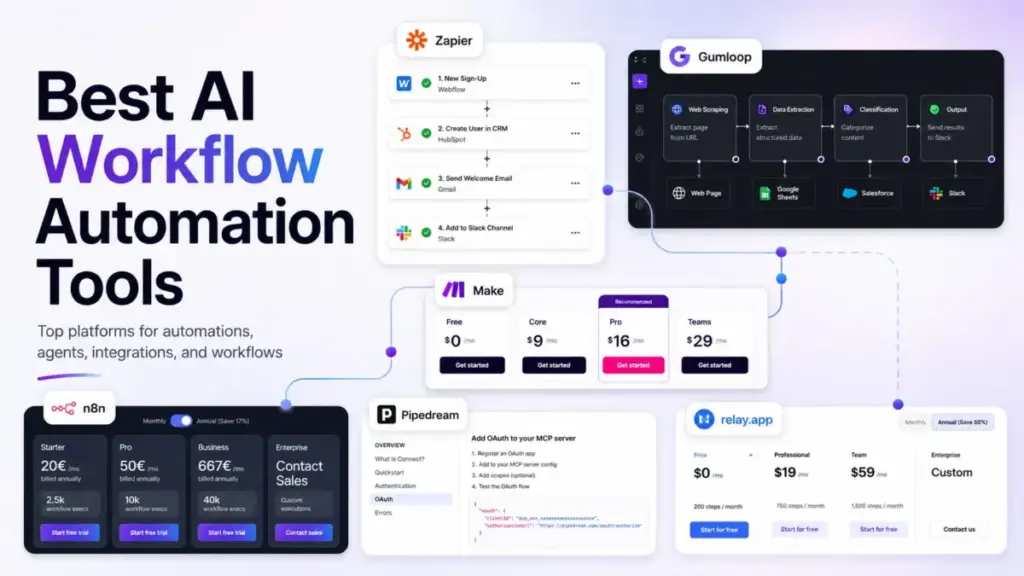
I analyzed pricing for 28 AI workflow automation platforms and narrowed the list to 10 based on public pricing evidence, AI feature depth, integration breadth, and buyer fit. The result: the best tools for what workflow automation means in practice are not always the most agentic or the cheapest.
The right pick depends on your billing tolerance, your team’s technical skill, and whether you need simple app routing or full AI agent orchestration. One finding that surprised me: the open-source option (Activepieces) offers unlimited runs on its free tier, while the most popular tool (Zapier) caps free users at 100 tasks per month.
Quick Verdict: Best AI Workflow Automation Tools by Use Case
| Use case | Best pick | Why it fits |
|---|---|---|
| Best overall for most teams | Zapier | Broadest app ecosystem (9,000+), AI Copilot, and fastest no-code setup |
| Best visual workflow builder | Make | Visual canvas with routers, filters, and AI Agents starting at$9/month |
| Best for technical and self-hosted teams | n8n | Self-hosted Community Edition, code steps, and unlimited users on cloud |
| Best AI-native data workflows | Gumloop | Built for web scraping, extraction, classification, and AI agent flows |
| Best human-in-the-loop approvals | Relay.app | AI builder with built-in approval checkpoints and MCP server support |
| Best multi-agent AI workforce | Relevance AI | Agents, Workforces, Knowledge/RAG, and 2,000+ integrations |
| Best open-source and cost control | Activepieces | Unlimited runs, 10 free active flows, open-source Community Edition |
| Best for developers and API builders | Pipedream | MCP servers, 10,000+ pre-built API tools, and Node.js/Python execution |
| Best AI assistant workflows | Lindy | Email drafting, meeting prep, and follow-up automation for professionals |
| Best for sales prospecting and GTM | Bardeen | Agentic web scraper, lead enrichment, and browser-based data workflows |
What this means: There is no single best AI workflow automation tool for every team. A 3-person marketing team automating Slack-to-CRM workflows needs Zapier or Make. A 10-person RevOps team building AI agents for data extraction needs Gumloop or Relevance AI. A solo developer connecting AI models to APIs needs Pipedream. Start by identifying your billing model tolerance: tasks, credits, actions, or active flows.
How We Chose and Ranked These Tools
I evaluated 28 AI workflow automation platforms based on a detailed analysis of official product documentation, feature specifications, pricing pages, and verified customer sentiment. Pricing was verified in June 2026. I did not rank tools by brand popularity or affiliate payout.
Ranking Criteria
| Criterion | Weight | What I checked |
|---|---|---|
| Pricing value | 20% | Starting price, free plan, billing unit predictability, hidden costs |
| Core feature depth | 20% | AI workflow creation, visual builder, agent logic, human review |
| Ease of use | 15% | Onboarding, natural-language builders, setup time |
| Integrations | 15% | Native apps, API, webhooks, MCP support, BYOK |
| Scalability | 15% | Team controls, SSO, audit logs, concurrency, governance |
| User fit | 15% | Best-for match, not-best-for warning, limitation severity |
What this means: I weighted pricing value and feature depth equally at 20% each because the billing unit (tasks vs credits vs actions vs active flows) affects total cost more than the starting price in this category. A tool with a lower starting price but unpredictable credit consumption can cost more at scale than a higher-priced tool with flat billing.
Testing Level and Review Limitation
All 10 tools were evaluated through official research only. I did not test these products directly for this article. Every pricing claim, feature statement, and integration count is sourced from official product pages, official documentation, and official pricing pages verified in June 2026. Pricing and features change frequently in this category, so check official pricing pages before purchasing.
Free Tier Champions: AI Workflow Tools That Cost Nothing to Start
Four tools on this list offer genuinely usable free plans. The difference is what “free” buys you.
Zapier: Best Overall
Zapier is the safest starting point for teams that want the broadest no-code app ecosystem and AI-assisted workflow creation without managing infrastructure.
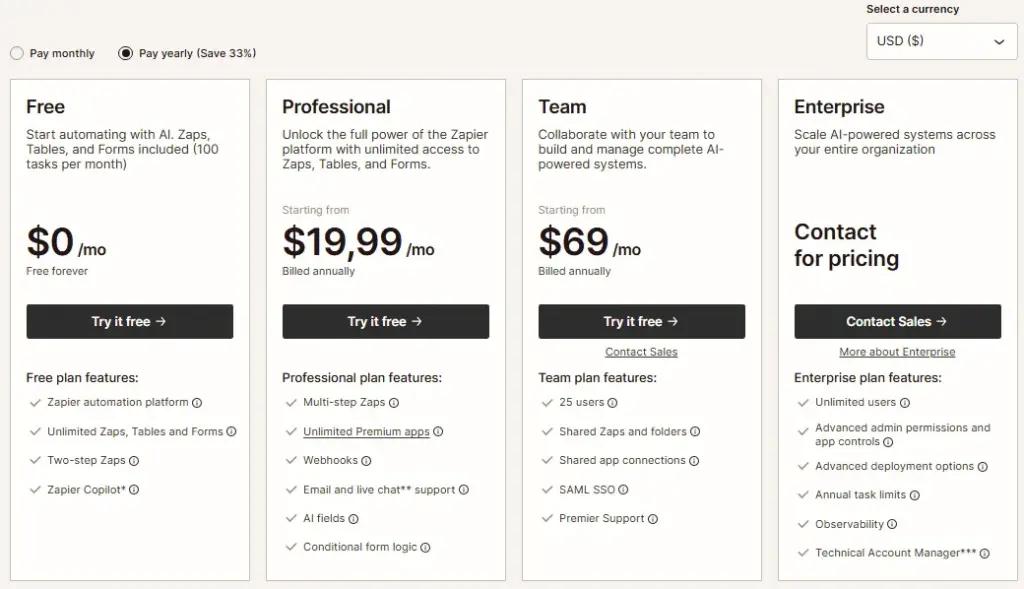
Starting price: $19.99/month billed annually for Professional (as of June 2026). Free plan available with 100 tasks/month and two-step Zaps. Official pricing page
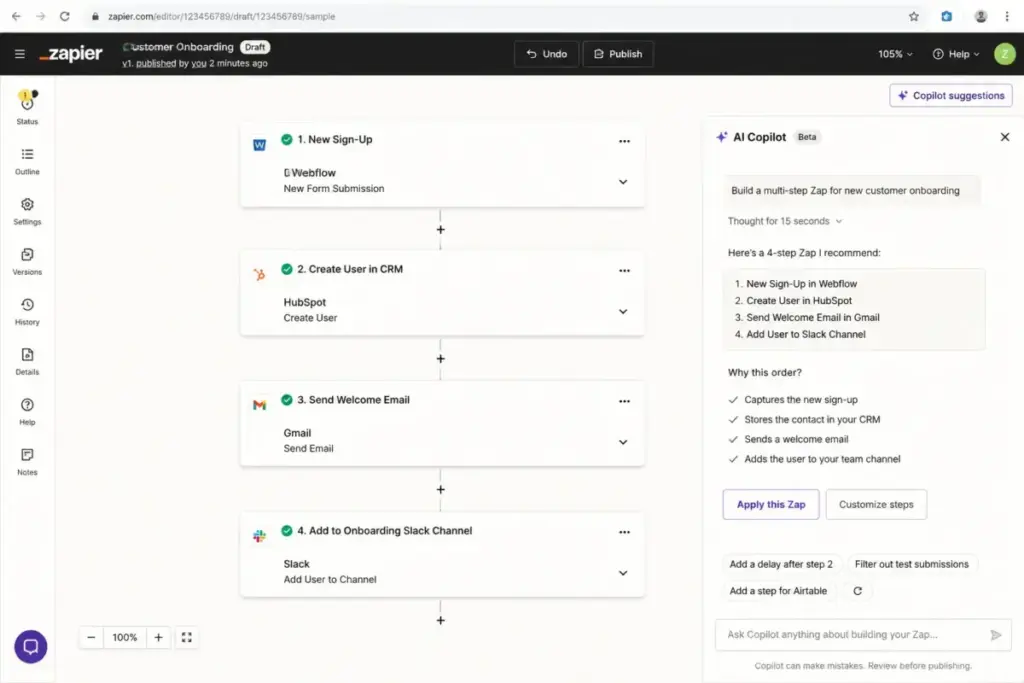
Zapier connects to over 9,000 apps, which is the largest integration footprint on this list. The AI Copilot helps non-technical users build multi-step Zaps using natural language. Tables, Forms, and Zapier MCP expand the platform beyond simple trigger-action automation into data management and AI tool connectivity.
The free plan is limited to two-step Zaps and 100 tasks per month. That works for a solo founder testing a single workflow. A 5-person marketing team running lead routing, CRM sync, and Slack notifications will burn through 100 tasks in the first week. The Professional plan at $19.99/month unlocks multi-step Zaps, but the real cost depends on your task tier. Higher task volumes push the monthly bill well past $50.
Key strengths:
- 9,000+ app connections, the largest in this category
- AI Copilot for natural-language Zap creation
- Tables and Forms for data collection workflows
- Zapier MCP for connecting AI agents to app ecosystem
Where it falls short:
- Task-based pricing pushes past $50/month at higher task tiers
- Free plan caps at 100 tasks/month and two-step Zaps
- Premium app connections and AI-heavy workflows add cost
Best for: 3-person SaaS teams automating CRM-to-Slack routing, solo founders connecting apps without code, and agencies managing client workflows across dozens of apps.
Avoid if: Your team runs 10,000+ automations per month and needs the lowest per-task cost. Make or Activepieces will cost less at that volume.
Setup difficulty: Low. The Copilot and template library make first-workflow creation take minutes.
Verdict: Choose Zapier if you need the widest app coverage and fastest setup. Budget for the Professional plan minimum, and estimate your monthly task volume before committing.
Make: Best Visual Builder

Make is the strongest visual workflow builder for operators and value-conscious SMB teams that need routers, filters, and AI modules at a lower entry price than Zapier.
Starting price: $9/month for Core at 10,000 credits/month (as of June 2026). Free plan available with 1,000 credits/month. Official pricing page
Make (owned by Celonis) uses a visual canvas where each module action in a scenario consumes one credit. That credit model is more granular than Zapier’s task pricing, which means Make is cheaper for workflows with many steps but moderate volume. The AI Agents feature is available across plans, giving even free users access to AI-powered automation building.
The credit system can be confusing. A 5-step workflow that runs 100 times per month consumes 500 credits. The free plan’s 1,000 credits cover that scenario. A 15-step workflow running 500 times per month consumes 7,500 credits, which fits inside the Core plan’s 10,000 credit allotment. But a high-volume team running complex scenarios will need to monitor credit consumption carefully.

Key strengths:
- Visual workflow canvas with routers, filters, and conditional logic
- AI Agents available across all plans
- 3,000+ app integrations including OpenAI, Perplexity AI, and ElevenLabs
- Lower starting price than Zapier ($9/month vs $19.99/month)
Where it falls short:
- Credit accounting adds complexity for teams not used to usage-based billing
- Smaller integration ecosystem than Zapier (3,000 vs 9,000)
- More complex than simple two-app trigger-action tools
Best for: 5-person RevOps teams building multi-branch workflows with conditional logic, agencies automating content pipelines with AI modules, and budget-conscious teams that need more steps per workflow without per-task pricing.
Avoid if: You want the simplest possible two-app setup. Zapier’s Copilot is faster for basic trigger-action workflows.
Setup difficulty: Medium. The visual canvas is intuitive for technical operators but takes longer to learn than Zapier’s linear builder.
Verdict: Choose Make if your workflows have more than three steps and you want visual control over branching logic. The credit model rewards complexity over volume.
Activepieces: Best Open Source

Activepieces is the best option for teams that want AI agents, unlimited workflow runs, and self-hosting control at the lowest possible cost.
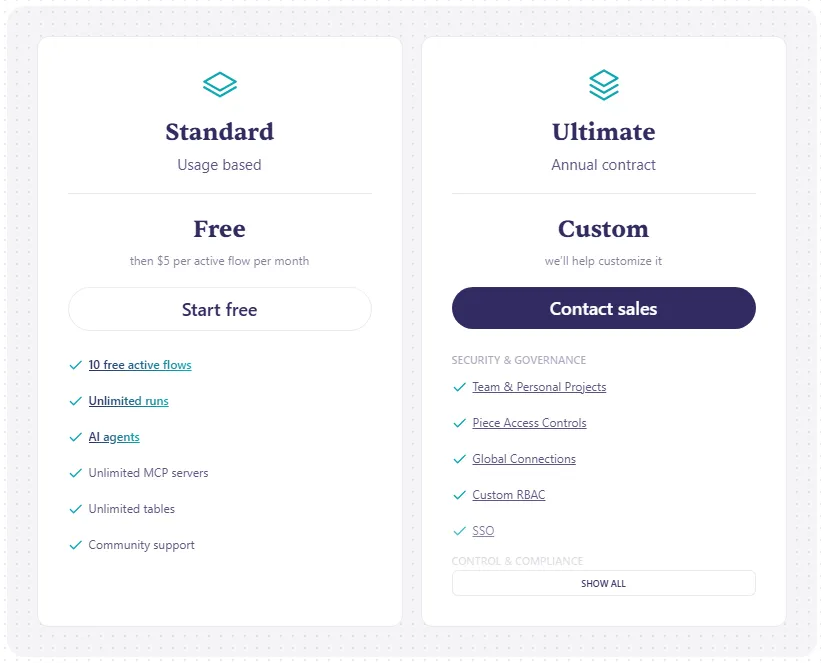
Starting price: Free with 10 active flows and unlimited runs (as of June 2026). Additional active flows cost $5 per active flow per month after the free allowance. Official pricing page
The billing model is the key differentiator. Activepieces charges by active flow count, not by run count. That means a workflow that runs 10,000 times per month costs the same as one that runs 10 times. For high-volume automation teams, this model can save hundreds of dollars compared to task-based or credit-based alternatives.
The Standard plan includes AI agents, unlimited MCP servers, unlimited tables, and 740+ integrations including Gmail, OpenAI, Slack, Notion, HubSpot, and Shopify. The open-source Community Edition lets technical teams self-host the entire platform.
Key strengths:
- Unlimited runs on all plans (no per-execution metering)
- 10 free active flows before any payment
- Open-source Community Edition for self-hosting
- AI agents and unlimited MCP servers included
Where it falls short:
- Enterprise governance features (SSO, audit logs, RBAC) require custom Ultimate plan
- Self-hosting requires technical infrastructure skills
- Template marketplace is smaller than Zapier or Make
Best for: 10-person technical teams running high-volume automations, agencies that want cost predictability regardless of execution count, and open-source advocates who need full self-hosted control.
Avoid if: Your team is non-technical and wants a polished consumer-grade UX. Zapier or Relay.app will be easier to adopt.
Setup difficulty: Low for cloud. High for self-hosted Community Edition.
Verdict: Choose Activepieces if your main concern is cost predictability at scale. The per-flow pricing model is the most transparent on this list.
Bardeen: Best for Sales Prospecting

Bardeen is the strongest AI workflow tool for sales, recruiting, and GTM teams that need browser-based lead sourcing, web scraping, enrichment, and qualification.
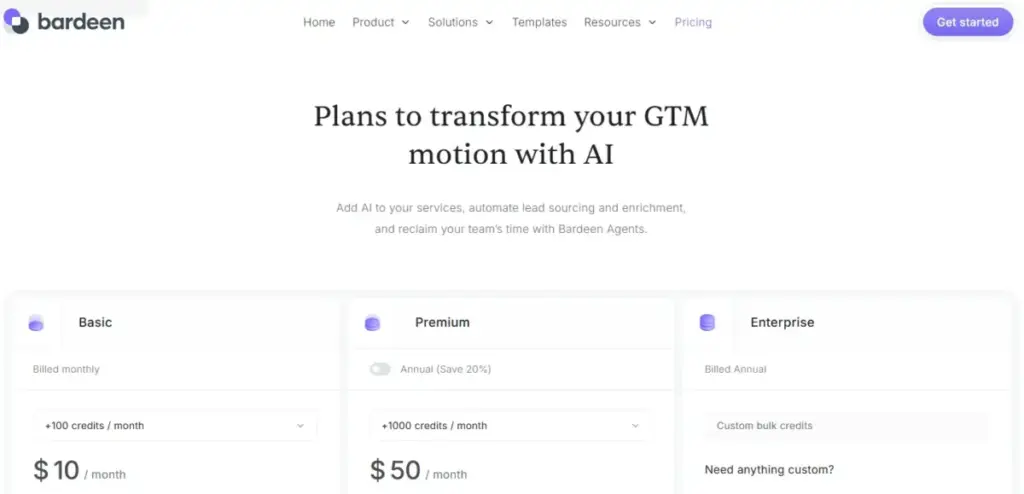
Starting price: $10/month for Basic (as of June 2026). Free 100 credits available. Official pricing page
Bardeen has shifted toward GTM and browser data workflows. The agentic web scraper, AI web search, and enrichment engine are built for teams that need to pull lead data from websites, qualify prospects, and sync results to Google Sheets, Airtable, or Notion. Credits drive the cost: scraper and web search rows cost 1 credit per row, enrichment rows cost 3 credits per row, and utility actions are free.
Key strengths:
- Agentic web scraper for automated lead sourcing
- AI web search and enrichment for prospect qualification
- Export to Google Sheets, Airtable, Notion, and CSV
- Low starting price at $10/month
Where it falls short:
- Best for GTM and browser workflows, not broad internal automation
- Credit burn depends on scraped and enriched row volume
- Narrower category fit than general workflow platforms
Best for: 5-person SDR teams automating LinkedIn lead scraping, recruiting teams pulling candidate data from job boards, and real estate agents sourcing property listings.
Avoid if: You need general-purpose workflow automation across internal business processes. Zapier, Make, or n8n are better fits.
Setup difficulty: Low for browser-based GTM workflows.
Verdict: Choose Bardeen if your primary automation need is web data extraction and lead enrichment. It is the most specialized tool on this list, and that specialization is its advantage.
Best Under $25/Month: Affordable AI Automation That Scales
Relay.app: Best Human-in-the-Loop

Relay.app is the best AI workflow automation tool for business users who need approval checkpoints, AI output reviews, and human-in-the-loop controls built into every workflow.
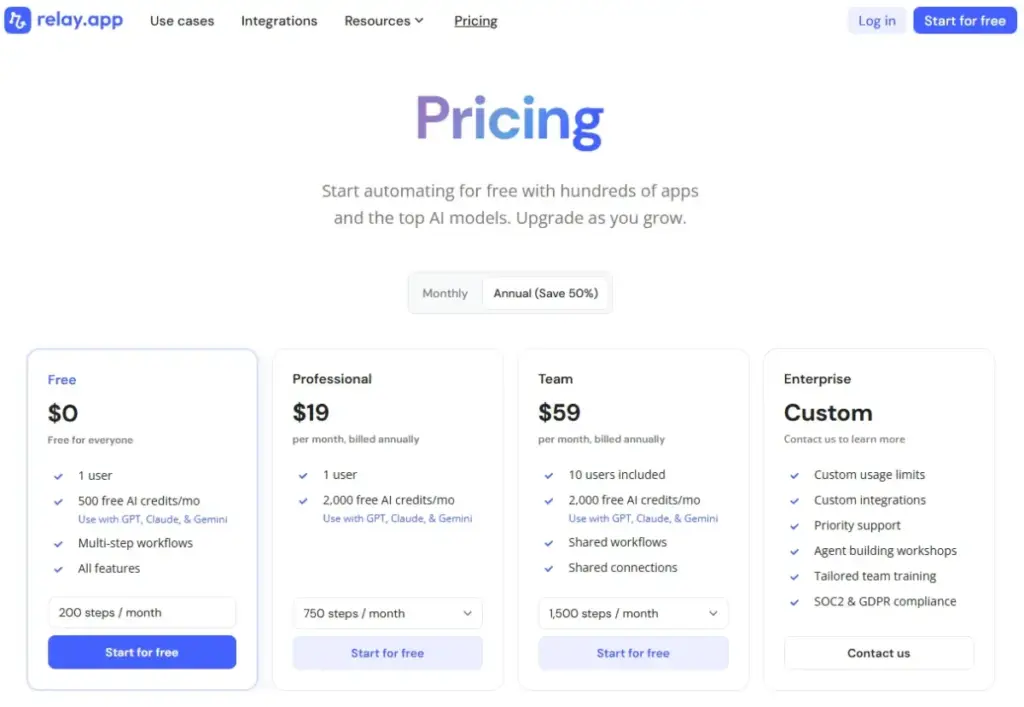
Starting price: $19/month billed annually for Professional (as of June 2026). Free plan available with 200 steps/month, 500 AI credits/month, 1 user, and 5 workflows. Official pricing page
Relay.app includes all features across all plans. The difference between tiers is volume: steps per month, AI credits per month, and user count. The Professional plan at $19/month includes 750 steps/month and 2,000 AI credits/month. The Team plan at $59/month includes 1,500 steps/month and 10 users.
The human-in-the-loop capability is the core differentiator. Every workflow can include approval gates where a team member reviews AI-generated output before it executes. That matters for compliance-sensitive operations, financial approvals, or customer-facing communications where AI errors carry real risk.
Key strengths:
- Built-in human-in-the-loop approval gates for AI workflows
- Custom MCP servers for connecting to AI models
- All features included on every plan (volume is the only tier difference)
- BYOK (bring your own key) for AI model access
Where it falls short:
- Step limits are lower than Zapier’s task tiers or Activepieces’ unlimited runs
- Integration library of 200+ apps is smaller than Zapier (9,000) or Make (3,000)
- 1-user limit on Free and Professional plans
Best for: 3-person compliance teams automating document review with AI plus human approval, solo consultants running client-facing AI workflows that need quality checkpoints, and finance teams approving expense reports through automated pipelines.
Avoid if: Your team needs thousands of monthly executions or 500+ app integrations. Zapier or Make will serve high-volume, broad-integration needs better.
Setup difficulty: Low. The AI builder generates workflows from natural-language descriptions.
Verdict: Choose Relay.app if the biggest risk in your automation is AI making a mistake without human review. No other tool on this list makes approval flows this easy.
Relevance AI: Best AI Workforce

Relevance AI is built for teams creating multi-agent AI workforces where each agent handles a specific business process, like sales qualification, support triage, or report generation.
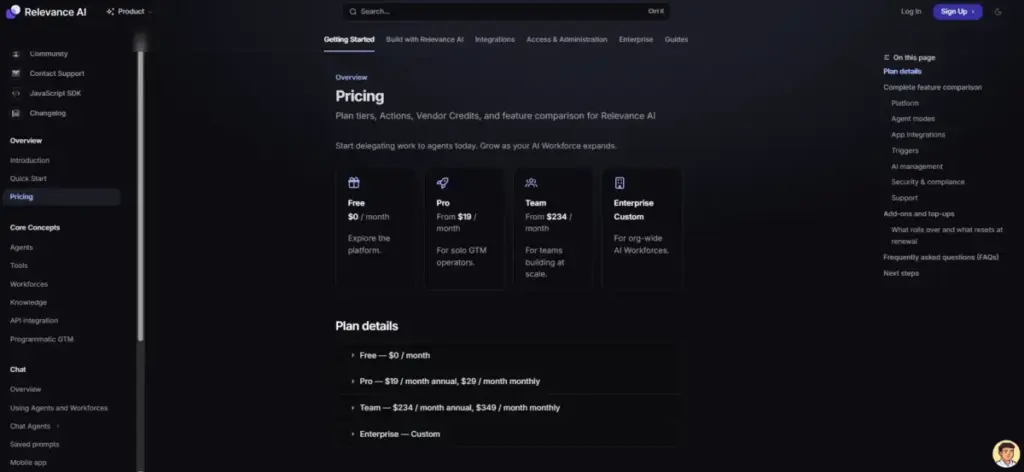
Starting price: $19/month billed annually for Pro, or $29/month monthly (as of June 2026). Free plan available with 200 Actions/month, a $2 one-time Vendor Credits allocation, unlimited agents and tools, 1 workforce, 1 user, and 1 project. Official pricing page
The billing model uses two units: Actions (workflow executions) and Vendor Credits (for external AI model calls). The Pro plan at $19/month annual is affordable for solo builders. The Team plan jumps to $234/month, which is a steep increase that affects mid-sized teams.
Relevance AI is not a traditional trigger-action automation tool. It is a platform for building AI workforces with role-based agents, Knowledge/RAG systems, and human oversight protocols. The Marketplace lets teams deploy pre-built agent templates. The 2,000+ integrations include Google Workspace, Salesforce, Slack, Asana, Canva, Notion, and HubSpot.
Key strengths:
- Multi-agent workforce architecture with role-based agents
- Knowledge/RAG for agent context and memory
- Human oversight, approval workflows, and escalation protocols
- 2,000+ integrations across business apps
Where it falls short:
- More complex conceptual model than trigger-action tools
- Team plan price jump from $19/month to $234/month is steep
- Action and Vendor Credit economics need careful planning
Best for: 10-person GTM teams building AI agents for sales qualification and outbound sequencing, operations managers deploying agent-based report generation, and agencies creating AI workforces for client services.
Avoid if: You only need simple app-to-app routing. Zapier handles that in 5 minutes.
Setup difficulty: Medium. The agent-building interface is no-code, but the workforce concept requires planning.
Verdict: Choose Relevance AI if your automation vision is role-based AI agents handling distinct business processes, not just connecting two apps.
Best for Mid-Market and Technical Teams: $25-100+/Month
n8n: Best for Technical Teams

n8n is the best AI workflow automation tool for technical teams, agencies, and builders who want self-hosting, code steps, and full workflow control alongside natural-language AI workflow creation.
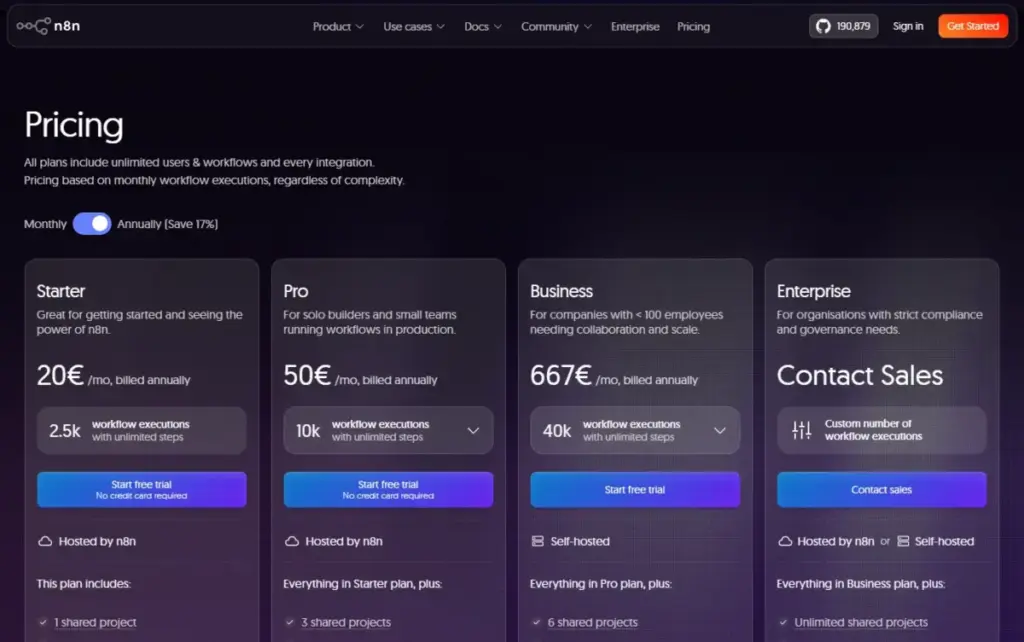
Starting price: 20 EUR/month billed annually for Starter Cloud. Community Edition for self-hosting is available at no cost. Official USD pricing was not confirmed in the source reviewed. Official pricing page
n8n lists cloud pricing in EUR (20 EUR/month for Starter, 50 EUR/month for Pro). Both cloud plans include unlimited users and unlimited workflows. The Starter plan includes 2,500 workflow executions and 50 AI Workflow Builder credits. The Pro plan includes 10,000 executions and 150 AI Workflow Builder credits.
The self-hosted Community Edition is where n8n stands apart. Technical teams can run the entire platform on their own infrastructure at zero licensing cost. That makes n8n the lowest-cost option for high-volume automation, assuming the team can manage servers and updates.
Key strengths:
- Self-hosted Community Edition at no licensing cost
- AI Workflow Builder for natural-language workflow creation
- Unlimited users on all cloud plans
- Code steps in JavaScript and Python for custom logic
- Webhooks, HTTP requests, and GraphQL support
Where it falls short:
- Steeper learning curve than Zapier, Make, or Relay.app
- Cloud plans limit executions, concurrent runs, and AI builder credits
- Official cloud pricing is listed in EUR, not USD
Best for: 10-person development agencies building client automation workflows, technical SaaS teams that need self-hosted control and BYOK, and solo developers who want code-level flexibility inside a visual builder.
Avoid if: Your team has zero technical resources. Zapier or Relay.app will get you running faster without infrastructure management.
Setup difficulty: Medium for cloud. High for self-hosted.
Verdict: Choose n8n if your team can manage infrastructure and wants the deepest technical control. The Community Edition makes it the cheapest option at scale for teams with DevOps capacity. Read the full n8n self-hosted review for deployment details.
Gumloop: Best AI-Native Builder

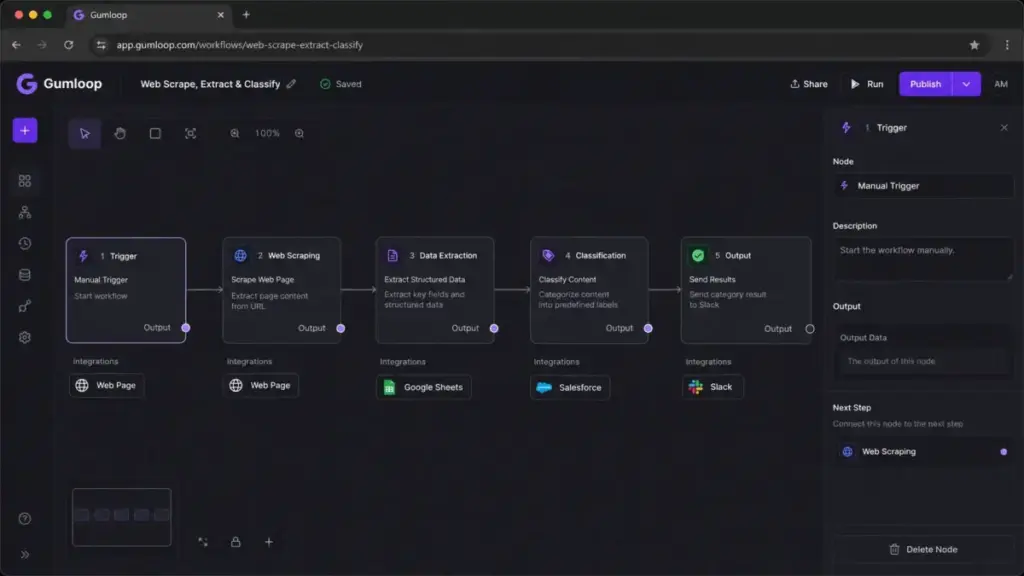
Gumloop is the most AI-native workflow builder on this list, purpose-built for messy data workflows involving web research, scraping, extraction, classification, and summarization.
Starting price: $37/month for Pro with 20,000+ credits/month (as of June 2026). Free plan available with 5,000 credits/month, 1 seat, 1 active trigger, and 2 concurrent runs. Official pricing page
Gumloop is not a general-purpose app connector. It is an AI workflow builder designed for data-heavy operations. The visual builder lets non-technical users create agent flows that pull data from websites, classify documents, extract structured information, and pipe results into business apps. BYOK is available on paid plans.
The credit-based pricing is harder to forecast than flat per-task or per-flow pricing. Each AI operation consumes credits, and credit burn varies by workflow complexity. The Pro plan includes unlimited seats, which makes it cost-effective for teams compared to per-user pricing models.
Key strengths:
- Visual AI workflow builder designed for data extraction and research
- Agents and Gummie assistant for AI-guided automation
- Unlimited flows and unlimited seats on Pro
- BYOK for custom AI model access on paid plans
Where it falls short:
- Credit consumption is harder to predict than flat-rate pricing
- Less suited for simple app-to-app routing (Zapier and Make are better)
- Smaller integration ecosystem than established platforms
Best for: 5-person market research teams automating competitive intelligence gathering, data operations teams extracting structured data from unstructured sources, and content teams building AI-powered research pipelines.
Avoid if: Your workflows are simple trigger-action connections between standard SaaS apps. Zapier handles that with less setup.
Setup difficulty: Low for AI-native workflows. Medium for complex multi-step agent flows.
Verdict: Choose Gumloop if your automation challenge is messy data, not clean app-to-app routing. It excels where traditional workflow tools struggle.
Lindy: Best AI Assistant Workflows

Lindy is the best AI workflow automation tool for executives, solo operators, and professionals who want email drafting, calendar management, meeting prep, and follow-up automation in a personal assistant package.
Starting price: $49.99/month for Plus (as of June 2026). No free plan verified. 7-day free trial available. Official pricing page
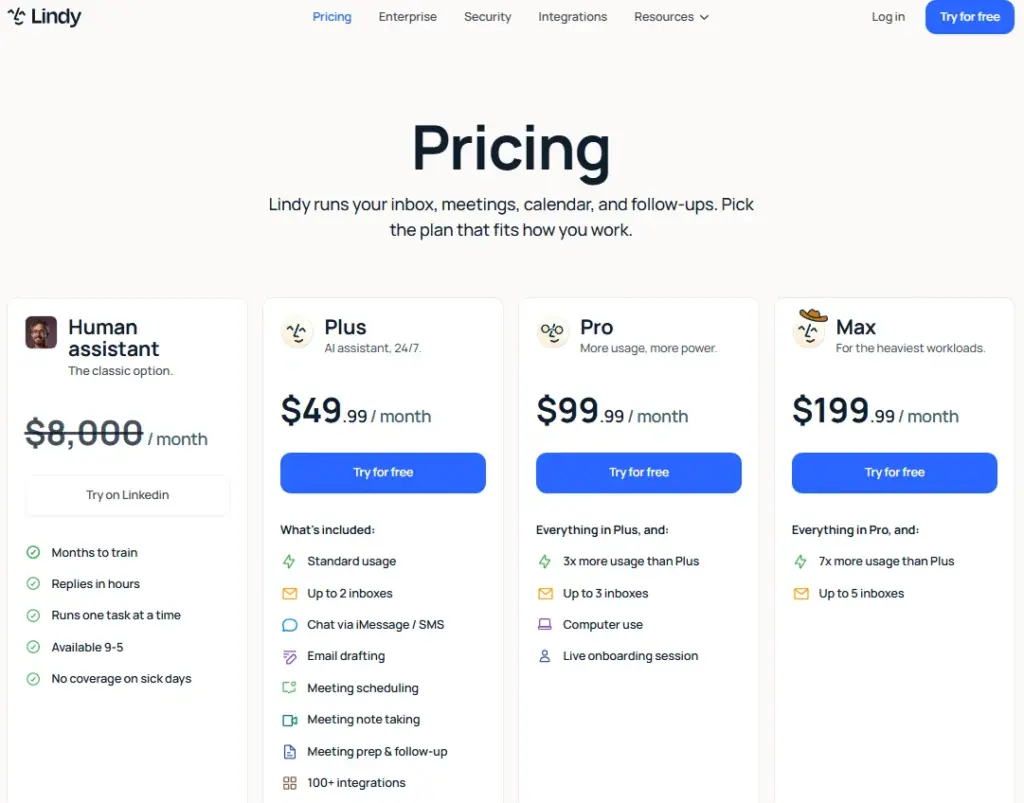
Lindy is the most expensive entry point on this list. The Plus plan at $49.99/month includes standard usage and 2 connected inboxes. The Pro plan at $99.99/month offers 3x the usage and 3 connected inboxes. The Max plan at $199.99/month offers 7x the usage and 5 connected inboxes.
The positioning is different from every other tool here. Lindy is not a workflow builder in the traditional sense. It is a personal AI assistant that automates professional routines: drafting emails, prepping for meetings, tracking follow-ups, and managing calendars. The natural-language instruction model means you tell Lindy what to do instead of building visual workflows.
Key strengths:
- Natural-language agent instructions for non-technical users
- Email drafting and follow-up automation
- Meeting prep and calendar workflow management
- Hundreds of integrations including Google Sheets, Gmail, Slack, HubSpot, and Salesforce
Where it falls short:
- Higher entry price than all other tools on this list ($49.99/month vs $9-$37/month)
- More personal-assistant focused than general workflow automation
- No free plan (only 7-day trial)
Best for: Solo executives managing 50+ emails per day, sales professionals automating meeting follow-ups and CRM updates, and consultants who need AI-assisted email and scheduling without building workflows.
Avoid if: You need general-purpose workflow automation across multiple team members. Zapier, Make, or Relay.app provide broader automation at a lower price.
Setup difficulty: Low. The assistant model requires no technical configuration.
Verdict: Choose Lindy if your automation need is personal productivity, not team workflow orchestration. The price is justified only if email and calendar management consume significant daily hours.
Pipedream: Best for Developers
Pipedream is the best AI workflow automation platform for developers building API workflows, MCP-enabled AI applications, and custom integrations with code-first control.
Starting price: Free plan available with daily credit limits. Paid plan pricing is credit-based with a platform fee and usage-based credits. Exact dollar amounts are not publicly disclosed on the documentation reviewed (as of June 2026). Official pricing page
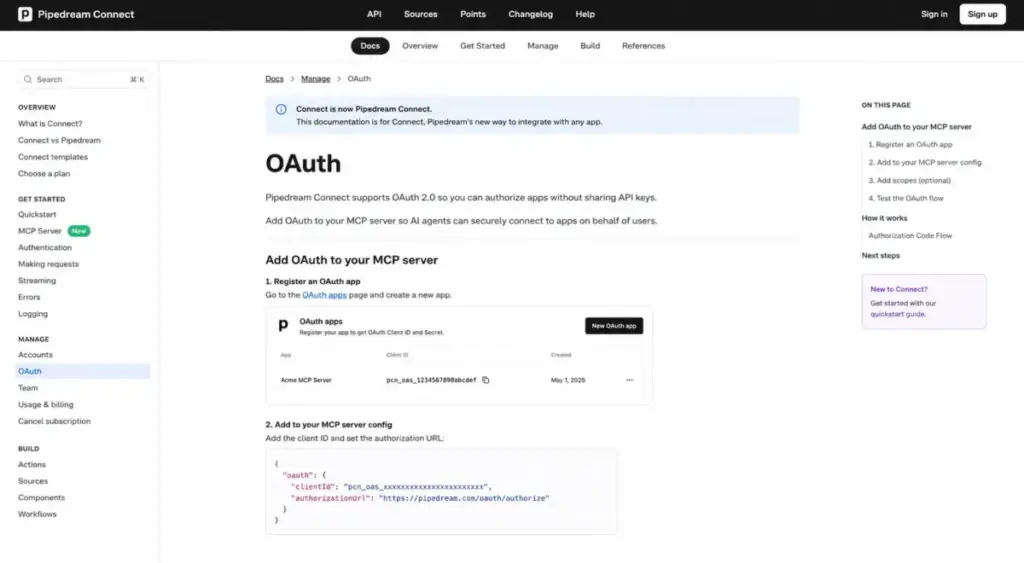
Pipedream is a developer-first platform. Workflows execute Node.js, Python, Go, and Bash code. Pipedream Connect provides fully managed OAuth and secure credential storage for thousands of APIs. MCP servers let developers expose Pipedream’s 10,000+ pre-built API tools to AI agents.
That developer-first setup only works if the team understands what an API is and how app authentication affects workflow design.
The pricing transparency is the main limitation. The official documentation confirms free and paid plans, platform fees, included credits, and additional credit billing, but exact dollar amounts for paid tiers are not fully exposed in the public documentation I reviewed.
Key strengths:
- MCP servers for AI agent-to-API connectivity
- 10,000+ pre-built API tools with managed OAuth
- Code execution in Node.js, Python, Go, and Bash
- Free plan for development and prototyping
Where it falls short:
- Paid pricing is not fully transparent in public documentation
- Developer-first model is not accessible for non-technical teams
- No visual builder comparable to Make or Gumloop
Best for: Solo developers building AI agent backends that need API authentication, engineering teams connecting AI models to production APIs via MCP, and startups prototyping workflow MVPs with code-first flexibility.
Avoid if: Your team has no developers. Every other tool on this list is more accessible for business users.
Setup difficulty: High for non-developers. Low for experienced developers.
Verdict: Choose Pipedream if you are a developer who needs the fastest path from AI model to production API workflow with managed authentication.
Pricing Comparison: Starting Price vs Real Cost at Scale
| Tool | Starting price | Free plan | Billing unit | 10-user estimate | Hidden costs |
|---|---|---|---|---|---|
| Zapier | $19.99/mo | Yes, 100 tasks/mo | Tasks | Depends on task tier | Premium apps, AI add-ons, higher task tiers |
| Make | $9/mo | Yes, 1,000 credits/mo | Credits (per module action) | $29/mo Teams + credit tier | Higher credit volumes, enterprise governance |
| n8n | 20 EUR/mo cloud | Self-hosted free | Executions | 20 EUR/mo (unlimited users) | Cloud execution limits, AI builder credits |
| Gumloop | $37/mo | Yes, 5,000 credits/mo | Credits | $37/mo (unlimited seats) | Credit burn on complex AI workflows |
| Relay.app | $19/mo | Yes, 200 steps/mo | Steps + AI credits | $59/mo Team (10 users) | Additional steps, AI credits, model usage |
| Relevance AI | $19/mo annual | Yes, 200 actions/mo | Actions + Vendor Credits | $234/mo Team | Vendor Credits, enterprise deployment |
| Activepieces | Free (10 flows) | Yes, unlimited runs | Active flows | $5/extra flow | Enterprise governance on custom plan |
| Pipedream | Free plan available | Yes, daily credit limit | Compute credits | Not publicly disclosed | Compute time, memory, additional credits |
| Lindy | $49.99/mo | No (7-day trial) | Per user | ~$500/mo (10 x $49.99) | Higher usage tiers, connected inbox limits |
| Bardeen | $10/mo | Yes, 100 credits | Credits (per row) | Not disclosed per seat | Credit burn on scraping and enrichment |
What this means: The starting price column is the least useful column in this table. The billing unit column matters more. Zapier charges per task. Make charges per module action (credit). Activepieces charges per active flow with unlimited runs. Lindy charges per user. Pipedream charges per compute second. A team running 1,000 automations per month will pay vastly different amounts on each platform depending on workflow complexity, step count, and AI model usage.
The Maya Patel Add-On Reveal: Three hidden costs appear across most tools on this list. First, AI model credits or Vendor Credits are separate from platform credits on Relay.app, Relevance AI, and Gumloop. Second, enterprise governance features like SSO, audit logs, and RBAC are gated behind the highest or custom tiers on nearly every platform. Third, premium app connections (Zapier) or higher concurrency limits (Gumloop, n8n) add cost that the starting price does not reflect.
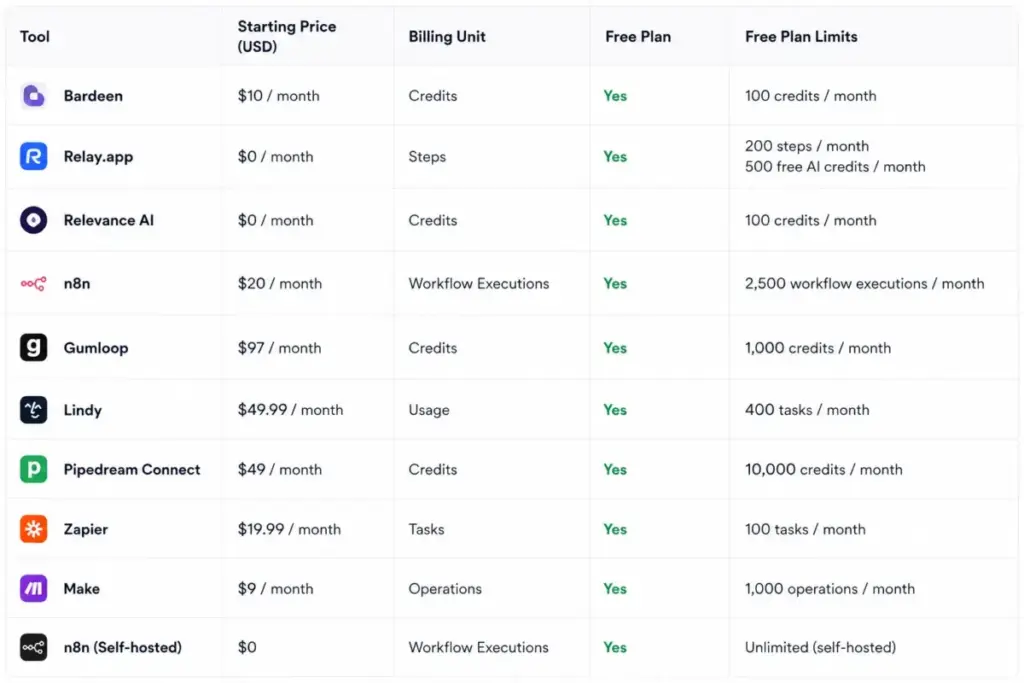
Feature Gate Comparison: What You Get on Each Plan
| Feature | Zapier | Make | n8n | Gumloop | Relay.app | Relevance AI | Activepieces | Pipedream | Lindy | Bardeen |
|---|---|---|---|---|---|---|---|---|---|---|
| AI workflow builder | All paid | All plans | Starter+ | All plans | All plans | All plans | All plans | All plans | All plans | All plans |
| Multi-step workflows | Professional+ | All plans | All plans | All plans | All plans | All plans | All plans | All plans | All plans | All plans |
| API/webhook support | Professional+ | Core+ | All plans | Pro+ | Professional+ | Pro+ | All plans | All plans | Varies | Varies |
| Human-in-the-loop | Limited | No | No | No | All plans | All plans | All plans | No | No | No |
| Self-hosting option | No | No | Yes | No | No | No | Yes | No | No | No |
| MCP support | Yes | No | No | No | Yes | No | Yes | Yes | No | No |
| SSO/admin controls | Enterprise | Enterprise | Enterprise | Enterprise | Team+ | Team+ | Ultimate | Paid plans | Enterprise | Enterprise |
| BYOK (AI model keys) | No | No | Yes | Pro+ | Professional+ | Pro+ | Yes | Yes | No | No |
What this means: Human-in-the-loop and MCP support are the two features that most directly separate these tools. Only Relay.app, Relevance AI, and Activepieces offer built-in human approval workflows. MCP server support (for connecting AI agents to APIs) is available on Zapier, Relay.app, Activepieces, and Pipedream. Self-hosting is limited to n8n and Activepieces. If any of these features are must-haves, your shortlist narrows fast.
Setup and Migration Difficulty
| Tool | Setup difficulty | Why |
|---|---|---|
| Zapier | Low | Template library, AI Copilot, and guided onboarding |
| Make | Medium | Visual canvas is powerful but has a learning curve |
| n8n | Medium (cloud) / High (self-hosted) | Cloud is guided; self-hosting requires DevOps |
| Gumloop | Low-Medium | AI-native interface for data workflows |
| Relay.app | Low | AI builder generates workflows from descriptions |
| Relevance AI | Medium | Agent-building is no-code but conceptually complex |
| Activepieces | Low (cloud) / High (self-hosted) | Cloud onboarding is simple; self-hosting needs infra |
| Pipedream | High (non-devs) / Low (devs) | Code-first platform; developers feel at home |
| Lindy | Low | Natural-language assistant requires no configuration |
| Bardeen | Low | Browser-based scraper templates are point-and-click |
What this means: If your team has no developers, Zapier, Relay.app, Lindy, and Bardeen are the fastest to deploy. Make and Gumloop require moderate learning investment. n8n and Pipedream are best for teams with technical resources. Relevance AI requires conceptual planning around agent roles and workforce design before building.
Which AI Workflow Tool Should You Avoid?
Every tool on this list has a scenario where it is the wrong pick. Here are the specific avoidance rules.
Avoid Zapier if you run 10,000+ tasks per month and need the lowest per-execution cost. Task pricing makes Zapier one of the most expensive options at high volume. Activepieces (unlimited runs) or Make (credit-based) will cost less.
Avoid Lindy if you need team-wide workflow automation. At $49.99 per user per month, a 10-person team pays roughly $500/month for a personal assistant tool. That budget covers Zapier Team ($69/month for 25 users) or Make Teams ($29/month) with broader workflow capabilities.
Avoid Pipedream if your team has no developers. The code-first model and credit-based compute pricing assume API familiarity. Non-technical teams will struggle.
Avoid Relevance AI if you only need simple trigger-action app connections. The agent-workforce model adds complexity that is unnecessary for basic automation.
Avoid Bardeen if your automation needs are internal operations, not GTM or web data. Bardeen is specialized for browser-based lead workflows, not ERP or finance automation.
How to Choose the Right AI Workflow Automation Tool
Start with these five questions. Your answers will narrow the list to two or three candidates.
1. What is your team’s technical skill level?
No developers: Zapier, Make, Relay.app, Lindy, Bardeen. Mixed team: Gumloop, Relevance AI, Activepieces. Developer-first: n8n, Pipedream.
2. What billing model can your team predict?
Per task (Zapier), per credit/action (Make, Gumloop, Relevance AI, Bardeen), per active flow (Activepieces), per user (Lindy), per compute second (Pipedream), or per step (Relay.app). Pick the model where you can estimate monthly cost within 20%.
3. Do you need human approval in automated workflows?
Yes: Relay.app (purpose-built) or Relevance AI (agent escalation). Every other tool either lacks it or requires workarounds.
4. How many app integrations are non-negotiable?
500+ apps: Zapier (9,000), Make (3,000), or Relevance AI (2,000). Under 100 apps: any tool on this list. API-first: Pipedream or n8n.
5. Do you need self-hosting or data residency control?
Yes: n8n Community Edition or Activepieces Community Edition. Everyone else is cloud-only.
Common Mistakes When Choosing AI Workflow Automation Software
Choosing by starting price. The starting price is the least predictive number in this category. A tool starting at $9/month (Make) can cost more than a tool starting at $19/month (Relay.app) if your credit consumption exceeds the included allotment.
Assuming “AI” means the same thing. Zapier’s AI Copilot helps you build workflows. Gumloop’s AI nodes process data inside workflows. Lindy’s AI drafts emails. Relevance AI’s agents run autonomous business processes. Understanding agentic AI definitions helps avoid picking the wrong category of tool.
Ignoring the billing unit. Tasks, credits, actions, steps, active flows, compute seconds, and rows are not interchangeable. A 10-step workflow counts as 1 task on Zapier but 10 credits on Make. Calculate your actual consumption before comparing prices.
Picking an AI agent platform when you need simple routing. If your automation is “when a form is submitted, add to CRM and notify Slack,” you do not need Relevance AI or Gumloop. Zapier does this in 3 minutes.
Skipping the free plan test. Seven of the ten tools on this list have free plans. Test your top two candidates with real workflows before paying. The free tier limitations will tell you exactly what you need to budget for.
Final Verdict: Best AI Workflow Automation Tool for Most Teams
For most teams, Zapier is the safest starting point. The 9,000+ app ecosystem, AI Copilot, and low setup friction make it the fastest path from zero to working automation. Budget for the Professional plan and monitor your task consumption monthly.
For budget-conscious operators who need visual logic, Make delivers more workflow complexity per dollar. The $9/month Core plan with 10,000 credits is the best entry price on this list for teams with moderate volume.
For technical teams with DevOps capacity, n8n self-hosted is the lowest-cost option at scale. Zero licensing cost, unlimited users, and full code-level control.
For teams where AI mistakes carry real risk, Relay.app is the only tool that makes human-in-the-loop approval a first-class feature rather than a workaround.
For developer API workflows, Pipedream is the fastest path from AI model to production integration.
For AI workforce building, Relevance AI offers the deepest multi-agent architecture with role-based agents, Knowledge/RAG, and organizational governance.
For open-source cost control, Activepieces is the only tool that charges by active flows (not runs), making it the most predictable billing model at high volume.
The tool that does not fit most teams: Lindy, at $49.99/month per user, is excellent for personal assistant workflows but too expensive and too narrow for team-wide automation. Consider it only if email and calendar management are your primary bottleneck.
Here is the thing. The best AI workflow automation tool in 2026 is not the one with the most features or the lowest starting price. It is the one whose billing unit you can predict, whose AI capabilities match your actual workflow complexity, and whose governance controls match your risk tolerance.
For detailed product breakdowns, start with the Zapier platform review to understand task-based pricing at scale.
Compare Zapier against the Make automation analysis if you prefer credit-based visual workflows at a lower entry price.
If self-hosting is a priority, read the n8n review to understand Community Edition deployment, cloud plan limits, and unlimited-user pricing.
FAQ
What is the best AI workflow automation tool overall?
Zapier is the best overall AI workflow automation tool for most teams in 2026. It connects to over 9,000 apps, includes an AI Copilot for natural-language workflow building, and offers the fastest no-code setup. The Professional plan starts at $19.99/month billed annually. Budget for higher task tiers if your team runs more than a few hundred automations per month.
What is the best free AI workflow automation tool?
Activepieces offers the most generous free plan with 10 free active flows and unlimited workflow runs. Make’s free plan includes 1,000 credits per month for visual workflows. Zapier’s free plan is limited to 100 tasks per month and two-step Zaps, which works for testing but not production use. Choose based on whether you prefer per-flow billing (Activepieces) or per-credit billing (Make).
What is the cheapest AI workflow automation software?
Make Core at $9/month is the cheapest paid plan on this list. Activepieces is free for up to 10 active flows with unlimited runs, making it the cheapest option overall for teams that stay within 10 workflows. Bardeen Basic starts at $10/month for GTM-specific automation. The actual cheapest option depends on your workflow automation requirements and monthly execution volume.
Which AI workflow automation tool is best for small teams?
For non-technical teams of 3-5 people, Zapier or Relay.app provide the fastest setup and lowest learning curve. For technical small teams, n8n self-hosted eliminates licensing cost entirely. Make is the best value pick for small teams that need visual workflow logic at a lower price than Zapier. Budget $9-$20/month for a small team’s core automation needs.
Can I self-host an AI workflow automation tool?
Yes. n8n and Activepieces both offer open-source Community Editions for self-hosting. n8n requires Docker or Kubernetes deployment. Activepieces uses a similar containerized deployment model. Self-hosting eliminates licensing fees but requires DevOps resources for server management, updates, and security. All other tools on this list are cloud-only.
What is the difference between task-based and credit-based pricing?
Task-based pricing (Zapier) counts each workflow execution as one task, regardless of how many steps it has. Credit-based pricing (Make) counts each individual module action as one credit. A 5-step workflow running once costs 1 task on Zapier but 5 credits on Make. At low step counts, both models cost roughly the same. At high step counts per workflow, task-based pricing is cheaper per execution. At high execution volume with simple workflows, credit-based pricing is often cheaper.
Do I need an AI workflow tool or a regular automation tool?
If your workflows involve data classification, content generation, document extraction, or natural-language processing, you need an AI workflow tool. If your workflows are simple trigger-action connections (new form submission triggers CRM entry), a regular automation tool works fine. Most tools on this list (Zapier, Make, n8n) handle both AI and non-AI workflows. Gumloop, Relevance AI, and Lindy are AI-first platforms with less emphasis on traditional app routing.
Which tool is best for connecting AI models to business apps?
Pipedream is the best developer-first option for connecting AI models to APIs with managed OAuth and MCP server support. For no-code users, Zapier MCP and Relay.app’s custom MCP servers provide AI-to-app connectivity without writing code. Gumloop is the best option for AI-native data workflows that pipe model outputs directly into business apps like Google Sheets, Notion, and CRMs.
Is Zapier still worth it in 2026 with all the alternatives?
Yes, for most teams. Zapier’s 9,000+ app ecosystem is still three times larger than the nearest competitor (Make at 3,000). The AI Copilot and template library reduce setup time to minutes. The Zapier alternatives and replacements cover specific scenarios where Make, n8n, or Activepieces are better picks: high-volume automation, self-hosting needs, or budget constraints under $10/month.
What is the difference between workflow automation and agentic AI?
Workflow automation connects apps with trigger-action rules: when X happens, do Y. Agentic AI adds decision-making: an AI agent evaluates context, chooses actions, and executes multi-step processes with minimal human input. Tools like Zapier and Make are workflow-first with AI features added. Relevance AI and Gumloop are agent-first with workflow features built in. If your automation needs fixed rules, workflow tools work. If your automation needs judgment, explore what AI agents are and how agentic platforms handle autonomous decision-making.
