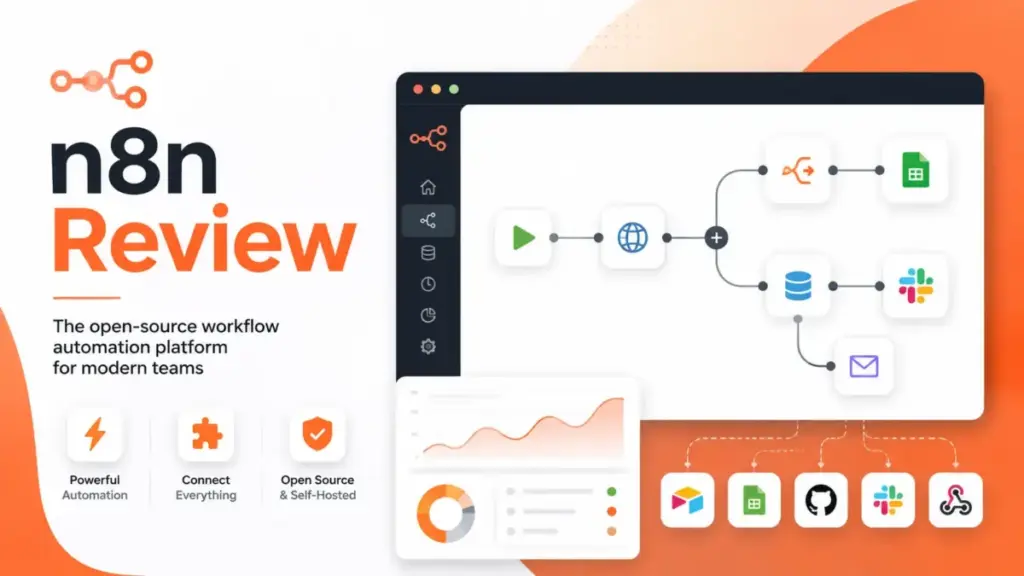
This n8n Review 2026 evaluates a platform that promises open-source flexibility, execution-based pricing, and self-hosted control, but delivers those benefits only to teams willing to invest in technical setup. n8n charges per workflow execution, not per step: a 10-node workflow costs the same as a 2-node workflow to run.
That model, combined with native API integration, JavaScript and Python code nodes, and AI agent orchestration, makes it one of the strongest automation runtimes for developer-led teams. But “open-source” is an oversimplification. n8n operates under the Sustainable Use License, not MIT or Apache. Self-hosting is free in license cost, not in labor. And support below Enterprise tier routes to a community forum, not a support desk.
Quick Verdict
| Category | Detail |
|---|---|
| Overall Score | 8.7 / 10 |
| Technical User Score | 9.1 / 10 |
| Non-Technical User Score | 7.2 / 10 |
| Best For | Technical teams, RevOps, automation consultants, AI workflow builders, data-sensitive companies |
| Not For | Non-technical teams wanting fast no-code setup, teams without DevOps capacity, buyers needing phone support |
| Starting Price | €20/month (Starter, billed annually, 2,500 executions) |
| Free Option | Self-hosted Community Edition (source-available, not MIT/Apache) |
| Main Alternative | Zapier for non-technical speed; Make for visual automation without infrastructure |
| Biggest Hidden Cost | Self-hosting labor: server setup, container management, security hardening, backup discipline |
| 60-Second Verdict | n8n is one of the strongest automation platforms for technical teams that want execution-based pricing, self-hosting control, and native AI workflow capabilities. It is not the fastest path to automation for non-technical users, and the “open-source” label requires a footnote. If your team can manage infrastructure (or pay for n8n Cloud), the per-execution pricing model saves real money on complex multi-step workflows compared to per-task competitors. |
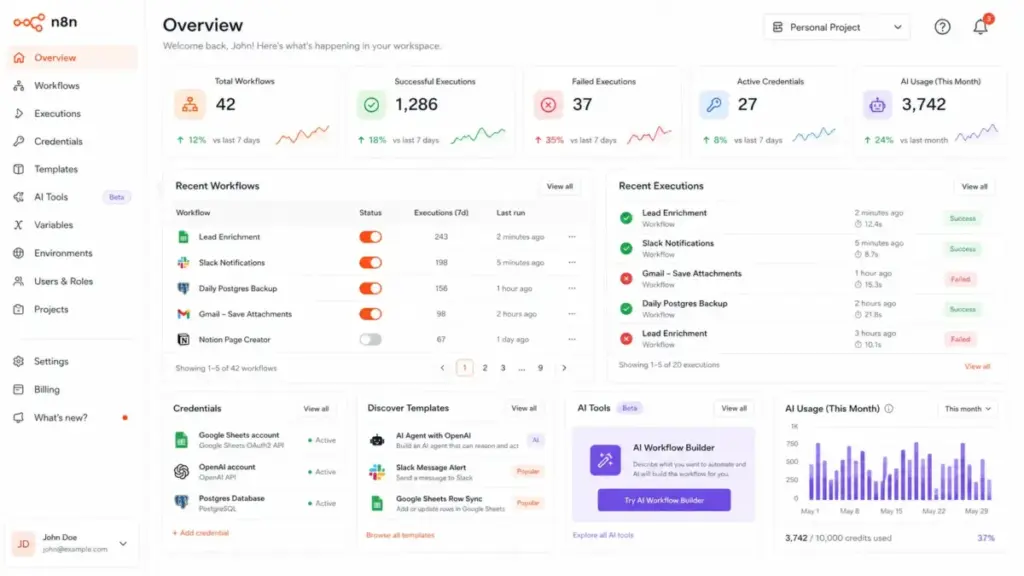
n8n Review: My 2026 Verdict
n8n earns an 8.7 out of 10 because it delivers more automation control per euro than any competitor I have evaluated, but it demands technical competence that not every buyer has. That score reflects a platform that excels at developer-owned workflows, AI agent orchestration, and self-hosted deployment while falling short on onboarding speed, low-tier support, and the transparency of its licensing model.
I scored this review using SaaSZap’s weighted review methodology, covering automation flexibility (20%), pricing value (15%), ease of setup (10%), developer control (15%), AI workflow capability (15%), governance and security (10%), support and reliability (10%), and ecosystem and integrations (5%).
Who it is best for: Technical teams that treat automation as infrastructure, not a convenience. If your team includes someone comfortable with Docker, JavaScript, OAuth credentials, and webhook debugging, n8n will outperform Zapier and Make on cost, flexibility, and data control.
Who should avoid it: Non-technical teams that want app-to-app automation in under 10 minutes. If nobody on your team can troubleshoot a failed webhook or configure an OAuth2 callback URL, you will spend more time debugging n8n than automating with it.
Why the score is not higher: Three friction points hold n8n back from a 9.0+. First, the self-hosting experience demands real DevOps knowledge, and n8n’s own documentation warns that mistakes cause data loss, security issues, and downtime. Second, technical support below Enterprise tier points users to the community forum, which means no SLA and no guaranteed response time. Third, the Sustainable Use License is not the permissive open-source license many buyers assume it is, creating legal ambiguity for agencies and consultants who embed n8n in client deliverables.
What Is n8n?
n8n (pronounced “nodemation”) is a source-available workflow automation platform that combines a visual workflow builder with full code access, 400+ integrations, and native AI capabilities. It lets technical teams build automations visually, drop into JavaScript or Python when the visual builder is not enough, and deploy on n8n Cloud or self-hosted infrastructure.
The platform positions itself for technical teams that need more than drag-and-drop. Every workflow is a directed graph of nodes: trigger nodes start the workflow, action nodes do the work (send an email, query a database, call an API), and logic nodes handle branching, merging, and error paths. You can inspect the data flowing between every node, pin test data for debugging, and switch between visual editing and raw JSON at any point.
n8n offers four deployment paths:
- n8n Cloud: Hosted by n8n, starting at €20/month. No infrastructure to manage.
- Community Edition: Self-hosted, free, source-available. Missing SSO, environments, external secrets, sharing, and Git version control (full feature comparison).
- Business (self-hosted): €667/month billed annually. Adds SSO, SAML, LDAP, environments, scaling options, and Git version control for companies under 100 employees.
- Enterprise: Contact sales. Cloud or self-hosted. Custom execution volume, 200+ concurrent executions, dedicated support with SLA.
n8n is not a simple SaaS tools product you sign up for and forget. It is an automation runtime that rewards ownership, and ownership comes with responsibility. If you are new to the concept, our guide on what workflow automation is explains the fundamentals, including when a platform like n8n is the right choice versus simpler automation approaches.
Is n8n Really Open Source?
n8n is source-available, not open-source in the traditional OSI sense, and that distinction has real consequences for how you can use, modify, and distribute the software. If you are evaluating n8n because “it’s free and open-source,” you need to read this section before committing.
n8n’s codebase is published on GitHub under two licenses:
- Sustainable Use License (SUL): Covers most of the codebase. You may use or modify the software for internal business purposes, non-commercial use, or personal use. You may not distribute it as a competing product or embed it commercially without permission.
- n8n Enterprise License: Covers Enterprise-specific features. These files are not available for community use.
What you can do under SUL:
- Self-host n8n for your own company’s internal automation
- Modify the source code for your own use
- Use n8n for personal projects or learning
- Contribute to the codebase
What you cannot do under SUL:
- Redistribute n8n as part of a commercial product
- Offer n8n as a managed service to third parties
- Remove or modify the license to claim it is MIT, Apache, or GPL
Why this matters for specific buyers:
- Automation consultancies building workflows for clients on a shared n8n instance: you are likely fine for internal use, but reselling n8n access or bundling it into a product requires legal review.
- SaaS companies wanting to embed n8n’s workflow engine into their product: SUL prohibits this without a commercial agreement with n8n.
- Enterprises evaluating open-source for procurement compliance: n8n is not OSI-approved open-source. If your procurement team requires MIT, Apache-2.0, or GPL licensing, consider Activepieces (MIT-licensed) as an alternative.
The “fair-code” label n8n uses is a branding choice, not a legal standard. It signals that the source code is visible and modifiable, but the usage rights are more restrictive than traditional open-source licenses. This is not inherently bad; it is a sustainable business model. But calling it “open-source” without the SUL caveat is misleading, and most competitor reviews on the SERP do exactly that.
n8n Features That Matter
n8n’s feature set is built for teams that want both visual simplicity and code-level control, and the 2026 release cycle has pushed AI capabilities to the center of the platform. Not every feature matters equally to every buyer, so I am focusing on the six capabilities that most affect your purchase decision.
n8n Visual Workflow Builder
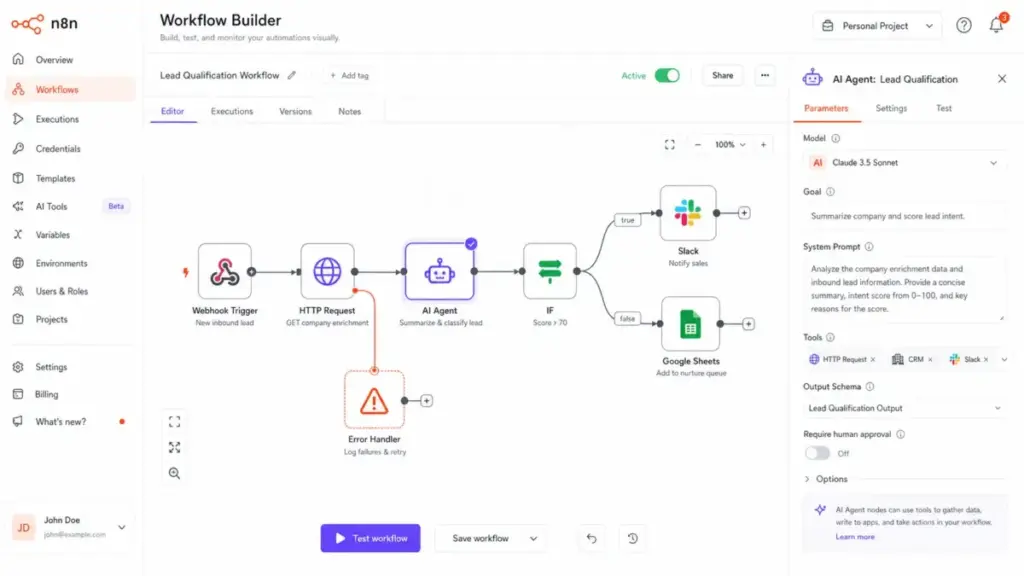
The workflow canvas is where every n8n automation starts. You drag nodes onto a canvas, connect them with edges, and configure each node’s parameters. The builder supports branching (IF/Switch nodes), merging, looping, sub-workflows, and error-handling paths. Every execution produces a visual trace: you can click any node and see the exact input and output data at that step.
What separates n8n’s builder from Zapier’s linear editor or Make’s scenario view is the combination of visual editing and raw data access. You are never more than one click away from the JSON payload at any node. For technical users, this transparency is a significant advantage. For non-technical users, the exposed complexity can feel overwhelming.
As Óscar M., an executive at an internet company, noted in a Capterra review: “Some nodes can be tricky to configure.” That matches what I see in community forum threads: node configuration for OAuth-dependent services, webhook response formatting, and conditional branching logic are the three areas where new users get stuck most often.
n8n Code Nodes and API Workflows
n8n includes JavaScript and Python Code nodes that let you write custom logic inside any workflow. The JavaScript Code node runs natively. The Python Code node, as of n8n v2.0, requires task runners in external mode with native Python tools, replacing the older Pyodide-based implementation for better security and performance.
The HTTP Request node supports REST, GraphQL, and raw HTTP methods with full header, query parameter, and body control. You can chain HTTP requests, parse responses with Code nodes, and build complete API orchestrations without leaving the workflow canvas.
For developers, this is where n8n separates itself from Zapier and Make. You are not limited to pre-built connectors; you can call any API endpoint, transform data with code, and build workflows that would require a custom backend in other platforms.
Example workflow: lead enrichment and routing. A Webhook Trigger node receives form submissions from a landing page. An HTTP Request node calls Clearbit’s enrichment API with the lead’s email address. A JavaScript Code node scores the lead based on company size, industry, and funding data from the API response. An IF node branches the flow: leads scoring above 70 trigger a Slack message to the sales channel with the enrichment data attached; leads scoring below 70 are added to a Mailchimp nurture sequence via the Mailchimp node. An Error Trigger node catches API failures and logs them to a Google Sheet for weekly review. This 7-node workflow counts as one execution on n8n. On Zapier, the same workflow would consume seven tasks per run.
n8n AI Workflow Builder
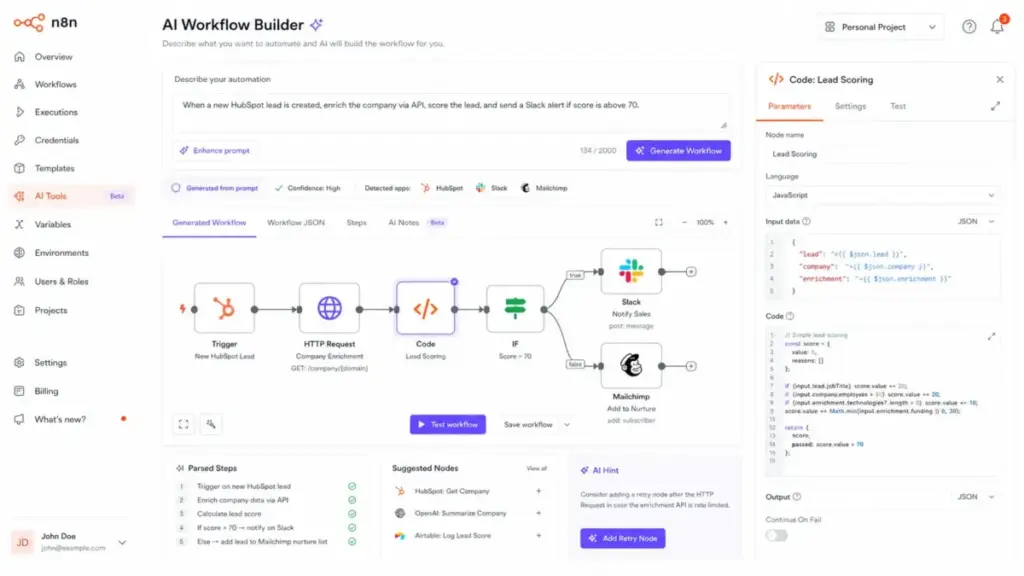
The AI Workflow Builder uses generative AI to generate workflow structures from natural language descriptions. You describe what you want (“When a new lead is added in HubSpot, enrich it with Clearbit, score it, and send a Slack notification if the score is above 50”), and the builder generates a starting workflow with the right nodes and connections.
This is useful for accelerating the initial workflow structure, but it does not eliminate configuration work. You still need to set up credentials, map fields, and test the workflow. Think of it as a scaffolding tool, not a finished-product generator. Each plan includes a limited number of AI Workflow Builder credits: 50 on Starter, 150 on Pro, and 1,000 on Enterprise Cloud.
The quality of the generated workflow depends heavily on how specific your description is. Vague prompts produce generic structures. Specific prompts with named services, field names, and conditional logic produce workflows closer to production-ready. Prompt engineering skills directly affect the value you get from this feature.
n8n AI Agents and Human Review
n8n’s AI Agent workflows let you build autonomous agents that use LangChain, connect to MCP (Model Context Protocol) servers, and execute multi-step reasoning chains. The Chat Trigger node creates conversational interfaces. The Agent node orchestrates tool calls, memory, and decision logic.
The critical 2026 addition is human-in-the-loop approval for AI tool calls. You can configure specific tools within an AI Agent to require explicit human approval before execution. This means an agent can research, plan, and propose actions, but a human must approve before the agent sends an email, updates a CRM record, or triggers a payment. Chat node human-in-the-loop actions let workflows send messages, wait for replies, and use inline approval buttons.
For teams building AI agents that interact with production systems, this governance layer is essential. It addresses the “autonomous agent did something we did not want” risk that has plagued early AI automation adopters. You can integrate approval flows with Slack or other team collaboration tools to keep approvals in the tools your team already uses.
This is also where n8n connects to the broader best AI chatbots ecosystem: you can wire up ChatGPT, Claude, Gemini, or any LLM with an API as the reasoning engine inside an n8n agent workflow.
n8n Integrations and Webhooks
n8n offers 400+ built-in integrations (called nodes) covering CRM, email, databases, cloud storage, developer tools, and communication platforms. Each node is a pre-built connector with authentication, input/output mapping, and error handling.
Webhooks are first-class citizens. You can create webhook trigger nodes that generate unique URLs, receive incoming HTTP requests, and start workflows in real time. For outbound integrations without a pre-built node, the HTTP Request node covers any API with a public endpoint.
The integration count is competitive with Make and behind Zapier’s 7,000+ app ecosystem. But integration count alone is misleading: n8n’s HTTP Request node and Code nodes let you connect to any service with an API, which means the effective integration count is limited only by your team’s technical skill.
n8n Debugging and Execution History
Every workflow execution in n8n produces a detailed execution log. You can view the input and output data at every node, identify where errors occurred, and re-run executions with modified data. The Pro plan adds execution search, and Business and Enterprise plans add longer retention periods.
Workflow history (available on Pro and above) lets you track changes to workflow configurations over time. This is important for teams with multiple editors: if a workflow breaks after a change, you can compare versions and revert.
The debugging experience is one of n8n’s strongest advantages over Zapier, where execution logs are more limited, and over Make, where scenario history provides less granular data inspection.
First 30 Days With n8n
The first month with n8n follows a predictable learning curve that most reviews skip, and understanding it before you commit saves you from the “week two frustration” that drives some buyers back to Zapier. Here is what to expect, based on documentation analysis and community patterns.
Day 1: Signup and First Workflow
If you choose n8n Cloud, signup takes under 5 minutes. You get a working instance with sample workflows and templates. If you choose self-hosting, day one involves spinning up a Docker container, configuring environment variables, and setting up a reverse proxy for HTTPS access. The Cloud path gets you building in minutes. The self-hosted path can take half a day to a full day depending on your infrastructure experience.
Your first workflow will likely be a simple trigger-action pair: a webhook that receives data and sends a Slack message, or a schedule trigger that pulls data from an API. This works well, builds confidence, and takes 15 to 30 minutes.
Week 1: Credentials, Webhooks, and HTTP Requests
This is where friction starts. Every third-party service requires credential configuration: API keys, OAuth2 flows, or custom authentication headers. OAuth2 in particular is a common pain point. You need to register an app with the service provider, configure callback URLs, and handle token refresh logic. n8n abstracts most of this, but the initial setup for services like Google Workspace, HubSpot, or Salesforce can take 20 to 45 minutes per service.
Webhook configuration introduces another friction point: understanding production vs. test webhooks, configuring response data, and debugging incoming payloads. Ben B., a small-business reviewer on G2, noted: “It isn’t intuitive enough at first.” That observation aligns with what I see in community threads during week one.
Week 2: Debugging and Error Handling
By week two, your workflows are running, and some are failing. This is normal. Common failure points include API rate limits, changed field names in third-party services, expired credentials, and unexpected data formats. n8n’s execution log shows exactly where failures occur, but understanding why requires reading API error responses and adjusting node configurations.
This is also when you start building error-handling branches: adding Error Trigger nodes, configuring retry logic, and sending failure notifications to Slack or email. If you skip error handling, you will discover broken workflows days or weeks after they fail.
Week 3: Production Scheduling and Secrets
Week three is about moving from “it works when I test it” to “it runs reliably without me watching.” You configure cron triggers, set up webhook-based workflows for real-time processing, and start managing credentials across multiple workflows. On paid Cloud or Business plans, global variables and environments let you separate development and production configurations.
On Community Edition, you do not have global variables, environments, or external secrets. You manage configuration through environment variables on your server, which works but lacks the governance features of paid plans.
Week 4: Scaling, Backups, and Ownership
By week four, you are either committed or reconsidering. Self-hosted users need to establish backup procedures for the n8n database, monitor server resources, and plan for scaling as workflow volume increases. Cloud users need to understand their execution limits and plan for overages.
This is also when the total cost of ownership becomes clear. Self-hosted is not free labor. Cloud is not unlimited resources. The real question at the end of month one is not “does n8n work?” but “can my team maintain this long-term?”
n8n Pricing and Real Cost
n8n’s execution-based pricing is one of the most cost-efficient models for complex multi-step workflows, but the pricing page does not tell you everything about cloud resource limits, self-hosting labor, or the gap between Community and paid features. Pricing data verified as of April 27, 2026, from the official n8n pricing page.
n8n Pricing Table (2026)
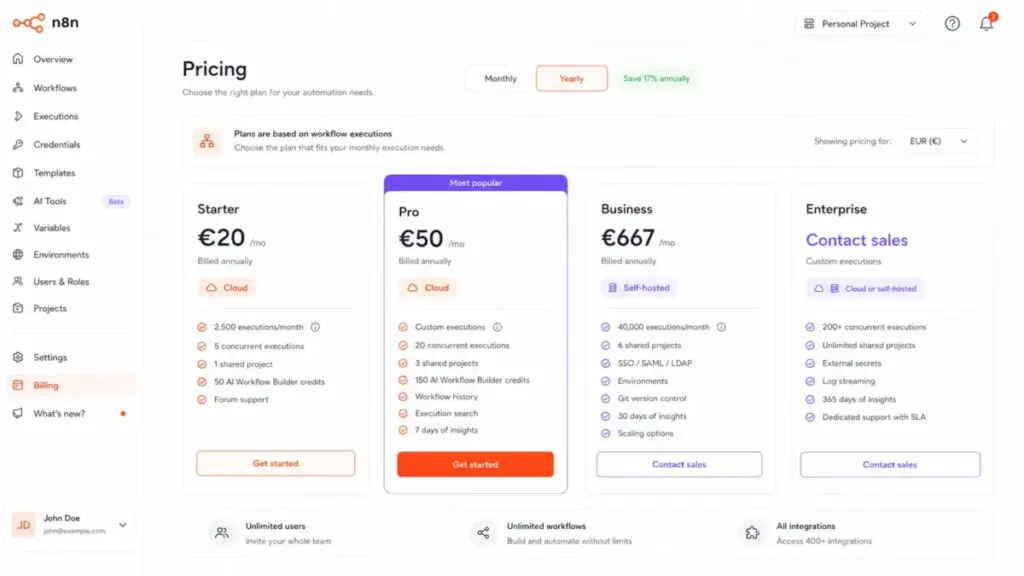
| Plan | Price (Annual) | Executions | Hosting | Concurrent | Projects | Support | Key Extras |
|---|---|---|---|---|---|---|---|
| Starter | €20/mo | 2,500 | Cloud | 5 | 1 shared | Forum | 50 AI Builder credits |
| Pro | €50/mo | Custom | Cloud | 20 | 3 shared | Forum + admin email | 150 AI Builder credits, workflow history, execution search, 7-day insights |
| Business | €667/mo | 40,000 | Self-hosted | Not specified | 6 shared | Forum | SSO/SAML/LDAP, environments, Git version control, 30-day insights |
| Enterprise | Contact sales | Custom | Cloud or self-hosted | 200+ | Unlimited | Dedicated SLA email | 1,000 AI Builder credits (cloud), external secrets, log streaming, 365-day insights |
| Community | Free | Unlimited | Self-hosted | Not specified | None | Forum | Missing: SSO, sharing, environments, external secrets, Git VC, projects |
All plans include unlimited users and workflows. Annual billing saves approximately 17%.
What the Pricing Page Does Not Tell You
Cloud resource limits are the first hidden constraint. n8n publishes these limits in their cloud data management documentation, but they do not appear on the pricing page:
| Cloud Plan | RAM | CPU |
|---|---|---|
| Trial | 320 MiB | 10 millicore burstable |
| Starter | 320 MiB | 10 millicore burstable |
| Pro-1 | 640 MiB | 20 millicore burstable |
| Pro-2 | 1,280 MiB | 80 millicore burstable |
| Enterprise | 4,096 MiB | 80 millicore burstable |
320 MiB of RAM on Starter is tight for workflows that process large datasets, handle file attachments, or run AI model calls. If your workflows consistently need more memory, you will hit the ceiling and need to upgrade, even if your execution count is well within limits.
Execution Pricing vs. Task Pricing: A 10-Step Workflow Example
This is where n8n’s pricing model creates its biggest advantage for complex workflows:
| Platform | Pricing Unit | 10-Step Workflow x 1,000 Runs | Units Consumed |
|---|---|---|---|
| n8n | Per workflow execution | 1,000 runs | 1,000 executions |
| Zapier | Per successful task/action | 1,000 runs x 10 steps | 10,000 tasks |
| Make | Per module operation (credit-based) | 1,000 runs x 10 modules | 10,000 operations |
On n8n Starter (€20/month, 2,500 executions), you could run that 10-step workflow 2,500 times. On Zapier Professional ($19.99/month), the same 10-step workflow at 2,500 runs would consume 25,000 tasks, far exceeding the included allocation. The per-execution model becomes more cost-effective as workflow complexity increases.
Free Self-Hosted Is Not Free Labor
Community Edition has no license fee, but it has real operational costs:
| Cost Variable | Estimate | Notes |
|---|---|---|
| VPS/Server | $5 to $40/month | DigitalOcean, Hetzner, AWS EC2. Depends on workflow volume. |
| Setup time | 4 to 16 hours | Docker setup, reverse proxy, SSL, environment config. |
| Ongoing maintenance | 2 to 6 hours/month | Updates, backups, monitoring, security patches. |
| Backup solution | $0 to $10/month | Automated database backups to cloud storage. |
| Security hardening | 4 to 8 hours initially | Firewall rules, SSH hardening, container isolation. |
| Missing features | N/A | No SSO, no environments, no external secrets, no Git VC, no sharing, no projects. |
A realistic total cost for self-hosting Community Edition is $10 to $50/month in infrastructure plus 4 to 10 hours of initial setup and 2 to 6 hours of monthly maintenance. That is not “free.” It is cost-efficient for teams with DevOps skills and expensive for teams without them.
Self-Hosted Cost Calculator by Team Size
Use this table to estimate your real annual cost before committing to self-hosting:
| Cost Component | Solo Developer | Small Team (3 to 5) | Mid-Market (10 to 20) |
|---|---|---|---|
| Server (VPS) | $6/mo (1 vCPU, 2 GB RAM) | $24/mo (2 vCPU, 4 GB RAM) | $80/mo (4 vCPU, 8 GB RAM) |
| Backup storage | $2/mo | $5/mo | $10/mo |
| SSL and domain | $0 (Let’s Encrypt) | $0 (Let’s Encrypt) | $15/mo (managed certificate) |
| Monitoring | $0 (manual checks) | $0 (UptimeRobot free tier) | $20/mo (Grafana Cloud or similar) |
| n8n license | Free (Community) | Free (Community) | €667/mo (Business; required for SSO and environments) |
| Setup labor (one-time) | ~6 hours | ~12 hours | ~24 hours |
| Monthly maintenance | ~2 hours | ~4 hours | ~8 hours |
| Estimated monthly total | ~$8 + 2h labor | ~$29 + 4h labor | ~€792 + 8h labor |
| Estimated annual total | ~$96 + 30h labor | ~$348 + 60h labor | ~€9,504 + 120h labor |
The solo developer scenario is where self-hosting genuinely saves money compared to n8n Cloud. The mid-market scenario shows that once you need Business-tier features (SSO, SAML, environments), the €667/month license fee dominates the cost structure, and the “self-hosted is cheaper” narrative breaks down.
n8n Cloud vs. Self-Hosted Comparison
| Factor | n8n Cloud | Self-Hosted (Community) | Self-Hosted (Business) |
|---|---|---|---|
| License cost | €20 to €50+/mo | Free | €667/mo |
| Infrastructure | Managed by n8n | You manage | You manage |
| Updates | Automatic | Manual | Manual |
| Backups | n8n handles | You handle | You handle |
| SSO/SAML | Enterprise only | Not available | Included |
| Resource limits | 320 MiB to 4 GiB RAM | Your server limits | Your server limits |
| Support | Forum (+ admin email on Pro+) | Forum | Forum |
| Data residency | n8n’s infrastructure | Your choice | Your choice |
| Best for | Teams without DevOps, fast start | Solo developers, budget-sensitive | Regulated industries, team collaboration |
What n8n Gets Right
n8n’s strongest advantage is the combination of visual automation and code-level control in a single platform, something few tools in this price range deliver as cleanly. Here are the specific wins.
- Per-execution pricing on complex workflows. A 15-node workflow costs the same as a 2-node workflow per execution. This makes n8n dramatically cheaper than Zapier or Make for complex, multi-step automations. A team running 2,000 multi-step workflows per month can stay on the €20 Starter plan.
- Full data visibility at every node. You can inspect the exact JSON payload entering and leaving every node in a workflow. This is not a debugging afterthought; it is a core design principle. Compared to Zapier’s task history, which shows less granular data, n8n’s execution inspector can save hours of troubleshooting time.
- Self-hosting with real deployment control. For data-sensitive companies in healthcare, finance, or regulated industries, self-hosting means your workflow data never leaves your infrastructure. You control encryption, access, backup location, and retention. Few mainstream automation platforms offer a free self-hosted edition with this level of functional depth.
- AI agent workflows with human approval gates. The human-in-the-loop feature for AI tool calls is a genuine governance innovation. Most automation platforms treat AI as “plug in an LLM node.” n8n treats AI as “orchestrate an agent with controlled tool execution and human approval.” For teams building production AI agents, this is a meaningful differentiator.
- Native JavaScript and Python in workflows. The Code node is not a workaround; it is a first-class feature. You can write transformation logic, call APIs, parse complex data structures, and implement business rules that would require multiple nodes (or be impossible) in visual-only platforms.
- Unlimited users and workflows on every plan. Unlike Zapier and Make, where user seats or workflow limits create upgrade pressure, n8n includes unlimited users and unlimited workflows on every plan, including Starter. The only scaling variable is execution count.
As Ollie Scheers, CTO of Huel, summarized in an n8n case study: “n8n was the big unlock.” That quote reflects what technical teams consistently report: the platform removes the ceiling that other automation tools impose on workflow complexity.
What n8n Gets Wrong
n8n’s limitations are real, specific, and often understated in competitor reviews that treat it as “free Zapier for developers.” Honest evaluation requires naming these friction points clearly.
- The learning curve is steeper than the marketing suggests. n8n’s visual builder looks simple in demo videos, but configuring OAuth2 credentials, debugging webhook payloads, understanding execution modes (manual vs. production vs. test), and building error-handling branches takes meaningful time. Plan for 20 to 40 hours of learning before your team is productive with non-trivial workflows.
- Support below Enterprise tier is forum-only for technical issues. If your workflow breaks at 2 AM and you are on Starter or Pro, your support path is the community forum. There is no SLA, no guaranteed response time, and no escalation path. Cloud plans can use email for admin and billing issues, but technical troubleshooting goes through the forum. For teams accustomed to vendor support on paid plans, this is a significant expectation gap.
- Self-hosting requires genuine DevOps skills. n8n’s own self-hosting documentation warns: “Self-hosting requires knowledge of servers, containers, resources, scaling, security, and configuration. Mistakes can cause data loss, security issues, and downtime.” This is not a disclaimer to ignore. If your team cannot manage Docker containers, database backups, and security patches, self-hosting is a liability, not an asset.
- Community Edition is missing key collaboration features. No SSO, no shared projects, no environments, no external secrets, no Git version control, no sharing. For a solo developer, these omissions are manageable. For a team of three or more, the lack of sharing and project organization pushes you toward the €667/month Business plan, a significant jump from free.
- Cloud resource limits are tight on lower tiers. 320 MiB of RAM on Starter with 10 millicore burstable CPU is enough for simple workflows but constrains memory-intensive operations. File processing, large dataset transformations, and AI model calls can hit these limits. The resource ceiling is not visible until you exceed it.
- The Sustainable Use License creates legal uncertainty for some buyers. If you are an automation agency building client workflows on a shared n8n instance, or a SaaS company wanting to embed n8n’s engine, the SUL restrictions may require legal review. The license is not MIT, Apache, or GPL. For procurement teams that require OSI-approved open-source, this is a blocker.
- Upgrade pressure from Community to Business is steep. The gap between free Community Edition and €667/month Business is the widest jump in the automation platform market. There is no self-hosted plan at €50 or €100/month. If you outgrow Community and need SSO, environments, or Git version control, the cost increase is dramatic.
- Python Code node changes in v2.0 require migration work. n8n v2.0 removed the Pyodide-based Python Code node and replaced it with a task-runner-based implementation. If you have existing workflows using the old Python node, you need to migrate them to the new system, which requires task runners in external mode and native Python tools. This is a necessary security improvement, but it is also a breaking change.
n8n vs. Alternatives
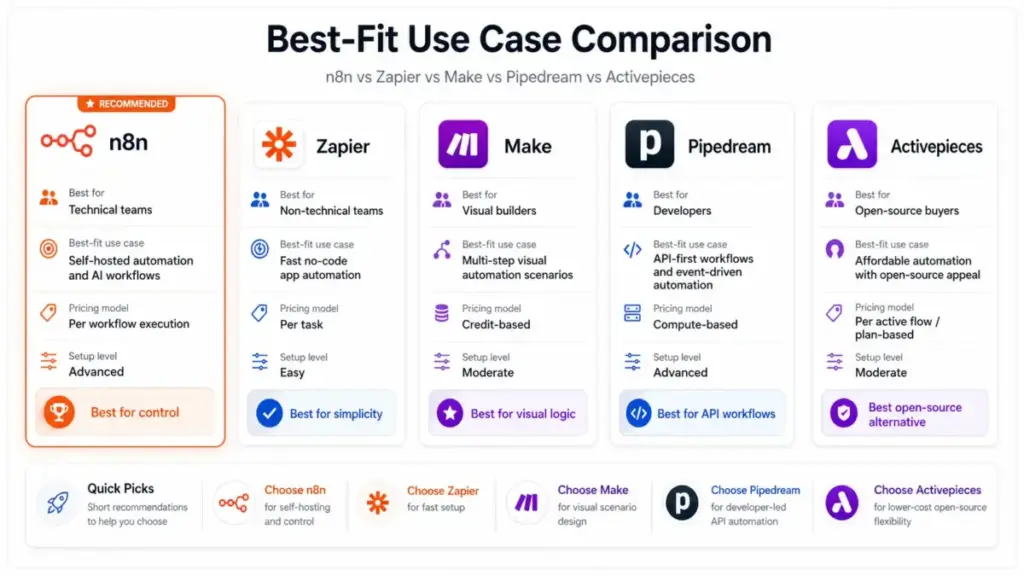
n8n competes against tools that range from no-code simplicity (Zapier) to enterprise iPaaS (Workato), and no single competitor beats n8n across all dimensions. The right choice depends on your team’s technical maturity, infrastructure preferences, and pricing sensitivity. If you are starting from Zapier and exploring what else exists, our Zapier alternatives guide covers the full landscape; this section focuses on head-to-head comparisons.
n8n vs. Zapier
| Factor | n8n | Zapier |
|---|---|---|
| Pricing model | Per execution | Per task (action) |
| Complex workflow cost | Lower (1 execution = 1 run) | Higher (each step = 1 task) |
| Self-hosting | Yes (Community, Business, Enterprise) | No |
| Learning curve | Steeper | Gentler |
| Integrations | 400+ | 7,000+ |
| Code access | JavaScript, Python | Limited (Zapier Code) |
| AI features | AI agents, MCP, human-in-the-loop | AI actions, Chatbots |
| Support | Forum (Enterprise: SLA email) | Email/chat on paid plans |
| Best for | Technical teams, complex workflows | Non-technical teams, fast setup |
Verdict: Zapier wins for non-technical users who want the broadest app ecosystem and fastest onboarding. n8n wins for technical teams that need execution-based pricing, self-hosting, and code-level control. Read the full Zapier review for a detailed breakdown of Zapier’s pricing math.
n8n vs. Make
| Factor | n8n | Make |
|---|---|---|
| Pricing model | Per execution | Credit-based (per operation) |
| Self-hosting | Yes | No |
| Visual builder | Node-based canvas | Scenario-based canvas |
| Code access | Full JavaScript/Python | Limited (Make functions) |
| Learning curve | Steeper | Moderate |
| Best for | Developer-owned automation | Visual automation without infrastructure |
Verdict: Make wins for visual workflow builders who want managed cloud automation with routers, filters, and scenario logic. n8n wins for technical teams that need self-hosting, code access, and AI agent orchestration. See the full Make review for a comparison of Make’s credit-based pricing.
n8n vs. Pipedream
| Factor | n8n | Pipedream |
|---|---|---|
| Pricing model | Per execution | Compute credit-based |
| Self-hosting | Yes | No |
| Audience | Technical teams + visual builders | Developer-first |
| AI features | AI agents, MCP, human-in-the-loop | Event-driven AI |
| Best for | Visual + code automation | API-first serverless workflows |
Verdict: Pipedream wins for developers who want event-driven, serverless API automation without a visual builder. n8n wins for teams that want both visual automation and code-level control with self-hosting options.
n8n vs. Activepieces
| Factor | n8n | Activepieces |
|---|---|---|
| License | Sustainable Use License | MIT |
| Pricing model | Per execution | Per active flow ($5/flow) |
| Ecosystem maturity | 400+ nodes, established | Growing, smaller ecosystem |
| AI features | AI agents, MCP, human-in-the-loop | AI agents, MCP servers |
| Best for | Mature technical automation | Permissive open-source buyers |
Verdict: Activepieces wins for buyers who need a truly permissive MIT open-source license and prefer per-flow pricing with unlimited runs. n8n wins for mature technical teams that need deeper integration depth, AI governance, and a larger community.
n8n vs. Workato
| Factor | n8n | Workato |
|---|---|---|
| Pricing model | Per execution (transparent) | Custom enterprise (sales-led) |
| Target buyer | Technical teams, SMBs, mid-market | Enterprise IT, procurement teams |
| Self-hosting | Yes | On-premise agent available |
| Governance | SSO, SAML, RBAC (Business+) | Full enterprise governance suite |
| Best for | Control without enterprise procurement | Enterprise iPaaS with SLA |
Verdict: Workato wins for enterprises that need mature iPaaS governance, procurement compliance, and vendor SLA. n8n wins for technical teams that want automation control without a six-figure annual contract and a sales-led procurement process.
Who Should Use n8n?
n8n fits specific buyer profiles better than any generic “SMB vs. enterprise” segmentation can capture. Here are the micro-cohorts where n8n delivers the highest return on investment.
| Buyer Profile | Why n8n Fits | Key Plan |
|---|---|---|
| 2-person automation consultancy managing internal and client workflows | Per-execution pricing keeps costs low. Self-hosting gives data control. Visual builder impresses clients during demos. | Community or Starter |
| 5-person RevOps team syncing CRM, enrichment, and Slack alerts | Complex multi-step workflows cost less per execution. Code nodes handle data transformation. Webhook triggers enable real-time processing. | Pro or Business |
| 3-person AI operations team building approval-gated agents | AI Agent workflows with human-in-the-loop approval. MCP integration. LangChain support. Chat Trigger for conversational interfaces. | Pro or Enterprise |
| 10-person data-sensitive startup wanting self-hosted infrastructure | Complete data residency control. No third-party data processing. Business plan adds SSO, SAML, and environments. | Business |
| Developer-founder automating backend processes with APIs and webhooks | Code nodes replace custom scripts. HTTP Request node connects any API. Self-hosted Community Edition costs only infrastructure. | Community |
Claire Van Hinsbergh, Cyber Operations Engineering Manager at Vodafone, captured this fit in an n8n case study: “It did everything that we wanted, all in one tool.” That quote reflects the experience of technical teams that value having both visual building and code access in a single platform.
Who Should Not Use n8n?
n8n is not the right tool for every automation buyer, and recommending it universally would be irresponsible editorial practice. Here are the profiles where a competitor is the better choice.
- Non-technical teams that want fast app-to-app automation. If your team cannot configure OAuth2 credentials or debug webhook payloads, Zapier’s guided setup will get you to working automation faster. The learning curve cost of n8n will exceed the subscription savings.
- Teams without a DevOps or security owner for self-hosting. If nobody on your team can manage Docker containers, database backups, firewall rules, and security patches, self-hosting n8n is a risk. n8n Cloud removes infrastructure responsibility, but cloud resource limits on lower tiers constrain performance for demanding workflows.
- Enterprises needing mature iPaaS procurement and SLA. If your organization requires vendor SLA, dedicated account management, enterprise governance audit trails, and procurement compliance from day one, Workato or a similar enterprise iPaaS is a better fit. n8n Enterprise offers some of these features, but n8n’s procurement maturity does not match vendors that have served Fortune 500 for a decade.
- Buyers who need phone or direct support at low tiers. If you expect to call a support line when a workflow breaks, n8n is not for you. Forum support is the default for all non-Enterprise plans. Even cloud plans route technical issues to the forum, reserving email support for admin and billing inquiries.
- Users who want a permissive MIT open-source license. If your procurement or legal team requires OSI-approved open-source licensing, n8n’s Sustainable Use License is a blocker. Activepieces offers an MIT-licensed Community Edition with a growing feature set as the closest alternative.
Daniel Rivera’s Quick Take
If I were building a new automation stack for a technical team in 2026, n8n would be my first choice. Not because it is the easiest, not because it is truly open-source, and not because self-hosting is “free.” I would choose it because execution-based pricing is fundamentally more cost-efficient for complex workflows, and the combination of visual building, code nodes, and AI agent orchestration is unmatched at this price point.
I would not choose n8n if my team lacked someone comfortable with infrastructure. The gap between “n8n works in a demo” and “n8n runs reliably in production” is bridged by DevOps discipline, not by the platform itself. I have seen too many community forum threads from teams that self-hosted without backup plans, lost their database, and discovered that free software does not include free disaster recovery.
The contrarian take: n8n’s biggest competitive advantage is not its features or its pricing. It is the fact that you own the runtime. When Zapier changes its pricing tiers (again), your workflows still run. When Make deprecates a connector, your workflows still run. When a cloud vendor sunsets a feature, self-hosted n8n workflows still run. Ownership has a cost, but it also has a value that shows up on the balance sheet every time a competitor forces a migration.
Final Verdict
n8n scores 8.7 out of 10 in my 2026 evaluation. It is one of the best automation platforms for technical teams that want execution-based pricing, self-hosting control, and native AI workflow capabilities. It is not the best choice for non-technical teams, support-dependent organizations, or buyers who need permissive open-source licensing.
| Scenario | Best Choice | Why |
|---|---|---|
| Technical team, complex workflows, cost-sensitive | n8n | Per-execution pricing, code nodes, self-hosting |
| Non-technical team, fast setup, broad integrations | Zapier | Easiest onboarding, 7,000+ apps |
| Visual automation, no infrastructure management | Make | Visual scenario builder, managed cloud |
| Developer-first, API automation, serverless | Pipedream | Event-driven, compute-based, developer-native |
| Permissive open-source, simple pricing | Activepieces | MIT license, per-flow pricing, unlimited runs |
| Enterprise iPaaS, procurement compliance, SLA | Workato | Governance, account management, enterprise maturity |
FAQ
Here are the most common questions buyers ask about n8n in 2026.
Is n8n Worth It in 2026?
Yes, for technical teams. n8n’s per-execution pricing model, self-hosting options, and AI agent capabilities make it one of the most cost-efficient automation platforms for complex workflows. Non-technical teams may find Zapier or Make worth the premium for faster onboarding and better support.
Is n8n Really Open Source?
No, not in the traditional OSI sense. n8n is source-available under the Sustainable Use License. You can view, modify, and use the code for internal business purposes, but you cannot redistribute it commercially or offer it as a managed service. The accurate terminology is “fair-code” or “source-available.”
How Much Does n8n Cost?
n8n Starter costs €20/month billed annually for 2,500 workflow executions. Pro starts at €50/month. Business (self-hosted) costs €667/month billed annually for 40,000 executions. Enterprise pricing requires contacting sales. Community Edition is free to self-host with no license fee.
Is n8n Free to Self-Host?
The Community Edition has no license fee, but self-hosting costs include server infrastructure ($5 to $40/month), setup time (4 to 16 hours), and ongoing maintenance (2 to 6 hours/month). Community Edition also lacks SSO, environments, external secrets, sharing, and Git version control.
What Are the Limitations of n8n Community Edition?
Community Edition lacks Custom Variables, Environments, External Secrets, External binary storage, Log streaming, Multi-main mode, Projects, SSO, sharing, and Git version control. Registering the Community Edition unlocks folders, debug in editor, and custom execution data.
Is n8n Better Than Zapier?
n8n is better than Zapier for technical teams that need execution-based pricing, self-hosting, and code-level control. Zapier is better than n8n for non-technical teams that want the fastest no-code setup and the broadest app ecosystem with 7,000+ integrations.
Can Non-Developers Use n8n?
Yes, but with a steeper learning curve than Zapier or Make. n8n’s visual workflow builder is functional for non-developers, but configuring credentials, debugging webhooks, and building error-handling logic requires technical comfort. Non-developers score n8n at 7.2/10 in this review.
What Is the Difference Between n8n Cloud and Self-Hosted?
n8n Cloud is managed by n8n with automatic updates, backups, and no infrastructure management. Self-hosted gives you full data control, no resource limits (beyond your server), and the ability to run Community Edition for free. Cloud has RAM and CPU limits per plan tier (320 MiB on Starter, up to 4,096 MiB on Enterprise).
Does n8n Support AI Agents?
Yes. n8n includes AI Agent workflows with LangChain integration, MCP server connectivity, Chat Trigger nodes, and human-in-the-loop approval for AI tool calls. These features let you build autonomous agents that require human approval before executing sensitive actions.
What Are the Best n8n Alternatives?
The best n8n alternatives depend on your needs. Zapier for non-technical speed, Make for visual automation without infrastructure, Pipedream for developer-first API workflows, Activepieces for MIT-licensed open-source automation, and Workato for enterprise iPaaS with governance and SLA.