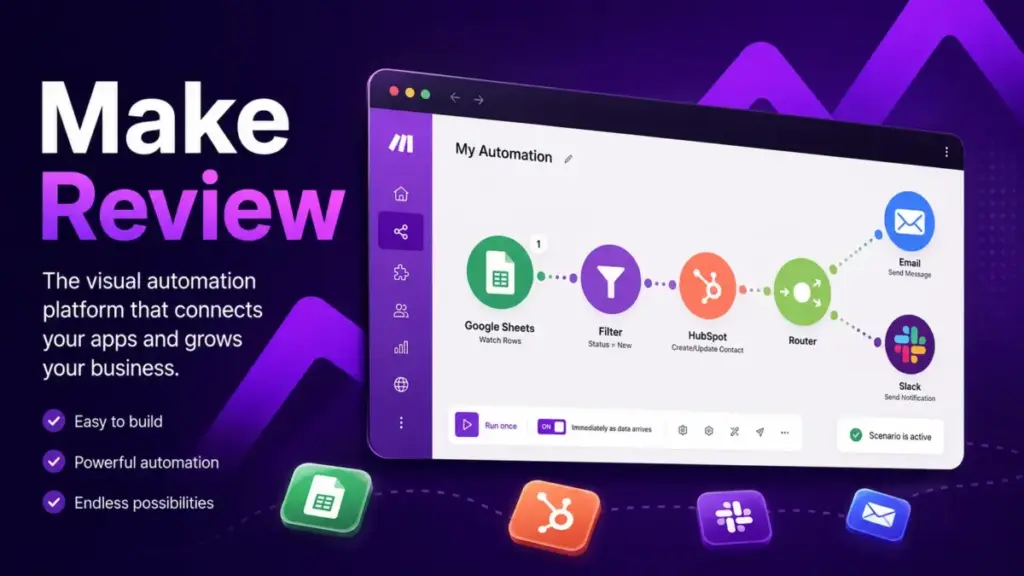
Most automation tools look simple until you check the invoice. This Make review breaks down what the platform actually costs, where it outperforms Zapier and n8n, and where the credit math will surprise you. Make earns an 8.7/10 in my evaluation: the visual builder and logic depth are among the best available, but the gap between listed price and real cost catches too many buyers off guard.
The 60-Second Version
| Category | Detail |
|---|---|
| Score | 8.7 / 10 |
| Best for | Teams building multi-branch, API-heavy workflows who want visual control without self-hosting |
| Not for | Beginners who want plug-and-play simplicity or high-volume teams that need predictable per-execution pricing |
| Biggest strength | Visual scenario builder with routers, filters, iterators, and error handlers |
| Biggest weakness | Credit consumption multiplies silently through bundles and AI token usage |
| Best alternative: simple workflows | Zapier |
| Best alternative: self-hosted volume | n8n |
| Best alternative: lifetime pricing | Pabbly Connect |
| Best alternative: enterprise iPaaS | Workato |
Make Review: My 2026 Verdict
Make is one of the strongest visual automation platforms available today, and its pricing model is the one thing that holds it back from a higher score. The scenario builder, routing logic, and error handling give teams real engineering-grade control without writing code. AI Agents, MCP Server, and Make Grid push it further into orchestration territory that Zapier has not matched.
The weakness is not the feature set. The weakness is that Make bills credits per operation per bundle, and most buyers count modules instead of bundles. A 4-module workflow processing 10 form responses burns 31 credits, not 4. Add AI token consumption and 15-minute polling on the Free plan, and the gap between expected cost and actual cost widens fast.
I scored Make using our review methodology across eight categories:
| Category | Score |
|---|---|
| Visual workflow builder | 9.3 / 10 |
| Automation logic depth | 9.2 / 10 |
| Pricing transparency | 7.7 / 10 |
| Ease of use | 7.8 / 10 |
| Integrations | 9.1 / 10 |
| AI workflow capability | 8.6 / 10 |
| Support and governance | 7.4 / 10 |
| Enterprise readiness | 8.4 / 10 |
| Overall | 8.7 / 10 |
Make is not “Zapier but cheaper.” It is a visual orchestration layer that rewards workflow design discipline and punishes users who scale without modeling scenario cost first.
What Is Make?
Make is a visual workflow automation platform, formerly known as Integromat, now owned by Celonis. It lets users connect apps, build conditional logic, handle errors, and run multi-step automations using a drag-and-drop canvas. The platform supports over 3,000 app integrations and includes HTTP/webhook modules for custom API connections. To understand the foundational concepts behind platforms like Make, including how workflow automation compares to RPA and manual processes, read our workflow automation definition guide.
Unlike linear automation tools, Make uses a canvas-based builder where scenarios branch through routers, loop through iterators, and collapse through aggregators. Every module shows its input and output data in real time. This visual approach makes debugging faster and logic more transparent, especially for workflows with five or more steps.
In 2026, Make added AI Agents, an MCP Server for connecting LLM tools like ChatGPT and Claude directly to Make scenarios, and Make Grid for mapping automation dependencies across an organization.
Who Should Use Make?
Make fits teams that need more logic control than Zapier but less infrastructure work than n8n. These are the profiles that get the most value:
- AI automation agencies (2-10 people) building client workflows across Google Sheets, Slack, Airtable, CRMs, OpenAI, and webhooks. Make’s visual canvas is easy to hand off to clients who need to understand what the workflow does.
- RevOps teams (5-25 people) syncing leads between HubSpot, Salesforce, email tools, spreadsheets, and internal databases. Routers and filters handle conditional lead routing without code.
- Solo consultants running 5-20 recurring client automations who want to avoid Zapier’s per-task pricing spikes. Make’s credit model can be cheaper for complex, low-frequency workflows.
- Technical SMB operators who understand JSON, webhooks, and error handling but do not want to maintain n8n infrastructure or manage Docker containers.
- Enterprise automation teams evaluating SOC 2 compliance, SSO, audit logs, and centralized automation governance through Make Grid and the Enterprise plan.
Who Should Not Use Make?
Make is the wrong choice when simplicity or predictable volume pricing matters more than workflow depth. Skip Make if:
- You need the simplest possible setup for basic app-to-app automations. Zapier’s linear builder is faster for “when this happens, do that” workflows.
- You process very high volumes and need predictable per-execution pricing. n8n’s execution-based billing (cloud) or unlimited self-hosted model is more cost-effective at scale.
- You want lifetime pricing with no recurring fees. Pabbly Connect offers one-time payment plans for simpler automation needs.
- You work exclusively inside Microsoft 365, SharePoint, Teams, and Dataverse. Microsoft Power Automate has deeper native integration with that stack.
- Your enterprise procurement team requires a mature iPaaS vendor with established governance tooling. Workato has a longer track record in that category.
- You are a complete beginner who has never built an automation. Make’s learning curve around bundles, iterators, aggregators, and data mapping will slow you down in the first week.
Make Features That Matter
Make’s feature set is deep enough to replace code-based integrations for most mid-complexity workflows. The features below are the ones that actually affect buying decisions, not a generic checklist.
Make Visual Scenario Builder
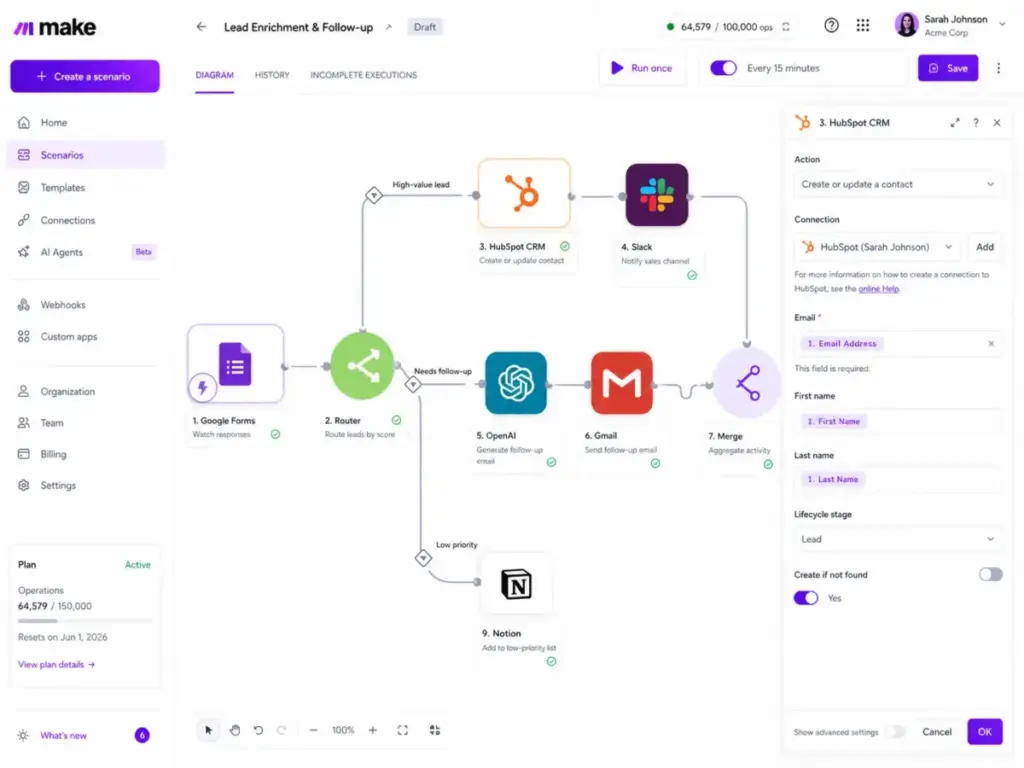
The scenario builder is Make’s core advantage. Every automation is a visual map. Modules sit on a canvas connected by lines. Data flows left to right. You click any module to see exactly what data entered and exited. This is fundamentally different from Zapier’s vertical step list or n8n’s node graph.
Routers split a workflow into parallel branches. Filters add conditions to each branch. You can see the entire decision tree at once. For a workflow that routes leads to different Slack channels based on deal size, source, and region, Make’s canvas makes the logic readable. In Zapier, the same workflow requires nested Paths that stack vertically and become hard to follow past three levels.
Make Routers, Filters, and Branching
Routers are where Make separates from simpler tools. A single trigger can branch into unlimited paths, each with its own filter conditions. Filters evaluate data using operators like equals, contains, greater than, exists, and regex patterns.
Iterators break arrays into individual items for processing. Aggregators collect processed items back into a single output. This pair is critical for workflows that handle lists: processing line items from an invoice, iterating through rows in a spreadsheet, or looping through API response arrays.
Error handlers attach to any module. You can set a workflow to retry, ignore, commit (save partial results), or break on failure. This is production-grade error management without writing try-catch blocks.
Make Webhooks and HTTP Modules
Make supports both instant triggers (webhooks) and scheduled polling. Instant triggers fire when an external service sends data to a Make webhook URL. Scheduled triggers poll an app at intervals you set (minimum 15 minutes on Free, down to 1 minute on paid plans).
The HTTP module is Make’s escape hatch. Any app with a REST API can be connected, even without a native integration. You configure the method, URL, headers, query parameters, and body. Make parses JSON responses automatically and maps fields to later modules.
For teams that work with custom APIs, this flexibility matters. But it is not friction-free. Complex JSON schemas, nested objects, and APIs that return inconsistent structures still require technical thinking. Make helps, but it does not eliminate the need to understand API contracts.
Make Execution Logs and Error Handling
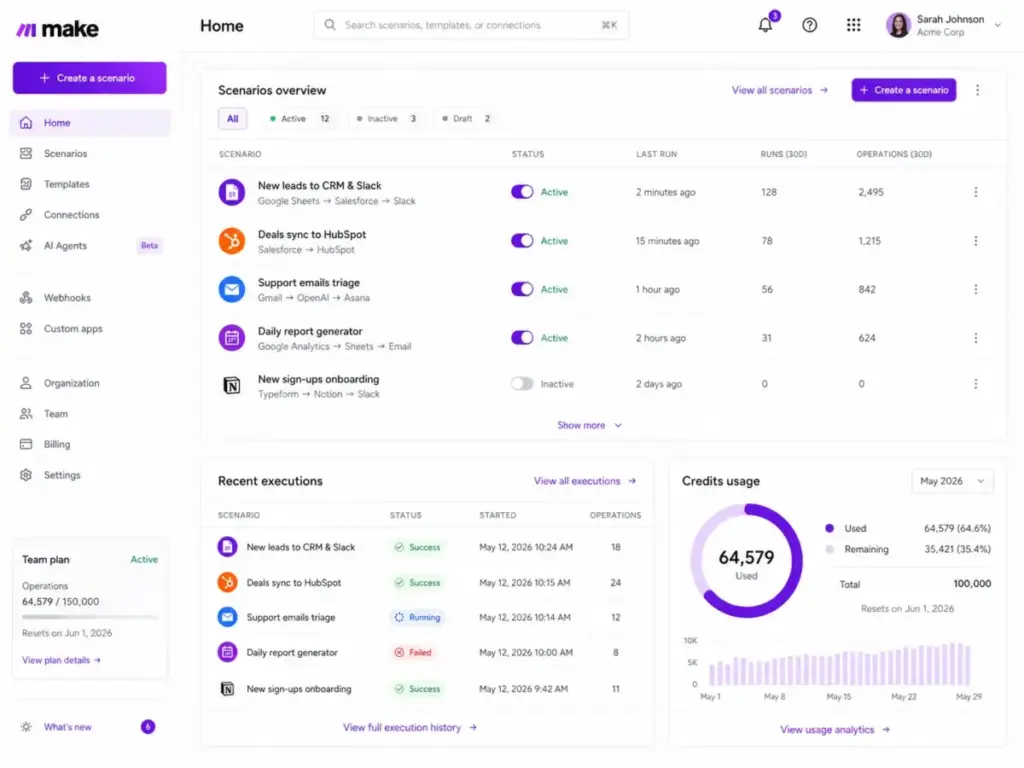
Every scenario run is logged. You can inspect each module’s input, output, processing time, and credit consumption. On the Pro plan and above, full-text search across execution logs is available, which becomes important when you run dozens of scenarios daily.
The incomplete execution queue is useful. When a scenario fails mid-run, Make stores the partial execution. You can inspect where it broke, fix the issue, and replay the execution without re-triggering the source event.
One limitation: execution logs on the Free and Core plans do not support full-text search. Debugging a specific failed run across many scenarios requires scrolling through history manually.
Make AI Agents and MCP Server
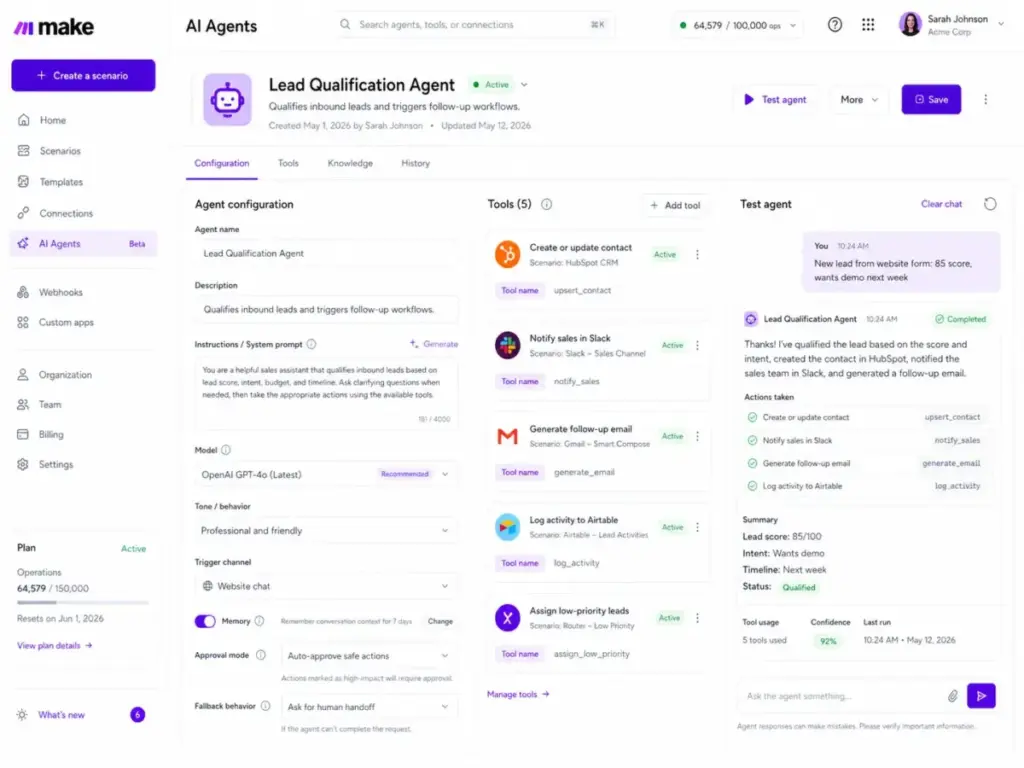
Make AI Agents are not just ChatGPT wrappers bolted onto automations. They are scenario-connected agents that can call Make workflows as tools, access data stores, and execute multi-step actions based on natural language instructions.
AI Agents are available on all plans. The difference from a standard OpenAI module is control: you define which scenarios the agent can call, what data it can access, and what guardrails apply. This is closer to agentic automation than dropping a GPT prompt into a Zap.
The Make MCP Server is a 2026 addition. MCP (Model Context Protocol) lets LLM-based tools like ChatGPT, Anthropic Claude, and Cursor connect directly to Make scenarios. Instead of building a separate webhook integration, an MCP-compatible tool can discover and call Make scenarios natively. For teams building AI-powered workflows, this reduces the glue code between generative AI models and business automations.
The Make AI Toolkit bundles AI-related modules across providers. It supports connections to OpenAI, Anthropic, Google Gemini, and other AI services. Credit usage for AI modules is dynamic: it scales based on token consumption, not a flat per-call rate. A short text classification might cost 1 credit. A long document summarization might cost 10 or more. This variable cost is the part most buyers miss.
Make Grid for Automation Visibility
Make Grid is an auto-generated visual map of all automations, AI agents, dependencies, and data flows across an organization. It is not a workflow builder. It is an observability layer.
For teams running 20 or more scenarios, Grid shows which automations connect to which apps, where data flows overlap, and which scenarios depend on shared triggers or data stores. This helps operations managers understand automation sprawl before it creates conflicts.
Grid is most useful on Teams and Enterprise plans where multiple people build and maintain scenarios. On a solo account, it adds less value.
How Much Does Make Cost?
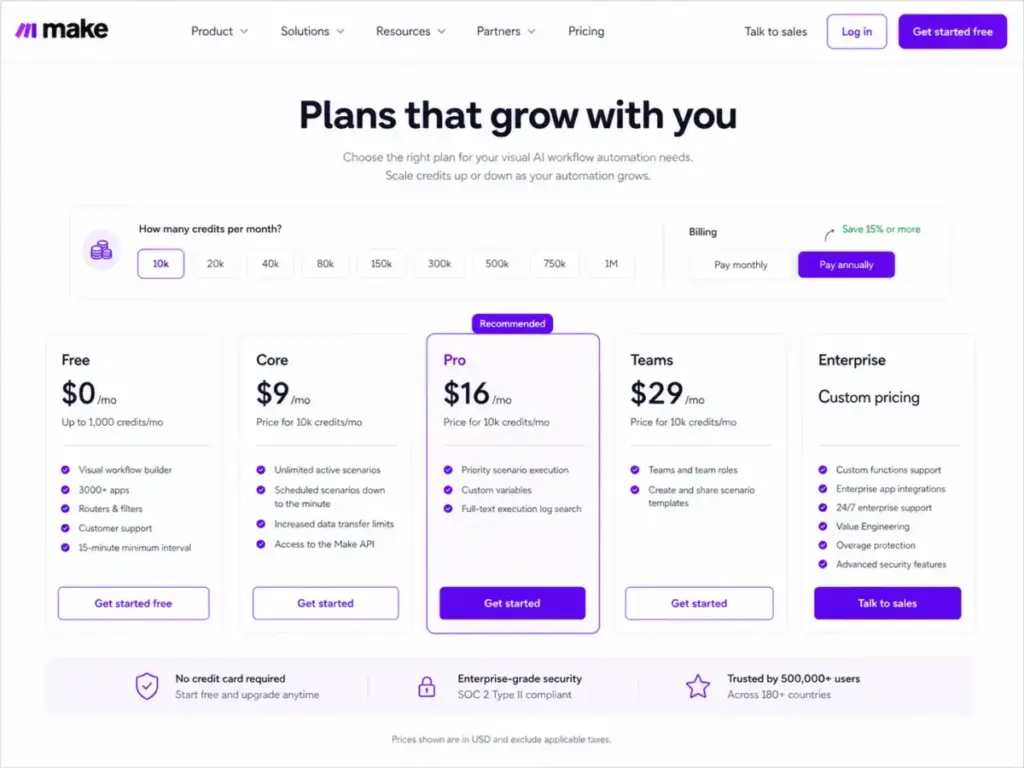
Make pricing starts free and scales through four paid tiers, but the listed price per plan tells only part of the story. All pricing verified on the Make pricing page on April 27, 2026. Verify before purchase because SaaS pricing changes.
Make Pricing Table
| Plan | Price/Month | Credits/Month | Key Additions |
|---|---|---|---|
| Free | $0 | 1,000 | Visual builder, 3,000+ apps, routers, filters, 15-min minimum interval |
| Core | $9 | 10,000 | Unlimited active scenarios, 1-minute scheduling, Make API access |
| Pro | $16 | 10,000 | Priority execution, custom variables, full-text execution log search |
| Teams | $29 | 10,000 | Team roles, shared scenario templates |
| Enterprise | Custom | Custom | 24/7 support, SSO, audit logs, overage protection, Value Engineering |
Source: Make pricing page, verified April 27, 2026. Credit amounts shown reflect the base tier for each plan on the official pricing page view. Higher credit tiers are available at higher prices.
Make Credits vs Operations
In most non-AI app modules, 1 operation equals 1 credit. An operation is a single module execution that processes or checks data. This sounds straightforward until you factor in bundles.
A bundle is a single data packet processed by a module. When a trigger returns multiple items (10 form responses, 15 new rows, 8 webhook payloads), each item is a separate bundle. Every downstream module runs once per bundle.
This is the math that catches buyers:
What the Make Pricing Page Does Not Tell You
The gap between “modules in my scenario” and “credits consumed” is the biggest pricing surprise in Make. Here is how it works with three real workflow patterns:
| Workflow | Modules | Bundles per Run | Credits per Run | Runs per Day | Monthly Credits |
|---|---|---|---|---|---|
| A. Simple lead alert: New HubSpot contact sends Slack message | 2 (trigger + action) | 1 | 2 | 10 | 600 |
| B. Form processor: Google Forms trigger returns 10 responses, 3 downstream modules process each | 4 (trigger + 3 actions) | 10 bundles across 3 modules | 31 | 5 | 4,650 |
| C. AI enrichment: Webhook receives 5 leads, OpenAI enriches each, writes to Airtable and Slack | 4 (webhook + AI + 2 actions) | 5 bundles across 3 modules + dynamic AI tokens | 16-30+ | 10 | 4,800-9,000+ |
Workflow A fits comfortably on the Free plan. Workflow B could exhaust Core’s 10,000 credits in about two days of heavy use. Workflow C varies wildly depending on AI token consumption per call.
Key pricing facts buyers miss:
- Bundle multiplication. The Make documentation example is clear: 1 trigger returns 10 responses, 3 downstream modules each run 10 times. Total: 1 + 10 + 10 + 10 = 31 operations, not 4. See the Make operations documentation for the full explanation.
- AI token-based credits. AI modules do not consume a flat 1 credit per call. Credit usage scales with token count, file size, page count, or runtime depending on the module. The Make credits documentation explains the dynamic model.
- Extra credits cost 25% more. Paid users can buy extra credits manually or enable auto-purchasing in 10,000-credit units. These extra credits carry a 25% surcharge over the base plan rate. They expire at the end of the billing cycle.
- Polling burns credits even on “no data” checks. A scheduled trigger that checks for new data every minute and finds nothing still counts as an operation. High-frequency polling on quiet data sources wastes credits.
- 15-minute minimum on Free. The Free plan only runs scheduled scenarios every 15 minutes. For time-sensitive workflows, this pushes you to Core immediately.
Make User Experience
Make’s user experience splits sharply between the first hour and the first month. Simple two-module workflows feel approachable. Multi-branch scenarios with arrays, iterators, and error handlers require investment.
The First 30 Minutes in Make
The onboarding flow is fast. Sign up (no credit card), create a scenario, pick a trigger app, pick an action app, map a few fields, click “Run once,” and watch data flow through the modules. Module output bubbles show exactly what data was processed. This feedback loop is satisfying and more transparent than Zapier’s step-by-step log.
The template library helps. Pre-built scenarios for common workflows (Google Forms to Slack, Shopify order to email, webhook to database) give beginners a working pattern to modify.
Where Beginners Get Stuck
Confusion starts when workflows grow. The concepts that trip new users:
- Bundles vs. items. A trigger returning 10 rows creates 10 bundles. Every module downstream runs 10 times. Beginners expect 1 run.
- Iterators and aggregators. Processing arrays requires splitting them with an iterator and recombining with an aggregator. This is not obvious from the UI.
- Data mapping syntax. Make uses its own mapping syntax for functions, date formatting, and conditional expressions. It is learnable but distinct from spreadsheet formulas or JavaScript.
- Router filter order. When multiple router branches match, Make processes them in order. Unintended branch execution is a common early mistake.
As one Capterra reviewer put it: “It’s a pleasure to create with it.” That sentiment holds once you clear the learning curve. The first week is the hardest part.
Where Technical Users Win
Users who understand JSON, REST APIs, and data structures get more from Make faster. The HTTP module, webhook triggers, custom headers, and JSON parsing become second nature. Technical users also benefit from:
- Custom error handlers per module.
- Data stores for persistent key-value data between runs.
- Custom variables (Pro and above) for environment-specific configuration.
- The Make API for triggering scenarios programmatically.
Make Integrations and API Options
Make lists over 3,000 app integrations and 400+ AI app connections on its integrations page. The catalog covers major SaaS categories: CRM (HubSpot, Salesforce), email (Gmail, Outlook), project management (Notion, Monday.com, Asana), e-commerce (Shopify), databases (Airtable, Google Sheets), and communication (Slack, Microsoft Teams).
For apps without native modules, the HTTP module and webhook triggers fill the gap. The Make Developer Hub lets teams build custom app modules that appear in the scenario builder like native integrations.
Integration quality varies. Major apps (Google Workspace, Slack, Salesforce) have deep, well-maintained modules with granular trigger and action options. Niche apps sometimes have limited module coverage, missing specific triggers or actions that the app’s API actually supports. This is where the HTTP module becomes necessary, and where non-technical users may hit a wall.
One recurring complaint in user reviews: Google account re-authentication. Some users report needing to reconnect Google services periodically, which breaks scheduled scenarios until the connection is refreshed.
Security and Enterprise Governance
Make’s security posture is strong on paper: SOC 2 Type II, SOC 3, GDPR, AES-256 encryption at rest, and TLS 1.2/1.3 in transit. The Make security page details vulnerability management, independent penetration testing, and access controls.
The governance gap is plan-dependent:
| Feature | Free / Core / Pro | Teams | Enterprise |
|---|---|---|---|
| Team roles | No | Yes | Yes |
| Shared templates | No | Yes | Yes |
| SSO | No | No | Yes |
| Audit logs | No | No | Yes |
| 24/7 support | No | No | Yes |
| Overage protection | No | No | Yes |
| 99.5% uptime SLA | No | No | Yes |
| Isolated AWS environment | No | No | Yes |
| On-premises agent | No | No | Yes |
| Value Engineering access | No | No | Yes |
For team collaboration on automations, the Teams plan unlocks roles and templates. But SSO, audit logs, and real governance require Enterprise. Organizations with compliance requirements (SOC 2 for their own audits, HIPAA-adjacent workflows, financial data processing) will likely need Enterprise pricing, which is not published.
Make Pros and Cons
What Make Gets Right
- Visual scenario builder. The canvas-based design is the best visual automation builder I have evaluated. Logic is readable, data flow is visible, and debugging is faster than log-scrolling in linear tools.
- Logic depth without code. Routers, filters, iterators, aggregators, and error handlers cover 90% of the branching and looping patterns that would otherwise require scripting.
- HTTP module flexibility. Any REST API becomes accessible. For teams with custom internal tools, this extends Make’s reach beyond its native catalog.
AI Agents and MCP Server. The 2026 AI additions are not cosmetic. AI Agents connected to scenarios, combined with MCP for LLM tool integration, position Make ahead of Zapier for AI chatbot and agentic workflows. - Free plan with no time limit. 1,000 credits per month, no credit card required. Enough to test real workflows before committing.
- Execution log transparency. Module-level input/output inspection and incomplete execution replays make debugging practical.
What Make Gets Wrong
- Credit math is confusing. Bundle multiplication means a simple-looking workflow can consume 5-10x more credits than expected. Most buyers discover this after they scale, not before.
- Support response times. Capterra reviewers note slow support: “Support takes a really long time to get back to you.” Priority support requires Pro or higher. 24/7 support requires Enterprise.
- AI credit consumption is unpredictable. Dynamic token-based credit usage for AI modules makes cost planning difficult. A workflow that costs 5 credits today might cost 15 tomorrow if input text length changes.
- Learning curve for non-technical users. Bundles, iterators, aggregators, array handling, and Make’s mapping syntax take meaningful time to learn. This is not a platform you master in an afternoon.
- Google re-authentication issues. Multiple users report needing to periodically reconnect Google services. For scheduled scenarios, a broken connection means silent failures until someone checks.
- Governance locked behind Enterprise. SSO, audit logs, and overage protection are Enterprise-only. Teams managing sensitive data on the Pro or Teams plan lack basic governance tools.
- Niche integration gaps. While the 3,000+ app count is real, some integrations are shallow. Missing triggers or actions force users to the HTTP module, which requires API knowledge.
Make vs Alternatives
No automation platform wins every scenario. The right choice depends on workflow complexity, volume, technical capacity, and budget. Here is how Make compares head-to-head.
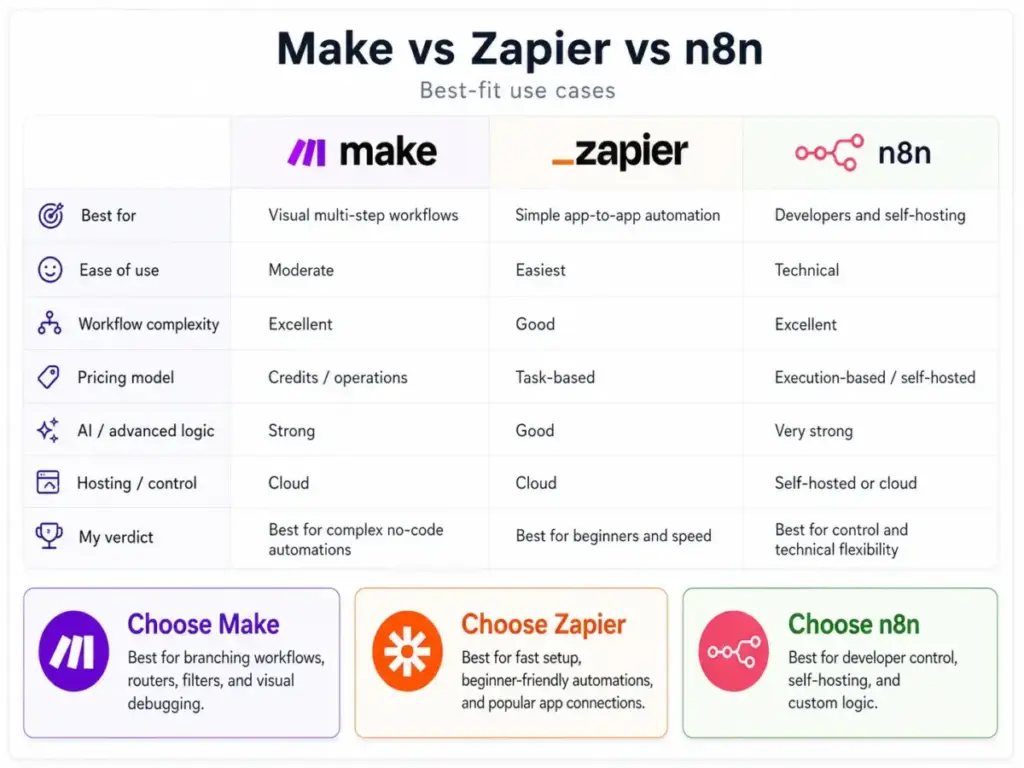
Make vs Zapier
Zapier is the simpler tool. Its linear step builder, massive app catalog (7,000+), and “just works” philosophy make it the default for non-technical users building basic automations.
Make wins on visual control. Routers, branching, and the canvas view make complex workflows readable. For a 10-step workflow with 3 conditional branches, Make is easier to build and debug. In Zapier, the same workflow becomes a deeply nested Paths structure. Read the full Zapier review for a detailed comparison.
| Factor | Make | Zapier |
|---|---|---|
| Builder | Visual canvas with routers | Linear step list with Paths |
| Best for | Multi-branch, API-heavy workflows | Simple app-to-app automation |
| Pricing model | Credits (per operation per bundle) | Tasks (per successful action step) |
| Free plan | 1,000 credits/month | 100 tasks/month |
| AI features | AI Agents, MCP Server, AI Toolkit | AI actions, Chatbots, Canvas |
| Learning curve | Steeper (bundles, iterators) | Gentler (linear steps) |
| Winner by scenario | Complex workflows, cost-conscious teams | Beginners, simple automations |
Verdict: Choose Zapier for simple, low-volume automations. Choose Make when workflows need branching, error handling, or API integration depth.
Make vs n8n
n8n is the developer-first alternative. It offers a visual node editor, self-hosting option, and execution-based pricing on cloud. For the full breakdown, see the n8n review.
Make wins on managed simplicity. You do not need to maintain servers, update containers, or manage database backups. Make’s hosted platform handles infrastructure. For non-developers who want visual automation, Make is more accessible.
n8n wins on volume and control. Self-hosted n8n has no per-execution limits. Cloud n8n charges per execution regardless of workflow complexity, making costs predictable. Technical teams that want full data control and infrastructure ownership will prefer n8n.
| Factor | Make | n8n |
|---|---|---|
| Hosting | Cloud only (managed) | Self-hosted or cloud |
| Best for | Non-dev teams wanting visual orchestration | Developers wanting infrastructure control |
| Pricing | Credits per operation per bundle | Executions (cloud) or unlimited (self-hosted) |
| Data control | Cloud-stored | Full control (self-hosted) |
| AI features | AI Agents, MCP Server | AI nodes, LangChain integration |
| Winner by scenario | Managed visual workflows | High-volume, self-hosted workflows |
Verdict: Choose n8n for self-hosting, high volume, or full data sovereignty. Choose Make for hosted visual automation without infrastructure management.
Make vs Pabbly Connect
Pabbly Connect competes on price. It offers lifetime payment plans and unlimited workflows on paid tiers, targeting buyers who want to eliminate recurring SaaS fees.
Make wins on sophistication. Routers, iterators, AI Agents, MCP Server, and the depth of error handling are ahead of Pabbly’s simpler linear workflow builder. Make’s integration catalog is also deeper.
Pabbly wins on long-term cost. A one-time payment removes monthly billing anxiety entirely. For straightforward automations (form to email, CRM to spreadsheet), Pabbly delivers at a fraction of Make’s ongoing cost.
Verdict: Choose Pabbly for simple workflows with lifetime pricing preference. Choose Make for complex routing, AI workflows, and deeper integrations.
Make vs Workato
Workato targets enterprise iPaaS buyers. Its governance tooling, procurement integration, compliance features, and recipe-based automation engine serve large organizations with formal IT oversight.
Make wins on speed and entry cost. A solo operator can sign up, build, and deploy a workflow in under an hour. Workato requires sales conversations, implementation planning, and enterprise procurement cycles.
Workato wins on enterprise governance. For organizations with 50+ automations, compliance requirements, and centralized IT management, Workato’s maturity in audit trails, access controls, and vendor management is stronger.
Verdict: Choose Workato for enterprise iPaaS with procurement and governance. Choose Make for faster setup and lower entry cost.
Make vs Power Automate
Microsoft Power Automate is strongest inside the Microsoft 365 ecosystem. SharePoint, Teams, Dataverse, Dynamics 365, and Azure integrations are deeply native.
Make wins for cross-SaaS workflows. If your stack includes Airtable, Slack, Notion, Shopify, and non-Microsoft tools, Make’s integration breadth and visual builder are more practical.
Power Automate wins for Microsoft-first organizations. The licensing is often bundled with existing Microsoft 365 subscriptions, making it effectively free for basic use cases within the Microsoft stack.
Verdict: Choose Power Automate for Microsoft-heavy environments. Choose Make for multi-vendor SaaS automation.
Daniel Rivera’s Quick Take
Make is the platform I recommend most often to automation consultants and RevOps teams who have outgrown Zapier’s linear builder but do not want to manage n8n infrastructure. The visual scenario builder is genuinely best-in-class. The AI Agents and MCP Server additions in 2026 are real differentiators, not marketing features.
But I cannot recommend Make without a warning: model your credit consumption before you commit to a plan. The bundle multiplication model means a workflow that looks like 4 steps can behave like 31 in billing terms. AI modules add variable cost on top. And if you need enterprise governance, the jump from Teams ($29/month) to Enterprise (custom, unpublished pricing) is steep and opaque.
My advice: start on the Free plan, build your top three workflows, run them for two weeks, and check your credit consumption report. If the math works, Make is an excellent choice. If credits spike faster than expected, re-examine your trigger frequency and bundle volumes before upgrading.
Final Verdict
Make earns 8.7 out of 10 in this review. It is one of the best visual automation platforms available in 2026, with genuine depth in workflow logic, AI integration, and cross-app orchestration. The credit pricing model and support expectations are real friction points, but they are manageable for buyers who plan ahead.
Choose Make if you need visual multi-branch workflows, API flexibility, and AI agent capability without self-hosting. Choose a competitor when simplicity, volume pricing, lifetime deals, or Microsoft-native integration matters more.
FAQ
Is Make worth it in 2026?
Yes, for teams that need visual workflow control beyond what Zapier offers. Make’s scenario builder, router logic, AI Agents, and MCP Server are strong 2026 differentiators. It is not worth it for buyers who want the simplest possible automation setup or who cannot tolerate unpredictable credit consumption.
How much does Make cost?
Make Free is $0/month with 1,000 credits. Core starts at $9/month for 10,000 credits. Pro is $16/month and Teams is $29/month, both for 10,000 credits at the base tier. Enterprise pricing is custom. All prices verified on the Make pricing page on April 27, 2026. Extra credits cost 25% more than the base rate.
What are Make credits?
Credits are Make’s billing unit. In most non-AI modules, 1 operation (a single module run processing one bundle) equals 1 credit. AI and advanced modules use dynamic credit consumption based on token count, file size, or runtime. A trigger returning 10 bundles with 3 downstream modules consumes 31 credits, not 4.
Is Make better than Zapier?
Make is better for complex, multi-branch workflows with API calls, conditional logic, and error handling. Zapier is better for simple, linear automations and has a larger app catalog. Make’s visual canvas beats Zapier’s linear builder for readability on complex scenarios. Zapier’s step builder is faster for two-step automations.
Is Make better than n8n?
Make is better for non-developer teams that want managed, hosted automation. n8n is better for developers who want self-hosting, full data control, and unlimited execution volume. If you can manage infrastructure, n8n’s cost model is more predictable at high volume.
Is Make good for beginners?
Make is usable for beginners on simple two-module workflows. It is not beginner-friendly for multi-step automations involving bundles, iterators, aggregators, or complex data mapping. Expect a meaningful learning curve in the first week. Zapier is a gentler starting point for complete beginners.
Does Make support AI agents?
Yes. Make AI Agents are available on all plans. They connect to Make scenarios as callable tools, access data stores, and execute multi-step workflows based on natural language input. Credit usage for AI modules is dynamic and varies based on token consumption.
What is Make MCP Server?
Make MCP Server connects MCP-compatible LLM tools (ChatGPT, Claude, Cursor) directly to Make scenarios. Instead of building webhook bridges, MCP-compatible tools discover and call Make workflows natively. It is a 2026 addition targeting AI automation builders.
Is Make secure for enterprise teams?
Make reports SOC 2 Type II, SOC 3 audits, and GDPR adherence. Enterprise plans add SSO, audit logs, 99.5% uptime SLA, isolated AWS environment, and on-premises agent. Teams and below lack SSO and audit logs, which limits governance for compliance-sensitive organizations.
What are the best Make alternatives?
The best Make alternatives depend on your needs: Zapier for simplicity, n8n for self-hosting and developer control, Pabbly Connect for lifetime pricing, Workato for enterprise iPaaS governance, and Microsoft Power Automate for Microsoft 365 environments. See our full Make review for additional context on each alternative.