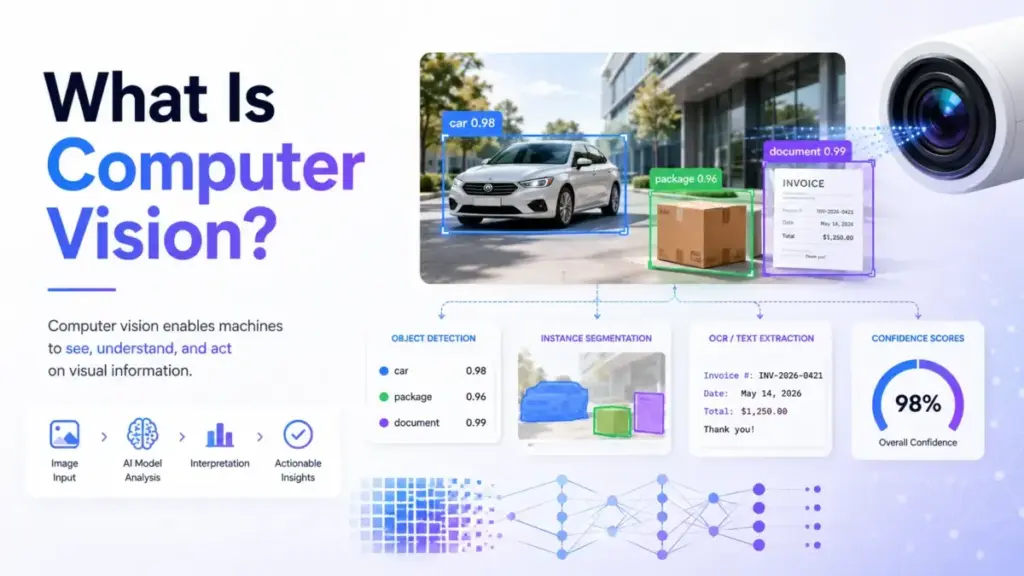
Computer vision gets explained as “teaching machines to see.” That framing sounds clean, but it skips the part that actually determines whether a project succeeds or fails: the production pipeline surrounding the model. I have spent six years covering AI tools and the pattern repeats across every visual AI deployment I review. Teams pick a prebuilt API, get excited by a demo, then hit file-size limits, labeling costs, false positives, or billing surprises within the first month. The concept itself is straightforward. The execution is where most projects stall.
This guide explains what computer vision means in practice, how the pipeline works end to end, which tasks it covers, where SaaS buyers use it, what the tools cost, and when visual AI is not the right answer.
Quick Answer: Computer vision is a field of artificial intelligence that enables software to interpret images, video, and other visual inputs to detect objects, read text, classify scenes, segment regions, or trigger automated decisions. It differs from basic image processing because it produces structured outputs (labels, bounding boxes, extracted text, confidence scores) rather than just enhanced images. Computer vision works best when the visual decision is clearly defined, representative training data exists, and errors can be measured and handled safely.
The 60-Second Explanation of Computer Vision
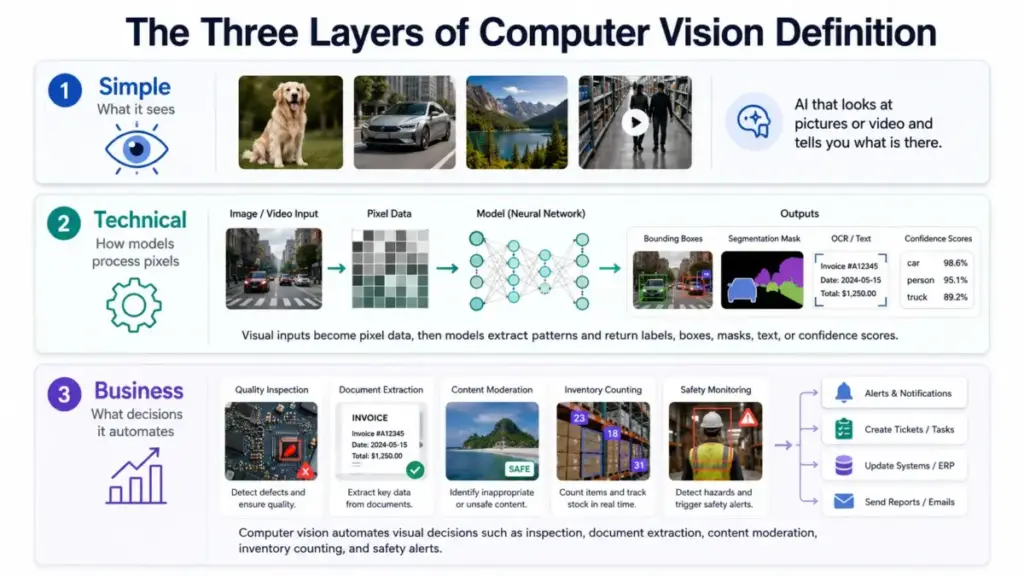
Simple version: Computer vision is AI that looks at pictures or video and tells you what it sees. A phone unlocking with your face, a warehouse camera counting packages, a scanner reading a receipt: all computer vision.
Technical version: Computer vision systems convert visual inputs (images, video frames, scanned documents) into numerical pixel arrays, then apply models, whether classical algorithms, convolutional neural networks, vision transformers, or multimodal architectures, to extract patterns. The model outputs structured data: class labels, bounding boxes, pixel-level masks, recognized text, embedding vectors, or confidence scores. Stanford HAI defines it as AI that enables computers to “see, identify, and understand visual information from images and videos” (Stanford HAI).
Business version: Computer vision automates visual decisions that humans currently make manually: inspecting products for defects, extracting fields from invoices, flagging unsafe content, verifying identity documents, counting inventory, or monitoring safety compliance. The business value is not in “seeing” but in reducing manual review hours, improving consistency, and scaling visual analysis beyond what human teams can handle economically. IBM describes it as AI that “processes, analyzes and interprets visual inputs” (IBM), and in 2026 the relevance is growing as Gartner lists Physical AI, intelligence embedded into robots, drones, and smart equipment, among its strategic technology trends for 2026.
How Computer Vision Actually Works
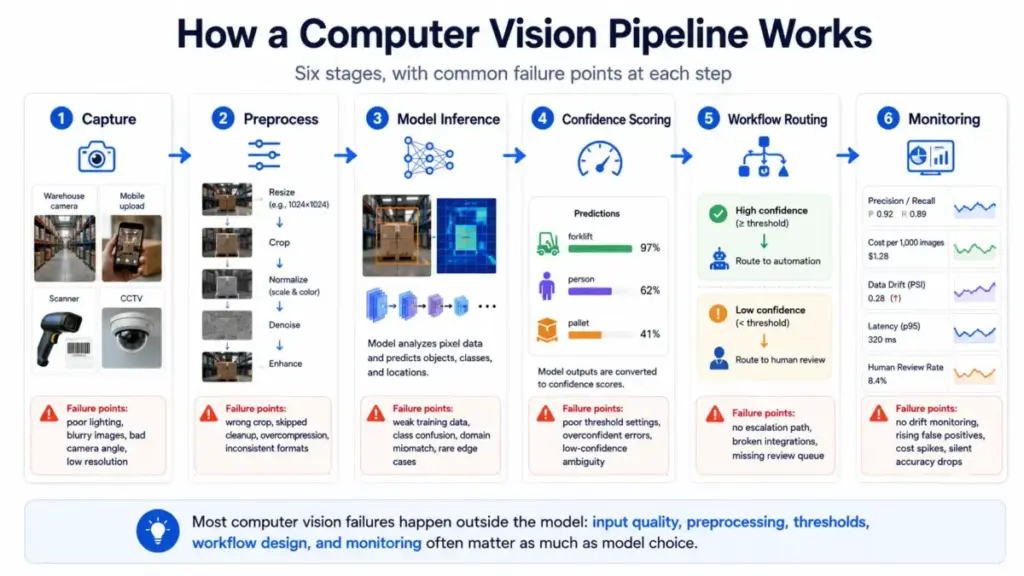
Computer vision is not a single model. It is a pipeline with at least six stages, and each stage introduces failure points that most explainers skip.
Stage 1: Capture. Images or video arrive from cameras, scanners, mobile uploads, drones, medical devices, or stored media. The source determines quality, resolution, lighting, and angle. A warehouse camera at 720p in poor lighting produces very different inputs than a flatbed scanner processing clean invoices.
Stage 2: Preprocess. The system resizes, normalizes, crops, enhances, or augments the image. This stage handles the gap between raw input and what the model expects. Skipping preprocessing is the fastest way to degrade accuracy.
Stage 3: Model inference. A trained model (classical algorithm, CNN, vision transformer, or multimodal model) extracts patterns and produces outputs: labels, bounding boxes, masks, text, embeddings, or confidence scores.
Stage 4: Confidence scoring. Every prediction comes with a confidence value. A label detection returning “forklift: 0.42” is not the same as “forklift: 0.97.” Production systems need thresholds to decide what to trust, what to flag, and what to discard.
Stage 5: Workflow routing. Results feed into a database, dashboard, alert system, human review queue, or automation rule. Low-confidence predictions should route to human reviewers. High-confidence results trigger actions.
Stage 6: Monitoring. After deployment, the system must be tracked for accuracy drift, latency, cost per decision, false positive rates, and edge-case failures. Practitioner discussions consistently flag production monitoring as an unresolved pain point for teams running deep learning models on remote sensors.
Where things go wrong: Most failures happen outside the model. Bad lighting, uncontrolled camera angles, ambiguous label definitions, unrepresentative training data, missing preprocessing, and absent monitoring cause more production issues than model architecture choices.
The Eight Tasks Computer Vision Handles
Computer vision is not one task. It is a category that covers at least eight distinct job types, and each one answers a different business question.
| Task | What it does | Output type | Business example |
|---|---|---|---|
| Image classification | Assigns labels to a whole image | Class label + confidence | Sorting product photos by category |
| Object detection | Finds and localizes objects with bounding boxes | Bounding boxes + labels | Counting vehicles in a parking lot |
| Image segmentation | Divides an image into pixel-level regions | Pixel masks | Identifying defect areas on a circuit board |
| OCR (text recognition) | Detects and extracts text from images | Structured text | Reading invoice fields from scanned PDFs |
| Face detection and analysis | Detects faces or face attributes | Face coordinates + attributes | Age verification at a kiosk (not identity) |
| Video analytics and tracking | Tracks objects or events across frames | Trajectories + event logs | Monitoring foot traffic in a retail store |
| Visual search and embeddings | Converts images into searchable vectors | Embedding vectors | Finding similar products from a photo |
| Industrial machine vision | Applies cameras and sensors to inspection | Pass/fail + measurements | Measuring component tolerances on a production line |
What this means: Before choosing a tool or building a model, define which task type matches your business decision. A team that needs OCR for invoice processing has a fundamentally different pipeline than a team doing real-time object detection on a factory floor.
Computer Vision vs Image Processing, OCR, and Machine Vision
Buyers often confuse computer vision with adjacent concepts. This table clarifies the boundaries.
| Concept | What it answers | Key difference from computer vision |
|---|---|---|
| Image processing | How do I enhance or transform this image? | Manipulates pixels (resize, filter, sharpen) but does not interpret content |
| Image recognition | What is in this image? | A subset of computer vision focused on classification only |
| OCR | What text is in this image? | A specific computer vision task, not a separate field |
| Machine vision | How do I inspect parts on a production line? | Industrial application of computer vision with cameras, sensors, and lighting hardware |
| Machine learning | How do I train models to learn from data? | The broader discipline; computer vision is one application domain |
| Multimodal AI | How do I process text, images, and audio together? | Combines vision with language and other modalities |
What this means: Computer vision interprets visual content and turns it into decisions. Image processing stops at pixel manipulation. Machine vision is computer vision applied to industrial inspection. OCR is one task within computer vision, not a separate category.
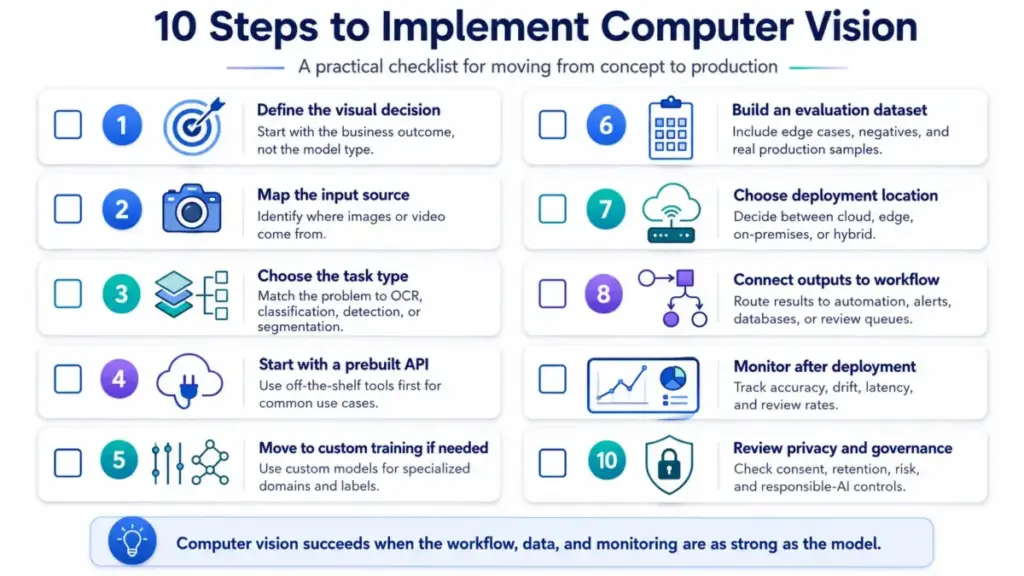
Step-by-Step: How to Implement Computer Vision
Implementation is where the gap between concept articles and real projects becomes obvious. These ten steps reflect what I see in production deployments across the SaaS tools I cover.
Step 1: Define the visual decision, not the model task
Start with the business outcome. “Flag damaged packages,” “extract invoice line items,” “count people entering a zone,” or “detect missing PPE” are decisions. “Run object detection” is a technique. The decision shapes everything downstream.
Step 2: Map the input source
Identify whether images come from mobile uploads, CCTV feeds, scanners, drones, production cameras, or stored media. Each source has different quality, format, resolution, and volume characteristics.
Step 3: Choose the task type
Match the decision to the right task from the taxonomy above. Use OCR for text extraction, classification for whole-image labels, detection for object locations, segmentation for pixel-level regions.
Step 4: Start with a prebuilt API when the task is generic
For common OCR, image tagging, content moderation, and object detection, prebuilt APIs from Google Cloud Vision, Amazon Rekognition, or Azure AI Vision get you to production fastest. Custom models add weeks or months.
Step 5: Move to custom training when the domain is specialized
When labels, defects, product types, or industrial objects are unique to your operation, tools like Roboflow or Clarifai support custom model training with your own datasets.
Step 6: Build an evaluation dataset before launch
Include clear positives, negatives, edge cases, poor lighting, blurry inputs, rare classes, and real production conditions. This dataset is your ground truth for measuring whether the system works.
Step 7: Choose the deployment location
Use cloud for easy scaling and API access, edge for low latency or bandwidth constraints, on-premises for sensitive data, and hybrid when governance or reliability requires it.
Step 8: Connect outputs to workflow
Route low-confidence results to human review. Write structured data to databases. Trigger alerts for safety events. Update dashboards. Create tickets for exceptions.
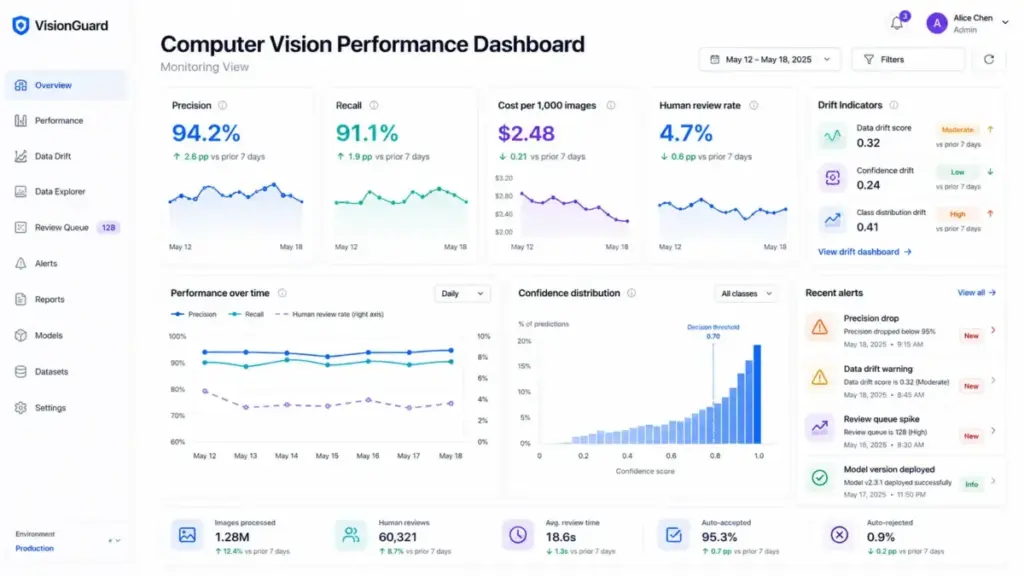
Step 9: Monitor after deployment
Track precision, recall, false positive rate, latency, cost per decision, confidence distribution, drift, and human review outcomes. Production monitoring is not optional. It is how you catch degradation before it reaches customers.
Step 10: Review privacy and responsible-AI risks
Pay special attention to faces, biometric data, surveillance, health imagery, children, public spaces, and employee monitoring. Governance questions belong in procurement, not as an afterthought.
The Mistakes That Set Computer Vision Projects Back
These are the patterns I see repeated across buyer evaluations and practitioner discussions.
- Starting with a model before defining the business decision. Teams choose “object detection” before clarifying what object, what action, and what error tolerance matters.
- Using demo images instead of production images. Clean sample photos perform well in trials. Blurry, poorly lit, cluttered real-world images tell a different story.
- Ignoring lighting and camera placement. Accuracy depends on input quality. A model trained on well-lit images fails in dim warehouses.
- Not budgeting for data labeling. Labeling is expensive, time-consuming, and ambiguous. Practitioner threads consistently flag annotation cost as the most underestimated line item.
- Comparing tools only by model accuracy. Workflow fit, pricing units, deployment options, human review support, and API limits matter as much as benchmark scores.
- Treating free tiers as production pricing. Free tiers exist for evaluation. Production workloads at scale land on different pricing curves entirely.
- Skipping human review for low-confidence predictions. Automation without escalation paths creates silent failures that compound over time.
- Failing to monitor drift. Models degrade as real-world conditions change. Without monitoring, accuracy drops go undetected.
Five Misconceptions About Computer Vision
Misconception: Computer vision is the same as image processing. Reality: Image processing enhances or transforms images. Computer vision interprets visual content and produces classifications, detections, extracted text, or decisions.
Misconception: Computer vision is just facial recognition. Reality: Face-related use cases are a small subset. OCR, object detection, quality inspection, segmentation, visual search, moderation, safety monitoring, and document understanding are all computer vision tasks.
Misconception: A prebuilt API solves every visual problem. Reality: Prebuilt APIs handle common tasks well. Specialized workflows often need custom labels, domain-specific datasets, human review loops, or edge deployment.
Misconception: Accuracy is only a model problem. Reality: Accuracy also depends on camera placement, lighting, image resolution, label quality, dataset diversity, preprocessing, confidence thresholds, and production monitoring.
Misconception: Computer vision is always cloud-based. Reality: Vision systems run in the cloud, on premises, on edge devices, or in hybrid configurations depending on latency, privacy, bandwidth, and reliability requirements.
When to Use Computer Vision and When to Skip It
Use computer vision when:
- The input is visual (images, video, scanned documents)
- The decision can be defined clearly with measurable success criteria
- Enough representative image or video data exists or can be collected
- Automation reduces manual review or improves speed at acceptable error rates
- Errors can be measured, monitored, and handled safely
Avoid or delay computer vision when:
- Image quality is uncontrolled and cannot be improved
- Labels are ambiguous and subject-matter experts disagree on classifications
- The cost of false positives or false negatives is unacceptable without human review
- Privacy approval for visual data collection is unclear
- No one owns monitoring or retraining after deployment
- A simpler approach (barcode, form field, sensor, manual QA, rules-based logic) solves the problem reliably
The bottom line: Computer vision is not magic eyesight for machines. It is a production system that turns visual inputs into decisions under real constraints. If the constraints are not defined, the system will not deliver.
How to Measure Computer Vision Success
Model metrics alone do not tell you whether a computer vision system is working. Business metrics close the gap.
| Metric | What it measures | Why it matters |
|---|---|---|
| Precision | Correct positive predictions / all positive predictions | High precision = fewer false alarms |
| Recall | Correct positive predictions / all actual positives | High recall = fewer missed detections |
| F1 score | Harmonic mean of precision and recall | Balances precision and recall into one number |
| mAP (mean Average Precision) | Detection accuracy across confidence thresholds | Standard benchmark for object detection models |
| IoU (Intersection over Union) | Overlap between predicted and ground-truth regions | Standard benchmark for segmentation tasks |
| OCR character/word error rate | Text recognition accuracy | Measures OCR quality on real documents |
| False positive rate | Incorrect alerts / total negative cases | Drives human review workload and trust |
| Human review rate | Predictions routed to manual review | Indicates automation coverage |
| Cost per 1,000 images | Total spend / volume processed | Ties model performance to budget reality |
| Latency (p95) | Processing time at 95th percentile | Determines real-time feasibility |
| Drift rate | Accuracy change over time | Signals when retraining is needed |
What this means: Track model metrics (precision, recall, mAP) alongside business metrics (cost per decision, human review rate, hours saved). A model with 95% precision that costs three times your budget is not a success.
Computer Vision Tools and What They Cost
Five SaaS platforms cover the range from prebuilt APIs to full custom-model pipelines. None of them rank as “best” without knowing your task, data, and deployment needs.
| Tool | Best fit | Pricing model | Key features | Watch out for |
|---|---|---|---|---|
| Google Cloud Vision AI | Generic OCR, labeling, moderation via API | Per feature, per image unit. First 1,000 units/month free for many features. Label Detection at $1.50 per 1,000 units (as of May 2026) | Text detection, image labeling, object localization, safe search, logo and landmark detection | Each feature counts as a separate billing unit. Quotas have defaults that can be adjusted, but system limits are fixed |
| Amazon Rekognition | Pretrained image and video analysis with optional custom labels | Pay-as-you-go with free tier (1,000 images/month for new accounts, Group 1 and Group 2 APIs) | Labels, text detection, faces, content moderation, PPE detection, video analysis, custom labels | 15 MB max image for S3, 5 MB raw-byte limit for many APIs, 100-word cap on DetectText, video analysis up to 10 GB or 6 hours |
| Azure AI Vision | Image tagging, OCR, face detection, spatial analysis via Foundry Tools | Transaction-based. Each selected feature counts as a transaction. Multi-feature calls count each feature separately | Image analysis, OCR, face detection, people detection, spatial analysis | Image must be JPEG/PNG/GIF/BMP, under 4 MB, and at least 50×50 pixels. Each PDF page counts as a separate feature transaction |
| Clarifai | Full-stack AI platform with custom model training and inference | Pay-as-you-go with usage-dependent costs. Up to 100 requests/second | Visual classifiers, visual detectors, custom training, dataset management, vector search, enterprise deployment | Pay-as-you-go plan has a $100/month maximum spend limit by default. Contact Clarifai to increase |
| Roboflow | Developer-focused annotation, training, deployment, and workflow building | Free Public plan, Core at $79/month (annual) or $99/month (monthly), custom Enterprise | AI-assisted annotation, hosted training, workflow builder, inference, model evaluation, edge and cloud deployment | Free Public plan lists datasets and models publicly on Roboflow Universe. Credits consumed across data, training, and deployment |
What this means: Pricing is never per-image-flat. Google bills per feature per unit. AWS groups APIs into billing categories. Azure counts each feature in a multi-feature call separately. Clarifai caps default spend. Roboflow uses credits. Check the official pricing page for current rates before procurement.
Pricing sources verified May 2026: Google Cloud Vision pricing, Amazon Rekognition pricing, Azure Computer Vision pricing, Roboflow pricing.
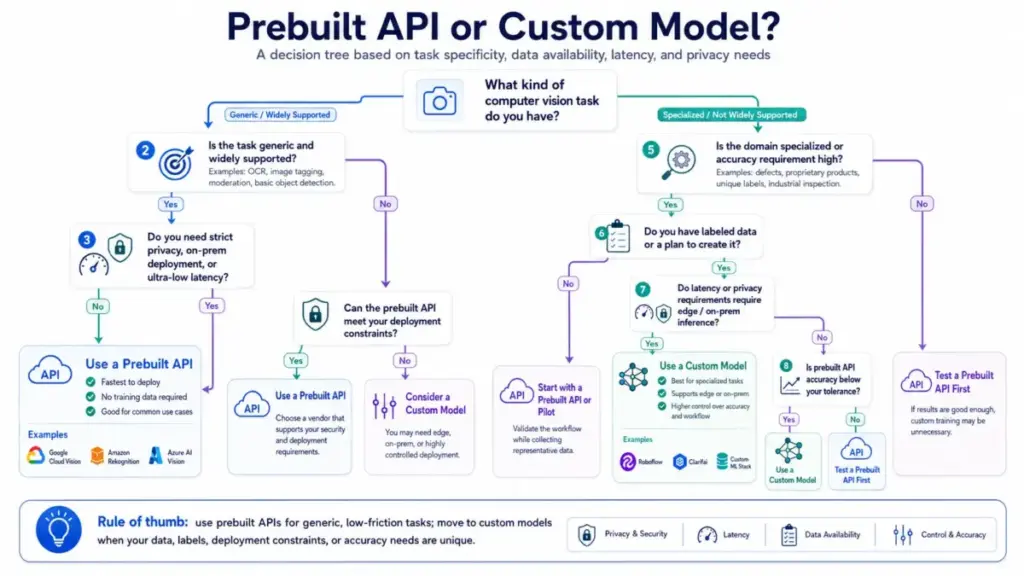
Prebuilt API or Custom Model?
Use a prebuilt API (Google Cloud Vision, Amazon Rekognition, Azure AI Vision) when:
- The task is generic: OCR, image tagging, content moderation, standard object detection
- Speed to production matters more than domain-specific accuracy
- You do not have labeled training data
Move to a custom model platform (Roboflow, Clarifai) when:
- Labels, defects, product types, or objects are unique to your domain
- Prebuilt API accuracy is insufficient for your error tolerance
- You need edge deployment, on-premises inference, or controlled training pipelines
Computer Vision Readiness Checklist
Use this before starting a computer vision project.
- Visual decision defined (not just “use AI on images”)
- Input source identified (camera, scanner, upload, stored media)
- Task type selected (classification, detection, segmentation, OCR, tracking)
- Representative image dataset available or collection plan in place
- Label definitions agreed upon by subject-matter experts
- Edge cases, poor-quality inputs, and rare classes documented
- Deployment location chosen (cloud, edge, on-premises, hybrid)
- Human review workflow designed for low-confidence predictions
- Privacy, consent, and responsible-AI review completed
- Monitoring plan with metrics, drift detection, and retraining triggers defined
- Pricing model understood (per unit, per feature, per credit, per transaction)
- File size, format, and API rate limits verified against production volume
FAQ
What is computer vision in simple terms?
Computer vision is AI that interprets images and video so software can detect objects, read text, classify scenes, or trigger decisions. It turns visual information into structured data that workflows, databases, or automation rules can act on.
Is computer vision part of artificial intelligence?
Yes. Computer vision is a subfield of artificial intelligence focused specifically on visual inputs. It typically uses machine learning or deep learning models to extract meaning from images and video.
What is the difference between computer vision and image processing?
Image processing manipulates pixels: resizing, filtering, sharpening, or enhancing images. Computer vision interprets visual content and outputs classifications, detections, extracted text, or decisions. Image processing is often a preprocessing step within a computer vision pipeline.
Can I use computer vision without training my own model?
Yes. Prebuilt APIs from Google Cloud Vision, Amazon Rekognition, and Azure AI Vision handle common tasks (OCR, image tagging, moderation, face detection) without custom training. Custom models become necessary when your domain, labels, or objects are specialized.
How do API pricing units work for computer vision?
Pricing varies by vendor. Google Cloud Vision charges per feature per image unit. Amazon Rekognition groups APIs into billing categories with pay-as-you-go rates. Azure counts each selected feature as a separate transaction. Clarifai and Roboflow use usage-based and credit-based models. Always check the vendor’s official pricing page for current rates.
What are the main risks of computer vision?
Key risks include poor accuracy on low-quality or unrepresentative images, privacy violations when processing faces or biometric data, bias from imbalanced training datasets, hidden costs from per-feature billing, and accuracy drift after deployment without monitoring. AI hallucinations can also occur in vision models that generate overconfident incorrect predictions.
Can computer vision run on edge devices?
Yes. Vision models can run on edge devices, on premises, in the cloud, or in hybrid setups. Edge deployment suits use cases with low-latency requirements, bandwidth constraints, or data residency rules. Tools like Roboflow and Clarifai support edge deployment options.
What metrics should I track for computer vision accuracy?
Track precision, recall, F1 score, and mAP for detection tasks. Add IoU for segmentation and character/word error rate for OCR. On the business side, measure cost per 1,000 images, human review rate, false positive rate, latency, and drift rate. Model accuracy without business context is incomplete.