The question SaaS buyers should be asking about multimodal AI is not “Can the model handle images?” It is “Does it actually see my PDF, or does it just extract the text and ignore the chart on page three?”
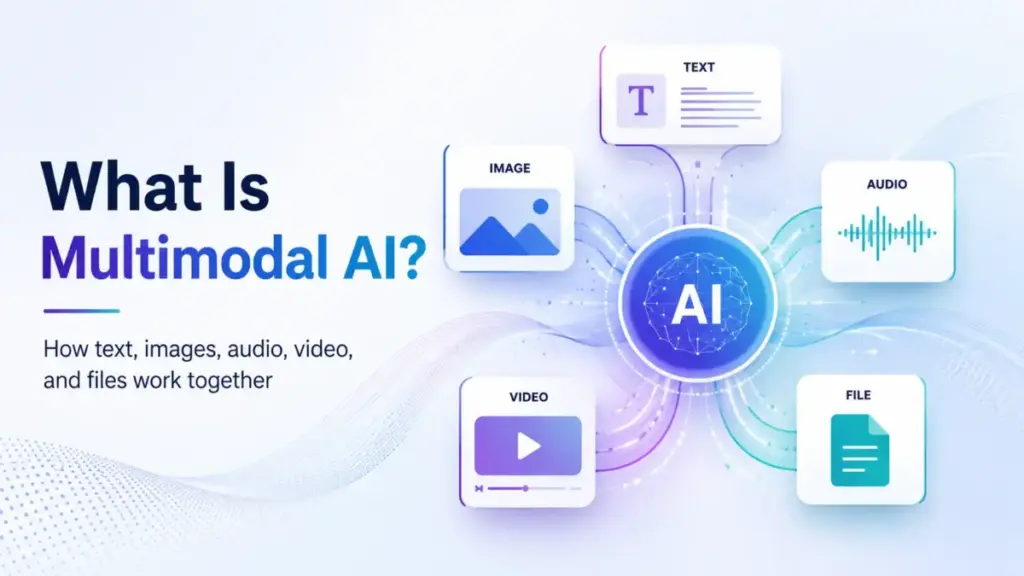
That distinction matters more than any definition. Multimodal AI is artificial intelligence that can process, integrate, and often generate outputs across more than one data type: text, images, audio, video, code, documents, or sensor data. Stanford HAI defines it as AI systems that can “process, understand, and generate multiple types of data modalities simultaneously.” IBM describes it as machine learning models capable of “processing and integrating information from multiple modalities or types of data.”
The concept sounds straightforward. The reality inside SaaS products is not. Many AI chatbot tools and copilots now advertise multimodal features, but the modalities you actually get depend on your plan, your file size, your region, and sometimes whether the feature left beta last Tuesday. More modalities do not automatically mean better output. Poorly aligned or low-quality visual, audio, or file inputs can add cost, latency, privacy risk, and ambiguity.
This guide explains what multimodal AI actually means, how it processes different input types, where SaaS teams use it today, which tools expose it (and at what price), and when a text-only model is still the better choice.
Quick Answer: Multimodal AI is artificial intelligence that processes more than one data type (text, images, audio, video, files, code) within the same workflow. It works by encoding each input into numerical representations, aligning them, fusing the information, and generating an output. It matters for SaaS because business artifacts are not text-only: they include screenshots, PDFs, call recordings, product photos, and design files.
What Multimodal AI Actually Means
Understanding multimodal AI requires looking at it from three angles, depending on how deep you need to go.
The simple version. Multimodal AI is AI that works with more than just text. Instead of typing a question and getting a text answer, you can show it a photo, upload a document, speak to it, or give it a video clip, and it responds in a useful way.
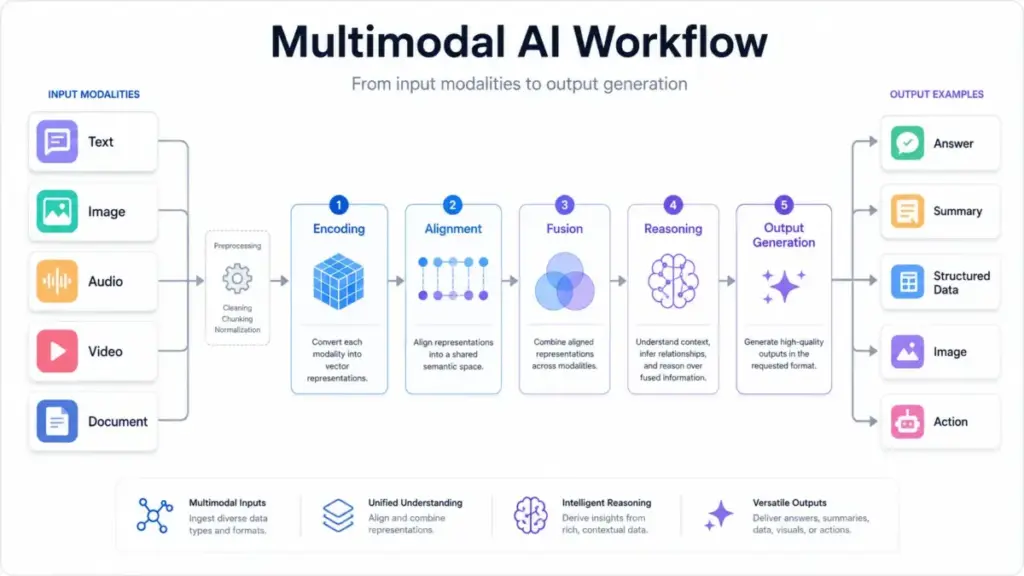
The technical version. Multimodal AI systems ingest different input types, preprocess each modality through specialized encoders, convert each input into numerical representations (embeddings), align those representations across modalities through cross-attention mechanisms or shared embedding spaces, fuse the information into a unified context, reason over cross-modal relationships, and generate an output. The output itself can be text, an image, audio, video, structured data, or an action. Modern architectures typically use early fusion (combining raw features), late fusion (combining model decisions), or hybrid approaches.
The business version. For SaaS teams, multimodal AI means the difference between describing a problem in words and showing the actual artifact. A support agent uploads a broken-product photo plus a text description. The model uses the image to identify the part, the text to understand the issue, and the help-center data to suggest a fix. That is a multimodal workflow. The buyer question is no longer “Can the AI chat?” but “Can it understand the actual work artifact: the deck, screenshot, spreadsheet, call recording, design brief, support image, or video asset?”
McKinsey notes that “a shift toward multimodal AI is underway” as enterprises move from text-only large language models toward systems that process multiple formats through preprocessing, feature encoding, fusion, and output steps.
How It Works
Here is how multimodal AI processes a request, step by step. I will use a practical example: a SaaS support team wants the AI to analyze a customer’s screenshot of an error message alongside their text complaint.
Step 1: Input ingestion. The system receives two inputs: a PNG screenshot and a text message. Each arrives as raw data in its native format.
Step 2: Preprocessing. The image is resized and normalized. The text is tokenized. If this were audio, it would be converted to spectrograms. Each modality gets prepared for its specific encoder.
Step 3: Modality encoding. Separate encoder modules (a vision encoder for images, a text encoder for language) convert each input into high-dimensional numerical vectors called embeddings. These embeddings capture the semantic meaning of each input in a format the model can work with.
Step 4: Alignment. The model maps relationships between the embeddings. It connects the error code visible in the screenshot with the text description of the problem. This is where cross-attention or projection layers bridge the gap between what the customer typed and what the image shows.
Step 5: Fusion. The aligned representations merge into a shared context. The model now “understands” both inputs together, not as two separate pieces of information.
Step 6: Reasoning and output. The model reasons over the fused context and generates a response: a text explanation of the error, a suggested fix, and a link to the relevant help article.
Where things go wrong. The process breaks when modalities conflict (the screenshot shows error A, but the text describes error B), when input quality is poor (a blurry photo, garbled audio), or when the model hallucinates details that are not present in either input. Adding more modalities does not reduce AI hallucinations automatically. Models can still misread charts, infer beyond evidence, or over-trust low-quality inputs.
Multimodal AI vs Related Concepts
Multimodal AI overlaps with several terms that SaaS buyers often confuse. This table clarifies the differences.
| Concept | What it is | How it relates to multimodal AI |
|---|---|---|
| Generative AI | AI that creates new content (text, images, audio, video) | Generative AI can be multimodal (e.g., text-to-image) or unimodal (text-to-text). Multimodal AI can be generative or analytical. |
| Large language model (LLM) | A model trained primarily on text data | An LLM processes one modality. A multimodal LLM (MLLM) extends it to handle images, audio, or video alongside text. |
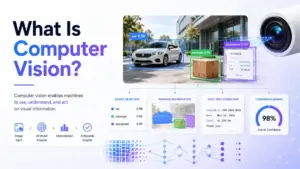
| Computer vision | AI that interprets visual data (images, video) | Computer vision is one modality. Multimodal AI combines vision with text, audio, or other inputs. |
| OCR (optical character recognition) | Extracting text from images or scanned documents | OCR converts images to text (single transformation). Multimodal AI reasons across both the visual layout and the extracted text. |
| RAG (retrieval augmented generation) | Grounding AI outputs in retrieved documents | RAG feeds retrieved text into a model. Multimodal RAG retrieves and reasons across text, images, tables, and diagrams. |
| Agentic AI | AI that takes autonomous actions across tools | Agents can be text-only or multimodal. Multimodal agents use vision, voice, or file inputs to inform their actions. |
| Deep learning | Neural network architectures with multiple layers | Deep learning is the underlying technology. Multimodal AI is an application pattern that uses deep learning for multiple input types. |
What this means for buyers: When a vendor says their product uses “multimodal AI,” verify which modalities it actually processes. A product that only does text-to-image generation is not the same as one that can read your uploaded PDF, interpret its charts, and answer questions about the data.
How to Implement Multimodal AI in SaaS Workflows
This is where most definition articles stop. They explain what multimodal AI is, then leave you with a list of broad use cases like “healthcare” and “autonomous vehicles.” SaaS buyers need more practical guidance.
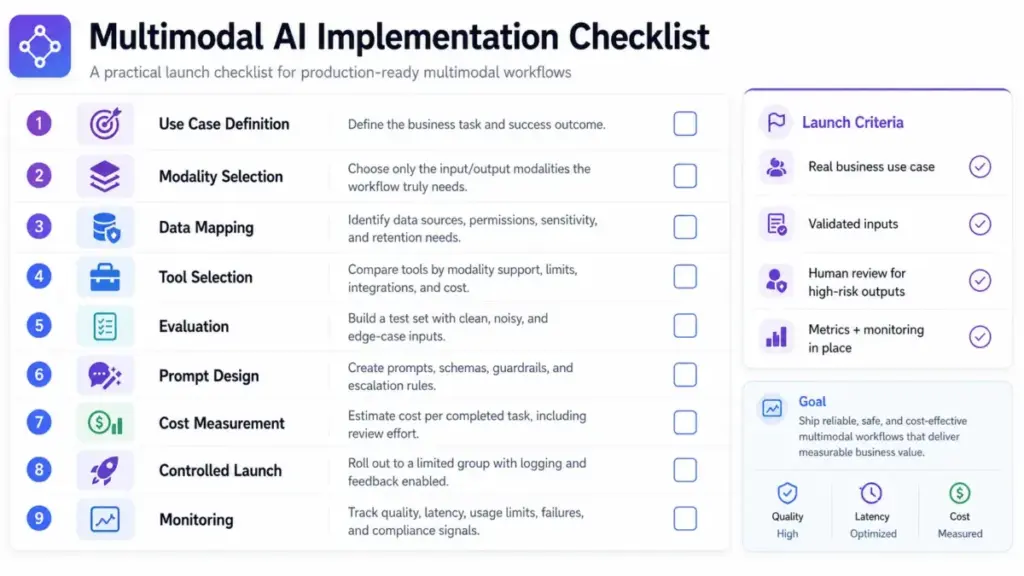
Step 1: Define the job in business terms
Do not start with the model. Start with the task. Examples: classify support screenshots, extract fields from invoices, summarize sales calls, generate product visuals, or analyze charts in reports. If you cannot describe the job without mentioning “AI,” the use case is probably too vague.
Step 2: Identify required modalities and exclude unnecessary ones
Do not add voice, video, images, or files unless they improve the decision or user experience. A text-only model is cheaper, faster, and easier to evaluate. Add modalities only when the task genuinely requires non-text evidence.
Step 3: Map data sources, permissions, and sensitivity
Include screenshots, files, call recordings, CRM records, customer images, and internal documents. Ask: what personal data enters the system? What are the retention policies? Who has access?
Step 4: Choose the workflow type
Options include: chat assistant, embedded copilot, API pipeline, document extraction workflow, creative generation workflow, or agentic process. The workflow type determines which tool and plan you need.
Step 5: Select a tool based on modality support, plan limits, and cost
Do not choose a model first. Choose the tool that fits your workflow, then check its modality support, plan-level limits, enterprise controls, latency, cost, and output format. The comparison table in the next section covers five major options.
Step 6: Build an evaluation set
Create a small test set with real examples: clean inputs, noisy inputs, edge cases, adversarial files, ambiguous images, poor audio, and expected outputs. Test by modality. An AI that reads clean PDFs perfectly may fail on scanned invoices with coffee stains.
Step 7: Design prompts, schemas, and review steps
For high-stakes or customer-facing outputs, require citations, confidence scores, human review, or escalation paths. Do not deploy multimodal AI without a human-in-the-loop for workflows where errors carry legal, financial, or safety consequences.
Step 8: Measure cost and latency before rollout
Image, video, audio, and large-document workflows can cost significantly more than text-only chat. Track cost per completed task, not just cost per API call.
Step 9: Launch in a controlled workflow
Start with opt-in users, logging, feedback capture, and clear data-handling notices. Do not deploy to every customer on day one.
Step 10: Monitor by modality
Track where the system succeeds or fails: images, tables, screenshots, long PDFs, charts, voice, or video. Overall accuracy masks modality-specific weaknesses.
Common Mistakes and Misconceptions
Mistakes that waste your first month
Assuming file upload means visual understanding. Some tools extract only digital text from documents, while others use visual retrieval or image-aware parsing. A file upload button does not always mean the model sees the whole document. Verify what the product actually processes: does it read the text, or does it interpret the charts, images, and layout too?
Ignoring modality-specific limits. File size caps, image dimension limits, daily usage quotas, and generative credit allowances vary by plan. A workflow that works on your test account may hit limits in production.
Using multimodal AI for tasks where text is enough. If a text description fully captures the problem, adding images or audio adds cost and complexity without improving the result. More data does not guarantee better judgment.
Failing to test noisy inputs. Clean test data produces clean results. Real-world inputs include blurry screenshots, scanned documents with handwriting, low-quality call audio, and compressed video. Test with realistic artifacts, not demo-quality examples.
Sending sensitive data without retention controls. Voice recordings, customer photos, employee screenshots, and internal documents carry privacy and compliance obligations. Check data retention, access controls, and geographic processing requirements before uploading sensitive business data.
Measuring only overall accuracy. A model that scores 90% overall accuracy may score 60% on chart interpretation and 95% on text questions. Break metrics down by modality.
Treating beta creative outputs as fully indemnified. Some creative generation features are in beta, and their commercial licensing and indemnification status may differ from generally available features.
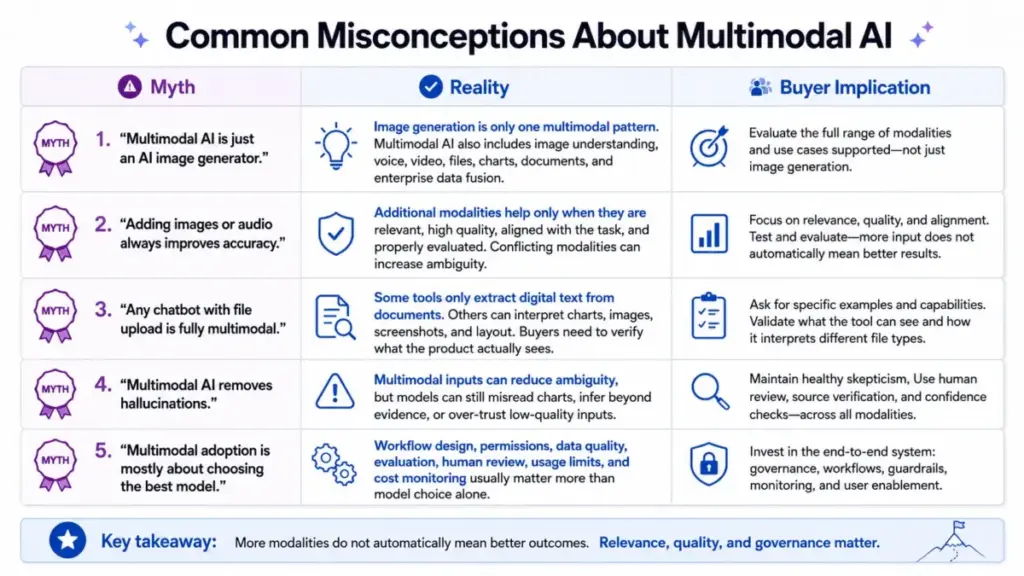
Common misconceptions
| Misconception | Reality |
|---|---|
| Multimodal AI is the same as anAI image generator. | Image generation is one multimodal pattern. Multimodal AI also includes image understanding, voice, video, files, charts, documents, sensors, and enterprise data fusion. |
| Adding images or audio always improves accuracy. | Additional modalities help only when they are relevant, high quality, aligned with the task, and properly evaluated. Conflicting modalities can add ambiguity. |
| Any chatbot with file upload is fully multimodal. | Some products extract only digital text from documents. Others use visual retrieval or image-aware parsing. Buyers must verify what the product actually sees. |
| Multimodal AI removes hallucinations. | Multimodal evidence can reduce ambiguity, but models can still misread charts, infer beyond evidence, fabricate details, or over-trust low-quality inputs. |
| Multimodal SaaS adoption is mostly a model-choice problem. | The harder work is workflow design, permissioning, data quality, evaluation, human review, usage limits, and cost monitoring. |
Limitations and When NOT to Use Multimodal AI
Real limitations buyers should know
1. More data does not guarantee better judgment. Weak, noisy, misaligned, or conflicting modalities can reduce accuracy. An image that contradicts the text prompt creates ambiguity, not clarity.
2. Multimodal workflows cost more. Images, audio, video, and files increase compute, storage, latency, and review burden. API pricing for image and video processing is typically higher per token or per request than text-only workflows. Generative credits for creative outputs are consumed faster on video and complex image operations.
3. Privacy and compliance risks rise with richer inputs. Voice, video, faces, documents, screenshots, customer records, and sensitive workplace files carry different regulatory obligations than text prompts. The European Data Protection Supervisor (EDPS) notes that multimodal AI introduces challenges around personal data volume, emotion-recognition risk, and data synchronization.
4. Product limits vary widely. Multimodal functionality is often gated by subscription tier, usage caps, country, credits, or add-on licenses. What works on a Pro plan may not be available on Free.
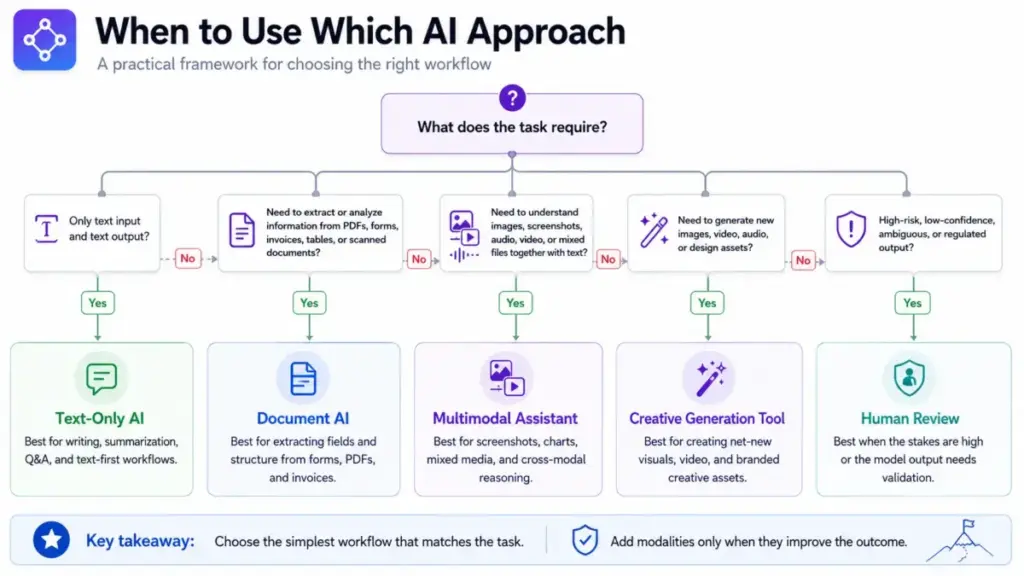
When to use multimodal AI
- The task depends on non-text evidence: screenshots, product photos, diagrams, charts, PDFs, presentations, call audio, videos, design references, forms, or sensor data.
- User experience improves by letting people show or speak instead of type.
- A SaaS workflow must connect multiple artifact types (e.g., analyzing a support screenshot alongside a CRM ticket).
When to avoid or delay multimodal AI
- Text-only context is sufficient for the task.
- The input contains sensitive biometric or personal data without proper governance.
- Latency or cost targets are tight and text-only would meet them.
- The product cannot prove it actually interprets the needed modality (verify, do not assume).
- Errors would cause legal, financial, medical, or safety harm without human review.
Where SaaS Teams Use Multimodal AI Today
Most articles repeat the same examples: healthcare diagnostics and self-driving cars. SaaS buyers need to see how multimodal AI applies to their actual workflows.
| SaaS workflow | Modalities involved | Example |
|---|---|---|
| Customer support triage | Screenshot + text + CRM data | Agent uploads a product photo and error description; AI identifies the issue and suggests a fix. |
| Document extraction | PDF + images + tables | Finance team uploads invoices; AI extracts line items, tax fields, and totals from mixed-format documents. |
| Sales enablement | Presentation + text + voice | Sales rep shares a prospect’s deck; AI summarizes key points and suggests talking points. |
| Meeting summarization | Audio + video + text | AI transcribes a recorded meeting, identifies action items, and links them to project tasks. |
| Creative production | Text prompt + reference image + brand assets | Marketing team generates campaign visuals using brand guidelines and reference images as inputs. |
| Product analytics | Chart + screenshot + text | Product manager uploads a dashboard screenshot; AI interprets the metrics and flags anomalies. |
| Onboarding and training | Video + text + quiz | New hire watches a product walkthrough; AI generates quiz questions from the video content. |
| Knowledge management | Document + image + diagram | AI indexes internal documentation that includes diagrams, flowcharts, and mixed-media pages. |
SaaS Tools That Expose Multimodal AI
Here is where multimodal AI gets specific. Five major SaaS tools expose multimodal capabilities, but the modalities you get, the limits you face, and the price you pay differ significantly. This information is based on official documentation, authoritative explainers, academic sources, and SERP comparison reviewed on May 19, 2026.
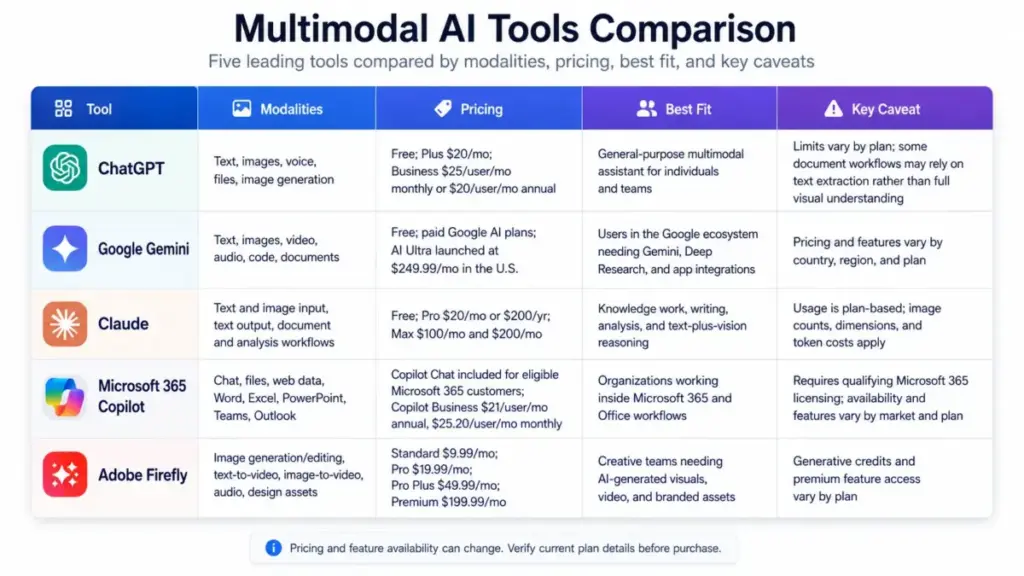
| Tool | Modalities | Pricing status (as of May 2026) | Best fit | Key caveat |
|---|---|---|---|---|
| ChatGPT | Text, images, voice, files, image generation, screen sharing/video (eligible plans) | Free plan available. Plus $20/month. Business $25/user/month (monthly) or $20/user/month (annual). | General-purpose multimodal assistant for individuals and teams needing chat, files, images, voice, and workspace features. | File, voice, video, image, and project limits differ by plan. Some document workflows extract only text unless visual retrieval is available. |
| Google Gemini | Text, images, video, audio, code, documents, Gemini Live, Deep Research, Google app integrations | Free access available. Google AI Ultra launched in the U.S. at $249.99/month. Other plan tiers localized by region. | Users already in Google’s product suite needing Gemini, Deep Research, Google app integrations, NotebookLM, or large storage bundles. | Plan prices and feature availability vary by country, age, language, and region. Some features are experimental or U.S.-only. |
| Claude | Text and image input with text output across all current models. Document, image, and analysis workflows. | Free plan available. Pro $20/month or $200/year. Max 5x $100/month. Max 20x $200/month. | Knowledge work, writing, analysis, document reasoning, image interpretation, and coding workflows. | Usage capacity is plan-based. Image counts (20 per message on claude.ai), dimensions (8000×8000 px max), and token costs apply. |
| Microsoft 365 Copilot | Chat, uploaded files, web data, referenced files, voice, Copilot in Word/PowerPoint/Excel/Teams/Outlook, agents, enterprise controls. | Copilot Chat included for eligible Microsoft 365 customers. Copilot Business $21/user/month (annual), temporarily $18/user/month. Monthly commitment $25.20/user/month. | Organizations inside Microsoft 365 needing AI grounded in emails, files, meetings, chats, and Office apps. | Requires eligible Microsoft 365 licensing. Some features limited by plan, market, and data readiness. Availability and pricing may vary by market. |
| Adobe Firefly | Image generation/editing, text-to-video, image-to-video, audio/sound effects, vectors, Adobe app integrations. | Standard $9.99/month. Pro $19.99/month. Pro Plus $49.99/month (regular). Premium $199.99/month (regular). | Creative teams needing prompt-to-image, video, sound effects, and brand-safe creative workflows with Adobe integration. | Generative credits govern usage (2,000 to 50,000/month by plan). Beta outputs may have different commercial and indemnification status. |
What this means: No single tool covers every modality equally. ChatGPT is the broadest general-purpose assistant. Google Gemini integrates deepest with Google’s product suite. Claude excels at text-plus-vision reasoning for knowledge work. Microsoft Copilot is built for organizations already inside Microsoft 365. Adobe Firefly focuses on creative generation with credit-based usage.
Verify current pricing and plan limits on each tool’s official pricing page before purchasing. Limits apply, are plan-dependent, and may change.
A File Upload Button Does Not Always Mean the Model Sees the Whole Document
This deserves its own callout because it is the single most common source of buyer confusion.
When you upload a PDF to an AI assistant, one of two things happens:
- Text extraction only. The system pulls the digital text layer from the document. It reads the words but ignores charts, images, tables with complex layouts, and visual formatting. If the PDF is a scanned image, it may extract nothing at all without OCR.
- Visual understanding. The system processes the document as an image (or series of images) and can interpret charts, diagrams, screenshots, handwritten notes, and visual layout alongside the text.
Most free-tier AI assistants use option 1. Visual retrieval or true image-aware parsing often requires paid plans or specific API configurations. Official documentation from OpenAI notes hard file limits including 512MB per file, 2M tokens for text/document files, and approximately 50MB for CSV/spreadsheets. But file size limits and visual understanding are separate questions.
Before choosing a multimodal AI tool for document workflows, ask: “Does this tool extract text from my files, or does it actually see the images, charts, and layout?” The answer determines whether your invoice processing, chart analysis, or screenshot interpretation workflow will actually work.
Why Multimodal AI Can Cost More
| Cost factor | Why it increases with multimodal workflows |
|---|---|
| Token/credit consumption | Images, audio, and video consume more tokens or credits per request than text. |
| Storage | Uploaded files, images, and recordings require more storage than text conversations. |
| Compute and latency | Processing visual, audio, or video inputs requires more computation, increasing response time. |
| Human review burden | Multimodal outputs (generated images, video, audio) often require human review before customer-facing use. |
| Evaluation complexity | Testing accuracy across screenshots, PDFs, audio, charts, and video requires separate test sets per modality. |
| Rate limits | Many tools impose lower rate limits for image or video processing than for text-only requests. |
The practical implication: Before building a multimodal workflow, calculate cost per completed task, not just cost per API call. A support-screenshot analysis workflow that costs $0.08 per image input may seem cheap until you process 10,000 tickets per month.
How to Measure Success
| Metric | What it measures | Why it matters |
|---|---|---|
| Task completion rate | Percentage of multimodal requests that produce a usable output | Indicates whether the AI handles real inputs, not just clean test data. |
| Human correction rate | How often a human must edit or override the AI output | High correction rates signal poor modality interpretation. |
| Grounded answer rate | Percentage of outputs supported by the input evidence | Measures whether the model stays within the evidence or hallucinates. |
| Cost per completed task | Total cost (API + storage + review) divided by successfully completed tasks | Prevents underestimating the real operational cost. |
| Latency per modality | Response time broken down by input type | Image and video inputs typically add latency. Know where the bottleneck is. |
| Modality-specific accuracy | Accuracy measured separately for text, images, charts, PDFs, audio, and video | Overall accuracy masks weaknesses in individual modalities. |
| Privacy/compliance incidents | Number of data handling violations or unauthorized data exposures | Multimodal inputs carry higher privacy risk than text prompts. |
| Model refusal or failure rate | How often the AI declines or fails to process an input | High refusal rates for certain file types indicate capability gaps. |
Governance Checklist for Multimodal AI
Privacy risk increases with richer inputs. Most SERP results ignore this, but enterprise SaaS buyers cannot afford to.
- Consent. Do users know their voice, images, screenshots, or video are being processed by AI? Is consent documented?
- Data retention. How long does the AI vendor store uploaded files, images, audio recordings, or video? Can you configure retention periods?
- Access controls. Who in your organization can access the multimodal inputs and outputs? Are admin controls available on your plan?
- Sensitive data minimization. Do not upload customer photos, employee screenshots, or call recordings unless necessary. Minimize personal data in multimodal inputs.
- Geographic processing. Where is the data processed and stored? Some features are limited by region or require specific data residency configurations.
- Customer-photo handling. If customer support workflows involve product photos from customers, verify that those images are not used for model training without consent.
- Call recording policies. Meeting and call recordings fed into multimodal AI must comply with two-party consent laws in applicable jurisdictions.
Beginner Checklist: Getting Started with Multimodal AI
Use this checklist before deploying multimodal AI in any SaaS workflow.
- [ ] Define the specific business task (not “use AI,” but “classify support screenshots by error type”).
- [ ] List the modalities required. Remove any that do not improve the outcome.
- [ ] Identify sensitive data in each modality (customer photos, voice recordings, internal documents).
- [ ] Select a tool and verify its modality support on your specific plan.
- [ ] Check file size limits, image dimension limits, usage caps, and rate limits.
- [ ] Build an evaluation set with clean inputs, noisy inputs, and edge cases.
- [ ] Test accuracy by modality, not just overall.
- [ ] Calculate cost per completed task, including storage and human review.
- [ ] Set up human review for high-stakes or customer-facing outputs.
- [ ] Launch with opt-in users and logging enabled.
- [ ] Monitor for modality-specific failures and privacy incidents.
- [ ] Re-evaluate quarterly: are the additional modalities still worth the cost?
Related Resources
If you are evaluating multimodal AI tools or related concepts, these SaaSZap guides cover specific products and topics in depth:
- Best AI chatbots at SaaSZap for a ranked comparison of general-purpose AI assistants.
- ChatGPT vs Claude for a head-to-head comparison of two leading multimodal assistants.
- ChatGPT vs Gemini for comparing OpenAI and Google’s multimodal approaches.
- What is prompt engineering for designing effective inputs for multimodal systems.
- Adobe Firefly pricing for detailed plan and credit breakdowns.
- ChatGPT pricing guide for plan-by-plan multimodal feature access.
- Claude pricing breakdown for API rates and plan-level limits.
FAQ
What is multimodal AI in simple terms?
Multimodal AI is artificial intelligence that works with more than one type of data at the same time. Instead of processing only text, it can also handle images, audio, video, documents, and code. A practical example: you upload a photo of a product defect and type a description of the problem, and the AI uses both inputs to suggest a solution.
How does multimodal AI work?
Multimodal AI takes different types of input (text, images, audio, video), converts each into numerical representations through specialized encoders, aligns the representations so the model can connect information across formats, fuses them into a shared context, and generates an output. The output can be text, an image, audio, or structured data, depending on the system.
What is the difference between multimodal AI and generative AI?
Generative AI creates new content (text, images, audio, video). Multimodal AI processes multiple data types. They overlap when a system generates images from text (both generative and multimodal), but generative AI can be text-only, and multimodal AI can be analytical rather than generative.
Is ChatGPT a multimodal AI?
Yes. ChatGPT supports text and image input, voice conversations, file uploads, image generation, and screen sharing on eligible plans. Official documentation shows that the model can understand text, images, and audio. However, the specific multimodal features available depend on your plan tier, and usage limits apply.
Can multimodal AI read charts and PDFs accurately?
It depends on the tool and the document. Some AI tools extract only digital text from PDFs and cannot interpret charts, images, or visual layouts. Others process documents as images and can reason about charts, diagrams, and tables. Accuracy varies with input quality: clean digital PDFs perform better than scanned documents with complex layouts. Always test with your actual documents before deploying.
Is multimodal AI safe for sensitive business data?
Multimodal AI increases data exposure compared to text-only AI because it can ingest voice recordings, customer photos, screenshots, internal documents, and video. Before using multimodal AI with sensitive data, verify the vendor’s data retention policies, access controls, processing locations, and compliance certifications. Plan-level admin controls and enterprise data protection features are available from some vendors but may require paid tiers.
Why does multimodal AI cost more than text-only AI?
Images, audio, video, and large files require more compute, storage, and processing time than text. API pricing typically charges more tokens or credits for image and video inputs. Generative credit systems (like Adobe Firefly’s) consume credits faster for complex visual operations. Additionally, multimodal outputs often require human review, adding labor cost.
When should a business NOT use multimodal AI?
Avoid multimodal AI when text-only context is sufficient, when latency or cost targets are tight, when the product cannot prove it interprets the needed modality, when inputs contain sensitive biometric data without governance, or when errors would cause legal or financial harm without human review. A text-only model is cheaper, faster, and easier to evaluate when it meets the task requirements.
What is a multimodal large language model?
A multimodal large language model (MLLM) is a large language model that has been extended to process inputs beyond text, typically images, audio, or video, alongside text. It uses modality-specific encoders and alignment mechanisms to integrate visual or audio information with its text reasoning capabilities.
Which multimodal AI tool is best for PDFs and documents?
No single tool dominates all document workflows. ChatGPT handles file uploads with text and image analysis. Google Gemini’s developer documentation mentions processing up to 1,000 pages of PDF. Claude supports text and image input for document reasoning. Microsoft 365 Copilot integrates with Word, Excel, and PowerPoint files within the Microsoft 365 environment. The best choice depends on your specific document types, plan limits, integration needs, and budget.
Methodology Note
This article is based on official product documentation, authoritative explainers (Stanford HAI, IBM, McKinsey), academic research on multimodal machine learning, and SERP competitor analysis reviewed on May 19, 2026. No hands-on product testing was performed. Pricing and feature information comes from official vendor pricing pages, help centers, and public documentation verified on the same date. Verify current pricing, plan availability, and feature limits on each vendor’s official website before making purchasing decisions.