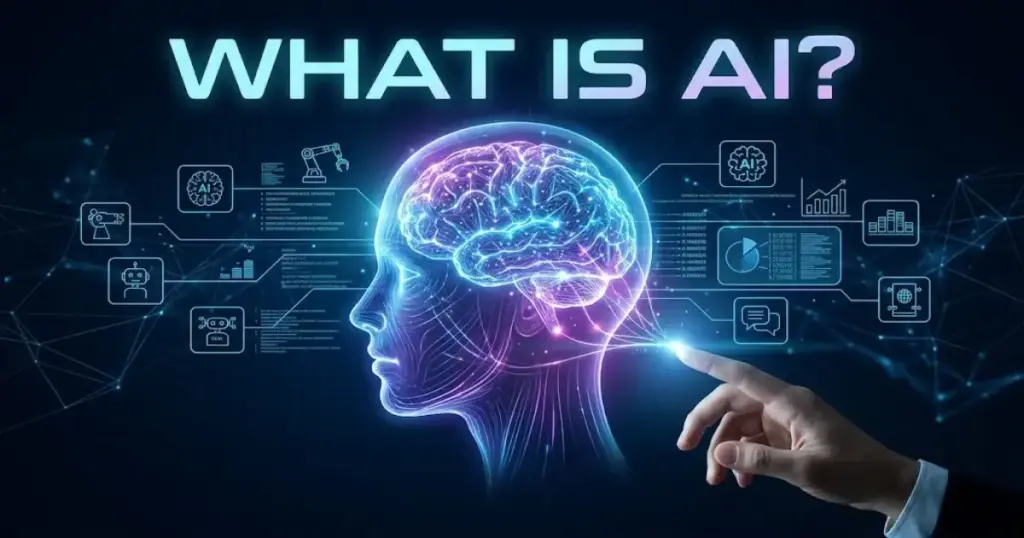
Artificial intelligence is software that takes inputs, runs them through a trained model, and returns a probabilistic output: text, a classification, a prediction, or an action. If you have used a chatbot, clicked a recommended product, or had an email ranked as spam, you have already seen AI at work.
Most business buyers I talk to think AI means a humanoid robot or a magic answer machine. Neither is accurate. Before you evaluate any of the best AI chatbots or connect an AI tool to your CRM, it helps to understand what AI actually is and where it reliably earns its place in a workflow.
What Is AI?
Artificial intelligence is a field of computer science focused on building systems that can make inferences from data rather than follow fixed coded rules. In plain terms: given enough examples, an AI system learns to recognize patterns and applies those patterns to new inputs it has never seen before.
IBM defines AI as “technology that enables computers and machines to simulate human learning, comprehension, problem solving, decision making, creativity and autonomy.” Microsoft Azure puts it more concisely: “It’s the capability of a computer system to mimic human-like cognitive functions such as learning and problem-solving.”
Neither definition implies consciousness. Neither implies accuracy. An AI system is a probability engine. It outputs the most statistically likely answer based on the data it was trained on and the instructions it received. That distinction matters enormously when you are deciding whether to trust AI output in a live business process.
The OECD’s definition of an AI system is useful here. The OECD frames an AI system as a machine-based system that can generate predictions, content, recommendations, or decisions that influence real or virtual environments. The key word is influence. AI does not just display data. It acts on data, and that action has downstream consequences.
AI, Machine Learning, Deep Learning, and AI Agents Compared
Before going further, here is the table every competitor skips. These six concepts are not interchangeable.
| Concept | Simple meaning | Business example | When it fails |
|---|---|---|---|
| AI | Systems that learn patterns and infer outputs from data | Spam filter, lead scoring, chatbot | When training data is biased or outdated |
| Machine learning | A method for AI: algorithms that improve by training on data examples | Churn prediction from CRM usage signals | When labeled training data is scarce |
| Deep learning | A subset of ML using layered neural networks for complex pattern recognition | Image recognition, speech-to-text | When computing cost is prohibitive |
| Generative AI | AI that produces new content (text, images, code, audio, video) from a prompt | ChatGPT drafting emails, Midjourney generating visuals | When accuracy and citation matter more than fluency |
| AI agents | AI systems that plan, call tools, remember context, and take sequential actions | Auto-booking a calendar, executing a multi-step research workflow | When actions are irreversible or require accountability |
| Automation | Rules-based software that executes predefined actions without inference | Zapier trigger moving a CRM deal stage when a form is submitted | When exceptions or judgment calls arise |
How Does AI Work?
AI is not magic. It is a specific sequence of steps that transforms raw input into a usable output. Understanding those steps is what separates buyers who get results from buyers who end up with expensive demos that never ship.
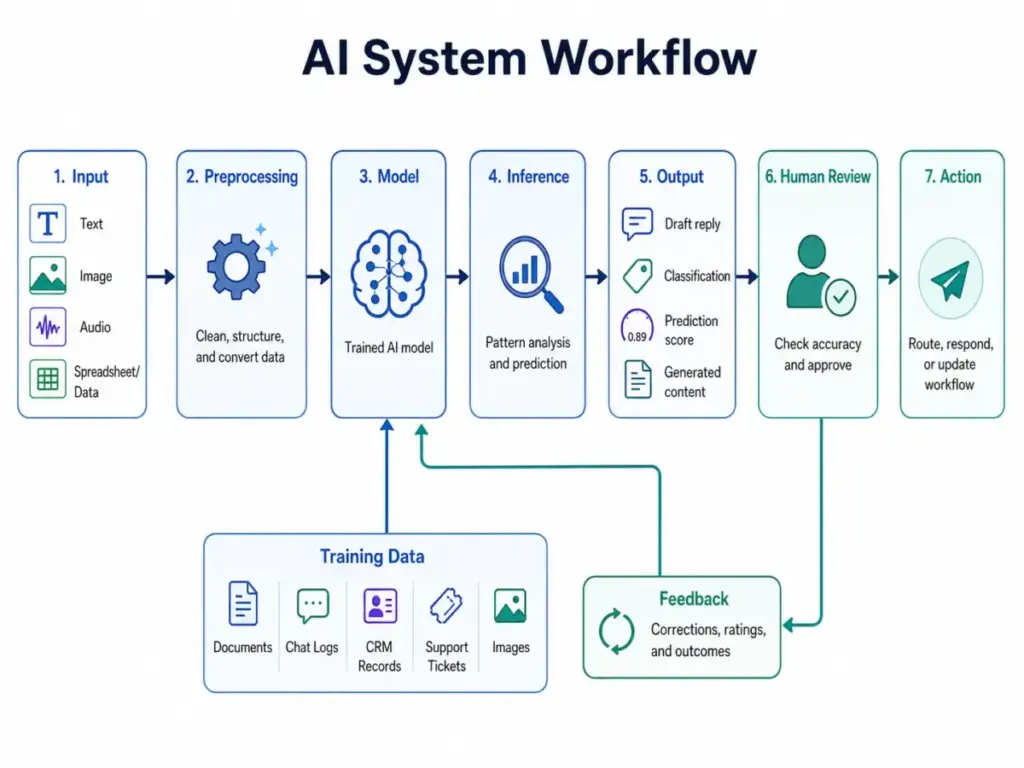
Here is the standard workflow, stripped of jargon:
- Input. A user or system provides data: a sentence, an image, a row of CRM records, an audio clip.
- Preprocessing. The system converts raw input into a format the model understands. Text becomes tokens. Images become pixel vectors.
- Model inference. The trained model analyzes the input and calculates the most statistically probable output based on patterns it learned during training.
- Output. The model returns a result: a draft reply, a classification, a prediction score, a generated image.
- Human review or automated action. A human checks the output for accuracy, or a system routes it automatically based on confidence thresholds.
- Feedback loop. Corrections, ratings, or behavioral signals feed back into future training runs to improve accuracy over time.
Stanford HAI explains that “modern AI often works by finding patterns in large amounts of data and using those patterns to generate predictions or responses.” The feedback loop is where most small teams underinvest. You cannot deploy an AI tool and walk away. Accuracy degrades when the world changes and the model does not.
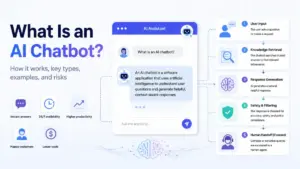
Concrete example: A customer support ticket arrives. The AI model reads the text, classifies it as a billing issue at 91% confidence, routes it to the billing queue, and drafts a suggested reply. A support agent reviews the draft, edits two sentences, and sends it. The agent’s edit is logged. Over time, the model learns that its draft for this ticket type needed adjustment, and it improves.
That loop, not the model itself, is what creates compounding value.
Types of Artificial Intelligence
AI is not one technology. It is a category containing several distinct approaches. Treating them as interchangeable is one of the fastest ways to make a bad vendor decision.
Narrow AI
Narrow AI, sometimes called weak AI, is designed to do one specific task well. A spam classifier is narrow AI. A fraud detection model is narrow AI. A recommendation engine is narrow AI. Most of the AI you use in business software today is narrow AI. It is reliable within its trained domain and unreliable outside it.
Generative AI
Generative AI is the AI type that captured mainstream attention in 2023. It produces new content (text, code, images, audio, video) by sampling from patterns in its training data. Large language models (LLMs) like GPT-4o, Claude, and Gemini are generative AI. So are image models like DALL-E 3 and Stable Diffusion. Generative AI reached 53 percent population adoption within three years, according to the Stanford HAI 2026 AI Index. That is adoption, not necessarily correct usage.
Predictive AI
Predictive AI analyzes historical data to forecast future outcomes. CRM lead scoring, churn prediction, sales forecasting, and inventory optimization all use predictive AI. It outputs a probability, not a guarantee. A model might predict that a lead has a 78% chance of converting. Your sales team still makes the call.
Computer Vision
Computer vision trains models to interpret images and video. Use cases include document scanning, visual inspection in manufacturing, face recognition in access control, and content moderation in social platforms. In SaaS contexts, computer vision shows up in tools that extract data from uploaded invoices or ID documents.
Natural Language Processing
Natural language processing (NLP) is the discipline that lets AI understand, parse, and generate human language. NLP powers chatbots, sentiment analysis, document summarization, and the search you use inside most enterprise SaaS tools. Every AI tool that reads or writes text is using NLP under the hood.
AI Agents
AI agents are systems that combine a foundation model with memory, planning, and tool access. Instead of answering a single question, an agent executes a sequence of decisions over time. An AI agent might receive a task like “research this competitor and summarize the key pricing differences,” then autonomously search the web, pull data, synthesize findings, and write a report. Understanding prompt engineering is particularly valuable when working with agents, because the quality of your instructions determines the quality of the agent’s plan.
Artificial General Intelligence
Artificial general intelligence (AGI) is AI that could match human cognitive ability across any domain. It does not exist as a commercial product today. No current AI system reasons, plans, or adapts the way a human does. AGI is relevant to your buying decisions only insofar as vendors sometimes imply capabilities that do not exist. When a vendor says their system “understands your business,” verify what that actually means before signing a contract.
AI Examples in Business Workflows
This is the section most competitor articles skip. Abstract definitions are not useful if you cannot map them to the workflows you actually run.
Here are the AI applications I encounter most often across SaaS teams:
- CRM lead scoring. AI models analyze contact behavior, deal activity, and firmographic data to rank leads by conversion likelihood. Sales reps focus on high-score leads first.
- Email segmentation. AI clusters contacts by behavior patterns (open rates, click sequences, purchase recency) rather than manually defined lists. Campaigns reach the right subgroup without manual tagging.
- Customer support triage. Incoming tickets are classified by topic and priority. High-confidence classifications route automatically. Edge cases escalate to human agents.
- Meeting summaries. Transcription models convert audio to text, then summarization models extract action items, decisions, and next steps. The output goes directly into the CRM record or project task.
- Project planning. AI reviews previous project timelines and risk logs to suggest realistic duration estimates for new tasks.
- Data analysis. AI reads a CSV export and returns an annotated summary of trends, outliers, and correlations that would take a human analyst hours to produce manually.
- Content drafting. AI generates a first draft from a brief. A writer edits for accuracy, tone, and originality. The AI saves the time of staring at a blank page, not the time of thinking.
- Search and synthesis. AI search tools retrieve relevant documents and synthesize an answer with source citations. Perplexity is the clearest current example of this approach in a commercial product.
None of these workflows remove humans from decisions. They move humans closer to the decision and further from the grunt work.
AI vs Machine Learning
These two terms appear side by side constantly. They are not the same thing, and confusing them leads to confused vendor conversations.
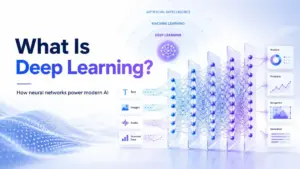
Artificial intelligence is the parent field. It includes any method that produces intelligent-seeming behavior from a machine. Machine learning is one method within AI. ML systems improve by training on data examples rather than following rules written by a programmer. Deep learning is a subset of ML that uses layered neural networks to solve particularly complex pattern recognition problems (image classification, speech transcription, natural language understanding).
Generative AI sits on top of deep learning. Foundation models like GPT-4o and Claude were trained on massive corpora using deep learning techniques, then fine-tuned using human feedback to make them more reliable and safer.
The practical implication: not all AI is machine learning (some AI systems use logic rules or search algorithms), but all modern LLMs are machine learning. When a vendor claims their product uses AI, the meaningful follow-up question is: “What does the model actually learn from, and how often is it retrained?”
AI vs Automation
People conflate AI and automation constantly. They are related but distinct.
Automation executes a predefined rule or sequence: if X happens, do Y. A Zapier workflow that moves a CRM deal to “Contacted” when a call is logged is automation. It requires no inference. It simply executes instructions.
AI infers an output from a pattern. An AI model that reads the call transcript and suggests whether the deal should advance to “Qualified” based on signals in the conversation is AI. It is making a judgment.
| Automation | AI | |
|---|---|---|
| Logic type | Explicit rules | Pattern inference |
| Requires training data | No | Yes |
| Handles exceptions | No | Partially |
| Output type | Deterministic | Probabilistic |
| Best for | Repetitive, predictable steps | Pattern detection, language, judgment calls |
| Fails when | Rules do not cover the situation | Training data does not match the real world |
Most good SaaS workflows use both. Automation handles the routing. AI handles the classification. Human review handles the exceptions.
Benefits of AI
AI earns its place in a workflow when it handles tasks that are high-volume, pattern-heavy, and low-stakes enough to accept a margin of error. The main benefits I see across SaaS teams are:
- Faster first drafts. Generative AI produces a usable starting point in seconds for emails, summaries, proposals, and social posts.
- Better pattern detection. ML models find correlations in data that humans would not notice working at normal speed.
- Lower manual data entry. AI extraction tools read documents, invoices, and forms and populate structured records automatically.
- Personalization at scale. AI recommendation engines personalize content or product suggestions across thousands of users simultaneously.
- Support routing efficiency. Ticket classification reduces average handle time when routing accuracy is above 85%.
- Forecasting. Predictive models provide more consistent sales and demand forecasts than spreadsheet-based guesses.
- Workflow assistance. AI copilot features inside CRM, email, and project tools suggest next steps based on context.
AI Risks and Limitations
Hallucinations. An AI model produces an output that is grammatically fluent and factually incorrect. It is not lying. It is generating the most statistically probable token sequence based on training data. The NIST AI Risk Management Framework, designed to help manage AI risks to individuals, organizations, and society, specifically identifies hallucination as a core trustworthiness concern. The mitigation is human review for high-stakes outputs and retrieval-augmented generation (RAG) for factual queries.
Bias. If the training data reflects historical inequalities (biased hiring decisions, lending patterns, demographic underrepresentation), the model inherits that bias. This is not a technical bug. It is a data problem. No model audit replaces a data audit.
Data privacy. When you send customer records, legal documents, or confidential data to a third-party AI API, you are potentially exposing that data to the vendor’s systems. Read the data processing terms before connecting sensitive data sources to any AI tool.
Over-automation. Teams that automate too many steps without checkpoints end up with errors that propagate through workflows silently. A misclassified ticket that gets auto-resolved without human review might result in an unhappy customer who was never actually helped.
Security exposure. AI tools with broad system permissions (agent tools that can browse, write files, send email) create new attack surfaces. Prompt injection is a real threat: malicious content in an input can redirect an AI agent to take unintended actions.
Poor ROI measurement. Many AI tool purchases cannot demonstrate a quantifiable return because the team never defined a baseline before deployment. If you cannot measure the before state, you cannot prove the after state improved.
When Should You Not Use AI?
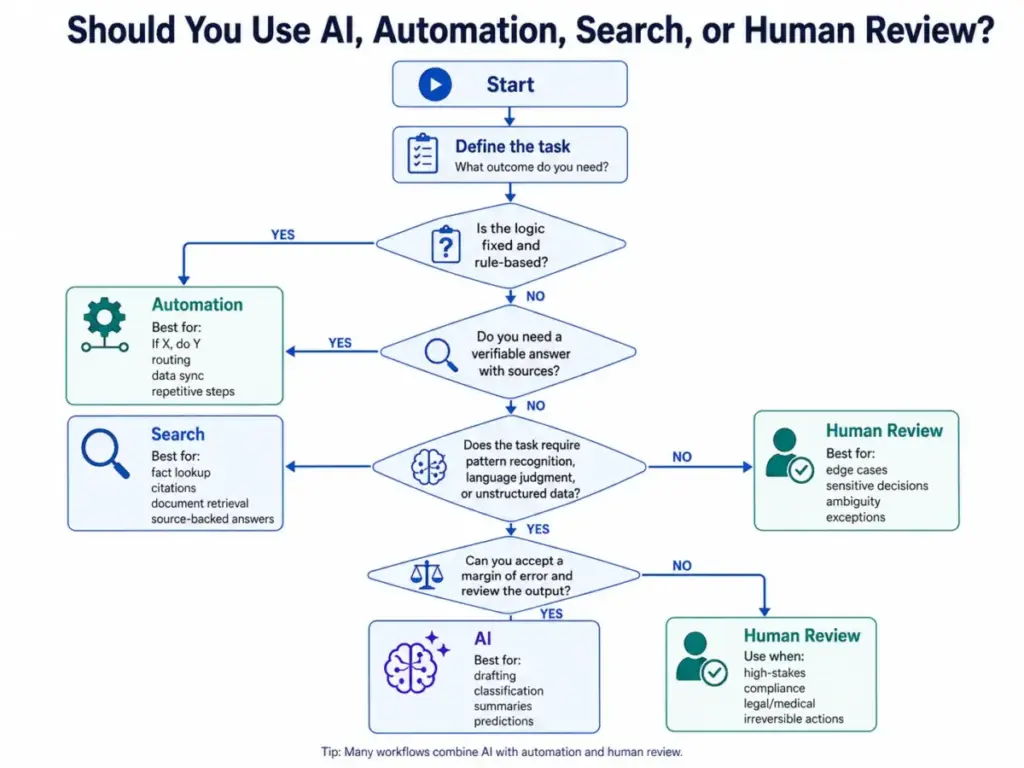
Use AI when: you need probabilistic judgment on language, patterns, or unstructured data; when volume is too high for manual processing; when you accept a margin of error and have human review in place.
Do not use AI when:
- The logic is fixed. If your workflow has a deterministic answer (“if invoice total is over $10,000, flag for CFO approval”), use automation. AI adds cost and variability where rules work perfectly.
- The answer must be sourced. If you need a verifiable fact with a citation, use a search engine or a retrieval-augmented tool. A generative AI model may produce a confident wrong answer.
- The stakes are too high for a margin of error. Medical dosing, legal advice, compliance determinations, and financial audit work require accuracy guarantees that no current AI model can provide without structured human oversight.
- You have not defined who owns the output. AI output with no named human accountable for it is a governance failure waiting to happen. AI agents are not employees.
- Your data is not clean. A lead scoring model trained on three months of incomplete CRM data is worse than no model. Garbage in, garbage out is a rule that AI amplifies, not eliminates.
How to Decide If Your Business Needs AI
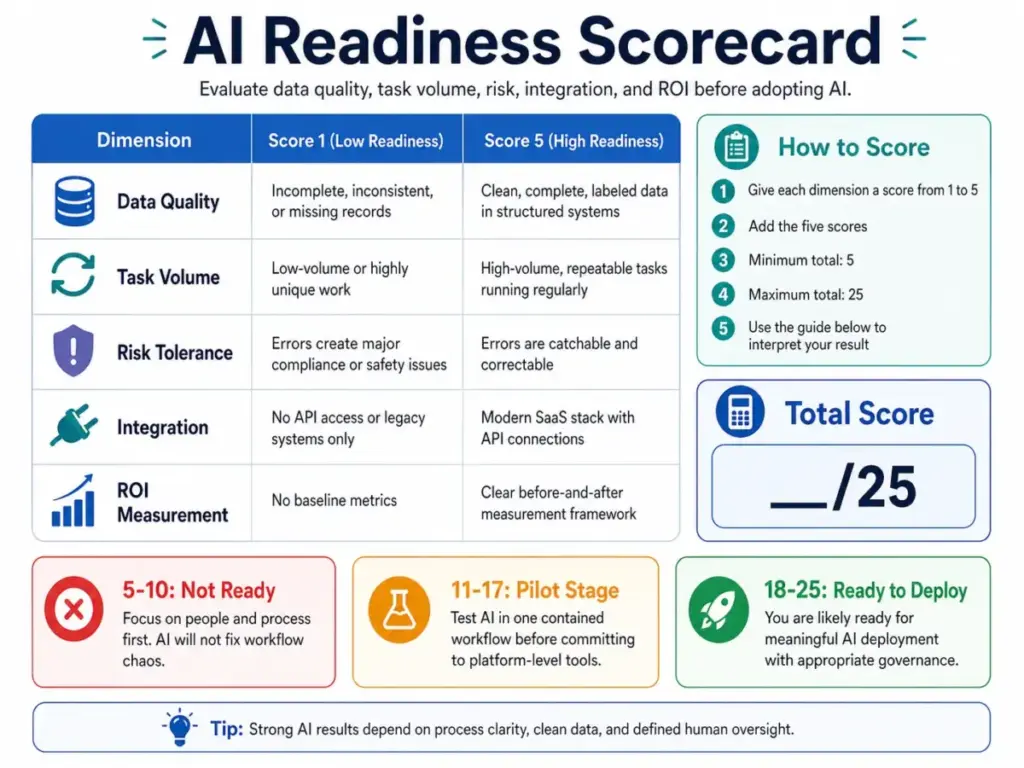
This scorecard does not tell you which tool to buy. It tells you whether AI is likely to deliver value at all. Score each dimension from 1 to 5 and add up the result.
AI Readiness Scorecard:
| Dimension | Score 1 (Low) | Score 5 (High) |
|---|---|---|
| Data quality | Records are incomplete, inconsistent, or missing | Clean, complete, labeled data in structured systems |
| Task repeatability | Work is unique each time | High-volume, similar tasks running daily |
| Risk tolerance | Errors cause major compliance or safety issues | Errors are catchable and correctable |
| Integration | No API access, legacy systems only | Modern SaaS stack with API connections |
| ROI measurability | No baseline metrics | Clear before/after measurement framework |
Interpretation:
- 5 to 10: Focus on people and process first. AI will not fix workflow chaos.
- 11 to 17: Pilot AI in one contained workflow before committing to platform-level tools.
- 18 to 25: You are likely ready for meaningful AI deployment with appropriate governance.
This framework is informed by the logic of the NIST AI Risk Management Framework, which emphasizes that trustworthy AI requires organizational readiness, not just model quality.
AI Tools by Use Case
I am not ranking these tools, and I am not recommending any without knowing your stack, budget, or workflow. What I can do is map the main categories to the tools worth investigating, linked to our detailed reviews where we have done hands-on testing.
General work and content ideation: ChatGPT is the widest-use generative AI tool. It handles writing, brainstorming, summarization, code explanation, and basic reasoning. Our ChatGPT review covers strengths, limits, and pricing tiers.
Long-context reasoning and document work: Claude from Anthropic handles long documents and nuanced instructions well. Our Claude review covers context window performance and use case fit.
Google ecosystem integration: Gemini connects natively to Google Workspace (Docs, Sheets, Gmail, Drive). Our Gemini review covers how that integration performs in practice.
Research and source-backed answers: Perplexity retrieves sources in real time and cites them inline. Our Perplexity review evaluates accuracy, citation quality, and the Pro tier.
Microsoft 365 workflows: Microsoft Copilot embeds generative AI into Word, Excel, Outlook, and Teams for users already in the Microsoft ecosystem.
Visual content creation: AI image generation tools allow teams to produce marketing visuals from text prompts. See our guide to the best AI image generators for a category overview.
Video content production: AI video tools generate or edit motion content from scripts or clips. Our best AI video generator guide covers the current options by use case.
You can evaluate any of these against our SaaSZap review methodology to understand how we test and score tools before recommending them.
Daniel Rivera’s 60-Second Explainer
Think of an AI model as a very well-read colleague who has never done the actual job.
They have read every customer support transcript, every email, every sales call recording you have ever produced. They know the patterns. When you show them a new ticket, they can guess what category it falls into and draft a plausible reply, faster than any human on the team.
But they have never spoken to a customer directly. They do not know that your biggest client has a longstanding billing dispute that requires a manual exception. They do not know that the policy changed last Tuesday. And they will not tell you when they are wrong. They will tell you confidently, fluently, and at scale.
That is the AI value proposition in one paragraph: speed and pattern recognition, with a firm requirement for human review wherever accuracy actually matters. Treat it like a brilliant intern, not an autonomous employee, and you will extract genuine value. Treat it like an oracle, and you will eventually get burned.
Common Misconceptions About AI
AI is conscious. It is not. No current AI system has awareness, intent, or feelings. It produces outputs that mimic human language because it was trained on human language. That is the extent of it.
AI is always machine learning. Early AI systems used logic rules and decision trees with no learning component. Some modern AI tools still use rule-based approaches for specific tasks.
More data always means better AI. Volume matters less than quality and relevance. A model trained on ten million irrelevant examples is worse than one trained on one hundred thousand precisely labeled ones.
AI agents are autonomous employees. AI agents can execute multi-step tasks, but they require clear instructions, defined boundaries, and human oversight for anything consequential. An agent that can send emails and modify database records needs the same governance as a new hire with admin access.
AI improves accuracy automatically over time. It improves only if feedback loops are actively maintained. Without labeled corrections and model updates, a deployed AI system can drift in accuracy as the world changes.
Adding AI to a broken workflow fixes the workflow. AI amplifies existing processes. If your CRM data is inconsistent and your team does not follow stage hygiene, an AI lead scoring model will produce inconsistent and unreliable scores.
Frequently Asked Questions
1. What does AI mean in simple words?
AI stands for artificial intelligence. It is software that learns patterns from data and uses those patterns to make decisions or generate outputs, instead of following manually written rules.
2. Is ChatGPT artificial intelligence?
Yes. ChatGPT is a generative AI product built on a large language model called GPT-4o. It is a specific application of AI, not AI in its entirety. Generative AI is one category within the broader field of artificial intelligence.
3. How does AI work?
An AI system receives an input, runs it through a trained model, and produces an output. The model was trained on large volumes of data examples to recognize patterns. The output is probabilistic, not certain. Human review and feedback loops improve accuracy over time.
4. What is the difference between AI and machine learning?
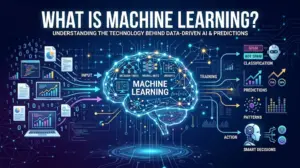
AI is the broader field. Machine learning is one method within AI where algorithms improve by training on data rather than following explicitly coded rules. All machine learning is AI. Not all AI is machine learning. If you want to understand the exact mathematical principles and business applications behind this method, check out our guide on what machine learning is and how it replaces rigid rule-based systems.
5. What is generative AI?
Generative AI is a category of AI that produces new content from a prompt: text, code, images, audio, or video. Large language models like ChatGPT, Claude, and Gemini are generative AI systems.
6. What are the main types of AI?
The main types relevant to business buyers are: narrow AI (task-specific), generative AI (content creation), predictive AI (forecasting), computer vision (images and video), natural language processing (language understanding), and AI agents (multi-step autonomous task execution). Artificial general intelligence (AGI) does not yet exist as a commercial product.
7. Can AI think like humans?
No. AI systems process patterns in data and return statistically likely outputs. They do not reason, feel, plan with real-world understanding, or have awareness of context outside their training and the inputs they receive. The appearance of thinking is a function of training on human-generated text.
8. Is AI the same as automation?
No. Automation executes predefined rules deterministically: if X, then Y. AI infers probabilistic outputs from patterns in data. Automation handles repetitive, predictable tasks reliably. AI handles pattern recognition, language, and judgment calls at scale. Most strong SaaS workflows use both.
9. What are examples of AI in business?
Common examples include CRM lead scoring, customer support ticket routing and draft replies, meeting transcription and summarization, email segmentation, content drafting, fraud detection, demand forecasting, and AI-powered search synthesis. These are all active production applications, not future capabilities.
10. What are the biggest AI risks?
The main risks are: hallucination (confident wrong output), bias from flawed training data, data privacy exposure when sending sensitive information to third-party APIs, over-automation without human checkpoints, security vulnerabilities from broad agent permissions, and poor ROI measurement from undefined baselines.
11. How do I choose an AI tool?
Start with the workflow, not the tool. Define the input, the desired output, the acceptable error rate, and the human review step. Then evaluate tools that fit that workflow. Run the AI Readiness Scorecard above before committing budget.
12. Does my small business need AI?
Maybe. AI earns its cost when you have high-volume, repetitive tasks involving language or pattern recognition, clean data to train on, and a human review process for outputs. If your workflows are small, highly unique, or depend on verified facts, simpler tools or manual processes may outperform AI at lower cost and risk.
Key Takeaways
- What is AI, in one sentence: AI is software that infers probabilistic outputs from patterns in data, rather than following fixed coded rules.
- AI, machine learning, deep learning, generative AI, and AI agents are distinct concepts with different capabilities, costs, and failure modes. Do not let vendors use them interchangeably.
- AI earns its place in workflows that are high-volume, pattern-heavy, and have human review for error correction. It does not belong in every workflow.
- The biggest AI failures in small teams come from deploying tools before defining data quality, workflow ownership, and measurement baselines, not from choosing the wrong model.
- Generative AI tools like ChatGPT, Claude, Gemini, and Perplexity each suit different use cases. Evaluate against your actual workflow before committing.
- AI without governance is a liability. Assign human accountability for every consequential AI output before it leaves your system.