Most AI glossaries hand you an alphabetical list of definitions and call it a day. That approach worked in 2023, when AI vocabulary felt like trivia. In 2026, AI terminology is a buying decision. The Stanford HAI 2025 AI Index Report found that 78% of organizations reported using AI in 2024, up from 55% the year before. U.S. private AI investment hit $109.1 billion that same year.
And according to the Ramp AI Index for 2026, paid business AI adoption crossed 54.2% for the first time among its U.S. sample. If you are comparing AI chatbots, evaluating copilots, or trying to decode a vendor pitch about agents and RAG, you need more than definitions. You need a map showing how these terms connect inside real SaaS workflows.
This AI glossary explains every term that matters for SaaS buyers in 2026, groups them by workflow layer instead of alphabet, flags where vendor marketing stretches the truth, and connects each concept to the products that actually use it.
Quick Answer: An AI glossary is a structured reference explaining artificial intelligence vocabulary, including terms like LLM, generative AI, RAG, embeddings, AI agents, context windows, hallucinations, and governance. The OECD defines an AI system as a machine-based system that infers from input how to generate outputs such as predictions, content, recommendations, or decisions, with varying levels of autonomy and adaptiveness. NIST uses a similar framing, describing AI as a machine-based system that can make predictions, recommendations, or decisions influencing real or virtual environments.
The 60-Second Explanation of AI Terminology
Layer 1 (simple): AI vocabulary is a set of labels for the tools, models, and processes that power modern software. If a product says it uses “AI,” you need enough vocabulary to ask what kind, how it works, and what limits it has.
Layer 2 (technical): AI terminology covers a stack. Foundation models and large language models sit at the base. Prompts, tokens, and context windows describe how you interact with them. Embeddings, vector databases, and retrieval-augmented generation explain how models access external knowledge. AI agents, tool calling, and orchestration describe how models take actions. Guardrails, governance, and evaluation describe how organizations control risk.
Layer 3 (business): For SaaS buyers, AI terminology is a decision filter. Understanding the difference between a chatbot, a copilot, and an agent tells you what level of autonomy (and risk) a product introduces. Knowing that RAG does not eliminate hallucinations saves you from buying a product based on a vendor claim that does not hold up. Recognizing the difference between per-seat pricing, usage-based pricing, and metered agent pricing prevents bill shock.
How AI Terms Fit Together (The Workflow Map)
Most glossaries treat AI terms as isolated entries. That approach misses the chain: data flows into models, models respond to prompts within context windows, retrieval systems ground answers in external knowledge, agents use tools to take actions, and governance layers control risk throughout.
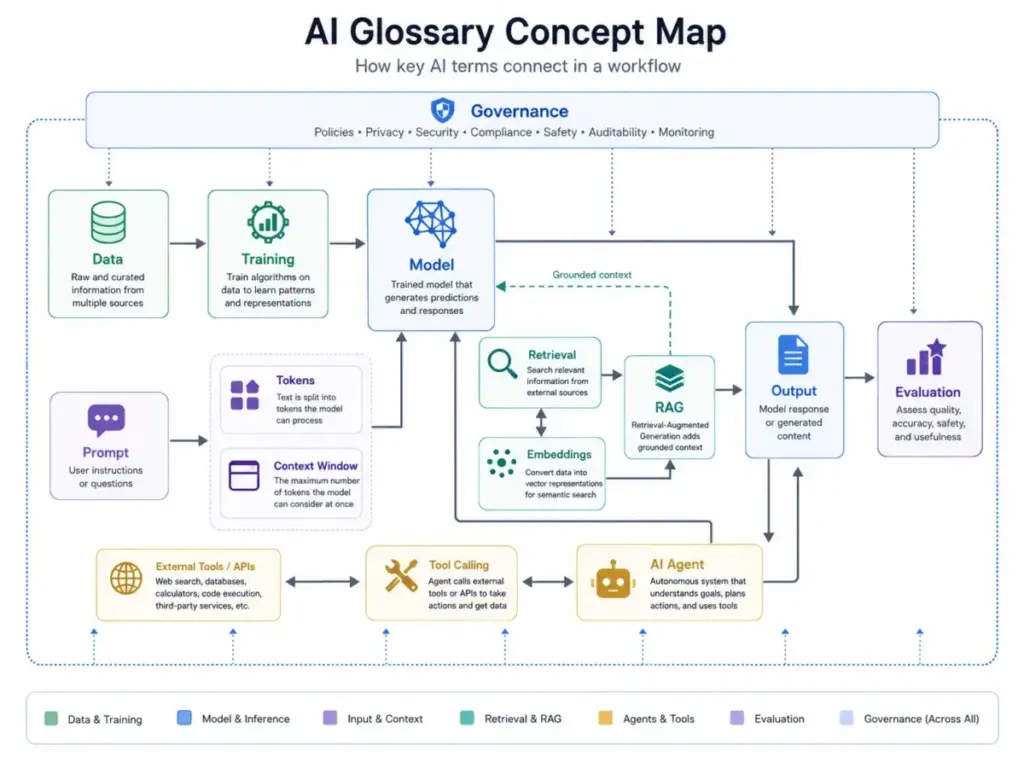
Here is the chain, simplified:
- Training data feeds into a model during training (the model learns patterns from large datasets).
- A user sends a prompt (instruction or question) to the model.
- The model processes the prompt as tokens (word fragments) within a context window (maximum input size).
- If the system uses RAG, it retrieves relevant information from a knowledge base using embeddings and a vector database before generating a response.
- The model generates an output (text, code, image, or action recommendation).
- If the system is an AI agent, the model can call tools or APIs, reason over steps, and take actions within defined limits.
- Guardrails, human-in-the-loop review, and governance policies control what the model can and cannot do throughout the process.
This is the map. Every AI term in this glossary fits somewhere in this chain. The sections below walk through each layer.
Foundational AI Terms Every Buyer Should Know
The foundation layer defines what AI systems are and how they learn. These terms appear in nearly every vendor pitch, white paper, and product page.
| Term | Plain-English Definition | Why It Matters for Buyers |
|---|---|---|
| Artificial Intelligence (AI) | A machine-based system that makes predictions, recommendations, or decisions based on input data | Every SaaS product using “AI” claims this label. The question is what kind and how reliable. |
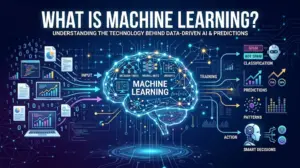
| Machine Learning (ML) | A subset of AI where systems learn patterns from data instead of following manually written rules | Machine learning powers features like lead scoring, spam filtering, and recommendation engines. |
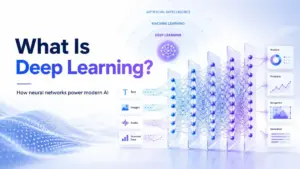
| Deep Learning | A subset of ML using neural networks with multiple layers to process complex patterns | Powers image recognition, language models, and speech-to-text. Not all AI products use deep learning. |
| Neural Network | A computing architecture inspired by the human brain, with layers of connected nodes | The building block behind LLMs, image generators, and voice AI. |
| Foundation Model | A large AI model trained on broad data that can be adapted for many tasks | GPT-4o, Claude, and Gemini are foundation models. Vendors build products on top of them. |
| Large Language Model (LLM) | A foundation model specifically trained on text data to generate, analyze, and transform language | The engine behind ChatGPT, Claude, Gemini, and most AI chatbots. Understanding LLMs helps you evaluate what a chatbot can and cannot do. |
| Training Data | The dataset used to teach a model during training | Quality and scope of training data affect model accuracy, bias, and coverage. |
| Inference | The process of a trained model generating an output from new input | Every time you ask an AI chatbot a question, you trigger inference. Vendors price inference differently (per-token, per-query, per-seat). |
| Supervised Learning | Training a model using labeled examples (input-output pairs) | Powers classification tasks like spam detection and sentiment analysis. |
| Unsupervised Learning | Training a model to find patterns in unlabeled data | Powers clustering, anomaly detection, and customer segmentation. |
| Reinforcement Learning | Training a model through trial-and-error with rewards and penalties | Used to fine-tune LLMs (RLHF) and train game-playing AI. |
What this means for buyers: When a vendor says their product “uses AI,” ask which kind. A product using a pre-trained LLM through an API is different from one that trained its own model on your industry data. The distinction affects accuracy, customization depth, and data privacy.
Generative AI and LLM Terms
Generative AI moved from research labs to daily business tools between 2023 and 2026. This section covers the terms you encounter when evaluating AI chatbots, writing assistants, and content generation tools.
| Term | Definition | Common Vendor Misuse |
|---|---|---|
| Generative AI | AI that creates new content (text, images, code, audio, video) based on patterns learned during training | Vendors label any output as “generative AI” even when the tool is doing retrieval or template filling. |
| Transformer | The neural network architecture behind modern LLMs, processing input in parallel rather than sequentially | You rarely need to know this term to buy software, but it explains why LLMs handle context better than older models. |
| Prompt | The instruction or question a user sends to an AI model | The quality of your prompt directly affects output quality. This is why prompt engineering exists as a discipline. |
| Token | A fragment of text (roughly 3/4 of a word in English) that AI models use as their basic unit of processing | Pricing, context limits, and output caps are measured in tokens. A 1,000-word document uses roughly 1,300 tokens. |
| Context Window | The maximum number of tokens a model can process in a single prompt and response | Google Cloud defines context window as the number of tokens a foundation model can process in a given prompt. Bigger is not always better (see misconceptions below). |
| Temperature | A setting that controls how random or deterministic a model’s output is (low = predictable, high = creative) | Customer service AI should use low temperature. Creative writing tools benefit from higher temperature. |
| Hallucination | When an AI model generates factually incorrect or fabricated information with apparent confidence | MIT Sloan describes hallucinations as cases where LLMs generate factually inaccurate or illogical answers due to data and architecture constraints. Hallucinations are not bugs that get patched. They are structural properties of how LLMs work. |
| Multimodal AI | An AI model that can process and generate multiple types of input and output (text, images, audio, video) | ChatGPT, Claude, and Gemini all support multimodal input. Check which modalities your plan actually includes. |
| System Prompt | Hidden instructions set by the developer that shape how the model behaves for a specific application | This is how SaaS vendors customize a general model for their product. The system prompt defines the product’s personality, restrictions, and behavior. |
The hype test: If a vendor says their product “uses generative AI,” ask three questions. What model powers it? What is the context window limit? And does it hallucinate, and if so, how do they handle it? A vendor that answers these directly is more trustworthy than one that pivots to marketing language.
Retrieval, Grounding, and RAG Terms
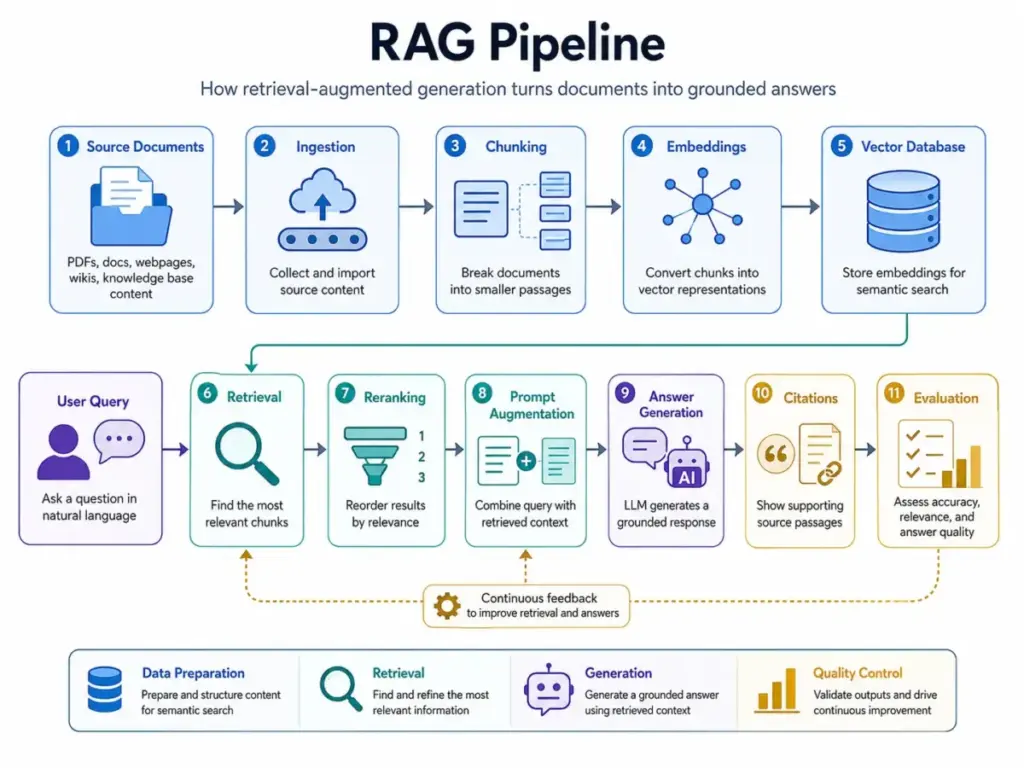
This is where many vendor claims break down. RAG (retrieval-augmented generation) is the most misunderstood term in enterprise AI. Vendors imply that RAG eliminates hallucinations. It does not.
| Term | Definition | Where Things Go Wrong |
|---|---|---|
| Embedding | A numerical representation of text (or images, audio) that captures meaning, not just keywords | Embedding quality determines retrieval quality. Poor embeddings return irrelevant results even with a good vector database. |
| Vector Database | A database optimized to store and search embeddings using similarity rather than exact match | Not all vector databases perform equally. Search speed, accuracy, and cost vary by provider. |
| Semantic Search | Search based on meaning rather than keyword matching, powered by embeddings | Semantic search improves results for natural-language queries but struggles with highly specific technical terms. |
| RAG (Retrieval-Augmented Generation) | A technique where an AI model retrieves external information before generating a response, grounding its output in specific data | RAG is a pipeline, not a feature you toggle on. Quality depends on source content, chunking strategy, embedding model, retrieval accuracy, reranking, and prompt design. |
| Grounding | Connecting an AI model’s output to specific, verifiable sources of information | Google Cloud describes RAG-related data indexing as structuring and organizing a knowledge base to optimize search and retrieval, reducing hallucinations and improving response accuracy. |
| Knowledge Base | A structured or unstructured collection of documents that an AI system can search and reference | The quality of your knowledge base directly limits the quality of RAG answers. Garbage in, hallucinations out. |
| Citation | A reference showing which source document the AI used to generate a specific claim | Not all AI products provide citations. Products that cite sources are easier to verify and trust. |
| Reranking | A second-pass ranking step that reorders retrieved results by relevance before passing them to the model | Reranking improves answer quality but adds latency and cost. |
| Data Indexing | The process of organizing content so it can be efficiently retrieved by a search or RAG system | Poor indexing is the most common reason RAG implementations underperform. |
The RAG reality check: RAG improves grounding, but it does not guarantee correctness. A RAG system with poor source documents, bad chunking, or weak reranking can confidently cite the wrong passage. Ask vendors: What is your retrieval accuracy rate? How do you measure answer quality? What happens when the knowledge base does not contain the answer?
AI Agent and Automation Terms
“AI agent” is the most overloaded term in SaaS marketing right now. Vendors use it to describe everything from a chatbot with canned responses to an autonomous system that books meetings, updates CRM records, and escalates tickets. The Google Cloud generative AI glossary defines AI agents as applications that process input, reason with available tools, and take actions based on decisions, describing orchestration, model, and tools as core agent components. That is a useful starting point, but it does not capture the spectrum.
Here is how the four main categories actually differ:
| Category | User Control | Tool Use | Autonomy Level | Risk Level | Best-Fit Use Case |
|---|---|---|---|---|---|
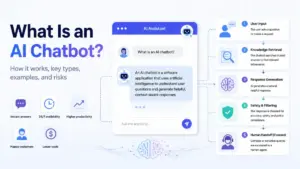
| Chatbot | User drives every interaction | None or minimal | Low (responds only when prompted) | Low | Customer FAQ, information lookup |
| Copilot | User initiates, AI assists | Limited (suggestions, drafts) | Low to medium (suggests, does not act) | Low to medium | Email drafting, code completion, document summarization |
| Workflow Automation | User defines rules, system executes | Pre-configured integrations | Medium (runs predefined sequences) | Medium | Lead routing, ticket assignment, data sync |
| AI Agent | User sets goals, agent plans and acts | Dynamic tool calling, API access | High (multi-step reasoning and action) | High | Sales outreach sequences, autonomous customer service, CRM data enrichment |
What this means: The higher the autonomy, the higher the risk. A chatbot that gives a wrong answer is inconvenient. An AI agent that sends the wrong email to a customer or updates the wrong CRM record creates real business damage. Before buying an “agent” product, ask: What actions can it take? What guardrails limit those actions? Can a human review actions before they execute?
Key Agent and Automation Terms
| Term | Definition |
|---|---|
| AI Agent | An AI system designed to pursue a goal by reasoning over steps, using tools or APIs, and taking actions within defined limits |
| Agentic AI | AI systems designed for autonomous, multi-step task completion (a 2026 marketing term that vendors apply broadly) |
| Tool Calling / Function Calling | The ability of an AI model to invoke external tools, APIs, or functions as part of its reasoning process |
| Planner | The component of an agent that breaks a goal into steps |
| Executor | The component that carries out each step the planner defines |
| Orchestration | The coordination layer that manages how an agent’s model, tools, and data sources work together |
| Workflow Automation | Rule-based sequences that execute predefined actions when triggered (not the same as AI agents, despite vendor overlap) |
| Human Handoff / Human-in-the-Loop | A control mechanism where the system routes decisions to a human for review before or after an action |
Governance, Risk, and Responsible AI Terms
Most glossaries mention responsible AI as a concept. Few connect governance terms to the vendor controls that SaaS buyers should actually verify before signing a contract.
Governance Terms for SaaS Buyers
| Term | Definition | What to Ask the Vendor |
|---|---|---|
| Responsible AI | A framework for developing and deploying AI that is fair, transparent, accountable, and safe | Does the vendor publish a responsible AI policy? Is it specific or generic? |
| AI Safety | Practices to prevent AI systems from causing unintended harm | How does the vendor test for harmful outputs before releasing updates? |
| Bias | Systematic errors in AI output that reflect prejudices in training data or model design | Has the vendor audited their models for bias? Do they publish results? |
| Explainability | The ability to understand and explain how an AI system reached a specific output | Can the product show why it made a recommendation or took an action? |
| Model Evaluation | The process of measuring an AI model’s accuracy, reliability, and safety | What benchmarks does the vendor use? How often do they evaluate? |
| Guardrails | Technical and policy controls that prevent an AI system from producing harmful, off-topic, or unauthorized output | What guardrails exist? Can you customize them? |
| Data Privacy | Controls over how user data is collected, stored, processed, and shared | Is your data used to train models? Can you opt out? |
| Access Control | Permissions that determine which users can access which AI features, data, and administrative functions | Does the product support role-based access, SSO, and SCIM? |
| Audit Logs | Records of AI system activity that support compliance, troubleshooting, and accountability | Can admins view who used AI features, what queries ran, and what actions the system took? |
| Data Retention | Policies governing how long the vendor stores your data and AI interaction history | What is the default retention period? Can you set custom retention? |
| Model Training Policy | Whether the vendor uses customer data to train or improve their AI models | Check this explicitly. Google states Workspace data is not used to train or improve Gemini models. OpenAI states ChatGPT Business does not train on business data. |
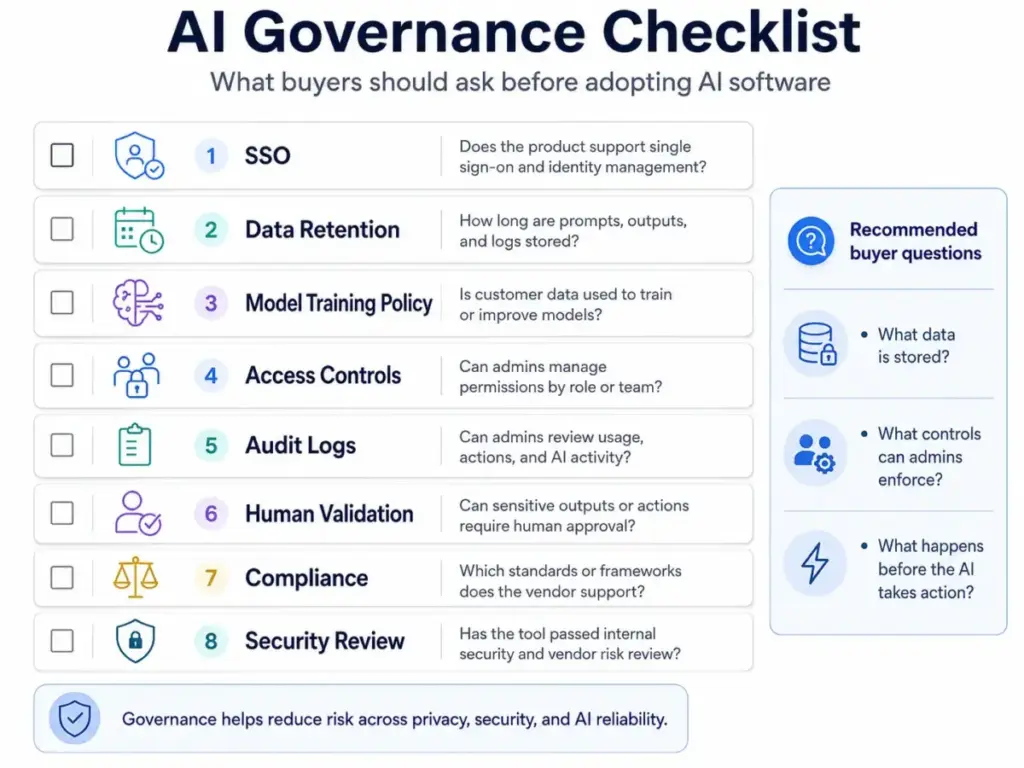
The governance check: Before signing an AI vendor contract, verify these six items: (1) model training opt-out, (2) data retention policy, (3) access control granularity, (4) audit log availability, (5) guardrail customization, and (6) compliance certifications (SOC 2, GDPR, HIPAA as applicable). If the vendor cannot answer these clearly, the product is not enterprise-ready regardless of what its features page promises.
AI Pricing Terms Buyers Should Know
No other AI glossary covers pricing vocabulary. That gap leaves buyers unprepared for the billing models they encounter when comparing AI SaaS products. Here are the pricing terms that matter, with real examples.
| Pricing Term | How It Works | Real-World Example (as of May 2026) |
|---|---|---|
| Per-User Seat Pricing | Fixed monthly fee per user regardless of usage | ChatGPT Business:$25/user/month billed monthly (OpenAI pricing page). Claude Team standard seat: $25/seat/month billed monthly or $20 billed annually (Anthropic pricing). |
| Add-On Seat Pricing | A base plan plus per-seat AI add-on | Microsoft 365 Copilot Business:$21/user/month (annual), on top of a qualifying Microsoft 365 subscription (Microsoft pricing). Promotional pricing may apply. |
| Bundled AI (included in plan) | AI features included in the platform subscription at no separate cost | Google Workspace with Gemini: AI included across plans, starting at$7/user/month for Business Starter (Google Workspace pricing). Feature access varies by tier. |
| Usage-Based / Metered Pricing | Charges based on consumption (queries, tokens, agent actions, credits) | Salesforce Agentforce: Agentforce 1 Sales at$550/user/month annually includes unmetered employee agent usage and 1M Flex Credits per org per year (Salesforce pricing). Microsoft Copilot agent usage can also be metered via Azure. |
| Seat + Usage Hybrid | A per-seat base fee plus variable usage charges | Claude Enterprise:$20/seat plus usage at API rates, with cost scaling by model and task (Anthropic pricing). |
| Custom Enterprise Pricing | Pricing negotiated through sales, not published on the website | ChatGPT Enterprise and Salesforce Enterprise both require contacting sales for final pricing. |
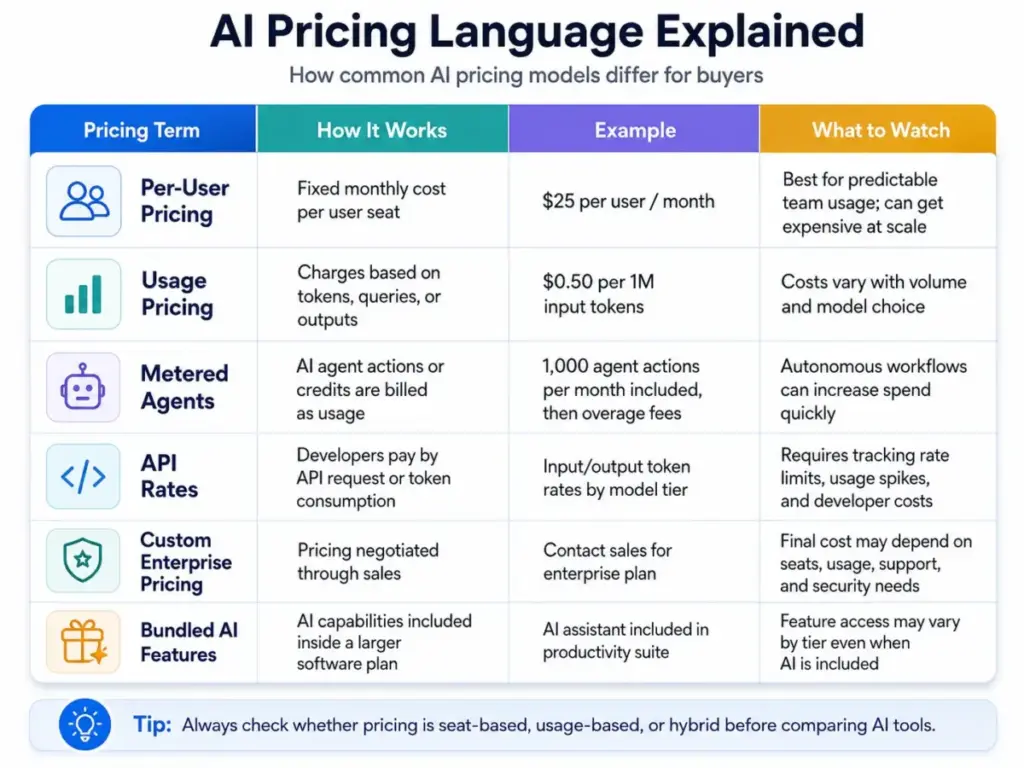
What to watch: Usage limits are not always fully public. Anthropic states usage limits apply and plans may change. Microsoft’s Copilot Business availability varies by market and requires a separate qualifying license. Google Workspace AI capabilities vary by plan tier. Salesforce notes its pricing page is informational and subject to change. Always verify local pricing, billing terms, and effective cost before purchasing.
Which AI Terms Matter by Role
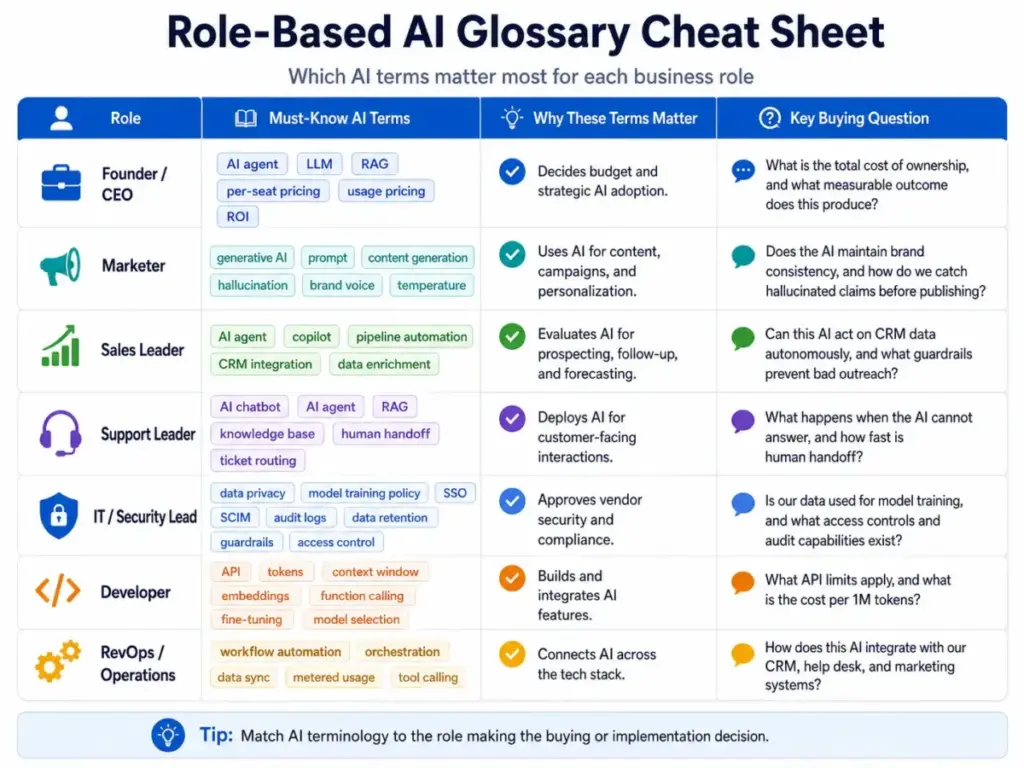
Different readers need different terms. A founder evaluating AI tools has different vocabulary needs than a security lead reviewing vendor compliance. This table maps AI terms to the roles that need them most.
| Role | Must-Know Terms | Why These Terms Matter | Key Buying Question |
|---|---|---|---|
| Founder / CEO | AI agent, LLM, RAG, per-seat pricing, usage pricing, ROI | Decides budget and strategic AI adoption | What is the total cost of ownership, and what measurable outcome does this produce? |
| Marketer | Generative AI, prompt, content generation, hallucination, brand voice, temperature | Uses AI daily for content, campaigns, and personalization | Does the AI maintain brand consistency, and how do I catch hallucinated claims before they publish? |
| Sales Leader | AI agent, copilot, pipeline automation, CRM integration, data enrichment | Evaluates AI for prospecting, follow-up, and forecasting | Can this AI act on CRM data autonomously, and what guardrails prevent bad outreach? |
| Support Leader | AI chatbot, AI agent, RAG, knowledge base, human handoff, ticket routing | Deploys AI for customer-facing interactions | What happens when the AI cannot answer? How fast is human handoff? |
| IT / Security Lead | Data privacy, model training policy, SSO, SCIM, audit logs, data retention, guardrails, access control | Approves vendor security and compliance | Is our data used for model training? What access controls and audit capabilities exist? |
| Developer | API, tokens, context window, embeddings, function calling, fine-tuning, model selection | Builds and integrates AI features | What API rate limits apply, and what is the cost per 1M tokens? |
| RevOps / Operations | Workflow automation, orchestration, data sync, metered usage, tool calling | Connects AI across the tech stack | How does this AI integrate with our existing CRM, help desk, and marketing tools? |
Common Misconceptions About AI Terminology
These misconceptions appear in buyer conversations, vendor demos, and even industry articles. I flag them here because getting these wrong leads to bad purchasing decisions.
Misconception: “All AI tools are basically ChatGPT clones.”
Reality: Many tools use LLMs, but enterprise AI workflows also involve retrieval, vector search, workflow orchestration, permissions, human review, governance, and integrated business systems. A customer service AI agent pulling from a knowledge base and updating ticket status is architecturally different from a standalone chatbot.
Misconception: “RAG eliminates hallucinations.”
Reality: RAG improves grounding by retrieving external information, but it does not guarantee correctness. Retrieval quality, source quality, chunking strategy, reranking, prompt design, and evaluation all affect the final output. A RAG system can confidently cite the wrong passage if its retrieval step fails.
Misconception: “An AI agent is just a chatbot with a new label.”
Reality: A chatbot responds to prompts. An AI agent pursues a goal, reasons over steps, uses tools or APIs, and takes actions within defined limits. Salesforce describes Agentforce as a proactive, autonomous application that answers questions, takes actions, and improves productivity. The distinction matters because agents introduce higher autonomy and higher risk.
Misconception: “AGI exists because current chatbots can answer many types of questions.”
Reality: AGI (artificial general intelligence) remains theoretical. Definitions vary across researchers and organizations. Current AI systems are capable but constrained by reliability, context, tools, data access, and task boundaries. TechCrunch’s May 2026 AI glossary frames AGI as nebulous, noting inconsistent usage across the industry.
Misconception: “Bigger context windows always solve knowledge problems.”
Reality: Larger context can help, but long-context prompts can still miss important details, increase cost, or produce weak answers if the input is poorly structured. RAG with a well-indexed knowledge base often outperforms stuffing an entire document library into a single prompt.
Real-World Examples: How AI SaaS Products Use These Terms
These five products illustrate how glossary concepts translate into real SaaS features and pricing. I am not ranking these products. I am using them to show how AI terms map to actual workflows. Definitions and pricing below come from official product and pricing pages, verified in May 2026.
ChatGPT Business
OpenAI’s ChatGPT Business is a collaborative AI workspace for startups and growing businesses. It provides access to GPT models for chat, data analysis, canvas, shared projects, custom workspace GPTs, apps, and admin controls. Pricing starts at $25/user/month billed monthly (Enterprise is custom).
Glossary concepts in action: LLM (GPT models), context window (expanded on Enterprise), prompt (user chat input), multimodal (text, image, code), guardrails (abuse guardrails on usage), governance (SAML SSO, MFA, no training on business data, custom data retention on Enterprise).
Caveat: Enterprise features like SCIM, EKM, user analytics, domain verification, role-based access controls, custom data retention, and volume discounts require contacting sales. Verify local currency and billing terms before purchase.
Claude Team and Enterprise
Anthropic’s Claude exposes concepts like model choice, extended context, connectors, enterprise search, projects, artifacts, memory, Claude Code, and admin controls across paid plans. Team standard seats cost $25/seat/month (monthly) or $20 annually. Enterprise pricing starts at $20/seat plus usage at API rates.
Glossary concepts in action: LLM (Claude models with model selection), context window (extended context), RAG-adjacent features (connectors to Microsoft 365 and Slack, enterprise search), governance (SSO, admin controls, no model training on content by default), usage-based pricing (Enterprise API rates).
Caveat: Usage limits apply. Prices do not include tax. Plans and prices may change at Anthropic’s discretion. Effective cost varies by seat type, model, and task.
Microsoft 365 Copilot Business
Microsoft’s Copilot embeds AI chat, Work IQ grounding, agents, and app assistance into Word, Excel, PowerPoint, Outlook, Teams, and Copilot Studio. Copilot Chat is included at no additional cost for eligible Microsoft 365 users with Entra accounts. Copilot Business costs $21/user/month (annual), with a limited-time promotional discount visible on the pricing page.
Glossary concepts in action: Copilot (AI assistant embedded in productivity apps), grounding (Work IQ connects to organizational data), AI agents (via Copilot Studio, with metered usage via Azure), governance (enterprise-grade security, privacy, and compliance).
Caveat: Requires a separate qualifying Microsoft 365 license. Not available in all markets. Agent usage can be metered. Verify availability, promotion terms, and base license requirements in your market.
Google Workspace with Gemini
Google Workspace brings Gemini AI assistance into Gmail, Docs, Sheets, Slides, Meet, Chat, Drive, Vids, and NotebookLM. Business Starter begins at $7/user/month (annual U.S. pricing). AI features are included across plans at different access levels.
Glossary concepts in action: LLM (Gemini models), multimodal (text, image, voice across apps), RAG-adjacent (NotebookLM grounds answers in user-provided documents), governance (customer data is not used to train or improve Gemini models or for ads targeting; Gemini retrieves only Workspace content the user has access to).
Caveat: Gemini capabilities vary by plan tier. The Gemini app has basic or expanded access depending on plan. Verify exact feature access for your chosen tier.
Salesforce Agentforce
Salesforce’s Agentforce applies AI agent concepts to CRM workflows. Salesforce describes it as a proactive, autonomous AI application that answers questions, takes actions, and improves productivity. Agentforce Builder lets users describe what they want an agent to do in plain language, then AI helps generate subagents, instructions, and actions with guardrails. Sales Cloud Enterprise starts at $175/user/month (annual) with Agentforce included. Agentforce 1 Sales at $550/user/month includes unmetered employee agent usage and 1M Flex Credits per org per year (Salesforce Sales pricing).
Glossary concepts in action: AI agent (autonomous agents for sales and service), orchestration (Agentforce Builder with subagents), tool calling (actions within Salesforce platform), guardrails (instructions and logic for agent control), governance (Salesforce platform security and data grounding).
Caveat: Salesforce states its pricing page is informational and subject to change. Detailed pricing requires a sales representative. AI can be added to Enterprise and above.
Terms Vendors Use Loosely (And Questions to Ask)
Vendor marketing stretches AI vocabulary. Here are the terms most commonly misused in product pages and sales demos, with the question you should ask to cut through the claim.
| Term | How Vendors Stretch It | What to Ask |
|---|---|---|
| AI Agent | Applied to simple chatbots, rule-based automation, and genuine autonomous agents alike | Can the “agent” reason over multiple steps, call external tools, and take actions, or does it follow a script? |
| AI-Powered | Attached to any feature that touches an LLM API, regardless of depth | Which specific features use AI, and what model powers them? |
| Grounded | Implies zero hallucination risk | What is your retrieval accuracy rate? How do you measure answer correctness? |
| Enterprise-Ready | Used before the product has SSO, SCIM, audit logs, or custom data retention | Do you support SSO, SCIM, custom data retention, and audit logs today, not on a roadmap? |
| Copilot | Applied to features ranging from autocomplete to multi-step workflow assistance | Does the copilot suggest actions or execute them? What data does it access? |
| Autonomous | Implies full self-direction, often while requiring significant human configuration | What percentage of tasks complete without human intervention? What failure rate do you see? |
When You Need AI Software
Not every team needs AI tools today. Here are the signals that you are ready, and the signals that you are not.
You need AI software when:
- Your team spends more than 10 hours per week on repetitive text-based tasks (drafting, summarizing, responding)
- Your knowledge base has grown beyond what keyword search can handle effectively
- Your customer support volume exceeds what your team can handle with current response times
- Your sales team needs help with prospecting research, email drafting, or CRM data entry
- Your organization needs to comply with AI governance requirements from clients or regulators
- You are comparing multiple AI vendors and need structured evaluation criteria
- Your competitors have deployed AI-assisted workflows and you are losing speed or quality
You are not ready when:
- Your team has not defined what problem AI should solve (buying AI for the sake of AI wastes budget)
- Your data is unstructured, undocumented, or not accessible via API
- You do not have anyone responsible for evaluating AI output quality and managing vendor relationships
How to Choose the Right AI Tool
- Define the problem first. Start with the workflow you want to improve, not the AI product you want to buy.
- Match tool type to autonomy tolerance. Use a chatbot if you want user-driven Q&A. Use a copilot if you want AI suggestions within existing apps. Use an agent only if you are comfortable with autonomous actions and have guardrails in place.
- Compare pricing models. Per-seat, usage-based, and bundled pricing produce very different total costs depending on your team size and usage patterns.
- Verify governance controls. Check model training policy, data retention, access control, audit logs, and compliance certifications before committing.
- Test retrieval quality, not just chat quality. If the product uses RAG, test it with your actual documents. Generic demos do not predict real-world performance.
- Check integration depth. An AI tool that does not connect to your CRM, help desk, or productivity suite creates another silo.
- Plan for evaluation. Define success metrics before deployment. Track answer accuracy, time saved, user adoption, and cost per outcome.
Start with specific use case reviews rather than generic product rankings when evaluating AI tools.
AI Glossary Beginner Checklist
Use this checklist to build your AI literacy before evaluating vendors:
- [ ] I can define AI, machine learning, and deep learning and explain how they relate
- [ ] I understand what an LLM is and which products use them
- [ ] I know what tokens and context windows are and why they affect pricing and performance
- [ ] I can explain the difference between a chatbot, copilot, and AI agent
- [ ] I understand what RAG is and why it does not eliminate hallucinations
- [ ] I know what embeddings and vector databases do in a retrieval system
- [ ] I can identify the pricing model a vendor uses (per-seat, usage-based, bundled, hybrid)
- [ ] I know what guardrails, governance, and human-in-the-loop mean in practice
- [ ] I can ask a vendor whether my data is used for model training
- [ ] I understand that “AI-powered” is a marketing label that requires follow-up questions
Related Resources
- What is artificial intelligence? (foundational AI concepts)
- What is text-to-image AI? (visual AI generation explained)
- What is an AI chatbot? (definition, types, and use cases)
- ChatGPT vs Claude comparison (head-to-head evaluation)
- What is natural language processing? (how AI understands text)
- ChatGPT pricing breakdown (plan-by-plan analysis)
- Claude pricing guide (tiers, limits, and hidden costs)
FAQ
What is an AI glossary?
An AI glossary is a structured reference that explains artificial intelligence terms. A useful glossary goes beyond alphabetical definitions: it groups terms by workflow layer (foundations, generative AI, retrieval, agents, governance), connects terms to real products, and flags where vendor marketing stretches the meaning.
What is the difference between AI, machine learning, and deep learning?
AI is the broadest category: any machine-based system that makes predictions, recommendations, or decisions. Machine learning is a subset of AI where systems learn from data instead of following manually coded rules. Deep learning is a subset of machine learning that uses multi-layered neural networks to process complex patterns like language and images.
What is an LLM in simple terms?
A large language model (LLM) is an AI model trained on massive amounts of text data to generate, analyze, and transform language. GPT-4o (powering ChatGPT), Claude (by Anthropic), and Gemini (by Google) are all LLMs. They predict the next token in a sequence, which is why they can write fluently but sometimes generate incorrect information.
What is RAG and why does it matter?
RAG (retrieval-augmented generation) is a technique where an AI model retrieves relevant information from external documents before generating a response. It matters because it grounds AI answers in specific data rather than relying solely on the model’s training data. RAG improves accuracy for domain-specific questions but does not eliminate hallucinations.
What is the difference between an AI agent and a chatbot?
A chatbot responds to user prompts with text answers. An AI agent pursues goals, reasons over steps, uses external tools or APIs, and takes actions. A chatbot answers your question about order status. An agent checks the order, contacts the shipping provider, updates the CRM, and sends the customer a tracking link. The autonomy difference creates different risk profiles.
What does hallucination mean in AI?
Hallucination is when an AI model generates factually incorrect or fabricated information while presenting it as confident truth. It happens because LLMs predict probable text sequences rather than verifying facts. RAG can reduce hallucinations but does not eliminate them. Always verify AI-generated claims against source documents.
Is prompt engineering still useful in 2026?
Yes. Models have improved, but prompt quality still directly affects output quality. Structured prompts with clear instructions, context, examples, and constraints produce more accurate and useful results than vague questions. The difference is that prompt engineering in 2026 focuses more on system-level design (system prompts, tool definitions, guardrail configuration) than on individual query tricks.
What AI terms should I know before buying AI software?
At minimum: LLM, context window, tokens, RAG, AI agent, copilot, hallucination, guardrails, per-seat pricing, usage pricing, data privacy, model training policy, and SSO. These terms appear in every vendor evaluation and directly affect cost, risk, and fit.
Do I need fine-tuning or RAG for company documents?
If you want an AI to answer questions about your specific documents, start with RAG. It is faster to implement, does not require model training, and keeps your documents under your control. Fine-tuning makes sense when you need the model to learn a specialized style, vocabulary, or task that RAG alone cannot address. Most business teams start with RAG and only consider fine-tuning after validating the use case.
What is a guardrail in AI?
A guardrail is a technical or policy control that prevents an AI system from producing harmful, off-topic, or unauthorized output. Examples include content filters, topic restrictions, action approval workflows, and output validation rules. Guardrails are especially important for AI agents that can take actions autonomously.
This AI glossary was researched using official documentation from NIST, OECD, OpenAI, Anthropic, Microsoft, Google, Salesforce, Stanford HAI, McKinsey, Ramp, and additional analyst and vendor sources. Definitions reflect terminology as of May 2026. AI terms, model capabilities, vendor plan names, and pricing change frequently. Verify pricing and features on official product pages before purchasing.