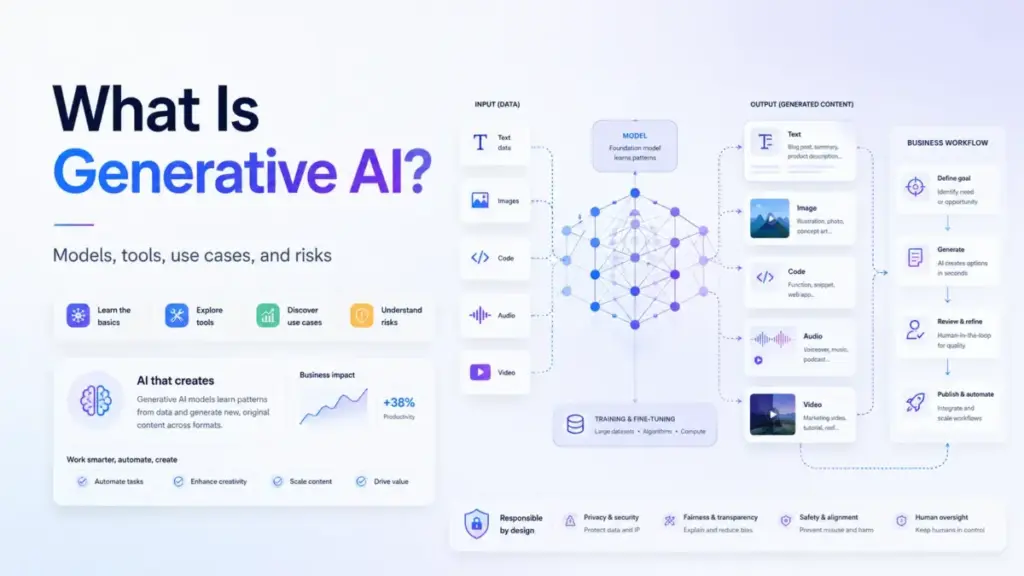
Generative AI is artificial intelligence that creates new text, images, code, audio, or video from a prompt. That one-line definition is correct, but it stops before the part that matters to anyone buying or deploying SaaS software. The question worth asking in 2026 is not what generative AI can produce.
It is how it changes the way your team works, what it costs when you move past the demo, and what breaks when you skip the governance part. I have tracked AI pricing changes across 12 tools monthly for 18 months, and the pattern is clear: the marketing page shows a chatbot, but the product you actually buy is a workflow layer with credits, plan gates, usage limits, and data policies attached.
This guide covers how generative AI works, where it shows up in top AI chatbot tools and SaaS products, what it costs in practice, and when your team should (and should not) use it.
Quick Answer: What Is Generative AI?
Generative AI is a category of artificial intelligence that creates new content, such as text, images, code, audio, video, or structured data, in response to a prompt or instruction. It works by predicting outputs based on patterns learned during training. Unlike search, which retrieves existing pages, generative AI produces original outputs that did not exist before the prompt. It is one function of AI, not all of AI.
The 60-Second Explanation of Generative AI
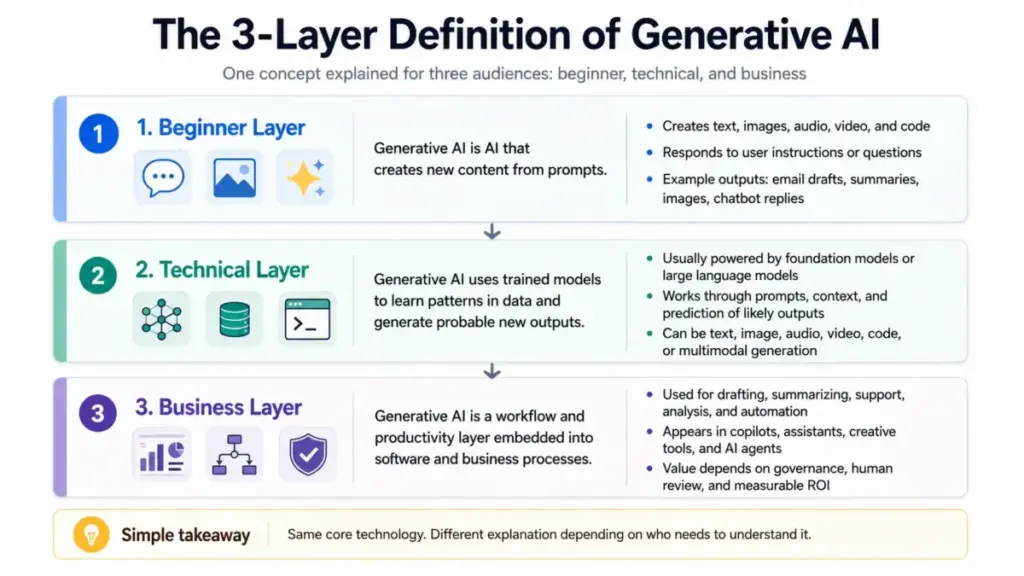
For beginners
Generative AI is software that makes new things. You type a request. The AI produces text, an image, code, audio, or video based on what it learned from large amounts of data. Think of it as a very fast first-draft machine that needs a human to check the output.
For technical readers
Generative AI relies on foundation models, primarily transformers and diffusion models, trained on large datasets of text, code, images, audio, or video. During inference, the model takes a prompt plus optional context (retrieved documents, files, conversation history) and generates an output by predicting the most likely next token, pixel, or data point. Techniques like retrieval augmented generation (RAG), fine-tuning, and guardrails are layered on top in SaaS products to improve accuracy and control.
For business decision-makers
Generative AI is now embedded in the SaaS products your team already uses or evaluates: email drafting in Google Workspace, sales reply generation in Salesforce, creative asset production in Adobe Firefly, document analysis in ChatGPT, and meeting summaries in Microsoft Teams. The business question is not “should we try generative AI” but “which generative AI delivery model fits our workflow, data sensitivity, and budget?” McKinsey’s 2025 survey reported that 88 percent of organizations use AI regularly in at least one business function, but only 39 percent reported enterprise-level EBIT impact. That gap is the adoption-to-value problem.
How Generative AI Actually Works
The mechanism matters because it explains why outputs can be wrong, why costs vary, and why governance is not optional.
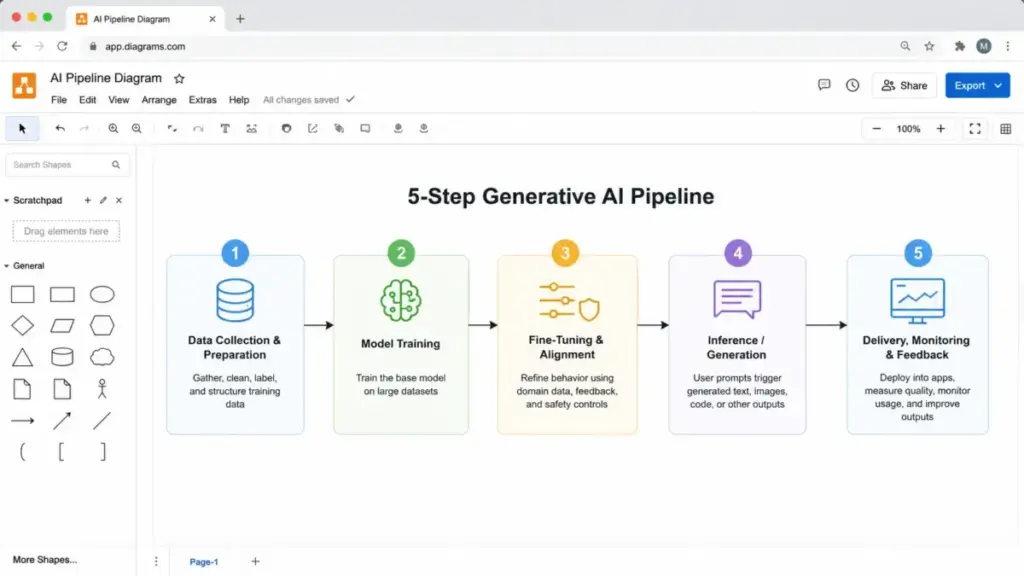
Step 1: Training. A foundation model is trained on massive datasets, often billions of text passages, images, code repositories, or audio files. The model learns statistical patterns: which words follow which, what visual patterns correspond to what descriptions, how code logic connects.
Step 2: Prompt. A user provides an input. This can be a text instruction, a file, an image, a conversation thread, or a structured request through a SaaS product interface.
Step 3: Generation. The model predicts and produces output, token by token (for text) or through iterative refinement (for images). It does not retrieve a stored answer. It constructs one based on learned patterns.
Step 4: Post-processing. In SaaS products, the raw model output passes through additional layers. These can include content filters, source grounding (connecting output to specific business data via RAG), permission checks, format templates, and human review gates.
Step 5: Delivery. The finished output appears in the product interface: a drafted email in Outlook, a generated image in Adobe Firefly, a summarized meeting in Google Meet, or a service reply in Salesforce.
Where things go wrong
The biggest failure point is Step 3. Because the model predicts based on patterns rather than verifying facts, it can produce outputs that sound fluent but are inaccurate, outdated, or fabricated. This is called hallucination. A second failure point is Step 4: if the SaaS vendor has weak guardrails, the model can expose sensitive data, ignore role permissions, or generate outputs that violate company policies.
IBM describes generative AI as “artificial intelligence that can create original content such as text, images, video, audio or software code in response to a user’s prompt or request” (source).
Generative AI vs Related Concepts
One of the most common sources of confusion is mixing up terms that sound similar but mean different things. This table separates them.
| Concept | What it does | Key difference from generative AI |
|---|---|---|
| Traditional AI / predictive AI | Classifies, predicts, detects, recommends | Analyzes existing data. Does not create new content. |
| Search engines | Retrieve and rank existing web pages | Returns links to existing sources. Generative AI creates new outputs. |
| Foundation models | Pre-trained neural networks (GPT, Gemini, Claude, Llama) | The engine. Generative AI is one function the engine can perform. |
| Large language models (LLMs) | Foundation models specialized in text | A type of foundation model. Not all generative AI uses LLMs (image models use diffusion). |
| Retrieval augmented generation (RAG) | Retrieves relevant documents, then generates with that context | A technique that improves generative AI accuracy. Not a separate category. |
| AI agents | Combine generative models with planning, memory, tools, and actions | Build on generative AI but add autonomous multi-step task execution. |
What this means: When a vendor says “we added AI,” ask which kind. A predictive model that forecasts churn is different from a generative model that drafts customer emails. A foundation model API is different from an embedded AI assistant in your CRM. The packaging determines the cost, the risk profile, and the governance requirements. For more on these related concepts, see our guides on large language models, retrieval augmented generation, and AI agents.
Types of Generative AI
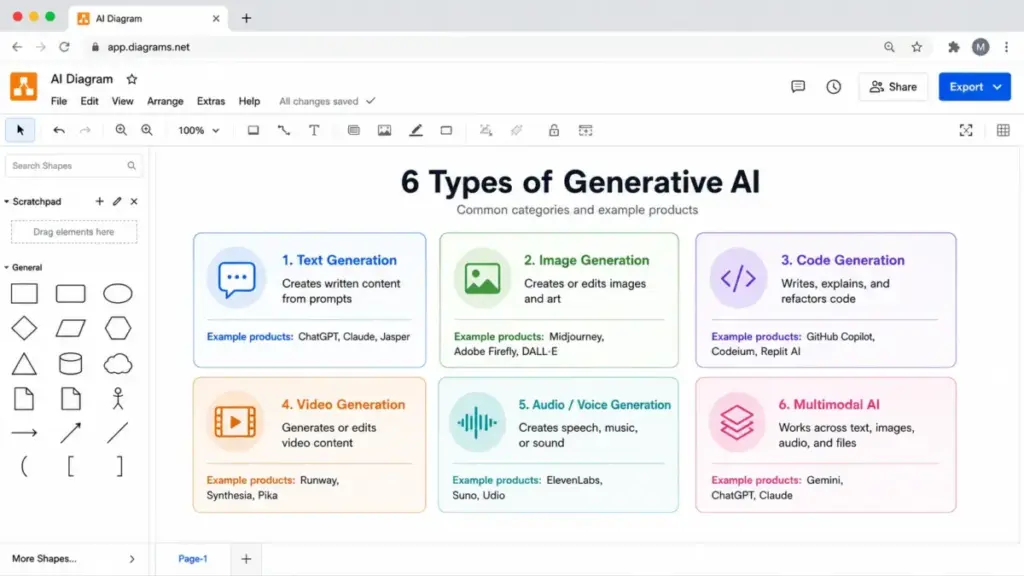
Generative AI is not a single tool. It covers at least six output categories, each with different models, use cases, and SaaS delivery patterns.
Text generation
Creates emails, summaries, reports, documentation, marketing copy, support replies, chat responses, and knowledge-base answers. This is the most widely deployed type in SaaS products. Examples: ChatGPT, Microsoft 365 Copilot, Google Workspace Gemini, Salesforce Agentforce.
Image and design generation
Creates or edits images, layouts, creative assets, product visuals, and brand materials. Uses diffusion models or transformer-based architectures. Examples: Adobe Firefly, Canva AI, DALL-E, Midjourney.
Code generation
Writes, explains, refactors, debugs, or reviews software code. Deployed in coding environments and development platforms. Examples: GitHub Copilot, ChatGPT, Claude.
Audio and video generation
Creates voice, music, sound effects, video clips, captions, lip sync, and multimedia edits. Still early in enterprise SaaS adoption but growing. Examples: Runway, Sora, ElevenLabs.
Multimodal generation
Uses and creates multiple content types in one workflow: text plus images, documents, spreadsheets, video, or voice. Most modern foundation models (GPT-4o, Gemini, Claude) are multimodal. For a deeper look at how these models handle multiple input types, see our guide on multimodal AI.
Agentic generative AI
Combines generative models with planning, memory, tool use, and actions so the system can complete multi-step tasks under guardrails. This is the 2025-2026 frontier. Examples: Salesforce Agentforce, Microsoft Copilot Studio agents. McKinsey’s 2026 AI trust research highlights that “AI trust and the responsible AI practices that enable trust are no longer a tangential concern but a foundational requirement” as AI systems move toward more autonomous workflows (source).
Step-by-Step: How to Implement Generative AI
The gap between “we tried ChatGPT” and “we deployed generative AI in our workflow” is where most teams stall. Here is the implementation sequence that separates pilots from production.
Step 1: Pick one narrow workflow
Do not start with “use AI everywhere.” Start with one repeatable task: support reply drafting, sales email personalization, document summarization, creative variant generation, code review, or meeting-note summarization. One workflow, one team, one measurable outcome.
Step 2: Classify the data involved
Map every data input the AI will see: public, internal, confidential, regulated, customer data, intellectual property, or personal information. This classification determines which tools are even eligible.
Step 3: Choose the right delivery model
Your options are different and the choice matters:
- Built-in SaaS assistant (Microsoft 365 Copilot, Google Workspace Gemini): AI embedded in tools your team already uses.
- Standalone AI workspace (ChatGPT Team/Enterprise, Claude for Work): General-purpose AI with file upload, analysis, and conversation.
- CRM AI (Salesforce Agentforce): AI wired into customer data, sales workflows, and service processes.
- Creative AI (Adobe Firefly): AI for image, video, and design production with commercial licensing.
- Agent platform (Copilot Studio, Agentforce): Build autonomous AI agents for multi-step tasks.
Step 4: Define guardrails before launch
Approved use cases. Banned data inputs. Required review steps. Source citation rules. Escalation paths. Output disclaimers. Set these before the first user touches the tool, not after the first incident.
Step 5: Create prompt and context patterns
Build reusable instructions, templates, examples, style guides, retrieval sources, and validation checks. This is where prompt engineering becomes an operational skill, not a hobby.
Step 6: Pilot with a small group
Run the workflow with 5-10 users. Compare AI-assisted outputs against the human baseline for speed, quality, accuracy, and adoption. Document failure cases.
Step 7: Measure cost and usage early
Track credit burn, token consumption, per-seat add-on costs, and model-tier changes from day one. Many teams discover their actual monthly cost is 2-3x the per-seat price because of usage-based charges.
Step 8: Roll out with training and feedback loops
Training on prompt quality and risk. Feedback loops for output quality. Audit logs for compliance. Policy updates as use cases expand. Periodic review of failure cases and hallucination rates.
The Mistakes That Waste Your First Month
After tracking 30+ AI tools, I see the same mistakes repeat across teams adopting generative AI for the first time.
Starting with vague “use AI everywhere” programs. No workflow target, no success metric, no review process. The result is scattered experimentation with no measurable value.
Pasting sensitive data into unmanaged tools. An employee pastes customer records into a free-tier AI chatbot with no data retention policy. This is a data privacy incident waiting to happen.
Assuming generated text is factual. Generative AI produces fluent text. Fluency is not accuracy. High-value workflows need source grounding, human review, and validation checks.
Ignoring usage-based pricing. The per-seat price looks reasonable. The credit consumption, token overages, and premium model charges add 40-100% on top. Check the limits before you commit.
Replacing human review too early. Removing the human from the loop before you understand the failure rate creates risk that exceeds the time saved.
Choosing tools based only on model benchmarks. A model that scores highest on a benchmark may not be the best fit for your specific workflow, data sensitivity, and integration requirements.
Not training staff on prompt quality and risk. Bad prompts produce bad outputs. Untrained users waste credits, create governance violations, and lose trust in the tool.
Common Misconceptions
Misconception: Generative AI is the same thing as internet search.
Reality: Search retrieves and ranks existing sources. Generative AI creates new outputs from learned patterns. If you need citations and source verification, you need retrieval or RAG added on top of generation.
Misconception: All AI is generative AI.
Reality: Generative AI is one function. Other AI systems classify, predict, detect anomalies, recommend items, optimize logistics, or automate rules without creating new content.
Misconception: Foundation models and generative AI mean the same thing.
Reality: Foundation models are the pre-trained engines (GPT-4o, Gemini, Claude, Llama). Generative AI is a function those engines can perform. The same foundation model can also be used for classification, embedding, or analysis.
Misconception: Generative AI output is automatically correct because it sounds fluent.
Reality: AI hallucinations are real. The model predicts statistically likely outputs, not verified facts. High-value workflows need source grounding, human review, test cases, and governance.
Misconception: Generative AI pricing is always a simple monthly subscription.
Reality: Many products combine seat fees, usage limits, credits, model tiers, add-ons, and custom enterprise pricing. The advertised price is rarely the full cost.
When to Use and When to Avoid Generative AI
Use generative AI when:
- The task involves repeated content creation, summarization, rewriting, brainstorming, or structured first drafts.
- Human review of outputs is feasible and built into the workflow.
- The cost of a wrong first draft is low (internal emails, brainstorming, early-stage content).
- You need to scale personalization across customer support, sales outreach, or creative variants.
- Knowledge retrieval over large document sets, inboxes, or CRM records is slowing your team down.
Avoid generative AI when:
- The task requires guaranteed factual accuracy without review (medical advice, legal filings, financial reporting).
- Sensitive data exposure risk exceeds the time saved.
- Autonomous actions without guardrails could damage customer relationships or compliance.
- The workflow does not have a clear review step before output reaches the customer.
- Your team has not classified the data inputs or defined acceptable use policies.
How to Measure Generative AI Success
If you cannot measure it, you cannot justify the cost. These are the metrics that separate productive adoption from expensive experiments.
| Metric | What it measures | Why it matters |
|---|---|---|
| Time saved per workflow | Minutes/hours saved per task with AI vs without | The primary ROI argument |
| Output acceptance rate | Percentage of AI outputs used with minor or no edits | Shows whether the AI fits the workflow |
| Human review pass rate | Percentage of outputs that pass review without major correction | Measures output quality |
| Hallucination/correction rate | How often outputs contain factual errors | Tracks accuracy risk over time |
| Cost per completed workflow | Total AI cost (seat + usage + credits) divided by completed tasks | Reveals true unit economics |
| Adoption rate | Percentage of target users actively using the tool weekly | Measures whether the tool sticks |
| Support containment rate | Percentage of support queries resolved by AI without human escalation | Specific to customer service AI |
| Content cycle time | Time from brief to published content | Measures creative workflow acceleration |
| Compliance incidents | Number of data, privacy, or policy violations involving AI | Tracks governance risk |
What this means: Start tracking at least 3-4 of these during pilot. If time saved is high but correction rate is also high, the net ROI is lower than it looks. If adoption rate is below 30% after 60 days, the tool is not solving a real problem for the team.
Real-World SaaS Examples of Generative AI
Most generative AI definitions list tools without explaining how the AI is actually packaged, priced, or limited. Here is what five major products look like in practice.
| Product | How it uses generative AI | Pricing model | Key caveat |
|---|---|---|---|
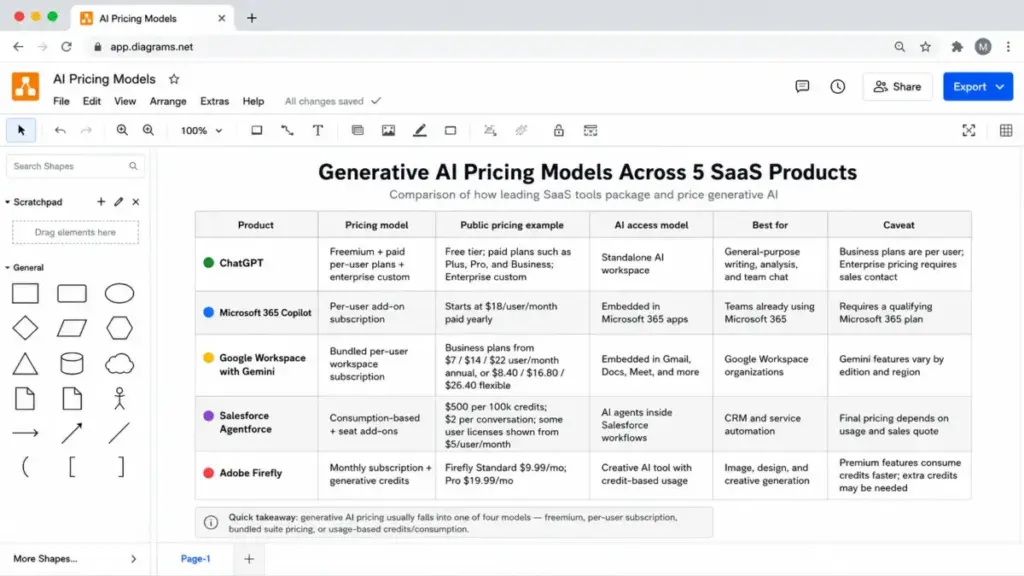
| ChatGPT | General-purpose assistant: drafting, analysis, image generation, coding, file analysis, data analysis, custom GPTs | Free tier + Plus ($20/mo) + Pro ($200/mo) + Team ($25-30/seat/mo) + Enterprise (custom) | Free tier has usage limits. Advanced models, canvas, and priority access require Plus or higher. |
| Microsoft 365 Copilot | AI embedded in Teams, Outlook, Word, PowerPoint, Excel, with Copilot Chat and agent creation via Copilot Studio | $30/user/month add-on (requires qualifying Microsoft 365 or Office 365 plan) | Requires eligible base plan. AI features vary by app. Copilot Studio agents are a separate capability. |
| Google Workspace with Gemini | Gemini-assisted drafting, summarization, email replies, meeting help, and AI features across Gmail, Docs, Sheets, Slides, Drive, Meet, Chat | Gemini features included in Business and Enterprise plans; standalone Gemini plans also available | AI feature availability varies by Workspace plan tier and region. Some advanced features require higher plans. |
| Salesforce Agentforce | Generative and agentic AI inside CRM: autonomous agents, service replies, conversation summaries, knowledge creation | Agentforce starts at $2/conversation for certain agent types; Einstein AI features vary by Salesforce edition | Per-conversation pricing model. Full capabilities require specific Salesforce editions. Enterprise agreements vary. |
| Adobe Firefly | Creative AI: image generation, Generative Fill, video, audio, mood boards, partner models | Credit-based pricing inside Creative Cloud plans; standalone Firefly plans available | Credit limits apply. Premium generations consume more credits. Commercial use rights tied to Firefly-generated content. |
What this means: Generative AI is not priced the same way across products. ChatGPT uses tiered subscriptions. Microsoft charges a flat per-user add-on. Google bundles AI into Workspace plans. Salesforce charges per conversation. Adobe uses credits. Before committing to any tool, calculate the actual monthly cost for your team size, usage pattern, and required features, not just the starting price.
Pricing note: Check each vendor’s official pricing page for current rates. AI pricing changes frequently, and enterprise agreements, regional pricing, and promotional rates can differ from published prices. Prices referenced here are based on publicly available information as of the research date (May 2026).
Generative AI Risks: What the Marketing Pages Skip
OWASP’s Top 10 for Large Language Model Applications warns that “manipulating LLMs via crafted inputs can lead to unauthorized access, data breaches, and compromised decision-making” (source). Here are the risks that matter for SaaS buyers.
Inaccuracy and hallucination. Generated outputs can be factually wrong, outdated, or fabricated. The model does not know what it does not know. Every output that reaches a customer, a contract, or a public-facing channel needs review.
Prompt injection. Attackers or even careless users can craft inputs that cause the model to ignore instructions, reveal system prompts, or produce unauthorized outputs. This matters when generative AI is connected to customer-facing workflows.
Sensitive information disclosure. If the AI has access to internal data (CRM records, documents, emails), weak access controls can cause it to surface confidential information to unauthorized users.
Excessive agency. Agentic AI systems that can take actions (send emails, update records, create tickets) without human approval can cause damage at the speed of automation if guardrails are missing.
Overreliance. Teams that stop reviewing AI outputs because “it is usually right” create a false confidence loop. The one time the output is wrong in a high-stakes context is the incident that matters.
Cost unpredictability. Usage-based pricing (credits, tokens, per-conversation fees) makes monthly costs harder to forecast than traditional per-seat SaaS. Teams that do not track consumption discover budget overruns at invoice time.
Copyright and data provenance. Questions about training data, output ownership, and commercial licensing are not fully settled. Adobe Firefly addresses this with training on licensed content. Other tools have different policies. Check before using AI-generated assets in commercial contexts.
Risk mitigation checklist
- [ ] Define approved use cases and banned data inputs before launch
- [ ] Set up human review gates for customer-facing and regulated outputs
- [ ] Configure role-based access controls for AI features connected to internal data
- [ ] Monitor credit and token usage weekly during pilot, monthly after rollout
- [ ] Train users on prompt quality, data sensitivity, and when to escalate
- [ ] Review AI vendor data retention and processing policies
- [ ] Log AI-assisted actions for audit and compliance
- [ ] Reassess risk quarterly as AI features expand
What Good Generative AI Adoption Looks Like
Before generative AI: A support agent reads a customer ticket, searches the knowledge base, drafts a reply from scratch, has a supervisor review it, and sends it. Average time: 12 minutes per ticket.
After generative AI (well-implemented): The AI reads the ticket, retrieves relevant knowledge base articles, generates a draft reply with citations, the agent reviews and adjusts the tone, and sends. Average time: 4 minutes per ticket. The human still reviews. The knowledge base still matters. The AI handles the first draft and the retrieval.
After generative AI (poorly implemented): The AI generates replies without knowledge base grounding. Replies sound fluent but reference products the company does not sell. An angry customer screenshots the error. The team turns off the feature after 2 weeks. Total value: negative.
The difference is not the AI model. It is the workflow design, the data connections, the review gates, and the training.
Tools That Apply Generative AI in SaaS Workflows
Beyond the five examples above, generative AI appears across the SaaS market:
- AI chatbots and assistants: ChatGPT, Claude, Gemini, Perplexity
- Content creation: Jasper, Canva AI, Writesonic
- Customer service: Intercom Fin, Zendesk AI, Salesforce Agentforce
- Sales and CRM: Microsoft 365 Copilot, HubSpot AI, Salesforce Einstein
- Coding: GitHub Copilot, ChatGPT, Claude
- Creative production: Adobe Firefly, Canva AI, Runway, DALL-E
- Workflow automation: Zapier AI, Make AI, n8n AI nodes
The right tool depends on your workflow category, data sensitivity, team size, and budget. A 5-person marketing team generating blog drafts has different requirements than a 50-agent support center deploying autonomous service agents.
Generative AI Adoption Checklist
Use this as a starting point before deploying generative AI in your team.
- [ ] Identify one specific, repeatable workflow to pilot
- [ ] Classify all data inputs (public, internal, confidential, regulated)
- [ ] Evaluate 2-3 tools against your workflow requirements, not benchmark scores
- [ ] Calculate actual monthly cost including seats, credits, usage limits, and add-ons
- [ ] Define approved use cases and banned data types in writing
- [ ] Set up human review gates for all customer-facing and regulated outputs
- [ ] Train pilot users on prompt quality, output validation, and risk awareness
- [ ] Track 3-4 metrics from day one (time saved, acceptance rate, correction rate, cost per task)
- [ ] Review vendor data retention, processing, and privacy policies
- [ ] Plan a 30-day review to decide: expand, adjust, or stop
- [ ] Document failure cases and update policies quarterly
FAQ
What is generative AI in simple terms?
Generative AI is software that creates new content (text, images, code, audio, video) based on instructions you give it. It learns patterns from large datasets during training and uses those patterns to produce outputs that did not exist before. It is like a very fast first-draft machine that still needs a human to verify the output.
How does generative AI differ from regular AI?
Regular AI (also called traditional or predictive AI) analyzes existing data to classify, predict, detect, or recommend. Generative AI creates new content. A spam filter uses predictive AI. A tool that drafts your email reply uses generative AI. Both are AI, but they serve different functions.
Is ChatGPT an example of generative AI?
Yes. ChatGPT is a general-purpose generative AI assistant that creates text, images (via DALL-E), code, and structured outputs in response to prompts. It runs on OpenAI’s GPT foundation models and is one of the most widely used generative AI products.
What is the difference between a foundation model and generative AI?
A foundation model is the pre-trained engine (like GPT-4o, Gemini, Claude, or Llama). Generative AI is one function that engine can perform: creating new content. The same foundation model can also classify text, generate embeddings, or power search. Foundation model is the engine. Generative AI is the driving.
What are the biggest risks of using generative AI at work?
The top risks are inaccuracy (hallucinations), sensitive data exposure, prompt injection attacks, excessive agency in agentic systems, cost unpredictability from usage-based pricing, and overreliance on AI outputs without human review. Mitigation requires guardrails, review gates, access controls, usage monitoring, and user training.
How should a business start using generative AI?
Start with one narrow, repeatable workflow. Classify the data involved. Choose a delivery model that fits your existing tools. Define guardrails and approved use cases before launch. Pilot with a small group. Measure cost and quality from day one. Roll out with training and feedback loops. Do not start with “use AI everywhere.”
Why do AI tools use credits instead of flat pricing?
Credits let vendors align pricing with actual usage intensity. A user who generates 5 images per month costs the vendor less compute than one generating 500. Credit-based pricing (used by Adobe Firefly, some ChatGPT features, and many API-based tools) means your monthly cost depends on consumption, not just seat count. Check the credit limits and per-generation costs before committing.
Can generative AI replace employees?
Generative AI is better understood as a productivity multiplier than a replacement. It accelerates first drafts, automates retrieval, and handles repetitive content tasks. But it does not verify facts, exercise judgment, understand context the way a human does, or take accountability for outcomes. The teams getting the most value use AI to handle the first 80% of a task and humans for the last 20% (review, judgment, quality).
What is the difference between generative AI and Agentic AI?
Generative AI creates content in response to a single prompt. Agentic AI builds on generative AI but adds goal pursuit, multi-step planning, memory, tool use, and autonomous action. An AI that drafts an email is generative. An AI that reads a support ticket, searches the knowledge base, drafts a reply, checks policy, and sends it under guardrails is an agent. Agents require more governance because they act, not just generate.
How do I stop employees from pasting customer data into AI tools?
Three practical steps: (1) Define a written acceptable-use policy that specifies what data types are banned from AI tools. (2) Choose enterprise AI products with data retention controls, SSO, and audit logs (ChatGPT Enterprise, Microsoft 365 Copilot, Google Workspace with Gemini). (3) Train users on data classification and provide approved AI tools that handle their actual workflow so they do not reach for unmanaged alternatives.