Most AI guides explain prompt engineering as “write better instructions.” That is true the way “cook better food” is a recipe. It tells you nothing about what breaks in production, why the same prompt fails across different models, or how teams version and monitor prompts inside SaaS workflows that serve thousands of users.
Based on official documentation, pricing pages, and SaaS workflow research across major AI platforms, the biggest gap is not casual prompting. It is making prompts reliable inside production workflows.
This guide covers what prompt engineering is, how prompts shape model output, which techniques work, where the limits are, which tools support real workflows, and when prompting alone is not enough.
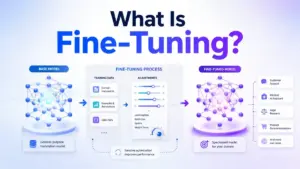
Quick Answer: Prompt engineering is the practice of writing, structuring, testing, and refining instructions, context, examples, and output rules so an AI model produces responses that match a specific goal. It differs from fine-tuning (which changes the model itself) and RAG (which adds external data). Use it when the model has the right capability but needs clearer direction.
What Prompt Engineering Actually Means
The Simple Version
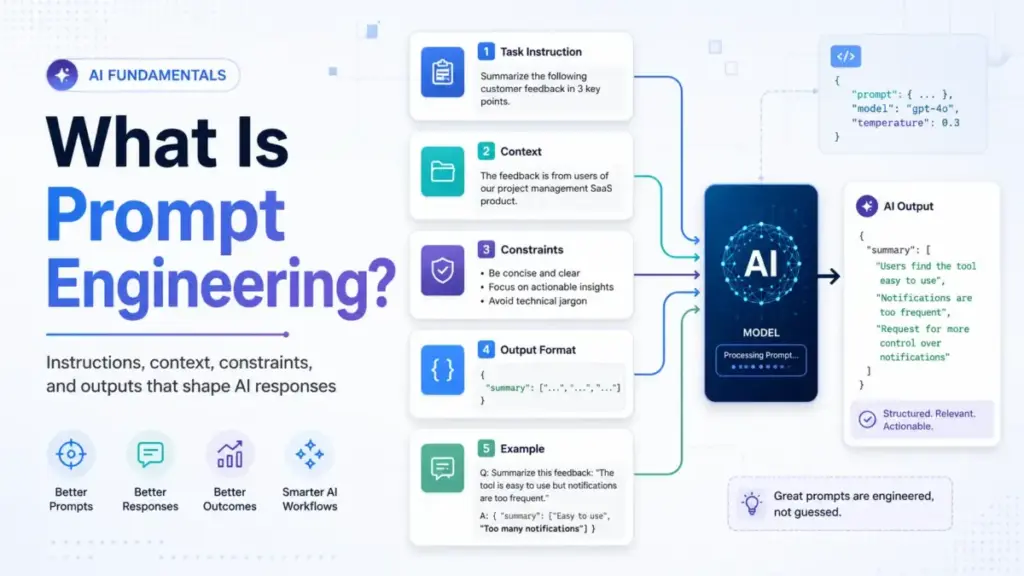
Prompt engineering means writing instructions that tell an AI model what to do, what context to use, and how to format the output. A prompt can be one sentence or a multi-page document with rules, examples, and safety checks.
The Technical Version
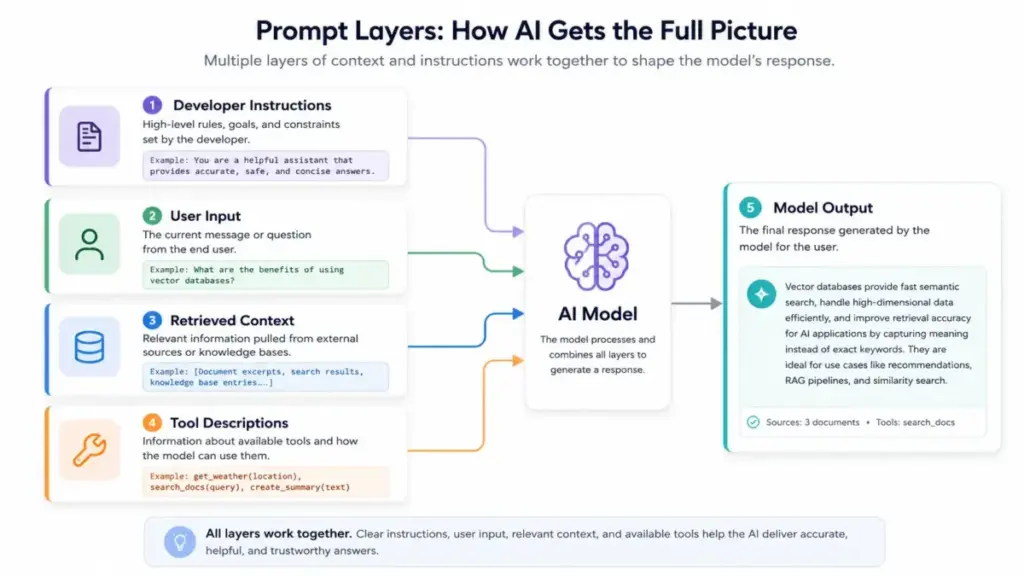
A prompt is a sequence of tokens the model uses as part of its inference context. Modern LLM applications separate prompts into layers: developer instructions (system-level rules the end user cannot see), user messages (the actual request), assistant history (prior conversation), retrieved context (documents, data), and tool descriptions (what the model can call). OpenAI defines prompt engineering as the process of writing effective instructions so a model consistently generates content that meets requirements. The model predicts the most likely useful output based on all tokens in this combined context.
The Business Version
For SaaS teams, prompt engineering is the operational discipline that determines whether an AI feature produces useful, consistent, governed output, or generates unpredictable responses that require manual cleanup. McKinsey found that 88% of organizations regularly use AI in at least one business function, yet most remain in experimentation or pilot stages. The gap between pilot and scaled value is often prompt quality, context design, validation, and risk control.
How Prompt Engineering Works
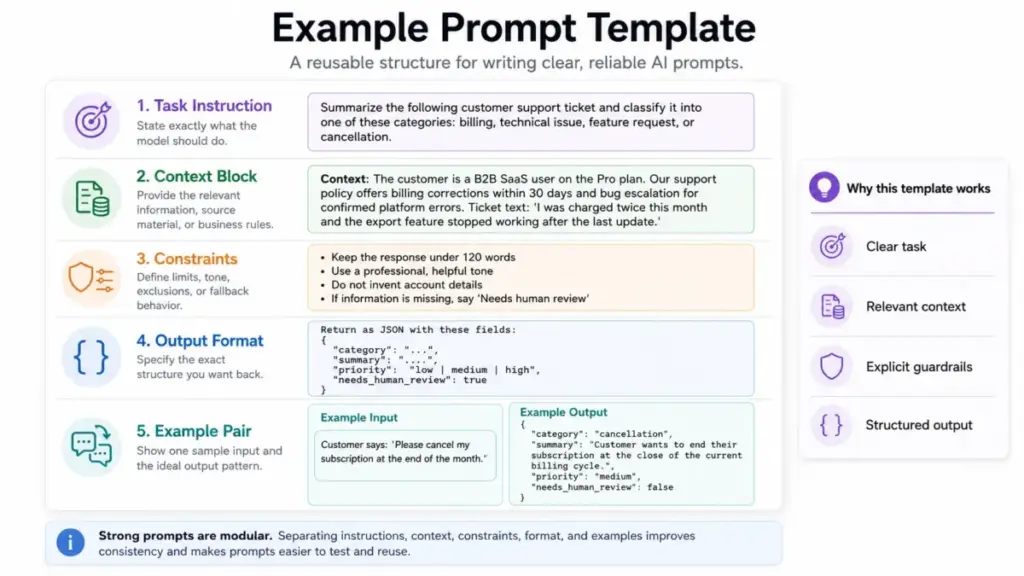
A prompt gives the model four things: a task, context, constraints, and an expected output format. Here is the pipeline from input to output, along with where things break.
Step 1: Define the task. Tell the model exactly what to do. “Summarize this support ticket” is better than “help me with this.”
Step 2: Provide context. Include the source material, business rules, customer data, or knowledge the model needs. Without context, the model guesses. Anthropic describes context as a critical but finite resource for AI agents.
Step 3: Set constraints. Specify audience, tone, length, what to include, what to exclude, and what to do when information is missing. A prompt without constraints produces generic output.
Step 4: Define output format. Tell the model whether you need JSON, a table, a paragraph, a checklist, or a score. Structured output prompting reduces post-processing and makes the response machine-readable.
Step 5: Add examples (when consistency matters). Including one to three high-quality input-output pairs gives the model a pattern to follow. This is few-shot prompting, and it produces more consistent results for recurring tasks than instructions alone.
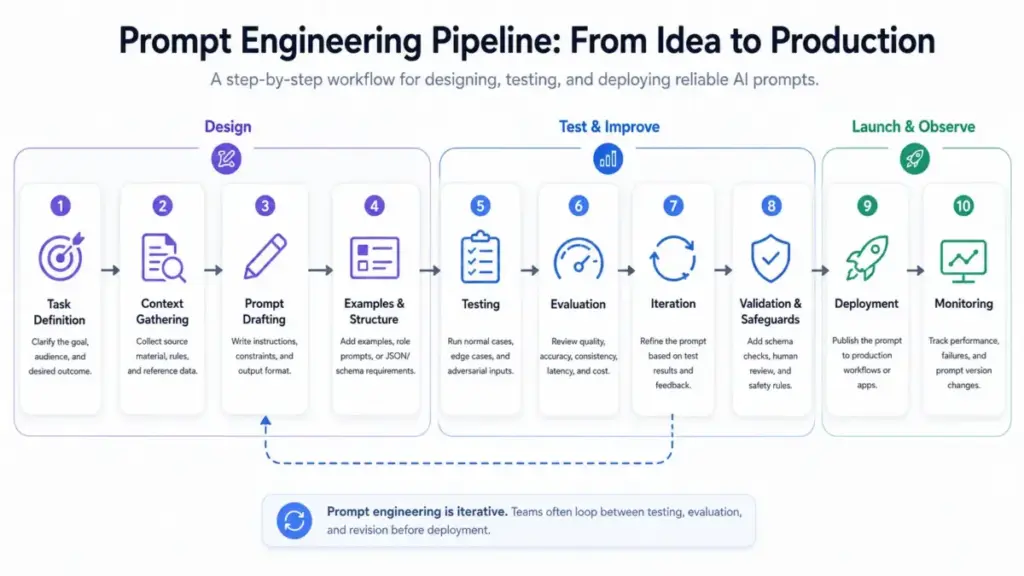
Step 6: Test and iterate. Run the prompt against normal inputs, edge cases, missing data, and adversarial inputs. A prompt that works for one scenario often fails for another. OpenAI notes that model output is non-deterministic and different model snapshots may require different prompting.
Where the Pipeline Breaks
| Failure Point | What Happens | How to Fix |
|---|---|---|
| Vague task instruction | Model generates plausible but irrelevant output | Rewrite the task as a specific action verb |
| Missing context | Model fills gaps with training data (hallucination risk) | Supply the needed documents or rules |
| No constraints | Output is too long, wrong tone, or includes forbidden content | Add explicit boundaries |
| No examples | Inconsistent formatting across runs | Add 1-3 input-output examples |
| No output validation | Bad output reaches users | Add schema checks and human review |
What this means: Prompt engineering is not a single skill. It is a design practice that combines instruction clarity, context management, testing, and validation. Teams that skip any step get unpredictable results.
Prompt Engineering vs Context Engineering vs Fine-Tuning vs RAG
One of the biggest gaps in most guides is explaining when prompt engineering is the right tool, and when it is not. Here is how the four main approaches differ.
| Approach | What It Does | When to Use | When It Falls Short |
|---|---|---|---|
| Prompt engineering | Writes instructions, context, examples, and constraints so the model responds correctly | Task is language-heavy, model has the right capability, context fits in the window | Private or fresh data not in context, deterministic decisions, high-stakes judgment |
| Context engineering | Manages what information, tools, history, and memory enter the model context at runtime | Agent workflows, dynamic data, multi-step tasks with tool use | Static, simple one-shot tasks |
| Fine-tuning | Changes the model weights using training data so the model behaves differently by default | Consistent behavior across thousands of requests, domain-specific language, format enforcement | Small teams, fast iteration, low data volume |
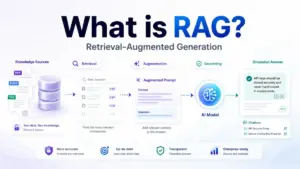
| RAG (Retrieval-Augmented Generation) | Retrieves external documents and injects them into the prompt at runtime | Model needs private, fresh, or domain-specific knowledge not in training data | Task is purely about instruction quality, not knowledge gaps |
What this means: Prompt engineering handles instructions. Context engineering manages what enters the model’s working memory. RAG adds missing knowledge. Fine-tuning changes model behavior. Most production AI systems use two or more of these together.
In 2026, the line between prompt engineering and context engineering is blurring. For agent-based systems that use tools, retrieve data, and maintain memory across steps, the prompt is just one piece of a larger context design problem.
How to Apply Prompt Engineering: Steps, Examples, and Real Workflows
Step 1: Define the Actual Task
Before writing a single word of prompt, name the job. Is it a classification, a draft, an extraction, a summary, a code generation, or an action decision? Vague tasks produce vague output.
Example (support team): “Classify this customer email into one of these categories: billing, technical, feature request, cancellation. Return the category name and a one-sentence reason.”
Step 2: Separate Instruction from Context
Write the action the model should take, then provide the material it should use. Mixing the two causes the model to confuse instructions with data.
Example (sales research): “Using the following company profile, write a 3-sentence cold email opener that references the prospect’s industry and a specific pain point from the profile. [Company profile follows].”
Step 3: Specify Output Format
Tell the model exactly what shape the response should take: paragraph, table, JSON, checklist, score, or action plan. Structured output prompting reduces post-generation editing.
Example (product feedback): “Classify this feedback into: category, sentiment (positive/neutral/negative), priority (P0/P1/P2), and suggested action. Return as JSON.”
Step 4: Add Constraints
Include audience, tone, allowed sources, forbidden claims, length, and what to do when information is missing.
Example (SEO brief): “Write for a B2B SaaS audience. Keep paragraphs under 4 sentences. Do not mention competitors by name. If you lack data for a claim, write ‘DATA NEEDED’ instead of guessing.”
Step 5: Use Examples When Consistency Matters
For recurring tasks, include one to three examples of desired input-output pairs. This is few-shot prompting, and it produces more predictable formatting and tone than instructions alone.
Step 6: Test Across Realistic Inputs
Run the prompt against normal cases, edge cases (missing fields, unexpected format), adversarial input (prompt injection attempts), and long context. A prompt that passes one test case is not production-ready.
Step 7: Version and Evaluate
Track prompt versions. Compare outputs. Monitor quality, latency, cost, and user satisfaction over time. Prompt changes that improve one metric often degrade another.
Step 8: Add Safeguards
For high-stakes outputs, add human review, output validation, rate limits, permission checks, and prompt injection handling. A prompt is not a security boundary.
Common Mistakes and Misconceptions
Mistakes That Break Prompt Workflows
| Mistake | Why It Fails | Fix |
|---|---|---|
| Writing vague, one-line prompts | Model guesses at format, length, and scope | Add task, context, constraints, and format |
| Hiding all rules in one massive instruction | Model loses track of rules beyond ~2,000 words | Split into sections with clear labels |
| Mixing user data with system instructions | Creates prompt injection vulnerabilities | Separate developer instructions from user input |
| Not giving examples for repetitive tasks | Output formatting varies across runs | Add 1-3 few-shot examples |
| Assuming one prompt works across models | Different models interpret instructions differently | Test per model, adjust per model |
| Skipping edge case testing | Prompt breaks on unusual inputs | Test with missing data, long input, adversarial text |
| Treating prompts as “set and forget” | Model updates and data drift degrade output | Version prompts, monitor production output |
Misconceptions That Waste Time
Misconception: Prompt engineering is just writing long prompts.
Reality: Length is not the goal. The goal is useful instruction, relevant context, examples, and output checks. A 50-word prompt with the right structure outperforms a 500-word unfocused prompt.
Misconception: A single perfect prompt works across every model.
Reality: OpenAI and Anthropic both indicate that model-specific prompting matters. A prompt optimized for GPT-4o may need revision for Claude or Gemini. Models interpret instructions, examples, and formatting differently.
Misconception: Prompt engineering removes the need to verify AI outputs.
Reality: Microsoft warns that even effective prompts still require output validation. A prompt that works in one scenario may not generalize. Human review remains necessary for high-stakes decisions.
Misconception: Prompt engineering is obsolete because models are smarter.
Reality: Casual prompts are easier in 2026 than in 2023. But production systems still need context design, evaluation pipelines, observability, and safety controls. Better models reduce prompting friction for simple tasks while raising the bar for production workflows.
Misconception: Prompt injection can be solved by hiding better system prompts.
OWASP treats prompt injection as a core LLM application risk. Mitigation requires system design, input handling, output validation, permissions, and monitoring, not just a cleverly worded system prompt.
Limitations and When NOT to Use Prompt Engineering Alone
Prompt engineering is powerful but not sufficient for every AI use case. Here is where it falls short.
Technical Limits
- Non-determinism. Even with the same prompt and temperature setting, model output varies between runs. OpenAI states model output is non-deterministic. For tasks requiring exact repeatability, prompt engineering alone is not enough.
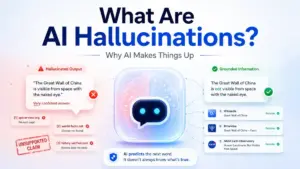
- Hallucination. Models generate plausible-sounding text that may be factually wrong. Better prompts reduce hallucination frequency but do not eliminate it. Microsoft and McKinsey both emphasize the need for validation and human oversight.
- Context window limits. Prompts, context, examples, and retrieved data all compete for the same token budget. Long prompts crowd out useful context.
Security Limits
- Prompt injection. OWASP identifies prompt injection as a top risk for LLM applications. Crafted inputs can manipulate model behavior, bypass system instructions, and access unauthorized data. Neither RAG nor fine-tuning fully solve this. Mitigation requires input validation, output filtering, permission design, and monitoring.
- System prompts are not secrets. Users can extract system prompt content through various techniques. Do not rely on prompt hiding for security.
Operational Limits
- Prompt engineering does not replace workflow redesign. If the underlying business process is broken, better prompts produce well-formatted bad decisions.
- Prompt engineering does not replace retrieval. If the model needs private or fresh data, use RAG. Prompting cannot inject knowledge the model does not have.
- Prompt engineering does not replace human review for high-stakes decisions. Medical, legal, financial, and compliance outputs need human validation regardless of prompt quality.
When to Use Prompt Engineering vs. Alternatives
| If your problem is… | Use this approach |
|---|---|
| AI gives generic or wrong-format answers | Prompt engineering (better instructions) |
| AI lacks domain knowledge | RAG (retrieve and inject documents) |
| AI behavior needs to change permanently | Fine-tuning (retrain the model) |
| AI agent needs tools, memory, permissions | Context engineering + agent framework |
| AI output goes to end users in high-stakes domain | Human review + validation pipeline |
What this means: Most teams need more than one approach. Start with prompt engineering for instruction-heavy tasks. Add RAG when you need private data. Consider fine-tuning only after you have enough examples and enough volume to justify the investment.
How to Measure Prompt Engineering Success
Most guides skip metrics entirely. Here are the measurements that matter for SaaS teams using prompt engineering in production.
| Metric | What It Measures | Why It Matters |
|---|---|---|
| Task completion rate | % of prompts that produce a usable output | Core quality signal |
| Factual error rate | % of outputs containing verifiable errors | Trust and accuracy |
| Schema validation pass rate | % of structured outputs that pass format checks | Automation reliability |
| Human edit rate | % of outputs requiring manual correction | Operational cost |
| Escalation rate | % of outputs that get escalated to human review | Risk containment |
| Prompt version win rate | How often a new prompt version outperforms the old one | Iteration velocity |
| Average latency | Time from prompt submission to response | User experience |
| Token cost per successful task | Total token spend divided by successful outputs | Unit economics |
| Prompt injection detection rate | % of injection attempts caught before reaching users | Security posture |
| Human override rate | How often humans override the AI output | Calibration signal |
What this means: If you are not measuring prompt quality, you are guessing. Start with task completion rate and human edit rate. Add security metrics when the prompt handles untrusted input.
Real-World Tools and Examples
These five platforms demonstrate how prompt engineering works in practice, from consumer-facing chat to production prompt management.
| Tool | What It Offers for Prompt Engineering | Pricing (as of May 2026, verify on official page) | Key Caveat |
|---|---|---|---|
| ChatGPT / OpenAI | Developer/user/assistant message roles, reusable prompts, Responses API, prompt engineering guide | Free, Plus $20/mo, Pro $200/mo, Team $25/user/mo; API usage-based (pricing may vary by region) | Free tier has model and usage caps; API costs scale with token volume |
| Claude / Anthropic | Prompting best practices, XML structuring, prompt chaining, thinking mode, prompt generator and templates in Console | Free tier available; Pro $20/mo; API usage-based | Free tier has rate limits and model access restrictions |
| Microsoft Copilot Studio | Custom prompt builder with instruction + context, dynamic input variables, model selection, agent integration | Credit-based: 25,000 Copilot credits at $200/pack/month; also bundled in some M365 E3/E5 plans | Credit model is opaque for estimating per-prompt cost; enterprise-focused |
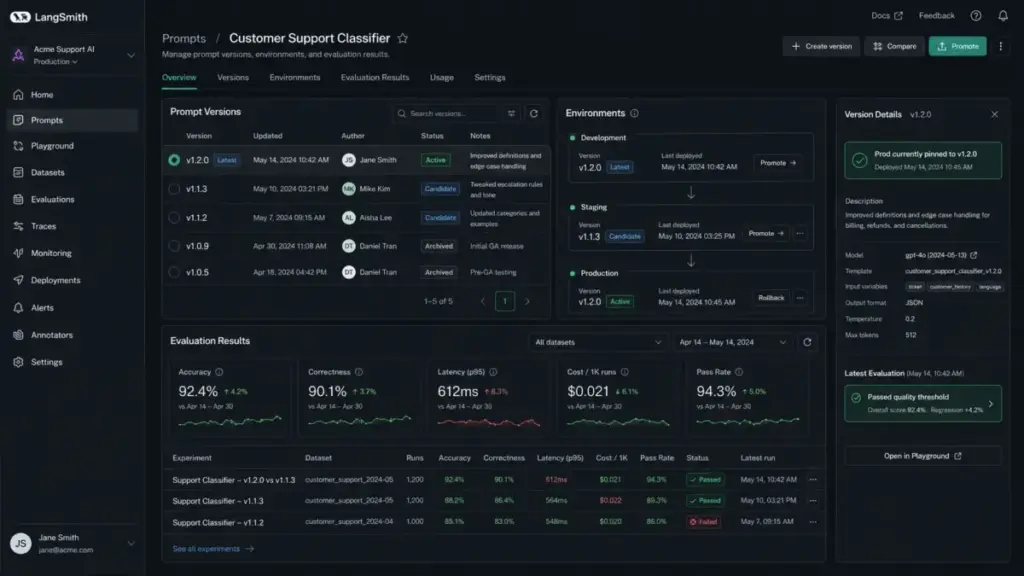
| LangSmith | Prompt hub, versioning, staging/production environments, traces, online/offline evals, monitoring | Developer: 1 free seat + 5k base traces/month; Plus: self-serve teams + 10k base traces/month | Requires LangChain ecosystem knowledge; trace overage charges apply |
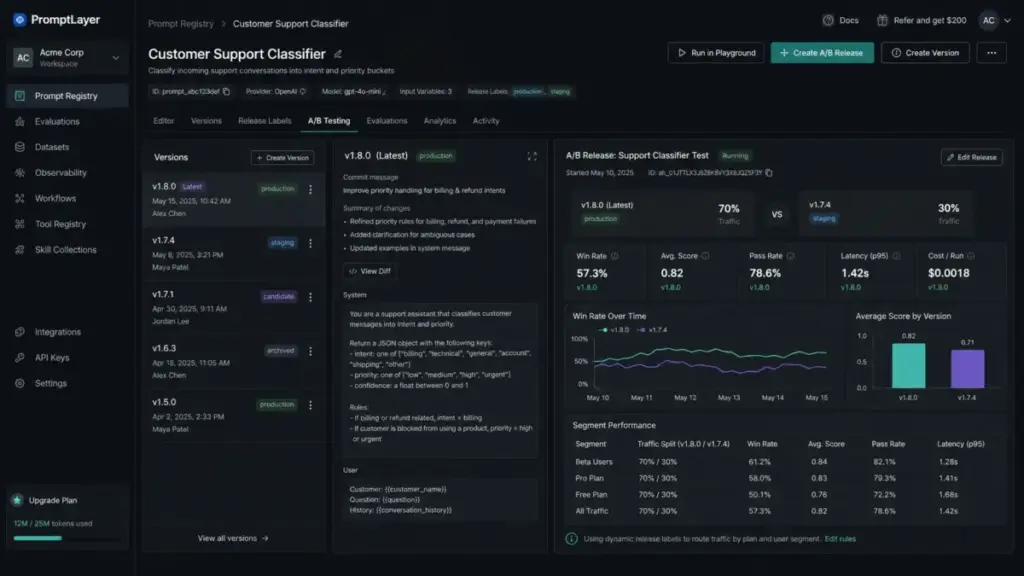
| PromptLayer | Prompt registry (CMS), evaluations, A/B testing, analytics, RBAC, release labels, self-hosting option | Free $0; Pro $49/month; pay-as-you-go $0.003/transaction | Smaller ecosystem than LangSmith; advanced features require Pro plan |
What this means: ChatGPT and Claude handle the prompting itself. LangSmith and PromptLayer handle the lifecycle around prompts (versioning, testing, monitoring). Pricing models differ: ChatGPT and Claude charge per-token on API, Copilot Studio uses a credit system, and LangSmith charges by trace volume. Check each vendor’s pricing page before committing.
How Each Tool Handles Prompt Engineering
ChatGPT / OpenAI documents prompt engineering as writing effective model instructions. The API separates messages into developer, user, and assistant roles, which lets SaaS teams set system-level rules that persist across user interactions. The dashboard supports reusable prompts for Responses API workflows. OpenAI’s prompt engineering guide is the most widely referenced starting point.
Claude / Anthropic provides detailed prompting documentation covering clarity, examples, XML structuring for complex prompts, extended thinking for reasoning tasks, and prompt chaining for multi-step workflows. The Claude Console includes a prompt generator, templates, variables, and a prompt improver that suggests improvements to existing prompts.
Microsoft Copilot Studio lets business users create custom prompts with instruction and context fields, add dynamic input variables, test prompt performance, and embed prompts inside agents. The prompt builder includes model settings and output preview, making it accessible to non-developers.
LangSmith supports the full prompt lifecycle: create prompts in the hub, version them, promote between staging and production, trace model calls, and run online or offline evaluations. It is designed for teams that treat prompts as production assets requiring the same rigor as code deployment.
PromptLayer positions itself as a prompt CMS with evaluation and observability. Teams can register prompts, run evaluations against test datasets, A/B test prompt versions, track analytics, apply role-based access control, and self-host for data sovereignty requirements.
Prompt Engineering for AI Agents
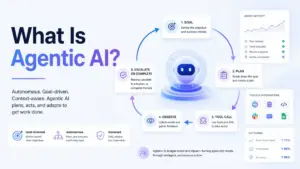
Basic prompt guides rarely cover how prompts change when agents can use tools, retrieve data, and act across systems. In 2026, LangChain’s agent research shows organizations are deploying agents and treating quality, observability, and iteration as production barriers.
Agent Prompt Checklist
When writing prompts for AI agents, include these elements:
- [ ] Goal: What is the agent trying to accomplish?
- [ ] Tools: Which tools can the agent use? What are the input/output formats?
- [ ] Permissions: What actions is the agent allowed to take? What is forbidden?
- [ ] Stop conditions: When should the agent stop and return a result?
- [ ] Escalation rules: When should the agent hand off to a human?
- [ ] Error handling: What should the agent do when a tool call fails?
- [ ] Audit trail: Does the prompt instruct the agent to log actions and reasoning?
What this means: Agent prompts are not just instructions. They are operating manuals that define scope, permissions, and failure behavior. Treating agent prompts like casual chat prompts creates unpredictable autonomous behavior.
From Prompt to Production: The Lifecycle Teams Actually Need
Most articles explain how to write a better prompt. Few explain how teams version, test, deploy, and monitor prompts in production. Here is the lifecycle that separates one-off prompting from repeatable SaaS workflows.
Prompt Lifecycle Checklist
- [ ] Draft: Write the prompt with task, context, constraints, format, and examples
- [ ] Test: Run against normal inputs, edge cases, missing data, adversarial input
- [ ] Version: Tag the prompt version. Record what changed and why
- [ ] Evaluate: Compare output quality, latency, cost, and schema pass rate against the previous version
- [ ] Deploy: Promote the prompt to production. Keep the previous version for rollback
- [ ] Monitor: Track task completion rate, error rate, latency, cost, and user feedback
- [ ] Rollback: If metrics degrade, revert to the previous version
- [ ] Iterate: Use monitoring data to inform the next prompt revision
What this means: Prompts are not static text. They are versioned assets that need the same deployment rigor as feature code. Tools like LangSmith and PromptLayer support this lifecycle. Teams without versioning and monitoring are flying blind.
When You Need Prompt Engineering Software (and How to Choose)
Dedicated tooling makes sense when your team manages more than 5 prompts across different workflows, multiple people edit prompts without version tracking, or prompt failures reach end users before anyone notices. If you use AI only for personal productivity or have a single prompt that rarely changes, built-in model playgrounds are enough.
When evaluating tools, prioritize: prompt versioning (compare and roll back), evaluation support (test datasets and quality measurement), observability (trace calls, latency, token cost), access control (restrict production edits), and integration with your existing LLM provider.
For detailed reviews of individual platforms, see our ChatGPT evaluation and Claude AI analysis.
Beginner Checklist: Start Here
If you are new to prompt engineering, use this checklist for your first production prompt:
- [ ] Write the task as a specific action verb (classify, summarize, extract, draft)
- [ ] Separate your instructions from the data the model should use
- [ ] Specify the output format (JSON, table, paragraph, checklist)
- [ ] Add at least 2 constraints (audience, tone, length, or exclusions)
- [ ] Include 1 example of desired input and output
- [ ] Test with 3 real inputs before deploying
- [ ] Test with 1 edge case (missing data or unusual format)
- [ ] Record the prompt version and date
- [ ] Check the output for factual accuracy before trusting it
- [ ] Set up a way to collect user feedback on AI outputs
Related Resources
Explore these guides for deeper coverage of related topics:
- What is RAG (retrieval-augmented generation) for when prompts need external knowledge
- What is fine-tuning in AI for when prompting is not enough
- ChatGPT pricing and API costs for cost planning
- What is an LLM (large language model) for foundational model concepts
- What are AI hallucinations for understanding output risks
- ChatGPT vs Claude comparison for choosing between top models
- AI terminology glossary for quick reference on AI terms
FAQ
What is prompt engineering in simple terms?
Prompt engineering is writing clear instructions, context, examples, and rules so an AI model gives you the response you actually want. Think of it as designing a brief for a very capable but literal assistant: the better your brief, the better the output.
Is prompt engineering still worth learning in 2026?
Yes. Models are better at handling casual prompts in 2026, but production AI workflows still need structured prompts, testing, versioning, and safety controls. The skill has shifted from “making AI work at all” to “making AI work reliably at scale.”
What is the difference between prompt engineering and fine-tuning?
Prompt engineering changes the instructions you give the model. Fine-tuning changes the model itself using training data. Use prompting for quick iteration and task-specific instructions. Use fine-tuning when you need consistent behavior across thousands of similar requests and have the training data to support it.
What is the difference between prompt engineering and RAG?
Prompt engineering tells the model how to respond. RAG provides the model with external knowledge it does not already have. If the model needs private documents, recent data, or domain-specific facts, RAG retrieves and injects that context alongside the prompt.
Can prompt engineering prevent AI hallucinations?
It reduces hallucination frequency but does not eliminate it. Techniques like providing source material, asking the model to cite its sources, and instructing it to say “I do not know” when uncertain all help. But output validation and human review remain necessary for high-stakes use cases.
What is the difference between a system prompt and a user prompt?
A system prompt (or developer message) sets persistent rules and context that apply to every interaction. A user prompt is the individual request from an end user. In SaaS applications, developers write system prompts to control AI behavior, while user prompts vary per request. Keeping these layers separate is important for both consistency and security.
What tools are used for prompt engineering in production?
OpenAI’s API and playground, Anthropic’s Claude Console, Microsoft Copilot Studio, LangSmith (for versioning and evals), and PromptLayer (for prompt CMS and observability) are the most commonly used tools. The right choice depends on your LLM provider, team size, and need for versioning or compliance.
How do teams manage prompt versions?
Production teams version prompts the same way they version code: tag each version, compare outputs against test datasets, promote to production, monitor performance, and roll back if metrics degrade. LangSmith and PromptLayer both support this workflow natively.
What is prompt injection and why should teams care?
Prompt injection is when crafted user input manipulates the AI into ignoring its instructions, revealing system prompts, or performing unauthorized actions. OWASP identifies it as a top LLM application risk. Teams should care because it can lead to data leaks, unauthorized access, and reputational damage. Mitigation requires input handling, output validation, and permission design, not just prompt wording.
Should I use prompt engineering or automation for repetitive AI tasks?
Use both. Prompt engineering designs the instructions. Workflow automation (tools like Zapier, Make, or custom pipelines) handles the triggering, routing, and error handling. Prompt engineering without automation means someone has to manually run each prompt. Automation without good prompts means running bad instructions at scale.