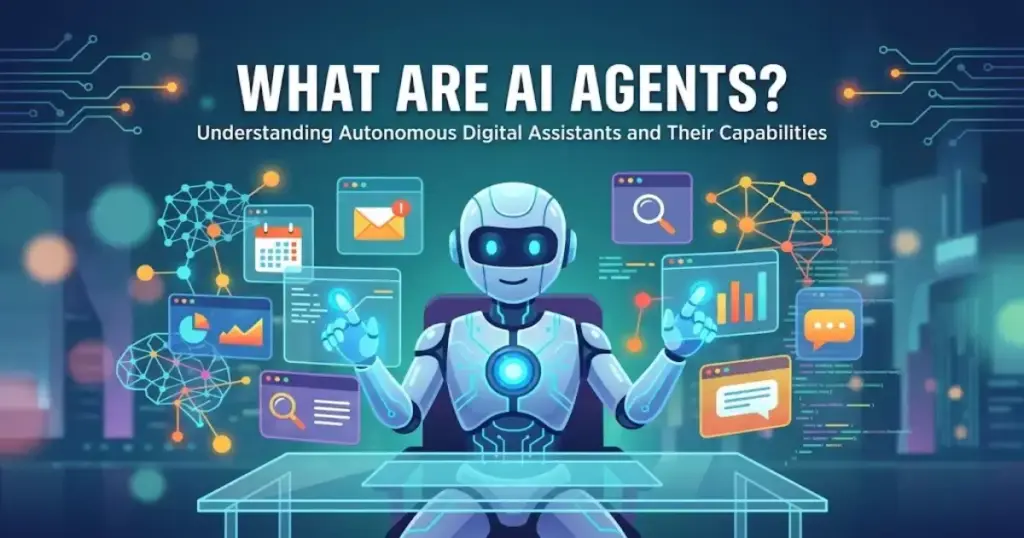
Every software vendor seems to have slapped “AI agent” on their product in the last 18 months. If you are trying to figure out what that actually means for your team, you are not alone. What are AI agents, exactly, and how do they differ from the chatbots, automations, and AI assistants you already use?
This article gives you a plain-English answer, a practical breakdown of types and architecture, and a decision framework to help you choose the right tool — or decide you do not need one at all. If you are also evaluating best AI chatbots for your team, this article will help you understand where chatbots end and agents begin.
What Are AI Agents?
An AI agent is a software system that uses artificial intelligence to pursue a goal, make decisions, and take actions on behalf of a user or organization. Unlike a chatbot that responds to a single prompt, an agent works across multiple steps, selects and uses tools, and adapts its plan based on results.
“AI agents are software systems that use AI to pursue goals and complete tasks on behalf of users.”
— Google Cloud, What are AI agents?
The minimum traits that separate a true agent from a simpler AI system are:
- A goal: a defined outcome to work toward, not just a prompt to answer.
- A model: a large language model (LLM) or similar system that reasons and plans.
- Tools: the ability to call external services, APIs, databases, or other systems.
- Memory or state: the ability to retain context across multiple steps.
- Action: the ability to actually do something in the world, not just generate text.
- Feedback: a loop where the agent observes results and adjusts.
Generative AI provides the foundation for most modern AI agents. The model layer is what gives an agent the ability to reason about a goal and plan a sequence of steps. But reasoning alone is not enough. Without tools and action capacity, you have a smart text generator, not an agent.
The 60-Second Explainer
- An AI agent receives a goal, not just a question.
- It breaks the goal into steps, selects tools, and acts.
- It reads results, adjusts, and continues until the goal is met or it asks for help.
- It can use APIs, search the web, write and run code, or update records in other systems.
- It can be paused, interrupted, or handed to a human at any step.
AI Agents vs Chatbots, Assistants, and Automations
This is the distinction that most articles skip, so let me state it plainly: a chatbot answers. An AI agent acts. An automation follows a fixed path. An agent can choose the next step.
| System type | Autonomy level | Tool use | Memory/state | Best for | Example |
|---|---|---|---|---|---|
| AI agent | High: sets its own steps | Yes: multiple tools | Yes: across steps | Multi-step goals with uncertainty | Qualifying a lead, booking a call, logging to CRM |
| AI assistant | Medium: responds to requests | Sometimes | Session only | Q&A, drafting, summarizing | Summarizing a document on request |
| Chatbot | Low: follows a script | No | No | FAQ, triage, lead capture | Answering “What are your hours?” |
| Workflow automation | None: deterministic | API calls only | No | Repeatable, rule-based processes | Syncing form submissions to a spreadsheet |
What Most AI Agent Guides Get Wrong
Most guides treat autonomy as the goal. It is not. The goal is controlled delegation.
An agent that acts with full autonomy and no oversight is a liability. An agent that checks in, logs every action, and escalates edge cases is a system you can actually trust in a production workflow.
According to Anthropic’s research on measuring agent autonomy, oversight requires more than putting a human in an approval chain. Users who auto-approve everything are not really supervising. The design needs to give users visibility into what the agent is doing and simple ways to interrupt it.
The best-performing agent setups are not the most autonomous. They are the ones with the clearest checkpoints.
How Do AI Agents Work?
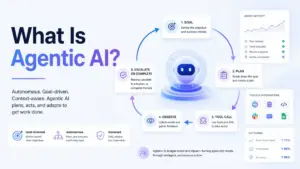
An AI agent runs on a loop. Each pass through the loop moves the agent closer to its goal, or surfaces a decision it cannot make alone.
Here is how the loop works in plain language:
- Goal input: a user or system gives the agent a goal. “Qualify these 50 new leads and add notes to the CRM.”
- Interpretation: the agent parses the goal and identifies what it needs to know and do.
- Planning: the agent breaks the goal into subtasks. It decides what order to do them.
- Tool selection: the agent picks which tools to call. It might call a CRM API, a web search, or a data enrichment service.
- Action: the agent calls the tool and acts.
- Observation: the agent reads the result. Did it work? What did it learn?
- Adjustment or escalation: the agent adapts its plan. If it hits a decision it is not authorized to make, it asks the human.
“Agents are applications that plan, call tools, collaborate across specialists, and keep enough state to complete multi-step work.”
— OpenAI, Agents SDK documentation
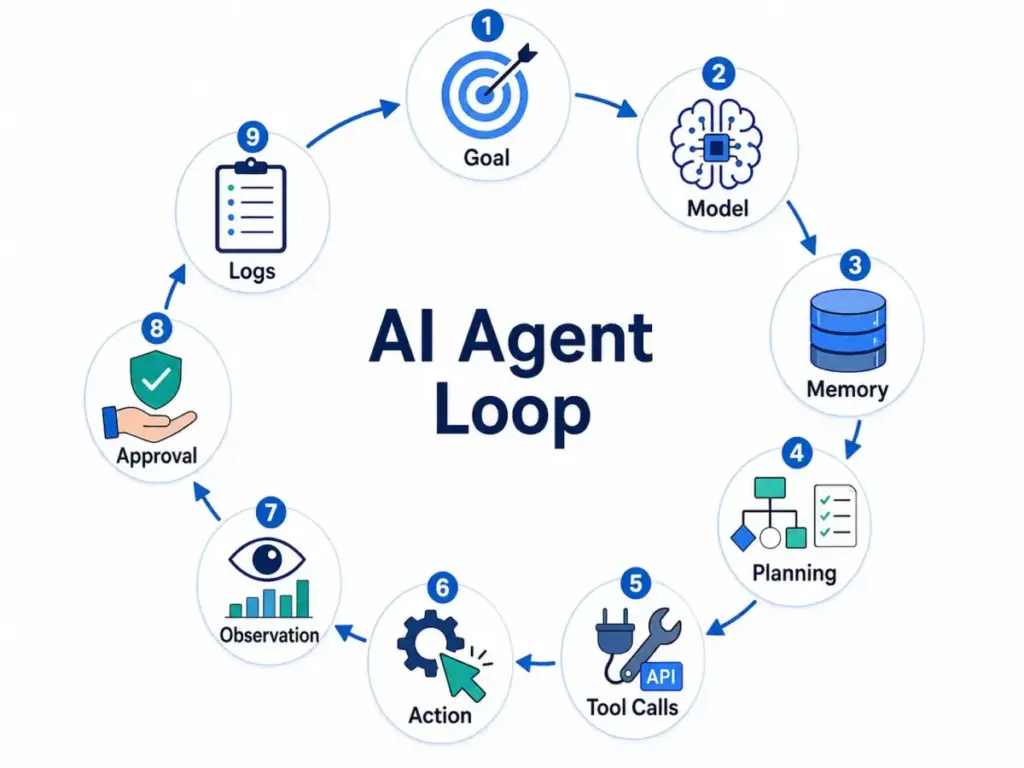
This loop is what separates an agent from a single LLM call. A chatbot completes one step. An agent runs this loop until the goal is achieved or it is stopped.
AI Agent Architecture
Understanding the components helps you evaluate any agent product on the market. Every serious AI agent system has six layers.
Model
The model is the brain. For most commercial agents in 2026, this is an LLM such as GPT-5.5, Claude 4.7, or Gemini 3.1. The model handles reasoning, planning, and language understanding. The quality of the model directly affects how well the agent handles ambiguity, edge cases, and novel tasks.
Tools and APIs
Tools are how an agent reaches into the world. A tool might be a web search, a CRM API, a database query, a code interpreter, or a file system. Without tools, an agent can only generate text. With tools, it can send emails, update records, retrieve data, and trigger other systems. Understanding what an API is helps here: tools are essentially structured API calls that the agent decides when and how to invoke.
Memory and State
Memory lets an agent remember what happened across steps. Short-term memory covers the current task. Long-term memory, often implemented through retrieval augmented generation (RAG), lets agents access stored knowledge. State management tracks where the agent is in a multi-step workflow so it does not repeat steps or lose context.
Planning and Orchestration
Planning is how an agent decides what to do next. Simple agents follow a fixed plan. More capable agents decompose goals dynamically, spawning subtasks or delegating to specialist agents. Orchestration manages these task flows. In a multi-agent system, an orchestrator agent routes work to specialist agents and aggregates results.
Guardrails and Approvals
Guardrails define what an agent is allowed to do. A well-designed agent has explicit permission scopes. It knows which tools it can call, which data it can access, and which actions require human approval before execution. IBM recommends that high-impact actions always require approval before the agent proceeds, not just a log entry after the fact.
Logs and Observability
Logs are how you debug and audit an agent. If an agent takes an unexpected action, you need to be able to trace every decision it made. Observability is not optional. It is the mechanism that lets you catch errors before they become costly mistakes. Without it, you are flying blind.
Types of AI Agents
The classical taxonomy of AI agents comes from academic AI research, but each type maps to real business use cases in 2026.
| Type | How it decides | Business example | Main limitation |
|---|---|---|---|
| Simple reflex agent | Current input only | Auto-reply to support tickets by keyword | Fails on anything outside its rules |
| Model-based agent | Input plus internal world model | Inventory reordering based on stock levels and lead times | Model must be kept accurate |
| Goal-based agent | Plans actions toward a goal | Lead qualification agent that works toward booking a meeting | Requires clear, measurable goal definition |
| Utility-based agent | Maximizes a score or value | Ad campaign optimizer balancing cost per click and conversion | Needs good training signal and defined metrics |
| Learning agent | Improves from feedback | Support agent that gets better at routing tickets over time | Requires data volume and feedback loops |
| LLM agent | Reasons in natural language | Research synthesizer reading papers and writing summaries | Can hallucinate; needs evaluation and oversight |
| Multi-agent system | Specialist agents coordinated by an orchestrator | Sales pipeline agent that coordinates lead research, outreach drafting, and CRM updates | Complexity, cost, and debugging difficulty multiply |
Simple Reflex Agents
A simple reflex agent responds to a condition. If X, do Y. There is no memory and no planning. A help desk bot that routes tickets labeled “billing” to the billing queue is a simple reflex agent. It works well when conditions are predictable.
Model-Based Agents
A model-based agent maintains a representation of the world and uses it to make decisions. A logistics tool that tracks inventory levels, supplier lead times, and order history to decide when to reorder stock is a model-based agent. The internal model needs to stay accurate, which is a real maintenance burden.
Goal-Based Agents
A goal-based agent plans a sequence of actions toward an explicit goal. A sales agent tasked with qualifying 100 leads and booking meetings for the sales team is a goal-based agent. The quality of the goal definition directly determines how useful the agent is.
Utility-Based Agents
A utility-based agent maximizes a utility function. A paid media agent that adjusts bids and creative combinations to maximize return on ad spend while staying within a budget cap is a utility-based agent. These agents require a well-defined and honest metric. Optimizing the wrong number is worse than not optimizing at all.
Learning Agents
A learning agent improves from feedback. A customer support routing agent that learns over time which agent handles which issue type most effectively is a learning agent. These require enough data volume and clean feedback signals to improve meaningfully.
LLM Agents
An LLM agent uses a large language model as its reasoning core.
“Agents, on the other hand, are systems where LLMs dynamically direct their own processes and tool usage.”
— Anthropic, Building Effective Agents
A research agent that reads a set of PDFs, extracts key claims, cross-references them, and writes a summary is an LLM agent. The strength is flexibility. The weakness is that LLMs can hallucinate, and without evaluation layers, errors can propagate through a workflow.
Multi-Agent Systems
A multi-agent system coordinates multiple specialist agents under an orchestrator. AWS describes these as systems where an orchestrator agent routes tasks to specialist agents and combines their outputs. A content operations agent could coordinate a research sub-agent, a writing sub-agent, and a fact-checking sub-agent. The power is specialization. The cost is complexity. Debugging a multi-agent system is significantly harder than debugging a single agent.
Real AI Agent Examples
Abstract definitions only go so far. Here is what AI agents actually look like in business workflows.
Customer support ticket triage: An agent monitors the support inbox, reads each ticket, classifies the issue, checks the knowledge base, and either resolves it automatically or routes it to the right team with a draft reply. Human agents spend time on decisions, not on reading and sorting.
Sales lead qualification: An agent receives a list of new sign-ups, enriches each record with company data, scores leads against an ideal customer profile, and writes personalized outreach drafts. A sales rep reviews and sends. The agent handled the research and drafting.
Marketing campaign operations: An agent monitors campaign performance, identifies underperforming ads, drafts replacement copy, and flags the draft for a human to approve before any budget changes go live. Approvals stay with the human. Legwork moves to the agent.
Research synthesis: An agent reads a set of research papers or web sources, extracts key facts, cross-references conflicting claims, and writes a structured briefing. Legal, strategy, and research teams use this to reduce reading time on large document sets.
Coding and software maintenance: A coding agent reads a repository, identifies failing tests, proposes fixes, and opens a pull request for human review. It does not merge without approval. Claude Code is a practical example of this pattern in production today.
Finance invoice review: An agent reads incoming invoices, matches them to purchase orders, flags discrepancies, and queues clean matches for approval. Finance teams process more invoices with fewer manual steps.
Personal productivity: An agent monitors your email, drafts replies to routine messages, summarizes threads you have not read, and reminds you of deadlines buried in conversations. The human stays in control of what gets sent.
Benefits of AI Agents
Agent benefits are real, but they are specific. “Boost productivity” is not a benefit. Here is what agents actually do well.
Reduce time on structured, multi-step tasks: Tasks like lead enrichment, ticket triage, and invoice matching follow a pattern. Agents handle the pattern. Humans handle the exceptions.
Work across tools without manual handoffs: An agent can read from one system, process data, and write to another without a human bridging the gap. This is where agents beat simple automations: they handle the decision layer between tools.
Scale without proportional headcount: According to Deloitte’s State of AI in the Enterprise 2026, worker access to AI rose by 50% in 2025. Companies deploying agents at scale are doing more work with the same teams, not replacing teams wholesale.
Handle tasks that need judgment, not just rules: A deterministic automation fails when conditions change. An agent can reason about an unusual case and either handle it or escalate it. That judgment capacity is the practical differentiator.
Run asynchronously in the background: Background agents execute queued work without requiring a user to be present in a chat interface. You give the agent a task and check the results later. This is closer to delegation than conversation.
Support adoption at the team level: Capgemini’s research on agentic AI projects that by 2028, 38% of organizations expect AI agents to work as team members within human teams. That framing, agents as colleagues rather than tools, reflects how the most effective deployments actually operate.
AI Agent Risks
AI agents carry real risks. Most guides either ignore them or list them without practical context. Here is what actually goes wrong.
Wrong tool action: An agent calls the wrong API endpoint or uses correct tools with wrong parameters. It might delete a record instead of archiving it. Without scoped permissions and human approval on destructive actions, this happens.
Data leakage: An agent with access to sensitive data can inadvertently include that data in prompts sent to external LLM APIs. Every tool call is a potential data boundary crossing. Permissions must match the data classification.
Prompt injection: A malicious actor embeds instructions in content the agent reads. The agent follows those instructions instead of your original goal. This is a real attack vector for agents that read emails, web pages, or third-party content.
Hallucinated reasoning: An LLM agent can produce plausible-sounding but incorrect reasoning. If the agent is confident about a wrong fact, and you do not have an evaluation layer, that error propagates into the workflow output.
Approval fatigue: If every action requires human approval, users start auto-approving without reading. The oversight mechanism becomes theater. Good agent design means selective, meaningful approvals, not blanket checkpoints.
Tool and API failure: External tools break. Rate limits hit. APIs return errors. A well-designed agent handles failures gracefully, retries with backoff, and escalates rather than silently failing or looping forever.
Observability gaps: If you cannot trace what the agent did and why, you cannot debug failures or audit decisions. Observability is a requirement, not a nice-to-have.
The Hidden Costs Most AI Agent Guides Skip
Agents are not free. Here are the costs that vendor marketing does not cover.
Token costs: Every step in an agent loop consumes tokens. A multi-step agent processing hundreds of leads or documents per day can generate significant LLM API costs. These scale with usage in ways that simple SaaS subscriptions do not.
Latency: Agent loops take time. A task that takes a human 30 seconds might take an agent 45 seconds across multiple tool calls. For real-time workflows, this matters.
Tool errors and retry logic: Every external tool call can fail. Building robust error handling, retry logic, and failure escalation is engineering work that sits on top of the agent itself.
Debugging time: When an agent produces an unexpected output, tracing the decision path through a multi-step loop is harder than reading a fixed workflow log. Debugging agentic systems requires observability tooling that most teams have not built yet.
Evaluation overhead: How do you know if the agent is doing a good job? Building evaluation pipelines to check agent output quality is non-trivial work. Without them, you are trusting the agent blindly.
Human approval overhead: Approval workflows add latency and require human attention at unpredictable times. In async workflows, this can bottleneck the whole system.
Governance infrastructure: Only one in five companies has a mature governance model for autonomous AI agents, according to Deloitte. Building the access controls, audit logs, and policy frameworks to govern agents is a real investment.
| Risk | Likely Cause | Business Impact | Mitigation |
|---|---|---|---|
| Wrong tool action | Agent calls the wrong API, uses the wrong parameter, or acts on outdated context | Records are changed incorrectly, emails are sent to the wrong people, or tasks are executed without review | Limit tool permissions, require approval for high-impact actions, and log every tool call |
| Data leakage | Agent has access to sensitive files, customer records, or internal systems without clear boundaries | Private customer, employee, or company data may be exposed in prompts, outputs, or third-party tools | Use scoped access, classify sensitive data, restrict external tool calls, and audit data flows |
| Prompt injection | Agent reads malicious instructions hidden inside emails, webpages, documents, or tickets | Agent may ignore original instructions, reveal data, or perform unauthorized actions | Sanitize inputs, separate system instructions from external content, and block untrusted commands |
| Hallucinated reasoning | LLM produces a confident but false explanation, source, or decision path | Bad recommendations, inaccurate reports, wrong customer responses, or compliance risk | Use retrieval, source citations, validation checks, and human review for critical outputs |
| Approval fatigue | Too many low-value approval requests train users to auto-approve actions | Human oversight becomes superficial, increasing the chance of costly mistakes | Use risk-based approvals, batch low-risk actions, and reserve manual approval for irreversible steps |
| Tool or API failure | External systems return errors, rate limits, stale data, or unexpected formats | Agent loops, fails silently, duplicates work, or leaves tasks incomplete | Add retries, fallback paths, timeout rules, error alerts, and escalation to a human owner |
| Cost overrun | Multi-step loops consume tokens, trigger paid APIs, or retry too often | Usage costs rise faster than expected, especially at scale | Set token budgets, usage alerts, hard spending limits, and per-task cost caps |
| Latency | Agent needs several model calls, tool calls, and approval steps to finish one task | Slow workflows frustrate users and make real-time use cases impractical | Use agents for async work, simplify task scope, cache common data, and avoid unnecessary loops |
| Poor observability | Logs do not show prompts, tool calls, decisions, outputs, or failures clearly | Teams cannot debug mistakes or prove what happened during an incident | Store full execution traces, tool responses, approval history, and outcome status |
| Over-automation | Team uses an agent where a fixed workflow, chatbot, or dashboard would work better | Higher cost, more complexity, harder maintenance, and weaker reliability | Start with the simplest system first, then add agentic behavior only when judgment and iteration are required |
When Not to Use AI Agents
This is the section that vendor guides never write. Here are the cases where AI agents are the wrong answer.
When a chatbot is enough: If your users need to ask simple questions and get answers from a knowledge base, a chatbot with good retrieval is simpler, cheaper, and more predictable than an agent.
When a deterministic workflow handles it: If the process is fixed, rule-based, and does not require judgment, use a workflow automation. Zapier, Make, or n8n can execute a structured process without the overhead of an LLM loop. Our guide on what workflow automation is explains exactly when rule-based automation is the better choice over AI agents, including a decision framework for choosing the right approach.
When a database query is sufficient: Agents that retrieve and summarize data are sometimes used when a well-designed dashboard or SQL query would do the same job faster and more reliably.
When you need a single LLM call: Many tasks need exactly one inference step. Classify this text. Summarize this document. Extract these fields. One call, structured output, done. Adding an agent loop to a single-call task adds cost and latency for no benefit.
When the failure cost is high and oversight is low: If an agent error would cause a costly or irreversible action, and you do not have real-time human oversight, do not use an agent. Use a human.
When your data is not ready: Agents depend on clean, structured, accessible data. If your CRM is a mess, your knowledge base is outdated, or your APIs are unreliable, an agent will amplify those problems.
Anthropic’s guidance is direct: many successful agent systems use simple, composable patterns instead of complex frameworks. Agents trade latency and cost for task performance. Start with the simplest solution. Add agentic complexity only when simpler solutions fail.
The decision rule I use: Use an AI agent only when the task needs judgment, iteration, tool use, and state across steps. If it needs fewer than three of those four things, use something simpler.
Best AI Agent Tools
This is not a ranked list. Different tools fit different teams, budgets, and technical requirements. Use this as a starting point, not a verdict. For full evaluations, see the individual reviews linked below, all produced using the SaaSZap review methodology. For agent-mode coding tools specifically, including Cursor, Claude Code, and GitHub Copilot, our AI coding assistants guide ranks 10 options by pricing and features.
| Tool | Best fit | Agent strength | Limitation | Link |
|---|---|---|---|---|
| ChatGPT | General business productivity, research, file analysis | Strong general reasoning, native agent mode, GPT-4o model | Less suited to complex custom integrations without dev work | ChatGPT review |
| Claude | Reasoning-heavy workflows, coding, writing, tool-connected tasks | Strong at long-context tasks, Claude Code for coding agents | API-first for advanced agent use; consumer UI is simpler | Claude review |
| Gemini | Google Workspace users, long-context research, Google ecosystem | Deep Google integration, strong multimodal input | Best value when inside Google’s ecosystem specifically | Gemini review |
| Zapier | No-code business automation with AI steps | AI actions across 7,000+ apps, no-code agent workflows | Agent logic is limited compared to developer frameworks | Zapier review |
| Make | Visual workflow builders who want controllable agentic flows | Excellent visual editor, granular control, AI modules | Less suited to fully autonomous open-ended tasks | Make review |
| n8n | Technical teams wanting self-hosting and custom integrations | Open-source, self-hostable, full workflow control | Requires more technical setup than no-code alternatives | n8n review |
| Amazon Bedrock Agents | AWS-heavy enterprises building production agent systems | Native AWS integration, foundation model flexibility, enterprise controls | Requires AWS expertise; not a no-code solution | AWS Bedrock Agents docs |
| Google Vertex AI Agent Builder | Google Cloud enterprises building custom agents | Google Cloud integration, Gemini model access, enterprise governance | Google Cloud dependency; developer-oriented | Vertex AI Agent Builder |
Which AI Agent Path Fits Your Team?
| Team profile | Recommended starting point | Why |
|---|---|---|
| Solo founder or operator | ChatGPT or Claude with agent mode | Low setup friction, strong general capability, no infrastructure needed |
| Marketing ops team | Zapier with AI steps | No-code, connects to existing marketing stack, controllable |
| Support team | Zendesk AI or a chatbot platform with RAG | Specialized for ticket triage and knowledge retrieval |
| RevOps team | Make or n8n with CRM integrations | Needs reliable, auditable data flows across sales tools |
| Developer or technical team | Claude API, OpenAI Agents SDK, or n8n | Needs custom logic, evaluation, and full control |
| Enterprise IT team | Amazon Bedrock Agents or Google Vertex AI Agent Builder | Needs enterprise governance, security, and cloud integration |
| Use Case | Best-Fit Tool Type | Buyer Profile | Technical Skill Needed | Governance Need | Good Starting Options |
|---|---|---|---|---|---|
| General productivity agent | AI assistant with agent features | Solo founder, consultant, manager, knowledge worker | Low | Low to medium | ChatGPT, Claude, Gemini |
| Research and document analysis | Long-context AI assistant | Analyst, strategist, legal ops, content team, research team | Low to medium | Medium | Claude, ChatGPT, Gemini |
| Sales lead qualification | CRM-connected AI workflow | RevOps manager, sales ops team, B2B sales team | Medium | Medium to high | Zapier, Make, n8n, HubSpot AI |
| Customer support triage | Help desk AI agent | Support manager, CX team, help desk operator | Low to medium | High | Intercom, Zendesk AI, Freshdesk AI |
| Marketing campaign operations | No-code automation with AI steps | Marketing ops team, growth team, email marketer | Medium | Medium | Zapier, Make, n8n |
| Internal knowledge assistant | RAG-based chatbot or agent | HR, IT, operations, enablement team | Medium | High | Glean, Guru, Notion AI, custom RAG agent |
| Coding and repository tasks | Developer agent | Software engineer, engineering manager, technical founder | High | High | Claude Code, Cursor, GitHub Copilot, OpenAI Agents SDK |
| Data analysis workflow | AI assistant plus database/API access | Analyst, finance ops, BI team, operations lead | Medium to high | High | ChatGPT, Claude, Gemini, custom SQL agent |
| Multi-app workflow automation | Workflow automation platform | Ops manager, automation builder, agency operator | Medium | Medium to high | Zapier, Make, n8n |
| Enterprise custom agent | Cloud agent platform | Enterprise IT, platform team, AI engineering team | High | Very high | Amazon Bedrock Agents, Google Vertex AI Agent Builder, Azure AI Agent Service |
| Regulated workflow | Human-in-the-loop agent system | Finance, healthcare admin, legal ops, compliance team | High | Very high | Custom agent framework, Bedrock Agents, Vertex AI, OpenAI Agents SDK |
| Background task execution | Autonomous or semi-autonomous agent | Operations team, product team, founder, admin team | Medium to high | High | OpenAI Agents SDK, Claude API, n8n, Make |
AI Agent Readiness Checklist
Before you deploy an agent in a real workflow, score your situation. Honest answers prevent expensive mistakes.
| Criterion | 0 points | 1 point | 2 points |
|---|---|---|---|
| Clear goal | Goal is vague or undefined | Goal exists but has ambiguous edges | Goal is specific, measurable, and scoped |
| Clean data | Data is inconsistent or inaccessible | Data exists but has gaps or format issues | Data is clean, structured, and accessible |
| Safe tools | Agent has broad access with no limits | Agent access is partially scoped | Agent access is tightly scoped to required tools only |
| Human approval path | No human checkpoint exists | Approval exists but is not enforced | Human approval is required for all high-impact actions |
| Logs and monitoring | No logging in place | Basic logs exist but are not reviewed | Full observability with alerting and review process |
| Failure recovery | Agent fails silently or loops forever | Agent surfaces errors but does not escalate | Agent escalates failures to a human with context |
| Cost limit | No cost controls in place | Soft cost tracking exists | Hard cost limits and alerts are configured |
| Responsible owner | No one owns the agent | An owner is named but lightly engaged | A named owner reviews agent behavior regularly |
Scoring:
- 14 to 16: Ready to deploy in a controlled production workflow.
- 10 to 13: Run a constrained pilot. Fix the gaps before scaling.
- 6 to 9: Significant preparation needed. Consider a simpler automation first.
- 0 to 5: Not ready. The agent will create more problems than it solves.
AI Agent Readiness Scorecard
Use this scorecard before deploying an AI agent into a real business workflow. Score each criterion from 0 to 2, then add the total.
| Criterion | 0 Points | 1 Point | 2 Points |
|---|---|---|---|
| Clear goal | The task is vague or open-ended | Goal exists but has unclear boundaries | Goal is specific, measurable, and scoped |
| Clean data | Data is messy, outdated, or inaccessible | Data exists but needs cleanup | Data is clean, structured, and accessible |
| Safe tool access | Agent has broad access to tools or systems | Access is partially limited | Agent only has access to required tools |
| Human approval path | No approval checkpoint exists | Approval exists but is inconsistent | High-impact actions require human approval |
| Logs and monitoring | No execution logs are stored | Basic logs exist but are rarely reviewed | Full logs track prompts, tool calls, actions, and outcomes |
| Failure recovery | Agent fails silently or loops | Errors are shown but not escalated | Agent retries, stops safely, and escalates with context |
| Cost control | No usage or token limits exist | Usage is tracked manually | Hard limits, alerts, or per-task caps are configured |
| Responsible owner | No one owns the workflow | Owner exists but rarely reviews it | A named owner reviews performance and failures regularly |
Scoring Guide
| Total Score | Readiness Level | Recommendation |
|---|---|---|
| 14-16 | Ready for controlled deployment | Start with a limited production workflow and monitor weekly |
| 10-13 | Pilot-ready | Run a small pilot before scaling |
| 6-9 | Not ready yet | Fix data, permissions, approval, and monitoring gaps first |
| 0-5 | High risk | Use a simpler chatbot, automation, or manual process instead |
Quick Rule
An AI agent is worth testing only when the workflow needs judgment, tool use, iteration, and memory across steps. If the task needs fewer than three of those four elements, a normal automation or single AI prompt is usually safer and cheaper.
FAQ About AI Agents
What is an AI agent in simple terms?
An AI agent is a software program that takes a goal, breaks it into steps, uses tools to act in the world, and adjusts its plan based on results. Unlike a chatbot, it does not stop after one answer. It keeps working until the goal is met or a human intervenes.
What is an example of an AI agent?
A sales lead qualification agent is a practical example. It receives a list of new sign-ups, looks up company information using an API, scores each lead against your ideal customer profile criteria, and writes a personalized outreach draft for the sales rep to review. The rep reviews and sends. The agent did the research and drafting steps.
How do AI agents work?
Agents run on a loop: receive a goal, plan steps, select tools, act, observe results, and adjust. This loop continues until the goal is achieved or the agent encounters a decision that requires human input. Each loop iteration may involve calling external APIs, reading data, writing to a database, or drafting content.
Are AI agents the same as chatbots?
No. A chatbot responds to a single input and produces a single output within a conversation. An AI agent takes a goal, plans multiple steps, uses tools across systems, and acts autonomously across those steps. The difference is autonomy, tool use, and multi-step execution.
What are the main types of AI agents?
The main types are simple reflex agents, model-based agents, goal-based agents, utility-based agents, learning agents, LLM agents, and multi-agent systems. In business contexts, LLM agents and goal-based agents are the most common in 2026. Each type handles different levels of task complexity and uncertainty.
What is agentic AI?
Agentic AI is the broader category of AI systems that act with some degree of autonomy toward goals. An AI agent is a specific instance of agentic AI. The term “agentic” describes the pattern: perceiving an environment, planning, acting, and adapting. It contrasts with generative AI systems that only produce outputs in response to prompts without taking actions.
Are AI agents safe?
AI agents are as safe as their design, permissions, and oversight allow. Without scoped tool access, audit logs, human approval on high-impact actions, and observability, agents pose real risks including wrong actions, data leakage, and prompt injection. Safety is an engineering and governance problem, not a model capability question. Capgemini research shows trust in fully autonomous AI agents dropped from 43% to 27% in one year, which reflects practical experience with ungoverned deployments.
Can AI agents replace employees?
Not in any straightforward sense. AI agents can handle structured, repeatable, tool-dependent tasks at scale. They cannot handle judgment calls that require institutional knowledge, relationship context, ethical reasoning, or accountability. The more useful question is: which specific tasks in an employee’s workflow are good candidates for agent delegation? Most answers are a subset, not a replacement.
Do small businesses need AI agents?
Most small businesses are better served by a capable AI assistant and simple automations than by a full agent system. The overhead of designing, monitoring, and maintaining agents is non-trivial. If a task can be handled with ChatGPT, a Zapier workflow, or a good chatbot, start there. Add agent complexity only when simpler options hit a ceiling.
What is the best AI agent tool?
There is no single best tool. The right choice depends on your team’s technical skill, existing stack, governance requirements, and use case. For no-code teams, Zapier or Make are practical starting points. For developers, Claude API or OpenAI Agents SDK offer more control. For enterprises on AWS or Google Cloud, Bedrock Agents or Vertex AI Agent Builder are the logical anchors. See the tools section above for use-case-specific guidance.
Key Takeaways
- An AI agent pursues a goal, uses tools, and acts across multiple steps. A chatbot answers one question. The distinction matters when you are evaluating software.
- The six components of an agent are model, tools, memory, planning, guardrails, and observability. If a product skips one of these, ask why.
- Seven agent types exist in the classical taxonomy. In practice, most business agents are LLM agents or goal-based agents, often combined in multi-agent systems.
- Real adoption is still early. Capgemini data shows only 2% of organizations have deployed AI agents at scale, with 61% still exploring. You are not behind if you are still in evaluation.
- Governance gaps are the biggest risk. Only one in five organizations has a mature governance model for autonomous AI agents, per Deloitte. Build oversight before you build scale.
- Many workflows do not need agents. A deterministic automation, a single LLM call, or a well-designed chatbot is the right answer for most routine tasks.
- The most useful AI agent is often less autonomous, not more. Controlled delegation with clear checkpoints consistently outperforms maximum autonomy in production workflows.