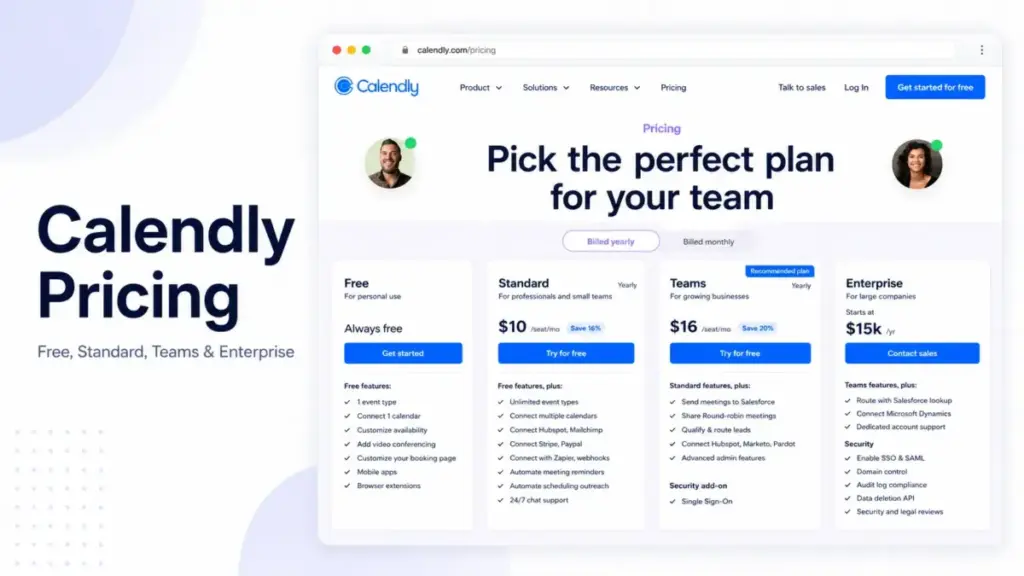
Calendly pricing looks simple at $10 to $16 per seat per month, but that headline number is not what most teams end up paying. The plan that fits a growing revenue team is usually Teams, and the gates around routing, Salesforce, and SSO are where the real cost shows up.
I have spent years evaluating project management and collaboration tools for distributed teams, and the pattern with Calendly’s pricing is consistent across public plan data and buyer reports: people judge it by the Free plan or the $10 Standard plan, then hit an upgrade wall sooner than they expected. This guide breaks down every plan, the hidden costs, and the real cost at 5, 10, 25, 50, and 100 seats.
One thing the public plan tables almost never tell you: Teams annual pricing changes once you pass 30 seats. That single detail moves the 50-user and 100-user math by thousands of dollars a year. More on that below.
Quick Calendly Pricing Verdict
Calendly is per-seat scheduling software with a usable free tier and three paid plans. Here is the short version before the detail.
| Question | Answer |
|---|---|
| Starting paid price | $10/seat/month (Standard, billed annually) |
| Free plan | Yes, free forever (1 event type, 1 calendar) |
| Free trial | 14-day Teams trial, no card required |
| Best plan for most teams | Standard for solo and small teams; Teams for revenue teams |
| Plan to avoid | Teams, if you only need unlimited event types and payment links |
| Biggest hidden cost | Empty-seat billing (you pay for unfilled seats) |
| Best alternative if too expensive | Cal.com (free for one user, $12/user Teams) |
| Pricing verified | June 2026 |
What this means: if you book meetings as one person, Free or Standard covers you. The decision gets expensive only when you add team routing, CRM sync, or enterprise security. Pricing verified June 2026 against the official Calendly pricing page. Check it for current rates.
Key Takeaways
- Calendly Standard costs $10/seat/month annually ($12 monthly) and fits most solo professionals and small teams.
- Calendly Teams costs $16/seat/month annually ($20 monthly) for the first 30 seats, then drops in tiers.
- Calendly bills for every seat you buy, filled or not. This catches teams off guard.
- Enterprise starts at $15,000/year, but the final quote is custom.
- SAML SSO is a paid add-on on Teams, and Calendly does not publish the add-on price.
Calendly Pricing for Solo Users
A solo user should start on Free and move to Standard the moment one booking link stops being enough. Free gives you one event type and one connected calendar. Standard runs $10/seat/month billed annually (as of June 2026).
That jump matters more than it looks. Free caps you at a single active event type. The second you need a “15-minute intro” and a “60-minute deep dive” running side by side, Free breaks.
Standard is where solo consultants, coaches, and recruiters live. It adds unlimited event types, up to 6 connected calendars, payment collection through Stripe and PayPal, automated reminders, and booking page branding.
Real cost for one user: $120/year on Standard annual, or $144/year if you pay month to month.
Here is the insider point. If reminders and a branded page drive real revenue for you, Standard pays for itself fast. If you only share one link a few times a month, stay on Free and stop reading the upgrade prompts.
Calendly Cost for a 5-Person Team
A 5-person team should pick Standard or Teams based on one question: do you route leads or just book meetings? That answer decides whether you pay $600 or $960 a year.
Standard for 5 users costs $600/year annually ($50/month). Teams for 5 users costs $960/year annually ($80/month). The $360 gap buys round-robin scheduling, lead routing, and Salesforce meeting sync.
If your five people are a support pod or a small services team that books one-to-one calls, Standard is plenty. Nobody needs round robin to confirm a client check-in.
If your five people are a sales team passing inbound leads between reps, Teams earns its price. Round robin alone removes the “who takes this demo” Slack thread.
Real cost for 5 users: Standard $600/year, Teams $960/year (both annual billing, as of June 2026).
Calendly Teams Pricing for 10 to 20 Users
A 10-to-20-person team almost always lands on Teams, and annual billing is the obvious move. Teams runs $16/seat/month annually for these seat counts, so 10 users cost $1,920/year and 20 users cost $3,840/year.
Annual billing saves real money here. At 10 seats, paying yearly instead of monthly saves $480 a year on Teams. The same 10 seats on Standard saves $240 a year annually versus monthly.
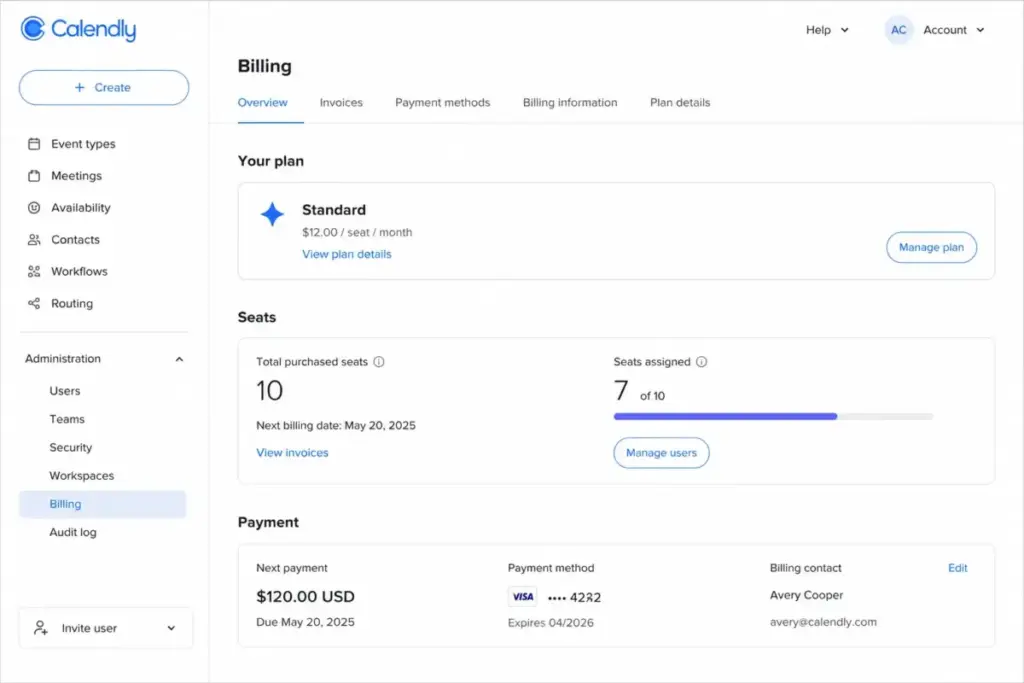
But watch the hidden cost at this size: empty seats. Calendly bills per license, not per active user. If you buy 15 seats and only fill 12, you still pay for 15.
This is the friction point most teams hit in month two. Someone leaves, the seat sits empty, and finance asks why the bill did not drop.
Real cost for 10 users: Teams $1,920/year annual, or $2,400/year monthly. Standard alternative: $1,200/year annual.
Calendly Cost at Scale: 25, 50, and 100 Users
At 25 or more users, Teams is still the default, and the per-seat price starts dropping once you pass 30 seats. This is the detail that competitor pricing pages skip.
Calendly Teams uses annual volume tiers. The first 30 seats stay at $16/seat/month. After that, the rate steps down by seat band.
| Seat band | Annual price per seat/month |
|---|---|
| Seats 1-30 | $16.00 |
| Seats 31-50 | $14.50 |
| Seats 51-100 | $14.00 |
| Seats 101-200 | $13.50 |
| Seats 201-300 | $13.00 |
| Seats 301+ | $12.00 |
What this means: the first 30 seats never get cheaper, so per-seat math breaks above 30. A 50-seat team does not pay 50 times $16. It pays 30 seats at $16 plus 20 seats at $14.50.
Here is the original cost math competitors leave out:
- 50 users on Teams annual: (30 × $16) + (20 × $14.50) = $770/month, or $9,240/year.
- 100 users on Teams annual: (30 × $16) + (20 × $14.50) + (50 × $14) = $1,470/month, or $17,640/year.
That 100-user figure is the trigger for an Enterprise conversation. Enterprise starts at $15,000/year. Once your Teams annual cost passes $15,000 and you also need SSO, SCIM, or audit logs, request a quote instead of stacking add-ons.
Negotiation tip: large teams should ask Calendly to compare Teams-plus-SSO against an Enterprise package directly. The SSO add-on price is not public, so you cannot run that comparison yourself.
Full Calendly Plan Breakdown
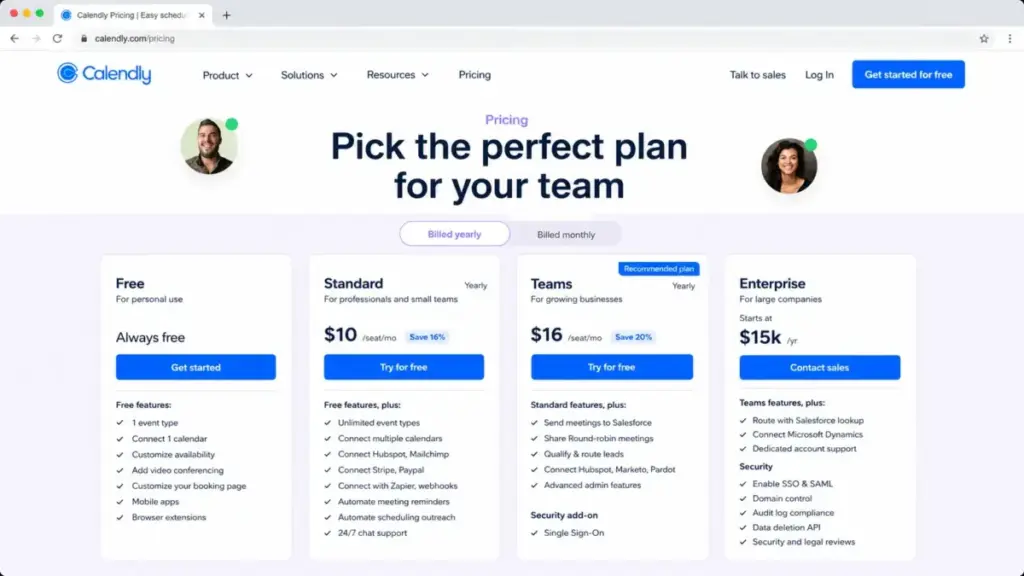
Calendly offers four plans: Free, Standard, Teams, and Enterprise. Each one is billed per seat except Enterprise, which is a custom annual contract.
| Plan | Monthly | Annual | Billing basis | Best for | Key limits |
|---|---|---|---|---|---|
| Free | $0 | $0 | Per user | One person, one link | 1 event type, 1 calendar |
| Standard | $12/seat | $10/seat | Per user | Solo pros, small teams | No CRM sync, no SSO |
| Teams | $20/seat | $16/seat | Per user (tiered above 30) | Revenue and sales teams | No SCIM, no audit logs |
| Enterprise | Custom | From $15,000/yr | Custom contract | Large, regulated orgs | Quote required |
What this means: the practical plan for most paying teams is Teams, not Standard, because routing and CRM sync are the reason teams buy Calendly in the first place. Solo users and lean teams without routing needs should stay on Standard. All prices verified June 2026 on Calendly’s pricing page.
What each plan includes
Free includes one event type, one connected calendar, unlimited meetings, basic video conferencing, mobile apps, and browser extensions. It is missing multi-person meetings, payments, workflows, and any admin control. Avoid Free if reminders or a branded page drive your bookings.
Standard includes unlimited event types, up to 6 calendars, multi-person meeting types, Stripe and PayPal payments, workflows, webhooks, and 24/7 chat support. It is missing Salesforce sync, marketing routing, SSO, and audit logs. Avoid Standard if you need to route leads across reps.
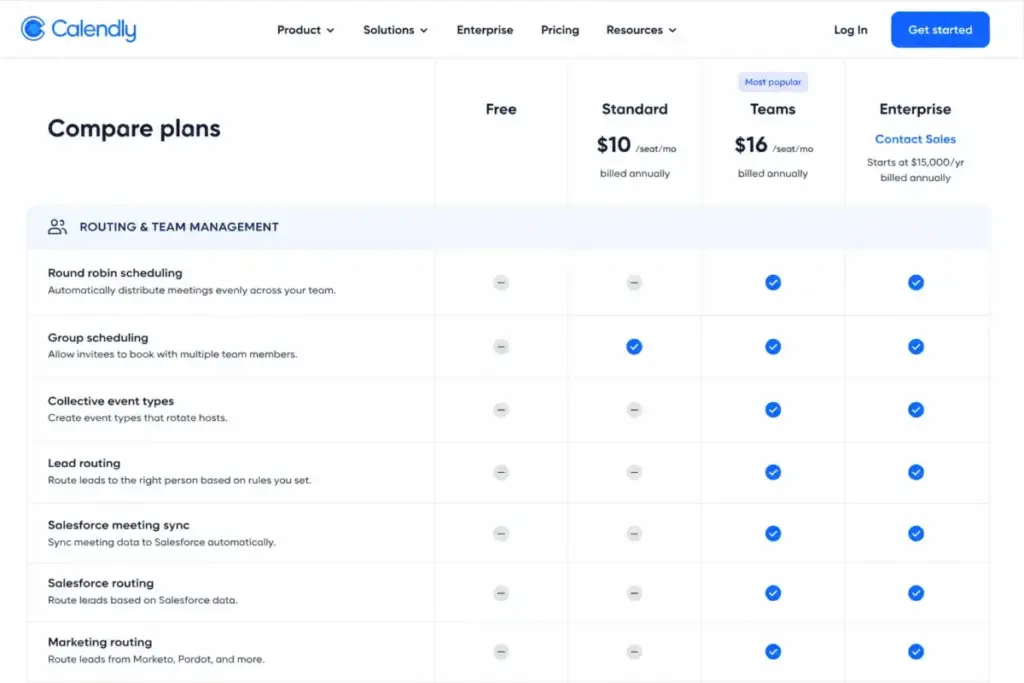
Teams includes everything in Standard plus Salesforce meeting sync, round robin, lead routing, HubSpot, Marketo, and Pardot connections, and advanced admin features. SSO is available as a paid add-on. It is missing SCIM, domain control, audit logs, and Microsoft Dynamics 365. Avoid Teams if you only want unlimited event types.
Enterprise includes the main governance and security features missing from Teams, including SSO/SAML, SCIM, domain control, audit logs, and dedicated support. Avoid Enterprise if you are under roughly 50 seats and do not need SSO or compliance controls.
Feature Gates by Plan
Calendly gates its highest-value features behind Teams and Enterprise, and knowing where each gate sits prevents buying the wrong plan. Here is what opens up at each level.
| Feature | Free | Standard | Teams | Enterprise |
|---|---|---|---|---|
| Event types | 1 | Unlimited | Unlimited | Unlimited |
| Connected calendars | 1 | 6 | 6 | 6 |
| Multi-person meetings | No | Yes | Yes | Yes |
| Payment collection | No | Yes | Yes | Yes |
| HubSpot, Mailchimp, Zapier | No | Yes | Yes | Yes |
| Round robin routing | No | No | Yes | Yes |
| Salesforce CRM sync | No | No | Yes | Yes |
| Marketo/Pardot routing | No | No | Yes | Yes |
| SAML SSO | No | No | Add-on | Included |
| SCIM provisioning | No | No | No | Yes |
| Domain control and audit logs | No | No | No | Yes |
| Microsoft Dynamics 365 | No | No | No | Yes |
| Dedicated onboarding | No | No | No | Yes |
What this means: the three gates that force upgrades are round robin (Free and Standard to Teams), Salesforce sync (Standard to Teams), and SSO plus SCIM (Teams to Enterprise). If you understand how workflow automation and routing fit your process, you can predict your upgrade path before you pay.
Calendly Hidden Costs Nobody Mentions
Calendly’s real cost includes several billing mechanics that the plan table hides. None of them are hidden in a sneaky way, but most pricing articles skip them entirely.
Empty-seat billing. Calendly charges for every seat you buy, whether a person fills it or not. Removing a user does not reduce your bill. You must reduce the seat count, and that change starts at the end of your billing cycle.
SSO on Teams costs extra. SAML SSO shows up as a Teams add-on and is included only on Enterprise. Calendly does not publicly list the add-on price, so teams needing SSO should request a quote.
SMS credit ceilings. Calendly caps SMS at 250 credits per seat per month on non-Enterprise plans and 1,000 per seat on Enterprise. Credit cost varies by destination country, so SMS-heavy appointment teams should verify usage before committing.
Invoice billing threshold. Paying by invoice instead of card is available on Standard or Teams only at a $5,000 spend, and on Enterprise at $15,000. A small team that wants procurement-style billing may not qualify.
Taxes. Calendly may add subscription tax based on your location. Tax-exempt organizations can submit documentation for a refund or future exemption.
| Hidden cost | Amount | When it hits |
|---|---|---|
| Empty seats | Full seat price | You buy more seats than users |
| SSO on Teams | Undisclosed add-on | You need SAML SSO without Enterprise |
| SMS overage | Varies by country | You exceed monthly credit caps |
| Invoice billing | $5,000 / $15,000 threshold | You want to pay by invoice |
| Taxes | Varies by location | Based on your billing address |
What this means: the empty-seat rule is the one that surprises growing teams most. Review your seat count quarterly, because Calendly will not prompt you to drop unused licenses.
Calendly Monthly vs Annual Pricing
Annual billing is the better deal on every paid Calendly plan, with savings of 16% on Standard and 20% on Teams. The official pricing page shows both labels (as of June 2026).
The math is straightforward. Standard drops from $12 to $10 per seat. Teams drops from $20 to $16 per seat for the first 30 seats.
At 10 seats, annual Teams saves $480 a year. At 10 seats, annual Standard saves $240 a year. The savings scale with seat count.
One caveat on commitment. Upgrades and added seats take effect right away, while downgrades and removed seats only start at the end of your billing cycle. Annual buyers should size seats conservatively.
Which Calendly Plan to Avoid
Avoid Teams if your only reason to upgrade is unlimited event types or payment links, because Standard already includes both at $6 less per seat. This is the most common overpay I see.
Teams exists for routing and CRM work. Round robin, lead qualification, and Salesforce sync are the features worth the jump. Buying Teams without using them means paying a 60% premium for nothing.
Also avoid staying on Free if reminders, multiple meeting types, or a branded booking page are core to revenue. Free is a personal tool, not a business one.
The exception runs the other way at scale. Do not assume Teams is cheaper than Enterprise at 100 seats. Teams annual lands at $17,640/year, while Enterprise starts at $15,000/year with security features bundled in.
Calendly Pricing vs Competitors
Calendly sits in the middle of the scheduling market on price, and the smarter comparison is billing model, not starting price. Calendly is per-seat. Its rivals split across per-seat, flat-rate, and CRM-bundled models.
| Tool | Starting price | Billing model | Free plan | 10-user cost |
|---|---|---|---|---|
| Calendly | $10/seat/mo annual | Per user | Yes | $1,200/yr (Standard) |
| Cal.com | $12/user/mo annual | Per user | Yes | $120/mo (Teams) |
| Doodle | $8.95/user/mo annual | Per user (2-user min) | Not confirmed | $89.50/mo annual |
| Acuity | $16/mo annual | Flat by calendars | No (7-day trial) | $49/mo (Premium) |
| HubSpot Meetings | $0 free; $7/seat/mo | CRM bundle | Yes | $70/mo (Sales Starter) |
What this means: Cal.com beats Calendly on the individual free plan and matches it on team price. Acuity charges flat by calendar capacity, so it gets cheaper per person as your team grows. HubSpot Meetings is free if you already live in HubSpot, and you can see the full breakdown on the HubSpot pricing guide. Competitor figures verified June 2026 against each vendor’s official pricing.
Pros and cons of Calendly pricing
Pros: a genuinely usable free tier, clear per-seat rates, a 14-day Teams trial with no card, and annual discounts up to 20%.
Cons: empty-seat billing, an undisclosed SSO add-on price, a custom Enterprise quote, and a Teams premium that punishes teams who do not route leads.
Is Calendly Worth the Price
Calendly is worth it for any team where a booked meeting carries pipeline or revenue value, and it is not worth it for casual one-link users. The verdict splits cleanly by use case.
It is worth paying for if you are a consultant who books paid calls, a recruiter scheduling interviews, or a sales team routing inbound demos. The reminders, payments, and routing recover their cost in saved time and fewer no-shows.
It is not worth paying for if you share one link occasionally, if you only need multiple staff calendars for basic booking, or if you already run scheduling inside HubSpot, Microsoft 365, or Acuity.
Three buyer scenarios make this concrete:
- A solo recruiter scheduling 30 interviews a month: Standard at $120/year. Worth it for reminders alone.
- An 8-person SaaS sales team routing inbound leads: Teams at $1,536/year annual. Worth it for round robin and Salesforce sync.
- A 40-person services org needing SSO and audit logs: request Enterprise. Teams plus an SSO add-on rarely beats a bundled quote at that size.
How to Avoid Overpaying for Calendly
You can cut your Calendly bill with a few deliberate choices, most of which come down to matching the plan to actual use. Here are seven that work.
- Start on Free and only upgrade when a single event type genuinely blocks you.
- Pick Standard over Teams unless you route leads or sync Salesforce.
- Pay annually to capture the 16% to 20% discount.
- Audit seats quarterly so empty licenses do not keep billing.
- Right-size before renewal, since downgrades only apply at cycle end.
- Compare Teams-plus-SSO against Enterprise before adding the SSO add-on.
- Check SMS credit limits for your destination countries if you send reminders by text.
These steps are how James Carter advises teams to keep collaboration and scheduling spend honest. Calendly rewards buyers who plan ahead and punishes those who autopilot through upgrade prompts. For broader tooling decisions, our roundup of the best productivity tools covers where scheduling fits alongside the rest of your stack.
Calendly Pricing FAQ
How much does Calendly cost in 2026?
Calendly pricing starts at $0 for Free and $10 per seat per month for Standard on annual billing. Teams costs $16 per seat per month annually for the first 30 seats, and Enterprise starts at $15,000 per year with a custom quote. Monthly billing runs higher at $12 and $20 per seat.
Is Calendly still free?
Yes, Calendly has a free-forever plan. It includes one event type, one connected calendar, unlimited meetings, basic video conferencing, mobile apps, and browser extensions. It does not include payments, workflows, multi-person meetings, or any team routing, so most businesses outgrow it quickly.
What is the difference between Calendly Standard and Teams?
Standard ($10/seat annually) gives unlimited event types, 6 calendars, payments, and workflows. Teams ($16/seat annually) adds round robin scheduling, lead routing, and Salesforce, Marketo, and Pardot connections. If you book one-to-one meetings, Standard is enough. If you route leads across reps, Teams is the plan you need.
Does Calendly charge for unused seats?
Yes. Calendly bills for every seat you purchase, whether a person fills it or not. Removing a user does not lower your bill on its own. You must reduce the seat count, and that reduction only takes effect at the end of your current billing cycle.
Does Calendly have a free trial?
Yes. New users get a 14-day trial of the Teams plan with no credit card required. After the trial ends, the account automatically moves to the Free plan. Paid features such as adding users or creating workflows switch off when the trial expires.
Is SSO included in Calendly Teams?
No. SAML SSO is a paid add-on on the Teams plan and is only included by default on Enterprise. Calendly does not publish the SSO add-on price. Teams that need single sign-on should request a quote and compare the Teams-plus-SSO total against an Enterprise package.
How much is Calendly Enterprise?
Calendly Enterprise starts at $15,000 per year. The final price depends on seat count, implementation scope, and contract terms, so you must request a quote. Enterprise bundles SSO/SAML, SCIM, domain control, audit logs, the Data Deletion API, Microsoft Dynamics 365, and dedicated support.
Is Cal.com cheaper than Calendly?
For individuals, yes. Cal.com offers a free plan for one user with unlimited event types and calendars, which is more generous than Calendly Free. For teams, the two are close: Cal.com Teams costs $12 per user per month annually versus Calendly Teams at $16. Cal.com also offers a 14-day trial.
Does Calendly offer a nonprofit discount?
Calendly offers special pricing for qualified nonprofit organizations, but it does not publish the discount percentage. Eligible nonprofits should contact Calendly support with their documentation to confirm the rate and eligibility. Treat any specific figure you see elsewhere as unverified until Calendly confirms it.
The Bottom Line on Calendly Pricing
Calendly pricing rewards teams that match the plan to real use and penalizes those who upgrade on autopilot. Free works for one person and one link. Standard at $10 per seat covers solo professionals and small teams. Teams at $16 per seat is the plan revenue teams actually need once routing and CRM sync enter the picture.
Watch the three things competitors gloss over: empty-seat billing, the Teams tier drop above 30 seats, and the undisclosed SSO add-on. Get those right and Calendly stays affordable. Ignore them and the bill creeps past what the plan table promised.
If the price stops making sense, Cal.com is the closest value alternative for most teams. Pricing verified June 2026. Check the Calendly pricing page for the current rates before you commit.