The Zoom Pro sticker price is $16.99 per user per month. That number is honest and almost useless. It tells you what one host pays before the things that actually move your bill: annual billing, the jump to 300-participant meetings, the SSO gate, a phone bundle, a webinar license, a room license, storage, and tax at checkout.
I evaluate meeting and collaboration tools through the lens of what a team of 5 or 50 ends up paying after the second invoice, not the first.
So this guide does what most ranking pages skip. It calculates Zoom at 5, 10, 25, 50, and 100 US users, maps exactly which features force an upgrade, and flags the costs that show up later.
If you want the wider context first, start with our roundup of the best video conferencing software, then come back here for the money math.
All prices below are in USD and were checked against Zoom’s official pricing pages on June 25, 2026, and cross-checked against recent 2026 pricing pages where Zoom renders price cards dynamically. Taxes, region, promotions, and enterprise quotes can change the final amount, so confirm at checkout before you buy.
Key Takeaways
- Free still works for short calls. Zoom Basic is free but caps meetings at 40 minutes and 100 participants, with no cloud recording.
- Pro is Zoom’s cheapest paid plan at $16.99/user/month monthly or $14.16/user/month billed annually ($169.92/user/year). It removes the 40-minute cap.
- The real upgrade trigger to Business is rarely meeting length. It is SSO, managed domains, and 300-participant meetings. Business is $21.99/user/month monthly or $18.33/user/month annually ($219.96/user/year).
- Add-ons are where Zoom gets expensive. Webinars, Large Meeting, Phone, and Rooms each stack on top of your seat price.
- Cancelling a paid plan can delete your cloud recordings 30 days later unless a qualifying plan remains. This is the cost nobody puts in a pricing table.
- Zoom is not the cheapest option if your team already pays for Microsoft 365 or Google Workspace.
Quick Pricing Verdict
| Question | Answer (verified June 25, 2026, USD) |
|---|---|
| Starting paid price | Pro: $14.16/user/month billed annually ($169.92/year) |
| Free plan | Yes. 40-minute cap, 100 participants, no cloud recording |
| Best plan for most small teams | Pro, unless you need SSO or 300-person meetings |
| Best plan for IT-governed teams | Business ($18.33/user/month annually) |
| Plan to avoid buying by default | Business Plus, unless you are replacing a phone system |
| Biggest hidden cost | Add-on stacking (Webinars, Phone, Large Meeting, Rooms) |
| Best alternative if Zoom is too expensive | Microsoft Teams or Google Workspace if you already pay for one |
The Advertised Price vs The Real Price
Here is the gap that catches buyers. The price you see on the plan card is the per-seat price on one billing cycle. The price you pay depends on which gate you hit first.
| What you think you are buying | What changes the real bill |
|---|---|
| “$16.99 Pro” | Drops to $14.16/user/month only if you commit annually |
| “Pro for the whole team” | Pro caps at 100 participants. 300 needs Business |
| “We will just add SSO later” | SSO is a Business feature, not an add-on. The whole account moves up |
| “Pro includes recording” | Pro includes 10 GB per license, then storage becomes a question |
| “We need a webinar once” | Webinars is a separate paid license on top of your seat |
| “Business Plus is the next step up” | It is a phone bundle. You pay for Zoom Phone whether you use it or not |
The pattern repeats across every plan. Zoom’s base meeting product is reasonably priced. The cost surprises come from capacity, security gates, and bundled services that look like simple tier upgrades but are really separate purchases.
The 5 Hidden Costs Nobody Mentions
1. Add-on stacking
This is the big one. Large Meeting, Webinars, Phone, and Rooms are all priced per license on top of your base seat. A 20-person team on Business at $18.33/user/month is about $4,400/year. Add ten Zoom Phone Unlimited seats at roughly $15 to $16/user/month and a webinar license in the low $80s per month, and you have added thousands before anyone counts rooms. The base plan is the floor, not the ceiling.
2. Cloud recording storage
Pro and Business each include 10 GB of cloud recording per license. That sounds generous until a sales team records every external call. Zoom’s official accessible text does not fully disclose overage or extra-storage pricing, and third-party pages and user reports flag storage as a recurring surprise. If your team records heavily, treat storage as a variable you will eventually pay for.
3. The cancellation recording trap
This one is not in any plan card. Per Zoom’s help documentation, cancellations take effect at your next renewal date, and cloud recordings are permanently deleted 30 days after a paid base plan is cancelled, unless the account keeps a qualifying plan with cloud recordings. If you downgrade or leave Zoom and forget to export, you can lose recordings you assumed were archived. Export before you cancel.
4. The phone support gate
Paid does not mean phone support. Zoom’s official support comparison shows live chat for accounts spending over $10/month and live phone support only for accounts spending over $200/month. A 5-person Pro team at about $71/month annually gets chat, not a phone line. Small teams that expect a human on the phone should set that expectation before buying.
5. Tax and renewal timing
Sales tax, VAT, GST, or comparable consumption taxes are applied at checkout based on your sold-to address, what you bought, and your exemption status. They are not in the headline price. Enterprise renewals can also be re-quoted, and add-on contracts can lock in alongside your base term. None of this is hidden in a sinister way. It is just absent from the number you compared.
Plan-by-Plan Breakdown
Here is every self-serve Zoom Workplace plan with monthly and annual pricing, in USD.
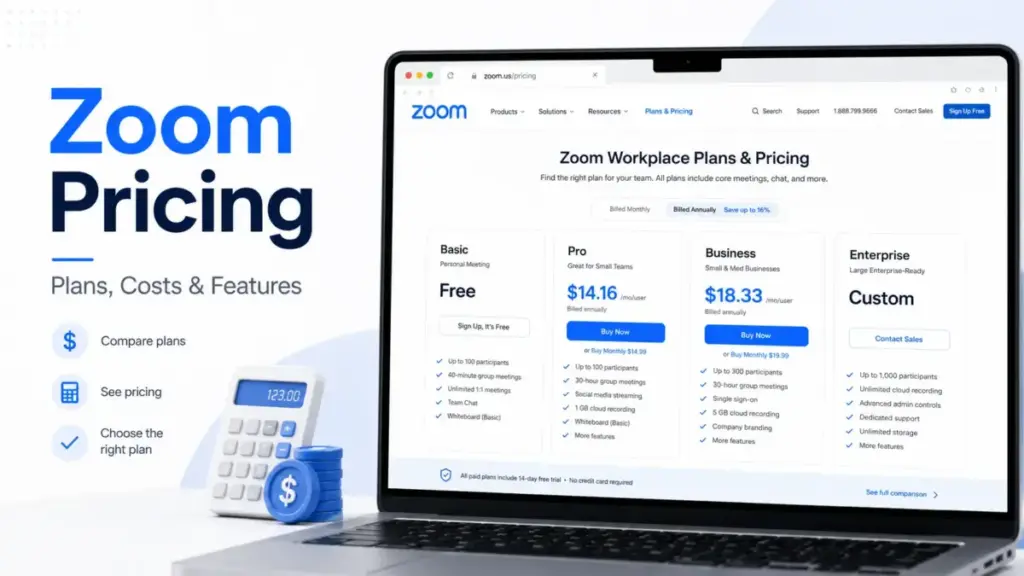
| Plan | Monthly | Annual (per user/month) | Annual total | Best for | Key limits |
|---|---|---|---|---|---|
| Basic | $0 | $0 | $0 | Short internal calls | 40-min cap, 100 participants, no cloud recording |
| Pro | $16.99 | $14.16 | $169.92 | Solo users, small teams | 100 participants, no SSO, 10 GB recording/license |
| Business | $21.99 | $18.33 | $219.96 | IT-governed teams | 300 participants, adds SSO + managed domains |
| Pro Plus | $25.00 | $20.50 | $246.00 | 1-9 users needing phone | Pro limits + Zoom Phone unlimited domestic |
| Business Plus | $29.00 | $24.50 | $294.00 | 10-250 users consolidating phone | Business limits + Zoom Phone unlimited domestic |
| Enterprise | Custom | Custom | Custom | Large orgs, 250+ users | Sales-quoted, adds enterprise controls |
Basic. Free, capped at 40 minutes and 100 participants, with limited AI Companion, three editable whiteboards, five two-minute clips, and one personal booking page. No cloud recording, no admin portal, no SSO. Fine for quick internal syncs.
Pro. The cheapest license that removes the 40-minute cap. You get 30-hour meetings, 100 participants, 10 GB cloud recording per license, and paid-plan AI Companion for note-taking and meeting summaries. What you do not get: 300-participant meetings, SSO, managed domains, or the admin and compliance APIs. For a solo consultant or a 5-person team that mostly hosts small external calls, Pro is the right plan.
Business. Same meeting reliability, plus the things IT cares about. Business adds 300 participants, unlimited whiteboards, unlimited booking pages, SSO via SAML 2.0, managed domains, and DLP and archiving APIs. The price gap over Pro is small. The feature gap is the reason most growing teams move here.
Pro Plus and Business Plus. These are not “more Zoom.” They are Zoom plus Zoom Phone unlimited domestic calling. Pro Plus targets 1-9 users; Business Plus targets 10-250 users. Buy them only if you are replacing or consolidating a phone system. More on that below.
Enterprise. Custom quoted. Official plan cards position it for larger meeting capacity, full phone, webinars, rooms, workspace reservation, visitor management, translated captions, and enterprise-only controls like customer managed key and hybrid cloud. Zoom does not publicly disclose the per-user price or seat minimum, so I will not invent one. If you are above 250 users or need those controls, you are talking to sales.
Feature Gates: What You Actually Get by Plan
This is the table IT buyers actually search for. It maps the gates that force an upgrade.
| Feature | Basic | Pro | Business | Enterprise |
|---|---|---|---|---|
| 40-minute limit removed | No | Yes | Yes | Yes |
| 100 participants | Yes | Yes | Yes | Yes |
| 300 participants | No | No | Yes | Yes |
| 500+ participants without Large Meeting add-on | No | No | No | Yes |
| 10 GB cloud recording per license | No | Yes | Yes | Unlimited positioning |
| Unlimited AI note-taking and summaries | Limited | Yes | Yes | Yes |
| Unlimited whiteboards | No | No | Yes | Yes |
| Unlimited booking pages | No | No | Yes | Yes |
| SSO via SAML 2.0 | No | No | Yes | Yes |
| Managed domains | No | No | Yes | Yes |
| Archiving API and DLP API | No | No | Yes | Yes |
| Customer managed key | No | No | No | Yes |
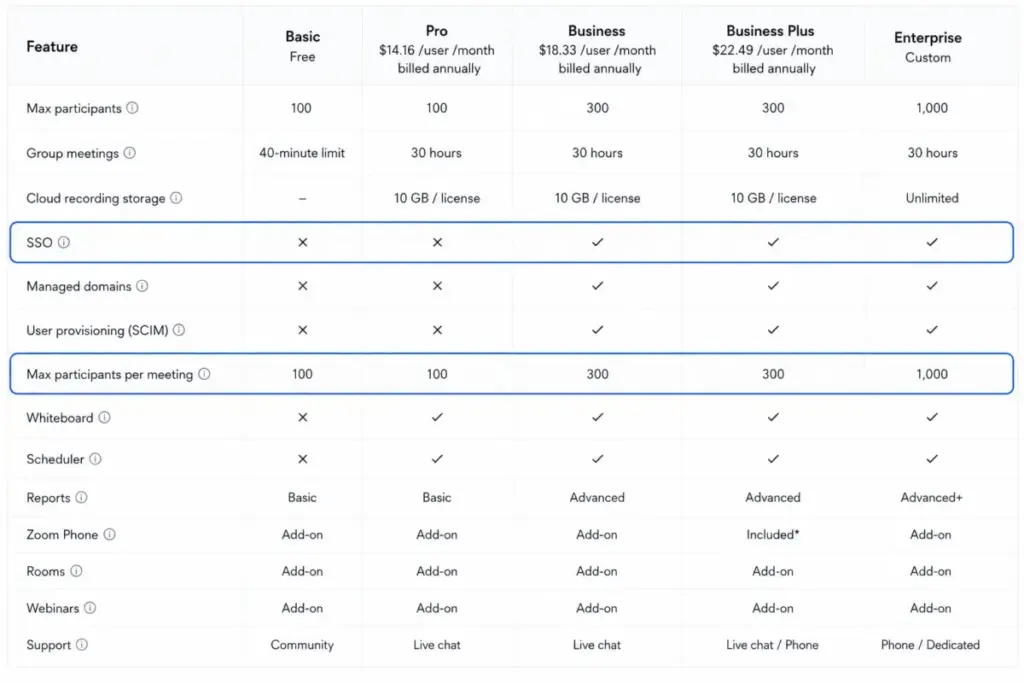
The single most important row is SSO. If your security team requires single sign-on, you are on Business or higher, full stop. Meeting length never enters that decision.
Add-Ons: Large Meeting vs Webinars vs Events
Add-ons are where buyers overpay, usually because they pick the wrong one for the job. Here is the decision in plain terms.
Use Large Meeting when you need an interactive meeting bigger than your plan allows. Capacities run 500, 1,000, 3,000, or 5,000 participants, assigned to a licensed user. Third-party 2026 pages commonly cite a starting price near $50/month or $600/year, though exact pricing varies by capacity. Everyone can still talk, share, and use video. It is a bigger meeting, not a broadcast.
Use Zoom Webinars when you need one-to-many: registration, Q&A, polls, reporting, and up to 30-hour event duration. Official pricing is capacity-based by attendee count. Public sources for the 500-attendee tier sit in the low $80s per license per month billed annually, with sources differing between roughly $79 and $83.33, so verify the exact attendee tier at checkout. Webinars Plus (around $290.83/license/month annually per recent 2026 data) adds pre-recorded content, backstage coordination, and richer analytics. Zoom Events (around $415.83/license/month annually) handles multi-session events with lobbies, ticketing, and sponsorship.
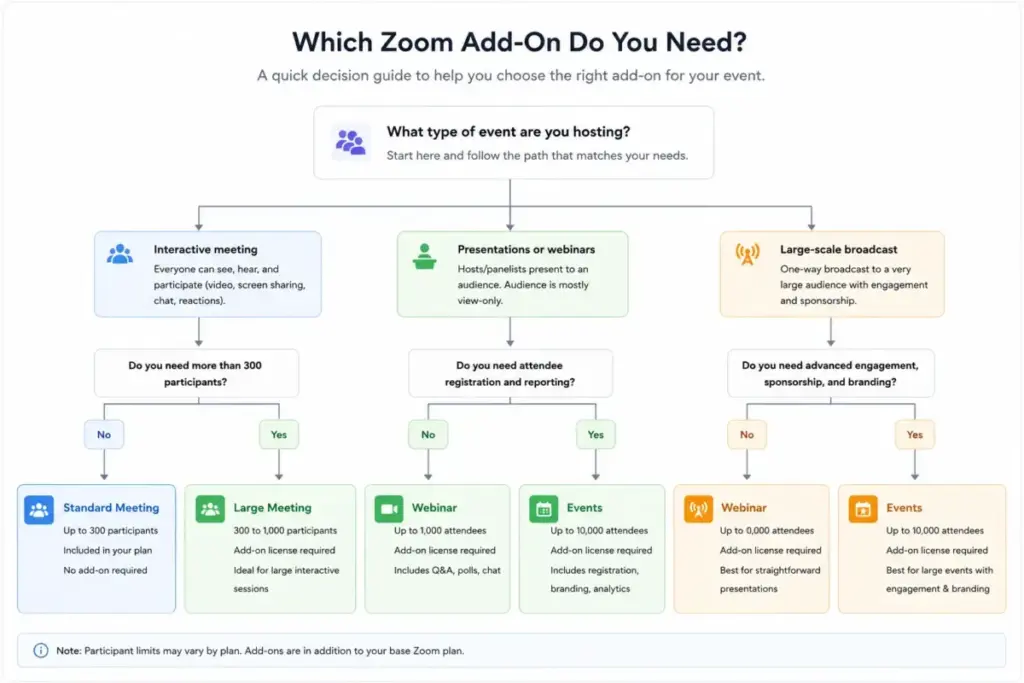
A quick filter I use: if the audience needs to interact, it is a meeting, so look at Large Meeting. If the audience watches and asks questions, it is a broadcast, so look at Webinars. Zoom’s own guidance notes a regular meeting can be enough below 500 participants, which means you may not need any add-on at all.
The other common add-ons:
| Add-on | Public pricing context (USD) | What it adds |
|---|---|---|
| Zoom Rooms | $41.58/room/month annually (about $49 monthly) | Conference-room meeting software; hardware separate |
| Zoom Phone US/Canada Metered | ~$10-$10.50/user/month annually | Cloud phone, metered outbound calls |
| Zoom Phone US/Canada Unlimited | ~$15-$16/user/month annually | Unlimited domestic calling |
| Zoom Scheduler | Included (1 page Basic, unlimited Business) | Booking pages tied to meetings and calendar |
When the Free Plan Stops Working
Basic is genuinely useful, and most teams outgrow it for one predictable reason.
The 40-minute cap is the wall. A free meeting cuts off at 40 minutes with 100 participants, which is fine for standups and quick syncs and frustrating for anything client-facing. The moment a sales or training call gets awkwardly cut, someone buys Pro.
The next triggers, in the order teams usually hit them: cloud recording (Basic has none), deeper AI Companion use, 300-participant meetings, then SSO and managed domains once IT gets involved. If you only ever host short internal calls, Basic can last indefinitely. If you host external meetings, budget for Pro from day one.
Real Cost Scenarios: 5, 10, 25, 50, and 100 Users
This is the math the plan cards never show. All figures are USD and use annual billing unless noted.
| Users | Recommended plan | Annual cost | Monthly equivalent | Notes |
|---|---|---|---|---|
| 5 | Pro | $849.60/year | $70.80/mo ($84.95 if billed monthly) | 30-hour meetings, 100 participants, no SSO needed |
| 10 | Pro or Business | $1,699.20 (Pro) / $2,199.60 (Business) | $141.60 / $183.30 | First point where SSO or 300 participants may justify Business |
| 25 | Business | $5,499.00/year | $458.25/mo | SSO, managed domains, 300 participants, stronger admin |
| 50 | Business | $10,998.00/year | $916.50/mo | Governance matters more than the Pro price gap here |
| 100 | Business or Business Plus | $21,996 (Business) / $29,400 (Business Plus) | $1,833 / $2,450 | Business Plus adds Phone; compare against existing PBX first |
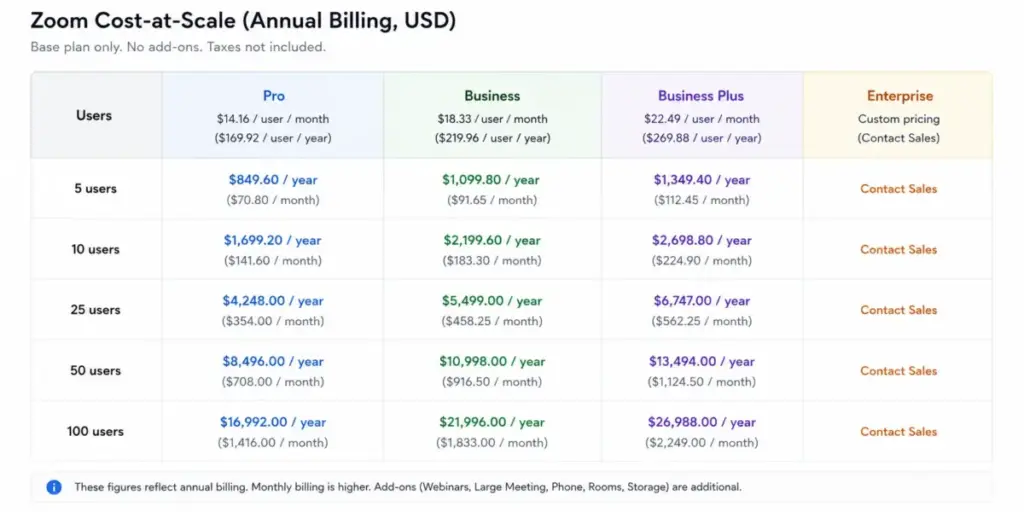
Read the 10-user row carefully. The jump from Pro to Business is about $500/year for ten seats. If you need SSO or 300-person meetings, that is a bargain. If you do not, it is $500 you did not have to spend. Decide based on the feature gate, not the round number. For more guides like this one, the full library lives in our pricing guides hub.
Monthly vs Annual Billing
Annual billing saves about 16.7% on Pro, 16.6% on Business, and 15.5% on Business Plus versus paying monthly. In dollars, a 10-user Pro team saves about $339.60/year by committing annually, and a 10-user Business team saves about $439.20/year.
The tradeoff is commitment. Annual locks your seat count and your term, and add-ons can lock in alongside it. If your headcount is stable, annual is the obvious choice. If you are scaling fast or unsure, the monthly premium buys flexibility worth more than the discount. Verified nonprofits, separately, can get a 50% discount on Pro, Business, Webinars, and Large Meetings, which changes this math entirely.
Which Zoom Plan Should You Avoid?
Do not buy Business Plus by default just because it sits one row above Business.
Business Plus is Business plus Zoom Phone unlimited domestic calling, at $24.50/user/month annually versus Business at $18.33. That is about $74/user/year for the phone bundle. If your team does not need a cloud phone system, you are paying for a product you will not use. Judge Business Plus as a phone decision: compare its phone component against a standalone Zoom Phone seat (roughly $15-$16/user/month unlimited), against Microsoft Teams Phone, or against keeping your existing PBX. Only bundle when consolidation actually saves money.
The other thing to avoid: buying a Webinars license for marketing webinars that really need funnels, email sequences, and landing pages. Zoom Webinars handles the broadcast well. It is not a marketing automation platform.
Which Zoom Plan Should You Choose?
- Solo user or freelancer: Pro. You need the 40-minute cap gone and cloud recording. You do not need SSO.
- 5-person team, external calls: Pro. 100 participants is plenty, annual billing keeps it under $850/year.
- 10-25 person team with IT requirements: Business. The SSO and managed-domain gates make this the practical floor, not the price.
- Team consolidating a phone system: Business Plus, but only after pricing the phone component on its own.
- 250+ users or compliance needs: Enterprise, via a sales quote. Ask specifically about storage, support tier, and which add-ons are included.
Zoom Pricing vs Competitors
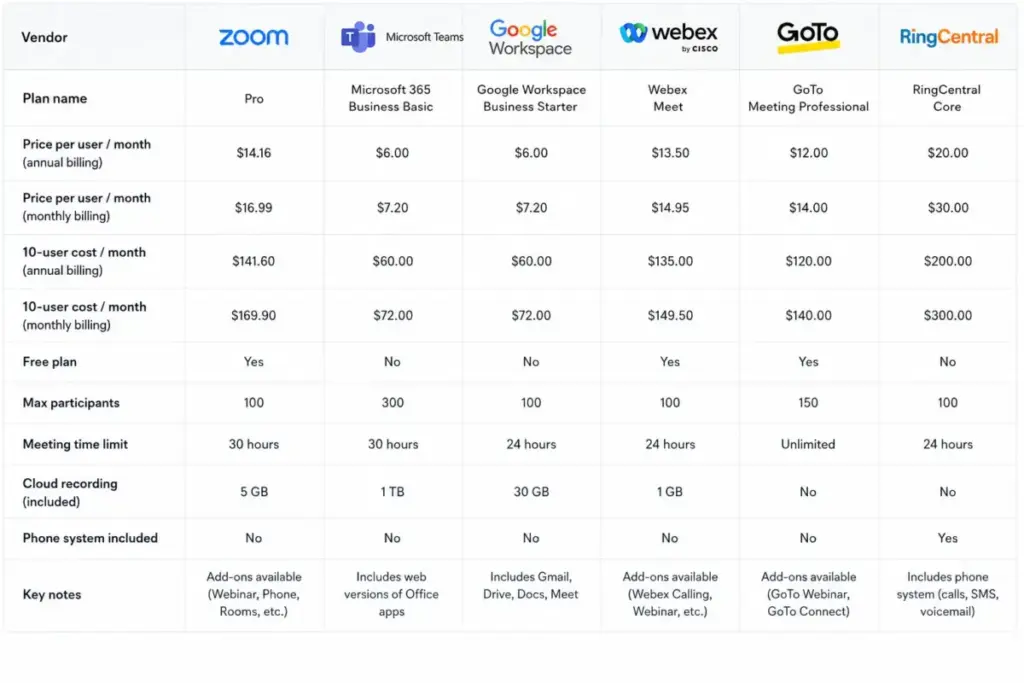
Zoom is mid-priced for a standalone meeting tool. Whether it is “expensive” depends entirely on what you already pay for. If Microsoft 365 or Google Workspace is already in your stack, their meeting tools are nearly free by comparison.
| Product | Starting price (USD) | Billing | Free plan | 10-user monthly (annual equiv) |
|---|---|---|---|---|
| Zoom Pro | $14.16/user/mo | Per user | Yes | $141.60 |
| Zoom Business | $18.33/user/mo | Per user | Yes | $183.30 |
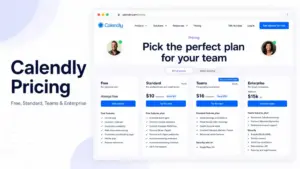
| Microsoft Teams Essentials | $4.00/user/mo | Per user | Yes (separate) | $40.00 |
| Microsoft 365 Business Basic | $6.00/user/mo | Per user | No (trial) | $60.00 (rising to $70 after July 1, 2026) |
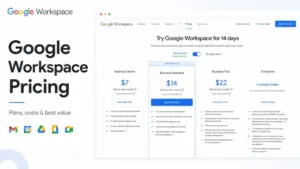
| Google Workspace Business Starter | $7.00/user/mo (annual) | Per user | No (trial) | $70.00 ($84 on flexible) |
| Cisco Webex Meet | $14.50/user/mo (third-party listing) | Per host | Yes | $145.00 |
| GoTo Meeting Professional | $12/organizer/mo (annual) | Per organizer | No (trial) | $120.00 |
| RingCentral Video Pro Plus | $10/user/mo | Per user | Yes (Video Pro) | $100.00 |
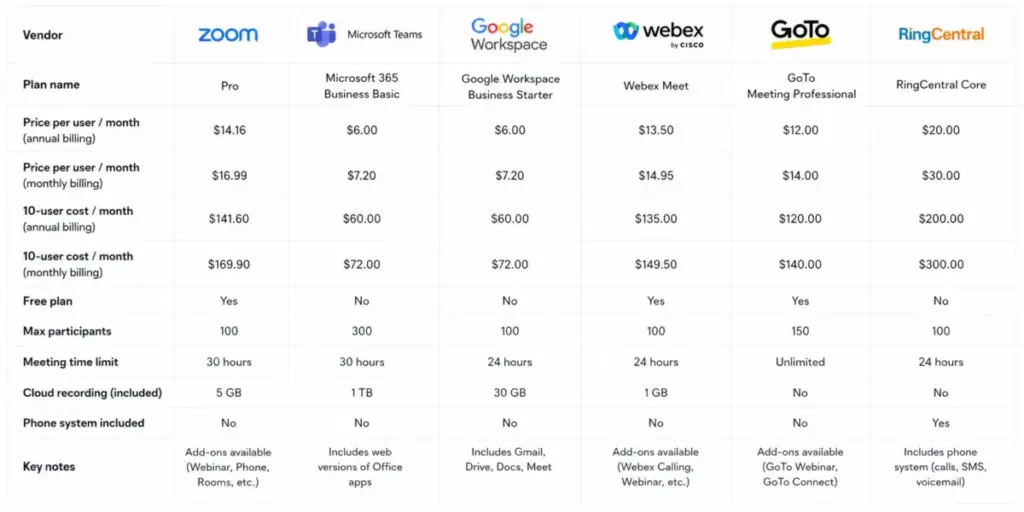
Webex and GoTo figures above come from third-party listings or dynamically rendered pages and are shown as context, not confirmed primary pricing. Verify at the vendor checkout.
Microsoft and Google Workspace win on raw price because video is bundled into a suite you may already own. Microsoft has also announced a Business Basic increase to $7.00/user/month effective July 1, 2026, so factor that in. The honest read: Zoom rarely wins a pure price comparison. It wins on meeting reliability and the fact that external guests already know how to use it.
Is Zoom Worth the Price?
Worth it if you host external meetings often, value Zoom’s reliability and near-universal guest familiarity, and need clean cloud recording and AI summaries. Consultants, sales teams, training and customer success teams, agencies, and SMBs are the clearest fit. Pro for small teams, Business once SSO or 300 participants enter the picture.
Not worth it if you are already standardized on Microsoft 365 or Google Workspace for meetings, or if your real need is marketing webinars with automation rather than simple broadcasts. In both cases, compare the bundled or purpose-built alternative before paying for Zoom add-ons. For a deeper feature-level look, our Zoom Workplace review covers the product itself.
How to Avoid Overpaying for Zoom
- Commit annually only if headcount is stable. The 15-17% discount is real, but so is the lock-in.
- Buy Business for the gate, not the round number. If you do not need SSO, managed domains, or 300 participants, stay on Pro.
- Right-size host licenses. Participants do not need paid licenses, only hosts do. Audit who actually schedules meetings.
- Price phone separately before buying Business Plus. The bundle is only a deal if you would buy the phone seats anyway.
- Match the audience tool. Use Large Meeting for interactive meetings, Webinars for broadcasts. Picking the wrong one doubles the cost.
- Export recordings before any cancellation or downgrade. They can be deleted 30 days after a paid plan ends.
- Check the nonprofit discount. Verified nonprofits get 50% off Pro, Business, Webinars, and Large Meetings.
A note on the numbers: Zoom renders some prices dynamically, and a few older pages still cite Pro at $13.33/user/month annually while current pages show $14.16. I have used the freshest verified figures here, but a price card can shift by date, region, or promotion. Always confirm your exact total at checkout. If you are weighing Zoom against a chat-first stack, our Slack pricing guide covers the other side of that decision, and our explainer on video conferencing covers the category basics.
Frequently Asked Questions
How much does Zoom cost per month?
Pro is $16.99/user/month billed monthly, or $14.16/user/month billed annually. Business is $21.99 monthly or $18.33 annually. Basic is free with a 40-minute cap. All prices in USD.
Is Zoom still free in 2026?
Yes. Zoom Basic is free for one user, with a 40-minute meeting limit, 100 participants, limited AI Companion, and no cloud recording.
Does Zoom Business require 10 users?
Not on Zoom’s current small-business plan card, which positions Business from a single user. Older third-party pages still mention a 10-user minimum, so do not treat that as confirmed for 2026 without checking checkout.
How much does Zoom cost for 10 users?
About $1,699.20/year on Pro or $2,199.60/year on Business, both billed annually. The difference buys SSO, managed domains, and 300-participant meetings.
Can I host 300 participants on Zoom without Business?
No. Pro caps at 100 participants. You need Business for 300, or a Large Meeting add-on for 500 and above.
How much does a Zoom webinar cost?
Webinar pricing is capacity-based. The 500-attendee tier sits in the low $80s per license per month billed annually based on current public data, though sources vary. Confirm the exact attendee tier at checkout.
Is Zoom cheaper than Microsoft Teams?
No, not on price alone. Microsoft Teams Essentials starts at $4/user/month and Business Basic at $6 (rising to $7 after July 1, 2026), versus Zoom Pro at $14.16 annually. If you already pay for Microsoft 365, Teams is the cheaper meeting tool.
What happens to my recordings if I cancel Zoom?
Cloud recordings are permanently deleted 30 days after a paid base plan is cancelled, unless the account keeps a qualifying plan with cloud recordings. Export anything you need first.
Do meeting participants need paid Zoom licenses?
No. Only the host scheduling and running the meeting needs a paid license. Participants join for free.
The Bottom Line
Zoom’s base meeting product is fairly priced. Pro is a sensible buy for small teams, and Business is a small premium for the security and capacity gates that growing teams hit. The cost surprises live in the add-ons, the storage, the cancellation rules, and the bundles that look like simple upgrades. Price the gate you are actually trying to clear, ignore the rest, and Zoom stays reasonable. Stack add-ons without checking, and it does not.