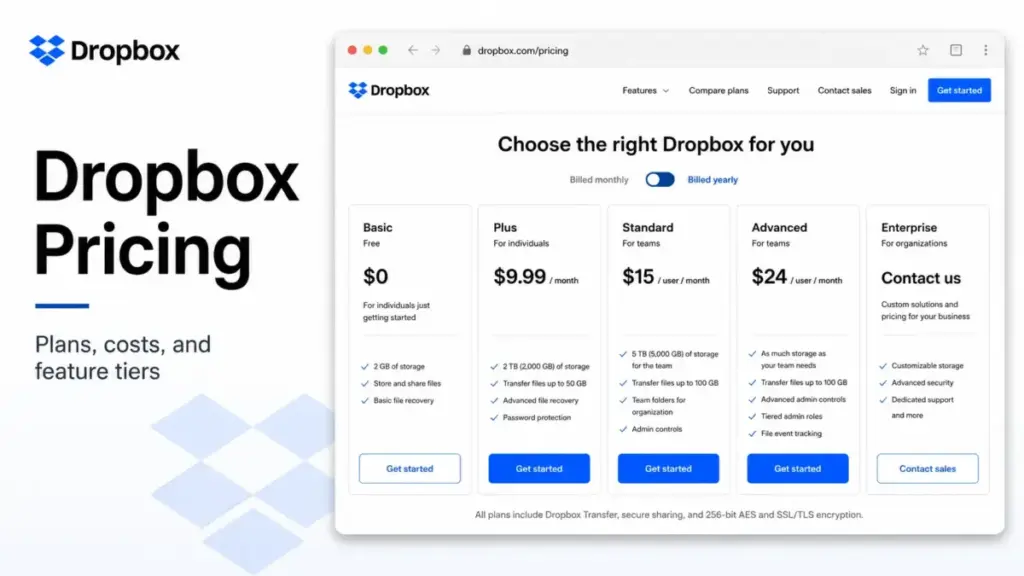
Dropbox advertises Plus at $9.99 per month. That number is honest, and it is also the start of a budgeting problem. Dropbox pricing looks simple on the plan card, but the real cost decision lives in the gaps between plans.
The problem is what sits on either side of it. Below Plus, the only option is a free plan capped at 2 GB. Above it, the next individual tier (Professional) costs $16.58 per month for storage most people will never fill. There is no 100 GB or 500 GB middle plan, so the moment 2 GB runs out, the cheapest legitimate jump is to a 2 TB plan you are paying for whether you use it or not.
For teams, the math gets more interesting. Dropbox Standard runs $15 per user per month on annual billing, and Advanced jumps to $24 per user per month with a three-license minimum. The gap between those two plans is where most of the real money decisions happen, because Advanced is where single sign-on, ransomware detection, and longer recovery windows live.
This guide breaks down every Dropbox plan, the annual versus monthly spread, the add-ons that stack on top of your base price, what a team of 5, 10, 25, 50, or 100 actually pays, and when Google Workspace, Microsoft 365, or Box is the cheaper answer. If you want the broader category picture first, see our roundup of team collaboration tools.
Key takeaways
- Free plan: Dropbox Basic is free with 2 GB of storage. Useful for testing, too small for ongoing work.
- Cheapest paid plan: Plus at $9.99 per month billed annually ($119.88 per year) for 1 user and 2 TB.
- Best value for most small teams: Standard at $15 per user per month annually, which adds team storage, an admin console, and 180-day version history.
- The biggest pricing trap: there is no middle storage tier between 2 GB free and 2 TB paid, so light users overpay.
- The hidden costs: Replay ($10 to $12 per user per month), the Security add-on (price not disclosed), and sales-led governance add-ons can all stack on top of your base subscription.
- Enterprise is custom: Dropbox does not publish Enterprise pricing. Treat any quoted figure with suspicion and request a quote.
- Cheaper alternatives exist: if you mainly need office apps and storage, Microsoft 365 Business Basic ($6 per user per month) and Google Workspace Business Starter ($7) undercut Standard.
Quick pricing verdict
Here is the short version before the tables.
Starting price: $9.99 per user per month (Plus, billed annually). Free option: yes, Basic with 2 GB. Best plan for most teams: Standard. Plan to avoid for tiny teams: Advanced, because of its three-license minimum and higher per-seat rate. Biggest hidden cost: the Replay add-on for video review teams, plus a Security add-on that Standard customers must buy separately. Worth it if you share large files externally and need reliable sync. Skip it if you mainly need email, docs, and meetings, where bundled suites cost less.
Dropbox pricing plans at a glance
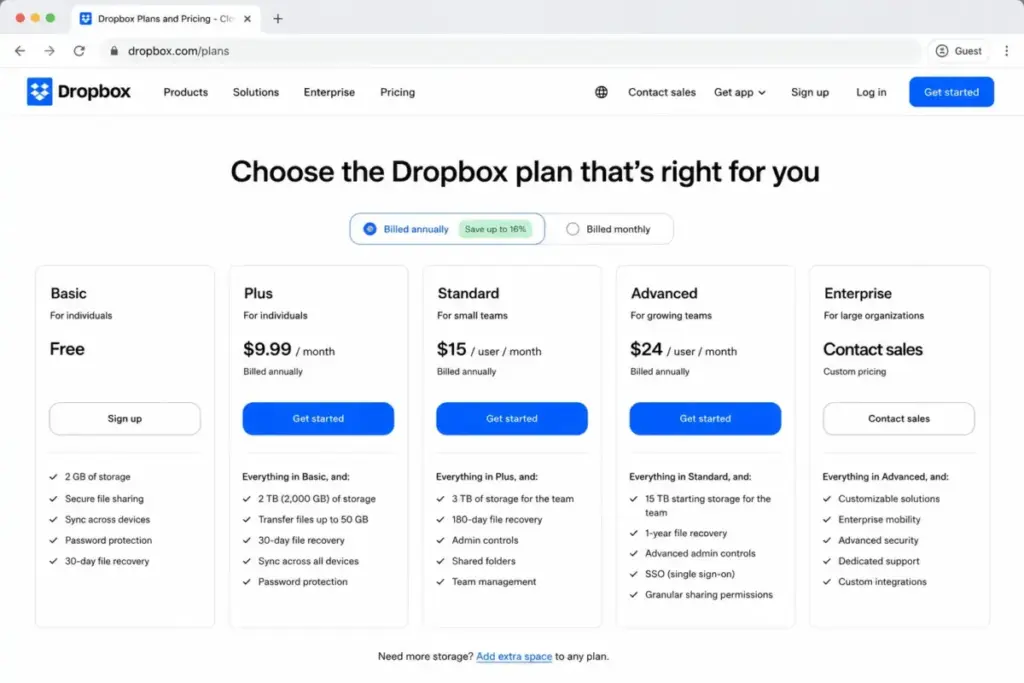
Every Dropbox plan, the price, and what you actually get. Monthly figures are commonly listed at the rates below, but Dropbox’s accessible pricing page primarily exposes annual-equivalent pricing, so confirm the monthly number at checkout before you buy.
| Plan | Monthly | Annual (per user) | Billing basis | Storage | Best for |
|---|---|---|---|---|---|
| Basic | $0 | $0 | 1 user | 2 GB | Testing, light file sharing |
| Plus | $11.99 | $9.99/mo ($119.88/yr) | 1 user | 2 TB | Solo users who need real storage |
| Professional | $19.99 | $16.58/mo ($198.96/yr) | 1 user | 3 TB | Power users, advanced sharing |
| Standard | $18/user | $15/user/mo ($180/user/yr) | per user | Team storage (3 TB+ at signup) | Small teams needing shared storage |
| Advanced | $30/user | $24/user/mo ($288/user/yr) | per user | 15 TB starting team storage | Teams needing SSO and security |
| Enterprise | Custom | Custom | per user | Custom | Large orgs, procurement, EMM |
A note on the team plans. Dropbox’s current pricing page shows Standard available for “1 person or more,” but some third-party and older pages still list a three-user minimum. Confirm this at checkout, because it changes the entry cost for solo buyers and pairs. Advanced is firmer: it requires a minimum of three actively-used licenses.
Source: Dropbox plans, verified June 25, 2026.
What each plan actually includes
Dropbox Basic (free)
Two gigabytes. That is the whole headline. You get syncing, file sharing, and basic security, which is enough to move a few documents between devices or test whether Dropbox sync fits your habits.
What it does not have: paid storage, extended version history, advanced sharing, team folders, an admin console, single sign-on, or ransomware detection. The 2 GB cap is the trigger that pushes nearly everyone to a paid plan, and because there is no small middle tier, the next step is a steep one.
Avoid Basic if you store anything beyond a handful of documents. It is a trial, not a home.
Dropbox Plus ($9.99/user/month annually)
This is the plan most individuals land on. You get 2 TB of storage, 30-day file recovery and version history, and the ability to send transfers up to 50 GB. For one person, 2 TB is generous to the point of excess for many users, which is exactly the complaint that turns up in Dropbox’s own community: plenty of people want a cheaper 50 GB to 500 GB option and there isn’t one.
What you do not get: team folders, an admin console, SSO, or audit logs. Plus is a single-user product.
Buy Plus if you are one person who needs reliable sync and large transfers. Skip it if 2 TB is far more than you will use, because you are paying for headroom you don’t need.
Dropbox Professional ($16.58/user/month annually)
Professional bumps storage to 3 TB and extends version history to 180 days. It adds advanced sharing controls, full-text search, document scanning, watermarking, viewer history, advanced PDF editing, and priority chat support.
Here is the catch worth naming: Professional is still an individual plan. There is no centralized team admin console or team-wide policy control. So if you are a solo consultant who wants the sharing and branding features, it fits. If you are two or more people who need shared governance, you are better served by a team plan even at a similar headline price.
Buy Professional if you are a one-person operation that shares client work and wants watermarking and longer recovery. Skip it if you need anything resembling team administration.
Dropbox Standard ($15/user/month annually)
Standard is the entry point for teams and, for most small teams, the right answer. It includes shared team storage, 180-day version history, an admin console, 100 GB Dropbox Transfer, PDF editing, viewer history, and business-hours phone support. Dropbox Help notes that Standard’s exact cost can depend on team size and geographic location, so treat the published per-seat rate as a benchmark.
The gate to watch: Standard does not include SSO, tiered admin roles, audit logs with file-event tracking, or ransomware detection. Ransomware detection is available to Standard teams only as a paid Security add-on, and Dropbox does not publish that add-on’s price.
Buy Standard if you are a small team that needs shared storage, basic admin controls, and external sharing. Skip it if your security or compliance requirements demand SSO and audit logs, because then you are buying add-ons to patch the gap.
Dropbox Advanced ($24/user/month annually)
Advanced is the security and scale tier, and its storage rules deserve a careful read because the marketing line (“15 TB”) hides the real model.
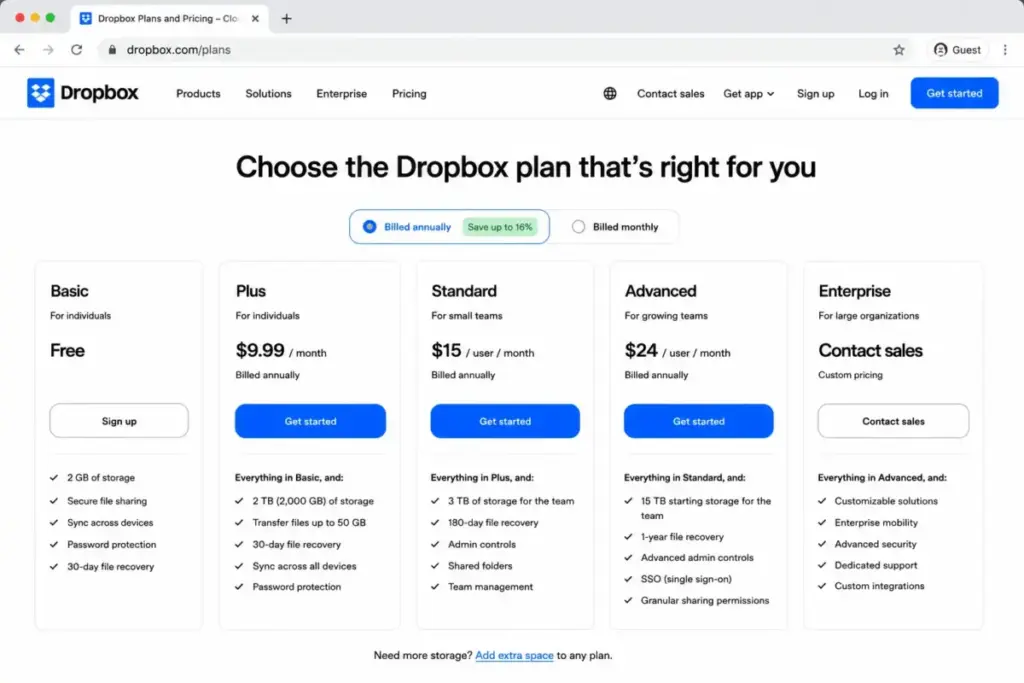
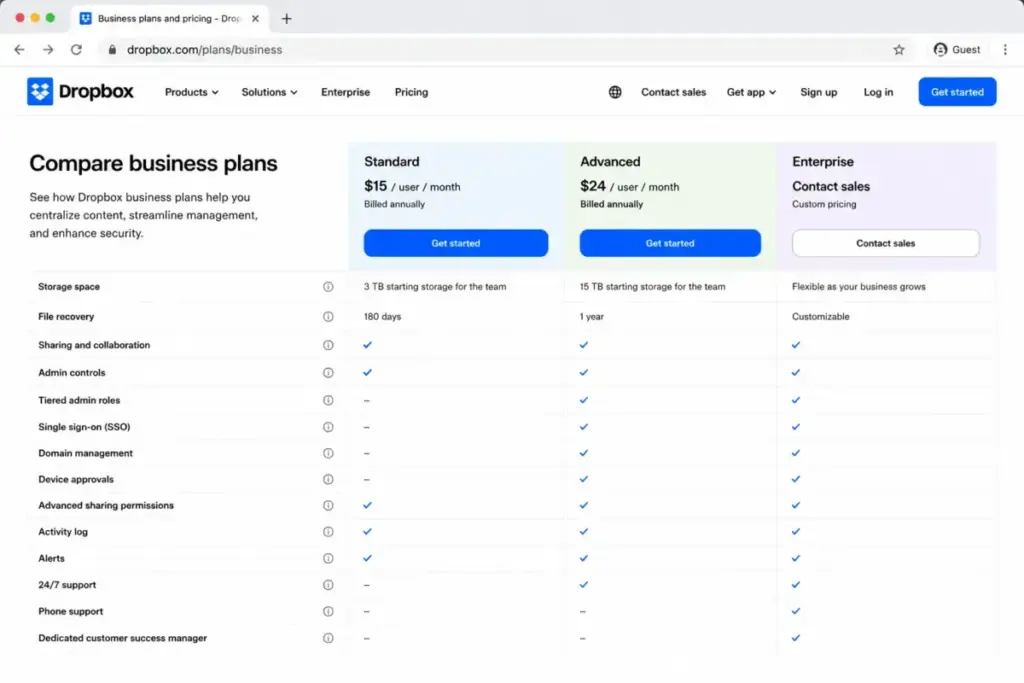
On features, Advanced is where the meaningful security gates open: single sign-on, tiered admin roles, end-to-end encryption, advanced key management, compliance tracking, ransomware and security alerts, and one-year version history. The Security add-on that Standard teams pay extra for is included here automatically.
Buy Advanced if SSO, audit logs, ransomware detection, and longer recovery are genuine requirements. Avoid Advanced if you are a very small team that only needs storage, because the three-license minimum and the $9-per-seat premium over Standard buy you controls you may never touch.
Dropbox Enterprise (custom)
Enterprise is contact-sales pricing. Dropbox’s own pricing page lists it as “Contact us for pricing” and positions it for larger businesses that need customized storage, enterprise security integrations, domain ownership controls, enterprise mobility management, network control, 24/7 support, an assigned support manager, and training.
I am not going to invent a per-seat number here, and you should distrust any article that does. The honest guidance: at Enterprise scale, list price is a starting point for negotiation, not the final figure.
Feature gates: when each capability unlocks
The fastest way to pick a Dropbox plan is to find the single feature you actually need and buy the plan where it first appears.
| Capability | Basic | Plus / Professional | Standard | Advanced / Enterprise |
|---|---|---|---|---|
| 2 GB free storage | Yes | Yes | Yes | Yes |
| 2 TB+ personal storage | No | Yes (2 TB Plus, 3 TB Pro) | Team storage | Team storage |
| 180-day version history | No | Pro only | Yes | Yes |
| 1-year version history | No | No | No | Yes |
| 100 GB Dropbox Transfer | No | Pro only | Yes | Yes |
| Team folders | No | No | Yes | Yes |
| Admin console | No | No | Yes | Yes |
| Tiered admin roles | No | No | No | Yes |
| Single sign-on (SSO) | No | No | No | Yes |
| Ransomware detection | No | No | Add-on | Yes |
| End-to-end encryption | No | No | No | Yes |
| Premium Replay | Limited | Paid add-on | Paid add-on | Paid add-on |
The pattern is clear. Everything an IT or security team cares about (SSO, tiered admins, ransomware detection, end-to-end encryption) sits at the Advanced line. If even one of those is non-negotiable, Standard plus add-ons rarely wins on either price or simplicity.
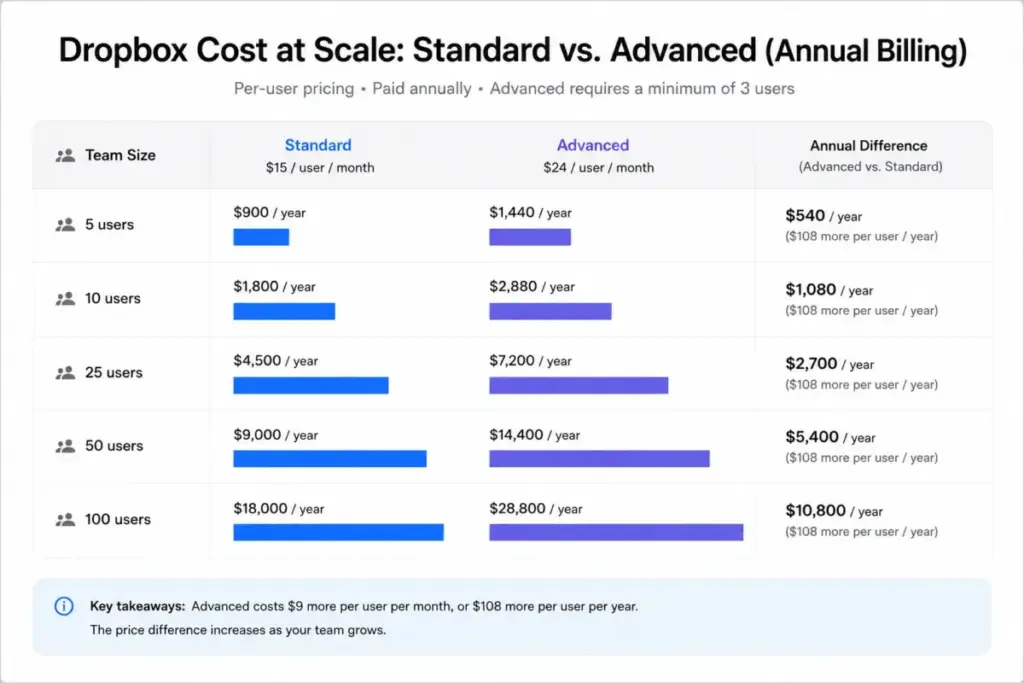
The real cost at 5, 10, 25, 50, and 100 users
A per-seat price means nothing until you multiply it. Here is what Dropbox costs across realistic team sizes, before any add-ons, on both Standard and Advanced.
| Team size | Standard monthly | Standard annual | Advanced monthly | Advanced annual |
|---|---|---|---|---|
| 5 users | $90/mo | $900/yr | $150/mo | $1,440/yr |
| 10 users | $180/mo | $1,800/yr | $300/mo | $2,880/yr |
| 25 users | $450/mo | $4,500/yr | $750/mo | $7,200/yr |
| 50 users | $900/mo | $9,000/yr | $1,500/mo | $14,400/yr |
| 100 users | $1,800/mo | $18,000/yr | $3,000/mo | $28,800/yr |
Read the gap, not just the rows. At 25 users, choosing Advanced over Standard adds $2,700 per year. At 100 users it adds $10,800 per year. That delta should be justified by a specific security or admin requirement, not bought as insurance. And at 100 users, the annual list figures above are a benchmark; if you need custom support, domain controls, or EMM, request an Enterprise quote rather than stacking Advanced seats.
Monthly versus annual: the discount is real
Dropbox rewards annual commitment, and the discount is large enough to matter.
| Plan | Monthly rate | Annual-equivalent monthly | Approx. annual saving |
|---|---|---|---|
| Plus | $11.99 | $9.99 | ~16.7% |
| Professional | $19.99 | $16.58 | ~17.1% |
| Standard | $18/user | $15/user | ~16.7% |
| Advanced | $30/user | $24/user | ~20% |
At 10 users, annual Standard saves roughly $360 per year over monthly Standard, and annual Advanced saves about $720 per year over monthly Advanced. The tradeoff is commitment: annual billing locks the spend for the term, so only commit to a seat count you are confident about. If your team size fluctuates, the monthly uplift can be cheaper than paying for seats you stop using.
Hidden costs and add-ons
This is the section most pricing pages skip, and it is where the marketing price and the real price separate. Dropbox’s base plans look clean. The add-ons are where a budget quietly inflates.
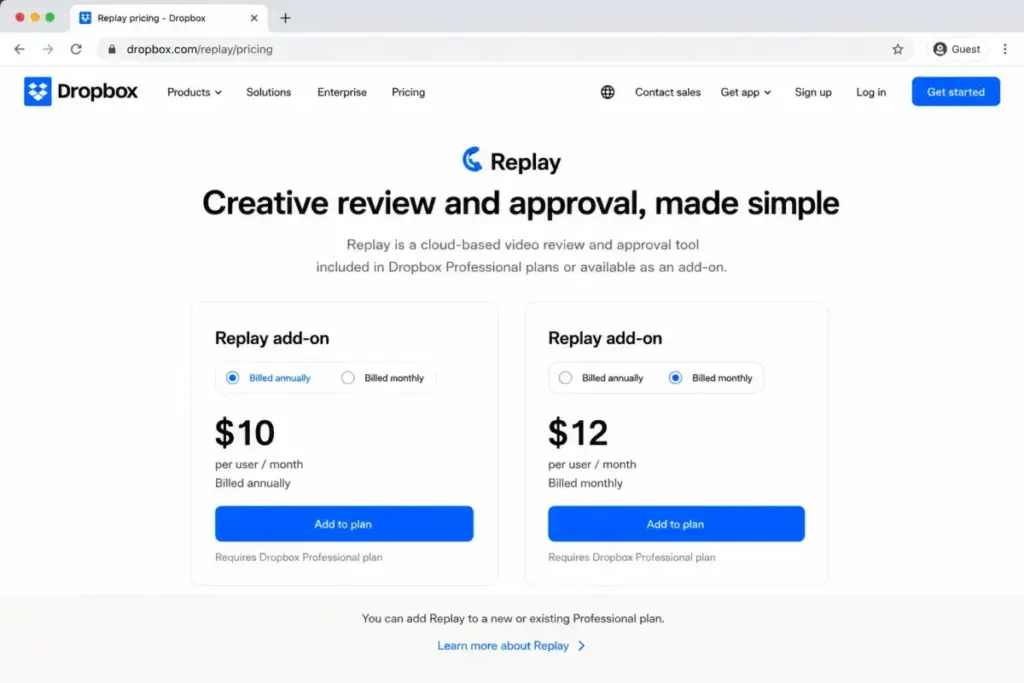
Dropbox Replay add-on. Replay is Dropbox’s video review tool. The premium add-on costs $10 per user per month billed annually ($120 per year) or $12 per user per month billed monthly, and it unlocks password-protected shared links, autogenerated transcripts and captions, large file transfers, and archiving to Dropbox. Basic users have to upgrade to Plus or higher before they can even buy it.
Security add-on. Standard and Business teams can buy a Security add-on for ransomware detection, data classification, and security alerts. It is included automatically with Advanced, Business Plus, and Enterprise. Dropbox does not publish a public price for it, so if you are on Standard and want these features, treat the cost as quote-based and factor it in before assuming Standard is the cheaper path.
Advanced Team and Content Controls add-on. Available to Advanced and Enterprise customers through Dropbox sales and powered by BetterCloud, this covers governance, sensitive-content scanning, alerts, bulk actions, and lifecycle workflows. Pricing is sales-led.
Data governance and extended version history. Dropbox references extended recovery of up to 10 years and legal-hold-oriented governance through sales-led add-ons. No public price was found.
API and platform gates. Higher tiers reference unlimited API access for security and productivity platform partners and up to one billion API calls per month for data transport partners. Public overage pricing was not found, so heavy programmatic users should clarify limits before building on Dropbox.
The takeaway: a creative team on Standard that needs premium Replay and ransomware detection is not paying $15 per seat. It is paying $15 plus $10 for Replay plus an undisclosed Security add-on, which may make Advanced the simpler and not-much-more-expensive choice.
Which Dropbox plan should you choose?
Match the plan to the buyer, not the marketing.
- Solo user, lots of files: Plus. You get 2 TB and 50 GB transfers for $9.99 per month annually. Only step up to Professional if you need watermarking, 180-day recovery, or advanced sharing.
- Freelancer or consultant sharing client work: Professional, for the branding and sharing controls, if you are genuinely a team of one.
- Small team (3 to 20) needing shared storage: Standard. It covers admin basics and team folders without paying for security features you may not use.
- Security-conscious or regulated team: Advanced, where SSO, ransomware detection, audit logs, and one-year recovery are built in rather than bolted on.
- Large organization (50+): start on Advanced list pricing as a benchmark, then request an Enterprise quote if you need domain controls, EMM, or negotiated support.
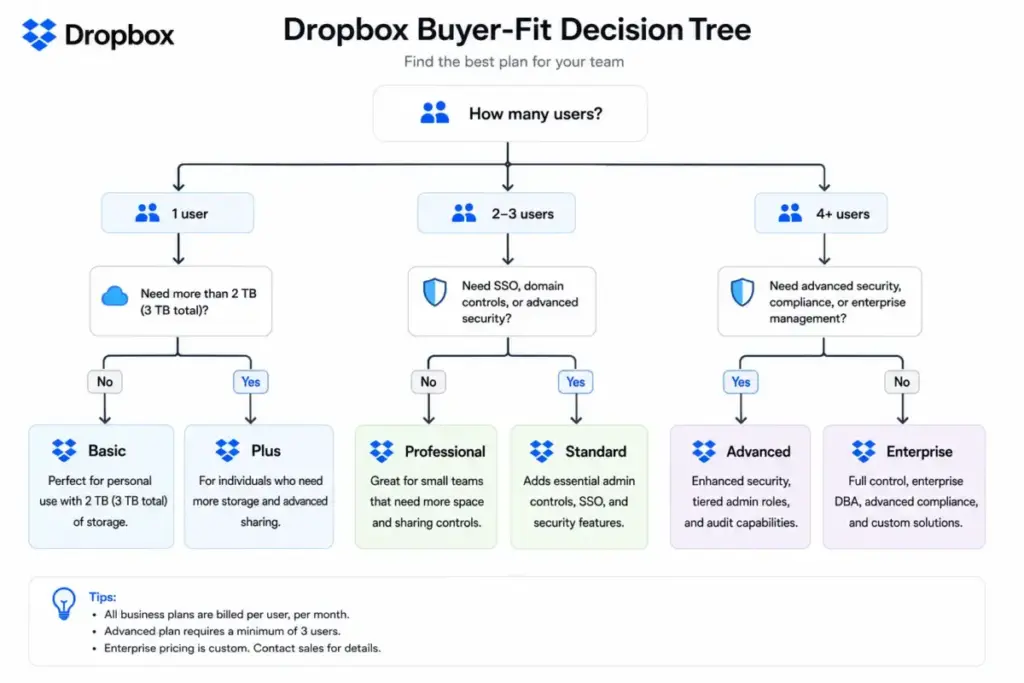
The plan most small teams should avoid
Advanced, for tiny teams that only need storage.
The reasoning is concrete. Advanced carries a three-license minimum and a $24-per-seat annual rate, which is $9 more per seat than Standard. For a three-person team that wants shared files and nothing more, that is a $324 annual premium for SSO, audit logs, and ransomware detection nobody on the team will configure. Standard does the job.
Advanced is still the right call the moment one security requirement becomes mandatory. The point is to upgrade for a reason you can name, not to buy the bigger plan as a default.
Dropbox pricing versus the alternatives
The honest answer to “is Dropbox expensive?” depends on what you are comparing. Against pure cloud storage, Dropbox’s sync and external sharing justify the price for the right buyer. Against bundled productivity suites, Dropbox looks expensive because Google and Microsoft include email, docs, and meetings at a similar or lower per-seat cost.
| Product | Practical team plan | Annual price/user | 10-user annual-equivalent | Best for |
|---|---|---|---|---|
| Dropbox Standard | Standard | $15/user/mo | $180/mo | File-heavy teams, external sharing |
| Google Workspace | Business Starter | $7/user/mo | $70/mo | Teams wanting Gmail, Docs, Meet bundled |
| Microsoft 365 | Business Basic | $6/user/mo | $60/mo | Teams already in the Office ecosystem |
| Box | Business Starter | $5/user/mo (3-user min) | $50/mo | Budget cloud storage with admin basics |
| Sync.com | Teams 1 TB | $6/user/mo (3-user min) | $60/mo | Lower-cost team storage, promo pricing may apply |
A few caveats so the comparison is fair. Google Workspace Business Starter includes only 30 GB of pooled storage per user, far below Dropbox’s terabytes, so storage-heavy teams will need Business Standard ($14 per user per month) to reach 2 TB pooled. Microsoft 365 Business Basic includes 1 TB of cloud storage per user. Box Business Starter is cheap but caps storage at 100 GB with a 2 GB upload limit, and Box’s full-featured Business plan is $15 per user per month, matching Dropbox Standard. Sync.com may also display promotional first-year pricing, so confirm the renewal rate before committing.
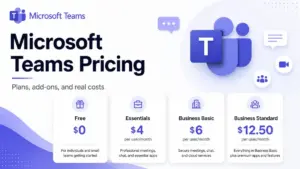
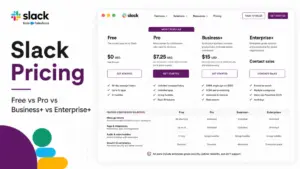
So the verdict: if your team mainly needs office apps and meetings, Microsoft Teams inside Microsoft 365 or Google Workspace is the cheaper, broader buy. If your team’s daily work is moving and sharing large files reliably, Dropbox’s premium is defensible. For other collaboration pricing comparisons, see our breakdown of Slack pricing.
Is Dropbox worth the price in 2026?
It depends on what you are actually buying.
Worth it if you share large files externally, your team relies on Dropbox’s mature sync and sharing workflow, or you run creative and agency work where Transfer and Replay earn their keep. Verified user sentiment is consistent on this point: reviewers praise Dropbox for simple, reliable sync and sharing. Capterra lists Dropbox Business at 4.5 overall across more than 21,000 reviews with 92% positive sentiment, citing secure, flexible file sharing and an intuitive interface among the pros.
Not worth it if your core need is email, documents, and video meetings, where a bundled suite delivers more for less. The same review sources that praise the sync repeatedly flag two things: limited free storage and pricing that feels high at scale compared with alternatives. That is not a contradiction. Dropbox is good at what it does and charges accordingly.
The cheaper alternative when Dropbox is overkill: Microsoft 365 Business Basic or Google Workspace Business Starter for teams that need productivity apps more than premium file sync.
How to avoid overpaying for Dropbox
Seven specific moves, in order of how much they save.
- Right-size the plan to one feature. If you do not need SSO or ransomware detection, do not buy Advanced. Standard plus the controls you actually use is usually cheaper.
- Commit annually only when seat count is stable. Annual billing saves 16% to 20%, but locks the term. Fluctuating teams may save more on monthly.
- Price the add-ons before you commit. A Standard plan with Replay and a Security add-on can cost more than Advanced, which includes the security features.
- Avoid the Advanced three-license trap. Tiny teams that buy Advanced pay for a minimum and a premium they rarely use.
- Question the 2 TB default. If you are a light user staring at the jump from free to Plus, weigh whether a competitor’s smaller paid tier fits better.
- Get an Enterprise quote at scale. Above 50 to 100 users, list price is a negotiating benchmark, not the final number.
- Compare against bundles. If you would otherwise pay separately for email and office apps, a suite may make Dropbox redundant. Start by understanding what cloud storage you genuinely need versus a full team collaboration software stack, and where Dropbox fits among broader productivity tools.
Frequently asked questions
How much does Dropbox cost per month?
Paid Dropbox starts at $9.99 per user per month for Plus on annual billing ($119.88 per year). Team plans are $15 per user per month for Standard and $24 per user per month for Advanced on annual billing. Monthly billing costs more per month, commonly listed at $11.99 (Plus), $18 (Standard), and $30 (Advanced), so verify at checkout.
Is Dropbox free?
Yes. Dropbox Basic is free and includes 2 GB of storage with syncing and file sharing. It is fine for testing but too small for ongoing personal or team use.
What is the difference between Dropbox Plus and Professional?
Plus is $9.99 per month annually with 2 TB and 30-day recovery. Professional is $16.58 per month annually with 3 TB, 180-day version history, advanced sharing, watermarking, and full-text search. Both are individual plans, so neither offers team administration.
Does Dropbox Advanced really require three users?
Yes. Advanced has a minimum of three actively-used licenses and gives 5 TB per active license, starting at 15 TB of shared team storage. That minimum is a key reason very small teams often choose Standard instead.
Which Dropbox plan includes SSO?
Single sign-on is available on Advanced and Enterprise. It is not included on Plus, Professional, or Standard.
Does Dropbox charge extra for Replay?
Yes. Premium Replay is a paid add-on at $10 per user per month annually ($120 per year) or $12 per user per month monthly. Teams with a dedicated account manager may face a 10-add-on minimum.
Does Dropbox charge extra for security features?
On Standard, ransomware detection, data classification, and security alerts require a paid Security add-on whose price Dropbox does not publish. These features are included automatically on Advanced and Enterprise.
Is there a cheaper Dropbox plan than Plus?
No paid tier sits between the free 2 GB Basic plan and the 2 TB Plus plan. This missing middle tier is a common complaint among users who do not need 2 TB but have outgrown 2 GB.
Does Dropbox have a free trial?
Yes. Dropbox offers a free trial of Professional, Standard, or Advanced, and the pricing page headlines a 30-day trial. Signup requires billing information, so treat it as payment details required.
How much does Dropbox Enterprise cost?
Dropbox does not publish Enterprise pricing. It is custom, based on factors like user count, location, and required features, and the plan is listed as “Contact us for pricing.” Request a quote rather than relying on third-party estimates.
Is Dropbox cheaper than Google Drive or OneDrive?
Usually not on a per-seat basis once you compare bundles. Google Workspace Business Starter ($7 per user per month annually) and Microsoft 365 Business Basic ($6 per user per month annually) include full productivity suites at lower prices than Dropbox Standard. Dropbox competes on sync reliability and external sharing, not on raw cost.
Conclusion
Dropbox pricing is simple on the plan card and complicated in the cart. The free plan is a 2 GB trial, Plus is the individual workhorse at $9.99 per month annually, Standard is the right team plan for most at $15 per user, and Advanced earns its $24-per-seat premium only when SSO, ransomware detection, and longer recovery are real requirements. The traps are the missing middle storage tier, the three-license Advanced minimum, and add-ons (Replay and Security especially) that quietly lift the per-seat number above the headline.
If your work lives in shared files and external sharing, Dropbox is worth the premium. If it lives in email, docs, and meetings, price a bundled suite first. Either way, decide based on the feature you actually need and the seat count you can commit to, then check the official Dropbox plans page for the current rate before you buy. For a deeper look at how the product performs day to day, read our full Dropbox review.