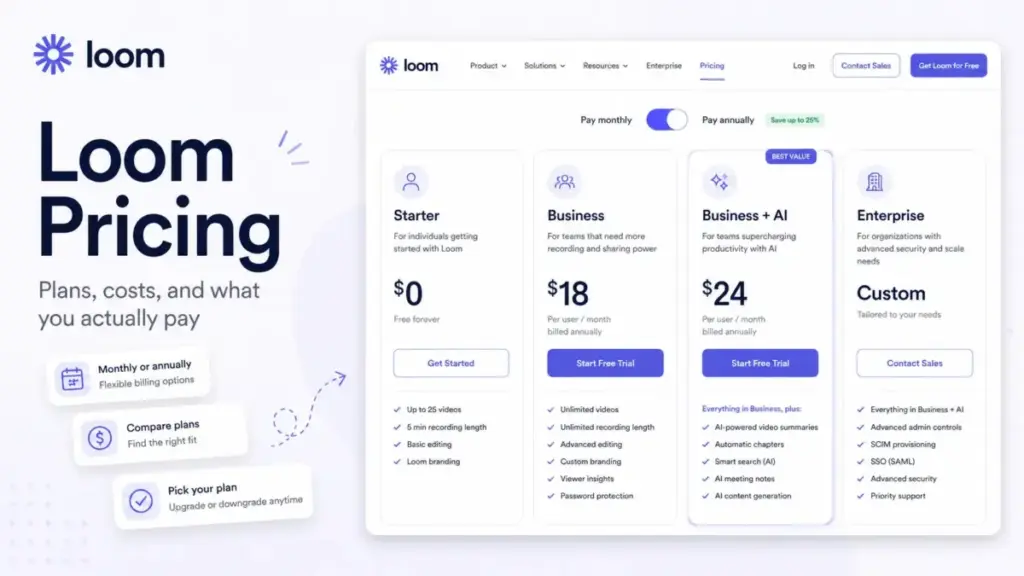
Loom pricing looks simple on the surface. Starter is free, Business is $18 per user per month, and Business + AI is $24 per user per month (as of June 2026). Most teams read those numbers and think the decision is free versus paid.
That framing is wrong, and it gets people billed for things they did not plan for.
The real Loom pricing question in 2026 is not whether $18 a seat is cheap. It is what happens after Atlassian billing, Creator Lite changes, annual user-tier rules, and the Business + AI delta enter the picture. That is where the bill quietly grows.
I am James Carter, and I cover project management and collaboration software for SaaSZap, including our roundup of the best team collaboration tools. I dug through Loom’s pricing page, Atlassian’s billing docs, and the support center to map every plan, gate, and hidden charge. Here is what you actually pay, and the one upgrade trap I would tell any admin to check first.
This guide is based on the official Loom and Atlassian pricing pages, Loom billing documentation, and SaaSZap editorial analysis. It does not claim hands-on testing inside a paid account. Pricing verified June 26, 2026. Plan details and billing rules change often, so confirm live rates on the official Loom pricing page before you buy.
Loom Pricing Summary: How Much Does Loom Cost?
Loom is inexpensive for small async-video teams and gets pricey once many users need Creator seats, AI workflows, or Enterprise security. Here is the short version before the detail.
| Question | Answer |
|---|---|
| Starting paid price | $18/user/month (Business, monthly billing) |
| Free plan | Yes (Starter), capped at 25 videos per person |
| Free trial | 14-day Business + AI trial for new workspaces |
| Best plan for most teams | Business, unless AI notes and workflows are used weekly |
| Plan to avoid | Business + AI for every seat when only a few people create videos |
| Biggest hidden cost | Creator Lite seats converting to paid Creator seats after Atlassian integration |
| Pricing verified | June 26, 2026 |
What this means: if you only need basic screen capture, the free Starter plan may carry you. If your team records SOPs, demos, or async updates daily, Business is the honest entry point, not the headline free tier.
If you are still deciding where async video fits among chat, docs, and live meetings, our explainer on team collaboration software frames the category before you commit budget.
The Advertised Price vs the Real Price
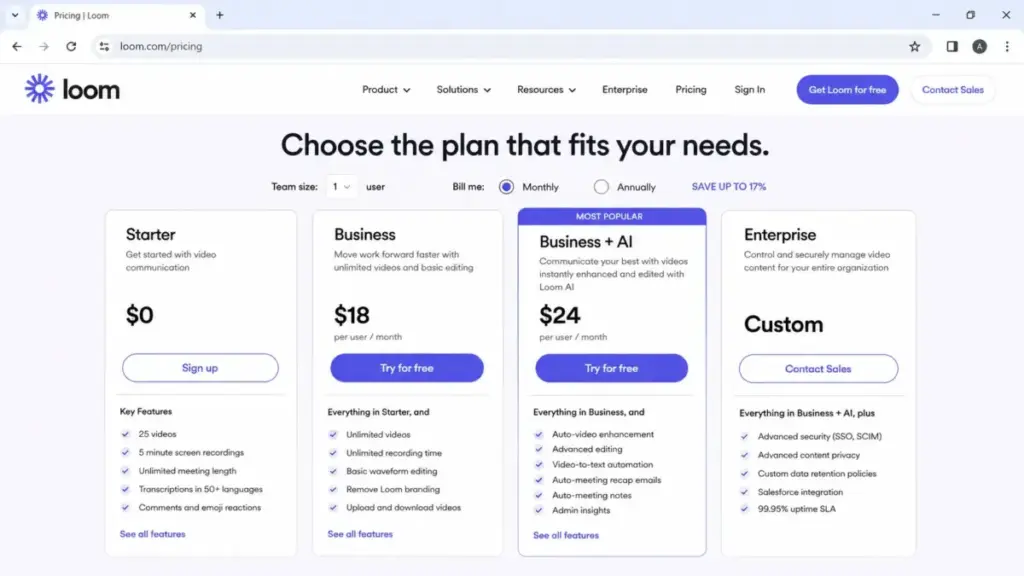
The advertised price is the per-seat number. The real price is that number multiplied by every billable Creator, adjusted for annual tiers, proration, and seat conversions you did not expect.
| Plan | Advertised price | What you may actually pay |
|---|---|---|
| Starter | $0 | $0, until video limits or user caps force an upgrade |
| Business | $18/user/mo | $15/user/mo annual ($180/user/yr), billed by Creator and Admin seats |
| Business + AI | $24/user/mo | $20/user/mo annual ($240/user/yr), same Creator/Admin billing basis |
| Enterprise | Custom | Volume quote, billed by Member and Admin seats, not Creator seats |
What this means: Loom bills Business and Business + AI by Creators and Admins, while Enterprise is billed by Members and Admins. That billing-basis switch matters at scale, and most pricing pages skip it entirely.
Annual billing saves up to 17% versus monthly list pricing. On a 10-seat Business plan, that is about $360 a year. On Business + AI, it is about $480 a year.
There is a catch. Atlassian annual subscriptions can be billed by the closest user tier, not your exact paid-user count. So your annual invoice may round to a tier rather than match your headcount.
The Hidden Loom Costs Nobody Mentions
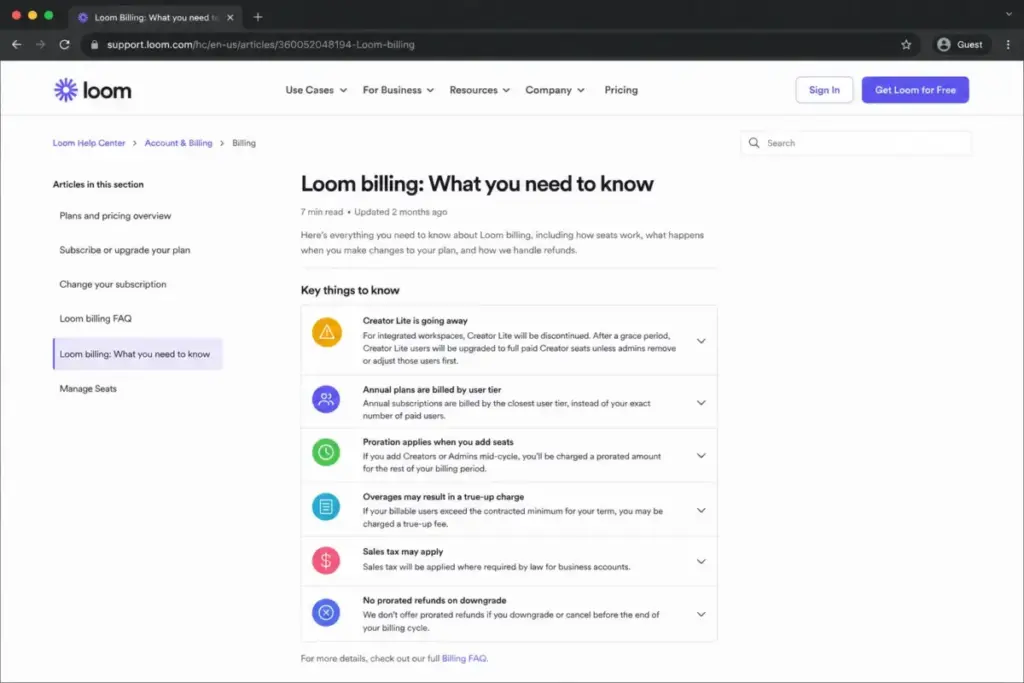
Loom’s biggest costs are not on the pricing card. They live in billing docs and integration notices. Here are the ones that change the math.
| Hidden cost | When it hits |
|---|---|
| Creator Lite converting to paid Creator seats | After Atlassian integration, once a grace period ends |
| Annual user-tier billing | When annual invoices round to the nearest user tier |
| Seat expansion proration | When you add Creators or Admins mid-cycle |
| Contract true-up | When billable users exceed your contracted minimum |
| Sales tax | Added by jurisdiction for business accounts |
| No prorated refund on downgrade | When you cut seats or cancel before the cycle ends |
The Creator Lite conversion trap
This is the one I would check before anything else. For integrated workspaces, Creator Lite is being discontinued.
Creator Lite users can be upgraded to full paid Creator seats after a grace period. That happens unless admins remove or adjust those users first.
Picture a 40-person team where only 12 people record. If 28 dormant Creator Lite accounts roll into paid seats, that is a real bill for people who never press record.
One thing I learned reading the docs: audit your Creator Lite users before any integration billing date. Do not wait for the invoice to tell you who got upgraded.
Annual user-tier billing
Atlassian annual plans can bill by the closest user tier instead of your exact seat count. Your finance team should not assume annual cost equals seats times the annual rate.
It can round up. Treat the per-seat annual math as a floor, not a guarantee.
Proration, true-ups, and the downgrade gap
Add a paid Creator mid-cycle and Loom prorates the charge. Reasonable enough.
The asymmetry is on the way down. Loom’s billing docs describe no prorated refund or credit when you reduce seats or cancel early. You keep access until the cycle ends, but you do not get money back.
Contracted plans add one more layer. If your Creators exceed the contracted minimum during the term, Loom can bill a true-up. Plan your seat count honestly at signup.
Loom Plan-by-Plan Breakdown and Feature Gates
Loom has four plans in 2026: Starter, Business, Business + AI, and Enterprise. Each one adds a specific layer, and the gaps between them decide your spend.
| Plan | Monthly | Annual | Billing basis | Best for |
|---|---|---|---|---|
| Starter | $0 | $0 | Free | Solo users and very light recorders |
| Business | $18/user | $180/user/yr (~$15/mo) | Creators + Admins | Teams needing unlimited recording and branding control |
| Business + AI | $24/user | $240/user/yr (~$20/mo) | Creators + Admins | Teams using AI notes, summaries, and workflows weekly |
| Enterprise | Custom | Custom | Members + Admins | Orgs needing SSO, SCIM, and Salesforce integration |
Source: official Loom pricing page and Atlassian Loom pricing, verified June 2026.
What this means: the jump from free to Business buys unlimited videos and branding control. The jump from Business to Business + AI buys automation. The jump to Enterprise buys security and governance, not more recording features.
Starter (free)
Starter is free and capped. It includes 25 videos per person, 5-minute screen recordings, transcriptions, comments, reactions, viewer insights, and a team workspace.
Includes: basic async recording, viewer insights, screenshots, and a shared workspace.
Missing: unlimited videos, longer recordings, branding removal, AI workflows, SSO, and SCIM.
Avoid if: your team records regularly. The 25-video cap arrives faster than you expect.
Business ($18/user/mo)
Business removes the free caps for serious recorders. It adds unlimited videos, HD recording, basic editing, upload and download, branding removal, engagement insights, custom thumbnails, and CTAs.
Includes: one all-company space plus three additional spaces, drawing tools, and custom dimensions.
Missing: the full Loom AI stack, SSO, SCIM, and Salesforce integration.
Avoid if: nothing. This is the practical floor for active teams.
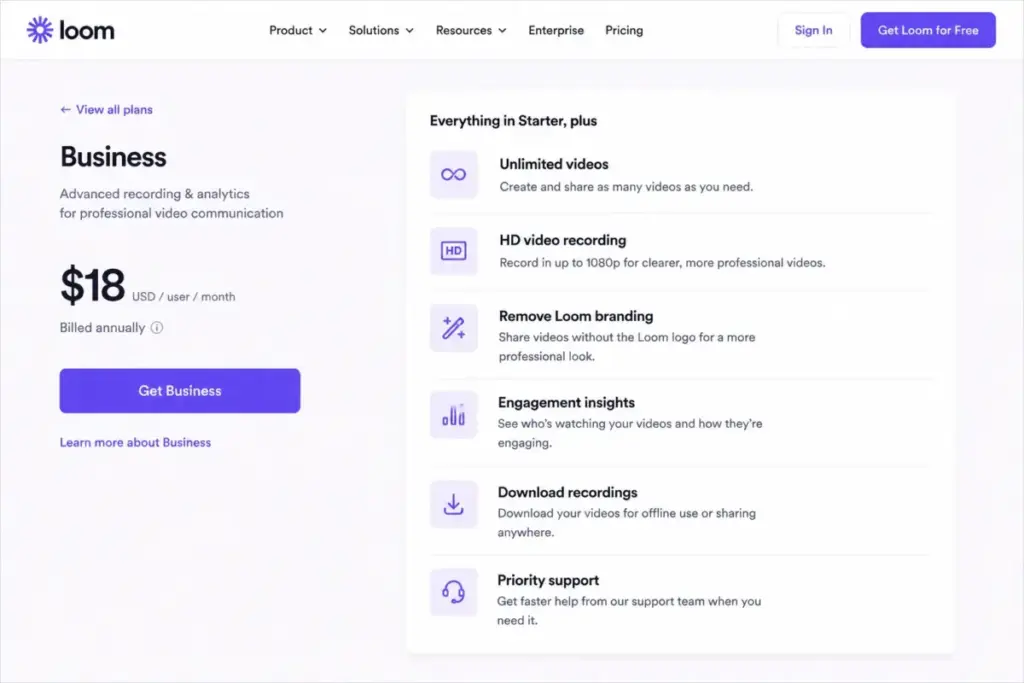
There is a wording gap worth flagging. Loom’s pricing copy describes Business recording as unlimited. Loom’s Business support documentation references a recording length of up to six hours.
If you record long webinars or training marathons, treat six hours as the practical documented ceiling, not unlimited.
Business + AI ($24/user/mo)
Business + AI adds Loom’s automation layer on top of everything in Business. That is the entire reason to pay the extra $6 a seat.
Includes: AI summaries, chapters, tasks, titles, auto CTAs, AI Workflows, auto-meeting recap emails, meeting notes, filler-word removal, and silence removal.
Missing: Enterprise security and admin controls, SSO, SCIM, and Salesforce integration.
Avoid if: your team rarely uses AI notes or workflows. You are paying for features that sit idle.
Enterprise (custom)
Enterprise is custom priced and billed by volume. Public sources do not disclose a seat minimum, so ask sales for a quote.
It adds advanced security, SSO and SAML, SCIM, Salesforce integration, a 99.95% uptime SLA, downloadable user insights, advanced privacy controls, dedicated support, and custom onboarding. Atlassian Guard Standard capabilities such as SSO, SCIM, and an organization audit log are included for Loom Enterprise customers.
Avoid if: you do not need governance. You are buying compliance, not recording power.
Feature gates by plan
This table is the upgrade map. Find the feature you need, and you find the plan you must buy.
| Feature | Starter | Business | Business + AI | Enterprise |
|---|---|---|---|---|
| Unlimited videos | No | Yes | Yes | Yes |
| Recording length | 5 min | Up to 6 hr (docs) | Up to 6 hr (docs) | Unlimited (FAQ) |
| HD recording | Limited | Yes | Yes | Yes |
| Remove Loom branding | No | Yes | Yes | Yes |
| Engagement insights | Basic | Yes | Yes | Downloadable |
| AI summaries, tasks, CTAs | No | No | Yes | Yes |
| AI Workflows | No | No | Yes | Yes |
| SSO / SAML | No | No | No | Yes |
| SCIM | No | No | No | Yes |
| Salesforce integration | No | No | No | Yes |
| Dedicated support and onboarding | No | No | No | Yes |
What this means: AI is the Business-to-Business + AI gate. Security is the Business + AI-to-Enterprise gate. You cannot buy SSO on Business at any price, so a single compliance requirement can push you straight to a custom quote.
For a deeper functional look beyond price, see our full Loom review and analysis.
When the Loom Free Plan Stops Working
The Loom free plan stops working the moment you hit 25 videos per person. At that point, Starter users cannot record new videos until they delete or move existing ones.
Here is the part that trips people up. Archived videos still count toward the 25-video limit. Archiving does not free up room.
There is also a user-count question that depends on your workspace status. Older Loom.com references mention up to 50 Creator Lite accounts. Atlassian-integrated Starter documentation mentions a 10-user limit.
I would not state one universal free-user cap. The number depends on whether your workspace runs on older Loom.com billing or the Atlassian-integrated model.
What pushes teams off free: needing unlimited videos, longer recordings, branding removal, CTAs, AI workflows, or SSO. Any one of those means a paid plan.
Real Loom Cost Scenarios: 5 to 100 Users
Finance teams search by headcount, not plan name. So here is what Loom costs at five common team sizes, on list pricing, before tax and tier rounding.
| Team size | Business (monthly / annual) | Business + AI (monthly / annual) | Recommended plan |
|---|---|---|---|
| 5 users | $90/mo / $900/yr | $120/mo / $1,200/yr | Business for normal async, Business + AI if AI runs weekly |
| 10 users | $180/mo / $1,800/yr | $240/mo / $2,400/yr | Either, depending on AI adoption |
| 25 users | $450/mo / $4,500/yr | $600/mo / $6,000/yr | Business + AI if video-to-text replaces meeting notes |
| 50 users | $900/mo / $9,000/yr | $1,200/mo / $12,000/yr | Business + AI, or Enterprise if security is required |
| 100 users | $1,800/mo / $18,000/yr | $2,400/mo / $24,000/yr | Enterprise evaluation recommended |
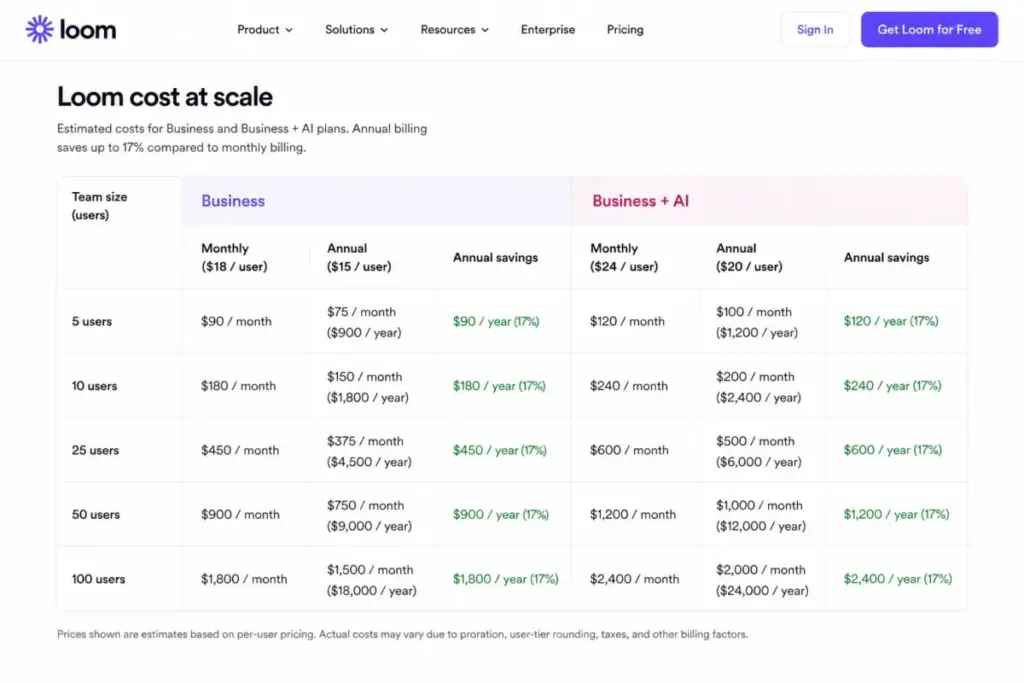
What this means: at 10 users, the gap between Business and Business + AI is $600 a year. That is the number to weigh against the hours your team spends writing meeting notes and SOPs by hand.
At 50 users and up, security needs often decide the plan before features do. SSO and SCIM live only on Enterprise, so governance can override the Business + AI recording fit.
At 100 monthly users, Atlassian integration docs mention possible volume discounts, but the exact figure is not public. Use list pricing as a ceiling, not a quote.
One scale note from the workflow side: Loom does not work the same at 5 users as it does at 50. At 5, everyone is a Creator and billing is obvious. At 50, the hard part is auditing which seats truly need to record.
Monthly vs Annual Loom Billing
Annual billing saves up to 17% versus monthly, and the per-seat annual equivalents are about $15 on Business and $20 on Business + AI. That is real money on larger teams.
The trade-off is commitment plus the tier-rounding rule. Annual Atlassian subscriptions can bill by the nearest user tier, so your invoice may not match your exact seat count.
My recommendation: go annual once your team is stable and your Creator list is audited. Stay monthly while headcount is still moving, so you are not locked into a tier you outgrow or under-use.
Which Loom Plan Should You Avoid?
Avoid putting every seat on Business + AI by default. If only a handful of people create videos or use AI workflows, you are paying $6 extra per idle seat.
The fix is simple. Split your roster. Put active creators on Business + AI and lighter users on Business or free Creator access where the workspace allows it.
The exception: if your whole team genuinely uses AI summaries, recaps, and workflows weekly, uniform Business + AI is fair. The automation can pay for itself in saved note-taking time.
Also avoid letting legacy Creator Lite users drift into paid seats during Atlassian integration. Audit first, then let billing changes happen.
Which Loom Plan Should You Choose?
Match the plan to your team profile, not to the headline price. Here is how I would route four common buyers.
Solo users and freelancers: start on Starter (free). If you outgrow 25 videos or need branding removal, move to Business at $18 a month.
5-person SaaS or support teams: Business is the clean choice at $90 a month. Add Business + AI only if you record async updates daily and want auto recaps.
25-person product or enablement teams: Business + AI at $600 a month makes sense when video-to-text replaces SOP writing or manual meeting notes.
50-plus distributed orgs with compliance needs: evaluate Enterprise. Once SSO, SCIM, or Salesforce integration is mandatory, the other plans cannot meet you there.
Loom complements live-meeting tools rather than replacing them, so teams trimming call volume often pair it with a platform covered in our Zoom Workplace review.
If your bigger question is live meetings rather than recordings, compare options in our best video conferencing tools guide instead.
Loom Pricing vs Competitors
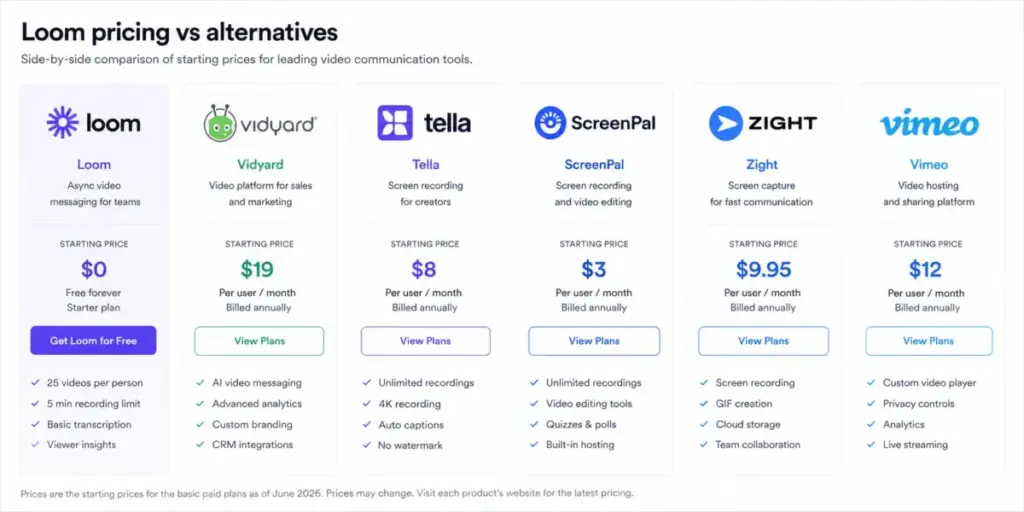
Loom sits in the mid-range of async-video pricing. It is pricier than lightweight screen recorders and cheaper than enterprise video platforms. Here is the context at a glance.
| Tool | Starting price | Free plan | 10-user context |
|---|---|---|---|
| Loom | $18/user/mo (Business) | Yes | $180/mo on Business list pricing |
| Vidyard | $59/seat/mo annual (Starter) | Yes | ~$590/mo annual-equivalent for Starter |
| Tella | $13/user/mo annual (Pro) | No confirmed free plan | ~$130/mo annual-equivalent on Pro |
| ScreenPal | $4/mo (Deluxe) | Yes | ~$40/mo as 10 Deluxe seats (lightweight benchmark) |
| Zight | ~$9.95/user/mo (Pro) | Yes | ~$99.50/mo using third-party Pro price |
| Vimeo | ~$12/mo annual (Starter) | Yes | Not directly comparable, bundles seats and storage |
What this means: Loom is not the cheapest, but it undercuts Vidyard heavily on the entry tier. ScreenPal and Tella win on raw price for simple recording, while Vimeo plays a different game with bundled seats and storage.
A caveat on the numbers. Zight’s official pricing page was inaccessible during research, so that figure comes from a third-party reference. Vimeo’s exact 10-user self-serve cost requires current checkout. Treat both as directional, not precise quotes.
You can dig into individual pricing models on the official pages: Vidyard pricing, Tella pricing.
Is Loom Worth the Price?
Loom is worth the price when async video replaces recurring live work. If your team records walkthroughs, SOPs, demos, or meeting recaps every week, the time saved beats the seat cost.
Worth it if: you run customer success, product, sales enablement, training, or operations on distributed teams that record regularly.
Not worth it if: you record a handful of short videos a month, only need basic free capture, or require SSO and SCIM but do not want a custom Enterprise quote.
Best alternative if too expensive: ScreenPal or Tella for lightweight recording at a lower seat cost. Vidyard if you need sales-video depth and can absorb the higher entry price.
The honest verdict from a workflow lens: Loom earns its money on adoption, not features. A team that actually records daily gets full value. A team that buys seats and forgets them is just funding shelfware.
How to Avoid Overpaying for Loom
You can trim a Loom bill without losing capability. Here are the moves I would make before renewal.
- Audit Creator Lite users before Atlassian integration billing dates. Remove dormant accounts so they do not convert to paid seats.
- Split your roster. Reserve Business + AI for active creators, not every seat.
- Confirm whether annual billing rounds to a user tier before committing. Check the tier against your real headcount.
- Time downgrades for the cycle end. There is no prorated refund, so cancel or cut seats before renewal, not after.
- Watch contracted minimums to avoid true-up charges when Creators grow.
- Check education eligibility. Eligible users may get up to 50% off general academic use or 75% off classroom use, though the legacy free Education plan is gone.
- Trust current official Loom and Atlassian pricing over third-party directories. Some marketplace pages show stale or annual-equivalent prices that conflict with live monthly rates.
For workflow context on how recording fits a wider stack, it helps to map async video against your chat, docs, and meeting tools before you scale seats.
Key Takeaways
- Loom paid pricing starts at $18 per user per month on Business, with Business + AI at $24 and Enterprise on a custom quote (as of June 2026).
- Annual billing saves up to 17%, but Atlassian annual plans can round to user tiers instead of exact seats.
- The biggest hidden cost is Creator Lite seats converting to paid Creator seats after Atlassian integration.
- AI features gate Business + AI. Security features like SSO and SCIM gate Enterprise.
- Business is the practical floor for active teams. Reserve Business + AI for seats that actually use AI workflows.
Frequently Asked Questions
How much does Loom cost per month?
Loom Business costs $18 per user per month and Business + AI costs $24 per user per month on monthly billing (as of June 2026). Annual billing drops those to about $15 and $20 per user per month. Starter is free with limits, and Enterprise uses a custom volume quote rather than public pricing.
Is Loom free to use?
Yes, Loom offers a free Starter plan. It includes 25 videos per person, 5-minute screen recordings, transcriptions, comments, reactions, and viewer insights. Once you hit the 25-video cap, you cannot record new videos until you delete or move some. Archived videos still count toward that limit.
Is Loom Business + AI worth it?
Business + AI is worth the extra $6 per seat when your team uses AI summaries, meeting recaps, and workflows weekly. At 10 users, that is a $600 yearly difference over Business. If only a few people use the AI features, put active creators on Business + AI and keep everyone else on Business instead.
What happened to Loom Creator Lite?
Creator Lite is being discontinued for Atlassian-integrated workspaces. Affected Creator Lite users can be upgraded to full paid Creator seats after a grace period unless admins remove or adjust them first. Audit your Creator Lite accounts before integration billing dates so dormant users do not quietly convert into a paid bill.
Does Loom include SSO on the Business plan?
No, SSO and SAML are not available on Loom Business or Business + AI at any price. They live only on Loom Enterprise, alongside SCIM and Salesforce integration. If your organization requires single sign-on, you must move to a custom Enterprise quote rather than upgrading within the self-serve plans.
Does Loom annual billing use exact users or tiers?
Atlassian annual subscriptions can be billed by the closest user tier rather than your exact paid-user count. So your annual invoice may round to a tier instead of matching headcount exactly. Confirm the tier against your real seat count before committing, and treat per-seat annual math as a floor rather than a guarantee.
How much does Loom cost for 10 users?
At list pricing, 10 Business users cost $180 per month or $1,800 per year. Ten Business + AI users cost $240 per month or $2,400 per year (as of June 2026). Those figures exclude sales tax and assume exact paid users, so annual tier rounding under Atlassian billing may shift the final invoice.
Is Loom cheaper than Vidyard?
Yes, Loom is cheaper at the entry tier. Loom Business starts at $18 per user per month, while Vidyard’s Starter is listed at $59 per seat per month billed annually. For a 10-person team on entry plans, that is roughly $180 versus $590 per month. Vidyard targets sales-video depth, so the comparison is not feature-identical.
Conclusion
Loom pricing is not a free-versus-paid coin flip. It is a question of who creates, who needs AI, and who needs governance.
Business at $18 a seat is the honest floor for active teams. Business + AI earns its $6 premium only on seats that use automation weekly. Enterprise is for compliance, not recording power.
Before you upgrade, do one thing first. Audit your Creator Lite list and your annual tier. That single check is where most teams either save money or get surprised.
Confirm current rates on the official Loom pricing page before you buy, since pricing and billing rules can change.