Your engineering lead just realized three months of critical project decisions are gone from your chat history. This happens because your workspace is on the free tier. At that point, many teams start looking at Slack pricing to find a paid plan.
The advertised per-user rates look simple, but the real cost is often different. Finding the best team collaboration tools requires you to look past the list price. You must map your security, compliance, and history needs first.
Before committing your budget, you must understand how active-member billing, user calculation rules, and feature gates affect your monthly bill. This guide breaks down every plan, hidden costs, add-ons, user-count scenarios, and whether the platform is worth the price.
| Metric | Detail |
|---|---|
| Starting Price | $0 (Free plan) |
| Free Plan / Trial | Free forever with 90-day history limit. Free trials of Pro and Business+ require no credit card. |
| Best Plan for Most Teams | Pro (enables unlimited history, group huddles, and external shared channels) |
| Plan to Avoid | Business+ if you only need message history (it is an identity and compliance upgrade) |
| Biggest Hidden Cost | Active-member billing variability based on the 28-day active user calculation |
| Best Alternative | Teams Essentials (for Microsoft environments) or Pumble Pro |
| Pricing Verified Date | May 26, 2026 |
How We Reviewed Slack Pricing
This evaluation is based on independent editorial research, analyzing official product documentation, feature specifications, and verified customer feedback. I have spent years reviewing communication systems to understand what team collaboration software does for small and growing teams.
For this guide, I analyzed the official pricing pages (as of May 2026), help center articles, and security documents. I also calculated total cost of ownership models for teams from 5 to 100 users. This research ensures you get an independent analysis of how the billing system operates.
The Advertised Price vs The Real Price
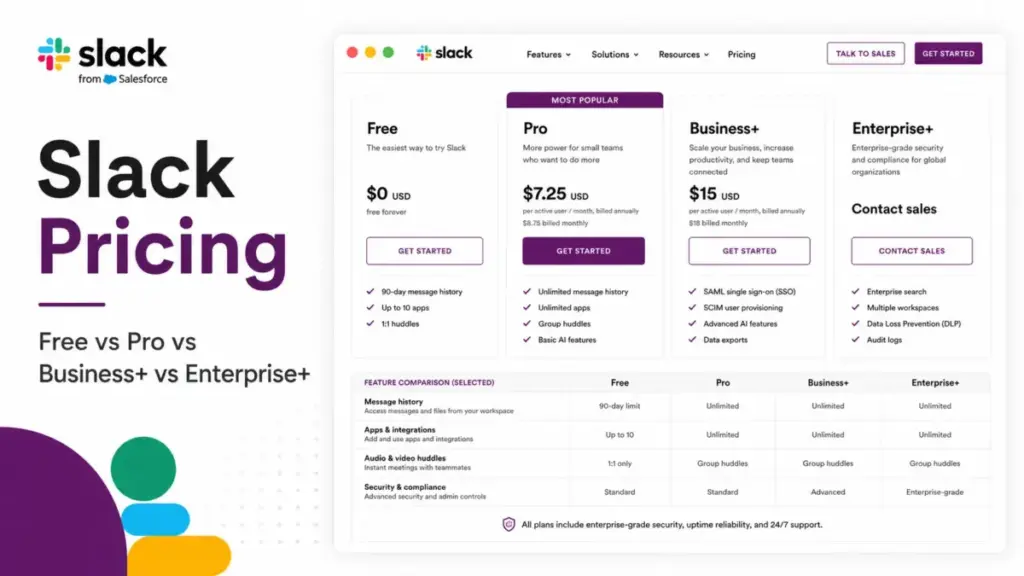
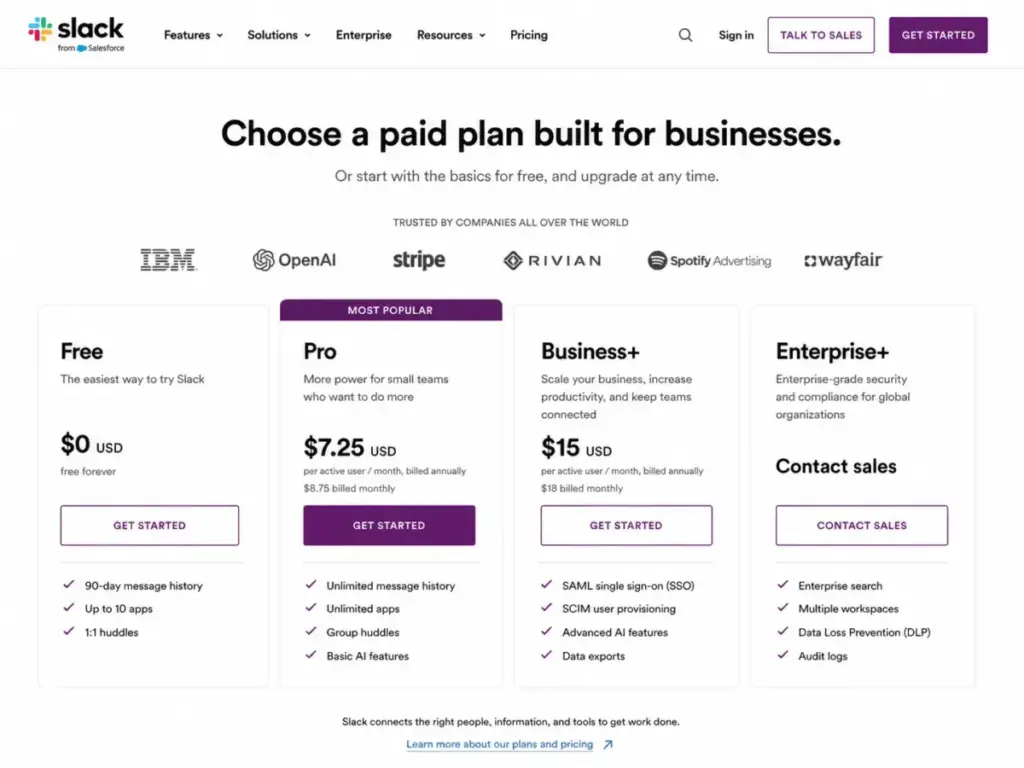
Slack pricing starts at $0 per user per month, but that list price changes when you add custom requirements. The master pricing table below displays the official rates and limits for every tier.
| Plan | Monthly Billed | Annually Billed | Billing Basis | Best For | Key Limits |
|---|---|---|---|---|---|
| Free | $0 | $0 | Per active user | Small teams with basic needs | 90 days of searchable message and file history, up to 10 apps, 1:1 huddles, 1:1 external work |
| Pro | $8.75/user | $7.25/user | Per active user | Small and growing teams | One workspace, basic AI features (summaries, huddle notes) |
| Business+ | $18/user | $15/user | Per active user | Mid-market teams requiring identity/compliance | One workspace, advanced AI features, SAML SSO, SCIM user management, all-message data exports |
| Enterprise+ | Contact sales | Contact sales | Custom contract | Large or complex organizations | Undisclosed pricing, custom seats and terms, native DLP, legal holds, audit logs, multiple SAML configurations |
What this means:
The starting price on the pricing page is only the baseline. If you choose monthly billing instead of paying annually, your costs increase by 17.1% on Pro and 16.7% on Business+. For a growing team, these percentage differences turn into hundreds of dollars in extra fees over a calendar year.
The 5 Hidden Costs Nobody Mentions
Slack bills your team based on active membership, which introduces budget variability. I have analyzed the operational details of the billing engine to identify the costs that surprise finance teams. These cost factors and add-ons are summarized in the table below.
| Cost Factor / Add-on | Price | TCO Impact |
|---|---|---|
| Active-member billing variability | Variable | Prorated credits for inactive users, but invited members become billable once they accept. |
| Monthly billing premium | $1.50/user (Pro) or $3.00/user (Business+) extra per month | 17–20% higher than annual rates. |
| Identity and compliance premium | $7.75/user/month list difference | $93/user/year jump from Pro to Business+. |
| Slack Atlas add-on | Contact sales | Undisclosed cost for org charts and rich profiles on Business+ (included in Enterprise+). |
| Enterprise Key Management (EKM) | Contact sales | Customer-controlled encryption keys as an add-on for Enterprise Grid/Enterprise+. |
| Salesforce subscription separation | Separate subscription | Salesforce does not bundle Slack into Salesforce pricing. |
1. Active-Member Billing Variability
Under the Fair Billing Policy, the company monitors user activity over a 28-day billing cycle. The platform calculates active members based on whether a user opens the application or sends a message.
If a user goes inactive for 28 days, the system issues a prorated credit to your account. This credit applies to your next billing cycle.
However, the reverse is also true. If you invite five contractors and they log in once, they immediately become billable members. These changes make your monthly software bill unpredictable.
2. Monthly Billing Premium
Paying month-to-month instead of annually adds a premium to your bill. For the Pro plan, you pay $8.75 per user instead of $7.25.
On the Business+ plan, the monthly rate rises to $18 per user instead of $15.
For a 10-person team, paying monthly on Pro adds $180 in annual costs compared to paying annually. This is a premium you pay for flexibility, which makes annual commitments the standard choice for stable teams.
3. Business+ Upgrade for Identity and Compliance
Upgrading from Pro to Business+ to get SAML SSO and SCIM provisioning increases your costs. The list price difference is $7.75 per user per month on annual terms.
This is equal to an extra $93 per user per year for security controls.
For a 25-user team, the upgrade to Business+ increases the annual bill from $2,175 to $4,500. You pay $2,325 extra per year for compliance and directory sync.
4. Salesforce Subscription Separation
Salesforce owns Slack, but the CRM subscription does not include the communication tool. You must buy separate licenses for both platforms.
Some integrations allow you to view Salesforce records inside chat channels.
However, this does not grant full access to the CRM. Your team members still need active licenses for both systems to manage sales pipelines.
5. Custom Add-On Costs
Enterprise customers face undisclosed costs for security and profile add-ons. For example, the Slack Atlas add-on adds org charts and employee profiles to Business+ workspaces.
Similarly, the Enterprise Key Management security add-on allows you to control your encryption keys.
These add-ons require custom sales conversations. The pricing is not public, which means your procurement team must negotiate these rates.
Plan-by-Plan Breakdown
Every plan tier gates features based on security, search history, and collaboration limits. Below is a detailed look at what each plan contains and who should avoid them.
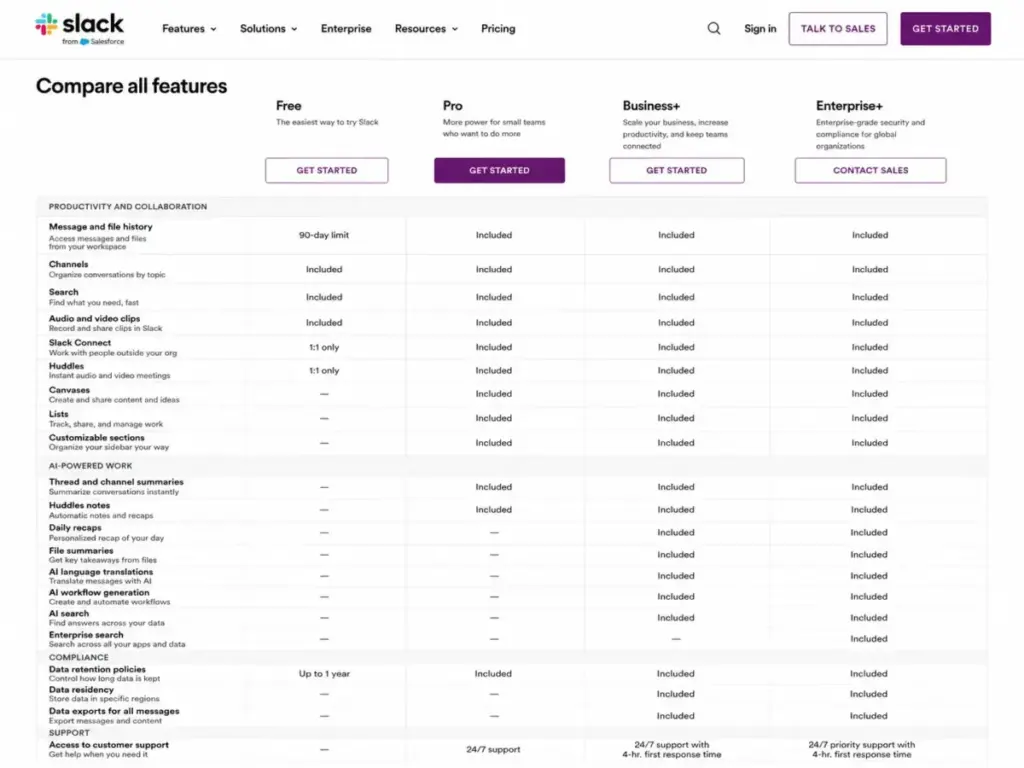
Slack Free
Best for solo users and teams under 5 people.
- Includes: 90 days of searchable message and file history, data retention up to one year, up to 10 app integrations, 1:1 huddles, and 1:1 external messaging.
- Missing: Unlimited history, group huddles, group external channels, Lists, and AI features.
- Avoid if: Your team relies on past messages and files to retrieve project decisions.
- Mini verdict: The Free plan works for basic chat, but the 90-day search cap limits its usefulness as a knowledge database.
Slack Pro
Best for small and growing teams.
- Includes: Unlimited history, unlimited app integrations, group meetings, group external messages, canvases, Lists, and basic AI features (summaries, huddle notes).
- Missing: SAML SSO, SCIM user provisioning, all-message data exports, and advanced administrative controls.
- Avoid if: Your IT department requires Okta or Azure AD directory sync for security compliance.
- Mini verdict: The Pro plan is the best value for collaboration, delivering unlimited history and group huddles without the enterprise security tax.
Slack Business+
Best for governed mid-market teams.
- Includes: Pro capabilities plus advanced AI features (daily recaps, file summaries, AI search), SAML-based SSO, SCIM user provisioning, data exports for all messages, and 24/7 support with 4-hour response time.
- Missing: Unlimited workspaces, enterprise search, native DLP, information barriers, legal holds, and audit logs.
- Avoid if: You need centralized management across multiple distinct workspaces or native compliance exports for regulatory audits.
- Mini verdict: Business+ is an identity and compliance upgrade, meaning you pay a premium for administrative control rather than collaboration features.
Slack Enterprise+
Best for global corporations and regulated industries.
- Includes: Custom contract, unlimited workspaces, Enterprise Grid architecture, multiple SAML configurations, mobile device management support, native DLP, information barriers, legal holds, audit logs, and HIPAA support.
- Missing: Public list pricing and standard seat minimums.
- Avoid if: Your team does not have dedicated IT administrators to manage the Enterprise Grid architecture.
- Mini verdict: Enterprise+ is a security and governance layer designed for compliance-heavy environments, requiring a sales-led contract negotiation.
The table below outlines the feature gates across all four plans.
| Feature Gate | Free | Pro | Business+ | Enterprise+ |
|---|---|---|---|---|
| Message History | 90 days (stored up to 1 year) | Unlimited | Unlimited | Unlimited |
| App Integrations | Up to 10 | Unlimited | Unlimited | Unlimited |
| Huddles | 1:1 only | Group meetings | Group meetings | Group meetings |
| External Work | 1:1 only | Group channels | Group channels | Group channels |
| SAML SSO | No (conditional via Salesforce) | No (conditional via Salesforce) | Yes (SAML-based) | Yes (multi-SAML) |
| SCIM Provisioning | No (conditional via Salesforce) | No (conditional via Salesforce) | Yes | Yes |
| Data Exports | No | No | Yes (all messages) | Yes (Discovery API) |
| Native DLP/Compliance | No | No | No | Yes (HIPAA/legal holds) |
When the Free Plan Stops Working
The Free plan has a hidden limitation that goes beyond the 90-day search cap. Under the official retention policy, messages and files older than one year are permanently deleted from the servers.
Many teams assume their old messages are simply hidden behind a paywall.
However, if you stay on the Free plan for two years, your first-year data is gone forever. Upgrading to a paid plan later will not restore these deleted messages.
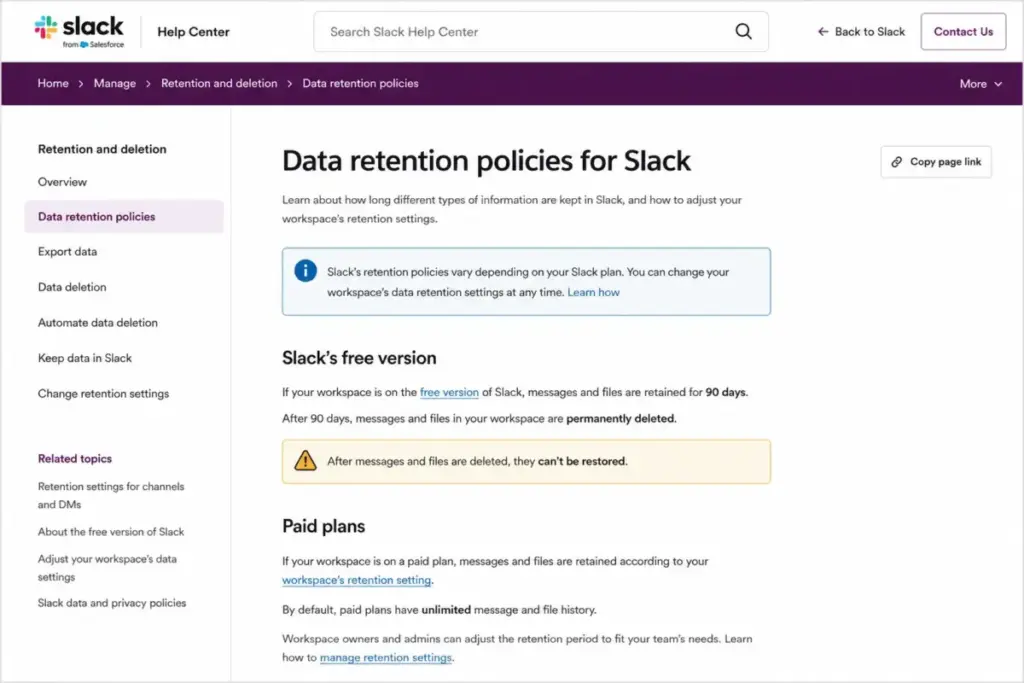
If your team uses the chat platform as a knowledge base, this deletion policy presents a risk. You must upgrade to a paid tier before your messages cross the one-year mark to preserve your history.
Real Cost Scenarios
To help you budget, I calculated the real annual cost of Slack across different team sizes. These scenarios use the annual list prices and assume no custom add-ons.
| Team Size | Recommended Plan | Estimated Monthly Cost | Estimated Annual Cost | Billing Option | Notes |
|---|---|---|---|---|---|
| 5 Users | Pro | $36.25 | $435 | Annual billing | The Free plan works if 90-day history is acceptable, but Pro is the clean path to preserve history. |
| 10 Users | Pro | $72.50 | $870 | Annual billing | The upgrade to Business+ increases the cost to $150/month ($1,800/year) if you need SSO. |
| 25 Users | Pro | $181.25 | $2,175 | Annual billing | Annual billing saves $450 per year on Pro compared to monthly billing at this scale. |
| 50 Users | Business+ | $750.00 | $9,000 | Annual billing | Business+ is recommended here because IT teams at this scale require directory sync and SSO. |
| 100 Users | Business+ | $1,500.00 | $18,000 | Annual billing | For complex corporate compliance or multiple workspaces, you must contact sales for Enterprise+ rates. |
What this means:
At 50 users, the price difference between Pro and Business+ is $4,650 per year. If you do not need directory sync or compliance exports, staying on Pro saves a significant portion of your software budget.
Which Slack Plan Should You Choose?
The right plan depends on your team size and your IT security requirements. Here is my recommendation for three common buyer scenarios:
- 1 to 5 users: Stay on the Free plan if you only need quick coordination. If you need a searchable archive of client work, upgrade to Pro.
- 10 to 20 users: Choose Pro to enable group huddles and unlimited integrations. At this scale, the Pro plan delivers the best collaboration value.
- 25+ users: Upgrade to Business+ if your HR and IT teams require centralized user provisioning. This tier is essential for organizations using Okta or Azure AD to manage access.
Which Slack Plan Should You Avoid?
You should avoid the Business+ plan if your only goal is to get “more Slack.” The Pro plan already includes unlimited history, unlimited integrations, group huddles, and canvases.
Upgrading to Business+ costs an extra $7.75 per user per month.
Unless your security team requires SAML SSO or SCIM user provisioning, this upgrade is an unnecessary expense. Save your budget and stick to Pro.
How Slack Pricing Compares to Competitors
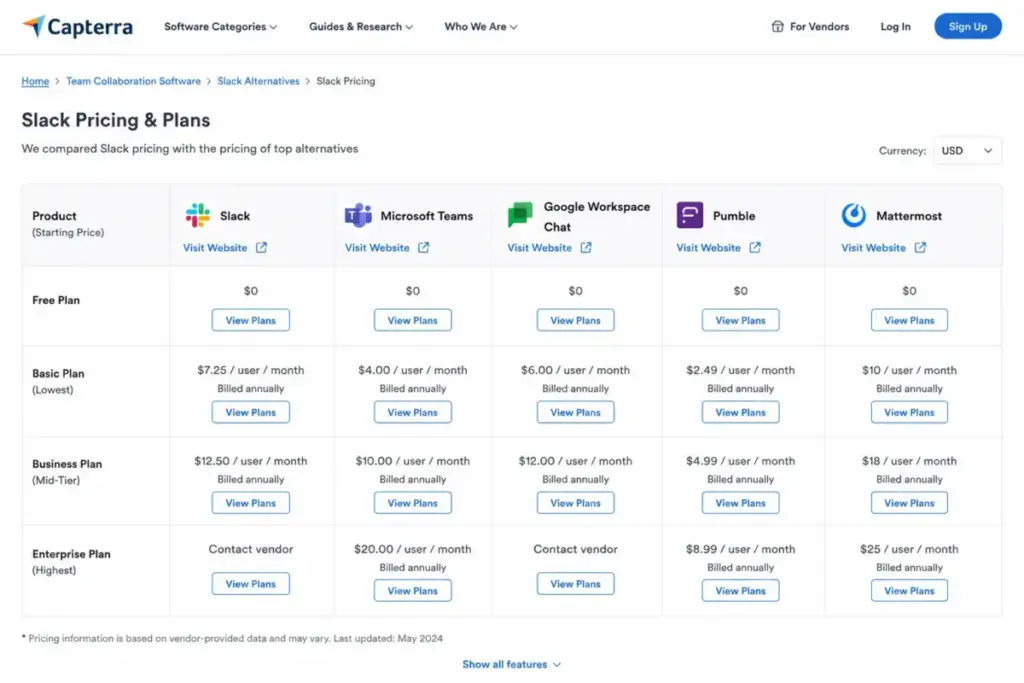
Slack position in the market is premium, meaning it is more expensive than most direct alternatives. The table below compares the pricing of popular communication tools.
| Competitor | Starting Price | Practical Tier | 10-User Cost | Best For |
|---|---|---|---|---|
| Teams Essentials | $4.00/user/month | $4.00/user/month | $40/month | Microsoft-centric offices |
| Google Workspace | $7.20/user/month | $7.20/user/month | $72/month | Teams needing bundled email and storage |
| Zoom Workplace | $14.16/user/month | $14.16/user/month | $141.60/month | Video-first teams |
| Pumble Pro | $2.49/user/month | $2.49/user/month | $24.90/month | Budget-conscious teams |
What this means:
Microsoft Teams is a cheaper alternative for organizations already paying for Microsoft 365. My Microsoft Teams evaluation highlights that the communication tool is bundled with your email and office suite.
If you are on Google Workspace, using Google Chat is a similar path. The Google Workspace review shows that you can avoid paying for Slack entirely by using the bundled tools you already own.
For teams focused on video meetings, my Zoom Workplace analysis explains how the video vendor is expanding its chat functionality to compete.
Is Slack Worth the Price?
Slack is worth the price if the platform is the central operating system for your team workflows. It excels when you connect developer alerts, customer channels, and automated workflows under one workspace.
However, the cost is hard to justify for casual communication.
If your team only uses the tool for social chat and occasional check-ins, cheaper options are better. You will pay a premium for features your team never opens.
How to Avoid Overpaying for Slack
To manage your communication software budget, you must audit your workspace usage. I recommend implementing these five cost control practices:
- Review active users monthly: Set a calendar reminder to review your active member list and deactivate inactive accounts to trigger billing credits.
- Use single-channel guests: The platform allows you to invite single-channel guests for free, which saves you from paying for full member seats.
- Deactivate pending invites: Pending invitations do not cost money, but they become billable the moment they are accepted.
- Choose annual billing: Select the annual payment option to save up to 17.1% on your seat costs.
- Connect workflow tools: Use a Zapier integration analysis to build simple automation rules that reduce the need for custom app subscriptions.
- Evaluate wiki tools: Compare your needs against the Notion pricing structure to see if you can move long-term documentation out of chat and into a cheaper workspace tool.
FAQ
How much does Slack cost per user?
Slack costs $7.25 per user per month for the Pro plan and $15.00 per user per month for the Business+ plan when billed annually. If you choose monthly billing, the prices increase to $8.75 per user on Pro and $18.00 per user on Business+. The Enterprise+ plan requires a custom contract.
Is Slack free to use?
Yes, Slack includes a Free plan that has no time limit. However, the Free plan only allows you to view the last 90 days of message and file history. It also limits your workspace to 10 app integrations and 1:1 huddles.
What happens to messages after 90 days on the Free plan?
Messages and files older than 90 days are hidden from your search results and views. They are not immediately deleted, but they remain locked behind the paywall until you upgrade. However, the system permanently deletes all free workspace data older than one year.
What is the difference between Slack Pro and Business+?
The Pro plan is designed for collaboration, offering unlimited history, unlimited integrations, and group huddles. The Business+ plan is designed for identity and compliance, adding SAML SSO, SCIM user provisioning, all-message exports, and 24/7 support.
Does Slack offer discounts for nonprofits?
Yes, the company offers a nonprofit program. Eligible organizations with 250 or fewer members can access the Pro plan for free. Nonprofits also receive an 85% discount on Pro plans above that size and an 85% discount on the Business+ plan.
Can a school get Slack cheaper?
Yes, education institutions can apply for an 85% discount on the Pro or Business+ plans. This discount applies to both annual and monthly terms for eligible academic organizations.
Does Slack require a credit card for a free trial?
No, you do not need to enter a credit card to start a free trial of Pro or Business+. The trial ends automatically unless a workspace administrator enters billing details to upgrade.
Is Slack AI included in Pro and Business+ pricing?
The platform bundles basic AI features, such as thread summaries and huddle notes, into the Pro plan. The Business+ and Enterprise+ plans include advanced AI tools, including daily recaps, file summaries, and AI search. The legacy standalone website add-on is no longer available.