If you only need cheap custom-domain email, Google Workspace is not your shortest path. If your team lives in Gmail, Drive, Meet, and Docs every day, Google Workspace pricing is one of the easier decisions in business software, and the cheapest plan is almost never the right one. That gap between the headline price and the plan you actually need is what this guide settles.
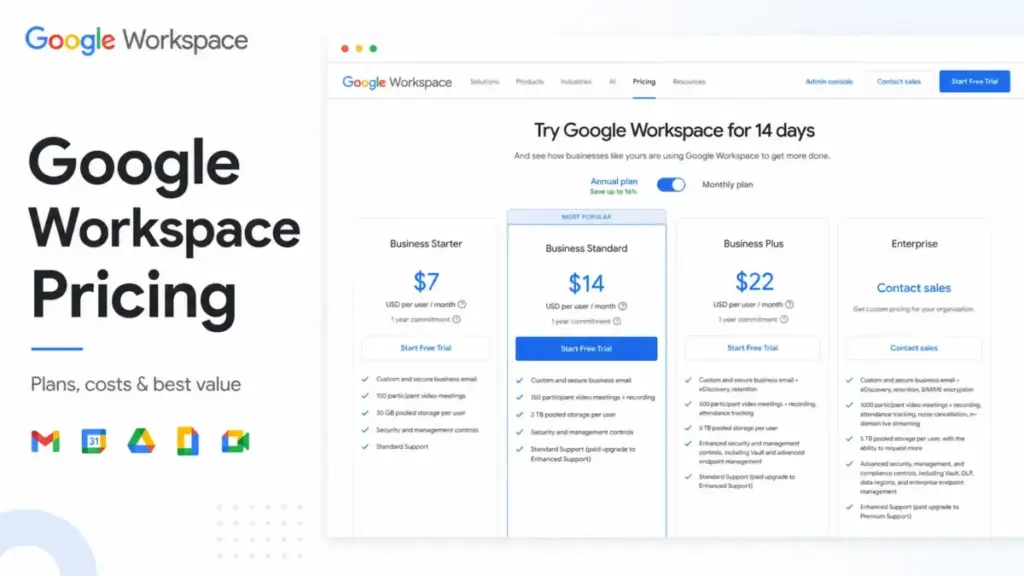
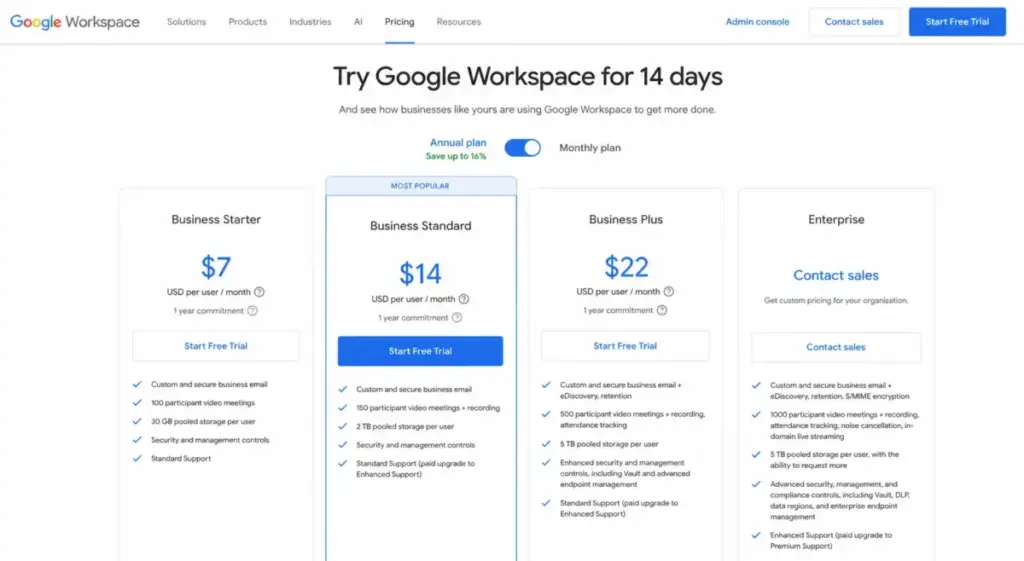
Google Workspace pricing runs from $7 to $22 per user per month on an annual commitment, plus a custom Enterprise tier (as of June 2026). The real question is not “what does it cost,” it’s “which tier matches how your team works,” because Business Starter’s 30 GB storage and lighter AI access push more teams to upgrade than most pricing pages admit.
I’m Sarah Chen, and I cover email and collaboration suites at SaaSZap. Below is the plan-by-plan math for 5, 10, 25, 50, and 100-user US businesses, the add-ons that quietly inflate the bill, and the one billing choice that decides whether annual pricing saves you money or traps you.## Quick Pricing Verdict
Google Workspace charges per user per month, and it charges differently depending on whether you commit for a year. That single billing decision shapes your total cost more than the plan name does.
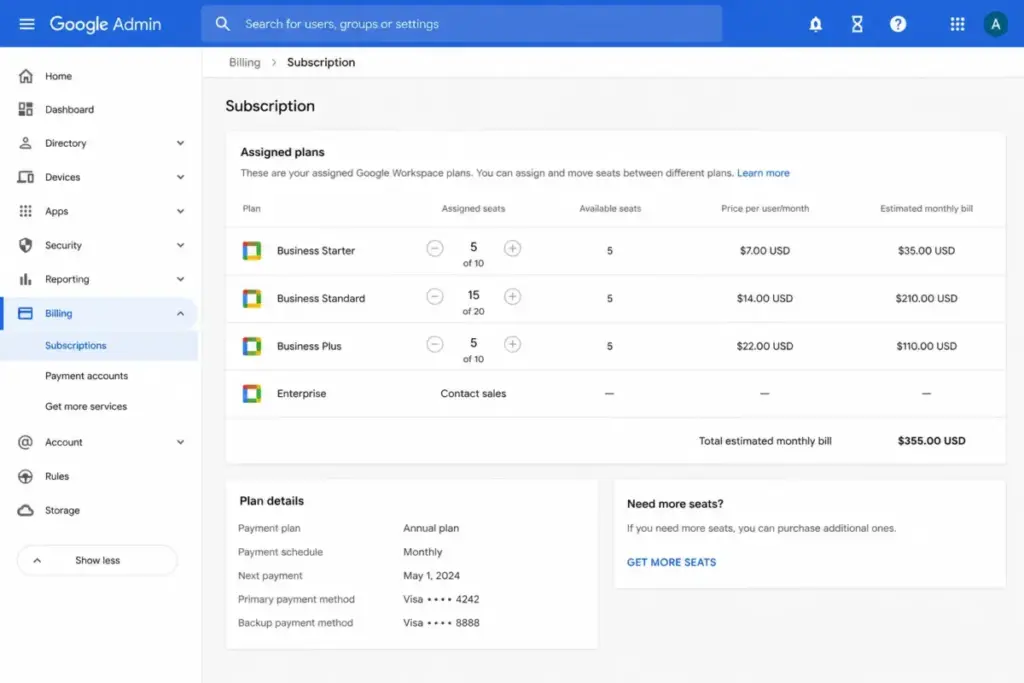
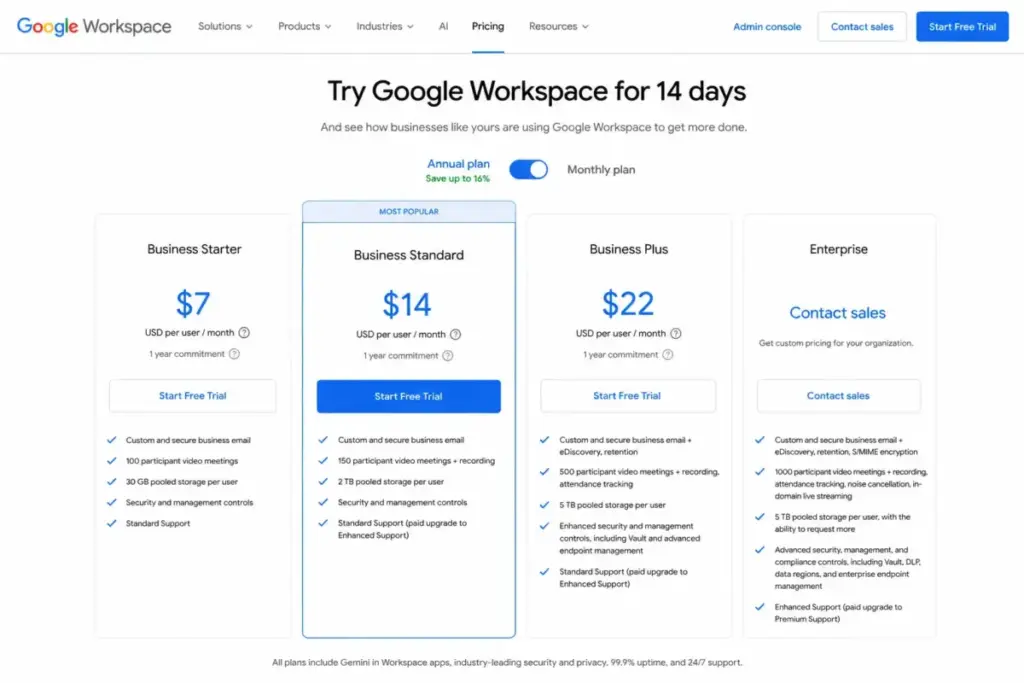
| Plan | Annual price (per user/mo) | Flexible price (per user/mo) | Pooled storage/user | Best for |
|---|---|---|---|---|
| Business Starter | $7 | $8.40 | 30 GB | Email-light teams under 5 users |
| Business Standard | $14 | $16.80 | 2 TB | Most active teams (best value) |
| Business Plus | $22 | $26.40 | 5 TB | Compliance and retention needs |
| Enterprise | Custom | Custom | 5 TB or more | Advanced security and controls |
What this means: The published Business plans cap at 300 users each, and Enterprise is the only path past that ceiling or into advanced security controls. For most small and mid-sized teams, Business Standard at $14 per user per month is the plan to anchor your budget on, not the $7 Starter tier. The sections below show why.
You can verify current rates on the official Google Workspace pricing page, since promotional discounts sometimes appear at checkout for the first few months.
How Google Workspace Pricing Actually Works
Google Workspace is sold as a per-user subscription billed monthly, with every published Business price quoted in US dollars. The model is simple on the surface: pick a plan, multiply by headcount, choose annual or flexible billing.
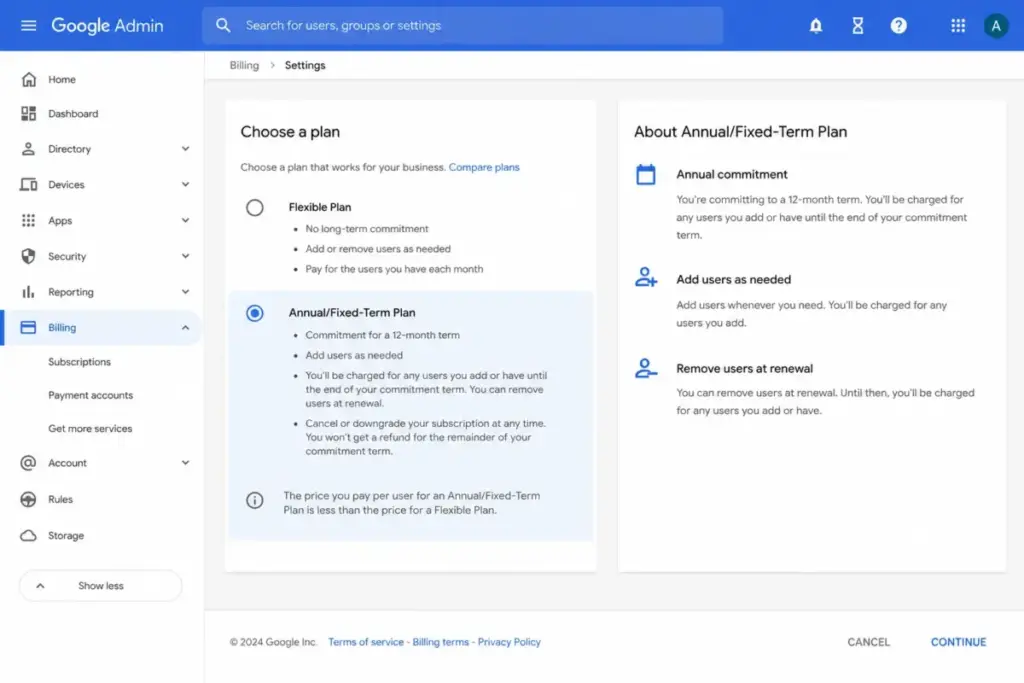
The complication is the commitment. Google offers two billing structures. The Flexible Plan has no long-term contract and lets you add or remove users at any time. The Annual/Fixed-Term Plan locks you in for a year, lets you add users whenever you want, but only lets you reduce licenses at renewal.
That asymmetry is the whole game. Annual billing is roughly 16% cheaper per seat, but you are betting on stable headcount. Cancel early on an annual plan and you can owe the remaining balance of your commitment. Google also does not publish a free business plan. Consumer Gmail and the free Google apps are separate products without the custom-domain admin console, business storage, or centralized controls. The only free entry point is a 14-day trial.
The Three-Trigger Test: Before you pick a Google Workspace plan, check three things. First, storage: will your team exceed pooled allocation within a year? Second, compliance: do you need Vault, eDiscovery, or Secure LDAP? Third, controls: do you need DLP or Context-Aware Access? Each “yes” pushes you up one tier. Zero “yes” answers means Business Standard covers you.
If You Are a Solo User or Tiny Team
For a solo founder or a two-person operation, Business Starter at $7 per user per month annually is the entry point, and it is the one case where Starter genuinely fits. At that size, you are paying for professional custom-domain email, Gmail’s interface, and basic Gemini access in Gmail, not for heavy collaboration infrastructure.
Starter includes 30 GB of pooled storage per user and 100-participant video meetings. For a freelancer sending invoices and proposals, that is enough.
Here is the honest caveat. The 30 GB ceiling is shared pooled storage, and it fills faster than people expect once you store project files, shared drives, and email attachments. Starter also caps SAML app auto-provisioning at 3 apps and excludes Meet recording, eSignature, and appointment booking pages. My recommendation for solo users: start on Starter, but assume you will reassess within the first year if you add anyone or lean on Drive. The storage wall arrives sooner than the price suggests.
If You Have a 5-Person Team
For a 5-person team, Business Standard at $14 per user per month annually is the best-value plan, costing $70 per month or $840 per year. This is the tier I point most small teams toward, because it removes the two constraints that make Starter frustrating: storage and meeting tools.
Business Standard jumps pooled storage from 30 GB to 2 TB per user, raises meetings to 150 participants, and adds recording and noise cancellation. It also unlocks Gemini features across Docs, Sheets, Slides, Meet, and Drive, not just Gmail, plus appointment booking pages and eSignature.
The math against Starter is closer than it looks. Five Starter seats run $35 per month, while five Standard seats run $70. You are paying an extra $420 per year for roughly 66x the storage and the collaboration features a real team uses daily.
For a 5-person marketing team running campaigns, recording client calls, and collaborating in shared docs, that $420 is not a premium. It is the price of not hitting a storage wall in month four.
If You Have 10 to 20 Users
At 10 users, Business Standard costs $140 per month or $1,680 per year on annual billing. This is where the annual-versus-flexible decision starts to carry real dollars, and where add-on creep begins.
Choosing annual over flexible on Business Standard saves a 10-person team about $336 per year. That is not trivial, but it assumes your headcount holds. If you expect to shrink, the Flexible Plan’s higher per-seat rate can be cheaper than paying out an annual commitment you cannot reduce.
Watch for hidden costs at this size. If your team needs business phone service, Google Voice adds $10 to $30 per user per month on top of the plan. No-code app building through AppSheet adds $5 to $10 per user per month. These are separate subscriptions, billed separately, and they are the most common reason a “$14 per user” plan turns into a $20-something per user reality.
For a 15-person team that needs Voice, the true cost is not $14 per seat. It is $14 plus $10, or $24 per user per month, which is $4,320 per year before any other add-on.
If You Have 25 to 50 Users
For teams of 25 to 50, Business Standard remains the default at $350 per month (25 users) or $700 per month (50 users) on annual billing. At this scale, the decision shifts from “which plan is cheapest” to “do we need compliance features,” and that is the Business Plus question.
Business Plus at $22 per user per month annually adds 5 TB pooled storage, 500-participant meetings, Google Vault, eDiscovery, Secure LDAP, and advanced endpoint management. For a 50-person company, that is the difference between $8,400 per year on Standard and $13,200 per year on Plus.
The trigger for Plus is rarely storage. It is retention and legal hold. If your HR, finance, or legal team needs to preserve and search email and files for compliance, Vault and eDiscovery only appear on Business Plus. There is no add-on path to bolt them onto Standard.
One operational warning at this size: if you add Google Voice Standard or Premier for more than 50 users, Google requires paying up front and increasing licenses in a block, not seat by seat. Budget for that lump sum.
If You Have 50 to 100 Users
A 100-user team on Business Standard costs $1,400 per month or $16,800 per year on annual commitment, and Business Standard still works at this size because the published Business plans support up to 300 users. You do not automatically need Enterprise at 100 seats.
The real fork is Standard versus Plus. The same 100-user team on Business Plus would cost $2,200 per month or $26,400 per year, a $9,600 annual difference. That gap is the single biggest pricing decision a growing company makes inside Google Workspace.
Pay the $9,600 only if you have a concrete compliance, retention, or endpoint-security requirement. If you are upgrading “to be safe,” you are buying features your team will never open. Most 100-person companies without regulated workflows are well served by Standard, with Plus reserved for the specific departments that need it. Enterprise enters the conversation only when you need DLP, Context-Aware Access, Cloud Identity Premium, 1,000-participant live streaming, or you cross 300 users, and its pricing is custom through Google Sales.
Full Plan Breakdown and Cost at Scale
Google Workspace cost scales linearly per seat on a single plan, which makes total budgeting straightforward once you pick a tier. The table below uses Business Standard, the best-value plan for most teams, on annual billing.
| Team size | Standard monthly | Standard annual | Plus annual (for comparison) |
|---|---|---|---|
| 5 users | $70 | $840 | $1,320 |
| 10 users | $140 | $1,680 | $2,640 |
| 25 users | $350 | $4,200 | $6,600 |
| 50 users | $700 | $8,400 | $13,200 |
| 100 users | $1,400 | $16,800 | $26,400 |
What this means: Business Standard delivers the storage, AI, and meeting features most teams need at a price that stays predictable as you grow. The Plus column is your compliance premium, useful to know in advance so a Vault requirement does not blindside your budget. None of these figures include add-ons, which are covered next.
You can review the full feature list per tier on the official Google Workspace pricing page, and the deeper feature differences in our Google Workspace review and analysis.
Plan Feature Gates That Drive Upgrades
The features that force a Google Workspace upgrade are storage, meeting tools, AI access, and security controls, in that rough order of frequency. Knowing exactly where each one is gated prevents paying for a tier you do not need.
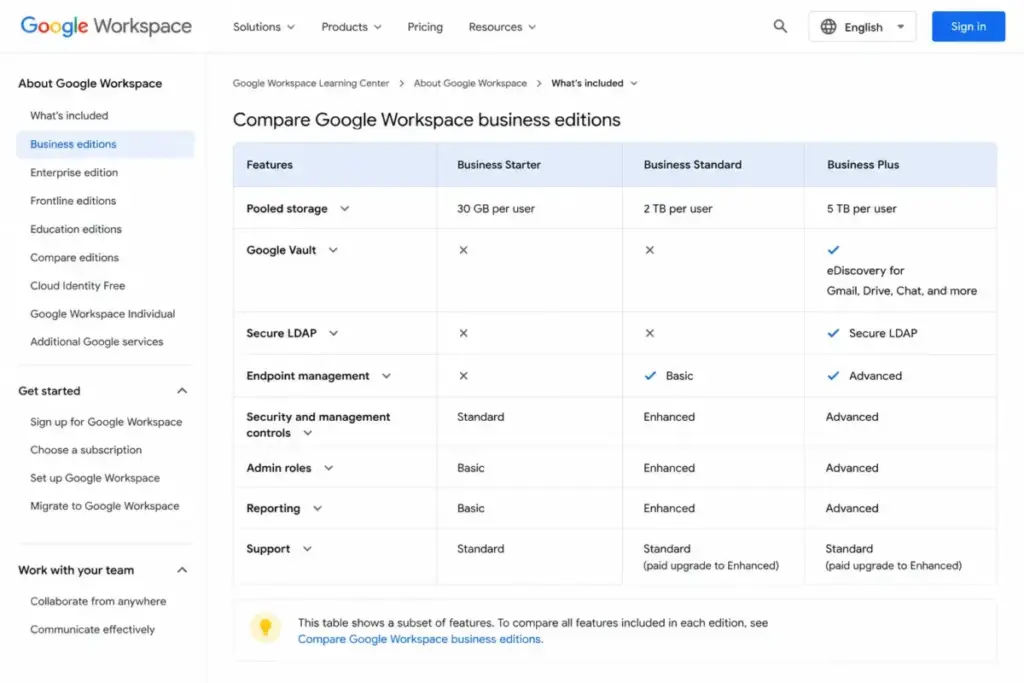
| Feature | Starter | Standard | Plus | Enterprise |
|---|---|---|---|---|
| Pooled storage/user | 30 GB | 2 TB | 5 TB | 5 TB or more |
| Meeting recording | No | Yes | Yes | Yes |
| Video participants | 100 | 150 | 500 | Up to 1,000 |
| Gemini across all apps | Limited | Yes | Yes | Yes |
| eSignature | No | Yes | Yes | Yes |
| Vault and eDiscovery | No | No | Yes | Yes |
| Secure LDAP | No | No | Yes | Yes |
| Advanced endpoint mgmt | No | No | Yes | Yes |
| DLP and Context-Aware Access | No | No | No | Yes |
What this means: Two upgrade walls matter most. The first is the 30 GB to 2 TB jump from Starter to Standard, which catches Drive-heavy teams. The second is the compliance wall at Business Plus, where Vault, eDiscovery, and Secure LDAP first appear with no add-on workaround on lower tiers.
Security and Admin Gates for IT Teams
For IT admins, the security gates are more nuanced than “SSO included.” Single sign-on using Google or a third-party identity provider works across all Business plans. The differences are in provisioning and directory features.
SAML app auto-provisioning is limited to 3 apps on Business Starter and becomes unlimited on Business Standard and Plus. Secure LDAP, which many legacy and on-premise tools depend on, appears only on Business Plus. Fundamental endpoint management spans all Business plans, but advanced endpoint management starts at Business Plus.
If your stack relies on Secure LDAP or you need to auto-provision more than 3 SAML apps, your real entry tier is Business Standard at minimum, and Business Plus if Secure LDAP is mandatory.
Hidden Costs and Add-Ons
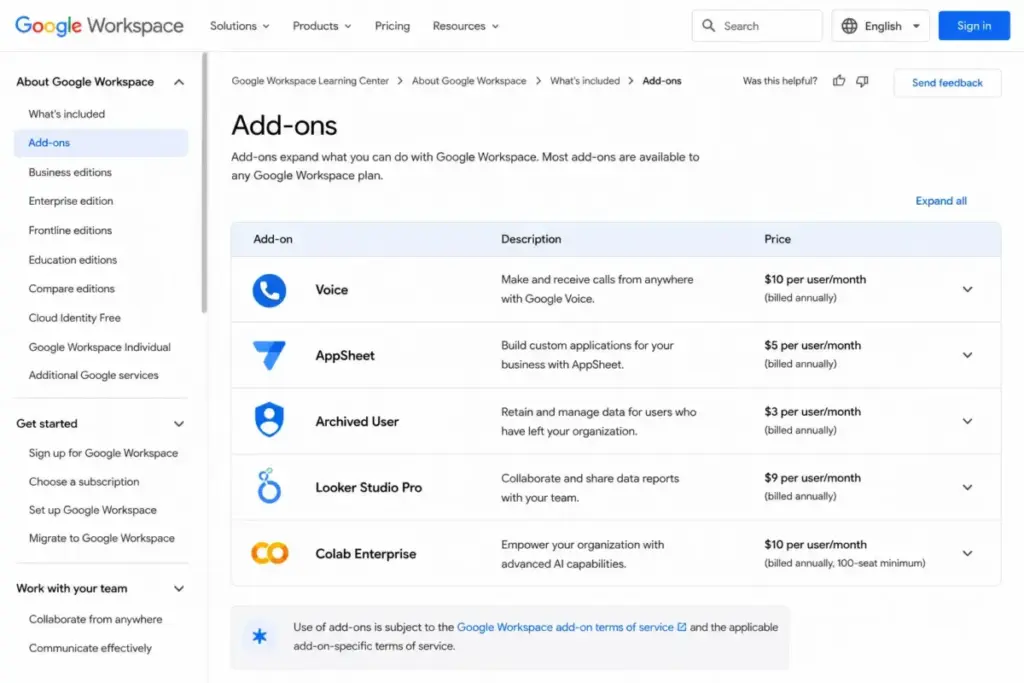
The add-ons are where Google Workspace pricing stops being simple, and they are the most under-reported part of the buying decision. Every item below is a separate subscription that does not appear in the headline per-seat price.
| Add-on | Price (per user/mo) | When you need it |
|---|---|---|
| Google Voice | $10 / $20 / $30 | Business phone numbers in Workspace |
| AppSheet | $5 / $10 / custom | No-code app building |
| Archived User license | $2 to $7 | Retaining ex-employee data |
| Looker Studio Pro | $9 | Paid reporting collaboration |
| Colab Pro | $8.33 annual / $9.99 flex | Paid Colab compute |
| Colab Pro Plus | $41.66 annual / $49.99 flex | Higher Colab compute tier |
| Enhanced / Premium Support | Contact sales | Faster, advanced support |
| Assured Controls | Contact sales | Enterprise Plus regulatory needs |
| Chat interoperability | $0 (order via sales/partner) | Third-party chat connections |
| Additional pooled storage | Not publicly listed | Pooled storage runs out |
What this means: The archived user license is the sneakiest cost. When an employee leaves but you need to keep their email and files, you pay $2 to $7 per former user per month depending on edition, indefinitely. A company with high turnover can accumulate a meaningful archived-license bill that never appears in seat-count planning.
A few other billing realities to budget for. Charges begin automatically after the 14-day trial. Threshold billing can trigger an earlier charge if accrued usage crosses your account’s billing threshold mid-cycle. Prorated charges appear when you add users mid-term. And buying or managing a domain during signup is a separate transaction priced by the registrar. The Google Workspace billing documentation covers these mechanics in detail.
Additional pooled storage is available when your plan allocation runs out, but Google does not publish a simple public per-unit price for it, so confirm the cost with sales before assuming it is cheap.
Annual vs Monthly: The Billing Trap
Annual billing saves about 16% per seat, but it only saves money if your headcount is stable. This is the billing decision that catches the most buyers off guard, so it deserves its own math.
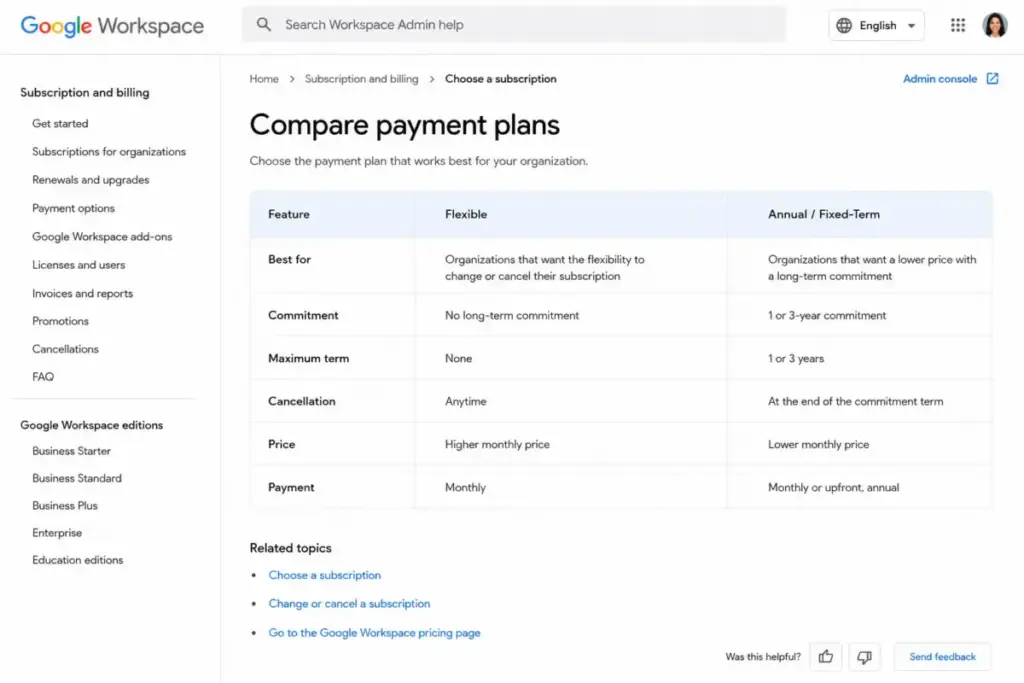
On the Flexible Plan, you can cancel or reduce licenses at any time, paying a higher per-seat rate for that freedom. On the Annual/Fixed-Term Plan, you commit for a year, you can add users anytime, but you can only reduce licenses at renewal. Cancel early and the remaining commitment balance can come due.
Annual billing saves money only if your headcount is stable. A 10-person team that grows is fine on annual: you add seats freely. A team that might shrink, run seasonal contractors, or restructure should price out the Flexible Plan first. The 16% discount is not worth owing a full year on seats you cut in month three.
Here is the practical rule. If your headcount is flat or growing, take annual and bank the savings. If your headcount fluctuates or you are pre-revenue and uncertain, the Flexible Plan’s higher rate is cheap insurance against a lock-in you cannot escape.
You can confirm the exact commitment terms on Google’s Flexible versus Annual billing comparison page before you sign.
The Plan to Avoid for Most Teams
Business Starter is the plan most growing teams should skip, despite being the cheapest. The 30 GB pooled storage per user is the single most common reason teams outgrow a Google Workspace plan within their first year.
Starter makes sense for solo users and two-person operations doing light email. For anyone who collaborates in Drive, records meetings, or expects to add people, Starter’s savings of $7 per user per month over Standard evaporate the moment you hit the storage ceiling or need a feature gated above it. Starter is not a bad plan, it is a narrow one: right for a small, email-first use case and wrong for the active collaboration most teams actually do. Buying it to save money and upgrading three months later costs you the migration effort and the false economy.
Google Workspace vs Competitor Pricing
Google Workspace is mid-priced among business suites: cheaper than Proton, pricier than Zoho, and close to Microsoft 365 once AI is included. The right comparison depends on which ecosystem your team already lives in.
| Suite | Starting price (per user/mo, annual) | Free plan | 10-user cost/mo |
|---|---|---|---|
| Google Workspace (Starter) | $7 | No (14-day trial) | $70 |
| Microsoft 365 Business Basic | $6 | No | $60 |
| Zoho Workplace Standard | ~$3 | Yes (mail, up to 5 users) | ~$30 |
| Proton Business Suite | ~$12.99 | No (trial) | ~$129.90 |
| Lark Pro | ~$12 | Yes (Starter) | ~$120 |
What this means: Microsoft 365 Business Basic undercuts Google Workspace Starter at $6 per user per month, though Microsoft has announced a move to $7 per user per month for Teams-inclusive suites from July 1, 2026. Zoho Workplace is the budget choice for teams that mainly need email. Proton and Lark prices here are directional, drawn from third-party extraction and competitor plan pages, so confirm them before budgeting.
The pricing-only view misses the real decision. Teams standardized on desktop Office apps and Windows security stacks usually land on Microsoft 365. Teams that want included Gemini AI, real-time Docs collaboration, and Gmail as their primary layer get more value from Google Workspace, even at a slightly higher seat price than Microsoft’s entry tier. If video meetings drive your choice, our best video conferencing software guide compares Meet against the field, and our team collaboration tools roundup covers the broader suite market.
Is Google Workspace Worth It?
Google Workspace is worth it for teams that use Gmail as their primary email layer and collaborate daily in Docs, Drive, and Meet, and it is overpriced for teams that only need basic custom-domain email. The value is in the integrated workflow, not any single feature.
It is poor value when you need only a mailbox and minimal storage. At that point, Zoho Workplace or a basic Proton plan costs far less, and you are not paying for collaboration infrastructure you will not touch.
My recommendation: most 5-to-100-person US businesses should budget for Business Standard at $14 per user per month annually, add Business Plus only for the specific departments with compliance needs, and reserve Enterprise for advanced security or 300-plus headcount. That is the plan structure that matches how teams actually work, rather than how the cheapest line item looks.
Frequently Asked Questions
How much does Google Workspace cost in 2026?
Google Workspace costs $7, $14, or $22 per user per month on annual billing for Business Starter, Standard, and Plus respectively (as of June 2026). Flexible monthly billing runs higher at $8.40, $16.80, and $26.40 per user. Enterprise pricing is custom. A 10-person team on Business Standard pays $140 per month or $1,680 per year before any add-ons.
Is Google Workspace free?
No. Google Workspace Business has no free plan, only a 14-day trial. Consumer Gmail and free Google apps are separate products that lack the custom-domain admin console, business storage, and centralized controls. The trial requires payment setup up front but does not charge you until it ends, and it is limited to 10 users.
What is the cheapest Google Workspace plan?
Business Starter is the cheapest at $7 per user per month on annual billing. It includes custom business email, 30 GB pooled storage per user, Gemini in Gmail, and 100-participant meetings. It excludes Meet recording, eSignature, and the larger storage most teams need, so the lowest price often leads to an early upgrade.
What is the difference between Business Starter and Business Standard?
Business Standard ($14 per user per month annual) adds far more than Starter ($7). The biggest jump is storage, from 30 GB to 2 TB pooled per user. Standard also adds Meet recording, 150-participant meetings, Gemini across all Workspace apps, appointment booking pages, and eSignature. For most active teams, Standard is the practical starting tier.
Does Google Workspace include Gemini AI?
Yes. Since January 2025, Gemini AI features are included in Google Workspace Business and Enterprise subscriptions, and the previous standalone Gemini add-on is no longer sold. Access and usage limits vary by plan, with Business Starter getting more limited Gemini access than Standard, Plus, and Enterprise. Check current plan-level limits before purchase, since AI limits can change.
Which Google Workspace plan includes Google Vault?
Google Vault and eDiscovery first appear on Business Plus at $22 per user per month on annual billing. They are not available on Business Starter or Business Standard, and there is no add-on to attach them to lower tiers. Teams in HR, finance, legal, or regulated industries that need email and file retention or legal hold must move to Business Plus or Enterprise.
Can I cancel a Google Workspace annual plan early?
You can cancel, but the Annual/Fixed-Term Plan commits you for a year, and early cancellation can leave the remaining commitment balance due. You can add users anytime on an annual plan but can only reduce licenses at renewal. If your headcount fluctuates, the Flexible Plan, which allows cancellation and license reduction anytime at a higher per-seat rate, is often the safer choice.
Is Google Workspace cheaper than Microsoft 365?
At the entry tier, Microsoft 365 Business Basic ($6 per user per month annual) is slightly cheaper than Google Workspace Starter ($7), with Microsoft moving to $7 for Teams-inclusive suites from July 1, 2026. The fairer comparison includes included AI and storage, where the suites are close. Ecosystem fit usually decides it more than the few dollars of seat-price difference.
What add-ons cost extra in Google Workspace?
The main paid add-ons are Google Voice ($10 to $30 per user per month), AppSheet ($5 to $10), archived user licenses ($2 to $7 per former user), Looker Studio Pro ($9), and Colab Pro ($8.33 to $49.99). Enhanced Support, Premium Support, and Assured Controls are contact-sales upgrades. Each is billed as a separate subscription on top of your base plan.
The Bottom Line
Google Workspace pricing looks like a four-line table and behaves like a decision tree. The $7 headline draws you in, but Business Standard at $14 per user per month is the plan that fits most 5-to-100-person teams, because it clears the storage and meeting walls that make Starter frustrating.
Run the Three-Trigger Test before you buy: storage, compliance, controls. If none apply, Standard is your answer and your budget is predictable. If compliance applies, Business Plus is worth its premium for the departments that need it. If you need advanced security or more than 300 users, talk to Google Sales about Enterprise.
And before you click annual to save 16%, be honest about your headcount. A stable or growing team should take the discount. A team that might shrink should pay the Flexible Plan’s premium for the freedom to leave. That one choice, more than the plan name, decides what Google Workspace really costs you.