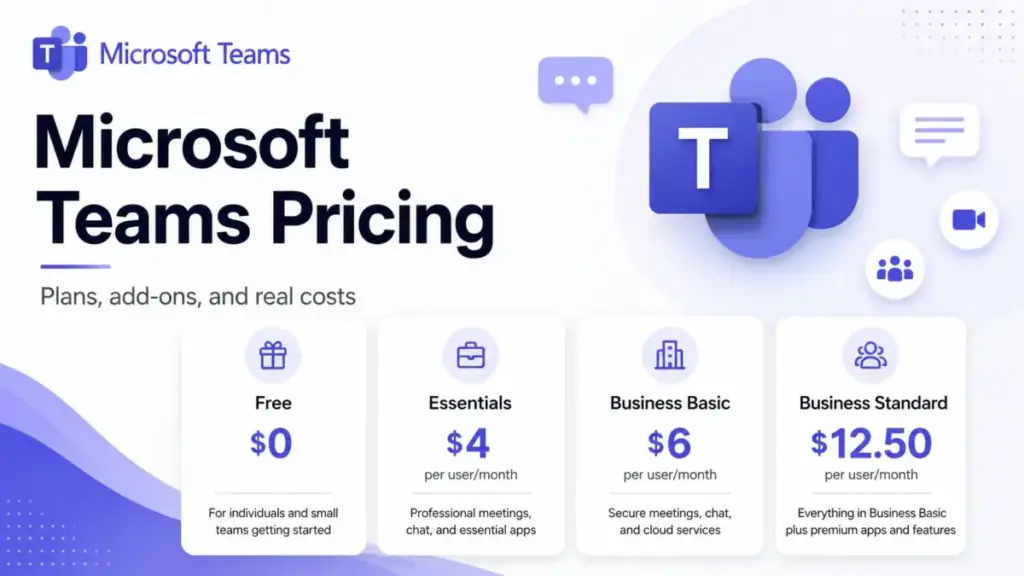
Microsoft Teams pricing starts at $0 on the free plan and climbs to $22 per user per month for Business Premium, but that ladder hides the number that actually lands on your invoice. The plan price is the cheap part. The expensive part is the add-on stack that follows: Teams Phone, Teams Premium, Copilot, and Rooms Pro.
I am James Carter, and I cover collaboration and project management software at SaaS Zap. I went through every public Microsoft pricing page on June 25, 2026 to map what a real team pays once the meetings, email, phone calls, and AI add up. If you want to see how Teams ranks against rivals first, our best team collaboration tools guide compares the main options.
Here is the open loop worth holding onto: the cheapest paid plan, Teams Essentials, is often the worst value. The $2 jump to Microsoft 365 Business Basic buys more than most buyers realize. And on July 1, 2026, two of the most popular plans get more expensive. This guide covers all of it.
Pricing verified June 25, 2026 against official Microsoft US pages. Prices change. Check the official Microsoft Teams pricing page for current rates.
Quick Pricing Verdict
| Question | Answer |
|---|---|
| Starting paid price | $4.00/user/month, Teams Essentials, paid yearly (as of June 2026) |
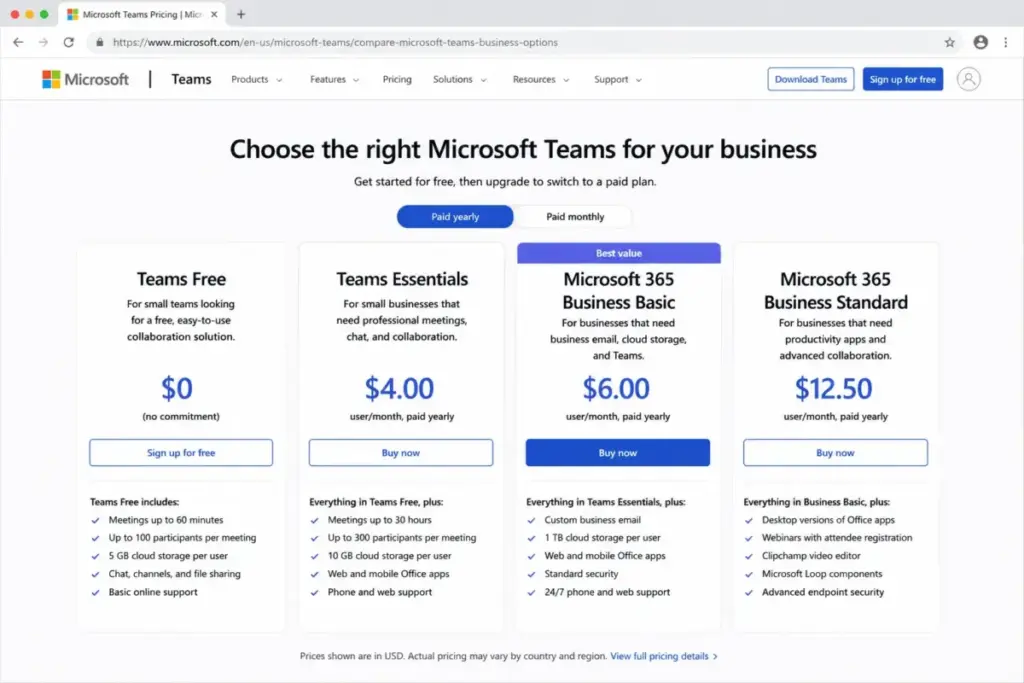
| Free plan | Yes. 60-minute meetings, 100 participants, 5 GB per user |
| Best value for most teams | Microsoft 365 Business Basic, $6/user/month paid yearly |
| Plan to avoid | Teams Essentials, for teams that need email or Office apps |
| Biggest hidden cost | Teams Phone calling, adds $10 to $34/user/month |
| Price change to watch | July 1, 2026: Business Basic rises to $7, Standard to $14 |
| Best alternative if too expensive | Google Workspace from $7/user/month, or Slack from $7.25 |
What this means: If you already want Microsoft email, OneDrive storage, and Office apps, Teams is inexpensive. If you only want video meetings and chat, you are likely overpaying for a bundle you will not fully use. The right plan depends entirely on whether you live inside Microsoft 365 or just want a meeting tool.
The Advertised Price vs the Real Price
The advertised price of Microsoft Teams is the per-user plan fee. The real price is that fee plus the add-ons your team will reach for within the first quarter. Microsoft sells phone, premium meetings, AI, and meeting-room licensing separately.
Here is the gap in plain numbers.
| Line item | Advertised | What pushes the real cost up |
|---|---|---|
| Base plan | $0 to $22/user/month | Phone, Premium, Copilot, Rooms are not included |
| Teams Phone | Looks like $10 | Calling plans run $13, $17, or $34/user/month |
| AI features | “Copilot” | Microsoft 365 Copilot is $21 to $30/user/month extra |
| Meeting rooms | “Rooms Basic free” | Rooms Pro is $40/room/month plus hardware |
| Premium meetings | Bundled in marketing | Teams Premium is a $10/user/month add-on |
What this means: A 10-person team on Business Basic looks like $60/month annual equivalent. Add phone calling and Copilot to half the team, and the same team can pass $250/month. That is the math most pricing pages skip. The base plan rarely tells you the full bill.
This pattern has a name worth remembering. I call it the Add-On Stack Test: before you sign, list every Microsoft capability your team already expects (calling, AI notes, room systems) and price each as a separate line. Teams almost never costs what the headline plan suggests.
The Hidden Costs Nobody Puts in the Plan Table
Microsoft Teams has five cost centers that sit outside the base subscription. Each one is optional. Each one is also the thing teams reach for once they get comfortable.
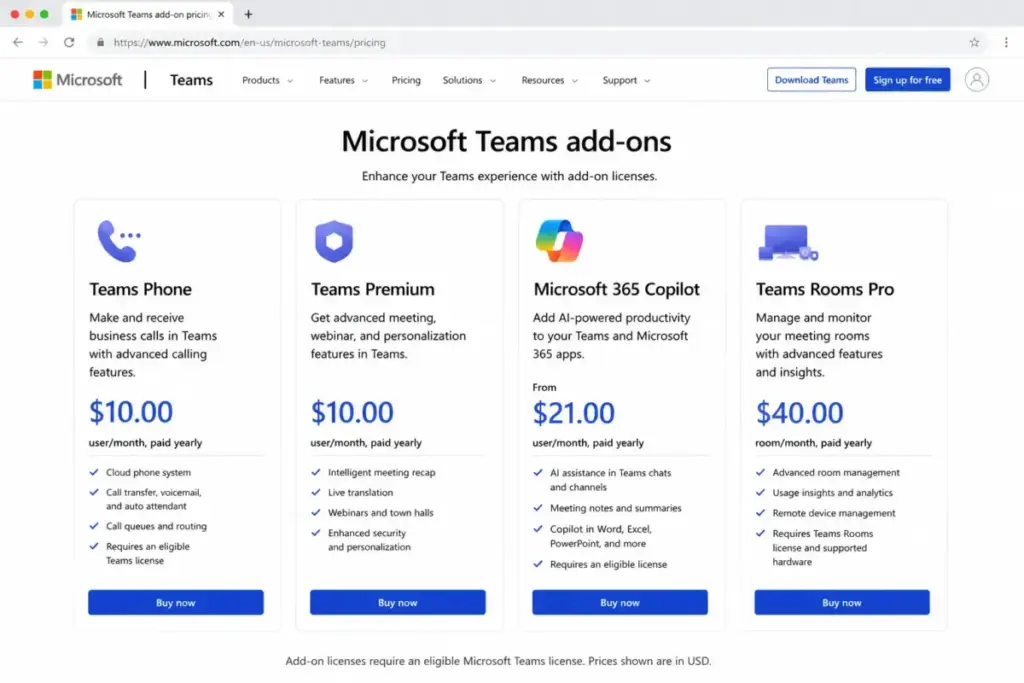
Teams Phone and calling plans
Teams Phone is the cost that surprises people most. The phone system add-on alone is $10/user/month paid yearly, and it requires a separate eligible Teams license underneath it. That add-on gives you cloud phone features but no actual calling plan.
To make outbound calls, you stack a calling option on top:
| Teams Phone option | Price (paid yearly) | What you get |
|---|---|---|
| Teams Phone Standard | $10/user/month | Phone system, no calling plan included |
| Pay-as-you-go calling (US Zone 1) | $13/user/month | Phone number, metered outbound minutes |
| Calling Plan (US) | $17/user/month | 3,000 outbound domestic minutes |
| Domestic and international | $34/user/month | 3,000 domestic or 600 international minutes |
What this means: A user who needs a real desk-phone replacement costs $17 to $34/user/month on top of the base plan. Microsoft documents three calling plan types: Domestic, International, and Pay-As-You-Go. Per-minute overage and porting rates vary by country and carrier, so check the calling-plan detail at checkout before you commit a whole team.
Microsoft 365 Copilot
Copilot is two different things, and buyers confuse them constantly. Copilot Chat is available at no extra cost for eligible Microsoft Entra ID users, though agent usage can be metered through Azure. The paid product, Microsoft 365 Copilot Business, is $21/user/month paid yearly. Eligible customers can get a promotional $18/user/month first-year price between July 1 and September 30, 2026. Enterprise Copilot runs $30/user/month.
Teams Premium
Teams Premium is a $10/user/month add-on for advanced meeting protection, personalization, intelligence, premium webinars, and town halls. It needs an eligible Teams license to attach to. Microsoft’s documentation notes that licenses bought before April 1, 2026 keep their previously included features until expiration, and you need at least one active Teams Premium license to manage Premium features.
Meeting rooms
Teams Rooms Basic is free for certified Teams devices and capped at 25 rooms. Teams Rooms Pro is $40/room/month paid yearly for advanced room management, security, and hybrid-meeting operations. The room license is the cheap part here too. Certified room hardware is a separate capital cost that varies by device and vendor.
Annual commitment and cancellation
Microsoft bills most business plans on either a monthly commitment or an annual commitment. Cancel a paid subscription after the seven-day window, and you can stay responsible for the remaining term. After cancellation, admins keep limited-function account access to data for 90 days.
| Hidden cost | Amount | When it hits |
|---|---|---|
| Teams Phone system | $10/user/month | Any user who needs PSTN calling |
| Calling plan | $13 to $34/user/month | Outbound phone calls |
| Teams Premium | $10/user/month | Premium meeting controls and webinars |
| Microsoft 365 Copilot | $21 to $30/user/month | Work-context AI across apps |
| Rooms Pro | $40/room/month | Equipping physical meeting rooms |
| Annual cancellation | Remaining term obligation | Canceling after the 7-day window |
What this means: Price the base plan, then add a separate line for every capability above that your team will use. A communications-heavy 20-person team can spend more on add-ons than on the base subscription.
Plan-by-Plan Breakdown With Feature Gates
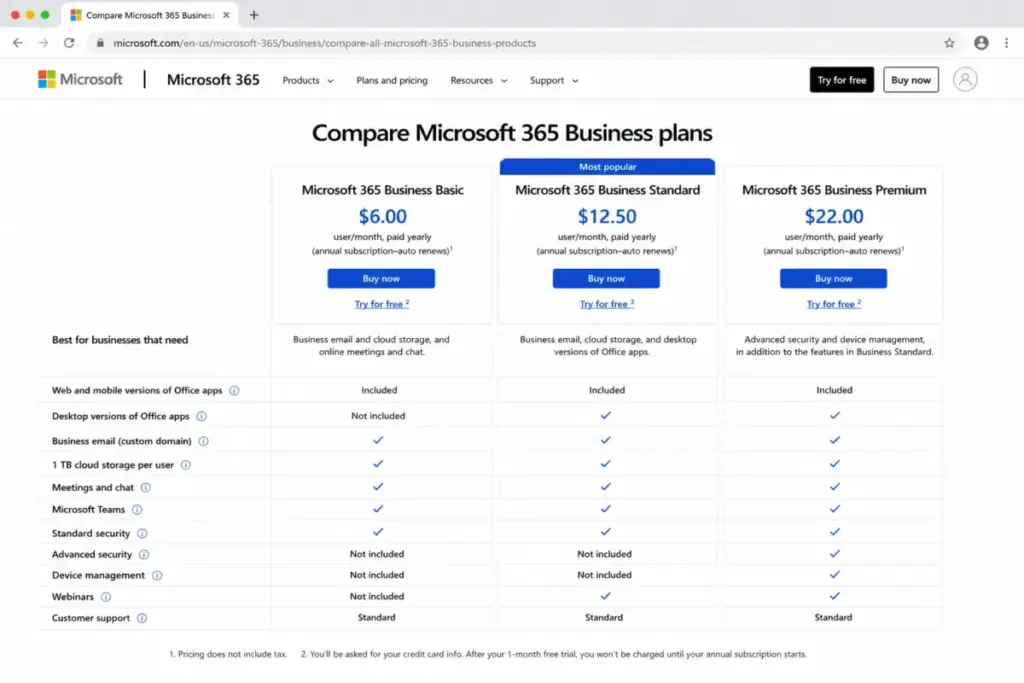
Microsoft publicly shows annual-billed pricing for the main Teams/Microsoft 365 business plans. Monthly-commitment prices may appear at checkout or vary by commerce path, so verify current monthly terms before choosing annual billing.
| Plan | Monthly | Annual (per user/mo) | Best for | Key limits |
|---|---|---|---|---|
| Teams Free | $0 | $0 | Tiny teams, occasional meetings | 60-min meetings, 100 people, 5 GB |
| Teams Essentials | See note | $4.00 ($48/yr) | Meeting-only teams, no email need | 30-hr meetings, 300 people, 10 GB, no email |
| Business Basic | $7.20 | $6.00 ($72/yr) | Most small teams | 1 TB, email, web/mobile Office, no desktop apps |
| Business Standard | $15.00 | $12.50 ($150/yr) | Teams needing desktop Office + webinars | Desktop Office, webinars, Loop, Clipchamp |
| Business Premium | $26.40 | $22.00 ($264/yr) | Security-conscious teams under 300 | Standard plus advanced security and device management |
| Teams Enterprise | Not publicly shown monthly | $8.55 | Standalone enterprise Teams license | Suites, Phone, Copilot are separate decisions |
A note on Teams Essentials billing. Microsoft publicly shows Essentials at $4/user/month paid yearly. A monthly option may exist in commerce channels, but the official public page verified here displayed annual-billed pricing only. For Teams Enterprise, Microsoft lists $8.55/user/month paid yearly and did not show a monthly commitment price in the verified source.
What this means: The plans for 1 to 300 employees (Essentials, Basic, Standard) all support 30-hour meetings and 300 participants. They split on storage, email, and Office apps, not on meeting capacity. So the plan question is really an email-and-apps question.
Feature gates that decide your plan
Where features open up matters more than headline price. This table maps the gates.
| Feature | Free | Essentials | Business Basic | Standard+ |
|---|---|---|---|---|
| Meetings over 60 minutes | No | Yes | Yes | Yes |
| Up to 300 participants | No | Yes | Yes | Yes |
| Meeting recordings with transcripts | No | Yes | Yes | Yes |
| Storage above 5 GB | No | 10 GB | 1 TB | 1 TB |
| Custom business email | No | No | Yes | Yes |
| Web and mobile Office apps | No | No | Yes | Yes |
| Desktop Word, Excel, PowerPoint, Outlook | No | No | No | Yes |
| Webinars with registration and reporting | No | No | No | Yes |
| Teams Phone PSTN calling | No | Add-on | Add-on | Add-on |
| Teams Premium meeting intelligence | No | Add-on | Add-on | Add-on |
| Advanced security and device management | No | No | No | Business Premium |
What this means: The recordings-and-storage gate sits between Free and Essentials. The email-and-apps gate sits between Essentials and Business Basic. The desktop-Office gate sits between Basic and Standard. Match the lowest plan that clears the gate your team actually needs.
When the Free Plan Stops Working
Microsoft Teams Free is genuinely useful for a 3-person side project, and it stops working the moment a real team forms around it. Free gives you group meetings up to 60 minutes, up to 100 participants, 5 GB of cloud storage per user, chat, file sharing, tasks, and polling.
What it does not give you is where teams hit the wall.
- No meeting recordings or transcripts
- No breakout rooms
- No Microsoft Whiteboard
- No screen-sharing control
- No business email
- No 30-hour or 300-participant meetings
The 60-minute meeting cap is the first thing most teams hit. A weekly planning call that runs long gets cut off. The second wall is recordings: anyone who needs to share a meeting recap with an absent teammate has to upgrade.
The upgrade trigger is clear. The moment you need longer meetings, recordings, more than 5 GB of storage, business email, or admin controls, Free is done. For most growing teams that happens fast.
If you want to understand the category Teams competes in before choosing a tier, our explainer on what team collaboration software does sets the baseline.
Real Cost Scenarios at 5 to 100 Users
Microsoft 365 Business Basic is the practical baseline for most small teams, so I priced it across five team sizes. Annual billing is the cheaper path. These figures use current June 2026 pricing, with the scheduled July 1, 2026 increase noted alongside.
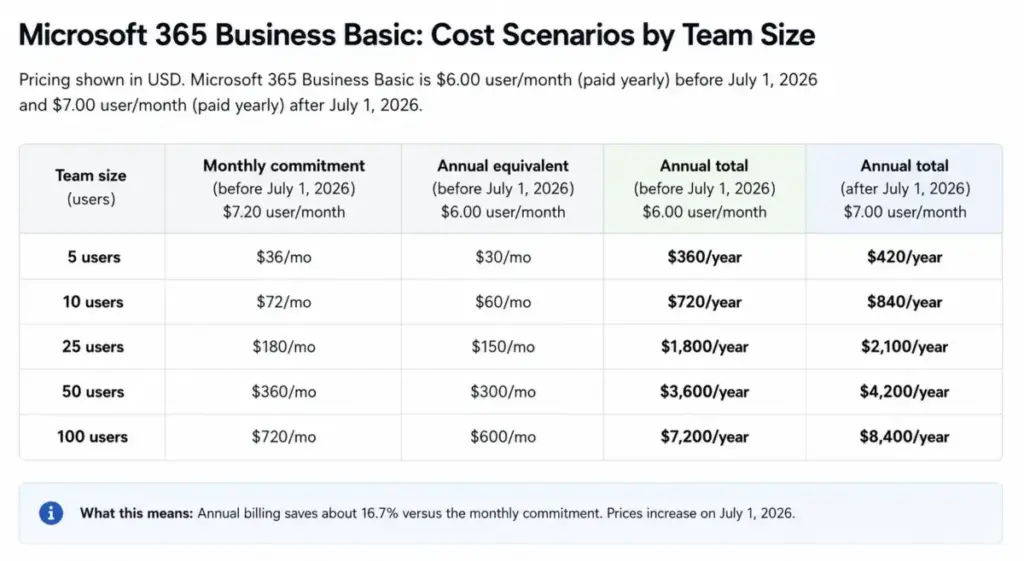
| Team size | Monthly commitment | Annual equivalent | Annual total (before July 2026) | Annual total (after July 2026) |
|---|---|---|---|---|
| 5 users | $36/mo | $30/mo | $360/year | $420/year |
| 10 users | $72/mo | $60/mo | $720/year | $840/year |
| 25 users | $180/mo | $150/mo | $1,800/year | $2,100/year |
| 50 users | $360/mo | $300/mo | $3,600/year | $4,200/year |
| 100 users | $720/mo | $600/mo | $7,200/year | $8,400/year |
What this means: Annual billing saves about 16.7% versus the monthly commitment. At 10 users on Business Basic that is $144/year. At 50 users it is roughly $720/year. The monthly-commitment column reflects pre-July rates; the two right columns show how the annual total shifts after July 1, 2026. If you need desktop Office apps or webinars, swap to Business Standard at $12.50/user/month paid yearly before July 1, 2026 and $14 after. Layer in Teams Phone or Copilot per user where needed, and the bill moves again.
One thing worth doing: review your add-on assignments quarterly. Teams hand out Phone and Copilot licenses during a project, then forget to reclaim them. That is silent monthly spend on seats nobody uses.
Annual vs Monthly Billing
Annual commitment is cheaper than monthly commitment on every Microsoft 365 Business plan, by about 16.7%. Microsoft 365 Business Basic is $6/user/month paid yearly versus $7.20 on a monthly commitment. Business Standard is $12.50 versus $15. Business Premium is $22 versus $26.40.
| Plan | Annual (per user/mo) | Monthly commitment | Annual savings at 10 users |
|---|---|---|---|
| Business Basic | $6.00 | $7.20 | $144/year |
| Business Standard | $12.50 | $15.00 | $300/year |
| Business Premium | $22.00 | $26.40 | $528/year |
What this means: Annual billing saves real money, but it locks you in. Cancel after the seven-day window and you can owe the remaining term. So annual makes sense for headcount you are confident about, and monthly makes sense for seasonal or uncertain roles. Mixing the two across one tenant is fine.
The July 1, 2026 price change
This is the gap most 2026 pricing pages miss. Microsoft scheduled annual-billed increases that take effect July 1, 2026.
| Plan | Before July 1, 2026 | From July 1, 2026 |
|---|---|---|
| Business Basic with Teams | $6/user/month | $7/user/month |
| Business Standard with Teams | $12.50/user/month | $14/user/month |
| Business Premium with Teams | $22/user/month | $22/user/month (unchanged) |
The change also touches enterprise suites with Teams, including Office 365 E3, Office 365 E5, Microsoft 365 E3, and Microsoft 365 E5, while Office 365 E1 with Teams is listed as unchanged. If you are quoting Microsoft Teams pricing in 2026, state whether your number applies before or after July 1.
The Plan to Avoid and the Plan to Choose
Teams Essentials is the plan to avoid for most businesses. At $4/user/month it looks like a bargain over Business Basic at $6, but that $2/user/month gap is smaller than what you give up. Essentials has no custom business email, no 1 TB storage, and no Microsoft 365 web or mobile Office apps.
Choose Teams Essentials only in one case: a meeting-and-chat team that already has email and documents handled elsewhere. Think a 5-person agency running on Google for email but wanting Teams meetings with one client.
For everyone else, Microsoft 365 Business Basic is the best value. The extra $2/user/month buys business email, 1 TB of OneDrive storage per user, web and mobile Office apps, identity controls, and more than ten business apps. That is a large feature jump for a small price.
Step up to Business Standard if you need desktop Office apps, webinars with registration, or Clipchamp and Loop. Step up to Business Premium if a 20-to-300-person team needs advanced cyberthreat protection and device management in the same subscription.
The simple rule: Essentials for meeting-only teams. Business Basic for most. Standard for desktop Office. Premium for security.
Enterprise and the 300-User Ceiling
Microsoft 365 Business plans are built for up to 300 employees or provisioned licenses. Cross that ceiling and you move into enterprise plan territory. Microsoft says volume discounts are typically available for enterprise agreement customers with 250 or more licenses.
Microsoft also lists a standalone Microsoft Teams Enterprise license at $8.55/user/month paid yearly, separate from the Office 365 and Microsoft 365 enterprise suites. Phone, Premium, and Copilot remain separate decisions at that level too.
What this means: A 280-person company should plan the enterprise transition now, not at 301 seats. Applying Business plan prices to enterprise procurement understates the real per-user cost once suites and add-ons enter the contract.
Microsoft Teams Pricing vs Competitors
Microsoft Teams pricing reads differently next to its rivals. The base plans are competitive, but Teams assumes you want the wider Microsoft 365 bundle. Here is how four common alternatives compare on practical tiers.
| Tool | Free plan | Starting paid (annual) | 10-user cost (annual equivalent) |
|---|---|---|---|
| Microsoft Teams (Business Basic) | Yes | $6/user/month | $60/month |
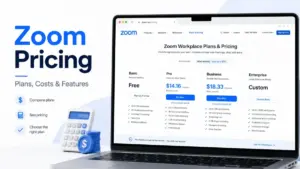
| Zoom Workplace (Pro) | Yes | $14.16/user/month | $141.60/month |
| Google Workspace (Business Starter) | No business free | $7/user/month | $70/month |
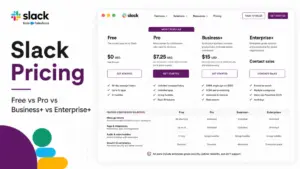
| Slack (Pro) | Yes | $7.25/user/month | $72.50/month |
| Cisco Webex (Meet) | Yes | $12/license/month | $120/month |
What this means: On base price, Microsoft 365 Business Basic undercuts Zoom Workplace Pro and Webex Meet, and it edges out Google Workspace and Slack while bundling far more (email, Office apps, storage). Zoom looks expensive here because Pro is meeting-first, not a productivity suite. The honest comparison is apples-to-oranges: Teams sells a bundle, Zoom and Slack sell a focused tool. If video meetings are your main need, our best video conferencing software guide weighs the meeting-first options.
For deeper pricing breakdowns on the closest rivals, see our analysis of Zoom Workplace and its plans, the Slack pricing breakdown, and Google Workspace plans and costs. For a chat-first comparison, the Slack platform review covers where it beats and loses to Teams.
Is Microsoft Teams Worth the Price?
Microsoft Teams is worth it if you already want Microsoft 365 email, OneDrive storage, and Office apps. At that point Business Basic at $6/user/month is one of the better-value bundles in collaboration software, and Teams comes along for the ride.
It is not worth it if you only need lightweight video meetings or Slack-style chat. Paying for a productivity suite to get a meeting tool wastes money. A meeting-only team is better served by Zoom or Webex, and a chat-first team by Slack.
The verdict shifts with add-ons. Once you stack Teams Phone, Copilot, and Rooms Pro, Microsoft Teams stops being cheap. A 20-agent team with full phone and AI can clear $250 to $400/month above the base subscription. Run the Add-On Stack Test before you assume Teams is the budget choice.
I suspect most 5-to-10-person teams will land on Business Basic and never touch the enterprise tiers. That is the sweet spot Microsoft built it for.
How to Avoid Overpaying for Microsoft Teams
A few specific moves keep the Microsoft Teams bill honest.
- Start on Business Basic, not Essentials. The $2/user/month difference returns email, 1 TB storage, and Office apps. Essentials only wins for true meeting-only teams.
- Pay annually for stable headcount. Annual billing saves about 16.7%, but lock it only for roles you are confident about.
- License Teams Phone selectively. Only users who replace a desk phone need a calling plan. Pick pay-as-you-go ($13) over a flat calling plan ($17 to $34) for low-volume callers.
- Separate Teams Premium from Copilot. Premium ($10) handles meeting controls and webinars. Copilot ($21 to $30) handles work-context AI. Buy the one your use case actually needs, not both by default.
- Use Rooms Basic where you can. It is free for up to 25 certified rooms. Reserve the $40/room/month Rooms Pro for spaces that need advanced management.
- Audit add-on seats quarterly. Reclaim Phone and Copilot licenses from users who no longer need them.
- Lock your quote before July 1, 2026. Business Basic and Standard annual prices rise on that date.
Microsoft Teams Pricing FAQ
How much does Microsoft Teams cost per month?
Microsoft Teams ranges from $0 on the free plan to $22/user/month for Microsoft 365 Business Premium paid yearly (as of June 2026). The most common paid plans are Teams Essentials at $4 and Business Basic at $6, both billed annually. Add-ons like phone and AI sit on top of these base prices.
Is Microsoft Teams still free?
Yes. Teams Free includes group meetings up to 60 minutes, up to 100 participants, 5 GB of cloud storage per user, chat, file sharing, and polling. It excludes meeting recordings, breakout rooms, business email, and longer meetings. Free works for tiny teams but breaks down once you need recordings or storage.
What is the difference between Teams Essentials and Business Basic?
For $2/user/month more, Business Basic adds custom business email, 1 TB of storage per user, web and mobile Office apps, identity controls, and more business apps. Teams Essentials gives meetings, chat, and 10 GB storage but no email or Office apps. For most teams, Business Basic is the better value.
How much is Microsoft Teams Phone?
Teams Phone Standard is $10/user/month paid yearly, with no calling plan included. Adding outbound calling costs $13 for pay-as-you-go, $17 for a domestic calling plan, or $34 for domestic and international. Each Phone user also needs an eligible base Teams license underneath.
Is Microsoft 365 Copilot included with Teams?
Microsoft may run promotional Copilot pricing for eligible customers, but buyers should confirm current promo terms at checkout.
Can I pay monthly instead of annually?
Yes for Microsoft 365 Business plans. Business Basic is $7.20/user/month on monthly commitment versus $6 paid yearly. Annual billing saves about 16.7%, but canceling after the seven-day window can leave you responsible for the rest of the term. Teams Essentials shows annual-billed pricing on Microsoft’s public page.
What changed in Microsoft 365 pricing on July 1, 2026?
Annual-billed Business Basic with Teams rises from $6 to $7/user/month, and Business Standard rises from $12.50 to $14. Business Premium stays at $22. Several enterprise suites with Teams, including Office 365 E3, E5, and Microsoft 365 E3, E5, also change, while Office 365 E1 stays the same.
Is there a free trial, and does it need a credit card?
Microsoft 365 business trials run 30 days, can include up to 25 users, and require a credit card. The trial converts to paid after 30 days unless canceled. Trials apply to plans like Business Basic, Standard, and Premium. Verify exact terms at checkout, since they vary by product and tenant.
Is Teams cheaper than Zoom or Slack?
On base price, Microsoft 365 Business Basic at $6/user/month undercuts Zoom Workplace Pro at $14.16 and lands near Slack Pro at $7.25, while bundling email and Office apps. The comparison is uneven, though: Teams sells a full suite, while Zoom and Slack sell focused meeting and chat tools.
The Bottom Line on Microsoft Teams Pricing
Microsoft Teams pricing rewards teams already committed to Microsoft 365 and punishes teams that just want a meeting app. Business Basic at $6/user/month paid yearly is the value pick for most small teams, Essentials is usually a false economy, and the add-on stack of Phone, Premium, Copilot, and Rooms is where the real budget goes.
Two dates matter for any 2026 decision: prices were verified June 25, 2026, and Business Basic and Standard rise on July 1, 2026. Price the bundle, run the Add-On Stack Test, and you will know what Microsoft Teams really costs your team.
Pricing verified June 25, 2026. Microsoft prices and promotions change. Confirm current rates on the official Microsoft 365 Business pricing page and the Microsoft July 2026 licensing update before purchase.