Notion’s Plus plan costs $10 per member per month billed yearly (as of June 2026), and its free plan gives individual users unlimited pages. ClickUp starts at $7 per user per month billed yearly with a free forever tier that includes unlimited tasks. Todoist Pro is $5 per month billed yearly. Three different price points, three completely different productivity philosophies, and most comparison articles treat them like interchangeable task apps.
That is the core problem with the way the best project management software category gets covered. Top results mix personal habit trackers, full operations platforms, automation engines, and calendar-first AI planners into a single ranked list without explaining which type of buyer each tool actually serves. A founder choosing between Notion and Zapier is solving a different problem than a consultant choosing between Motion and Sunsama. One is picking a workspace. The other is picking a scheduling philosophy.
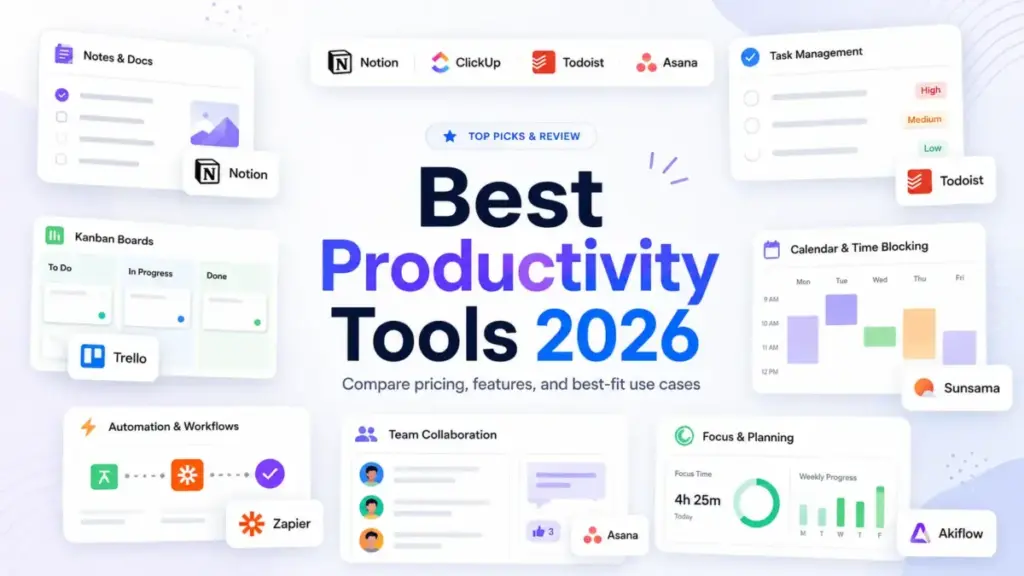
This guide separates 10 productivity tools into four buyer categories: all-in-one workspaces, team project platforms, personal task managers, and specialist layers (automation, AI scheduling, daily planning, time blocking). I verified US pricing, free plan limits, integration depth, hidden costs, and honest limitations for each tool so you can match your operating style to the right product. One pattern I kept finding: the tool with the most features is rarely the one that saves the most time.
Quick Verdict: Best Productivity Tools by Buyer Type
The best productivity tool in 2026 is not the app with the most features. It is the tool that fits your operating style, pricing tolerance, integration needs, and tolerance for setup complexity. Here is the short version, mapped by the productivity problem each tool solves best.
| If you need… | Best pick | Why it fits |
|---|---|---|
| Best overall productivity workspace | Notion | Docs, databases, tasks, AI agents, and a useful free tier in one platform |
| Best all-in-one work OS for teams | ClickUp | Tasks, docs, chat, dashboards, time tracking, automations, and AI in one place |
| Best for cross-functional team projects | Asana | Structured projects, goals, portfolios, workload, and reporting for stakeholder visibility |
| Best personal task manager | Todoist | Fastest task capture, simplest daily planning, transparent pricing |
| Best automation layer | Zapier | 9,000+ app integrations to automate repetitive work without replacing your stack |
| Best visual Kanban board | Trello | Easiest board-and-card system with Power-Ups and lightweight automation |
| Best visual operations hub | monday.com | Visual boards, dashboards, workflows, and templates for operations teams |
| Best AI auto-scheduler | Motion | AI schedules your tasks, meetings, and calendar work automatically |
| Best guided daily planner | Sunsama | Calmer daily planning routine with time blocking and task import from other tools |
| Best power-user time blocking hub | Akiflow | Unified inbox for tasks and calendars with keyboard-first time blocking |
What this means: productivity tools split into four tiers. All-in-one platforms (Notion, ClickUp) try to replace multiple tools. Team project platforms (Asana, monday.com, Trello) add structured team coordination. Personal managers (Todoist) focus on individual speed. Specialist layers (Zapier, Motion, Sunsama, Akiflow) solve one productivity problem deeply. Picking from the wrong tier is the most expensive mistake on this list.
How We Ranked These 10 Productivity Tools
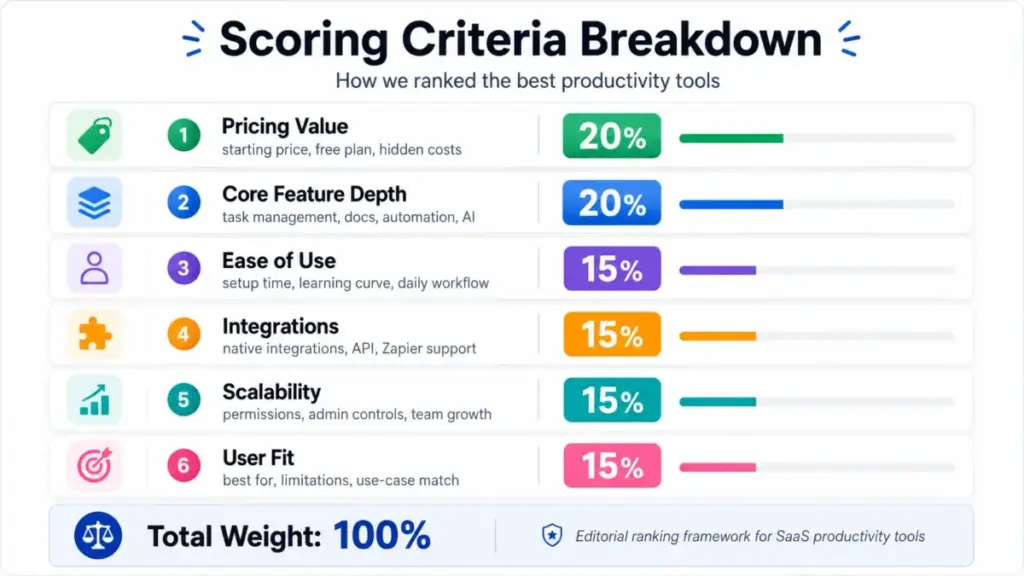
I evaluated 30 productivity products against six weighted criteria. The list includes tools from the SERP competitive set, official websites, pricing pages, help centers, integration directories, and editorial knowledge.
- Pricing value (20%): Starting price, free plan, minimum seats, add-ons, hidden costs, usage limits, and whether pricing is publicly confirmed.
- Core feature depth (20%): Task management, project views, knowledge capture, calendar planning, automation, AI, reporting, and collaboration depth.
- Ease of use (15%): Onboarding clarity, workflow simplicity, setup burden, daily-use friction, and risk of overconfiguration.
- Integrations (15%): Native integrations, API, Zapier support, calendar and email sync, Slack, Google Drive, Microsoft, and enterprise connectors.
- Scalability (15%): Team controls, permissions, SSO, SCIM, audit logs, enterprise plans, automation limits, and upgrade behavior.
- User fit (15%): Best-for specificity, not-best-for caveats, limitation severity, and how clearly the tool solves a distinct productivity problem.
Badge logic: the highest balanced score earns Best Overall. Category-specific badges reward the strongest evidence-backed fit for all-in-one workspaces, team projects, personal tasks, automation, Kanban, visual operations, AI scheduling, daily planning, and time blocking.
Products excluded from the final list include Google Workspace and Microsoft 365 (too broad as office bundles), Slack (communication layer, not a primary productivity system), Calendly (too narrow for this keyword when Motion, Sunsama, and Akiflow cover calendar-first productivity), and Airtable (overlaps with monday.com and Notion in this context).
Review limitation: this evaluation uses official pricing, public product documentation, and verified feature specifications. I did not run a live multi-week deployment of each tool. Specific workflow behaviors and credit consumption should be confirmed directly with each vendor.
All-in-One Workspace Platforms
Notion: Best Overall Productivity Workspace

Notion gives teams and solo operators docs, databases, task views, AI agents, enterprise search, and meeting notes in one platform (as confirmed on Notion’s pricing page). That breadth is the reason it ranks first.
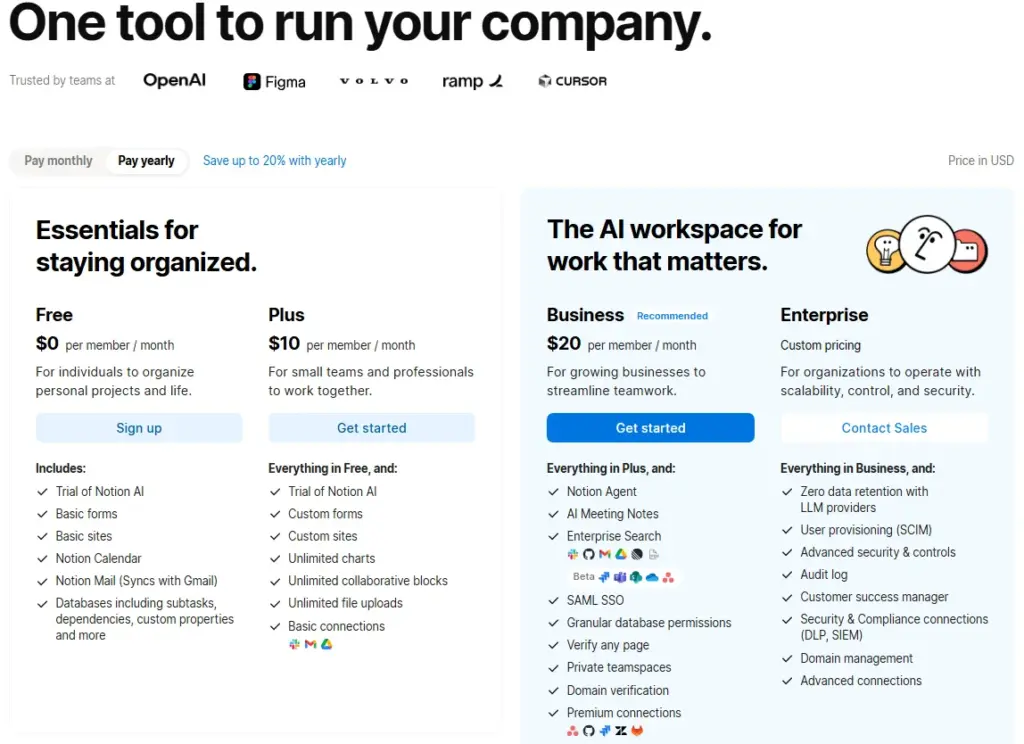
Starting price: $10/member/month billed yearly for Plus.
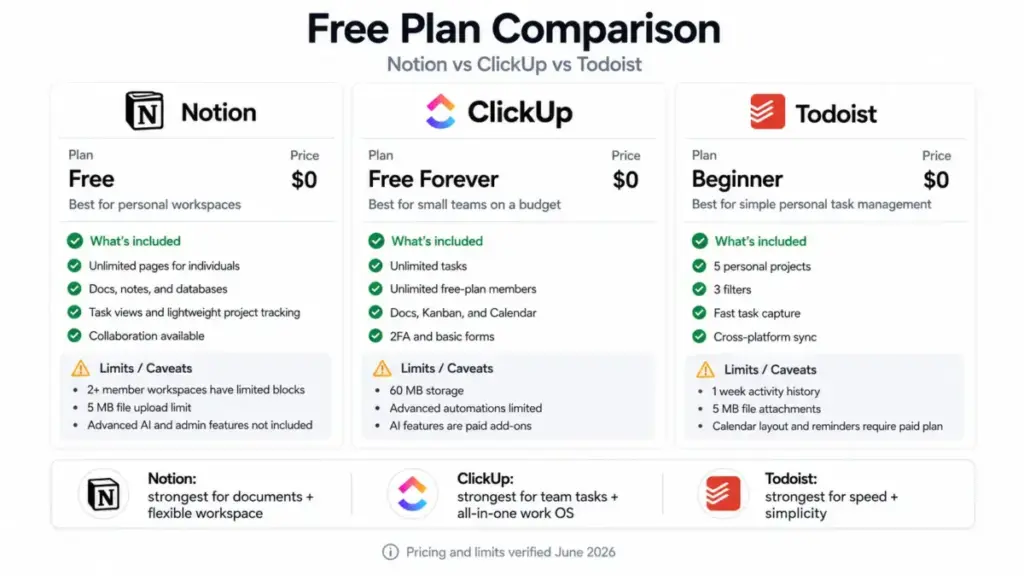
Free plan: Yes. $0/member/month. Unlimited for individuals, but workspaces with 2 or more members trigger limited blocks. 5 MB file upload limit.
The free plan is genuinely strong for solo users. I track SaaS pricing structures across dozens of tools, and Notion’s individual free tier is one of the few that does not feel artificially crippled. The problem starts with teams: adding a second member to a workspace immediately introduces block limits that push you toward Plus.
Plus at $10/member/month (billed yearly) unlocks unlimited blocks, 25 MB file uploads, and broader workspace features. Business at $20/member/month adds granular database permissions, SAML SSO, and advanced security. Enterprise adds enterprise search, zero-data-retention AI options, and custom compliance controls. Monthly pricing was not confirmed in the accessible official extract.
The AI layer is where the hidden costs surface. Custom Agents cost $10 per 1,000 monthly Notion credits. Notion AI features on non-Enterprise plans have 30-day data retention. Advanced search, AI, and admin controls are higher-tier features. These are not dealbreakers, but they mean the true cost of an AI-heavy Notion workspace is higher than the base Plus price suggests.
Integrations: Slack, Google Drive, GitHub, Asana, Jira, Box, OneDrive, Salesforce, API, and webhooks.
Best for: Teams and solo operators who want docs, databases, tasks, lightweight project management, and AI workspace features in one place.
Not best for: Teams needing a strict traditional project management system with minimal setup, or buyers who need every advanced AI and security feature on a low-cost plan.
Score: 8.77/10. Strongest overall balance of pricing, features, integrations, and buyer fit. The free plan, broad feature set, and workspace depth push it ahead of narrower tools.
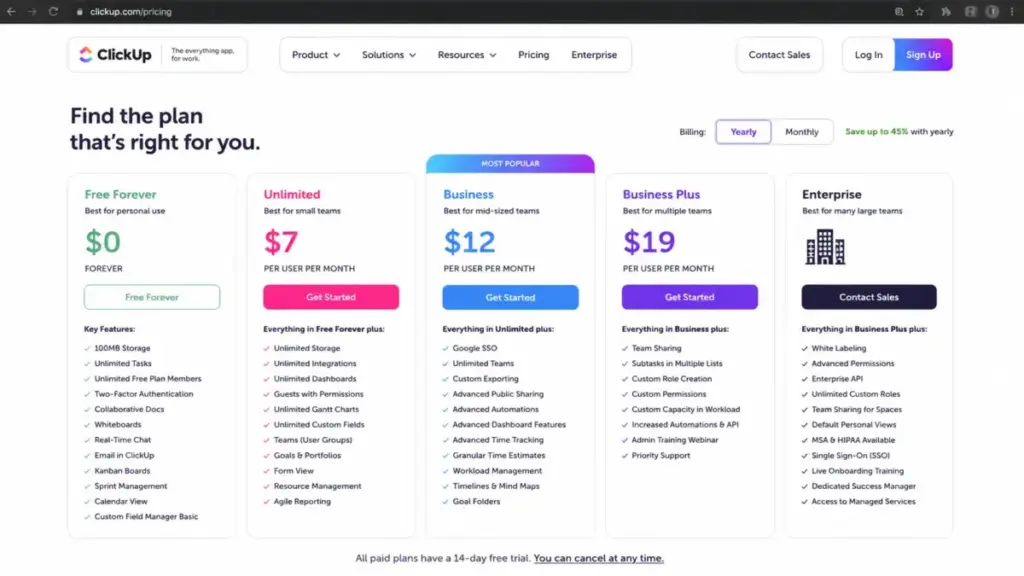
ClickUp: Best All-in-One Work OS

ClickUp has the deepest feature set on this list. Tasks, docs, chat, whiteboards, dashboards, Gantt charts, time tracking, automations, sprints, and AI agents are all in one platform (as confirmed on ClickUp’s pricing page).
Starting price: $7/user/month billed yearly for Unlimited.
Free plan: Yes. Free Forever includes 60 MB storage, unlimited tasks, unlimited free-plan members, docs, Kanban, calendar, 2FA, and basic forms.
The $7/user/month annual entry price is one of the lowest for a full work OS. Business at $12/user/month adds 5,000 automations per month, advanced admin, and more. Enterprise adds 250,000 automations per month. Monthly pricing was not confirmed in the accessible official extract.
Where the cost math gets tricky: ClickUp Brain AI and Everything AI are paid add-ons. Extra AI credits cost $10 per 10,000 credits. And here is the caveat I see trip up buyers repeatedly: upgrades apply to the entire Workspace. You cannot upgrade a single team or department. If one group needs Business features, every member in the Workspace moves to Business pricing.
That workspace-wide upgrade rule is the kind of pricing caveat that turns a $7/user/month tool into a much larger budget line when 40% of your team only needs basic task management.
Integrations: Slack, HubSpot, Google Drive, webhooks, and automation integrations on paid plans.
Best for: Teams that want tasks, docs, chat, whiteboards, dashboards, time tracking, automations, sprints, and AI in one platform.
Not best for: Individuals or small teams who want a very simple task list without setup complexity or workspace-wide upgrade implications.
Score: 8.70/10. Deepest all-in-one feature set and strong pricing, slightly reduced by complexity and add-on cost behavior.
Team Project Management Platforms
Asana: Best for Cross-Functional Team Projects

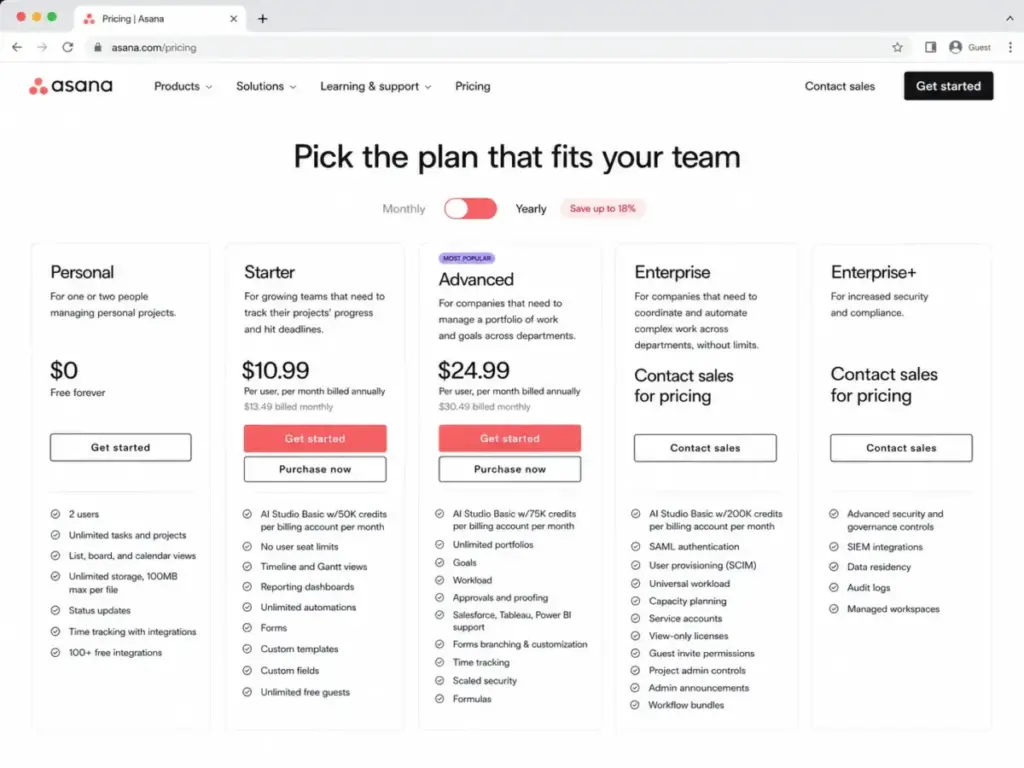
Asana is the tool I point teams toward when the productivity problem is not task capture but project visibility. Goals, portfolios, workload management, timelines, approvals, and proofing are built for cross-functional coordination (as confirmed on Asana’s pricing page).
Starting price: $10.99/user/month billed annually for Starter.
Free plan: Yes. Personal plan is free forever for up to 2 users.
Asana publishes both monthly and annual prices, which is increasingly rare. Starter runs $13.49/user/month billed monthly or $10.99 billed annually. Advanced is $30.49 monthly or $24.99 annually. Enterprise and Enterprise Plus are custom.
The pricing transparency is good, but the minimum-seat rule changes the math. Asana requires 2 paid seats according to official help documentation. A solo freelancer cannot buy a single Starter seat. And the Personal plan is capped at 2 users, making it a dead end for any team larger than a pair.
Advanced features like portfolio views, workload planning, goals, and custom rules require the Advanced plan. For a 10-person team, Advanced costs roughly $250/month billed annually, which is competitive with Asana’s peer set but meaningful for budget-sensitive buyers.
Integrations: 100+ free integrations including Slack, Google Drive, and Zoom. Advanced adds Salesforce, Tableau, and Power BI.
Best for: Teams managing cross-functional projects, approvals, timelines, goals, workload, portfolios, and executive visibility.
Not best for: Solo users who need a cheap personal task manager or teams unwilling to pay for at least two paid seats.
Score: 8.47/10. One of the strongest team project platforms, with clear pricing and deep project structure, offset by minimum-seat rules and higher Advanced pricing.
Trello: Best Visual Kanban Board

Trello remains the fastest way to go from zero to a working productivity board. Boards, lists, cards, and drag-and-drop. That simplicity is why Atlassian has not tried to make Trello into something heavier (as confirmed on Trello’s pricing page).
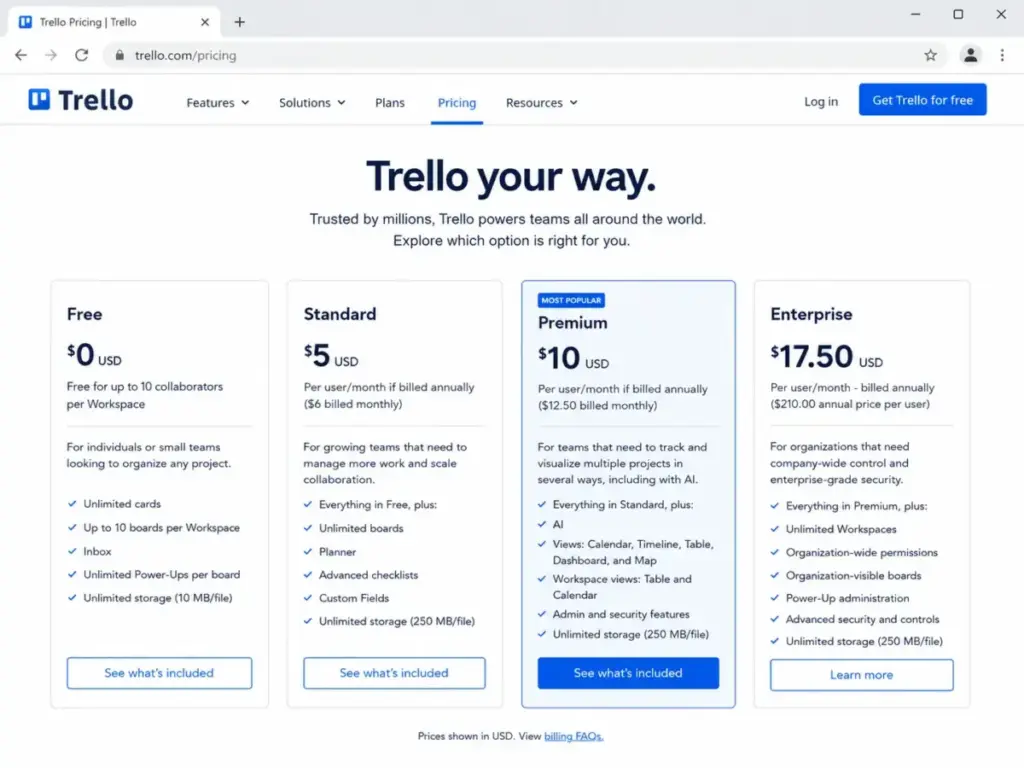
Starting price: $5/user/month billed annually for Standard.
Free plan: Yes. Up to 10 collaborators per Workspace, unlimited cards, up to 10 boards, 10 MB file uploads, and 250 Workspace command runs per month.
Standard at $5/user/month annually ($6 monthly) adds 1,000 command runs per month and 250 MB uploads. Premium at $10/user/month annually ($12.50 monthly) adds unlimited command runs, calendar, timeline, table, dashboard, and map views. Enterprise is $17.50/user/month annually.
The free plan is practical for individuals and small teams running fewer than 10 boards. The 250 command run limit is the gate that pushes active teams to Standard.
Hidden costs I flag for buyers: multi-board guests are billed like Workspace members. Some partner Power-Ups require separate subscriptions. Atlassian Guard Standard (security and compliance) is separate from Trello Enterprise pricing.
Integrations: 200+ Power-Ups and apps including Slack, Google Drive, Salesforce, and Microsoft Teams.
Best for: Individuals and teams who want a simple visual Kanban system with boards, cards, checklists, Power-Ups, and lightweight automation.
Not best for: Teams needing advanced workload management, deep reporting, or a fully structured project management platform.
Score: 8.23/10. Easiest adoption on this list with fair pricing, limited by lighter feature depth compared to full work platforms.
monday.com: Best Visual Operations Hub

monday.com is the tool that makes operations visible. Visual boards, dashboards, workflows, templates, AI columns, and workflow builders give operations teams a canvas that non-technical stakeholders can read (as confirmed on monday.com’s pricing page).
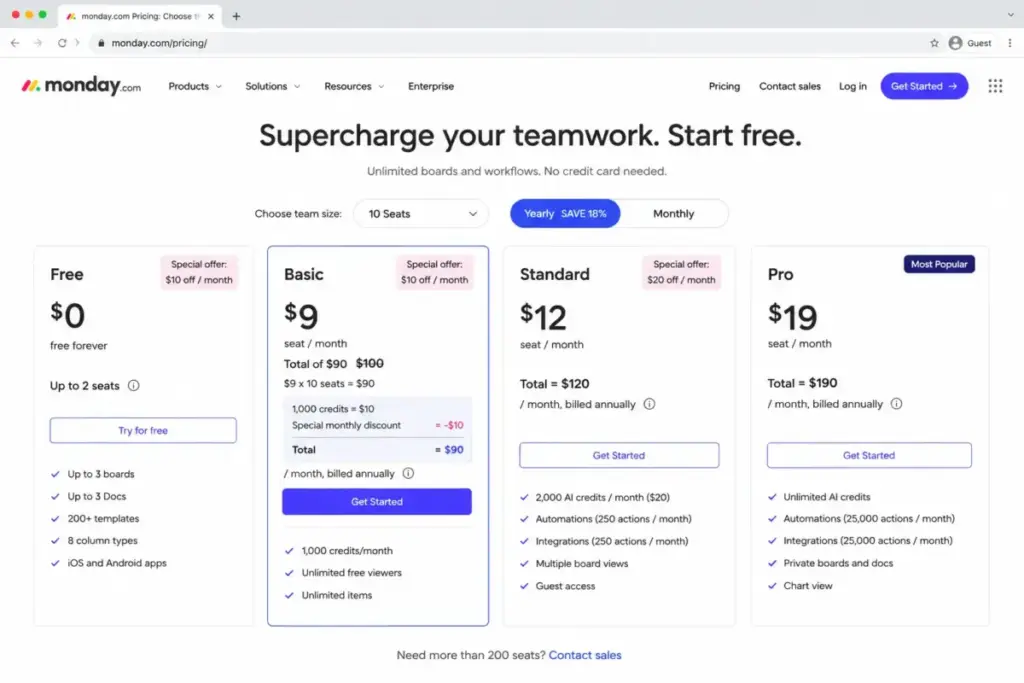
Starting price: $9/seat/month billed annually for Basic.
Free plan: Yes. Free plan available for monday work management, with plan-specific limits not fully confirmed in the accessible extract.
The sticker price looks competitive. Basic at $9/seat/month, Standard at $12/seat/month, both billed annually. Monthly pricing was not confirmed in the accessible extract.
But the minimum-seat rule changes everything for small buyers. monday.com requires 3 seats minimum, and seat counts rise in buckets of 5 after initial tiers. A solo operator or two-person team pays for three seats regardless. That pushes the real Basic starting cost to $27/month minimum, not $9.
Standard plan limits are the other caveat: 250 automation actions and 250 integration actions per month, 5 boards per dashboard, and 20 GB storage. A team running 15 automations per day hits the monthly cap in under three weeks.
Integrations: Slack, Outlook, Zendesk, Microsoft Teams, Google Drive, Gmail, Excel, Dropbox, Google Calendar, and 200+ apps.
Best for: Teams that want visual boards, dashboards, workflows, templates, automations, integrations, and operations tracking.
Not best for: Solo users or two-person teams who need the lowest possible starting cost, because monday.com pricing starts with minimum-seat and seat-bucket rules.
Score: 8.17/10. Excellent for visual team operations, reduced by minimum-seat rules and automation action limits on lower plans.
Personal Task Management
Todoist: Best Personal Task Manager
Todoist does one thing better than every other tool on this list: fast task capture. Quick Add, natural language parsing, reminders, deadlines, and cross-platform sync are built for speed, not feature depth (as confirmed on Todoist’s pricing page and official help articles).
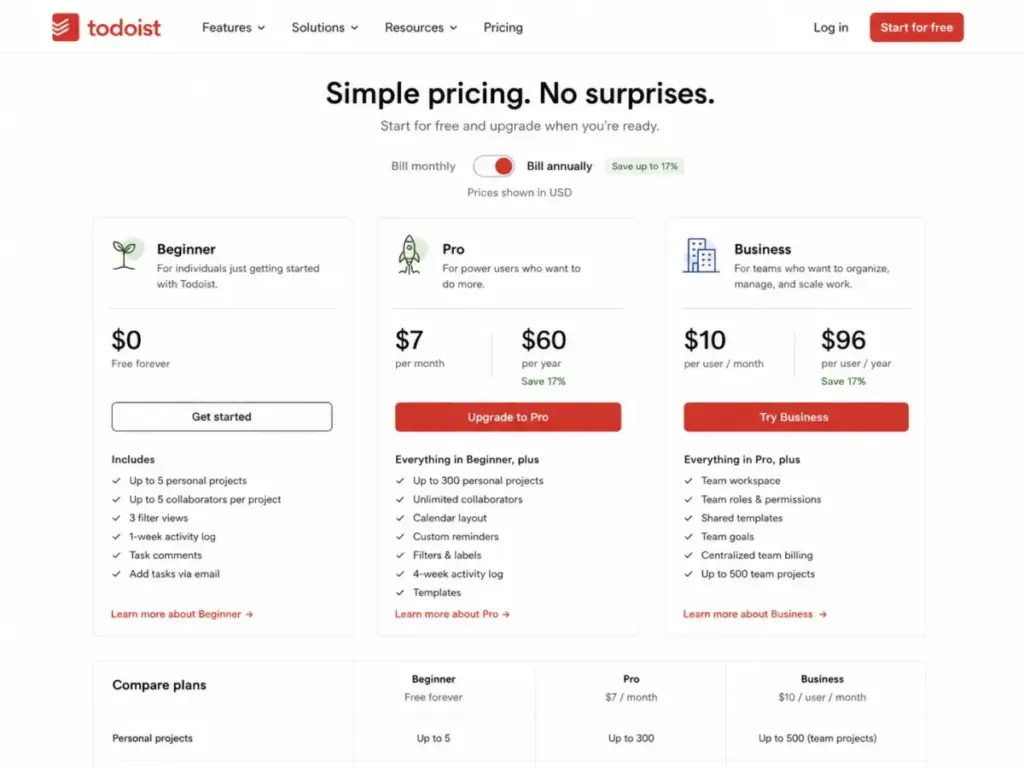
Starting price: $7/month Pro monthly or $5/month billed yearly.
Free plan: Yes. Beginner is free forever with 5 personal projects, 3 filters, 1-week activity history, and 5 MB file attachments.
Pro at $5/month annually unlocks 300 personal projects, 150 filters, full activity history, calendar layout, task duration, and reminders. Business at $8/user/month annually ($10 monthly) adds centralized team billing, admin features, and up to 500 team projects.
The pricing transparency here is refreshing. No hidden tiers, no credit systems, no workspace-wide upgrade rules. What you see is what you pay. For a productivity tool focused on personal task management, Todoist offers some of the best value in this entire list.
The usage limits are practical, not punitive: 300 active tasks per project, 500 active projects overall, and one calendar provider can be connected at a time. That single-calendar limitation is the most frequently missed restriction. If you use both Google Calendar and Outlook, you pick one.
Integrations: 90+ integrations including Gmail, Outlook Mail, Google Calendar, Outlook Calendar, Slack, and browser extensions.
Best for: Individuals and small teams who want fast task capture, simple planning, reminders, deadlines, and cross-platform task management.
Not best for: Teams that need deep portfolio management, workload planning, dashboards, or complex project reporting.
Score: 8.42/10. Best personal task management value, with the clearest pricing and strongest daily-use simplicity, limited by intentionally lighter team and project features.
Specialist Productivity Layers
Zapier: Best Automation Layer
Zapier is not a task manager or a workspace. It is the plumbing that connects your productivity stack. And for teams drowning in repetitive manual work, that plumbing produces larger productivity gains than switching project management tools (as confirmed on Zapier’s pricing page).
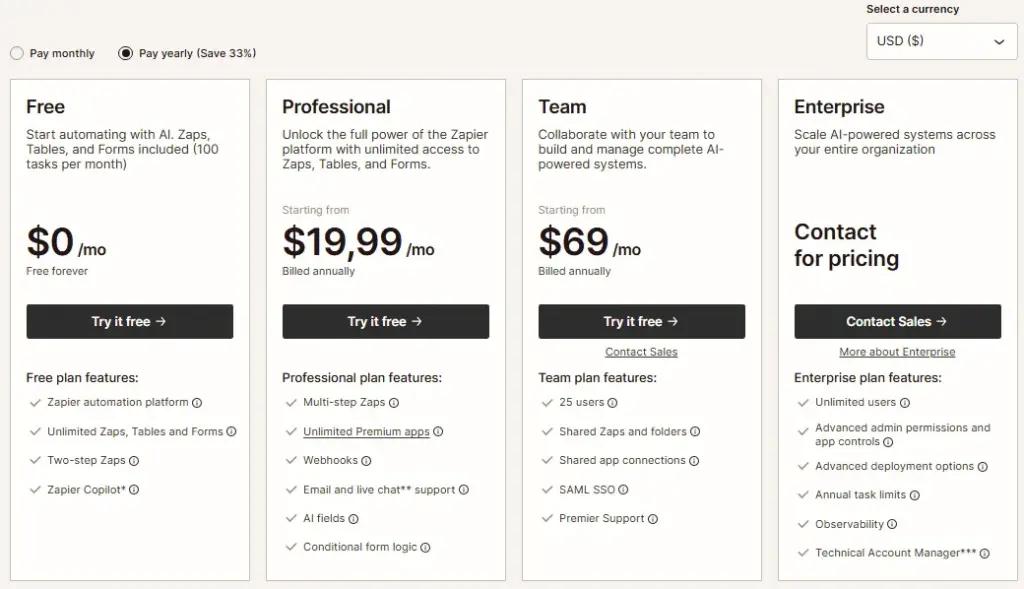
Starting price: $19.99/month billed annually for Professional.
Free plan: Yes. 100 tasks per month and two-step Zaps.
The free plan is useful for testing but limited. Professional at $19.99/month annually unlocks multi-step Zaps and higher task limits. Team at $69/month annually includes 25 users and shared app connections. Enterprise adds SAML SSO and high-volume automation.
The cost model is usage-based, not seat-based. Task consumption determines what you pay. If a 5-step Zap fires 200 times per day, that is 1,000 tasks per day, 30,000 per month. The pay-as-you-go behavior means costs can increase unpredictably for high-volume workflows. One month you are on Professional, the next month you need a higher task tier.
Key features beyond basic Zaps: Tables, Forms, Canvas, Agents, Chatbots, Zapier MCP, multi-step workflows, webhooks, and premium apps.
Integrations: 9,000+ apps including Salesforce, HubSpot, Slack, ChatGPT, Microsoft Teams, Zendesk, Jira, and NetSuite. This is the largest integration ecosystem on this list by a wide margin.
Best for: Teams that want to automate repetitive work across apps without replacing their existing productivity stack.
Not best for: Buyers looking for a built-in task manager, planner, or project workspace as the primary productivity interface.
Score: 8.38/10. Best integration ecosystem and automation depth, offset by task-based pricing unpredictability and the fact that it supplements rather than replaces a primary productivity tool.
Motion: Best AI Auto-Scheduler

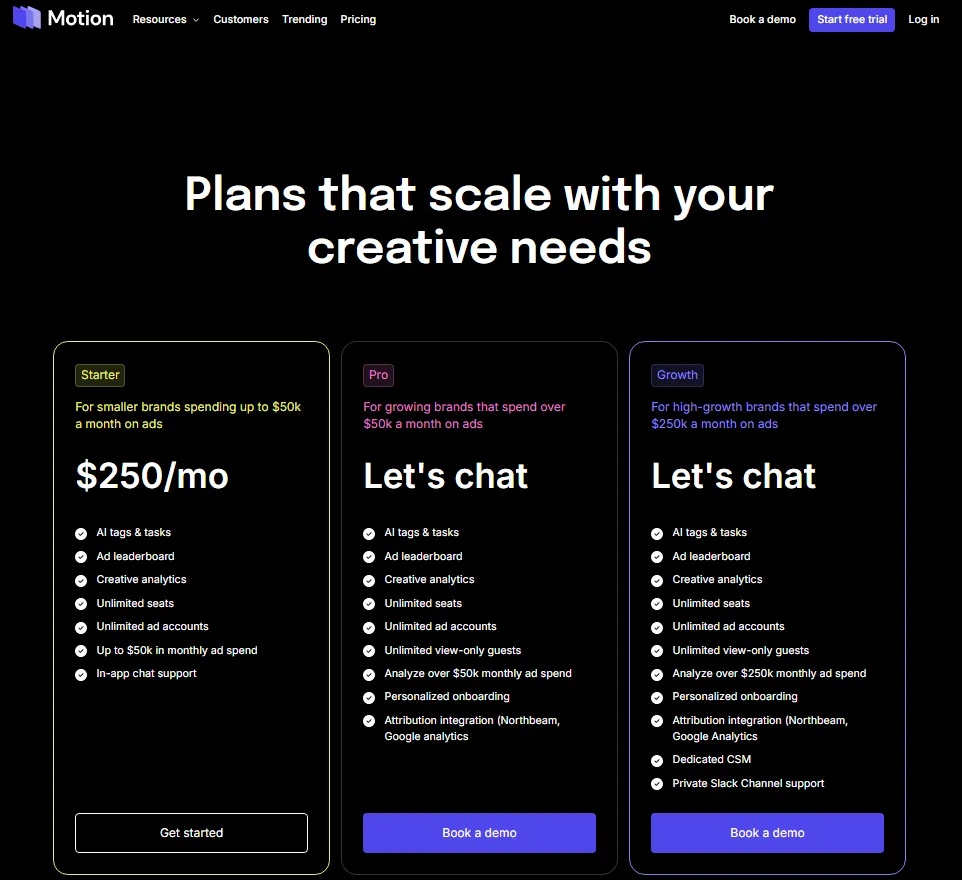
Motion takes the opposite approach from every other tool on this list. Instead of giving you boards, lists, and views to organize work manually, it uses AI to schedule tasks, meetings, and calendar blocks for you (as confirmed on Motion’s pricing page).
Starting price: $19/seat/month for Pro AI.
Free plan: No free forever plan verified. A risk-free free trial is available, and the official App Store listing references a 7-day trial.
Pro AI at $19/seat/month includes 7,500 credits per seat per month, AI Chat, projects, tasks, AI Calendar, meetings, AI Docs, wiki, notes, and AI Task Planner. Business AI at $29/seat/month adds 15,000 credits per seat per month, capacity planning, dashboards, permissions, time tracking, and priority support.
The credit model is the cost variable that matters most. Pro AI extra credits cost $0.25 per 100 credits. Business AI extra credits cost $0.19 per 100 credits. If your scheduling volume consistently exceeds the monthly credit allocation, overages add up. I have seen this pattern with AI credit models across other tools: the base price looks manageable, the credit overages are where the budget surprises happen.
The mobile app listing describes the app as a companion to the web and desktop experience, not a standalone replacement. Calendar-heavy users who need full functionality will primarily work from desktop.
Best for: Busy professionals and small teams that want AI to schedule tasks, meetings, projects, and calendar work automatically.
Not best for: Buyers who want a free forever task manager or a low-cost lightweight list app.
Score: 7.92/10. Valuable AI scheduling focus for calendar-heavy users, reduced by no free plan, credit overage risk, and narrower scope.
Sunsama: Best Guided Daily Planner

Sunsama approaches productivity from the opposite direction of ClickUp and Notion. Instead of building a workspace you configure, Sunsama builds a daily planning routine you follow. Guided daily planning, calendar time blocking, realistic workload assessment, and focus mode replace the endless customization that makes heavier tools feel like work (as confirmed on Sunsama’s pricing page).
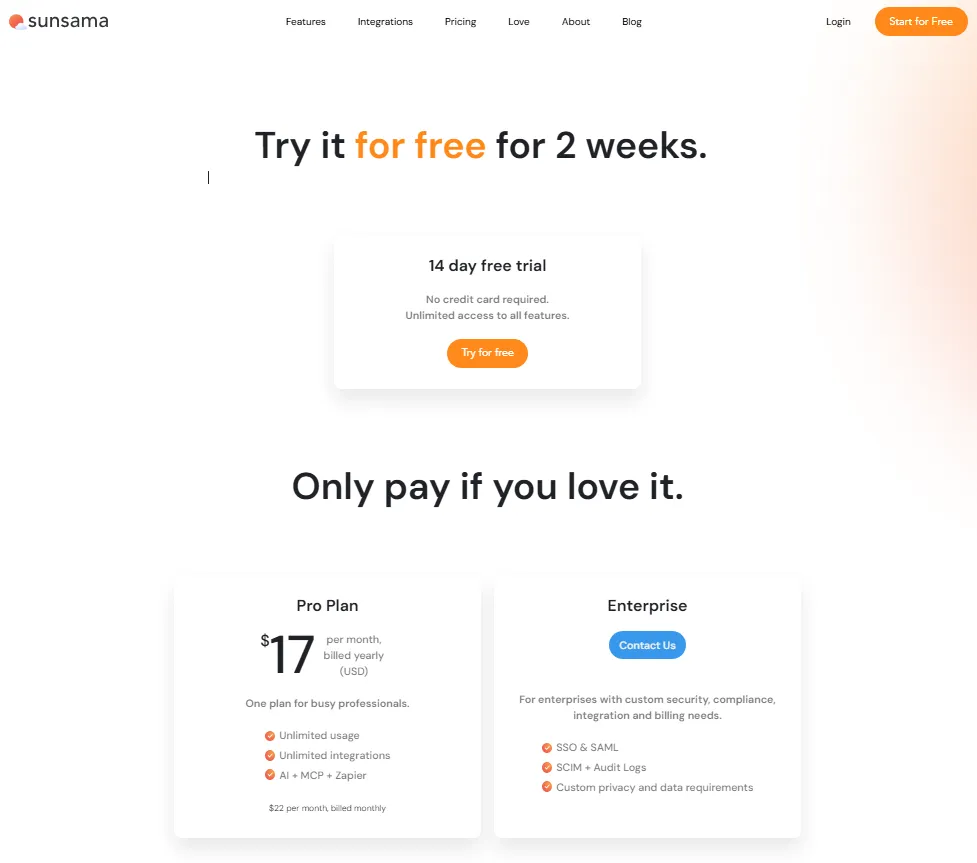
Starting price: $17/month billed yearly.
Free plan: No. Official FAQ states Sunsama does not have a free forever plan.
Pro at $17/month annually or $22/month monthly includes unlimited usage and unlimited integrations. Enterprise is contact sales for security, compliance, integration, and billing needs.
The 14-day free trial requires no credit card and gives unlimited access to all features. That is a fair evaluation window. But the lack of a free forever plan means Sunsama needs to earn its spot every month. At $17/month for a planning layer that sits on top of other productivity tools, buyers need to value the guided routine enough to justify the recurring cost.
The pricing page includes a legacy FAQ figure that conflicts with the current top pricing card. This is a non-fatal caveat but worth noting for buyers comparing cached search results against the live page.
The integration list is Sunsama’s practical strength. It pulls tasks from Asana, ClickUp, GitHub, Gmail, Jira, Linear, Microsoft To Do, monday.com, Notion, Outlook, Slack, Microsoft Teams, Todoist, Toggl, and Trello. That import capability means you do not replace your project management tool. You add a daily planning layer on top of it.
Best for: Professionals who want a calmer guided daily planning routine that combines tasks, calendar time blocking, and imported work from other tools.
Not best for: Users who require a free forever plan or a full project management platform with advanced reporting.
Score: 7.88/10. One of the clearest daily planning workflows, reduced by paid-only model and narrower scope.
Akiflow: Best Power-User Time Blocking Hub

Akiflow targets the productivity user who has tried Todoist, Notion, and calendar apps separately and wants them unified. A command bar for task capture, multiple calendar views, time blocking, and a unified inbox that aggregates tasks from other tools make it a strong fit for power users who want one command center for planning.
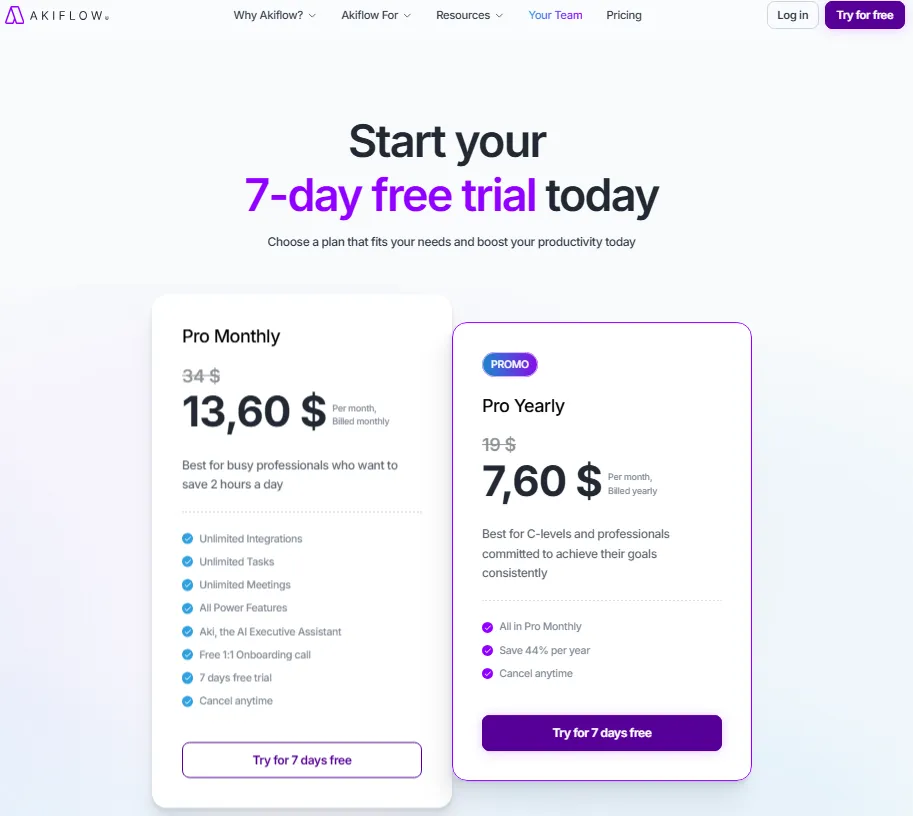
Starting price: $34/month billed monthly, or $19/month billed annually.
Free plan: No. Akiflow offers a 7-day free trial.
Akiflow’s Pro plan costs $34/month when billed monthly, or $19/month when billed annually. The annual plan brings the effective monthly cost down significantly, but it still requires an upfront annual commitment. There is no verified free forever plan.
The pricing is no longer as aggressive as the previous $8.33/month figure suggested. At $19/month billed annually, Akiflow is more expensive than Todoist Pro and Trello Standard, but it sits in the same premium calendar-first category as Motion and Sunsama. The difference is positioning: Todoist is a lightweight task manager, while Akiflow is built around time blocking, calendar planning, universal task capture, and a unified inbox.
Usage limits are relatively clean compared with credit-based tools. Akiflow’s paid plan includes unlimited integrations, unlimited tasks, and unlimited meetings. That makes the pricing easier to understand than Motion’s credit-based model, where heavy AI usage can create overage costs.
Where Akiflow falls short: it is a personal productivity hub, not a team project management platform. Advanced project views, portfolios, workload management, and reporting are not the core use case. The 7-day trial is also shorter than Sunsama’s 14-day trial, giving buyers less time to evaluate whether the workflow fits.
Integrations: Google Calendar, Outlook Calendar, Gmail, Slack, Todoist, Asana, ClickUp, Jira, Linear, Notion, GitHub, Trello, Microsoft To Do, Zoom, Zapier, and IFTTT.
Best for: Power users who want a unified inbox, command-bar task capture, and keyboard-first time blocking across multiple calendars and task sources.
Not best for: Budget buyers, casual task-list users, or teams needing a primary project management platform with portfolios, workload planning, and advanced reporting.
Score: 7.70/10. Strong time blocking hub for power users, reduced by no free plan, a short 7-day trial, and a higher annual price than lightweight task managers.
Productivity Tools Pricing Comparison
All pricing verified as of June 2026 from official pricing pages. Check each vendor’s live pricing page before committing, as prices can change.
| Product | Starting price | Free plan | Billing basis | Annual price | Hidden costs |
|---|---|---|---|---|---|
| Notion | $10/member/mo (annual) | Yes, unlimited for individuals | Per member | $10 Plus; $20 Business | AI credits $10/1,000; Custom domains extra; block limits for team free |
| ClickUp | $7/user/mo (annual) | Yes, Free Forever | Per user | $7 Unlimited; $12 Business | AI add-ons; extra credits $10/10,000; workspace-wide upgrades |
| Asana | $10.99/user/mo (annual) | Yes, 2 users | Per user | $10.99 Starter; $24.99 Advanced | Min 2 seats; goals and workload require Advanced |
| Todoist | $5/mo (annual) | Yes, 5 projects | Per user | $5 Pro; $8/user Business | Business required for team billing |
| Zapier | $19.99/mo (annual) | Yes, 100 tasks/mo | Usage-based | $19.99 Professional; $69 Team | Task overages; pay-as-you-go; premium apps |
| Trello | $5/user/mo (annual) | Yes, 10 boards | Per user | $5 Standard; $10 Premium | Guest billing; Power-Up subscriptions; Guard separate |
| monday.com | $9/seat/mo (annual) | Yes, limited | Per seat | $9 Basic; $12 Standard | Min 3 seats; seat buckets; 250 automation actions/mo on Standard |
| Motion | $19/seat/mo | No verified free plan | Per seat + credits | $19 Pro AI; $29 Business AI | Credit overages $0.19-$0.25 per 100 |
| Sunsama | $17/mo (annual) | No | Per user | $17 Pro | Enterprise is contact sales; legacy FAQ pricing conflict |
| Akiflow | $8.33/mo (annual) | No | Per user | $8.33 Pro; $12.50 Team | Enterprise custom; 7-day trial only |
What this means: the cheapest tools with verified free plans are Trello, Todoist, and ClickUp. For all-in-one workspaces, Notion and ClickUp offer the best value under $15/user/month. For calendar-first productivity, Akiflow’s annual pricing ($8.33/month) undercuts Motion ($19) and Sunsama ($17) significantly. The biggest hidden cost traps are ClickUp’s workspace-wide upgrades, monday.com’s minimum-seat buckets, Zapier’s task-based overages, and Motion’s credit overages.
Feature Comparison by Tool Category
The core question is not which tool has the most features. It is which category of tool you actually need. This table maps what each product delivers natively.
| Feature | Notion | ClickUp | Asana | Todoist | Zapier | Trello | monday.com | Motion | Sunsama | Akiflow |
|---|---|---|---|---|---|---|---|---|---|---|
| Task management | ✓ | ✓ | ✓ | ✓ | No | ✓ | ✓ | ✓ | ✓ | ✓ |
| Docs and wikis | ✓ | ✓ | Limited | No | No | No | No | ✓ | No | No |
| Database views | ✓ | ✓ | No | No | Tables | No | ✓ | No | No | No |
| Gantt and timeline | Limited | ✓ | ✓ | No | No | Premium | ✓ | No | No | No |
| AI features | ✓ | Add-on | AI Studio | Task Assist | Agents | No | AI columns | Core | No | No |
| Time tracking | No | ✓ | No | No | No | No | No | Business | No | No |
| Calendar time blocking | No | No | No | Paid | No | No | No | ✓ | ✓ | ✓ |
| Automation | Limited | ✓ | ✓ | No | Core | ✓ | ✓ | AI | Via Zapier | No |
| Daily planning routine | No | No | No | No | No | No | No | AI | ✓ | ✓ |
| App automation across tools | No | No | No | No | ✓ | No | No | No | No | No |
| Free plan | ✓ | ✓ | ✓ | ✓ | ✓ | ✓ | ✓ | No | No | No |
What this means: Notion and ClickUp cover the broadest feature surface. Asana and monday.com focus on structured team coordination. Todoist and Trello prioritize simplicity. Motion, Sunsama, and Akiflow specialize in calendar-first planning. Zapier stands alone as an automation layer. No single tool covers every cell in this table, which is exactly why buyers need to pick based on category, not feature count.
Which Productivity Tool Should You Avoid?
Every tool on this list has a scenario where it is the wrong pick. These are the honest anti-recommendations:
- Avoid Notion if your team needs a strict, traditional project management system with Gantt-first workflow, timeline dependencies, and advanced reporting out of the box. Notion is flexible, but flexibility requires configuration.
- Avoid ClickUp if your team wants a simple daily task list without complexity. ClickUp’s feature depth creates a heavier learning curve than Todoist or Trello, and workspace-wide upgrades can raise costs for mixed-use teams.
- Avoid Asana if you are a solo user looking for the cheapest personal task manager. The 2-user Personal plan cap and 2-seat minimum on paid plans make it less economical for individuals.
- Avoid Todoist if your team needs portfolio management, workload planning, dashboards, or complex reporting. Todoist is intentionally lightweight and does not replace a full work management platform.
- Avoid Zapier if you need a primary productivity interface. Zapier automates workflows between tools; it does not provide a workspace, planner, or task management surface.
- Avoid Trello if your team needs deep reporting, workload management, or structured portfolio planning. Trello’s strength is visual simplicity, not operational depth.
- Avoid monday.com if you are a solo user or two-person team sensitive to starting cost. The 3-seat minimum and seat-bucket pricing push the real entry cost higher than the per-seat sticker price.
- Avoid Motion if you need a $0 productivity tool. No verified free plan exists, and credit overages can increase costs.
- Avoid Sunsama if you need a free plan or a full project management platform. Sunsama is a paid daily planning layer, not a PM replacement.
- Avoid Akiflow if you need deep team project management. Akiflow is a personal time blocking hub, not a portfolio or operations platform.
What this means: the most common mistake I see is buying an all-in-one work OS when the buyer only needs a personal task manager, or buying a daily planner when the real problem is team project visibility. Match the tool category to the actual productivity bottleneck.
How to Choose the Right Productivity Tool
Here is a five-question framework for matching your productivity problem to the right tool:
Question 1: Is your productivity bottleneck personal or team-based?
If personal: Todoist, Sunsama, Akiflow, or Motion. If team-based: Notion, ClickUp, Asana, monday.com, or Trello. If both: Notion or ClickUp cover the widest range.
Question 2: What is your monthly budget per user?
- $0: Notion (individual), ClickUp Free, Todoist Free, Trello Free, Asana Personal (2 users), Zapier Free
- $5 to $15: Todoist Pro, Trello Standard, Akiflow Pro (annual), ClickUp Unlimited, Notion Plus, Asana Starter
- $15 to $30: Motion Pro AI, Sunsama Pro, monday.com Standard, Asana Advanced, Notion Business, Motion Business AI
- $30+: Enterprise tiers across most tools
Question 3: Do you need calendar time blocking?
If yes: Motion (AI-driven), Sunsama (guided routine), or Akiflow (keyboard-first). If no: every other tool on this list.
Question 4: How many apps do you need to connect?
Under 10: native integrations on most tools are sufficient. Over 10: check Zapier’s 9,000+ app ecosystem or ClickUp’s automation integrations. If cross-app automation is the primary need: Zapier is the answer, period.
Question 5: How much setup time can you invest?
If the answer is “none”: Todoist or Trello. If you have a weekend: Notion or Asana. If you have a team onboarding budget: ClickUp or monday.com.
When Free Plans Are Enough
Seven of the 10 tools on this list offer free plans. Here is when they are genuinely sufficient:
| Tool | Free plan limit | Enough if… |
|---|---|---|
| Notion | Unlimited individual; limited team blocks | Solo knowledge worker managing docs, databases, and personal tasks |
| ClickUp | 60 MB storage, unlimited tasks | Small team tracking tasks and docs without heavy automation or AI |
| Asana | 2 users | Two-person team managing projects with list, board, and calendar views |
| Todoist | 5 personal projects, 3 filters | Individual managing a short daily task list without calendar layout |
| Zapier | 100 tasks/month, 2-step Zaps | Light automation connecting 2 to 3 apps with simple triggers |
| Trello | 10 boards, 10 collaborators | Individual or small team running fewer than 10 active boards |
| monday.com | Limited (details not fully confirmed) | Evaluating the interface before committing to a paid plan |
What this means: free plans work for individuals and small teams with limited scope. The moment you need team collaboration (Notion), heavy automation (ClickUp, Zapier), more than 2 users (Asana), calendar layout (Todoist), or more than 10 boards (Trello), you will outgrow the free tier.
Final Verdict: Best Productivity Tool for Most Buyers
Notion earns the top rank because it combines knowledge management, task databases, AI workspace features, broad integrations, and a genuinely useful free tier better than any narrower tool on this list. It is not the deepest project management platform and not the simplest task manager, but it is the most versatile productivity workspace for the widest range of buyers.
Here is the verdict by buyer type:
- Best all-in-one for teams that want everything: ClickUp. Deepest feature set, lowest all-in-one entry price at $7/user/month, but expect a learning curve and watch for workspace-wide upgrade rules.
- Best for structured team project management: Asana. Goals, portfolios, workload, and approvals make it the strongest choice for cross-functional teams. Budget for Advanced if you need the full feature set.
- Best personal task manager: Todoist. Clearest pricing, fastest task capture, lowest daily-use friction. The $5/month annual Pro plan is one of the best values in productivity software.
- Best automation layer: Zapier. 9,000+ integrations. No competitor comes close on breadth. Budget for task-tier variability.
- Best visual board: Trello. Easiest adoption, fair pricing, ideal for visual thinkers and Kanban workflows.
- Best for operations teams: monday.com. Visual operations hub with dashboards and workflows. Watch the 3-seat minimum and automation action limits.
- Best AI scheduling: Motion. If you want AI to schedule your day, this is the only dedicated product on the list.
- Best daily planning routine: Sunsama. If you want calm, guided daily planning over heavy configuration, Sunsama is the pick.
- Best power-user time blocking: Akiflow. Keyboard-first time blocking with unified task and calendar management at $8.33/month annual.
The tool you should pick depends on the type of productivity problem you are solving. Match your bottleneck to the buyer type above, and the decision narrows itself.
FAQ
What is the best free productivity tool in 2026?
Notion and ClickUp both offer strong free plans. Notion’s free plan is best for individual knowledge workers who need docs, databases, and task views with no time limit. ClickUp’s Free Forever plan is best for small teams that need unlimited tasks, docs, and Kanban. Todoist’s free tier works for individuals tracking fewer than 5 projects. Trello’s free plan handles up to 10 boards with 10 collaborators. The best free tool depends on whether your productivity need is individual workspace (Notion), team task management (ClickUp), personal task capture (Todoist), or visual boards (Trello).
Is Notion better than ClickUp for productivity?
Notion is better for teams that prioritize knowledge management, docs, databases, and flexible workspace design. ClickUp is better for teams that want the deepest all-in-one feature set including tasks, docs, chat, time tracking, sprints, dashboards, and automation. Notion’s learning curve centers on workspace design. ClickUp’s learning curve centers on feature volume. Choose Notion if you value flexibility. Choose ClickUp if you value feature depth.
How much do productivity tools cost for a 10-person team?
Costs vary widely. Notion Plus costs roughly $100/month for 10 members billed annually. ClickUp Unlimited costs $70/month. Asana Starter costs $110/month. Todoist Business costs $80/month. monday.com Basic costs $90/month (with 3-seat minimum at $9/seat). Trello Standard costs $50/month. Motion Pro AI costs $190/month. Enterprise tiers and add-ons (AI credits, extra automation actions) can increase these figures.
Can Todoist replace a project management tool?
No, unless your project management needs are limited to personal task tracking, reminders, and simple team task sharing. Todoist is intentionally lightweight. It does not include Gantt charts, portfolios, workload management, advanced reporting, or complex workflow automation. For personal productivity, Todoist is excellent. For team project management, use Asana, ClickUp, or monday.com.
Is Zapier a productivity tool?
Zapier is a productivity tool in the sense that it automates repetitive work across apps, saving time on manual data entry, status updates, and cross-tool workflows. It connects 9,000+ apps. It is not a productivity tool in the sense that it does not provide a workspace, task manager, calendar, or planning interface. Zapier works best as a layer on top of other productivity tools.
What is the difference between Motion and Sunsama?
Motion uses AI to automatically schedule tasks, meetings, and calendar blocks based on priorities and deadlines. Sunsama uses a guided daily planning routine where you manually time-block tasks from a unified view of imported work. Motion is hands-off scheduling. Sunsama is intentional, calmer planning. Motion starts at $19/seat/month with no free plan. Sunsama starts at $17/month with no free plan. Choose Motion if you want AI automation. Choose Sunsama if you want a structured daily planning ritual.
Which productivity tool has the best integrations?
Zapier leads with 9,000+ app integrations, far more than any other tool on this list. Among workspace and project tools, ClickUp and Notion offer the broadest native integration ecosystems. Trello has 200+ Power-Ups. Asana has 100+ free integrations. Sunsama integrates with 16+ common productivity and project management tools. Akiflow connects to major calendar, email, and task management platforms.
Should I use one productivity tool or multiple?
Most productive setups use 2 to 3 tools: one primary workspace or task manager, one communication tool, and optionally one automation or calendar layer. Using a single all-in-one tool (Notion or ClickUp) reduces context switching but increases setup complexity. Using multiple specialized tools (Todoist plus Zapier plus Sunsama) keeps each tool simple but adds integration overhead. Avoid using more than 4 productivity tools unless each one solves a distinct problem.
Do I need an AI productivity tool in 2026?
Not necessarily. AI features like Motion’s auto-scheduling, Notion’s AI agents, and ClickUp Brain add value for users with complex scheduling needs or large knowledge bases. For users who manage a straightforward task list and calendar, Todoist or Trello without AI features work perfectly. The AI add-on costs (credits, per-seat charges, overage fees) mean you should only pay for AI if it solves a specific productivity pain point you experience daily.
What is the best productivity tool for small teams under 10 people?
For teams of 3 to 10 people, ClickUp Unlimited at $7/user/month annually offers the best feature-to-price ratio. Notion Plus at $10/member/month is the best choice if the team values docs and knowledge management alongside task tracking. Asana Starter at $10.99/user/month fits teams that need structured project management with goals and reporting. For the simplest visual board, Trello Standard at $5/user/month is the most affordable option.