Adobe Firefly is worth paying for, but only if you already live inside Adobe’s ecosystem. This Adobe Firefly review breaks down every plan, credit rule, and feature gate so you can decide whether Firefly fits your workflow or whether a competitor serves you better. Firefly is one of the most visible generative AI creative platforms in 2026.
It now bundles Adobe’s own models with partner models from Google, OpenAI, Runway, and others. That makes it more than a simple text-to-image tool. But “more” also means more credit confusion, more plan tiers, and more fine print. If you are comparing AI image generators, the real question is not whether Firefly works. It does. The question is whether its credit economics and output quality justify the cost for your specific use case.
Quick Verdict: Is Adobe Firefly Worth It?
Adobe Firefly scores 8.3 out of 10 for users who need brand-safe AI generation inside Adobe’s workflow. It is not the best raw image generator. Midjourney and OpenAI Images produce stronger first-pass outputs for many prompts. But no competitor matches Firefly’s direct Photoshop integration, Content Credentials, or commercial-safety positioning. If you already pay for Creative Cloud, Firefly is the natural extension. If you do not, the value drops fast.
| Decision Point | Adobe Firefly Verdict | Buyer Impact |
|---|---|---|
| Best for | Creative Cloud users, brand-safe marketing, Photoshop/Express workflows | High value if already in Adobe ecosystem |
| Skip if | You want top raw image quality per dollar, unlimited low-cost generation, or video-first output | Better alternatives exist for these needs |
| Starting price | $9.99/month (Firefly Standard, 2,000 credits) | Entry cost is low, but credits burn fast on premium features |
| Score | 8.3/10 | Strong for Adobe-native users, average for everyone else |
| Credit warning | Credits do not roll over month to month | Seasonal or uneven users lose unused credits every billing cycle |
| Commercial use | Non-beta Firefly outputs can be used commercially | Beta and partner-model outputs carry separate risk |
| Top alternative | Midjourney for raw artistic quality, OpenAI Images for prompt accuracy | Switch if image quality per prompt matters more than workflow integration |
How We Reviewed Adobe Firefly
This review evaluates Adobe Firefly across seven weighted criteria using official product data, real user feedback, and competitive benchmarking. I cross-referenced Adobe’s pricing page (checked May 4, 2026), help documentation, API usage notes, and community forums. User quotes come from G2, Capterra, and Reddit. I did not fabricate testing claims. Where I describe workflow observations, they are supported by Adobe’s published documentation and user-reported experiences. For a full explanation of how SaaSZap evaluates software, see our review methodology.
Scoring weights:
- Image generation quality: 20%
- Editing workflow: 15%
- Adobe ecosystem integration: 15%
- Pricing and credit value: 15%
- Commercial safety and trust: 15%
- Video and audio capability: 10%
- Alternatives competitiveness: 10%
What Is Adobe Firefly?
Adobe Firefly is a generative AI platform for creating and editing images, video, audio, and designs within Adobe’s ecosystem. Adobe trained Firefly on licensed Adobe Stock images, public domain content, and content where it holds permission or rights. That training approach is the foundation of Adobe’s commercial-safety claims. Firefly is not a single model. It is a platform that now hosts both Adobe-built models and partner models from Google, OpenAI, Runway, Black Forest Labs, Luma, ElevenLabs, and others.
The distinction between Adobe models and partner models matters. Adobe models carry the platform’s commercial-use and Content Credentials guarantees. Partner models are not developed by Adobe. Users must decide whether a partner model is appropriate for their project. Adobe states this clearly in its help documentation on non-Adobe models.
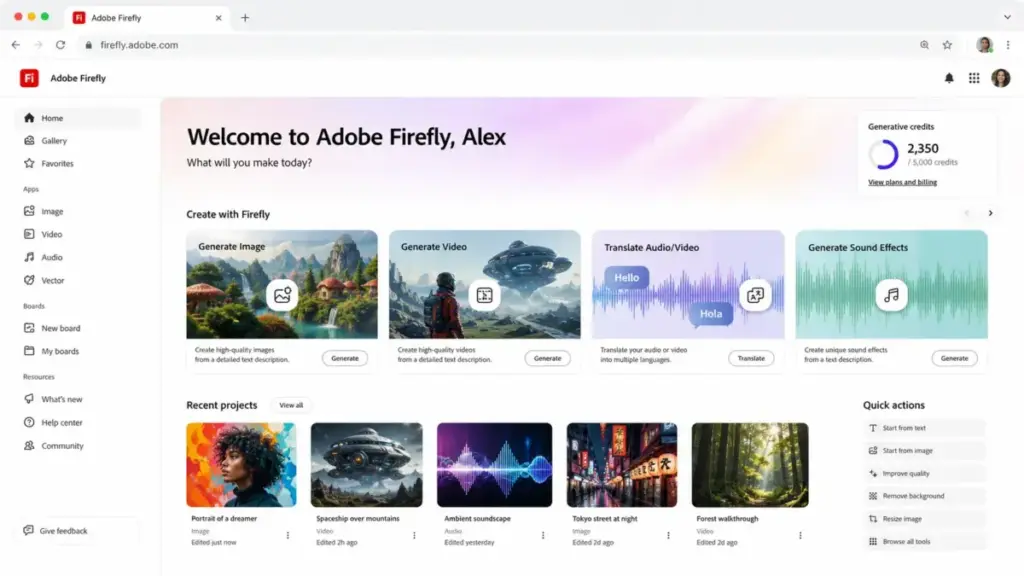
Firefly lives in three places: the Firefly web app, mobile app, and inside Creative Cloud applications like Photoshop, Illustrator, and Adobe Express. Higher-tier plans unlock Photoshop on web and mobile, plus Adobe Express Premium access.
Adobe Firefly Features
Firefly’s 2026 feature set spans text-to-image, video generation, audio translation, and a new AI assistant, making it Adobe’s broadest generative AI release yet. Each feature uses generative credits differently. Some features are unlimited on paid plans (standard image generation). Others burn credits quickly (video, partner models). I will cover the most buyer-relevant features below.
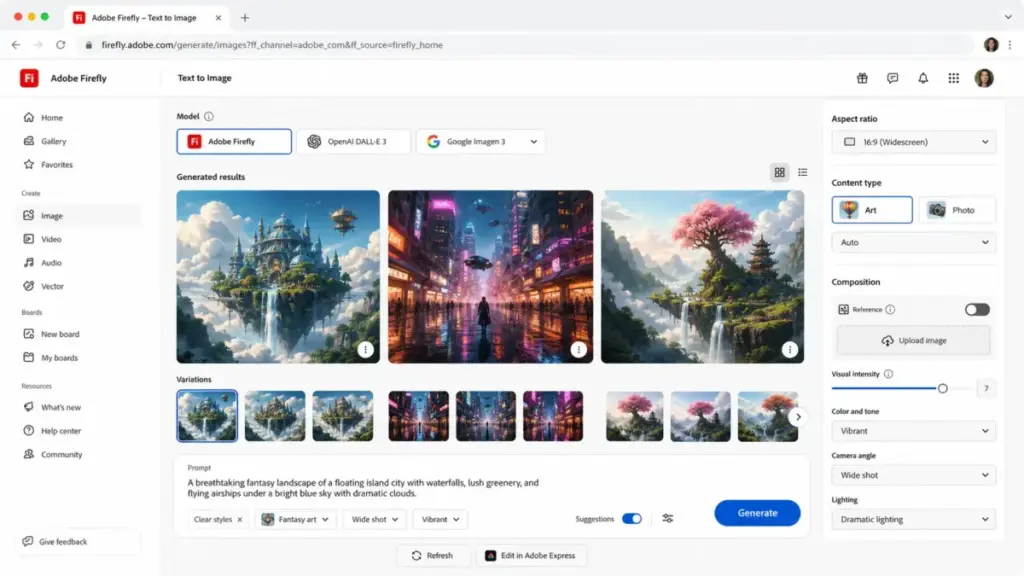
Adobe Firefly Text to Image
Text to Image is Firefly’s core offering. You type a prompt, choose a model (Adobe or partner), set aspect ratio and style preferences, and generate. Standard image generation on paid plans is unlimited for Adobe models. Premium features, including partner models, consume credits.
The output quality is good for marketing assets, social media graphics, and concept exploration. It is not best-in-class for photorealistic or highly stylized prompts. Midjourney consistently produces more visually striking results for artistic use cases.
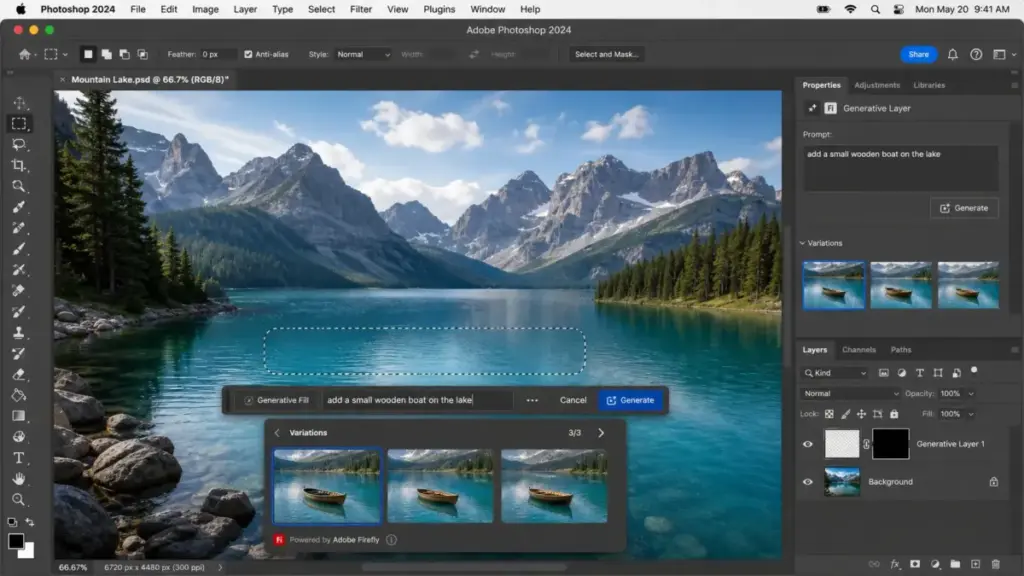
Adobe Firefly Generative Fill and Editing
Generative Fill is where Firefly earns its keep for Photoshop users. Select an area, type what you want, and Firefly fills it contextually. This works inside Photoshop on desktop, web, and mobile. Most standard Generative Fill actions in Photoshop use 1 credit per generation, unless your plan includes unlimited standard generations.
Additional editing tools include Generative Expand, Remove Object, Remove Person, Upscale Image, and Style Transfer. These are practical, production-ready tools for designers who need fast asset iteration. The editing workflow is where Firefly outperforms every competitor I tested against.
Adobe Firefly Boards
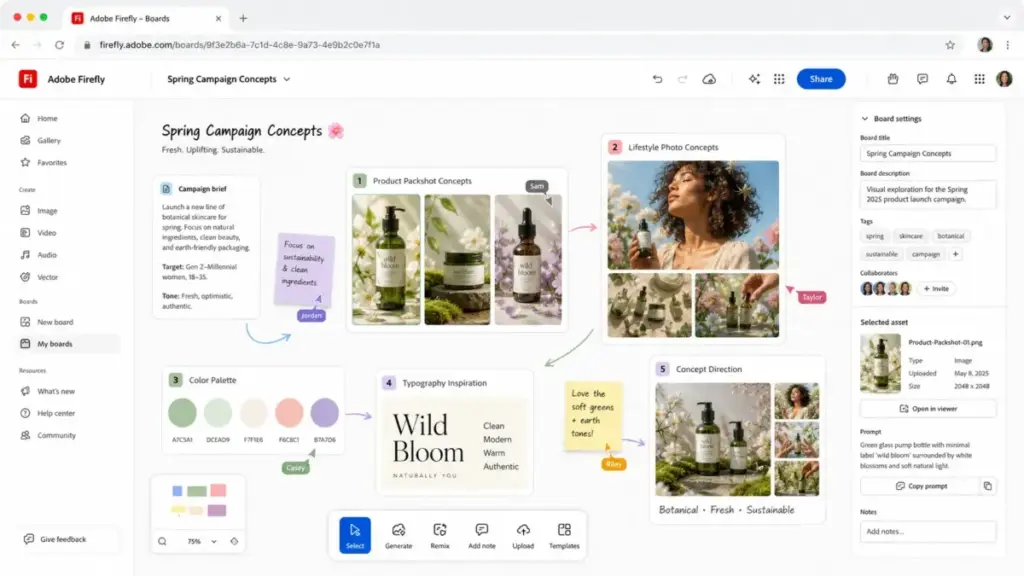
Firefly Boards is a visual ideation workspace. Think of it as a mood board powered by generative AI. You can create, arrange, and iterate on generated assets in a shared canvas. All paid plans include unlimited Firefly Boards access.
For teams producing campaign concepts or brand explorations, Boards is a genuinely useful addition. It is not available from Midjourney, DALL-E, or Leonardo AI.
Adobe Firefly Video and Audio
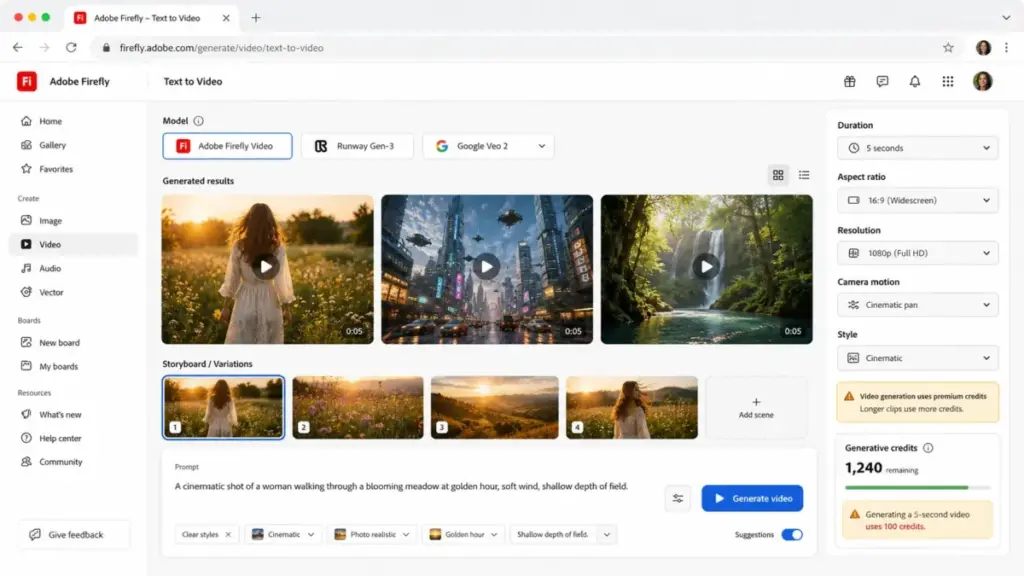
Firefly now includes video generation, audio translation, and sound effects. Five-second video clips are the primary video output. The number of videos you can generate depends on your plan: 20 on Standard, 40 on Pro, 100 on Pro Plus. Firefly Premium unlocks unlimited access to the Firefly Video Model in Generate Video.
Audio translation lets you translate video and audio content. Standard gets 6 minutes per month. Premium gets 166 minutes. Sound effect generation ranges from 200 (Standard) to 5,000 (Premium).
Video is Firefly’s weakest competitive area. Runway offers a far more capable video-first workflow. If video generation is your primary need, read our RunwayML review and best AI video generator guide.
Adobe Firefly Partner Models
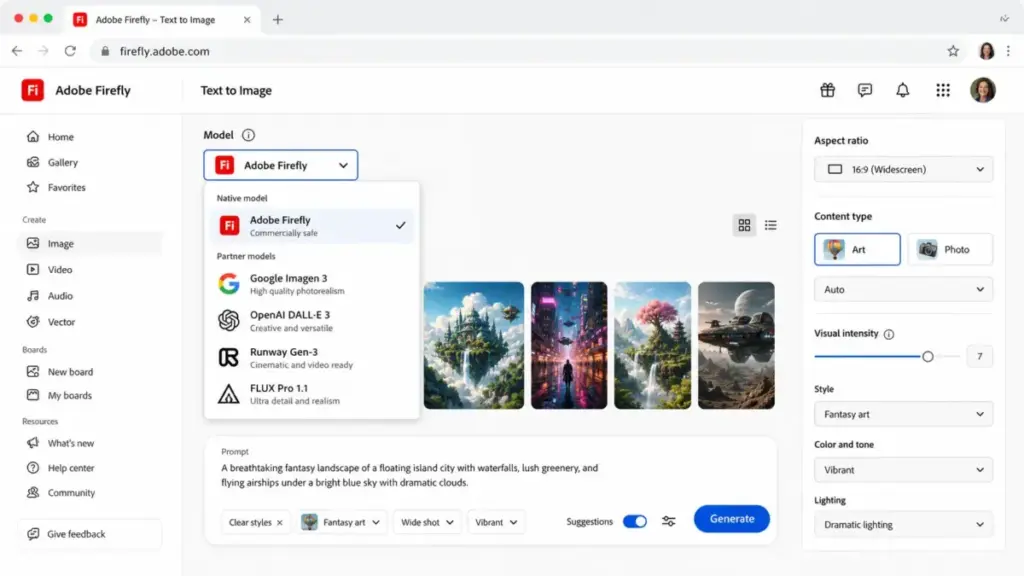
This is Firefly’s biggest 2026 shift. Adobe now hosts third-party models from Google, OpenAI, Runway, Black Forest Labs (FLUX), Luma, and ElevenLabs directly inside the Firefly interface. You can switch between Adobe and partner models without leaving the app.
Partner-model generations consume premium credits. And here is the critical caveat: partner models are not developed by Adobe, and users are responsible for determining whether a partner model suits their project. Adobe’s commercial-safety claims and Content Credentials apply to Adobe-model outputs. They do not automatically extend to partner-model outputs.
Adobe Firefly AI Assistant
Adobe announced the Firefly AI Assistant as coming in 2026. Adobe’s president David Wadhwani called it part of “a new era of agentic creativity.” The assistant is designed to handle multi-step creative tasks through conversational prompts.
I have not tested it yet. It is not fully released. I will update this review when it ships. For now, treat it as a forward-looking feature, not a buying reason.
Adobe Firefly Pricing and Credits
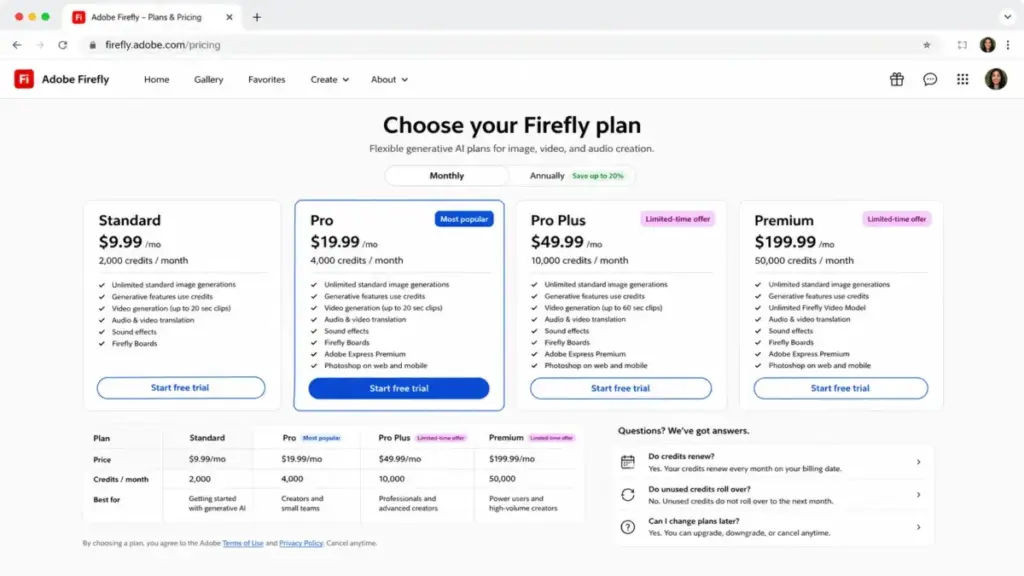
Firefly Standard starts at $9.99 per month with 2,000 credits, but the real cost depends on how fast you burn through premium features. Pricing checked May 4, 2026. Adobe currently offers limited-time 50% first-year discounts on Pro Plus and Premium, ending May 20, 2026. I use regular prices as the baseline below.
For a deeper pricing breakdown, see our Adobe Firefly pricing guide.
| Plan | Monthly Price | Monthly Credits | Best For | Key Limit |
|---|---|---|---|---|
| Free | $0 | Limited complimentary | Testing before paying | Very limited generations |
| Standard | $9.99 | 2,000 | Solo creators, light use | 20 five-second videos, no Express Premium |
| Pro | $19.99 | 4,000 | Freelancers, regular use | 40 five-second videos, includes Express Premium and Photoshop web/mobile |
| Pro Plus | $49.99 | 10,000 | Teams, heavy image work | 100 five-second videos, promo: $24.96/month first year |
| Premium | $199.99 | 50,000 | Agencies, enterprise scale | Unlimited Firefly Video Model, promo: $99.86/month first year |
Pricing checked May 4, 2026.
Adobe Firefly Credit Math
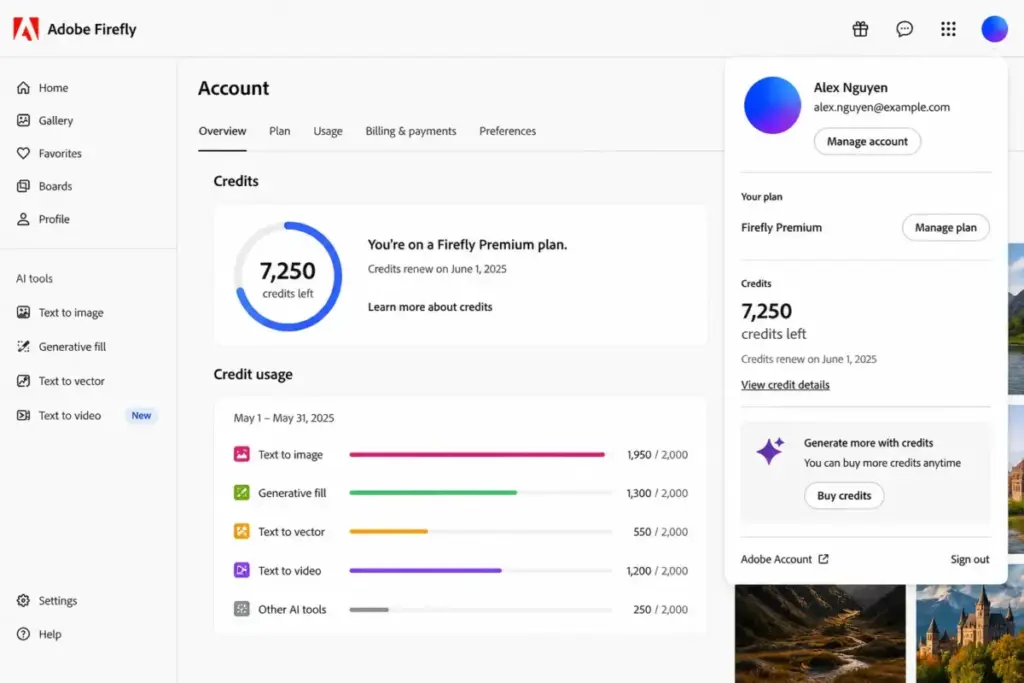
Credits are the currency. Every generation consumes them. The table below shows approximate capacity per plan for common use cases.
| Use Case | Standard (2,000) | Pro (4,000) | Pro Plus (10,000) | Premium (50,000) |
|---|---|---|---|---|
| Five-second videos | Up to 20 | Up to 40 | Up to 100 | Unlimited (Firefly Video Model) |
| Translated audio/video | Up to 6 min | Up to 13 min | Up to 33 min | Up to 166 min |
| Sound effects | Up to 200 | Up to 400 | Up to 1,000 | Up to 5,000 |
| Standard image generations | Unlimited | Unlimited | Unlimited | Unlimited |
| Premium image generations | Credits consumed | Credits consumed | Credits consumed | Credits consumed |
Standard image generation (using Adobe models) is unlimited on all paid plans. Premium features (video, partner models, advanced generation) consume credits from your monthly pool.
Credit Add-Ons
If you exhaust your monthly credits, Adobe sells add-on packs:
- 2,000 credits: $9.99/month
- 7,000 credits: $29.99/month
- 10,000 credits: $49.99/month
- 50,000 credits: $199.99/month
These add-ons are monthly subscriptions, not one-time purchases. They also do not roll over.
What Adobe Firefly Pricing Does Not Tell You
Credits do not roll over. If you use 800 of your 2,000 Standard credits in April, you lose 1,200 on your billing date. This punishes seasonal creators and agencies with uneven client work. One Reddit user put it bluntly:
“I just feel that other sites give a lot more value / credits ratio.” – Open_Bug_4196, Reddit r/Adobe
Premium features burn credits fast. A single five-second video generation can consume 100 credits on Standard. Ten videos and you have burned half your monthly allotment.
Promo pricing expires. The 50% first-year discounts on Pro Plus ($24.96/month) and Premium ($99.86/month) end May 20, 2026. After that, you pay full price. Budget accordingly.
Partner-model generations use premium credits. Switching to a Google or OpenAI model inside Firefly is convenient, but it drains your credit pool faster than Adobe-model standard generations.
Adobe Firefly User Experience
The signup-to-first-output experience is fast, but prompt rejections and quality inconsistency become friction points within the first week. Creating a Firefly account takes minutes. The web app interface is clean. Model selection, prompt input, and style controls are clearly labeled. Mobile access works on both iOS and Android.
The Photoshop and Express integration is where Firefly feels most natural. Generative Fill inside Photoshop does not require switching apps. You select, prompt, generate, and refine in one canvas. This is the single biggest advantage over every standalone competitor.
However, real user friction exists. Review platforms like G2 surface recurring themes: inaccuracy, poor results for specific prompt types, and prompt rejections. One Capterra reviewer noted (translated from Italian):
“The tool still needs to improve generation, especially people.” – Cristina S., Consultant, Capterra
Prompt rejections are a particular pain point for paid users. Adobe’s content policy filters sometimes block legitimate creative prompts. When you are paying $49.99 per month, a rejected prompt feels like wasted money. Reddit threads in r/Adobe and r/photoshop show consistent complaints about this issue.
On the positive side, one user highlighted the onboarding experience:
“Adobe Firefly is easy to use with great templates and design tools.” – Uwandu S., Photography, Capterra
The day-1 experience is good. The day-30 experience depends on your output volume and tolerance for credit management.
Adobe Firefly Pros and Cons
Firefly’s strengths center on workflow integration and commercial safety; its weaknesses center on credit economics and raw output quality.
- Direct Photoshop, Illustrator, and Express integration removes app-switching friction
- Content Credentials attach provenance metadata to generated outputs
- Commercial use is permitted for non-beta Firefly-model outputs
- Firefly Boards provides a unique visual ideation workspace competitors lack
- Partner models bring Google, OpenAI, and Runway options into one interface
- Standard image generations are unlimited on all paid plans
- IP indemnification may be available for qualifying enterprise plans
- Credits do not roll over, punishing uneven or seasonal usage patterns
- Raw image quality lags Midjourney and OpenAI Images for stylized and photorealistic prompts
- Video generation quotas are restrictive compared to Runway’s dedicated plans
- Prompt rejections from content filters interrupt paid workflows
- Partner-model commercial suitability is the user’s responsibility, not Adobe’s
- Premium at $199.99 per month is expensive unless you consistently use 50,000 credits
- API default rate limit of 4 RPM per organization is low for automation workflows
What Adobe Firefly Gets Wrong
Firefly’s convenience comes at the cost of raw generative quality, and Adobe has not closed that gap in 2026. This is the section most reviews skip. Firefly is not the best image generator. It is the most convenient one for Adobe users. Those are different things.
When I compare identical prompts across Firefly, Midjourney, and OpenAI Images, Midjourney consistently produces more visually compelling first-pass results. OpenAI Images handles complex text rendering and multi-element compositions with better prompt accuracy. Firefly’s strength is what happens after generation: the edit, the fill, the expand, the handoff to Photoshop.
The credit system creates a second problem. You pay monthly whether you generate or not. Credits vanish on your billing date. Leonardo AI, by contrast, offers rollover token banks on paid plans. For creators with variable output needs, Leonardo’s model is friendlier.
Video credit burn is a third concern. Firefly Standard allows only 20 five-second videos per month. At $9.99, that is roughly $0.50 per five-second clip. Runway’s Standard plan at $12 per month (billed annually) offers 625 credits with more flexible video generation. For video-heavy workflows, Firefly is not competitive. See our Runway ML pricing breakdown.
The API tells a similar story. Firefly’s API defaults to 4 requests per minute per organization and 9,000 requests per day. Exceeding these limits triggers HTTP 429 responses. You can request higher limits through your Adobe account manager, but the default is restrictive for production automation.
Commercially Safe Does Not Mean Every Output Is Indemnified
Adobe’s commercial-safety story is strong, but buyers must understand its boundaries. Non-beta Firefly outputs can be used commercially. That is clear. But beta outputs, while potentially usable commercially, are not eligible for IP indemnification. Qualifying enterprise plans may receive indemnification, subject to terms. And partner-model outputs carry their own rules entirely. If you are building a compliance case around Adobe’s safety claims, read the fine print on Adobe’s commercial safety approach.
Adobe Firefly Alternatives
Firefly is not the best choice for every use case, and I recommend switching tools when a competitor clearly wins on your primary need. The table below maps each competitor to its advantage over Firefly.
| Tool | Better Than Firefly For | Worse Than Firefly For | Starting Price | Best Fit |
|---|---|---|---|---|
| Midjourney | Artistic quality, stylized output, community prompt culture | Adobe workflow integration, commercial-safety positioning | $10/month (Basic) | Illustrators, visual artists prioritizing image beauty |
| DALL-E / OpenAI Images | Prompt accuracy, text rendering, conversational iteration | Photoshop integration, enterprise creative production | Token-based API pricing | Prompt-heavy users iterating inside a chatbot |
| Leonardo AI | Token rollover, model training, high-volume concept art | Adobe ecosystem fit, enterprise commercial-safety messaging | Free (150 daily tokens) | Creators generating many concept assets outside Adobe |
| Canva AI | Templated brand workflows, non-designer team collaboration | Photoshop-level editing, creative professional tools | Free (limited) | Marketing teams needing finished layouts over model control |
| Runway | Video-first AI production, Gen-4.5, dedicated video editing | Adobe integration, lower entry price for image-first users | $12/month (Standard, annual) | Video teams where Firefly’s video quotas are too restrictive |
Adobe Firefly vs Midjourney
Midjourney wins for raw visual quality. If you are an illustrator or concept artist who wants the most striking first-pass output, Midjourney is the better tool. Its community and prompt-sharing culture also help users improve faster. Firefly wins if you need that generated image inside Photoshop within 30 seconds. For a detailed comparison, see our Midjourney review.
Adobe Firefly vs DALL-E and OpenAI Images
OpenAI Images excels at prompt comprehension. Complex multi-element scenes and accurate text rendering are areas where OpenAI consistently outperforms Firefly. If you work inside ChatGPT and want conversational image iteration, OpenAI is the better fit. Firefly wins for design editing handoff and enterprise production pipelines. Read our DALL-E review for the full analysis.
Adobe Firefly vs Leonardo AI
Leonardo AI offers token rollover on paid plans, which is a direct answer to Firefly’s no-rollover credit model. If your output volume fluctuates month to month, Leonardo’s token bank is friendlier. Leonardo also supports custom model training. Firefly wins for Creative Cloud integration and enterprise commercial-safety messaging. See our Leonardo AI review.
Adobe Firefly vs Canva AI
Canva AI is the better choice for non-designer teams creating presentations, social posts, and templated brand campaigns. Its template library and drag-and-drop workflow are designed for marketers, not designers. Firefly wins when you need Photoshop-level editing precision. Read our Canva AI review.
Adobe Firefly vs Runway
Runway is the clear winner for video-first AI production. Its Gen-4.5 model, Act-Two, and dedicated video editing tools are purpose-built for video creators. Firefly’s video quotas (20 clips on Standard, 40 on Pro) are too restrictive for serious video work. Firefly wins on image editing and lower entry pricing for image-first users.
Who Should Use Adobe Firefly?
Firefly is best for users whose creative workflow already passes through Adobe applications. The value proposition drops sharply for users outside that ecosystem.
| User Type | Recommended Plan | Why It Fits | When to Choose an Alternative |
|---|---|---|---|
| Solo designer using Photoshop | Pro ($19.99/month) | Generative Fill, Express Premium, Photoshop web/mobile all included | If you need top-tier image quality, add Midjourney |
| 2-5 person marketing team | Pro Plus ($49.99/month) | 10,000 credits cover regular social and ad asset production | If output is heavily templated, consider Canva AI |
| 5-person ecommerce team (100 product visuals/month) | Pro Plus ($49.99/month) | Standard image generation is unlimited; credits cover premium needs | If budget is tight, Leonardo AI offers rollover tokens |
| 12-person agency with Adobe workflows | Premium ($199.99/month) | 50,000 credits, unlimited Firefly Video, full Express and Photoshop access | If video production exceeds Firefly’s capacity, add Runway |
| Enterprise brand team needing provenance | Premium or Firefly for Business | Content Credentials, potential IP indemnification, Custom Models | If you need open model control, Firefly is too restrictive |
| Casual AI image creator (no Adobe apps) | Free or Standard ($9.99/month) | Low entry cost for browser-based generation | If you want best quality per dollar, start with Midjourney Basic |
Who Should Not Use Adobe Firefly?
Firefly is the wrong tool if your primary need falls outside Adobe’s workflow or if credit economics work against your output pattern.
Skip Firefly if you want the highest raw image quality per dollar. Midjourney’s Standard plan at $30 per month offers unlimited relaxed-mode images with consistently stronger artistic output.
Skip Firefly if you are a video-first creator. Firefly Standard’s 20 five-second video limit is not enough for serious video production. Runway’s Pro plan at $28 per month (billed annually) gives 2,250 credits with a dedicated video workflow.
Skip Firefly if your output volume is uneven. The no-rollover credit policy means you lose every unused credit each month. Leonardo AI’s rollover token bank handles variable workloads better.
Skip Firefly if you need open model control. Firefly hosts partner models, but you cannot fine-tune, retrain, or export them. If model customization matters, look at Leonardo AI or local Stable Diffusion workflows.
Skip Firefly if prompt accuracy is your top priority. OpenAI Images handles complex prompts, text rendering, and multi-element scenes more reliably. If you need a tool that understands exactly what you describe, start there.
Final Verdict
Adobe Firefly earns 8.3 out of 10. It is the best AI generation tool for users already inside Adobe’s creative ecosystem. It is not the best standalone image generator.
Score breakdown:
- Image generation quality: 8.0/10
- Editing workflow: 8.8/10
- Adobe ecosystem integration: 9.4/10
- Pricing and credit value: 7.2/10
- Commercial safety and trust: 8.8/10
- Video and audio capability: 7.6/10
- Alternatives competitiveness: 7.8/10
My recommendation: If you use Photoshop, Illustrator, or Express daily, Firefly Pro at $19.99 per month is the sweet spot. You get unlimited standard generations, 4,000 credits for premium features, and full Photoshop web/mobile access. If you generate at scale, Pro Plus at $49.99 per month covers most team workflows. Premium at $199.99 per month is only justified for agencies or enterprise teams burning through video and premium credits consistently.
If you do not use Adobe apps, start with Midjourney Basic ($10/month) for image quality or OpenAI Images for prompt accuracy. You will get better results per dollar.
This Adobe Firefly review reflects pricing and features as of May 2026. I will update it when the Firefly AI Assistant ships and when promo pricing expires.
Adobe Firefly FAQ
Here are direct answers to the most common questions about Adobe Firefly in 2026.
Is Adobe Firefly worth it in 2026?
Yes, for Adobe Creative Cloud users. Firefly’s Photoshop integration, Content Credentials, and commercial-use permissions make it the natural choice if you already work in Adobe. For non-Adobe users, competitors like Midjourney and OpenAI Images offer better raw output quality. Read the fit matrix above to match your profile.
How much does Adobe Firefly cost?
Firefly offers five tiers: Free ($0, limited generations), Standard ($9.99/month, 2,000 credits), Pro ($19.99/month, 4,000 credits), Pro Plus ($49.99/month, 10,000 credits), and Premium ($199.99/month, 50,000 credits). Limited-time 50% first-year discounts on Pro Plus and Premium end May 20, 2026. Full pricing details are on Adobe’s Firefly plans page.
What are Adobe Firefly generative credits?
Generative credits are tokens that power image, video, audio, and vector generation in Firefly. Standard image generation on paid plans is unlimited for Adobe models. Premium features like video generation and partner-model access consume credits from your monthly pool. Adobe explains credit behavior in its generative credits FAQ.
Does Adobe Firefly have a free plan?
Yes. The Firefly Free plan gives limited access to standard and premium features with a small number of complimentary generations. It is useful for testing the interface before committing to a paid plan. It is not sufficient for regular production work.
Do Adobe Firefly credits roll over?
No. Credits renew on your billing date each month. Any unused credits are lost. Free-plan credits expire one month from allocation. This is one of Firefly’s most criticized policies, especially for users with variable monthly output.
Can I use Adobe Firefly images commercially?
Yes, with conditions. Outputs from Firefly features without the beta label can be used commercially. Beta outputs can be used commercially unless stated otherwise, but beta outputs are not eligible for IP indemnification. Partner-model outputs are the user’s responsibility. Qualifying enterprise plans may receive IP indemnification, subject to Adobe’s terms.
Is Adobe Firefly better than Midjourney?
It depends on your priority. Midjourney produces better artistic and stylized output. Firefly offers better Adobe workflow integration, Content Credentials, and commercial-safety positioning. If image beauty is your top criterion, choose Midjourney. If you need generated images inside Photoshop within seconds, choose Firefly.
Is Adobe Firefly included with Creative Cloud?
Firefly’s standalone plans are separate from Creative Cloud subscriptions. However, Creative Cloud subscribers receive generative credits for Firefly features used within Photoshop, Illustrator, and other CC apps. The standalone Firefly plans (Standard through Premium) provide additional credits and access to the full Firefly web and mobile app.
What happens when Adobe Firefly credits run out?
You have four options: wait for your monthly credit reset, buy a credit add-on pack, upgrade your plan, or contact Adobe for business pricing. Firefly Premium users who exhaust credits can queue up to 20 video generations with unspecified completion time. Standard generations may still be available on plans with unlimited standard access.
What are the best Adobe Firefly alternatives?
The best alternative depends on your need. For artistic image quality, choose Midjourney. For prompt accuracy and text rendering, choose OpenAI Images. For token rollover and model training, choose Leonardo AI. For templated marketing workflows, choose Canva AI. For video-first AI production, choose Runway. See the alternatives comparison table above for pricing and fit details. You can also explore our guides to best AI photo editor tools and what is prompt engineering for additional context.