Gemini Enterprise starts at $21/seat/month. Microsoft 365 Copilot costs $30/user/month paid yearly, plus a qualifying Microsoft 365 subscription. Choose Gemini if your team runs on Google Workspace, Gmail, and Docs. Choose Microsoft 365 Copilot if your daily work lives in Outlook, Teams, Word, Excel, and SharePoint. The Gemini vs Copilot decision is not about which AI writes better paragraphs. It is about which ecosystem already holds your files, email, permissions, and workflows.
Most best AI chatbot roundups frame this as a chatbot face-off. That framing skips the parts that matter for procurement: licensing prerequisites, data connectors, admin governance, cost at scale, and switching costs. This comparison covers all of those, including why a 50-user Copilot deployment costs $450/month more than Gemini before you count the Microsoft 365 base plan.
| Category | Winner | Why |
|---|---|---|
| Pricing at scale | Gemini | $21/seat/month vs $30/user/month before Microsoft 365 base cost |
| Google Workspace fit | Gemini | Native in Gmail, Docs, Sheets, Slides, Meet, Drive, NotebookLM |
| Microsoft 365 fit | Copilot | Embedded in Word, Excel, PowerPoint, Outlook, Teams, SharePoint |
| Enterprise data connectors | Tie | Both offer connectors, governance, and admin controls |
| Security and compliance | Tie | Both inherit enterprise-grade security from parent ecosystems |
| Research and multimodal creation | Gemini | Deep Research, Google Search, NotebookLM, image and video tools |
| Office workflow automation | Copilot | Microsoft Graph, Work IQ, and native Office app context |
What this means: Gemini wins three categories. Copilot wins two. Two are a tie. The winner depends on where your data already lives, not on which chatbot sounds smarter in a demo.
How Daniel Rivera Compared Gemini and Copilot
This comparison uses official pricing pages, product documentation, and public feature announcements from Google and Microsoft as of June 2026. I did not hand-test either tool for this article. All claims trace back to official sources or attributed third-party reporting.
Testing level: Official research only for both products. I do not write “I tested” when I have not. Pricing was verified on the Google Cloud Gemini Enterprise page and the Microsoft 365 Copilot enterprise pricing page on June 22, 2026.
Daniel Rivera has tracked AI tool pricing across 12 products monthly for 18 months. The pattern in this category is consistent: the AI label is cheap, but the prerequisite platform licensing is where the real spend hides.
Limitation: Google Workspace pricing can render differently by region and account type. Some Gemini features vary by Workspace plan, admin settings, and rollout status. Microsoft 365 Copilot pricing assumes a qualifying Microsoft 365 subscription that is not included in the $30/user/month figure. I present these caveats inline where they affect the buyer decision.
If You Need a Google-Native AI Assistant, Choose Gemini
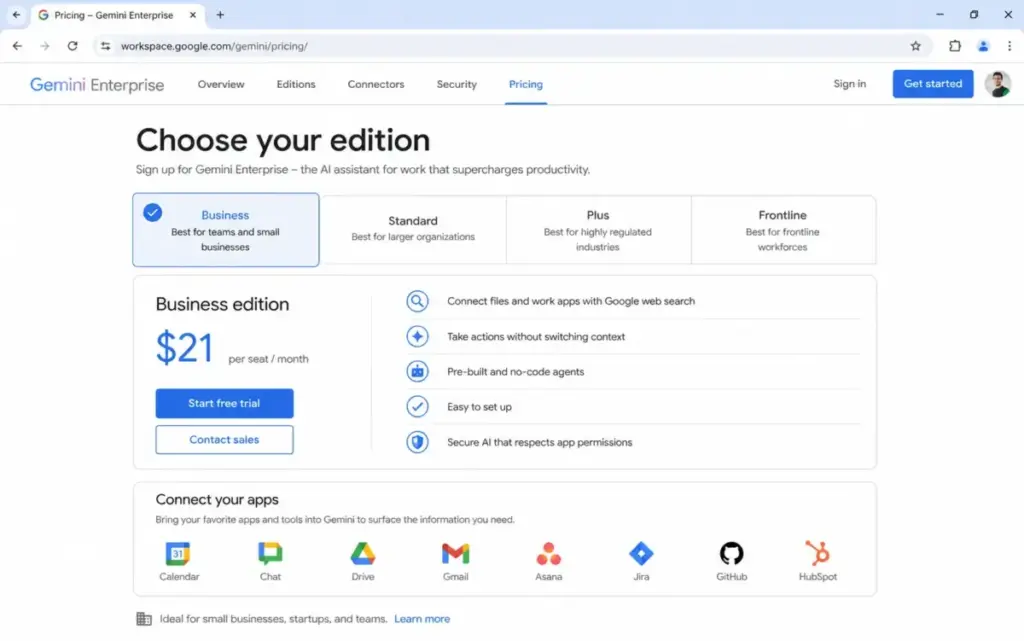
Gemini is the stronger pick for teams that already run on Google Workspace. Gemini works inside Gmail, Docs, Sheets, Slides, Meet, Drive, and Chat. Google Workspace plans include varying levels of Gemini access depending on tier. Gemini Enterprise Business edition adds enterprise connectors, agent governance, and broader deployment features at $21/seat/month (as of June 2026).
The integration depth matters. A marketing team drafting in Docs, scheduling in Calendar, and collaborating in Meet gets AI assistance without switching apps. NotebookLM adds source-backed research. Deep Research handles multi-step analysis. Google Search grounding gives Gemini real-time web context that Copilot does not match outside Bing.
Paraphrased user sentiment from Reddit: users often describe Gemini as stronger for brainstorming, research, and general writing, especially outside Office-specific workflows.
The caveat: Gemini’s value drops if your files, email, and meetings do not live in Google’s ecosystem. If your team runs Outlook for email and Teams for meetings, Gemini becomes a standalone AI assistant rather than an embedded workflow tool. That is a different value proposition at any price.
If Your Team Runs on Microsoft 365, Choose Copilot
Microsoft 365 Copilot is the better pick when daily work happens in Word, Excel, PowerPoint, Outlook, Teams, SharePoint, and OneDrive. Copilot is embedded across all of those apps and grounded in Microsoft Graph, which means it can pull context from your organization’s files, chats, emails, and permissions.
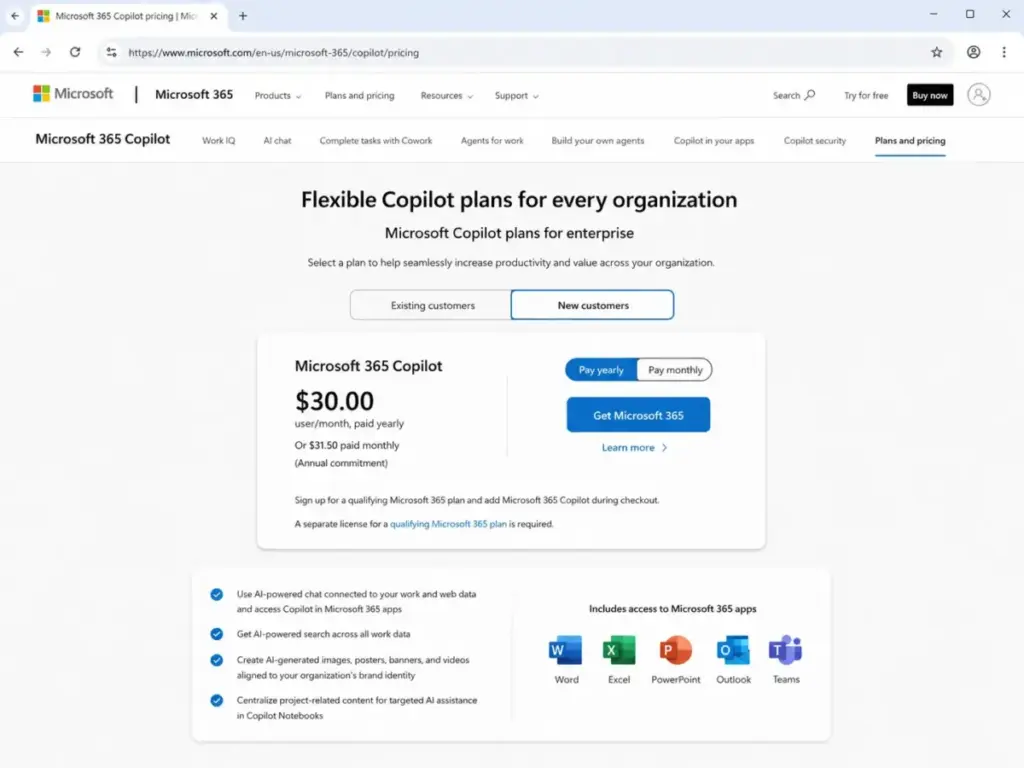
Copilot costs $30/user/month paid yearly or $31.50/user/month paid monthly with annual commitment (as of June 2026). Both options require a qualifying Microsoft 365 plan.
Work IQ and prebuilt agents (Researcher, Analyst, Facilitator) add workflow automation that goes beyond basic chat. Custom Copilot agents can connect external business data through synced or federated MCP connectors. For a 50-person firm already using Outlook, Teams, SharePoint, and Excel, Copilot surfaces organizational context that Gemini cannot access without a suite switch.
Paraphrased user sentiment from Reddit: users often find Copilot more useful for day-to-day work when the organization already runs Outlook, Word, Excel, Teams, and SharePoint.
The caveat: Copilot requires clean Microsoft 365 data. Organizations with messy SharePoint permissions, unstructured OneDrive folders, or inconsistent metadata will need data-readiness work before Copilot delivers value. Permission governance is not optional. It is a deployment prerequisite.
If You Need Research and Multimodal Creation, Choose Gemini
Gemini’s research and content creation tools are stronger than Copilot’s in three areas: Deep Research for multi-step analysis, Google Search grounding for real-time web data, and multimodal generation for images and video.
NotebookLM lets you upload sources and generate audio summaries, Q&A, and study guides from your own documents. No Copilot equivalent matches this workflow as of June 2026. Gemini Enterprise adds enterprise connectors that link AI to internal knowledge bases, CRM data, and business tools like Jira and HubSpot.
For research teams, content creators, and analysts who need to synthesize web sources with internal data, Gemini’s tooling covers more ground. The Gemini vs Perplexity comparison digs deeper into research-specific workflows if citation transparency matters more than productivity-suite integration.
The caveat: Gemini’s multimodal features depend on plan tier. Google Workspace Starter shows limited Gemini access compared to Standard, Plus, or Enterprise. Buyers should verify what their current Workspace plan includes before assuming access to image generation, video tools, or Deep Research.
If You Need Structured Office Document Automation, Choose Copilot
Copilot is the better tool when the output is a Word report, an Excel model, a PowerPoint deck, or an Outlook email thread. Copilot drafts, edits, and summarizes inside the app where the document lives. It does not require copying content between a chat window and an editor.
Teams meeting summaries, action item extraction, and follow-up drafts happen inside Teams. Excel analysis and formula suggestions happen inside Excel. PowerPoint deck generation from a Word brief happens inside PowerPoint. Each step pulls from Microsoft Graph, which means Copilot knows who shared the file, which version is current, and what permissions apply.
For a 50-person law firm drafting contracts in Word, running financial models in Excel, and coordinating case files in SharePoint, Copilot fits the existing workflow without adding a new app. A standalone AI like ChatGPT can draft text, but it cannot pull your latest SharePoint file version or read your Teams chat history mid-conversation.
The caveat: these features require the $30/user/month Copilot license on top of a qualifying Microsoft 365 plan. Copilot Chat is available at no additional cost for eligible Microsoft 365 business and enterprise users, but it is limited to web-grounded chat, file uploads with caps, and Copilot Pages. Full Office app integration requires the paid license.
If Budget Is the Main Constraint, Choose Gemini
Gemini Enterprise Business edition starts at $21/seat/month. Microsoft 365 Copilot costs $30/user/month paid yearly. That is a $9/user/month difference before you account for Copilot’s Microsoft 365 prerequisite.
At 25 users, the gap is $225/month. At 50 users, it is $450/month. Over a year, a 50-person team saves $5,400 on AI licensing alone by choosing Gemini Enterprise over Microsoft 365 Copilot. And that calculation does not include the Microsoft 365 base plan, which adds another layer of per-user cost.
Google Workspace also includes Gemini features across its plans, with access levels varying by tier. A team already paying for Google Workspace Standard or Plus may get enough Gemini functionality without the separate $21/seat Gemini Enterprise add-on. That makes the effective AI cost lower for Google-native teams.
The caveat: Gemini Enterprise, Google Workspace Gemini, Google AI plans, and Gemini API pricing are separate pricing surfaces. A buyer evaluating “how much does Gemini cost” needs to identify which product fits their use case. The answer varies by plan, region, and account type. Check the official pricing page before budgeting.
Gemini vs Copilot Pricing at Scale
Here is what common team sizes cost per month on the closest comparable business plans.
| Team Size | Gemini Enterprise Cost (monthly) | Microsoft 365 Copilot Cost (monthly) | Winner | Caveat |
|---|---|---|---|---|
| 5 users | $105 | $150 | Gemini | Copilot also requires qualifying Microsoft 365 plan |
| 10 users | $210 | $300 | Gemini | $90/month gap before Microsoft 365 base cost |
| 25 users | $525 | $750 | Gemini | $225/month gap; $2,700/year savings |
| 50 users | $1,050 | $1,500 | Gemini | $450/month gap; $5,400/year savings |
What this means: Gemini Enterprise wins on sticker price at every team size. But “cheaper” only matters if Gemini fits your workflow. A 50-person team on Microsoft 365 does not save money by buying Gemini Enterprise if the team still needs Copilot for Outlook, Teams, and SharePoint automation. The savings are real for Google Workspace teams. They are theoretical for Microsoft 365 teams.
Gemini hidden costs: Google Workspace base plan may still be needed for app-native productivity. Gemini feature access depends on Workspace tier, admin settings, and rollout status. API pricing is separate from seat licensing. Region can affect checkout pricing.
Copilot hidden costs: Qualifying Microsoft 365 subscription required. Data cleanup, permission governance, admin training, and adoption work add rollout cost. Custom agents may be metered for unlicensed Copilot Chat users.
Feature Gate Comparison: What Each Plan Unlocks
| Feature | Gemini Availability | Copilot Availability | Buyer Impact |
|---|---|---|---|
| Basic AI chat | Free Gemini app | Copilot Chat (eligible Microsoft 365 users) | Both accessible at no additional cost |
| Gmail/Outlook AI drafting | Gemini in Gmail (Workspace plan-dependent) | Copilot in Outlook ($30/user/month) | Suite match determines which AI drafts your email |
| Spreadsheet AI analysis | Gemini in Sheets (Workspace plan-dependent) | Copilot in Excel ($30/user/month) | Copilot license required for Excel AI |
| Meeting summaries | Gemini in Meet (Workspace plan-dependent) | Copilot in Teams ($30/user/month) | Depends on whether you use Meet or Teams |
| Deep Research | Gemini AI Pro plan or higher | Not a core Copilot feature | Gemini advantage for research-heavy teams |
| NotebookLM | Included with Gemini plans | No equivalent | Gemini exclusive for source-based study tools |
| Enterprise connectors | Gemini Enterprise | Copilot synced/federated connectors | Both gate enterprise data access behind paid tiers |
| Custom AI agents | Gemini Enterprise | Copilot agents (included for licensed users) | Both offer agent building at enterprise tier |
| Microsoft Graph context | Not available | Copilot ($30/user/month) | Copilot exclusive for organizational knowledge graph |
| Admin governance and audit | Gemini Enterprise (Model Armor, access controls) | Microsoft 365 (Purview, Entra, tenant controls) | Both offer governance, through different admin stacks |
What this means: The plan gate table matters more than any feature checklist. If your must-have feature is NotebookLM or Deep Research, only Gemini offers them. If your must-have is Microsoft Graph context or Teams meeting automation, only Copilot offers those. The $21 vs $30 price difference is secondary to whether the tool integrates with the apps where your team already works.
Gemini vs Copilot at a Glance
| Dimension | Gemini | Microsoft 365 Copilot |
|---|---|---|
| Best for | Google Workspace teams, research workflows, multimodal creation | Microsoft 365 teams, Office document automation, enterprise permissions |
| Starting price (business) | $21/seat/month (Enterprise Business edition) | $30/user/month paid yearly (requires Microsoft 365 plan) |
| Free tier | Gemini app (basic), Workspace-included AI varies by plan | Copilot Chat for eligible Microsoft 365 users |
| Primary ecosystem | Google Workspace, Gmail, Docs, Sheets, Drive, Meet | Word, Excel, PowerPoint, Outlook, Teams, SharePoint |
| Enterprise data access | Gemini Enterprise connectors, Google Cloud | Microsoft Graph, Work IQ, synced/federated connectors |
| Security posture | Access transparency, audit logging, data residency, VPC controls, CMEK | Microsoft 365 security, Purview, Entra, tenant isolation, encryption |
| Onboarding complexity | Medium | Medium to High |
| Setup difficulty | Low for Workspace teams; Medium for enterprise deployment | Medium for Microsoft 365 teams; High for permission governance |
What this means: The at-a-glance table confirms the ecosystem split. If you scan this table and one column describes your current stack, that column is your answer. Mixed-stack teams should read the buyer scenario section below.
Migration and Switching Friction
Switching between Gemini and Copilot is not an AI subscription swap. It is a productivity-suite migration.
| Dimension | Moving from Gemini to Copilot | Moving from Copilot to Gemini |
|---|---|---|
| Difficulty | Medium to High | Medium to High |
| Email migration | Gmail to Outlook (years of history, filters, labels) | Outlook to Gmail (rules, folders, archive) |
| File migration | Drive to OneDrive/SharePoint | OneDrive/SharePoint to Drive |
| Calendar migration | Google Calendar to Outlook Calendar | Outlook Calendar to Google Calendar |
| Chat history | Google Chat to Teams | Teams to Google Chat |
| Permission rebuild | Google admin console to Microsoft Entra | Microsoft Entra to Google admin console |
| AI context loss | Gemini-specific prompts, Gems, NotebookLM sources | Copilot agents, custom connectors, Work IQ data |
What this means: The switching cost is the suite, not the AI. A company that switches from Google Workspace to Microsoft 365 just to get Copilot also migrates email, files, permissions, calendars, and user habits. That is a 3–6 month project for a 50-person team, not a billing change. Most companies should stay in their current suite and use the AI that matches it.
Gemini hidden switching cost: Teams that built NotebookLM workflows, Gems, and Google AI Studio integrations lose those assets when leaving Google’s ecosystem.
Copilot hidden switching cost: Organizations that invested in Copilot agents, Microsoft Graph customizations, and Purview data governance policies lose that configuration when leaving Microsoft 365.
Where Gemini Wins
- Lower per-seat AI pricing. Gemini Enterprise Business edition costs $21/seat/month versus Copilot’s $30/user/month paid yearly, before Copilot’s Microsoft 365 prerequisite.
- Google Workspace integration depth. Gemini works inside Gmail, Docs, Sheets, Slides, Meet, Drive, and Chat. No other AI assistant matches this Google-native coverage.
- Research and multimodal tools. Deep Research, NotebookLM, Google Search grounding, and image/video generation give Gemini a broader creation toolkit.
- NotebookLM. Source-based research, audio summaries, and document Q&A have no direct Copilot equivalent.
- Budget flexibility. Google Workspace plans include varying Gemini access. Teams already on Workspace may not need a separate AI add-on at all.
Where Microsoft 365 Copilot Wins
- Microsoft 365 app integration. Copilot is embedded in Word, Excel, PowerPoint, Outlook, Teams, Loop, SharePoint, and OneDrive. Office-native context is stronger than any third-party AI plug-in.
- Microsoft Graph and Work IQ. Copilot accesses organizational files, chats, emails, and permissions through Microsoft Graph. That contextual depth is Copilot’s core advantage.
- Prebuilt and custom agents. Researcher, Analyst, Facilitator, and custom agents automate workflows with enterprise data. Licensed users get custom agents included.
- Enterprise compliance integration. Microsoft Purview, Entra, and Defender integrate with Copilot’s security posture. Enterprises already using these tools get compliance continuity.
- Copilot Chat at no additional cost. Eligible Microsoft 365 business and enterprise users get web-grounded Copilot Chat, Copilot Pages, and IT controls without a paid Copilot license.
Who Should Choose Gemini
Choose Gemini if you match any of these profiles:
- 10-person startup on Gmail and Google Docs. Your email, files, and meetings are already in Google Workspace. Gemini adds AI to that stack at $21/seat/month or less depending on your Workspace tier.
- Research-first content team. You need Deep Research, NotebookLM, and Google Search grounding. Your output is analysis, reports, and source-backed content, not Office documents.
- Budget-sensitive team scaling AI access. You want per-seat AI at a lower price point than Copilot without a separate Microsoft 365 prerequisite.
Who Should Choose Microsoft 365 Copilot
Choose Microsoft 365 Copilot if you match any of these profiles:
- 50-person firm on Outlook, Teams, SharePoint, and Excel. Your documents, chats, and permissions live in Microsoft 365. Copilot pulls context from all of them through Microsoft Graph.
- Enterprise with Purview and Entra already deployed. Your compliance and identity controls are Microsoft-native. Copilot inherits those controls without adding a new security layer.
- Teams that need Office document automation. You draft in Word, model in Excel, present in PowerPoint, and coordinate in Teams. Copilot automates those workflows natively.
Who Should Avoid Both and Consider Alternatives
Avoid choosing between Gemini and Copilot if:
- Your team needs a vendor-neutral AI assistant. Neither Gemini nor Copilot is ecosystem-agnostic. If you want an AI that works across Google and Microsoft without suite lock-in, consider ChatGPT or Claude. The ChatGPT vs Gemini comparison covers standalone AI options.
- Your primary need is citation-first research. Gemini and Copilot are productivity assistants, not answer engines. For research workflows where visible source links matter, consider Perplexity. The Claude vs Gemini comparison covers long-form writing and reasoning depth.
- Your team uses a mixed Google and Microsoft stack. Pilot both tools by department. Use Gemini for teams on Workspace and Copilot for teams on Microsoft 365. Forcing a suite switch for AI access costs more than running two AI subscriptions.
Alternatives to Gemini and Microsoft 365 Copilot
| Tool | Choose If | Starting Price | SaaSZap Coverage |
|---|---|---|---|
| ChatGPT | You need a general-purpose AI assistant without suite lock-in | $20/month (Plus) | Read the ChatGPT vs Copilot comparison |
| Claude | You prioritize long-form writing, reasoning, and document review | $20/month (Pro) | Read the ChatGPT vs Claude comparison |
| Perplexity | You need citation-first research with visible source links | $20/month (Pro) | Read the ChatGPT vs Perplexity comparison |
What this means: If neither Gemini nor Copilot fits your ecosystem, the right alternative depends on what you value most. ChatGPT for flexibility. Claude for writing depth. Perplexity for sourced research. Each costs $20/month at the individual tier.
Data Readiness Checklist Before Deploying Either Tool
Before rolling out Gemini or Copilot to your team, verify these prerequisites. Both tools only work well when your underlying data and permissions are clean.
For Gemini Enterprise deployment:
- Google Workspace admin controls reviewed and configured
- Drive folder structure organized for AI retrieval
- Gemini Enterprise connectors mapped to CRM, project management, and internal knowledge sources
- Admin rollout settings verified (feature availability depends on plan, region, and admin configuration)
For Microsoft 365 Copilot deployment:
- SharePoint and OneDrive permissions audited (Copilot inherits all Microsoft 365 permissions)
- Overshared files and folders identified and restricted
- Microsoft Purview sensitivity labels applied to confidential data
- Adoption training planned (Copilot is useful only when users know how to prompt it in context)
Why this matters: most Copilot deployment failures trace to permission hygiene, not AI quality. If every employee can access every SharePoint folder, Copilot will surface confidential data in responses. The same applies to Gemini Enterprise with Google Drive. AI amplifies whatever access controls you already have, good or bad.
Final Verdict: Gemini vs Copilot in 2026
The Gemini vs Copilot decision in 2026 is an ecosystem decision, not an AI quality contest.
Choose Gemini if your documents, email, calendar, meetings, and files live in Google Workspace. Gemini Enterprise costs $21/seat/month, integrates with Gmail, Docs, Sheets, Drive, and Meet, and adds research tools (NotebookLM, Deep Research) that Copilot does not match. Google Workspace teams get the most AI value per dollar.
Choose Microsoft 365 Copilot if your work lives in Outlook, Teams, Word, Excel, SharePoint, and OneDrive. Copilot costs $30/user/month paid yearly (plus a qualifying Microsoft 365 plan), but the Microsoft Graph context, Work IQ, and Office-native integration make it the right pick for Microsoft-native organizations.
Use both if your company runs a mixed stack. Assign Gemini to Google Workspace departments and Copilot to Microsoft 365 departments. Running two AI subscriptions costs less than forcing a suite migration.
The question most comparisons skip: Copilot’s $30/user/month price tag does not include the Microsoft 365 base plan. A team evaluating total cost of ownership should add the qualifying subscription to the Copilot figure. Gemini Enterprise’s $21/seat/month similarly assumes the team is already on Google Workspace. Neither AI tool is a standalone purchase. Both are platform extensions.
Frequently Asked Questions
Is Gemini better than Copilot?
Gemini is the better fit for Google Workspace teams. Copilot is the better fit for Microsoft 365 teams. Neither is universally better. The decision depends on where your email, files, and meetings already live. If you use Gmail and Docs, choose Gemini. If you use Outlook and Teams, choose Copilot. The AI capabilities are comparable. The ecosystem integration is not.
Which is cheaper, Gemini or Copilot?
Gemini Enterprise starts at $21/seat/month. Microsoft 365 Copilot costs $30/user/month paid yearly. Gemini has the lower listed price at every team size. But Copilot’s total cost also depends on which qualifying Microsoft 365 plan you already pay for. Compare total platform cost, not just the AI add-on.
Does Copilot need a Microsoft 365 license?
Yes. Microsoft 365 Copilot requires a qualifying Microsoft 365 business or enterprise subscription. The $30/user/month Copilot fee is an add-on. Copilot Chat is available at no additional cost for eligible Microsoft 365 users, but it is limited to web-grounded chat and does not include full Office app integration.
Does Gemini work with Microsoft 365?
Gemini Enterprise includes Microsoft 365 as one of its enterprise connectors. But Gemini is not embedded inside Word, Excel, or Outlook the way Copilot is. For Microsoft 365 organizations, Gemini functions as a separate AI tool rather than a native workflow assistant.
Should my company switch suites just for the AI?
No, unless the AI is one factor in a broader platform evaluation. Switching from Google Workspace to Microsoft 365 (or vice versa) involves migrating email, files, calendars, permissions, and user habits. That is a multi-month project. The AI add-on does not justify that cost alone. Use the AI that matches your current suite.
Can I use both Gemini and Copilot?
Yes. Running both costs $51/user/month at the business tier ($21 for Gemini Enterprise plus $30 for Copilot). Some mixed-environment companies do this by department. The cost is lower than a full suite migration and avoids forcing a single-vendor decision.
Which is better for meeting notes, Gemini or Copilot?
Copilot is better for Teams meeting notes. Gemini is better for Google Meet meeting notes. Each tool summarizes, extracts action items, and generates follow-ups only for meetings in its own platform. If your company uses Teams, choose Copilot. If your company uses Meet, choose Gemini.
Is Copilot included in Microsoft 365?
Copilot Chat is included for eligible Microsoft 365 business and enterprise users at no additional cost. Full Microsoft 365 Copilot with Office app integration, Work IQ, and agents requires a separate $30/user/month license. The free and paid versions are different products with different capabilities.