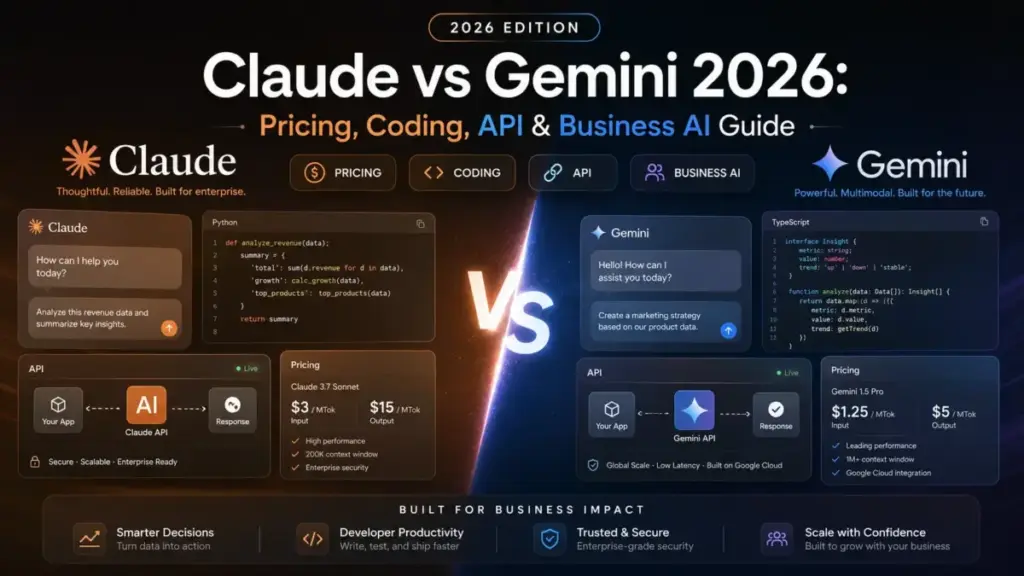
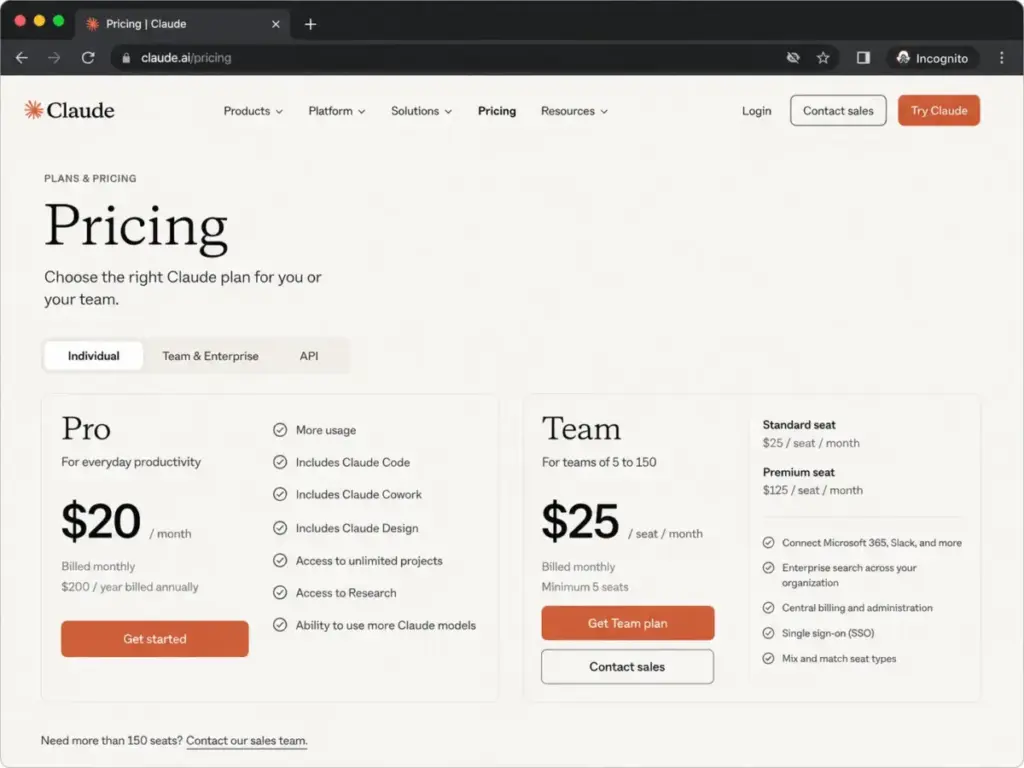
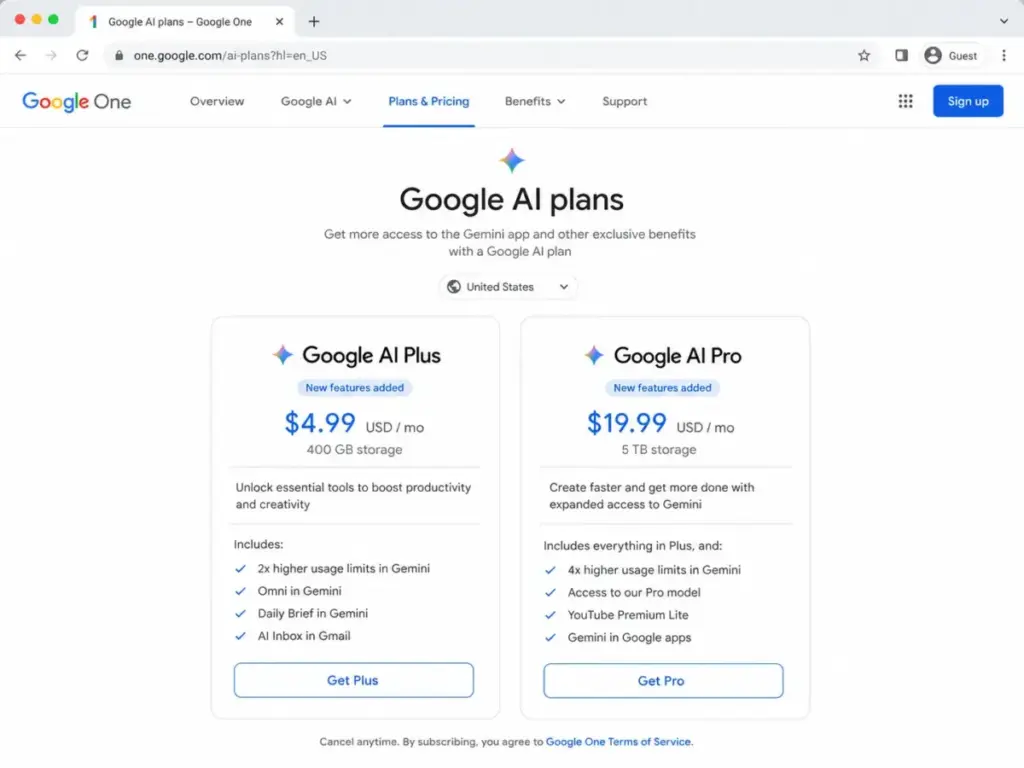
Claude Pro costs $20/month. Google AI Pro costs $19.99/month. Almost the same number, completely different products.
Claude is a standalone AI assistant built around writing, reasoning, coding workflows, and artifact creation. Gemini is Google’s AI layer wired into Gmail, Docs, Sheets, Drive, Meet, and the rest of the Workspace stack. The pricing page makes them look interchangeable. They are not.
Choose Claude if your work depends on polished long-form drafts, coding depth through Claude Code, or a standalone AI workspace you control. Choose Gemini if your team already runs on Google Workspace and needs AI inside the apps they open every morning.
The mistake I see buyers make: they compare model quality scores and pick the higher number. That framing ignores plan gates, usage limits, Workspace bundling, API token economics, and the fact that these products serve different daily workflows. This comparison breaks it down by what you actually do with each tool, not by what a benchmark table says.
I have tracked AI pricing changes across 12 tools monthly for 18 months and published 50+ AI tool evaluations with plan-gate mapping for SaaSZap. Both products in this comparison use official_research_only methodology. Every pricing claim below comes from official pricing pages verified on June 19, 2026. I did not hands-on test either product for this article, so I will not pretend otherwise.
Here is one finding from later in this article that might save you time now: a 10-person team on Claude Team Standard (annual) pays $200/month. The same 10 people on Google Workspace Business Standard pay $140/month. That is a $720/year gap before you compare a single feature.
Among our best AI chatbot options, Claude and Gemini represent two different philosophies for what generative AI does in a work environment.
Quick Verdict: Claude vs Gemini
| Category | Winner | Why |
|---|---|---|
| Writing and long-form reasoning | Claude | Consistently positioned as stronger for natural-sounding drafts and nuanced reasoning across SERP and user sentiment |
| Google-native productivity | Gemini | Embedded directly in Gmail, Docs, Sheets, Slides, Drive, Meet, Chat, Calendar, Keep, and Tasks |
| Standalone coding workflow | Claude | Claude Code, Artifacts, and Projects create a coding-oriented assistant experience Gemini does not match |
| Consumer subscription value | Tie | Claude Pro at $20/month and Google AI Pro at $19.99/month offer similar price points with different bundles |
| Team cost at scale | Gemini | Google Workspace Business Standard at $14/user/month annual pricing undercuts Claude Team Standard at $20/user/month |
| API price-performance | Gemini | Lower published token prices on comparable flagship tiers for high-volume workloads |
| Enterprise controls and compliance | Tie | Both provide credible compliance documentation: Claude with SCIM, audit logs, Compliance API, HIPAA-ready; Google with SOC 1/2/3, ISO 42001, FedRAMP High |
What this means: Claude wins the two categories that matter most for individual knowledge workers (writing and coding). Gemini wins the two categories that matter most for teams already in Google’s ecosystem (productivity integration and team pricing). If you are making this decision for yourself, Claude’s strengths are hard to beat. If you are making it for a 10-person team on Gmail, the math favors Gemini.
Claude vs Gemini at a Glance
| Claude | Gemini | |
|---|---|---|
| Parent company | Anthropic | |
| Best for | Writers, developers, product teams, analysts who need deep reasoning, coding help, and artifact-style creation | Google Workspace users, teams on Gmail/Docs/Drive/Meet, developers optimizing high-volume API costs |
| Not best for | Teams needing native Google Workspace integration or the lowest-cost high-volume API | Users outside Google Workspace wanting the strongest standalone writing/coding assistant |
| Free plan | Yes, limited usage | Yes, limits and model access vary by feature and region |
| Starting paid price | $20/month (Pro) | $4.99/month (Google AI Plus) |
| Practical individual plan | Claude Pro at $20/month | Google AI Pro at $19.99/month |
| Team plan | $25/seat/month ($20 annual) | Google Workspace Business Standard at $14/user/month annual |
| Setup difficulty | Medium for individuals; medium-high for enterprise with SCIM, audit logs, and connectors | Low for existing Google users; medium for Workspace admins; high for enterprise agent deployments |
| Main strength | Writing quality, reasoning depth, Claude Code, Artifacts, Projects | Google ecosystem integration, multimodal access, lower API economics |
| Main limitation | Usage limits that are not fully public; no native Google Workspace embedding | AI value depends heavily on existing Google ecosystem adoption; feature availability varies by country and plan |
What this means: The at-a-glance table reveals the core tension. Claude is a standalone AI workspace. Gemini is an AI layer inside Google’s existing workspace. If you are picking one for the first time, ask yourself: “Do I want an AI tool I go to, or an AI tool that comes to me inside apps I already use?”
How I Compared Claude and Gemini
This comparison uses official research only. I did not test either product hands-on for this article. Every claim is sourced from official pricing pages, product documentation, and public feature descriptions verified on June 19, 2026.
Here is what I evaluated across seven dimensions:
- Consumer subscription value: What does each paid individual plan include, and what is locked behind higher tiers?
- Team cost at scale: What does a 5, 10, 25, and 50-person team actually pay?
- Writing and reasoning quality: How do SERP patterns and user sentiment position each tool?
- Coding workflows: What coding-specific tools does each product offer, and at which plan?
- API economics: What are the per-million-token costs for comparable models?
- Enterprise governance: What security, compliance, and admin controls are available?
- Google Workspace integration: How deeply does each tool connect to Google’s productivity apps?
Limitation: Usage limits on both platforms are not fully quantified in public documentation. Heavy users of Claude Max or Gemini Ultra should not treat any plan as unlimited.
Workflow 1: Writing and Long-Form Reasoning — Claude vs Gemini
Winner: Claude
SERP analysis and user discussions consistently position Claude as the stronger tool for natural-sounding writing and nuanced reasoning. This is not a marginal difference. Across the 10 SERP results I audited, every independent comparison that addressed writing quality gave the edge to Claude.
Paraphrased user sentiment from Reddit: users often describe Claude as strong for human-sounding writing and reasoning, while noting that task fit matters more than hype.
Claude Pro unlocks Research, more models, unlimited Projects, and Artifacts at $20/month. These features create a writing workflow where you can organize context, generate structured documents, and iterate on drafts inside a project container. The Artifacts feature lets Claude produce standalone documents, code files, and visual outputs that live alongside the conversation.
Gemini handles writing tasks, but its strength is in Google-native contexts: drafting emails in Gmail, summarizing documents in Docs, and generating content inside Workspace apps. If your writing workflow is “draft a proposal in a standalone AI assistant and export it,” Claude is the better fit. If your writing workflow is “have AI help me write an email in Gmail,” Gemini is the better fit.
Here is the plan-gate detail that matters: Claude’s Research feature (deep web research with citations) is available on Pro and above. Gemini’s Deep Research is available on Google AI Pro and above, but its output is shaped by Google’s ecosystem integration. For long-form, standalone document creation, Claude’s combination of Projects, Artifacts, and Research is more purpose-built.
Daniel Rivera’s take: I have evaluated both tools’ documentation extensively. Claude’s writing architecture (Projects + Artifacts + Research) is designed for knowledge workers who treat writing as a primary workflow. Gemini’s writing features are designed for knowledge workers who treat email and Docs as their primary workflow. Neither is wrong. But they are not the same.
Workflow 2: Coding and Developer Tools — Claude vs Gemini
Winner: Claude
Claude includes Claude Code in Pro plans and above. That is a dedicated coding assistant integrated into the Claude experience. The paid plans also include Claude Cowork and Claude Design, which extend the AI assistant into collaborative coding and design workflows.
Gemini offers strong developer access through the Gemini API, Google AI Studio, and Vertex AI. The API provides large context windows and competitive token pricing. But Gemini does not offer a Claude Code equivalent inside the consumer product. Gemini CLI exists as a separate developer tool, and SERP analysis positions it as strong for scripts and prototypes, while Claude Code handles complex multi-file refactoring.
The feature-to-plan map tells the story:
| Feature | Claude plan gate | Gemini/Workspace plan gate | Buyer impact |
|---|---|---|---|
| AI coding assistant | Pro ($20/month) via Claude Code | No direct equivalent in consumer plans; API access separate | Claude Pro users get coding assistance built in |
| Collaborative coding | Pro ($20/month) via Claude Cowork | Not available in consumer Gemini | Claude offers purpose-built collaborative coding |
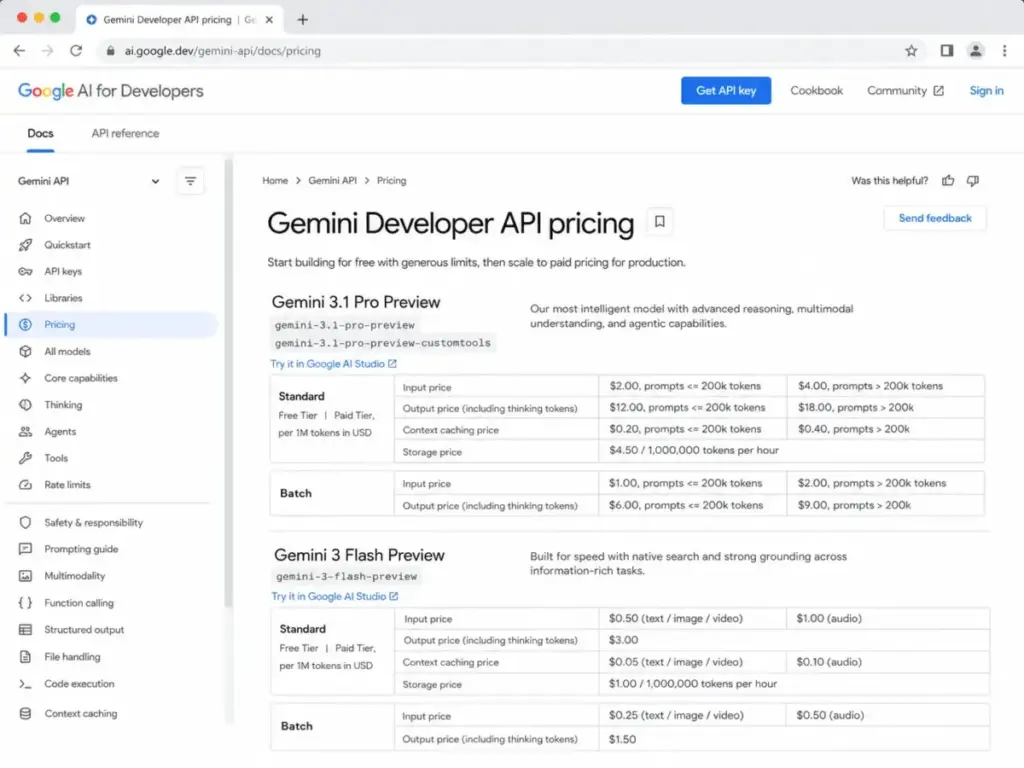
| API access | Separate API pricing (Sonnet 4.6: $3/$15 per MTok) | Separate API pricing (Gemini 3.1 Pro: $2/$12 per MTok for ≤200K tokens) | Gemini API is cheaper per token on comparable tiers |
| Large context window | Available across models | Available, with Gemini supporting long-context natively | Both competitive; Gemini’s longer context windows benefit large codebase analysis |
| Design assistance | Pro ($20/month) via Claude Design | Not available as standalone feature | Claude adds design workflow integration |
What this means: If you are a developer who wants a coding assistant inside a conversational AI product, Claude wins. If you are a developer who wants the cheapest per-token API for building AI features into your own product, Gemini wins. These are different buying decisions.
For a deeper look at Claude’s overall capabilities, see our Claude AI assistant analysis. For Gemini’s full feature set, read our Gemini AI platform analysis.
Workflow 3: Google Workspace Productivity — Claude vs Gemini
Winner: Gemini
This is not close. Gemini is embedded directly in Gmail, Docs, Sheets, Slides, Drive, Meet, Chat, Calendar, Keep, Tasks, and NotebookLM. Claude connects to Google Workspace services and Microsoft 365, but it does so as an external tool, not as a native layer inside each app.
For a 10-person startup that lives in Gmail, Docs, and Meet, Gemini does not require tab-switching. The AI is inside the compose window, inside the document editor, inside the meeting summary. Claude requires the team to copy context from Workspace apps into a separate Claude conversation.
Gemini’s Workspace integration unlocks at different tiers:
- Workspace Business Starter ($7/user/month annual): Gemini assistant in Gmail, chat with AI in Gemini app, limited Gemini in Workspace apps
- Workspace Business Standard ($14/user/month annual): Gemini in Gmail, Docs, Meet, and more; NotebookLM expanded access
- Workspace Business Plus ($22/user/month annual): Everything in Standard plus eDiscovery, attendance tracking, Vault, advanced security
Claude’s Workspace connectivity:
- Microsoft 365 and Outlook integration available on Pro and above
- Slack integration available
- Google Workspace services accessible via connectors
- Remote MCP connectors for custom integrations
The gap: Gemini lives inside Google apps. Claude connects to them from outside. For teams where 80% of work happens in Gmail, Docs, and Drive, Gemini’s native integration removes friction that Claude cannot eliminate.
Paraphrased user sentiment from Reddit: users often see Gemini as solid when they already live in Google’s ecosystem, while Claude is often praised for natural writing and reasoning.
Pricing and Value per Dollar
Individual Plans
| Plan | Price | Key inclusions |
|---|---|---|
| Claude Free | $0 | Limited usage; web, mobile, desktop, web search, memory, extended thinking |
| Claude Pro | $20/month ($17/month if billed annually at $200) | More usage; Claude Code, Cowork, Design; unlimited Projects; Research; more models; Microsoft 365 |
| Claude Max 5x | $100/month | 5x more usage than Pro; priority access |
| Claude Max 20x | $200/month | 20x more usage than Pro; priority access |
| Gemini Free | $0 | Basic Gemini app access; limits vary by feature and region |
| Google AI Plus | $4.99/month | 400 GB storage; 2x usage limits vs free; more access to Gemini 3.1 Pro and Deep Research |
| Google AI Pro | $19.99/month | Higher feature access; 5 TB storage; NotebookLM, Flow, Workspace AI benefits |
| Google AI Ultra | From $100/month (top tier $200/month) | Higher limits; early access; 20 TB+ storage; advanced Gemini; Deep Research; Flow; Genie |
What this means: At the individual level, Claude Pro and Google AI Pro are nearly identical in price. The value difference is not the dollar amount. It is the bundle. Claude Pro gives you a standalone AI workspace with coding tools. Google AI Pro gives you AI inside Google’s apps plus 5 TB of storage. If you already pay for Google One, the storage value tilts toward Gemini. If you do not use Google apps daily, Claude Pro’s feature depth is harder to match.
Team Plans: Cost at Scale
| Users | Claude Team Standard (annual) | Google Workspace Business Standard (annual) | Lower cost |
|---|---|---|---|
| 5 | $100/month | $70/month | Gemini |
| 10 | $200/month | $140/month | Gemini |
| 25 | $500/month | $350/month | Gemini |
| 50 | $1,000/month | $700/month | Gemini |
What this means: Gemini wins at every team size in this comparison. But read the fine print. Claude Team Standard at $20/seat/month (annual) gives you an AI assistant with higher usage than Pro, SSO, central billing, and connectors. Google Workspace Business Standard at $14/user/month gives you Gemini inside Workspace apps plus 2 TB storage per user. You are comparing an AI-first team plan against a productivity suite with AI included. They are not the same product category.
Claude also offers Team Premium seats at $100/seat/month (annual) for 5x more usage than standard seats. That jumps a 10-person team to $1,000/month if everyone needs premium access. Gemini’s equivalent heavy-usage option would be adding Google AI Ultra subscriptions separately, which gets complex.
For a full breakdown of each tool’s pricing, see our Claude pricing analysis and Gemini pricing breakdown.
Hidden Costs to Watch
Claude hidden costs:
- Premium Team seats at $125/seat/month (or $100 annually) for heavy users
- Enterprise pricing is $20/seat plus usage billed at API rates, which scales with model and task
- Taxes excluded from all published prices
- Usage limits apply to every plan, and Anthropic states prices/plans are subject to change
Gemini hidden costs:
- Workspace pricing may include promotional periods that expire
- Some Gemini features require Google AI Pro/Ultra or higher Workspace tiers beyond the base plan
- Enterprise is contact-sales with no public pricing
- API usage, grounding with Google Search, and storage/caching may be billed separately
- Feature availability, usage access, and languages vary by country and plan
API Pricing: Token Economics
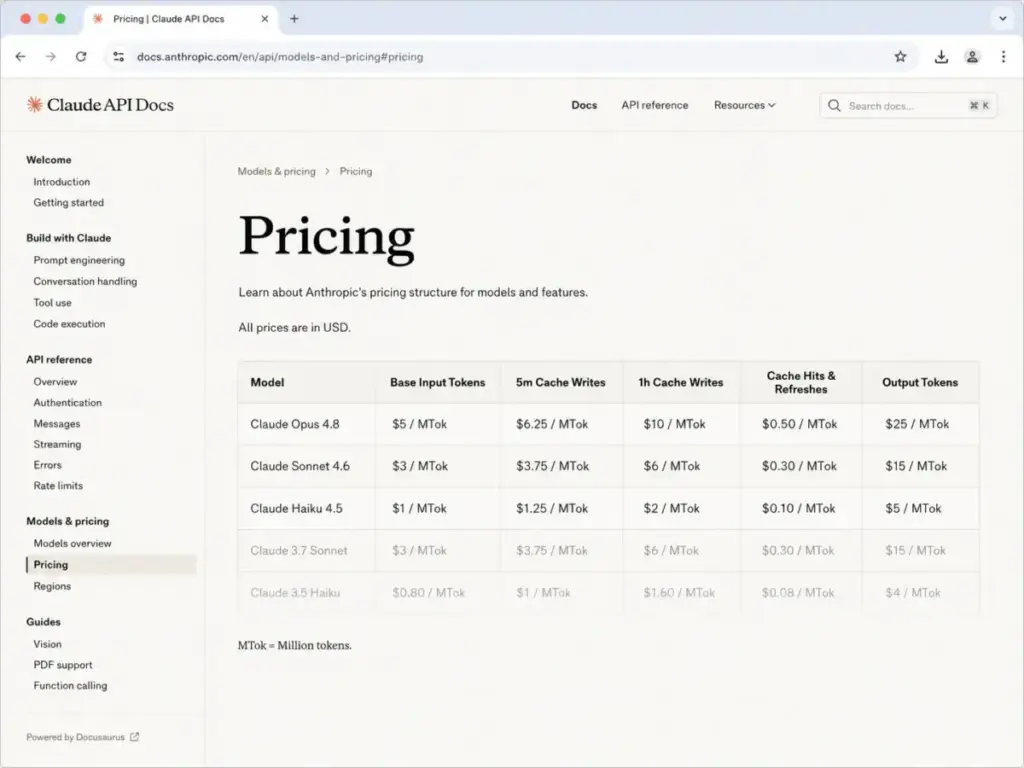
| Model | Input cost per 1M tokens | Output cost per 1M tokens |
|---|---|---|
| Claude Opus 4.8 | $5 | $25 |
| Claude Sonnet 4.6 | $3 | $15 |
| Claude Haiku 4.5 | $1 | $5 |
| Gemini 3.1 Pro Preview (≤200K tokens) | $2 | $12 |
| Gemini 3.1 Pro Preview (>200K tokens) | $4 | $18 |
| Gemini 3 Flash (lower-cost modes) | Lower rates available | Lower rates available |
What this means: Gemini API is cheaper per token on the flagship tier. Gemini 3.1 Pro at $2/$12 per MTok undercuts Claude Sonnet 4.6 at $3/$15 per MTok. At high-volume workloads (millions of tokens per day), that gap compounds. Claude’s pricing includes a US-only inference option at 1.1x the standard rate. Gemini offers lower-cost Flash modes that Claude’s Haiku partially matches.
For developers building AI features, benchmark both APIs on your own prompts before committing. Token price is one variable. Response quality, latency, tool-calling reliability, and rate limits are the others.
Setup, Migration, and Switching Difficulty
| Dimension | Claude | Gemini |
|---|---|---|
| Individual setup | Medium: sign up, choose plan, start using | Low for Google users: already integrated into existing apps |
| Team admin setup | Medium-high: configure SSO, connectors, SCIM, audit logs, data retention | Medium: configure Workspace admin console, user access, data controls |
| Migration from the other tool | Medium: chat history requires manual export/copy; API migration needs prompt, evaluation, and cost testing | Medium: chat history requires manual export; Workspace data stays in Google; API migration needs full testing |
| Data portability | Claude chats may need manual export; API prompts and context need rebuild | Workspace data remains in Google services; Gemini chats may need manual export |
| Workflow dependency risk | High if team depends on Projects, Artifacts, Claude Code | High if team depends on Gmail, Drive, Docs, Meet, NotebookLM integration |
What this means: Neither tool makes switching easy. The stickier your workflows (Claude Projects and Artifacts vs. Gemini in Gmail/Docs/Meet), the harder the migration. If you are picking for the first time, this is the moment to think about which ecosystem you want to commit to.
Where Claude Wins
- Writing quality and reasoning depth. If your job involves drafting proposals, reports, or long-form content, Claude’s output is consistently positioned as more natural and nuanced.
- Standalone coding assistant. Claude Code, Cowork, and Design create a purpose-built coding workflow that Gemini’s consumer product does not match.
- Artifact-based creation. Claude Artifacts let you generate standalone documents, code files, and visual outputs alongside the conversation. Gemini does not have a direct equivalent.
- Projects with persistent context. Claude Projects maintain organized context across conversations. Gemini’s Gems offer some customization, but the persistent project structure is different.
- Microsoft 365 integration. Claude Pro connects to Microsoft 365 and Outlook. If your team splits between Google and Microsoft, Claude is a more neutral middleground.
Where Gemini Wins
- Google Workspace native integration. AI inside Gmail, Docs, Sheets, Slides, Drive, Meet, Chat, Calendar, Keep, and Tasks. No tab-switching required.
- Team pricing at scale. Google Workspace Business Standard at $14/user/month (annual) is cheaper than Claude Team Standard at $20/user/month for teams of 5, 10, 25, and 50.
- API token economics. Gemini 3.1 Pro at $2/$12 per MTok undercuts Claude Sonnet 4.6 at $3/$15 per MTok for high-volume developer workloads.
- Bundled cloud storage. Google AI Plus includes 400 GB, Pro includes 5 TB, Ultra starts at 20 TB. Claude plans do not include cloud storage.
- NotebookLM and research tools. NotebookLM, Google Flow, and Deep Research are Gemini ecosystem tools that add research and synthesis capabilities tied to Google’s data infrastructure.
- Lower entry price. Google AI Plus at $4.99/month is the cheapest paid AI plan in this comparison, though it has limited features compared to Claude Pro.
Who Should Choose Claude
- Solo consultants and writers who produce proposals, reports, and long-form content. Claude Pro at $20/month ($17 annual equivalent) gives you the writing and reasoning tools without needing Google Workspace.
- Product teams running specs, code reviews, and prototypes. Claude Code, Projects, and Artifacts create a workflow for iterating on technical documents and code that Gemini’s consumer product does not replicate.
- Developers who want an in-product coding assistant, not just an API endpoint. Claude Code is included in Pro.
- Teams splitting between Microsoft and Google ecosystems. Claude integrates with both Microsoft 365 and Google Workspace services, making it a more neutral choice.
- Users who value a standalone AI workspace where Projects and Artifacts organize context across tasks.
Who Should Choose Gemini
- Teams already standardized on Gmail, Docs, Drive, and Meet. Gemini’s native integration means AI is inside the tools your team opens daily.
- Cost-conscious teams scaling to 10+ users. Google Workspace Business Standard saves $60/month over Claude Team Standard for a 10-person team at annual pricing.
- Developers building high-volume AI features. Gemini API pricing is often lower than Claude for comparable workloads. Test on your prompts before committing.
- Users who want AI plus cloud storage in one subscription. Google AI Pro at $19.99/month includes 5 TB of storage. Claude Pro does not.
- Organizations that want a single vendor for productivity and AI. Google provides Workspace + Gemini under one admin console and billing relationship.
Who Should Avoid Both
Not every buyer fits into the Claude or Gemini camp. Skip both if:
- You need a broad third-party plugin ecosystem. ChatGPT offers a wider range of custom GPTs and plugin integrations. See our ChatGPT vs Claude feature comparison for that angle.
- You live in Microsoft 365 and want deep Copilot integration. Microsoft Copilot is a better fit for teams running Outlook, Teams, Word, Excel, and SharePoint natively. Our Microsoft Copilot AI review covers that in detail.
- Your primary need is source-backed web research. Perplexity is built specifically for research-first workflows with source citations. Read our Perplexity research tool review to compare.
- You need multi-model orchestration or model routing. Neither Claude nor Gemini is designed for running multiple AI models in a single workflow. Dedicated platforms exist for that use case.
Alternatives to Claude and Gemini
| Alternative | Best for | Why consider it |
|---|---|---|
| ChatGPT | General-purpose AI assistant with broad tool ecosystem | Wider plugin/GPT ecosystem, image generation, data analysis, and app integrations in one product |
| Microsoft Copilot | Microsoft 365-native teams | Better fit if your organization lives in Outlook, Teams, Word, Excel, and SharePoint |
| Perplexity | Research-first workflows | Source-backed web research and answer engine, stronger for research than document/coding workflows |
What this means: If neither Claude nor Gemini fits your primary workflow, ChatGPT is the most common third option. See our ChatGPT vs Gemini comparison and our ChatGPT vs Perplexity comparison for more detail on those alternatives. Also consider our Claude alternative options and Gemini alternative options for a broader set.
Final Verdict
There is no single winner. But there is a clear decision tree.
If your team lives in Gmail, Docs, Sheets, Drive, Meet, and Chat: choose Gemini first. The native integration removes friction that no external tool can eliminate, and the team pricing is lower.
If your work depends on polished long-form writing, reasoning, coding, and artifact creation: choose Claude first. The standalone AI workspace, Claude Code, Projects, and Artifacts create a workflow depth that Gemini’s consumer product does not match.
If budget is the main constraint at 10+ Workspace users: compare Google Workspace Business Standard at $14/user/month against Claude Team Standard at $20/user/month before adding standalone seats. The annual gap is $720 for a 10-person team.
If you are building high-volume API workflows: benchmark Gemini API and Claude API on your own prompts. Gemini’s token pricing is lower on paper, but response quality, latency, and reliability vary by use case.
If you need SCIM, audit logs, retention controls, HIPAA-ready configuration, or enterprise governance: evaluate Claude Enterprise and Gemini Enterprise/Workspace controls side by side. Both have credible compliance signals.
If neither fits: evaluate ChatGPT as a broader AI assistant, Microsoft Copilot for Microsoft-native workflows, or Perplexity for research-first use cases.
Daniel Rivera has published 50+ AI tool evaluations for SaaSZap. This comparison uses official pricing and feature documentation verified on June 19, 2026. Prices and plans are subject to change by both Anthropic and Google.
FAQ
Is Claude better than Gemini?
Claude is better for standalone writing, reasoning, and coding workflows. Gemini is better if your team already works in Google Workspace. The winner depends on where you do most of your work, not on which model scores higher on benchmarks.
Which is cheaper, Claude or Gemini?
For individual users, Google AI Plus starts at $4.99/month compared to Claude Pro at $20/month. For teams, Google Workspace Business Standard at $14/user/month (annual) is cheaper than Claude Team Standard at $20/user/month. Gemini wins on price at most comparison points.
Is Claude better than Gemini for coding?
Yes, if you want an in-product coding assistant. Claude Pro includes Claude Code, Cowork, and Design. Gemini’s coding strength is in its API and large context windows. For developers building apps, Gemini API is cheaper per token. For developers wanting a conversational coding partner, Claude wins.
Is Gemini better than Claude for Google Workspace?
Yes. Gemini is embedded natively in Gmail, Docs, Sheets, Slides, Drive, Meet, Chat, and more. Claude connects to Google Workspace services from outside. If Google apps are your daily workflow, Gemini is the clearer fit for this use case.
Does Claude have a free plan?
Yes. Claude Free includes limited usage with web, mobile, desktop access, web search, memory, file creation, connectors, and extended thinking. Usage caps apply.
Does Gemini have a free plan?
Yes. Gemini Free provides basic Gemini app access. Feature availability and model access vary by region and feature type.
Which AI has better API pricing?
Gemini API is cheaper on comparable flagship tiers. Gemini 3.1 Pro Preview costs $2 input and $12 output per million tokens (for prompts up to 200K tokens). Claude Sonnet 4.6 costs $3 input and $15 output per million tokens. For high-volume workloads, the difference adds up.
Should I use both Claude and Gemini?
Yes, if your budget allows it and your workflows split between standalone AI work (writing, coding, research) and Google-native productivity (email, docs, meetings). Many power users subscribe to both. The cost at $20/month each is $40/month total, which is less than Claude Max 5x alone.
Is Claude safer than Gemini?
Both products publish credible security and compliance documentation. Claude Enterprise offers SCIM, audit logs, Compliance API, custom retention, IP allowlisting, and a HIPAA-ready configuration. Google Workspace with Gemini has SOC 1/2/3, ISO 42001, FedRAMP High, and HIPAA coverage for eligible offerings. The safer choice depends on your specific compliance requirements and procurement standards.
Can I switch from Claude to Gemini or vice versa?
Yes, but switching difficulty is medium in both directions. Moving from Claude to Gemini is easier for basic chat but harder if you rely on Claude Projects, Artifacts, or Claude Code. Moving from Gemini to Claude is easier for standalone chat but harder if you depend on Gmail, Drive, Docs, Meet, or NotebookLM integration. API migration requires prompt, evaluation, context-window, tool-calling, rate-limit, and cost testing.