ChatGPT vs Copilot is not a question of which AI is smarter. Both run on OpenAI models. The real split is between a standalone AI workspace (ChatGPT) and an AI layer embedded inside Microsoft 365 (Copilot). Choose ChatGPT if you want one flexible tool for writing, coding, research, images, and custom GPTs across any software stack. Choose Microsoft Copilot if your daily work already lives in Outlook, Teams, Word, Excel, and SharePoint, and you need AI that reasons over your tenant data without copy-pasting files.
That sounds simple, but the buying decision gets complicated fast. Microsoft uses the word “Copilot” for at least five different products at five different price points. And the Copilot add-on price is not the full cost, because it requires a separate Microsoft 365 license most comparisons forget to include. I will break down the real numbers later in the pricing section, and they shift the math for teams of 10 or more.
Among best AI chatbot options available in 2026, these two dominate the conversation for business buyers. This comparison covers pricing, workflow fit, governance, plan gates, and the specific buyer scenarios where each tool wins or loses.
| Category | Winner | Why |
|---|---|---|
| Pricing and total cost | ChatGPT | Lower business seat cost, no prerequisite license |
| Microsoft 365 workflow integration | Copilot | Native to Outlook, Teams, Word, Excel, SharePoint, Graph |
| Standalone AI workspace | ChatGPT | Broader writing, coding, image, research, and GPT tools |
| Enterprise governance | Copilot | Inherits tenant permissions, sensitivity labels, Purview |
| Creative work and coding | ChatGPT | Stronger reasoning, debugging, image generation, Codex |
| In-app productivity and meetings | Copilot | Summarizes Teams meetings, drafts in Outlook, Excel formulas |
| Plan naming clarity | ChatGPT | Simpler tiered structure vs Copilot’s five product names |
What this means: ChatGPT wins four categories, Copilot wins three. But category count alone does not settle this. If your organization runs on Microsoft 365 and your data governance requires tenant-level controls, those three Copilot wins may outweigh everything else. The verdict depends on where your team spends its hours.
How This Comparison Was Built
This article is based on official product documentation, published pricing pages, and feature specifications from OpenAI and Microsoft as of June 2026. Daniel Rivera covers AI tools and generative AI for SaaSZap, tracking pricing changes and plan-gate shifts across AI products monthly.
I did not test these tools hands-on for this article. All claims are sourced from official product pages and verified pricing data. Where user sentiment is referenced, it comes from paraphrased patterns on G2, not from individual user quotes.
Testing level: official research only. Pricing verified: June 2026.
To understand what an AI chatbot does at the product level, both ChatGPT and Copilot use large language models for text generation, summarization, and reasoning. The difference is in the surface area of what each tool wraps around that core.
Comparison methodology:
- Pricing data from official ChatGPT and Microsoft Copilot pricing pages
- Feature gates mapped plan by plan using official documentation
- Cost-at-scale calculated at 5, 10, 25, and 50 users
- Microsoft 365 prerequisite costs included in Copilot totals
- Comparison dimensions scored individually with a declared winner per dimension
Review limitations: Enterprise pricing for ChatGPT is custom and not publicly disclosed. Microsoft 365 Copilot promotional pricing may change after promotional periods. Copilot Studio agent costs are metered and usage-dependent.
Workflow 1: Writing, Drafting, and Content Creation
ChatGPT wins for standalone writing and creative drafting.
ChatGPT treats writing as a first-class workflow. The Plus plan at $20/month gives access to GPT-5.5 Instant and Thinking models, Canvas for inline editing, Projects for organizing drafts, and custom GPTs that can be tuned for specific writing styles. The Pro tiers ($100/month and $200/month) expand usage limits with 5x and 20x higher capacity than Plus.
Microsoft Copilot handles writing differently. It drafts inside Word, which is useful if your final output lives in a .docx file. Copilot can pull context from your SharePoint and OneDrive files through Microsoft Graph, so it can reference existing company documents when composing a new draft. That context grounding is something ChatGPT does not do automatically.
Here is the catch. Copilot’s writing inside Word requires a paid Copilot license, and it works within Word’s formatting constraints. ChatGPT’s Canvas gives more freeform control over tone, length, structure, and iteration. For a 3-person content agency drafting blog posts, social media copy, and client proposals across different tools, ChatGPT provides more flexibility. For a 15-person operations team writing internal memos that reference existing SharePoint documents, Copilot’s context grounding is more practical.
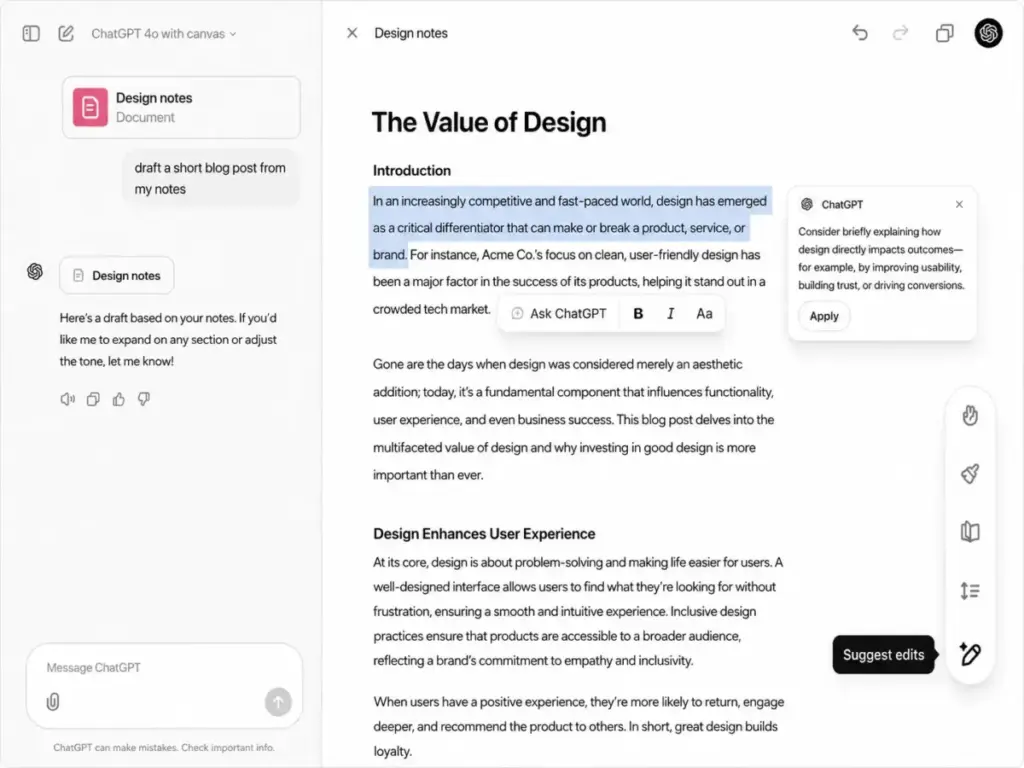
Winner: ChatGPT. Broader writing surface area, more creative control, and lower cost for standalone drafting workflows. Copilot wins only when the writing context needs to pull from existing Microsoft 365 documents.
Workflow 2: Coding, Debugging, and Technical Analysis
ChatGPT wins for standalone coding, debugging, and technical reasoning.
ChatGPT Plus includes access to Codex, advanced reasoning models, agent mode for multi-step tasks, and deep research capabilities. Developers can upload files, run data analysis, and iterate on code within a single workspace. The Pro tiers expand these limits for heavy users.
Microsoft Copilot’s coding support works best inside the Microsoft ecosystem. Copilot can help write Excel formulas, Power Automate flows, and Power Platform scripts. For IDE-level coding, Microsoft offers GitHub Copilot as a separate product with separate pricing, which is not the same as Microsoft 365 Copilot.
That distinction matters. A developer searching “ChatGPT vs Copilot for coding” might mean GitHub Copilot (an IDE code completion tool) rather than Microsoft 365 Copilot (an Office productivity assistant). Microsoft 365 Copilot is not a code editor. It can assist with formula writing and structured data, but it is not designed for debugging Python scripts or building applications.
For a solo developer or a 5-person engineering team that spends most of the day writing and debugging code, ChatGPT Plus or Pro provides a more complete workspace. For a business analyst who writes Excel formulas and Power BI queries inside Microsoft 365 apps, Copilot is the better fit because the AI suggestions appear inline.
Winner: ChatGPT. Stronger general-purpose coding workspace. Copilot’s coding strength is in Excel formulas and Microsoft-specific scripting, not standalone development.
Workflow 3: Microsoft 365 Productivity (Email, Meetings, Spreadsheets)
Copilot wins for any workflow that starts in Outlook, Teams, Word, Excel, or SharePoint.
This is where Copilot’s architecture advantage becomes clear. Microsoft 365 Copilot reasons over your entire Microsoft 365 environment through Microsoft Graph. It can summarize a Teams meeting you missed. It can draft an Outlook reply using context from previous email threads. It can generate a PowerPoint deck from a Word document. It can analyze Excel data without uploading files anywhere.
ChatGPT cannot do any of this natively. To use ChatGPT for these workflows, you would need to copy-paste content, export files, or manually upload documents. That works for ad hoc tasks, but it breaks for routine business workflows where speed and context matter.
Copilot also introduces Work IQ, which combines organizational signals to personalize AI responses. Pre-built agents for research, analysis, and meeting facilitation add structured capabilities on top of the chat interface. Copilot Pages provide a collaborative canvas that teams can share and iterate on together.
For a 25-person company that uses Outlook for email, Teams for meetings, and SharePoint for document storage, Microsoft 365 Copilot eliminates the context switching that ChatGPT would require. The trade-off: Copilot’s responses are shaped by the data in your Microsoft 365 tenant, and the quality depends on how well your organization manages its permissions and data hygiene.
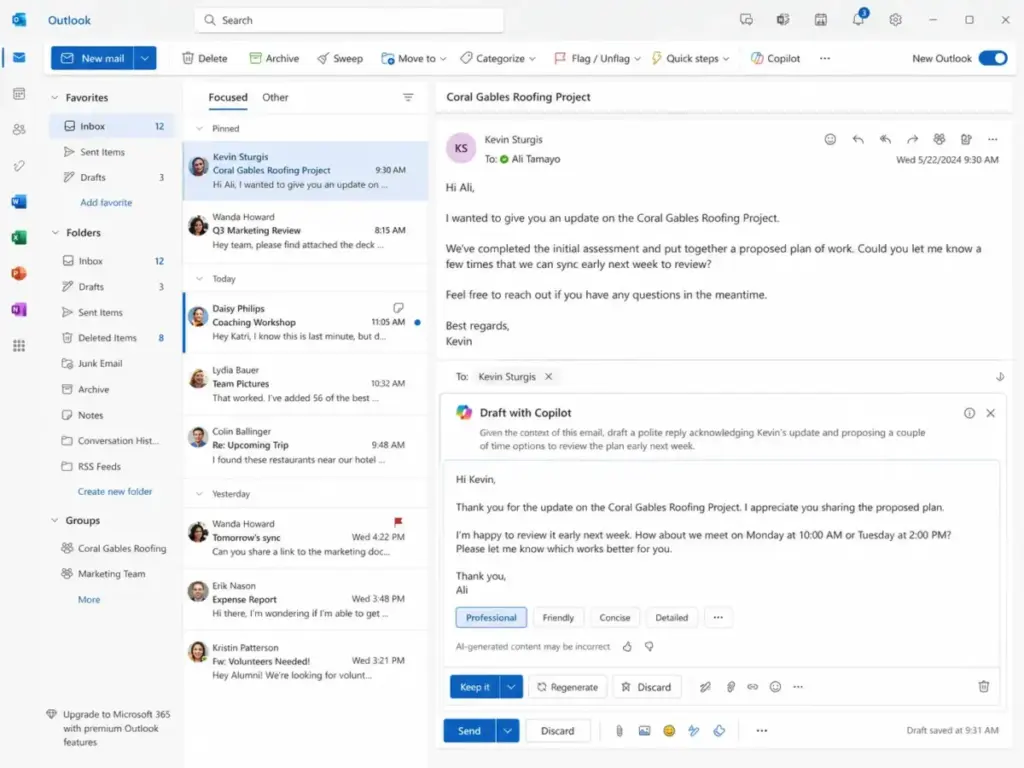
Winner: Microsoft Copilot. No contest for Microsoft 365-native workflows. ChatGPT is stronger in isolation, but Copilot’s Graph-grounded context inside Office apps is the product’s core value.
Pricing and Value per Dollar
ChatGPT pricing is structured as direct tiers. Copilot pricing requires understanding multiple product layers. Here is the breakdown.
ChatGPT Plans (as of June 2026)
| Plan | Price | Key Limits |
|---|---|---|
| Free | $0 | Limited messages, uploads, images, deep research |
| Go | $8/month | More access than Free, may include ads |
| Plus | $20/month | GPT-5.5 Instant/Thinking, deep research, agent mode, Codex, Projects, custom GPTs |
| Pro 100 | $100/month | 5x higher usage than Plus |
| Pro 200 | $200/month | 20x higher usage than Plus |
| Business | $25/user/month ($20/user/month annual) | Minimum 2 seats, workspace and admin controls |
| Enterprise | Custom | SSO, SCIM, compliance, data residency |
Microsoft Copilot Plans (as of June 2026)
| Plan | Price | Key Limits |
|---|---|---|
| Free | $0 | Consumer chat with limited capabilities |
| Microsoft 365 Personal | $9.99/month ($99.99/year) | Office apps with personal Copilot access |
| Microsoft 365 Family | $12.99/month ($129.99/year) | Household use with Copilot benefits |
| Microsoft 365 Premium | $19.99/month ($199.99/year) | Highest personal Copilot usage, Defender, 1 TB storage |
| Copilot Chat | Included | Requires eligible Microsoft 365 business account |
| Copilot Business | $21/user/month annual ($25.20/user/month monthly) | Requires separate Microsoft 365 Business plan, up to 300 users |
| Copilot Enterprise | $30/user/month annual | Requires separate Microsoft 365 plan, full governance |
What this means: The prices above are the Copilot component only. For business teams, Copilot Business requires a qualifying Microsoft 365 plan on top. Microsoft 365 Business Standard currently runs $12.50/user/month (scheduled to increase to $14/user/month on July 1, 2026). That base license changes the total cost picture.
Cost at Scale: The Number Most Comparisons Skip
| Team Size | ChatGPT Business (annual) | Copilot Business Add-on (annual) | Copilot Practical Cost (add-on + M365 Business Standard) | Winner |
|---|---|---|---|---|
| 5 users | $100/month | $105/month | $167.50/month | ChatGPT |
| 10 users | $200/month | $210/month | $335/month | ChatGPT |
| 25 users | $500/month | $525/month | $837.50/month | ChatGPT |
| 50 users | $1,000/month | $1,050/month | $1,675/month | ChatGPT |
What this means: At 25 users, the difference between ChatGPT Business and Copilot practical cost is $337.50/month, or $4,050/year. That gap justifies itself only if Copilot’s Microsoft 365 integration saves enough time across email, meetings, and document workflows to offset the premium. For teams that already pay for Microsoft 365 Business Standard regardless of Copilot, the relevant comparison is the add-on cost alone ($525 vs $500 at 25 users), which nearly eliminates the gap.
Hidden Costs
ChatGPT hidden costs: OpenAI API usage is billed separately from ChatGPT subscriptions. Enterprise pricing is custom. Pro tiers ($100 or $200/month) may be needed for heavy individual usage. Business requires a minimum of 2 seats.
Copilot hidden costs: Requires a qualifying Microsoft 365 plan. Microsoft 365 Business Standard is rising from $12.50 to $14/user/month in July 2026. Copilot Studio agents can incur metered costs through Azure subscription, Copilot Credits, or pay-as-you-go billing. Enterprise rollout costs include permissions cleanup, data governance setup, and user training.
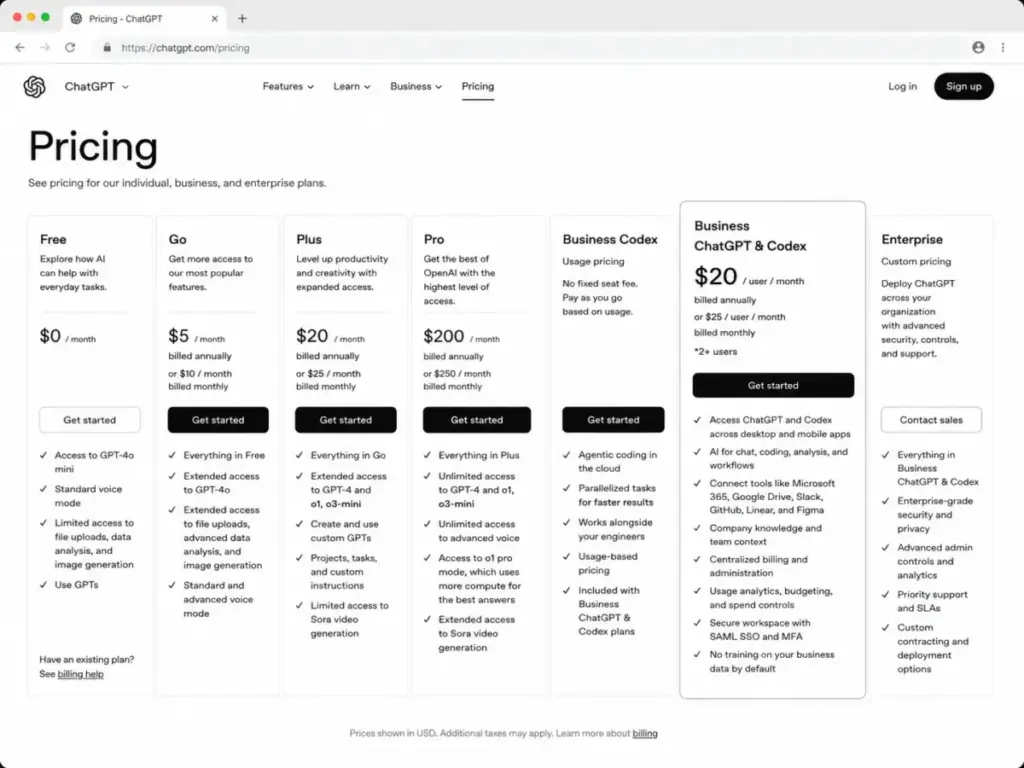
Pricing winner: ChatGPT. Lower total cost at every team size. Copilot narrows the gap only when the organization already pays for Microsoft 365 and the in-app productivity savings are measurable.
The Plan-Gate Map: What Each Tier Actually Gets You
This is where most ChatGPT vs Copilot comparisons stop too early. Features that look “included” on marketing pages are often gated to higher plans.
| Feature | ChatGPT Plan Gate | Copilot Plan Gate | Buyer Impact |
|---|---|---|---|
| Basic AI chat | Free | Free | Both accessible at no cost |
| Advanced reasoning models | Plus ($20/month) | Microsoft 365 Premium ($19.99/month) | Near-identical individual price point |
| Custom GPTs creation | Plus and above | Copilot Studio (metered) | ChatGPT bundles it; Copilot meters it |
| File uploads and analysis | Free (limited), Plus (expanded) | Copilot Business/Enterprise | ChatGPT gives partial access earlier |
| Image generation | Free (limited), Plus (expanded) | Not a core Copilot feature | ChatGPT is stronger for images |
| Teams meeting summaries | Not available | Copilot Business/Enterprise | Copilot-only capability |
| Outlook email drafting | Not available | Copilot Business/Enterprise | Copilot-only capability |
| Excel formula assistance | Not available (separate from API) | Copilot Business/Enterprise | Copilot-only capability |
| SSO and SCIM | Enterprise (custom) | Microsoft 365 tenant controls | Both require higher tiers for governance |
| Sensitivity labels and DLP | Not available | Copilot Enterprise with Purview | Copilot inherits Microsoft 365 governance |
| Agent/workflow automation | Codex, agent mode (Plus/Pro) | Copilot Studio (metered Azure) | Different pricing models for automation |
What this means: ChatGPT gates creative and technical features by monthly subscription tier. Copilot gates productivity features by Microsoft 365 plan level plus a Copilot add-on. The gating models are fundamentally different, and a direct “feature for feature” comparison misses the structural difference. ChatGPT charges per individual or per seat. Copilot charges per seat on top of a platform license.
Setup and Onboarding Difficulty
| Factor | ChatGPT | Microsoft Copilot |
|---|---|---|
| Individual setup | Low (sign up and start) | Low (sign up and start for free consumer Copilot) |
| Business setup | Medium (configure workspace, billing, users, GPT governance) | Medium to High (requires Microsoft 365 admin, Copilot license assignment, permissions review) |
| Enterprise setup | High (SSO, SCIM, compliance, data residency, security review) | High (tenant permissions, Purview, DLP, adoption analytics, training) |
| Data migration | No direct migration path from Copilot | No direct migration path from ChatGPT |
| Switching cost | Medium (custom GPTs, projects, prompt libraries must be rebuilt) | Medium (workflows tied to Microsoft 365 apps, Graph context, Copilot Studio agents) |
What this means: Neither tool offers a clean migration path to the other. Switching from ChatGPT to Copilot means rebuilding prompt workflows inside Microsoft 365 and losing standalone workspace features. Switching from Copilot to ChatGPT means losing automatic Microsoft Graph context and having to manually upload or connect data sources. The switching friction is real in both directions, so the initial choice matters.
Where ChatGPT Wins
- Standalone flexibility. ChatGPT works with any software stack. No Microsoft 365 dependency. A 3-person design agency using Figma, Notion, and Slack gets full AI value from ChatGPT without buying into a separate platform.
- Creative and technical depth. Image generation, Codex, deep research, agent mode, and custom GPTs are all part of the ChatGPT ecosystem. These features do not exist in Microsoft 365 Copilot.
- Simpler pricing. Five individual tiers plus Business and Enterprise. No prerequisite license confusion. A solo consultant knows exactly what $20/month buys.
- Cost at scale for non-Microsoft teams. At 25 users on annual billing, ChatGPT Business costs $500/month. The Copilot practical cost with Microsoft 365 Business Standard is $837.50/month.
- Plan naming transparency. “ChatGPT Plus” means one thing. “Microsoft Copilot” can mean free consumer chat, Microsoft 365 Premium, Copilot Business, Copilot Enterprise, or Copilot Studio, each with different pricing and capabilities.
Where Microsoft Copilot Wins
- Microsoft 365 native integration. Copilot lives inside Outlook, Teams, Word, Excel, PowerPoint, SharePoint, and OneDrive. No copy-pasting. No file uploads. The AI works where the work already happens.
- Microsoft Graph grounding. Copilot reasons over your organization’s emails, files, meetings, and contacts. Work IQ adds organizational context. This depth of grounding is not something ChatGPT replicates.
- Enterprise governance out of the box. Copilot inherits Microsoft 365 tenant permissions, sensitivity labels, DLP policies, and Purview compliance. For regulated industries or organizations with strict data governance, this inherited control is a major advantage.
- Meeting and email workflows. Teams meeting summaries, action items, Outlook email drafting with thread context, and PowerPoint generation from Word documents are Copilot-exclusive capabilities that save time in high-volume communication environments.
Choose ChatGPT, Choose Copilot, or Avoid Both
Choose ChatGPT If
- Your team uses a mixed software stack (Slack, Google Workspace, Notion, Figma) and does not depend on Microsoft 365
- You need one AI workspace for writing, coding, research, images, and custom assistants
- Budget is the primary constraint and you want the lowest per-seat cost at 5, 10, 25, or 50 users
- You are a solo creator, developer, analyst, or consultant who values maximum AI flexibility
Choose Microsoft Copilot If
- Your organization is standardized on Microsoft 365 and your daily work lives in Outlook, Teams, SharePoint, and OneDrive
- You need AI grounded in your tenant data with inherited permissions, sensitivity labels, and compliance controls
- Your workflows are meeting-heavy and email-heavy, and you value summarization and drafting inside those apps
- You operate in a regulated industry where data governance within the Microsoft 365 service boundary is a requirement
Avoid Both If
- Your team uses Google Workspace. Google’s own AI tools and Gemini integration serve that ecosystem better. Our ChatGPT vs Gemini comparison covers this matchup.
- You need citation-first research with visible source links as the core workflow. Perplexity is better suited for that. See our ChatGPT vs Perplexity comparison for details.
- You want IDE-native code completion rather than a chat-based coding workspace. GitHub Copilot (a separate product from Microsoft 365 Copilot) or other coding assistants may be the better fit.
- Neither product’s cost is justified for your current team size and usage intensity. For teams under 5 who use AI occasionally, ChatGPT Free or Copilot Free may be sufficient without paying for any subscription.
| Buyer Situation | Choose ChatGPT When | Choose Copilot When | Watch-Out |
|---|---|---|---|
| Solo creator on $20/month budget | You need broad creative, writing, image, and coding tools | You specifically want Office app drafting and Microsoft 365 integration | Microsoft 365 Premium is $19.99/month but offers narrower AI features than ChatGPT Plus |
| 5-person agency using mixed tools | You want flexible AI workspace at $100/month annual billing | You are already paying for Microsoft 365 and want in-app AI | Copilot practical cost is $167.50/month with M365 Standard |
| 25-person company on Microsoft 365 | Budget is the priority at $500/month | Copilot’s meeting and email automation saves measurable time | Copilot practical cost is $837.50/month vs ChatGPT at $500/month |
| Enterprise with regulated data | You can meet compliance through ChatGPT Enterprise controls | You need tenant-level permissions, Purview, and sensitivity labels | ChatGPT Enterprise pricing is custom; Copilot Enterprise is $30/user/month annual plus M365 |
| Developer doing long debugging sessions | ChatGPT Plus or Pro gives deeper reasoning and Codex access | Your coding is mostly Excel formulas and Power Platform | Microsoft 365 Copilot is not a standalone code editor |
What this means: The right tool depends on three factors: where your team spends its time, whether you already pay for Microsoft 365, and how much Microsoft 365-specific automation is worth to your organization.
Alternatives If Neither Fits
Claude is worth considering for long-form writing, deep analysis, and thoughtful drafting workflows. If your primary need is polished prose and extended reasoning rather than Microsoft 365 integration or custom GPTs, Claude fills that gap. Read our Claude AI review and analysis for the full assessment.
Perplexity is the stronger pick when every answer needs visible source links and citation verification is the core workflow. Neither ChatGPT nor Copilot treats sourcing as a primary feature the way Perplexity does. Our Perplexity AI review and evaluation breaks this down.
Google Gemini is the natural choice for organizations on Google Workspace. If your team uses Gmail, Google Docs, Drive, and Sheets, Gemini integrates with that ecosystem the way Copilot integrates with Microsoft 365. See our Gemini AI review and analysis for details.
| Alternative | Best For | Consider Instead of |
|---|---|---|
| Claude | Long-form writing, analysis, drafting | ChatGPT if writing quality is the top priority |
| Perplexity | Citation-first research, source verification | Both if sourcing accuracy matters more than productivity |
| Google Gemini | Google Workspace users | Copilot if your organization uses Google instead of Microsoft |
What this means: The AI chatbot space in 2026 is specialized enough that no single tool covers every workflow. ChatGPT and Copilot are the two broadest options, but targeted alternatives exist for specific needs.
Final Verdict
There is no universal winner between ChatGPT and Copilot in 2026. The decision splits along one axis: how much of your work happens inside Microsoft 365.
For individuals, small teams, and mixed-tool organizations: ChatGPT is the better pick. Lower cost, broader capabilities, simpler pricing, and no platform dependency. A 10-person team on ChatGPT Business pays $200/month. The same team on Copilot Business with Microsoft 365 Standard pays $335/month for a tool that is stronger only inside Office apps.
For Microsoft 365-heavy organizations and enterprises: Microsoft Copilot is the better pick. Graph grounding, tenant permissions, sensitivity labels, meeting summaries, and in-app drafting create value that ChatGPT cannot match from the outside. The premium is real, but the time savings inside Outlook, Teams, and SharePoint can justify it for teams that use those apps 6+ hours per day.
For everyone else: Start with ChatGPT Free or Copilot Free. Use both for a week. Track which one you reach for during actual work. The tool you keep opening is the one worth paying for.
Daniel Rivera covers AI tools and generative AI for SaaSZap. This comparison reflects official documentation and pricing as of June 2026. Pricing and features change, so verify current rates on the official pages linked above before purchasing.
FAQ
Is ChatGPT better than Microsoft Copilot?
ChatGPT is better for standalone writing, coding, research, image generation, and creative work. Microsoft Copilot is better for workflows inside Outlook, Teams, Word, Excel, and SharePoint. The right pick depends on where your workflows run. Choose ChatGPT if your work spans multiple tools. Choose Copilot if your daily hours are spent in Microsoft 365 apps. For teams using mixed software stacks, ChatGPT provides more flexibility at lower cost.
Does Microsoft Copilot need a separate Microsoft 365 license?
Yes. Microsoft 365 Copilot Business ($21/user/month annual) requires a qualifying Microsoft 365 Business plan. Microsoft 365 Business Standard runs $12.50/user/month billed yearly, bringing the practical total to $33.50/user/month. This prerequisite cost is the most under-discussed factor in Copilot vs ChatGPT pricing comparisons. Check the Microsoft Copilot pricing breakdown for full tier details.
How much does ChatGPT Business cost for a team of 25?
ChatGPT Business costs $20/user/month on annual billing. For 25 users, that is $500/month or $6,000/year. Monthly billing is $25/user/month, totaling $625/month. Business requires a minimum of 2 seats. The ChatGPT pricing breakdown covers all tiers in detail.
Can Copilot read my Teams meetings and Outlook emails?
Yes. Microsoft 365 Copilot with a paid Copilot license can summarize Teams meetings, extract action items, draft Outlook replies using email thread context, and generate content from SharePoint and OneDrive files. This works through Microsoft Graph, which connects data across Microsoft 365 apps within your tenant’s permission boundaries.
Can ChatGPT access my SharePoint files?
Not automatically. ChatGPT does not have native access to Microsoft 365 tenant data. You would need to export, download, or upload files manually. ChatGPT Business supports file uploads and workspace-level integrations, but it does not replicate Copilot’s automatic Microsoft Graph grounding across your organization’s SharePoint, OneDrive, and Outlook.
Is Copilot just ChatGPT inside Office?
No. Copilot uses OpenAI models, but it adds Microsoft Graph grounding (reasoning over your tenant data), sensitivity label inheritance, DLP integration, Purview compliance, Work IQ, pre-built agents, and Copilot Studio for custom agent creation. The underlying model is similar, but the product wrapper, data access layer, and governance architecture are entirely different.
Which is cheaper for a 10-person team?
ChatGPT Business at annual billing costs $200/month for 10 users. Microsoft 365 Copilot Business add-on alone costs $210/month. With the required Microsoft 365 Business Standard license, the practical Copilot cost is $335/month. ChatGPT is $135/month cheaper at 10 users when accounting for the full Microsoft 365 stack.
Should developers use ChatGPT or Copilot?
Developers who need a general-purpose coding workspace for debugging, reasoning, file analysis, and code generation should use ChatGPT Plus or Pro. Developers who work inside Visual Studio and want IDE-native code completion should look at GitHub Copilot (a separate product). Microsoft 365 Copilot is not designed as a coding tool; it assists with Excel formulas, Power Platform, and Office document workflows.
Is Microsoft 365 Premium the same as Copilot Pro?
Microsoft 365 Premium ($19.99/month) replaced the previous Copilot Pro individual subscription as the highest-tier personal plan. It includes expanded Copilot usage, Office apps, 1 TB storage, and Defender benefits. This is a consumer and individual plan. For business teams, Microsoft Copilot review and evaluation covers the full product range including Business and Enterprise options.
What is the real cost of Copilot for a 25-person team?
The Copilot Business add-on costs $21/user/month billed yearly, totaling $525/month for 25 users. The required Microsoft 365 Business Standard license adds $12.50/user/month (rising to $14/user/month in July 2026), adding $312.50/month. The practical total is $837.50/month before any Copilot Studio agent costs or Azure consumption. Our ChatGPT review and analysis includes a business buyer comparison for reference.