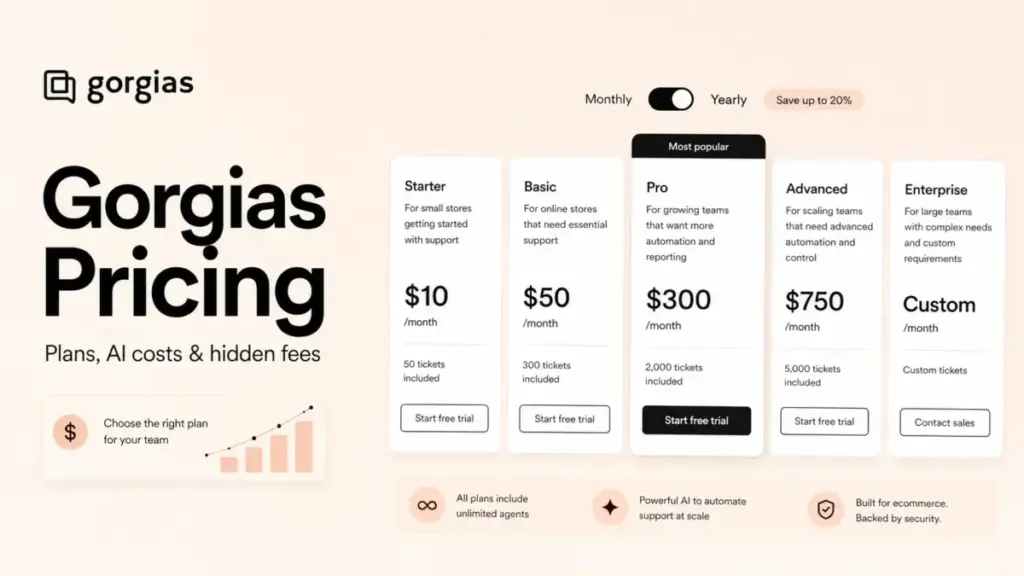
Gorgias pricing starts at $10 per month, and that number is the reason most cost estimates for this ecommerce help desk come out wrong. The $10 Starter plan buys 50 tickets and 3 seats, which is a trial-sized allowance, not an operating budget for a store that answers real customer email.
For most growing Shopify support teams, Pro is the safer budget baseline at $360 per month billed monthly or $300 per month billed yearly, because it carries 2,000 tickets and the revenue reporting most support teams eventually want. This guide sits inside our SaaS pricing guides and stays on cost.
Here is the gotcha that no plan card shows clearly. Gorgias runs several separate billing meters at once, so AI Agent resolutions, Voice tickets, and SMS tickets each count on their own counter, not against your Helpdesk ticket allowance.
That structure is normal for help desk software priced by volume, but Gorgias stacks more meters than most. This guide walks every plan, add-on, and overage rate, then models the real monthly bill by ticket volume so you can see where $10 becomes $840.
Quick Pricing Verdict
| Question | Answer |
|---|---|
| Starting price | $10/month (Starter, 50 tickets, 3 seats) |
| Free plan? | No permanent free plan; 7-day free trial on the Shopify App Store listing |
| Best plan for most support teams | Pro: $360/mo monthly or $300/mo billed yearly, 2,000 tickets |
| Plan I would avoid for a working store | Starter, if you handle more than ~40 tickets a month |
| Biggest hidden cost | Add-on meters: AI Agent resolutions plus separate Voice and SMS ticket counters |
| Best alternative if the AI meters scare you | Help Scout or Freshdesk for flatter per-seat billing |
| Pricing verified | July 3, 2026, official Gorgias pricing and docs |
The one-line version: Gorgias is priced by billable tickets, not by seat, so the bill tracks how many customer conversations you handle and how you handle them. That is fair for a lean store and punishing for a store with seasonal spikes and heavy AI automation.
The Advertised Price vs the Real Price
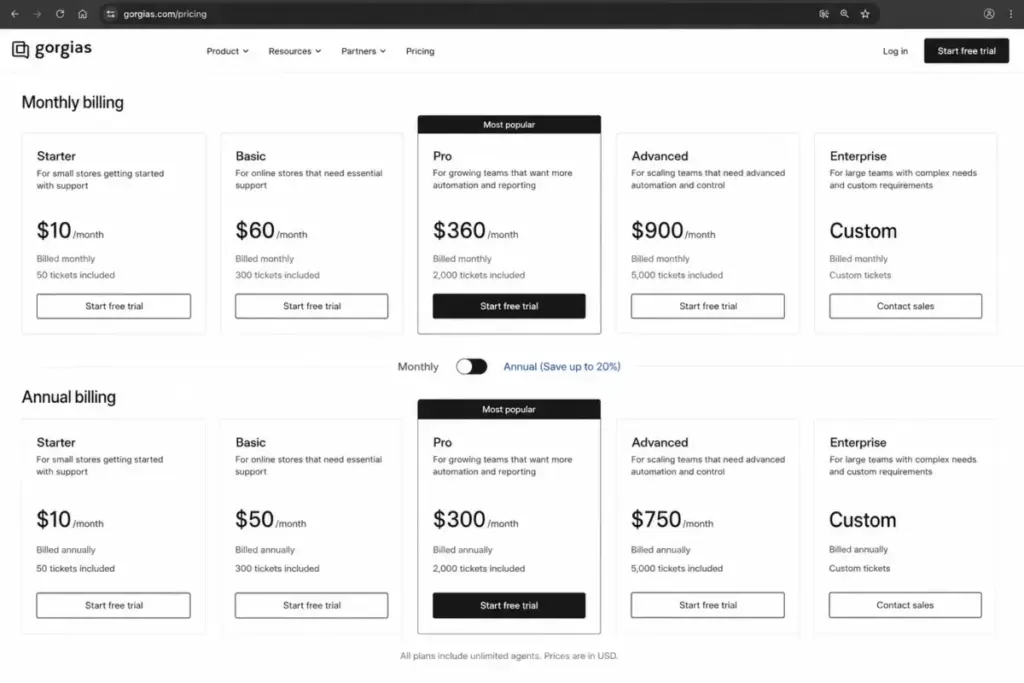
Every Gorgias plan card shows a clean flat number. The real invoice is that number plus whatever your ticket overages, AI resolutions, and channel add-ons add on top.
Below is the gap between the sticker price and a realistic working bill, using the official public rates checked on July 3, 2026.
| Plan | Advertised price | Realistic monthly bill at typical use | What closes the gap |
|---|---|---|---|
| Starter | $10/mo | $10 to $30/mo | Ticket overage at $0.40 each once past 50 tickets |
| Basic | $50/mo (yearly) or $60/mo | $50 to $110/mo | $40 per 100 overage tickets past 300 |
| Pro | $300/mo (yearly) or $360/mo | $300 to $850/mo | AI Agent resolutions at $0.90 each on annual billing |
| Advanced | $750/mo (yearly) or $900/mo | $750 to $2,400/mo | AI resolutions plus Voice and SMS add-on meters |
| Enterprise | Custom quote | Custom | Custom ticket volume, custom overage, negotiated add-ons |
Read that Pro row carefully. The base is $300 to $360, but a store running 30% AI automation on 2,000 tickets adds roughly $540 in resolution fees, which is where the real number lands near $840 per month.
That is not a criticism of the product. It is the difference between a flat subscription and a usage model, and it is the single fact that changes how you should budget.
The Add-On Meters Nobody Puts on the Plan Card
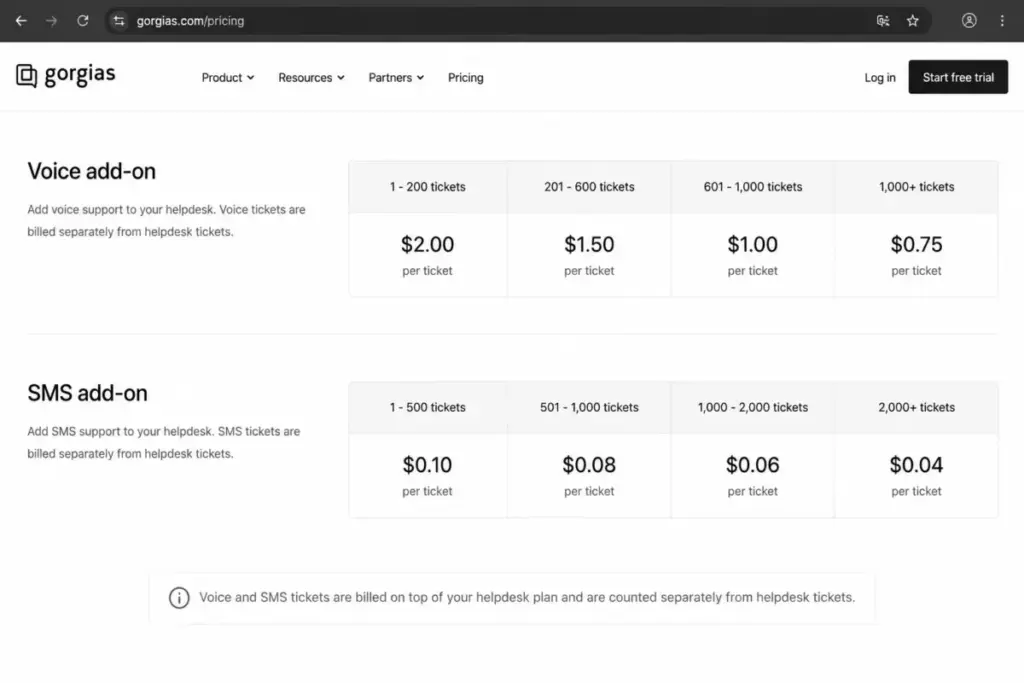
Gorgias has more separate cost meters than a typical ticketing tool. Here are the ones that move the bill, with official rates checked July 3, 2026.
1. Helpdesk Ticket Overages
Each plan includes a monthly billable-ticket allowance, and every ticket past it is charged. Starter runs $0.40 per extra ticket, Basic is $40 per 100, and both Pro and Advanced are $36 per 100.
The trap is seasonal. A store that averages 1,800 tickets but spikes to 2,600 in November pays about $216 in Pro overage that month alone.
2. AI Agent Resolved-Conversation Fees
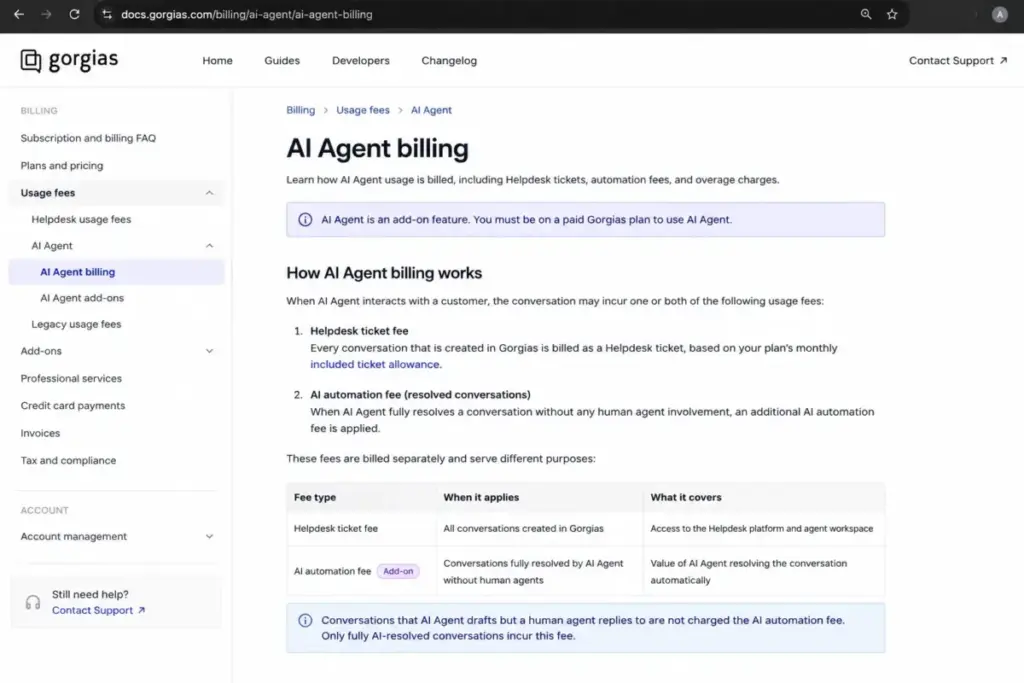
This is the meter that surprises people. Gorgias charges a Helpdesk ticket fee and then, where applicable, an additional outcome-based fee when AI Agent fully resolves a conversation on its own.
The public rate is $1.00 per resolved conversation on monthly billing and $0.90 per resolved conversation on annual billing. You pay only for fully automated resolutions, not for every AI touch, but a fully AI-resolved case can still carry both a ticket cost and an automation cost.
Here is the billing logic in one table, based on the official billing doc.
| What happens to a conversation | Helpdesk ticket fee | AI automation fee |
|---|---|---|
| Human agent replies | Yes | No |
| AI Agent drafts, human finishes | Yes | No |
| AI Agent fully resolves, no human | Yes, where the ticket counts | Yes, per resolved conversation |
So automation lowers your labor cost, not always your Gorgias line item. If AI usage runs past your selected automation level, overage on AI interactions or resolutions is listed at $150 per 100 on the official pricing extracts, which is a second, separate overage from your ticket overage.
The unit economics decide whether that trade is worth it. At $0.90 per resolved conversation, 1,000 AI resolutions a month cost $900, so AI Agent pays for itself only if it removes clearly more than $900 of agent time from that same volume.
For most stores it does, because a fully deflected WISMO or returns question would otherwise take an agent several minutes. My rule of thumb: if AI is resolving repetitive, low-judgment tickets, the $0.90 meter is cheap labor, but if it is resolving nuanced tickets a human would handle better, you are paying twice for a worse answer.
3. Voice Tickets on a Separate Counter
Phone support is a paid add-on, and Voice tickets do not draw down your Helpdesk allowance. The official Voice documentation states Voice ticket volume and its overage rate are counted separately from the tickets included in your Helpdesk plan.
Voice pricing is tiered by volume, cheaper per ticket as volume rises.
| Monthly Voice tickets | Rate per ticket |
|---|---|
| 0 to 24 | $1.20 |
| 25 to 74 | $1.20 |
| 75 to 149 | $0.90 |
| 150 to 249 | $0.70 |
| 250 to 499 | $0.50 |
| 500 to 999 | $0.40 |
For a phone-heavy store, this is a real second budget line. At 300 Voice tickets a month, you are adding roughly $150 on top of your plan, before any SMS.
4. SMS Tickets on Yet Another Counter
Inbound SMS support is a separate add-on with its own per-ticket tiers, distinct again from Helpdesk and Voice.
| Monthly SMS tickets | Rate per ticket |
|---|---|
| 0 to 24 | $0.80 |
| 25 to 74 | $0.80 |
| 75 to 149 | $0.60 |
| 150 to 249 | $0.56 |
| 250 to 499 | $0.43 |
| 500 to 999 | $0.41 |
A mobile-first brand routing 250 SMS conversations a month adds around $107 to the bill. None of that shows on the headline plan price.
5. Professional Services and Legacy Billing
Implementation help beyond standard onboarding is quote-based. The official support table lists professional services and custom solutions as a custom quote, so a complex migration or custom workflow build is a number you negotiate, not one you read off a page.
There is also a legacy-pricing wrinkle. Accounts created before May 28, 2025 may sit on legacy Helpdesk and AI Agent pricing under certain conditions, so an existing customer’s invoice can differ from today’s public rates.
If your bill does not match this guide, check Settings, then Billing and usage.
Plan-by-Plan Breakdown
Here is the full pricing table with both billing modes, ticket allowances, and overage rates, verified July 3, 2026 against the official pricing page and the Shopify App Store listing. If you want the product experience behind these numbers, our full Gorgias review covers the inbox and AI Agent in use.
| Plan | Monthly billing | Annual (per-month equivalent) | Billing basis | Included tickets | Overage | Best for |
|---|---|---|---|---|---|---|
| Starter | $10/mo | No public annual rate | Billable tickets | 50/mo | $0.40/ticket | Testing or a brand-new store |
| Basic | $60/mo | $50/mo ($600/yr) | Billable tickets | 300/mo | $40/100 | 2 to 5 person team, steady low volume |
| Pro | $360/mo | $300/mo ($3,600/yr) | Billable tickets | 2,000/mo | $36/100 | Most growing Shopify support teams |
| Advanced | $900/mo | $750/mo ($9,000/yr) | Billable tickets | 5,000/mo | $36/100 | High-volume DTC support |
| Enterprise | Custom | Custom | Billable tickets | 5,000+/mo | Custom (see caveat) | Above 5,000 tickets, custom terms |
Note the billing gap that trips up other pricing pages. The “$300” you see quoted for Pro is the annual-equivalent monthly figure; billed month to month, Pro is $360, and annual billing is roughly two months free.
Starter, $10/mo
Includes 50 billable tickets, 3 user seats, and 2 requests-per-second API access. It leaves out annual billing, since the official annual toggle marks Starter as unavailable for yearly billing.
Avoid if your store already handles more than about 40 tickets a month, because overage at $0.40 each erases the low price fast. If AI Agent on Starter is important to you, confirm availability at checkout, since the public pricing text is ambiguous on that point.
Basic, $50 to $60/mo
Includes 300 tickets, core ecommerce integrations, and the public table lists up to 500 user seats. It is the first plan that behaves like a real support tool rather than a trial.
Missing the revenue statistics that come with Pro. I would use Basic for a 2-to-5-person team whose ticket volume is steady and predictable, and I would leave it the moment overages become a monthly habit.
Pro, $300 to $360/mo
Includes 2,000 tickets and revenue statistics, which is why Gorgias positions it as the recommended plan. This is the practical tier for most growing Shopify brands.
The catch is AI economics. Pro is where teams turn on AI Agent, and that is exactly where the meter I described earlier starts changing your invoice.
Advanced, $750 to $900/mo
Includes 5,000 tickets and adds a dedicated email server noted on the official plan card. It suits high-volume brands that also want stronger support and onboarding.
Do not assume Advanced buys predictability. At this volume, AI resolutions and channel add-ons usually matter more than the base price, so model those before you commit.
Enterprise, custom
Covers more than 5,000 tickets a month with custom volume and a 4-requests-per-second API rate, double the public tiers. Pricing is quote-based, so there is no public base number to plan around.
One contradiction to raise with sales: the public Enterprise card showed $32 per 100 overage tickets, while the feature comparison table labels Enterprise overage as custom. Get the overage rate written into your quote rather than assuming the card number holds.
Feature Gates: What You Actually Get by Plan
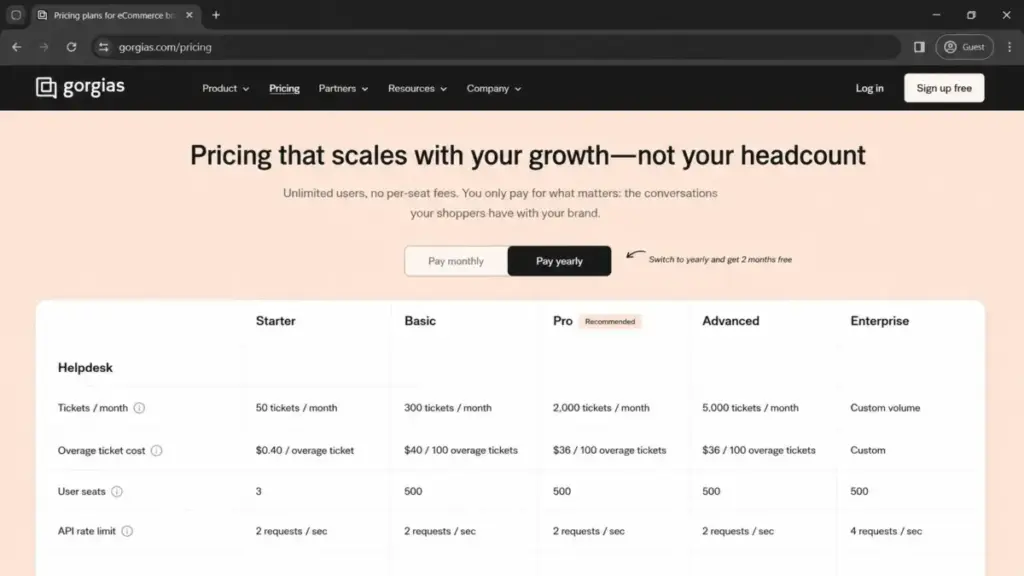
Ticket allowance is not the only thing that changes across plans. Several operational limits move too, and two of them can force a plan decision on their own.
| Gate | Starter | Basic | Pro | Advanced | Enterprise |
|---|---|---|---|---|---|
| User seats (public table) | 3 | 500 | 500 | 500 | 500, confirm larger |
| API rate limit | 2 req/sec | 2 req/sec | 2 req/sec | 2 req/sec | 4 req/sec |
| Revenue statistics | No | No | Yes | Yes | Yes |
| Automation statistics | With AI Agent | With AI Agent | With AI Agent | With AI Agent | With AI Agent |
| AI Agent | Add-on | Add-on | Add-on | Add-on | Add-on |
| Voice / SMS | Add-on | Add-on | Add-on | Add-on | Add-on |
Two gates deserve attention. Gorgias markets “unlimited users” because it is not priced per seat, yet the public feature table lists 3 seats on Starter and 500 on every other public tier, so very large organizations should confirm their seat ceiling with sales.
The API rate limit is the second. Public tiers cap at 2 requests per second and only Enterprise moves to 4, so a store running heavy custom integrations or a busy sync may need Enterprise for throughput alone, not for ticket volume.
Order Management automation carries its own gate. It requires an active AI Agent subscription and, per the official docs, is only supported on Shopify stores, not BigCommerce or Magento 2.
Real Cost Scenarios by Team Size and Ticket Volume
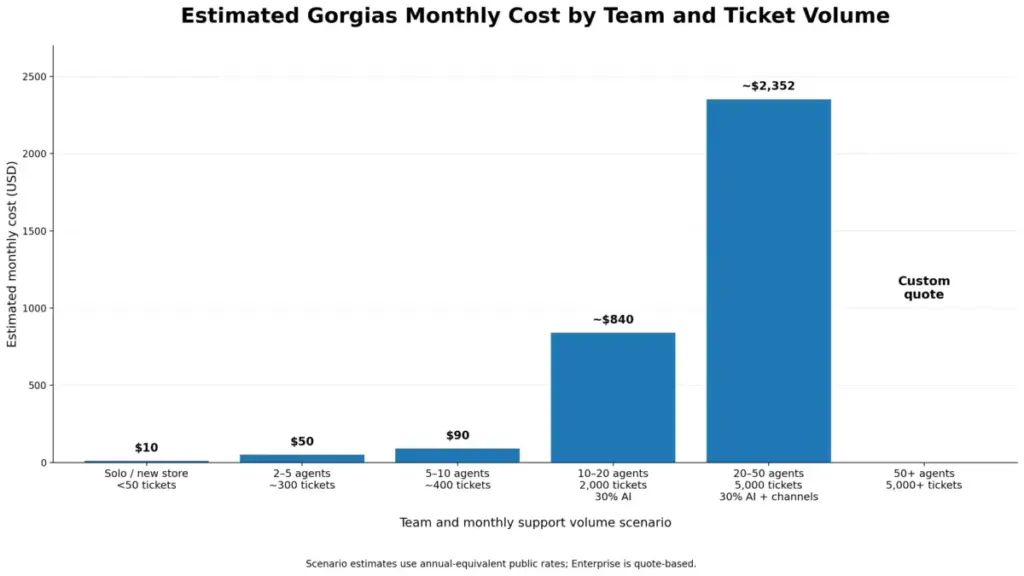
Because Gorgias bills by tickets and add-ons, a per-seat scenario table would mislead you. These scenarios model team size against monthly ticket volume and automation, using official annual-equivalent rates checked July 3, 2026.
| Team and volume | Recommended plan | Estimated monthly cost | Estimated annual | Assumptions |
|---|---|---|---|---|
| Solo / new store, under 50 tickets | Starter | $10 | $120 | Monthly billing, no AI, no add-ons |
| 2 to 5 agents, ~300 tickets | Basic | $50 | $600 | Annual billing, no overage, no add-ons |
| 5 to 10 agents, ~400 tickets | Basic + overage | $90 | $1,080 | $50 base plus 100-ticket overage monthly |
| 10 to 20 agents, 2,000 tickets, 30% AI | Pro + AI | ~$840 | ~$10,080 | $300 base plus 600 AI resolutions at $0.90 |
| 20 to 50 agents, 5,000 tickets, 30% AI + channels | Advanced + add-ons | ~$2,352 | ~$28,224 | $750 base, 1,500 AI resolutions, 200 Voice, 200 SMS |
| 50+ agents, 5,000+ tickets | Enterprise | Custom | Custom | Quote required |
Look at the jump from the 5-to-10 row to the 10-to-20 row. The base plan roughly triples from Basic to Pro, but the AI resolution meter is what pushes the real number from about $90 to about $840.
Treat those AI and channel figures as public-rate estimates, not a guaranteed invoice, because your actual automation rate and channel mix decide the final meter reading.
Monthly vs Annual Billing
Annual billing is worth taking on the paid tiers. Basic, Pro, and Advanced all drop to the lower per-month equivalent on yearly billing, which works out to roughly two months free versus paying month to month.
The exception is Starter. The official annual toggle marks Starter as unavailable for annual billing, so there is no confirmed yearly discount at the entry tier, and I would not assume one.
My recommendation: if you are confident in the plan tier, pay annually on Basic or above to bank the discount. If your ticket volume is still volatile, stay monthly for a quarter first, since annual billing locks the base but does nothing to cap the usage meters.
Which Gorgias Plan Should You Choose?
Match the plan to ticket volume and Shopify stack, not to headcount.
Solo or brand-new Shopify store under 50 tickets a month: start on Starter at $10, and accept that it is a stepping stone you will outgrow.
Small team, 2 to 5 agents, roughly 300 steady tickets: Basic at $50 annual is the fit, as long as overages stay rare.
Growing Shopify support team, 5 to 15 agents, 300 to 2,000 tickets: Pro is the plan I would budget around, and I would model AI Agent cost before turning it on.
High-volume DTC brand near 5,000 tickets: Advanced, with Voice and SMS meters forecast in advance.
Above 5,000 tickets, or any team needing higher API throughput: Enterprise, with every meter negotiated into the quote.
Which Gorgias Plan Should You Avoid?
Avoid Starter as an operating plan for any store with real support volume. At $0.40 per overage ticket, a store handling 200 tickets a month pays roughly $60 in Starter overage on top of the $10 base, which is worse value than simply moving to Basic.
The exception is genuine: Starter is the right choice for a store that is still pre-launch or testing the inbox, and for that narrow case the $10 price is fine.
I would also be cautious recommending Advanced to a non-Shopify brand that expects the same automation. Order Management automation is Shopify-only, so a BigCommerce or Magento 2 store paying $750 for Advanced may not get the order-aware automations it is picturing.
Gorgias Pricing vs Competitors
Gorgias bills by ticket; most rivals bill by agent or seat. That single difference decides who is cheaper, so compare on your real agent count and ticket volume, not on sticker price.
Official competitor rates below were checked July 3, 2026.
| Tool | Pricing model | Entry paid tier | Practical mid tier | Cheaper than Gorgias when |
|---|---|---|---|---|
| Gorgias | Per billable ticket | $10/mo (50 tickets) | Pro $300/mo (2,000 tickets) | Small team, moderate ticket volume |
| Zendesk Suite | Per agent | Team $55/agent/mo yearly | Professional $115/agent/mo | Few agents, very high ticket volume |
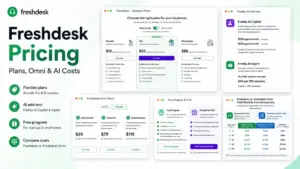
| Freshdesk | Per agent | Growth $19/agent/mo yearly | Pro $55/agent/mo | Small agent count, non-ecommerce |
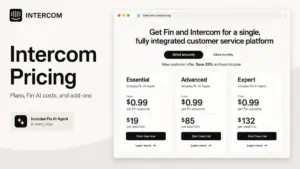
| Intercom | Per seat + Fin outcomes | Essential $29/seat/mo yearly | Advanced $85/seat/mo, Fin from $0.99 | Chat-led, seat-limited teams |
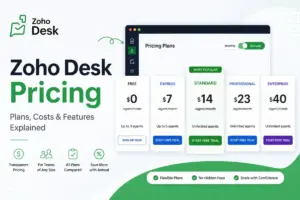
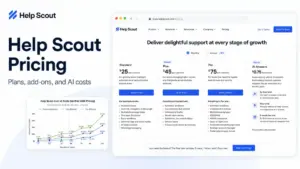
| Help Scout | Per user | Standard $25/user/mo | Plus $45/user/mo | Small team wanting flat, simple billing |
The honest read on “is Gorgias cheaper than Zendesk”: for a 3-agent store handling 1,500 tickets, Gorgias Pro at $300 undercuts Zendesk Suite Professional, which would run about $345 for three agents. Flip it to a 15-agent team on lower ticket volume and the seat-based tools often win.
Normalize it at 10 agents to see the crossover. Ten agents on Zendesk Suite Team is about $550 a month, and on Help Scout Plus about $450, both flat regardless of ticket count.
Gorgias Pro covers those same 10 agents at $300 for up to 2,000 tickets, so it wins on price until AI resolutions and channel add-ons push the meter past roughly $500. The decision is not which tool is cheaper in the abstract; it is whether your ticket volume and automation rate sit below or above that crossover.
If you are cross-shopping the seat model, our Zendesk pricing guide runs the same meter-by-meter math on a per-agent tool. Intercom with Fin outcome pricing is the closest structural match to Gorgias AI economics for chat-heavy stores.
When ecommerce fit is the reason you are looking, Help Scout is the flatter-billing option I would price out first for a small team that wants a predictable bill.
Is Gorgias Worth the Price?
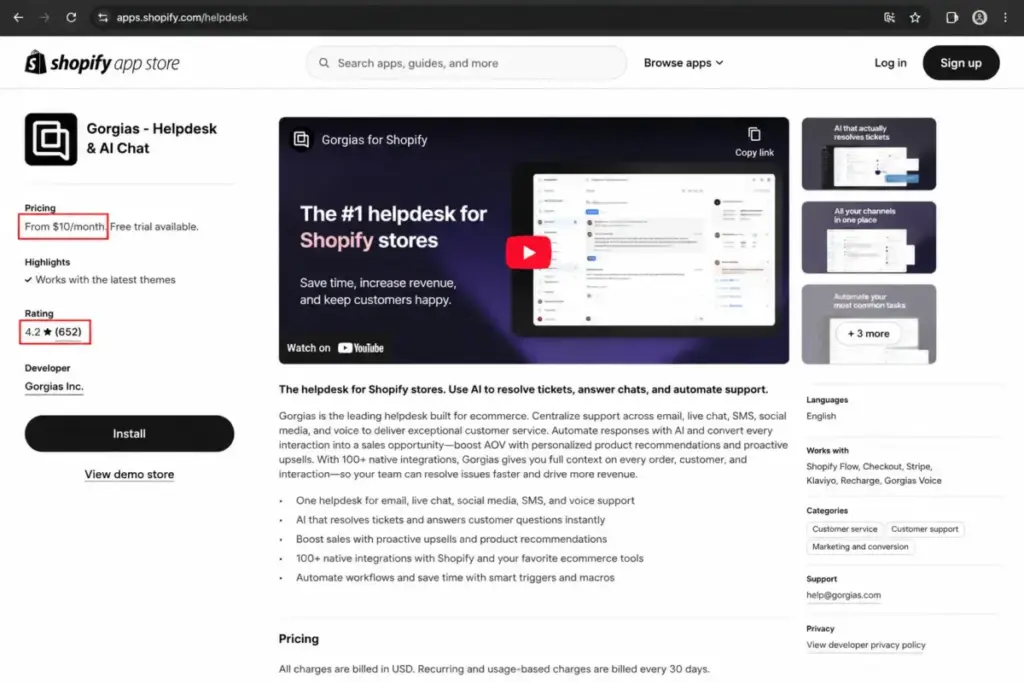
Worth it if you run a Shopify or Shopify Plus store, handle 300 to 5,000 tickets a month, and want order-aware support without paying per seat. At that profile, ticket-based billing plus Shopify context earns the spend, and the marketplace signal backs the fit: the Shopify App Store listing shows a 4.2 rating across 652 reviews.
Not worth it if your platform is BigCommerce or Magento 2 and you are buying for Order Management automation, or if your finance team needs a flat, predictable bill with no usage meters. In both cases the add-on counters work against you.
If the AI and channel meters are the dealbreaker but you still want strong support tooling, a per-seat tool with flatter billing is the cleaner budget. That is the case where I would price Zendesk alternatives before committing to a usage model.
For a wider view of the seat-based options in this cluster, the best help desk software roundup is the shortlist I would start from.
How to Avoid Overpaying for Gorgias
- Forecast ticket volume including your peak month, then pick the plan whose allowance covers the peak, since overage per 100 is more expensive than the next tier’s headroom in some months.
- Model AI Agent resolution cost before enabling it. At $0.90 per resolved conversation on annual billing, 1,000 monthly resolutions is $900, so confirm the labor savings clear that number.
- Budget Voice and SMS as separate lines. They never draw from your Helpdesk allowance, so a phone-and-text store should treat them as two extra subscriptions.
- Pay annually on Basic or above once your tier is stable, to bank the roughly two-months-free discount. Keep Starter monthly, since it has no confirmed annual rate.
- Watch the seat and API gates. If you need more than the public 500-seat table value or more than 2 requests per second, that is an Enterprise conversation, not a plan upgrade you can self-serve.
- If you signed up before May 28, 2025, check your Billing and usage screen for legacy pricing before assuming today’s public rates apply.
- Push overage and AI allowances into any Enterprise quote in writing. The public Enterprise overage line is ambiguous, so negotiate the rate rather than inheriting it.
The AI Agent Setup Workload You Are Also Paying For
The $0.90 resolution fee is not the only cost of AI Agent. There is a setup and maintenance cost in hours that no pricing page lists, and it changes your first-quarter budget.
Two facts from the official docs shape that workload. AI Agent generates answers from skills and knowledge you build, not from your existing macros, so a team expecting to reuse its macro library for automation will have to author new content first.
Product answers depend on data you maintain. AI Agent pulls product information from your Shopify catalog, your store’s website product pages, and custom product information added inside Gorgias, which means a product-heavy store carries an ongoing content-hygiene job to keep AI answers accurate.
Each connected Shopify store also gets its own dedicated AI Agent. That is useful for multi-store brands, but it also means the setup work multiplies per store rather than being built once and shared.
I would treat the first month of AI Agent as a build phase, not a savings phase. Budget agent hours for writing skills and knowledge, expect the deflection rate and the savings to climb only after that content matures.
Where the Cost Becomes Justified
Gorgias earns its price at a specific operating point, and naming that point is more useful than calling it affordable or expensive. The spend is justified when order-aware context and automation remove enough repetitive work to change your staffing math.
The clearest threshold is ticket volume against agent time. A store on Pro at roughly $840 all-in with 30% automation is spending about $0.42 per handled ticket across 2,000 tickets, which is defensible if each deflected or accelerated ticket saves more than that in labor.
Below about 300 tickets a month, the math gets thinner, because the base plan cost spreads across too few conversations to justify the ecommerce-specific tooling over a plain per-seat help desk like Freshdesk. Above 2,000 tickets with real Shopify order actions, the context Gorgias surfaces starts paying for itself in handle time, not just in ticket count.
The place it stops being justified is predictability-sensitive finance. If your operations team needs a bill that does not move with volume, the usage meters are a structural mismatch no plan tier fixes.
Your Enterprise Sales-Quote Checklist
Enterprise pricing is quote-based, so the base number is not the risk; the un-negotiated meters are. Before you sign, get each of these written into the quote rather than assumed from the public cards.
- The custom included ticket volume and the exact overage rate, since the public card showed $32 per 100 while the comparison table said custom.
- The AI Agent allowance and the resolution rate above it, because AI overage is a separate meter from ticket overage.
- Voice and SMS per-ticket rates at your expected volume, confirmed as separate counters.
- The API rate limit, confirmed at the 4-requests-per-second Enterprise level if your integrations need throughput.
- The support tier and onboarding scope. Gorgias lists Standard support for brands at or below $3 million revenue, Specialist for $3 to $20 million, and Dedicated for $20 million-plus or $40,000-plus contracts.
- Any professional services or custom implementation fees, which are quote-based and easy to underestimate.
Walk into that conversation with your peak-month ticket volume and target automation rate in hand. The quote is only as good as the usage numbers you bring to it.
Security and Compliance, for the Buyers Who Ask
Security rarely appears on a pricing page, but it is a purchase gate for mid-market and enterprise brands, so here is the short checklist from official sources checked July 3, 2026.
Gorgias states it is SOC 2 Type II compliant, with the AI Agent privacy FAQ noting compliance since 2020 and a renewed certification announced on the company blog. The same FAQ states compliance with GDPR, CPRA, and applicable privacy laws, and that AI Agent data is not used to train third-party language models.
The Data Processing Agreement commits Gorgias to processing personal data per customer instructions and applicable privacy law. For a store handling order and customer data, that is the baseline I would confirm in your own Trust Center review before rollout.
A Note on Integrations and the Mobile App
Integration counts differ by page, so treat any single number with caution. Gorgias markets 100-plus apps on its apps page, the pricing feature table listed 189 apps, and the homepage cites 300-plus integrations, all seen on July 3, 2026.
The mobile app is available on iOS and Android. One operational limit worth knowing: push notifications require the agent to be set as Available and are sent during business hours, so it is not a reliable always-on after-hours pager.
Frequently Asked Questions
How much does Gorgias cost per month?
Gorgias starts at $10 per month for Starter with 50 tickets. Basic is $50 to $60, Pro is $300 to $360, and Advanced is $750 to $900 depending on monthly or annual billing, with Enterprise custom.
Does Gorgias have a free plan?
No permanent free plan. The Shopify App Store listing offers a 7-day free trial, but you pay from the first billing cycle after that.
Does Gorgias charge per agent or per ticket?
Per billable ticket, not per agent. That is why a large team on low volume can be cheaper on Gorgias than on a seat-based tool, and why a small team on high volume can be more expensive.
Does AI Agent count as a ticket in Gorgias?
It can cost on two meters. A conversation fully resolved by AI Agent can carry the Helpdesk ticket fee where the ticket counts, plus an outcome-based automation fee of $0.90 to $1.00 per resolved conversation.
What are Gorgias overage fees?
Helpdesk overages are $0.40 per ticket on Starter, $40 per 100 on Basic, and $36 per 100 on Pro and Advanced. AI interactions or resolutions past your level are listed at $150 per 100, and Voice and SMS have their own tiered per-ticket rates.
How much does Gorgias Voice add-on cost?
Voice is tiered from $1.20 per ticket at low volume down to $0.40 per ticket at 500 to 999 tickets, counted separately from your Helpdesk allowance.
Is Gorgias cheaper than Zendesk?
It depends on agent count and ticket volume. For a 3-agent store at 1,500 tickets, Gorgias Pro at $300 undercuts Zendesk Suite Professional near $345 for three agents; add agents or drop ticket volume and Zendesk’s seat model can win.
Is Gorgias good for Shopify stores?
Yes, that is its core fit. Order-aware automation and Order Management are built around Shopify, though Order Management automation is Shopify-only and does not extend to BigCommerce or Magento 2.
What plan should a growing Shopify brand choose?
Pro at $300 to $360 for 2,000 tickets, with AI Agent cost modeled before you enable it. Move to Advanced only when volume nears 5,000 tickets or you need the dedicated email server.
Pricing and plan details reflect official Gorgias pricing pages and documentation checked on July 3, 2026, and may change. Confirm current rates and any Enterprise terms directly with Gorgias before purchase.