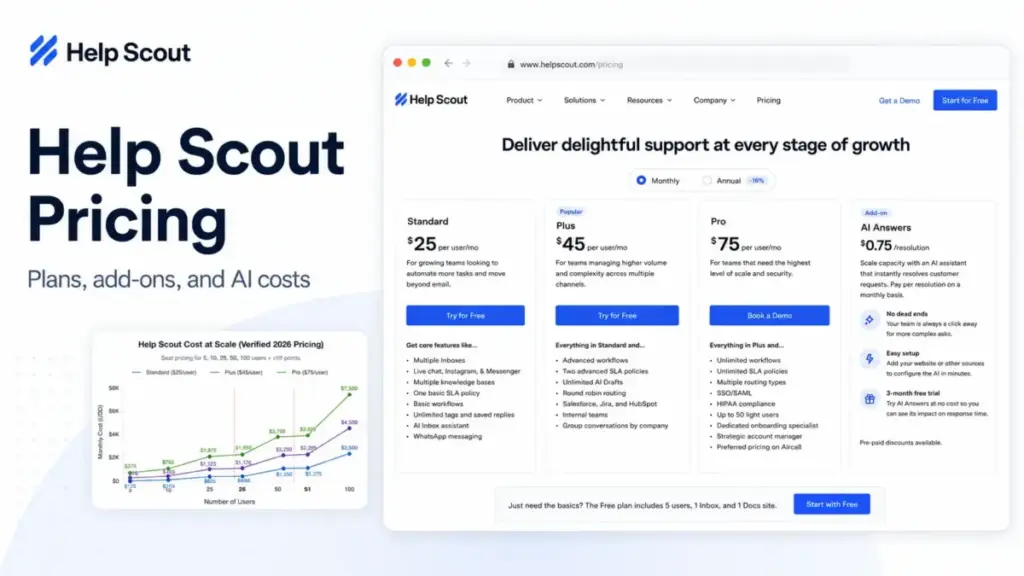
The sticker price on Help Scout is $25 per user per month for Standard. That number is real, and it is also the least useful figure for budgeting a support team.
The plan I would actually build a budget around for a growing team is Plus at $45 per user per month, because that is where advanced workflows, AI Drafts, round-robin routing, and Salesforce, Jira, and HubSpot integrations turn on. Standard looks cheaper until the feature you need sits one tier up.
The pricing that catches teams off guard is not the seat price at all. It is AI Answers at $0.75 per resolution, extra inboxes, extra Docs sites, Messages overages, and the two plan caps that force a jump in per-seat cost the moment you add one more user.
This guide breaks down every Help Scout plan, what each one leaves out, the add-ons that do not appear on the plan cards, real cost at 5, 10, 25, 50, and 100 users, and whether Help Scout is worth it in 2026.
Prices were verified from Help Scout’s official pricing page and help documentation on July 2, 2026. Help Scout can change pricing, so confirm the billing toggle on the official pricing page before you buy.
If you want the product side of the story, our Help Scout review covers the shared inbox, Docs, and AI features in more depth, and if you are new to the category, this primer on help desk software explains the terms used below.
Quick Pricing Verdict
| Question | Answer |
|---|---|
| Starting price | Free $0; paid starts at Standard $25/user/month (official page display) |
| Free plan or trial | Free plan (up to 5 users) and 15-day Standard/Plus trial, no credit card |
| Best plan for most growing teams | Plus at $45/user/month |
| Plan to avoid | Standard if you will pass 25 users or need CRM/project integrations soon |
| Biggest hidden cost | AI Answers at $0.75/resolution, billed monthly in arrears |
| Best alternative if too expensive | Freshdesk (free for 1-2 agents; Growth $19/agent) or Zendesk Support Team $19/agent |
| Pricing verified | July 2, 2026, from Help Scout’s official pricing page and docs |
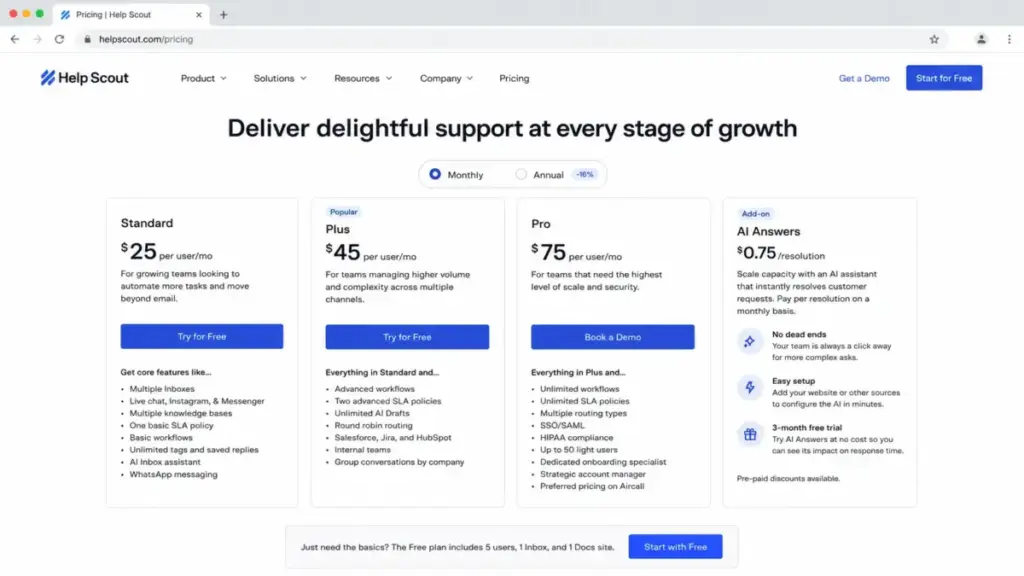
A note on the numbers before we go further. Help Scout’s pricing page shows $25, $45, and $75 per user per month with a monthly/annual toggle and a 16% annual discount marker.
Some third-party listings show higher monthly-billing figures, such as $30, $54, and $90. I treat the official page as the source of truth and flag the difference so you check the toggle at checkout rather than trusting a review-site cache.
The Advertised Price vs the Real Price
Help Scout advertises three paid seat prices and one AI add-on. The bill that lands depends on which features you switch on and how many inboxes, Docs sites, and AI resolutions you use.
Here is the gap between the number on the plan card and the number an operations lead should budget for.
| What the page shows | What you actually pay for |
|---|---|
| Standard $25/user/month | Same, until you need a third inbox, advanced workflows, or a 26th seat |
| Plus $45/user/month | Same, plus $0.75/AI resolution and any extra inboxes or Docs sites |
| Pro $75/user/month | Same, with a 10-user minimum, so the floor is $750/month |
| “AI Answers included” | $0.75 per resolution after a 3-month free trial, billed in arrears |
| “Multiple knowledge bases” | 2 to 5 Docs sites by plan; extra sites cost $20 to $24/month each |
The seat price is only the first line item. The rest of this guide walks each of those add-on lines and shows where they turn a tidy per-seat number into a real monthly total.
Help Scout Pricing Plans Compared
Help Scout runs a per-user subscription for Free, Standard, Plus, and Pro, plus a separate usage-based charge for AI Answers. All amounts are USD per Help Scout documentation.
| Plan | Displayed price | Billing basis | Best for | Key limits |
|---|---|---|---|---|
| Free | $0 | Up to 5 users | Testing or very early support | 100 contacts/month, 1 inbox, 1 Docs site, 30-day reporting, no Messages |
| Standard | $25/user/month | Per user (max 25) | Simple email and chat support | 2 inboxes, 2 Docs sites, 150 basic workflows, 1 SLA, 200 API calls/min |
| Plus | $45/user/month | Per user (max 50) | Growing teams needing integrations | 5 inboxes, 3 Docs sites, 500 advanced workflows, CRM integrations |
| Pro | $75/user/month | Per user, 10-user minimum | Larger teams needing security and scale | 10 inboxes, 5 Docs sites, unlimited workflows, HIPAA, SSO/SAML |
| AI Answers | $0.75/resolution | Usage, billed in arrears | Deflecting routine questions | 3-month free trial; spending cap available |
Source: Help Scout’s official pricing page and AI Resolutions pricing doc, checked July 2, 2026.
Two limits on this table do more damage to a budget than the seat price. The 25-user cap on Standard and the 50-user cap on Plus are not soft limits you negotiate around; passing them moves the whole team to a higher per-seat price.
The Five Hidden Costs Nobody Puts on the Plan Cards
Help Scout is more transparent than most support suites, but four of these five costs sit in the FAQ or the docs, not on the plan cards. Each one is a real line item I would model before signing.
1. AI Answers at $0.75 per Resolution
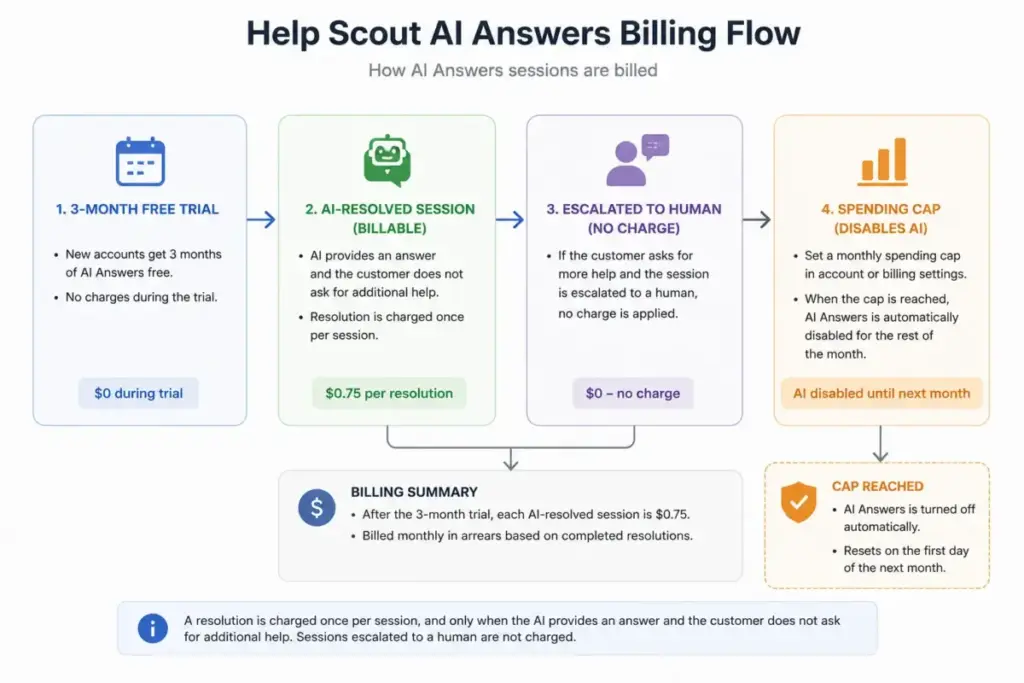
AI Answers is available on every plan with a 3-month free trial for new accounts. After the trial, each AI-resolved session costs $0.75, and Help Scout bills it monthly in arrears.
A resolution is charged once per session, and only when the AI provides an answer and the customer does not ask for additional help. If the customer escalates to a human, that session is not billed as a resolution.
Here is what that looks like at real volume, at $0.75 each.
| AI resolutions/month | Monthly AI cost |
|---|---|
| 100 | $75 |
| 300 | $225 |
| 500 | $375 |
| 1,000 | $750 |
For a five-person team on Standard at $125/month, 500 AI resolutions would triple the bill. AI Answers can quietly become your largest support line item, which is why the spending cap below matters.
Help Scout lets admins set a monthly spending limit. If the cap is reached, AI Answers is disabled in Beacon until the next billing cycle or until you raise the limit, per the AI Resolutions pricing doc. That control is the difference between usage-based pricing and a surprise invoice.
2. Extra Inboxes
Each paid plan includes a fixed number of shared inboxes: 2 on Standard, 5 on Plus, and 10 on Pro. A team running separate inboxes per brand or region can exceed that quickly.
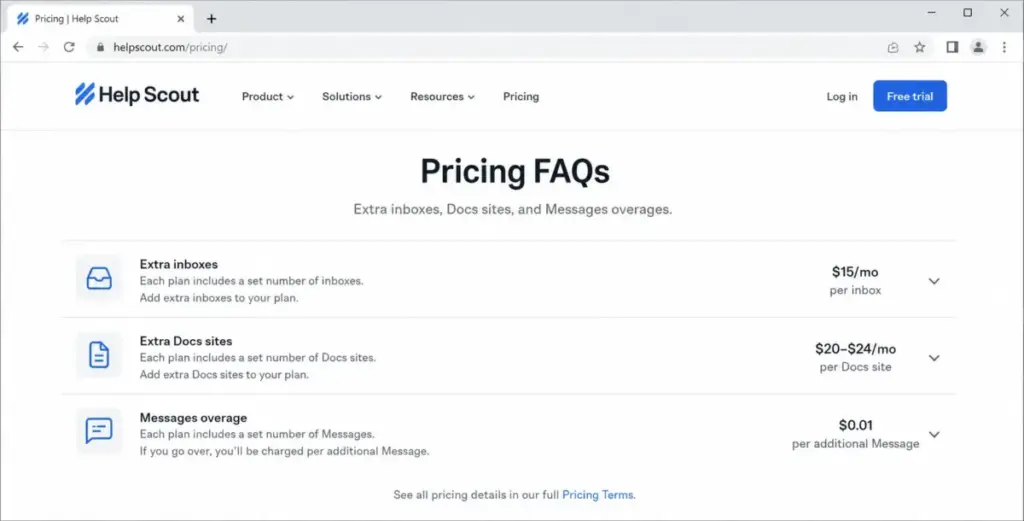
Additional inboxes cost $10/month each on annual billing or $12/month each on monthly billing, per Help Scout’s pricing FAQ. Five extra inboxes is $50 to $60/month on top of seats.
3. Extra Docs Sites
Docs sites are Help Scout’s knowledge bases. Free and Standard include limited counts (1 and 2), Plus includes 3, and Pro includes 5.
Additional Docs sites cost $20/month each annually or $24/month each monthly. A multi-brand company that wants a separate public knowledge base per product is buying add-ons here, so factor it in if you are comparing Help Scout against dedicated knowledge base software.
4. Messages Overage
Messages are Help Scout’s proactive in-app and web messages, sent through Beacon. Standard, Plus, and Pro include up to 2,000 unique viewers per month.
Above 2,000 unique viewers, Messages pricing starts at $20 USD, per Help Scout’s Messages pricing doc, and you can set a maximum monthly spending limit. Support and lifecycle teams that lean on proactive messaging should treat this as a variable cost, not a free feature. Messages is not included in the Free plan at all.
5. Security, Compliance, and the Plan-Cap Cliffs
SSO/SAML and IP restrictions appear as add-ons on Standard and Plus and are listed under Pro’s built-in security. Help Scout does not publish the add-on price, so confirm it with sales before you assume a lower tier will meet an IT requirement.
HIPAA is the cleaner rule: Help Scout’s HIPAA documentation states support is only included in the Pro plan. A healthcare team that needs a BAA should budget for Pro, not Standard or Plus.
The last hidden cost is not an add-on; it is a threshold. Passing 25 users forces a Standard team onto Plus, and passing 50 forces Plus onto Pro, which changes the per-seat price for everyone, not just the new hire.
What Each Help Scout Plan Includes
Prices are useful only next to what they gate. Here is the mini verdict on each plan, including what it leaves out and the point where I would not use it.
Free
Free covers up to 5 users, 1 inbox, 1 Docs site, 100 contacts per month, 10 tags, 10 saved replies, 10 Docs articles, and 30-day reporting, per Help Scout’s Free plan doc.
What it leaves out: Messages, more than one inbox or Docs site, and any real reporting history. Avoid Free as a production desk if you help more than 100 unique contacts a month, because you cannot reply past that limit until the cycle resets or you upgrade.
Standard ($25/user/month)
Standard adds unlimited contacts, 2 inboxes, 2 Docs sites, 150 basic workflows, one basic SLA policy, unlimited tags and saved replies, and 2-year reporting, with a 200 API-calls-per-minute limit.
What it leaves out: advanced workflows, AI Drafts and Summarize, round-robin routing, and Salesforce, Jira, and HubSpot integrations. Avoid Standard if you already know you need CRM integrations or expect to pass 25 users within the year.
Plus ($45/user/month)
Plus is the value tier for most growing teams. It adds up to 50 users, 5 inboxes, 3 Docs sites, 500 advanced workflows, two advanced SLA policies, unlimited AI Drafts, round-robin routing, internal teams, company grouping, all-time reporting, 5 light users, and 400 API calls per minute.
What it leaves out: unlimited workflows and SLAs, load-balanced routing, built-in SSO/SAML and HIPAA, and 800 API calls per minute. Avoid Plus if you specifically need HIPAA or want SSO without a separate add-on conversation.
Pro ($75/user/month)
Pro carries a 10-user minimum, so the entry point is $750/month regardless of team size. It adds unlimited users, 10 inboxes, 5 Docs sites, 15 light users, unlimited advanced workflows, unlimited SLAs, multiple routing types, built-in SSO/SAML, HIPAA, IP restrictions, 800 API calls per minute, a dedicated onboarding specialist, and a strategic account manager.
What it leaves out: little, at the feature level. Some items such as extra inboxes, extra Docs sites, and additional account services can still be add-ons or sales-led. Avoid Pro unless the 10-user minimum, HIPAA, SSO, or scale justify it, because below those needs you are paying $30 more per seat than Plus for capacity you will not use.
AI Answers ($0.75/resolution)
AI Answers is a usage add-on layered on any plan, not a seat tier. New accounts get a 3-month free trial, then pay $0.75 per billable resolution in arrears, with a spending cap available.
What it leaves out: predictability, unless you set the cap. Treat it as a metered utility and model it against your ticket volume rather than assuming it is a flat feature.
Feature Gates: What You Actually Get by Plan
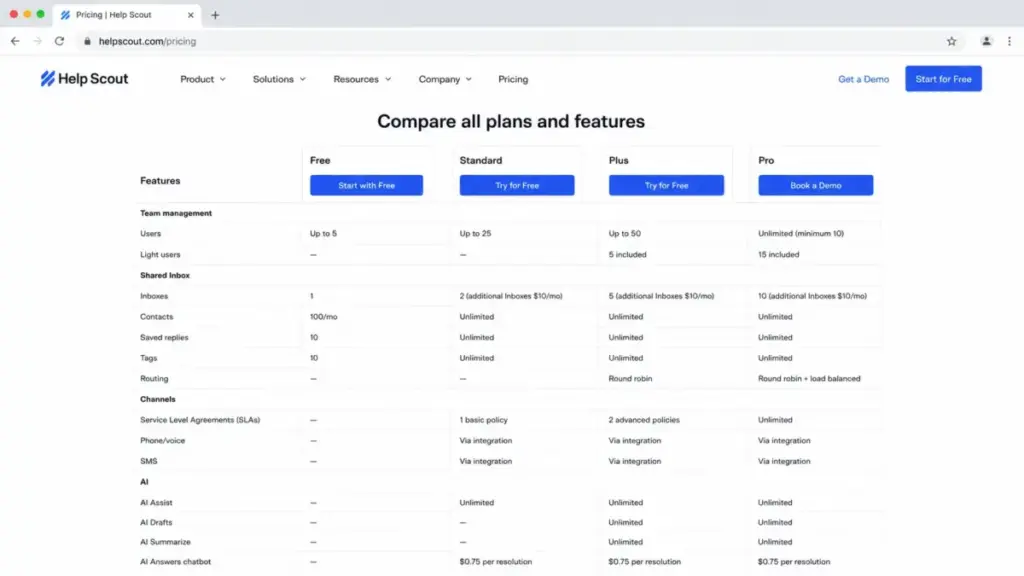
The upgrade that costs you money is usually triggered by one feature, not by headcount. This table shows where each capability turns on, sourced from Help Scout’s pricing feature table and docs, checked July 2, 2026.
| Feature | Free | Standard | Plus | Pro |
|---|---|---|---|---|
| Users | Up to 5 | Up to 25 | Up to 50 | Unlimited, 10 min |
| Contacts | 100/month | Unlimited | Unlimited | Unlimited |
| Inboxes included | 1 | 2 | 5 | 10 |
| Docs sites included | 1 | 2 | 3 | 5 |
| Workflows | Basic auto-reply | 150 basic | 500 advanced | Unlimited advanced |
| SLA policies | None | 1 basic | 2 advanced | Unlimited |
| AI Drafts / Summarize | No | No | Yes | Yes |
| Reporting history | 30-day | 2-year | All-time | All-time |
| API rate limit | Not a paid tier | 200/min | 400/min | 800/min |
| Salesforce / Jira / HubSpot | No | No | Yes | Yes |
| SSO / SAML | No | Add-on | Add-on | Included |
| HIPAA | No | No | No (per HIPAA doc) | Yes |
| Light users | No | No | 5 | 15 |
Read this table for your forcing function. If it is CRM integration, the line to watch is Salesforce/Jira/HubSpot, which pushes you to Plus. If it is compliance, HIPAA pushes you to Pro. If it is developer throughput, the 200, 400, and 800 API-calls-per-minute steps decide the tier.
When the Free Plan Stops Working
Help Scout’s Free plan is genuinely usable, but it is an evaluation and early-stage plan, not a scalable production desk. The number that ends it for most teams is 100 helped contacts per month.
Once you reach that limit, you cannot reply to more contacts until the monthly cycle resets or you upgrade, per Help Scout’s Free plan doc. A support team with real inbound volume hits that ceiling in days, not weeks.
The second constraint is structure: one inbox and one Docs site. A company with even two brands or two products cannot separate its queues on Free.
Use Free to test the interface, migrate a small volume, or run support for a pre-launch product. Do not build a customer-facing operation on it and expect it to hold past your first busy month.
Real Cost Scenarios at 5, 10, 25, 50, and 100 Users
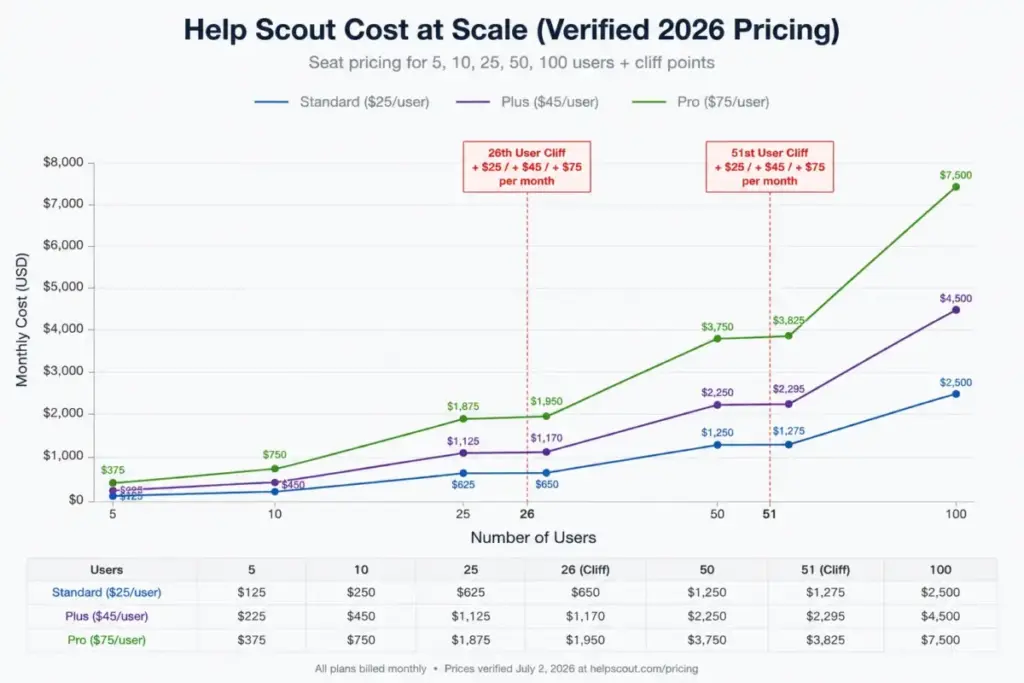
Per-user pricing hides the shape of the bill. Here is the monthly seat cost at each team size, before AI Answers and other add-ons, using the displayed $25, $45, and $75 per-user prices.
| Users | Standard | Plus | Pro | My recommendation |
|---|---|---|---|---|
| 5 | $125 | $225 | Not available (10 min) | Free if limits fit, else Standard |
| 10 | $250 | $450 | $750 | Plus if you need integrations |
| 25 | $625 | $1,125 | $1,875 | Standard if simple, Plus if not |
| 50 | Not available (25 max) | $2,250 | $3,750 | Plus unless Pro gates apply |
| 100 | Not available | Not available (50 max) | $7,500 | Pro; confirm add-ons with sales |
Now the part most pricing pages skip: the two cliffs where adding one seat raises the price for the whole team.
| Threshold | Before | After | Monthly jump |
|---|---|---|---|
| 26th user (Standard to Plus) | 25 x $25 = $625 | 26 x $45 = $1,170 | +$545 |
| 51st user (Plus to Pro) | 50 x $45 = $2,250 | 51 x $75 = $3,825 | +$1,575 |
That +$545 jump at the 26th seat is an 87% increase for one extra person. If your team is trending toward either cap, plan the upgrade rather than letting a single hire trigger it mid-quarter.
Monthly vs Annual Billing
Help Scout’s pricing page carries a monthly/annual toggle and a 16% annual discount marker. The displayed $25, $45, and $75 per-user prices sit alongside that toggle.
The annual choice also lowers add-on rates. Extra inboxes are $10/month annually versus $12/month monthly, and extra Docs sites are $20/month annually versus $24/month monthly, per the pricing FAQ.
I would not treat any monthly-billing seat figure as settled without checking the toggle at checkout, because third-party listings disagree with the official page. If your headcount is stable, annual billing plus the annual add-on rates is the lower total; if you are scaling fast and unsure of seat count, monthly billing buys flexibility at a modest premium.
Which Help Scout Plan Should You Choose?
The right plan tracks team size and one or two forcing features, not a vague sense of “value.” Here is how I would map it.
Solo or a 2-to-3 person early team: start on Free to evaluate, then move to Standard the month you pass 100 contacts or need a second inbox. Standard at $25/user is the honest entry point for real volume.
A 5-to-15 person team that needs Salesforce, HubSpot, Jira, AI Drafts, or advanced workflows: Plus at $45/user. This is the plan I recommend most often, because the integrations and workflows on Plus are usually the actual reason a team outgrew Standard.
A 25-plus person team, or any team with HIPAA, SSO as a hard requirement, or a need for unlimited workflows and SLAs: Pro at $75/user, remembering the 10-user minimum. Confirm onboarding and account-management scope in writing, since some services are sales-led.
Any team leaning on AI deflection: add AI Answers on top of whatever seat plan fits, set a spending cap on day one, and model it at $0.75 per resolution against your ticket volume.
Which Help Scout Plan Should You Avoid?
Avoid Standard if you already know you need CRM or project-tool integrations, advanced workflows, or if you expect to pass 25 users within the budget year. The reason is the 26th-seat cliff: the upgrade to Plus adds $545/month at 26 users and often forces the move at the worst time.
Standard still fits a team that runs a genuinely simple email and chat desk under 25 seats, with no integration or advanced-workflow needs. If that describes you, Standard is the correct choice, not a compromise.
Avoid Pro if your only reason for considering it is “more capacity.” At $75/user with a 10-user minimum, Pro is $30 per seat more than Plus, and unless HIPAA, SSO, IP restrictions, unlimited workflows, or the account-management layer are real requirements, that premium buys headroom you will not use.
Help Scout Pricing vs Zendesk, Freshdesk, Intercom, Front, and Gorgias
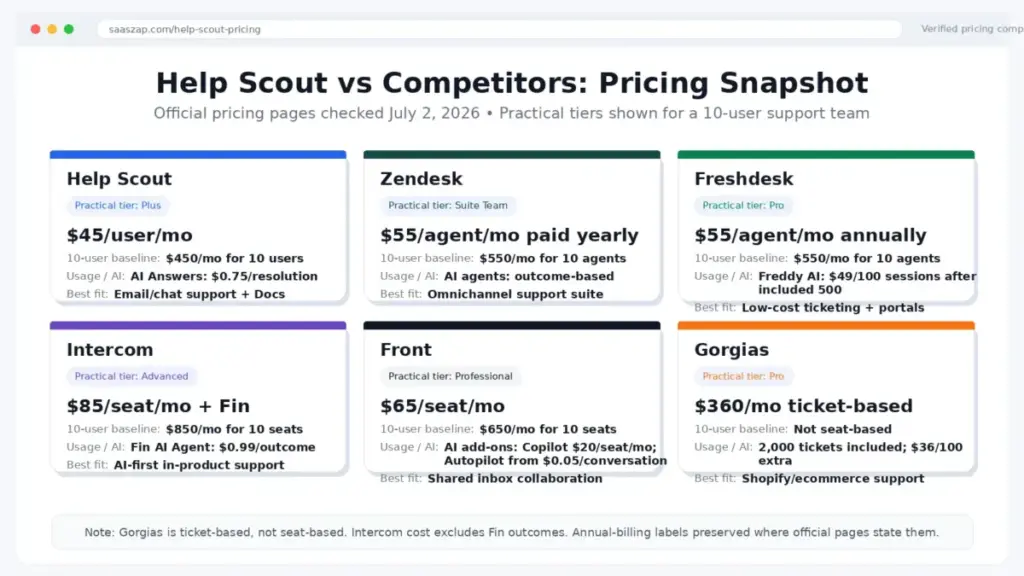
Isolated prices do not tell you whether Help Scout is expensive. The useful question is expensive compared with what, for which use case. Prices below are from each vendor’s official page, checked July 2, 2026.
| Product | Starting price | Practical tier | ~10-user cost/month | Best for |
|---|---|---|---|---|
| Help Scout | Free; Standard $25/user | Plus $45/user | $450 (Plus) | Email/chat-first support with Docs |
| Zendesk | Support Team $19/agent | Suite Team $55/agent | $550 (Suite Team) | Broader ticketing and omnichannel |
| Freshdesk | Growth $19/agent | Pro $55/agent | $550 (Pro) | Low-cost start; free for 1-2 agents |
| Intercom | Seat + usage | Expert $132/seat | $1,320 + Fin outcomes | AI-first, in-product messaging |
| Front | Starter $25/seat | Professional $65/seat | $650 (Professional) | Shared inbox and collaboration |
| Gorgias | Starter $10/month | Ticket-based tiers | Compare by tickets, not seats | Ecommerce and Shopify support |
Read across the practical-tier column. At 10 users on the tier most teams actually need, Help Scout Plus at $450 undercuts Zendesk Suite Team, Freshdesk Pro, Front Professional, and Intercom Expert.
Where Help Scout loses on price is the very bottom. Freshdesk is free for 1-2 agents for six months, and both Freshdesk Growth and Zendesk Support Team start at $19/agent, below Standard’s $25. Compare Help Scout against Zendesk’s pricing directly if entry cost is your main constraint.
Gorgias is not seat-based; its Basic, Pro, and Advanced tiers bundle ticket volume with per-ticket overages, so a seat-to-seat comparison misleads. Judge it on ticket volume if you run ecommerce support.
Is Help Scout Worth the Price?
Help Scout is worth it if you run an email and chat-first support desk of roughly 5 to 50 agents, want a clean shared inbox and Docs knowledge base, and value lower setup effort than an enterprise suite. At Plus, the $45/user tier delivers the integrations and workflows that most growing support teams upgrade for, and it lands below comparable Zendesk, Freshdesk, and Intercom tiers at 10 seats.
Help Scout is not worth it if you need deep contact-center operations, heavy omnichannel routing, or predictable flat-fee AI at high automation volume. Usage-based AI Answers at $0.75 per resolution can exceed seat cost for smaller teams with high deflection, and complex enterprise ticketing is better served elsewhere.
If Help Scout prices out or under-serves you, the practical alternatives are Freshdesk and Zendesk for lower-cost or heavier ticketing, Intercom for AI-first in-product support, and Front for collaborative shared inboxes. A wider shortlist lives in our guide to the best help desk software.
How to Avoid Overpaying for Help Scout
The overpaying happens in the add-ons and the tier choice, not the seat price. These steps keep the bill honest.
Set the AI Answers spending cap before you launch AI. At $0.75 per resolution billed in arrears, the cap is the only thing standing between a busy month and an unplanned invoice.
Right-size the tier to a forcing feature, not to comfort. If the only reason to move from Standard to Plus, or Plus to Pro, is capacity you are not using, stay put.
Choose annual billing when headcount is stable. The 16% seat discount and the lower annual add-on rates ($10 and $20 versus $12 and $24) compound across a year.
Audit your inbox and Docs-site count against the plan allocation. Extra inboxes and knowledge bases are the add-ons that multi-brand teams most often under-budget.
Time growth around the 25- and 50-user caps. If you are near either, model the Plus or Pro jump deliberately instead of letting one hire trigger the whole team’s price change.
Confirm SSO, IP restrictions, HIPAA, and onboarding scope with Help Scout in writing before signing, since several of these are add-ons or sales-led without a public price.
Check qualifying discount programs. Help Scout’s FAQ references Help Scout for Good for nonprofits and B Corporations and a startup plan for early-stage companies; the exact terms live on those program pages.
Before You Buy: The Procurement Checklist
Take these questions to Help Scout sales or support before you commit, so the quoted number matches the invoice.
Confirm whether the quoted seat prices are monthly or annual billing, and get the annual add-on rates in writing. Ask what your expected AI resolutions will cost at your ticket volume, and set the monthly spending cap. Confirm the count of extra inboxes and Docs sites you need and their per-month cost.
Ask whether SSO/SAML and IP restrictions are add-ons on your tier and what they cost. Confirm HIPAA availability if you handle PHI, which the docs place on Pro only. Confirm your Messages unique-viewer volume against the 2,000 included and the overage rate. Ask about onboarding and account-management scope on your tier, and check startup or nonprofit discount eligibility.
FAQ
How much does Help Scout cost?
Help Scout is free for up to 5 users with limits, then Standard at $25/user/month, Plus at $45/user/month, and Pro at $75/user/month on the official pricing page, plus AI Answers at $0.75 per resolution.
Is Help Scout really free?
Yes, there is a genuine Free plan for up to 5 users, but it caps you at 100 contacts per month and one inbox, and you cannot reply past that contact limit until the cycle resets or you upgrade.
Does Help Scout have a free trial?
Standard and Plus offer a 15-day trial with no credit card required. A Pro trial requires contacting sales, and new accounts also get a 3-month free trial of AI Answers.
What is included in Help Scout Standard versus Plus?
Standard covers simple support with 2 inboxes, 150 basic workflows, and 2-year reporting. Plus adds advanced workflows, AI Drafts, round-robin routing, all-time reporting, and Salesforce, Jira, and HubSpot integrations, which is why Plus is the practical tier for most growing teams.
How much does AI Answers cost, and when am I charged?
AI Answers costs $0.75 per resolution after the 3-month trial, billed monthly in arrears. You are charged once per session, only when the AI answers and the customer does not ask for more help; escalations to a human are not billed as resolutions.
Can I cap Help Scout AI spending?
Yes. Admins can set a monthly spending limit, and AI Answers is disabled in Beacon once the cap is reached until the next cycle or you raise the limit.
Is Help Scout HIPAA compliant, and which plan do I need?
Help Scout’s HIPAA documentation states HIPAA support is only included in the Pro plan, so healthcare teams needing a BAA should budget for Pro.
How much do extra inboxes and Docs sites cost?
Extra inboxes are $10/month each on annual billing or $12/month monthly. Extra Docs sites are $20/month each annually or $24/month monthly.
Is Help Scout cheaper than Zendesk or Intercom?
At 10 users on the practical tier, Help Scout Plus at $450/month is below Zendesk Suite Team ($550), Freshdesk Pro ($550), and Intercom Expert ($1,320 before Fin outcomes). At the entry level, Zendesk and Freshdesk start lower at $19/agent.
Pricing methodology: We checked Help Scout’s official pricing page, help docs, AI Resolutions pricing documentation, and competitor pricing pages on July 2, 2026. We used official Help Scout sources as the source of truth when third-party pricing pages showed conflicting numbers.