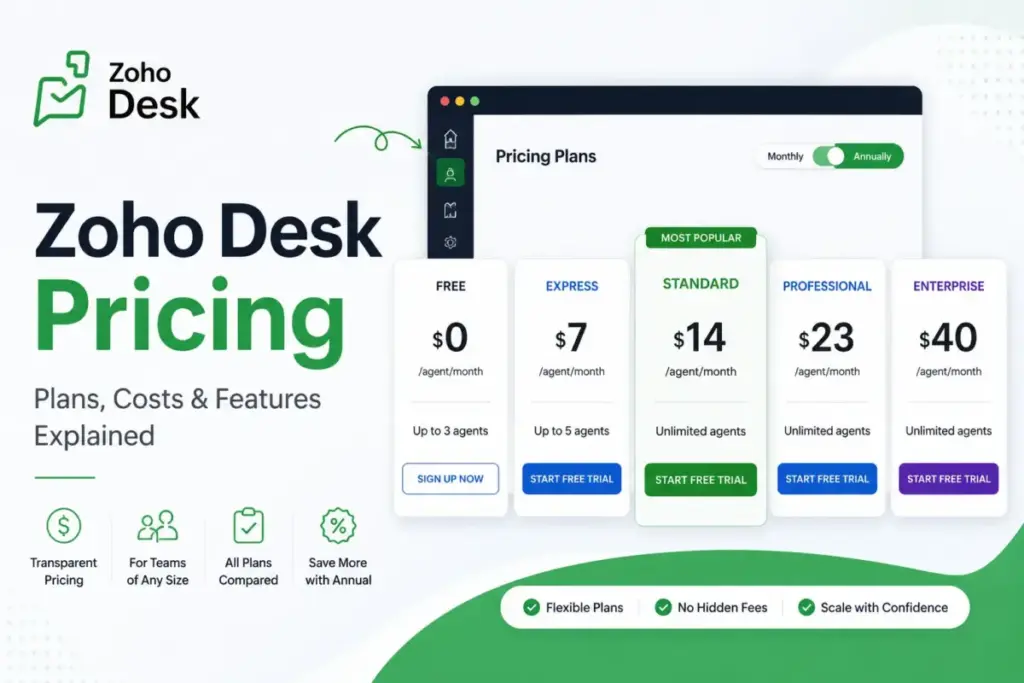
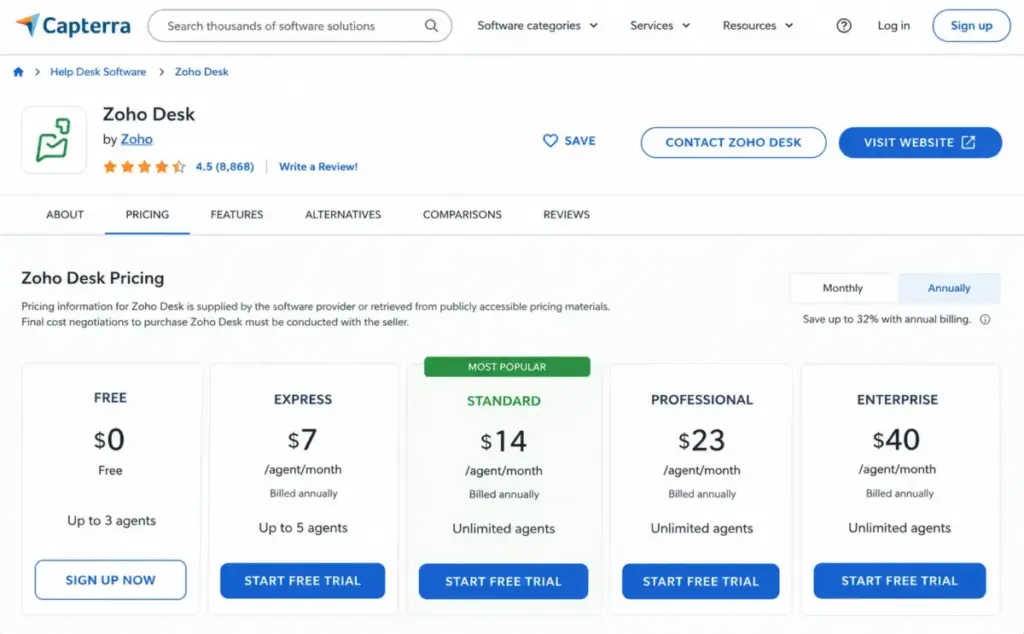
The sticker price runs from $7 to $40 per user per month on annual billing, and that range makes Zoho Desk look like the easy budget pick. The plan you should actually buy has almost nothing to do with the cheapest number.
It tracks your agent count, your support channels, your API load, and how much you care about faster support response times.
For most paying support teams weighing the best help desk software on cost, the practical plan is Standard at $14/user/month annually, not Express and not Free. Express looks cheaper at $7, but it caps at 5 users, so a growing team hits a wall fast.
The biggest budget surprise sits outside the plan table: paid support tiers add 20% or 25% to your subscription, WhatsApp carries usage-based charges, and light agents are a separate line item on lower plans.
I write about support economics, so I care less about feature lists and more about what the invoice reads at 10, 25, and 50 agents. This guide breaks Zoho Desk pricing down by team size first, then covers the full plan table, feature gates, hidden costs, competitor pricing, and where the cost stops being worth it.
All prices are US dollars, checked against Zoho’s own pages and a third-party pricing profile on July 3, 2026.
Quick Pricing Verdict
| Question | Answer |
|---|---|
| Starting paid price | $7/user/month (Express, annual billing); Standard $14/user/month is the practical floor |
| Free plan or trial | Free plan for up to 3 users; free trial with no credit card required |
| Best plan for most teams | Standard ($14/user/month annual) for unlimited users, messaging, knowledge base, and reporting |
| Plan to avoid for growing teams | Express, because the hard 5-user cap forces a re-plan the moment you hire a sixth agent |
| Biggest hidden cost | Premium Support (20%) and Enterprise Support (25%) add-ons, plus WhatsApp usage charges |
| Best alternative if too expensive | Freshdesk or Help Scout for simpler teams; Zendesk for teams that outgrow Zoho’s admin depth |
| Pricing verified | July 3, 2026, against official Zoho pages and a third-party pricing profile |
What this means: the entry price answers “how cheap can this be” but not “what will we pay.” The rest of this guide is the second question.
A note on method: this is a documentation-based pricing guide, not a hands-on trial, and it pairs with our full Zoho Desk review for the feature-and-usability side. The prices, plan limits, and feature gates come from Zoho’s official pricing, comparison, and support-plan pages, corroborated with a third-party pricing profile and reviewer patterns from G2, Capterra, TrustRadius, and TechRadar.
Where a number is add-on or region-dependent, I say so instead of guessing.
If Your Team Is 3 Agents or Fewer: Free or Express
The Free plan covers up to 3 users at $0, and for a founder-led or micro support desk it is a real shared-inbox replacement. It handles basic email ticketing without a monthly bill.
The catch is the 3-user ceiling. Free leaves out most social and messaging channels, deeper automation, and the public knowledge base depth that defines what help desk software does for a scaling team, so it is a starting point rather than a support-operation endpoint.
If a 3-person team needs paid social channels, web forms, workflows, escalations, and a custom domain, Express is the next step at $7/user/month annually or $9/user/month monthly. Three agents on annual Express run about $21/month, or $252/year before tax.
Use Free if: you are pre-revenue, running a side project, or replacing a shared Gmail inbox for 3 people.
Move to Express if: you need workflows, escalations, or social and web-form channels but your team is still 5 people or fewer.
Skip both if: you already know you will pass 5 agents this year. Buying Express now means re-planning onto Standard within months, so start on Standard instead.
If You Have a 5-Agent Team: Express Is the Value Play, But Read the Ceiling
Express fits a 5-agent team well on paper, and it is the cheapest paid tier that still includes workflows, direct assignment, escalations, and a custom domain. Five agents on annual Express cost $35/month, or $420/year, and on monthly billing $45/month.
Here is the hard line: Express is limited to 5 users, full stop. You cannot add a sixth agent to Express, so the plan’s value is real only if your headcount is stable at 5 or fewer.
The moment a sixth agent is on the horizon, Express stops being a decision and becomes a trap. You would pay to set up a plan you have to leave, then migrate configuration onto Standard.
For a stable 5-person team that only needs email, social, and basic workflows, Express is the lowest legitimate spend on Zoho Desk. For a hiring team, treat Express as a temporary state and budget Standard from the start.
Unit math: at 5 agents, the gap between Express ($35/month annual) and Standard ($70/month annual) is $35/month. That $35 buys unlimited seats, Business Messaging, community, a fuller knowledge base, and custom reports, which is usually worth it the moment growth is on the table.
If You Have a 10-Agent Team: Standard Is the Real Floor
Standard is the plan I would budget for a 10-agent support desk.
It removes the user cap, adds Business Messaging and instant messaging, a community forum, work modes, a proper knowledge base, happiness ratings, and custom reports and dashboards. Ten agents on annual Standard cost $140/month, or $1,680/year, and monthly billing pushes that to $200/month.
That $60/month monthly-versus-annual gap at 10 agents is the first billing lever worth paying attention to. Committing annually saves $720/year for a 10-person team, which is roughly four extra months of the plan for free.
Standard is where Zoho Desk starts behaving like a support platform rather than a ticket inbox. The reporting alone (50 custom reports and 10 custom dashboards) is the reason most 10-agent teams stop looking at Express.
Watch three cost triggers at this size. WhatsApp channels carry usage-based charges on top of the seat price, additional social brands are available on request rather than bundled, and light agents for non-support collaborators are a separate add-on on Standard.
Use Standard if: you run 6 to roughly 20 agents, need messaging and a knowledge base, and your support process is rule-based rather than multi-department.
Look at Professional instead if: you need Blueprint process automation, multiple departments, time tracking, or round-robin assignment. Those are the gates that pull teams up a tier.
If You Have a 25-Agent Team: Professional and the Department Question
Professional is the tier for a 25-agent operation that has outgrown simple rules.
It adds multi-department management (up to 10 departments), Blueprint process automation, time tracking, telephony-related capabilities, higher automation limits, and stronger analytics. Twenty-five agents on annual Professional cost $575/month, or $6,900/year, versus $875/month on monthly billing.
The jump from Standard to Professional is $9/user/month annually, which at 25 agents is $225/month, or $2,700/year. That is not a rounding error, so the upgrade needs a reason beyond “more features.”
The reasons that justify it are specific. Blueprint gives you state-based process automation with defined transitions, departments let you separate support queues by product or region, and Professional lifts workflow-rule and macro limits well above Standard’s caps.
Automation limits are the quiet driver here. Standard allows 5 workflow rules per module and 5 macros; Professional raises that to 15 per department and adds Blueprint, which is often the actual reason a 25-agent team upgrades rather than the marketing headline features.
At 25 agents, also plan for support add-ons. If your desk is business-critical, Premium Support adds 20% of your subscription fee, which on a $6,900/year Professional base is roughly $1,380/year on top.
Use Professional if: you run multiple support queues, need Blueprint-driven processes, track agent time, or want round-robin assignment across departments.
Do not pay for Professional if: your 25 agents share one simple queue with rule-based routing. In that case Standard’s limits may still hold, and the $2,700/year difference is not buying you anything you use.
If You Have 50 Agents: Enterprise Triggers and the Support Overlay
Enterprise is the $40/user/month annual tier, and at 50 agents it runs $2,000/month, or $24,000/year on annual billing, rising to $2,500/month if you pay monthly. Before committing, be clear that Enterprise is not just “more agents”; it is admin depth, AI depth, and governance.
The concrete Enterprise triggers are worth naming. You move up for multi-brand help centers, sandbox environments (3 included), custom modules, validation rules, higher API credits, active webhooks, field encryption, advanced AI, and 50 free light agents bundled in.
That light-agent inclusion matters for cross-functional teams. If engineers, finance, or product managers need to view and comment on tickets without full agent seats, Enterprise’s 50 included light agents can offset part of the higher per-seat price versus buying light agents as an add-on lower down.
Now the support overlay. Enterprise Support costs 25% of your annual subscription fee and carries a minimum of 25 user licenses, so on a $24,000/year Enterprise base it would add roughly $6,000/year for 24/7 multichannel support, one-hour initial response, and a Technical Account Manager.
That brings a 50-agent, fully-supported Enterprise deployment to around $30,000/year before taxes, WhatsApp usage, and any third-party integration costs. That is the number a finance team should budget, not the $40 sticker.
The light-agent inclusion is worth pricing out at this size.
On lower plans, light agents are a paid add-on, so a 50-agent team that also needs 40 internal collaborators would be adding 40 paid light-agent seats on Professional. On Enterprise, the first 50 light agents are included, which narrows the real per-seat gap between Professional-plus-add-ons and Enterprise.
Confirm the current light-agent add-on rate before you model this, because the exact US dollar figure was not reliably exposed in Zoho’s accessible pricing text during research. The decision logic holds regardless of the exact number: the more internal viewers you have, the more Enterprise’s bundled 50 offsets its premium.
Use Enterprise if: you need multi-brand support, sandboxing, custom modules, heavy API usage, field-level encryption, or you have 30-plus internal collaborators who fit the light-agent model.
Stay on Professional if: you have 50 agents but a single brand, standard admin needs, and no sandbox or custom-module requirement. Enterprise’s premium is governance and AI depth, and if you do not use those, you are overpaying by $17/user/month.
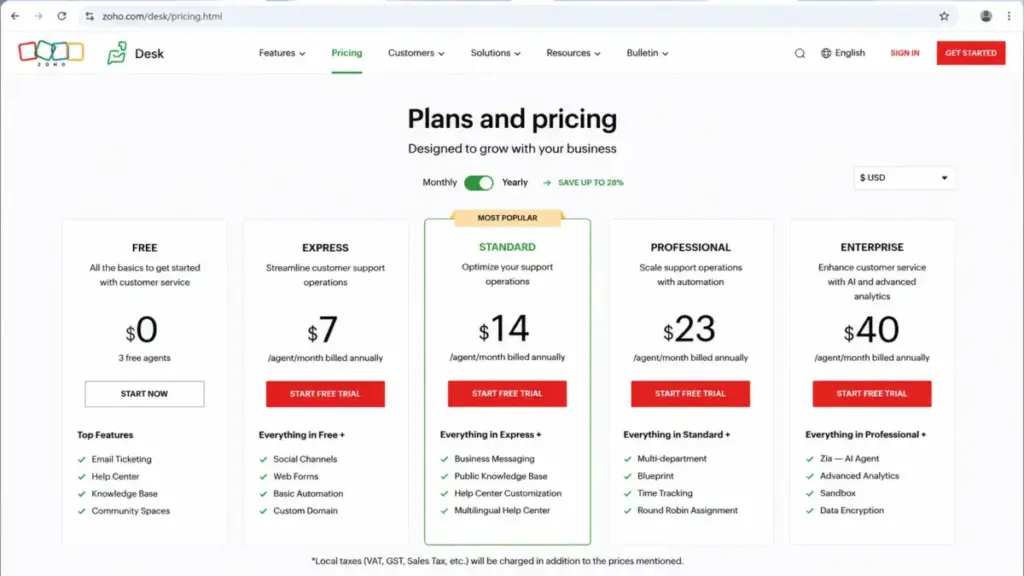
Zoho Desk Pricing Plans Compared
Here is every tier in one view, with US pricing checked July 3, 2026. Zoho localizes pricing by visitor region, so confirm the USD selector on the live pricing page before you buy.
| Plan | Monthly | Annual (per user/mo) | Billing basis | User limit | Best for |
|---|---|---|---|---|---|
| Free | $0 | $0 | Per user | Max 3 users | Founders and micro teams replacing a shared inbox |
| Express | $9 | $7 | Per user | Max 5 users | Stable 5-agent teams needing workflows and social channels |
| Standard | $20 | $14 | Per user | Unlimited | 6-20 agent teams needing messaging, KB, and reporting |
| Professional | $35 | $23 | Per user | Unlimited | Multi-department teams needing Blueprint and time tracking |
| Enterprise | $50 | $40 | Per user | Unlimited | Multi-brand, high-API, governance-heavy support orgs |
Buyer takeaway: the two paid tiers that matter for most teams are Standard and Professional. Free and Express are scale-limited by user count, and Enterprise is a governance-and-AI decision rather than a headcount decision.
Real cost by team size, annual billing, base subscription only:
| Team size | Recommended plan | Monthly (annual billing) | Annual | Monthly-billing alternative |
|---|---|---|---|---|
| 3 agents | Free or Express | $0 or $21 | $0 or $252 | $27 on monthly Express |
| 5 agents | Express | $35 | $420 | $45 |
| 10 agents | Standard | $140 | $1,680 | $200 |
| 25 agents | Professional | $575 | $6,900 | $875 |
| 50 agents | Enterprise | $2,000 | $24,000 | $2,500 |
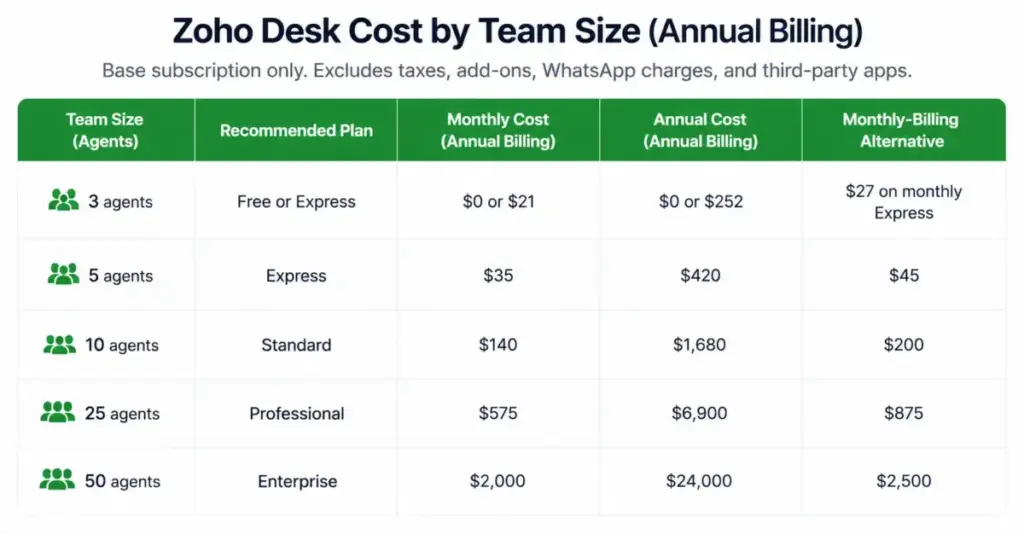
Pricing impact: these figures exclude local taxes, WhatsApp usage, support add-ons, light agents beyond Enterprise’s included 50, and any third-party app subscriptions. Treat them as the base subscription line, not the all-in cost.
What Each Plan Includes, Missing, and Avoids
Free. Includes basic email ticketing for up to 3 users, but leaves out most messaging channels, deeper automation, and public knowledge base depth. Avoid it if you expect a fourth agent or need social support.
Express. Includes email, social, web forms, direct assignment, workflows, escalations, custom domain, and ticket timeline and history, but not Business Messaging, community, custom reports, or any room past 5 users. Avoid it if your headcount is growing.
Standard. Includes unlimited users, Business Messaging, instant messaging, community forum, knowledge base, work modes, happiness ratings, 50 custom reports, and 10 custom dashboards, but not Blueprint, multi-department depth, time tracking, or telephony depth. Buy Professional instead if you need multi-department process automation.
Professional. Includes up to 10 departments, Blueprint process automation, time tracking, round-robin, 10 email channels, higher macro and workflow limits, and unlimited custom reports and dashboards, but not multi-brand help center, sandbox, custom modules, or the highest API and security tiers. Avoid it if a single simple queue covers your workflow.
Enterprise. Includes multi-brand, sandbox (3), custom modules, validation rules, 50 Business Messaging channels, 50 departments, advanced AI, higher API credits, active webhooks, field encryption, and 50 free light agents, with nothing material missing for most buyers. Avoid it if you do not use governance, sandboxing, or advanced AI, because the premium is those capabilities.
Feature Gates: What You Actually Get by Plan
The plan you need is usually decided by one gated feature, not by the price. These are the gates that move teams up a tier, based on Zoho’s official plan comparison.
| Gate | Standard | Professional | Enterprise |
|---|---|---|---|
| Email channels | 5 | 10 | 100 |
| Business Messaging channels | 1 | 10 | 50 |
| Workflow rules | 5 per module | 15 per department | 30 per department |
| Blueprint process automation | No | Yes | Yes |
| Departments | Limited | Up to 10 | Up to 50 |
| Custom reports / dashboards | 50 / 10 | Unlimited | Unlimited |
| Sandbox | No | No | 3 |
| Field encryption | No | No | Yes |
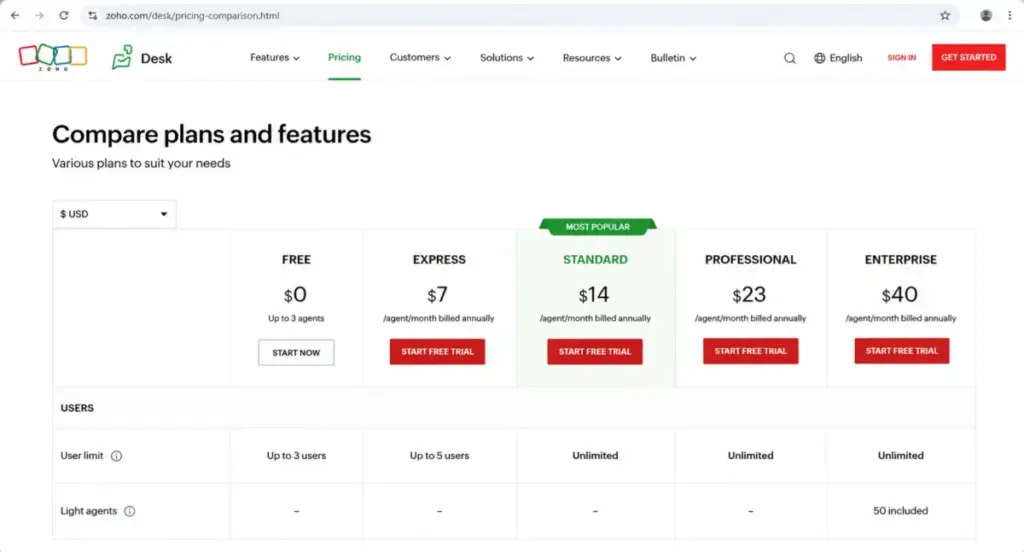
Bottom line: the jump from Standard to Professional is usually bought for Blueprint or departments, and the jump to Enterprise is bought for sandbox, field encryption, channel headroom, and API credits, not for seat count.
Channels and messaging. Email channels scale from 5 on Standard to 10 on Professional to 100 on Enterprise. Business Messaging channels tier at 1, 10, and 50 across the paid plans, so multi-region or multi-brand messaging teams can hit the channel cap before they hit any agent cap.
Live chat and Business Messaging are not the same thing in Zoho’s model. Business Messaging covers instant-messaging apps, while SalesIQ-powered website live chat software is a separate integration, so do not assume “messaging” and “website live chat” are one bundled feature.
Automation. Standard allows 5 workflow rules per module and 5 macros, Professional raises that to 15 per department and adds Blueprint, and Enterprise goes to 30 per department with custom functions.
If your routing logic is complex, the automation quota, not the feature name, decides your tier.
Blueprint. Blueprint state-based process automation is the Professional and Enterprise threshold. If you need defined ticket stages with controlled transitions, Standard will not cover it, and that single requirement is a common reason teams skip Standard entirely.
Reporting. Standard caps custom reports at 50 and dashboards at 10, while Professional and Enterprise lift both to unlimited. Teams that live in reporting often upgrade for the dashboard headroom alone.
API credits. Zoho Desk moved to an API-credit model that went live across data centers in October 2025, so this is a genuinely fresh 2026 pricing consideration. Credits scale by plan and user count:
| Plan | API credit formula |
|---|---|
| Free | 5,000 credits |
| Express | 25,000 + (users x 100) + add-on credits |
| Standard | 50,000 + (users x 250) |
| Professional | 75,000 + (users x 500) |
| Enterprise | 100,000 + (users x 1,000) |
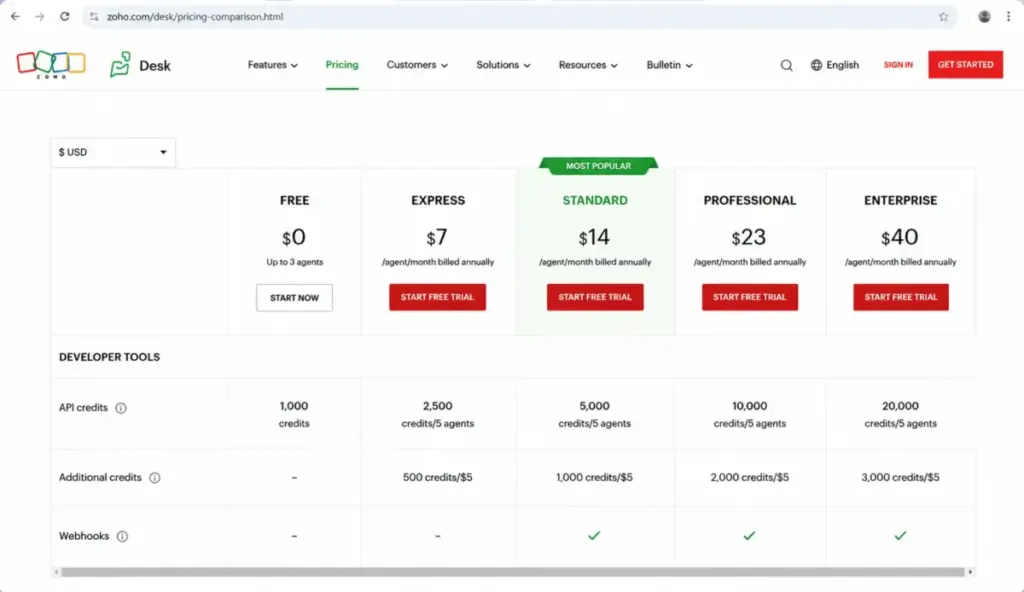
Why it matters: Zoho Desk does not enforce a per-token request rate limit, but excess requests may be throttled or rejected depending on system load, and access tokens are valid for one hour. Teams running BI syncs, CRM integrations, migrations, or custom apps should size their plan on credit capacity, not just seats.
AI. AI is not a single line item: built-in Zia features, generative AI through a connected OpenAI or DeepSeek key, and AI Agents are distinct systems, and availability can depend on your data center and whether a feature is in early access. Do not assume every AI capability is present on every plan or in every region; confirm the specific feature against the live comparison.
Security and admin. SSO, JWT authentication, ePHI field labeling, field encryption, data subject requests, and data-center location choice are not uniform across plans. Zoho maintains SOC 2 Type 2 and ISO 27001 commitments, but subscribing does not automatically make your organization GDPR or HIPAA compliant, so treat compliance as a shared responsibility.
Hidden Costs and Add-ons
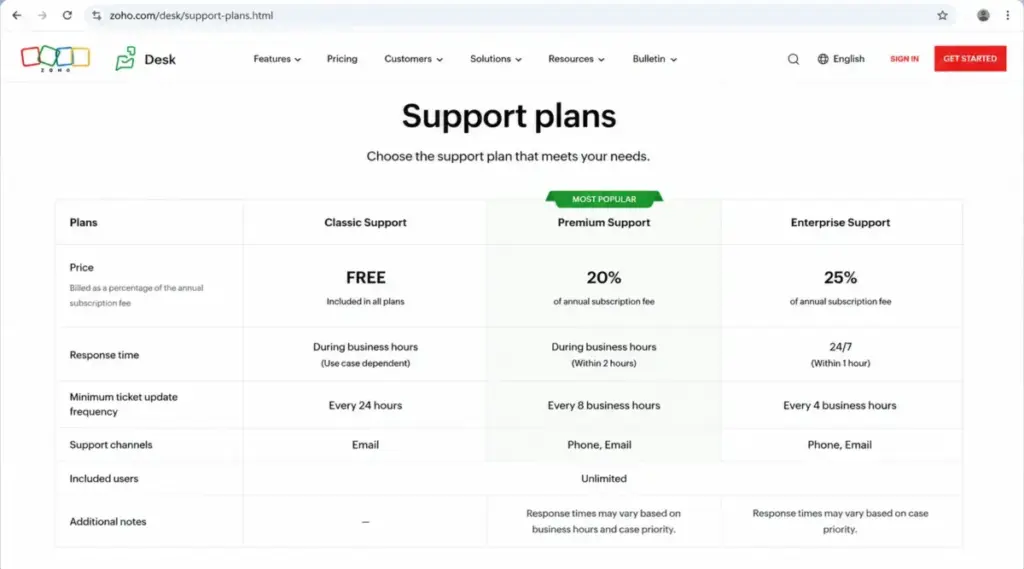
The subscription is the first line item, not the last. These are the costs that turn a $14 sticker into a bigger invoice.
| Add-on or cost | Price | When it hits |
|---|---|---|
| Local taxes | Varies by location | VAT, GST, or sales tax added on top of listed prices |
| Premium Support | 20% of subscription fee | You want 24-hour weekday live chat, toll-free calls, and 3-hour initial response |
| Enterprise Support | 25% of annual fee; min 25 licenses | You want 24/7 support, 1-hour response, and a Technical Account Manager |
| Light agents | Add-on on eligible plans; 50 free on Enterprise | Internal collaborators need to view and comment without full agent seats |
| WhatsApp messaging | Usage-based charges | You run WhatsApp as a support channel |
| Additional social brands | Available on request | You need more X, Facebook, or Instagram brands than your plan includes |
| Department add-ons | Store or quote pricing | You need more departments than your plan allows |
| Third-party apps | Varies by vendor | Zoho Flow, Zapier, telephony, or SMS providers with their own fees |
| On-Demand Mobile Apps | Requirement-based | You want custom-built mobile apps using Zoho Desk features |
Budget warning: the two costs that most often blindside finance are the support overlays and WhatsApp usage. On a $24,000/year Enterprise base, Enterprise Support alone adds roughly $6,000/year, and WhatsApp charges scale with conversation volume rather than seat count.
On light agents, the exact current US dollar add-on price was not reliably exposed in Zoho’s accessible pricing text during research. Enterprise includes 50 free light agents, and on lower plans they are paid add-on access, so confirm the current per-seat add-on price in Zoho’s store or a sales quote before you model collaboration costs.
Monthly vs Annual Billing
Annual billing is meaningfully cheaper on every paid tier, and the discount is baked into the per-user rate rather than offered as a separate coupon. Express runs $7 annually versus $9 monthly, Standard $14 versus $20, Professional $23 versus $35, and Enterprise $40 versus $50.
The savings compound with team size. At 10 agents, annual Standard saves $720/year over monthly, and at 25 agents, annual Professional saves $3,600/year.
The tradeoff is commitment. Annual billing locks you in for the term, so a team that expects to churn agents, pivot tools, or test Zoho Desk should weigh the monthly premium as the price of flexibility.
Recommendation: commit annually once you have validated the tool with a real team for a billing cycle. Pay monthly only during evaluation or when headcount is genuinely uncertain.
Which Zoho Desk Plan Should You Avoid?
Avoid Express if your team is growing. The 5-user cap is the reason. Express is the right call only for a stable team of 5 or fewer, and the moment you plan a sixth hire, Standard is the correct starting plan, because migrating configuration off Express later is wasted setup effort.
There is an exception. A 5-agent team with a genuinely fixed headcount and simple email-and-social support gets real value from Express, and paying for Standard’s unlimited seats it will never use is its own kind of overspend.
Avoid Enterprise if you do not use governance or advanced AI. At $40/user/month annual, Enterprise’s premium over Professional is $17/user/month, which is $850/month at 50 agents. If you are not using multi-brand, sandbox, custom modules, field encryption, or advanced AI, that premium buys shelf-ware.
Zoho Desk Pricing vs Zendesk, Freshdesk, Help Scout, and Intercom
Zoho Desk is priced below its obvious competitors at equivalent tiers, but plan-equivalence is where buyers get misled. Comparing Zoho’s $14 Standard to a Suite tier in the Zendesk pricing lineup is not a like-for-like match, so read the scope, not just the number.
All competitor prices were checked July 3, 2026.
| Product | Entry tier | Practical tier | Notes on scope |
|---|---|---|---|
| Zoho Desk | Express $7 | Standard $14 / Professional $23 | Unlimited users from Standard up |
| Zendesk | Support Team $19 | Suite Team $55; Suite Professional $115 | Support-only differs sharply from full Suite |
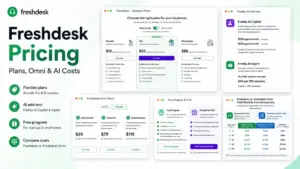
| Freshdesk | Growth $19 | Pro $55; Enterprise $89 | Support Desk vs Freshdesk Omni differ in scope |
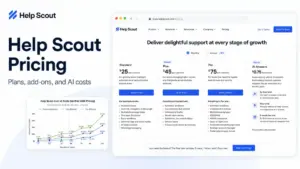
| Help Scout | Standard $25 | Plus $45 | Simpler, inbox-first; fewer admin controls |
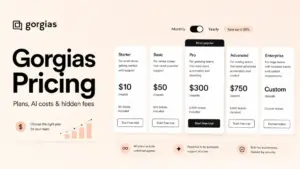
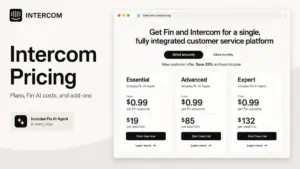
| Intercom | Essential $29 list ($19 seat promo) | Seat cost plus Fin AI from $0.99 per outcome | AI billed per resolution, not per seat |
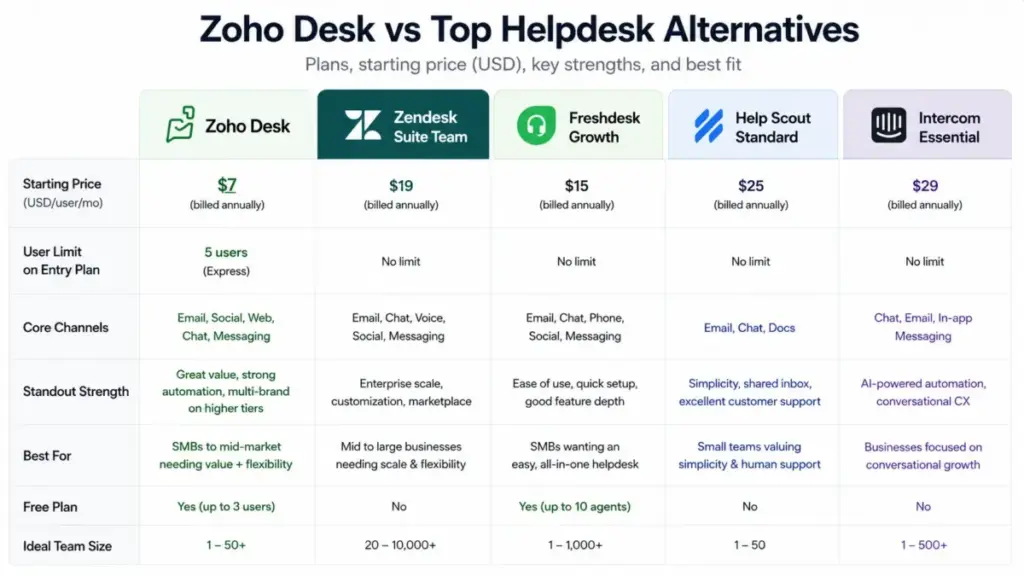
Competitive takeaway: on raw seat price, Zoho Desk is the cheaper platform at both entry and practical tiers, and its unlimited-user policy from Standard up is a real advantage over per-agent competitors. The caveat is that Zendesk Suite and Freshdesk Omni bundle capabilities Zoho splits across Professional and Enterprise, and as our Intercom review details, its Fin AI adds usage-based cost that a per-seat comparison hides.
If Zoho Desk’s admin depth is more than you need, Help Scout is the simpler inbox-first option, and Freshdesk sits close on price with a comparable feature spread. If you outgrow Zoho’s configuration model, Zendesk is the heavier platform buyers tend to move toward.
Is Zoho Desk Worth the Price?
For 6-to-25-agent support teams that want unlimited seats, real reporting, and messaging without Zendesk-level per-agent costs, Zoho Desk is worth it on Standard or Professional. The unlimited-user policy alone changes the math for teams that would pay per agent elsewhere.
Worth it if: you run 6 to 50 agents, value low per-seat cost, use the Zoho ecosystem, and can absorb a moderate setup effort. Reviewer patterns on G2, Capterra, and TrustRadius consistently praise ticket management, automation, and integrations at this price point.
Not worth it if: you need the simplest possible out-of-box UI, highly polished reporting with no configuration, or fixed all-in messaging costs. Reviewer patterns flag a learning curve, setup complexity, a UI some users call clunky, and reporting or customization limits, with TrustRadius reviewers also noting occasional slow performance and rigid customization.
If the setup complexity is a dealbreaker, Help Scout is the cleaner starting point, and our Freshdesk review covers the closest priced alternative with a comparable feature spread.
If you need heavier enterprise reporting and deeper workflow depth, the platform in our Zendesk review is the more polished, more expensive place teams tend to move toward.
Who Should Not Choose Zoho Desk
Price is only one side of the decision. There are three buyer cohorts where the low seat cost does not offset the tradeoffs, and reviewer patterns are consistent enough to name them.
Teams that need the simplest possible UI on day one. Multiple G2 and TrustRadius reviewers describe a learning curve and setup complexity, and some call the interface clunky. A 3-agent team that wants to be live in an afternoon with no configuration will feel that friction, and the inbox-first model in our Help Scout review is the gentler on-ramp.
Teams whose reporting needs are fixed and heavy from the start. Capterra and TrustRadius reviewers repeatedly flag reporting and customization limits. If board-level support dashboards are a launch requirement rather than a later nice-to-have, budget for Professional or Enterprise dashboards, or look at a platform built reporting-first.
Teams that need a fixed, predictable all-in messaging bill. WhatsApp usage charges and social brand add-ons make the monthly total variable for message-heavy desks. If finance needs a flat number every month, the usage-based channels are a budgeting headache, not a feature.
None of these are dealbreakers for the core 6-to-50-agent buyer. They are the specific cases where the cheapest sticker price hides a cost you feel later, in setup time, reporting gaps, or a variable invoice.
How to Avoid Overpaying for Zoho Desk
- Start on Standard if you are growing. Skipping Express avoids paying to configure a plan you will abandon at agent number six.
- Commit annually once validated. Annual billing saves $720/year at 10 agents on Standard and $3,600/year at 25 agents on Professional, so lock in after one validated billing cycle.
- Right-size on feature gates, not fear. Do not buy Professional for “more automation” unless you actually need Blueprint, departments, or the higher workflow limits. The gap is $2,700/year at 25 agents.
- Model API credits before integrating. If you run BI or CRM syncs, size the plan on the credit formula, because throttling under load is the failure mode, not a hard per-request cap.
- Budget support overlays separately. Premium Support (20%) and Enterprise Support (25%) are real recurring costs, so decide whether business-critical support justifies them before you sign.
- Confirm WhatsApp and social brand costs. WhatsApp is usage-based and extra social brands are on request, so message-heavy or multi-brand teams should get those numbers before budgeting.
- Use Enterprise’s 50 light agents deliberately. If you have many internal collaborators, the included light agents can offset Enterprise’s premium; if you do not, that inclusion is not a reason to upgrade.
FAQ
How much does Zoho Desk cost?
Paid plans run from $7/user/month (Express, annual) to $40/user/month (Enterprise, annual), with Standard at $14, Professional at $23, and a Free plan for up to 3 users. Prices checked July 3, 2026.
Is Zoho Desk free?
Yes, for up to 3 users. The Free plan handles basic email ticketing but leaves out most messaging channels, deeper automation, and knowledge base depth, so it suits founders and micro teams rather than a scaling support desk.
Does Zoho Desk charge per agent?
Yes, pricing is per user per month. Standard and above allow unlimited users, while Free caps at 3 and Express caps at 5.
What is the difference between Standard and Professional?
Professional ($23 vs $14 annual) adds multi-department management, Blueprint process automation, time tracking, round-robin, higher automation limits, and unlimited custom reports and dashboards. Teams usually upgrade for Blueprint or departments, not for reporting alone.
Does Zoho Desk include live chat?
Business Messaging and instant messaging come in from Standard, but SalesIQ-powered website live chat is a separate integration. Do not assume “messaging” and “live chat” are the same bundled feature.
What are Zoho Desk's hidden costs?
The main ones are Premium Support (20%) and Enterprise Support (25%) add-ons, WhatsApp usage-based charges, light agents on lower plans, extra social brands on request, department add-ons, and local taxes on top of listed prices.
Does Zoho Desk offer a free trial?
Yes, and reviewer and official sources indicate the trial does not require credit card details up front.
Is Zoho Desk cheaper than Zendesk?
On seat price, yes: Zoho Desk’s Standard is $14 and Professional is $23, while Zendesk Support Team starts at $19 and Suite Team is $55. The comparison is only fair when you match feature scope, because Zendesk Suite bundles capabilities Zoho splits across tiers.
Which Zoho Desk plan is best for a small support team?
Standard at $14/user/month annual for most 6-to-20-agent teams, because it removes the user cap and adds messaging, knowledge base, and reporting. A stable team of 5 or fewer can use Express at $7.
Will taxes increase my invoice?
Yes, local taxes such as VAT, GST, or sales tax are charged in addition to the listed prices and vary by location.