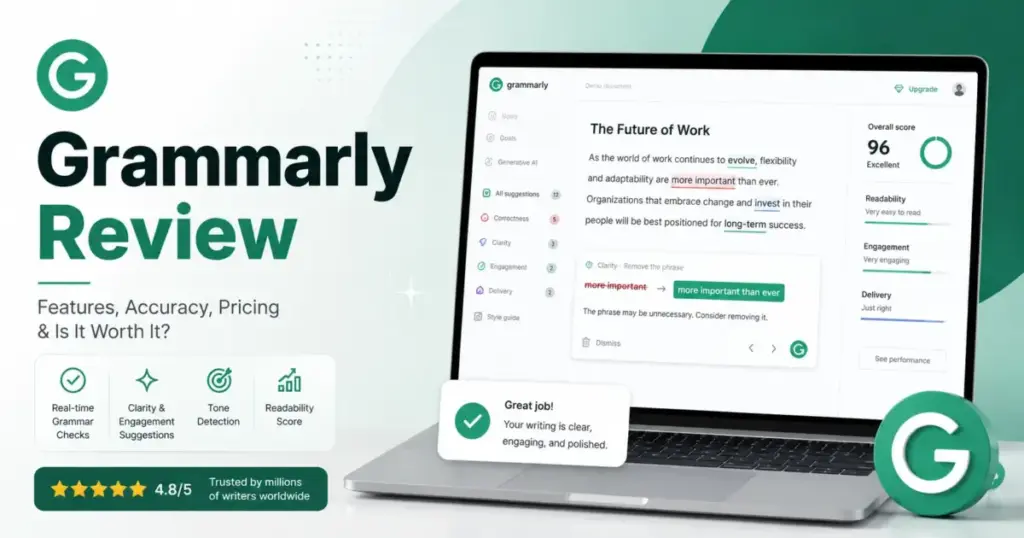
Grammarly lists “AI writing assistance” on every surface it touches. The browser extension, the desktop app, Gmail, Google Docs, Slack, Microsoft Word, and a mobile keyboard all carry the brand. The free plan catches typos. The Pro plan at $30/member/month (as of May 2026) adds full-sentence rewrites, plagiarism detection, AI detection, and up to 2,000 AI prompts per member per month. That distinction between Free and Pro is where the real buying decision lives, and most Grammarly reviews skip it.
The 2026 Grammarly review boils down to three questions. First, does Free give you enough? Second, does Pro justify the cost for your writing workflow? Third, if you run a team that handles confidential documents, do the privacy defaults and Enterprise gates match your compliance bar? I mapped Grammarly’s plans against official documentation, SERP competitor reviews, and third-party review sentiment from G2, Capterra, and TrustRadius to answer all three. The plan-gate caveat most reviews miss comes in the privacy section below.
Grammarly is part of the broader best AI writing tools category, but it sits in a unique position: less a content generator, more a writing polish layer that works inside the apps you already use.
| Category | Verdict |
|---|---|
| Best for | US-based professionals, marketers, and small content teams writing daily in Gmail, Docs, Word, and Slack |
| Not ideal for | Creative writers preserving distinctive prose, technical writers in LaTeX/Markdown/PDF, or teams needing guaranteed AI-authorship proof |
| Starting price | $0/month (Free) |
| Practical plan | Pro at$12/member/month billed annually ($144/member/year) |
| Free plan | Yes, with grammar, tone visibility, and 100 AI prompts/month |
| Setup difficulty | Low for individuals, Medium for team rollout, High for Enterprise IT |
| Main strength | Works across every writing surface without switching tools |
| Main limitation | Document upload capped at 100,000 characters / 4 MB; no PDF, LaTeX, or Markdown support in the Grammarly Editor |
| Best alternative | ProWritingAid for long-form and style-preserving editing |
What this means: If you write in a browser, Google Docs, or Microsoft Word and want grammar corrections without opening a separate app, Grammarly Free does the job. Pro earns its price for anyone who writes daily and needs rewrites, plagiarism checks, and AI detection. Enterprise is the path for IT teams needing SAML, SCIM, DLP, and data governance controls.
How Daniel Rivera Reviewed Grammarly
This Grammarly review is built on official product documentation, the Grammarly pricing page, official support articles on training settings and AI detection, and third-party review sentiment from G2, Capterra, and TrustRadius. I also audited the top 10 SERP results for “Grammarly Review” to identify what existing reviews get wrong: most still use the old “Premium” and “Business” terminology, understate the AI training defaults, and repeat AI detector accuracy claims without citing Grammarly’s own caveats.
Testing level: third-party validated. I did not test Grammarly hands-on for this review. All feature claims, pricing figures, and limitation data are sourced from official Grammarly pages and verified third-party platforms. Pricing was checked on May 29, 2026.
Review limitation: This review does not include SaaSZap-conducted accuracy benchmarks for grammar correction or AI detection. Performance claims from third-party reviews are attributed as sentiment, not confirmed as fact.
The 3 Problems Grammarly Solves
Everyday Writing Errors Across Every App
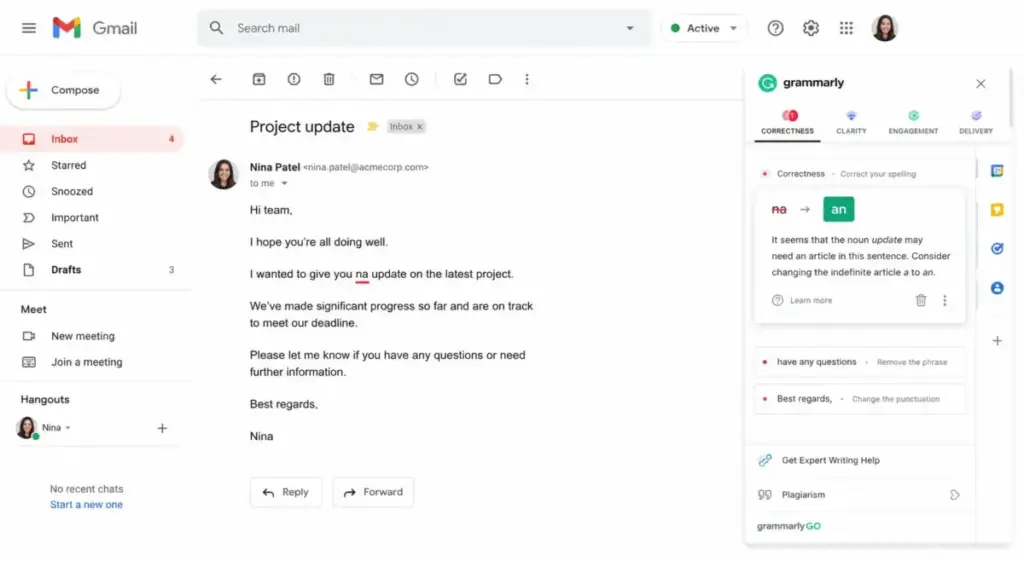
Grammarly catches grammar, spelling, and punctuation mistakes in real time. The corrections appear inside the writing surface you are already using: Chrome, Firefox, Edge, Safari, the desktop app, Google Docs, Gmail, Word, Outlook, Slack, and the mobile keyboard. You do not copy text into a separate editor. The corrections come to you.
The free plan covers mistake detection and tone visibility. For a solo professional sending 20 emails a day, that is often enough.
G2 review patterns confirm this is Grammarly’s strongest use case. Users consistently praise the browser-based correction speed and the confidence it gives non-native English speakers. The product works where the writing happens, and that is genuinely rare for a grammar checker and AI writing assistant.
Tone and Clarity Polish for Professional Communication
Pro unlocks tone adjustment, full-sentence rewrites, clarity suggestions, fluency improvements, and inclusive language checks. For a 5-person marketing team drafting client-facing emails and social copy, these features turn rough drafts into polished output without a separate editing pass.
Grammarly Pro also includes citation consistency checks and 2,000 AI prompts per member per month. Those prompts power the generative rewrite and composition features. On the Free plan, you get 100 AI prompts per month, which is enough for occasional rewrites but runs dry fast for daily writers.
Capterra review sentiment shows users value tone control and the ability to adjust formality on the fly. The friction point: some users dislike that deeper writing fixes require upgrading to Pro.
Brand Consistency and Team Governance for Content Teams
Pro includes 1 style guide, 1 brand tone, 2 user groups, snippets, Knowledge Share, and Team Analytics. For a 10-person content team, this means every writer follows the same voice rules and reuses approved copy blocks.
Enterprise expands governance with unlimited style guides, unlimited brand tones, unlimited user groups, custom roles, managed mode, application and domain controls, and an Effective Communication Score. Enterprise is delivered through Superhuman Go and includes dedicated support.
The gap between Pro and Enterprise governance is wide. Pro gives you one style guide. Enterprise gives you unlimited. If your organization runs multiple brands or divisions with different voice guidelines, Pro’s single style guide is a ceiling you will hit within weeks.
The 2 Problems Grammarly Creates
Voice Flattening and Over-Reliance on AI Rewrites
Grammarly’s rewrite suggestions optimize for clarity and conciseness. That is useful for business email. It is a liability for creative writing, opinion pieces, and any content where a distinctive voice is the product.
G2 and Capterra review patterns both surface this concern: suggestions can be overly aggressive, inconsistent, or voice-flattening. The tool does not know your editorial intent. It optimizes for readability metrics, not for style preservation.
Here is the practical workflow I recommend based on third-party user patterns: accept correctness fixes (grammar, spelling, punctuation) automatically. Review rewrite and tone suggestions manually. Reject any suggestion that neutralizes a deliberate stylistic choice. Never auto-apply all changes on a creative or opinion piece.
There is a secondary risk. Grammarly’s own support documentation warns that rewrites from Grammarly agents can raise the AI detection score of your text. If you use the AI rewrite features and then run the same text through Grammarly’s AI detector, it may flag your own edits as AI-generated. For students submitting essays, this is not a minor caveat.
AI Training Defaults and Privacy Controls That Vary by Account Type
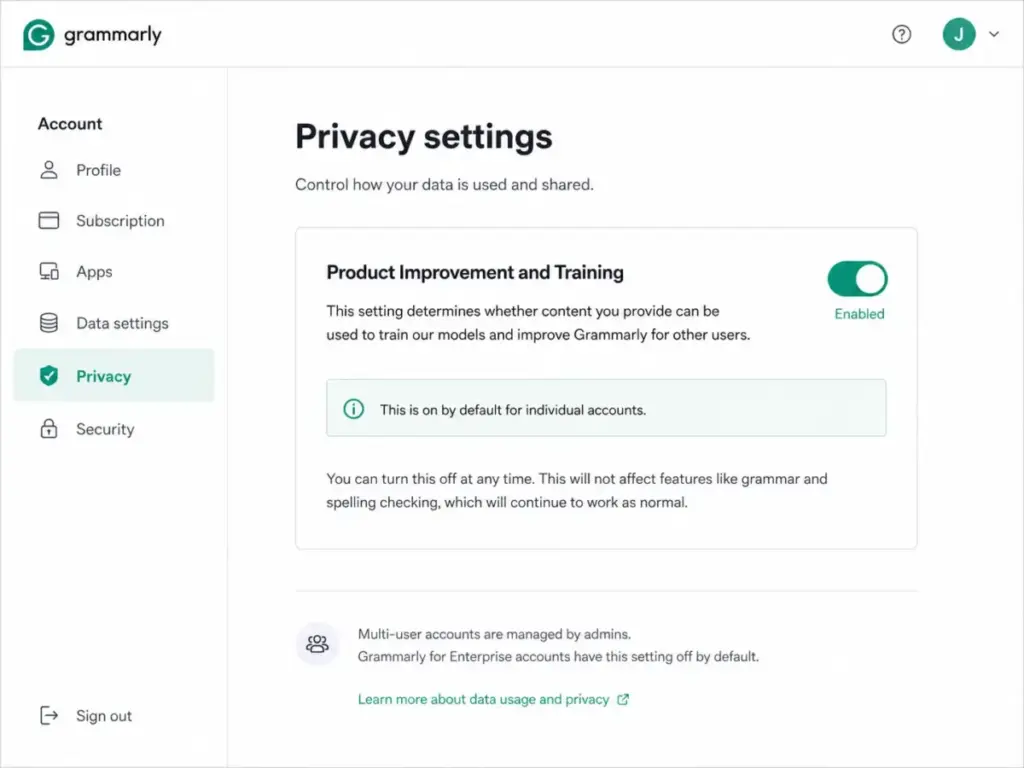
Individual Free, Premium (App Store), and single-user Pro accounts have Product Improvement and Training turned on by default unless the user opts out. That means Grammarly may use your writing data to improve its models unless you change the setting.
Sales-led Enterprise and Education accounts default to Training off. Website-purchased multi-user Pro accounts initially default to Training on unless the admin opts out.
Most Grammarly reviews say “Grammarly is secure” and stop there. The real answer depends on your account type and whether your admin has reviewed the training toggle. If your team writes confidential documents, SOC 2 Type 2 and ISO 27001 compliance are meaningful, but they do not override the training default.
Data training settings to check before using Grammarly at work:
- Log into your Grammarly account settings
- Go to the Privacy section
- Check whether “Product Improvement” and “Training” are toggled on or off
- If you are on a multi-user Pro account, the admin controls these settings
- If you are on an individual account, opt out manually if you write sensitive content
Enterprise customers get additional controls: BYOK encryption, DLP, Audit Logs API, confidential mode, session timeout, and group-level security controls. These are sales-led features, not self-serve.
Grammarly Pricing and Plans in 2026
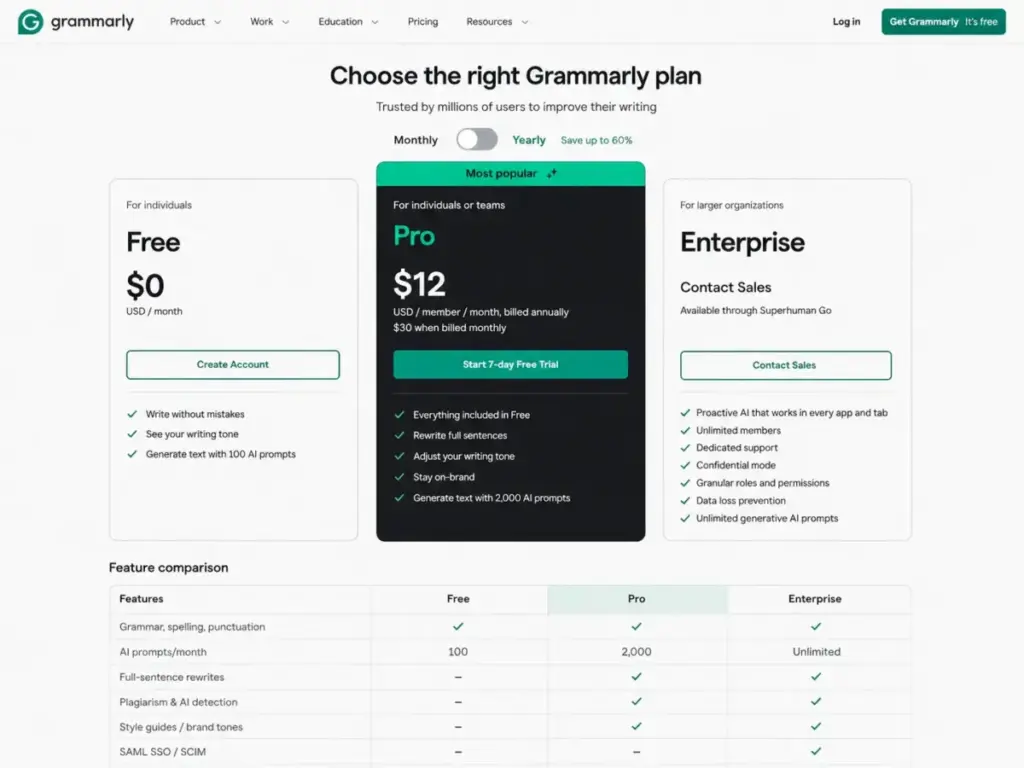
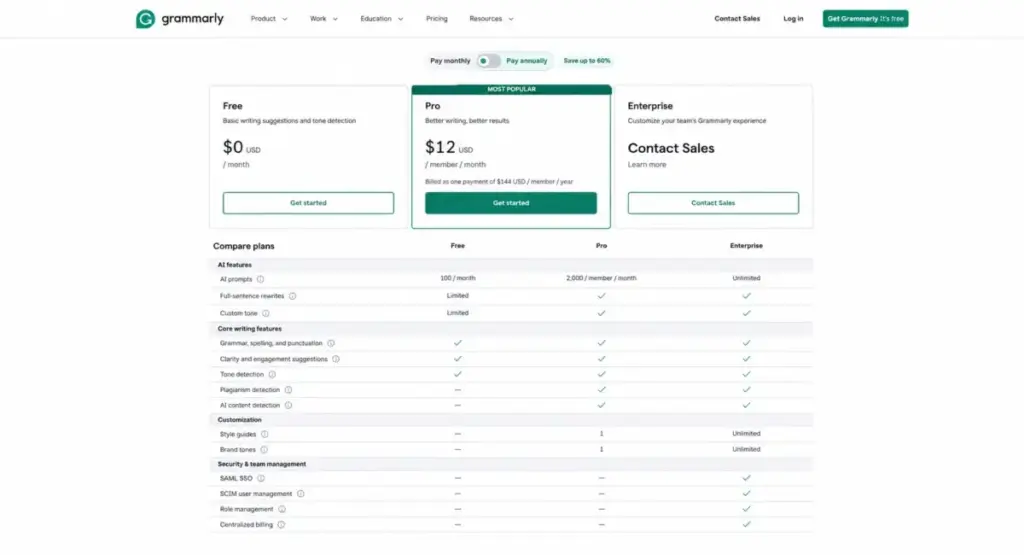
Grammarly’s official pricing page lists three plans (as of May 2026). The naming has changed: official support confirms that Grammarly Pro replaces Grammarly Business. The “Premium” label still appears on App Store and Google Play purchases, but the web-purchased plan for individuals and teams is called Pro.
| Plan | Monthly price | Annual price | AI prompts | Style guides | Brand tones | Support |
|---|---|---|---|---|---|---|
| Free | $0/month | $0/year | 100/month | 0 | 0 | Help center |
| Pro | $30/member/month | $144/member/year ($12/member/month) | 2,000/member/month | 1 | 1 | Priority |
| Enterprise | Custom (contact sales) | Custom (contact sales) | Unlimited | Unlimited | Unlimited | Dedicated |
What this means: The annual Pro plan at $12/member/month is the price most teams should evaluate. Monthly billing at $30/member/month is 2.5x more expensive per month. For a 10-person content team on annual Pro, the bill is $1,440/year ($120/month). On monthly billing, the same team pays $3,600/year ($300/month). That is a $2,160 difference for the same features.
Pro plans are billed as one payment for all seats. Additional seats are prorated. Grammarly does not offer lifetime plans, gift subscriptions, or one-time purchases.
Hidden cost note: Taxes may apply. App Store or Google Play “Premium” subscriptions are separate from web-purchased Pro and do not include team features or admin controls. If you subscribed through the App Store, you are not on Pro. You do not get style guides, brand tones, user groups, or analytics.
2026 naming clarification: If you see “Grammarly Business” in older reviews, that plan has been replaced by Pro. Enterprise is the only plan above Pro, and it requires contacting sales.
Feature Gates: What Each Plan Gets You
Daniel Rivera’s plan-gate mapping for Grammarly shows clear tiers. Free handles grammar. Pro handles writing quality and light team governance. Enterprise handles security and compliance.
| Feature | Free | Pro | Enterprise |
|---|---|---|---|
| Grammar, spelling, punctuation | Yes | Yes | Yes |
| Tone visibility | Yes | Yes | Yes |
| AI prompts/month | 100 | 2,000/member | Unlimited |
| Full-sentence rewrites | No | Yes | Yes |
| Tone adjustment | No | Yes | Yes |
| Fluency suggestions | No | Yes | Yes |
| Inclusive language | No | Yes | Yes |
| Citation consistency | No | Yes | Yes |
| Plagiarism detection | No | Yes | Yes |
| AI detection | No | Yes | Yes |
| Style guides | 0 | 1 | Unlimited |
| Brand tones | 0 | 1 | Unlimited |
| User groups | 0 | 2 | Unlimited |
| Knowledge Share | No | Yes | Yes |
| Snippets | No | Yes | Yes |
| Team Analytics | No | Yes | Yes (+ individual analytics) |
| SAML SSO | No | No | Yes |
| SCIM provisioning | No | No | Yes |
| Managed mode | No | No | Yes |
| DLP | No | No | Yes |
| BYOK encryption | No | No | Yes |
| Audit Logs API | No | No | Yes |
| Confidential mode | No | No | Yes |
| Custom roles | No | No | Yes |
| Application/domain controls | No | No | Yes |
| Support | Help center | Priority | Dedicated |
| Max seats | N/A | 149 | Unlimited |
What this means: The most common upgrade trigger from Free to Pro is needing full-sentence rewrites or plagiarism detection. Both are locked behind Pro. AI detection, which students and educators search for frequently, is also Pro-only. Enterprise gates are security-driven: if IT requires SAML SSO or DLP, there is no workaround on Pro.
Pro caps at 149 seats. Teams larger than 149 must go Enterprise. That is a hard gate most reviews do not mention.
Key Features with Plan Gates
Grammar, Spelling, and Punctuation Correction
Available on all plans, including Free. Grammarly catches errors as you type across browser extensions, desktop apps, Google Docs, Microsoft Word, Gmail, Outlook, Slack, and the mobile keyboard. The correction engine covers US English (the mobile keyboard’s autocorrect and predictions are English-only as of May 2026).
For a freelance writer producing 3,000 words per day, this is the feature that justifies installing Grammarly even on the Free plan. The writing surface coverage is broader than any competitor in this category.
Full-Sentence Rewrites and Clarity Suggestions
Pro only. Grammarly rewrites entire sentences for clarity, conciseness, and tone. The generative AI behind these rewrites consumes AI prompt credits. Each rewrite or composition request deducts from the monthly prompt allocation.
For a 3-person customer support team drafting responses in Zendesk or Salesforce, the rewrite feature cuts editing time. The caveat: over-relying on rewrites can flatten your team’s voice and, per Grammarly’s own documentation, raise the AI detection score of the resulting text.
Plagiarism Detection
Pro only. Grammarly scans text against web sources and academic databases. For a marketer repurposing content across channels or a student checking an essay before submission, plagiarism detection adds a safety layer.
The limitation: Grammarly’s plagiarism checker works on text uploaded or written in the Grammarly Editor. Document uploads are capped at 100,000 characters and 4 MB. PDF, LaTeX, and Markdown files are not supported in the Editor. If your workflow depends on those formats, Grammarly plagiarism detection is not a viable primary tool.
AI Detection
Pro only. Grammarly’s AI detector scans text and returns a score estimating the likelihood of AI authorship. Grammarly’s own documentation states that no AI detector is definitive and that the score should be used as one data point, not as proof.
This is the caveat most SERP reviews either overstate or ignore. Grammarly says the AI detection score is an averaged estimate. Rewrites generated by Grammarly’s own AI agents can raise the detection score. A student who uses Grammarly Pro to rewrite essay sentences and then checks the same text with Grammarly’s AI detector may get a higher AI-generated score on their own (partially AI-rewritten) text.
For academic use, the practical rule is: follow your school’s AI policy. Grammarly’s AI detection is a gut check, not a legal defense.
Style Guides and Brand Tones
Pro includes 1 style guide and 1 brand tone. Enterprise includes unlimited of both. Style guides enforce terminology, capitalization, and phrasing rules across all writers on the account. Brand tones set the voice and formality level Grammarly’s suggestions follow.
For a 15-person marketing department managing two brand voices, Pro’s single brand tone is insufficient. That team needs Enterprise or a workaround (creating separate Pro accounts per brand, which fragments analytics and governance).
Ease of Use and Setup
Grammarly is one of the easiest writing tools to start using. Install the browser extension, create an account, and corrections appear immediately. There is no onboarding wizard, no mandatory call, no configuration step for individual users.
Setup difficulty increases for teams. A Pro admin needs to configure the style guide, brand tone, user groups, analytics, training settings, and billing. That is a half-day task for a 10-person team, not a 5-minute install.
Enterprise setup is a different category. SAML SSO, SCIM provisioning, managed mode, application and domain controls, DLP, BYOK encryption, and Audit Logs API all require IT and security team involvement. Grammarly provides dedicated support for Enterprise rollouts, but the deployment timeline depends on your IT security review process.
Mobile experience: The iOS and Android keyboard provides real-time writing feedback across apps. The App Store listing notes that multilingual suggestions and rewrites are available, but autocorrect and predictions in the Grammarly keyboard are currently English-only.
Integrations and Ecosystem
Grammarly works across more writing surfaces than any direct competitor. The official integration list includes: browser extensions (Chrome, Firefox, Edge, Safari), desktop apps (Windows, Mac), Google Docs, Gmail, Microsoft Word, Microsoft Outlook, Slack, Salesforce, Microsoft PowerPoint, LinkedIn, Microsoft Teams, Google Sheets, Zendesk, Jira, and the mobile keyboard.
For teams using Slack for team communication or Google Workspace for document collaboration, Grammarly adds a writing quality layer without changing workflows.
If your team also evaluates AI tools for content creation, Grammarly fits as the grammar and polish layer alongside a generative tool.
API and automation: Grammarly offers enterprise-oriented APIs including a Writing Score API (beta), Analytics API, License Management API, AI Detection API (beta), and Plagiarism Detection API (beta). Public API pricing is not listed. API access should be treated as Enterprise and contact-sales unless your contract explicitly includes API terms. Do not assume self-serve API access based on marketing language.
Grammarly AI, Automation, and Reporting
Grammarly’s AI features span three tiers. Free gets 100 AI prompts/month for basic composition help. Pro gets 2,000 AI prompts/member/month for rewrites, tone shifts, and generative drafts. Enterprise gets unlimited prompts.
The generative AI features power Grammarly’s agents, which can draft, rewrite, and compose text based on context. Knowledge Share lets Pro and Enterprise teams feed company-specific information into Grammarly’s suggestions. Snippets store reusable text blocks.
Team Analytics on Pro shows writing activity, suggestion acceptance rates, and team-level trends. Enterprise adds individual analytics, Effective Communication Score, ROI reports, and cost-center visibility.
The hype test for Grammarly’s AI: it is not a content generation platform like Jasper AI review. Tools like Copy.ai and Jasper generate content from prompts. Grammarly’s AI works best as a polish layer on text you have already drafted. If you expect it to generate blog posts from scratch, it is the wrong tool. If you expect it to clean up a rough email in 10 seconds, it delivers.
Security, Support, and Admin Controls
Grammarly holds SOC 2 Type 2, SOC 3, ISO/IEC 27001:2022, ISO/IEC 27017:2015, ISO/IEC 27018:2019, ISO/IEC 27701:2019, and ISO/IEC 42001:2023 certifications. Data is encrypted with TLS 1.2 in transit and AES-256 at rest in AWS. Products like ChatGPT review analysis and other AI writing tools face similar data governance questions, but Grammarly’s security certification depth is above average for the category.
Enterprise adds SAML SSO, SCIM, managed mode, invite and domain capture, custom roles, application and domain controls, client control, confidential mode, DLP, Audit Logs API, BYOK encryption, session timeout, and group-level security controls.
Support tiers:
| Plan | Support level |
|---|---|
| Free | Help center |
| Pro | Priority support |
| Enterprise | Dedicated support |
What this means: Free users get self-serve help only. Pro adds priority response times. Enterprise gets a dedicated support contact, which matters for organizations deploying across hundreds of users.
For a privacy-sensitive 50-person legal team, the question is not whether Grammarly has certifications (it does). The question is whether your admin has disabled the training toggle and whether your plan includes DLP and confidential mode. Only Enterprise qualifies.
Grammarly Limitations
Grammarly is strong for everyday workplace writing, but it has limits that matter for specific use cases.
- Document upload cap: The Grammarly Editor accepts uploads up to 100,000 characters and 4 MB. Longer documents must be split. For a technical writer working on a 200-page manual, this is a dealbreaker for the Editor (though the browser extension works in Google Docs without this limit).
- No PDF, LaTeX, or Markdown support in the Editor: Academic and technical writers who work in these formats cannot use the Grammarly Editor directly. The browser extension works in some web-based editors, but the native Editor does not parse these file types.
- AI detector is not definitive: Grammarly’s own documentation warns that no AI detector can guarantee accuracy. The score is an averaged estimate. Using Grammarly’s own rewrite features can raise the AI detection score. Relying on Grammarly’s AI detector as sole proof of human authorship is risky in academic and professional contexts.
- Training defaults vary by account type: Individual and self-serve Pro accounts default to Training on. Enterprise and sales-led accounts default to Training off. This inconsistency means a casual user may unknowingly contribute writing data to model training.
- Pro style guide limit: Pro includes only 1 style guide and 1 brand tone. Multi-brand organizations hit this ceiling fast. The only path to unlimited style guides is Enterprise (custom pricing, sales-led).
- Pro seat cap at 149: Teams larger than 149 members must move to Enterprise. There is no option to add more Pro seats beyond this limit.
| Limitation | Who it affects | Workaround |
|---|---|---|
| 100,000-char / 4 MB upload cap | Technical writers, academic researchers | Use the browser extension in Google Docs; split documents |
| No PDF/LaTeX/Markdown in Editor | Scientific, academic, and technical writers | Use the browser extension or a separate tool |
| AI detector not definitive | Students, educators, content compliance teams | Use as a gut check, not as proof; follow institutional policy |
| Training default on (individual accounts) | Privacy-sensitive professionals | Manually opt out in account settings |
| 1 style guide on Pro | Multi-brand marketing teams | Upgrade to Enterprise or segment by Pro account |
| 149-seat Pro cap | Large organizations | Move to Enterprise |
What this means: Grammarly’s limitations are most painful for academic, technical, and multi-brand teams. For a solo marketer writing emails and social posts, none of these limits are likely to surface.
Who Wins and Who Loses with Grammarly
Use Grammarly Free If
- You write fewer than 5 emails per day and need basic grammar and spelling checks
- You are a student who only needs correctness, not rewrites or plagiarism detection
- You want to test Grammarly before committing to Pro
- You use the best AI chatbots for drafting and only need Grammarly for final polish
Upgrade to Grammarly Pro If
- You write daily and need full-sentence rewrites, tone adjustment, and clarity suggestions
- You need plagiarism detection for content repurposing or academic checks
- You manage a content team under 149 members and need 1 style guide, 1 brand tone, snippets, and Team Analytics
- Your team writes in English across Gmail, Docs, Word, Slack, and Salesforce
- You produce client-facing copy and need priority support
10-member team cost (Pro annual): $1,440/year ($120/month).
Consider Grammarly Enterprise If
- IT requires SAML SSO, SCIM, or DLP before approving any writing tool
- Your organization handles confidential or regulated documents and needs BYOK encryption, confidential mode, and Audit Logs API
- You manage multiple brands and need unlimited style guides and brand tones
- Your team exceeds 149 members
- You need dedicated support and managed deployment through Superhuman Go
Skip Grammarly (or Use It as a Secondary Checker) If
- You are a creative writer who needs to preserve a highly distinctive prose style. Grammarly’s suggestions optimize for clarity, not for literary voice.
- You are a technical or scientific writer working primarily in PDF, LaTeX, or Markdown. Grammarly does not support these formats in its Editor.
- You need guaranteed AI-authorship proof for compliance or academic integrity. Grammarly’s AI detector is not definitive, and its own rewrites can raise AI detection scores.
- You edit documents longer than 100,000 characters regularly. The upload limit in the Grammarly Editor will force you to split files.
Better Alternatives for the Losers
ProWritingAid: Best for Long-Form and Style-Preserving Writing
ProWritingAid is the stronger pick for writers who need deep style analysis without voice flattening. It supports longer documents and offers more granular control over writing style suggestions. For novelists, bloggers, and editors working on 10,000+ word pieces, ProWritingAid handles the workflow Grammarly’s Editor limits make difficult.
Choose ProWritingAid if: You write long-form content and need style reports that respect your voice. For more AI writing options, see the Copy.ai review for a generative AI comparison.
LanguageTool: Best for Multilingual Teams
LanguageTool supports 30+ languages natively. Grammarly’s core engine is English-first (the mobile keyboard’s autocorrect and predictions are English-only). For a European team writing in German, French, and English, LanguageTool covers more ground.
Choose LanguageTool if: Your team writes in multiple languages and needs grammar checking beyond English.
Hemingway Editor: Best for Readability-Focused Editing
Hemingway focuses on sentence length, passive voice, and readability grade. It does not rewrite for you. It highlights problems and lets you fix them. For writers who want to improve clarity without AI-generated rewrites, Hemingway is the minimal, voice-preserving alternative. The Writesonic review covers another AI option for teams that want full content generation rather than editing.
Choose Hemingway if: You want readability feedback without AI rewrites or subscription costs.
Paperpal: Best for Academic and Research Writing
Paperpal is built for academic writing. It understands citation formats, research terminology, and journal submission requirements. Grammarly does not handle PDF, LaTeX, or academic-specific grammar patterns in its Editor. Paperpal fills that gap.
Choose Paperpal if: You write academic papers, theses, or journal submissions and need format-specific support.
| Alternative | Best for | Starting price | Strength vs. Grammarly |
|---|---|---|---|
| ProWritingAid | Long-form, style-preserving writing | $10/month (annual) | Deeper style analysis, longer document support |
| LanguageTool | Multilingual teams | Free (premium from $4.99/month) | 30+ language support |
| Hemingway Editor | Readability-focused writers | $19.99 one-time (desktop) | No AI rewrites, voice-preserving |
| Paperpal | Academic and research writing | Free tier available | PDF, LaTeX, citation-aware |
What this means: Grammarly’s alternatives are not better at everything. They are better at specific use cases Grammarly handles poorly: long-form editing, multilingual support, readability analysis, and academic formatting.
Final Verdict: Is Grammarly Worth It in 2026?
Grammarly is worth it for professionals who write daily in English across multiple apps and want grammar, tone, and clarity polish without switching tools. The Free plan is genuinely useful for basic grammar checks. Pro earns its price for writers who need rewrites, plagiarism detection, and light team governance.
Grammarly is not worth it as a standalone tool for academic writers in LaTeX or PDF, creative writers who need voice preservation, or teams that require guaranteed AI-authorship proof. For those use cases, Grammarly works best as a secondary checker, not a primary writing environment.
Daniel Rivera’s recommendation by buyer type:
- Casual writer (fewer than 5 emails/day): Stay on Free. The grammar and tone checks are sufficient.
- Daily professional writer or freelance marketer: Upgrade to Pro (annual billing at $12/member/month). The rewrites, plagiarism detection, and AI detection justify the cost.
- Student submitting academic work: Use Free for grammar. If you use Pro’s AI rewrite features, understand that your school may flag AI-rewritten text. Follow your institution’s policy.
- Content team under 20 members: Pro covers style guides, brand tones, snippets, and Team Analytics. Adequate for a single-brand team.
- Content team managing multiple brands: Pro’s 1 style guide limit is too restrictive. Evaluate Enterprise pricing through sales.
- Enterprise IT with compliance requirements: Enterprise is the only plan with SAML, SCIM, DLP, BYOK, confidential mode, and dedicated support. Contact Grammarly sales for custom pricing.
- Technical writer in LaTeX/Markdown/PDF: Use ProWritingAid or Paperpal as your primary tool. Grammarly can supplement via the browser extension, but the Editor does not support these formats.
FAQ
Is Grammarly worth it in 2026?
Yes, if you write daily in English and need grammar, tone, and clarity corrections across apps. Free covers basics. Pro at $12/member/month (annual) adds rewrites, plagiarism detection, AI detection, and team governance. Skip Pro if you only write a few emails per week and Free catches enough errors for your workflow.
How much does Grammarly Pro cost?
Grammarly Pro costs $30/member/month on monthly billing, $60/member/three months on quarterly billing, or $144/member/year ($12/member/month) on annual billing. A 10-member team on annual Pro pays $1,440/year. Pricing verified from the official Grammarly pricing page as of May 2026.
What is the difference between Grammarly Free and Pro?
Free includes grammar, spelling, punctuation checks, tone visibility, and 100 AI prompts per month. Pro adds full-sentence rewrites, tone adjustment, fluency suggestions, inclusive language checks, citation consistency, plagiarism detection, AI detection, 2,000 AI prompts per member per month, 1 style guide, 1 brand tone, 2 user groups, Knowledge Share, snippets, Team Analytics, and priority support.
Is the Grammarly AI detector accurate?
Grammarly’s own documentation states that no AI detector is definitive and that the score should be used as one data point. The detection score is an averaged estimate. Grammarly also warns that rewrites from its own AI agents can raise the AI detection score of your text. Do not use Grammarly’s AI detector as sole proof of human authorship.
Does Grammarly use my writing to train AI?
It depends on your account type. Individual Free, Premium (App Store), and single-user Pro accounts have Product Improvement and Training on by default. Sales-led Enterprise and Education accounts default to Training off. Multi-user Pro accounts purchased through the website initially default on unless the admin opts out. Check your account settings to confirm.
Is Grammarly safe for business documents?
Grammarly holds SOC 2 Type 2, ISO 27001, and multiple ISO certifications. Data is encrypted with TLS 1.2 in transit and AES-256 at rest. For business use, the main risk is the training default: verify that your admin has disabled Product Improvement and Training. Enterprise adds DLP, BYOK encryption, confidential mode, and Audit Logs API for teams with stricter compliance requirements.
Does Grammarly work in Google Docs and Word?
Yes. Grammarly integrates natively with Google Docs (via browser extension) and Microsoft Word (via desktop app and add-in). Corrections, tone suggestions, and rewrites appear inline without leaving the document. The Google Docs integration does not have the 100,000-character upload limit that applies to the Grammarly Editor.
Is Grammarly Business still available?
No. Grammarly official support confirms that Grammarly Pro replaces Grammarly Business. If you see “Grammarly Business” in older reviews, that plan has been renamed and restructured as Pro. Enterprise is the only plan above Pro and requires contacting sales.
Does Grammarly support PDF, LaTeX, or Markdown?
No, not in the Grammarly Editor. The Editor does not support PDF, LaTeX, or Markdown file uploads. The browser extension works inside some web-based editors that handle these formats, but native support is not available. Technical and academic writers who rely on these formats should use a specialized tool like ProWritingAid or Paperpal as their primary editor.
Can Grammarly replace a human editor?
No. Grammarly catches grammar errors, improves clarity, and suggests tone adjustments. It does not understand argument structure, narrative flow, audience-specific nuance, or the difference between a stylistic choice and an error. For a daily email writer, Grammarly reduces the need for a second pair of eyes. For a published article, white paper, or legal document, a human editor remains necessary.