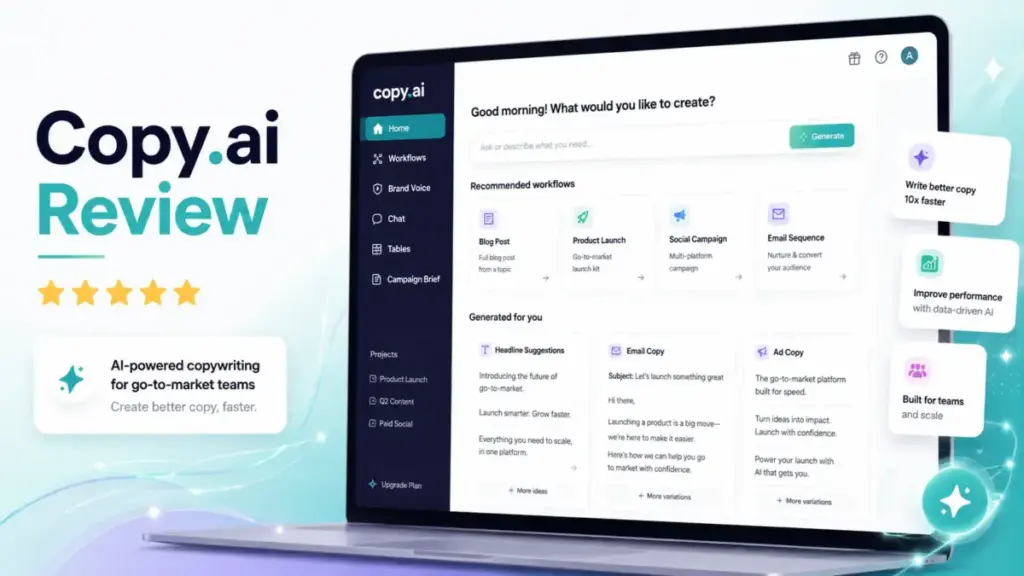
This Copy.ai Review starts with a number that matters more than any feature list: $971. That is the monthly price gap between Copy.ai’s Chat plan and its first workflow-automation tier. If you are evaluating AI tools for content creation for a sales or marketing team, that gap will shape your entire buying decision.
Copy.ai has repositioned itself from an AI copywriting tool into a GTM AI platform built around workflows, agents, and generative AI automation. The product is real. The shift is real. But the pricing structure creates a cliff that most reviews skip over. Below, I break down what Copy.ai actually delivers in 2026, what it costs at every tier, who benefits, and who should look elsewhere.
Quick Verdict on Copy.ai
Copy.ai scores 7.9 out of 10 as a GTM workflow automation platform, not as a general AI writing assistant. The score reflects strong workflow tooling and integration depth, offset by a brutal pricing cliff and unclear workflow-credit economics. Here is how the score breaks down.
| Criterion | Weight | Score |
|---|---|---|
| GTM workflow automation | 25% | 8.8 |
| AI writing quality | 20% | 7.4 |
| Pricing transparency | 20% | 6.6 |
| Integrations and scalability | 15% | 8.4 |
| Ease of adoption | 10% | 7.8 |
| Support and trust signals | 10% | 7.0 |
| Final score | 100% | 7.9/10 |
Daniel Rivera’s Quick Take
Copy.ai is worth serious evaluation if your team runs 3 or more repeatable GTM processes (prospecting sequences, lead enrichment, content repurposing) and can commit to $1,000/month or more. It is not worth it if you need a cheaper AI writing assistant, a dedicated SEO content engine, or a tool for solo blogging. The $29/month Chat plan is a useful entry point, but it is a different product from the workflow tiers.
Best For
- GTM teams automating sales outreach, lead processing, and CRM enrichment
- Marketing operations teams building repeatable content workflows
- RevOps teams deploying AI across 75 or more seats with governance needs
Not Best For
- Solo bloggers or freelance writers
- SEO content teams that need optimization and SERP analysis
- Teams with budgets between $30 and $999/month that need workflow automation
- Buyers that want predictable per-seat pricing without credit variables
What Is Copy.ai?
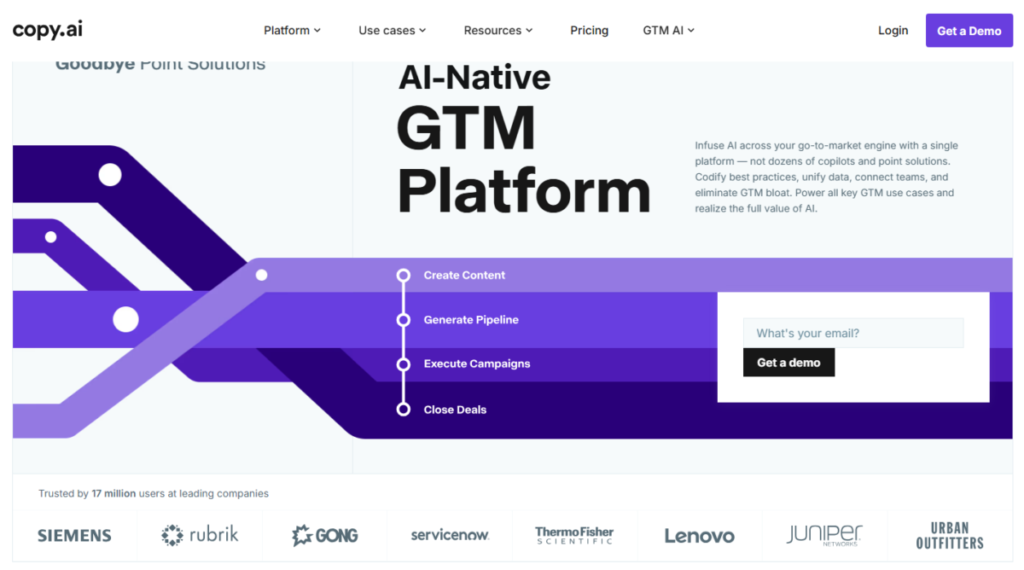
Copy.ai is a model-agnostic GTM AI platform that chains actions, agents, and data tables into repeatable workflows. It launched as an AI copywriting tool. In 2026, its product positioning centers on workflows, AI agents, tables, and integrations for sales, marketing, and operations teams.
The platform runs on top of multiple LLMs including models from OpenAI, Anthropic, and Gemini. Copy.ai calls itself a secure, vertical AI-native platform for business-critical GTM operations. Its official homepage references 2,000+ integrations and shows logos for Salesforce, HubSpot, Gong, Zapier, Outreach, and Salesloft.
That positioning matters for this review. If you evaluate Copy.ai as a simple AI text generator, you will miss its actual strengths and misjudge its pricing. If you evaluate it as a GTM workflow system, the pricing tiers start to make sense, even if they remain steep.
Copy.ai Features That Matter
Copy.ai’s feature set divides into two distinct experiences: Chat for quick AI tasks, and Workflows for repeatable multi-step automation. Understanding which side of Copy.ai you need determines whether the product fits your budget. Below are the features that affect real buying decisions.
Copy.ai Chat
Chat gives you direct access to OpenAI, Anthropic, and Gemini models inside a single interface. On paid plans, you get unlimited words. The Chat plan supports 5 seats and works for one-off tasks: prompt-based writing, ideation, email drafts, and light content operations.
Chat is the $29/month product. It does not include workflow credits. Think of it as a multi-model AI assistant with a shared workspace, not a workflow engine.
Copy.ai Workflows
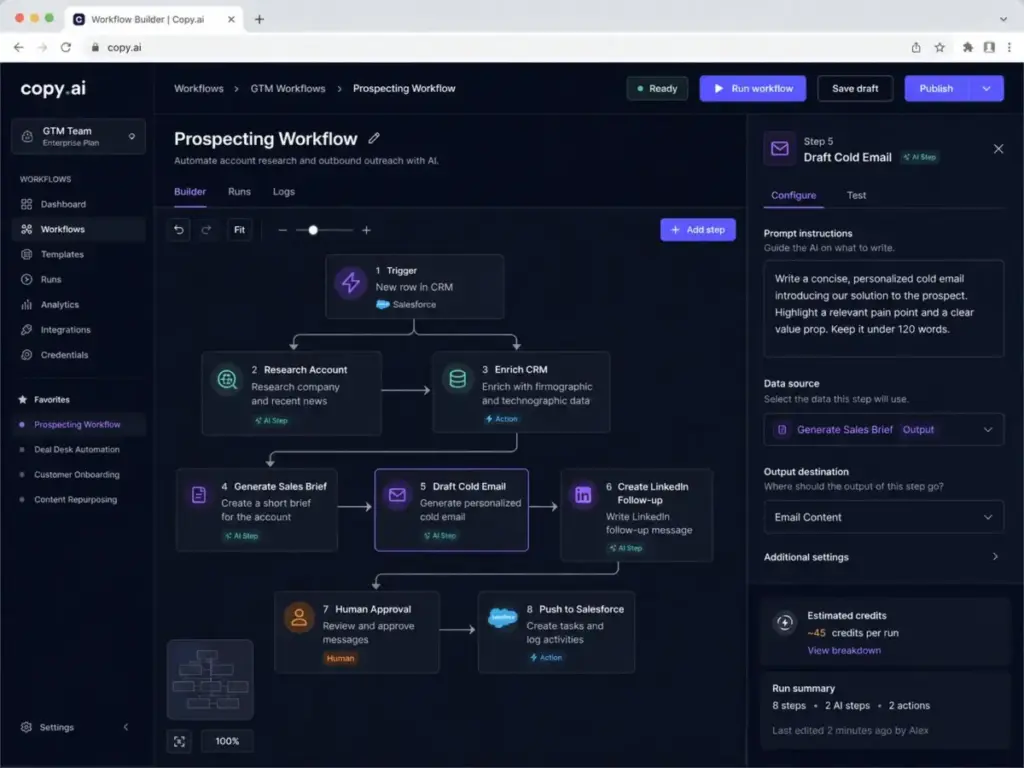
Workflows are multi-step AI chains that connect actions like text generation, web scraping, research, and data lookups into repeatable sequences. This is where Copy.ai separates from basic AI writing tools.
Practical workflow examples include:
- Prospecting: Pull account data, research the company, draft a personalized cold email, and queue a LinkedIn follow-up
- Inbound lead processing: Enrich a new CRM contact, score the lead, draft a sales brief
- Content repurposing: Take a webinar transcript, extract key insights, generate social posts, draft a blog summary
- CRM enrichment: Monitor new deals, pull competitive intelligence, update account records
Each workflow consumes workflow credits based on complexity, number of steps, research depth, and API usage.
Workflow Credits Explained
Workflow credits represent the computational cost of running workflow tasks. Credit consumption is not fixed per workflow. A simple two-step text generation workflow uses fewer credits than a five-step sequence involving web scraping, account research, and CRM updates.
Copy.ai states that users can check credits used for a run in the side panel. But the platform does not publish a standard credit-cost table per action type. This makes real cost forecasting harder than it should be.
| Workflow scenario | Estimated complexity | Credit risk |
|---|---|---|
| Simple email draft (2 steps) | Low | Low, predictable |
| Account research + cold email (4 steps) | Medium | Moderate, depends on scraping depth |
| Full prospecting sequence with CRM write (6+ steps) | High | High, variable per run |
| Bulk content repurposing (10+ inputs) | High | High, scales with volume |
| Custom API-connected workflow | Variable | Unpredictable without testing |
Buyer warning: You cannot fully predict workflow costs until you build, test, and run real workflows. Budget a testing period before committing to annual billing.
Copy Agents and Agentic Actions
Copy Agents make constrained micro-decisions inside workflows. They are best understood as guarded automation: an agent can choose between response templates, decide whether a lead meets qualification criteria, or select the right follow-up action based on rules you define.
Agents work well for repeatable decisions with clear rules. They are risky for ambiguous messaging, strategic brand positioning, or any task where a wrong micro-decision creates downstream damage. Human review layers remain necessary for high-stakes outputs.
Brand Voice and Infobase
Brand Voice defines your brand’s tone, personality, and messaging rules. Infobase stores company context (product descriptions, competitor positioning, ICP details) that workflows and Chat sessions can reference during generation.
Together, they reduce the gap between raw AI output and on-brand content. Neither eliminates the need for human editing, but they reduce the number of edits per output cycle.
Copy.ai Tables
Tables are a queryable data foundation inside Copy.ai. They consolidate data sources (account lists, product specs, prospect records) that workflows use as inputs. For GTM teams, Tables mean your AI workflows can reference real account data rather than relying solely on prompt context.
Integration Reality: Native, Zapier, and API
Copy.ai’s homepage claims 2,000+ integrations. That number needs context.
Native integrations include Slack, Microsoft Teams, and email alerts. These connect directly within the platform.
Zapier-based integrations extend reach to tools like Google Suite, Notion, Coda, and various CMS platforms. These work, but they add a dependency on Zapier’s reliability, pricing, and configuration.
API access is reserved for the Enterprise plan. Teams that need programmatic workflow triggers, bulk runs, or custom system connections must negotiate Enterprise pricing.
| Integration type | Examples | Availability |
|---|---|---|
| Native | Slack, Microsoft Teams, email | Growth and above |
| Zapier | Google Suite, Notion, Coda, CMS platforms | Growth and above (requires Zapier account) |
| API | Custom systems, bulk runs, programmatic triggers | Enterprise only |
| CRM | Salesforce, HubSpot | Growth and above |
| Sales tools | Outreach, Salesloft, Gong | Growth and above |
Copy.ai Security
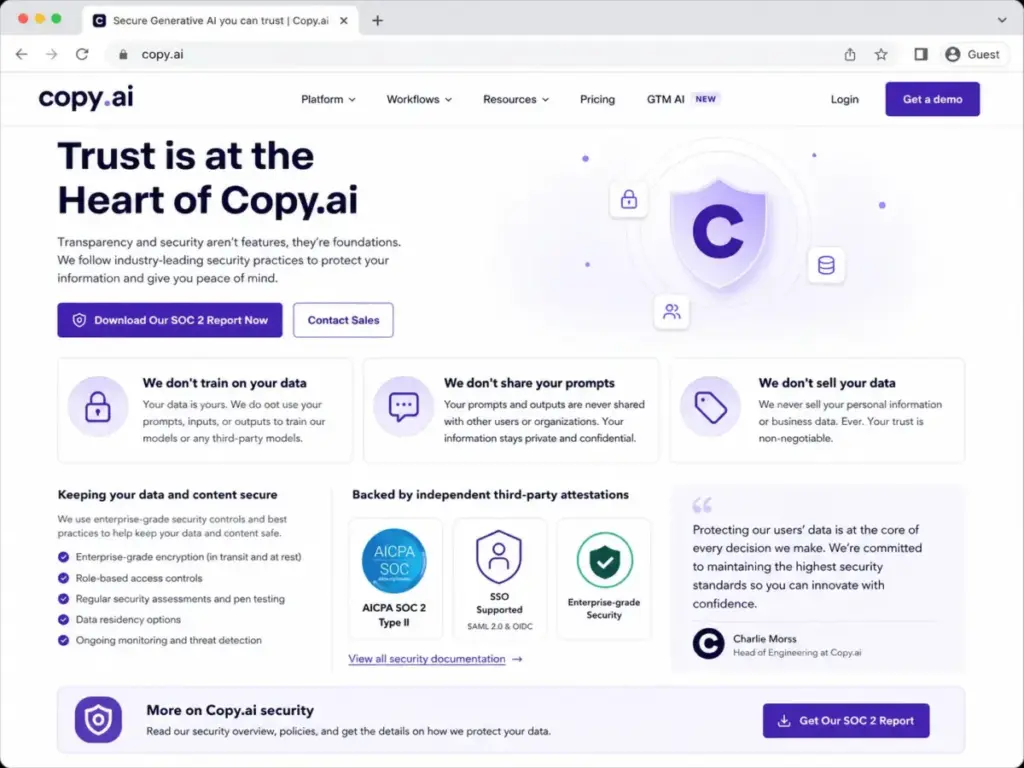
Copy.ai states it does not train on customer data. It does not share prompts. It does not sell customer data. The security page links to a SOC 2 report request through its Trust Center.
Enterprise plans include SSO and enterprise security protocols. For teams with GDPR requirements, Copy.ai positions itself as compliant, though buyers should verify specific data-residency details during the sales process.
Copy.ai Pricing and Plans
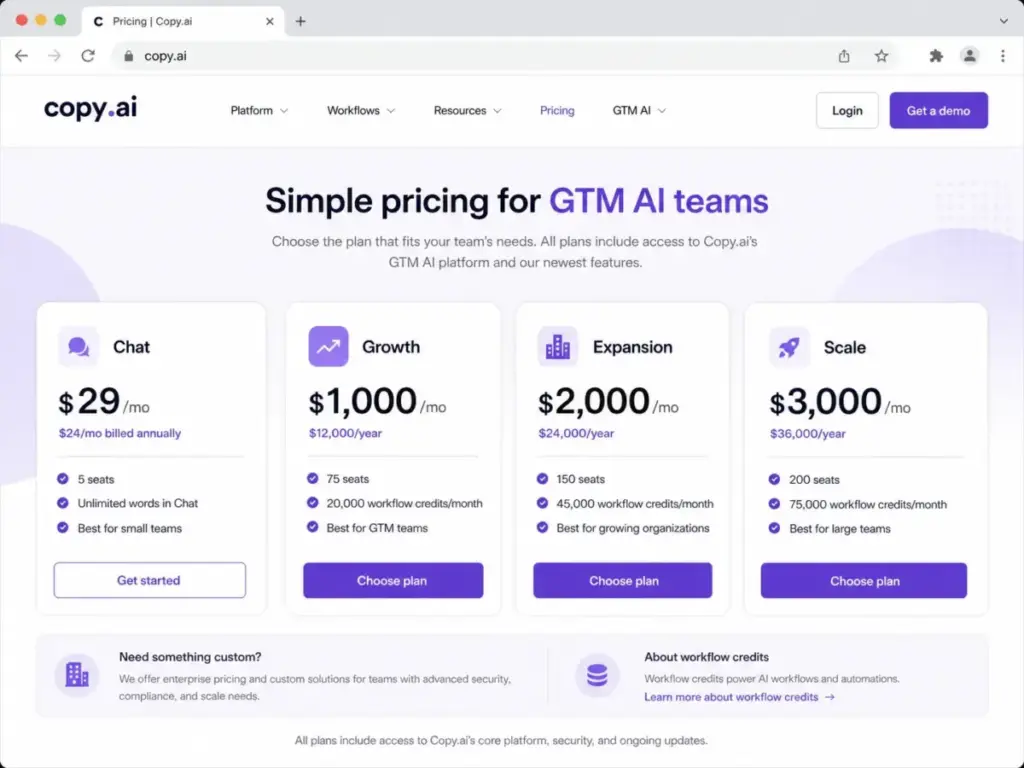
Copy.ai pricing verified May 4, 2026 creates a clear divide: $29/month for Chat, $1,000/month for the first workflow tier. There is no middle ground. Here is the full breakdown from the official pricing page.
| Plan | Price | Billing | Seats | Workflow credits | Best fit |
|---|---|---|---|---|---|
| Chat | $29/mo | Monthly | 5 | 0 | Small teams needing AI chat only |
| Chat (annual) | $24/mo | $288/year | 5 | 0 | Same, with 20% savings |
| Growth | $1,000/mo | $12,000/year | 75 | 20,000/mo | GTM teams adopting workflow automation |
| Expansion | $2,000/mo | $24,000/year | 150 | 45,000/mo | Larger orgs expanding AI automation |
| Scale | $3,000/mo | $36,000/year | 200 | 75,000/mo | Enterprises deploying GTM AI at scale |
| Enterprise | Custom | Sales-led | Custom | Custom | Complex enterprise GTM operations |
Pricing verified from Copy.ai pricing page, May 4, 2026.
The Pricing Cliff
The $29 to $1,000 gap is Copy.ai’s most important pricing fact. It is not a bug. It reflects Copy.ai’s deliberate positioning: Chat is an entry product; Growth is where the real platform begins.
But for buyers, this creates a dead zone. If you are a 5 to 25-person team that needs workflow credits but cannot justify $12,000/year, Copy.ai has no plan for you. The Growth plan comes with 75 seats, which means a 10-person team is paying for 65 empty seats.
| Team size | Chat ($29/mo) | Growth ($1,000/mo) | Cost per seat (Growth) |
|---|---|---|---|
| 5 users | Fits perfectly | Massive overkill | $200/seat/mo |
| 10 users | Fits, but no workflows | Overpaying for seats | $100/seat/mo |
| 25 users | Too few seats | Still overpaying | $40/seat/mo |
| 50 users | Cannot fit | Reasonable fit | $20/seat/mo |
| 75 users | Cannot fit | Exact fit | $13.33/seat/mo |
The per-seat economics only make sense when you approach 50 to 75 active users. For smaller teams, the Growth plan is a budget commitment that must be justified by workflow-automation ROI, not seat count.
Pricing Page Mismatch in 2026
Copy.ai’s current pricing page lists Chat, Growth, Expansion, Scale, and Enterprise. But other official Copy.ai pages and some indexed review sites still reference Free, Starter, and Advanced plans.
Copy.ai published a March 2026 article about Copy.ai Free. However, the live pricing page does not present a Free plan in the same pricing table.
My recommendation: Do not assume a free plan exists based on blog posts or cached review content. Check the live in-app signup screen before committing to any plan. Pricing structures shift, and outdated plan names create unnecessary confusion.
What Copy.ai Pricing Does Not Tell You
Workflow credits are the hidden variable. The pricing page tells you how many credits each plan includes. It does not tell you how many credits a specific workflow consumes per run.
| Question | What the pricing page says | What buyers need |
|---|---|---|
| How many credits per month? | 20,000 (Growth), 45,000 (Expansion), 75,000 (Scale) | Stated clearly |
| How many credits per workflow run? | Check the side panel after running | Not stated before purchase |
| Can I estimate cost before building? | Not directly | Need a trial or demo |
| What happens when credits run out? | Not specified on pricing page | Ask sales |
| Can I buy extra credits? | Not specified on pricing page | Ask sales |
This uncertainty is manageable for enterprises with dedicated implementation teams. It is a real risk for mid-market teams spending $12,000/year without a clear credit budget.
What Copy.ai Gets Right
Copy.ai’s strengths appear when you stop comparing it to AI writing tools and start comparing it to manual GTM processes. Here are the specific wins.
- Workflow automation replaces manual repetition. If your sales team copies data between 4 tools to build a prospecting email, a Copy.ai workflow can chain those steps. The value is not the AI-generated text. The value is the eliminated process time.
- Model-agnostic flexibility. Access to OpenAI, Anthropic, and Gemini models from one platform means you are not locked into a single model’s strengths and weaknesses. As models improve, you benefit without switching tools.
- 75-seat Growth plan suits mid-size GTM teams. For organizations with 50 to 75 GTM users, the per-seat cost is competitive. Shared workflows, Brand Voice, and Infobase create consistency that individual ChatGPT accounts cannot.
- Security positioning is clear. No training on customer data, no prompt sharing, no data selling. SOC 2 report availability. These are table-stakes for enterprise buyers, and Copy.ai states them directly.
- Integration depth for GTM stacks. Salesforce, HubSpot, Gong, Outreach, Salesloft, Slack, and Microsoft Teams connections mean workflows can read and write to the systems GTM teams already use.
Copy.ai customer stories include claims like “generating 5x more meetings” (Jean English, Former CMO at Juniper Networks) and “saved us $16 million dollars this year alone” (Roman Olney, Head of Global Digital Experience at Lenovo). These are vendor-published customer claims, not independently verified results. They signal enterprise adoption, but buyers should request case-study details during sales conversations.
What Copy.ai Gets Wrong
Copy.ai has real limitations that will disqualify it for certain teams. I count at least six.
- The $29 to $1,000 pricing cliff eliminates small workflow teams. A 10-person marketing team that needs 5 repeatable workflows has no affordable path to workflow credits. This is Copy.ai’s biggest structural weakness.
- Workflow-credit costs are opaque before purchase. You cannot model your monthly workflow spend until you build and test real workflows. For budget-conscious teams, this creates approval friction.
- Raw AI output still needs human editing. As one Reddit user noted, “copy ai is fine for speed” but the raw text is generic and needs heavy human editing (Thin_Rip8995, Reddit). This matches broader community feedback. Copy.ai accelerates drafts. It does not eliminate editorial review.
- Long-form SEO content is not a strength. Copy.ai does not include built-in SERP analysis, content optimization scoring, or AI search visibility tracking. Teams that need SEO-first content workflows should evaluate tools designed for that job.
- Support and billing friction appears in third-party reviews. Trustpilot review snippets include complaints about login access issues, slow or missing support responses, and refund frustration. These signals do not define the entire support experience, but they represent a risk factor for teams with strict support expectations.
- Pricing-page confusion creates buyer uncertainty. The mismatch between current plan names and older plan references (Free, Starter, Advanced) forces buyers to verify pricing directly. This is an unnecessary barrier that Copy.ai should resolve.
On Capterra, Copy.ai holds a 4.4 rating from 67 reviews, with users praising ideation and quick content drafts. One verified user called it “a bloody lifesaver” (Kirsty V., Copywriter, Capterra). On Gartner Peer Insights, a Product Marketing Manager described it as “incredibly helpful for generating content quickly.” These positive signals are genuine, but they primarily reflect the Chat and content-generation experience, not the workflow-automation tiers.
Copy.ai vs Alternatives
The right Copy.ai alternative depends on the job you need done, not on feature-list comparisons. Here is how Copy.ai stacks up against its primary competitors by specific use case.
| Tool | Best for | Starting price | Copy.ai wins when | Competitor wins when |
|---|---|---|---|---|
| Jasper | Brand governance, marketing campaigns | $59/mo (Pro, annual) | You need GTM workflow automation | You need on-brand campaign content across a marketing team |
| Writesonic | SEO content, AI search visibility | $79/mo (Starter, annual) | You need sales/marketing process automation | You need SEO optimization, SERP analysis, and GEO workflows |
| ChatGPT | General AI reasoning, flexibility | Free (Go plan from $0) | Your team needs packaged, repeatable GTM workflows | You need flexible reasoning, coding, data analysis, or custom GPTs |
| Claude | Long-form reasoning, editorial review | $17/mo (Pro, annual) | You need workflow execution and GTM process automation | You need deep document review, careful rewriting, or strategy work |
| Rytr | Budget copy generation | Low-cost plans | You need workflow automation at scale | You need basic content drafts and social captions on a tight budget |
Competitor pricing sourced from official pricing pages. See Jasper AI pricing, ChatGPT pricing, and Claude pricing for detailed breakdowns.
Copy.ai Decision Tree
Use this to shortcut your evaluation:
- Do you need repeatable multi-step GTM workflows?
- Yes: Continue evaluating Copy.ai.
- No: Consider ChatGPT, Claude, or Rytr instead.
- Can your team commit to $1,000/month or more?
- Yes: Copy.ai Growth or above is worth testing.
- No: Stay on Copy.ai Chat ($29/mo) or evaluate alternatives.
- Is brand governance your primary pain?
- Yes: Evaluate Jasper vs Copy.ai. Jasper is stronger here.
- No: Continue with Copy.ai.
- Is SEO content and AI search visibility your primary need?
- Yes: Evaluate Copy.ai vs Writesonic. Writesonic is stronger here.
- No: Copy.ai is a reasonable fit if workflow automation is the job.
- Do you need API access and bulk workflow runs?
- Yes: You need Copy.ai Enterprise. Prepare for custom pricing.
- No: Growth, Expansion, or Scale may suffice.
Who Should Use Copy.ai?
Copy.ai fits teams that can name at least three repeatable GTM processes they want to automate. If you cannot name three, you are not ready for a workflow platform. Below is a fit score by team profile.
| Buyer profile | Team size | Recommended plan | Fit score | Notes |
|---|---|---|---|---|
| Solo consultant producing short-form copy | 1 | Chat ($29/mo) or skip | 5/10 | ChatGPT or Claude is cheaper and more flexible |
| SaaS sales team doing outbound prospecting | 5 | Chat ($29/mo) to test, Growth if workflows justify it | 7/10 | Test Chat first. Move to Growth only when you can name 3 repeatable workflows |
| Content team repurposing webinars and sales calls | 10 | Growth ($1,000/mo) | 7.5/10 | Good fit if repurposing volume justifies the cost |
| GTM ops team building campaign workflows | 25 | Growth ($1,000/mo) | 8.5/10 | Strong fit. Workflow automation replaces manual process time |
| RevOps organization needing governance and API | 75+ | Expansion or Enterprise | 9/10 | Best fit. Per-seat cost is reasonable. Security and API access available |
The First 30 Minutes in Copy.ai
If you decide to test Copy.ai, here is a practical setup sequence:
- Minutes 1 to 5: Create your account. Select the Chat plan. Explore the Chat interface. Test one prompt using each available model (OpenAI, Anthropic, Gemini).
- Minutes 5 to 10: Set up Brand Voice. Add your company tone, style rules, and 2 to 3 sample paragraphs of existing content.
- Minutes 10 to 15: Create an Infobase entry. Add your product description, ICP summary, and top 3 competitor names.
- Minutes 15 to 20: Run a Chat prompt that references your Brand Voice and Infobase. Compare the output to a raw prompt without those references.
- Minutes 20 to 25: Browse the Workflow library. Identify one workflow that matches a process your team already runs manually. Read the workflow steps before running it.
- Minutes 25 to 30: If you are on a plan with workflow credits, run one test workflow. Check the credit consumption in the side panel. Calculate how many runs your monthly credit budget supports.
Good prompt engineering matters here. Copy.ai output quality scales directly with input specificity. Generic prompts produce generic results.
[SCREENSHOT: Copy.ai Chat interface with model access, if editor has app access]
Who Should Skip Copy.ai?
Copy.ai is not the right tool for every AI buyer. Here are the profiles that should look elsewhere.
- Solo bloggers and freelance writers. Copy.ai Chat at $29/month does not offer enough differentiation over ChatGPT Plus or Claude Pro at lower price points. You do not need workflows. You need a good AI writing partner — see our best AI writing tools guide for alternatives that fit solo creators.
- SEO content teams. Copy.ai does not include SERP analysis, keyword optimization scoring, or AI search visibility tracking. Writesonic and dedicated SEO platforms handle this job better.
- Teams with $30 to $999/month budgets that need workflows. Copy.ai has no plan for you. The pricing cliff means you either stay on Chat or jump to $1,000/month. If that math does not work, evaluate alternatives.
- Buyers that need predictable per-run pricing. Workflow credits vary by complexity. If your finance team needs a fixed cost per output, Copy.ai’s credit model creates forecasting friction.
- Teams with strict support SLAs. Third-party review signals suggest occasional support delays. If your organization requires guaranteed response times, confirm support terms before purchasing.
- Publishers that need print-ready or publish-ready long-form content. Raw Copy.ai output needs editing. Every AI tool does. But Copy.ai is not designed as an editorial production system. It is designed as a GTM workflow engine. If your gap is editorial QA after generation, the Grammarly tool review is the more relevant next read because it evaluates correction, rewrites, tone, and detection features instead of GTM automation.
Final Verdict
Copy.ai earns a 7.9/10 in this Copy.ai review because it solves a specific, high-value problem: turning repeatable GTM tasks into automated workflows. That problem is real. Sales teams copy data between 4 tools. Marketing teams rebuild the same campaign brief every quarter. RevOps teams manually enrich CRM records. Copy.ai workflows can replace those manual cycles.
The score loses points on pricing transparency. The $29 to $1,000 cliff, the opaque workflow-credit costs, and the pricing-page mismatch are real barriers. They do not break the product, but they slow down informed buying decisions.
My recommendation by budget:
- Under $30/month: Use ChatGPT or Claude. Copy.ai Chat is fine but not differentiated enough.
- $29/month: Copy.ai Chat works for teams of 5 that want multi-model access and shared projects.
- $1,000/month and above: Copy.ai Growth is worth testing if your team can identify 3+ repeatable workflows that currently waste hours of manual work.
- $2,000 to $3,000/month: Expansion and Scale make sense when you have 100+ users and workflow volume that justifies the credit allocation.
- Enterprise: Required for API access, bulk runs, and dedicated support.
Copy.ai is not the best AI writing assistant. It is not the best SEO tool. It is not the cheapest option. But for GTM workflow automation in 2026, it is one of the most complete platforms available, if your team and budget fit its pricing model.
Copy.ai Review FAQ
Below are direct answers to the most common Copy.ai questions.
What is Copy.ai used for?
Copy.ai is a GTM AI platform used for sales outreach automation, content repurposing, lead enrichment, CRM workflows, and AI-assisted writing. It serves marketing, sales, and operations teams that need repeatable AI workflows, not just one-off content generation.
Is Copy.ai free?
Copy.ai published a March 2026 blog post about a free plan. However, the current pricing page (verified May 4, 2026) does not list a Free plan in the same pricing table as Chat, Growth, Expansion, and Scale. Check the live signup screen to confirm current free-tier availability.
How much does Copy.ai cost?
Copy.ai Chat costs $29/month ($24/month annual). Growth costs $1,000/month ($12,000/year) with 75 seats and 20,000 workflow credits. Expansion is $2,000/month with 45,000 credits. Scale is $3,000/month with 75,000 credits. Enterprise is custom pricing. All pricing verified May 4, 2026.
Is Copy.ai better than ChatGPT?
Copy.ai is better than ChatGPT when your team needs packaged, repeatable GTM workflows with CRM integrations and shared Brand Voice. ChatGPT is better for flexible general reasoning, coding, data analysis, research, and solo use. For most individual users, ChatGPT offers more value at a lower price.
What are Copy.ai workflow credits?
Workflow credits represent computational resources consumed when running multi-step workflows. Credit usage varies by workflow complexity, number of steps, research depth, and API calls. The Growth plan includes 20,000 credits/month. Expansion includes 45,000. Scale includes 75,000.
Does Copy.ai write SEO content?
Copy.ai can generate blog drafts and long-form content, but it does not include built-in SERP analysis, keyword optimization, or content scoring. For SEO-focused content operations, Writesonic or dedicated SEO platforms are stronger choices.
Who is Copy.ai best for?
Copy.ai is best for GTM teams with 25 or more users that run repeatable sales, marketing, or operations workflows. It fits teams that can justify $1,000/month or more and can name specific manual processes they want to automate.
Does Copy.ai train on my data?
Copy.ai states it does not train on customer data, does not share prompts, and does not sell customer data. A SOC 2 report is available through the Copy.ai Trust Center.
Can I cancel Copy.ai?
Cancellation policies should be confirmed during signup. Some third-party review signals mention billing and refund friction. Review the terms of service and cancellation process before committing to annual billing.
What are the best Copy.ai alternatives in 2026?
The best Copy.ai alternative depends on your use case. Jasper is better for brand governance. Writesonic is better for SEO content and AI visibility. ChatGPT is better for flexible general AI. Claude is better for long-form reasoning. Rytr is better for budget copy generation. See the Copy.ai vs alternatives comparison table above for detailed breakdowns.