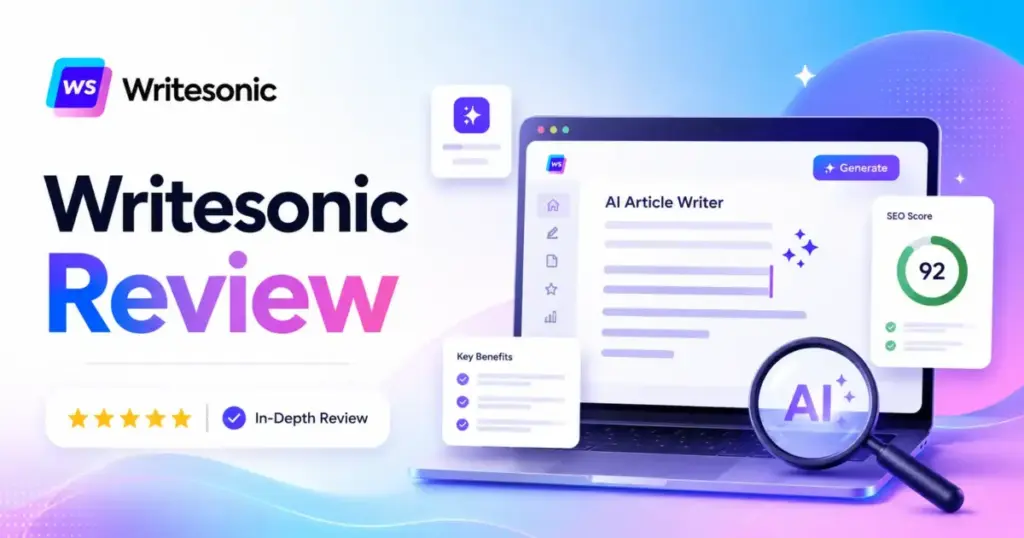
Most AI tools for content creation promise cheap blog drafts. Writesonic promises something bigger: an AI platform that writes content, tracks your brand’s visibility across AI answer engines, and runs SEO audits from one dashboard. This Writesonic review breaks down whether that promise holds up against the actual pricing, feature gates, and editing workload in 2026.
The real question is not whether Writesonic can generate articles. Every generative AI tool can do that. The question is whether the AI search visibility tracking, prompt monitoring, and content engine justify $79 to $499 per month when alternatives like Jasper, Copy.ai, Rytr, and ChatGPT exist at different price points. I tested the current plans, calculated the real cost per article, and mapped the limits most reviews skip.
TL;DR / Quick Verdict
| Detail | Summary |
|---|---|
| Score | 8.1/10 |
| Best for | SEO teams of 3 to 10, agencies managing 2 to 5 client sites, marketing directors tracking AI visibility |
| Not for | Solo bloggers writing fewer than 4 posts/month, teams that only need raw drafts, buyers who dislike credit ambiguity |
| Starter price | $79/month annual ($5.27/article) |
| Standout feature | AI Search Visibility tracking across ChatGPT, Gemini, Perplexity, Google AI Overviews |
| Biggest limitation | Fair usage policy restricts “unlimited” generation; drafts still need editing |
| Top alternative | Jasper for brand voice, Rytr for budget drafts, Surfer SEO for pure content optimization |
Writesonic Review Verdict and Score
Writesonic earns 8.1/10 because its strongest value in 2026 is AI search visibility tracking, not generic blog drafting. The platform combines content generation, SEO workflows, and AI citation monitoring in a single subscription. That combination matters for teams managing search presence across Google and AI answer engines simultaneously.
The score reflects two different products living inside one brand. As an AI writer, Writesonic is capable but not exceptional. Drafts from AI Article Writer 6 require editing, and per-article costs do not decrease much as you upgrade plans. As a GEO and AI visibility platform, Writesonic offers prompt tracking, citation gap analysis, and bot traffic analytics that most competitors do not include at any price.
| Category | Score |
|---|---|
| AI writing and draft generation | 8.0/10 |
| SEO workflow | 8.4/10 |
| AI search visibility and GEO | 8.8/10 |
| Pricing value for solo users | 6.5/10 |
| Pricing value for SEO teams | 8.3/10 |
| Ease of use | 8.2/10 |
| Output quality without editing | 7.0/10 |
| Integrations | 8.0/10 |
| Transparency and limits | 7.2/10 |
| Overall | 8.1/10 |
Worth it if your team needs content production plus AI visibility reporting in one platform. Skip it if you only need an AI drafting tool. Rytr at $7.50/month or ChatGPT handles that job at a fraction of the cost.
Scoring is based on editorial analysis of official documentation, verified pricing, user review sentiment from Capterra and G2, and feature evaluation against competing platforms. Read our full review methodology for scoring criteria.
What Is Writesonic?
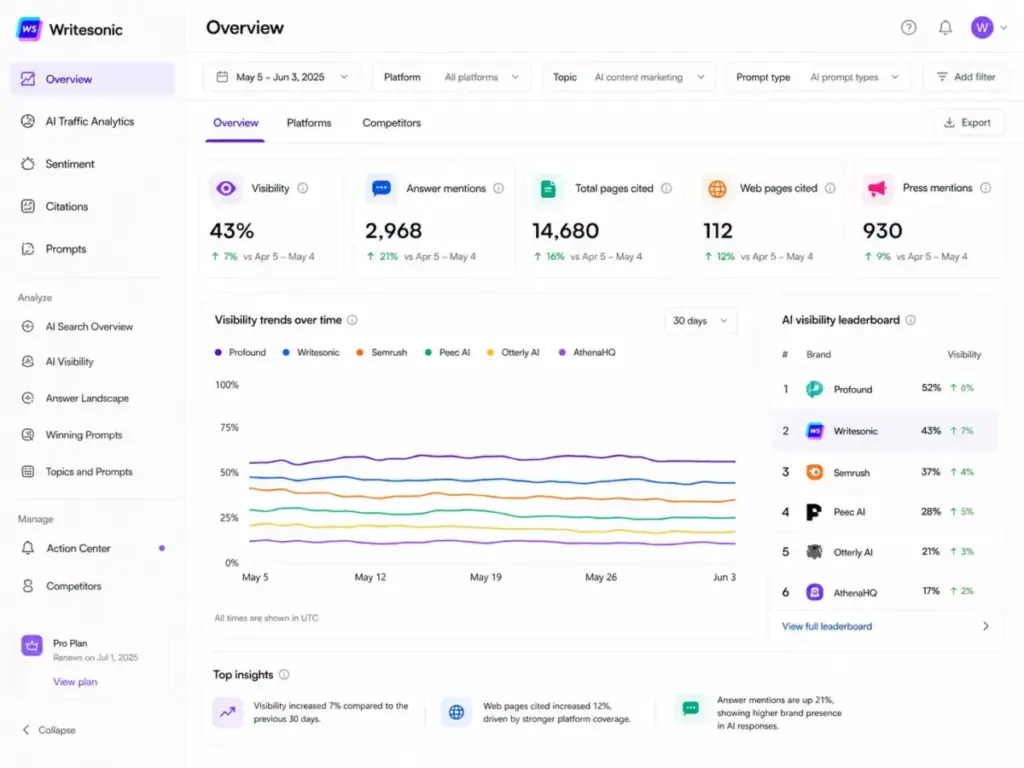
Writesonic is an AI content platform that combines article generation, SEO audits, and AI search visibility tracking. The company positions itself as more than an AI writer. Official documentation describes Writesonic as an “AI search visibility, SEO, and content platform” built around four pillars: Content Engine, AI Visibility Tracking, AI Visibility Actions, and SEO.
The target users, according to Writesonic’s own materials, are marketing directors, SEO managers, content teams, and agencies. That positioning matters because the pricing reflects it. Starter plans begin at $79/month annually, which is well above budget AI writers like Rytr. The price buys more than drafts. It buys prompt tracking across ChatGPT, Gemini, Perplexity, Google AI Overviews, Claude, Microsoft Copilot, and Grok, depending on your plan tier.
Writesonic Features That Matter
Writesonic packs more functionality than most AI writing tools, but not every feature is available on every plan. Feature gates are a real factor when choosing between Starter, Basic, and Growth tiers. The sections below focus on the capabilities that affect buying decisions, not a full feature catalog.
Understanding these gates is critical. A team paying $79/month gets a different product than a team paying $399/month.
Writesonic AI Article Writer 6
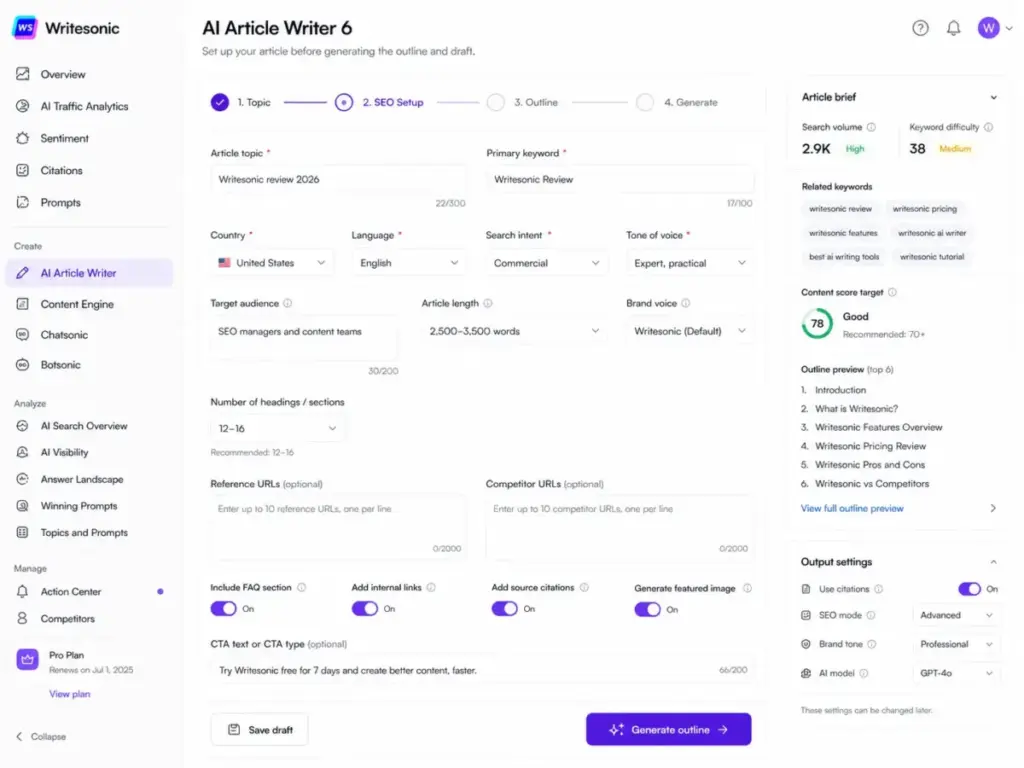
AI Article Writer 6 is the core content engine. It generates long-form articles with tone customization, source citations through links or footnotes, internal linking suggestions, FAQ sections, CTA blocks, AI-generated cover images, and built-in keyword research. The workflow starts with topic input and moves through outline, draft, and editing stages.
The free trial lets users test AI Article Writer 6 without a credit card. That is genuinely useful for evaluating draft quality before committing to a paid plan.
Article output limits vary by plan: Starter allows 15 articles per month, Basic allows 25, and Growth allows 50. Enterprise plans offer custom limits. These caps matter for teams producing content at scale because the per-article cost does not drop significantly across tiers.
However, output quality is not publish-ready. As one Capterra reviewer noted:
“The AI-generated content sometimes requires significant human editing to meet my high standards, which can be time-consuming.” – Verified Reviewer, Capterra
G2 review themes confirm this pattern: recurring cons include content issues requiring human editing and fact-checking. Plan your editorial workflow accordingly.
Writesonic AI Search Visibility
AI Search Visibility is Writesonic’s clearest differentiator in 2026. The feature monitors how your brand appears in AI answer engines, tracking visibility scores, sentiment, citations, and specific prompts where your content surfaces.
Writesonic documents that it tracks visibility across ChatGPT, Gemini, Perplexity, Google AI Overviews, Claude, Microsoft Copilot, and Grok. The number of platforms monitored depends on plan tier.
Prompt tracking limits are important to understand:
- Starter: 50 AI prompts tracked
- Basic: 100 AI prompts tracked
- Growth: 200 AI prompts tracked
- Enterprise: Custom
For teams where AI search visibility is a board-level metric, this feature alone can justify the subscription. For teams that only care about blog drafts, it adds cost without proportional value.
Writesonic SEO and Content Tools
The SEO toolkit includes keyword research with Google Keyword Planner data, Google Search Console integration, site audits, content optimization, and AI-powered fixes. SEO audits are capped: Starter allows 10 per month, Basic 20, Growth 50, and Enterprise custom.
Pages analyzed per month also differ: Starter covers 100 pages, Basic 1,200, Growth 2,500, and Enterprise custom. Larger sites on Starter or Basic may find these limits restrictive for ongoing technical SEO monitoring.
The AI Visibility Action Center identifies citation gaps, missing prompts, content opportunities, technical fixes, content refresh needs, and social engagement opportunities. It turns visibility data into action items, which is where the platform shifts from passive monitoring to active content strategy.
Writesonic Chatsonic and API
Chatsonic is Writesonic’s conversational AI assistant. The Chatsonic API supports real-time Google search toggling, memory management, and communication in 24 languages. For teams building custom workflows or integrating AI into internal tools, the API provides flexibility beyond the dashboard interface.
Chatsonic handles shorter content tasks: social media captions, email drafts, ad copy, and research queries. One Capterra reviewer highlighted this versatility:
“Writesonic has revolutionized my workflow, saving me countless hours in both my social media management job and my sales side hustle.” – Maia S., Creative Director, Social Media Management, Capterra
Unlimited AI Agent generations are listed, but these are subject to Writesonic’s fair usage policy. “Unlimited” does not mean unrestricted. More on that in the limitations section.
Writesonic Integrations
Writesonic connects with external tools through several integration paths:
- Google Search Console: Displays top keywords, clicks, impressions, winners, losers, new and lost keywords, and top pages. Setup is available through the integrations page.
- WordPress: The AI Analytics plugin requires an active Writesonic account, WordPress admin access, plugin installation, API key entry, and connection verification. Verification usually finishes in 1 to 2 minutes but can take up to 5.
- Zapier: The Zapier integration connects Writesonic with other apps for automating document creation, spreadsheet updates, email workflows, notes, and tasks.
- AI Bot Traffic Analytics: Server-side tracking that captures AI crawler visits and human visits from AI citations. Click rate is defined as Human Visits / Bot Visits x 100.
Writesonic User Experience
The first 30 minutes with Writesonic reveal whether you are buying an AI writer or an AI visibility platform. Signup is straightforward. The free trial for AI Article Writer 6 does not require a credit card, which removes friction for initial evaluation.
The lifecycle from signup to daily use follows a predictable path. Your first article draft arrives in minutes. Quality is decent for a first pass but needs editing for accuracy, tone, and factual claims. The first SEO audit takes slightly longer to configure, especially if you are connecting Google Search Console and importing existing site data. When the main bottleneck is polish rather than article generation, the Grammarly review gives a cleaner view of grammar correction, tone adjustment, plagiarism checks, and AI text detection.
WordPress AI Traffic Analytics setup requires installing the Writesonic plugin, entering an API key, and verifying the connection. Writesonic documents that verification usually completes in 1 to 2 minutes but can take up to 5. For teams familiar with WordPress plugin workflows, this is routine. For non-technical users, the multi-step setup adds friction compared to simpler AI writing tools.
Daily use centers on three workflows: generating articles, running SEO audits, and monitoring AI visibility dashboards. The learning curve is moderate. Teams comfortable with prompt engineering and SEO tools will adapt quickly. Teams expecting a one-click blog writer may find the dashboard more complex than expected.
Scaling friction appears around month two. Project limits (1 on Starter and Basic, 2 on Growth) force agencies to choose between consolidating client work or upgrading plans. Seat limits (1, 2, or 3 users depending on plan) add $50/month per additional user. These constraints are not obvious during the trial period.
Writesonic Pricing and Plans
Writesonic’s 2026 pricing starts at $79/month annually, but the real cost depends on how many articles, audits, and tracked prompts your team needs. The pricing structure has shifted from the older credit-based model toward plan-based tiers that bundle content, SEO, and AI visibility features together.
Pricing checked May 4, 2026. Source: Writesonic pricing page.
| Feature | Starter | Basic | Growth | Enterprise |
|---|---|---|---|---|
| Monthly (billed monthly) | $99/mo | $249/mo | $499/mo | Custom |
| Monthly (billed annually) | $79/mo | $199/mo | $399/mo | Custom |
| Articles per month | 15 | 25 | 50 | Custom |
| AI prompts tracked | 50 | 100 | 200 | Custom |
| SEO audits per month | 10 | 20 | 50 | Custom |
| Pages analyzed | 100 | 1,200 | 2,500 | Custom |
| Included users | 1 | 2 | 3 | Custom |
| Additional users | N/A | Up to 3 ($50/user/mo) | Up to 2 ($50/user/mo) | Custom |
| Projects | 1 | 1 | 2 | Custom |
| Data refresh | Daily | Daily | Daily | Daily or weekly |
| Support | Priority email | Priority email | Priority email + Dedicated Slack | Dedicated Slack, Teams, email, account manager |
True Cost Per Article and Per Tracked Prompt
Most Writesonic reviews stop at the sticker price. The math below shows why upgrading plans does not reduce your per-unit cost. The value of upgrading comes from scale, visibility features, and support, not cheaper content.
| Plan (Annual) | Price/Month | Articles | Cost/Article | Prompts Tracked | Cost/Prompt |
|---|---|---|---|---|---|
| Starter | $79 | 15 | $5.27 | 50 | $1.58 |
| Basic | $199 | 25 | $7.96 | 100 | $1.99 |
| Growth | $399 | 50 | $7.98 | 200 | $2.00 |
Starter is actually the cheapest per article at $5.27. Basic and Growth cost more per article because you are paying for expanded audits, pages analyzed, users, projects, and deeper AI visibility tracking. If your team only needs drafts, Starter is the most cost-efficient tier.
Plan Recommendations
- Starter ($79/month annual): Best for early-stage brands testing AI visibility alongside content production. One user, one project, 15 articles. Sufficient for a solo marketer or small brand.
- Basic ($199/month annual): Best starting point for serious SEO and GEO teams. Two users, 25 articles, 100 tracked prompts, 1,200 pages analyzed. The $50/additional user cost makes this a $249 to $349/month platform for 3 to 5 person teams.
- Growth ($399/month annual): Designed for agencies and larger content operations. Three users, 50 articles, 200 prompts, 2,500 pages analyzed, two projects. Dedicated Slack support.
- Enterprise (custom): Multi-brand organizations needing custom prompt tracking, dedicated GEO strategist, and account management.
Credits renew monthly on your subscription renewal date. Add-on credits can be purchased from Plans and Billing. Writesonic does not document rollover behavior for unused credits.
Writesonic Pros and Cons
Writesonic’s advantages cluster around AI visibility tracking and workflow breadth, while its weaknesses center on pricing transparency and output quality.
- Combines AI writing, SEO, and AI visibility tracking in one subscription. Competing tools require separate purchases for content generation, SEO audits, and AI search monitoring.
- AI Article Writer 6 includes source citations and internal linking. These features reduce post-production work compared to raw AI drafts from ChatGPT or Claude.
- Prompt tracking across ChatGPT, Gemini, Perplexity, and Google AI Overviews. No other AI writing tool at this price range offers cross-platform AI visibility monitoring.
- Integrates with Google Search Console, WordPress, Zapier, and API workflows. Teams can connect existing SEO and CMS infrastructure without switching platforms.
- Content refresh and AI Visibility Action Center surface actionable opportunities. Citation gaps and missing prompts become task lists rather than guesswork.
- Free trial for AI Article Writer 6 without a credit card. Low-risk evaluation path.
- Expensive for users who only need AI blog drafts. At $79/month minimum, Writesonic costs 10x more than Rytr ($7.50/month) for pure drafting needs.
- Drafts still require human editing and fact-checking. G2 review themes consistently mention content accuracy issues. Capterra reviewers confirm the editing burden.
- Credit and usage limits frustrate frequent creators. Capterra data shows 65% negative sentiment out of 180 reviews mentioning restrictive credit-based usage. One reviewer reported: “It has happen 3 (three) times that my credits were cancelled with no reason and the first time it took a month to get access back.” – Stefano L., Owner, 1 employee, Capterra.
- Fair usage policy restricts “unlimited” generation. High-volume automation, scripts, and continuous generation without genuine need can trigger account suspension.
- Seat and project limits inflate real costs. Additional users cost $50/month each. Agencies managing multiple clients hit the 1-project cap on Starter and Basic quickly.
- GEO tracking value depends on team capacity. Tracking 50 to 200 prompts is only valuable if someone acts on the data. Passive monitoring wastes budget.
What Writesonic Does Not Tell You
The gap between Writesonic’s marketing page and the actual user experience involves six specific limitations that most reviews skip.
Fair Usage Is Not Unlimited
Writesonic’s fair usage policy prohibits high-volume resale generation, scripts or bots that bypass usage limits, sharing credentials outside the organization, continuously generating content without genuine need, and copyright misuse. Writesonic states that unusually high usage or sharing login details can lead to account suspension or deletion without refund. “Unlimited AI Agent generations” carries an asterisk that matters.
Cost Per Article Does Not Improve With Upgrades
Starter at $5.27/article is cheaper than Basic at $7.96/article and Growth at $7.98/article. You are not paying less per draft on higher tiers. You are paying for more audits, more users, more projects, and more tracked prompts. If someone on your team pitches an upgrade by saying “we’ll save on content production,” the math does not support that argument.
Additional Users Are Expensive
Basic includes 2 users. Growth includes 3. Every additional user costs $50/month. A 5-person team on Basic pays $199 + $150 (3 additional users) = $349/month. That is not obvious from the pricing page headline.
Projects Are Severely Limited
Starter and Basic include 1 project each. Growth includes 2. For agencies managing separate client sites, this means either consolidating all client work into one project or paying for Growth at minimum. Enterprise unlocks custom project counts, but that requires a sales conversation.
Generic Output Remains a Risk
A verified marketing professional on TrustRadius reported that Writesonic increased content-team efficiency and reduced writer dependency but cited lack of sentence-level rephrasing and lack of built-in plagiarism or style checking as notable cons. The platform generates competent first drafts, but editorial teams should budget time for revision.
AI Visibility Tracking Is Only Valuable If You Act On It
Tracking 100 AI prompts on Basic or 200 on Growth generates data. Data without action is a cost center. Teams that lack capacity to respond to citation gaps, content refresh recommendations, and prompt opportunities will pay for dashboards they do not use.
Writesonic Alternatives Compared
No single AI tool wins every scenario, and Writesonic is not the right choice for every team. The alternatives below are mapped to specific buyer needs so you can choose based on your actual workflow, not marketing claims.
Writesonic vs Jasper
Jasper is stronger for brand-controlled marketing teams that need campaign workflow management and consistent brand voice across large content operations. Jasper AI pricing starts at $59/month per seat annually for Pro. Business plans require custom pricing. Jasper does not offer AI search visibility tracking or GEO features comparable to Writesonic. Choose Jasper if brand voice consistency and marketing campaign coordination matter more than AI visibility data. Read our full Jasper AI review for details.
Writesonic vs Copy.ai
Copy.ai positions itself as a GTM automation platform, not an SEO content tool. Its Chat plan starts at $29/month ($24/month annually) with 5 seats included. Growth jumps to $1,000/month annually for 75 seats and 20,000 workflow credits. Copy.ai is better for sales and marketing workflow automation. Writesonic is better for SEO content production and AI visibility tracking. See our Copy.ai review and Copy.ai vs Writesonic comparison.
Writesonic vs Rytr
Rytr is the budget winner. The Unlimited plan costs $7.50/month annually with unlimited AI generation. Premium at $24.16/month adds 35+ languages and plagiarism checks. Rytr lacks SEO audits, AI visibility tracking, Google Search Console integration, and structured content workflows. For freelancers and solo creators who need quick drafts and social media captions, Rytr delivers at a fraction of Writesonic’s price. See our Rytr review.
Writesonic vs Surfer SEO
Surfer SEO is a dedicated content optimization tool starting at $49/month annually. It offers deeper SERP analysis and content scoring than Writesonic’s built-in SEO tools. However, Surfer does not include AI content generation or AI visibility tracking. Teams that already use ChatGPT or Claude for drafts and need strong on-page optimization may prefer Surfer SEO over Writesonic’s bundled approach.
Writesonic vs ChatGPT and Claude
ChatGPT and Claude are general-purpose AI assistants that handle drafting, research, rewriting, and ideation at lower cost and higher flexibility. Neither includes built-in SEO workflows, AI visibility tracking, Google Search Console integration, or structured article pipelines. For teams that value flexibility over structured SEO tooling, ChatGPT or Claude paired with a separate SEO tool may outperform Writesonic’s all-in-one approach. See our ChatGPT review, Claude review, and ChatGPT vs Claude comparison.
Alternatives Comparison Table
| Tool | Best For | Starting Price (Annual) | AI Visibility Tracking | SEO Audits | AI Writing |
|---|---|---|---|---|---|
| Writesonic | SEO teams + AI visibility | $79/mo | Yes | Yes | Yes |
| Jasper | Brand voice + marketing teams | $59/mo/seat | No | No | Yes |
| Copy.ai | GTM workflow automation | $24/mo (5 seats) | No | No | Yes (chat) |
| Rytr | Budget AI drafting | $7.50/mo | No | No | Yes |
| Surfer SEO | Content optimization | $49/mo | No | Yes | Limited |
| ChatGPT/Claude | Flexible research + drafting | Varies | No | No | Yes |
Who Should Use Writesonic?
Writesonic fits teams that need content production and AI search monitoring in the same platform. The following profiles get the most value from the subscription cost.
| Buyer Profile | Why Writesonic Fits | Recommended Plan |
|---|---|---|
| SEO teams of 3 to 10 publishing 15 to 50 articles/month | Combined writing, auditing, and AI visibility | Basic or Growth |
| Agencies managing 2 to 5 client domains | Prompt tracking, content refresh, multi-project needs | Growth or Enterprise |
| B2B SaaS content teams tracking AI search as a KPI | AI visibility across ChatGPT, Gemini, Perplexity, Google AI Overviews | Basic or Growth |
| Marketing directors reporting AI search ROI | Dashboard evidence for leadership presentations | Growth or Enterprise |
Who Should Not Use Writesonic?
Writesonic is overkill for five specific buyer profiles.
- Solo bloggers publishing 1 to 4 posts per month. Starter at $79/month means $20 to $79 per article. Rytr at $7.50/month or ChatGPT covers this need more cheaply.
- Freelancers who mainly need first drafts and social captions. The AI visibility features add cost without matching the workflow. Rytr or ChatGPT are more practical.
- Teams already committed to Surfer SEO plus ChatGPT or Claude. If your existing stack handles content optimization and drafting, adding Writesonic creates tool overlap.
- Buyers who need unrestricted high-volume generation. Fair usage limits mean Writesonic is not built for script-driven mass content production.
- Teams that cannot budget $199/month or more for useful GEO data. Starter’s 50-prompt limit provides only a surface-level view of AI visibility. The feature becomes meaningful at Basic and above.
Final Verdict: Is Writesonic Worth It?
Writesonic is worth it for SEO teams and agencies that need AI content production and AI visibility tracking in one platform. It is not worth it for solo creators who only need cheaper AI drafts.
The 8.1/10 score reflects a product that has moved beyond simple AI writing into a more ambitious category: AI search visibility. That ambition comes with higher prices, feature gates, and a learning curve that basic AI writers do not demand. If your team tracks brand presence across AI answer engines, manages ongoing SEO audits, and publishes 15 to 50 articles per month, Writesonic consolidates three or four separate tools into one subscription.
If you only need blog drafts, use Rytr. If you need brand voice at scale, consider Jasper. If you need GTM workflow automation, look at Copy.ai. For a full comparison of all options, see our best AI writing tools roundup. If you need dedicated content optimization, Surfer SEO is more focused. If you need flexible AI assistance without structured workflows, ChatGPT or Claude cost less and adapt faster. Also see our broader guide to Jasper vs Copy.ai for additional context.
Writesonic’s best buyer in 2026 is not a solo blogger. It is a 3 to 10 person content and SEO team that needs to prove AI search visibility ROI alongside consistent content production. For that buyer, the pricing is justified. For everyone else, there are better-matched alternatives.
Writesonic FAQ
Answers below are based on official Writesonic documentation and editorial analysis.
Is Writesonic worth it in 2026?
Writesonic is worth it for SEO teams and agencies that need AI content production combined with AI search visibility tracking. It is not worth it for solo creators or freelancers who only need basic AI blog drafts. At $79/month minimum, the pricing only makes sense if you use the SEO audits, prompt tracking, and visibility features alongside the content engine.
How much does Writesonic cost?
Writesonic pricing starts at $79/month billed annually for the Starter plan (15 articles, 50 tracked prompts, 1 user). Basic costs $199/month annually (25 articles, 100 prompts, 2 users). Growth costs $399/month annually (50 articles, 200 prompts, 3 users). Monthly billing costs approximately 25% more. Enterprise pricing is custom. Pricing checked May 4, 2026.
Does Writesonic have a free trial?
Yes. Writesonic offers a free trial for AI Article Writer 6 that does not require a credit card. This allows new users to evaluate draft quality before committing to a paid plan.
Is Writesonic better than Jasper?
It depends on your priority. Writesonic is better for teams that need AI search visibility tracking and SEO audits alongside content generation. Jasper is better for marketing teams that prioritize brand voice control and campaign workflows. Jasper Pro starts at $59/month per seat annually.
Is Writesonic better than Copy.ai?
Writesonic is better for SEO-focused content teams. Copy.ai is better for GTM automation and sales workflows. Copy.ai starts at $24/month annually with 5 seats included, making it more cost-effective for teams focused on marketing automation rather than SEO content.
Is Writesonic good for SEO articles?
Writesonic’s AI Article Writer 6 produces SEO-oriented drafts with keyword targeting, source citations, internal linking, and FAQ sections. The tool is good for generating structured first drafts. However, output still requires human editing for accuracy and tone. Teams should treat Writesonic as a draft accelerator, not a publish-ready content machine.
Does Writesonic content need editing?
Yes. Capterra reviewers and G2 review themes consistently report that AI-generated content requires editing for accuracy and quality. A verified Capterra reviewer stated that “AI-generated content sometimes requires significant human editing.” Plan for editorial review time in your content workflow.
What are Writesonic's biggest limitations?
The five biggest limitations are: (1) fair usage policy restricts high-volume and automated generation; (2) per-article cost does not decrease on higher-tier plans; (3) additional users cost $50/month each on Basic and Growth; (4) projects are limited to 1 on Starter/Basic and 2 on Growth; and (5) drafts require human editing for factual accuracy and brand voice alignment.
What is Chatsonic?
Chatsonic is Writesonic’s conversational AI assistant. It supports real-time Google search, memory management, and 24 languages through its API. Chatsonic handles shorter content tasks like social captions, email drafts, ad copy, and research queries. It operates on a large language model architecture and is included with Writesonic subscriptions, subject to fair usage limits.
Who should use a Writesonic alternative?
Solo bloggers, freelancers, and teams that only need AI drafts should consider Rytr ($7.50/month) or ChatGPT. Teams already using Surfer SEO for content optimization plus ChatGPT or Claude for drafting likely do not need Writesonic’s bundled approach. Buyers needing unrestricted high-volume generation should avoid Writesonic’s fair usage constraints.