Most Hunter.io reviews read like rewritten feature pages. This Hunter.io review takes a different angle: credit math, workflow fit, and clear boundaries around what Hunter actually replaces in your outbound stack.
Hunter has been one of the go-to SaaS tools for email discovery since 2015. It finds professional email addresses from company domains, verifies deliverability, and now includes a built-in cold email sequencer. But in 2026, with Apollo.io offering a full sales engagement platform and Snov.io bundling warm-up and multichannel outreach, the question is no longer “Is Hunter good?” The question is: “Is Hunter enough?”
The short answer: for email-first outreach, domain-based prospecting, and list verification, Hunter is still one of the cleanest options available. For teams that need phone numbers, buyer intent signals, or advanced sales engagement automation, it is not.
Here is how I scored it, what the credit burn actually looks like, and who should pick Hunter over the alternatives.
TL;DR: Quick Verdict
| Category | Details |
|---|---|
| Score | 8.3 / 10 |
| Best for | Email-first outreach, domain-based prospecting, list verification, lightweight cold email campaigns |
| Not best for | Phone-heavy sales teams, buyer-intent workflows, teams needing deep enrichment or advanced sales engagement automation |
| Best alternative (full platform) | Apollo.io |
| Best alternative (outreach bundle) | Snov.io |
| Best alternative (phone + contacts) | UpLead or RocketReach |
| Free plan | Yes, 50 credits/month, no credit card required |
| Starter price | $49/month or $34/month billed annually |
| Growth price | $149/month or $104/month billed annually |
| Scale price | $299/month or $209/month billed annually |
How I Scored Hunter.io
I evaluated Hunter across six weighted categories based on what matters most to cold email operators, link builders, recruiters, and small outbound teams. Full details on how SaaS Zap rates products are in our review methodology.
| Category | Weight | Score | Weighted |
|---|---|---|---|
| Email finding accuracy and usefulness | 25% | 8.5 | 2.13 |
| Verification and deliverability help | 20% | 8.5 | 1.70 |
| Pricing and credit value | 20% | 8.0 | 1.60 |
| Outreach workflow depth | 15% | 7.5 | 1.13 |
| Integrations and API | 10% | 9.0 | 0.90 |
| Data transparency and compliance | 10% | 8.5 | 0.85 |
| Total | 100% | 8.3 / 10 |
Hunter scores highest on email finding, verification, and API quality. It loses points on outreach depth because Sequences is functional but basic compared to dedicated sales engagement platforms. Pricing scores well on a per-credit basis but can surprise teams that burn through credits faster than expected.
What Is Hunter.io?
Hunter.io is an email outreach platform built around three core actions: finding professional email addresses, verifying them, and sending cold email sequences. It is not a CRM. It is not a full sales intelligence platform like ZoomInfo. It does not position itself as a phone-number-first data provider. It is worth noting that email outreach and email marketing are different disciplines — email marketing is a consent-based channel built on subscriber permission, while outbound email discovery tools like Hunter serve cold prospecting workflows.
Hunter’s data comes from public web sources. The platform states it crawls 30 million web pages daily and indexes 150 million professional email addresses from 650 million public data sources. That public-source model is a key differentiator: every email result shows where Hunter found it, along with a confidence score.
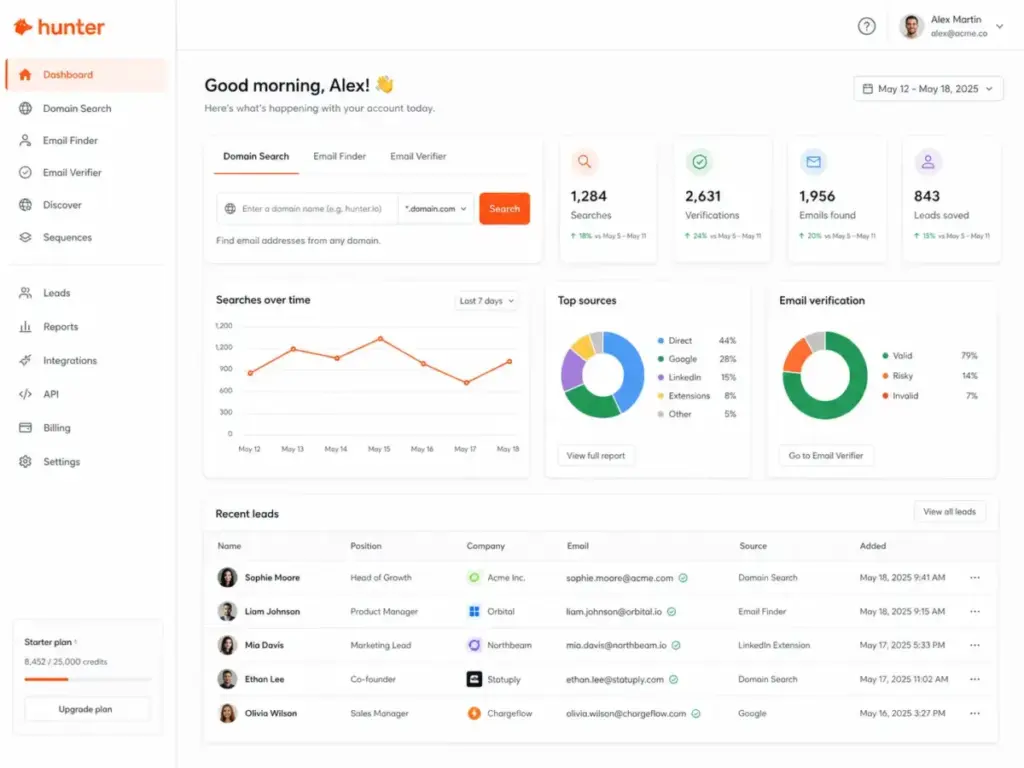
The product includes Domain Search (find emails by company), Email Finder (find one email by name and domain), Email Verifier, Discover (B2B lead database), Signals (company-level triggers like funding and hiring), Sequences (cold email outreach), and a full API.
What Changed in Hunter.io in 2026
Hunter shipped four notable updates between mid-2025 and early 2026. Most competing reviews do not cover these changes. They matter because they shift Hunter from a pure data tool toward a more complete outreach workflow.
Hunter.io Unified Credits
In June 2025, Hunter replaced its old separate-credit system with Unified Credits across Free, Starter, Growth, and Scale plans. Every action (Domain Search, Email Finder, Email Verifier, enrichment) now draws from one shared credit pool. This simplifies planning but also means a heavy verification week can eat into your prospecting budget.
Credit costs per action:
- Domain Search: 1 credit per revealed email
- Bulk Domain Search: 1 credit per 1 to 10 emails
- Email Finder: 1 credit per email found
- Email Verifier: 0.5 credit per verification
- Enrichment endpoints: 0.2 credit per enriched email or domain
- No credits consumed if Hunter cannot find or verify an email
- Duplicate searches within the same billing period do not consume credits again
Hunter.io Inbox Protection
Launched April 9, 2026, Inbox Protection lets you create managed email accounts directly inside Hunter with SPF, DKIM, and DMARC pre-configured. Accounts are typically ready within one hour. The system then warms them up over a 30-day period. This is Hunter’s answer to tools like Instantly and Smartlead that focus on deliverability infrastructure. It is a meaningful addition, though warm-up specialists still offer more granular control.
Hunter.io A/B Testing
Added March 31, 2026, A/B testing in Sequences lets you test subject lines and email body variations. This was a gap that made Sequences feel underpowered compared to Snov.io and Apollo. It is now functional, though the testing interface is simpler than what dedicated cold email platforms offer.
Hunter.io Email Accounts Center
Launched March 12, 2026, the Email Accounts Center introduces Global Health, a score out of 100 that tracks authentication, reputation, and email account health across all connected accounts. This gives outbound teams a single dashboard for sender reputation instead of checking each account separately.
Hunter.io Key Features
Hunter.io Domain Search
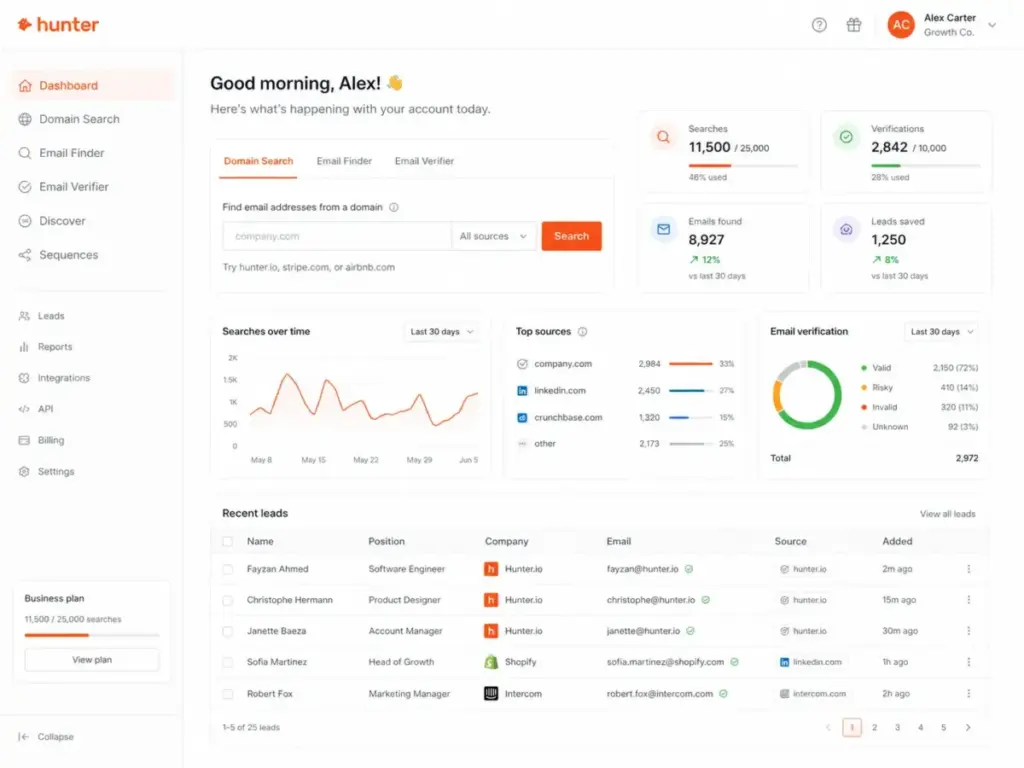
Domain Search is Hunter’s signature feature. Enter a company name or website, and Hunter returns a list of email addresses associated with that domain. Results include confidence scores, the public sources where each email was found, and department filters (engineering, sales, marketing, support, and others).
Domain Search works in the web app, through the Chrome extension, via the API, and through the Google Sheets add-on. Bulk Domain Search processes multiple domains at once and costs 1 credit per 1 to 10 emails returned, making it significantly cheaper per email than individual Email Finder lookups.
For link builders and PR outreach specialists, Domain Search is often the starting workflow: drop in a publication’s domain, filter by editorial or marketing department, and export the results. The confidence score helps prioritize which contacts to verify before sending.
Hunter.io Email Finder
Email Finder takes a full name plus a company domain and returns a single professional email address. It uses email pattern matching, public web sources, and verification status to deliver results.
This is the tool for named-prospect workflows. If you have a list of 200 decision-makers and their companies, Email Finder processes them one at a time or in bulk. Each found email costs 1 credit. If Hunter cannot find the email, no credit is charged.
The Google Sheets add-on makes this especially practical for small teams. Paste names and domains into a spreadsheet, run the add-on, and get verified emails alongside the original data. No API knowledge needed.
Hunter.io Email Verifier
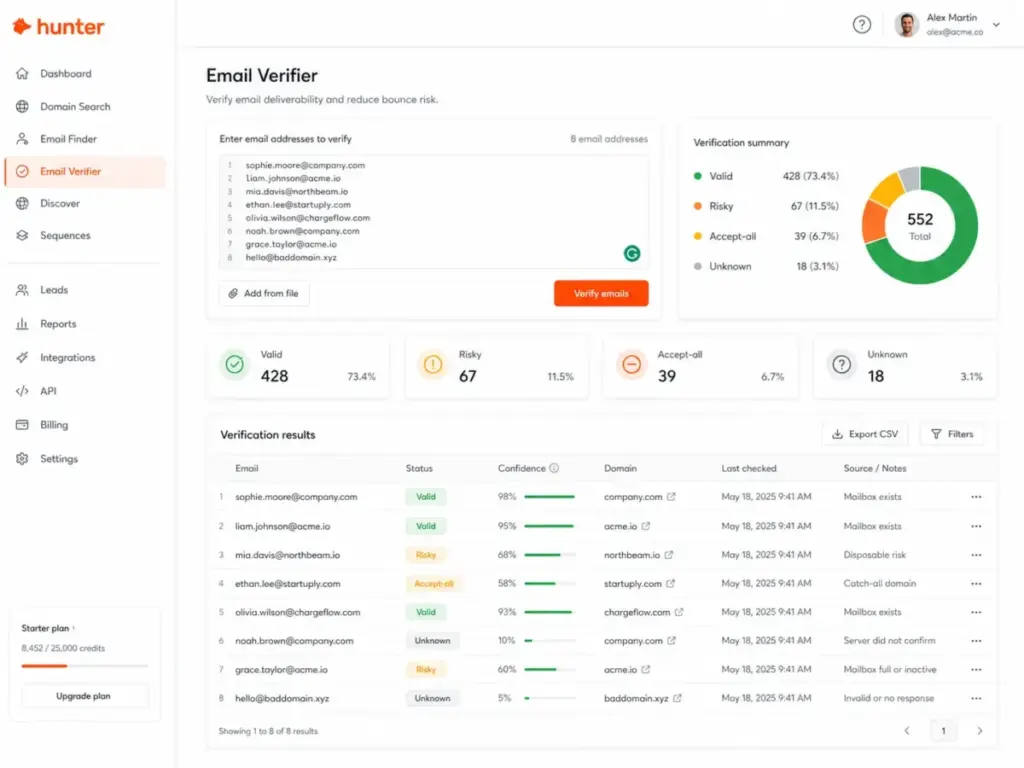
Email Verifier checks deliverability by examining syntax, domain information, server response, and Hunter’s own database signals. Results come back as valid, invalid, risky, or unknown.
The catch-all (accept-all) problem is worth noting. Some mail servers accept all incoming emails regardless of whether the specific address exists. Hunter uses proprietary verification to handle these, but no tool can guarantee accuracy on accept-all domains. Hunter is transparent about this limitation, which is more than most competitors offer.
Verification costs 0.5 credit per check, making it one of the most credit-efficient actions in Hunter. A list-cleaning workflow that only uses the Verifier gets twice the volume per credit compared to Email Finder.
“After switching to Hunter, we saw a 15-20% improvement.”
Siddhartha Jain, Head of GTM Engineering and Finance, Clazar
Hunter.io Sequences
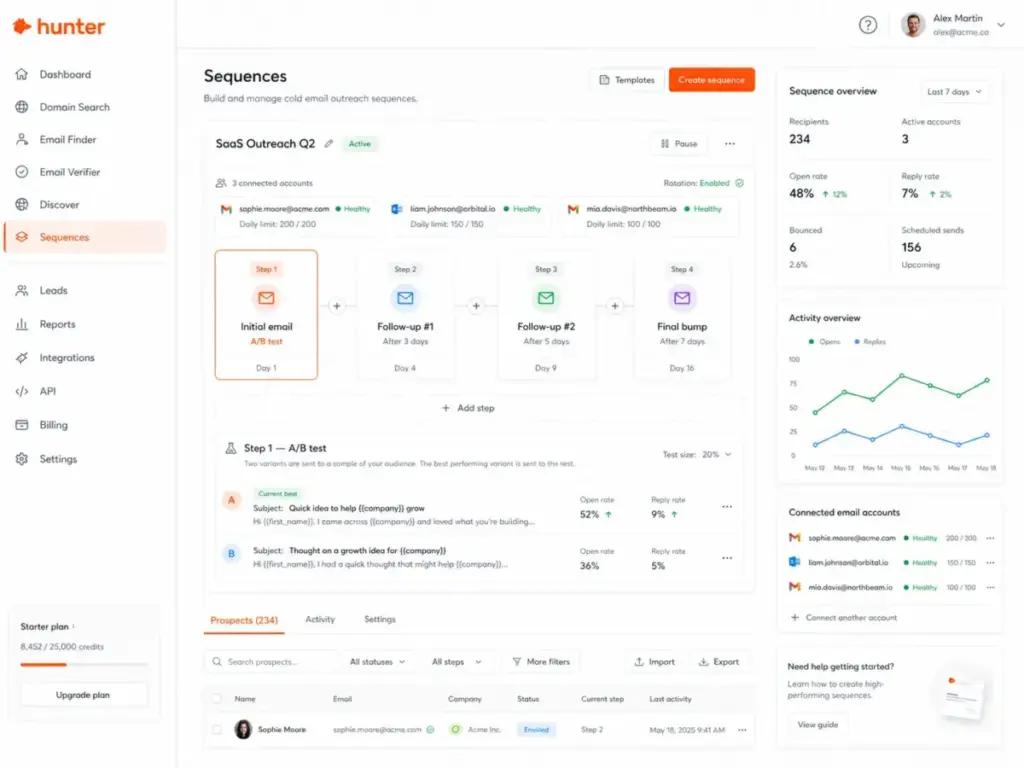
Sequences is Hunter’s built-in cold email tool. Connect your email accounts, write your outreach, set follow-up steps, and let Hunter send on a schedule.
Connected email account limits by plan:
- Free: 1
- Starter: 3
- Growth: 10
- Scale: 20
- Enterprise: custom
Recipient limits per sequence:
- Free: 500
- Starter: 2,500
- Growth: 5,000
- Scale: 15,000
- Enterprise: custom
Sequences now includes A/B testing (added March 2026), email account rotation, evergreen sequences, custom tracking domains (plan-dependent), and reporting. It handles the basics of cold email outreach well.
Where Sequences falls short: it is not a full sales engagement platform. There is no multichannel sequencing (LinkedIn steps, phone tasks). There is no built-in warm-up comparable to Instantly or Smartlead (though Inbox Protection addresses part of this). If your team runs complex multi-touch campaigns across channels, Sequences will feel limited.
For a solo founder or small team sending 100 to 500 cold emails per month, Sequences is enough. For a 10-person SDR team running coordinated outbound across email, LinkedIn, and phone, it is not.
Hunter.io Discover and Signals
Discover is Hunter’s B2B lead database for finding companies and contacts by ICP filters. Basic filters are available on lower plans; advanced filters unlock on higher tiers. An AI Assistant offers monthly search limits that vary by plan.
Signals surfaces company-level triggers: funding rounds, hiring activity, and company updates. These are useful for timing outreach, though the depth does not match dedicated intent-data providers like Bombora or G2 Buyer Intent.
Both features are relatively new additions to Hunter’s core product. They move Hunter closer to the “prospecting platform” category, but they are not yet at the depth of Apollo’s database or ZoomInfo’s firmographic coverage.
Hunter.io API and Integrations
Hunter’s API covers Discover, Domain Search, Email Finder, and Email Verifier endpoints. API responses include structured data with confidence scores and source information. For RevOps teams and developers building enrichment pipelines, the API is clean and well-documented.
Native integrations include HubSpot, Salesforce, Pipedrive, Zoho CRM, Gmail, Outlook, Google Sheets, Zapier, Make, Clay, Airtable, Excel, and Hunter MCP. The HubSpot CRM and Pipedrive integrations are particularly relevant for small sales teams that want to push verified contacts directly into their CRM pipeline.
Data Quality, Security, and Compliance
Hunter’s public-source transparency is a real differentiator, not just a compliance footnote.
Every email result shows the specific public web sources where Hunter found it. This means you can verify the data independently. Most competitors (Apollo, RocketReach, Lusha) do not expose source-level transparency at the same level.
Key data and security facts:
- Hunter states it sources data exclusively from the public web
- 30 million web pages crawled daily
- 650 million public data sources indexed
- 150 million professional email addresses in the database
- Data is removed after six months if the public source disappears
- Website owners can block Hunter’s crawler via robots.txt
- Data subjects can claim or remove their contact information
- Services hosted on Google Cloud Platform in Belgium
- Customer data encrypted at all times on GCP
- OAuth and refresh tokens encrypted with AES-256-CBC
- Passwords stored with bcrypt
The six-month data removal policy is notable. If a public source goes offline or removes the email, Hunter removes it from their database within six months. This is a stronger data-freshness commitment than many competitors make.
For GDPR-conscious teams operating in Europe, the Belgium-based GCP hosting and public-source-only model are relevant factors. Hunter does not claim GDPR certification (no email data tool can fully guarantee compliance on its own), but the architecture aligns with public-data processing principles.
Hunter.io Pricing and Credit Limits
Hunter.io Pricing Table
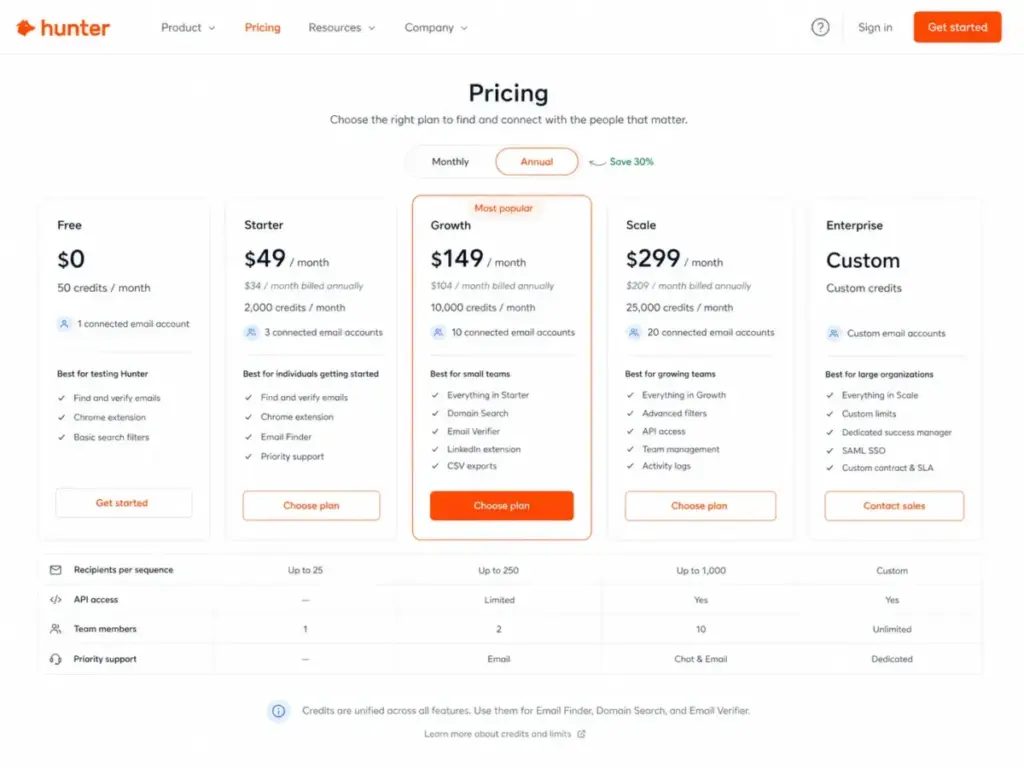
| Plan | Monthly Price | Annual Price | Monthly Credits | Email Accounts | Recipients/Sequence | Best For |
|---|---|---|---|---|---|---|
| Free | $0 | $0 | 50 | 1 | 500 | Testing the product |
| Starter | $49/mo | $34/mo ($408/yr) | 2,000 | 3 | 2,500 | Solo founders, freelancers |
| Growth | $149/mo | $104/mo ($1,248/yr) | 10,000 | 10 | 5,000 | Small teams, agencies |
| Scale | $299/mo | $209/mo ($2,508/yr) | 25,000 | 20 | 15,000 | SDR teams, high-volume outreach |
| Enterprise | Custom | Custom | Custom | Custom | Custom | Large organizations |
Pricing verified April 27, 2026 via Hunter.io pricing page. Annual billing is approximately 30% lower than monthly.
Hunter.io Credit Burn Reality Check
This is the section most Hunter.io reviews skip. Knowing the price per plan is not useful without knowing how fast you burn through credits in real workflows.
| Workflow | Actions | Credits Used | Plan Needed |
|---|---|---|---|
| 500 named prospects found + verified | 500 Email Finder + 500 Verifier | 500 + 250 = 750 | Starter (2,000) |
| 1,000 named prospects found + verified | 1,000 Email Finder + 1,000 Verifier | 1,000 + 500 = 1,500 | Starter (2,000) |
| 100 domains via Bulk Domain Search (avg 5 emails/domain) + verify all | 500 emails found + 500 Verifier | 100 + 250 = 350 | Starter (2,000) |
| 5,000 contacts cleaned (verifier only) | 5,000 Verifier | 2,500 | Growth (10,000) |
Key takeaways from the math:
- Bulk Domain Search is dramatically cheaper than Email Finder for discovery. 100 domains returning 500 emails costs roughly 100 credits (1 credit per 1-10 emails). The same 500 emails via Email Finder costs 500 credits.
- Verification-only workflows are the most credit-efficient use of Hunter. At 0.5 credits per verification, a Growth plan (10,000 credits) can verify 20,000 emails per month.
- Starter is enough for most solo operators. 2,000 credits covers 1,000 found-and-verified prospects per month, which exceeds what most solo founders or freelancers need.
- Growth makes sense at scale. If you are running outbound for multiple clients or domains, the 10,000-credit pool gives breathing room.
What the Pricing Page Does Not Make Obvious
Several cost factors are not immediately clear from the main pricing grid:
- Additional email accounts cost extra. Beyond the included accounts per plan, additional connected email accounts start from $10/month each.
- Custom domains and managed email accounts start from $6/month (monthly billing) or $4.50/month (annual billing). If you are creating multiple sending domains for deliverability, this adds up.
- All team members share one credit pool. Unlimited team members are included, but everyone draws from the same monthly credits. A five-person team on Starter splits 2,000 credits.
- Data Platform uses a separate credit system. If you need the Data Platform (which separates Search and Verification credits), it operates on its own pricing. Credits on Data Platform can be used up to 12 months from purchase.
- Running out of credits mid-month requires purchasing extra credit packs or upgrading your plan. There is no pay-as-you-go overflow option on standard plans.
Best Hunter.io Plan by Use Case
- Free: Testing Hunter before committing. 50 credits is enough for a handful of searches to evaluate data quality.
- Starter ($49/mo or $34/mo annual): Solo founders, freelance link builders, recruiters doing moderate volume. 2,000 credits handles most individual workflows.
- Growth ($149/mo or $104/mo annual): Small agencies, 3-5 person outbound teams, anyone running domain-based prospecting across multiple client accounts.
- Scale ($299/mo or $209/mo annual): SDR teams sending high-volume sequences, organizations needing 20 connected email accounts and 15,000 recipients per sequence.
Hunter.io User Experience
The First 30 Minutes in Hunter.io
Hunter’s onboarding is one of the fastest in the B2B data tool category. Here is what the first session looks like:
- Minutes 0-2: Sign up with email. No credit card required. Dashboard loads immediately.
- Minutes 2-5: Run your first Domain Search. Enter any company domain and see results with confidence scores and sources. This alone tells you whether Hunter’s data covers your target market.
- Minutes 5-10: Try Email Finder with a specific name and domain. Compare the result against what you can find manually on LinkedIn or company websites.
- Minutes 10-15: Run Email Verifier on a few addresses from your existing list. Note how it classifies valid, risky, and accept-all addresses.
- Minutes 15-25: Install the Chrome extension. Visit a company’s website and trigger Domain Search from the browser. This is where Hunter feels fastest for ad-hoc prospecting.
- Minutes 25-30: Connect a Gmail or Outlook account and explore Sequences. Set up a basic two-step follow-up sequence (even if you do not send it yet) to understand the workflow.
By minute 30, you have a clear picture of Hunter’s data quality for your industry, verification accuracy, and whether Sequences fits your sending workflow.
Where Hunter.io Feels Fast
- Domain Search returns results in seconds, even for large organizations
- The Chrome extension makes ad-hoc prospecting feel natural during research sessions
- Google Sheets add-on turns any spreadsheet into a bulk lookup tool without touching the API
- Email Verifier processes bulk lists quickly with clear status labels
- CRM integrations with HubSpot and Pipedrive push contacts directly without manual CSV exports
Where Hunter.io Starts to Feel Limited
- Sequences lacks multichannel steps (no LinkedIn, no phone task reminders)
- Discover’s B2B database is smaller and less filterable than Apollo’s
- Signals provides surface-level company triggers, not deep buyer intent
- No phone number lookups as a primary workflow
- Credit pool sharing across team members can create internal friction
- Accept-all email addresses remain a verification blind spot (true for all tools, but worth noting)
Hunter.io Pros and Cons
- Public-source transparency on every result. Hunter shows exactly where it found each email address. No other major competitor does this at the same level.
- Verification at 0.5 credits per check. List-cleaning workflows get twice the volume per credit compared to email finding.
- Bulk Domain Search is extremely credit-efficient. 1 credit per 1-10 emails makes domain-based prospecting far cheaper than named lookups.
- Free plan with no credit card. 50 credits per month is enough to evaluate data quality before committing.
- Google Sheets add-on and Chrome extension. These turn Hunter into a workflow tool, not just a web app.
- Inbox Protection and managed email accounts (2026). SPF, DKIM, DMARC configuration handled inside Hunter reduces setup friction for cold email.
- Clean API with structured payloads. Confidence scores, source data, and verification status in every API response.
- No phone number lookups. Hunter is email-only. Teams that need direct dials must pair it with UpLead, RocketReach, or Lusha.
- Sequences is basic compared to dedicated cold email platforms. No multichannel steps, limited A/B testing depth, no built-in warm-up comparable to Instantly or Smartlead.
- Shared credit pool creates team friction. Five team members on a Starter plan split 2,000 credits. Heavy users can drain the pool for everyone.
- Accept-all addresses remain uncertain. Hunter’s proprietary verification helps, but no tool can fully solve the catch-all problem.
- Additional email accounts and custom domains add hidden costs. $10/month per extra email account and $6/month per custom domain can add $50-100/month for serious outbound setups.
- Discover and Signals are not yet competitive with Apollo or ZoomInfo. The B2B database is growing but lacks the depth and filtering that dedicated sales intelligence platforms offer.
- Data availability varies by country and industry. Hunter’s public-web sourcing model means coverage is stronger for English-speaking markets and tech-heavy industries. Niche verticals or regions with less public web presence may see thinner results.
Hunter.io vs Alternatives
| Feature | Hunter.io | Apollo.io | Snov.io | UpLead | RocketReach |
|---|---|---|---|---|---|
| Starting price | $49/mo | $49/user/mo (annual) | $29.25/mo (annual) | $99/mo | $69/mo |
| Free plan | Yes, 50 credits | Yes (Fair Use Policy) | Limited | 7-day trial, 5 credits | 5 lookups |
| Email finding | Yes | Yes | Yes | Yes | Yes |
| Email verification | Built-in | Built-in | Built-in | Built-in (95% accuracy claim) | Basic |
| Phone numbers | No | Yes | No | Yes (mobile direct dials) | Yes |
| Cold email sequences | Yes (basic) | Yes (advanced) | Yes (multichannel) | No | No |
| Warm-up | Inbox Protection (new) | Basic | Yes | No | No |
| LinkedIn automation | No | No native | $69/mo add-on | No | No |
| CRM integrations | HubSpot, Salesforce, Pipedrive, Zoho | Built-in CRM | HubSpot, Pipedrive | Salesforce, HubSpot | Salesforce, HubSpot |
| API | Yes | Yes | Yes | Yes | Yes |
| Data source transparency | High (shows sources) | Low | Low | Medium | Low |
| Best for | Email-first outreach | Full sales platform | Outreach + warm-up bundle | Verified contacts + phone | Email + phone lookups |
[CUSTOM VISUAL: Hunter.io vs Apollo vs Snov.io vs UpLead vs RocketReach by best-fit use case – Place after Alternatives section]
Hunter.io vs Apollo.io
Apollo is a broader platform. It combines a large B2B database, email sequences, phone dialer, and a lightweight CRM in one subscription. Starting at $49/user/month (billed annually), Apollo costs more per seat but includes features Hunter does not offer: phone numbers, buyer intent signals, and multi-touch sequences.
Choose Hunter when: You only need email discovery and verification, your team is small, and you want transparent source data. Choose Apollo when: You need a full sales engagement platform with phone data, sequences, and CRM-like pipeline management.
Hunter.io vs Snov.io
Snov.io bundles email finding, verification, cold outreach, and warm-up in one subscription. Its Starter plan at $29.25/month (annual) is cheaper than Hunter’s Starter and includes 1,000 credits. Snov.io also offers LinkedIn automation as a $69/month add-on.
Choose Hunter when: You want cleaner email discovery with public-source transparency and do not need LinkedIn automation. Choose Snov.io when: You want outreach automation, warm-up, and multichannel features in one subscription at a lower entry price.
Hunter.io vs UpLead
UpLead positions itself as a verified B2B contact database with a 95% data accuracy claim. Its Essentials plan starts at $99/month (170 credits) or $74/month annually. UpLead includes mobile direct dials, which Hunter does not.
Choose Hunter when: You need high-volume email finding and verification at a lower per-credit cost. Choose UpLead when: You need phone numbers alongside email addresses and want a database-first prospecting workflow.
Hunter.io vs RocketReach
RocketReach offers email and phone lookups starting at $69/month for 100 lookups. It is more expensive per contact than Hunter but includes direct dial capabilities.
Choose Hunter when: You only need email addresses and want to maximize volume per dollar. Choose RocketReach when: You need both email and phone data for individual prospect lookups.
Hunter.io vs ZoomInfo
ZoomInfo is enterprise-grade sales intelligence with custom pricing that typically starts in the thousands per month. It includes territory planning, buyer intent, and deep firmographic data. Lusha occupies a similar space at a slightly lower price point.
Choose Hunter when: Your budget is under $300/month and you only need email finding and verification. Choose ZoomInfo or Lusha when: You are an enterprise sales team needing intent data, phone numbers, territory management, and org charts.
Who Should Use Hunter.io?
Hunter fits specific buyer segments well. Here are the micro-cohorts where it delivers the best return:
Solo founder sending 100-300 outbound emails per month. The Starter plan (2,000 credits) covers prospecting and verification with room to spare. Sequences handles basic follow-ups. The free plan lets you validate data quality before spending anything.
Freelance link builder verifying 500-1,000 contacts per month. Domain Search plus the Verifier is the core workflow. At 0.5 credits per verification, Starter handles the volume easily. The Google Sheets add-on speeds up batch processing.
3-person agency building domain-based lists for clients. Growth (10,000 credits) gives each team member roughly 3,300 credits. Bulk Domain Search keeps per-email costs low. CRM integrations push leads directly into client pipelines.
Recruiter sourcing business email addresses (not direct dials). Email Finder works well for named-prospect lookups. If you only need professional emails (not personal phone numbers), Hunter covers the workflow. If you need direct dials, look at UpLead or RocketReach instead.
SaaS SDR team using HubSpot or Pipedrive but needing email discovery. The native CRM integrations let you enrich contacts without leaving your pipeline tool. Growth or Scale plans match team sending volume.
Who Should Not Use Hunter.io?
Phone-heavy outbound team needing direct dials. Hunter does not find phone numbers. If cold calling is a core motion, you need UpLead, RocketReach, Lusha, or ZoomInfo.
Enterprise sales team needing intent, enrichment, and territory planning. Hunter’s Discover and Signals features are not at the depth required for enterprise RevOps workflows. ZoomInfo and Apollo serve this segment better.
Team needing LinkedIn automation and warm-up as core workflow. Hunter does not offer LinkedIn automation. Snov.io offers it as a $69/month add-on. If multichannel sequences (email plus LinkedIn plus phone) are essential, Hunter is not enough on its own.
Agency sending huge volume where credits become the constraint. A 10-person agency burning 50,000+ credits per month will exceed Scale’s 25,000-credit limit. At that volume, the per-credit economics shift, and Enterprise pricing or alternative tools may offer better value.
RevOps team needing deep firmographic enrichment. Hunter’s enrichment endpoints (0.2 credits per enriched email or domain) are useful but limited compared to Clearbit (now part of HubSpot) or Apollo’s full data model.
Sarah Chen’s Quick Take
Hunter.io occupies a specific, well-defined position in the outbound stack: it finds emails, verifies them, and sends basic cold email sequences. It does all three well. The public-source transparency on every result is a genuine trust advantage that no major competitor matches. The credit system, while unified, rewards verification-heavy and domain-based workflows with strong per-contact economics.
Where Hunter loses ground is scope. It is not trying to be Apollo. It is not trying to be ZoomInfo. If you need phone numbers, buyer intent, or multichannel automation, Hunter will leave gaps. But if your primary workflow is “find professional emails by company domain, verify them, and send a cold email sequence,” Hunter remains one of the most focused and cost-effective options in 2026. The Inbox Protection and A/B testing additions show the product is not standing still, even if it is not racing to become an all-in-one sales platform.
Final Verdict
Score: 8.3 / 10
Hunter.io is the right tool when email discovery and verification are your primary needs and you want transparent source data behind every result. It is not the right tool when you need a full sales engagement platform, phone numbers, or buyer intent data.
Choose Hunter if you are a solo founder, freelance outreach specialist, recruiter, or small team that runs email-first outbound and values credit efficiency and data transparency.
Choose Apollo.io if you need a broader sales platform with phone data, advanced sequences, and a built-in CRM.
Choose Snov.io if you want outreach, warm-up, and LinkedIn automation bundled at a lower starting price.
Choose UpLead or RocketReach if phone numbers are a primary requirement alongside email data.
This Hunter.io review reflects pricing and features verified as of April 27, 2026. Plans, credits, and feature availability can change. Check the Hunter.io pricing page for the most current details.
FAQ
Is Hunter.io worth it in 2026?
Yes, for email-first outreach workflows. Hunter’s Starter plan at $49/month (or $34/month annually) includes 2,000 Unified Credits, which covers most solo and small-team prospecting needs. The 2026 additions (Inbox Protection, A/B testing, Global Health) make it more capable than previous versions. It is not worth it if you need phone numbers or full sales engagement automation.
What is Hunter.io used for?
Hunter.io is used for finding professional email addresses by company domain or individual name, verifying email deliverability, and sending cold email sequences. Common use cases include cold email outreach, link building outreach, PR prospecting, and recruiter sourcing.
How much does Hunter.io cost?
Hunter offers a free plan with 50 credits/month. Paid plans start at $49/month (Starter, 2,000 credits), $149/month (Growth, 10,000 credits), and $299/month (Scale, 25,000 credits). Annual billing reduces prices by approximately 30%, bringing Starter to $34/month and Growth to $104/month.
How do Hunter.io credits work?
Hunter uses Unified Credits across all tools. Email Finder costs 1 credit per found email. Email Verifier costs 0.5 credit per verification. Bulk Domain Search costs 1 credit per 1-10 emails returned. No credits are consumed if Hunter cannot find or verify an email. Duplicate searches in the same billing period do not use credits again. See Hunter.io credit rules for full details.
Is Hunter.io accurate?
Hunter does not publish a single accuracy percentage. Accuracy depends on the target domain, industry, and region. Each result includes a confidence score and the public sources where the email was found, so you can assess reliability per contact. For domains with strong public web presence, accuracy is generally high. For niche industries or regions with limited public data, results may be thinner.
Does Hunter.io verify emails?
Yes. Hunter’s Email Verifier checks syntax, domain information, server response, and Hunter’s internal database signals. Results are classified as valid, invalid, risky, or unknown. Accept-all (catch-all) addresses remain a challenge for all verification tools, including Hunter.
Does Hunter.io find phone numbers?
No. Hunter.io is an email-first tool and does not position itself as a phone number provider. If you need direct dials, consider UpLead, RocketReach, or Lusha as alternatives or complements to Hunter.
Is Hunter.io good for cold email?
Yes, for basic cold email workflows. Sequences supports connected email accounts (1-20 depending on plan), follow-ups, A/B testing, email account rotation, and custom tracking domains. It is good enough for solo founders and small teams. For advanced multichannel sequences, warm-up at scale, or high-volume sending, dedicated platforms like Instantly, Smartlead, or Apollo offer more depth.
What is the best Hunter.io alternative?
It depends on your primary need. For a full sales engagement platform: Apollo.io. For outreach with warm-up and LinkedIn automation: Snov.io. For verified contacts with phone numbers: UpLead. For email and phone lookups: RocketReach. For enterprise sales intelligence: ZoomInfo.
Which is better, Hunter.io or Apollo?
Neither is universally better. Hunter is better for teams that only need email finding and verification at a lower cost with transparent source data. Apollo is better for teams that need a full sales platform with phone numbers, advanced sequences, intent data, and CRM-like functionality. Apollo starts at $49/user/month (billed annually), which gets expensive for multi-seat teams.
Can I use Hunter.io for free?
Yes. Hunter’s free plan includes 50 credits per month, 1 connected email account, and up to 500 recipients per sequence. No credit card is required to sign up. The free plan is sufficient for testing data quality and running a small number of lookups.
Does Hunter.io integrate with HubSpot?
Yes. Hunter offers a native integration with HubSpot that lets you push discovered and verified contacts directly into your HubSpot CRM. Other supported integrations include Salesforce, Pipedrive, Zoho CRM, Gmail, Outlook, Google Sheets, Zapier, Make, Clay, Airtable, and Excel.