If you already think in funnel steps, this ClickFunnels review will feel like a yes waiting for a plan number. If you just want a cheap landing page or a real CRM, it is closer to a no.
ClickFunnels is built for founders, coaches, course sellers, and marketers who sell one clear offer through a sequence: opt-in, sales page, checkout, upsell, follow-up email. The pricing model rewards that motion and punishes casual, tool-hoarding use.
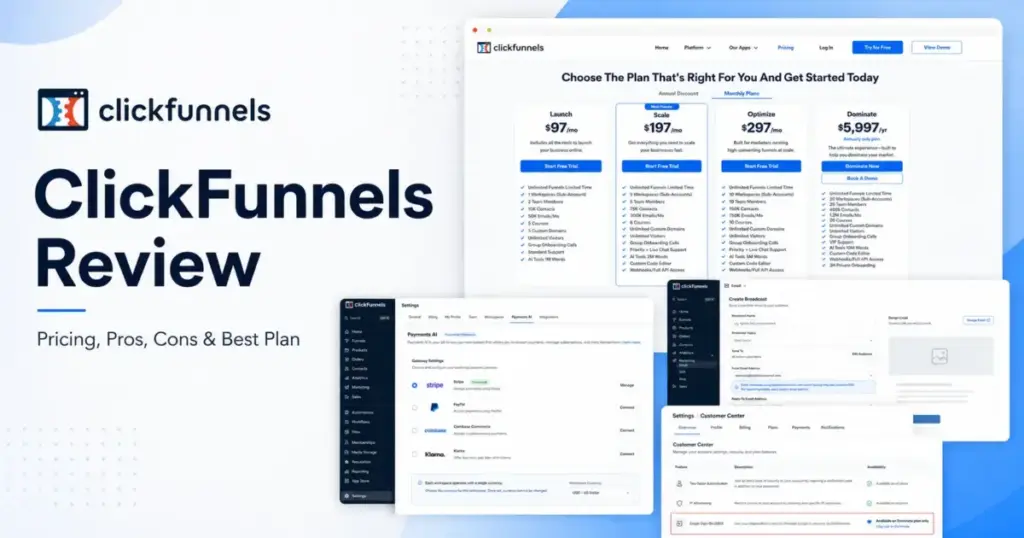
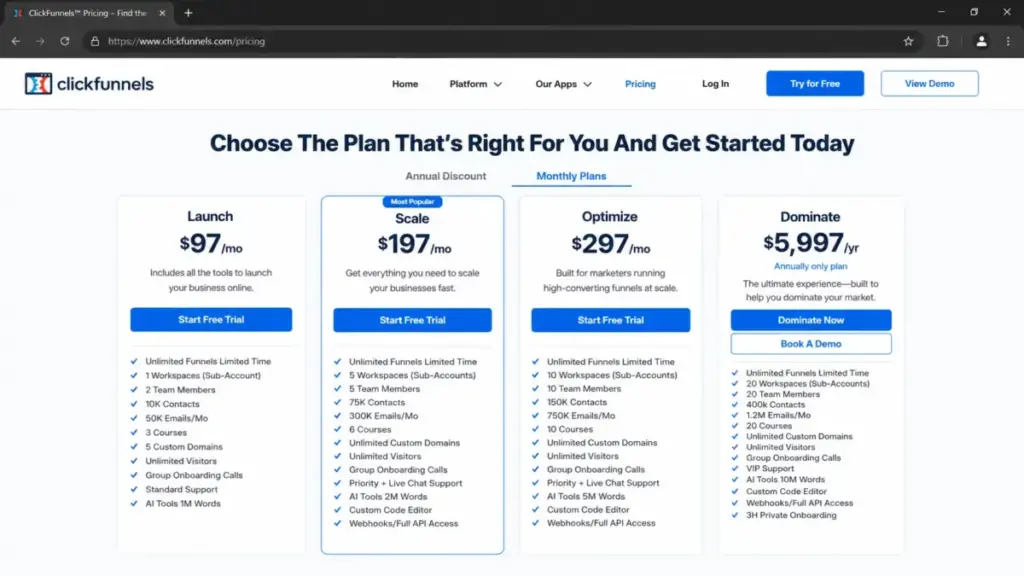
Pricing starts at $97/month on the Launch plan, or $81/month billed annually. Most serious operators land on Scale at $197/month, because that is where webhooks, full API access, and the custom code editor turn on.
The billing model is the review here. ClickFunnels charges by workspaces, team members, email contacts, and monthly email sends, so an underused or bloated list quietly pushes you up a tier.
This review covers pricing, plan gates, payment fees, email limits, course caps, real limitations, buyer fit, and marketing automation platforms that fit better when ClickFunnels does not.
All pricing and plan limits were checked on July 1, 2026 on the official ClickFunnels pricing page and support docs, and prices can change.
Quick Verdict
| Category | Verdict |
|---|---|
| Best for | Funnel-led founders, coaches, course sellers, info-product marketers |
| Not ideal for | Cheap-landing-page buyers, deep-CRM teams, LMS-first creators, SSO-required enterprises |
| Starting price | $97/month (Launch), or $81/month billed annually |
| Best practical plan | Scale at $197/month, because API, webhooks, and custom code turn on here |
| Free plan / trial | No free plan; 14-day free trial with a 30-day money-back guarantee |
| Setup difficulty | Medium: page building is fast, but funnel, payment, and email setup take work |
| Main strength | One stack for funnels, checkout, email, CRM, courses, and automation |
| Main limitation | Plan caps on contacts, sends, courses, and API gate upgrade pressure early |
| Best alternative | Systeme.io for low cost, GoHighLevel for agencies, Kajabi for course-first |
How I Reviewed ClickFunnels
This is a documentation-based review, not a hands-on account test. I built it from the official ClickFunnels pricing page, help docs, feature pages, and developer docs, cross-checked against third-party review sentiment.
I am Sarah Chen, and I cover email and marketing automation platforms for saaszap.com. My lens is the sending motion and the pricing model, not the feature count.
The documentation indicates current plan limits, payment caveats, and feature gates as of July 1, 2026. Where the official pages disagree with each other, I flag it and tell you which source to trust for a buying decision.
I did not run a live ClickFunnels account, so I do not make speed, uptime, or inbox-placement claims. Third-party ratings from G2 and Capterra are used only as sentiment, not as proof of features.
ClickFunnels Pros and Cons
The short version: ClickFunnels is strong at converting one offer and weak at being cheap, minimal, or best-in-class at any single job.
| Pros | Cons |
|---|---|
| Funnel, checkout, email, CRM, courses, and automation live in one workspace | Contacts, email sends, and courses are capped per plan and force upgrades |
| Smart Checkout supports order bumps, one-click upsells, and one-time offers | API, webhooks, and custom code are locked out of the entry Launch plan |
| Analytics is included free on every plan for funnel and revenue tracking | SSO is documented only on the $5,997/year Dominate plan |
| A/B testing spans funnel steps and email subject lines and preheaders | PayPal only works through Payments AI, and each workspace uses one currency |
| 14-day trial plus a 30-day money-back guarantee lowers first-purchase risk | Capterra sentiment flags frequent technical disruptions as a recurring complaint |
Each con here maps to a plan gate, a payment rule, or documented user sentiment, not vague grumbling. I unpack every one below.
What Is ClickFunnels?
ClickFunnels is a web-based platform for building and selling through sales funnels. The official docs describe it as one place for funnels, landing pages, checkout, CRM, email, courses, and automation.
It was created by Russell Brunson and is an Etison product. The current version bundles a funnel builder, Smart Checkout, an Email app, a light CRM, courses, community, analytics, and Payments AI into one workspace.
The point of ClickFunnels is the funnel motion, not any single tool. It assumes you sell one offer through a sequence and want the whole path, from opt-in to upsell to follow-up, in one login.
That framing is why it fits some businesses and frustrates others. If you do not think in funnels, most of the platform is overhead you will pay for and not use.
The Problems ClickFunnels Solves Well
ClickFunnels earns its price when it removes three specific headaches for one funnel owner. Here is what it does day to day, and where each strength still has an edge.
Collapsing a scattered tool stack into one funnel
ClickFunnels combines funnels, a store, CRM, email, courses, community, automations, appointments, and analytics in a single platform. The official docs describe it as one place to build and sell without a large technical team.
For a solo coach or a small info-product team, that means fewer logins, one billing line, and no duct-taped Zapier chains between five tools. This is the real argument for the price.
The catch is that “in one platform” does not mean best-in-class at each job. You are trading depth for consolidation, and that trade only pays off if you actually retire the tools you replace.
Learn how a sales funnel works before you commit, because ClickFunnels assumes you already think in stages: attract, sell, upsell, and follow up.
Selling with checkout, upsells, and order bumps
Smart Checkout is where ClickFunnels does its most useful work. The feature page describes one-click checkout for returning buyers, order bumps, one-time offers during checkout, and subscription upgrades or downgrades.
For an offer that depends on average order value, that upsell flow matters more than a pretty page. A $47 front-end offer with a one-click $197 upsell is the entire business model for many funnel sellers.
The limitation is implementation, not features. Each funnel is restricted to a single payment processor at any given time, so multi-processor selling means separate funnels.
Running email and automation without a separate ESP
ClickFunnels sends broadcasts and workflow emails from a custom domain. You can run a welcome flow, a launch sequence, and a win-back without a standalone email tool.
The Email app and Automation Workflows handle the sending and the triggers.
For a small list with a clean sending habit, that removes a $30 to $150 monthly email bill. A welcome flow and a cart-abandon flow matter more than 30 unused templates.
But email is capped by plan, and deliverability is your job, not a background feature. I cover both limits below, because this is the section where “all-in-one” quietly breaks for high-volume senders.
ClickFunnels Limitations
These are the documented problems ClickFunnels creates, and they are the reason plan choice is the whole game. None of them are dealbreakers on their own, but together they define who should walk away.
Plan caps create upgrade pressure fast
Launch includes 1 workspace, 2 team members, 10,000 contacts, and 50,000 emails per month. A single growing list or a second brand can exhaust that quickly.
The moment you need a third teammate, a fifth workspace, or API access, you are on Scale at double the price. The entry price is real, but it is not the price most teams end up paying.
Payment routing and currency are constrained
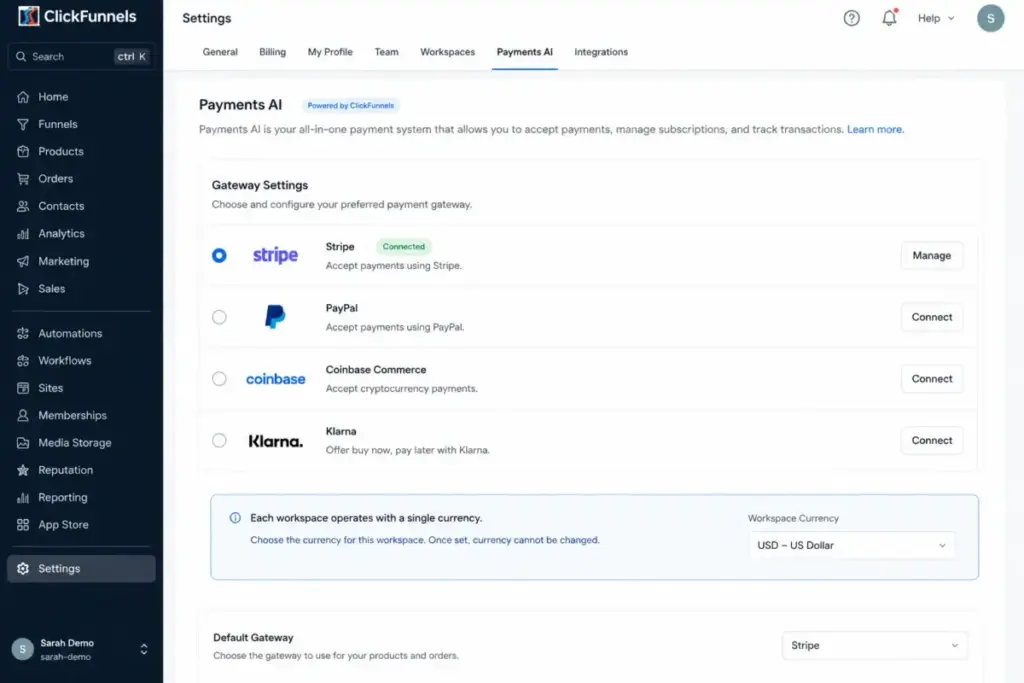
Each ClickFunnels workspace can operate with only a single currency, even though Payments AI supports multiple gateway currencies in settings. Sellers with international pricing hit this wall early.
PayPal can only be used through Payments AI. Coinbase and Klarna are supported by Payments AI, but neither is currently compatible with the Checkout element.
If Klarna installments are core to your offer, verify this before you buy.
Courses and community are capped, not unlimited
Course and community capacity is gated by plan: 3 on Launch, 6 on Scale, 10 on Optimize, and 20 on Dominate. A creator with a growing catalog can outgrow the middle tiers.
ClickFunnels is a funnel platform with course delivery attached, not a dedicated learning platform. If the learning experience is your product, this cap is a warning, not a footnote.
Downgrades keep content but block new creation
If you downgrade while over the lower plan’s limits, the official FAQ says existing content is not removed. But you cannot create new resources until you are back within the plan limits.
That is a soft lock, not data loss. It still means downgrading to save money can freeze your ability to launch anything new until you prune.
Enterprise controls arrive late
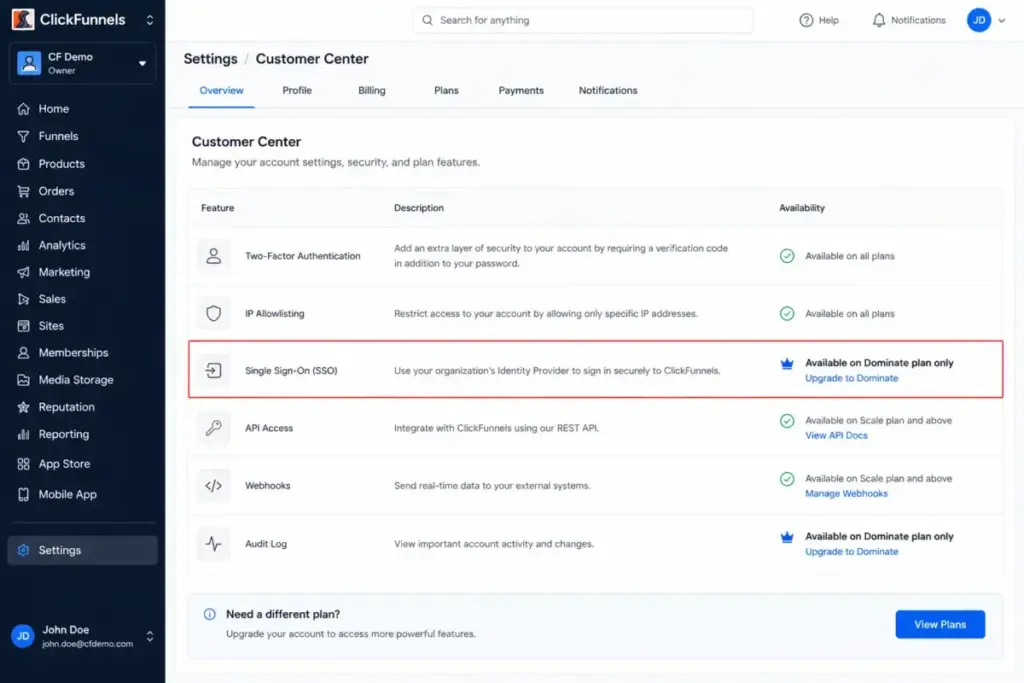
Single Sign-On is documented as available only on the Dominate plan, which is annual-only at $5,997/year. There is no public SOC 2 or ISO 27001 certification proof in ClickFunnels’ documentation.
ClickFunnels publishes legal, privacy, and GDPR resources, and I will not claim certifications it does not show. Security-conscious buyers should treat compliance depth as unverified and ask the sales team directly.
ClickFunnels Pricing and Plans
ClickFunnels has four plans in 2026: Launch, Scale, Optimize, and Dominate. Older Startup, Pro, or Classic plan names you find on other sites are stale and should be ignored for a current decision.
The pricing model charges by workspaces, team members, email contacts, and monthly sends, plus feature gates for API and admin controls. Read the caps, not just the headline price.
| Plan | Monthly | Annual | Key limits | Worth it? |
|---|---|---|---|---|
| Launch | $97/mo | $970/yr ($81/mo) | 1 workspace, 2 users, 10K contacts, 50K emails/mo, 3 courses, 5 domains, standard support | Good for one simple offer and a small list |
| Scale | $197/mo | $1,970/yr ($164/mo) | 5 workspaces, 5 users, 75K contacts, 300K emails/mo, 6 courses, API + webhooks + custom code, priority + live chat | Best practical plan for most funnel businesses |
| Optimize | $297/mo | $2,970/yr ($248/mo) | 10 workspaces, 10 users, 150K contacts, 750K emails/mo, 10 courses, Affiliate Center, priority + live chat | Right for agencies and larger catalogs |
| Dominate | Not offered | $5,997/yr | 20 workspaces, 20 users, 400K contacts, 1.2M emails/mo, 20 courses, VIP support, SSO, 3-hour private onboarding | Only for scale, admin, and SSO needs |
Official pricing: https://www.clickfunnels.com/pricing, checked July 1, 2026.
What this means: the practical plan for most funnel businesses is Scale at $197/month, not the $97 entry. Scale is the first tier with webhooks, full API access, and the custom code editor, which any team with real integrations needs.
There is no free forever plan. ClickFunnels offers a 14-day free trial and a 30-day money-back guarantee, which the FAQ frames as 44 risk-free days combined.
When you outgrow each plan
Upgrade pressure is more honest than the entry price, so here is the trigger map. Buy the plan that matches your next constraint, not your current one.
| Move to | Buy it when you need |
|---|---|
| Scale | A 3rd to 5th teammate, up to 5 workspaces, API, webhooks, custom code, or live chat support |
| Optimize | Up to 150K contacts, 750K sends, 10 workspaces, 10 courses, or the Affiliate Center |
| Dominate | Up to 20 workspaces, 400K contacts, 1.2M sends, VIP support, or SSO |
What this means: if you know API or a fifth workspace is coming within three months, start on Scale. Downgrading later is soft-locked, so buying too low can cost you launch time.
Hidden costs to model before you buy
The real cost of ClickFunnels is rarely the plan price alone. Model these before you commit.
ClickFunnels states it charges no additional fees beyond standard processor rates for Stripe or Payments AI. Standard Stripe and gateway processing fees still apply on every sale, so your effective cost includes payment processing.
You should also budget for likely upgrades when you pass contact, send, workspace, or course caps. Teams that need deep CRM, a real LMS, or advanced email automation may still pay for a specialist tool on top.
Cost scenarios by business type
Headline pricing hides the real bill, so here is what three common buyers actually pay per year. Each assumes annual billing and normal Stripe processing on sales.
A solo coach with one offer and a 5,000-contact list fits Launch at $970/year, plus processing fees. If email volume or a second workspace appears, the jump to Scale adds $1,000/year.
A growing creator with three courses and a 60,000-contact list needs Scale at $1,970/year. Cross 75,000 contacts or six courses and Optimize pushes the bill to $2,970/year.
A three-brand agency needing separate workspaces and live chat lands on Scale or Optimize, so $1,970 to $2,970/year. Add API-heavy client work early, because downgrading later is soft-locked and costs launch time.
What this means: the honest annual cost for most funnel businesses is $1,970 to $2,970, not the $970 entry. Model your contact count and send volume first, because those two numbers move you between tiers faster than features do.
Feature Gates by Plan
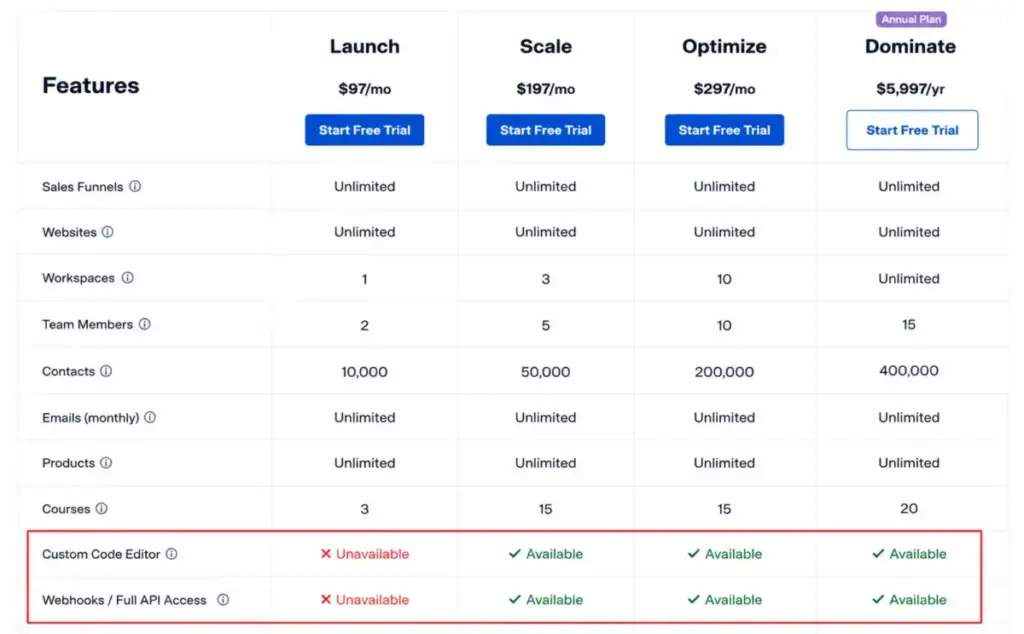
The features that decide a purchase are gated, not universal. This table shows the gates that actually change the buying decision.
| Feature | Launch | Scale | Optimize | Dominate |
|---|---|---|---|---|
| Webhooks / full API | No | Yes | Yes | Yes |
| Custom code editor | No | Yes | Yes | Yes |
| Affiliate Center | No | No | Yes | Yes |
| Live chat support | No | Yes | Yes | Yes |
| SSO | No | No | No | Yes |
| Analytics | Yes | Yes | Yes | Yes |
What this means: developers and integration-heavy teams should skip Launch entirely. On Launch there is no webhooks, full API, or custom code editor.
That gap is the most common reason a technical team outgrows the entry plan on day one.
Key Features and Where They Are Locked
Every feature below answers the same four questions: what it does, who it fits, which plan it needs, and where it stops. That is the difference between a review and a rewritten feature list.
Funnel and page builder
The drag-and-drop builder is the core of ClickFunnels and the reason page-building friction is low. It fits founders who want to publish a sales page today without a developer.
The custom code editor is gated to Scale and higher, so Launch users cannot inject custom scripts. Teams that need custom tracking, widgets, or scripts should plan for Scale.
Smart Checkout
Smart Checkout handles one-click checkout, order bumps, one-time offers, and subscription changes. It fits any seller whose margin depends on upsells and average order value.
The gate is not a plan, it is payment routing: one processor per funnel at a time. International or multi-processor sellers should design around separate funnels.
Email broadcasts and workflows
Email broadcasts and automation workflows send from your custom domain, covering welcome flows, launches, and win-backs. This fits small lists that want funnel and email in one place.
Monthly send limits are the gate: 50K on Launch, 300K on Scale, 750K on Optimize, and 1.2M on Dominate. High-frequency senders should map their volume to a tier before buying.
CRM and contact management
The CRM includes MessageHub, Opportunities, and Appointments, and supports CSV contact import. It fits funnel-led sales that need a light pipeline, not a deep sales CRM.
Here is a contradiction to know. The CRM page says there is no limit on contacts, but the pricing page lists email contact caps of 10K to 400K by plan. For a buying decision, treat the pricing-page caps as the real billing constraint.
Courses and community
Courses, community, and the Customer Center let you deliver and sell learning products inside the same platform. This fits creators who sell courses through funnels rather than run an education-first business.
The cap is 3 to 20 courses by plan, and the delivery experience is lighter than a dedicated LMS. Education-first creators should weigh a specialist platform.
Automation workflows
Automation Workflows trigger emails, tag contacts, and move opportunities based on buyer actions. This fits lifecycle campaigns like nurture, cart recovery, and post-purchase sequences.
Full API and webhooks, which many automations depend on, are Scale-and-up only. Deep automation on Launch will hit a wall.
Read the marketing automation basics if you are new to triggers and flows.
Analytics and A/B testing
Analytics is included free on every plan and tracks visitors, sales, revenue, and page views. A/B testing spans funnel-step variations and email subject lines and preheaders.
Together they turn ClickFunnels into a conversion system, not just a publisher. This is the value that a standalone page builder cannot match, and it is the same on every tier.
Payments, Fees, and Checkout Setup
Payment setup is where “no extra fees” gets misread, so model it carefully. ClickFunnels does not add a platform cut, but processors do.
ClickFunnels integrates Stripe and Payments AI, and states it charges no additional fees beyond standard processor rates. Standard Stripe and gateway fees still apply to every transaction.
A workspace designates one default processor, and each funnel is restricted to a single processor at any given time. PayPal only works through Payments AI, and Coinbase and Klarna are not currently compatible with the Checkout element.
What this means: for a US seller in one currency using Stripe, setup is simple and the only cost is normal processing. For international, multi-currency, or Klarna-dependent sellers, verify these constraints before you build.
Email Marketing and Deliverability
This is the section where all-in-one either holds or breaks for you, so I am spending real time here. Whether ClickFunnels replaces your email tool depends on volume and sending discipline.
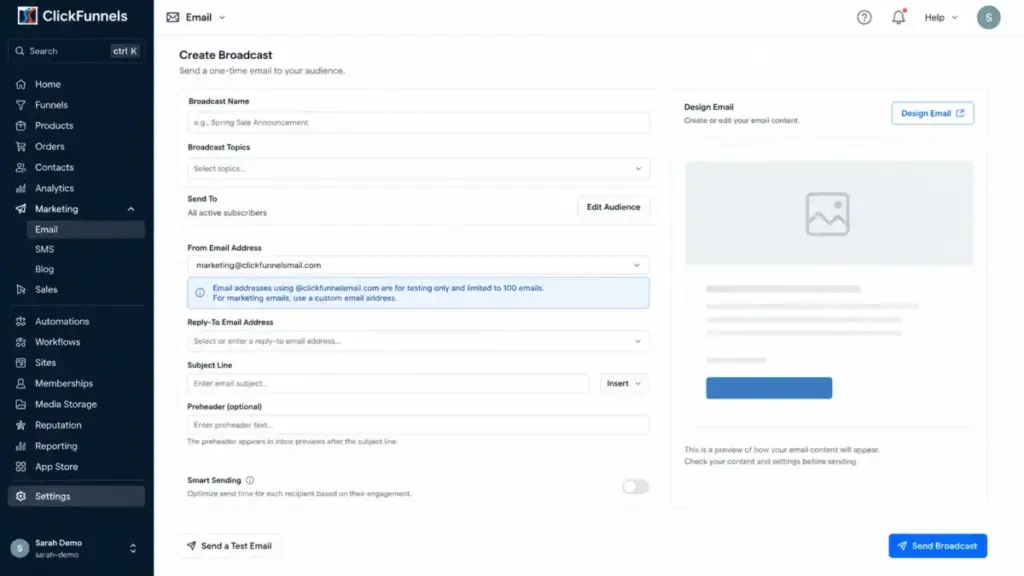
Paid plans cap monthly sends at 50K to 1.2M, and trial accounts are limited to 100 marketing emails per day. Map your list size times your send frequency against those caps before you assume ClickFunnels replaces your ESP.
One setup trap matters: the default @clickfunnelsmail.com address is for testing only and is capped at 100 emails. Real campaigns require a verified custom sending domain, which is a deliverability requirement, not an optional polish step.
Deliverability is your responsibility on any platform, so treat domain authentication as core marketing work. Proper email deliverability setup protects inbox placement more than any template does.
For a clean, engaged list under a few hundred thousand sends, ClickFunnels email is enough. For high-volume, deliverability-sensitive senders, GetResponse for email-led funnels or a dedicated ESP is the safer motion.
Can ClickFunnels Replace Your Marketing Stack?
The all-in-one promise only pays off if you cancel the tools it replaces. Here is an honest map of what ClickFunnels can absorb and what usually still needs a specialist.
| Stack job | ClickFunnels verdict |
|---|---|
| Landing pages and sales pages | Can replace for funnel-led selling |
| Checkout, order bumps, upsells | Can replace for most digital-offer sellers |
| Email broadcasts and flows | Can replace for engaged lists within send caps |
| Lightweight CRM and pipeline | Can replace for funnel-led sales, not deep CRM |
| Course and community delivery | Plan-dependent; may still need a real LMS |
| Advanced lifecycle automation | May still need a specialist ESP |
| Ecommerce catalog and inventory | May still need Shopify or SamCart |
| Affiliate program | Plan-dependent; Affiliate Center is Optimize and up |
What this means: a solo or small funnel business can genuinely retire four or five tools and come out ahead on cost. A team with a mature CRM, a large course catalog, or heavy automation will keep at least one specialist tool, which shrinks the savings argument.
Run this test before buying: list every tool ClickFunnels would replace, then add their monthly cost. If that total beats $197/month and you will actually cancel them, the math works.
If not, the consolidation is theoretical.
Ease of Use, Integrations, and Support
Setup difficulty is medium, not the “anyone can do it” pitch you see on affiliate pages. Building a page is fast, but funnels, payments, email domains, and analytics still need ownership.
Templates and drag-and-drop lower the technical friction, so a non-developer can ship a page in an afternoon. The harder work is offer strategy, payment setup, and sending discipline, which no builder does for you.
The integrations page lists connections including ActiveCampaign, ConvertKit, GetResponse, HubSpot, Keap, Klaviyo, Mailchimp, Pipedrive, Sendlane, Slack, GoTo Webinar, WebinarFuel, and Zapier. Availability does not equal best-in-class depth, so teams with mature CRM or email stacks may prefer to connect rather than replace.
If you already run Keap’s CRM and automation, for example, connecting it can beat migrating everything into ClickFunnels. The all-in-one promise only pays off when you truly retire the old tool.
Support is tiered by plan: Standard on Launch, Priority plus Live Chat on Scale and Optimize, and VIP on Dominate. Live chat is not on the entry plan, which matters for non-technical buyers who need fast help.
For developers, REST API, webhooks, native integrations, and Zapier are documented, but gated to Scale and up. The docs discourage V1 webhooks because they receive maintenance support only, and endpoint scopes are limited to certain events, so build on V2.
What Users Say About ClickFunnels
Third-party ratings are strong but split, so read them by theme rather than by star count. I use these as sentiment, not as proof of features.
ClickFunnels holds 4.6 out of 5 from 417 reviews on G2 and 4.5 out of 5 from 665 reviews on Capterra. Those are healthy scores for a platform at this price.
The positive Capterra sentiment clusters around lead capture, landing pages, web forms, templates, and the contact database. Those are the funnel-building jobs the platform is built for, so the praise lines up with the design.
The recurring negative theme on Capterra is frequent technical disruptions. That is user sentiment, not a verified defect rate, but it is worth weighing if reliability is a hard requirement for your business.
Who Wins with ClickFunnels
ClickFunnels rewards a specific operator profile. If you match one of these, it is a strong fit.
Solo coaches and consultants selling one paid offer win on Launch, if the list and course needs stay small. The funnel, checkout, email, and course tools cover a simple offer without extra tools.
Info-product marketers and course sellers who sell through funnels win on Scale. The upsell checkout and built-in email do more for revenue than a standalone page builder.
Small agencies managing a few brands win on Scale or Optimize, where multiple workspaces and live chat support arrive. Workspace count, not entry price, is the number that matters for them.
Ecommerce offer builders running lead magnets, order bumps, and upsells win when average order value depends on the checkout flow. Smart Checkout is the reason to choose it over a generic cart.
Developer-supported teams win on Scale or higher, where webhooks, full API, and the custom code editor turn on. They can push data to a warehouse, sync a CRM, and build custom flows on V2 webhooks.
Who Loses with ClickFunnels
Just as important, some buyers should walk away. If you match one of these, spend your money elsewhere.
Cheap-landing-page buyers lose, because $97 to $197 per month is heavy for a few opt-in pages. A dedicated page builder costs far less for that single job.
Deep-CRM teams lose, because ClickFunnels CRM is funnel-first and light on advanced pipeline, forecasting, and reporting. Teams needing that depth should look at standalone CRM software instead.
Education-first creators lose, because course and community caps and a lighter learning experience trail dedicated platforms. If the course is the product, an LMS beats a funnel builder.
SSO-required and compliance-sensitive enterprises lose, because SSO is Dominate-only and no public SOC 2 or ISO proof exists. That is a real blocker for security reviews.
Teams sensitive to reliability complaints should note that Capterra sentiment flags frequent technical disruptions as a recurring theme. Treat that as user sentiment to weigh, not a verified defect rate.
Best ClickFunnels Alternatives
If you landed in the “who loses” group, pick an alternative by your actual pain point, not by a generic ranking. Here is where each one wins.
| Alternative | Choose it if | Trade-off vs ClickFunnels |
|---|---|---|
| Systeme.io | You want a low-cost all-in-one funnel and email tool | Less polished checkout and ecosystem |
| Leadpages / Unbounce | You only need fast, cheap landing pages | No built-in CRM, email, or courses |
| GoHighLevel | You are an agency needing CRM automation and client sub-accounts | Steeper learning curve |
| Kajabi / Teachable | Course delivery and community are your product | Weaker funnel and upsell checkout |
| Shopify / SamCart | Ecommerce catalog or checkout-heavy selling is the core | Not built around funnel sequences |
| ActiveCampaign / Brevo | Email-first lifecycle automation matters most | No native funnel or checkout builder |
For email-led businesses, our ActiveCampaign evaluation shows deeper automation than ClickFunnels offers natively.
On a tighter budget, Brevo’s email and automation features cover lifecycle sends at a lower entry price.
If email is your whole business, a specialist email tool beats paying funnel-platform prices for send capacity. Match the tool to the sending habit, not the marketing pitch.
Final Verdict: Is ClickFunnels Worth It in 2026?
ClickFunnels is worth it if you sell one clear offer through a funnel and will actually retire the tools it replaces. It is not worth it as a page builder, a deep CRM, or an LMS.
The honest answer to this ClickFunnels review is conditional. Buy Scale at $197/month if you need API, webhooks, custom code, or more than two teammates, which most real businesses do.
Start on Launch only for a single simple offer with a small list.
Avoid it if you need cheap landing pages, deep CRM depth, an education-first platform, or SSO below the $5,997/year Dominate tier. In those cases a specialist tool wins on cost and fit, whether that is a CRM, an LMS, or dedicated email marketing tools.
The pricing model is the real decision, not the feature list. If your list is engaged and your funnel is disciplined, ClickFunnels pays for itself.
If your list is bloated or your offer is undefined, no plan will fix that, and the caps will just cost you more each month.
ClickFunnels FAQ
Is ClickFunnels worth it in 2026?
Yes, if you sell an offer through funnels and consolidate tools. No, if you only need landing pages or a deep CRM.
How much does ClickFunnels cost?
Plans run $97/month (Launch), $197/month (Scale), $297/month (Optimize), and $5,997/year (Dominate). Annual billing lowers the effective monthly rate.
Does ClickFunnels have a free trial?
Yes. There is a 14-day free trial and a 30-day money-back guarantee, framed by ClickFunnels as 44 risk-free days combined, with no free forever plan.
Does ClickFunnels take a percentage of my sales?
No, ClickFunnels states it charges no additional fees beyond standard processor rates. Your Stripe or gateway processing fees still apply on every sale.
Which ClickFunnels plan includes API and webhooks?
Scale, Optimize, and Dominate include webhooks, full API access, and the custom code editor. Launch does not, so integration-heavy teams should start on Scale.
Can I sell courses with ClickFunnels?
Yes, with plan caps of 3 to 20 courses. It suits selling courses through funnels, but an education-first business is better served by a dedicated LMS.
Which plan has SSO?
Only the Dominate plan, which is annual-only at $5,997/year. There is no public SOC 2 or ISO 27001 certification proof, so verify compliance directly.
Will I lose content if I downgrade ClickFunnels?
No. Existing content stays after a downgrade, but you cannot create new resources until you are back within the lower plan’s limits.
Are ClickFunnels contacts unlimited?
The CRM page says there is no contact limit, but the pricing page caps email contacts at 10K to 400K by plan. For a buying decision, use the pricing-page caps as the real constraint.
What is the best ClickFunnels alternative?
It depends on your pain point: Systeme.io for low cost, GoHighLevel for agencies, Kajabi for course-first, and ActiveCampaign or Brevo for email-first automation.