Pipedrive CRM earns an 8.4/10 in this Pipedrive CRM review because it does one thing better than most competitors: it keeps sales reps inside their pipeline instead of buried in admin work. If your team has outgrown spreadsheets and needs a visual, activity-driven CRM that enforces deal discipline, Pipedrive belongs on your shortlist and it consistently shows up in our best CRM software rankings for sales-focused teams.
But the sticker price is misleading. Once you add LeadBooster, Projects, and Campaigns, a five-person team on Growth can pay 40% more than the pricing page suggests. This review breaks down the real costs, hard automation limits, and the exact scenarios where Pipedrive wins or loses against HubSpot, Salesforce, Zoho CRM, Freshsales, and Close CRM.
Quick Verdict
| Category | Verdict |
|---|---|
| Score | 8.4 / 10 |
| Best for | Sales-led SMBs (2-50 reps) that need visual pipeline discipline without Salesforce-level complexity |
| Not for | Marketing-led teams, free-CRM seekers, enterprise sales ops with complex object models |
| Best plan | Premium ($59/seat/month, annual) for teams that need LeadBooster and workflow automation depth |
| Biggest strength | Visual pipeline UX that keeps reps focused on next actions |
| Biggest limitation | No permanent free plan, and add-ons inflate the real cost quickly |
| Starting price | $14/seat/month (Lite, billed annually) |
| Trial | 14 days, no credit card required |
| Free plan | No |
| Main alternatives | HubSpot Sales Hub, Salesforce Sales Cloud, Zoho CRM, Freshsales, Close CRM |
Final Verdict: Is Pipedrive Worth It?
Pipedrive is worth it for sales teams between 2 and 50 people that prioritize pipeline visibility and deal velocity over marketing automation or enterprise reporting. At $14 to $79 per seat per month (billed annually), the base pricing is competitive. The platform scores well on setup speed and daily workflow fit, but falls short on reporting depth and native marketing tools.
Here is how Pipedrive scored across the criteria I weight most for sales CRM buyers. Each score reflects pricing verified on the Pipedrive pricing page as of May 5, 2026, feature testing, published documentation, and third-party review signals from Capterra (4.5/5 from 3,041 reviews), G2 (4.2/5), and Gartner (4.3/5). For details on how I evaluate CRM products, see our review methodology.
| Criterion | Score | Why it matters |
|---|---|---|
| Pipeline usability | 9.3 | Drag-and-drop deal movement, customizable stages, activity reminders |
| Setup speed | 9.0 | Most teams are inside a working pipeline within 30 minutes |
| Sales workflow fit | 8.8 | Built around the daily sell-call-follow-up loop, not marketing funnels |
| Integrations and API | 8.5 | 500+ integrations, open API, but rate limits tighten on lower plans |
| Pricing transparency | 7.8 | Base prices are clear, but add-on and top-up costs are buried in docs |
| Scaling controls | 7.7 | Permissions, visibility groups, SSO on higher plans, but 300K deal cap applies |
| Reporting depth | 7.2 | Adequate for pipeline metrics, weak for multi-touch attribution or custom objects |
| Marketing automation | 6.5 | Campaigns add-on exists, but native journey and lead-scoring tools are limited |
| Overall | 8.4 |
Bottom line: If your primary job is selling, not marketing, Pipedrive delivers a clean workspace that reduces admin friction. If you need lifecycle marketing, advanced analytics, or a free forever tier, look at HubSpot or Zoho CRM instead.
What Is Pipedrive CRM?
Pipedrive is a sales-focused CRM built around a visual sales pipeline that tracks deals from first contact to close. It is not a full customer platform like HubSpot or Salesforce. Pipedrive concentrates on the activities that move deals forward: calls, emails, meetings, and follow-ups. If you are unfamiliar with CRM platforms in general, our guide on what is CRM software covers the basics.
Founded in 2010, Pipedrive now claims over 100,000 companies use the platform. It offers 500+ integrations, built-in AI tools, GDPR compliance, and SOC 2/SOC 3 certifications. The product is designed for sales-led SMBs, B2B agencies, startup sales teams, and consultants who need deal tracking without the configuration overhead of enterprise CRMs.
Pipedrive operates on a per-seat subscription model with four paid tiers (Lite, Growth, Premium, Ultimate) and several paid add-ons. There is no permanent free plan, only a 14-day trial with no credit card required.
Pipedrive CRM Features
Pipedrive’s feature set is deliberately narrow: it focuses on pipeline management, deal tracking, activity scheduling, and sales automation rather than trying to be an all-in-one business platform. That focus is both its greatest advantage and its ceiling. Below is what you get and where it stops.
Pipedrive Visual Pipeline
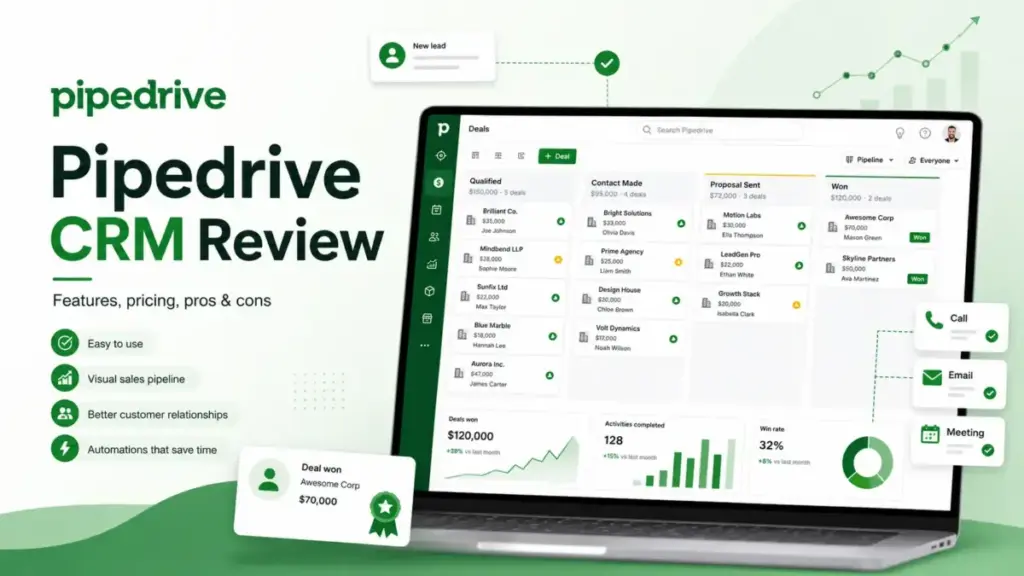
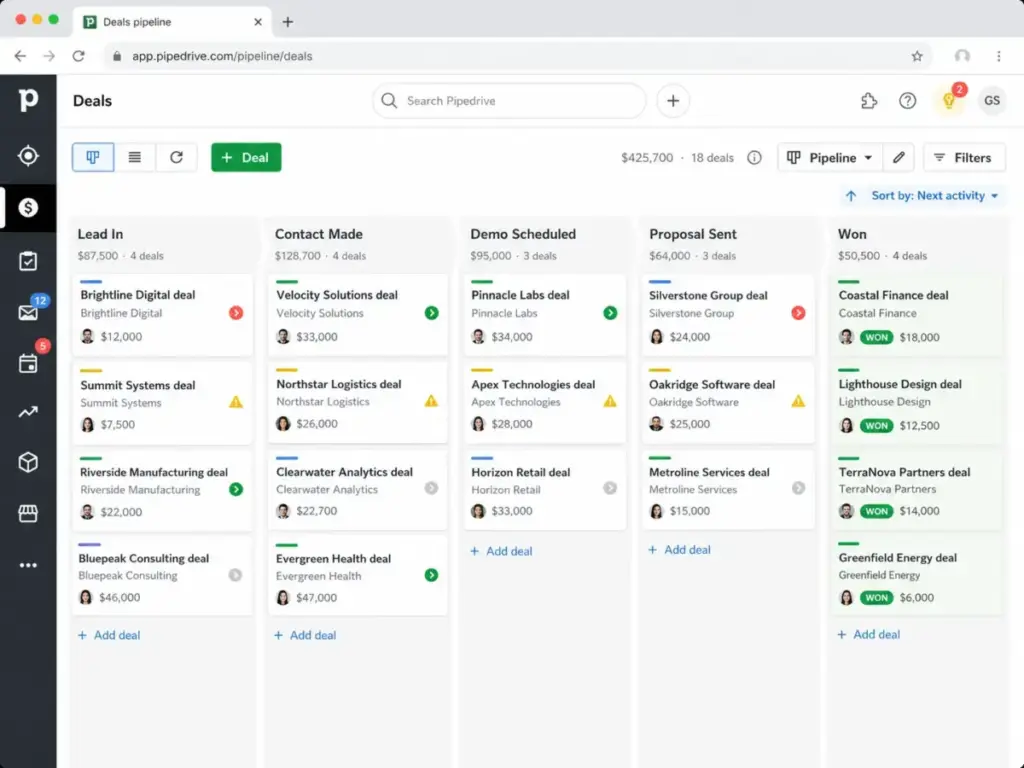
The pipeline view is Pipedrive’s signature. Deals appear as cards on a Kanban-style board, organized by stage. You drag deals between stages, and Pipedrive color-codes them based on activity age, so stale deals are visible at a glance.
You can create multiple pipelines for different products, regions, or sales processes. Each pipeline supports custom stages, and you can set probability percentages per stage for revenue forecasting. To understand how those stage probabilities translate into a usable revenue number, see our complete guide to revenue forecasting, which explains weighted pipeline, historical run-rate, and top-down methods side by side.
For teams moving from spreadsheets, this is the feature that typically drives adoption. There is no steep learning curve: if you can use a Trello board, you can use Pipedrive’s pipeline.
Pipedrive Lead and Deal Management
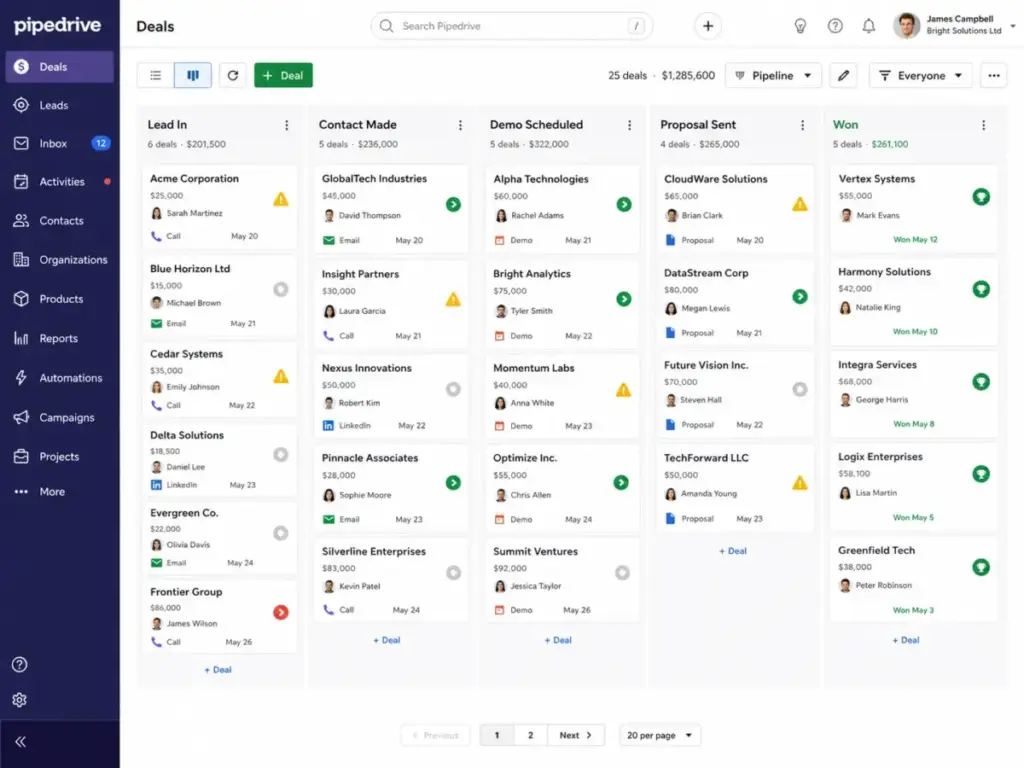
Pipedrive separates leads from deals. Leads live in a pre-qualification inbox, and only become deals when they enter a pipeline. This separation keeps your pipeline clean and prevents unqualified prospects from inflating forecasts.
Contact management has no usage limits on the number of contacts you store. However, the combined number of leads and deals is capped at 300,000 on all current plans except legacy Enterprise accounts. Admins receive notifications at 80% and 100% of that limit. If exceeded, Pipedrive does not delete data, but it blocks manual additions and may route automation-created or API-created deals to a waitlist. Deals on the waitlist for one year are automatically deleted, a detail buried in Pipedrive’s usage limits documentation.
Pipedrive Email Sync and Activity Tracking
Pipedrive syncs with Gmail and Outlook, linking email threads to contacts and deals automatically. You can send and receive email inside the CRM, track opens, and schedule follow-ups without switching tools.
Activity tracking is where Pipedrive enforces discipline. Every deal can have a “next activity” attached, and the dashboard highlights deals with overdue or missing activities. This is the core of Pipedrive’s philosophy: sales progress comes from completing activities, not from staring at dashboards.
For teams that struggle with follow-up consistency, this design is a meaningful workflow improvement. That follow-up discipline is especially important in property sales, where agents need to manage buyer leads, seller conversations, showings, referrals, and long-cycle client relationships; for that workflow, compare real estate CRM software before choosing a general sales CRM.
Pipedrive Automations
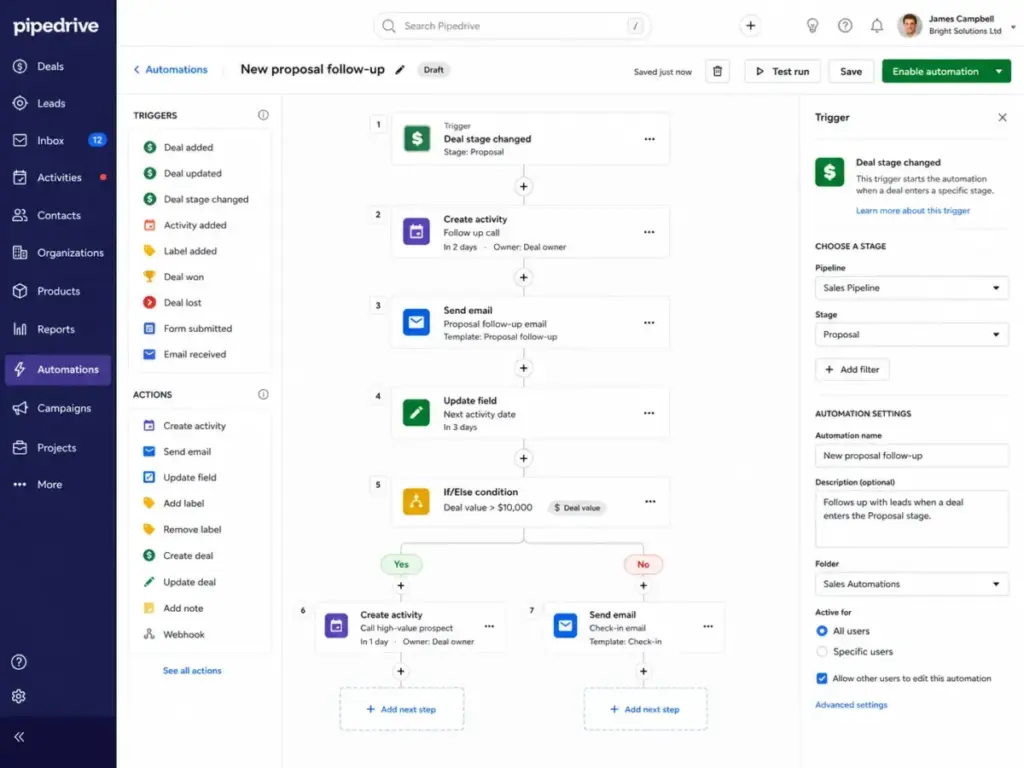
Automations are available starting on the Growth plan ($39/seat/month). Lite users have no access to workflow automation. The automation builder uses a visual trigger-action-condition format, and it is straightforward for simple workflows like assigning deals, sending emails on stage changes, or updating fields.
However, automations have hard limits that many competing reviews skip:
| Limit | Growth | Premium | Ultimate |
|---|---|---|---|
| Active automations per company | 50 | 150 | 250 |
| Actions per automation | 10 | 10 | 10 |
| Wait-for-condition steps | 3 | 10 | 10 |
| Delay steps | 3 | 10 | 10 |
| If/else conditions | 3 | 10 | 20 |
| Company execution cap | 10,000 per 10 min | 10,000 per 10 min | 10,000 per 10 min |
| Email action rate | 40/min per company | 40/min per company | 40/min per company |
Source: Pipedrive automation limits documentation.
For a 5-person team running 20 automations, Growth is fine. For a 25-person team with complex deal routing, stage-based email sequences, and multi-condition workflows, the 50-automation cap on Growth becomes a real constraint. I cover this in detail in the “What Pipedrive Does Not Tell You” section below.
Pipedrive AI Tools
Pipedrive has added AI features for report creation and email composition. The AI can generate summary reports from your pipeline data and draft email responses based on conversation context. These tools are useful for speed but are not a substitute for a dedicated sales engagement platform. They reduce time on routine tasks without replacing your sales playbook.
Pipedrive Integrations and API
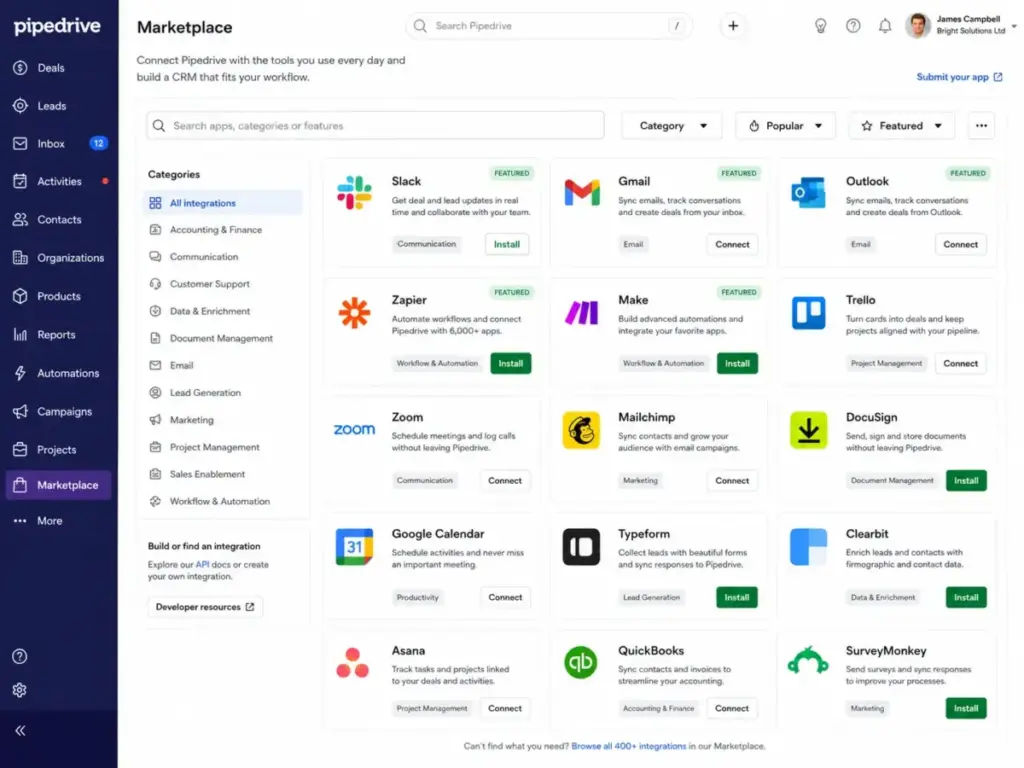
Pipedrive’s Marketplace lists 500+ integrations, including Slack, Microsoft Teams, Zapier, Make, Gmail, and Outlook. The open API supports custom integrations, but rate limits vary by plan:
| Plan | API-token requests / 2 sec | OAuth-app requests / 2 sec | Search API / 2 sec |
|---|---|---|---|
| Lite | 20 | 80 | 10 |
| Growth | 40 | 160 | 10 |
| Premium | 100 | 400 | 10 |
| Ultimate | 120 | 480 | 10 |
Source: Pipedrive API rate limiting documentation.
The Search API cap of 10 requests per 2 seconds across all plans is the bottleneck most integration teams hit first. If you sync Pipedrive with a data warehouse or run real-time lead enrichment, this limit matters.
Pipedrive User Experience
Pipedrive’s setup-to-first-deal time is among the fastest in the CRM category, and that speed advantage carries into daily use. The interface is clean, opinionated, and built around sales activities rather than configuration menus. Here is what to expect.
Pipedrive First 30 Minutes
Account creation takes under two minutes. The onboarding wizard walks you through pipeline setup, deal creation, and email sync. Most teams with a defined sales process can have a working pipeline with real data within 30 minutes, no CRM implementation guide required for basic setups.
Data import supports CSV and spreadsheet files. Pipedrive maps fields automatically and flags duplicates. For teams migrating from spreadsheets, this is where the switch happens with minimal friction.
Pipedrive Daily Sales Workflow
The daily workflow centers on the activity feed. Reps log in, see overdue activities, scheduled calls, and deals requiring attention. The interface pushes you toward action rather than analysis. This design reflects Pipedrive’s core bet: sales productivity improves when reps complete activities, not when they build reports.
As Aviva Rosman, Co-Founder and COO at BallotReady, noted on TrustRadius: “It doesn’t have all of the bells and whistles, but it doesn’t need them.”
That simplicity is a feature until your team outgrows it. More on that below.
Pipedrive Mobile and Field Sales Use
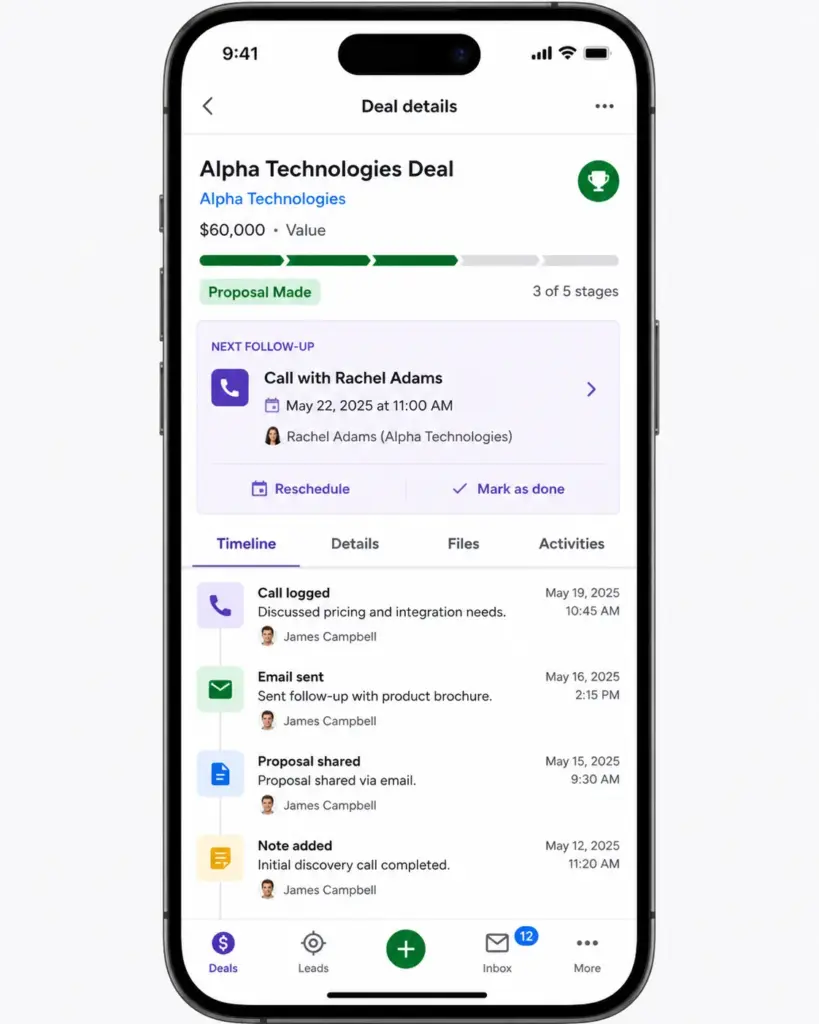
The mobile app mirrors the desktop pipeline view. Reps can update deals, log activities, and check schedules from the field. Call logging and note-taking work well for outside sales teams. The app is functional, not flashy, which is what field reps need.
Pipedrive Setup Friction
Setup friction is low for standard sales pipelines. It increases when you need custom fields beyond the defaults, complex permission structures, or multi-pipeline reporting. Pipedrive does not offer the deep customization of Salesforce, and teams with non-linear sales processes may find the pipeline model limiting.
Pipedrive Pricing and Plans
Pipedrive pricing starts at $14/seat/month (Lite, billed annually), but the plan you need and the add-ons you want can push the real cost significantly higher. All prices below were verified on the Pipedrive pricing page on May 5, 2026. For a deeper breakdown, see our full Pipedrive pricing analysis.
| Plan | Annual price (per seat/month) | Annual cost per seat | Best for | Key unlock | Hidden cost risk | Verified |
|---|---|---|---|---|---|---|
| Lite | $14 | $168 | Solo reps, basic pipeline tracking | Visual pipeline, email sync | No automations, no LeadBooster | May 5, 2026 |
| Growth | $39 | $468 | Small teams needing automation | 50 automations, two-way email sync | Add-ons for LeadBooster, Projects | May 5, 2026 |
| Premium | $59 | $708 | Growing teams needing lead gen and workflow depth | 150 automations, LeadBooster included | Web Visitors is separate | May 5, 2026 |
| Ultimate | $79 | $948 | Established sales orgs needing max controls | 250 automations, highest API limits | Still has execution caps | May 5, 2026 |
What Changed in Pipedrive Plans
Pipedrive restructured its pricing tiers in 2025. If you see older reviews referencing different plan names, here is the mapping:
- Essential became Lite
- Advanced became Growth
- Professional and Power merged into Premium
- Enterprise became Ultimate
Feature allocations shifted during this change. Check the new plans documentation for the full breakdown.
Growth vs Premium: Where the Decision Flips
This is the decision most buyers get wrong. Growth looks cheaper, but add-ons change the math.
| Need | Growth + add-on | Premium (included) | Better choice |
|---|---|---|---|
| Lead generation (Chatbot, Prospector, Web Forms) | Growth $39 + LeadBooster $32.50 = $71.50/mo | $59/seat/mo (LeadBooster included) | Premium |
| Project management | Growth $39 + Projects $6.67 = $45.67/mo | $59/seat/mo (Projects included) | Growth if Projects is all you need |
| 150 automations | Not available on Growth (capped at 50) | Included | Premium |
| 10 if/else conditions per automation | Not available on Growth (capped at 3) | Included | Premium |
For teams that need LeadBooster and more than 50 automations, Premium is the rational choice. The $20/seat premium over Growth pays for itself once you avoid stacking add-ons.
The Pricing Page Is Only the Starting Cost
Pipedrive’s add-on pricing is listed on the official pricing page, but the cumulative impact is easy to miss:
| Add-on | Starting price (per month) | Included in |
|---|---|---|
| LeadBooster (Chatbot, Live Chat, Prospector, Web Forms) | $32.50 | Premium, Ultimate |
| Projects | $6.67 | Premium, Ultimate |
| Campaigns | $13.33 | Not included in any plan |
| Web Visitors | $41.00 | Not included in any plan |
A five-person team on Growth that adds LeadBooster and Campaigns pays $39 × 5 + $32.50 + $13.33 = $240.83/month, or $2,889.96/year. That is 22% more than the base plan cost of $2,340/year.
Source: Pipedrive pricing support documentation.
Total Annual Cost by Team Size (Base Plans Only)
| Team size | Lite | Growth | Premium | Ultimate |
|---|---|---|---|---|
| 1 user | $168 | $468 | $708 | $948 |
| 5 users | $840 | $2,340 | $3,540 | $4,740 |
| 10 users | $1,680 | $4,680 | $7,080 | $9,480 |
| 25 users | $4,200 | $11,700 | $17,700 | $23,700 |
These figures do not include add-ons, top-ups, or usage overage charges. For teams at 10+ seats considering Premium with Campaigns and Web Visitors, the real annual cost can exceed $10,000.
What Pipedrive Does Not Tell You
Pipedrive’s sales page highlights speed, simplicity, and AI, but buries the constraints that affect growing teams. These are not deal-breakers for everyone, but they are facts you should know before committing.
Pipedrive Add-Ons Change the Real Price
As one Reddit user put it: “Pipedrive starts cheap but add-ons stack up fast.”
LeadBooster ($32.50/month) is only included in Premium and Ultimate. If you are on Lite or Growth and want the Chatbot, Prospector, or Web Forms, you pay extra. Web Visitors ($41/month) is never included in any plan, not even Ultimate. Campaigns ($13.33/month) is also a separate purchase across all tiers.
For a solo consultant on Lite, the base cost is manageable. For a 10-person team on Growth that needs lead generation and email campaigns, the add-on stack can increase the total bill by 30-40%.
Pipedrive Automations Have Hard Limits
Growth caps you at 50 active automations per company (not per user). Each automation is limited to 10 actions. If/else branching is restricted to 3 conditions on Growth, versus 10 on Premium and 20 on Ultimate. The company-wide execution cap is 10,000 executions per 10 minutes, and automated emails are limited to 40 per minute across the entire account.
For a team running basic deal-stage triggers, these limits are generous. For a team with complex lead routing, multi-step nurture sequences, and conditional follow-ups across 15+ reps, the Growth ceiling arrives faster than expected.
Pipedrive API Limits Matter at Scale
Lite allows only 20 API-token requests per 2 seconds. If you run a real-time sync with a lead enrichment tool or data warehouse, that is roughly 600 requests per minute, enough for light use but not for high-frequency integrations.
The Search API is the tightest constraint: 10 requests per 2 seconds across all plans, including Ultimate. Teams that build custom search-based workflows or dashboard integrations will hit this wall regardless of plan tier.
Pipedrive Reporting Is Not Enterprise-Grade
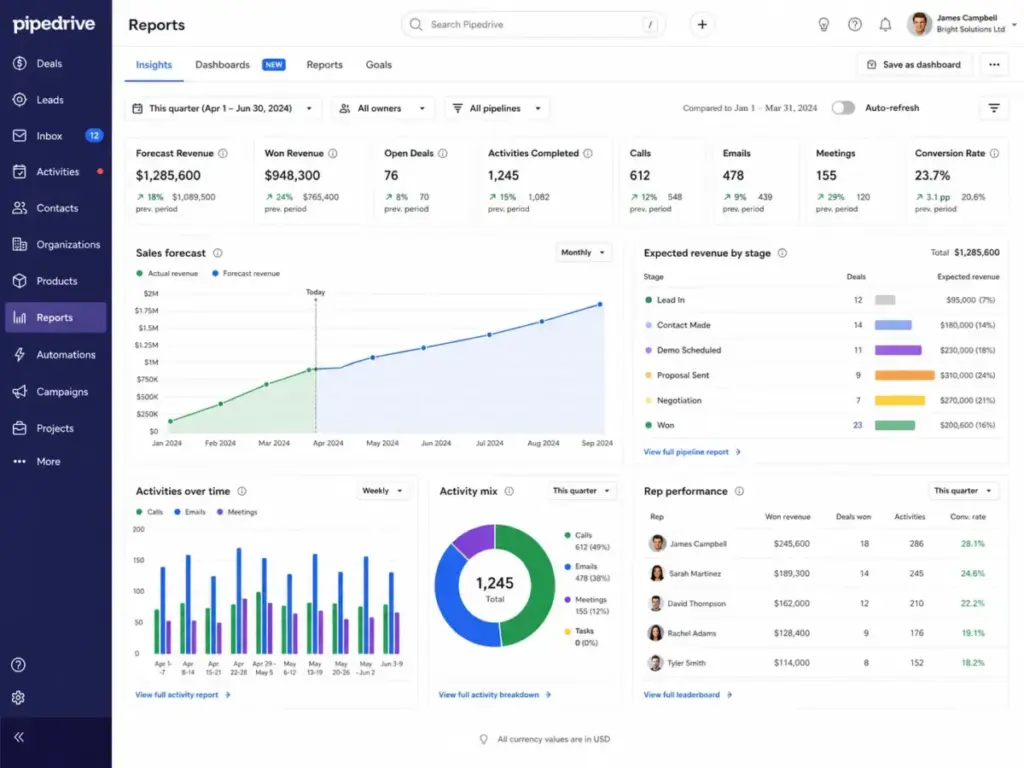
Pipedrive’s reports cover pipeline velocity, deal conversion, activity completion, and revenue forecasts. These are the metrics most sales managers need day to day. However, there is no multi-touch attribution, no custom report builder comparable to Salesforce, and limited cross-object reporting.
As Mark A., Head of Marketing, noted on Capterra: “Overall a decent CRM for tracking leads through a pipeline,” but also flagged it as “quite limited in terms of customisation.”
Capterra’s editorial summary confirms this pattern: users value the visual interface and automated workflows, but reporting and customer support surface as recurring pain points.
Pipedrive Is Not Native Marketing Automation
Pipedrive offers a Campaigns add-on for email marketing, but it is not a marketing automation platform. There are no native landing pages, no lead scoring engine, no lifecycle stage management, and no multi-channel journey builder. Aviva Rosman noted on TrustRadius: “Pipedrive is not as strong at marketing in terms of tracking leads.”
If your growth model depends on inbound marketing funnels, Pipedrive will require you to bolt on a separate marketing tool or switch to a platform like HubSpot that includes those capabilities natively.
Pipedrive Pros and Cons
Pipedrive’s strengths center on pipeline clarity and sales workflow speed. Its weaknesses cluster around pricing transparency, automation depth, and marketing capabilities.
- Visual pipeline is the best in class for SMB sales teams. Drag-and-drop deal management, color-coded activity aging, and customizable stages make pipeline status instantly clear.
- Setup takes minutes, not weeks. Most teams have a working pipeline with real data within 30 minutes. No dedicated admin or consultant required for basic configurations.
- Activity-driven design enforces follow-up discipline. The “next activity” system highlights stale deals and overdue tasks, which directly impacts close rates.
- No contact storage limits. You can store unlimited contacts on any plan. The 300,000 cap applies to combined leads and deals, not contacts.
- 500+ integrations and open API. Gmail, Outlook, Slack, Zapier, Make, and Microsoft Teams are all supported. The API is well-documented for custom builds.
- Security meets compliance standards. SOC 2, SOC 3, GDPR support, 2FA, SSO (higher plans), encryption at rest and in transit, and daily backups for three months. Details at Pipedrive privacy and security.
- 14-day free trial with no credit card. Low-risk way to test the product with real data.
- No permanent free plan. Unlike HubSpot (free CRM) or Zoho CRM (free for 3 users), Pipedrive requires a paid subscription after the 14-day trial.
- Add-ons inflate the real cost. LeadBooster, Campaigns, Web Visitors, and Projects are separate charges that can increase your bill by 30-40% on lower plans.
- Automation limits constrain growth. Growth’s 50-automation cap and 3-condition branching limit become real bottlenecks for teams with 10+ reps and complex workflows.
- Reporting lacks depth for data-driven sales managers. No multi-touch attribution, limited custom report building, and no cross-object analytics.
- Marketing automation is an afterthought. The Campaigns add-on covers basic email, but there is no native lead scoring, journey builder, or lifecycle reporting.
- API rate limits tighten on lower plans. Lite’s 20 requests per 2 seconds is restrictive for integration-heavy setups. The Search API cap of 10 per 2 seconds affects all plans.
- Support quality varies by plan. Higher-tier plans get priority support. Capterra reviewers have flagged customer support as a recurring concern.
Pipedrive vs Alternatives
Pipedrive wins on pipeline simplicity and setup speed, but loses to competitors on marketing depth, free entry, enterprise scale, and built-in calling. Here is where each alternative beats Pipedrive, and where Pipedrive beats them.
Pipedrive vs HubSpot
Choose Pipedrive over HubSpot for pure sales pipeline discipline at a lower per-seat cost. Choose HubSpot over Pipedrive for inbound marketing, free CRM entry, landing pages, forms, and lifecycle reporting. HubSpot’s free plan covers unlimited users with basic CRM. Its Starter plan begins at $15-$20/seat/month but Professional jumps to $100/seat/month. For a deeper breakdown, see our HubSpot vs Pipedrive comparison.
Winner by scenario: Pipedrive for sales-only teams under 20 reps. HubSpot for marketing-plus-sales teams at any size.
Pipedrive vs Salesforce
Choose Pipedrive over Salesforce Sales Cloud when you need a working CRM in 30 minutes, not 30 days. Choose Salesforce over Pipedrive for enterprise customization, custom objects, advanced permissions, AppExchange depth, and complex multi-department workflows. Salesforce Starter Suite begins at $25/user/month, but Enterprise is $175/user/month.
Winner by scenario: Pipedrive for SMBs with straightforward B2B sales. Salesforce for enterprise teams with dedicated admins and complex sales ops.
Pipedrive vs Zoho CRM
Choose Pipedrive over Zoho CRM for a cleaner sales UX and faster onboarding. Choose Zoho over Pipedrive for budget-conscious teams that want free CRM (up to 3 users), suite breadth across the Zoho ecosystem, and lower per-seat costs at scale. See our Pipedrive vs Zoho CRM comparison.
Winner by scenario: Pipedrive for teams that value UX clarity. Zoho for cost-sensitive teams that need CRM plus project management, invoicing, and support in one ecosystem.
Pipedrive vs Freshsales
Choose Pipedrive over Freshsales for visual pipeline management and marketplace depth. Choose Freshsales over Pipedrive for built-in telephony, AI lead scoring in higher tiers, and a free plan for up to 3 users. Freshsales Growth starts at $9/user/month (annual). See our Freshsales review and Pipedrive vs Freshsales comparison.
Winner by scenario: Pipedrive for pipeline-first teams. Freshsales for teams that need built-in phone and the Freshworks ecosystem.
Pipedrive vs Close CRM
Choose Pipedrive over Close CRM for visual deal management and broader integration options. Choose Close over Pipedrive for outbound-heavy teams that need built-in calling, SMS, Power Dialer, and sales engagement in one platform. Close starts at $35/seat/month (Essentials, annual). See our Close CRM review.
Winner by scenario: Pipedrive for pipeline visibility. Close for high-volume calling and SMS-first selling.
Alternatives Comparison Table
| Scenario | Best CRM | Why |
|---|---|---|
| Pure sales pipeline for SMB | Pipedrive | Fastest setup, cleanest pipeline UX |
| Free CRM to start | HubSpot | Unlimited free users with basic CRM |
| Inbound marketing + sales | HubSpot | Native forms, landing pages, lifecycle reporting |
| Enterprise customization | Salesforce | Custom objects, AppExchange, advanced permissions |
| Budget all-in-one suite | Zoho CRM | Free for 3 users, broad app ecosystem |
| Built-in phone and SMS | Close CRM | Power Dialer, SMS, calling in one tool |
| Built-in telephony + free tier | Freshsales | Free plan, native phone, AI lead scoring |
For a broader comparison, see our Pipedrive alternatives roundup.
Who Should Use Pipedrive?
Pipedrive fits best when your primary workflow is selling, not marketing or servicing, and your team values speed over configurability. Here are the specific profiles where Pipedrive makes the most sense.
- Solo consultants managing 50-100 active relationships. Lite ($14/month) gives you a visual pipeline, email sync, and activity reminders without paying for features you will not use.
- 2-5 person B2B startup sales teams moving from spreadsheets. Growth ($39/seat/month) adds automations and two-way email sync. The onboarding is fast enough that you can migrate over a weekend.
- 5-15 person outbound sales teams using Gmail or Outlook. Premium ($59/seat/month) includes LeadBooster for prospecting and enough automation depth for multi-step deal workflows.
- 10-30 person agencies tracking deals, proposals, and handoffs. Premium with the Projects add-on (included) gives pipeline plus project management in one platform.
- 20-50 person sales-led SMBs ready for tighter controls. Ultimate ($79/seat/month) provides the highest API limits, 250 automations, and advanced permission controls for scaling teams.
Buyer Decision Matrix
| Team profile | Choose Pipedrive? | Best plan | Why |
|---|---|---|---|
| Solo consultant, under 100 contacts | Yes | Lite | Low cost, fast setup, visual pipeline |
| 3-person startup, moving from spreadsheets | Yes | Growth | Automations, email sync, affordable |
| 10-person outbound team, Gmail stack | Yes | Premium | LeadBooster included, 150 automations |
| 25-person agency, deal + project tracking | Yes | Premium | Projects included, pipeline + delivery |
| 50-person sales org, needs marketing automation | Maybe | Premium + HubSpot Marketing | Pipedrive for pipeline, HubSpot for marketing |
| Marketing-led team, inbound funnels | No | N/A | HubSpot or Zoho is a better fit |
| Enterprise with 200+ reps and custom objects | No | N/A | Salesforce is the right tool |
Who Should Not Use Pipedrive?
Pipedrive is the wrong choice when your workflow requires capabilities it was not designed to deliver. Being direct about this saves you time and money.
- Teams that need free CRM forever. Pipedrive has no permanent free plan. HubSpot and Zoho CRM both offer free tiers.
- Marketing-led teams that need native journeys, lead scoring, and campaign analytics. Pipedrive’s Campaigns add-on is basic email. It is not a marketing automation platform.
- Enterprise sales ops teams with complex objects, permissions, and workflow dependencies. Pipedrive’s data model is simpler than Salesforce’s. If you need custom objects, complex approval chains, or multi-entity reporting, Pipedrive will hit its ceiling.
- API-heavy teams syncing high-frequency data. The Search API cap of 10 requests per 2 seconds affects all plans. If your integration architecture depends on frequent lookups, this is a hard constraint.
- Support-led businesses needing ticketing and service workflows inside the same platform. Pipedrive is a sales CRM. It does not include help desk, ticketing, or customer service modules.
Alex Morrison’s Quick Take
Pipedrive is the CRM I recommend when someone asks: “What CRM isn’t terrible for small sales teams?” It is not the cheapest once you buy the workflow it sells best. The base price is competitive, but the moment you need LeadBooster, Campaigns, and Projects, you are paying closer to Premium territory anyway. My contrarian take: most teams should skip Growth and go straight to Premium. The math favors it once you factor in the add-ons Growth forces you to buy separately.
Pipedrive’s simplicity is a product advantage until reporting, marketing, and automation depth matter. For the window where it fits, roughly 2 to 40 sales reps with a defined B2B pipeline, it is one of the best daily-use CRMs available.
FAQ
Here are direct answers to the most common questions about Pipedrive CRM.
What is Pipedrive CRM used for?
Pipedrive is a sales CRM used for tracking deals through a visual pipeline, managing contacts, scheduling sales activities, syncing email, and automating repetitive sales tasks. It is designed for sales teams, not for marketing, support, or operations. Over 100,000 companies use Pipedrive to manage their sales process.
Is Pipedrive CRM worth it in 2026?
Yes, for sales-led SMBs with 2-50 reps that prioritize pipeline visibility and activity discipline. Pipedrive scores 8.4/10 in this review. It is not worth it for teams that need free CRM, native marketing automation, or enterprise-grade reporting. Check add-on costs before committing to a plan.
How much does Pipedrive CRM cost?
Pipedrive costs $14 to $79 per seat per month when billed annually. Lite is $14, Growth is $39, Premium is $59, and Ultimate is $79. Add-ons like LeadBooster ($32.50/month) and Web Visitors ($41/month) increase the total. Prices verified on the Pipedrive pricing page on May 5, 2026.
Does Pipedrive have a free plan?
No. Pipedrive does not offer a permanent free plan. It provides a 14-day free trial with no credit card required. After the trial, you must subscribe to a paid plan starting at $14/seat/month (Lite, billed annually). For free CRM options, consider HubSpot or Zoho CRM.
What are the main Pipedrive CRM features?
Core features include visual sales pipeline, deal and lead management, email sync with Gmail and Outlook, activity tracking, workflow automations (Growth and above), AI tools for reports and email, LeadBooster for lead generation (Premium and above), Smart Docs, Projects, and 500+ marketplace integrations.
What are Pipedrive's biggest limitations?
The main limitations are: no free plan, add-ons that increase the real cost by 30-40%, automation caps (50 on Growth, 150 on Premium), API rate limits that constrain integrations, reporting that lacks multi-touch attribution and custom objects, and limited native marketing automation capabilities.
Is Pipedrive better than HubSpot?
Pipedrive is better than HubSpot for pure sales pipeline management at a lower per-seat cost. HubSpot is better for teams that need free CRM, inbound marketing, landing pages, and lifecycle reporting. For small sales-only teams, choose Pipedrive. For marketing-plus-sales teams, choose HubSpot.
Is Pipedrive better than Salesforce?
Pipedrive is better than Salesforce for SMBs that want fast setup and simple pipeline management. Salesforce is better for enterprise teams with custom objects, complex workflows, and dedicated CRM admins. Pipedrive gets you selling in 30 minutes. Salesforce gets you enterprise-grade control in 30 days. See our Pipedrive vs Salesforce analysis.
Is Pipedrive good for small businesses?
Yes. Pipedrive is one of the strongest CRM options for small sales teams. Setup is fast, the pipeline view is intuitive, and Lite at $14/seat/month is affordable for most budgets. The main trade-off is the lack of a free plan and the need to purchase add-ons for lead generation and marketing features.
What are the best Pipedrive alternatives?
The best alternatives depend on your needs. HubSpot Sales Hub for free CRM and marketing. Salesforce Sales Cloud for enterprise customization. Zoho CRM for budget all-in-one. Freshsales for built-in telephony. Close CRM for outbound calling and SMS.
Does Pipedrive include marketing automation?
Pipedrive offers a Campaigns add-on ($13.33/month) for basic email marketing, but it does not include native marketing automation. There is no built-in lead scoring, journey builder, or multi-channel campaign manager. Teams that need marketing automation should consider HubSpot or pair Pipedrive with a dedicated marketing platform.
Which Pipedrive plan is best for sales teams?
For most growing sales teams, Premium ($59/seat/month, annual) is the best value. It includes LeadBooster, Projects, 150 automations, and deeper workflow controls. Growth ($39/seat/month) works for teams under 5 reps with simple automation needs. Lite ($14/seat/month) suits solo reps who only need pipeline tracking.