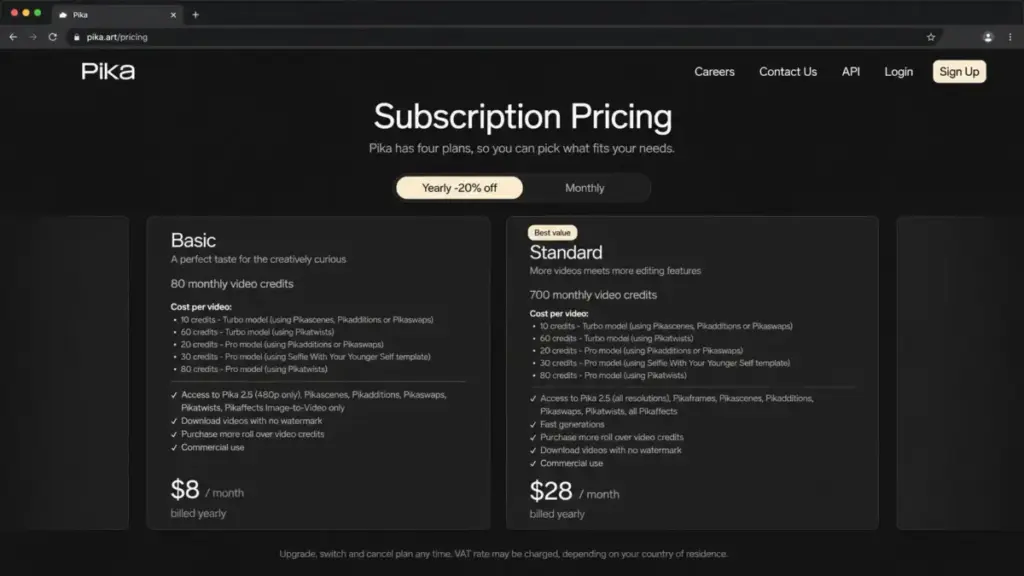
Pika credits disappear faster than most users expect. A Pikascene costs more credits than a basic text-to-video clip. A Pikatwist burns more than a Pikaddition. By the time you figure out the credit math, your monthly allocation is gone, and you are still on a 480p export because Pika Basic limits Pika 2.5 to that resolution. Standard at $28/month billed yearly is the first plan that opens all resolutions and all tools, but even there, 700 monthly video credits do not stretch far when advanced effects consume credits at different rates.
That is the Pika problem in one paragraph. The tool itself is fast, creative, and genuinely fun for social-ready AI video effects. But the moment you need higher resolution without gating, predictable credit burn, a production editing workflow, API access, or cinematic realism beyond meme-style clips, you hit a wall.
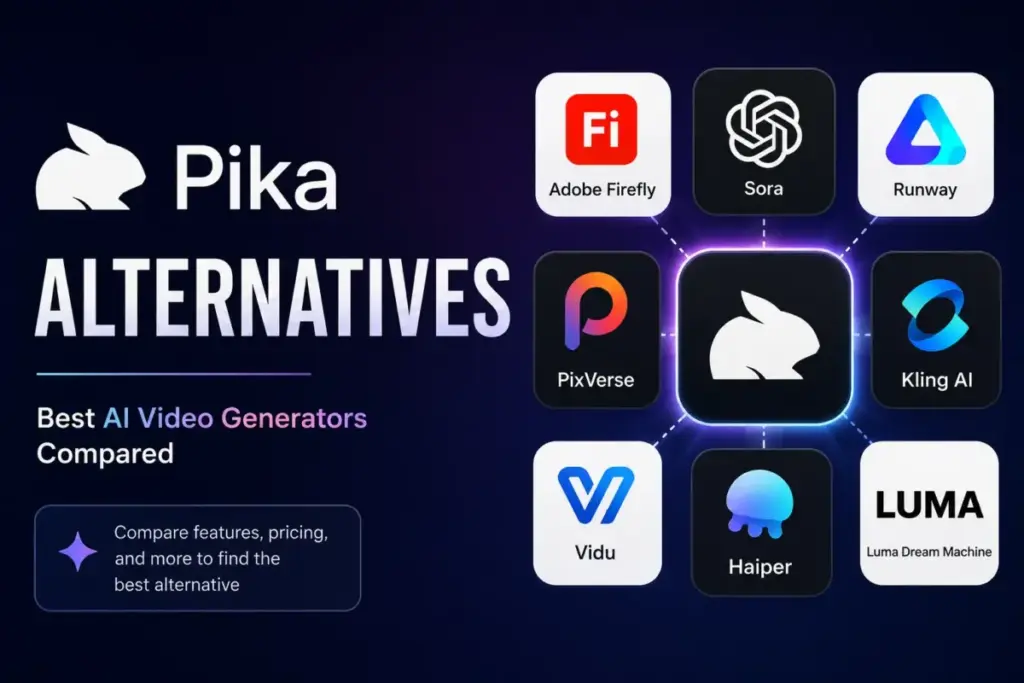
I mapped 10 Pika alternatives to the specific frustration that triggers the switch. Not a generic list. A frustration map. If you are exploring best AI video generator options beyond Pika, this guide breaks down which tool fixes which problem, what each one costs at scale, and where you will hit a new ceiling.
Quick Verdict: Best Pika Alternatives by Switching Trigger
| If you are leaving Pika because… | Best alternative | Why |
|---|---|---|
| Credit-heavy iteration burns budget | Vidu | Starts at $8/month billed yearly with reference-to-video and anime workflows |
| You need cinematic realism and native audio | Google Flow | Veo 3.1 generation with bundled Flow credits at $19.99/month |
| You need a structured editing workflow | Runway | Gen-4.5, project workspace, third-party models, and editor-style tools |
| You need character consistency and anime | Vidu | Reference-to-video, multi-entity consistency, first/last-frame control |
| You need API or production integration | PixVerse | Official API pricing at $100/month with rate-limit documentation |
| You need brand-safe commercial output | Adobe Firefly | Firefly Video Model with commercial-use rights starting at $9.99/month |
| You want a lower-cost social video tool | Hailuo AI | Standard at $9.99/month for short creator clips |
| You want a multi-model creative suite | Krea | Image, video, 3D, lipsync under compute-unit pricing starting at $5.25/month equivalent |
What this means: There is no single “best Pika alternative.” The right switch depends on whether your bottleneck is credit burn, video quality, workflow depth, API access, or commercial safety. Runway and Google Flow lead for production quality. Vidu and Hailuo lead for budget-friendly iteration. Adobe Firefly and Krea lead for teams that need broader creative workflows.
The Pika Problem Map

Pika is strong at what it does: fast creative AI video effects, text-to-video, image-to-video, Pikascenes, Pikadditions, Pikaswaps, Pikatwists, Pikaffects, and casual social-ready clips. Understanding what generative AI does helps frame why Pika’s effects-first approach works for some creators and frustrates others.
Here is the problem map, based on official documentation and verified user feedback.
Starting price: $8/month billed yearly (Basic)
Practical tier: $28/month billed yearly (Standard, 700 credits, all resolutions, all tools)
Official pricing page
| Pain point | Detail | Who it affects |
|---|---|---|
| Credit burn varies by feature | Pikascenes, Pikatwists, and advanced effects consume credits at different rates | Creators who iterate frequently |
| Basic plan caps at 480p | Pika 2.5 on Basic is limited to 480p resolution | Anyone who needs 720p or 1080p output |
| No visible self-serve API pricing | API access is not presented with open self-serve pricing | Product and developer teams |
| Effects-first, not editing-first | Pika is built for quick effects, not structured video production workflows | Marketing teams and agencies |
| Character consistency gaps | Limited reference-to-video and multi-entity consistency controls | Anime creators and character-driven content |
| No team or enterprise workflow tools | Pika pricing is per-account, not per-team | Teams of 5+ needing shared workspaces |
“The app only allows 10 videos per day, there’s no mention of this limit until after you pay.” (App Store reviewer, source)
When Pika still makes sense: If you produce short, effects-driven social clips and your monthly output stays within 700 credits on Standard, Pika remains one of the fastest tools for novelty AI video. The Pikaswaps and Pikaffects features have no direct equivalent in most competitors. Do not switch if your entire workflow is built around these specific effects.
For a deeper look at Pika’s strengths and limitations, see our full Pika Art review and analysis.
Alternatives That Fix Credit Burn and Cost Problems
Vidu: Best for Reference-to-Video and Anime Creators
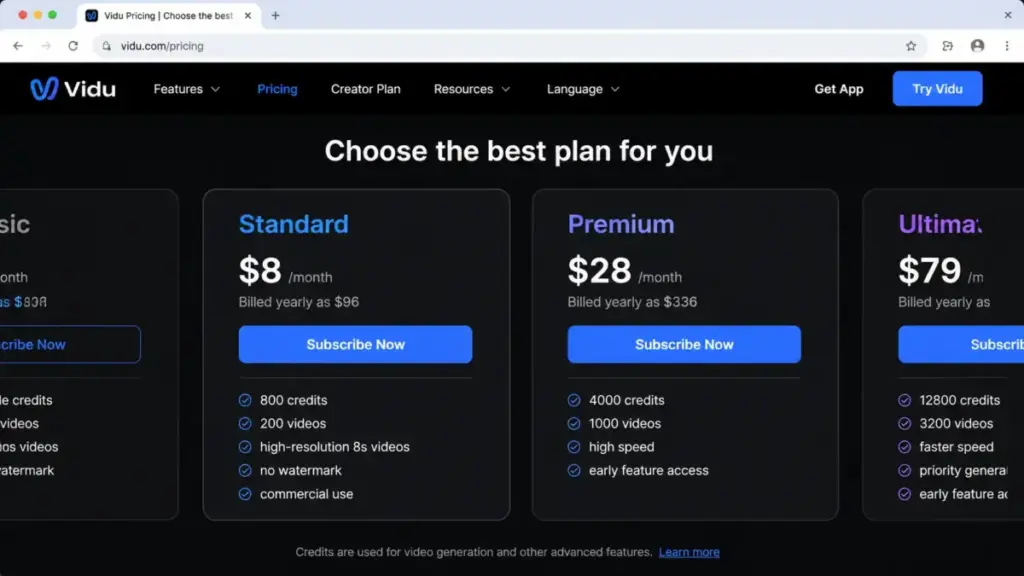
Vidu is the strongest Pika alternative for creators who need predictable credit costs, reference-to-video workflows, and anime-style generation. The Standard plan starts at $8/month billed yearly, matching Pika Basic on price but offering reference-to-video, first/last-frame control, and anime art-to-video that Pika does not provide.
Starting price: $8/month billed yearly
Practical tier: Premium at $28/month for higher usage
Free plan: Yes, free generation with limits
Official pricing page
Vidu does better than Pika in multi-entity consistency, character reference workflows, and anime-specific generation. The tradeoff: Pika is more recognizable for quick viral effects and simple novelty transformations. Vidu’s credit burn and free-mode constraints should be checked on the pricing page, as details render dynamically.
Best for:
- Anime and character-driven video creators
- Teams needing reference-to-video consistency
- Creators who want first/last-frame control
Avoid if: You only need quick social effects without character consistency requirements.
Migration difficulty: Low
Hailuo AI: Best Lower-Cost Alternative for Short Social Clips

Hailuo AI hits a lower published monthly entry price than Pika Standard. If your Pika frustration is purely about cost-per-clip for social video iteration, Hailuo is the clearer fit.
Starting price: $9.99/month (Standard, per official Hailuo article)
Free plan: Yes, new users receive free credits that expire after 3 days
Official pricing page
The pricing source is an official Hailuo article rather than a fully parsed pricing table. The subscribe page is dynamic and may show different plan structures. Hailuo does better than Pika on monthly entry cost for casual social clips. The tradeoff: Pika has more visible effect-led branding and a clearer official pricing-page structure.
Best for:
- Solo creators focused on short-form social video
- Budget-conscious creators under $10/month
Avoid if: You need structured team workflows, API access, or cinematic-quality output.
Migration difficulty: Low
Krea: Best Multi-Model Creative Suite for Advanced Creators

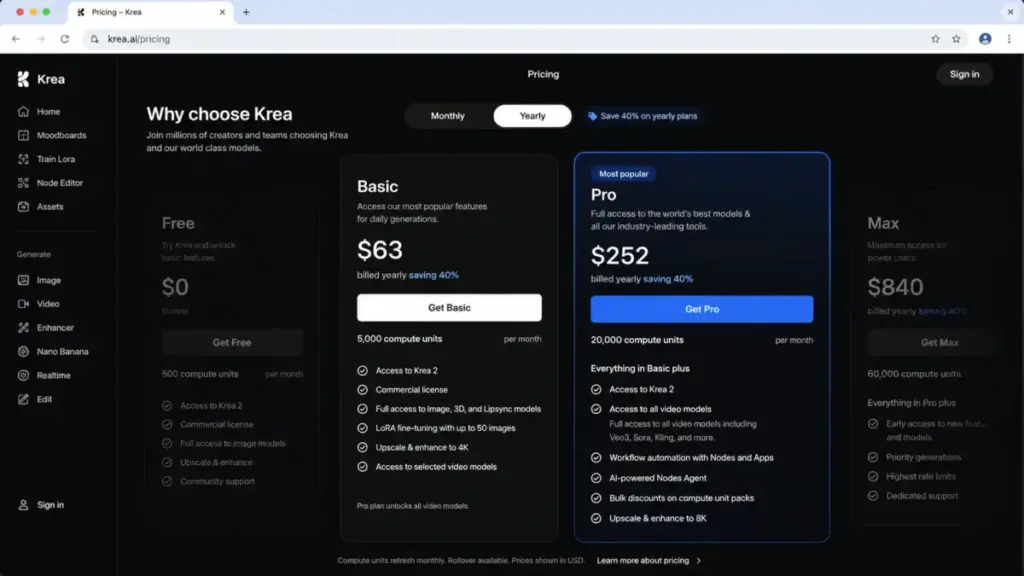
Krea is broader than Pika. It combines image, video, 3D, lipsync, and premium models under compute-unit pricing. The free plan gives 100 compute units per day. Basic starts at $63/year ($5.25/month equivalent), but Basic only includes selected video models. All video models require Pro at $252/year ($21/month equivalent).
Starting price: $5.25/month equivalent, billed yearly at $63
Practical tier: Pro at $21/month equivalent for all video models
Free plan: Yes, 100 compute units per day
Official pricing page
The plan-gate here is real: Basic users get selected video models only. If you need every video model Krea offers, Pro is the floor. Unused Basic/Pro/Max usage does not roll over. Krea does better than Pika by offering one workspace for image, video, 3D, lipsync, and multi-model workflows. The tradeoff: Pika is more focused and easier for quick AI video effects. Krea’s compute-unit model needs buyer education.
Best for:
- Creators who want image, video, and 3D in one workspace
- Teams evaluating multiple AI models without separate subscriptions
Avoid if: You want a simple video-only tool. Krea’s breadth adds complexity.
Migration difficulty: Medium
Alternatives That Fix Quality and Cinematic Control
Runway: Best Overall Pika Alternative for Pro AI Video Workflows

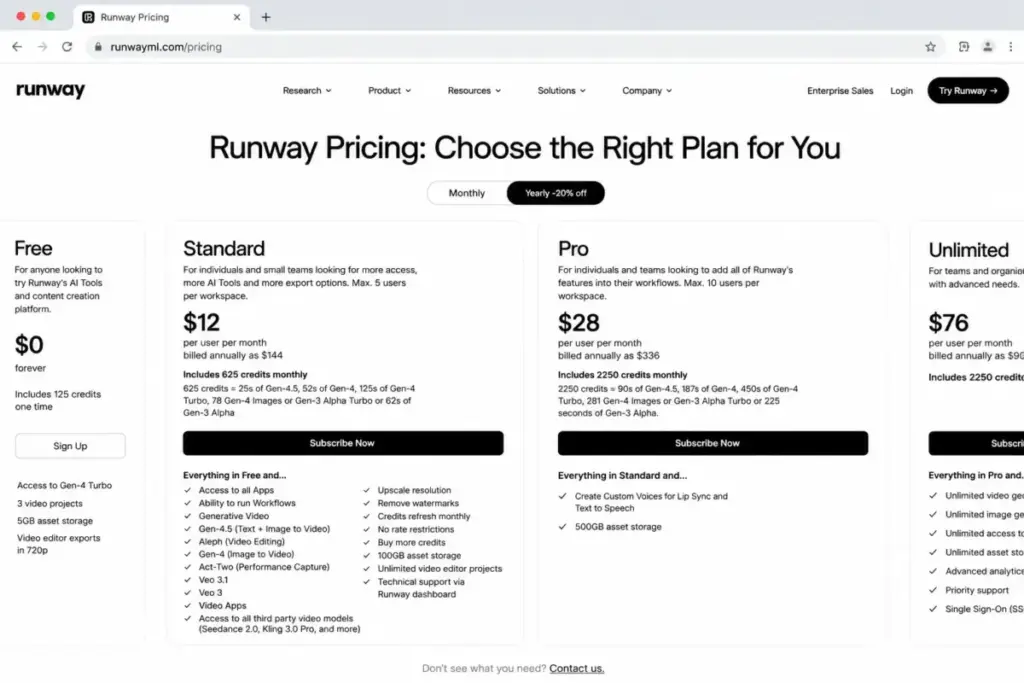
Runway is the most production-oriented Pika alternative. Gen-4.5, Gen-4, Aleph, Act-Two, Veo 3.1 access, third-party model integration, project workspace, and watermark removal on paid plans make it the first stop for teams that need editing workflow depth.
Starting price: $12/user/month billed annually
Practical tier: Pro for larger teams and higher credit allocation
Free plan: Yes, free plan with one-time credits
Official pricing page
The credit math is more complex than Pika. Model credit costs vary by seconds and model, so real usage cost can exceed the base seat price. Standard has workspace user limits. But for teams that need a structured production workspace, not just an effects generator, Runway is the clearer fit. For a detailed breakdown, see the Runway ML review and evaluation.
Best for:
- Video production teams needing editor-style workflows
- Creators who want access to multiple AI models (Gen-4.5, Veo, third-party)
- Teams that need project organization and collaboration
Avoid if: You only need quick social effects. Runway’s pricing and per-second credit math add overhead for casual use.
Migration difficulty: Medium
The Runway ML pricing breakdown covers the per-model credit costs in detail.
Google Flow: Best for Cinematic Veo Video and Native Audio

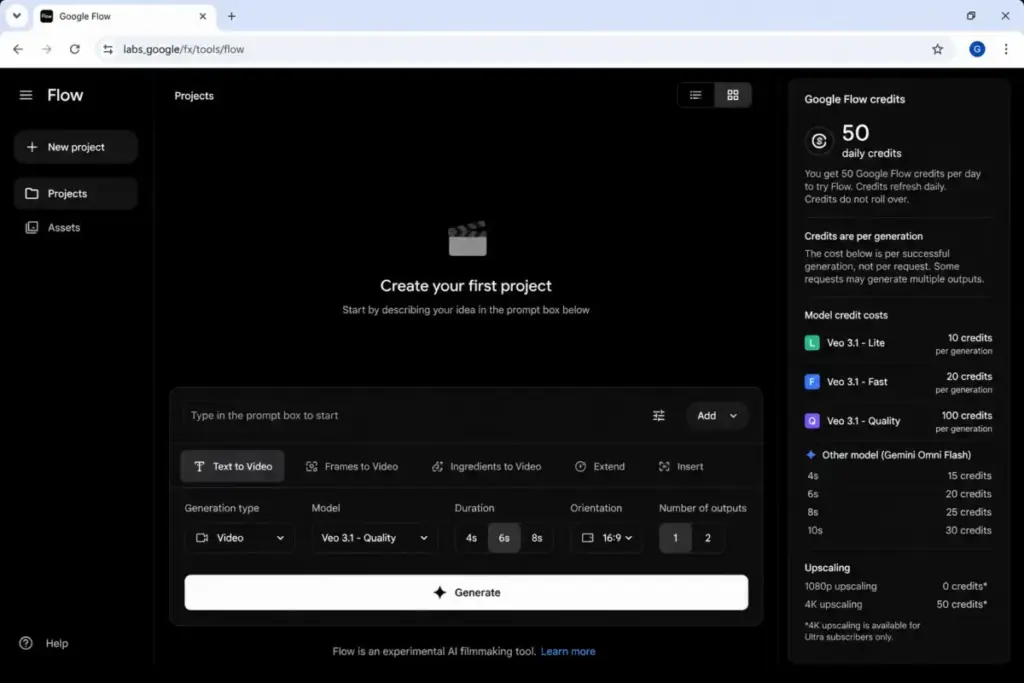
Google Flow is built around Veo models and offers bundled Flow credits through Google AI plans. If your Pika frustration is about video quality and cinematic realism, Flow is the primary comparison point.
Starting price: $19.99/month via Google AI Pro
Practical tier: AI Pro with 1,000 monthly Flow credits
Free plan: Yes, free users receive limited daily Flow credits
Official pricing page
Here is the catch: paid Flow credits do not roll over. Free credits are model-limited. Pricing may vary by market. Flow does better than Pika on cinematic realism and audio-forward video generation. The tradeoff: Pika is faster and more playful for effect-led clips. Flow’s credit rollover restrictions are more limiting than Pika’s system.
Best for:
- Creators prioritizing cinematic realism over social effects
- Users already in the Google AI ecosystem
Avoid if: You need effects-first creative tools, or you cannot commit to a $19.99/month subscription.
Migration difficulty: Medium
Kling AI: Best for Human Motion and Character-Focused AI Video

Kling AI fits Pika switchers who care most about realistic motion, people, dialogue, and character continuity. The official membership evidence shows Standard at $72/year during the verified period.
Starting price: $72/year for Standard (renewal price should be caveated)
Free plan: Yes, free access with limits
Official pricing page
The membership page is dynamic. Subscription credits expire monthly. Payment provider handling fees may apply. Kling does better than Pika for motion-heavy and character-driven video. The tradeoff: Pika is easier for quick social effects. Kling’s pricing and credit expiry rules need careful review before committing.
Best for:
- Character-driven video with realistic human motion
- Dialogue and lip-sync focused content
Avoid if: You only need quick effects without character consistency requirements.
Migration difficulty: Medium
Luma: Best for Cinematic Creative Teams

Luma packages creative agents, Luma models, third-party models, collaborator workflows, and commercial use in paid plans. The entry price is higher than Pika, starting at $30/month for Plus.
Starting price: $30/month or $300/year for Plus
Free plan: Not confirmed in parsed pricing evidence
Official pricing page
Luma does better than Pika for cinematic generation and higher-end creative workflows. The tradeoff: Pika remains stronger for quick, meme-like effects. Luma’s entry price is 3.75x higher than Pika Basic and comparable to Pika Standard, but with different model access and commercial use rights.
Best for:
- Creative teams needing cinematic-quality AI video
- Teams that want Luma agents and guest collaborator workflows
Avoid if: Your budget is under $30/month, or you only need simple social effects.
Migration difficulty: Medium
Alternatives That Fix Workflow, API, and Brand Safety
Adobe Firefly: Best Brand-Safe Pika Alternative for Adobe Teams
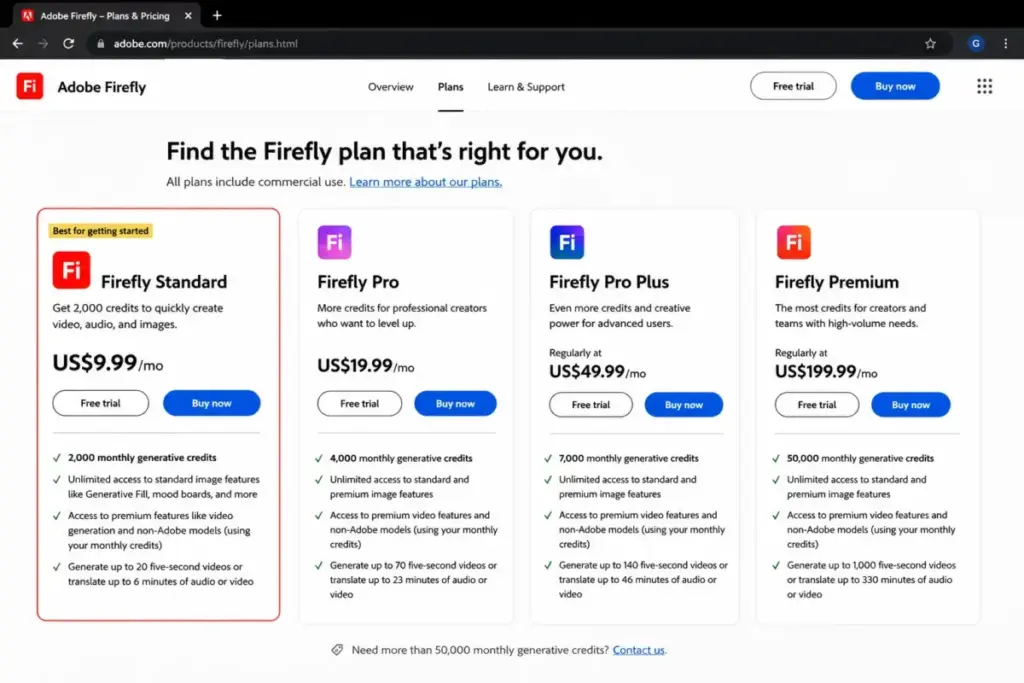
Adobe Firefly is the Pika alternative for teams already inside Adobe’s ecosystem. Firefly Standard starts at $9.99/month with 2,000 credits and up to 20 five-second videos. Commercial creative workflow, Firefly Video Model, and access to selected non-Adobe models are included.
Starting price: $9.99/month
Practical tier: Pro or Teams plans for higher credit allocation
Free plan: Yes, Adobe offers a free starting option
Official pricing page
The caveat: some “unlimited video” language is promotional and applies only to selected models and resolutions. Teams pricing differs from individual pricing. Firefly does better than Pika for brand-safe commercial output and Adobe ecosystem fit. The tradeoff: Pika is lighter and more playful. Adobe’s credit model and promotional terms require more explanation. For a full breakdown, see our Adobe Firefly review and analysis.
Best for:
- Brand and marketing teams in the Adobe ecosystem
- Agencies needing commercial-use AI video with IP safety
- Teams using Firefly alongside Photoshop, Premiere, and Illustrator
Avoid if: You do not use Adobe products, and you only need standalone AI video generation.
Migration difficulty: Medium
The Adobe Firefly pricing breakdown covers plan differences and credit allocation.
PixVerse: Best Pika Alternative for API and Product Teams
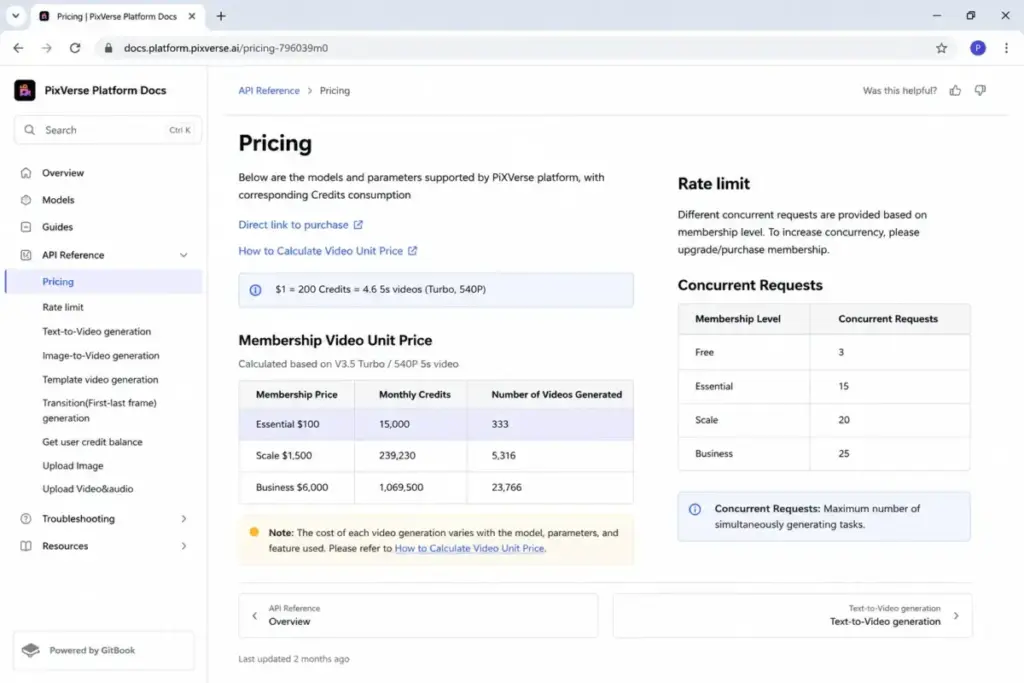
PixVerse is the Pika alternative for teams that need to build AI video into products, apps, or automated workflows. The official API docs list Essential at $100/month with documented rate limits. Consumer web pricing was not confirmed in parsed official sources.
Starting price: API Essential $100/month; consumer pricing not confirmed
Free plan: API/free access may exist, but consumer plan details were not confirmed
Official API pricing page
This is where the distinction matters: PixVerse API pricing and consumer web membership are separate products. Do not compare PixVerse API Essential at $100/month to Pika Standard at $28/month. They serve different buyers. PixVerse does better than Pika for product integration, with official rate-limit documentation and V6 positioning around 1080p, native audio, and multi-shot storytelling.
Best for:
- Product teams building AI video into apps
- Developer teams needing documented API access and rate limits
Avoid if: You are a casual creator. API pricing is not consumer pricing.
Migration difficulty: High
Magnific: Best All-in-One Creative Suite for Teams and Agencies

Magnific positions itself as a full creative suite, not a single AI video generator. The product covers AI image and video generation, creative suite tools, MCP/API/Agents, team/enterprise workflows, and legal/security claims. Magnific was formerly Freepik.
Starting price: Consumer pricing not publicly confirmed in parsed official sources
Free plan: Not confirmed in parsed official pricing evidence
Official product page
The honest assessment: I cannot provide a direct cost comparison because Magnific’s public pricing was not confirmed in my research. The product is broader than Pika (image, video, audio, 3D, agents, stock, API, team/enterprise workflows) but less Pika-like for casual effect users. Use caveated language when comparing costs.
Best for:
- Agencies and teams needing a full creative production suite
- Teams that want image, video, audio, 3D, and stock in one platform
Avoid if: You want clear public pricing before committing, or you only need a simple AI video tool.
Migration difficulty: Medium
Pricing Comparison: All 10 Pika Alternatives
All prices verified as of June 12, 2026. Prices can change. Check official pricing pages before purchasing.
| Product | Starting price | Practical tier | 10-user equivalent cost | Free plan | Billing basis |
|---|---|---|---|---|---|
| Pika | $8/mo (yearly) | $28/mo Standard | $280/mo (10 Standard) | Limited free | Account credits |
| Runway | $12/user/mo (yearly) | $28/user/mo Pro | $280/mo (10 Pro) | Yes, one-time credits | Per-user + credits |
| Google Flow | $19.99/mo | $19.99/mo AI Pro | $199.90/mo (10 individual) | Yes, daily credits | Bundle + credits |
| Kling AI | $72/year Standard | Standard | $60/mo (10 annual) | Yes, with limits | Subscription credits |
| Luma | $30/mo | $30/mo Plus | $300/mo (10 Plus) | Not confirmed | Subscription usage |
| Adobe Firefly | $9.99/mo | $19.99/mo Teams | $199.90/mo (10 Teams) | Yes, free option | Subscription + credits |
| Hailuo AI | $9.99/mo | $9.99/mo Standard | $99.90/mo (10 Standard) | Yes, 3-day credits | Subscription credits |
| Vidu | $8/mo (yearly) | $28/mo Premium | $80/mo (10 Standard) | Yes, with limits | Subscription credits |
| PixVerse | $100/mo API | API Essential | $100/mo (1 org API) | Not confirmed | API credits |
| Krea | $5.25/mo (yearly) | $21/mo Pro | $210/mo (10 Pro yearly) | Yes, 100 units/day | Compute units |
| Magnific | Not disclosed | Not disclosed | Not calculable | Not confirmed | Not disclosed |
What this means: At 10 users on practical tiers, Kling AI and Vidu are the cheapest options. Runway and Pika Standard land at the same $280/month for 10 users, but Runway offers more production depth. Google Flow and Adobe Firefly cluster around $200/month for 10 individual subscriptions. PixVerse API pricing is for organizations, not individual creators. Magnific’s pricing cannot be compared without public disclosure.
Migration Difficulty by Alternative
| Alternative | Difficulty | Main risk | Key consideration |
|---|---|---|---|
| Vidu | Low | Learning new reference-to-video workflows | Simple sign-up, no data migration needed |
| Hailuo AI | Low | 3-day free credit expiry | Quick onboarding, minimal workflow change |
| Krea | Medium | Compute-unit model learning curve | Multiple model types to evaluate |
| Runway | Medium | Credit math complexity per model | Project workspace setup and model selection |
| Google Flow | Medium | Credit rollover restrictions | Google AI plan dependency |
| Kling AI | Medium | Dynamic membership page and credit expiry | Membership plan verification needed |
| Luma | Medium | Higher entry price commitment | Model and agent workflow evaluation |
| Adobe Firefly | Medium | Adobe ecosystem dependency | Strongest if already using Adobe apps |
| Magnific | Medium | Pricing opacity | Suite evaluation before commitment |
| PixVerse | High | API integration development | Requires developer resources |
What this means: Most Pika alternatives have medium migration difficulty because AI video tools do not carry persistent data. You are not migrating a CRM database. You are learning a new interface and credit system. The main risk is always the credit math, not the onboarding.
Which Pika Alternative Should You Avoid?
Every tool on this list serves a specific switching trigger. Here is when each one is the wrong pick.
- Avoid PixVerse if you are a casual creator. API pricing is not consumer pricing. Do not confuse $100/month API Essential with a Pika-style subscription.
- Avoid Magnific if you need transparent pricing before committing. Public pricing was not confirmed in official sources.
- Avoid Luma if your budget is under $30/month. The entry price is 3.75x Pika Basic.
- Avoid Krea Basic if you need all video models. Basic includes selected models only. You need Pro.
- Avoid Hailuo AI if you need production-quality controls. It is a social clip tool, not a production platform.
- Avoid Runway if you only make quick social effects. The per-second credit math adds overhead you do not need.
How to Choose the Right Pika Alternative
Five questions that pick the tool for you.
- What is your monthly budget? Under $10/month: Vidu Standard or Krea Basic. $10-$30/month: Hailuo, Adobe Firefly, Krea Pro, or Pika Standard. Over $30/month: Runway, Google Flow, or Luma.
- Do you need API access? If yes, PixVerse (API) or Runway are your only verified options in this list.
- Do you need brand-safe commercial output? If yes, Adobe Firefly, Runway, or Magnific. Adobe Firefly is the strongest for teams already using Adobe apps.
- Do you care about character consistency or anime? If yes, Vidu or Kling AI.
- Do you need cinematic realism? If yes, Google Flow (Veo 3.1), Runway (Gen-4.5), or Kling AI.
The Alternative Nobody Mentions
Krea is the underdog on this list. Most Pika alternative guides focus on direct video-to-video comparisons. Krea is different because it is not just a video tool. It combines image, video, 3D, lipsync, and multiple model access under one compute-unit system. The free plan with 100 compute units per day lets you test without commitment. Pro at $21/month equivalent gives access to all video models.
The reason Krea flies under the radar: it does not market itself as a “Pika alternative.” It markets itself as a creative suite. But for creators who are outgrowing Pika’s single-purpose approach, Krea’s breadth is the value proposition. The compute-unit model takes some learning, but once you understand it, you can switch between image and video generation without juggling separate subscriptions.
If you want to compare Krea against other video-focused tools, the Runway ML alternatives comparison covers overlapping options from a different angle.
When to Stay with Pika
Switching tools costs time. Here is when Pika is still the right choice.
Stay with Pika if:
- Your workflow depends on Pikaswaps, Pikaffects, or Pikatwists. No alternative replicates these specific effects.
- Your monthly output stays within 700 Standard credits and you do not need resolution above 1080p.
- You produce effects-driven social clips and do not need editing workflows, API access, or team tools.
- You value speed and simplicity over production depth. Pika’s interface is lighter than Runway, Krea, or Adobe Firefly.
Switch from Pika if:
- Credit burn on advanced effects exceeds your budget regularly.
- You need 1080p or higher without plan-gated resolution.
- You need API access for product integration.
- You need character consistency, reference-to-video, or anime workflows.
- You need brand-safe commercial output with enterprise controls.
- Your team size exceeds what individual Pika accounts can support.
Final Verdict: Best Pika Alternative for Most Creators
Runway is the best overall upgrade for production teams. Vidu is the best first switch for budget-conscious creators leaving Pika because of credit burn. The production workspace, multi-model access (Gen-4.5, Veo, third-party models), and editor-style workflows fill the gaps that push users away from Pika. The credit math is more complex, but the output ceiling is higher.
By switching trigger:
- Best for budget-conscious creators: Vidu Standard at $8/month billed yearly
- Best for cinematic realism: Google Flow at $19.99/month with Veo 3.1
- Best for character and anime: Vidu with reference-to-video workflows
- Best for brand-safe teams: Adobe Firefly starting at $9.99/month
- Best for API and product teams: PixVerse API Essential at $100/month
- Best multi-model creative suite: Krea Pro at $21/month equivalent
Why Sora is not on this list: OpenAI has announced Sora discontinuation. Many competing guides still include Sora as a Pika alternative. That recommendation is stale. Every tool on this list has verified official product evidence. Where public pricing was not confirmed, the limitation is stated explicitly.
Daniel Rivera covers AI tools and emerging technology at SaaS Zap. This evaluation is based on official documentation, pricing pages, and published product information. Testing level for all products: official research only. No product was tested firsthand for this article. Pricing verified June 12, 2026.
For a broader view of what multimodal AI enables across video, image, and audio, see our knowledge hub.
FAQ
What is the best Pika alternative in 2026?
Runway is the best overall Pika alternative for teams that need production-quality AI video workflows. For budget-conscious creators, Vidu matches Pika’s $8/month starting price with additional reference-to-video and anime capabilities. The best pick depends on your switching trigger: credit burn, quality, workflow, API, or brand safety.
Is there a free Pika alternative?
Yes. Krea offers 100 free compute units per day. Google Flow provides limited daily free credits. Runway has a free plan with one-time credits. Hailuo AI gives new users free credits that expire after 3 days. None of these free tiers match the full feature set of paid plans.
Is Runway better than Pika?
Runway is better for structured production workflows, multi-model access, and team collaboration. Pika is better for quick social effects and novelty transformations. At 10 users on practical tiers, both cost $280/month, but Runway provides more production tools, project organization, and model variety.
Which Pika alternative is cheapest?
Krea Basic at $5.25/month (billed yearly at $63) is the lowest entry price, but it includes selected video models only. Vidu Standard and Pika Basic both start at $8/month billed yearly. For full video model access, Krea Pro at $21/month equivalent or Hailuo Standard at $9.99/month are the next tier.
Which Pika alternative has API access?
PixVerse offers official API pricing starting at $100/month for Essential with documented rate limits. Runway, Luma, and Magnific also position API or developer access, but PixVerse has the clearest published API pricing structure in this list.
Why is Sora not listed as a Pika alternative?
OpenAI has announced Sora discontinuation. Recommending a discontinued product as an active Pika alternative would mislead readers. Many competing guides still include Sora. This list only includes tools with verified active availability as of June 2026.
Which Pika alternative is best for anime videos?
Vidu is the strongest Pika alternative for anime-style video. It offers reference-to-video, anime art-to-video, multi-entity consistency, and first/last-frame control. Kling AI also supports character-driven video but with stronger focus on realistic human motion rather than anime-specific art styles.
Should I stay with Pika or switch?
Stay if your workflow depends on Pikaswaps, Pikaffects, or Pikatwists, and your monthly output stays within 700 Standard credits. Switch if you regularly exceed your credit allocation, need resolution above 480p on Basic, need API access, or need production-quality editing workflows. The switching trigger, not the tool ranking, should drive your decision.