Most AI video generators promise cinematic magic from a text prompt. The reality is messier. Failed renders, burned credits, and output that looks nothing like what you described. This Pika Art review breaks down what Pika actually delivers in 2026, what it costs when you factor in retries and resolution gates, and where competitors still win.
Pika, built by Pika Labs and available at pika.art, is a generative AI video platform built around text-to-video, image-to-video, and a growing library of creative effects. It is fun, fast, and unpredictable. If you are deciding whether to pay for Pika or look elsewhere, this review gives you the credit math, the feature breakdown, and the honest limitations before you commit.
Pika Art Verdict and Score
Pika is a creativity toy that occasionally produces genuinely impressive short clips, but it is not a production tool you can depend on for repeatable, brand-safe output. The platform excels at fast visual experimentation for social content. It struggles with prompt adherence, consistent quality, and the kind of reliability that business teams need. My recommended scores reflect this split.
| Criterion | Score | What I Found | Buyer Impact |
|---|---|---|---|
| Overall (social creators) | 7.2/10 | Fast effects, fun templates, good for TikTok/Reels hooks | Worth testing on free plan before upgrading |
| Overall (business production) | 5.8/10 | Inconsistent output, credit burn on retries, weak support signals | Too risky for deadline-driven brand video |
| Pricing value | 6/10 | Headline prices look cheap; real cost depends on retries and resolution | Budget 30-50% more credits than you expect |
| Feature depth | 7.5/10 | Pikaframes, Pikatwists, Pikaffects, Pikaformance add real creative range | Best when using guided effects, not open prompts |
| Output quality | 6.5/10 | Pika 2.5 shows improvement; still inconsistent across prompts | Great clips mixed with unusable ones |
| Prompt adherence | 5.5/10 | Templates work well; open text prompts produce variable results | Use templates and reference images when possible |
| Ease of use | 7/10 | Web app is straightforward; mobile app has friction | Desktop web is the best experience |
| Support and trust | 4.5/10 | Public complaints about response times and cancellation | Test before committing to annual billing |
| Commercial readiness | 6/10 | Commercial use included on all plans; no governance or brand tools | Fine for social posts, not for regulated industries |
This review follows the SaaSZap review methodology, which prioritizes verified pricing data, public user sentiment signals, and practical workflow evaluation over vendor marketing claims.
What Is Pika Art?
Pika Art is a credit-based AI video generator built for short-form creative content. Developed by Pika Labs and accessible at pika.art, the platform lets users create videos from text prompts, still images, or existing video clips. Pika positions itself in the broader category of AI tools for content creation, specifically targeting creators who want fast, visually striking clips for social media.
The product sits between a full professional video editor like Runway and a simple filter app. Pika does not try to replace your editing timeline. Instead, it generates 5 to 10 second clips using its Pika 2.5 model, then layers on specialized effects through branded tools: Pikaframes for multi-keyframe transitions, Pikatwists for prompt-driven video edits, Pikaswaps for element replacement, Pikadditions for adding objects, Pikaffects for stylized AI effects, and Pikaformance for audio-synced facial expressions.
The core workflow is simple. You type a prompt or upload an image, pick a resolution and duration, and Pika generates a clip. The complexity hides in the credit system, where resolution, duration, model choice, and effect type all change how fast your balance drains.
Pika Pricing and Credit Reality
Pika’s headline pricing looks affordable until you calculate how many usable clips each plan actually delivers. The gap between “monthly price” and “real production cost” is the single biggest factor buyers underestimate. Here is what Pika charges as of May 2026, verified from the Pika pricing page.
Pika Plan Pricing (Verified May 5, 2026)
| Plan Name | Annual Monthly Price | Monthly Credits | Pika 2.5 Access | Key Inclusions |
|---|---|---|---|---|
| Free/Basic | $0 | 80 | 480p only | Pikascenes, Pikadditions, Pikaswaps, Pikatwists, Pikaffects (image-to-video only), no-watermark downloads, commercial use |
| Standard | $8/month | 700 | All resolutions | All features, Pikaframes, all Pikaffects, purchasable rollover credits |
| Pro | $28/month | 2,300 | All resolutions | All Standard features with higher volume |
| Fancy | $76/month | 6,000 | All resolutions | All Standard features with highest volume |
Yearly billing is advertised as 20% off the monthly rate. VAT may apply depending on your country. All paid plans include no-watermark downloads and commercial use rights. The Free/Basic plan also lists commercial use and no-watermark downloads, but limits Pika 2.5 to 480p resolution.
How Many Videos Does Each Plan Actually Produce?
This is where Pika pricing gets real. Credit costs vary by resolution, duration, and feature used.
Pika 2.5 Text-to-Video and Image-to-Video Credit Costs:
| Resolution | Duration | Credits Per Clip |
|---|---|---|
| 480p | 5 seconds | 12 credits |
| 480p | 10 seconds | 24 credits |
| 720p | 5 seconds | 20 credits |
| 720p | 10 seconds | 40 credits |
| 1080p | 5 seconds | 40 credits |
| 1080p | 10 seconds | 80 credits |
Pikaframes Credit Costs:
| Resolution | Duration | Credits Per Clip |
|---|---|---|
| 480p | 5 seconds | 12 credits |
| 480p | 25 seconds | 60 credits |
| 720p | 5 seconds | 20 credits |
| 720p | 25 seconds | 100 credits |
| 1080p | 5 seconds | 40 credits |
| 1080p | 25 seconds | 200 credits |
Other Feature Credit Costs:
| Feature | Model | Credits |
|---|---|---|
| Pikascenes, Pikadditions, or Pikaswaps | Turbo | 10 credits |
| Pikadditions or Pikaswaps | Pro | 20 credits |
| Pikatwists | Turbo | 60 credits |
| Pikatwists | Pro | 80 credits |
| Selfie With Your Younger Self | Template | 30 credits |
| Pikaformance | 720p | 3 credits per second |
Real Output Volume Per Plan (1080p Clips)
| Plan | Monthly Credits | 1080p 5s Clips | 1080p 10s Clips | Best Fit |
|---|---|---|---|---|
| Free/Basic | 80 | N/A (480p only) | N/A (480p only) | Testing Pika before buying |
| Standard (700) | 700 | ~17 clips | ~8 clips | Solo creator, light use |
| Pro (2,300) | 2,300 | ~57 clips | ~28 clips | Active social creator |
| Fancy (6,000) | 6,000 | ~150 clips | ~75 clips | Small team or agency |
Those numbers assume every generation succeeds. They will not.
What Pika Pricing Does Not Tell You
The real cost of Pika is not the subscription price. It is the credits you spend on clips you cannot use. Every failed generation, every output that does not match your prompt, and every retry eats from the same credit pool.
Here is a practical scenario. Say you are on the Standard plan with 700 monthly credits. You want 1080p 5-second clips for Instagram Reels. Each clip costs 40 credits. That gives you 17 attempts. But if 30% of your generations produce unusable output (wrong motion, bad prompt adherence, visual artifacts), you lose about 5 of those attempts. Your effective output drops from 17 clips to roughly 12 usable clips per month at $8.
On the Pro plan at $28/month with 2,300 credits, the same 30% waste rate turns 57 potential clips into about 40 usable ones. That pushes your effective cost per usable 1080p 5-second clip from $0.49 to around $0.70.
A few other cost factors buyers miss:
- Monthly credits expire. Unused included credits do not roll over to the next month. Only separately purchased credits carry forward.
- Resolution gates real cost. The Free/Basic plan limits Pika 2.5 to 480p. Any social-ready content at 720p or 1080p requires a paid plan.
- VAT adds to the sticker price. Depending on your country, tax may apply on top of the listed subscription cost.
- Pikatwists burns credits fast. A single Pikatwists generation costs 60 to 80 credits. On a Standard plan, that is roughly 9% of your monthly allowance for one clip.
- Pikaframes at full length is expensive. A 25-second 1080p Pikaframes transition costs 200 credits, or nearly 29% of a Standard plan’s monthly allowance.
The takeaway: budget 30 to 50 percent more credits than your initial estimate. If your workflow involves creative exploration (trying multiple prompts to find what works), the burn rate climbs fast.
Pika Features That Actually Matter
Pika’s strongest advantage is not raw video quality. It is the range of creative effects that let you do things other generators cannot. The platform is built around specialized tools, each with different credit costs and use cases. Here is what each feature does, what it costs, and where it falls short.
Pika Art Text-to-Video and Image-to-Video
This is Pika’s core function. Type a prompt or upload a still image, and Pika 2.5 generates a 5 or 10 second video clip. The model supports 480p, 720p, and 1080p output, with credit costs scaling accordingly.
Text-to-video works best with simple, visually descriptive prompts. The model handles natural motion and atmospheric scenes well. It struggles with specific human actions, text rendering, and precise spatial relationships.
Image-to-video is often the stronger workflow. A reference image gives Pika 2.5 more visual grounding, which improves motion quality. If you use tools like Midjourney or Leonardo AI for image generation, the image-to-video pipeline is a natural extension.
Credit impact: 12 to 80 credits per clip depending on resolution and duration. A 1080p 10-second clip at 80 credits is the most expensive standard generation.
Limitation: Prompt adherence is inconsistent. You may need 2 to 4 attempts to get a usable result for specific creative briefs, which multiplies your effective credit cost.
Pika Art Pikaframes
Pikaframes lets you define up to five keyframes (start and end states, plus intermediate frames) and Pika generates smooth transitions between them. Total output can reach 25 seconds, making this Pika’s longest single-generation format.
This is useful for product reveals, scene transitions, and narrative sequences. The multi-frame approach gives you more control over the video arc than a single text prompt.
Credit impact: 12 credits for a 5-second 480p clip up to 200 credits for a 25-second 1080p clip. The long-form 1080p option is expensive.
Limitation: At 200 credits for a single 25-second 1080p generation, this feature can drain a Standard plan’s budget in just three or four uses. It works best at shorter durations or lower resolutions.
Pika Art Pikatwists
Pikatwists lets you describe a transformation you want applied to a video. Upload a clip, type what should change, and Pika attempts to modify the video accordingly. Think of it as video-to-video editing with natural language instructions.
This is one of Pika’s most creative features. You can change environments, swap visual styles, or apply surreal transformations. It is also one of the most expensive.
Credit impact: 60 credits (Turbo model) or 80 credits (Pro model) per generation. A single Pro-model Pikatwists attempt costs more than a standard 1080p 5-second clip.
Limitation: Because Pikatwists applies AI interpretation to an existing video, results are highly variable. The feature is best for creative experimentation where “happy accidents” are welcome. It is not reliable enough for precise, repeatable edits.
Pika Art Pikaswaps and Pikadditions
Pikaswaps replaces elements within a video (swap a dog for a cat, replace a background object). Pikadditions adds new elements to an existing scene. Both use the same credit structure.
These features work well for meme-style content, visual gags, and social hooks where exact realism is not the goal.
Credit impact: 10 credits (Turbo) or 20 credits (Pro) per generation. These are among Pika’s most credit-efficient features.
Limitation: Element boundaries can be imprecise. Swapped or added objects sometimes blend awkwardly with the original scene, especially in complex backgrounds.
Pika Art Pikaffects
Pikaffects applies stylized AI effects to images and videos. The Free/Basic plan includes Pikaffects for image-to-video only. Paid plans unlock the full range.
Pikaffects is the most template-driven feature in Pika’s toolkit. Users pick a pre-built effect style rather than writing open prompts, which makes output quality more predictable than freeform generation.
Credit impact: Varies by effect type. Generally lower credit cost than open text-to-video generation.
Limitation: Creative freedom is constrained by the available effect templates. If the pre-built styles do not match your vision, Pikaffects will not help.
Pika Art Pikaformance
Pikaformance generates hyper-real facial expressions synced to an audio track. Upload a face image and an audio clip, and Pika animates the face to match the sound.
This targets talking-head content, lip-sync videos, and expression-driven social clips. The per-second pricing model (3 credits per second at 720p) means costs scale linearly with audio duration.
Credit impact: 3 credits per second of audio. A 10-second clip costs 30 credits. A 30-second clip costs 90 credits.
Limitation: Output is limited to 720p resolution. The quality depends heavily on the input face image and audio clarity. Pikaformance is not a replacement for dedicated avatar platforms like Synthesia, which offer more control over character consistency and presentation style.
Pika User Experience
The Pika web app gets you from signup to first generation in under three minutes, but the real learning curve is understanding where your credits go. Here is what the workflow actually looks like.

Signup and first generation. Sign in with Google and land on the generation canvas immediately. The interface shows a prompt input, resolution and duration selectors, and a gallery of community outputs and templates. The 80 free credits let you run a handful of test generations right away.
Templates vs. open prompts. Pika leans heavily into templates and guided effects. The homepage surfaces trending templates (like “Selfie With Your Younger Self”) and curated styles. These template-driven workflows produce more consistent results than open text prompts. If you are new to AI video, start with templates.
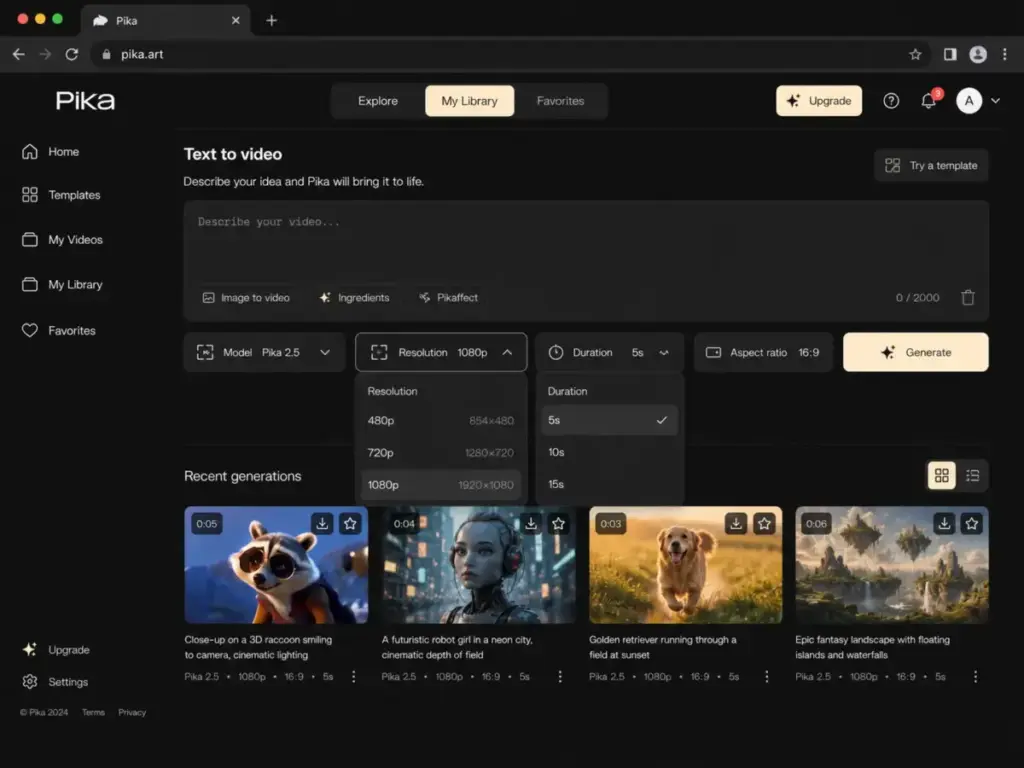
Generation workflow. Type a prompt (or upload an image), select resolution and duration, pick a model (Turbo or Pro), and generate. Output typically arrives in 30 seconds to a few minutes depending on queue load.
Mobile app. Pika offers a mobile app (listed on the App Store as “Pikaffects by Pika”). The app focuses primarily on Pikaffects and effect-driven workflows rather than the full generation suite. For the complete feature set, the web app at pika.art is the better experience.
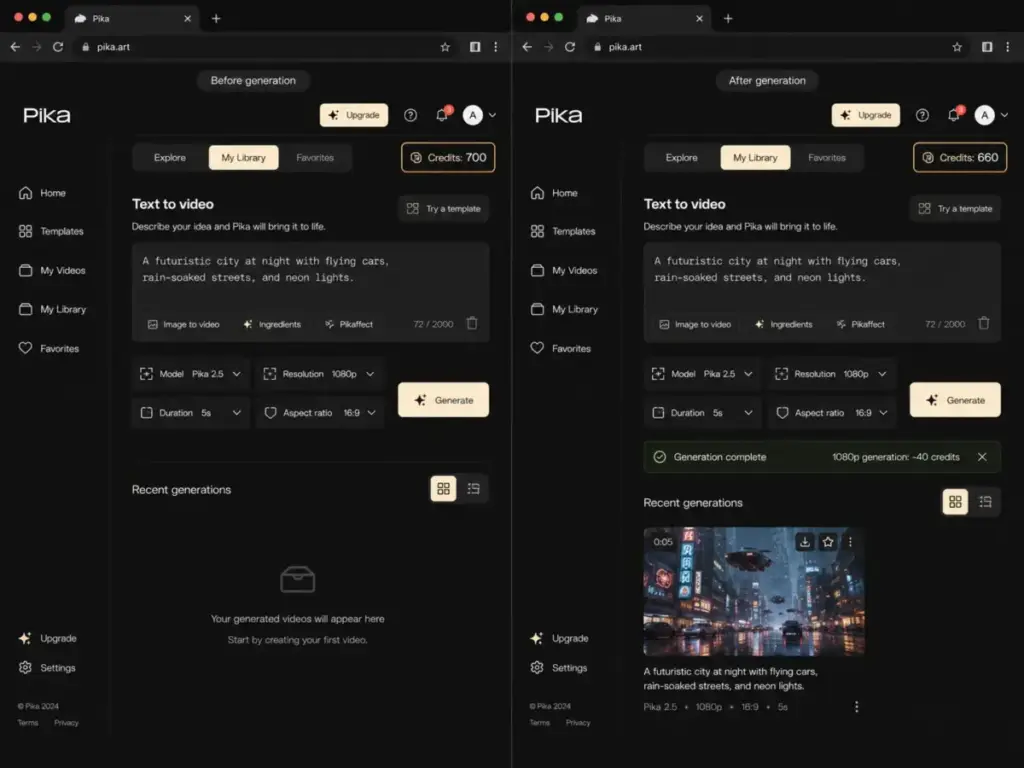
What to test in your first 30 minutes. If you are evaluating Pika, here is what I would focus on during a free-plan test session:
- Run one template-based generation to see Pika’s best-case output.
- Run one open text prompt describing a specific scene you need.
- Try one image-to-video generation using a reference image from your actual content.
- Check your credit balance after each generation to understand burn rate.
- Compare template output quality to open prompt output quality.
This gives you a realistic picture of what Pika delivers before you commit.
A note on official sources. Multiple unofficial sites and apps use the Pika name. The official product is at pika.art. The official mobile app is listed as Pikaffects by Pika on the App Store. Be cautious with lookalike domains.
Pika Limitations
Every AI video generator has limits. Pika’s are worth knowing before you pay. Here are the specific limitations I have identified from official product data and public user feedback.
- Prompt adherence is inconsistent. Pika 2.5 handles atmospheric and abstract prompts well but struggles with specific actions, spatial relationships, and detailed scene descriptions. A historical benchmark from Curious Refuge scored an earlier Pika version poorly on prompt adherence, temporal consistency, and motion quality. Pika 2.5 claims improvements, but open prompts still produce variable results.
- Credit burn on failed generations. Credits are consumed whether or not the output is usable. Public complaints on Reddit and Trustpilot mention wasted credits on failed generations and unusable output. One Trustpilot reviewer reported seeing “generation failed” and “error during video processing” messages. These are user-reported experiences, not universal outcomes, but they signal a pattern buyers should test for.
- Short maximum clip length. Standard Pika 2.5 generations max out at 10 seconds. Pikaframes extends this to 25 seconds but at high credit cost. If your workflow requires clips longer than 10 seconds, you will need to stitch multiple generations together externally.
- Monthly credits expire. Included plan credits reset each month. If you do not use them, they disappear. Only separately purchased credits roll over. This penalizes irregular usage patterns.
- Support and billing complaints. Trustpilot reviews for Pika show a 1.7/5 average from 55 reviews, with 85% rated 1-star. One reviewer stated, “there is no customer service at all.” These reviews represent a self-selected group, not a verified measurement of all experiences. However, the complaint pattern is consistent enough to flag. Pika has no confirmed G2 or Capterra profile. Product Hunt shows a 4.9/5 average from 14 reviews, reflecting early-adopter enthusiasm.
- No long-form or multi-scene production workflow. Pika generates individual clips. It does not offer scene sequencing, storyboard management, timeline editing, or multi-clip project organization. For anything beyond single-clip output, you need external editing tools.
- Resolution requires payment. The Free/Basic plan locks Pika 2.5 to 480p. Any social-platform-ready resolution (720p or 1080p) requires at least the $8/month Standard plan.
- No enterprise governance or brand controls. Pika does not offer team workspaces, brand asset libraries, approval workflows, or audit logs. For teams needing governed creative production, this is a significant gap.
Pika vs Alternatives
Pika is not the only AI video generator worth considering, and it is not the best choice for every workflow. The right tool depends on what you are making, who it is for, and how much output consistency matters. Here is how Pika compares to five major alternatives by use case.
Pika Art vs Runway
Both offer text-to-video, image-to-video, and creative editing. The differences show up in control, consistency, and team workflows.
Choose Pika for fast, playful social effects where creative surprise matters more than precise control.
Choose Runway for deeper creative control, predictable output, team asset management, and production-grade workflows. Runway also provides API access directly, while Pika routes API users to Fal.ai. See the full RunwayML review and Runway ML pricing analysis.
Pika Art vs Luma Dream Machine
Luma Dream Machine focuses on cinematic image-to-video generation with strong motion realism and visual coherence.
Choose Pika when you want a wider variety of creative effects and template-driven workflows for social content.
Choose Luma when you prioritize cinematic quality in image-to-video motion. Luma tends to produce smoother, more physically grounded movement from still images.
Pika Art vs Kling AI
Kling AI has gained attention for motion realism and competitive pricing in the AI video space.
Choose Pika when you want a broader effects toolkit and a more template-driven creative experience.
Choose Kling when motion realism is your top priority and you can tolerate a different credit and pricing structure. Kling’s motion quality in certain categories (human movement, physical interactions) has drawn strong community feedback.
Pika Art vs Adobe Firefly
Adobe Firefly operates within the Adobe Creative Cloud ecosystem with a strong emphasis on commercial safety and IP indemnification.
Choose Pika when you need standalone AI video generation outside the Adobe ecosystem and want faster creative experimentation at a lower entry price.
Choose Adobe Firefly when you already work inside Adobe tools (Premiere Pro, After Effects) and need commercially safer creative pipelines with clearer IP protections. See the Adobe Firefly review and Adobe Firefly pricing for details.
Pika Art vs Synthesia
Synthesia is a fundamentally different product. It generates avatar-led videos for business communication, training, and sales enablement.
Choose Pika when you want creative, effects-driven short clips for social media or marketing hooks.
Choose Synthesia when you need consistent talking-head avatars for training content, onboarding videos, or internal communications. Synthesia and Pika solve different problems for different buyers.
Pika Alternatives Comparison Table
| Use Case | Best Pick | Why |
|---|---|---|
| Fast social clips and creative effects | Pika | Broadest effects library, low entry price |
| Professional video production and team workflows | Runway | Better control, consistency, and team features |
| Cinematic image-to-video | Luma Dream Machine | Stronger motion quality from still images |
| Motion realism on a budget | Kling AI | Competitive motion quality and pricing |
| Adobe ecosystem and commercial safety | Adobe Firefly | IP indemnification and native Adobe integration |
| Avatar-led business video | Synthesia | Consistent character narration for training and sales |
| Beginner-friendly design with basic video | Canva AI | All-in-one design with simpler video needs |
Who Should Use Pika Art?
Pika works best for creators who value speed and creative surprise over production polish. Here are the specific user profiles that benefit most.
1. Solo TikTok and Reels creator publishing 10 to 30 clips per month. A Pro plan at $28/month gives roughly 40 to 57 usable clips at 1080p, depending on retry rate. Enough for daily social posting with creative experimentation.
2. Social media manager testing 5 to 10 visual hooks per week. Low cost per attempt (10 to 40 credits for most effects) makes rapid iteration practical. Use templates and Pikaffects for the most consistent results.
3. Small creative agency pitching motion concepts. Generate concept variations quickly. Set expectations that these are concept demos, not final deliverables.
4. Meme and content team prioritizing fast iteration. Pikaswaps, Pikadditions, and Pikatwists fit the “try ten ideas, post the two that work” workflow.
Who Should Not Use Pika Art?
Pika is the wrong tool for workflows that require consistency, governance, or predictable output. Here are the profiles that should look elsewhere.
1. B2B SaaS team needing polished product demo videos. Pika’s prompt variance and short clip length make it a poor fit. Runway or dedicated screen recording tools work better.
2. Training team needing consistent avatar narration. Synthesia is the right tool. Pika’s Pikaformance does not offer the character consistency training content requires.
3. Brand team requiring repeatable character identity across campaigns. Pika cannot maintain consistent character appearance across generations. This is a dealbreaker for brand campaigns.
4. Agency delivering client-ready video with strict approval deadlines. Variable prompt adherence and generation failures create too much production risk.
5. Regulated industry team needing documented compliance. Pika offers no audit logs, approval workflows, or enterprise compliance documentation.
How I Would Test Pika Before Paying
Do not buy a Pika plan based on feature lists. Test it with your actual content needs first. Here is a 5-prompt testing protocol I would run during a free trial or on the Free/Basic plan.
The 5-Prompt Test Protocol
| Test | Prompt Type | What You Are Testing |
|---|---|---|
| 1 | Product or object clip | Can Pika generate a clean, usable product showcase clip? |
| 2 | Human face or talking head | How well does Pika handle facial motion and expression? |
| 3 | Character consistency | If you generate the same character twice, do they look the same? |
| 4 | Element swap (Pikaswaps) | Does the swap look natural or does it break the scene? |
| 5 | Template effect (Pikaffects) | Does the guided effect produce reliable, shareable output? |
How to Evaluate Results
Run each prompt twice (10 total generations). Track these metrics:
- Usable output rate: How many of the 10 generations produce clips you would actually post or share?
- Credit cost per usable clip: Total credits spent divided by usable outputs.
- Prompt match rate: How closely did the output match what you described?
- Time per generation: How long did each generation take, including queue wait?
If your usable output rate is above 70%, Pika is likely a good fit for your workflow. If it falls below 50%, the credit burn will make the platform expensive relative to alternatives.
Before You Sign Up
Use the official site at pika.art and the official Pika FAQ page for account and billing questions. Review the Pika terms of service and acceptable use policy before generating content for commercial use. For API integration, Pika directs developers to Fal.ai.
Final Verdict
Pika Art earns a 7.2/10 for social-first creators and a 5.8/10 for business production teams. It is a genuinely fun and creatively stimulating AI video generator with a broad effects library that no single competitor fully matches. Pikaframes, Pikatwists, and Pikaffects give you creative options that Runway, Luma, and Kling do not offer in the same package.
But Pika is not a production tool. Prompt adherence is inconsistent. Failed generations eat credits. Monthly credits expire. Support feedback from public review platforms raises concerns. And the platform lacks every governance feature that business teams expect.
My recommendation:
- For TikTok, Reels, and social content creators: Start with the Free/Basic plan. Run the 5-prompt test. If your usable output rate is acceptable, the Standard plan at $8/month is a reasonable entry point.
- For agencies and creative teams: Test Pika for concept ideation only. Do not promise clients Pika-generated output as final deliverables.
- For business video production: Look at Runway for professional control, Adobe Firefly for Adobe-native workflows, or Synthesia for avatar-led content. Pika is not ready for this job.
- For everyone: Do not commit to annual billing until you have tested at least 20 generations on a monthly plan. The 20% annual discount is not worth the risk if the tool does not fit your workflow.
This Pika Art review reflects pricing and features verified as of May 5, 2026. AI video tools evolve quickly. Check the Pika pricing page for current rates before purchasing.
Pika Art FAQ
Answers to the most common questions about Pika Art, based on official product data and public user feedback.
Is Pika Art free?
Yes. Pika offers a Free/Basic plan with 80 monthly video credits at no cost. This plan limits Pika 2.5 to 480p resolution and restricts some features (Pikaffects is image-to-video only on the free plan). It includes commercial use rights and no-watermark downloads.
How much does Pika Art cost?
Pika has four tiers. Free/Basic costs $0. Standard costs $8/month billed yearly with 700 credits. Pro costs $28/month billed yearly with 2,300 credits. Fancy costs $76/month billed yearly with 6,000 credits. Yearly billing is advertised as 20% off. VAT may apply.
How many Pika credits does one video use?
It depends on resolution, duration, and feature. A 1080p 5-second Pika 2.5 clip costs 40 credits. A 1080p 10-second clip costs 80 credits. Pikatwists costs 60 to 80 credits. Pikaformance costs 3 credits per second of audio. Turbo-model effects like Pikascenes or Pikaswaps cost 10 credits.
Does Pika Art remove watermarks?
All plans, including Free/Basic, include no-watermark downloads according to the official pricing page.
Can I use Pika Art videos commercially?
Yes. Pika lists commercial use on all plans, including Free/Basic. Review the Pika terms of service for specific rights and restrictions before using generated content in commercial projects.
Is Pika better than Runway?
It depends on your use case. Pika is better for fast, playful social effects and creative experimentation at a lower price point. Runway is better for professional video production, team workflows, and scenarios requiring consistent, controllable output.
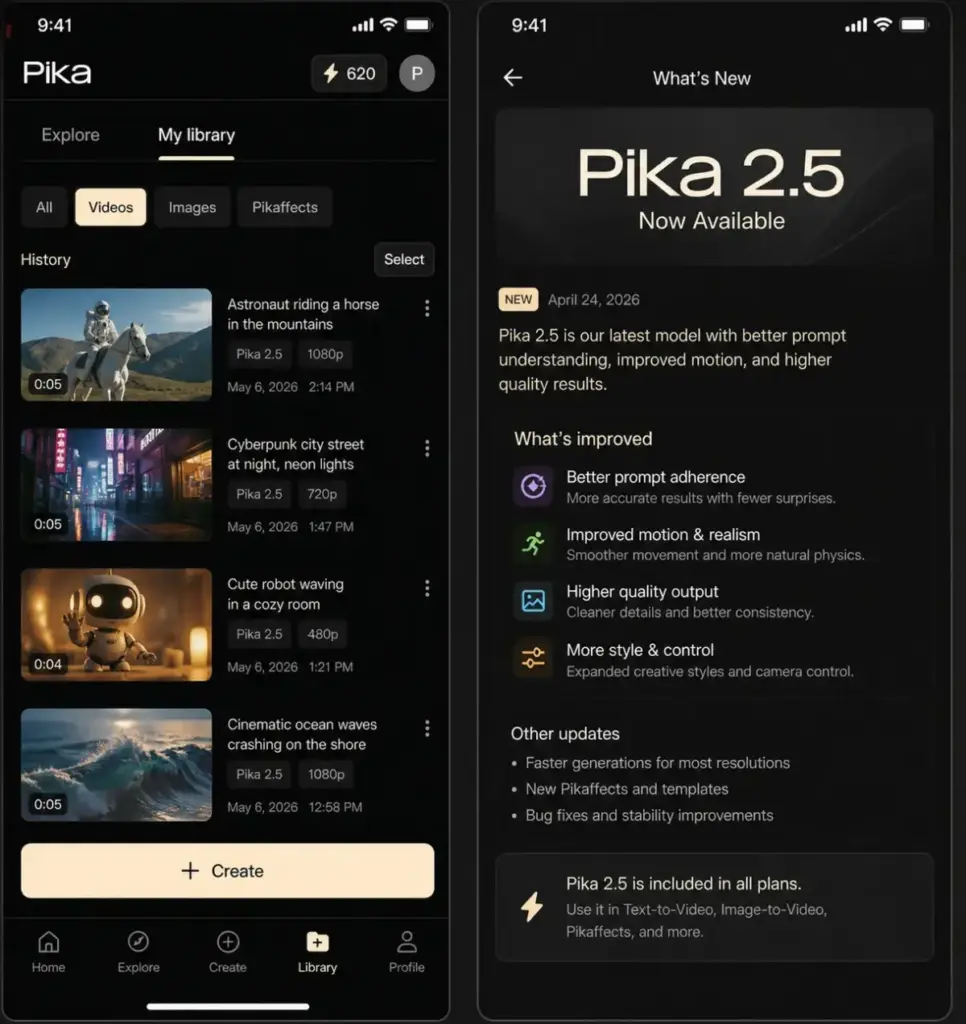
What is Pika 2.5?
Pika 2.5 is the current generation model powering Pika’s text-to-video and image-to-video features. Official release notes claim ultra-realistic generations, enhanced physics, and improved prompt adherence compared to earlier versions. Paid plans access Pika 2.5 at all resolutions. The Free/Basic plan is limited to 480p.
Why do Pika generations fail?
Generation failures can happen due to server load, prompt complexity, or content policy filters. Failed generations still consume credits. Public user complaints on Trustpilot and Reddit mention this as a recurring frustration. Pika’s FAQ page may address specific error scenarios.
What are the best Pika alternatives?
The best alternative depends on your needs. Runway offers stronger professional control. Luma Dream Machine excels at cinematic image-to-video. Kling AI competes on motion realism. Adobe Firefly provides commercially safer Adobe-native workflows. Synthesia specializes in avatar-led business video. Canva AI works for beginners who need basic video within a design platform.
Is Pika Art worth it in 2026?
For social-first creators who want fast, creative short clips, Pika is worth testing on the free plan and potentially upgrading to Standard ($8/month). For business teams needing reliable, repeatable video production, the credit burn risk, prompt inconsistency, and lack of governance features make Pika a harder sell. Run the 5-prompt test protocol before committing to a paid plan.