Runway advertises $12/user/month. Adobe Firefly starts at $9.99/month. Pika offers a free plan at $0. When looking for the best AI video generators, you will find three different pricing models, three different credit systems, and three different definitions of what “AI video generation” actually means for your budget.
After analyzing pricing for 45+ business tools, I can tell you that generative AI video tools charge by credits, minutes, or flat subscriptions, and the published starting price almost never reflects what a team producing weekly video content actually pays. Credits expire monthly. Watermark removal costs extra. Commercial-use rights start at mid-tier plans. The pricing page number is a starting point, not a budget.
I ranked these best AI video generators by what matters most to buyers: pricing transparency, credit economics, commercial rights, workflow fit, and the hidden costs that show up after you commit to a plan. Every price cited below was verified against official sources (as of May 2026), and I flag every case where pricing was not publicly accessible.
Here is the thing. Most ranking articles treat these tools as interchangeable. They are not. A cinematic generation platform, an avatar-based training tool, and a browser-based social editor solve completely different problems at completely different price points. The right pick depends on your workflow, not the model name.
Quick Verdict: Best AI Video Generator by Use Case
| Use Case | Best Pick | Why It Fits |
|---|---|---|
| Cinematic AI video generation | Runway | Gen-4.5 models, multi-model access, and production-grade controls |
| Commercial-safe creative work | Adobe Firefly | Adobe ecosystem, IP indemnity positioning, and team plan options |
| Enterprise training videos | Synthesia | 160+ language avatars, LMS integrations, and enterprise compliance |
| Personalized avatar video | HeyGen | Digital twins, voice cloning, 175+ languages, and CRM integrations |
| AI-powered video editing | Descript | Text-based editing, auto-captions, Studio Sound, and clip creation |
| Prompt-to-marketing assembly | invideo AI | 200+ models, stock media bundles, and 30-minute video from one prompt |
| Browser-based editing | VEED | AI video, subtitles, dubbing, avatars, and social export in browser |
| Budget social clips and effects | Pika | Free plan, $8/month entry, image-to-video effects, and social tools |
| Motion experiments | Luma Dream Machine | Ray3 access, 4K upscaling, HDR, and unlimited relaxed credits |
| Credit-based generation | Kling AI | Multi-modal generation, member benefits, and fast-track access |
What this means: If you produce AI-powered content for marketing campaigns, your shortlist is Runway, invideo AI, or Adobe Firefly. If you build training or sales enablement videos, start with Synthesia or HeyGen. If you need quick social clips on a tight budget, Pika and VEED are the better fit.
How We Chose and Ranked These Tools
I evaluated 30 candidates against six weighted criteria, using official pricing pages, product documentation, and help center evidence verified on May 25, 2026.
| Criterion | Weight | What I Checked |
|---|---|---|
| Pricing value | 20% | Starting price, free plan, annual/monthly split, credits, add-ons, hidden costs |
| Core feature depth | 20% | Text-to-video, image-to-video, avatars, editing, localization, models |
| Ease of use | 15% | Onboarding, UI clarity, setup time, learning curve |
| Integrations | 15% | Native integrations, API, ecosystem, stock media, enterprise connectors |
| Scalability | 15% | Team controls, SSO, credit pooling, enterprise plans, admin |
| User fit | 15% | Best-for and not-best-for accuracy, limitation severity |
Testing level: Official research only. I did not hands-on test every tool for this ranking. All claims are sourced from official product pages, pricing pages, and help center documentation. Where pricing was not publicly extractable, I flag it directly.
Excluded tools: I considered 30 candidates including Google Flow/Veo (bundled AI plan pricing, less transparent for a SaaS tool list), OpenAI Sora (packaging and pricing less established for a buyer-tool ranking), Canva Magic Media (design-suite feature, not a dedicated AI video platform), Colossyan (strong avatar tool, but Synthesia and HeyGen had stronger buyer differentiation), and PixVerse (vendor-authored SERP evidence creates bias risk).
Limitation: Pricing changes frequently in this category. Credits, model availability, and plan features can shift between the date I verified and the date you read this. Always confirm on the official pricing page before purchasing.
Free Tier Champions
Runway: Best Overall AI Video Generator
Starting price: $12/user/month billed annually | Free plan: Yes (one-time 125-credit deposit)
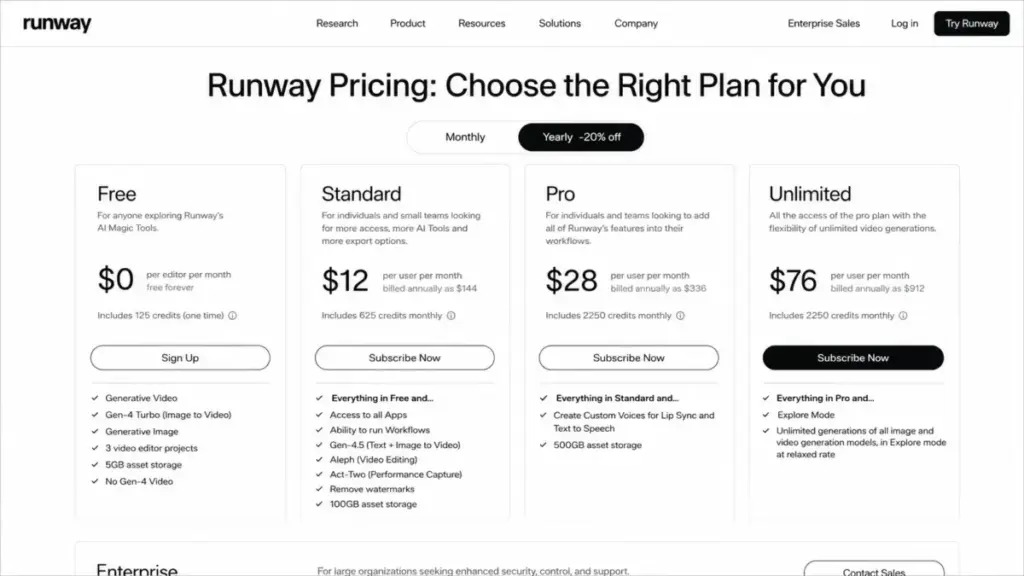
Runway gives you a free plan with 125 one-time credits. That is not 125 monthly credits. It is a one-time deposit. Once you burn through those credits testing Gen-4.5 or Gen-4 image-to-video, the free tier is done.
The paid tiers tell a clearer story. Standard at $12/user/month billed annually provides 625 monthly credits. Pro at $28/user/month increases the monthly pool. Unlimited at $76/user/month adds a larger credit allocation, but caps workspaces at 10 users.
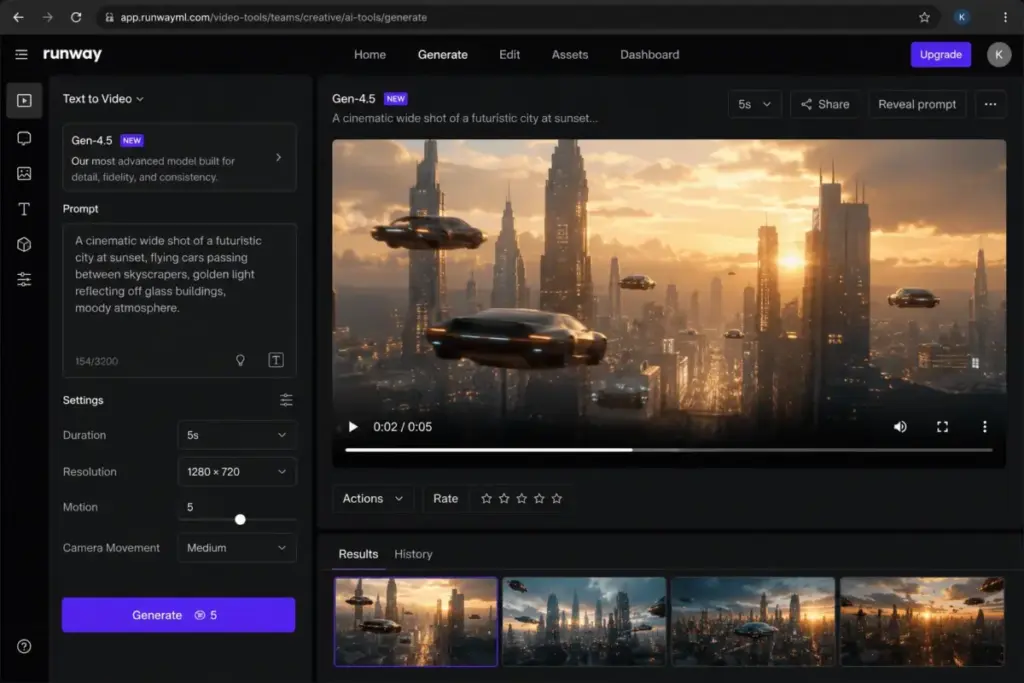
What sets Runway apart from every other tool on this list is model depth. Gen-4.5 handles text and image-to-video. Gen-4 focuses on image-to-video. Aleph provides video editing. Act-Two captures performance. And the platform gives access to third-party video models, which means you are not locked into a single generation engine.
Key features:
- Gen-4.5 text and image-to-video generation
- Aleph video editing tools
- Act-Two performance capture
- Third-party video model access
- Enterprise SSO, security, and compliance options
Hidden cost alert: Credit burn varies by model and workflow. A 5-second Gen-4.5 clip costs more credits than a Gen-4 image-to-video output. Adding users to one workspace does not automatically add credit allowance. Enterprise pricing is custom.
Better than: Most generators for cinematic output quality and model variety.
Worse than: Template-first tools like Synthesia for ease of use. Less predictable cost per output than flat-rate platforms.
Avoid if: Your team needs the simplest, most template-driven video builder, or if unpredictable credit consumption is a budget dealbreaker.
For a full pricing breakdown, see our Runway ML pricing analysis.
Pika: Best Budget Social Clips and Effects
Starting price: $8/month billed yearly (Basic) | Free plan: Yes ($0)
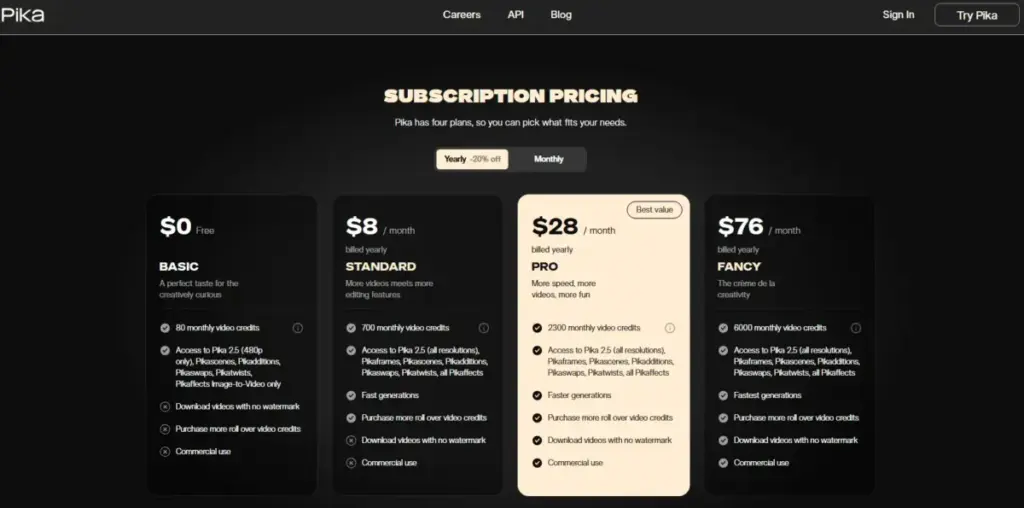
Pika has the lowest verified paid entry point on this list at $8/month billed yearly. The free plan costs $0 and includes enough credits to test the platform, though output carries a watermark and lacks commercial-use rights.
| Plan | Monthly Credits | Annual Price | Commercial Use | Watermark |
|---|---|---|---|---|
| Free | Limited | $0 | No | Yes |
| Basic | 80 | $8/month billed yearly | Yes | No |
| Standard | 700 | $28/month billed yearly | Yes | No |
| Pro | 2,300 | $76/month billed yearly | Yes | No |
What this means: 80 credits per month on Basic sounds reasonable until you check how many credits each feature costs. Pika 2.5 generation, Pikaframes, Pikascenes, Pikadditions, Pikaswaps, Pikatwists, and Pikaffects all consume credits at different rates. Higher resolution and longer duration cost more credits per output.
The strength is social-first creation. If you need quick image-to-video effects, face swaps, scene additions, or visual twists for TikTok or Instagram, Pika does this faster and cheaper than any cinematic-grade tool on this list.
Key features:
- Pika 2.5 video generation
- Pikaframes and Pikascenes for structured output
- Pikadditions, Pikaswaps, Pikatwists, Pikaffects for visual effects
Hidden cost alert: Credit cost varies by feature mode, quality setting, and duration. Budget plans may not support higher-resolution production at scale.
Avoid if: You need enterprise controls, team administration, or stable per-output cost estimates across every generation mode.
Best Under $25/Month
Adobe Firefly: Best for Commercial-Safe Creative Teams
Starting price: $9.99/month (Firefly Standard) | Free plan: Yes (limited) | Free trial: Yes
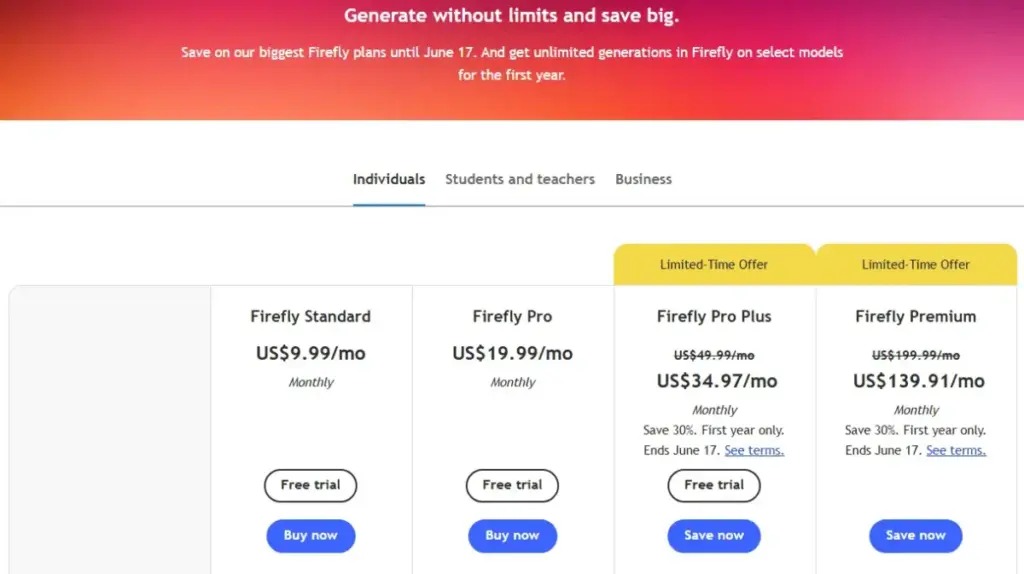
Adobe Firefly Standard at $9.99/month includes 2,000 monthly generative credits and up to 20 five-second videos. Pro at $19.99/month doubles the credit pool to 4,000. Team plans are billed annually with per-seat pricing.
The real value here is not the price. It is the Adobe ecosystem connection. If your team already works in Creative Cloud, Photoshop, or Adobe Express, Firefly slots into that workflow without adding another login. Text-to-video, audio/video translation, and access to Adobe and partner AI models are all managed through the same account.
Key features:
- Text-to-video generation (5-second clips)
- Audio and video translation
- Access to Adobe and partner AI models
- Direct integration with Creative Cloud, Express, and Photoshop web/mobile
Hidden cost alert: Video generation is credit-limited even on paid plans. Some model access or “unlimited” offers are promotional or time-limited. The 20-video cap on Standard is the number that matters if you produce video weekly.
Better than: Most competitors for commercial IP safety and creative-suite integration.
Worse than: Runway for cinematic generation depth. Synthesia for avatar volume.
Avoid if: You need the cheapest long-form video output or high-volume generation without credit planning.
See our Adobe Firefly pricing breakdown for full plan-by-plan analysis.
Luma Dream Machine: Best for Motion Experiments
Starting price: $9.99/month (Web Lite) | Free plan: Yes (limited, non-commercial, watermarked)
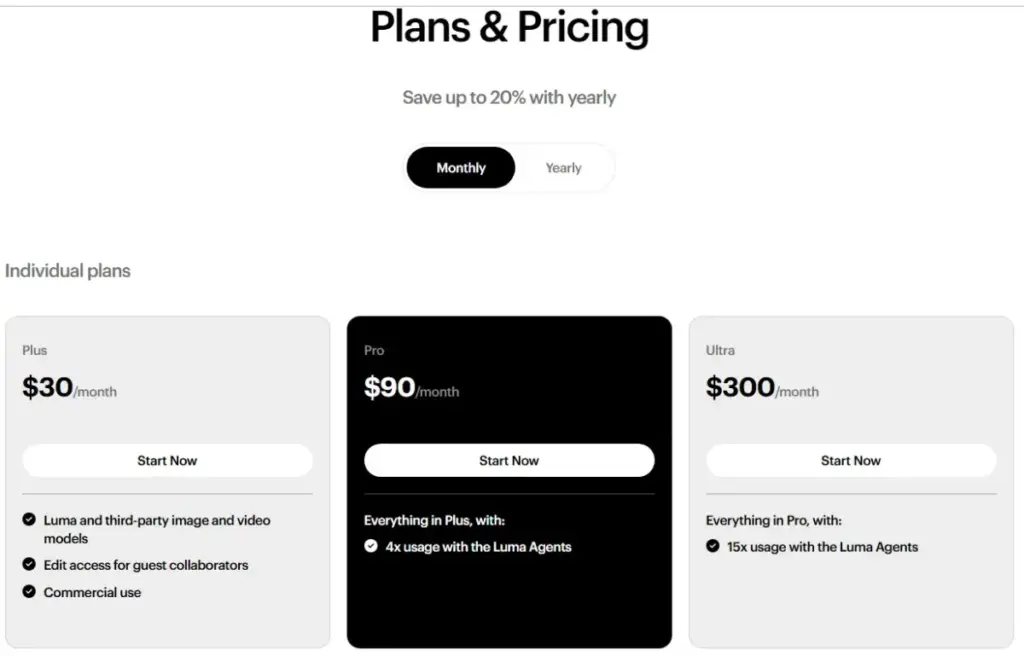
Luma Dream Machine lands just under $10/month at the Lite tier ($7.99/month on annual billing). But here is the catch: Lite is non-commercial and watermarked. Commercial use and watermark removal start at Plus ($29.99/month, or $23.99/month annually).
| Plan | Credits/Month | Annual Price | Commercial Use | Watermark |
|---|---|---|---|---|
| Free | Limited | $0 | No | Yes |
| Lite | 3,200 | $7.99/month annual | No | Yes |
| Plus | 10,000 | $23.99/month annual | Yes | No |
| Unlimited | 10,000 fast + unlimited relaxed | $75.99/month annual | Yes | No |
What this means: If you need commercial rights, your real starting price is $23.99/month, not $7.99. The gap between the advertised starting price and the commercially usable tier is the single most important number on this pricing page.
Ray3 access, 4K up-resolution, and HDR are available on higher tiers. The Unlimited plan adds unlimited relaxed-mode credits on top of 10,000 fast credits, which works well for high-volume experimentation where generation speed is not critical.
Key features:
- Ray3 video generation model
- 4K up-resolution and HDR (higher tiers)
- Video modification tools
- Unlimited relaxed credits on Unlimited plan
- Enterprise plan with no-training-data option
Hidden cost alert: Free and Lite outputs are non-commercial and watermarked. Credit usage varies by action and platform (web vs iOS). Enterprise is custom.
Avoid if: Your team needs commercial rights on the cheapest possible plan, or if you need SaaS integrations beyond the core generation platform.
Descript: Best for AI Video Editing
Starting price: $16/person/month billed annually | Free plan: Yes (1 media hour/month)
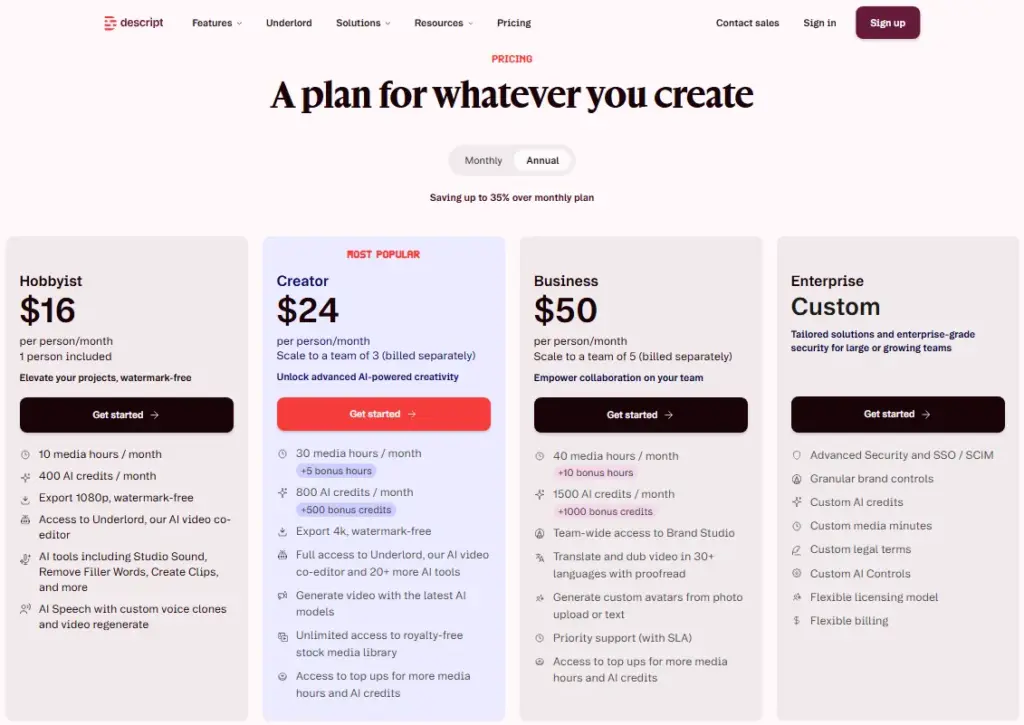
Descript is not a pure AI video generator. It is an AI video editor that happens to include generation capabilities. That distinction matters because Descript solves a different problem than Runway or Pika. It takes existing video, audio, or recordings and makes them publishable with AI-powered editing.
| Plan | Media Hours | AI Credits | Annual Price | Monthly Price |
|---|---|---|---|---|
| Free | 1/month | Limited | $0 | $0 |
| Hobbyist | 10/month | 400 | $16/person/month | $24/person/month |
| Creator | 30/month | 800 + bonus | $24/person/month | $35/person/month |
| Business | 40/month | 1,500 + bonus | $50/person/month | $65/person/month |
What this means: The billing is per-person, not flat-rate. A 3-person Creator team costs $72/month on annual billing. A 5-person Business team costs $250/month. The free plan includes 1 media hour per month, and no credit card is required.
Key features:
- Underlord AI co-editor for automated editing suggestions
- Studio Sound audio cleanup
- Remove Filler Words in one click
- Auto-generated clips from long-form content
- AI video generation with integrated models
Hidden cost alert: Editors consume shared media and AI credit pools. If your team uploads more content than the plan allows, top-ups are needed. The media-hour limit is the binding constraint, not the AI credits.
Better than: Prompt-only generators for editing and repurposing workflows. The text-based editing approach is faster than timeline editing for podcasters and YouTubers.
Worse than: Runway for cinematic generation. Synthesia for avatar-led training.
Avoid if: Your primary need is generating cinematic scenes from text prompts. Descript is an editing tool first.
Best for Mid-Market: $25–100/Month
Synthesia: Best for Enterprise Training Videos
Starting price: $29/month (Starter monthly) or $18/month billed yearly | Free plan: Yes (Basic, limited)
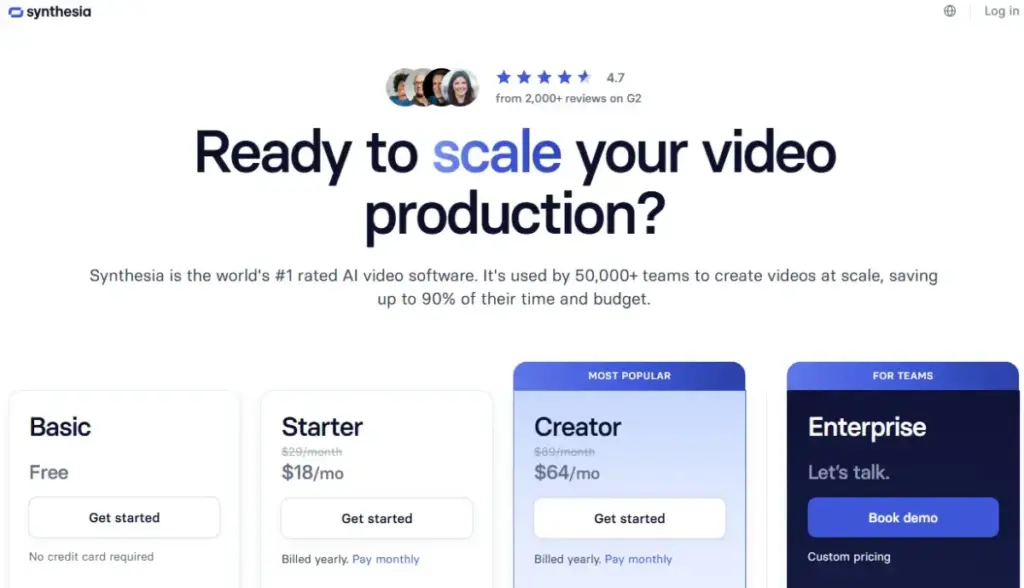
Synthesia solves one problem better than any other tool on this list: turning scripts into professional avatar-led training videos at scale. If your team produces onboarding content, compliance training, or internal communications, the avatar-and-language workflow replaces weeks of production with hours.
| Plan | Minutes/Month | Annual Price | Monthly Price |
|---|---|---|---|
| Basic (Free) | Limited | $0 | $0 |
| Starter | 10 min/month (120 min/year on annual) | $18/month billed yearly | $29/month |
| Creator | Higher usage | $64/month billed yearly | $89/month |
| Enterprise | Custom/unlimited-style | Custom | Custom |
What this means: 10 minutes per month on Starter produces roughly 2–3 training videos per month at 3–5 minutes each. For a team producing weekly videos, Creator at $64/month billed yearly or Enterprise is the practical tier.
Key features:
- AI avatars with realistic lip-sync
- Voices in 160+ languages
- Video translation for global teams
- Templates and collaboration tools
- Analytics and LMS integrations
Hidden cost alert: Self-serve plans are minute-capped. Large teams and higher usage volumes move to Enterprise, which is custom-priced. The gap between Starter minute limits and actual training video needs is where most teams underestimate cost.
Better than: Every other tool on this list for avatar-led enterprise training and localization.
Worse than: Runway and Pika for cinematic AI-generated scenes. Not designed for prompt-to-visual generation.
Avoid if: Your primary need is cinematic prompt-to-video creation, camera control, or generative visual experimentation. Synthesia is a training production platform, not a creative generation engine.
HeyGen: Best for Personalized Avatar Video
Starting price: $29/month (Creator) or $24/month billed annually | Free plan: Yes (3 videos/month, 1 minute max)
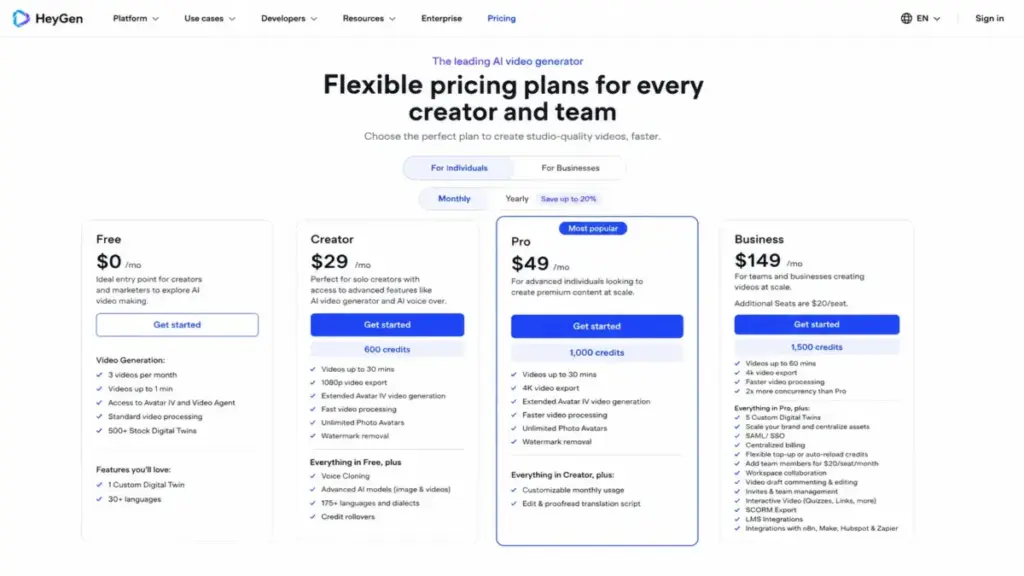
HeyGen overlaps with Synthesia on avatars but goes deeper on personalization. Digital twins, voice cloning across 175+ languages and dialects, and Video Agent for automated video outreach distinguish it from the training-first approach.
| Plan | Credits | Annual Price | Monthly Price |
|---|---|---|---|
| Free | 3 videos/month (1 min max) | $0 | $0 |
| Creator | 600 | $24/month annual | $29/month |
| Pro | 1,000 | Check live pricing | $49/month |
| Business | 1,500 | Check live pricing | $149/month |
What this means: The free plan is heavily capped at 3 videos per month, maximum 1 minute each. That is enough to evaluate the platform but not enough to produce anything at volume. Creator at $24/month annually with 600 credits is the realistic starting point for small teams.
Key features:
- Avatar IV with realistic performance
- Video Agent for automated outreach
- 500+ stock digital twins
- Custom digital twin creation
- Voice cloning across 175+ languages/dialects
Hidden cost alert: Longer videos, 4K output, SSO/SAML, team controls, and extra Business seats ($20/seat) all push costs above the published plan price. The per-seat add-on on Business is the hidden cost most teams miss.
Integrations: n8n, Make, HubSpot, Zapier, and LMS integrations on higher plans. SSO/SAML on Business.
Better than: Synthesia for personalized sales outreach and digital-twin workflows.
Worse than: Synthesia for pure training/compliance video production at enterprise scale with LMS analytics.
Avoid if: Your primary need is cinematic scene generation rather than avatar and localization workflows.
Best for $100+/Month (Enterprise and Volume)
invideo AI: Best for Prompt-to-Marketing Video Assembly
Starting price: $17/month billed yearly ($200/year for Plus) | Free plan: Not confirmed
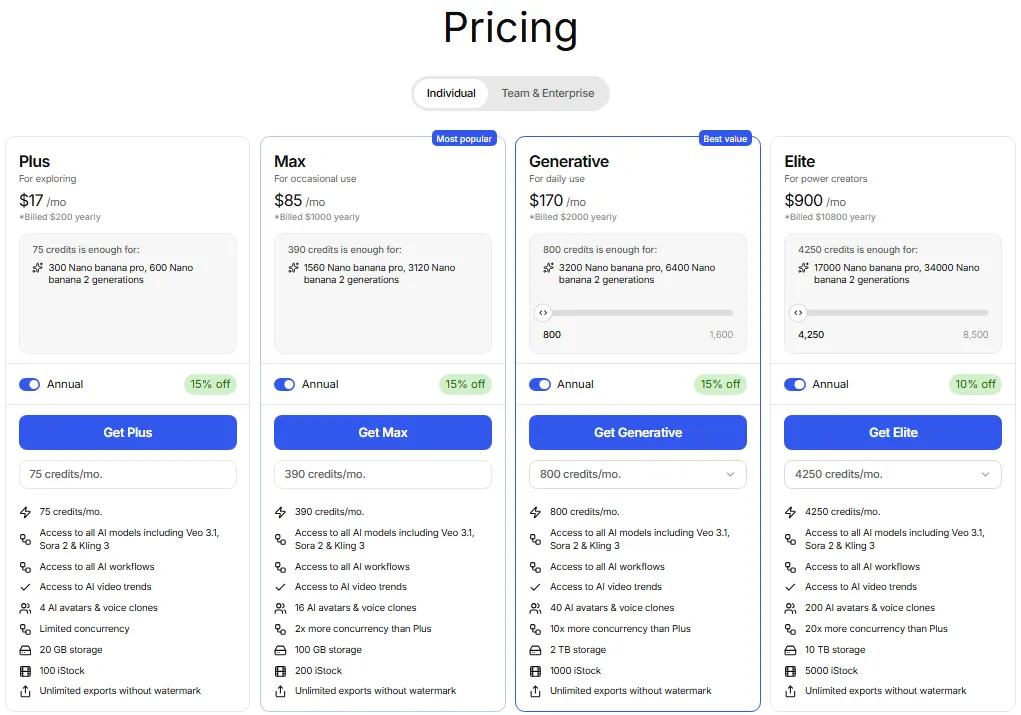
invideo AI turns a single prompt into a full marketing video by combining stock media, voiceover, music, and AI-generated clips. The v4 agent creates videos up to 30 minutes from one prompt, pulling from 200+ image, video, audio, and music models including Veo, Sora, and Kling.
| Plan | Annual Price | Billed As |
|---|---|---|
| Plus | $17/month | $200/year |
| Max | $85/month | $1,000/year |
| Generative | $170/month | $2,000/year |
What this means: The annual billing locks you into $200, $1,000, or $2,000 upfront depending on the tier. Monthly billing details were not confirmed in official extracted evidence. The credit system powers everything: video creation, model access, and generative features all draw from the same pool.
Key features:
- invideo v4 agent for prompt-to-video assembly
- Up to 30-minute videos from a single prompt
- 200+ image, video, audio, and music models
- Access to Veo, Sora, Kling, and other external models
- iStock and Storyblocks media integration
Hidden cost alert: Credit costs can change. Model and agent pricing may shift between billing cycles. Unused credits do not roll over. On-demand top-ups may be needed for high-volume production.
Better than: Every other tool for assembling complete marketing videos from a single prompt with stock media integration.
Worse than: Runway for cinematic quality control. Descript for editing existing footage. Less predictable per-output costs than fixed-plan tools.
Avoid if: You need stable, predictable credit costs per generation mode, or advanced manual editing control beyond the AI assembly workflow.
VEED: Best Browser-Based AI Video Editor
Starting price: Not publicly disclosed in accessible official pricing evidence | Free plan: Available (with limitations)
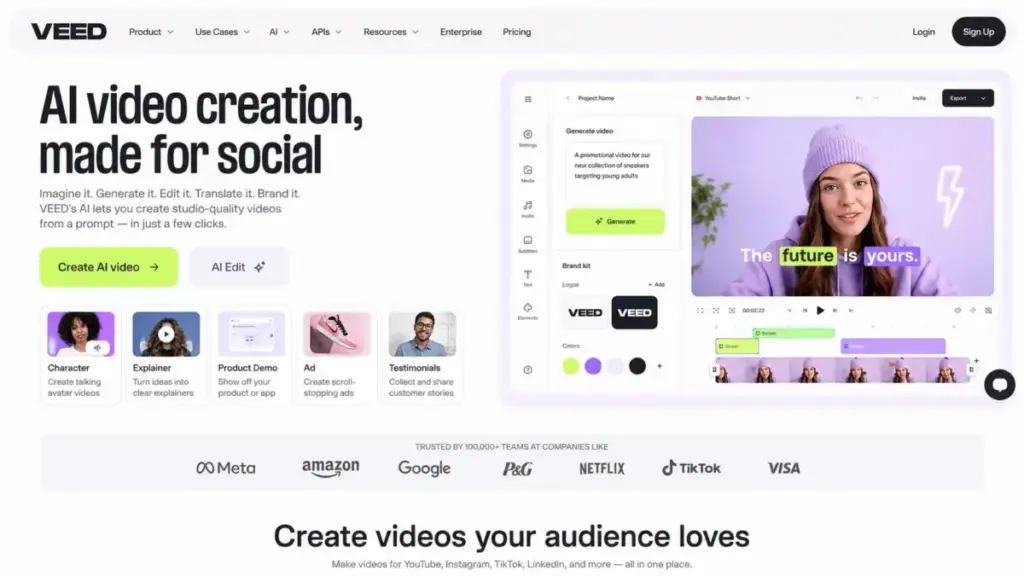
VEED is the hardest product on this list to price accurately. The official pricing page exists, but exact US plan prices were not reliably captured in accessible text during my research. I am including VEED because the feature set is strong, but I have to be direct: verify pricing on veed.io/pricing before committing.
What I can confirm from official product pages: VEED offers AI video generation (text-to-video, image-to-video), AI avatars, dubbing, subtitles, and a full browser-based editing suite. The AI Playground provides access to multiple models including Fabric, Sora, Veo, Kling, Seedance, and PixVerse.
Key features:
- AI Video Generator (text-to-video, image-to-video)
- AI Avatars for presenter-style content
- Dubbing AI and auto-subtitles
- Browser-based editing (no software install)
- AI Playground with multi-model access
Hidden cost alert: Plan-level AI quotas, export limits, watermark rules, and exact tier pricing must be checked on the live page. The pricing opacity is a legitimate concern for procurement teams.
Better than: Most tools for browser-based video editing with AI features built in. No software download required.
Worse than: Runway for cinematic model-first control. Less pricing transparency than every other tool on this list.
Avoid if: Your procurement process requires exact plan pricing before evaluation, or if you need a cinematic model-first generation platform rather than a browser editing suite.
Kling AI: Best Credit-Based Generator
Starting price: Credit-based membership (verify current price in app) | Free plan: Free/basic access available (verify allowance in app)
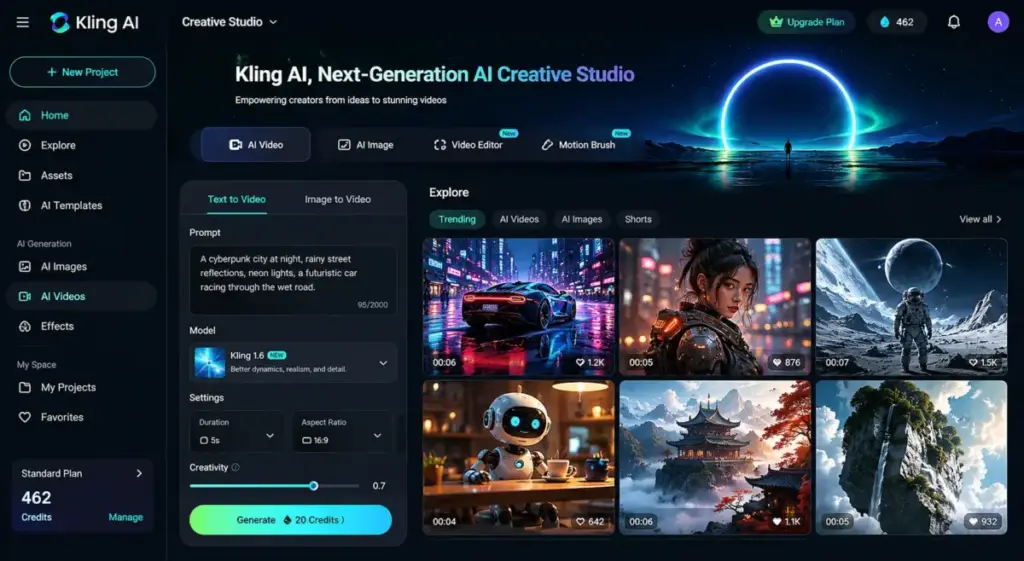
Kling AI is the most opaque product on this list from a pricing standpoint. Official payment terms confirm membership grades and credit-based paid service rules, but exact live prices are displayed inside the app and can change. Third-party sources commonly report Standard around $6.99–$10/month, but I will not present third-party prices as officially confirmed.
What the official terms confirm: Membership credits distribute monthly. Subscription credits are valid for 1 month. Purchased credits are valid for 2 years. Member benefits include fast-track generation, Professional mode, watermark removal, video extension, and image upscaling.
Key features:
- Video generation with multiple modes
- Image generation and sound generation
- Visual effects tools
- Fast-track generation for members
- Professional mode, watermark removal, and video extension
Hidden cost alert: Benefits and pricing are subject to the current website/app display. Subscription credits expire after 1 month. Paid-service rules may change. The pricing model requires checking the live app before every purchase decision.
Better than: Many generators for credit flexibility and model variety at potentially low entry prices.
Worse than: Every other tool on this list for pricing transparency. No strong SaaS integration evidence.
Avoid if: Your procurement team needs a static public pricing page, SaaS integrations, or stable pricing commitments.
Pricing Comparison Matrix: Starting Price vs Real Cost
| Product | Free Plan | Starting Paid Price | Billing Model | Commercial Use |
|---|---|---|---|---|
| Runway | Yes (125 one-time credits) | $12/user/month annual | Per user + credits | Yes (paid plans) |
| Adobe Firefly | Yes (limited) | $9.99/month | Flat rate + credits | Yes (paid plans) |
| Synthesia | Yes (Basic, limited) | $18/month annual ($29 monthly) | Flat rate + minutes | Yes (paid plans) |
| HeyGen | Yes (3 videos/month) | $24/month annual ($29 monthly) | Flat rate + credits | Yes (paid plans) |
| Descript | Yes (1 media hour) | $16/person/month annual | Per person + hours | Yes (paid plans) |
| invideo AI | Not confirmed | $17/month ($200/year) | Usage-based credits | Check plan terms |
| VEED | Available (limited) | Not publicly disclosed | Custom | Check plan terms |
| Pika | Yes ($0) | $8/month annual | Usage-based credits | Yes (Basic+) |
| Luma Dream Machine | Yes (non-commercial) | $7.99/month annual (Lite) | Usage-based credits | No (Lite), Yes (Plus+) |
| Kling AI | Available (verify in app) | Verify in app | Usage-based credits | Check membership terms |
All pricing verified as of May 2026 from official sources. Confirm current prices on each product’s pricing page before purchasing.
What this means: Pika at $8/month and Luma Lite at $7.99/month have the lowest paid entry points, but neither includes commercial use at that tier. The cheapest option with confirmed commercial rights is Adobe Firefly at $9.99/month. For team use, Runway at $12/user/month is the most cost-effective cinematic-grade tool, but the per-user billing multiplies with headcount.
Feature Gate Comparison
| Feature | Runway | Adobe Firefly | Synthesia | HeyGen | Descript |
|---|---|---|---|---|---|
| Text-to-video | All plans (credit-limited) | Standard+ (credit-limited) | All plans (minute-limited) | All plans (credit-limited) | Paid plans (AI credit-limited) |
| Image-to-video | All plans | Standard+ | Not primary workflow | Not primary workflow | Paid plans |
| AI avatars | Not primary | Not primary | Core feature (all plans) | Core feature (all plans) | Not primary |
| Voice cloning | Not available | Not primary | Higher tiers | Creator+ | Not primary |
| Video translation | Not primary | Standard+ | All plans | All plans (credits) | Not primary |
| Commercial use | Paid plans | Paid plans | Paid plans | Paid plans | Paid plans |
| SSO/Enterprise | Enterprise only | Team plans | Enterprise | Business | Enterprise |
| API access | Enterprise | Plan-dependent | Enterprise | Business+ | Enterprise |
| Feature | invideo AI | VEED | Pika | Luma Dream Machine | Kling AI |
|---|---|---|---|---|---|
| Text-to-video | All plans (credits) | Available | All plans (credits) | All plans (credits) | Member feature |
| Image-to-video | All plans (credits) | Available | All plans (credits) | All plans (credits) | Member feature |
| AI avatars | Not primary | Available | Not primary | Not primary | Not primary |
| Voice cloning | Not primary | Not primary | Not primary | Not primary | Not primary |
| Video translation | Not primary | Available | Not primary | Not primary | Not primary |
| Commercial use | Check plan terms | Check plan terms | Basic+ | Plus+ | Check membership |
| SSO/Enterprise | Not disclosed | Not disclosed | Not available | Enterprise | Not disclosed |
| API access | Not disclosed | Not disclosed | Not available | Enterprise | API Platform |
Setup and Migration Difficulty
| Product | Setup Difficulty | Why |
|---|---|---|
| Runway | Medium | Multi-model platform requires understanding credit economics and model selection |
| Adobe Firefly | Low | Familiar Adobe interface, integrates into existing Creative Cloud workflow |
| Synthesia | Low | Template-driven, script-to-video workflow with minimal technical learning curve |
| HeyGen | Low | Guided avatar creation, template-based workflow |
| Descript | Low-Medium | Text-based editing is intuitive, but AI features require credit management |
| invideo AI | Low | Prompt-driven, but credit system requires cost planning |
| VEED | Low | Browser-based, no install, but plan limits need verification |
| Pika | Low | Simple prompt interface, but credit costs vary by feature |
| Luma Dream Machine | Medium | Model selection and credit optimization require experimentation |
| Kling AI | Medium | App-based pricing, in-product credit management, less transparent onboarding |
Which AI Video Generator Should You Avoid?
No tool on this list is universally bad. But several are wrong for specific buyers:
Avoid Kling AI if your procurement process requires a public pricing page. The in-app pricing model creates budget unpredictability that most finance teams will push back on.
Avoid VEED if you need exact pricing before evaluation. The pricing opacity is unusual for a SaaS tool at this level.
Avoid Luma Dream Machine Lite if you need commercial rights. The cheapest tier is non-commercial and watermarked. Your real starting price is Plus at $23.99/month annually.
Avoid Synthesia if your primary use case is cinematic AI scene generation. It is a training video platform, not a creative generation engine. Spending $64/month on Creator for prompt-to-video experimentation wastes budget.
Avoid Runway if your team wants simple, template-first video creation. The credit system and multi-model interface add complexity that template-driven teams do not need.
How to Choose the Right AI Video Generator
Step 1: Define your primary workflow. Are you generating cinematic clips, producing training videos, editing existing footage, or assembling marketing content? The answer eliminates half this list immediately.
Step 2: Check commercial-use rights at your target tier. Free and cheap plans often exclude commercial use or add watermarks. Verify before producing client-facing content.
Step 3: Calculate your monthly volume. Count expected videos per month, average duration, and resolution needs. Then map that against credit or minute limits on each plan. The plan that fits your volume at the lowest total cost wins.
Step 4: Test credit economics. On credit-based platforms (Runway, Pika, Luma, Kling), generate 5–10 test outputs and track how many credits each consumes. Extrapolate to your monthly volume. If the math does not work on your target plan, move up a tier or switch tools.
Step 5: Verify team billing. Per-user pricing (Runway, Descript) multiplies with headcount. Flat-rate pricing (Adobe Firefly Standard, Synthesia Starter) stays fixed regardless of team size. A 5-person team on Runway Standard pays $60/month. The same team on Synthesia Starter pays $18/month. The billing model matters more than the starting price.
Step 6: Check integrations. If you need LMS integration, choose Synthesia or HeyGen. If you need Adobe Creative Cloud integration, choose Firefly. If you need CRM and automation connectors (Zapier, Make, n8n), HeyGen has the strongest evidence.
Step 7: Audit the exit cost. Credits do not transfer between platforms. Projects, templates, and trained avatars lock you in. Evaluate switching cost before committing to an annual plan.
Common Mistakes When Choosing AI Video Generators
Mistake 1: Choosing by starting price alone. Pika starts at $8/month and Luma at $7.99/month. Neither includes commercial rights at those tiers. The “real” starting price for commercial use is higher on both platforms.
Mistake 2: Ignoring credit expiration. Most platforms reset credits monthly. Runway, Pika, Luma, and Kling all have monthly credit limits that do not roll over. If you produce video in bursts (3 videos one week, nothing the next), you may waste credits during low-output months.
Mistake 3: Treating all AI video generators as the same category. Synthesia and HeyGen are avatar platforms. Runway and Pika are generation platforms. Descript is an editing platform. invideo AI is an assembly platform. Buying a generation tool when you need an editing tool wastes budget.
Mistake 4: Skipping the commercial-rights check. Free plans on Runway, Pika, and Luma restrict commercial use. Using watermarked, non-commercial output in client deliverables creates legal risk.
Mistake 5: Overlooking per-user billing multipliers. Runway at $12/user/month costs $60/month for 5 users. Descript at $16/person/month costs $80/month for 5 people. Flat-rate tools like Adobe Firefly Standard stay at $9.99/month regardless of who on the team accesses it.
Mistake 6: Assuming “free plan” means free production. Free plans exist to evaluate the tool, not to run a production workflow. Runway gives 125 one-time credits. Pika gives limited monthly credits with watermarks. HeyGen gives 3 videos per month at 1-minute maximum. None of these support regular content production.
Final Verdict
Runway is the best overall AI video generator for 2026 if your team needs cinematic-grade generation with model variety, production controls, and an enterprise path. The credit system adds complexity, but no other platform matches its combination of Gen-4.5, multi-model access, and professional editing tools at a verified starting price of $12/user/month.
Here is my recommendation by buyer type:
For commercial creative teams already in Adobe: Adobe Firefly at $9.99/month. The ecosystem integration and commercial IP positioning justify the price without adding workflow friction.
For training and L&D teams: Synthesia starting at $18/month annually. Prompt-to-video generation tools solve a different problem. Synthesia’s avatar, translation, and LMS strengths are what training teams actually need.
For sales and personalization teams: HeyGen at $24/month annually. Digital twins, voice cloning, and CRM integrations directly support outbound sales workflows.
For podcasters and YouTubers: Descript at $16/person/month annually. The text-based editing workflow saves more time than any generation tool adds.
For solo creators on a budget: Pika at $8/month annually. The lowest paid tier with commercial rights and no watermark. Good enough for social clips and effects.
For motion experiments without commercial pressure: Luma Dream Machine Lite at $7.99/month. Test Ray3 and 4K up-res, but upgrade to Plus before using output commercially.
For deeper AI image generation comparisons, see our full ranking of image tools. And if you are evaluating AI tools beyond video, our Runway ML review and Pika Art review go deeper on individual product analysis. You can also explore what multimodal AI means for how these tools fit into the broader AI category.
FAQ
What is the best free AI video generator in 2026?
Pika offers the strongest verified free plan at $0 with no credit card required. Runway provides a one-time 125-credit deposit on its free plan. Both free tiers include watermarks and restrict commercial use. For commercial-grade free access, Adobe Firefly’s limited free tier is the strongest option, though output volume is constrained.
How much does an AI video generator cost per month?
Paid plans start as low as $7.99/month (Luma Dream Machine Lite, annual billing) and $8/month (Pika Basic, annual billing). Mid-range tools like Synthesia Starter cost $18/month annually. Professional-tier tools like Runway Pro run $28/user/month. Enterprise plans from Runway, Synthesia, and HeyGen require custom pricing. Always check whether the advertised price includes commercial-use rights.
Can I use AI-generated videos commercially?
It depends on the plan. Free tiers on Runway, Pika, and Luma Dream Machine restrict commercial use. Adobe Firefly paid plans include commercial licensing. Synthesia and HeyGen paid plans allow commercial use. Kling AI commercial terms should be verified in the app. Always check your specific plan’s terms before using output in client or customer-facing work.
Which AI video generator is best for marketing teams?
invideo AI is designed for prompt-to-marketing assembly, with stock media bundles and 200+ models. Adobe Firefly fits marketing teams already using Adobe creative tools. For avatar-based marketing (sales outreach, personalized demos), HeyGen offers the strongest integrations with CRM and automation platforms.
Do AI video generator credits roll over?
In most cases, no. Runway, Pika, Luma Dream Machine, and Kling AI credits reset monthly and do not roll over. Kling AI purchased credits (not subscription credits) are valid for 2 years. invideo AI credits also do not roll over. Check each platform’s terms for credit expiration rules before committing to an annual plan.
Which AI video generator is best for training videos?
Synthesia is the top pick for training and L&D teams. It offers AI avatars, 160+ language support, video translation, templates, analytics, and LMS integrations designed for enterprise training workflows. HeyGen is the alternative for teams that need more personalization (digital twins, voice cloning) alongside training content production.
Is Runway worth it for small teams?
Runway Standard at $12/user/month (billed annually) provides 625 monthly credits per workspace. For a solo creator or 2-person team, the credit pool is sufficient for regular short-form generation. For teams of 5+, the per-user billing makes Runway one of the more expensive options on this list. Calculate your team’s total monthly cost before committing.
What is the difference between AI video generators and AI video editors?
AI video generators (Runway, Pika, Luma Dream Machine, Kling AI) create new video from text prompts, images, or minimal input. AI video editors (Descript, VEED) enhance, edit, and repurpose existing footage using AI features like auto-captions, filler-word removal, and audio cleanup. Some tools (Runway, VEED) blur this line by offering both generation and editing, but the primary workflow differs.
Which AI video tool has the best free trial?
Adobe Firefly offers a verified free trial on paid plans. Descript’s free plan requires no credit card. Most other tools on this list provide free plans rather than time-limited trials. Pika, Runway, and Luma all offer free access with credit or feature limitations instead of traditional trial periods.
Should I choose annual or monthly billing?
Annual billing saves 15–40% on most tools. Synthesia Starter drops from $29/month to $18/month on annual billing (38% savings). HeyGen Creator drops from $29 to $24/month. Luma Lite drops from $9.99 to $7.99/month. The risk is commitment: if you switch tools mid-year, the remaining months are wasted. Start monthly to test, then switch to annual once you confirm the tool fits your workflow.