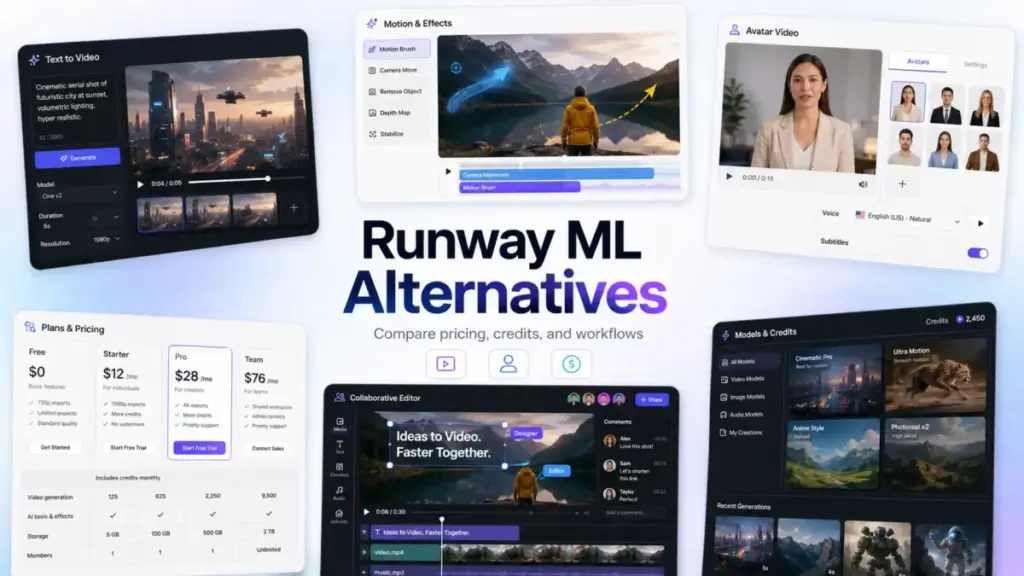
Runway ML remains one of the most complete AI video workspaces available today. Gen-4.5 text-to-video, Aleph editing, Act-Two performance capture, and a growing catalog of third-party models make it a serious creative tool. But the switching conversations in 2026 are no longer about whether Runway is “good enough.” They are about credit economics, workflow fit, and what kind of video you need to produce.
If you are comparing the best AI video generator options and wondering whether Runway is still the right spend, this guide breaks down ten alternatives by the exact switching trigger that brings creators, marketers, agencies, and training teams to the decision point.
Most SERP pages still mix discontinued products (Sora’s web and app were shut down in April 2026), avatar tools, stock-video editors, and cinematic text-to-video models into a single flat list — without explaining that these solve entirely different problems. This article separates them. Every price was verified against official sources on June 11, 2026. Every recommendation maps to a specific Runway pain point, not a generic feature comparison.
The thesis: Most Runway ML alternatives do not replace Runway feature-for-feature. They replace a specific pain point — credit cost, cinematic quality, avatar workflows, social editing, commercial safety, or team collaboration. The best alternative is not always the most realistic video model; the better decision is matching the tool to your production workflow and credit economics.
Why Users Leave Runway ML in 2026
Before choosing an alternative, it helps to understand what generative AI is in daily production and why Runway’s model creates friction for certain buyer profiles.
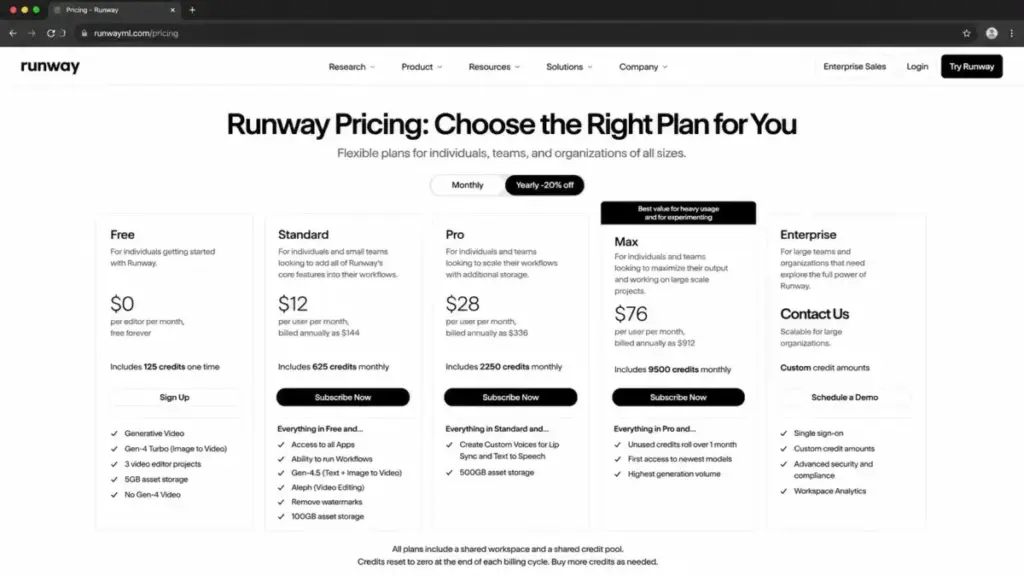
Runway’s free plan includes 125 credits — one time, not monthly. Paid annual plans start at $12/user/month (Standard), $28/user/month (Pro), and $76/user/month (Max). Credits are consumed per generation second, and newer models like Gen-4.5 burn credits faster than older ones. Standard workspaces cap at 5 users; Pro and Max cap at 10.
Here is what triggers the switch:
- Credits burn too fast. Iteration-heavy creators can exhaust monthly credits before finishing a single usable clip. Free credits do not renew.
- Need stronger cinematic prompt-following. Google Flow with Veo 3.1 and Kling AI are repeatedly positioned as stronger choices for motion realism, prompt adherence, and generated audio.
- Need social-first effects, not production pipelines. Creators making Reels, Shorts, and TikToks may not need Runway’s broader stack. Pika and Kapwing are faster for effect-driven short-form workflows.
- Need business or training videos, not cinematic scenes. Avatar platforms like Synthesia and HeyGen are more practical for script-to-spokesperson, training, sales outreach, and multilingual explainers.
- Need commercial-safe creative workflows. Adobe Firefly fits better when brand teams want AI features tied to Adobe’s ecosystem and safer review workflows.
- Need transcript-based editing and repurposing. Descript and Kapwing are stronger for cutting podcasts, webinars, and long-form recordings using transcripts.
- Need multi-model access without multiple subscriptions. invideo AI, Kapwing, and Google Flow centralize multiple generation models under one interface.
G2 reviewer Veton I. wrote: “Total waste of money” and “The output was unusable, incoherent.” On Trustpilot, Sean Kane noted: “Pro Plan is already expensive.” These are not isolated sentiments — they reflect a pattern where Runway’s value depends heavily on how efficiently you convert credits into usable output.
For a deeper look at Runway’s own feature set and current model lineup, see the full Runway ML review and analysis.
For plan-by-plan cost breakdowns, check the Runway ML pricing breakdown.
Quick-Comparison Pricing Table
All prices verified June 11, 2026. “Cost for 10 users” column is estimated using the most common plan applicable to teams of that size; exact costs should be confirmed directly with each vendor before procurement.
| Tool | Starting Price | Est. Cost for 10 Users/mo | Billing Basis | Key Hidden Cost |
|---|---|---|---|---|
| Runway ML (baseline) | $0 free; paid from $12/user/mo | ~$280/mo (Pro annual, 10-user workspace) | Per-user + credits | Free credits one-time; higher models burn faster |
| Google Flow (Veo 3.1) | Free; from $4.99/mo | ~$50–$200/mo | Subscription + credits | Advanced Flow credits require Google AI Pro |
| Kling AI | Free; Standard ~$72/year | ~$100/mo (est. 10 Standard monthly) | Subscription + credits | Credit cost varies by model, mode, resolution |
| Pika | $0 Basic; paid from $8/mo yearly | ~$80/mo (est. 10 Basic annual) | Subscription + credits | Free tier locked to 480p and image-to-video |
| Luma Dream Machine | $30/mo; $300/yr | ~$300/mo (10 individual Plus) | Credits or custom team | Team pricing is contact-sales |
| Adobe Firefly | US$9.99/mo | ~$100/mo (10 Standard) | Subscription + credits | Unlimited generation is promotional, not permanent |
| invideo AI | $17/mo yearly | ~$170/mo (est. 10 Plus annual) | Subscription + credits | Credits do not roll over |
| Synthesia | Free; paid from $29/mo | Custom/Enterprise path for 10 editors | Credits + video minutes | Larger teams need enterprise pricing |
| HeyGen | Free; Creator from $24/mo annually | ~$349/mo (Business base + 10 seats) | Credits + per-seat | Business = $149 base + $20/seat/mo |
| Kapwing | Free; Pro from $16/mo annually | ~$160–$500/mo | Subscription + AI credits | Free exports watermarked |
| Descript | Free; Hobbyist from $16/person/mo | ~$160–$240/mo | Per-person + credits | 4K and AI features locked behind Creator tier |
The 10 Best Runway ML Alternatives in 2026
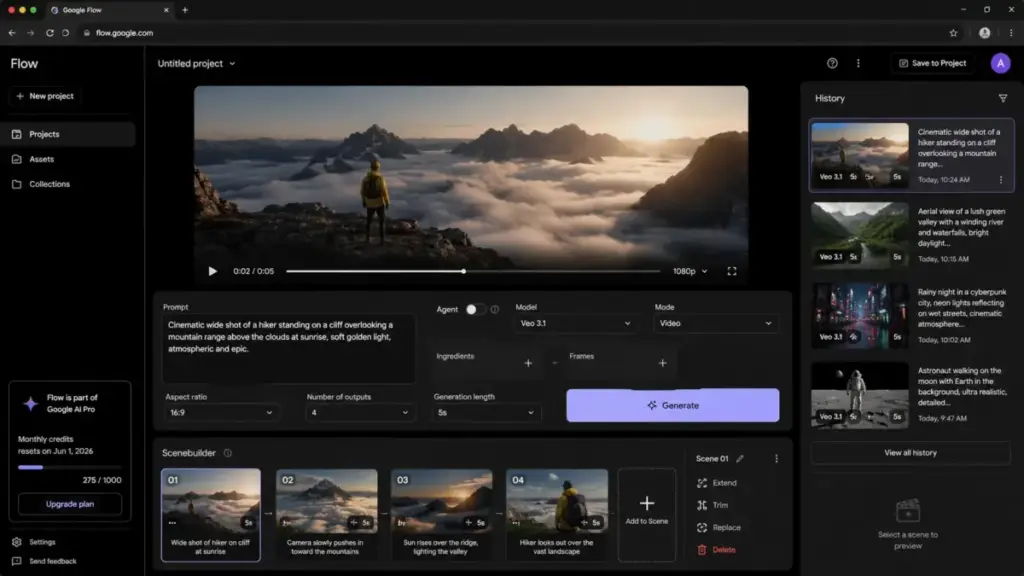
Google Flow with Veo 3.1 — Best Active Cinematic Alternative
Best for: Creators and small teams who want cinematic text-to-video generation with active model development, generated audio, and lower entry pricing than Runway.
Starting price: Free tier available; Google AI Plus from $4.99/month, Google AI Pro at $19.99/month for 1,000 monthly Flow credits.
Google Flow is Google’s creative workspace built around Veo 3.1. It offers text-to-video, frames-to-video, ingredients-to-video, video extension, Scenebuilder, and 1080p to 4K upscaling on paid tiers. The model is positioned as one of the strongest active competitors to Runway for cinematic quality and prompt adherence.
Where it replaces Runway: If your primary Runway use is generating cinematic clips, Flow provides a competitive generation engine at a fraction of the price — $19.99/month for Google AI Pro versus Runway’s $28/month Pro. The free tier alone gives access to Veo 3.1, which Runway does not include in its free plan.
Where it falls short: Flow is not a full production workspace. Runway’s timeline editing, Aleph video editor, third-party model catalog, and team project tools do not have direct equivalents in Flow. Teams who use Runway as an end-to-end editing and generation environment will find Flow more limited.
Migration difficulty: Medium. The generation workflow is similar (prompt → generate → refine), but post-production will require a separate editor.
Limitations: Credit limits vary by plan. Prices may vary by market. Advanced upscaling and higher Flow credits sit behind paid Google AI tiers.
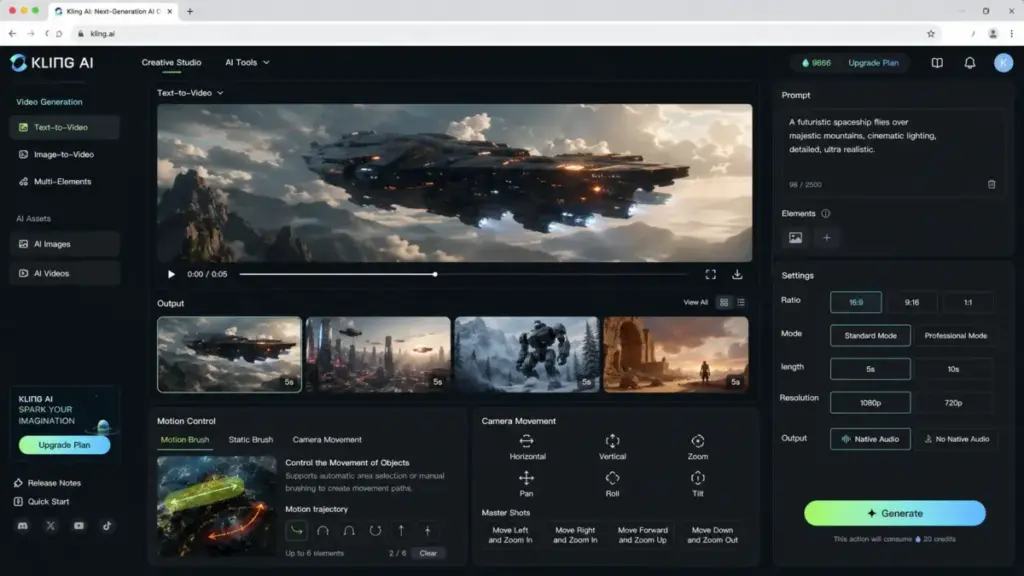
Kling AI — Best for Motion Realism and Character-Driven Clips

Best for: Runway users who want stronger photorealistic motion, character consistency, native audio options, and a credit-based generator focused on realistic movement.
Starting price: Free tier available; Standard at $72/year, Pro at $269/year on the official membership page.
Kling AI has positioned itself as a strong active choice for motion realism in 2026. It supports text-to-video, image-to-video, motion controls, native audio model access, and professional video modes. Credit pricing follows a standard of $1 = 66 credits, though promotional rates may differ on the payment page.
Where it replaces Runway: If you leave Runway because generated motion looks unnatural or because character consistency breaks between frames, Kling specifically optimizes for these. The annual pricing ($72/year Standard) costs less than two months of Runway’s cheapest paid plan.
Where it falls short: Kling is a generation-first platform, not a polished all-in-one editor. Credit budgeting can be confusing — generation costs depend on model, resolution, duration, mode, and whether audio is enabled. Purchased credits and membership credits may follow different validity rules.
Migration difficulty: Medium. The generation workflow translates well, but you lose Runway’s editing and project management features.
Limitations: Credits and promotions can vary by payment page. Exact generation cost depends on model, resolution, duration, and mode. No confirmed team-seat pricing.
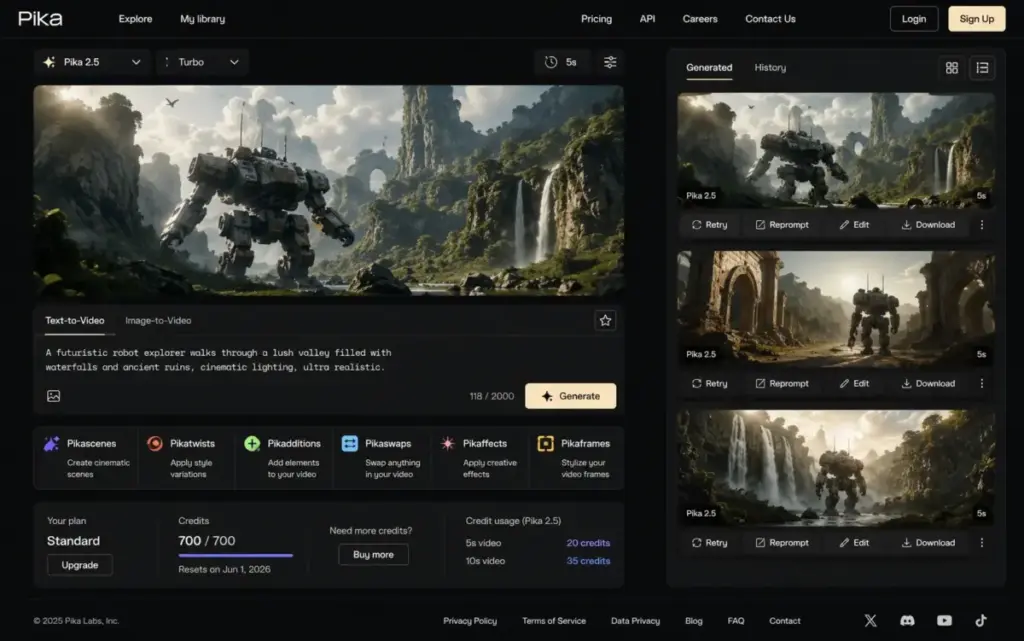
Pika — Best for Effects-Driven Short-Form Creators

Best for: Social creators, meme/video effects creators, and marketers who want faster, cheaper, stylized short clips and promptable effects rather than production-grade cinematic scenes.
Starting price: $0 free Basic with 80 monthly video credits; paid from $8/month billed yearly.
Pika 2.5 brings Pikaframes, Pikascenes, Pikadditions, Pikaswaps, Pikatwists, and Pikaffects — an effects-first toolkit designed for short-form social content. Commercial use is supported on paid plans, and no-watermark downloads are available on supported tiers.
Where it replaces Runway: If your Runway usage is primarily generating 5–10 second clips for TikTok, Reels, or Shorts, Pika’s workflow is tighter. The $8/month entry price versus Runway’s $12/month, combined with a persistent free tier (80 monthly credits versus Runway’s one-time 125), makes it a cheaper iterative tool for social creators.
For a detailed look at Pika’s full capabilities, see the Pika Art review and evaluation.
Where it falls short: Pika is not a production workspace. Complex multi-clip editing, advanced timeline tools, and broader professional pipeline features are not its focus.
Migration difficulty: Low. If you primarily use Runway for short clip generation, the switch is straightforward.
Limitations: Basic plan locked to 480p and image-to-video. Credit cost varies by model and feature. Higher tiers are needed for more credits and full access.
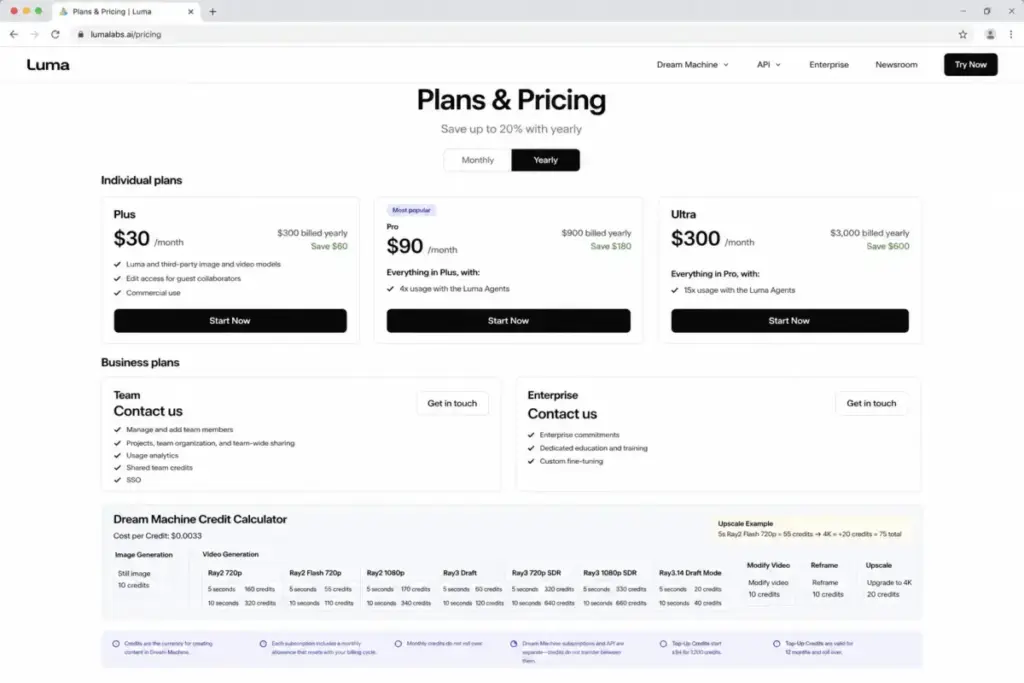
Luma Dream Machine — Best for Creative Control and High-End Image-to-Video

Best for: Visual creators who want Luma and third-party image/video models, guest collaboration, commercial use, and detailed per-generation credit cost information.
Starting price: $30/month or $300 billed yearly for individual plans.
Luma Dream Machine combines its own image and video models with third-party models, guest collaborators, Luma Agents, team sharing, usage analytics, and shared team credits. A distinctive feature is transparent per-generation credit costs — you can see exactly what each action costs before committing.
Where it replaces Runway: If you leave Runway because credit consumption feels opaque, Luma’s visible cost-per-generation is a meaningful improvement. The inclusion of third-party models alongside Luma’s own gives multi-model flexibility without separate subscriptions.
Where it falls short: Individual plans start at $30/month, higher than Runway’s $12/month Standard. Team and Enterprise pricing are contact-sales, making budget planning harder for growing teams. Serious production may require Pro ($100/month), Ultra, or Team tiers.
Migration difficulty: Medium. Generation and creative workflows translate, but team features require enterprise conversations.
Limitations: Credit consumption rises with resolution and action type. Team pricing is not public.
Adobe Firefly — Best for Brand-Safe Adobe Workflows
Best for: Brand teams, designers, marketers, and Adobe users who need video generation plus safer creative workflows inside the Adobe ecosystem.
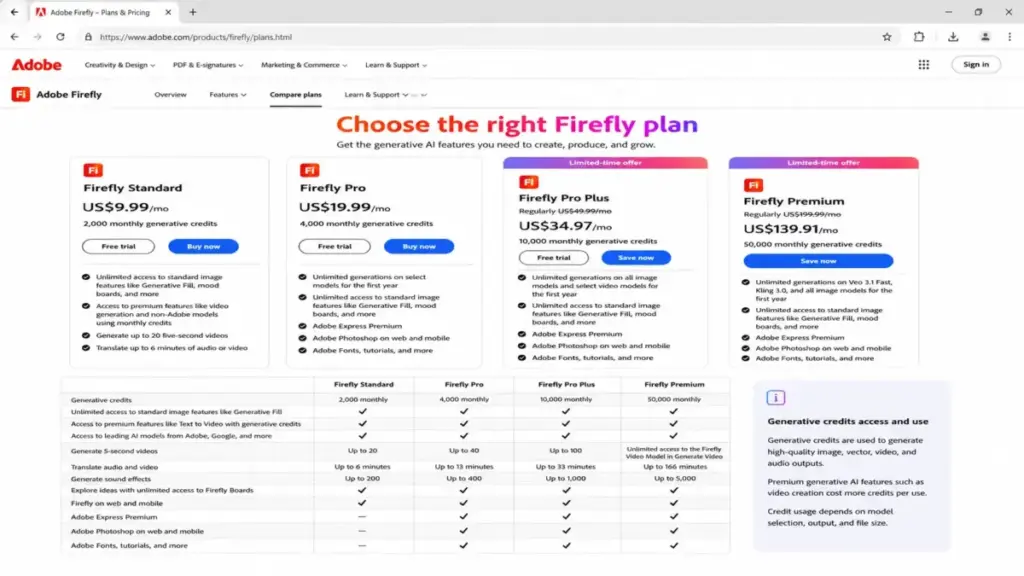
Starting price: US$9.99/month (Firefly Standard with 2,000 monthly generative credits).
Adobe Firefly spans Standard, Pro, and Pro Plus tiers, with generative credits, video generation, non-Adobe model access, Generative Fill, Photoshop web/mobile integration, and Adobe Express Premium on higher plans. The commercial safety angle — content credentials and Adobe’s training data approach — is a differentiator for brand-sensitive organizations.
Where it replaces Runway: If your team’s primary concern is producing brand-safe creative assets within Adobe’s ecosystem, Firefly integrates where Runway cannot. Monthly generative credits, Photoshop/Express integration, and standard review workflows reduce compliance friction that standalone AI video tools create.
For additional context on Firefly’s pricing tiers and credit system, see the Adobe Firefly pricing and cost breakdown.
For broader capabilities beyond video, read the Adobe Firefly review and analysis.
Where it falls short: Firefly is not specialized for standalone AI video production. Advanced generative video editing, shot-level cinematic control, and Runway’s broader model catalog are not Firefly’s focus.
Migration difficulty: Low — especially if your team already uses Adobe Creative Cloud.
Limitations: Video generation is credit-gated. Some “unlimited generation” language is promotional and applies only to select models and limited time periods.
invideo AI — Best for Prompt-to-Finished Marketing Videos

Best for: Marketers who want to create prompt-based explainer videos, ads, social clips, product videos, and stock-backed outputs instead of short AI-generated scenes.
Starting price: $17/month billed yearly.
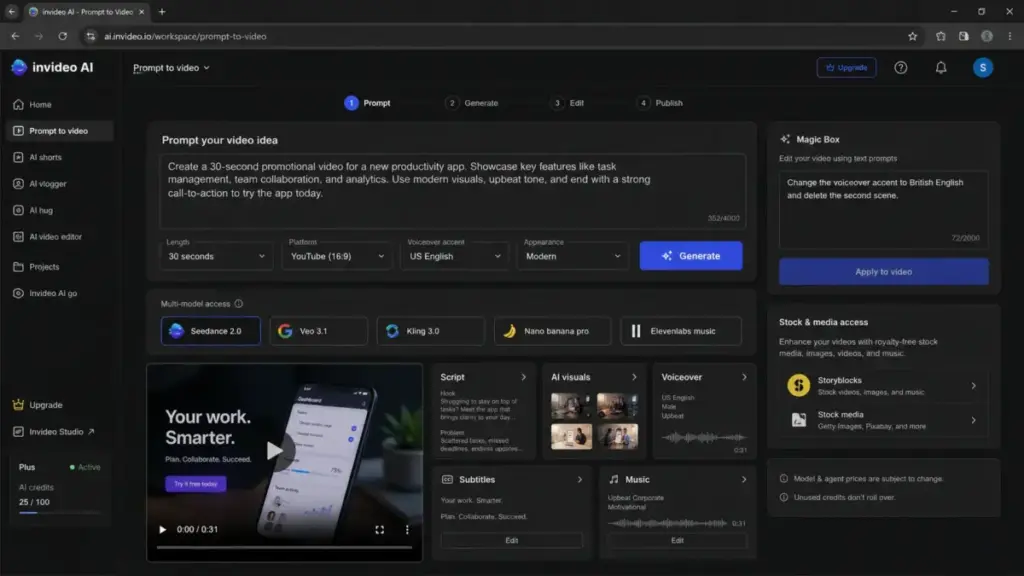
invideo AI operates as a multi-model prompt-to-video agent. The v4 agent can produce up to 30-minute videos from a single prompt, with access to 200+ image, video, audio, and music models — including Seedance 2.0, Veo 3.1, Kling 3.0, and ElevenLabs. Stock providers are integrated for mixed AI-and-footage outputs.
Where it replaces Runway: If your Runway workflow is “generate a clip → import into editor → add stock footage → add voiceover → export,” invideo collapses that into one step. For marketing teams producing explainers, product demos, and social content at scale, the agentic workflow is faster than Runway’s clip-by-clip generation.
Where it falls short: invideo is less precise than Runway for shot-level cinematic control. You trade generation precision for production speed. Credit costs vary by model, and unused credits do not roll over between billing periods.
Migration difficulty: Low. The workflow is fundamentally different (prompt-to-finished-video versus generate-then-edit), so it is less a migration and more a workflow replacement.
Limitations: Model and agent prices can change. Credits do not roll over. On-demand credit top-ups may be needed for heavy usage months.
Synthesia — Best for Training and Corporate Avatar Videos

Best for: Training, enablement, onboarding, and internal communications teams who need script-to-avatar business videos rather than generative cinematic scenes.
Starting price: Free Basic plan available; paid Starter from $29/month billed monthly, Creator from $89/month ($64/month billed yearly).
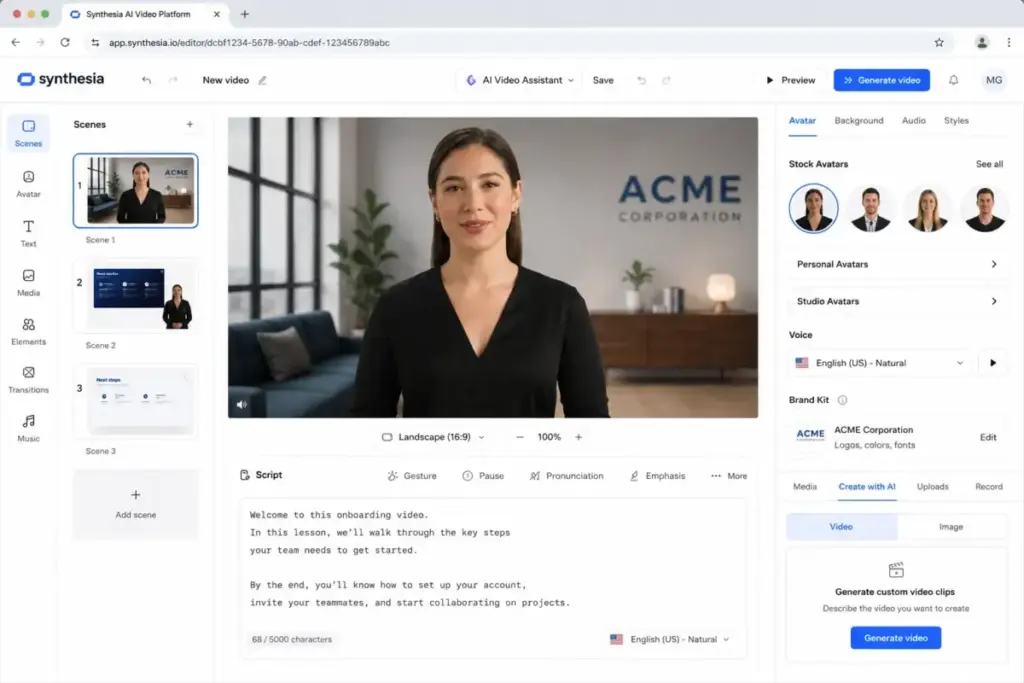
Synthesia is an avatar platform, not a cinematic generation tool. It offers AI avatars, dubbing, personal avatars, branded video pages, interactive videos, API access, collaboration features, and enterprise-scale workflows for business video production.
Where it replaces Runway: It does not replace Runway for creative AI video. It replaces the reason some buyers mistakenly chose Runway — they needed script-to-spokesperson training videos, not text-to-cinematic-scene generation. If your actual output is onboarding walkthroughs, compliance training, sales enablement, or multilingual internal communications, Synthesia is the correct tool category.
Where it falls short: Synthesia does not generate cinematic AI video, text-to-video scenes, or experimental visual content. It is not a Runway replacement in the creative generation sense.
Migration difficulty: Medium. The content creation workflow is entirely different. You are migrating a use case, not a feature set.
Limitations: Video generation minutes and credits are capped by plan. Larger teams likely need Enterprise pricing. Desktop availability is emphasized, with mobile limited.
HeyGen — Best for Personalized Avatar and Localization Videos
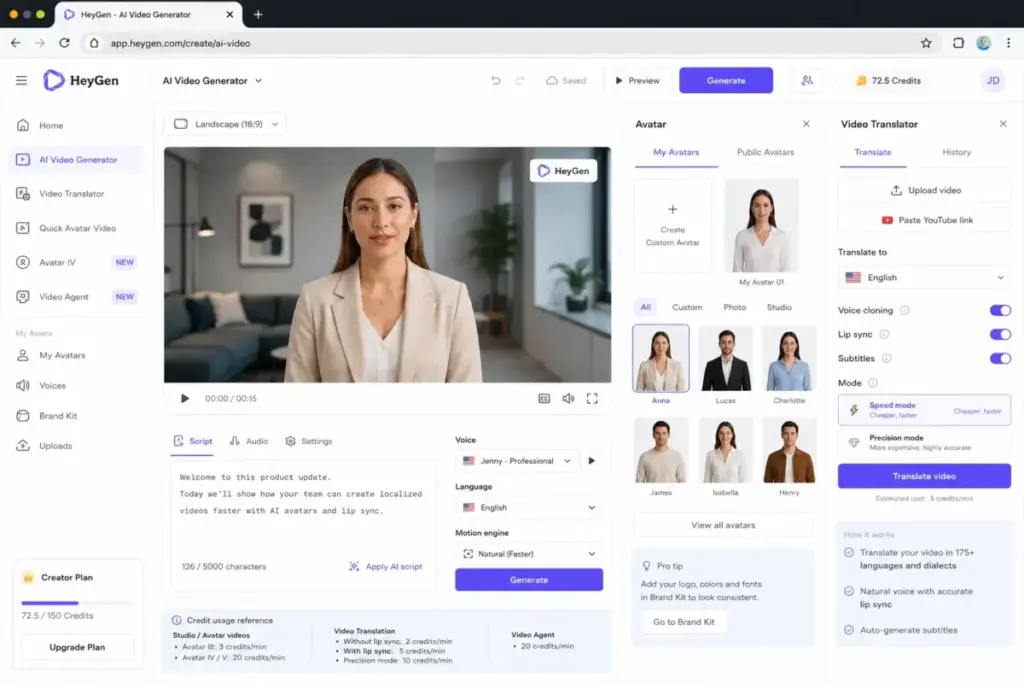
Best for: Sales, localization, education, and marketing teams who need avatar videos, lip-sync translation, and credit-based video creation at scale.
Starting price: Free plan (up to 3 videos/month); Creator from $29/month or $24/month billed annually; Business from $149/month + $20/seat/month.
HeyGen focuses on avatar-driven video creation with plan credits usable across studio videos, translation, lip sync, and related asset generation. Avatar engines range from Avatar III to V, with credit consumption depending on the engine used.
Where it replaces Runway: Similar to Synthesia — HeyGen replaces the use case, not the tool. If you need personalized sales outreach videos, multilingual lip-sync translations, or branded avatar explainers, HeyGen delivers these far more efficiently than trying to generate spokesperson-style content in Runway.
Where it falls short: HeyGen is not a cinematic scene generator. It produces human-presenter videos, not complex visual storytelling or experimental AI art.
Migration difficulty: Medium. Workflow is entirely different from Runway’s generation-focused approach.
Limitations: Credit cost depends on avatar engine and asset type. Business pricing includes a base subscription plus per-seat fees, which can scale quickly for larger teams.
Kapwing — Best for Browser-Based AI Editing and Collaboration

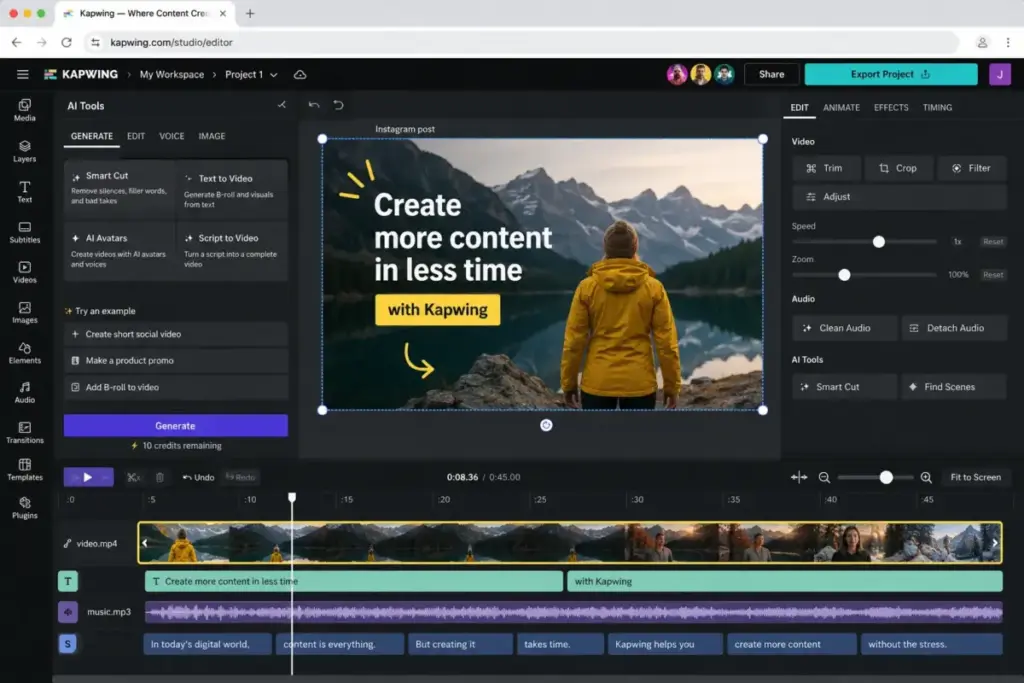
Best for: Teams who need fast web editing, subtitles, clipping, repurposing, team feedback, brand kits, and AI-assisted drafts more than advanced cinematic generation.
Starting price: Free to start; Pro from $16/month billed annually, Business from $50/month billed annually.
Kapwing combines browser-based editing with multiple AI video models (Veo, Kling, Wan, Seedance, and others) in a single online studio. Features include AI Video Editor, AI Video Generator, subtitles, transcript trimming, B-roll generation, online collaboration, and AI Assistant.
Where it replaces Runway: If your Runway usage is 30% generation and 70% editing/collaboration, Kapwing covers the editing half better while still offering AI generation through multiple models. The browser-native collaborative workflow — team feedback, brand kits, shared projects — is stronger than Runway’s workspace tools for content teams.
Where it falls short: Kapwing’s generative clips rely on underlying third-party models. For teams who need Runway’s specific model quality and professional generative video pipeline, Kapwing is a more generalist alternative.
Migration difficulty: Low. The browser-based editor is intuitive, and importing existing projects is straightforward.
Limitations: Free exports contain watermarks. AI generations consume credits. 4K and full power features require paid tiers.
Descript — Best for Transcript-Based Video Editing

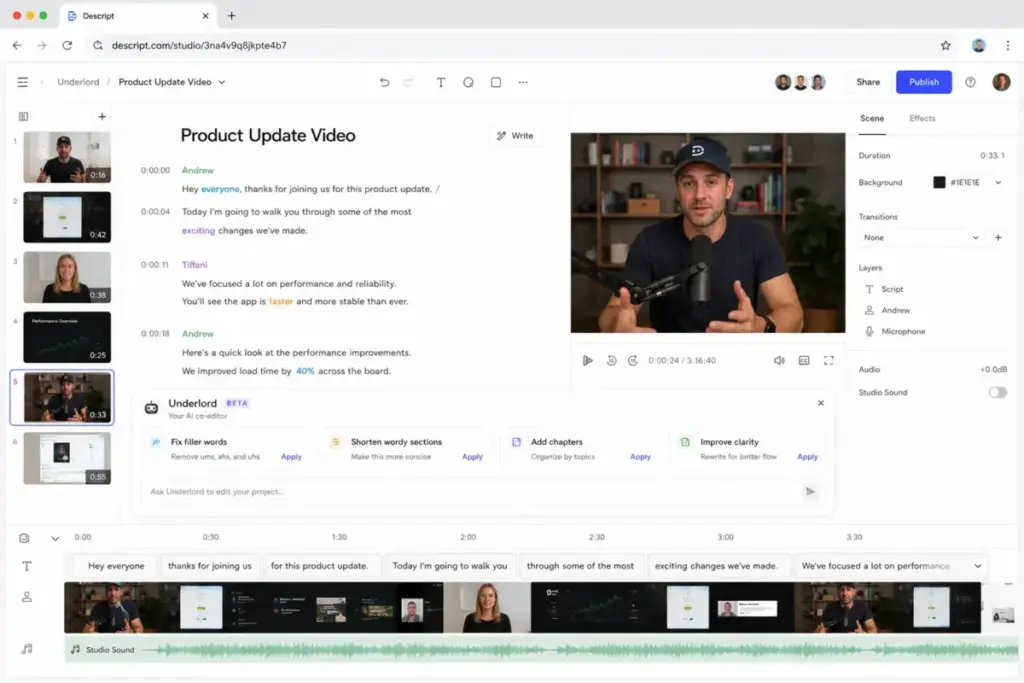
Best for: Podcasters, educators, webinar teams, and creators who need to edit existing footage faster using transcripts, AI tools, clips, voice, and stock media.
Starting price: Free plan available; Hobbyist from $16/person/month billed annually, Creator from $24/person/month billed annually.
Descript’s core differentiator is text-based editing — the Underlord AI video co-editor lets you edit video by editing the transcript. Additional features include Studio Sound, Remove Filler Words, Create Clips, AI Speech, custom voice clones, and access to latest AI video models on Creator tier.
Where it replaces Runway: Descript does not replace Runway for generation. It replaces Runway for teams who subscribed to Runway but mostly use it to clean up, cut, and repurpose existing footage. If your primary workflow is editing podcasts, webinars, interviews, and long-form recordings, Descript’s transcript-based approach cuts editing time by removing the need to scrub through a timeline manually.
Where it falls short: Descript is a post-production tool, not a generative video tool. It does not create cinematic scenes from text prompts. Teams that need both generation and transcript editing will need Descript alongside a generator.
Migration difficulty: Low. Descript’s editing model is different enough that it is an addition rather than a migration for most Runway users.
Limitations: AI credits and media hours are capped by plan. Strongest generative features (4K export, latest AI video models) sit behind Creator or higher tiers.
Buyer-Fit Matrix: Which Alternative Matches Your Switching Trigger?
| Switching Trigger | Best Alternatives | Why |
|---|---|---|
| Credits burn too fast | Google Flow, Kling AI, Pika | Lower entry pricing, persistent free tiers, or cheaper per-generation costs |
| Need stronger cinematic quality | Google Flow (Veo 3.1), Kling AI, Luma Dream Machine | Active model development focused on motion realism and prompt adherence |
| Need social-first effects and short clips | Pika, Kapwing, invideo AI | Effect-driven and browser-based workflows optimized for Reels/Shorts/TikTok |
| Need business/training avatar videos | Synthesia, HeyGen | Script-to-avatar workflows, not cinematic generation |
| Need commercial-safe creative workflows | Adobe Firefly | Adobe ecosystem, content credentials, brand review workflows |
| Need transcript editing and repurposing | Descript, Kapwing | Text-based editing for podcasts, webinars, and long-form footage |
| Need multi-model access, one subscription | invideo AI, Kapwing, Google Flow | Centralized access to Veo, Kling, Seedance, and other models |
Migration Notes for Teams
Before switching from Runway, consider these practical factors:
- Export your projects first. Runway projects, timelines, and saved prompts do not transfer to other platforms. Download all generated assets and final exports before canceling.
- Check credit economics, not just sticker price. A tool with a lower monthly price but faster credit burn may cost more per usable minute of video. Compare cost-per-generation-second, not just plan prices.
- Separate generation from editing needs. Many teams need two tools, not one: a generator (Flow, Kling, Pika) and an editor (Kapwing, Descript, Premiere). If you used Runway as both, budget for two subscriptions.
- Verify commercial use rights. Not all free tiers include commercial licensing. Check each platform’s terms before using generated content in paid campaigns.
- Test with your actual prompts. Model quality varies dramatically by prompt style, subject matter, and output type. Run your real production prompts through 2–3 alternatives before committing.
For teams exploring the broader category, the best AI content creation tools extend beyond video generators into writing, image, and multimodal platforms.
Understanding what multimodal AI means helps frame why some tools handle text-to-video better than others.
What Happened to Sora?
Multiple SERP results still list OpenAI Sora as a Runway alternative. Sora’s web and app were discontinued on April 26, 2026. Any article recommending Sora as an active alternative in 2026 is outdated. This list includes only tools with confirmed active availability as of June 2026.
Frequently Asked Questions
What is the best free alternative to Runway ML?
Google Flow with Veo 3.1 offers the strongest free tier for cinematic generation, with access to Veo 3.1 at no cost. Pika provides 80 monthly video credits on its free Basic plan. Both are stronger free options than Runway’s one-time 125 credits.
Is Kling AI better than Runway for realistic motion?
For photorealistic motion and character consistency specifically, Kling AI has been repeatedly positioned as a strong competitor. However, Runway offers a more complete production workspace. The choice depends on whether you prioritize generation quality or end-to-end editing.
Which Runway alternative is cheapest for a 10-person team?
Google Flow at the AI Plus tier ($4.99/month per user = ~$50/month for 10 users) is the cheapest option for teams that primarily need generation. Pika (~$80/month for 10 Basic annual seats) is second. Both cost less than a third of Runway Pro’s ~$280/month for a 10-user workspace.
Can I use AI-generated videos commercially?
Commercial rights vary by platform and plan tier. Pika, Adobe Firefly, Luma Dream Machine, and Runway include commercial use on paid plans. Free tiers often restrict commercial use or add watermarks. Always check each platform’s current terms of service.
Which Runway alternative is best for marketing videos?
invideo AI is the best fit for marketing teams that need prompt-to-finished explainer videos, product demos, and social ads. For brand-safe workflows within Adobe’s ecosystem, Adobe Firefly alternatives compares other options in that space.
Are avatar tools like Synthesia genuine Runway alternatives?
Not in the feature-for-feature sense. Synthesia and HeyGen replace the use case that led some buyers to Runway — producing spokesperson-style business videos. If your actual need is training videos, sales outreach, or multilingual explainers, avatar platforms are the correct category.
Why do Runway credits run out so fast?
Runway credits are consumed per generation second, and newer models (Gen-4.5) consume credits at higher rates than older ones. Iteration-heavy workflows — generating multiple versions, testing prompts, extending clips — compound consumption quickly. The free plan’s 125 credits are one-time, not monthly.
What replaced Sora after discontinuation?
Google Flow with Veo 3.1, Kling AI, and Pika have absorbed most of the interest that previously went to Sora. invideo AI also integrates multiple generation models including Veo 3.1 and Kling 3.0 in a single subscription.
Bottom Line
Runway ML is still a strong AI video workspace — but in 2026, paying for it only makes sense if you actively use its full production stack. If your switching trigger is credit cost, Google Flow and Pika offer better credit economics. If it is cinematic quality, Google Flow and Kling AI compete directly. If it is workflow fit, the right answer depends on whether you need social effects (Pika, Kapwing), avatar videos (Synthesia, HeyGen), transcript editing (Descript), prompt-to-finished marketing videos (invideo AI), or brand-safe Adobe integration (Firefly).
The most expensive mistake is not choosing the wrong model — it is subscribing to a cinematic generation platform when your actual production need is training videos, social clips, or podcast editing. Match the tool to the job, not the hype cycle.