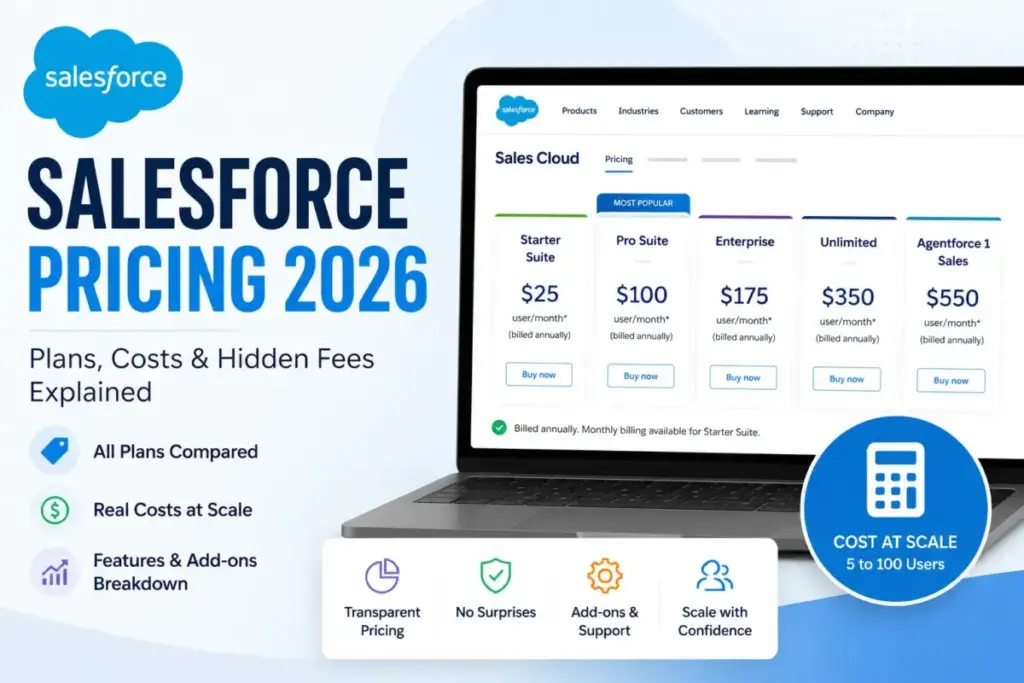
Salesforce advertises $25 per user per month on its pricing page. A 10-person sales team on Pro Suite pays $12,000 per year in license fees alone, before a single add-on, support upgrade, or implementation dollar. That gap between the entry price and the operational bill is where most CRM buying decisions go wrong
The real question is not whether Salesforce is expensive. It is whether the plan you pick matches the features your team actually uses, and whether the add-ons, support tiers, and annual billing commitments change the math enough to reconsider.
This guide breaks down every Salesforce Sales Cloud plan (as of May 2026), maps the feature gates that force upgrades, calculates cost at 5 to 100 users, and explains the hidden costs most pricing pages skip. If you are new to CRM software and need context before comparing prices, start there first, then return here for the real numbers.
Quick Pricing Verdict
| Category | Details |
|---|---|
| Starting price | $0 (Free Suite, 2 users) or $25/user/month (Starter Suite) |
| Free plan | Yes, Free Suite for up to 2 users, no credit card required |
| Free trial | 30 days, no credit card |
| Best plan for most teams | Pro Suite ($100/user/month, billed annually) |
| Plan to avoid | Unlimited ($350/user/month) unless you need bundled Premier Support, Full Sandbox, and predictive AI |
| Biggest hidden cost | Implementation and consulting ($10,000 to $500,000 based on third-party estimates) |
| Best alternative if too expensive | Pipedrive (from $14/user/month) or Zoho CRM (free for 3 users) |
| Pricing verified | May 2026 from Salesforce official pricing page |
The Advertised Price vs the Real Price
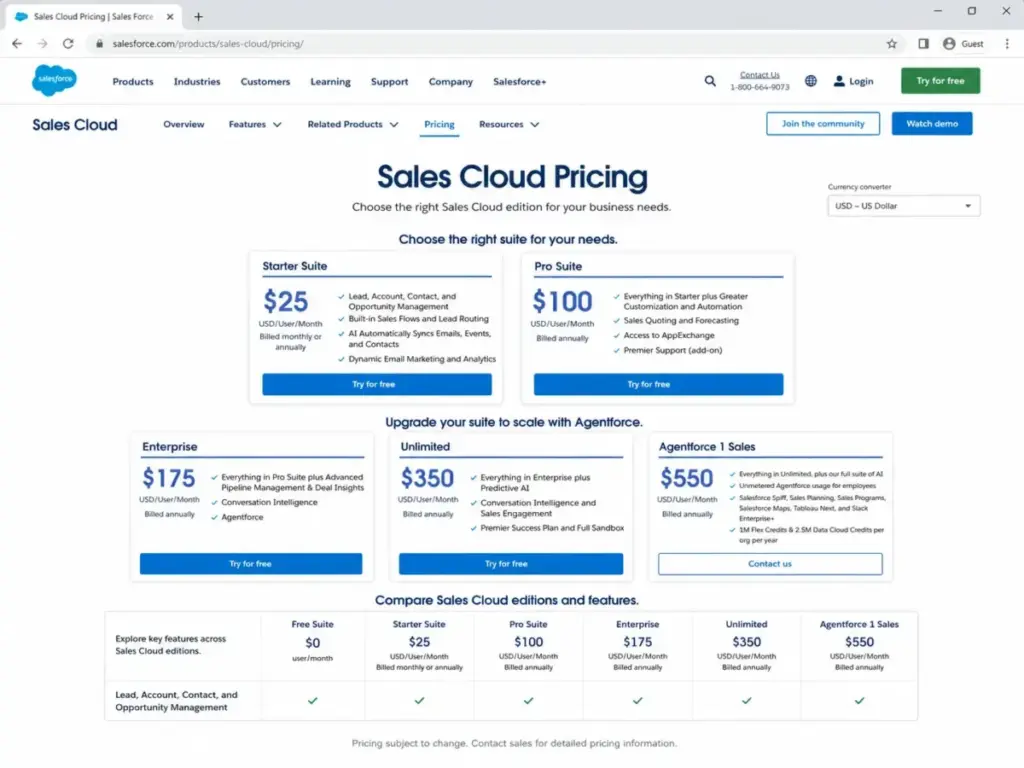
Here is what Salesforce lists on the pricing page, and here is what changes when you factor in billing, add-ons, and support.
| Plan | Listed Price | Billing | Annual Cost (1 User) | What Gets Added |
|---|---|---|---|---|
| Free Suite | $0 | Free | $0 | Limited to 2 users, basic CRM |
| Starter Suite | $25/user/month | Monthly or annual | $300 | No AppExchange, no forecasting |
| Pro Suite | $100/user/month | Billed annually | $1,200 | No advanced pipeline, no Conversation Intelligence |
| Enterprise | $175/user/month | Billed annually | $2,100 | Premier Support is add-on (30% of license fees) |
| Unlimited | $350/user/month | Billed annually | $4,200 | Premier Support bundled, Full Sandbox included |
| Agentforce 1 Sales | $550/user/month | Billed annually | $6,600 | Full AI suite, Slack, Tableau, 1M Flex Credits |
Prices verified May 2026 from Salesforce Sales Cloud pricing. Salesforce notes pricing is subject to change.
What this means: The $25 starting price applies only to Starter Suite with basic CRM functionality. The moment your team needs forecasting, AppExchange access, or quoting, you are looking at Pro Suite at $100 per user per month, billed annually. That is a 4x jump from the advertised entry point, and it is the most common pricing surprise I see buyers encounter.
Some older articles still cite Salesforce Pro at $80 or Unlimited at $330. Those figures appear outdated based on the current official pricing page. Always verify against Salesforce’s pricing before budgeting.
The 6 Hidden Costs Nobody Mentions
Implementation and Consulting
Salesforce does not publish a universal implementation fee. The official pricing page points to Professional Services and partner resources, but does not list a fixed cost. Third-party implementation partners commonly estimate costs ranging from $10,000 for a basic small-team setup to $500,000 or more for complex multi-cloud enterprise rollouts. These are third-party estimates, not official Salesforce figures. Budget for this separately.
Premier Success Plan
Unless you are on Unlimited or Agentforce 1 Sales, Premier Support costs 30% of your net license fees. For a 10-user Enterprise team at $2,100 per user per year, that is an additional $6,300 per year for 24/7 business-stopping issue support, expert guidance, and health checks. The Standard Success Plan (included with all licenses) gives you knowledge articles, Trailhead, and community access, but no direct expert support.
Web Services API Access
On lower-tier plans, API access may require a $25 per user per month add-on. If your team relies on custom integrations, this cost compounds quickly. A 10-user team needing API access adds $250 per month, or $3,000 per year.
AppExchange and Third-Party Apps
Salesforce has a vast ecosystem of paid ISV apps for dialers, data enrichment, e-signatures, and vertical extensions. Costs vary by vendor, but I have seen teams add $20 to $100 per user per month in AppExchange subscriptions alone.
Additional Data Cloud and Flex Credits
Agentforce 1 Sales includes 1 million Flex Credits and 2.5 million Data Cloud Credits per org per year. If your usage exceeds those allocations, additional credits are quote-based. For teams using AI features heavily, this can become a meaningful line item.
Monthly Billing Availability
Here is a detail many buyers miss: Starter Suite can be billed monthly or annually. But Pro Suite, Enterprise, Unlimited, and Agentforce 1 Sales are shown as billed annually on the official pricing page. Salesforce does not publish a standard public annual discount percentage for these higher tiers. That means your cash commitment is the full annual amount upfront, not a monthly draw.
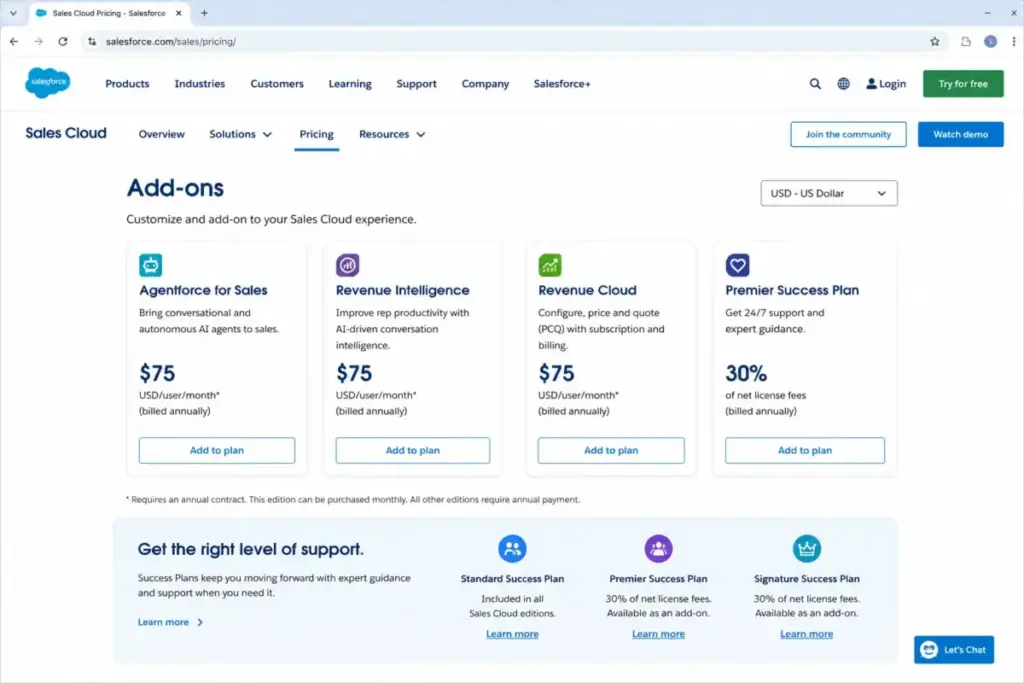
| Hidden Cost | Amount | When It Applies |
|---|---|---|
| Implementation and consulting | $10,000 to $500,000 (third-party estimates) | Initial setup, customization, migration |
| Premier Success Plan | 30% of net license fees (unless bundled with Unlimited) | When teams need 24/7 expert support |
| Web Services API add-on | $25/user/month where applicable | Lower plans needing custom integrations |
| AppExchange apps | Varies by vendor | Paid ISV tools for dialers, enrichment, e-sign |
| Additional Data Cloud or Flex Credits | Quote-based | Usage beyond included Agentforce 1 Sales credits |
| Professional services | Quote-based | Salesforce or partner implementation services |
Plan-by-Plan Breakdown
Free Suite: $0 for Up to 2 Users
Salesforce Free Suite includes two free user licenses with no contract and no credit card. It covers basic sales, service, and simple email marketing workflows.
Upgrade triggers: Adding a third user, needing advanced automation, needing deeper CRM analytics, or outgrowing the included monthly email send limit. Free Suite is realistic for solopreneurs or two-person teams testing CRM. It is not a long-term solution for a growing sales organization.
Starter Suite: $25/User/Month
Starter includes lead, account, contact, and opportunity management, built-in sales flows, lead routing, AI sync for emails and events, and dynamic email marketing with analytics. It can be billed monthly or annually.
Missing: No forecasting, no quoting, no AppExchange access, no advanced automation. If your team does pipeline forecasting or needs third-party apps, Starter will not work.
Pro Suite: $100/User/Month (Billed Annually)
Pro Suite adds greater customization and automation, sales quoting, forecasting, and AppExchange access. This is the first plan where Salesforce becomes a serious sales operations tool.
Missing: No advanced pipeline management, no deal insights, no Conversation Intelligence, no Agentforce. Teams that rely on AI-assisted pipeline analysis will hit this wall.
My take: Pro Suite is the practical plan for most growing sales teams. It is the tier where Salesforce stops being a contact database and starts being a sales pipeline tool.
Enterprise: $175/User/Month (Billed Annually)
Enterprise adds advanced pipeline management, deal insights, Conversation Intelligence, and Agentforce capabilities. This is where Salesforce starts competing with its own reputation as an enterprise platform.
Missing: Premier Success Plan is still an add-on. Full Sandbox is not confirmed as included. Predictive AI and Sales Engagement require Unlimited.
Unlimited: $350/User/Month (Billed Annually)
Unlimited includes everything in Enterprise plus predictive AI, Conversation Intelligence, Sales Engagement, Premier Success Plan, and Full Sandbox.
My take: The main reason to pay the $175-per-user premium over Enterprise is the bundled Premier Support and Full Sandbox. If you are already paying 30% of license fees for Premier separately on Enterprise, calculate whether Unlimited actually saves money.
Agentforce 1 Sales: $550/User/Month (Billed Annually)
The highest public Sales Cloud bundle includes the full AI suite, unmetered Agentforce usage for employees, Salesforce Spiff, Sales Planning, Sales Programmes, Salesforce Maps, Tableau Next, Slack Enterprise Plus, 1 million Flex Credits, and 2.5 million Data Cloud Credits per org per year.
My take: At $6,600 per user per year, this plan only makes sense if the bundled tools (Slack Enterprise Plus, Tableau Next, Spiff, Maps) replace separate subscriptions that would collectively cost more. Do the replacement math before committing.
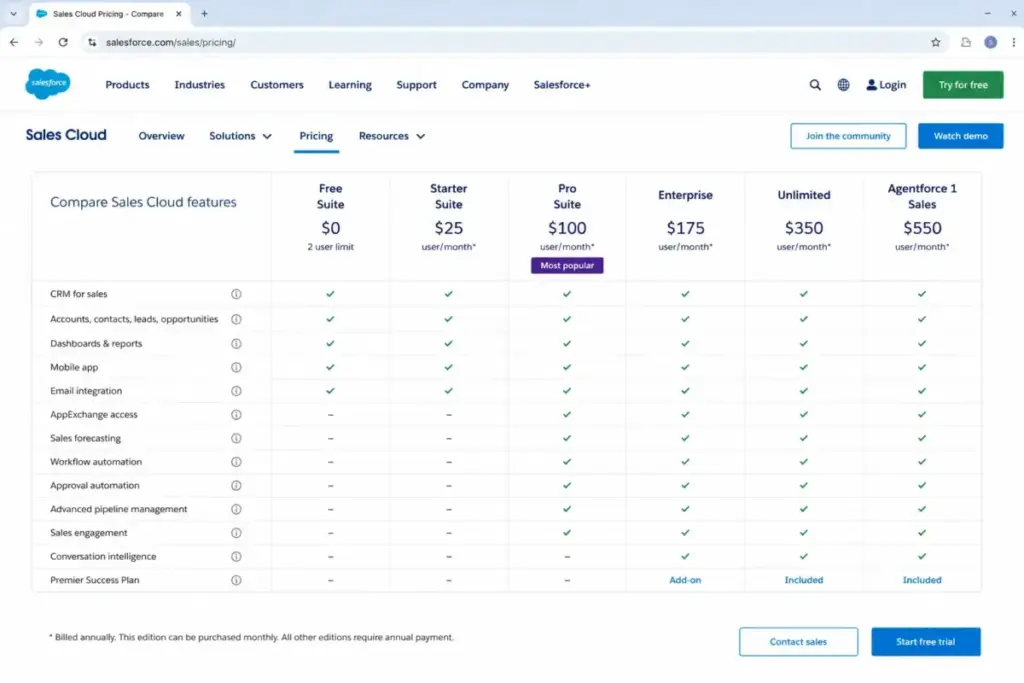
Feature Gates: What Forces an Upgrade
This table shows which features push your team into each tier.
| Feature | Free | Starter | Pro | Enterprise | Unlimited | Agentforce 1 Sales |
|---|---|---|---|---|---|---|
| Lead, account, contact management | Basic | Yes | Yes | Yes | Yes | Yes |
| Sales flows and lead routing | Limited | Yes | Yes | Yes | Yes | Yes |
| AI email, event, contact sync | Limited | Yes | Yes | Yes | Yes | Yes |
| Email marketing and analytics | Basic | Yes | Yes | Yes | Yes | Yes |
| Advanced customization and automation | No | No | Yes | Yes | Yes | Yes |
| Sales quoting and forecasting | No | No | Yes | Yes | Yes | Yes |
| AppExchange access | No | No | Yes | Yes | Yes | Yes |
| Advanced pipeline and deal insights | No | No | No | Yes | Yes | Yes |
| Conversation Intelligence | No | No | No | Yes | Yes | Yes |
| Premier Success Plan | No | Add-on | Add-on | Add-on | Included | Included |
| Full Sandbox | No | No | No | Not confirmed | Included | Included |
| Slack, Tableau, Spiff, Maps, Credits | No | No | No | No | No | Included |
What this means: The three biggest upgrade triggers are AppExchange access (requires Pro), Conversation Intelligence (requires Enterprise), and Premier Support (requires Unlimited unless you pay the 30% add-on). Know which feature your team will hit first, and plan your tier accordingly.
Salesforce Cost at Scale
| Team Size | Recommended Plan | Monthly Equivalent | Annual Cost | Notes |
|---|---|---|---|---|
| 2 users | Free Suite | $0 | $0 | Basic CRM, no contract, no credit card |
| 5 users | Starter Suite | $125 | $1,500 | Basic CRM with lead routing and email sync |
| 10 users | Pro Suite | $1,000 | $12,000 | Forecasting, quoting, AppExchange |
| 25 users | Enterprise | $4,375 | $52,500 | Advanced pipeline, Conversation Intelligence |
| 50 users | Enterprise | $8,750 | $105,000 | License cost only, before add-ons and support |
| 100 users | Enterprise to Agentforce 1 Sales | $17,500 to $55,000 | $210,000 to $660,000 | TCO warning: implementation, add-ons, support, and credits increase real cost materially |
These are base license costs calculated from official pricing. Implementation, Premier Support, AppExchange apps, API add-ons, and Data Cloud credits are not included. Your actual Salesforce quote may differ based on configuration and negotiation.
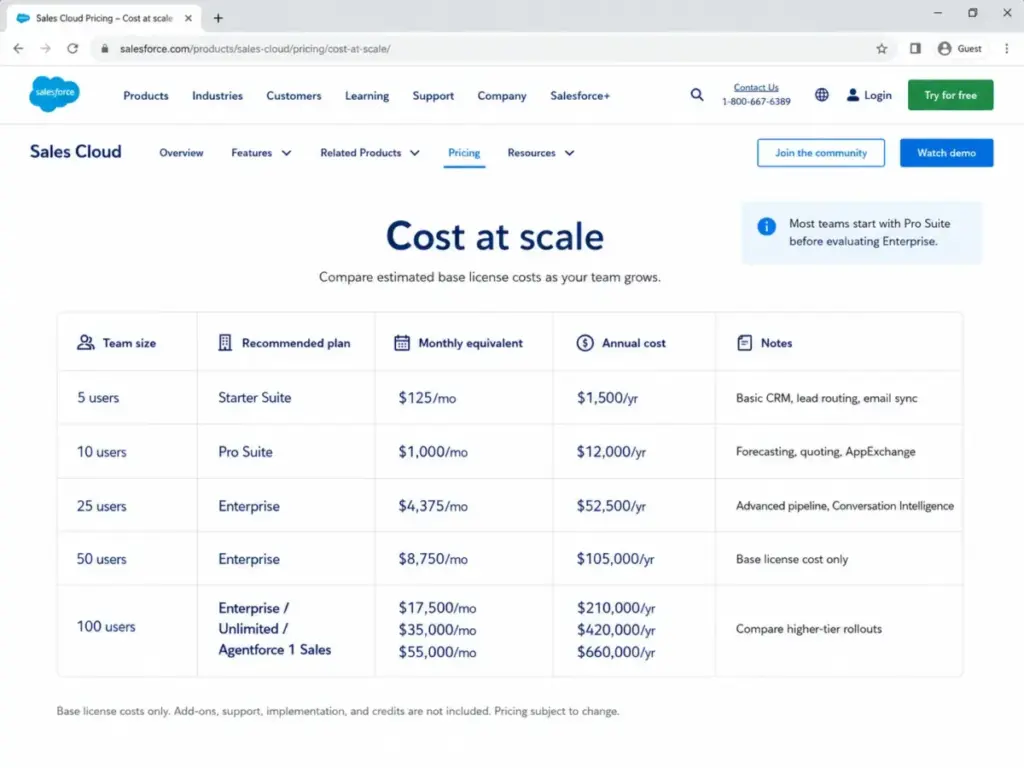
The jump from 10 users on Pro Suite ($12,000/year) to 25 users on Enterprise ($52,500/year) is the steepest scaling point. That is more than a 4x increase for 2.5x the users. If your team is approaching 25 seats, pressure-test whether you genuinely need Enterprise features or whether Pro Suite with select add-ons is more cost-effective.
When the Free Plan Stops Working
Salesforce Free Suite is genuinely free for up to 2 users. No credit card, no contract. It supports basic sales, service, and email marketing workflows.
But it stops being practical the moment you need any of these:
- A third user
- Advanced automation beyond basic workflows
- Deeper CRM analytics and reporting
- AppExchange access for third-party integrations
- Higher email send volumes beyond the included monthly limit
For very small teams evaluating whether CRM software fits their workflow, Free Suite is a reasonable starting point. For teams with active sales pipelines, the ceiling comes fast. Salesforce also offers a 30-day free trial of Sales Cloud with no credit card required, and Starter Suite can be tried for 30 days for up to 10 users.
Which Salesforce Plan Should You Choose?
1-2 person teams exploring CRM: Start with Free Suite. No risk, no cost. Upgrade when you outgrow 2 users or need automation.
Small sales teams (3-10 users) with basic needs: Starter Suite at $25 per user per month. Good for lead management, email sync, and basic pipeline tracking. Avoid if you need sales forecasting or AppExchange.
Growing sales teams needing forecasting and customization: Pro Suite at $100 per user per month. This is the plan where Salesforce becomes a real sales operations platform. The AppExchange access alone justifies the upgrade for most teams.
Teams with complex pipelines and AI needs: Enterprise at $175 per user per month. Advanced pipeline management, deal insights, and Conversation Intelligence. Consider whether Premier Support at 30% justifies stepping up to Unlimited instead.
Organizations replacing multiple tools: Agentforce 1 Sales at $550 per user per month only if the bundled Slack Enterprise Plus, Tableau Next, Spiff, Sales Planning, Maps, and AI credits replace existing separate subscriptions.
Which Salesforce Plan Should You Avoid?
Do not default to Unlimited ($350/user/month) or Agentforce 1 Sales ($550/user/month) unless you have verified that the bundled Premier Support, Full Sandbox, predictive AI, Sales Engagement, or the full AI suite replace tools you are already paying for separately.
I have seen teams buy Unlimited because “it has everything,” only to discover they use the same features available on Enterprise. The $175-per-user uplift from Enterprise to Unlimited is justified by Premier Support (otherwise 30% of license fees), Full Sandbox, and predictive AI. If your team does not use those three things, you are overpaying.
Also avoid staying on Starter Suite if your sales process requires forecasting, quoting, or AppExchange access. You will outgrow it within months and face a 4x per-user price jump to Pro Suite.
Salesforce Pricing vs Competitors
| CRM | Starting Price | 10-User Monthly Cost | Free Plan | Best For |
|---|---|---|---|---|
| Salesforce Sales Cloud | $25/user/month | $1,000 (Pro Suite) | Yes (2 users) | Complex sales operations, forecasting, enterprise governance |
| HubSpot Sales Hub | $9/seat/month | $90 (Starter) or $900 (Professional) | Yes | Marketing-first teams, inbound sales |
| Pipedrive | $14/seat/month | $140 (Lite) | No (14-day trial) | Visual pipeline management, simplicity |
| monday CRM | $12/seat/month | $120 (Basic) | No (14-day trial) | Project-centric sales teams |
| Zoho CRM | $14/user/month | $140 (Standard) | Yes (3 users) | Budget-conscious teams, feature depth per dollar |
| Microsoft Dynamics 365 Sales | $65/user/month | $650 (Sales Professional) | No (trial available) | Microsoft ecosystem, enterprise compliance |
Competitor prices verified May 2026 from official pricing pages. HubSpot Professional includes a $1,500 onboarding fee. monday CRM uses seat buckets with a 3-seat minimum.
What this means: At the Starter level, Salesforce CRM is competitive with most alternatives. The cost gap widens at the practical plan level. A 10-user team on Pro Suite pays $1,000 per month in license fees, while Pipedrive delivers pipeline management for $140 per month on Lite. But the comparison is not apples-to-apples: Salesforce at Enterprise and above offers forecasting, Conversation Intelligence, AppExchange depth, and enterprise governance that simpler CRMs do not match.
If your team needs basic pipeline management and wants to minimize cost, Pipedrive or Zoho CRM deliver more for less. If your team runs complex, multi-rep sales operations with integrations, forecasting, and compliance requirements, Salesforce earns the premium.
Is Salesforce Worth the Price?
Worth it if:
- Your sales team runs complex pipelines with multiple reps and needs real forecasting
- You rely on AppExchange integrations for dialers, enrichment, or vertical tools
- Your organization requires enterprise governance, sandboxes, and compliance controls
- You need AI-assisted sales workflows (Conversation Intelligence, Agentforce)
- You have the budget and internal capacity to support implementation and ongoing administration
Not worth it if:
- You are a solo operator or very small team needing only contact and deal tracking
- Your team cannot commit to the annual billing required for Pro Suite and above
- You do not have internal admin capacity or budget for implementation support
- Your CRM needs are limited to basic pipeline management without forecasting
If Salesforce exceeds your budget, start with Pipedrive for visual pipeline simplicity, Zoho CRM for feature depth at a lower price, or HubSpot pricing for marketing-CRM integration. Each of these Salesforce alternatives serves a different exit reason.
How to Avoid Overpaying for Salesforce
- Start with Pro Suite, not Enterprise. Unless you need Conversation Intelligence or advanced pipeline management today, Pro Suite covers most growing teams. You can upgrade later.
- Calculate Premier Support math before choosing Unlimited. If you are on Enterprise and paying 30% of license fees for Premier Support, compare that total to the Unlimited price. Sometimes Unlimited is cheaper.
- Audit your AppExchange spend quarterly. Paid ISV apps accumulate. Review which ones your team actually uses and cut the rest.
- Do not buy Agentforce 1 Sales for one feature. The $550 per user price only makes sense if the bundled Slack, Tableau, Spiff, and credits replace existing separate tools.
- Map your feature needs to plans before talking to sales. Use the feature gate table above. Knowing exactly which tier you need prevents upselling.
- Ask about startup and nonprofit discounts. Salesforce Startup Launchpad offers free and discounted products for eligible startups. Power of Us provides discounts for education and nonprofit organizations.
- Budget for implementation separately. Salesforce license cost is only part of the total cost of ownership. Third-party estimates for implementation range from $10,000 to $500,000 depending on complexity. Get implementation quotes before committing to a plan.
FAQ
How much does Salesforce cost per user?
Salesforce Sales Cloud starts at $25 per user per month for Starter Suite. Pro Suite costs $100 per user per month, Enterprise costs $175, Unlimited costs $350, and Agentforce 1 Sales costs $550, all billed annually (as of May 2026). There is also a Free Suite for up to 2 users.
Is Salesforce free?
Yes. Salesforce Free Suite gives you 2 free user licenses with no credit card, no contract, and basic CRM tools. You only pay when you need more users, advanced automation, or deeper analytics.
Does Salesforce offer a free trial?
Yes. Salesforce offers a 30-day Sales Cloud free trial with no credit card required. Starter Suite can also be tried for 30 days for up to 10 users.
What is the best Salesforce plan for small businesses?
Pro Suite at $100 per user per month is the best plan for most small sales teams. It includes forecasting, quoting, automation, and AppExchange access. Starter Suite works for very small teams that only need basic contact and deal management.
What are the hidden costs of Salesforce?
The main hidden costs are implementation and consulting (third-party estimates range from $10,000 to $500,000), Premier Success Plan (30% of license fees unless bundled with Unlimited), Web Services API add-on ($25/user/month where applicable), and AppExchange third-party app subscriptions.
Is Salesforce more expensive than HubSpot?
At the entry level, Salesforce Starter ($25/user/month) is more expensive than HubSpot Starter ($9/seat/month). At the practical plan level, Salesforce Pro Suite ($100/user/month) and HubSpot Professional ($90/seat/month with $1,500 onboarding) are closer. The comparison depends on which features your team needs and whether HubSpot onboarding fees change the math.
Does Salesforce charge for API access?
On lower-tier plans, Web Services API access may require a $25 per user per month add-on. Higher tiers include API access. Check which plan includes API by default before building integrations.
Which Salesforce plan includes Premier Success Plan?
Premier Success Plan is included with Unlimited ($350/user/month) and Agentforce 1 Sales ($550/user/month). On all other plans, it costs 30% of net license fees as an add-on.
What is Agentforce 1 Sales?
Agentforce 1 Sales is Salesforce’s highest public Sales Cloud bundle at $550 per user per month, billed annually. It includes the full AI suite, unmetered Agentforce usage for employees, Salesforce Spiff, Sales Planning, Tableau Next, Slack Enterprise Plus, and credits. Contact Salesforce for detailed business needs.
What is the cheapest Salesforce plan with forecasting?
Pro Suite at $100 per user per month (billed annually) is the cheapest Salesforce Sales Cloud plan that includes sales forecasting. Starter Suite does not include forecasting.
Pricing verified May 2026 from official Salesforce pages. Salesforce may change pricing or quote differently based on configuration. Implementation cost ranges are third-party estimates, not official Salesforce pricing. Check the official Salesforce pricing page for current rates.