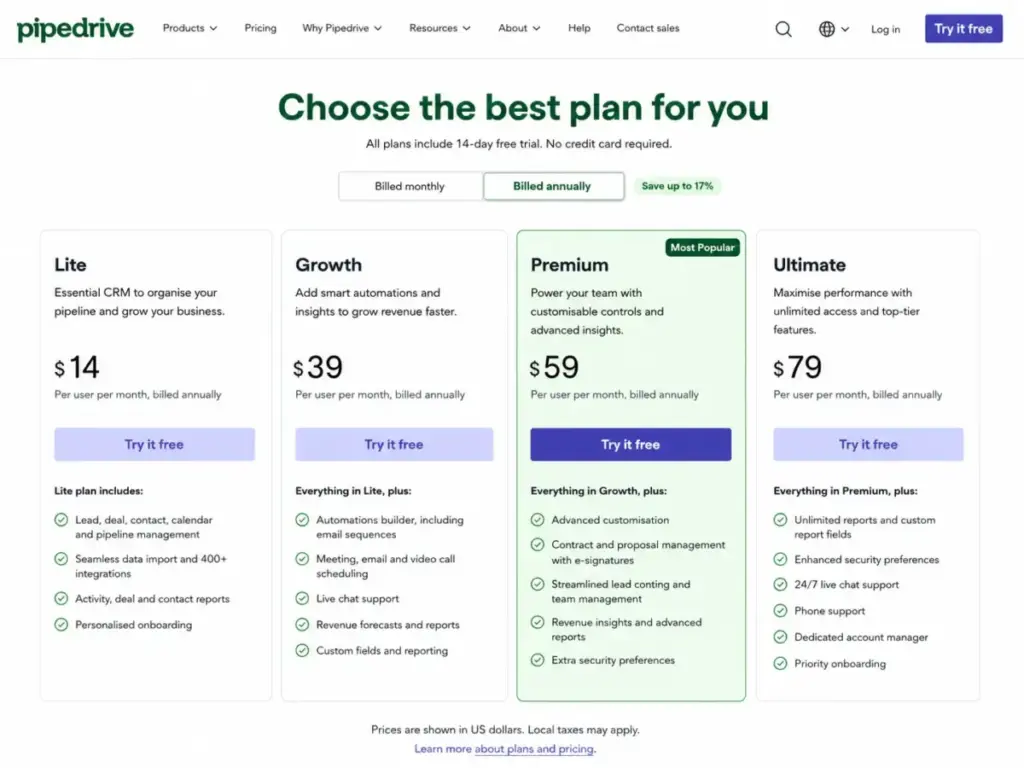
Pipedrive advertises $14 per user per month. That is the annual Lite plan, and it does not include email sync, automations, sequences, or forecasting. For most buyers shopping the CRM market, the real starting line is Growth at $39 per user per month billed annually, because that is where Pipedrive unlocks the features that make a sales CRM actually useful.
The bigger pricing question in 2026 is not which plan starts cheapest. It is when add-ons, included add-on bundles, top-up fees, and seat billing push the total bill past what teams expected. Many ranking pages still reference the old Essential, Advanced, Professional, Power, and Enterprise plan names.
Pipedrive restructured its packaging in 2025, and the current plans are Lite, Growth, Premium, and Ultimate. If you are comparing prices from an older article, those numbers may not match what you see in checkout today.
This guide breaks down every plan at real team sizes, shows which add-ons are included versus paid, surfaces the hidden costs most pricing pages skip, and calculates what Pipedrive actually costs for 5 to 100 users (as of May 2026).
| Quick Pricing Verdict | |
|---|---|
| Starting price | $14/user/month billed annually (Lite) |
| Free plan | No. 14-day free trial, no credit card required |
| Best plan for most teams | Growth ($39/user/month annually) |
| Plan to avoid | Lite, if you need email sync or automations |
| Biggest hidden cost | Add-ons on lower tiers: LeadBooster, Smart Docs, Projects from $6.67 to $41/month each |
| Annual vs monthly savings | Up to 42% savings on annual billing |
| Best alternative if too expensive | Freshsales ($9/user/month Growth, includes AI and email sync) |
| Pricing verified | May 2026, official pricing page |
Plan name update (2025): Pipedrive renamed its plans. Essential became Lite, Advanced became Growth, Professional and Power merged into Premium, and Enterprise became Ultimate. If an article you read references Essential at $9.90 or Professional at $49.90, those are old prices for old plans. Use the current names and prices above.
If You Are a Solo User or Freelancer
Recommended plan: Lite ($14/user/month annually, $168/year)
A single user managing contacts and a basic sales pipeline gets a functional deal tracker on Lite. You can log calls, move deals through stages, and use AI-powered report creation.
Here is what you give up: no full email sync, no workflow automations, no sequences, no forecast view, and no included LeadBooster, Projects, or Smart Docs. You also get a 2,500-lead-and-deal limit per seat, 30 custom fields, and 15 reports.
For a freelancer tracking 20 deals at a time, Lite works. For a solo consultant running outbound sequences and needing email tracking, Growth at $39/month is the real entry point.
Solo user cost: $14/month billed annually. $24/month if paying monthly (third-party validated; confirm in Pipedrive checkout).
If You Have a 5-Person Sales Team
Recommended plan: Growth ($39/user/month annually)
Monthly cost: $195/month billed annually
Annual cost: $2,340/year
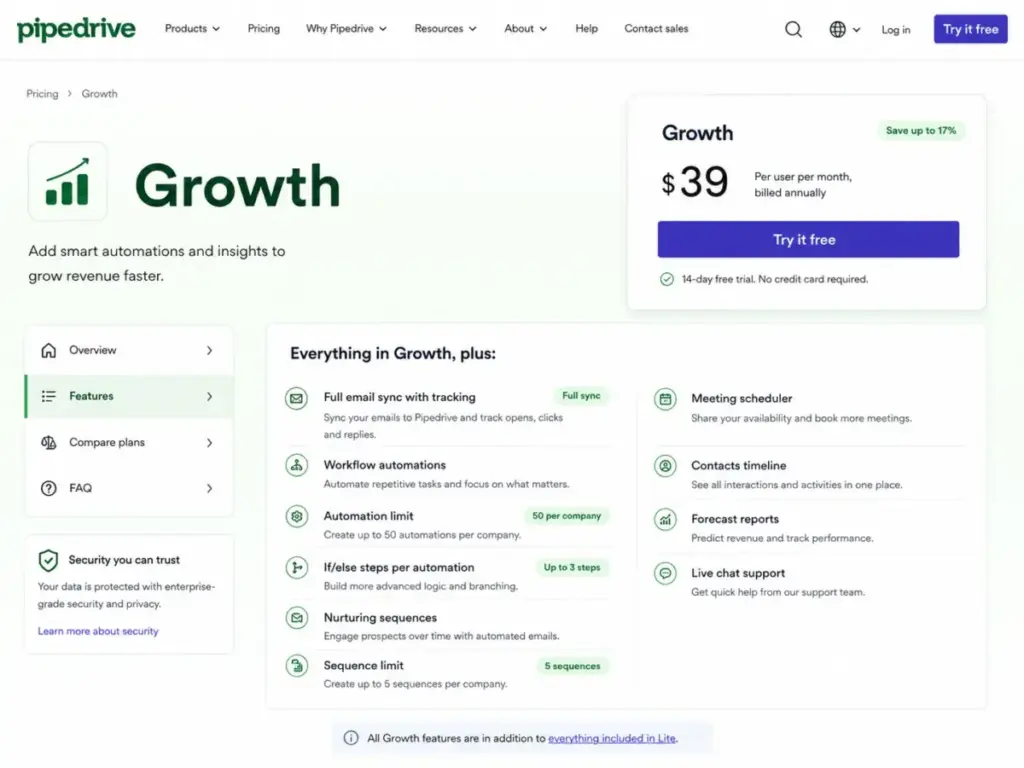
Growth is where Pipedrive becomes real sales CRM software. You get full email sync with tracking, workflow automations (50 per company, 3 if/else steps each), nurturing sequences (5 per company), forecast reports, meeting scheduler, contacts timeline, live chat support, and subscriptions management.
The per-company automation limit matters here. Fifty automations shared across five users can fill up faster than expected if every rep builds their own follow-up workflows. I keep coming back to this because it is the first Growth ceiling most teams hit.
You still pay separately for LeadBooster ($32.50/month starting), Projects ($6.67/month starting), and Smart Docs ($32.50/month starting) on Growth. If your team needs all three, that is roughly $72 per month on top of your $195 base. The total moves from $195 to about $267/month before you even consider top-ups.
| 5-User Growth Cost | Amount |
|---|---|
| Base (5 x $39) | $195/month |
| LeadBooster add-on | From $32.50/month |
| Projects add-on | From $6.67/month |
| Smart Docs add-on | From $32.50/month |
| Total with all add-ons | ~$267/month |
What this means: If your 5-person team needs lead generation, project tracking, and document templates, Premium at $59/user ($295/month) includes all three. The gap between Growth-plus-add-ons ($267) and Premium ($295) is $28/month, and Premium gives you 150 automations, 25 sequences, 3 email syncs per user, custom scoring, company data enrichment, and deeper reporting. That is the real plan decision at this team size.
If You Have a 10 to 20 User Team
Recommended plan: Growth for 10 users, Premium for 15 or more
| Team Size | Plan | Monthly (Annual Billing) | Annual Total | Notes |
|---|---|---|---|---|
| 10 users | Growth | $390/month | $4,680/year | Good value if team does not need bundled add-ons, custom scoring, or team permissions |
| 15 users | Premium | $885/month | $10,620/year | Recommended once you need LeadBooster, Smart Docs, Projects, team inbox, and visibility groups |
| 20 users | Premium | $1,180/month | $14,160/year | Check the 15-team and 150-automation limits before committing |
At 10 users on Growth, automation limits become a real constraint. Fifty automations shared across ten reps means five automations per person on average. If your team runs outbound follow-ups, deal-stage triggers, and activity reminders, that ceiling arrives in the first quarter.
Premium unlocks 150 automations, 10 if/else steps per automation, 25 sequences, a shared team inbox, 15 custom permission sets, 15 visibility groups, and 100 data enrichment credits per month. Those enrichment credits let you fill in missing company data directly from Pipedrive’s CRM, which is a feature the SERP rarely surfaces.
Monthly vs annual billing at 10 users on Growth: annual billing costs $390/month ($4,680/year). Third-party validated monthly billing runs about $490/month ($5,880/year). That is a $1,200/year difference. Pipedrive’s pricing page says annual billing saves up to 42%. I recommend annual billing for any team committed beyond 3 months.
If You Have 25 or More Users
Recommended plan: Premium for 25-50 users, Ultimate for 100+
| Team Size | Plan | Monthly (Annual Billing) | Annual Total | Notes |
|---|---|---|---|---|
| 25 users | Premium | $1,475/month | $17,700/year | Includes LeadBooster, Smart Docs, Projects, custom scoring, enrichment credits |
| 50 users | Premium | $2,950/month | $35,400/year | Check 15-team, 15-visibility-group, 300-custom-field, and 150-automation limits |
| 100 users | Ultimate | $7,900/month | $94,800/year | Security rules, security alerts, sandbox testing, extended phone support, higher limits |
At 50 users, Premium limits start to matter. Fifteen teams, fifteen custom visibility groups, 300 custom fields, and 150 automations can all become constraints for a large sales organization with multiple divisions or product lines.
Ultimate doubles most of those limits: 25 teams, 25 visibility groups, 500 custom fields, 250 automations, 50 sequences, 5 email syncs per user, 5 shared inboxes, 500 enrichment credits, and 10 custom scores. It also adds fortified account security with rules and alerts, a sandbox testing account, extended phone support, and partner discounts.
The honest question at this scale: is the extra $20/user/month over Premium worth it? That is $2,000/month for 100 users. If your team requires security governance, sandbox testing before rolling out changes, or needs more than 15 permission sets, yes. If you are buying Ultimate because it is the top tier and your team is under 50 users, probably not. Most 25 to 50 user teams stay on Premium and only move to Ultimate when they hit a specific governance or limit wall.
Full Plan Breakdown
| Plan | Annual Price | Monthly Price | Best For | Key Limits |
|---|---|---|---|---|
| Lite | $14/user/month | ~$24/user/month* | Solo users, basic pipeline management | 2,500 leads/deals per seat, 30 custom fields, 15 reports, no automations |
| Growth | $39/user/month | ~$49/user/month* | Small teams needing email sync and automations | 5,000 leads/deals per seat, 100 custom fields, 50 automations, 5 sequences |
| Premium | $59/user/month | ~$79/user/month* | Teams needing bundled add-ons and team controls | 15,000 leads/deals per seat, 300 custom fields, 150 automations, 25 sequences |
| Ultimate | $79/user/month | ~$99/user/month* | Large teams needing security governance and higher limits | 20,000 leads/deals per seat, 500 custom fields, 250 automations, 50 sequences |
Monthly prices are third-party validated. Pipedrive’s official pricing page shows annual rates. Confirm monthly pricing in Pipedrive checkout before purchase.
Annual prices verified May 2026 from Pipedrive’s official pricing page.
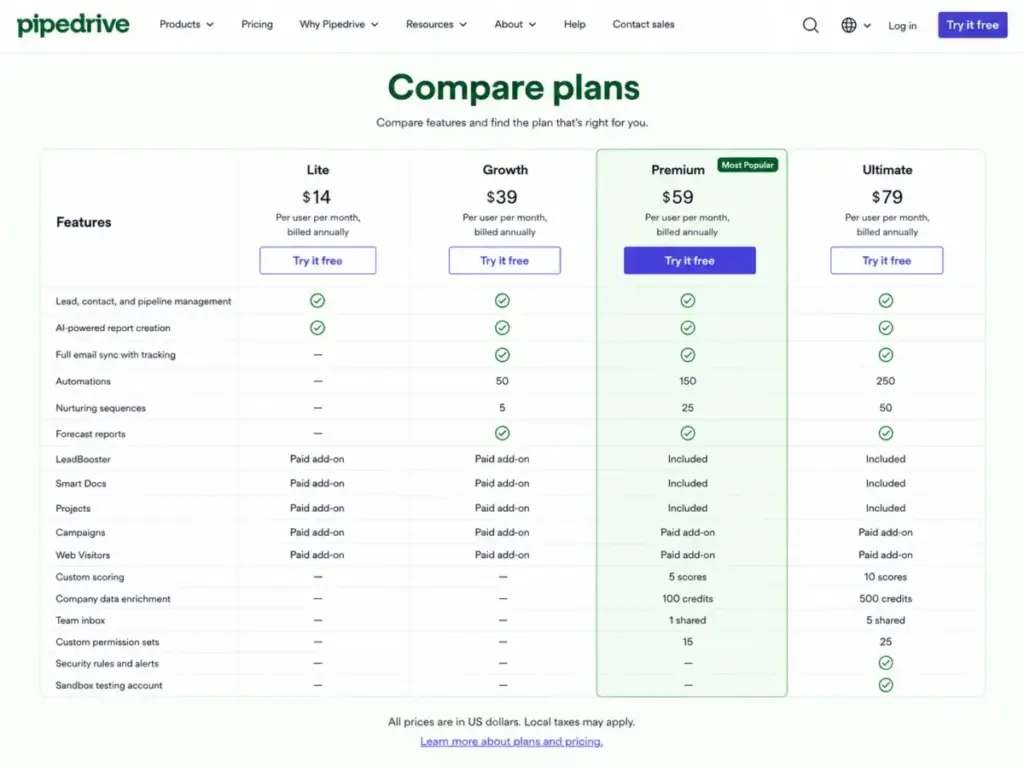
Feature Gates: What You Actually Get by Plan
| Feature | Lite | Growth | Premium | Ultimate |
|---|---|---|---|---|
| Lead, contact, pipeline management | Yes | Yes | Yes | Yes |
| AI-powered report creation | Yes | Yes | Yes | Yes |
| Full email sync with tracking | No | Yes | Yes | Yes |
| Automations | No | 50 | 150 | 250 |
| Nurturing sequences | No | 5 | 25 | 50 |
| Forecast reports | No | Yes | Yes | Yes |
| LeadBooster | Paid add-on | Paid add-on | Included | Included |
| Smart Docs | Paid add-on | Paid add-on | Included | Included |
| Projects | Paid add-on | Paid add-on | Included | Included |
| Campaigns | Paid add-on | Paid add-on | Paid add-on | Paid add-on |
| Web Visitors | Paid add-on | Paid add-on | Paid add-on | Paid add-on |
| Custom scoring | No | No | 5 scores | 10 scores |
| Company data enrichment | No | No | 100 credits | 500 credits |
| Team inbox | No | No | 1 shared | 5 shared |
| Custom permission sets | No | No | 15 | 25 |
| Security rules and alerts | No | No | No | Yes |
| Sandbox testing account | No | No | No | Yes |
What this means: The feature gate that forces the most upgrades is email sync, which moves teams from Lite to Growth. The second is the add-on bundle: if you need LeadBooster, Smart Docs, and Projects, buying them separately on Growth costs more than upgrading to Premium. The third is security governance, which only exists on Ultimate.
Hidden Costs and Add-ons Nobody Mentions
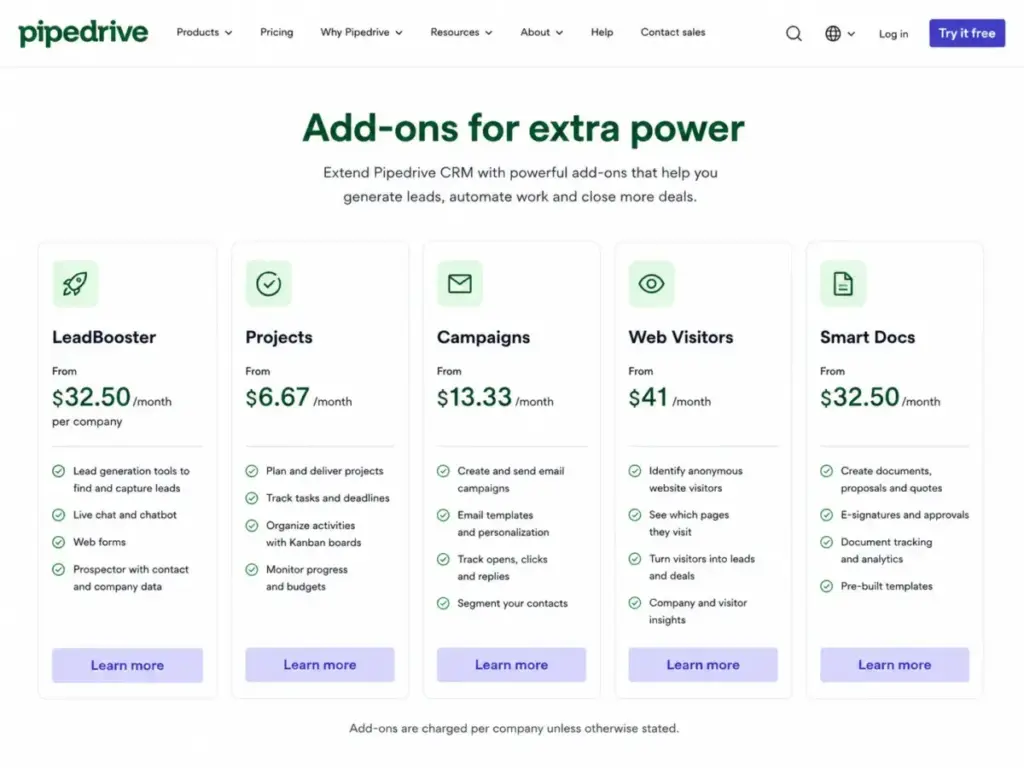
| Hidden Cost | Amount | When It Hits |
|---|---|---|
| LeadBooster (Lite/Growth) | From $32.50/month per company | When you need chatbot, live chat, prospector, or web forms for lead generation |
| Projects (Lite/Growth) | From $6.67/month per company | When you need post-sale project tracking with kanban boards |
| Smart Docs (Lite/Growth) | From $32.50/month per company | When you need document templates, autofill, and e-signatures |
| Campaigns (all plans) | From $13.33/month | When you need CRM-connected email marketing and segmentation |
| Web Visitors (all plans) | From $41/month | When you need website visitor identification and tracking |
| Feature top-ups | Not publicly listed | When you exceed API tokens, leads/deals, reports, automations, or teams |
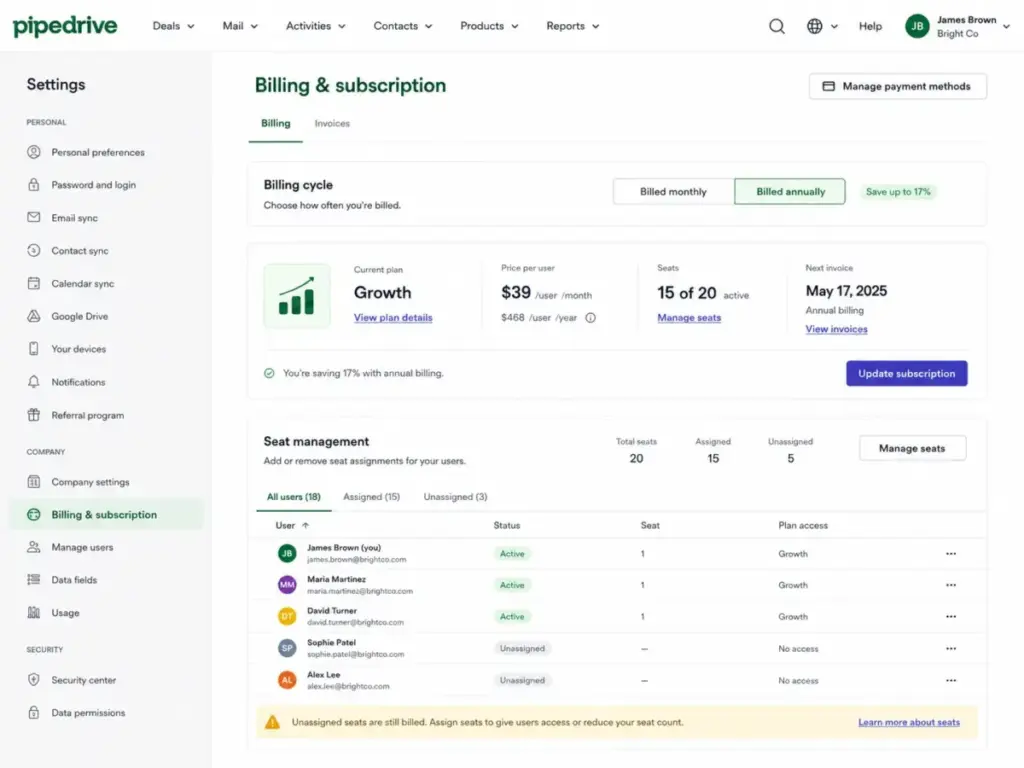
| Unassigned seats | Charged at plan rate | Pipedrive charges per seat whether assigned to a user or not |
| Taxes | VAT excluded; varies by jurisdiction | At checkout depending on billing country |
| Implementation | Free for plans over $400/year; partner services may cost extra | When you need migration, setup, or customization assistance |
The top-up system deserves extra attention. Pipedrive allows you to purchase additional capacity for API tokens (+250,000 per top-up, up to 10 top-ups from Growth) and leads/deals (+25,000 per top-up, up to 10 top-ups from Growth). Exact top-up prices are not publicly listed and are shown only in the Billing checkout. If your team relies heavily on API integrations or generates high lead volumes, ask for top-up pricing before committing to a plan.
Unassigned seat billing: Pipedrive charges for every seat on your subscription, whether that seat is assigned to an active user or sitting empty. Audit your seat count before every renewal. I have seen teams pay for 15 seats when only 11 are active because nobody remembered to remove the departures.
Which Pipedrive Plan Should You Avoid?
Avoid Lite if you already know you need email sync, workflow automations, nurturing sequences, or forecasting. Those features do not exist on Lite. You will upgrade to Growth within the first month, and the only thing Lite accomplished was adding a migration step.
Lite makes sense for one scenario: a freelancer or solo agent who genuinely only needs a visual deal pipeline and basic contact management without any email sync or automation. That is a narrow use case.
Pipedrive Pricing vs Competitors
| CRM | Starting Price (Annual) | 10-User Cost (Annual Billing) | Free Plan | Best For |
|---|---|---|---|---|
| Pipedrive Growth | $39/user/month | $390/month | No (14-day trial) | Visual pipeline-first sales teams |
| HubSpot Sales Hub Starter | $20/user/month list | $200/month list | Yes (free CRM) | Teams wanting marketing + sales under one roof |
| Zoho CRM Standard | $14/user/month | $140/month | Yes (3 users) | Budget-conscious teams needing deep customization |
| Salesforce Starter Suite | $25/user/month | $250/month | No (30-day trial) | Teams planning to scale to enterprise |
| Freshsales Growth | $9/user/month | $90/month | Yes (3 users) | Teams wanting the lowest per-seat cost with AI |
| monday CRM Basic | ~$12/seat/month | ~$120/month | No (14-day trial) | Teams already using monday.com for project management |
What this means: Pipedrive is not the cheapest CRM at 10 users. Freshsales and Zoho both cost less per seat. But Pipedrive wins on pipeline UX and adoption speed for sales-first teams. If your team prioritizes a clean visual pipeline over low cost, the premium is justified. If budget is the deciding factor and you can work with a different UI, Zoho CRM and Freshsales deliver more features per dollar.
Compared with Salesforce pricing, Pipedrive is simpler and cheaper at every team size under 50 users. Compared with HubSpot pricing, Pipedrive avoids the contact-based billing trap and the mandatory onboarding fees that HubSpot charges on Professional and above.
Is Pipedrive Worth the Price?
Worth it if:
- You are a sales-led SMB with 3 to 50 reps that values fast adoption and visual pipeline management
- Your team needs email sync, automations, and sequences without Salesforce-level complexity
- You want bundled LeadBooster, Projects, and Smart Docs on Premium without buying each separately
- You prefer per-seat billing without contact-volume penalties
Not worth it if:
- You need a free CRM long-term (consider HubSpot Free or Zoho CRM free tier)
- You need built-in email marketing without a paid Campaigns add-on
- You need deep enterprise customization at a lower per-seat cost (consider Zoho CRM)
- Your budget is under $10/user/month (consider Freshsales Growth at $9)
How to Avoid Overpaying for Pipedrive
- Start on Growth, not Lite. Lite lacks the features most sales teams need. Skipping it avoids a forced upgrade and migration hassle within 30 days.
- Calculate the add-on math before choosing Growth vs Premium. If you need LeadBooster, Smart Docs, and Projects on Growth, add up the separate costs. If the total exceeds the $20/user Premium upgrade, switch to Premium.
- Pay annually. The savings range from $10 to $20 per user per month depending on the plan. At 10 users, that is $1,200 to $2,400 per year.
- Audit seats quarterly. Pipedrive charges for unassigned seats. Remove departed team members before your next billing cycle.
- Ask about top-up pricing before committing. If your team is integration-heavy or generates high lead volumes, know the top-up costs for API tokens and leads/deals before you hit the ceiling.
- Do not upgrade to Ultimate for the name. Ultimate is worth it only if you need security governance, sandbox testing, or exceed Premium’s limits on teams, visibility groups, and custom fields. For most teams under 50 users, Premium is the better value.
- Use the 14-day trial strategically. The trial includes access to premium features like LeadBooster, Smart Docs, and Projects. Test those features during the trial to decide whether you need Premium or can work with Growth.
Pipedrive Pricing FAQ
How much does Pipedrive cost in 2026?
Pipedrive costs $14 to $79 per user per month billed annually across four plans: Lite ($14), Growth ($39), Premium ($59), and Ultimate ($79). Monthly billing is higher. Add-ons like LeadBooster, Campaigns, and Web Visitors cost extra on top of the base plan. Pricing verified May 2026 from the official Pipedrive pricing page.
Does Pipedrive have a free plan?
No. Pipedrive does not offer a permanent free CRM plan. It provides a 14-day free trial with no credit card required. The trial includes access to CRM features plus premium LeadBooster, Smart Docs, and Projects features, subject to supplemental terms. After the trial, you must convert to a paid plan.
Is Pipedrive charged per user?
Yes. Pipedrive uses per-seat billing. Every seat on your subscription is charged whether assigned to an active user or not. There is no public seat minimum for any plan.
Which Pipedrive plan includes LeadBooster?
LeadBooster is included on Premium and Ultimate. On Lite and Growth, LeadBooster is a paid add-on starting at $32.50 per month per company. The same inclusion rule applies to Projects and Smart Docs.
What are Pipedrive hidden costs?
The main hidden costs are add-ons on lower tiers (LeadBooster, Projects, Smart Docs, Campaigns, Web Visitors), feature top-ups for API tokens and lead volume (prices not publicly listed), unassigned seat charges, and taxes. Implementation is free for plans over $400/year, but partner-led customization or migration may cost extra.
Is Pipedrive cheaper than Salesforce?
Yes, at comparable tiers. Pipedrive Growth at 10 users costs $390/month billed annually. Salesforce Starter Suite at 10 users costs $250/month, but most teams need Salesforce Professional ($80/user) for meaningful automation, which runs $800/month. Pipedrive is simpler and cheaper for teams that do not need Salesforce-level customization.
Is Pipedrive cheaper than HubSpot?
At entry level, HubSpot’s free CRM costs nothing. But HubSpot Sales Hub Professional costs $100/seat/month with mandatory onboarding fees. Pipedrive Growth at $39/user avoids the contact-based billing escalation and onboarding fees that push HubSpot costs higher at scale. For a comparison, see our HubSpot vs Pipedrive analysis.
Should I pay annually for Pipedrive?
Yes, if you are committed beyond 3 months. Annual billing saves up to 42% compared with monthly billing. At 10 users on Growth, the annual saving is approximately $1,200 per year. Confirm the exact monthly price in Pipedrive checkout since the official pricing page shows annual rates only.
What happens if I hit Pipedrive usage limits?
You can either upgrade to a higher plan or purchase top-ups. Top-ups are available from the Growth plan onward for API tokens (+250,000 per top-up, up to 10) and leads/deals (+25,000 per top-up, up to 10). Top-up prices are shown in the Billing checkout and are not publicly listed. If you frequently exceed limits, upgrading to the next plan usually provides better value than stacking top-ups.
Which Pipedrive plan is best for small businesses?
Growth at $39/user/month billed annually is the best plan for most small businesses with 3 to 10 users. It unlocks email sync, automations, sequences, forecasting, and live chat support. Lite is only suitable if you need a basic pipeline tracker without email integration or automation. For teams needing LeadBooster and Smart Docs, Premium at $59/user is the better value compared with buying add-ons separately on Growth.
Pricing data in this article was verified on May 2026 from the official Pipedrive pricing page. Annual plan prices are confirmed from the official source. Monthly prices are third-party validated and should be confirmed in Pipedrive checkout before purchase. Prices may change. Check the official pricing page for the most current rates.