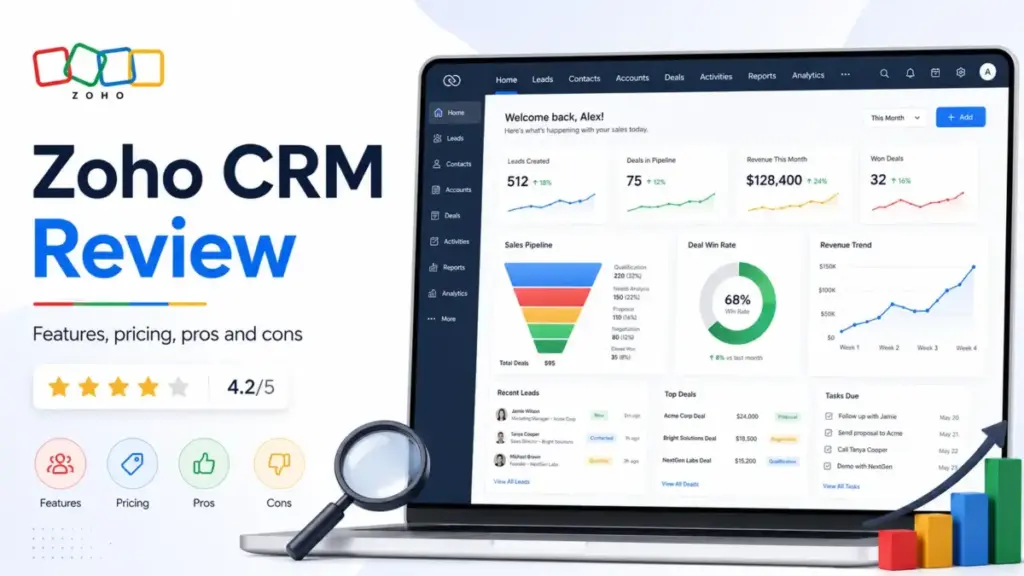
Most sales teams shopping for CRM software in 2026 want two things: more pipeline control and less cost. This Zoho CRM review covers whether Zoho delivers on both promises. The short answer: yes, but with a real trade-off. Zoho CRM packs lead management, deal tracking, workflow automation, Blueprint process design, CPQ, reporting, AI, portals, and a full ecosystem of connected Zoho apps into plans that start at $14/user/month.
That is a serious amount of capability for the price. The catch is setup time. Zoho CRM is a system you configure, not a tool you activate in an afternoon. Teams that assign an admin and invest in proper setup get strong returns. Teams that expect plug-and-play simplicity will hit friction in week one. I scored it using the SaaSZap review methodology, and the breakdown follows.
Quick Verdict
Zoho CRM scores 8.4/10 because it offers more CRM capability per dollar than most competitors, but charges buyers in setup time instead of subscription fees. It is one of the best CRM software options for teams that need depth over speed. The verdict table below captures the key decision points.
| Category | Verdict |
|---|---|
| Score | 8.4/10 |
| Best For | 5-50 person sales teams that need deep CRM features, Zoho ecosystem users, and teams with a dedicated CRM admin |
| Not For | Solo consultants, teams with no technical owner, buyers who want same-day setup |
| Best Plan | Professional ($23/user/month annually) for most sales teams; Enterprise ($40/user/month) if Zia AI and portals matter |
| Biggest Strength | Feature density at a lower price point than HubSpot Sales Hub, Salesforce, or Dynamics 365 |
| Biggest Weakness | Setup complexity and UI density require admin patience and configuration time |
| Best Alternative | HubSpot CRM for easier onboarding; Pipedrive for simple pipeline management |
The 60-Second Version
Zoho CRM gives a 12-person sales team lead management, deal pipelines, workflow automation, Blueprint, cadences, forecasting, reporting, and mobile CRM at $23/user/month. A comparable HubSpot Sales Hub setup costs more per seat for similar automation depth. Salesforce Sales Cloud costs significantly more and assumes a larger admin team. Pipedrive is simpler but shallower.
The real cost of Zoho is not the subscription. It is the 2-4 weeks a team needs to configure modules, layouts, automations, reports, and permissions before daily use feels smooth. If a buyer accepts that trade, Zoho CRM is one of the strongest value-for-money CRMs available.
Score Breakdown
| Category | Score |
|---|---|
| Features | 9.1/10 |
| Pricing Value | 8.8/10 |
| Automation Depth | 8.6/10 |
| Ease of Use | 7.2/10 |
| Reporting & Analytics | 8.1/10 |
| AI Capability | 7.8/10 |
| Integrations | 8.5/10 |
| Support | 7.0/10 |
| Scalability | 8.3/10 |
| Overall | 8.4/10 |
What Is Zoho CRM?
Zoho CRM is an AI-powered customer relationship management platform built for sales, marketing, and customer operations teams. It is part of the broader Zoho ecosystem, which includes Zoho Books (accounting), Zoho Desk (support), Zoho Campaigns (email marketing), Zoho Analytics (BI), and Zoho Projects (task management). Zoho says the CRM is used by over 250,000 businesses worldwide.
The platform handles leads, contacts, accounts, deals, activities, forecasts, reports, and automations. It also includes features that many CRMs charge extra for: CPQ (configure-price-quote), inventory management, customer portals, territory management, and an AI assistant called Zia. For teams already running Zoho apps, CRM connects natively without third-party middleware. For teams outside the Zoho ecosystem, the Zoho Marketplace offers extensions for Google Workspace, Microsoft 365, Slack, telephony providers, and payment tools.
Zoho CRM Features That Matter
Zoho CRM’s feature list is wide enough to cover most SMB sales workflows without requiring add-on tools. That width is what makes it a strong value proposition. It is also what makes initial setup take longer than simpler CRMs like Pipedrive or Freshsales.
Zoho CRM Lead and Deal Management
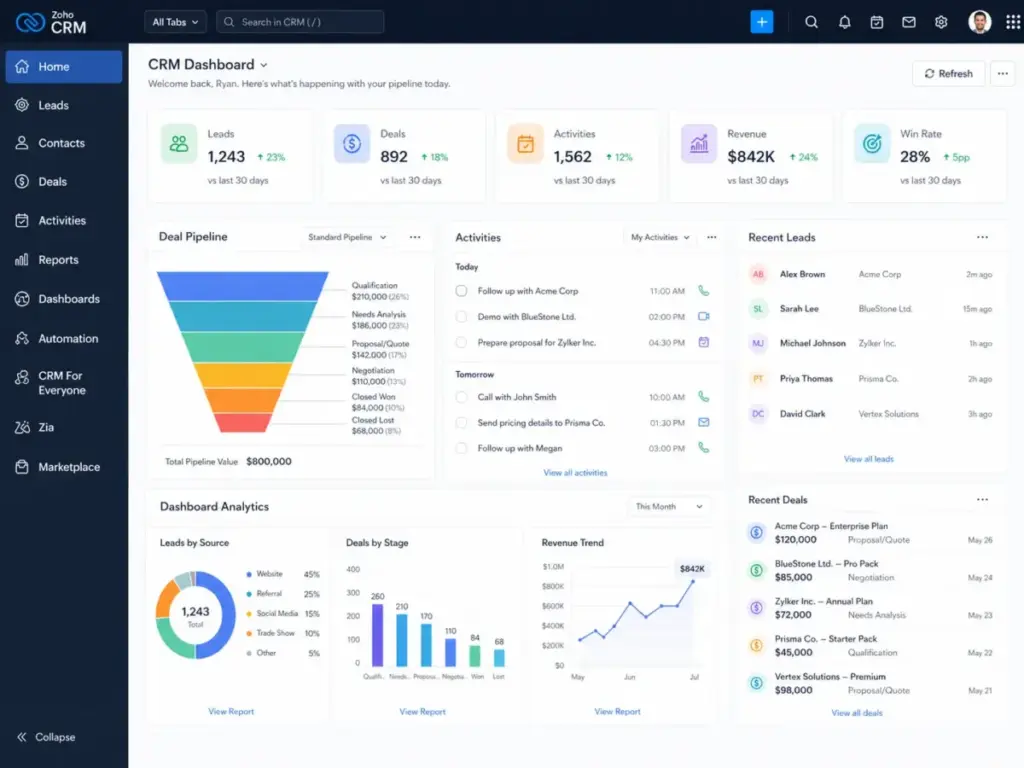
Leads, contacts, accounts, and deals form the core data model. Sales teams can customize fields, layouts, and modules per team or department. Assignment rules distribute incoming leads automatically. Web forms capture leads from websites. Cadences allow multichannel follow-up sequences across email, phone, and tasks. Deal pipelines support multiple stages with probability scoring, and pipeline views can be customized per sales process.
Zoho CRM Automation and Blueprint
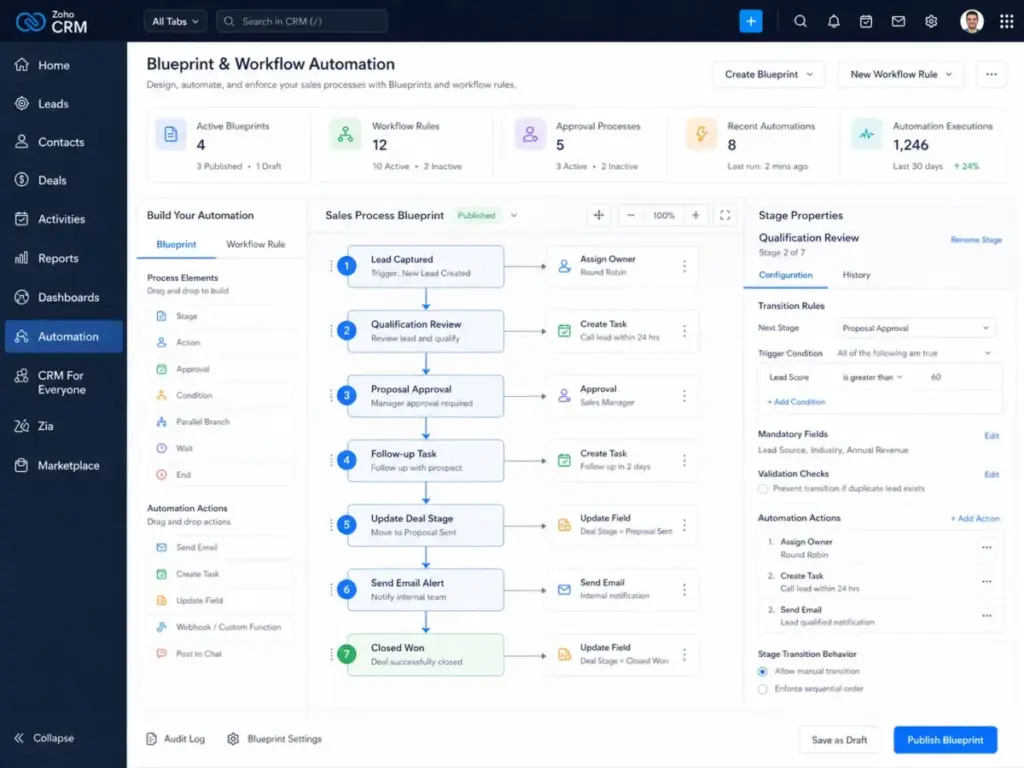
Workflow rules trigger actions based on record conditions: field updates, email alerts, task creation, webhook calls, and custom functions. Blueprint adds process automation by defining exact steps a record must follow before moving to the next stage. This is useful for teams that need compliance or process consistency in deal progression. Professional plans and above include Blueprint, widgets, and inventory management. Assignment rules, approval processes, and scoring rules add further automation layers.
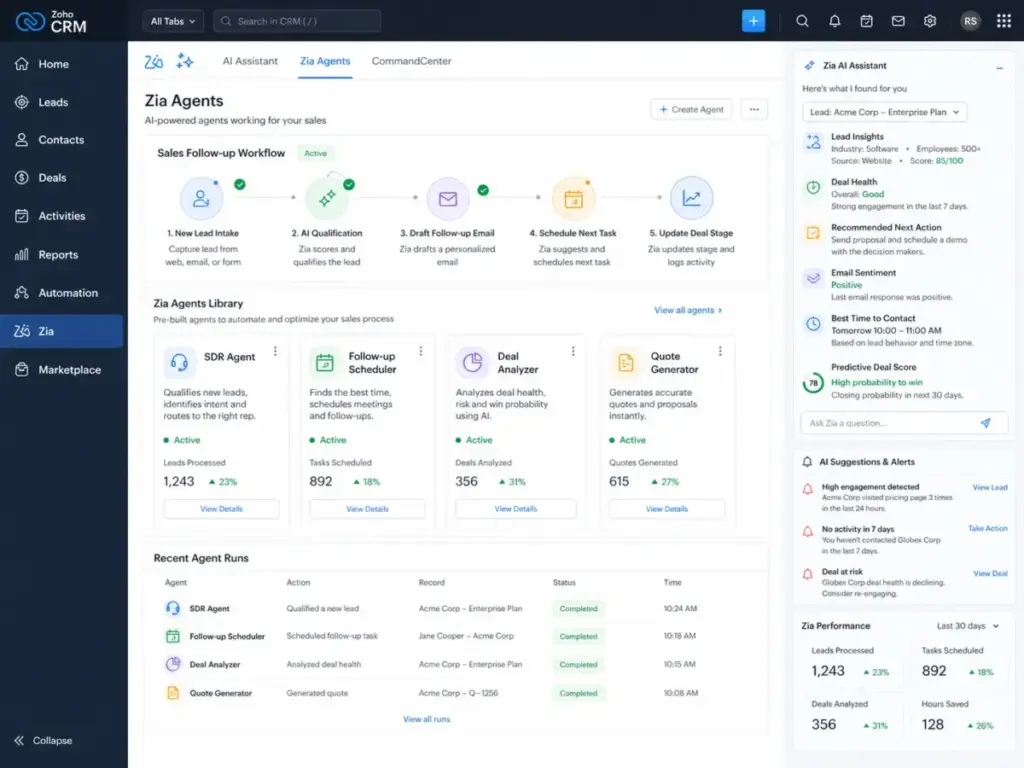
Zoho CRM Zia and AI Agents
Zia is Zoho’s AI assistant. It provides lead and deal predictions, email sentiment analysis, anomaly detection, best-time-to-contact suggestions, and data enrichment. The Q1 2026 update added the Zia Formula Expression Generator, which turns plain-language instructions into formula expressions. Smart Prompts now include a record assistant and template assistant for CRM context and email templates.
Zia Agents are pre-built or custom AI agents for sales workflows. Examples include SDR agents, sales coach agents, follow-up schedulers, deal analyzers, quote generators, revenue growth specialists, and deal closure reminders.
Important gate: Zia AI features are mainly available on Enterprise ($40/user/month) and Ultimate ($52/user/month) plans. Zia Agents are available on Enterprise and above, currently across US and India data centers. Buyers on Standard or Professional plans will not access these AI capabilities.
Zoho CRM Reporting and Analytics
Reports and dashboards ship across all paid plans, but depth increases with tier. Standard includes basic reports and dashboards. Enterprise and Ultimate include Zoho Analytics Premium at no extra cost. Custom report builders, scheduled reports, and KPI widgets allow sales managers to track pipeline velocity, conversion rates, rep performance, and forecast accuracy.
For context on what makes forecast accuracy high or low in practice, our sales forecasting guide explains how data hygiene, stage weighting, and methodology choice interact to determine how much you can trust the number your CRM produces.Reporting flexibility is strong, but configuring useful dashboards takes effort. Teams should plan for 1-2 days of report setup.
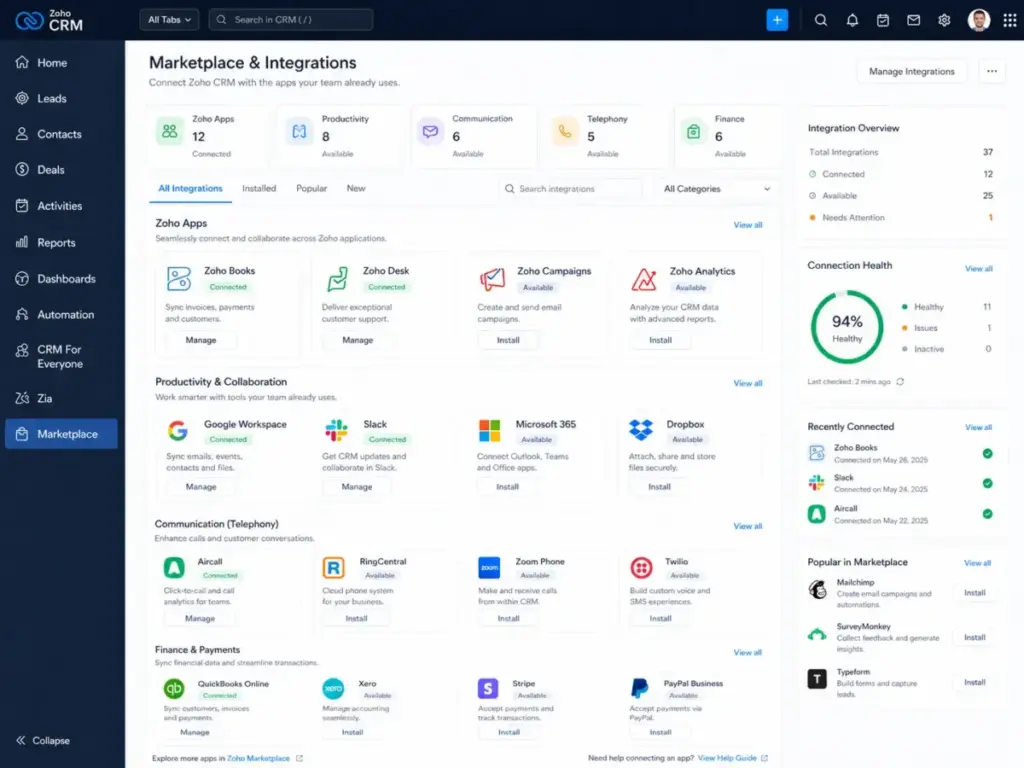
Zoho CRM Integrations and Marketplace
Zoho CRM connects natively with Zoho Books, Zoho Desk, Zoho Campaigns, and Zoho Analytics. The Zoho Marketplace lists extensions for Google Workspace, Microsoft 365, Slack, Mailchimp, QuickBooks, telephony providers, and more. Note: some Marketplace extensions are not available on Standard and Professional editions. WhatsApp Business integration requires credits for sending messages.
API access uses a v8 REST API with a rolling 24-hour window for rate limits. Insert, update, and upsert operations allow a maximum of 100 records per API call. Add/remove tags support up to 500 records per call. Technical teams should review these limits before building integrations.
Zoho CRM Security and Admin Controls
Security controls include role-based access, profiles, field-level security, audit logs, IP restrictions, two-factor authentication, and encryption at rest. Compliance coverage includes GDPR, HIPAA support, and SOC 2 Type II. Territory management (Enterprise+) adds geographic or segment-based data access controls. For regulated industries, these controls matter during vendor evaluation.
Zoho CRM User Experience
Zoho CRM’s interface is functional but dense, and that density is the primary source of its learning curve. New users face a navigation panel with many modules, submenus, and configuration paths. This is not a design flaw. It reflects the product’s depth. But it means day-one adoption is slower than with Pipedrive or HubSpot.
Canvas Design Studio lets admins redesign record layouts with drag-and-drop, which helps reduce visual clutter for specific teams. The CRM For Everyone UI, which Zoho has started rolling out in phases during 2026, aims to simplify navigation for non-sales users. The Q1 2026 update also introduced Workqueue, a centralized view for tasks, activities, calls, appointments, and assigned records.
Mobile CRM supports offline access, check-ins, voice notes, and card scanning. Field sales teams with 20+ reps can use territories and check-in tracking.
As one G2 reviewer noted, Zoho CRM “brings sales, customer data, and workflow automation into one place” (Bill L., Vice President of Sales and Operations, G2, April 24, 2026). The flip side is real: a verified Capterra reviewer who migrated from HubSpot described the “transition to Zoho difficult and cumbersome.” Both observations are accurate. Zoho’s value appears after configuration, not before.
Zoho CRM Pricing and Hidden Costs
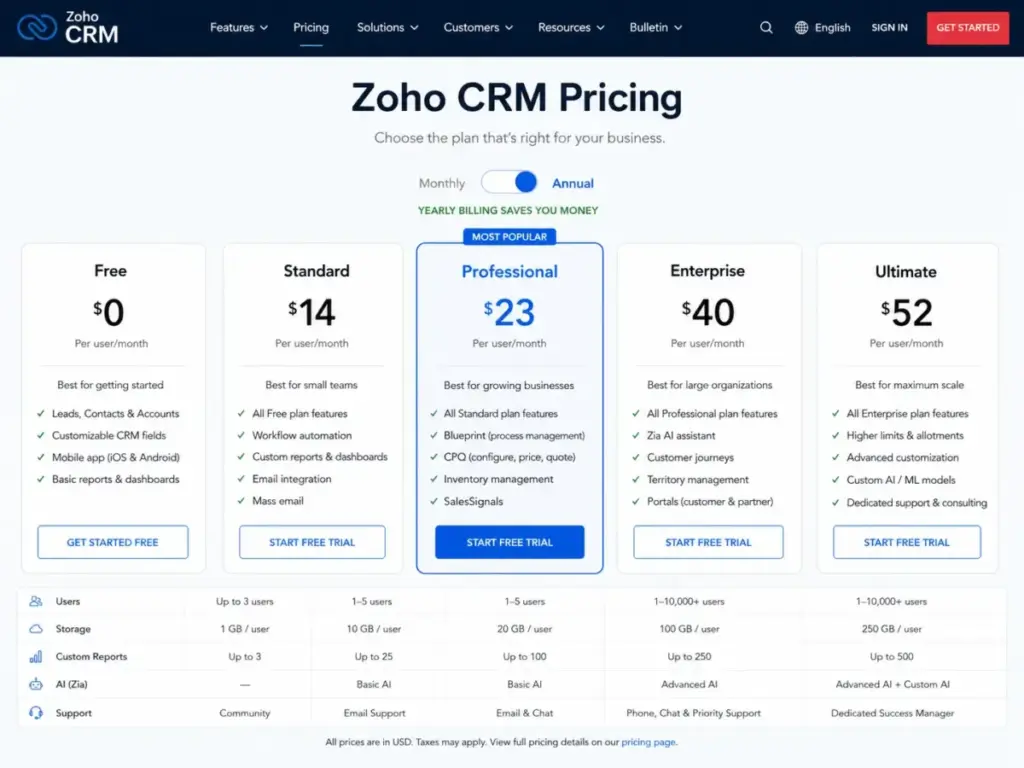
Zoho CRM’s published pricing is competitive, but the full cost of ownership includes support plans, storage, and implementation time that the pricing page does not emphasize. Understanding the total cost matters for budget planning. All prices below are verified from Zoho’s official pricing page as of Q1 2026.
Note: pricing can localize by region. Verify on Zoho’s pricing page before purchase.
| Plan | Annual (per user/month) | Monthly (per user/month) | Best Fit | Key Gates |
|---|---|---|---|---|
| Free | $0 | $0 | Up to 3 users | Basic leads, documents, mobile apps |
| Standard | $14 | $20 | Small teams replacing spreadsheets | Workflows, assignment rules, reports, dashboards, cadences |
| Professional | $23 | $35 | Teams needing automation and inventory | CPQ, Blueprint, widgets, inventory, Google Ads integration |
| Enterprise | $40 | $50 | Advanced customization and AI | Zia, journeys, territory management, custom functions, portals |
| Ultimate | $52 | $65 | Larger orgs needing higher limits | Enhanced limits, consulting, migration help, custom AI/ML, data preparation |
What Zoho CRM’s Pricing Page Does Not Tell You
The subscription price is the floor, not the ceiling. Here is what adds to total cost:
| Hidden Cost Item | Detail |
|---|---|
| Premium Support | 20% of subscription fee (support plans) |
| Enterprise Support | 25% of annual subscription fee, minimum 50 user licenses |
| Additional file storage | Available as add-on; base storage varies by plan |
| Additional data storage | Available as add-on |
| Data backup | Available as paid add-on |
| Portal users | Additional cost beyond included portal seats |
| WhatsApp credits | Required for outbound WhatsApp messages |
| Online training | Available as paid add-on |
| Implementation time | 2-4 weeks of internal admin effort (not billed by Zoho, but a real cost) |
Example cost scenario: A 15-person team on Enterprise ($40/user/month annual) pays $600/month base. Adding Premium Support at 20% adds $120/month. That is $720/month, or $8,640/year, before storage or portal add-ons. Compare that to the $600/month headline, and the gap is meaningful for budget-conscious SMBs.
Best plan for most buyers: Professional at $23/user/month annually. It includes Blueprint, CPQ, widgets, and inventory management. Most 6-20 person sales teams will get strong value here without paying for Enterprise AI features they may not use immediately. Move to Enterprise when Zia, portals, territories, or journey orchestration become necessary.
For a deeper pricing breakdown, see our full Zoho CRM pricing analysis.
What Zoho CRM Does Not Tell You
Every CRM has operational realities that the marketing page skips, and Zoho CRM’s biggest unspoken reality is the admin investment it requires. This is not a complaint. It is a planning input. Teams that know this upfront succeed. Teams that do not know it get frustrated.
The Admin Capacity Test
Before choosing Zoho CRM, answer these five questions:
- Who owns CRM fields and layouts?
- Who maintains workflow automations?
- Who audits duplicate records?
- Who handles integration failures?
- Who manages roles, profiles, and permissions?
If the answer to most of these is “nobody,” Zoho CRM is a risky choice. The platform assumes someone will configure and maintain it. A best CRM for small business with less depth but faster setup may serve better. If you operate in property sales or brokerage specifically, industry-built tools may outperform a horizontal platform on day one — see our best real estate CRMs guide for a ranked comparison.
The First 30 Days With Zoho CRM
| Week | Focus | Effort |
|---|---|---|
| Week 1 | Account setup, user invites, basic field/layout customization, data import (leads, contacts, deals) | 6-10 hours admin time |
| Week 2 | Pipeline stages, deal probability, basic workflow rules, assignment rules, email templates | 4-8 hours admin time |
| Week 3 | Reports, dashboards, cadence setup, integration with email/calendar, Zoho app connections | 4-6 hours admin time |
| Week 4 | Team training, feedback collection, layout adjustments, first automation audit | 4-6 hours admin + team time |
Total first-month investment: roughly 18-30 hours of admin effort. This is significantly more than Pipedrive (often usable in day one) or HubSpot (often configured in a few days). But the result is a more tailored system. [EDITOR TEST: setup time for 10-contact import]
Feature Gates That Surprise Buyers
- Zia AI predictions, scoring, and agents require Enterprise or Ultimate.
- Survey campaigns require Enterprise or above.
- Some Marketplace extensions are edition-gated to higher tiers.
- Zoho Analytics Premium is included free only on higher editions.
- WhatsApp Business outbound messages require purchased credits.
Support Variance
Standard support is included, but response times vary. In user reviews across G2 and Capterra, support quality appears inconsistent. Some users report fast, knowledgeable responses. Others report delays and ticket routing issues. Premium Support (20% of subscription) adds faster response SLAs. Enterprise Support (25%, 50-user minimum) adds a dedicated account manager. Budget-conscious teams should factor support costs into total ownership math.
Software Advice summarizes user sentiment as “exceptional value and deep customization” (Software Advice review summary), which aligns with the pattern: Zoho CRM delivers strong outcomes for teams that invest in configuration, but the path to those outcomes is not always smooth.
Zoho CRM Pros and Cons
Zoho CRM’s strengths and weaknesses reflect the same root cause: it tries to do a lot, and it succeeds, but at the cost of simplicity. Here are the specifics based on pricing analysis, feature documentation, and user review patterns.
- Deep feature set at a competitive price. Professional at $23/user/month includes Blueprint, CPQ, inventory, and cadences. Few CRMs match this depth at this price.
- Native Zoho ecosystem. Teams using Zoho Books, Desk, Campaigns, or Analytics get native integration without middleware.
- Strong automation. Workflow rules, assignment rules, scoring rules, approval processes, and Blueprint cover most SMB automation needs.
- Zia AI and Agents (Enterprise+). Lead/deal predictions, email sentiment, formula generator, and pre-built AI agents add value for teams on higher tiers.
- Canvas Design Studio. Custom record layouts let admins reduce UI clutter for different teams.
- GDPR, HIPAA, SOC 2 compliance support. Regulated industries get baseline compliance coverage.
- Free plan for micro-teams. Up to 3 users can use basic CRM at zero cost.
- Setup requires dedicated admin time. 2-4 weeks of configuration before the system feels productive.
- Interface density creates a learning curve. Many modules, settings, and navigation paths overwhelm new users.
- Best AI features are gated to Enterprise ($40+/user/month). Standard and Professional buyers miss Zia predictions, agents, and journeys.
- Support quality is inconsistent. User reviews show variable response times and resolution quality on standard support.
- Premium/Enterprise Support adds 20-25% cost. Meaningful budget impact for cost-conscious SMBs.
- Some Marketplace extensions are edition-gated. Not all integrations are available on lower tiers.
- Migration from other CRMs can be difficult. Users migrating from HubSpot report adjustment friction.
- API limits matter for technical teams. 100 records per insert/update/upsert call requires batch planning.
Zoho CRM Alternatives
No single CRM fits every team. Zoho CRM wins on depth and cost, but other tools win on simplicity, marketing, or enterprise governance. The decision depends on team size, admin capacity, budget, and workflow priorities. For a full list, see our Zoho CRM alternatives guide.
Zoho CRM vs HubSpot
HubSpot CRM is the better choice when ease of use, inbound marketing tools, and fast onboarding matter more than cost control. HubSpot’s free tier is generous, and its UI is cleaner on day one. Zoho CRM is the better choice when a team wants deeper automation, lower per-user cost at scale, and native Zoho ecosystem integration. For a detailed comparison, see HubSpot vs Zoho CRM.
Zoho CRM vs Salesforce
Salesforce CRM review covers the enterprise standard for sales operations. Salesforce offers deeper customization, a larger partner ecosystem, and more mature governance tools. It also costs significantly more and assumes a dedicated admin team. Zoho CRM is better for SMBs that want similar capability categories at a fraction of the price. Compare them directly in our Zoho CRM vs Salesforce analysis.
Zoho CRM vs Pipedrive
Pipedrive wins when a team wants the cleanest visual pipeline with minimal configuration. It is faster to set up and easier for reps who live in a pipeline board. Zoho CRM wins when a team needs automation depth, ecosystem coverage, AI, reporting, CPQ, or multi-department use cases that go beyond pipeline management.
Zoho CRM vs Freshsales
Freshsales offers built-in phone, email, and chat with a lighter setup experience. It suits teams that want a sales CRM with communication tools baked in. Zoho CRM is stronger for teams that need broader customization, a larger ecosystem, and more advanced automation and reporting.
Decision Matrix: Choose Your CRM
| Scenario | Best Choice |
|---|---|
| Want deep features at low cost with admin capacity | Zoho CRM |
| Want the easiest onboarding and inbound marketing | HubSpot CRM |
| Want a simple visual pipeline, minimal config | Pipedrive |
| Need enterprise governance, large admin bench, budget available | Salesforce Sales Cloud |
| Want lighter CRM with built-in phone and chat | Freshsales |
| Already run Microsoft 365, Teams, Outlook deeply | Microsoft Dynamics 365 Sales |
| Already use Zoho Books, Desk, Campaigns, Analytics | Zoho CRM (strongest fit) |
| 3-person team wanting same-day setup | HubSpot Free or Pipedrive |
[COMPARISON VISUAL: Zoho CRM vs HubSpot vs Salesforce vs Pipedrive vs Freshsales by best-fit use case – Place after Alternatives section]
Final Verdict: Who Should Use Zoho CRM?
Zoho CRM earns an 8.4/10 because it delivers more sales CRM capability per dollar than most alternatives, but only for buyers who accept the setup investment. It is not the easiest CRM. It is one of the most capable ones at its price point. Is Zoho CRM worth it in 2026? For the right team, absolutely.
Who Should Use Zoho CRM
| Team Profile | Why Zoho Fits |
|---|---|
| 6-person B2B services team replacing spreadsheets | Standard or Professional adds deal stages, tasks, follow-up reminders, and basic automation at $14-23/user/month |
| 12-person SaaS sales team | Professional gives Blueprint, cadences, CPQ, and workflow rules at $23/user/month |
| 20-person field sales team | Enterprise adds territories, mobile check-ins, Zia, and pipeline reports at $40/user/month |
| 30-person Zoho ecosystem company | Native connections to Books, Desk, Campaigns, Analytics reduce middleware cost |
| 50-person sales org with a CRM admin | Enterprise or Ultimate with full layout, automation, and permission control |
Who Should Not Use Zoho CRM
| Team Profile | Better Option |
|---|---|
| 3-person team wanting CRM running in one afternoon | HubSpot Free or Pipedrive |
| Solo consultant needing simple contact reminders | HubSpot Free or a lightweight CRM |
| Marketing-led team wanting polished inbound tools | HubSpot Marketing Hub |
| Enterprise org needing Salesforce-grade governance | Salesforce Sales Cloud |
| Team with no technical owner and no setup patience | Pipedrive or Freshsales |
Final Score: 8.4/10
Zoho CRM rewards patience. It rewards teams that assign an admin, invest in setup, and take advantage of the depth. It does not reward teams that expect instant results from a login screen.
Best plan recommendation:
- Standard ($14/user/month): Only for small teams needing basic automation and reporting.
- Professional ($23/user/month): Best starting point for most serious sales teams.
- Enterprise ($40/user/month): Best if the buyer wants Zia, portals, territories, and journey orchestration.
- Ultimate ($52/user/month): Only for teams needing higher limits, custom AI/ML, and migration support.
Zoho CRM FAQ
Here are answers to the most common questions about Zoho CRM in 2026.
Is Zoho CRM worth it in 2026?
Yes, for teams that can invest in setup. Zoho CRM offers lead management, deal tracking, automation, Blueprint, CPQ, reporting, and AI at prices lower than HubSpot Sales Hub or Salesforce. The trade-off is configuration time. Teams with admin capacity get strong returns. Teams without it should consider simpler alternatives.
Is Zoho CRM really free?
Yes, but with limits. The free plan supports up to 3 users with basic lead, contact, and deal management, documents, and mobile apps. It does not include workflow automation, Blueprint, cadences, Zia, or advanced reporting. It works for micro-teams evaluating the platform, not for serious sales operations.
How much does Zoho CRM cost?
Paid plans range from $14 to $52 per user/month on annual billing. Standard is $14, Professional is $23, Enterprise is $40, and Ultimate is $52. Monthly billing is 30-40% higher. Add Premium Support (20% of subscription) and storage/backup add-ons when calculating total cost. Local taxes may also apply.
What is the best Zoho CRM plan?
Professional at $23/user/month annually is the best value for most sales teams. It includes Blueprint, CPQ, widgets, inventory management, and Google Ads integration. Move to Enterprise when Zia AI, portals, territories, or journey orchestration become necessary.
Is Zoho CRM better than HubSpot?
It depends on priorities. Zoho CRM offers more feature depth per dollar and stronger automation at lower tiers. HubSpot offers easier onboarding, better inbound marketing tools, and a more polished UI. Choose Zoho for cost control and configuration depth. Choose HubSpot for simplicity and marketing alignment.
Is Zoho CRM better than Salesforce?
For SMBs, often yes on value. Zoho CRM costs significantly less and covers similar feature categories. Salesforce offers deeper enterprise customization, a larger partner ecosystem, and more mature governance. Choose Zoho for SMB budgets. Choose Salesforce for enterprise complexity.
Is Zoho CRM hard to use?
It is harder to set up than Pipedrive or HubSpot, but not hard to use once configured. The learning curve comes from module density, layout options, workflow configurations, and admin settings. Canvas Design Studio and the CRM For Everyone UI (rolling out in 2026) help reduce daily-use friction. Plan for 2-4 weeks of setup time.
Does Zoho CRM have AI?
Yes. Zia is Zoho CRM’s AI assistant. It provides lead/deal predictions, email sentiment analysis, anomaly detection, and best-time-to-contact suggestions. The 2026 updates added Zia Formula Expression Generator, Smart Prompts, and Zia Agents for automated sales workflows. Zia features are gated to Enterprise and Ultimate plans.
What are Zoho CRM's biggest limitations?
Setup complexity, AI feature gates, and support inconsistency are the top three. The interface is dense for new users. Zia AI requires Enterprise or above. Premium Support costs 20% extra. Some Marketplace extensions are edition-gated. API limits cap insert/update operations at 100 records per call. Migration from other CRMs can require significant adjustment.
What are the best Zoho CRM alternatives?
HubSpot CRM, Salesforce, Pipedrive, Freshsales, and Microsoft Dynamics 365 Sales. HubSpot fits marketing-led teams wanting ease of use. Salesforce fits enterprises with budget and admin resources. Pipedrive fits teams wanting simple pipeline management. Freshsales fits teams wanting built-in communications. Dynamics 365 fits Microsoft-centric organizations.