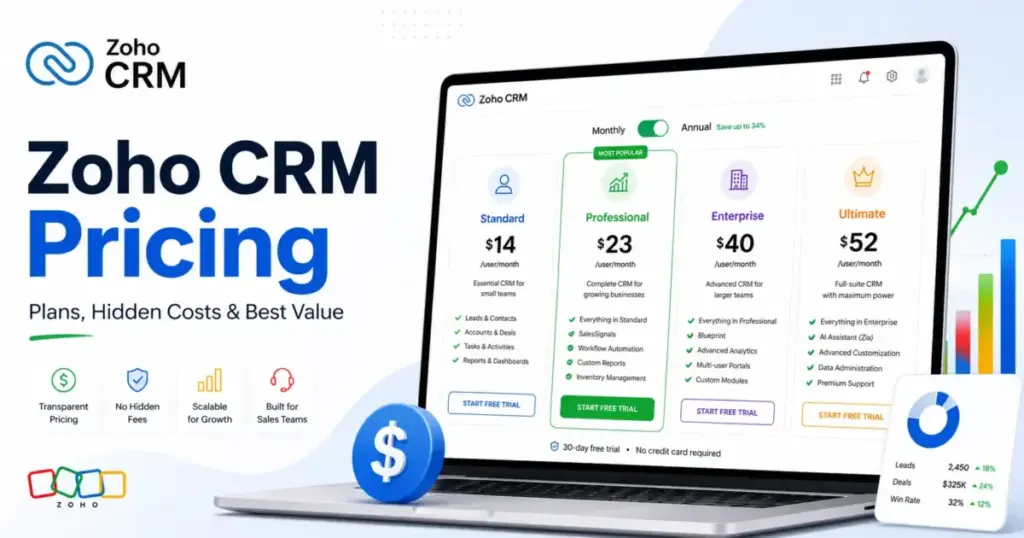
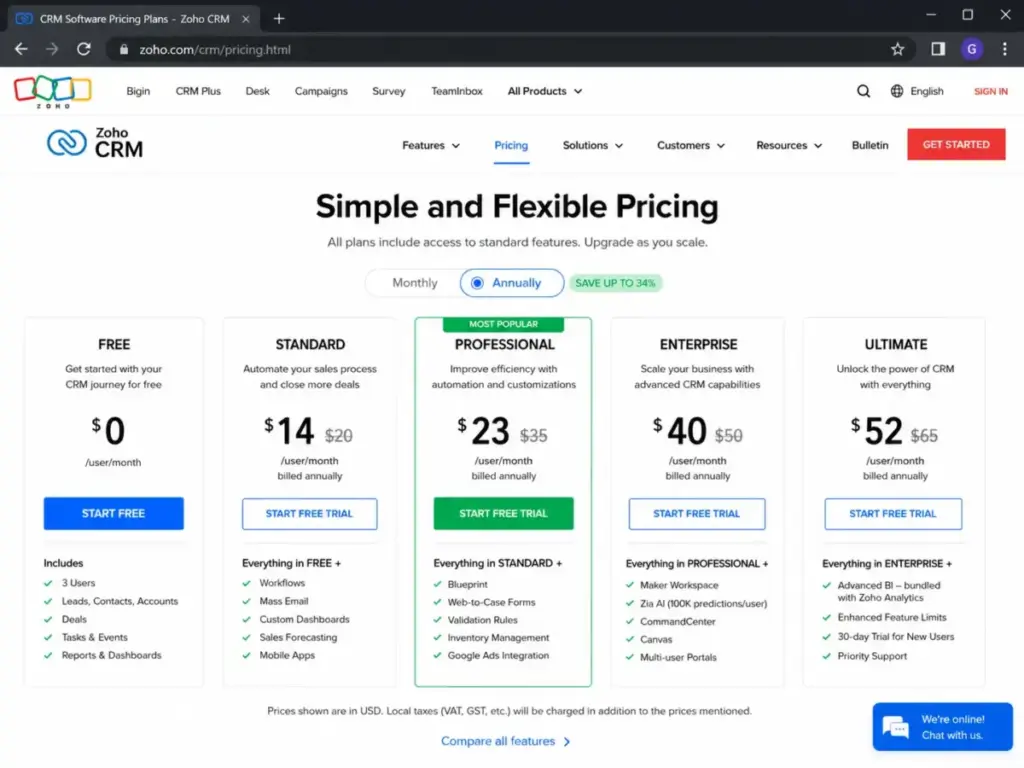
Zoho CRM pricing starts at $14/user/month billed annually. That number appears on every comparison page on the internet, and it tells you almost nothing about what you will pay. The Standard plan at that price is missing sandbox testing, email parsers, portal access, and the workflow volume most growing sales teams need within six months.
The plan most teams actually buy is Professional at $23/user/month annually, and even that locks out advanced AI, portals, and governance controls that push buyers to Enterprise at $40/user/month.
I evaluated Zoho CRM pricing using official documentation, the Zoho CRM edition-comparison PDF (USD), and verified pricing data as of May 2026. This guide breaks down every plan, the add-ons that change the bill, and the cost at 5 to 100 users so you can pick the right Zoho CRM plan without overpaying. If you are still deciding between vendors, see our roundup of the best CRM software for 2026.
Pricing note: US dollar prices in this guide come from Zoho’s official USD edition-comparison PDF, cross-checked against the public Zoho CRM pricing page as of May 2026. Zoho’s dynamic pricing page can render regional tables depending on your location. Confirm final checkout pricing with Zoho before purchasing.
| Quick Pricing Verdict | |
|---|---|
| Starting price | $0 (Free, up to 3 users) |
| Entry paid plan | $14/user/month billed annually (Standard) |
| Best plan for most teams | Professional at $23/user/month annually |
| Plan to avoid | Standard, if you already know you need advanced automation or portals |
| Free trial | 15 days, no credit card required |
| Biggest hidden cost | Premium Support at 20% of subscription fee |
| Best alternative if too expensive | Freshsales at $9/user/month annually |
| Pricing verified | May 2026 |
What this means: Zoho CRM is not expensive by list price. The buying decision comes down to whether your team hits the upgrade gates between Standard, Professional, and Enterprise, and whether support, API, portal, or storage add-ons change your total bill.
The Advertised Price vs the Real Price
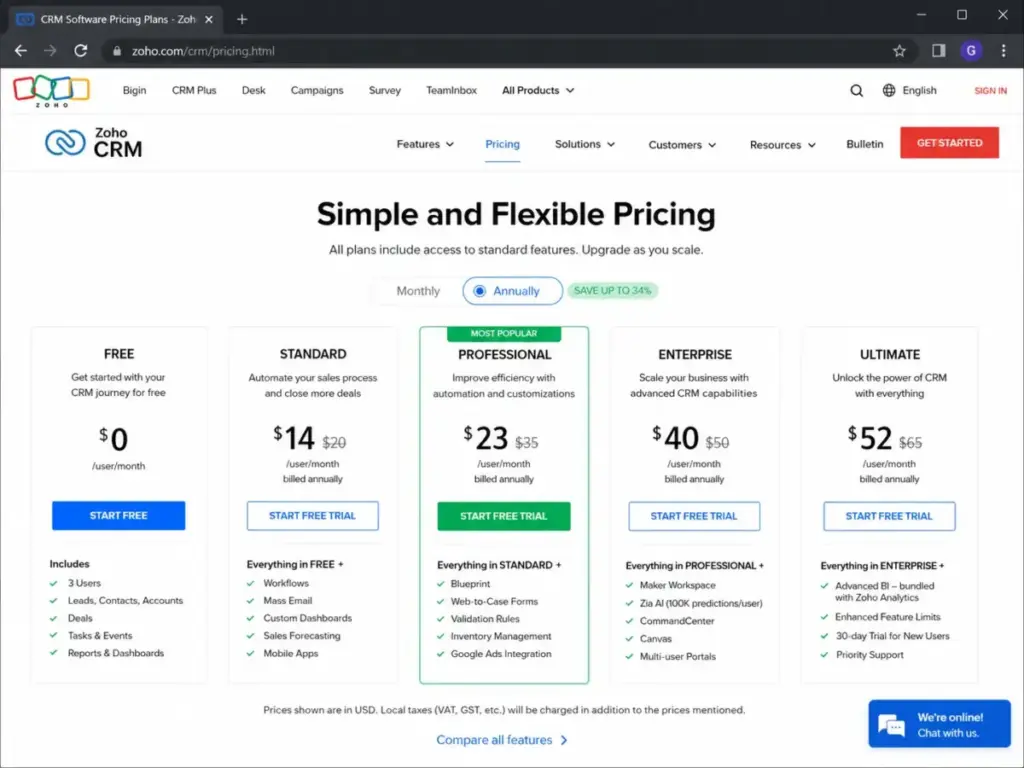
Zoho CRM advertises $14/user/month on the Standard plan. A 10-user team expects $140/month. The number is accurate for annual billing, but it leaves out what Standard is missing: portals, sandbox, email parsers, and the deeper workflow rules that Professional and Enterprise unlock.
| Plan | Monthly billing | Annual billing | Gap |
|---|---|---|---|
| Standard | $20/user/month | $14/user/month | 30% savings annually |
| Professional | $35/user/month | $23/user/month | 34% savings annually |
| Enterprise | $50/user/month | $40/user/month | 20% savings annually |
| Ultimate | $65/user/month | $52/user/month | 20% savings annually |
What this means: The annual discount varies by plan. Professional has the steepest annual-to-monthly gap at roughly 34%. Buyers on month-to-month billing pay significantly more, and that cost adds up fast at 10 or more users. A 10-user Professional team saves $1,440/year by choosing annual billing.
I keep coming back to one pattern with Zoho CRM: the entry price is genuinely low, but the real buying decision is not about the sticker. It is about which feature gates your workflow hits.
The 8 Hidden Costs Nobody Mentions
Most Zoho CRM pricing pages list five plans and move on. The costs below rarely appear in competitor articles but can change the bill for mid-size and larger teams.
Premium Support: 20% of Your Subscription Fee
Zoho’s Classic (free) support includes email-only ticketing during business hours. Upgrade to Premium Support for 24/5 coverage with a 3-hour response target and onboarding assistance, and you pay 20% of your total subscription fee.
For a 50-user Enterprise team paying $2,000/month annually, Premium Support adds $400/month, or $4,800/year. That is a cost most sales leaders do not budget for until the first critical support ticket sits in queue.
Enterprise Support: 25% with a 50-User Minimum
Enterprise Support costs 25% of your annual subscription fee and requires a minimum of 50 user licenses. It includes 24/7 multichannel support, a 1-hour response target, and a dedicated technical account manager.
On 50 Enterprise users paying $40/user/month annually ($24,000/year), Enterprise Support adds $6,000/year. For 100 users, it scales to $12,000/year. I suspect most teams under 50 users will never see this option, but for larger deployments, it is a material line item.
API Credit Overages
Each Zoho CRM plan includes a base API credit allowance plus a multiplier per user license. Free plan users get 5,000 credits. Paid plans start at 50,000 credits and scale up with user count and plan tier. Ultimate lists the highest allowance.
When usage exceeds the allocation, Zoho charges tiered pay-as-you-go rates: the first 25,000 add-on credits cost $0.14 per 1,000 credits per 24 hours, with lower slab rates after that. For teams running heavy integrations with Zapier, custom webhooks, or data sync tools, API overages can become a recurring line item.
Portal User Expansion
Zoho CRM Enterprise and Ultimate include portal access for external users (customers, partners, vendors). The first 1,000 portal invites are free. After that, Zoho uses slab pricing: $3/user/month for the next 1,000 users, then $2/user/month for the next 3,000.
A real estate agency or insurance brokerage with 5,000 active portal users pays nothing for the first 1,000, then roughly $3,000/month for the next 1,000, and $2,000/month for the next 3,000. That is a cost you will not find on most pricing breakdowns.
Implementation and Jumpstart Setup
Zoho offers implementation services including requirements gathering, data migration, setup guidance, and onboarding. The exact cost for these services is not publicly disclosed on the pricing page. If your team needs Zoho-led migration from another CRM, budget for a conversation with their sales team.
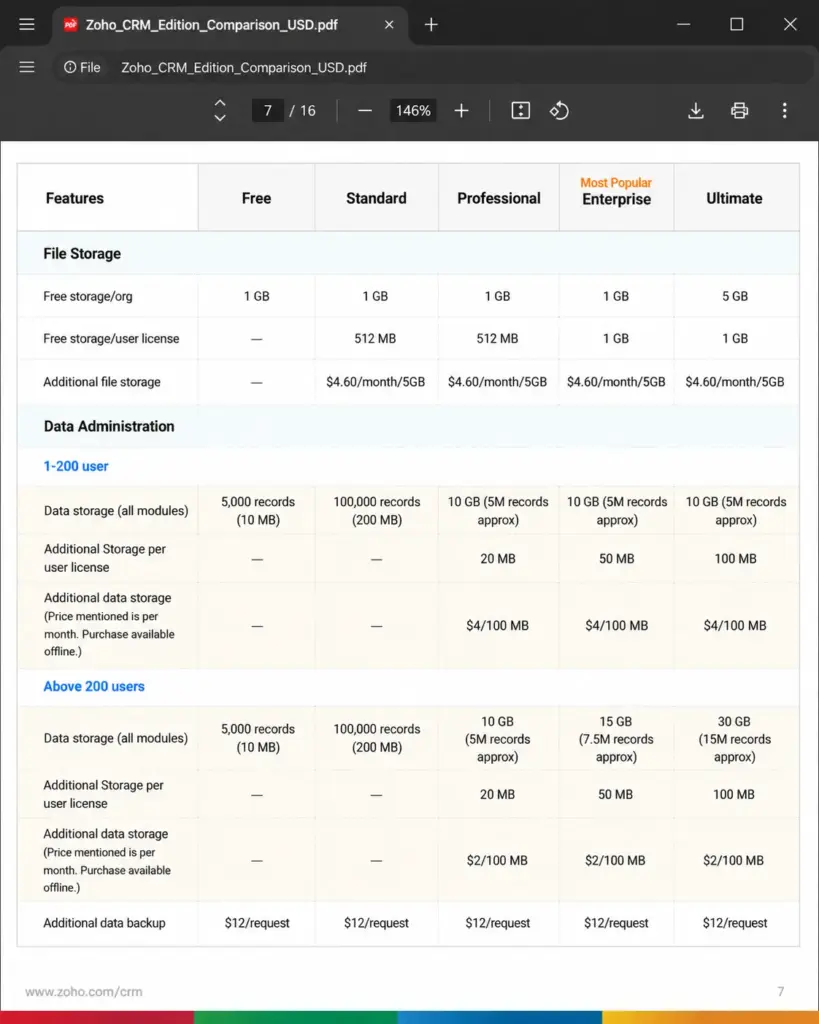
Additional File Storage
Plans include a base file storage allocation: 1GB on Free and Standard, scaling to 5GB plus 1GB/user on Ultimate. Additional file storage costs $4.60/month per 5GB according to the official USD comparison PDF.
Additional Data Storage
For teams with 1 to 200 users, extra CRM data storage costs $4 per 100MB/month. Above 200 users, the rate drops to $2 per 100MB/month. Teams with large import histories or attachment-heavy deals can hit these limits.
Additional Data Backup
Each extra backup request beyond included allowances costs $12 per request.
Plan-by-Plan Breakdown with Feature Gates
Here is what each paid plan includes and, more importantly, what it is missing. The Free plan works for up to 3 users with basic CRM records and mobile access, but it caps records, storage, API credits, and automation volume.
| Feature | Free | Standard | Professional | Enterprise | Ultimate |
|---|---|---|---|---|---|
| Users | Up to 3 | Paid | Paid | Paid | Paid |
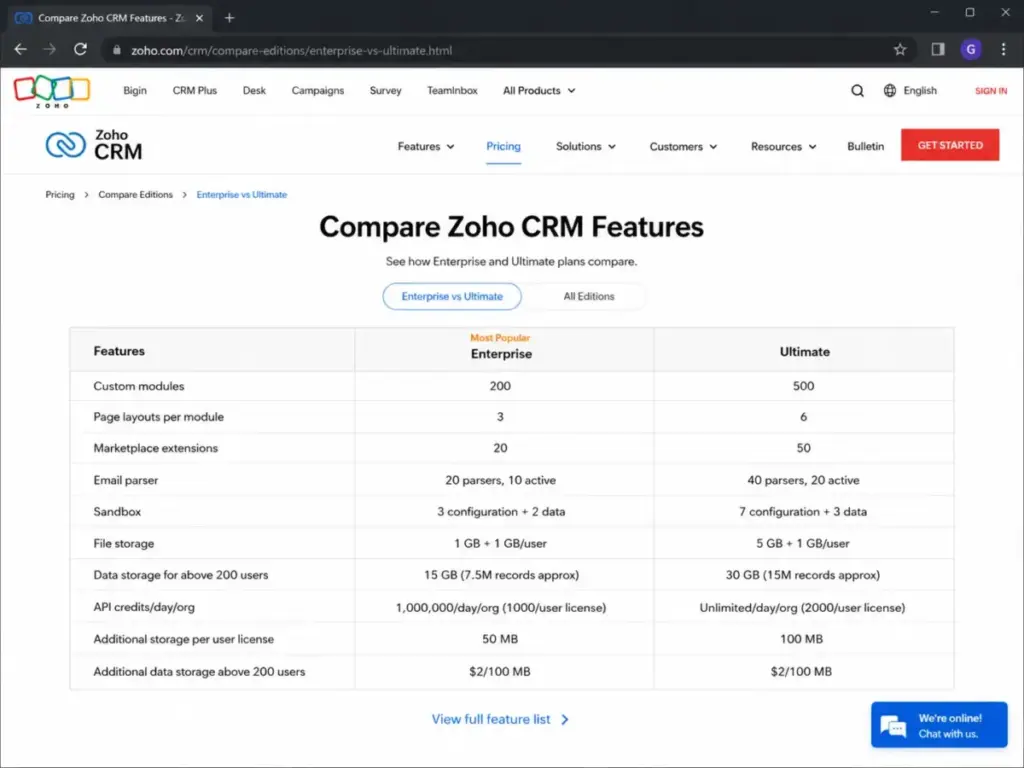
| Custom modules | No | 10 | 25 | 200 | 500 |
| Page layouts per module | No | No | 1 | 3 | 6 |
| Workflow rules per module | 10 (5 active) | 30 (15 active) | 80 (40 active) | 125 (75 active) | 150 (100 active) |
| File storage | 1GB | 1GB + 512MB/user | 1GB + 512MB/user | 1GB + 1GB/user | 5GB + 1GB/user |
| API credits (base) | 5,000 | 50,000+ | 50,000+ | 50,000+ | Highest |
| Marketplace extensions | No | 5 | 10 | 20 | 50 |
| Email parser | No | No | No | 20 (10 active) | 40 (20 active) |
| Portal users | No | No | No | Yes (1,000 free) | Yes (1,000 free) |
| Sandbox | No | No | No | 3 config + 2 data | 7 config + 3 data |
What this means: Standard is a basic CRM with limited customization. Professional unlocks deeper automation and more custom modules. Enterprise is where portals, sandbox, email parsers, and higher governance controls open up. Ultimate adds capacity headroom but is easy to overbuy if your team does not need the highest limits.
Free: Try Before You Buy, Not a Long-Term Plan
The Free plan supports up to 3 users with essential CRM records. It is useful for testing Zoho CRM before committing, but the 5,000-record data cap, 1GB storage, and limited API credits mean any team doing real pipeline work will outgrow it fast.
What triggers a paid upgrade: more than 3 users, heavier workflow automation, marketplace extensions, deeper customization, or any volume above hobby-level CRM usage.
Standard ($14/user/month annually): Entry, Not Destination
Standard adds multiple currencies, basic automation, and up to 10 custom modules. The upgrade gates are visible: no page layouts beyond defaults, no sandbox, limited marketplace extensions at 5, and workflow rules capped at 30 per module with 15 active.
Avoid Standard if your team already knows it needs advanced automation, portals, or more than 10 custom modules. You will outgrow it and pay migration friction to move up.
Professional ($23/user/month annually): The Best Value for Most Teams
Professional raises custom modules to 25, workflow rules to 80 per module (40 active), and adds deeper sales automation capabilities. For most growing sales teams under 50 users, Professional delivers the best balance of price and functionality.
The gap: Professional still lacks sandbox, email parsers, portal users, and the higher API and governance ceilings that Enterprise provides. If your team needs any of those, Professional becomes a temporary stop.
Enterprise ($40/user/month annually): The Governance Tier
Enterprise unlocks 200 custom modules, sandbox testing (3 configuration, 2 data), email parsers (20 with 10 active), portal user access, and higher API limits. For teams that need admin controls, multi-environment testing, or external user access, Enterprise is the first plan that delivers.
I am not fully convinced every team that buys Enterprise needs it. If you do not use portals, sandbox, or email parsers, you are paying for capacity you do not touch.
Ultimate ($52/user/month annually): Capacity Ceiling
Ultimate extends limits across every dimension: 500 custom modules, 7 configuration plus 3 data sandboxes, 50 marketplace extensions, and the highest published API and storage allowances. It exists for high-volume enterprise deployments.
Avoid Ultimate unless your team regularly hits Enterprise-tier limits. Most 10-to-50-user teams will never need it.
When the Free Plan Stops Working
Zoho CRM’s free plan is free forever, and that is not marketing spin. Three users, basic records, mobile access, and no time limit.
The free plan stops working when:
- Your team grows past 3 users
- You need more than 5,000 records or 1GB file storage
- Workflow automation requires more than 10 rules with 5 active per module
- You need marketplace extensions, custom reports, or advanced analytics
- Pipeline operations require deeper customization or multiple currencies
The 15-day free trial of paid plans (no credit card required) gives you a window to test whether Standard or Professional is the right entry point. Do not confuse this with the Zoho CRM Plus trial, which is a separate 30-day trial for a different bundle product.
Real Cost Scenarios: 5, 10, 25, 50, and 100 Users
The table below shows what Zoho CRM costs at common team sizes across all paid plans, using annual-billed pricing. Month-to-month costs are higher.
| Team size | Standard (annual) | Professional (annual) | Enterprise (annual) | Ultimate (annual) |
|---|---|---|---|---|
| 5 users/month | $70 | $115 | $200 | $260 |
| 5 users/year | $840 | $1,380 | $2,400 | $3,120 |
| 10 users/month | $140 | $230 | $400 | $520 |
| 10 users/year | $1,680 | $2,760 | $4,800 | $6,240 |
| 25 users/month | $350 | $575 | $1,000 | $1,300 |
| 25 users/year | $4,200 | $6,900 | $12,000 | $15,600 |
| 50 users/month | $700 | $1,150 | $2,000 | $2,600 |
| 50 users/year | $8,400 | $13,800 | $24,000 | $31,200 |
| 100 users/month | $1,400 | $2,300 | $4,000 | $5,200 |
| 100 users/year | $16,800 | $27,600 | $48,000 | $62,400 |
What this means: Professional at 10 users costs $2,760/year on annual billing. Enterprise at the same team size costs $4,800/year. The difference is $2,040/year, and whether that gap is worth it depends entirely on whether your team needs portals, sandbox, email parsers, or higher API ceilings. At 100 users, the gap between Professional and Enterprise grows to $20,400/year, which is the point where support tier, API credits, storage overages, and implementation scope start to matter more than the per-user price.
These numbers do not include Premium Support (20% surcharge), Enterprise Support (25% surcharge with 50-user minimum), API credit overages, portal user expansion, or additional storage. Add those, and the real bill can run 15 to 30 percent higher for teams with complex requirements.
Team User Licenses: A Way to Lower Cost
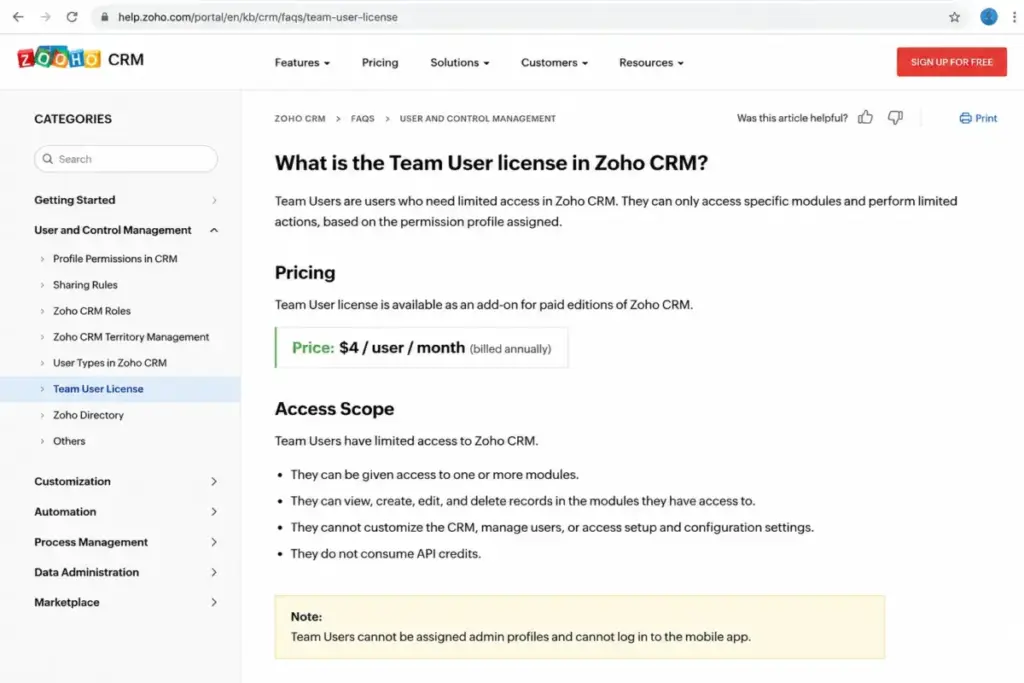
Zoho CRM offers a Team User license at $11/user/month (month-to-month) or $9/user/month (annual). Team Users get focused CRM access with limited organization-module reach. If your organization has users who only need to interact with team-level modules rather than full CRM access, Team User licenses can reduce headcount cost.
Zoho’s current FAQ confirms buyers can purchase as few as one Team User license. Earlier documentation referenced “Lite Users,” which appears to be the same concept under a different name.
Which Zoho CRM Plan Should You Choose?
The right plan depends on your team size, automation needs, and whether you need admin-level controls.
Choose Free if: You have 1 to 3 users, need basic contact management, and want to evaluate Zoho CRM before committing any budget.
Choose Standard if: You have a small sales team that needs multiple currencies, basic automation, and simple pipeline tracking, and you are confident your workflow complexity will not outgrow 10 custom modules and 30 workflow rules per module within 12 months.
Choose Professional if: You are a growing sales team of 5 to 25 users that needs deeper customization, more automation headroom, and better data flexibility without paying for Enterprise-level governance you do not use yet.
Choose Enterprise if: Your team needs sandbox testing, portal access for external users, email parsers, higher API ceilings, or advanced governance controls. Enterprise is the first plan where admin capabilities match mid-market CRM expectations.
Choose Ultimate if: Your team consistently hits Enterprise limits on custom modules, sandbox capacity, marketplace extensions, or API credits. Do not overbuy Ultimate on speculation.
Which Zoho CRM Plan Should You Avoid?
Standard is a poor value for teams that already know they need advanced automation or portals. The feature gates on Standard, particularly the 10-custom-module cap, limited workflow rules, and zero portal or sandbox access, create upgrade pressure within months for any team doing structured sales operations.
The exception: Standard works for small teams with simple CRM needs who want an affordable step up from the Free plan without jumping to Professional.
Ultimate is easy to overbuy unless your team has tested Enterprise limits and hit concrete capacity walls. The per-user jump from Enterprise to Ultimate is $12/user/month annually, or $1,440/year for 10 users, for expanded limits most teams do not exhaust.
Zoho CRM Pricing vs Competitors
How does Zoho CRM compare to other sales CRM platforms at 10 users? Here is a normalized comparison using annual-billed pricing.
| CRM | 10-user annual cost (entry) | Free plan | Trial |
|---|---|---|---|
| Zoho CRM Professional | $2,760/year | Yes (3 users) | 15 days, no card |
| Salesforce Starter Suite | $3,000/year ($25/user/month) | Free Suite listed | 30 days |
| HubSpot Sales Hub Starter | $2,400/year ($20/seat/month list) | Yes | Free tools |
| Pipedrive Lite | $1,680/year ($14/seat/month) | No | 14 days, no card |
| Freshsales Growth | $1,080/year ($9/user/month) | Yes (3 users) | 21 days |
| Less Annoying CRM | $1,800/year ($15/user/month) | No | 30 days, no card |
What this means: Zoho CRM Professional is competitively priced at 10 users but not the cheapest. Freshsales is the lowest-cost option at $1,080/year for 10 users. Pipedrive is slightly cheaper at $1,680/year but lacks a free plan. Salesforce costs more at entry but scales differently at enterprise tiers. The real comparison is not entry price. It is the plan you will actually use, which for most Zoho CRM buyers is Professional.
If Zoho CRM is too expensive for your workflow, consider Zoho CRM alternatives that trade ecosystem depth for lower per-seat cost.
Is Zoho CRM Worth the Price?
Worth it if:
- Your team is 5 to 50 users and needs structured pipeline management without Salesforce-level per-seat costs
- You want a CRM that grows from free to enterprise without switching vendors
- You value the Zoho ecosystem (Zoho Desk, Zoho Campaigns, Zoho Analytics) and plan to use multiple Zoho apps
- Your budget requires predictable per-user pricing with no mandatory onboarding fees on most plans
Not worth it if:
- You have 1 to 3 users with simple needs. The Free plan works, but Standard adds cost without enough feature depth to justify it for very small teams.
- You need full marketing, support, analytics, and operations bundles. Compare Zoho CRM Plus or Zoho One before buying standalone CRM seats, because bundling can cost less per app than buying each individually.
- You need 24/7 support as a baseline. Zoho’s support tiers add 20 to 25 percent to your subscription, which is a cost structure some competitors include in higher plans by default.
Review limitation: This pricing guide uses official Zoho CRM pricing documentation, the USD edition-comparison PDF, and verified public pricing data. I did not deploy Zoho CRM with a live multi-week team, so API credit consumption patterns, exact implementation timelines, and WhatsApp messaging costs should be confirmed directly with Zoho.
Should You Buy Zoho CRM or a Zoho Bundle?
If your team only needs sales CRM, buy standalone Zoho CRM. If you also need marketing automation, help desk, analytics, and project management from Zoho, compare Zoho CRM Plus (which bundles CRM with SalesIQ, Desk, Campaigns, Analytics, Social, Projects, and Survey) or Zoho One (which includes 45+ Zoho apps). Bundling can reduce the per-app cost significantly for teams that use three or more Zoho products.
How to Avoid Overpaying for Zoho CRM
- Start with annual billing. The savings range from 20 to 34 percent depending on the plan. Professional’s annual discount alone saves $144/user/year compared to monthly billing.
- Do not skip the free plan if you have 3 or fewer users. Test the product, understand the limits, and upgrade only when you hit a concrete gate.
- Audit your feature needs before picking a plan. If you do not need portals, sandbox, or email parsers, Professional delivers better value than Enterprise for most teams under 25 users.
- Use Team User licenses for limited-access users. At $9/user/month annually, Team Users cost less than half the Professional per-user rate. Assign full licenses only to users who need full CRM access.
- Monitor API credit usage before it becomes a surprise. Track your integration volume and compare it against your plan’s included credit allowance. Add-on credits cost $0.14 per 1,000 at the first slab.
- Budget for Premium Support separately. The 20% surcharge is not included in plan pricing. Decide early whether your team needs faster response times, and factor the cost into your annual CRM budget.
- Compare Zoho CRM Plus or Zoho One before buying standalone seats and separate Zoho app licenses. If you already use or plan to use Zoho Desk, Campaigns, or Analytics, a bundle purchase can reduce total cost.
Zoho CRM Pricing FAQ
Is Zoho CRM really free?
Yes, for up to 3 users with no time limit. The free plan includes essential CRM records, mobile access, and basic functionality. The limitations are user count (3 max), record storage (5,000 records or 10MB data), API credits (5,000), and automation volume (10 workflow rules with 5 active per module). Teams that outgrow any of these gates need a paid plan.
Which Zoho CRM plan is best for a 10-person sales team?
Professional at $23/user/month annually ($2,760/year for 10 users). It provides enough custom modules, workflow rules, and customization depth for most growing sales operations. Move to Enterprise only if your team needs portals, sandbox, email parsers, or higher API capacity.
Is Zoho CRM cheaper than Salesforce after add-ons?
Yes, in most mid-market scenarios. Zoho CRM Professional at 10 users costs $2,760/year. Salesforce Starter Suite at the same team size costs $3,000/year, and Salesforce’s practical plan for deeper CRM is significantly more. The gap widens at Enterprise tier, where Zoho CRM Enterprise ($4,800/year for 10 users) undercuts most Salesforce pricing mid-tier plans.
Do I need Zoho CRM Enterprise for Zia AI?
Enterprise and Ultimate unlock higher AI and analytics capabilities. Standard and Professional include some Zia features, but the advanced AI, prediction, and governance features are gated behind Enterprise. Verify the specific Zia features your team needs against the Zoho CRM feature comparison before committing to Enterprise.
Does Zoho CRM charge extra for API calls?
Yes, if you exceed your plan’s included API credit allowance. Each plan has a base credit pool plus a per-user-license multiplier. Add-on credits cost $0.14 per 1,000 credits at the first slab (25,000 credits), with lower rates at higher volume. Teams running heavy third-party integrations should monitor usage monthly.
Can I add portal users without upgrading to Enterprise?
No. Portal user access requires Enterprise or Ultimate. Standard and Professional do not include portal functionality as a primary feature. If external user access is a requirement, Enterprise is the minimum viable plan.
How much does Premium Support cost for Zoho CRM?
Premium Support costs 20% of your total subscription fee. For a 25-user Professional team paying $575/month annually, Premium Support adds $115/month, or $1,380/year. Enterprise Support at 25% requires a minimum of 50 user licenses.
Is Zoho CRM Standard vs Professional worth the $9/user/month upgrade?
Yes, for any team that needs more than 10 custom modules, more than 30 workflow rules per module, or deeper sales automation. The $9/user/month difference ($108/user/year) buys significantly more customization and automation headroom. Standard works for simple CRM needs; Professional works for teams that plan to grow.
Should I buy Zoho CRM or Zoho CRM Plus?
Buy standalone Zoho CRM if you only need sales CRM. Compare Zoho CRM Plus if you also need SalesIQ, Desk, Campaigns, Analytics, Social, Projects, and Survey. Zoho CRM Plus bundles these apps at a per-user rate that can be cheaper than buying standalone licenses for each.
What happens after the Zoho CRM free trial ends?
Your account downgrades to the Free plan (3 users, limited features) if you do not choose a paid plan. Data is not deleted immediately, but access to paid features stops. You can reactivate a paid plan at any time without losing CRM data.