Salesforce lists its Starter Suite at $25/user/month. That number gets repeated across dozens of review pages. But a 10-person sales team that needs forecasting, quoting, and AppExchange access jumps to Pro Suite at $100/user/month, and that plan still does not include advanced pipeline management, Conversation Intelligence, or web API access. Those sit behind the $175/user/month Enterprise tier.
After evaluating 40+ CRM platforms, I can tell you the Salesforce buying decision is less about whether the product is good (it is) and more about whether your team has the admin capacity, implementation budget, and process maturity to use it without wasting money.
This review is built around the real problems Salesforce solves, the real problems it creates, and whether the pricing math works for your team size in 2026. If you are comparing best CRM software options and trying to figure out if Salesforce belongs on your shortlist, start here.
| Quick Verdict | |
|---|---|
| Best for | Mid-market and enterprise sales teams with dedicated admins, multi-stage pipelines, and integration needs |
| Not ideal for | Solo sellers, 1–5 person teams, and businesses that need a low-maintenance CRM |
| Starting price | $0/user/month (Free Suite, 2-user cap) |
| Practical plan | Enterprise at $175/user/month billed annually |
| Free plan | Yes, Free Suite for up to 2 users, no contract or credit card |
| Setup difficulty | High. Expect configuration time, training, and admin dependency. |
| Main strength | Customization depth, reporting, and ecosystem (AppExchange, Slack, MuleSoft) |
| Main limitation | Total cost and complexity scale faster than the license price suggests |
| Best alternative | HubSpot CRM for teams that want marketing + CRM without admin overhead |
Salesforce Pros and Cons
- Customization depth goes beyond any competitor. Salesforce lets you build custom objects, workflows, approval chains, and reporting dashboards that match your exact sales process. No other CRM gives you this level of structural control.
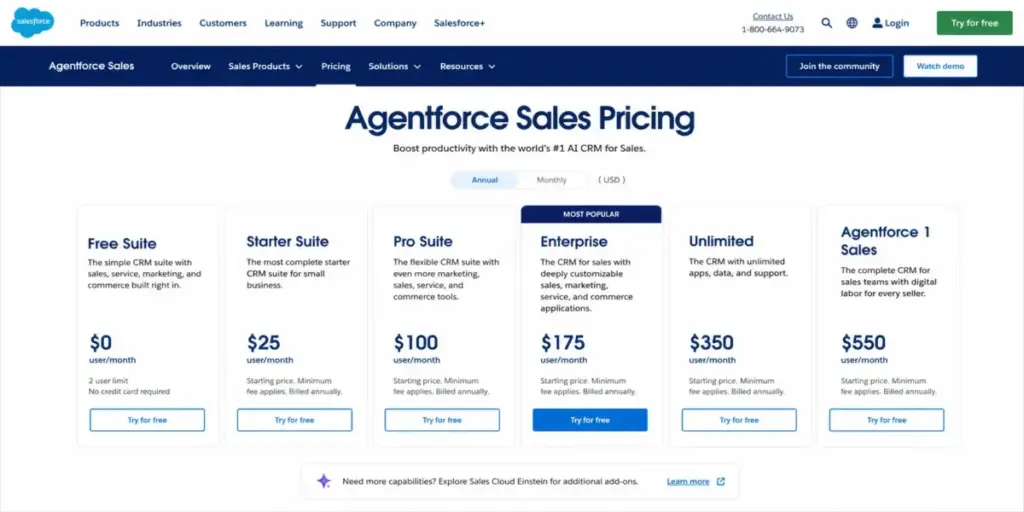
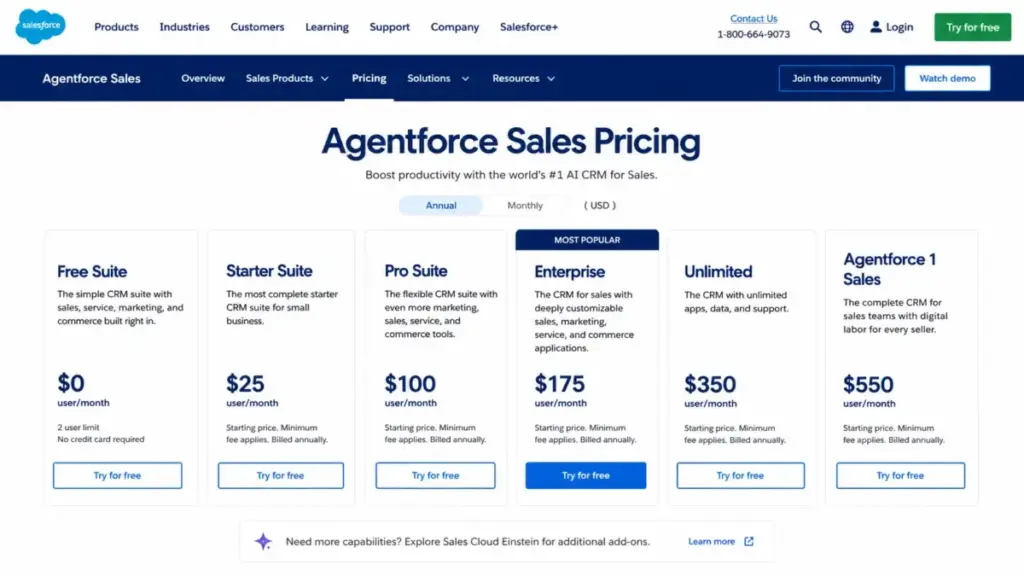
- Six pricing tiers, including a free plan. Free Suite ($0 for 2 users), Starter ($25), Pro ($100), Enterprise ($175), Unlimited ($350), and Agentforce 1 Sales ($550) cover a wide range of team sizes and budgets.
- AppExchange and AgentExchange create a real ecosystem. Thousands of apps and integrations let you extend Salesforce into marketing, support, finance, and operations without switching platforms.
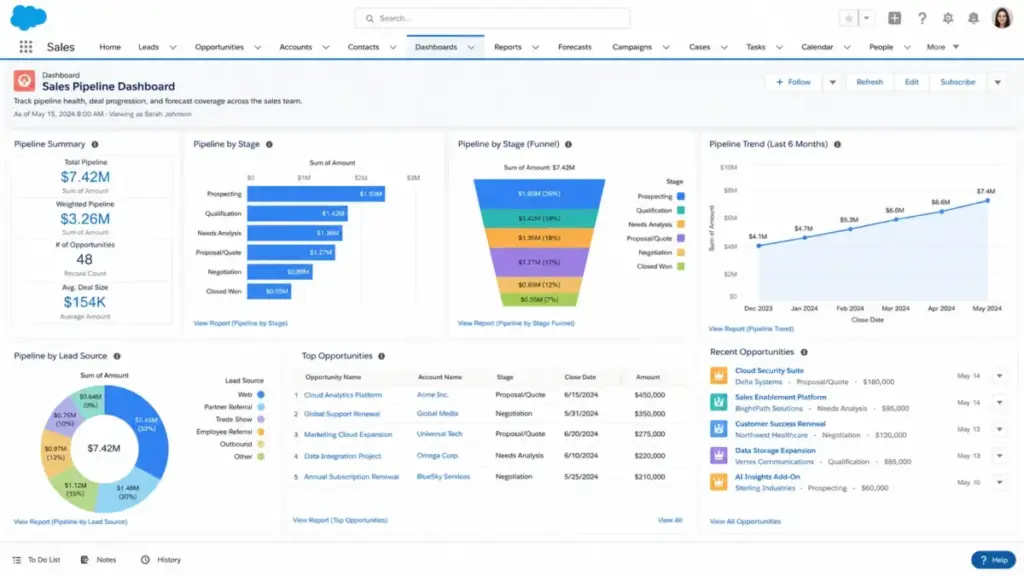
- Reporting and forecasting tools are enterprise-grade. Pipeline reports, deal insights, and forecast management give sales leaders visibility that smaller CRMs cannot match.
- Agentforce AI is a genuine product direction, not a label. Salesforce is investing in AI agents across the deal cycle, with Conversation Intelligence, predictive AI, and Sales Engagement features tied to higher tiers.
- Total cost climbs fast beyond the license price. Premier Success Plan is 30% of net license fees when not bundled. Implementation, training, admin time, and AppExchange apps all add to the bill.
- Setup and configuration require dedicated admin capacity. G2, Capterra, and Gartner reviewers consistently cite learning curve, setup complexity, and admin dependency as real buyer issues.
- Feature gates are aggressive. Quoting and forecasting require Pro Suite ($100). API access and Conversation Intelligence require Enterprise ($175). Predictive AI requires Unlimited ($350).
- Mobile experience has limits for complex work. The Salesforce mobile app handles activity updates, pipeline views, and meetings well. But complex reporting and configuration still need a desktop.
- Free Suite is a 2-user ceiling, not a growth plan. It works for 1–2 people proving CRM discipline. It is not a path to scaling a sales team.
What this means: Salesforce pros are real and measurable. So are the cons. The question is whether your team has the budget and operational maturity to get value from the platform after purchase.
What Is Salesforce CRM?
Salesforce, now branded as Agentforce Sales (formerly Sales Cloud), is a CRM software platform built by Salesforce, Inc. It is a sales force automation system that combines lead management, pipeline tracking, forecasting, workflow automation, reporting, mobile access, and AI agents into a single platform.
Salesforce is not a single tool. It is a platform of interconnected modules (Sales Cloud, Service Cloud, Marketing Cloud, Data Cloud, and more) that share a common data layer. That architecture is the source of both its power and its complexity. Every module you add creates more capability, but it also creates more configuration, more admin work, and more cost.
The platform serves organizations from 2-person startups (Free Suite) to global enterprises running hundreds of reps across multiple business units. But the product is architecturally designed for complexity. If your sales process is simple, Salesforce will feel like too much infrastructure for too little payoff.
How I Reviewed Salesforce
Testing level: third-party validated. I did not run a hands-on trial of Salesforce for this review. Instead, I used a combination of official Salesforce documentation, verified pricing pages (checked May 26, 2026), and cross-referenced findings with user review patterns from Gartner Peer Insights, G2, Capterra, Software Advice, and independent editorial sources (Forbes Advisor, TechRadar, Tech.co, Business.com, Expert Market).
What I verified directly:
- All six plan prices against the official Salesforce pricing page as of May 26, 2026
- Feature gates per plan (Free Suite through Agentforce 1 Sales)
- Support plan costs (Standard, Premier, Signature)
- Recurring user sentiment patterns across 5 review platforms
- API, mobile, and integration positioning from official docs
Limitation: This review does not include hands-on testing metrics (load times, click counts, setup timers). Testing claims are attributed to their source. Pricing is verified against official Salesforce pages and may change; confirm with Salesforce before purchasing.
Some third-party review sites still show older plan names (Professional, Einstein 1) or different prices for Enterprise and Unlimited tiers. I used official Salesforce pricing as of May 2026 as the single source of truth for this review.
The 3 Problems Salesforce Solves
Problem 1: Your Sales Process Is Too Complex for Simple CRMs
Salesforce is built for teams that have outgrown basic pipeline management tools. If your deals involve multiple stakeholders, approval workflows, custom objects, territory assignments, and multi-stage pipelines, Salesforce gives you the structural control to model your exact process inside the CRM.
This is the core architectural advantage. Most CRMs give you a fixed pipeline with customizable stages. Salesforce lets you build custom objects, define relationships between them, create approval chains, and automate workflows that trigger across those objects. That flexibility is why enterprise sales teams choose Salesforce over simpler alternatives.
Where this matters: B2B sales teams running 90+ day deal cycles with 3–5 stakeholders per deal, quoting and approval workflows, and territory management across regions. These teams need CRM infrastructure, not just a deal tracker.
The tradeoff: that structural flexibility requires someone who knows how to configure it. If your team does not have a Salesforce admin (internal or contracted), you will build a half-configured system that frustrates reps instead of helping them.
Problem 2: Your Reporting Stack Is Scattered Across Tools
Salesforce consolidates sales forecasting, pipeline reports, deal insights, activity tracking, and custom dashboards into one system. For sales leaders who need a single source of truth across multiple reps, regions, or product lines, that consolidation is the product.
Reports and dashboards on Enterprise and above include deal insights, Conversation Intelligence, and predictive AI on Unlimited. The reporting system scales with your data volume and org complexity in ways that smaller CRMs cannot match.
Verified user sentiment backs this up. Gartner Peer Insights reviewers praise Salesforce for flexibility, scalability, customization, and reporting strength. G2 reviews highlight productivity gains from centralized CRM data and pipeline visibility.
Where this matters: VP-level sales leaders managing 20+ reps who need forecast accuracy, pipeline health metrics, and rep activity reports without pulling data from 3 different tools.
Problem 3: You Need a CRM That Integrates With Everything
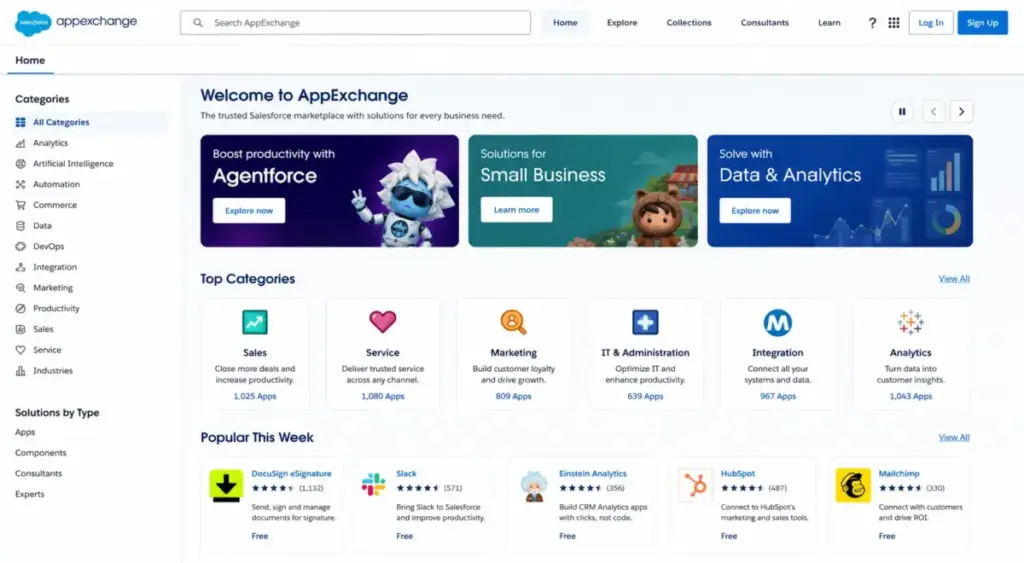
Salesforce’s AppExchange and AgentExchange marketplace, Slack integration, MuleSoft for complex integrations, and API access (Enterprise and above) make it the hub of a multi-tool sales stack.
Key integration facts:
- AppExchange has thousands of apps covering marketing, finance, support, and operations
- Native Slack integration is included
- Gmail and Outlook sync is available across paid plans
- MuleSoft handles complex, multi-system integrations
- API access is positioned at the Enterprise tier and above
For organizations running SalesLoft, HubSpot Marketing Hub, Dropbox Business, or custom internal tools, Salesforce is designed to be the central data layer. That integration depth is a real competitive advantage over CRMs that rely on Zapier for everything.
The 2 Problems Salesforce Creates
Problem 1: The Admin Dependency Trap
This is the problem competitors cite but rarely explain in practical terms. Salesforce requires ongoing admin capacity to stay useful. Not just for initial setup, but for:
- Building and maintaining custom workflows and automation rules
- Managing user permissions, roles, and data access
- Creating reports and dashboards that match evolving sales processes
- Cleaning data, deduplicating records, and maintaining pipeline hygiene
- Configuring new AppExchange integrations
Capterra and Software Advice reviewers consistently rate Salesforce lower on ease-of-use and value-for-money compared to feature strength. That gap is the admin dependency showing up in buyer experience.
The readiness test before buying Salesforce:
- ✅ You have a named Salesforce admin (internal or contracted)
- ✅ Your sales process has documented stages, roles, and handoffs
- ✅ You have budget for implementation beyond the license fee
- ✅ Your team can commit to training (not just a demo walkthrough)
- ✅ You have reporting requirements that justify the platform complexity
If you checked fewer than 3 of those boxes, a simpler CRM will give you better ROI for the next 12 months.
Problem 2: The Cost Multiplier Nobody Shows You
Salesforce publishes clean per-user prices. The real cost is higher. Here is how the math works at scale.
10-user team on Enterprise ($175/user/month):
| Cost Component | Monthly | Annual |
|---|---|---|
| Enterprise licenses (10 users) | $1,750 | $21,000 |
| Premier Success Plan (30% of net) | $525 | $6,300 |
| Subtotal before add-ons | $2,275 | $27,300 |
That is before implementation consulting, AppExchange apps, training, data migration, or any AI add-ons. The Premier Success Plan alone adds $6,300/year to a 10-user Enterprise deployment. If you do not buy Premier, you get Standard support: self-guided resources, knowledge articles, and Trailhead. No 24/7 phone support for business-stopping issues.
The gap between Salesforce’s listed price and total first-year cost is where most buyers get surprised. I keep coming back to this number because it shapes every recommendation I make about Salesforce.
The Signature Success Plan (designated CSM, proactive monitoring, fastest response times) is not publicly priced. Contact your Salesforce account executive for a quote.
Salesforce Pricing and Plans (as of May 2026)
All prices verified against the official Salesforce Sales Cloud pricing page on May 26, 2026. Confirm current pricing with Salesforce before purchasing, as prices are subject to change.
| Plan | Price | Billing | Key Inclusions | Best For |
|---|---|---|---|---|
| Free Suite | $0/user/month | No contract, no credit card, 2 user licenses | Lead, opportunity, case management; simple email marketing; Slack conversations | 1–2 person teams testing CRM for the first time |
| Starter Suite | $25/user/month | Monthly or annually | Lead routing; built-in sales flows; auto email/event/contact sync; dynamic email marketing | Small teams moving beyond spreadsheets |
| Pro Suite | $100/user/month | Billed annually | Greater customization and automation; sales quoting and forecasting; AppExchange; Premier Support as add-on | 10–25 person teams that need forecasting and quoting |
| Enterprise | $175/user/month | Billed annually | Advanced pipeline management; deal insights; Conversation Intelligence; Agentforce; web API | Mid-market teams with dedicated admin capacity |
| Unlimited | $350/user/month | Billed annually | Predictive AI; Sales Engagement; Premier Success Plan (bundled); Full Sandbox | Large teams with AI and sandbox needs |
| Agentforce 1 Sales | $550/user/month | Billed annually | Full AI suite; unmetered Agentforce; Spiff; Sales Planning; Tableau Next; Slack Enterprise+; 1M Flex Credits; 2.5M Data Cloud Credits/org/year | Enterprise teams going all-in on Salesforce AI |
What this means: The jump from Starter ($25) to Pro ($100) is 4x. The jump from Pro to Enterprise ($175) adds 75%. These are not incremental upgrades. Each tier unlocks functionality that previous tiers deliberately exclude. For a deeper pricing breakdown, see the full Salesforce pricing analysis.
Which Salesforce Plan Should You Choose?
| Your Situation | Recommended Plan | Why | Avoid If |
|---|---|---|---|
| 2-person founder team testing CRM | Free Suite | $0, no contract, core CRM basics | You need more than 2 users or advanced automation |
| 10-person team moving beyond spreadsheets | Starter or Pro Suite | Starter for basics; Pro if you need quoting and forecasting | You cannot commit to annual billing (Pro requires it) |
| 50–200 person B2B sales org | Enterprise | Advanced pipeline, deal insights, Agentforce, API access | You do not have a Salesforce admin |
| Enterprise team evaluating AI deployment | Unlimited or Agentforce 1 Sales | Predictive AI, Sales Engagement, Full Sandbox, or full AI suite | Your CRM data quality is poor (AI depends on clean data) |
Hidden Costs Beyond the License
| Hidden Cost | Detail |
|---|---|
| Premier Success Plan | 30% of net license fees (bundled only with Unlimited and above) |
| Signature Success Plan | Contact Salesforce for pricing (designated CSM, proactive monitoring) |
| Implementation consulting | Varies; Salesforce partners and consultants charge for setup, migration, training |
| AppExchange apps | Per-app pricing varies; some are free, many are paid subscriptions |
| Training | Trailhead is free; formal training and certifications cost extra |
| Data migration | Time and cost depend on source system complexity |
| AI and Data Cloud add-ons | Flex Credits, Data Cloud Credits, and additional AI features carry separate costs |
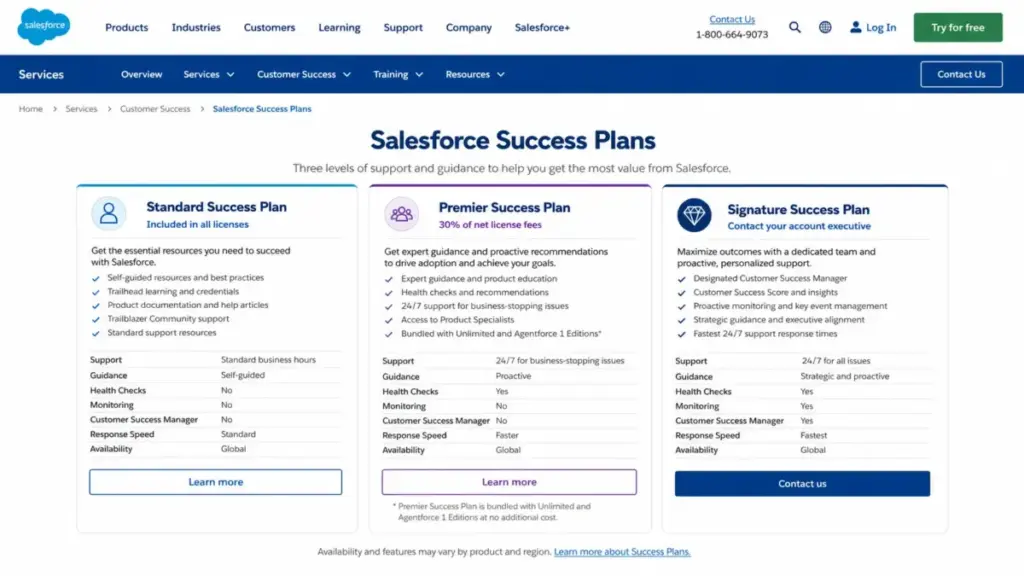
Support Plan Costs
| Support Tier | Cost | Includes |
|---|---|---|
| Standard Success | Included in all licenses | Self-guided resources, Trailhead, Trailblazer Community, knowledge articles |
| Premier Success | 30% of net license fees | Expert guidance, health checks, 24/7 support for business-stopping issues |
| Signature Success | Contact sales | Designated CSM, proactive monitoring, key event management, fastest response times |
What this means: If you are on Enterprise at $1,750/month for 10 users and want Premier support, that is an extra $525/month ($6,300/year). Most competitors bundle priority support into their top tier at no extra charge. This is a cost that Salesforce competitors rarely surface in their reviews.
Key Features with Plan Gates
Lead and Contact Management
Every Salesforce plan includes lead, account, and contact management. Free Suite covers the basics. Starter adds lead routing and built-in sales flows with automatic email, event, and contact sync. Pro Suite and above add greater customization and automation.
Plan gate: Lead routing and auto-sync start at Starter ($25). Greater customization starts at Pro ($100).
Limitation: Free Suite is capped at 2 users. For teams larger than 2, you are paying at minimum $25/user/month for basic lead management.
Pipeline and Forecast Management
Pipeline views, opportunity tracking, and deal stages are available across paid plans. But sales quoting and forecast management only unlock at Pro Suite ($100). Advanced pipeline management, deal insights, and Conversation Intelligence require Enterprise ($175).
Plan gate: Quoting and forecasting at Pro ($100). Advanced pipeline and deal insights at Enterprise ($175).
Limitation: If your sales leader needs forecast accuracy and deal-level insights, Starter Suite will not cut it. You are looking at Pro at minimum, Enterprise for the full picture.
Workflow Automation
Salesforce’s workflow automation engine (Flow Builder and process automation) is one of the platform’s strongest differentiators. But the depth of automation you can build depends on your plan.
Plan gate: Built-in sales flows start at Starter ($25). Greater customization and automation at Pro ($100). Agentforce AI automation starts at Enterprise ($175).
Limitation: Automation rules accumulate over time. Without admin oversight, teams build conflicting workflows that slow down the system. Third-party reviewers repeatedly cite this as a real operational risk.
Agentforce AI
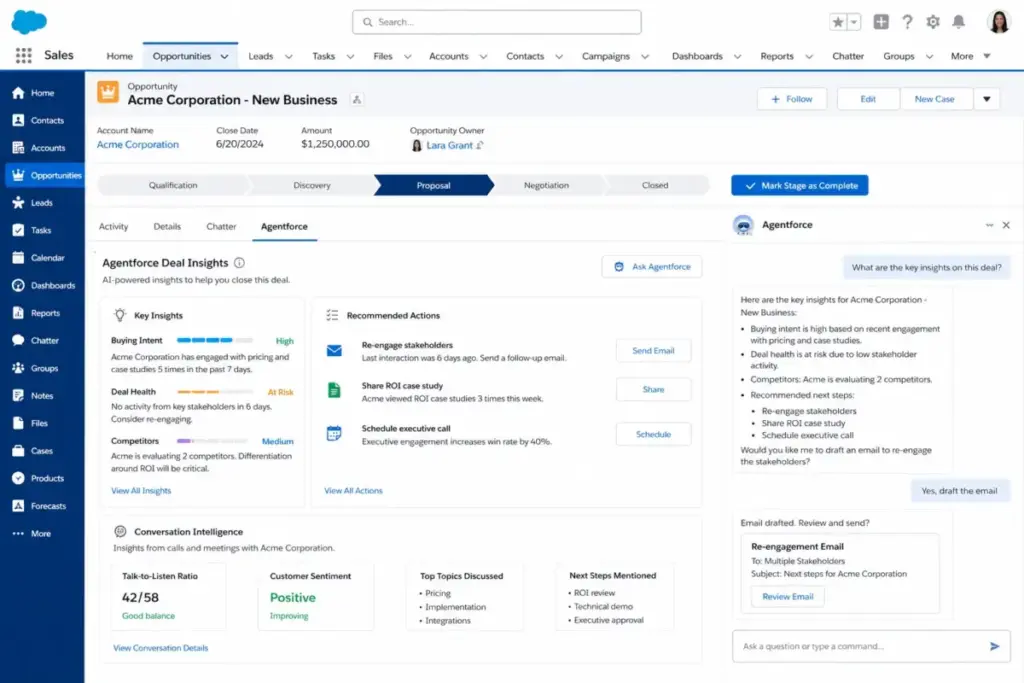
Salesforce is positioning Agentforce as the future of CRM AI: AI agents that assist across the deal cycle, from prospecting to close. Conversation Intelligence, predictive AI, and Sales Engagement are the headline features.
Plan gate: Agentforce starts at Enterprise ($175). Predictive AI and Sales Engagement require Unlimited ($350). Unmetered Agentforce usage for employees requires Agentforce 1 Sales ($550).
Limitation: AI output quality depends on CRM data quality. If your Salesforce instance has incomplete records, duplicate contacts, or inconsistent pipeline stages, Agentforce will produce unreliable recommendations. Clean your data before investing in AI features. This is the caveat most Salesforce AI coverage skips.
Reporting and Dashboards
Reports and dashboards are available across all plans. But the depth scales with tier: basic reports on Starter, custom dashboards and AppExchange analytics on Pro, deal insights and Conversation Intelligence on Enterprise, and predictive AI on Unlimited.
Plan gate: Custom reports on all paid plans. Advanced deal insights at Enterprise ($175). Predictive analytics at Unlimited ($350).
Limitation: Salesforce report formula fields have known constraints that surface at scale. For data-heavy organizations, review Salesforce’s documentation on formula field limits and report row limits before committing.
Ease of Use, Integrations, and Support
Ease of Use and Setup
Salesforce is not a CRM you sign up for and start using in 10 minutes. Official pages direct buyers to trials, configuration resources, consultants, and implementation partners. Gartner, Capterra, G2, Forbes, TechRadar, and Business.com all surface setup complexity, training needs, and admin dependency as consistent buyer-relevant issues.
Free Suite and Starter Suite are simpler to start with. But once you move to Pro Suite and above, configuration, customization, and ongoing admin work increase substantially.
Setup difficulty: High for any deployment beyond Free Suite or basic Starter use.
Integrations and Ecosystem
Salesforce’s integration ecosystem is the broadest in CRM. AppExchange and AgentExchange provide thousands of pre-built apps. Slack, Microsoft Outlook, Gmail, Dropbox Business, SalesLoft, and HubSpot Marketing Hub all have native or marketplace integrations.
MuleSoft handles complex, multi-system CRM integrations for enterprise buyers. API access (SOAP, REST) is positioned at the Enterprise tier, with documented request limits and allocations.
API caveat for technical buyers: Salesforce Developer docs describe API request limits per tier. API-heavy organizations should check limits and monitor consumption before buying. Enterprise is the first tier officially positioned for web API access. If your team runs data syncs, custom integrations, or high-volume API calls, verify your plan’s allocation against your actual usage patterns.
Security and Compliance
Salesforce maintains a compliance portal with SOC 2 documentation covering security, availability, and confidentiality controls. Compliance documentation is available for Agentforce, Einstein Platform, Hyperforce, Slack, Data Cloud, Heroku, Own, and other services.
For enterprise buyers: Request Salesforce’s SOC 2 reports and compliance documentation for the specific products your organization plans to use.
Mobile App
Salesforce offers iOS and Android mobile apps with a dedicated Sales Cloud Mobile Lightning workspace. The mobile app supports tasks, meetings, priority leads, pipeline views, swipe gestures, and a mobile calendar. Mobile App Plus and Mobile Builder offer optional offline-optimized experiences.
Realistic mobile assessment: The mobile app is strong for field reps logging calls, updating deal stages, checking schedules, and reviewing pipeline. But complex reporting, configuration changes, and admin work are still desktop activities. G2 reviewers highlight desktop-versus-mobile friction for complex CRM work.
Who Wins and Who Loses
Salesforce Wins For:
- Mid-market sales teams (25–200 reps) with dedicated admin capacity, multi-stage pipelines, and reporting requirements that justify Enterprise or above
- B2B organizations with complex deal cycles involving multiple stakeholders, approval workflows, quoting, and territory management
- Companies that need a CRM integration hub connecting sales, marketing, support, finance, and custom internal tools through AppExchange, APIs, and MuleSoft
- Sales leaders who need a single reporting system for forecasting, pipeline health, rep activity, and deal insights across regions or product lines
- Enterprise teams ready to invest in AI-assisted selling with clean CRM data, defined sales processes, and budget for Unlimited or Agentforce 1
Salesforce Loses For:
- Solo sellers and 1–5 person teams who need a CRM they can set up in a day without admin help or consultant fees
- Budget-conscious small businesses that cannot justify $100+/user/month for the features they need (quoting, forecasting, AppExchange)
- Teams without a Salesforce admin (internal or contracted) who will end up with a half-configured system that frustrates reps
- Organizations with simple sales processes (one pipeline, 3–4 stages, no approvals) where Salesforce’s structural complexity adds friction without adding value
- Founders and freelancers who need contact tracking and a simple pipeline, not an enterprise CRM platform
Better Alternatives for Teams Salesforce Does Not Fit
If Salesforce is too much platform for your team, these alternatives cover the most common exit scenarios. For a full breakdown, see the Salesforce CRM alternatives guide.
HubSpot CRM: Best for Marketing-Sales Teams Without Admin Overhead
HubSpot CRM starts free with unlimited users and includes a built-in marketing hub. The CRM is easier to configure without a dedicated admin. Sales Hub Professional is $100/seat/month (billed annually) for automation, forecasting, and sequences.
Choose HubSpot if: You want CRM + marketing under one login without hiring a Salesforce admin. Read the full HubSpot CRM review for plan details.
Skip HubSpot if: You need Salesforce-level customization, complex approval workflows, or deep API integrations.
Zoho CRM: Best Value for Cost-Conscious Teams
Zoho CRM starts at $14/user/month (Standard) with workflow automation, custom dashboards, and Zia AI. Enterprise is $40/user/month. The pricing gap vs. Salesforce is large. For a head-to-head comparison, see Zoho CRM vs Salesforce.
Choose Zoho if: You need 80% of Salesforce’s functionality at 25% of the cost, and your team is under 50 users.
Skip Zoho if: You need AppExchange-level ecosystem depth or are already deep in the Salesforce platform.
Pipedrive: Best for Small Sales Teams That Want Speed Over Structure
Pipedrive starts at $14/user/month (Essential) with a visual pipeline that reps can start using the same day. There is no free plan. Full details in the Pipedrive CRM review.
Choose Pipedrive if: You are a 5–15 person sales team that needs a fast, visual pipeline without admin overhead.
Skip Pipedrive if: You need enterprise reporting, complex workflows, or deep customization.
Microsoft Dynamics 365 Sales: Best for Microsoft-First Enterprise Teams
Dynamics 365 Sales Professional starts at $65/user/month. Enterprise is $105/user/month. Deep integration with Microsoft 365, Teams, and Outlook. See the full Dynamics 365 Sales review.
Choose Dynamics 365 if: Your organization runs on Microsoft and needs CRM that integrates natively with Teams, Outlook, and Power BI.
Skip Dynamics 365 if: You want AppExchange ecosystem breadth or are not already invested in Microsoft infrastructure.
| Alternative | Starting Price | Practical Tier | Best For | Avoid If |
|---|---|---|---|---|
| HubSpot CRM | Free | Professional $100/seat/month | Marketing-sales teams without admin | You need Salesforce-level customization |
| Zoho CRM | $14/user/month | Enterprise $40/user/month | Cost-conscious teams under 50 users | You need AppExchange ecosystem depth |
| Pipedrive | $14/user/month | Professional $49/user/month | Small teams wanting speed and simplicity | You need enterprise reporting |
| Dynamics 365 Sales | $65/user/month | Enterprise $105/user/month | Microsoft-first enterprise teams | You are not invested in Microsoft |
Final Verdict: Is Salesforce Worth It in 2026?
Salesforce is still the strongest CRM infrastructure choice for teams with complex sales processes, dedicated admin capacity, and clear reasons to invest in customization, integrations, and reporting at scale. No other CRM matches its structural flexibility, ecosystem depth, or enterprise governance capabilities.
But the buying decision is not about whether Salesforce is a good product. It is about whether your organization has the operational maturity to maintain and use it after purchase.
Buy Salesforce if:
- Your team has 10+ reps and a named Salesforce admin
- Your sales process involves multi-stage deals, quoting, and approval workflows
- You need a CRM that connects to 5+ other business systems
- Your reporting requirements include forecasting, pipeline health, and deal insights across teams
- You have budget for implementation, training, and Premier or Signature support
Do not buy Salesforce if:
- Your team is under 5 people and your sales process is a single pipeline with 3 stages
- You do not have admin capacity (internal or contracted) to configure and maintain the system
- Your CRM budget is under $100/user/month including support and add-ons
- You need a CRM you can set up today and start selling tomorrow
Plan recommendation by team size:
- 1–2 people: Free Suite ($0). Good for proving CRM discipline. Not a growth plan.
- 3–10 people: Starter Suite ($25) if basic pipeline is enough. Pro Suite ($100) if you need quoting, forecasting, and AppExchange.
- 10–50 people: Enterprise ($175). The first tier where Salesforce starts to justify its complexity.
- 50+ people with AI goals: Unlimited ($350) or Agentforce 1 Sales ($550), depending on AI, sandbox, and Data Cloud needs.
The gap between the published price and the real bill is where most buyers get surprised. Budget for the license, the support plan, the admin, and the implementation. If the total still makes sense, Salesforce is the right choice. If it does not, HubSpot vs Salesforce is the comparison most teams should read next.
FAQ
Is Salesforce CRM worth it in 2026?
Salesforce is worth it for sales teams with 10+ reps, dedicated admin capacity, complex pipelines, and budget for implementation beyond the license price. It is not worth it for solo sellers or small teams that need a simple, low-maintenance CRM.
How much does Salesforce CRM cost?
Salesforce offers six plans: Free Suite ($0/user/month for 2 users), Starter Suite ($25/user/month), Pro Suite ($100/user/month billed annually), Enterprise ($175/user/month billed annually), Unlimited ($350/user/month billed annually), and Agentforce 1 Sales ($550/user/month billed annually). Pricing verified May 26, 2026. Premier Support adds 30% of net license fees.
Is Salesforce Free Suite actually free?
Yes. Free Suite is $0/user/month with no contract and no credit card required. It includes 2 user licenses and covers lead, opportunity, and case management plus simple email marketing and Slack conversations. The limit is 2 users, so it works for founders testing CRM, not for growing teams.
Do I need a Salesforce admin before buying?
For Free Suite and Starter Suite, you can manage without a dedicated admin. For Pro Suite and above, you should have admin capacity (internal or contracted) for configuration, custom workflows, reporting, and ongoing maintenance. Buying Enterprise without admin support is one of the most common and expensive Salesforce mistakes.
Which Salesforce plan has API access?
Enterprise ($175/user/month) is the first tier officially positioned for web API access. Salesforce Developer docs describe API request limits and allocations for SOAP, REST, and related APIs. API-heavy organizations should check limits and monitor consumption before committing to a plan.
What is the difference between Salesforce Starter and Pro Suite?
Starter Suite ($25/user/month) includes basic lead, account, contact, and opportunity management with lead routing, sales flows, and email sync. Pro Suite ($100/user/month billed annually) adds greater customization and automation, sales quoting and forecasting, AppExchange access, and Premier Support as an add-on. The jump from $25 to $100 is the biggest practical tier gap in Salesforce pricing.
Is Salesforce better than HubSpot for sales teams?
Salesforce offers deeper customization, more granular pipeline control, and a broader integration ecosystem. HubSpot offers easier setup, a free CRM tier with unlimited users, and built-in marketing tools. Salesforce is the better fit for teams over 15 reps with complex processes. HubSpot is the better fit for marketing-sales teams that want simplicity.
What hidden costs should I expect with Salesforce?
Premier Success Plan (30% of net license fees), implementation consulting, data migration, admin time, AppExchange app subscriptions, training beyond Trailhead, and AI-related add-ons (Flex Credits, Data Cloud Credits). Budget 40–80% above the license price for a realistic first-year total cost.
Does Salesforce have a mobile app?
Yes. Salesforce offers iOS and Android mobile apps with a dedicated Sales Cloud Mobile Lightning workspace. Features include tasks, meetings, priority leads, pipeline views, swipe gestures, and a mobile calendar. Mobile App Plus and Mobile Builder add optional offline optimization. Complex reporting and admin work remain desktop activities.
Is Agentforce included in Salesforce Sales Cloud?
Agentforce features begin at the Enterprise tier ($175/user/month). Predictive AI and Sales Engagement require Unlimited ($350). Unmetered Agentforce usage for employees, plus Spiff, Sales Planning, Tableau Next, Slack Enterprise+, Flex Credits, and Data Cloud Credits, require Agentforce 1 Sales ($550).
This review reflects pricing and feature information verified against official Salesforce sources as of May 26, 2026. Salesforce states pricing is subject to change and most products use annual contracts. Confirm current pricing, plan details, and contract terms with Salesforce before purchasing.