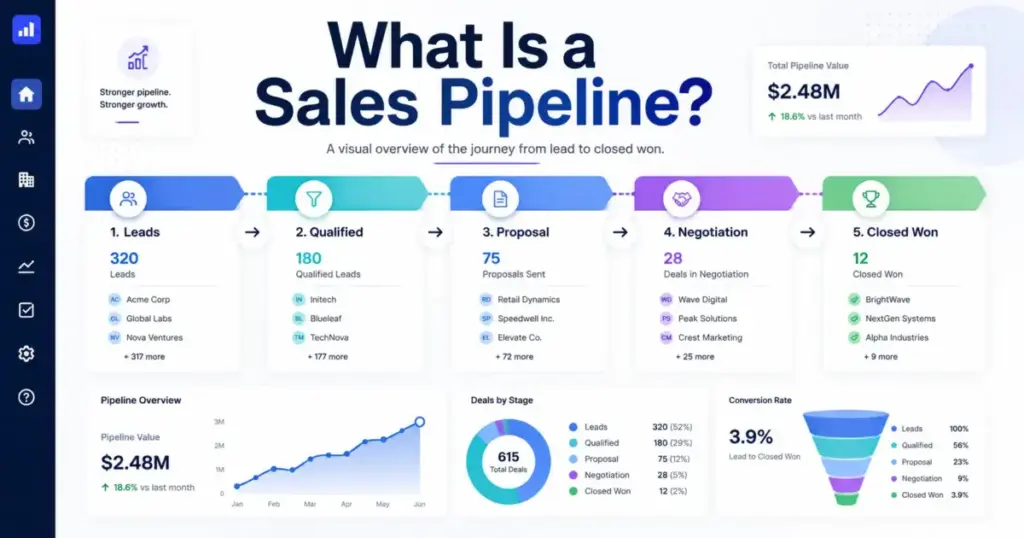
Most sales teams have a pipeline. Few trust it. The gap between “we track deals” and “our pipeline predicts revenue” is where quota misses, bad forecasts, and wasted rep time live. A sales pipeline is a structured view of every active deal your team is working, organized by stage from first contact to closed won or closed lost.
It lives inside CRM software, on a whiteboard, or in a spreadsheet, but the format matters less than whether the stages reflect real buyer progress. This guide breaks down what a sales pipeline actually is, how stages work with entry and exit criteria, and how to build a pipeline that helps you sell instead of just report.
What Is a Sales Pipeline?
A sales pipeline is an organized system that tracks sales opportunities through defined stages, from initial contact to a closed deal. Each opportunity in the pipeline represents a potential sale with a specific dollar value, an expected close date, and a current stage that reflects how far the buyer has progressed.
The pipeline is not your contact list. It is not every lead who downloaded a whitepaper. A sales pipeline only contains opportunities where a real conversation about buying has started or is about to start.
In practice, a pipeline answers three questions for any sales rep or manager:
- How many deals are active right now?
- Where is each deal in the buying process?
- What needs to happen next to move each deal forward?
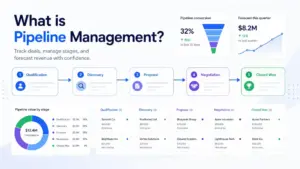
Most CRM platforms for sales teams display the pipeline as a visual board. Each column represents a stage. Each card represents a deal. Reps drag deals from left to right as buyers progress. Managers use the board to spot bottlenecks, coach reps, and forecast revenue.
The pipeline works only when stages mean something specific. “Interested” is not a stage. “Discovery call completed, budget confirmed” is a stage. That distinction is what separates a useful pipeline from a decorated to-do list.
Sales Pipeline vs Funnel vs Forecast
These three terms describe different views of the same selling activity, but they are not interchangeable. Confusing them leads to bad reporting and worse decisions. The table below shows how each concept differs in purpose, ownership, and common misuse.
| Concept | What It Shows | Main Question It Answers | Primary Owner | Common Mistake |
|---|---|---|---|---|
| Sales Pipeline | Active deals organized by stage | Where is each deal right now? | Sales rep | Treating every contact as a deal |
| Sales Funnel | Conversion volume across stages | How many leads convert at each step? | Marketing and sales ops | Using it to manage individual deals |
| Sales Forecast | Predicted revenue for a period | How much will we close this quarter? | Sales manager and finance | Treating pipeline total as forecast |
A sales pipeline is deal-level. You look at it to manage specific opportunities. A sales funnel is volume-level. You look at it to understand conversion rates across stages. A sales forecast is time-bound. You look at it to predict revenue for a specific period.
Here is the practical difference: your pipeline might show $500,000 in active deals. Your funnel tells you that historically, 30% of deals at the proposal stage close. Your forecast uses both data points (plus close dates and stage probability) to predict $150,000 in revenue this quarter. For a complete breakdown of how that forecast number is built from pipeline data, see our guide to sales forecasting, which covers the key methodologies from weighted pipeline to AI-assisted projection.
When a sales manager says “our pipeline is $2 million,” that number is almost never the forecast. It is the total value of every open deal. The forecast requires weighting each deal by its likelihood to close.
How Does a Sales Pipeline Work?
A sales pipeline works by moving opportunities through sequential stages, where each stage represents a meaningful shift in buyer commitment. The mechanics are simple. The discipline to maintain them is not.
Here is how a deal moves through a typical pipeline:
Example: $10,000 B2B software deal
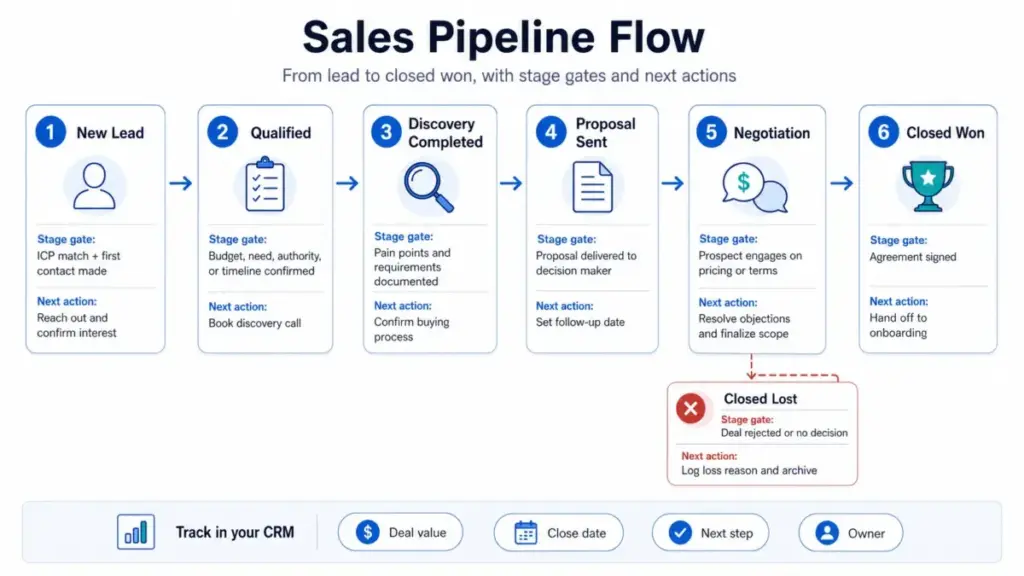
- A rep identifies a prospect who fits the ideal customer profile. The rep creates an opportunity record in the CRM with a deal value of $10,000 and an estimated close date of 60 days out. The deal enters the pipeline at Stage 1: New Lead.
- For teams using CRM automation, qualification at this stage often depends on a threshold lead score rather than a manual rep judgment call.
- The rep runs a discovery call. Pain points are confirmed, and requirements are documented. Stage 3: Discovery Completed.
- The rep sends a proposal with pricing. Stage 4: Proposal Sent.
- The prospect asks for a discount and wants to adjust the scope. Stage 5: Negotiation.
- The prospect signs. Stage 6: Closed Won. Revenue is booked.
At each stage, the CRM tracks the deal value, the next action, the close date, and often a stage probability (the historical likelihood that deals at this stage eventually close). These data points are stored as structured records inside the CRM database and feed pipeline reports, forecasting models, and sales dashboards.
If the deal stalls or the prospect says no, the deal moves to Closed Lost with a loss reason. Closed Lost is not a failure of the pipeline. It is the pipeline working correctly by removing deals that will not close.
Sales Pipeline Stages: Entry Criteria, Exit Criteria, and Rep Actions
The stages in your sales pipeline should represent real buyer decisions, not internal activity labels. A stage called “Follow-Up” tells you what the rep is doing. A stage called “Discovery Completed” tells you what the buyer has done. The second version is more useful for forecasting and coaching.
Most small and mid-size teams should start with 5 to 7 stages. Adding more stages does not add more clarity. It adds more CRM fields that reps skip.
The table below shows a practical 7-stage pipeline with the operational details that most sales pipeline articles skip.
| Stage | Entry Criteria | Exit Criteria | Rep Action | CRM Field to Track |
|---|---|---|---|---|
| 1. New Lead | Prospect matches ICP; initial contact made | Lead responds or rep qualifies out | Send intro email or make first call | Lead source, contact info |
| 2. Qualified | Budget, authority, need, or timeline confirmed | Discovery call is scheduled | Confirm fit via qualifying questions | Qualification score, deal value |
| 3. Discovery Completed | Discovery call held; pain and requirements documented | Prospect agrees to receive proposal | Document needs, confirm decision process | Pain points, decision makers, timeline |
| 4. Proposal Sent | Proposal or quote delivered to decision maker | Prospect responds with feedback or objections | Send proposal, set follow-up date | Proposal date, proposal value |
| 5. Negotiation | Prospect engages on terms, pricing, or scope | Agreement on final terms or deal killed | Handle objections, adjust terms | Adjusted deal value, competing vendors |
| 6. Closed Won | Contract signed or verbal commitment with PO | Deal is booked and handed to onboarding | Process contract, notify fulfillment | Close date, final revenue, win reason |
| 7. Closed Lost | Prospect declines or goes silent past threshold | Deal is archived with loss reason | Log loss reason, schedule re-engage date | Loss reason, competitor, re-engage date |
Why Fewer Stages Work Better for Small Teams
A 12-stage pipeline looks thorough on a whiteboard. In practice, reps skip stages, guess at which one applies, and stop updating the CRM entirely. The friction of choosing between “Initial Interest,” “Engaged,” “Warm Lead,” and “Qualified” is enough to break adoption.
Five to seven stages give you enough granularity to forecast without enough complexity to kill compliance. If your reps cannot explain every stage in 10 seconds, you have too many.
Stage Probability: Use History, Not Gut Feel
Stage probability assigns a percentage to each stage representing the historical likelihood that deals at that stage eventually close. For example, if 60% of deals that reach “Proposal Sent” end up closing, the probability for that stage is 60%.
This number is useful for calculating weighted pipeline (deal value multiplied by stage probability). But it is dangerous when invented. Setting probability to 80% at the proposal stage because it “feels close” will inflate your forecast.
Only set stage probabilities after you have at least 6 months of closed-deal data. Before that, treat every deal as equally uncertain.
Sales Pipeline Examples by Business Type
Different businesses need different pipeline stages because their selling motions are different. A solo consultant selling $5,000 projects does not need the same pipeline as an enterprise team selling $500,000 contracts. Below are four practical examples.
Solo Consultant Pipeline (4 Stages)
A freelance marketing consultant tracking inbound inquiries:
| Stage | What Happens |
|---|---|
| Inquiry Received | Prospect fills out contact form or sends referral email |
| Fit Call Done | 15-minute call to confirm scope, budget, and timeline |
| Proposal Sent | SOW with pricing delivered via email |
| Won or Lost | Client signs or declines |
This pipeline has four stages because the selling cycle is short (1 to 3 weeks) and there is no negotiation phase for most engagements. Adding stages like “Negotiation” or “Legal Review” would create empty columns.
Small Agency Pipeline (5 Stages)
A 10-person digital agency managing inbound and referral leads:
| Stage | What Happens |
|---|---|
| New Inquiry | Lead comes in via website, referral, or RFP |
| Qualified | Agency confirms budget range, project type, and timeline fit |
| Scoping | Discovery session held, detailed scope and deliverables drafted |
| Proposal Sent | Formal proposal with pricing tiers delivered |
| Won or Lost | Client signs contract or selects another agency |
Agency pipelines often need a “Scoping” stage because the gap between “interested” and “proposal ready” involves real work: audits, strategy sessions, or technical assessments.
B2B SaaS Outbound Pipeline (6 Stages)
A SaaS company with 5 SDRs and 3 AEs selling a $15,000 annual contract:
| Stage | What Happens |
|---|---|
| Prospecting | SDR identifies and contacts target accounts |
| Meeting Set | SDR books a discovery call for the AE |
| Discovery Done | AE confirms pain, budget, authority, and timeline |
| Demo / Evaluation | AE delivers product demo; prospect evaluates with team |
| Proposal / Negotiation | Pricing proposal sent; terms discussed |
| Closed Won or Lost | Contract signed or deal lost with documented reason |
This pipeline splits prospecting from qualification because two different roles (SDR and AE) own different stages. The handoff between “Meeting Set” and “Discovery Done” is a common bottleneck worth tracking.
Enterprise Field Sales Pipeline (7 Stages)
A field sales team selling $200,000+ contracts with 6 to 12 month cycles:
| Stage | What Happens |
|---|---|
| Territory Lead | Lead identified within assigned territory or account list |
| Qualified Opportunity | MEDDIC or similar qualification framework completed |
| Discovery / Needs Analysis | Multi-stakeholder discovery sessions completed |
| Solution Design | Custom solution proposed with technical validation |
| Proposal / RFP Response | Formal proposal or RFP response submitted |
| Negotiation / Legal | Contract terms, SLA, and procurement review |
| Closed Won or Lost | Deal signed or lost with full post-mortem |
Enterprise pipelines need more stages because the buying process involves more stakeholders, longer timelines, and formal procurement. Skipping the “Solution Design” stage in enterprise sales means sending proposals that do not address the real requirements.
What Makes a Sales Pipeline Accurate?
Pipeline accuracy is a behavior problem before it is a software problem. The best CRM in the world cannot fix a pipeline full of stale deals, wrong dollar values, and close dates that drift forward every week. Here is what separates a trusted pipeline from one that misleads.
Stage Definitions with Hard Rules
Every stage needs a clear entry rule and exit rule. If reps can move a deal to “Qualified” without confirming budget, the stage means nothing. Write stage definitions in plain language and post them where reps can reference them during CRM updates.
Required Next Steps
Every deal in the pipeline should have a documented next action with a date. “Waiting to hear back” is not a next step. “Follow up on proposal feedback by Thursday” is. Deals without next steps are deals nobody is working.
Close Date Discipline
Close dates should reflect when the buyer is expected to make a decision, not when the rep hopes the deal closes. When a close date passes without resolution, the rep should update it to a realistic new date or move the deal to Closed Lost. Deals with close dates in the past are pipeline pollution.
Stale Deal Removal
A stale deal is any opportunity that has not moved stages or had meaningful activity in a defined period (typically 30 to 60 days for SMB sales, 90 days for enterprise). Stale deals inflate pipeline value and create false confidence in forecasting.
One sales leader on Reddit described the problem bluntly: “Our pipeline is realistically inflated by about 60%.” That is not unusual. It is the default state of any pipeline without a regular cleanup process.
Win/Loss Reasons
Tracking why deals close (or do not) is the most underused pipeline feature. Loss reasons like “price,” “went with competitor,” “no decision,” or “timing” reveal patterns that stage data alone cannot show. Without loss reasons, pipeline reviews become guessing sessions.
Pipeline Review Cadence
A weekly 30-minute pipeline review where reps walk through their top 10 deals is the minimum. The review should focus on: What changed this week? What is the next step? Is the close date still realistic? Deals that have not moved get flagged or removed.
Stage Probability Based on Data
As mentioned earlier, stage probability is only useful when based on at least 6 months of historical close rates. Setting probability by gut feel is one of the fastest ways to corrupt a sales forecast. Forrester has noted that asking salespeople to estimate probabilities in their forecast process introduces systematic bias. Forecast inputs should rely on opportunity amount, sales stage, close date, and forecast category rather than subjective confidence ratings.
Common Sales Pipeline Mistakes
Most pipeline problems are process failures disguised as software limitations. Here are the mistakes that show up repeatedly in sales teams of every size.
- Too many stages. Twelve stages mean twelve chances for a rep to pick the wrong one. Start with five to seven.
- Vague stage names. “In Progress” and “Active” tell you nothing about buyer commitment. Name stages after buyer actions, not rep activities.
- Moving deals based on hope. A deal should only advance when the buyer does something new: agrees to a call, requests a proposal, engages on pricing. Rep optimism is not a stage gate.
- No exit criteria. Without clear rules for when a deal leaves a stage, reps park deals in comfortable middle stages indefinitely.
- Stale close dates. A deal with a close date three months in the past is not “still in play.” It is dead weight inflating your numbers.
- Treating pipeline total as forecast. Pipeline value and forecasted revenue are different numbers. A $2 million pipeline does not mean $2 million in expected revenue.
- Updating CRM only before meetings. If reps batch-update their pipeline the night before a forecast call, the data reflects what reps remember, not what actually happened. Real-time updates (even brief ones) produce better data.
- Using pipeline reviews as interrogation. When managers use pipeline reviews to pressure reps, reps respond by inflating deal values and hiding bad news. Reviews should be coaching sessions, not courtrooms.
How to Build a Sales Pipeline
Building a sales pipeline starts with understanding how you actually sell, not with choosing a CRM. Follow these steps to create a pipeline that reflects your real selling motion.
- Define your selling motion. Map how a typical deal moves from first contact to signed contract. Interview your top reps. Look at your last 20 closed deals. Identify the real decision points where buyers commit to the next step.
- Choose 5 to 7 stages. Name each stage after a buyer action or milestone. Avoid internal jargon. Each stage should answer the question: “What has the buyer done to get here?”
- Write entry and exit rules. For each stage, document what must be true before a deal enters and what must happen before it leaves. These rules prevent reps from guessing.
- Add required CRM fields. At each stage, require reps to fill in specific fields: deal value, close date, next step, key contact. Required fields force data discipline without creating busywork.
- Set probability only after you have data. If you have fewer than 50 closed deals tracked by stage, do not assign stage probabilities. Use equal weighting until historical data exists.
- Create a weekly cleanup rhythm. Every Friday (or Monday), each rep spends 15 minutes reviewing their pipeline: updating close dates, removing stale deals, adding next steps. This single habit improves pipeline accuracy more than any CRM feature.
- Review conversion rates by stage. After 3 to 6 months, analyze where deals stall or drop out. If 40% of deals die between “Proposal Sent” and “Negotiation,” your proposals need work, not your pipeline stages.
Best CRM Tools for Sales Pipeline Management
The right CRM for pipeline management depends on your selling motion, team size, and budget, not on feature count. A solo founder tracking 15 deals per month needs a different tool than an enterprise team managing 500 opportunities across four regions.
The table below maps CRM tools to the pipeline workflow they fit best. For detailed scoring and feature breakdowns, SaaSZap uses a documented review methodology across all CRM evaluations.
| CRM Tool | Best Pipeline Fit | Watch-Out | SaaSZap Review |
|---|---|---|---|
| HubSpot CRM | Teams wanting free CRM with marketing-to-sales pipeline visibility | Free plan limits reports; paid tiers escalate fast | HubSpot CRM review |
| Pipedrive | Small teams that need simple, visual pipeline adoption | Limited marketing features; reporting is basic on lower tiers | Pipedrive review |
| Salesforce | Enterprise teams needing opportunity governance, approvals, and multi-pipeline control | Complex setup; requires admin time; expensive per seat | Salesforce review |
| Zoho CRM | Budget-conscious teams needing multiple pipelines and heavy customization | UI can feel cluttered; learning curve for advanced features | Zoho CRM review |
| Close CRM | Outbound-heavy teams using calling, email sequences, and SMS from one view | Weak on marketing automation; not ideal for inbound-heavy teams | Close CRM review |
| Freshsales | Teams wanting lower-cost CRM with built-in phone and AI lead scoring | AI features locked to higher tiers; ecosystem smaller than HubSpot or Salesforce | Freshsales review |
Each of these tools handles pipeline management differently. Pipedrive was built around a visual pipeline board and treats every interaction as an activity tied to a deal. HubSpot’s deal pipeline connects marketing touchpoints to sales stages, giving managers visibility into which channels produce pipeline. Zoho CRM supports multiple sales pipelines in a single account, which is useful for teams selling different products or serving different markets.
The choice comes down to this: if your team sells visually and simply, Pipedrive fits. If you need free and want marketing data, start with HubSpot. If you need governance and scale, invest in Salesforce. If you need budget and flexibility, evaluate Zoho. For a broader comparison, the best CRM software guide on SaaSZap covers more tools with full scoring.
Alex Morrison’s Quick Take
I have seen teams spend weeks designing a 14-stage pipeline with custom fields for everything from “buyer sentiment” to “competitive threat level.” Those pipelines die within 90 days because reps stop updating them.
The best sales pipeline is not the one with the most stages. It is the one your reps update honestly before the manager asks.
If I were building a pipeline from scratch today for a team of 5 to 15 reps, I would use 5 stages, require only 4 CRM fields per deal (value, close date, next step, key contact), and run a 20-minute pipeline review every Monday. That is it. Everything else is optimization you earn after the basics work.
A pipeline is a shared agreement between reps and managers about what is real. The moment reps start inflating deal values to look busy or managers start using the pipeline to punish, the data becomes fiction. And fiction does not forecast.
What Most Sales Pipeline Articles Skip
Pipeline health depends more on stage criteria and rep behavior than on CRM software features. Here are the things most guides leave out.
A CRM cannot fix a sales process nobody follows. If your reps do not agree on what “Qualified” means, no CRM configuration will produce accurate pipeline data. Define stages as a team, get buy-in, and enforce the definitions in coaching, not just in CRM validation rules. This is why a structured CRM implementation starts with sales process mapping before any tool configuration.
A pipeline with inflated deal values is worse than no pipeline. An empty pipeline tells you that you need more leads. An inflated pipeline tells you that revenue is coming when it is not. The second scenario causes hiring mistakes, cash flow miscalculations, and missed targets that surprise everyone except the reps who knew the deals were weak.
Pipeline reviews should happen at deal level, not dashboard level. Staring at a bar chart that says “pipeline is up 20% month-over-month” tells you nothing about whether specific deals will close. The most useful pipeline review is a rep walking through their top 5 deals and answering: What changed? What is the next step? When will the buyer decide?
Weighted pipeline is a math exercise, not a prediction. Multiplying deal value by stage probability gives you a number. That number is only as good as your probability data. If your probabilities are guesses, your weighted pipeline is a guess with decimal points.
Frequently Asked Questions
What is a sales pipeline?
A sales pipeline is a visual system that tracks active deals through defined stages, from initial contact to closed won or closed lost. It shows sales reps and managers where every opportunity stands, what action is needed next, and how much potential revenue is in play. The pipeline lives inside a CRM or spreadsheet and is updated as buyers progress through the sales process.
What are the stages of a sales pipeline?
The most common stages are: New Lead, Qualified, Discovery Completed, Proposal Sent, Negotiation, Closed Won, and Closed Lost. The exact stages depend on your selling motion. Solo consultants may need only 4 stages, while enterprise teams often use 7. Each stage should reflect a buyer milestone, not an internal activity.
What is an example of a sales pipeline?
A B2B SaaS company might track deals through these stages: Prospecting, Meeting Set, Discovery Done, Demo/Evaluation, Proposal/Negotiation, and Closed Won or Lost. A $15,000 deal enters when an SDR books a meeting and moves forward as the AE qualifies, demos, and closes. Each stage has a required next step and a CRM field update.
What is the difference between a sales pipeline and a sales funnel?
A sales pipeline tracks individual deals by stage. A sales funnel measures conversion volume across stages. The pipeline answers “where is this specific deal?” The funnel answers “how many leads convert at each step?” Pipeline management is deal-level. Funnel analysis is aggregate. Both are useful, but they serve different management decisions.
What is the difference between a sales pipeline and a sales forecast?
A sales pipeline shows all active deals and their current stages. A sales forecast predicts how much revenue will close in a specific period. The pipeline is a snapshot of deal status. The forecast is a time-bound revenue prediction. Pipeline data feeds the forecast, but pipeline total and forecast are not the same number.
How many stages should a sales pipeline have?
Most small and mid-size teams should use 5 to 7 stages. Fewer stages reduce CRM update friction and increase rep adoption. More stages create confusion about which stage applies. Start simple. Add stages only when you identify a real decision point that your current stages do not capture.
What is pipeline value in sales?
Pipeline value is the total dollar amount of all active deals in your pipeline. If you have 30 open deals worth a combined $450,000, your pipeline value is $450,000. This number is not your forecast. It is the theoretical maximum if every deal closes, which almost never happens.
What is weighted pipeline?
Weighted pipeline multiplies each deal’s value by its stage probability. A $50,000 deal at a stage with 40% historical close rate contributes $20,000 to the weighted pipeline. This gives a more realistic view of expected revenue than raw pipeline value. The accuracy depends entirely on whether your stage probabilities are based on real data.
What is a sales pipeline in CRM?
A sales pipeline in CRM software is a digital board where each column represents a stage and each card represents a deal. Reps update deal records as buyers progress. The CRM tracks deal value, close date, next action, and stage history. Managers use pipeline reports and dashboards to coach reps and forecast revenue.
Can I manage a sales pipeline in a spreadsheet?
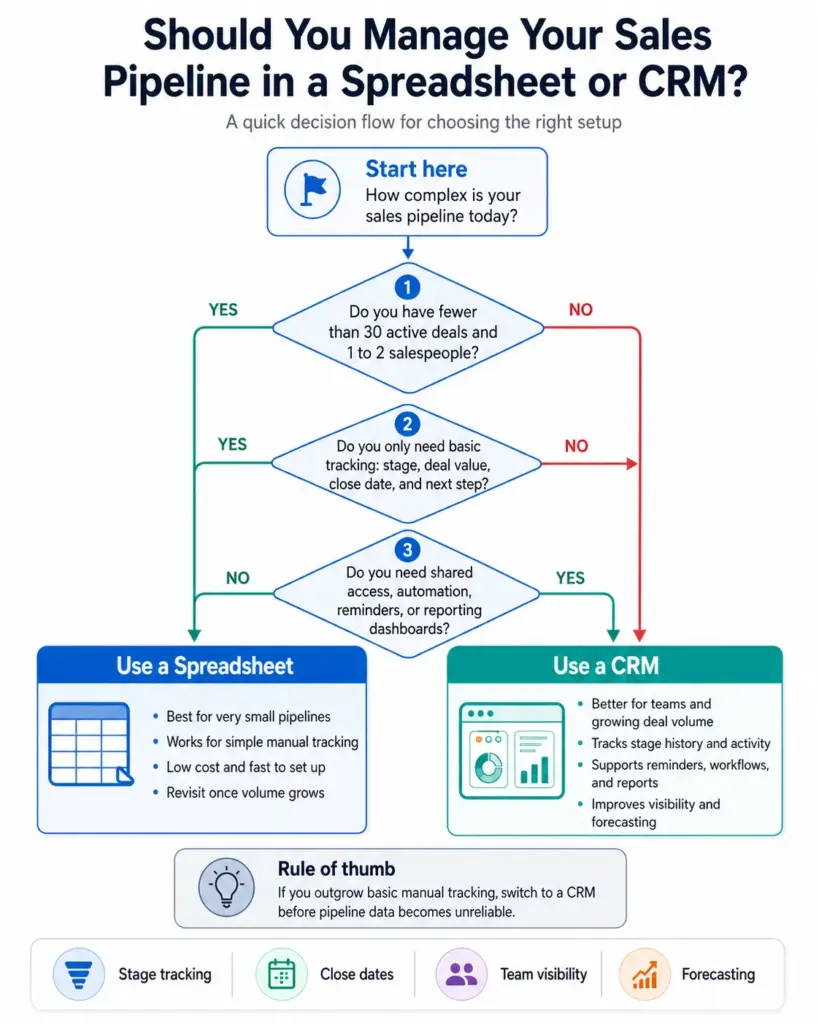
Yes, but only if you have fewer than 30 active deals and one or two salespeople. A spreadsheet works for tracking basic stage progression. It breaks down when you need shared access, automated reminders, stage history, or reporting. Most teams outgrow spreadsheets within 6 months and move to a CRM. For a detailed breakdown of when spreadsheets stop working for customer data, see our guide to contact management.
Which CRM is best for sales pipeline management?
It depends on your selling motion and team size. Pipedrive fits teams that want simple visual pipeline management. HubSpot is strong for teams wanting free CRM with marketing visibility. Salesforce suits enterprise opportunity governance. Zoho CRM works for budget-conscious teams needing multiple pipelines.
Key Takeaways
- A sales pipeline tracks active deals by stage; it is not a contact list, a funnel, or a forecast.
- The pipeline covers the Acquisition and Conversion phases of the broader customer lifecycle — what happens before and after the pipeline is a separate operational problem.
- Stage probability is useful only when based on historical close rates, not optimism.
- Stale deals and drifting close dates are the top reasons pipelines lose trust.
- Pipeline accuracy depends on rep behavior and stage discipline more than CRM features.
- Weekly pipeline reviews at the deal level catch problems before they become forecast misses.
- Choose a CRM that matches your selling motion: visual simplicity, marketing integration, enterprise governance, or budget flexibility.